
Quick answer
Open https://192.168.1.1 on a device joined to the PLDT modem, and log in as admin with password 1234, the default PLDT lists as of November 2026. Then change the SSID Name and Pre-shared Key, and the admin password too. From abroad that page won't load, because 192.168.1.1 is a private home-network address.
PLDT Home WiFi settings are the Wi-Fi name, password and security options stored in a PLDT Home modem. PLDT is a Philippine company. PLDT Home is its home internet service in the Philippines, so none of this applies to a US internet plan.
If your parents in Cebu have PLDT Fiber and you help them from the US over video calls, they'll do the steps below while you read along. Before you start, the person at home needs a phone or laptop on the modem's Wi-Fi, or a PC on a LAN cable, and the modem within reach. PLDT's connect a device page says the default Wi-Fi name and password are printed "at the back or side of the modem."
Key takeaways
- As of November 2026, PLDT says it has no PLDT Home app.
- 192.168.1.1 is a private address, so the settings page opens only at home.
- PLDT's help page lists admin and 1234 as the default modem login.
- Change that admin password when PLDT's first-login prompt asks.
- CISA asks for 16 or more characters, or 4 to 7 random words.
What PLDT Home is, and where its WiFi settings live
PLDT calls itself "the Philippines' largest fully integrated telco company" on its About Us page. Its shares trade in Manila and, as American Depositary Shares, in New York. PLDT was incorporated on November 28, 1928, its timeline says. PLDT Home is the home internet brand. Its Fiber FAQ page says Fiber Unli plans have "a 36-month contract (lock-in) period" as of November 2026.
The Wi-Fi settings themselves sit inside the modem PLDT installs, not on a website, and PLDT's change WiFi password page sends you to an admin dashboard at 192.168.1.1. Under RFC 1918, the Internet standard for private networks, everything from 192.168.0.0 to 192.168.255.255 is reserved "for private internets". Your parents' laptop finds 192.168.1.1 because it's plugged into that modem or joined to its Wi-Fi, while your phone in Chicago reaches its own router at that number, or nothing. So the device has to be on that modem's network, by Wi-Fi or by the LAN cable PLDT's reset steps use.
How do you change the PLDT Home WiFi name and password?
Whoever's at home can follow these on a phone or laptop joined to the modem. As of November 2026, PLDT's help page gives these steps for its admin dashboard, in this order:
- On your browser, just type https://192.168.1.1
- Log in with the username admin and the password 1234, the defaults PLDT's page lists.
- To change your WiFi Name, go to Basic then tap Wireless LAN (WLAN) Settings
- Go to SSID Name, type your preferred WiFi name in the box provided, then click Apply Changes and Save.
- To change your WiFi Password, go to Wireless Lan (WLAN) Settings and select Security.
- Go to Encryption/Security Mode and select WPA2-MIXED
- Go to Pre-shared Key and type your preferred WiFi password in the box provided.
PLDT's page then says that on a first login "you will be prompted to change the default username and password under the Account Management section." The forgot WiFi password page prints the same admin and 1234 defaults. Anyone who reads PLDT's help pages knows them. Left unchanged, it lets anyone on the home Wi-Fi sign in to the dashboard. Of routers in general, the FTC says that with the admin login, someone "could change the settings (including your Wi-Fi network password)."
PLDT's frequency bands page lists eight dual-band models, among them the Huawei HG8145V5, ZTE H188A and Zyxel VMG3926-B10B. The screen your parents see depends on the one PLDT installed.
The modem doesn't steer devices between bands. PLDT adds that "both SSID names of 2.4 GHz and 5 GHZ bands will be displayed". If the screen shows two Wi-Fi name boxes, change both. PLDT puts the 2.4 GHz range at "up to 150 feet indoors" and 5 GHz at "up to 50 feet indoors". It suggests 5 GHz for a device that stays put near the modem. For one that moves around, such as a cellphone or laptop, it suggests 2.4 GHz.
After you save, rejoin each device. PLDT's device connection page tells anyone who personalized the name and password to "just connect to your Wi-Fi name and enter your password."
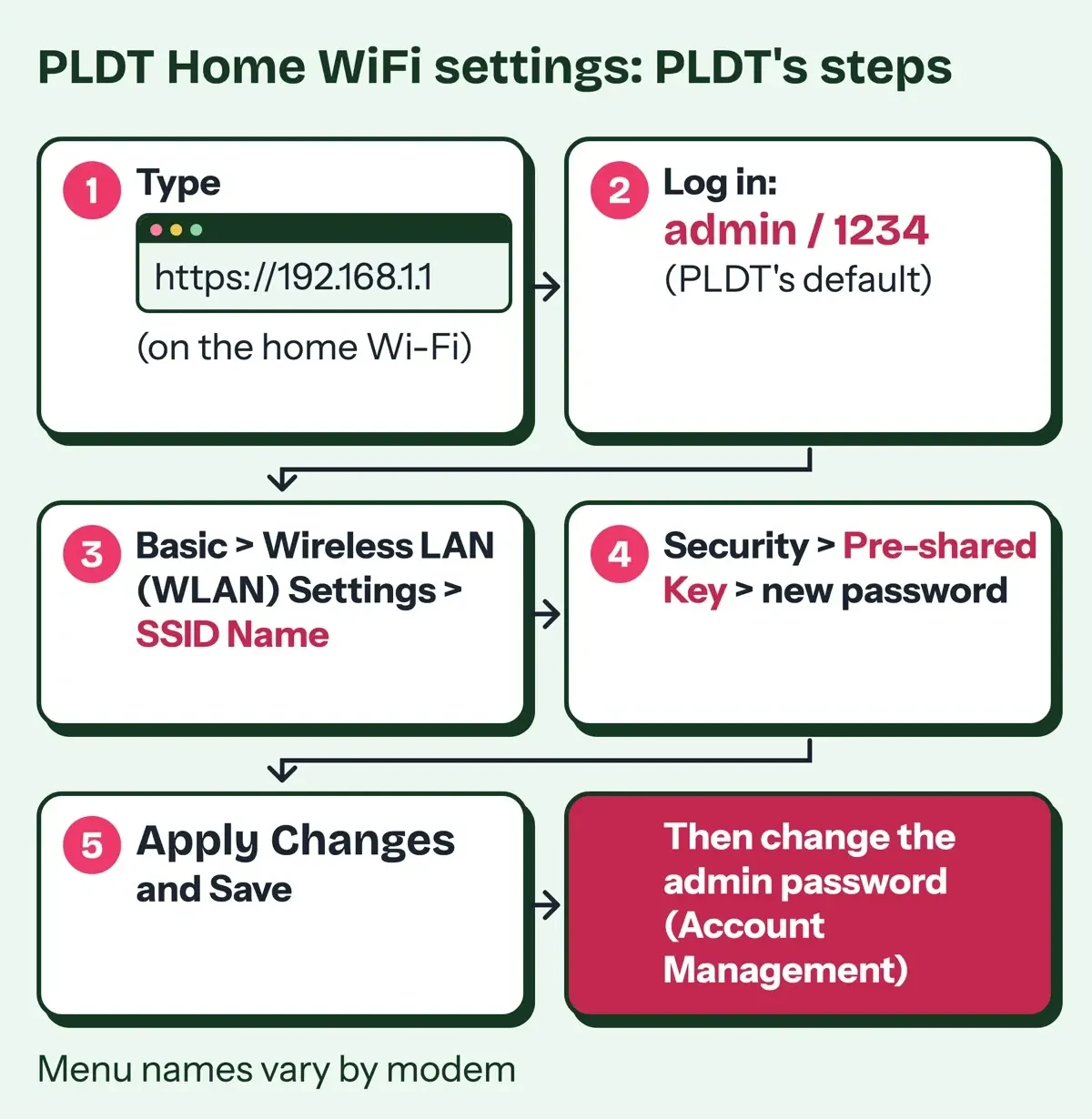 Diagram by DigitalTreed, from PLDT's change WiFi password page, read November 6, 2026. Menu names vary by modem.
Which security mode and passphrase to choose
Before anyone presses Save, look at the mode PLDT names, WPA2-MIXED. The FTC's home Wi-Fi guide tells people to set the router "to either WPA3 Personal or WPA2 Personal" and calls WPA and WEP "outdated and not secure". Apple's recommended router settings list "WPA/WPA2 mixed modes" among weak settings to avoid, next to WEP and TKIP. Apple's own pick is WPA3 Personal. It suggests WPA2/WPA3 Transitional when older devices, like an aging printer or smart TV, still have to join the network.
CISA's archived home network security page, released in 2021, says "Use the strongest encryption protocol available" and recommends WPA3 Personal.
PLDT doesn't say if its label means WPA2 mixed with old WPA. We couldn't see a PLDT modem screen. Check what's in the menu instead. If it lists WPA3 Personal, a WPA2/WPA3 option or plain WPA2 Personal, the FTC's and Apple's advice points there. An old phone that won't join afterward is the sign to step back one setting.
The Wi-Fi Alliance says "WPA3 is mandatory for Wi-Fi CERTIFIED devices", and that WPA3-Personal users get "increased protections from password guessing attempts".
For the passphrase, CISA's Use Strong Passwords page, now marked as archived content, asks for "At least 16 characters" or "a memorable phrase of 4 – 7 unrelated words". NIST's SP 800-63B digital identity guideline is written for account logins, not Wi-Fi, yet it's a useful yardstick. It sets 15 characters as the minimum for single-factor passwords. It also says verifiers "SHALL NOT impose other composition rules", so length, not a forced symbol, is what it asks for.
For a family that reads the password out loud, random words work well. EFF's dice passphrase page suggests "a six-word passphrase" built by rolling five dice per word against its long wordlist. Five dice give 6 x 6 x 6 x 6 x 6 = 7,776 possible words. Keep the family name, street and birth year out of it, and don't reuse the network name. We scored eight sample passphrases against those numbers. Seven are made up. The eighth is 1234, the default admin password PLDT publishes on its help pages. The formula is bits = length x log2(pool) for random characters, or words x log2(7,776) for random words.
| Sample | Length | Formula | Bits | 16+ chars | Flags |
|---|---|---|---|---|---|
| PLDT published default admin password | 4 | 4 x log2(10) = 4 x 3.322 | 13.3 | no | on blocklist |
| 9 characters, mixed (made up) | 9 | 9 x log2(95) = 9 x 6.570 | 59.1 | no | has a year |
| Family name + year (made up) | 13 | 13 x log2(95) = 13 x 6.570 | 85.4 | no | has a year, family or place name |
| Network name reused (made up) | 15 | 15 x log2(62) = 15 x 5.954 | 89.3 | no | family or place name, contains network name |
| 12 random characters (made up) | 12 | 12 x log2(95) = 12 x 6.570 | 78.8 | no | none |
| 16 random characters (made up) | 16 | 16 x log2(95) = 16 x 6.570 | 105.1 | yes | none |
| 4 random words (made up) | 28 | 4 x log2(7,776) = 4 x 12.925 | 51.7 | yes | none |
| 6 random words (made up) | 43 | 6 x log2(7,776) = 6 x 12.925 | 77.5 | yes | none |
The default 1234 scored 13.3 bits and sat on our small blocklist of common values, and only 3 of the 8 samples reached CISA's 16 characters. The made-up family name plus a year scored 85.4 bits by formula. That's above six random words at 77.5. Bits by formula are an upper bound. They hold only when every pick is random, and a surname with a birth year never is, which is why the test flags it for both.
Six random words also scored below 16 random characters, at 77.5 against 105.1, but they're far easier to read aloud to a parent over a call.
What we tested
The scoring ran on November 6, 2026 as a small Python program on a DigitalTreed laptop. It didn't send any passphrase anywhere. It used EFF's 7,776-word list, a local blocklist and pattern flags. The image below summarizes its local results.
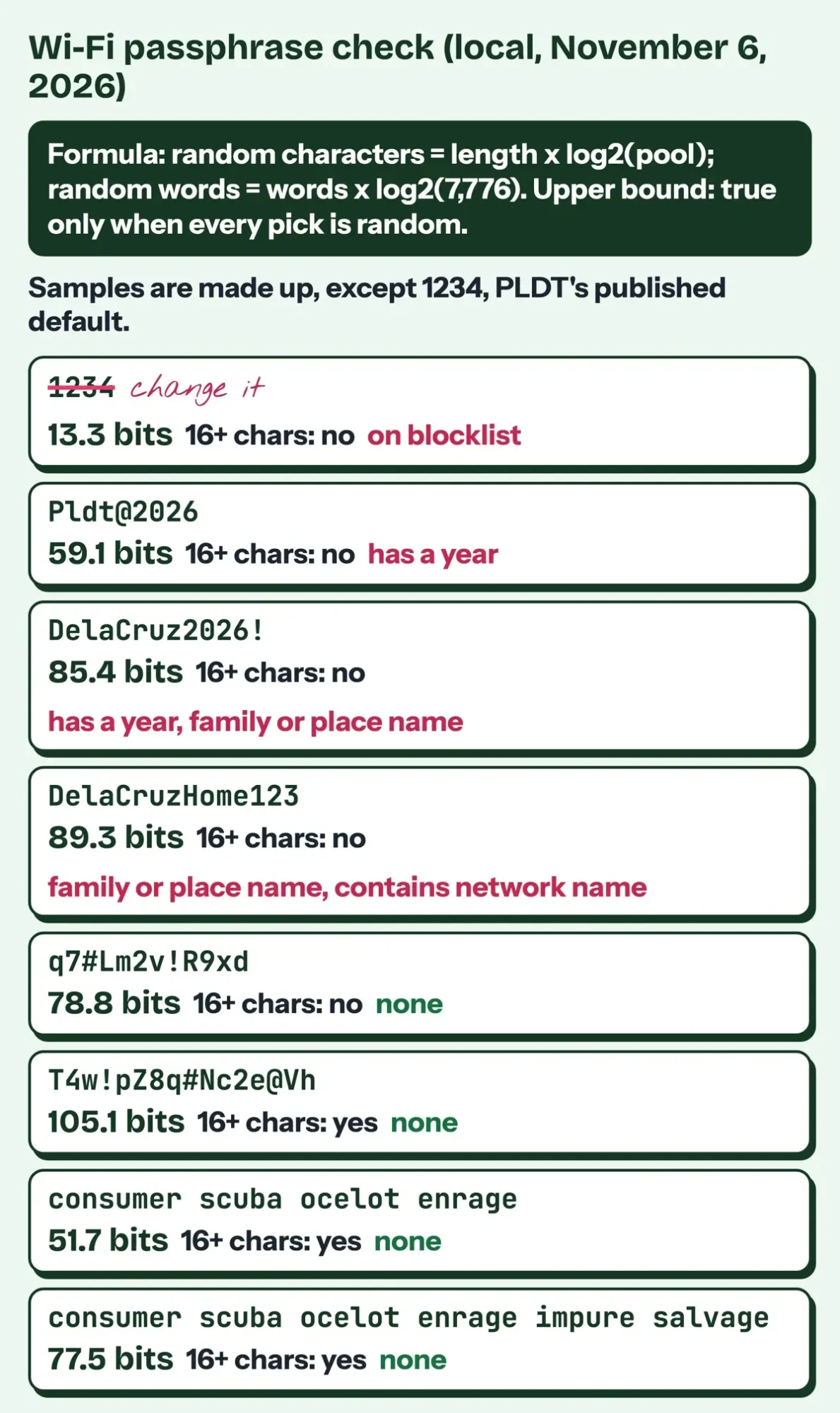 Drawn by us from our passphrase checker's results, run locally on November 6, 2026. All samples are made up except 1234, PLDT's published default.
Forgot the password: PLDT's reset steps
If nobody remembers the Wi-Fi password, PLDT's forgot WiFi password page has you do a hard reset. You "Look for a small hole on your Wi-Fi modem", then press the button inside with a pin "and hold for 5 seconds".
PLDT's next steps go back to the default login and the network name printed on the modem, so you'll have to rejoin every phone, TV and laptop.
After the reset, PLDT says to connect a PC by LAN cable, open 192.168.1.1 and log in with the default admin and 1234. Without a laptop, scan for the default network name and password, which are "found at the back or under your modem", then set a new name and password. A reset brings back the default admin login too, so change it in the same sitting.
While you're logged in, check updates and remote access too. The FTC says that if your router came from your internet provider, "check with your ISP to see whether it sends out automatic updates." CISA's home network page lists "Disable remote management." and says "Firmware updates enhance product performance, fix flaws, and address security vulnerabilities." The FTC also names WPS and UPnP as convenience features that weaken a network.
If pages stop loading after a reset while Wi-Fi shows connected, our browser DNS error fix walks through one common cause.
Can you change PLDT WiFi from the US?
From the US, you can't open that admin page. PLDT offers no app in its place either. Its myHome support page answers the app question this way, as of November 6, 2026: "For now, there is no PLDT Home Mobile App yet." Its website, my.pldthome.com, works in a phone browser. The page lists billing details, payment history and repair ticket status, not Wi-Fi settings. Sign-up needs the PLDT Home account number plus the mobile number or email registered to the account, because myHome sends a one-time code there. Logins through Facebook or Google are "no longer supported", PLDT says, and for anything else its help pages point to PLDT Cares Messenger or the 171 hotline.
PLDT also sells mesh systems, and its WiFi Mesh System page says the mesh comes with an app through which "users can conveniently manage the network, even outside the home." The mesh support page names TP Link Deco and Tenda Nova, and gives the Deco path to the network name and password: More, Router Settings (Wi-Fi), Network Name/Password. If your parents use one, it's worth asking them to add you to its app.
The FTC warns that remote access to router controls "can make your network less secure", and CISA says to turn remote management off. For a plain PLDT modem, a video call does the job without any remote access. Your parent opens 192.168.1.1 while you read each step aloud from this page, and you check the new passphrase against CISA's 16 characters before they press Save. Then you watch them change the admin login in the same session.
Afterward, keep the new Wi-Fi password in a password manager, which CISA's page recommends, or somewhere only the family sees.
Share the Wi-Fi password with the household, never the admin one, and treat any message claiming to be PLDT that asks for either as phishing. Our phishing prevention tips cover the signs.
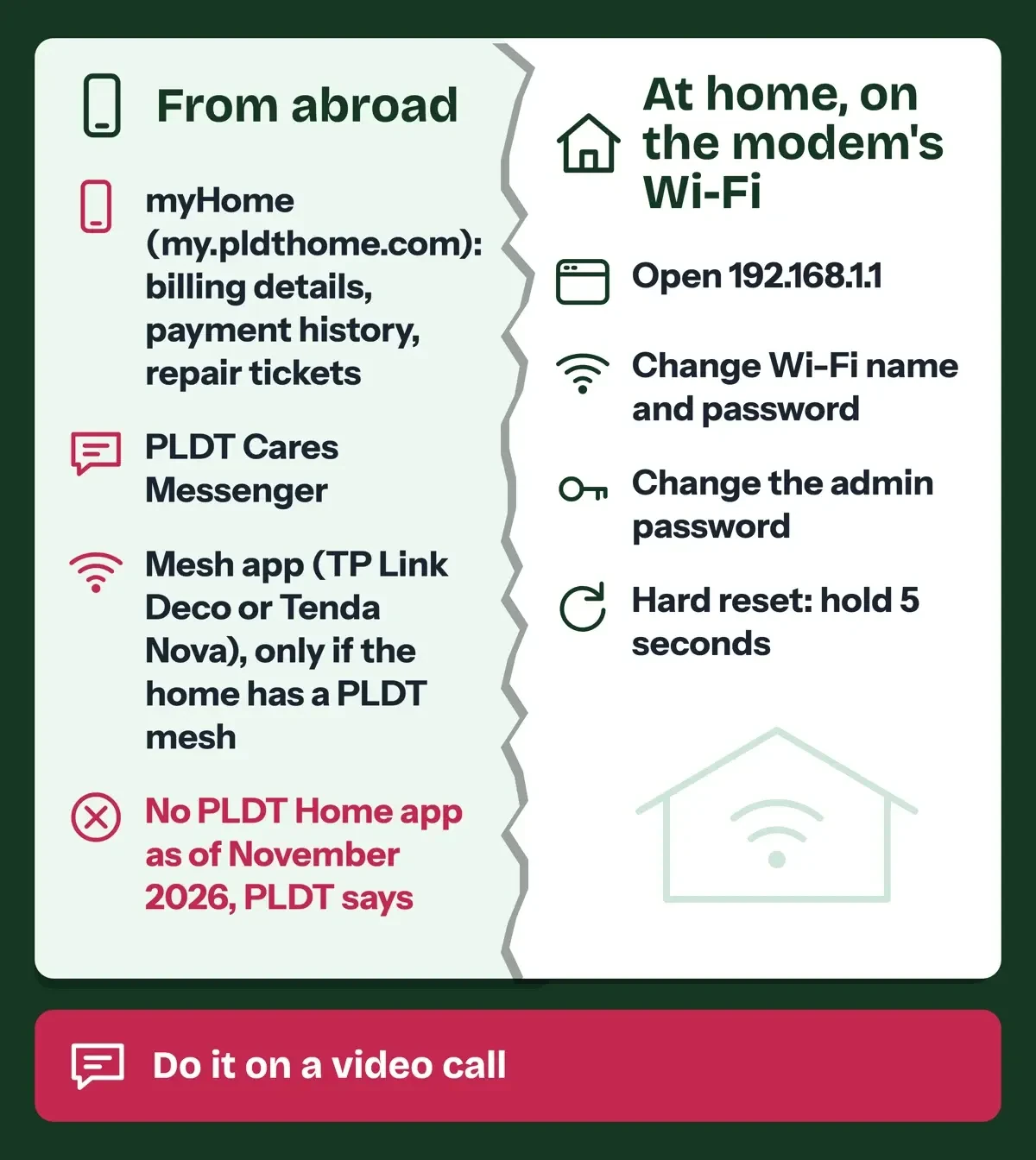 Drawn by us from PLDT's myHome, mesh and change WiFi password pages, read November 6, 2026.
The old pldthomewifisettings.net site is not PLDT's
Our 2023 article sent readers to pldthomewifisettings.net. It isn't a PLDT domain, so we don't link it. PLDT's own pages live on pldthome.com and pldt.com. The Verisign RDAP record shows pldthomewifisettings.net was registered on September 10, 2018 through Spaceship, Inc., and nothing in it ties the name to PLDT. The real steps start at 192.168.1.1, never at a public website. Our checker marked the made-up https://pldthome.com.wifi-settings.example/ as not PLDT. Its host ends in wifi-settings.example. For the made-up https://[email protected]/, it read the host as reset-wifi.example, since the part before the @ is a user name. Our lookalike domain comparison shows the same pattern with two finance sites.
Before your parents type a password anywhere, the site name should end in pldthome.com. We didn't see a PLDT page that asks for the Wi-Fi password online.
The same script verified TLS certificates for pldthome.com, my.pldthome.com, main.pldt.com, www.xfinity.com, consumer.ftc.gov and pages.nist.gov, and all six passed. If a relative already typed a password into a lookalike page, our guide for the minutes after a phishing click applies.
PLDT Home vs Xfinity: changing WiFi on a US gateway
Comcast puts Wi-Fi changes in a phone app. Its rented Xfinity gateway is the closest US match to a PLDT modem. Comcast's Xfinity help page calls the WiFi Details feature in the Xfinity app the quickest way: WiFi tab, WiFi details, Edit WiFi settings, then Save. Those steps are "for rented Xfinity Gateways only", and its guest WiFi page adds that the same card can share the name and password by QR code.
In the US, access depends on the account role. "Only Primary, Manager, and Member Xfinity ID users can access the WiFi tab", Xfinity says. Its Using the Xfinity app page says the app lets you manage your services "anytime, anywhere" and offers Chat with Xfinity Assistant to every account role. So an adult child added as a Manager or Member can change the password from another state.
Xfinity also says "Most Xfinity Gateways require the default WiFi name and password to be changed during installation," while PLDT asks for the admin login change at first login.
| Question | PLDT Home (Philippines) | Xfinity (US) |
|---|---|---|
| Where you change Wi-Fi | Admin page at 192.168.1.1, on the home network | Xfinity app, WiFi tab |
| Phone app for Wi-Fi | None, PLDT says; mesh apps only with a mesh | Xfinity app |
| Change from far away | Only through a mesh app | Yes, for Primary, Manager or Member users |
| Default login published | admin and 1234 on PLDT help pages | Default Wi-Fi on the gateway label |
| Help line | 171 and PLDT Cares Messenger | Xfinity Assistant in the app |
AT&T was harder to check. Its Wi-Fi help articles gave our plain checker only error pages on November 6, 2026, so AT&T isn't compared here.
Our Xfinity xFi Complete review covers what Comcast charges for the gateway and extras. If your parents travel and use café Wi-Fi, our McDonald's WiFi guide covers public hotspot safety. Our free antivirus guide for Windows covers the laptop they'll use for all of this.
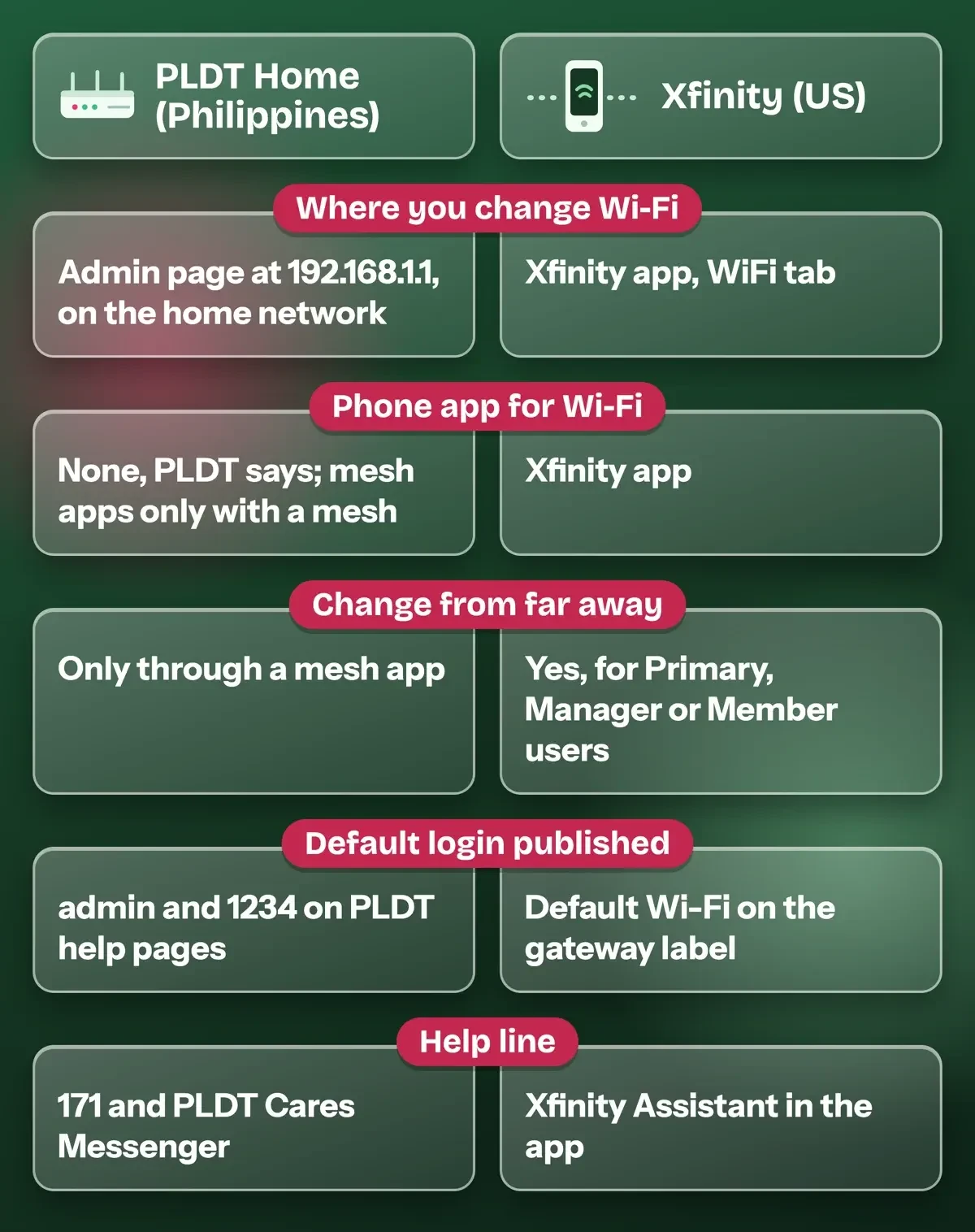 Drawn by us from PLDT's and Xfinity's help pages, read November 6, 2026.
PLDT Home WiFi settings questions
Frequently asked
Can I change the PLDT WiFi password from my phone?
Yes, on that modem's Wi-Fi. PLDT's reset page even gives a no-laptop route: join the default network printed on the modem, then open the admin page.
Does myHome change the Wi-Fi password?
PLDT doesn't list it. Its myHome page shows 6 months of statements and repair tickets, and says to call 171 to update a registered mobile number or email.
Is PLDT Prepaid Home WiFi set up the same way?
It moved. PLDT's Home WiFi page says "PLDT Prepaid Home WiFi is now Smart Home WiFi", so those devices follow Smart's help.
Should I change the Wi-Fi password every few months?
Not on a schedule. NIST's password guideline says verifiers "SHALL NOT require subscribers to change passwords periodically", but a change is forced when there is evidence of compromise.
How we made this guide: Nobody here owns a PLDT modem, so every step comes from PLDT's help pages. PLDT's site stopped our script with a bot check, as did two CISA pages. We opened those in an ordinary browser, saved the text and matched each quote to it. The passphrase test never left our machine. Facts checked by the DigitalTreed team on November 6, 2026.
First published December 2023 with two different default logins and an unofficial settings site. Rewritten November 6, 2026 from PLDT's help pages, US security guidance and a local passphrase test.
Sources
- PLDT: About Us
- PLDT Home: Fiber FAQ
- PLDT Home: How do I change my WiFi password?
- PLDT Home: I forgot my Wi-Fi password
- PLDT Home: How do I connect my wireless device to the Wi-Fi network?
- PLDT Home: WiFi frequency bands 2.4 GHz or 5 GHz
- PLDT Home: myHome support
- PLDT Home: WiFi Mesh System
- PLDT Home: WiFi Mesh System support
- PLDT Home: Home WiFi
- RFC 1918: Address Allocation for Private Internets
- FTC: How to secure your home Wi-Fi network
- CISA: Home Network Security (archived)
- CISA: Use Strong Passwords (archived)
- NIST SP 800-63B-4: Authentication and Authenticator Management
- Apple Support: Recommended settings for Wi-Fi routers and access points
- Wi-Fi Alliance: Security
- EFF: Dice-generated passphrases
- Verisign RDAP: pldthomewifisettings.net
- Xfinity: View and change your WiFi network name and password
- Xfinity: Help guests access your home WiFi
- Xfinity: Using the Xfinity app

Comments
No comments yet. Start the conversation below.