

Quick answer
Don't post clips from a 49000+ free reels bundle unless each clip has a license you can read (checked October 30, 2026). Pexels, Pixabay, Mixkit and Canva Free allow clips in business reels at no cost, but 4 of the 5 libraries we checked bar reselling clips as is. Save each license page before you post.
You post Reels for a shop or a side business with no budget for a videographer, and then a page offers 49,000 ready-made clips for nothing. A free reels bundle is a download that promises thousands of short videos to post as your own. This very page used to hand one out, and we've pulled it.
First comes whether you can post clips from a 49000 reels bundle, then what Instagram does with reposted reels. After that come free clip libraries with a license you can read and the limits that come with free clips. We close with what we tested on their pages and a reel workflow that keeps the license trail.
Key takeaways
- Pexels, Pixabay and Mixkit clips work in business reels without credit.
- Four of five free libraries bar reselling or redistributing a clip as is.
- Instagram says a repost can infringe despite credit, disclaimers or edits.
- A clip with no license page answered 0 of our 7 questions.
- Repeat copyright infringement can get an Instagram account disabled.
Can you post clips from a 49000 reels bundle?
Not safely, because a bundle hands you files with no license attached. US law starts from the owner's side. The Copyright Office general FAQ says "Your work is under copyright protection the moment it is created and fixed in a tangible form." Section 102(a) on its Title 17 chapter 1 page covers "original works of authorship fixed in any tangible medium of expression." A clip was protected the day its creator saved it to a phone.
That puts the burden on you. The Office's FAQ on using others' work says "in the absence of clear information to the contrary, most works may be assumed to be protected by federal copyright law."
One "no copyright" badge on a 49,000-file page isn't clear information about any single clip. We didn't open or download a bundle, so we can't tell you what any pack holds. The usual fixes don't work either. Instagram's copyright help pages list cases where a post can still infringe. One is when you "Found the content available on the Internet." Another is when you "Saw that others posted the same content as well." A disclaimer won't rescue it, since the list includes "Included a disclaimer that you didn't intend to infringe copyright."
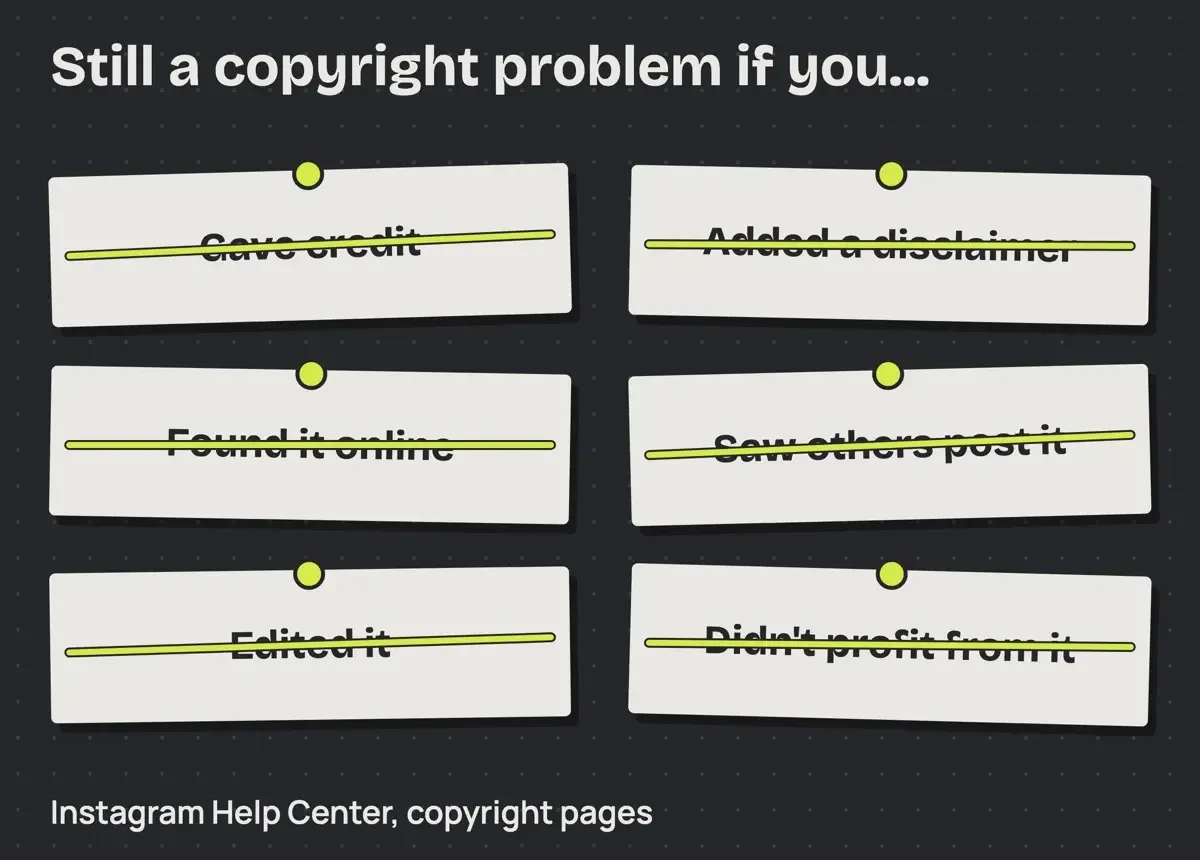 Diagram by DigitalTreed of six items on the Instagram Help Center copyright list, read October 30, 2026.
Editing doesn't make the clip yours. The Copyright Office's FAQ on using others' work says "you cannot claim copyright to another's work, no matter how much you change it, unless you have the owner's consent."
The same FAQ also puts a price on getting it wrong: "statutory damages up to $30,000 for each work infringed," as of October 2026. Our MP4Juice copyright guide covers the statute behind that figure, including the higher cap for willful copying.
What Instagram does with reposted reels
Instagram's own rules bite sooner than a lawsuit would. Every post carries a promise you make to the platform. The Instagram Terms of Use say "You represent you own or have obtained all necessary rights to the content you post or share." A bundle clip with no license makes that promise shaky the moment you tap Share.
If you repeatedly post content that infringes someone else's rights, Instagram's copyright help says "your account may be disabled or your Page removed under Instagram's repeat infringer policy." A feed built from one bundle repeats that bet daily.
Short of that, "your ability to post photos or videos may be limited." The Terms put it in legal form, since Instagram can stop serving you "if you repeatedly infringe other people's intellectual property rights."
Reach suffers even when nobody files a report. Instagram's Recommendations on Instagram page lists Explore and Reels among its recommendation spots. Under content it doesn't recommend, it names "Unoriginal content that is largely repurposed from another source with only minor, immaterial edits, without adding material value." A bundle clip with a new caption fits that description closely, and it may never reach people who don't already follow you.
Audio is a second risk inside the same reel. Meta's Music Guidelines, effective March 26, 2024, say "Use of music for commercial or non-personal purposes in particular is prohibited unless you have obtained appropriate licences." Uncleared music means "your content may be blocked, muted or removed." A downloaded clip that already carries a song brings two rights questions in one file.
Free clip libraries with a license you can read
The fix is a library that publishes its license on a page you can save. We read five of them on October 30, 2026, and each page got the same 7 questions a reel maker asks before posting. Here's what each one answered:
| Question | Pexels | Pixabay | Mixkit video | Meta Sound Collection | Canva Free | No license page |
| Free to use? | Yes | Yes | Yes | Yes | Yes | Not stated |
| OK in a business or ad reel? | Yes | Yes | Yes | Not stated | Yes | Not stated |
| Credit required? | No | No | No | Not stated | Not stated | Not stated |
| Can you edit or remix it? | Yes | Yes | Yes | Not stated | Not stated | Not stated |
| Can you resell or redistribute the clip as is? | No | No | No | Not stated | No | Not stated |
| Logos and brands in the clip OK for promotion? | No | No | Check | Not stated | No | Not stated |
| Any rule on people shown? | Yes | Yes | Not stated | Not stated | Yes | Not stated |
| Answered from the page | 7 of 7 | 7 of 7 | 6 of 7 | 1 of 7 | 5 of 7 | 0 of 7 |
"Not stated" means the page we read doesn't say, not that the answer is no.
Meta's Sound Collection answered just 1 of 7, because its public landing page, the only part we read, sets no rule beyond "Free to use." The last column is a clip with no license page, the position a bundle file puts you in.
The Pexels License is two short lists, one of what's allowed and one of what isn't. It says "All photos and videos on Pexels are free to use" and "Attribution is not required." Editing is fine, since "You can modify the photos and videos from Pexels."
It's commercial too. Section 5 of the Pexels Terms grants use "for commercial or non-commercial purposes," so a promo reel for your own shop is covered, within limits we'll get to.
Pixabay reads almost the same. Its Content License Summary lets you "Use Content for free," skip attribution and "Modify or adapt Content into new works." The summary also says "only the full Content License is legally binding," so we read the Pixabay Terms as well, and they grant use "for commercial or non-commercial purposes."
Mixkit is an Envato site. The Mixkit license page lists a Stock Video Free License and a separate Stock Video Restricted License. It tells you to "Be sure you are aware of which license applies to the item you have downloaded." The Free one names "Social Media video posts" and "Online marketing ads" among its uses. Items under it "can be used in your commercial and non-commercial projects, for free." Credit isn't required.
The Mixkit User Terms add that you're "only receiving a non-exclusive license to use that Item." So a rival shop can post the same clip.
Canva is a design app first. Its Free content lives inside your designs. Canva's licensing page says "You can use Free content at no cost." It also says "You can use our content in designs for marketing or social media." Hover over a thumbnail, and "If it's Pro, you'll see a little crown icon pop up," while free users see "a watermark on Pro content." One Pro element changes the rules for the whole reel. The Canva Content License Agreement says "the most restrictive category applies to the entire design." Music has its own catch, because "Popular Music can't be used for any commercial purposes, including advertising." For a business reel, leave Popular Music out.
Meta Sound Collection covers audio, not video. Its landing page offers "Thousands of high-quality audio tracks and sound effects" that are "Free to use in any videos that you create and share on Facebook and Instagram." Those lines are the whole of what its public page says about use.
Nothing there covers ads or edits. We'd keep its tracks out of paid ads.
Limits that come with free clips
Free clips still come with limits, and Pexels, Pixabay, Mixkit and Canva all ban reselling or passing on clips as they are. Pixabay draws that line with worked examples.
Its Terms define Standalone use as content "where no creative effort has been applied." Then they give examples: "using the Content in its original form or solely using a filter, changing colors, resizing or cropping the Content remains Standalone use." Mixing it with other media, text and editing is fine "so long as the combined effect is to make a 'new' creative work." A reel cutting a Pixabay clip together with your product shots and captions is a new work, but a zip of 500 Pixabay clips, cropped to 9:16, isn't.
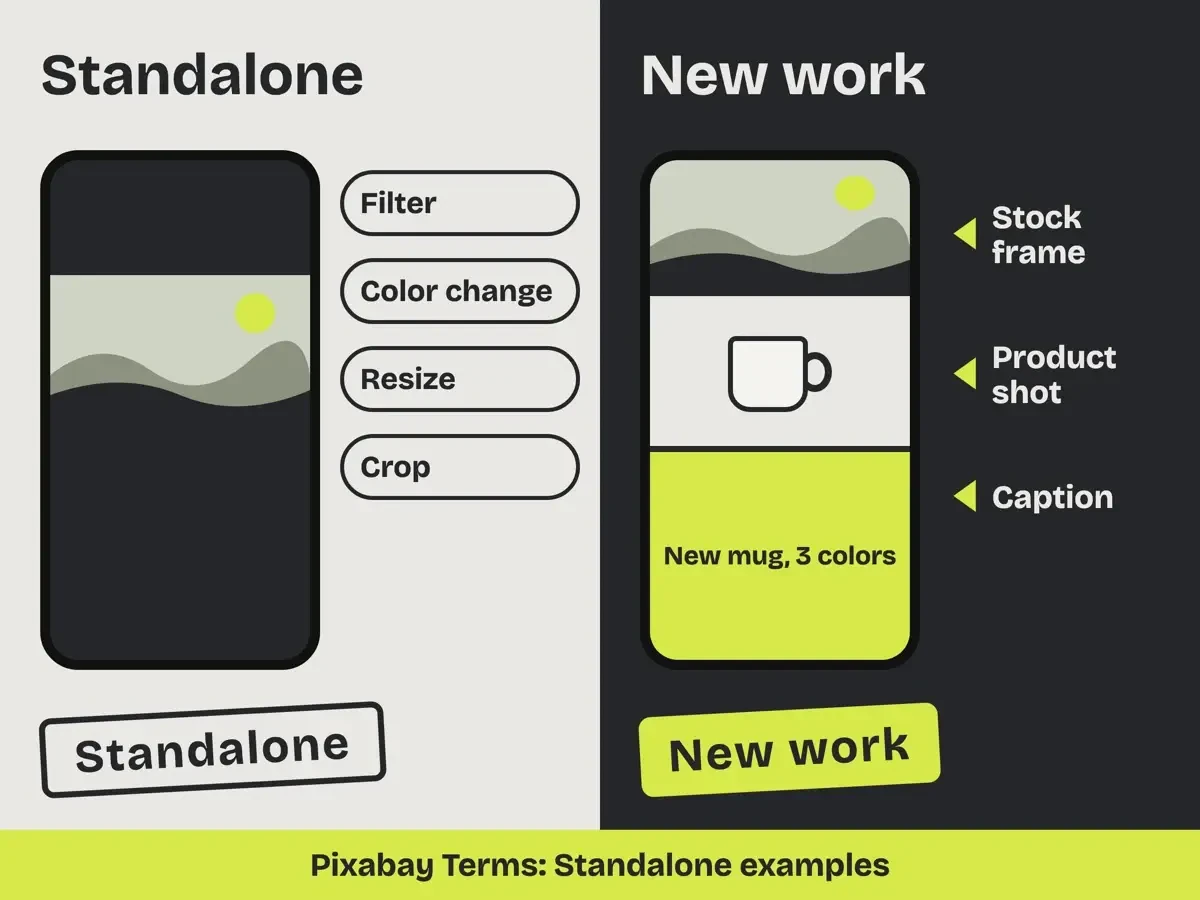 Drawn by us from the Standalone examples in the Pixabay Terms, read October 30, 2026. No Pixabay screen is shown.
That's why a bundle built from free stock clips still breaks the rules. The Pexels Terms ban selling or distributing content "on a Standalone basis," including "through a stock media platform." They also say you can't "use or compile any Content to replicate a similar or competing service." Mixkit's User Terms rule out the bundle model in one line: you can't "aggregate or collate an Item(s) and make available on a stock or inventory basis." They ban "scripts or bots to mass download Items" as well. Canva's agreement says you can't "sub-license, re-sell, rent, lend, assign, gift or otherwise transfer or distribute the Content."
People in a clip need a second look before the reel sells something. Pexels lists "Identifiable people may not appear in a bad light or in a way that is offensive." It adds "Don't imply endorsement of your product by people or brands on the imagery."
Its Terms go further for sales: "it is likely that you will need consent or a license" when the use is commercial.
Logos follow the same pattern. Pixabay says that if content "contains any recognisable trademarks, logos or brands, you cannot use that Content for commercial purposes in relation to goods and services." The Pexels Terms apply the same rule to any clip that "depicts any trademarks, logos or brands (whether two- or three-dimensional)." Mixkit warns that part of an item "(such as a trade mark or brand) may be sourced from a third party." So a stranger holding a branded coffee cup is a poor pick for your cafe ad, while a hands-only shot of a plain cup is the safer clip.
What we tested
On October 30, 2026, our script license_check.py read 18 saved license, terms and help pages. It asked each library 7 questions and rejected any answer whose quote wasn't on the page word for word. All 57 quotes matched.
Pexels and Pixabay answered 7 of 7, Mixkit 6, Canva Free 5 and Meta Sound Collection 1. An empty file standing in for a clip with no license page answered 0 of 7.
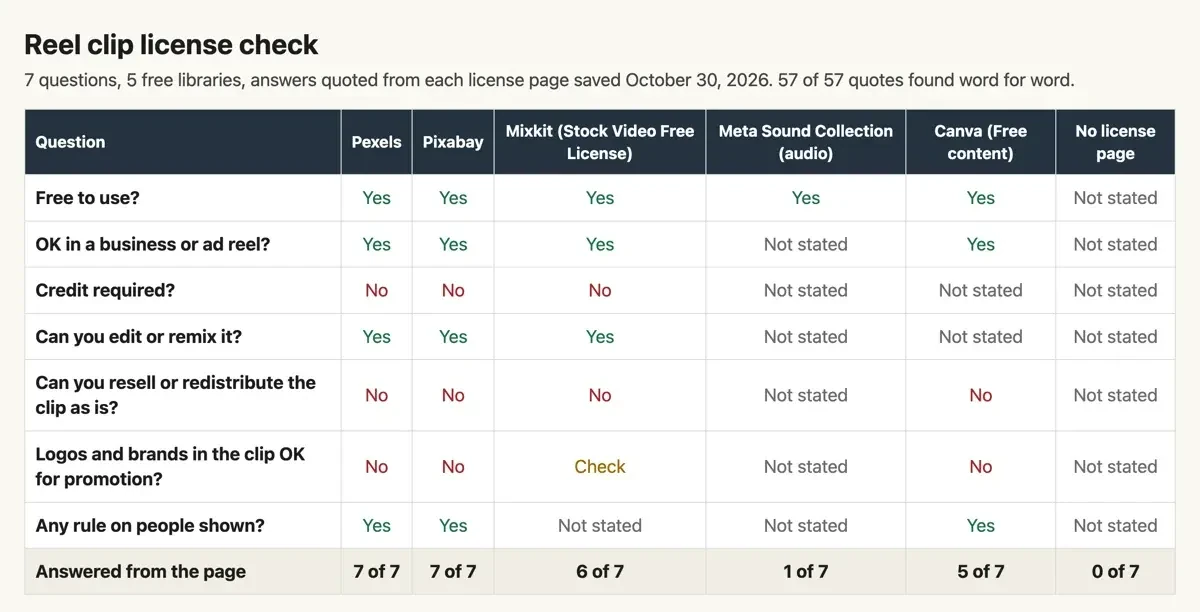 Screenshot: license-matrix.html from our 7-question check, served from 127.0.0.1 on October 30, 2026. Not a page from any of the five libraries.
A reel workflow that keeps the license trail
Each clip needs a short paper trail before it goes into a reel. We'd build it in this order:
- Search the library itself, and open the clip on its own page, not a reposted copy.
- Read which license it carries; on Mixkit the label can change, and on Canva watch for the crown.
- Save the license page as a PDF with the date, in the same folder as the clip.
- Check the frame for faces and logos if the reel promotes a product.
- Edit the clip into a new piece with your footage, captions and cleared audio.
- Log the clip, its source page and the date in your content calendar.
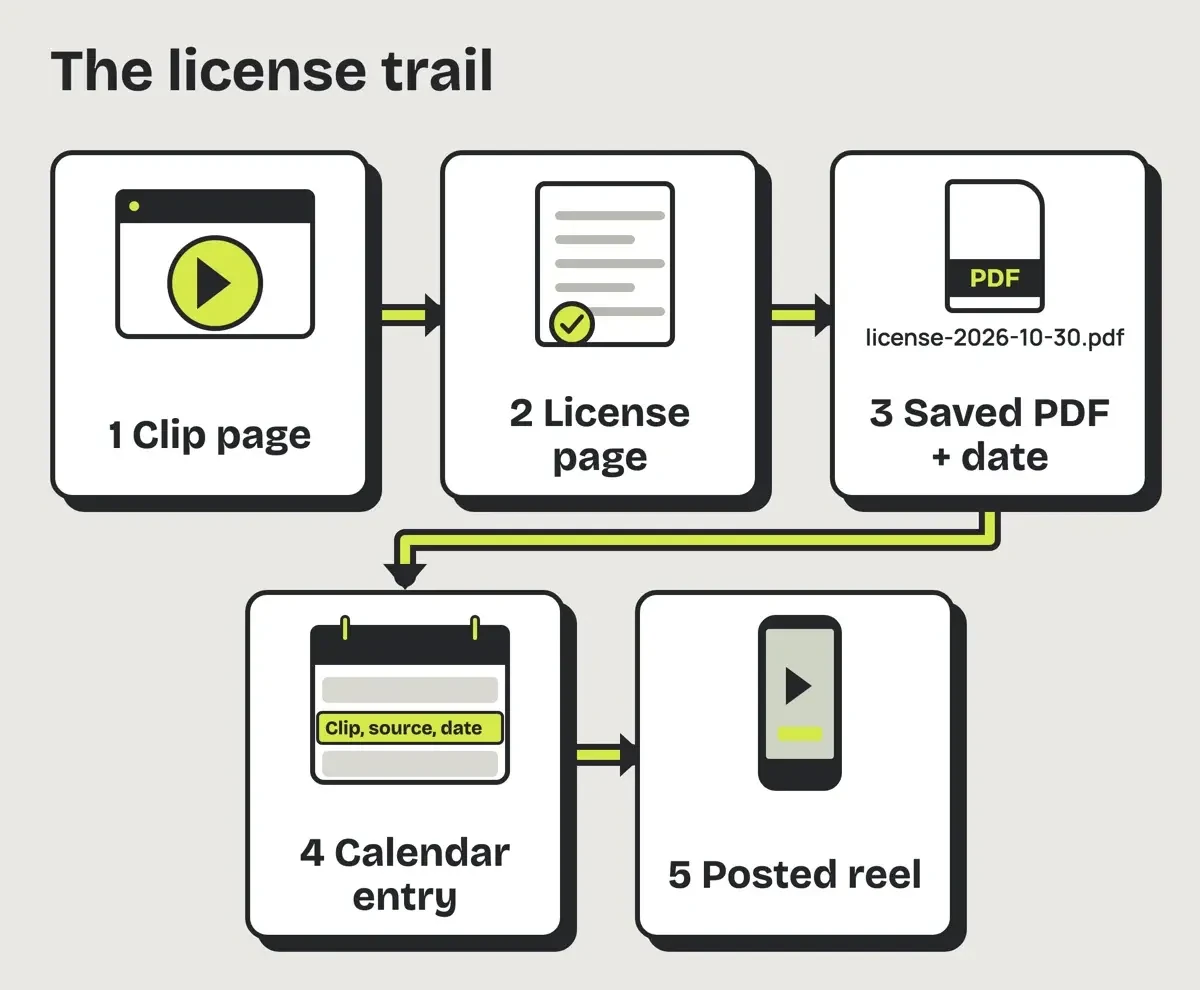 Drawn by us, October 2026: the license trail from clip page to posted reel.
Step 5 does two jobs. It keeps you clear of the Standalone rule, and it keeps the reel away from the "unoriginal content" line in Instagram's recommendation rules.
For vertical framing, our guide to cropping video in CapCut for Reels covers 9:16 settings. Our free photo editors export test helps with stills, and the log in step 6 fits the social media content calendar template as one extra column.
Our take: skip the bundle, even a free one. Pick Pexels or Pixabay for footage, use audio whose license page you've read, and keep those pages next to the files.
If someone reposts one of your reels without asking, our guide to protecting your content from copying walks through a DMCA takedown notice. How often to post is in our small business social media strategy.
Free reels bundle questions
Frequently asked
Are 'no copyright' reels safe to post?
A label isn't proof. Instagram lists "Think that the use is a fair use" among cases that can still infringe, and the Copyright Office's fair use FAQ says "only a federal court can determine" if a use is fair.
Can I sell a reels bundle made of Pixabay clips?
No. Pixabay bars selling content on a Standalone basis "as an image, audio, video, NFT or other digital file."
Do I have to credit Pexels in my reel?
No. Its license says "Giving credit to the photographer or Pexels is not necessary but always appreciated."
How we made this guide: We saved 18 license, terms, help and copyright.gov pages as text. Pexels, Pixabay, Canva, Instagram and Meta pages were read in a browser, because curl got a 403 block or a blank page. A local script matched all 57 quotes, and no bundle was opened. Facts checked by the DigitalTreed team on October 30, 2026.
First published August 2024 as a download page for a 49,000-clip reels bundle labeled no copyright. This rewrite, dated October 30, 2026, explains the rights risk and five free libraries' license limits, with no bundle link or seller named.
Sources
- U.S. Copyright Office: Copyright in General (FAQ)
- U.S. Copyright Office: Can I Use Someone Else's Work? (FAQ)
- U.S. Copyright Office: Title 17, Chapter 1 (section 102)
- Instagram Terms of Use
- Instagram Help Center: Copyright
- Instagram Help Center: Recommendations on Instagram
- Meta: Music Guidelines
- Meta Sound Collection
- Pexels License
- Pexels Terms and Conditions
- Pixabay Content License Summary
- Pixabay Terms of Service
- Mixkit License
- Mixkit User Terms
- Canva's licensing explained
- Canva Content License Agreement

1 comment
Rain mo arman
I need bundle
Reply