

Quick answer
AIOSEO is worth it as a free plugin if you untick the extras in its setup wizard and write your own meta descriptions. Pro is worth paying for only if you need a paid tool such as local SEO, Link Assistant or full-site redirects. In November 2026, Pro cost $159.60 for the first year and $399 a year after that.
All in One SEO, or AIOSEO, is a WordPress plugin that writes the behind-the-scenes code search engines read: page titles, descriptions, a sitemap and schema markup. Its pitch is that it does all of that from one dashboard, and its sales pages lean hard on that idea.
We installed the free version on a fresh WordPress site on November 26, 2026 and watched what it did. Below you'll find our verdict, what the setup wizard ticks for you and what the free plugin outputs. Then come the TruSEO score, what Pro really costs after year one, its security record, and how it stacks up against Yoast and Rank Math.
Key takeaways
- The free version covers the SEO basics well.
- Its wizard pre-ticks four extra plugins; untick them.
- Write your own meta descriptions; the default was 302 characters.
- Renewals cost 2 to 2.9 times the first-year price.
- Keep it updated: 29 security issues have been patched.
Our verdict in one table
Here's the short version before the detail. Prices come from AIOSEO's pricing page in US dollars, checked on November 26, 2026.
| You are | Our pick | Why |
|---|---|---|
| A blog or small business site | AIOSEO free, set up carefully | Titles, sitemap and schema work out of the box |
| A local business needing local schema | AIOSEO Plus or a free rival | Local SEO starts on Plus |
| Someone who needs redirects | Pro, or a free redirect plugin | Full-site redirects are on Pro |
| Price-sensitive and comfortable with settings | Rank Math free | More features at $0, see our comparison |
So for most small sites the free plugin is enough, and paying makes sense only once you need one specific Pro feature, not to make a score go up.
What we saw installing it on a fresh site
That verdict comes from a real install. On a fresh WordPress site, activating AIOSEO opened its setup wizard straight away, as its setup wizard guide says it will. The wizard has seven steps, and two of them deserve care.
Step 3 asks which features you want, and on our site, with the category set to Small Offline Business, eight items were already ticked that we hadn't asked for. Four were other plugins: Broken Link Checker, MonsterInsights, OptinMonster and Universally. Four were paid AIOSEO add-ons. A line under the button read: "The following plugins and AIOSEO addons will be installed."
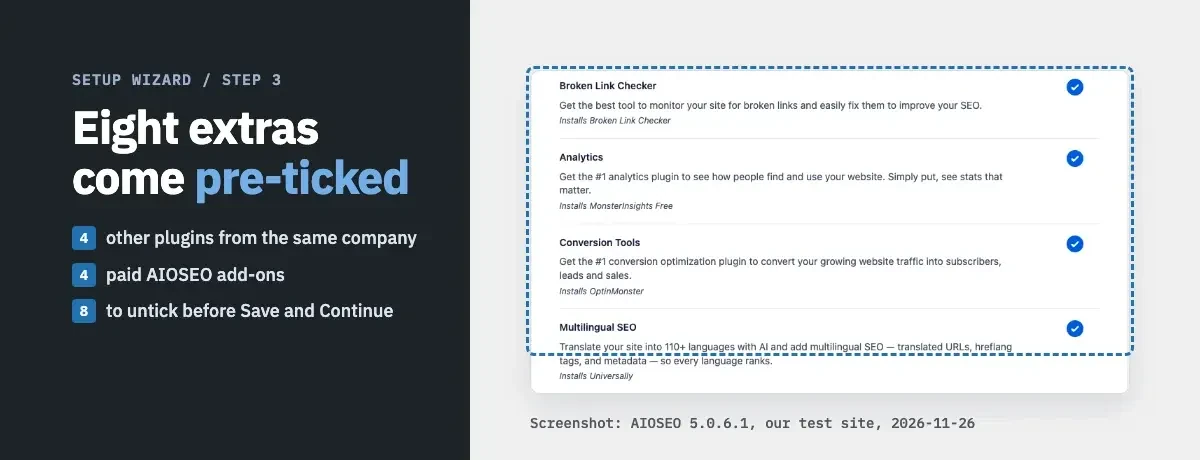 Screenshot from our test site, AIOSEO 5.0.6.1, November 26, 2026.
Those four plugins aren't random picks; they come from the same company. AIOSEO joined the Awesome Motive family in 2020, and Awesome Motive's About page lists it beside MonsterInsights, OptinMonster and SeedProd. We unticked all eight before going on.
Step 5 had our admin email filled in and a "Help make AIOSEO better for everyone" switch already on, which shares usage data. We skipped the step. The last screen, which the wizard guide doesn't show, offered Pro at 50% off and said 3,000,000+ professionals use AIOSEO, while WordPress.org shows 2,000,000+ active installs.
Our own video walks through the same wizard screen by screen, and for every setting in more depth, see our All in One SEO setup guide.

What the free version actually does
Once the wizard closed, the free plugin did the basics well. Our test post gained a meta description, seven Open Graph tags, three Twitter tags and a canonical tag. It also got one JSON-LD schema graph with six types, including BlogPosting, BreadcrumbList and Organization. The sitemap moved to AIOSEO's own version, and robots.txt gained two sitemap lines.
One default you'll want to fix. The description AIOSEO wrote for our 83-word test post was 302 characters long, simply the start of the post text. Its own checker flagged it as "over 160 characters." Google's guide to meta descriptions asks for a description that summarizes the page, so write one for every page that matters.
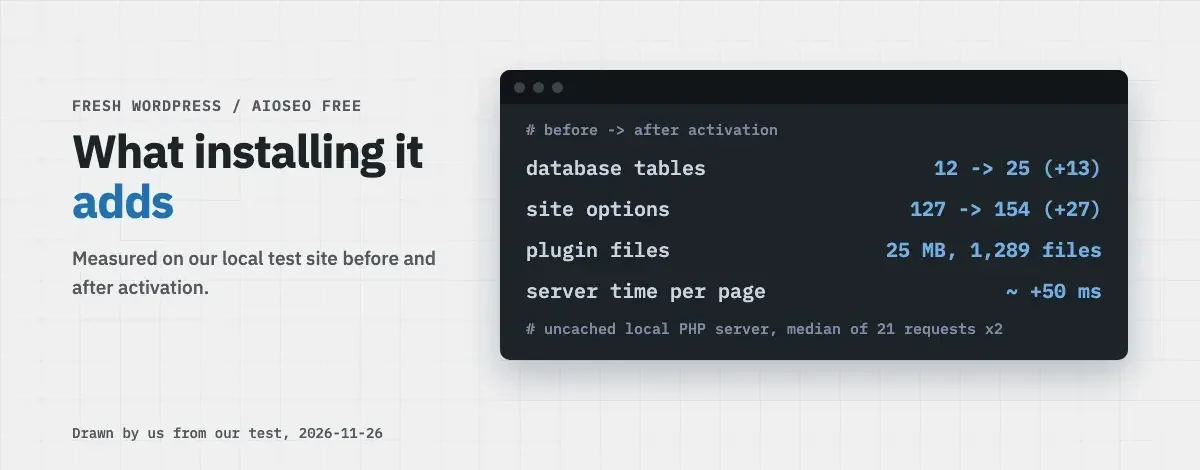 Drawn by us from our test on a local WordPress site, November 26, 2026.
The plugin also leaves a footprint. Activation took our database from 12 tables to 25 and added 27 options, and the plugin folder holds 25 MB in 1,289 files. On our uncached local server, the test page took about 50 ms longer to build with AIOSEO on than off. That's the median of 21 requests, run twice. A real host with page caching would hide most of it, so treat it as a rough sign, not a benchmark.
We'd still install it, set up with care.
Here's what the free plugin doesn't do, based on what we saw. It won't set up redirects when you change a URL. It won't add local business schema for a shop with an address, and it won't suggest internal links between your posts. It doesn't show Search Console data inside WordPress either. For a five-page business site, none of that's a dealbreaker, because free plugins and Google's own tools cover each gap. For a store or a news site with thousands of pages, those gaps are where Pro starts to earn its price, and that's the honest case for paying. Price the one tool you need against the renewal, not the first-year deal.
Expect sales messages too, because the free dashboard we tested showed a green "You're using All in One SEO Free" bar and six "Upgrade" prompts. Its menu also lists Pro-only tools such as Redirects and Link Assistant. The wizard's closing screen even sold "Ad free (no banner adverts)" as a Pro feature. AIOSEO's Lite vs Pro page marks every listed feature as paid, which can make the free plugin look emptier than it is.
What we tested
On November 26, 2026 we installed WordPress and AIOSEO 5.0.6.1 from WordPress.org on a local test site. We ran the wizard, measured the database and speed, and scored one sample post.
Is the TruSEO score worth chasing?
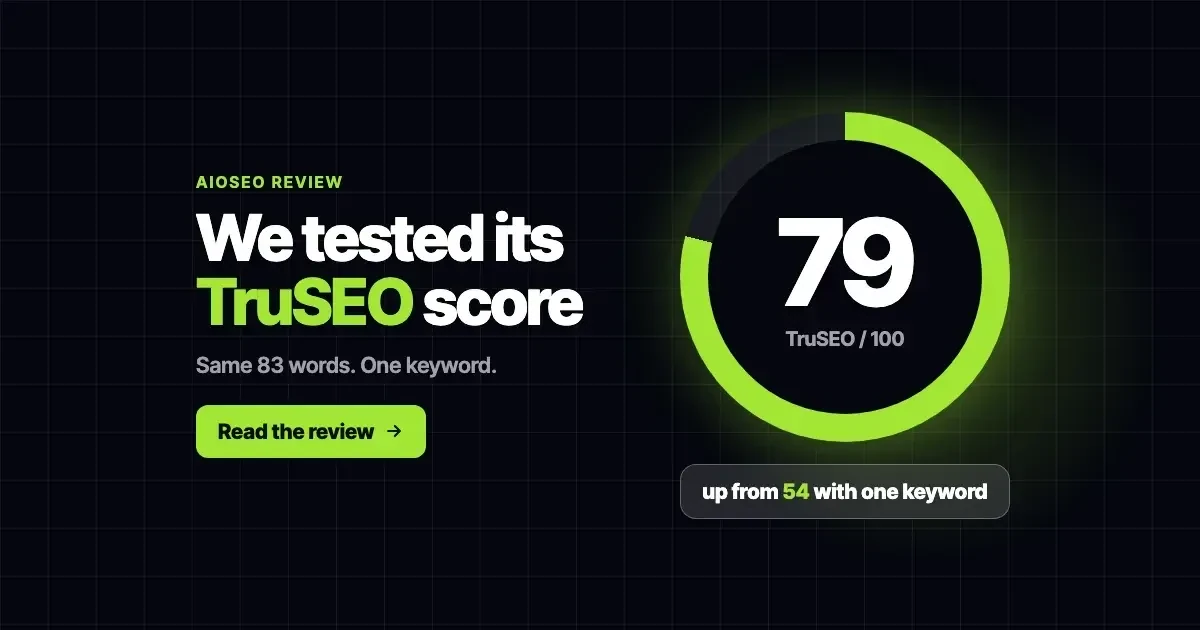
Not as a target. TruSEO is AIOSEO's on-page score, and its TruSEO help page says a score of 80 or above "counts as good." Our 83-word test post scored 54 out of 100 with no keyword set. Then we typed one keyword, "sourdough bread Austin," and changed nothing else. The score jumped to 79.
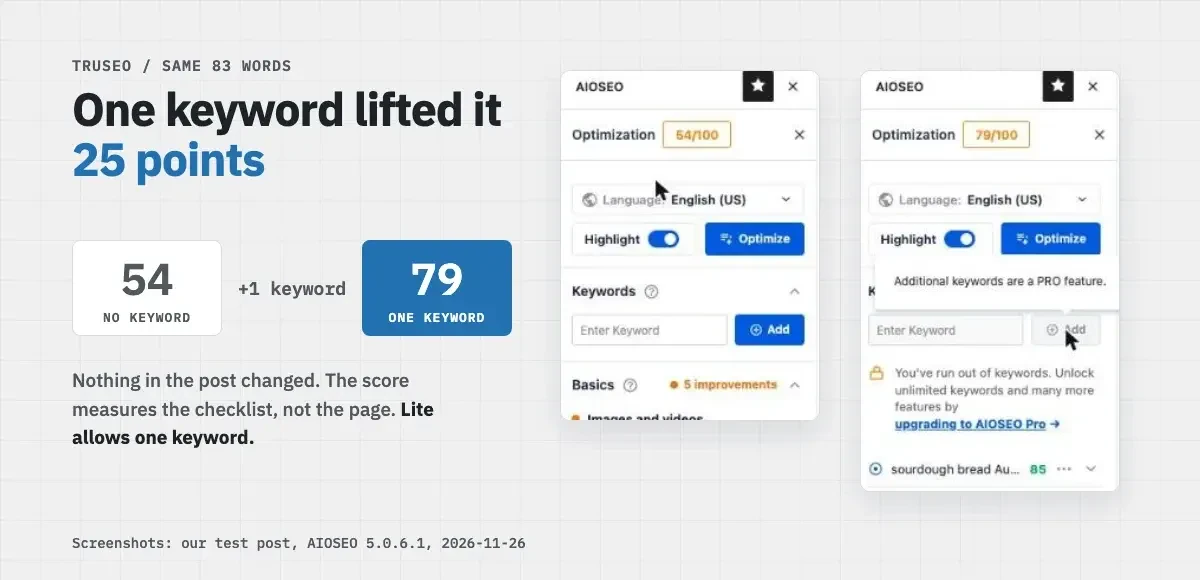 Screenshots from our test post, AIOSEO 5.0.6.1, November 26, 2026.
A score that moves 25 points without a single new word is measuring whether you filled in its checklist, not whether the page got any better for readers. Some of its checks are still useful: it told us the post had no images, no internal links, only 83 words and an over-long description. Fix those because readers notice. Then stop.
One keyword per post is plenty for most small sites.
The free plan also limits you to one keyword per post, so a page aimed at two related searches can only be scored against one of them. When we tried a second, a lock icon said "Additional keywords are a PRO feature."
AIOSEO pricing: the first year versus every year after
Now to what Pro costs, because the headline price is only for year one. The pricing page says, word for word, "Special introductory pricing, all renewals are at full price." It also says "Renewals are non-refundable," while new purchases get a 14-day refund.
| Plan (sites) | First year | Each renewal | Three years |
|---|---|---|---|
| Basic (1) | $49.50 | $99 | $247.50 |
| Plus (3) | $89.55 | $199 | $487.55 |
| Pro (10) | $159.60 | $399 | $957.60 |
| Elite (100) | $209.65 | $599 | $1,407.65 |
The jump at renewal is the real price.
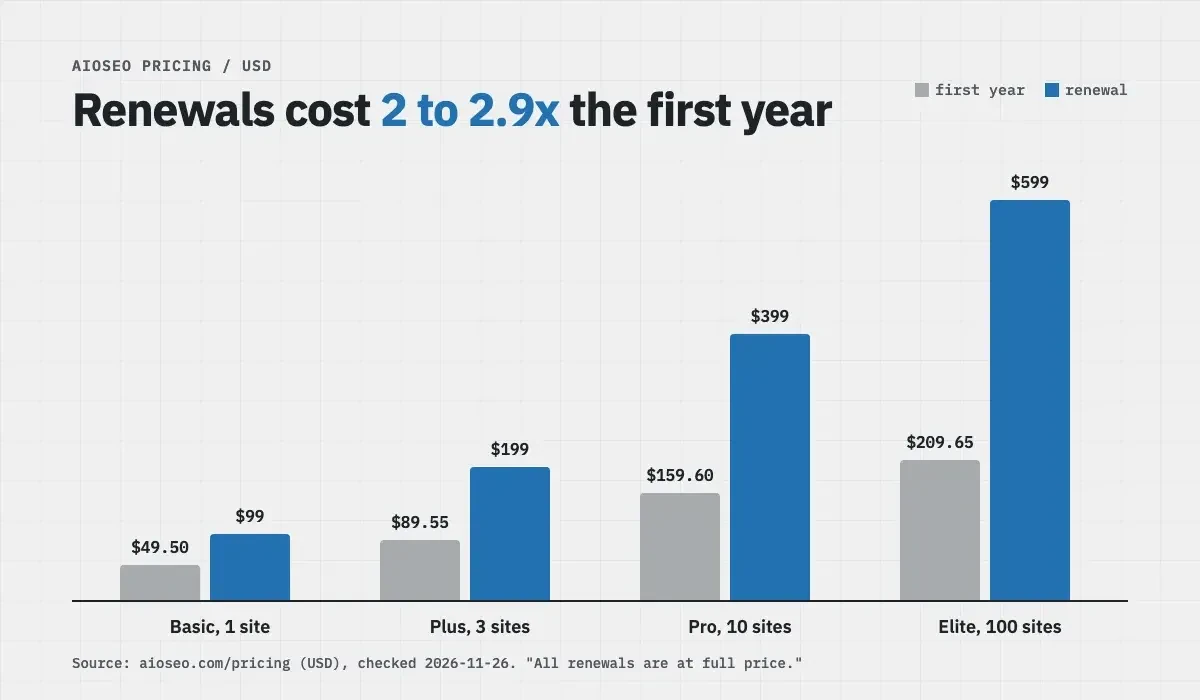 Drawn by us from aioseo.com/pricing in US dollars, as of November 26, 2026.
So at the November 2026 prices on the pricing page, Pro costs $957.60 over three years, not $159.60. Put the renewal date in your calendar with a reminder a few weeks ahead, and decide before it comes around. You can't get that money back afterward.
If you only bought Pro for one feature, ask yourself at renewal whether a free plugin now covers it. Many sites buy a plan for a launch, use one tool for a month and then pay full price for years. Cancelling auto-renew won't delete your settings in the free plugin, so dropping back to Lite is low risk. Before you cancel, export your settings under Tools, then Import/Export, so you have a copy. Then let the plan lapse on its renewal date instead of asking for money back afterward. We found the page showed local currency by default from India, so US readers should check the dollar price in their own browser.
Is AIOSEO safe to use?
It's as safe as you keep it, and you need to keep it updated. Patchstack's AIOSEO vulnerability list showed "29 patched" and "0 present" on November 26, 2026. The three newest were a stored cross-site scripting bug fixed in 5.0.5.1, a search-parameter information leak fixed in 5.0.4 and a cross-site scripting bug fixed in 5.0.2. WPScan lists the same fixes.
Twenty-nine patched issues may sound alarming, but a plugin on two million sites gets a lot of scrutiny. What matters is that fixes ship, and that you install them. Turn on automatic updates for this plugin, or check weekly. In WordPress, open Plugins, find All in One SEO and click Enable auto-updates. That's one click, and it's the single best thing you can do for this plugin's security.
One search we'd steer you away from is "all in one seo pro free download." Those are pirated, or nulled, copies. Sucuri's guide to the risks of nulled WordPress plugins lists hidden malware and backdoors first. The WordPress hardening handbook says: "Do not get plugins/themes from untrusted sources." If the free plugin isn't enough, pay for the real one or pick a free rival.
AIOSEO vs Yoast vs Rank Math
Those rivals are the two most people weigh it against, and you'll see why. All three cover titles, sitemaps and schema for free, so the choice really comes down to which dashboard you find easiest every day and what you'll pay later.
| Plugin | Active installs (WordPress.org) | Best for |
|---|---|---|
| AIOSEO | 2,000,000+ | A guided setup and one dashboard |
| Yoast SEO | 10,000,000+ | The most familiar, plain interface |
| Rank Math | 4,000,000+ | The most features in a free plugin |
If you're starting fresh, our Yoast vs Rank Math comparison covers the other two in depth, with setup guides for Yoast and Rank Math. Pick one plugin and stick with it. Running two SEO plugins at once writes duplicate titles, descriptions and schema into the same page, which is worse than running either one alone.
Be careful with reviews as well, because some top-ranking AIOSEO reviews come from sister companies, such as SeedProd's review, so check who wrote what you read, this one included. We don't have an affiliate link to any of these plugins.
Whichever plugin you pick, run your homepage through our free site checker afterward to confirm the tags are there. Prefer to have someone else set it up? Our SEO services cover WordPress plugin setup.
Frequently asked
Is AIOSEO free?
Yes. The free version on WordPress.org covers titles, descriptions, sitemaps and basic schema.
Does AIOSEO slow down my site?
Slightly in our uncached test, about 50 ms per page. Page caching on a real host hides most of that.
Can I run AIOSEO and Yoast together?
No. Running two SEO plugins writes two sets of titles, descriptions and schema into every page, which helps no one. Our AIOSEO guide covers switching.
How we made this guide: We tested the free plugin on our own local site and read the vendor and security pages. Facts checked by the DigitalTreed team on November 26, 2026.
Sources
- WordPress.org: All in One SEO plugin page
- AIOSEO: Pricing (USD, checked November 26, 2026)
- AIOSEO: Lite vs Pro
- AIOSEO docs: Setup wizard
- AIOSEO docs: What is TruSEO
- AIOSEO docs: XML sitemaps
- AIOSEO: Part of the Awesome Motive family (2020)
- Awesome Motive: About
- Patchstack: AIOSEO vulnerabilities
- WPScan: AIOSEO vulnerabilities
- Sucuri: The security risks of nulled WordPress plugins (2026)
- WordPress: Hardening handbook
- Google Search Central: Meta descriptions
- WordPress.org: Yoast SEO
- WordPress.org: Rank Math


Comments
No comments yet. Start the conversation below.