

What Rank Math is, who it's for, and when you don't need it
This guide is for people who run a WordPress site, or look after one for a client. Think of the owner of a Kanpur sweet shop with a WooCommerce store, the receptionist who updates a Delhi dental clinic's website, or the freelancer who builds sites for Pune coaching centres. You don't need to know any code. You do need admin access to WordPress.
By the end you'll be able to install Rank Math, get through its setup wizard without guessing, and keep only the modules your site needs. You'll set title templates, read the SEO score without being ruled by it, add schema and fix broken links with redirects. You'll also connect Search Console and decide whether PRO is worth paying for.
There are six chapters, about 37 minutes of reading in all. Chapter 1 explains what the plugin is and when you can skip it. Chapters 2 to 5 follow the order you'd set it up in, each with a task to do on your own site. Chapter 6 covers prices, switching from Yoast or All in One SEO, and the alternatives. Prices were checked on 16 October 2026, from Rank Math's own pricing page.
If you haven't decided between plugins yet, read this with our Yoast SEO guide, or go straight to Yoast vs Rank Math.
Quick answer
Rank Math is an SEO plugin for self-hosted WordPress sites. It controls titles, descriptions, robots tags, schema, sitemaps and redirects, and grades each post against a focus keyword. It's made by a Gurugram-based company and runs on 4 million+ sites. If your site isn't on WordPress, or already runs another SEO plugin well, you don't need it.
WordPress on its own doesn't let you write a separate search title for a page, add schema, or redirect an old address to a new one. An SEO plugin fills those gaps. Rank Math is one of the three big ones, next to Yoast SEO and All in One SEO.
What it does, in plain words
Once it's installed, every post and page gets a Rank Math panel in the editor. In that panel you type a focus keyword, the search phrase you want the page to be found for, and Rank Math runs a set of checks against it. The panel is also where you edit the title and description Google may show, pick a schema type, and set a page to noindex.
Behind the scenes, the plugin adds things to the whole site:
- Title and description templates, so pages you never touch still get a sensible title.
- An XML sitemap that updates itself when you publish.
- Schema markup (structured data) that describes the business, the site and each page to search engines.
- A redirect manager and a 404 monitor for broken addresses.
- Pings to search engines that support IndexNow when you publish or update a page.
- A dashboard of Search Console and Google Analytics numbers inside WordPress.
Rank Math's readme on WordPress.org says it is a "Module based system, enable only what you need".[1] That matters, and chapter 2 shows which modules to switch off.
Who makes it
Rank Math is an Indian product. Its About page gives its headquarters as Gurugram, India, and names three co-founders: Bhanu Ahluwalia, Nimit Kashyap and Suraj Vibhute.[2] Its terms name the company as ONE.COM INDIA PRIVATE LIMITED, with an office in DLF Cyber City, Gurgaon.[3] The site footer lists one.com, WP Rocket and Imagify among "Our Brands".[2] The plugin was first listed on WordPress.org on 19 November 2018.[1]
4M+
active installations on WordPress.org[1]
4.8/5
star rating from 7,514 reviews[1]
1.0.280
version on WordPress.org, updated 6 Oct 2026[1]
For comparison, Yoast SEO shows 10 million+ active installations[4] and All in One SEO 2 million+ on the same directory.[5] WordPress.org rounds these numbers down into bands, so treat them as rough sizes.
Who it's for
Rank Math fits best when:
- You run a self-hosted WordPress site (WordPress.org software on your own hosting), whether a blog, a business site or a WooCommerce store.
- You want schema, redirects and a 404 log without buying anything. These are in the free version.[1]
- You want Search Console numbers inside WordPress, which are free, and perhaps a basic rank tracker, which PRO adds.[6]
- You manage several sites of your own. One PRO plan covers unlimited personal websites, but not client sites.[6]
When you don't need it
Plenty of sites are better off without it. We'd skip Rank Math in these cases:
- Your site isn't on WordPress. Shopify, Wix and Squarespace have their own title, description and sitemap settings. Rank Math only runs on WordPress.
- You're on WordPress.com without a Business plan. Rank Math's pricing FAQ says WordPress.com sites need the Business plan to use it.[6]
- Your site already runs Yoast or All in One SEO and works. Our beginner guide gives the same advice: use whichever one your site already has, because switching on a live site is more trouble than it's worth (see on-page basics). Switch only if you need something the free Rank Math has and your current plugin charges for, such as redirects.
- Two SEO plugins at once. Never. They'd both print titles, canonicals and schema, and you'd get duplicates.
Tip
Before you install anything, see what your site already outputs. Paste your home page and one product or service page into our Meta Tag Analyzer. It shows the title, description, canonical and Open Graph tags, with a Google preview and a social preview. If they're already fine, a new plugin won't move rankings on its own.
What Rank Math can't do
A plugin writes tags. It doesn't research keywords for you (beyond suggestions), it doesn't build links, and it can't make a slow site fast. It also can't see your site the way an outside crawler does. For that, run a crawl now and then: our Free Website Audit checks up to 25 pages for SEO, speed, security and more, and gives a ranked list of fixes.
If you decided Rank Math is the one, chapter 2 installs it and walks through the setup wizard screen by screen.
Install Rank Math and run the setup wizard
Quick answer
Install the free plugin from Plugins, connect a free Rank Math account, and run the setup wizard in Advanced mode. It imports data from your old SEO plugin, sets your site type, logo and sitemap, then turns on 404 and redirect tools. Afterwards, switch off modules you won't use and check two link settings we'd change.
The wizard takes about ten minutes. Most of it is choosing from drop-downs, and you can run it again later, so nothing here is final.
Before you start
- Take a backup of the site, or ask your host to. You're about to change how every page's head is written.
- Check the plugin's minimums. WordPress.org lists WordPress 6.7 and PHP 7.4 as the lowest versions it needs.[1] Your host's control panel shows your PHP version.
- If another SEO plugin is active, leave it active for now. The wizard imports from it first, then you deactivate it.
Easy, Advanced or Custom mode
The first wizard screen asks you to pick a mode. Rank Math's setup guide describes three: Easy, Advanced and Custom, and Custom is for PRO users only.[7]
| Mode | What it does | Our pick |
|---|---|---|
| Easy | Fewer wizard steps and fewer settings on screen | Only if someone non-technical will be clicking around the settings |
| Advanced | Adds Role Manager, 404 + Redirections and Schema steps, and shows every setting afterwards | Yes, for almost everyone |
| Custom (PRO) | Loads a saved Rank Math settings file from another site | Agencies setting up many similar sites |
Why Advanced? Several things this guide uses are hidden in Easy mode. The 404 Monitor module,[8] the Database Tools[9] and the Import & Export page[10] all need Advanced mode, according to Rank Math's own help pages. You can switch modes at any time.[7]
The wizard, screen by screen
Install Rank Math and run the wizard for a Delhi dental clinic
- Install In WordPress, go to Plugins > Add Plugin[11], search for Rank Math SEO, click Install Now, then Activate.
- Connect your account Rank Math opens a page with a Connect Your Account button. Connecting is free, and the SEO Analyzer and the Google connection need it.[1] You can click Skip Now and connect later.[7]
- Pick Advanced mode Then read the compatibility check. If it lists a conflicting SEO plugin, leave it for one more step.
- Import The Import step shows data from Yoast SEO, All In One SEO, SEOPress, Redirection, Schema Pro or All In One Schema if any is installed.[7] Tick Recalculate SEO Scores, click Start Import, and wait for 100%. Chapter 6 covers switching in more detail.
- Your Site For the clinic, choose Small Business Site under "Your website is", then a business type. Fill in the website name, the clinic's name and a square logo of at least 112 x 112 pixels. Add a default social share image of 1200 x 630 pixels.[7]
- Analytics Click Connect Google Services and sign in with the Google account that owns the clinic's Search Console property. Chapter 5 explains what each permission is for. If you're not ready, skip it.
- Sitemap Leave Sitemaps and Include Images on. Untick post types and taxonomies with nothing worth finding, such as tags you never use.
- Optimization Turn on Noindex Empty Category and Tag Archives. For the two link options, read the next section before you choose.
- Ready, then Advanced Click Setup Advanced Options. Leave Role Manager off unless several people edit the site. Turn on both 404 Monitor and Redirections. On the Schema step, keep the defaults and click Save and Continue.[7]
- Deactivate the old plugin Only now, under Plugins, deactivate the previous SEO plugin. Then open the home page and one service page in a private window and check the title.
To run the wizard again later, go to Rank Math SEO > Dashboard > Setup Wizard.[7]
Two link settings we'd change
The Optimization step has two switches for external links. Rank Math's setup guide recommends turning on Nofollow External Links.[7] We don't, and here's why.
Google's guidance is to use nofollow "when other values don't apply, and you'd rather Google not associate your site with, or crawl the linked page from, your site."[12] When a Delhi dentist links to the Indian Dental Association or a government health page, that's a link they're happy to stand behind. Nofollowing every outbound link by default sends the opposite message. Leave it off, and mark paid or untrusted links one by one with sponsored, ugc or nofollow.
Open External Links in New Tab/Window is a user experience choice. It has nothing to do with rankings. The plugin's default turns it on.[13] We'd leave it as it is on most business sites.
Modules: keep only what you'll use
After the wizard, open Rank Math SEO > Dashboard > Modules. Each module is a switch. A fresh install turns on several of them, including Analytics, SEO Analyzer, Sitemap, Schema, Content AI, Instant Indexing and AI Visibility.[13] The wizard's advanced step is where you turn on 404 Monitor and Redirections.
Every module you leave on adds settings to learn and code to run. When I taught SEO, most of the local business sites my students worked on ran on WordPress with shared hosting, and site speed was the most common problem they hit. That's reason enough not to run features you don't use.
| Module | What it does | Keep it on? |
|---|---|---|
| Sitemap | Builds sitemap_index.xml | Yes |
| Schema (Structured Data) | Adds schema to pages | Yes |
| Redirections | 301, 302, 307, 410 and 451 rules | Yes |
| 404 Monitor | Logs addresses that return "not found" | Yes, in Simple mode |
| Instant Indexing | IndexNow pings to Bing and others | Yes |
| Analytics | Search Console data in WordPress; GA4 traffic needs PRO | If you'll look at it; Search Console itself is enough otherwise |
| Local SEO | Business address, hours, LocalBusiness schema | Yes for a shop, clinic or coaching centre |
| WooCommerce | Product schema and meta | Yes if you sell with WooCommerce |
| Image SEO | Adds image alt and title attributes automatically | Usually no (see chapter 3) |
| Link Counter | Counts internal and external links per post | Optional |
| SEO Analyzer | Site-wide check with 28+ tests | Optional; an outside audit sees more |
| Content AI, AI Visibility | AI writing tools and brand tracking in AI answers | Off until you've decided to use them (chapter 5) |
| LLMS Txt | Serves an llms.txt file | Optional; Google Search ignores it |
| News Sitemap, Video Sitemap, Podcast | PRO-only extras | Only for news sites, video libraries or podcasts |
The module names and descriptions are from the plugin's own module list.[14] For llms.txt, our GEO guide explains why it isn't a Google ranking lever: llms.txt, honestly.
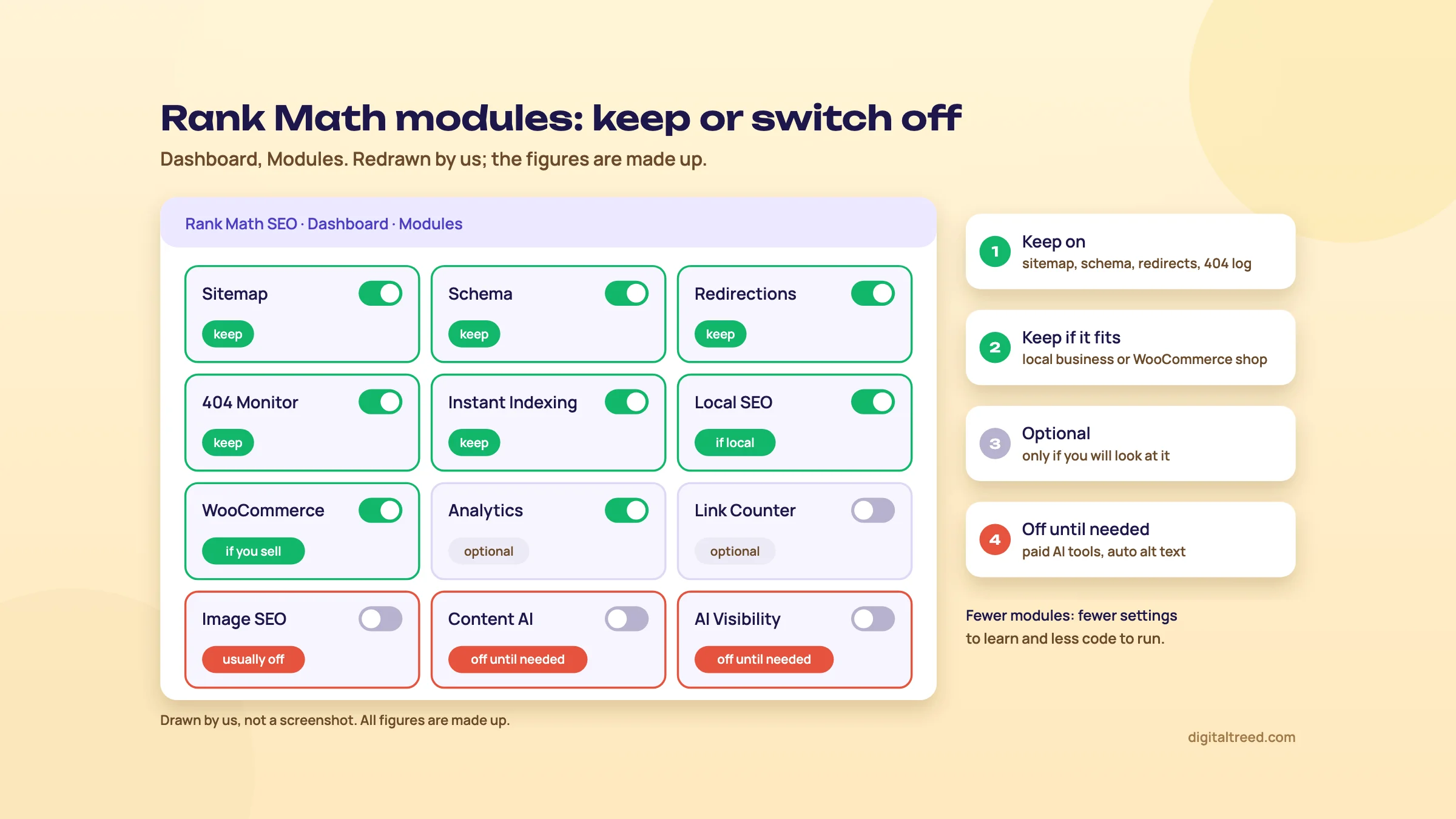 Which modules to keep on. Drawn by us; not a screenshot.
Three checks after setup
- Open yoursite.com/sitemap_index.xml. You should see a list of sitemaps, one per post type.
- Run your home page and two inner pages through our Noindex Tag Checker. It reads the meta robots tag, the X-Robots-Tag header and robots.txt, so you'll see at once if a setting has hidden a page from Google.
- Open WordPress Settings > Reading and make sure "Discourage search engines from indexing this site" is unticked. Rank Math's own indexing guide lists it among the things to check when pages aren't indexed.[15]
Now the plugin is running. Chapter 3 sets the title and description templates and shows how to read the SEO score.
Titles, meta templates and the SEO score
Quick answer
Rank Math writes every page's title and description from templates in Titles & Meta, and you override them per page with Edit Snippet. Set the templates once, then hand-write titles for pages that earn money. The SEO score only measures how well a page matches your focus keyword. Use it as a checklist; ignore the word-count, density and power-word targets.
This chapter covers the two places you'll spend most of your time: the site-wide templates and the panel in the post editor.
Title and description templates
Open Rank Math SEO > Titles & Meta. Its sections are Global Meta, Local SEO, Social Meta, Homepage, Authors and Misc Pages. Then there's one section for each post type and taxonomy, such as Posts, Pages, Products and Categories.[16] Templates set the defaults, and you can override any of them on a single post.[16]
Templates are built from variables, words wrapped in percent signs that Rank Math swaps for real values. On a fresh install, posts and pages use these:[13]
| Where | Default title | Default description |
|---|---|---|
| Posts, pages, products | %title% %sep% %sitename% | %excerpt% |
| Categories and tags | %term% %sep% %sitename% | %term_description% |
| Home page | %sitename% %page% %sep% %sitedesc% | empty |
So a page called "Kaju Katli 500g" on a site named "Agarwal Sweets Kanpur" gets the title "Kaju Katli 500g - Agarwal Sweets Kanpur". The separator is a hyphen by default, and you can change it under Global Meta.[13] To see every variable, click the drop-down arrow at the end of a template field.[16]
The defaults are fine for blog posts. Three changes are worth making on day one:
- Home page: replace the template with a written title and description. It's your most-seen result for brand searches.
- Products (WooCommerce): the default description is the excerpt, which on many stores is a thin or empty short description. Write descriptions by hand for your best sellers, naming the product, the delivery area and one reason to buy.
- Author and date archives: on a one-author site they repeat the blog. Rank Math's own guide says a single-author blog can turn author archives off (or noindex them if more authors may join), and that most sites should turn date archives off,[16] which a fresh install already does.[13]
Our beginner guide explains what makes a good title and description, and why Google sometimes rewrites them: on-page basics. The intermediate guide goes deeper: on-page in depth.
The panel in the editor
In the block editor, click the SEO score button at the top right to open Rank Math. In the classic editor, the Rank Math box sits below the content.[17] The General tab holds the snippet, the focus keyword and the checks. To write a custom title and description, click Edit Snippet.[17]
Write the title and description for a Kanpur sweet shop's product page
- Pick the focus keyword Type the phrase buyers use, such as "kaju katli online Kanpur", not just "kaju katli". The first keyword you add is the primary one; the free version takes up to 5 per post by default.[1]
- Open Edit Snippet In the General tab, click Edit Snippet. You'll see a preview with the title, URL and description.
- Write the title Put the keyword near the start: "Kaju Katli Online in Kanpur, 500g Box | Agarwal Sweets". Rank Math checks that the primary keyword sits in the first 50 characters. Its guide says that is about what Google shows on mobile.[17]
- Write the description One or two sentences on what's in the box, delivery areas and price. No keyword lists.
- Check the live page After you update, paste the URL into our Meta Tag Analyzer. Confirm the title and description in the HTML match what you wrote, and that the canonical points to the page itself.
Note
From our work: a women's wear manufacturer's online store. Its product pages targeted short, competitive keywords that big marketplaces own. We moved them to long-tail keywords, the longer phrases that match one product, and results started within a month. Choose the focus keyword for the page you have, not the one you wish you ranked for.
What the SEO score measures
The score, out of 100, appears on the editor button and in the posts list. Rank Math colours it green above 80, yellow from 51 to 80 and red below 50.[17] It's built from tests in four groups: Basic SEO, Additional SEO, Title Readability and Content Readability.[17] Every test is about the focus keyword you typed. No focus keyword, or a page set to noindex, and the score shows N/A.[9]
That's the key point. The score doesn't see your competitors, your links, your speed or whether the page answers the search. Rank Math says so itself: its guide calls the tests "a framework or guide, not as absolute answers", and says even a post with a lower score can rank well.[17]
Which tests to follow and which to ignore
Do not
- Padding a page to 2,500 words. Rank Math's content length test only gives full marks above 2,500 words, and 0% below 600 (product pages are excluded).[17] Google asks: "Are you writing to a particular word count because you've heard or read that Google has a preferred word count? (No, we don't.)"[18]
- Chasing a keyword density of 1 to 1.5%, the range Rank Math gives full marks for.[17] Google's spam policies define keyword stuffing as filling a page with keywords in an attempt to manipulate rankings.[19]
- Adding a "power word" or a number to every title because a test asks for one.[17] "Best" and "Top 10" don't suit a dental clinic's root canal page.
- Adding secondary keywords just to turn them green.
Do
- Keyword in the SEO title, near the start.
- Keyword in the URL, kept short.
- Keyword, or a close version, in the meta description and early in the content.
- Descriptive alt text on the main image.
- Links to related pages on your site, and to a good outside source where it helps the reader.
- Short paragraphs, so people on phones can read the page.
A page at 65 that answers the question beats a page at 95 that repeats the keyword 30 times. We'd be happy with yellow on most pages if the basics on the right are green.
To check the words on a page from outside WordPress, use our Word Counter and Keyword Density Checker. It counts words and shows how often your target phrases appear, which helps you spot a page that repeats itself.
Automatic alt text: leave it off
The Image SEO module can add alt text to images automatically. Its default pattern is the image's file name.[13] So "IMG_2041.jpg" becomes alt text that tells nobody anything. Google asks for alt text that is "useful, information-rich" and in context, and warns against stuffing it with keywords.[20] Write alt text by hand for images that matter, and leave the automatic option off.
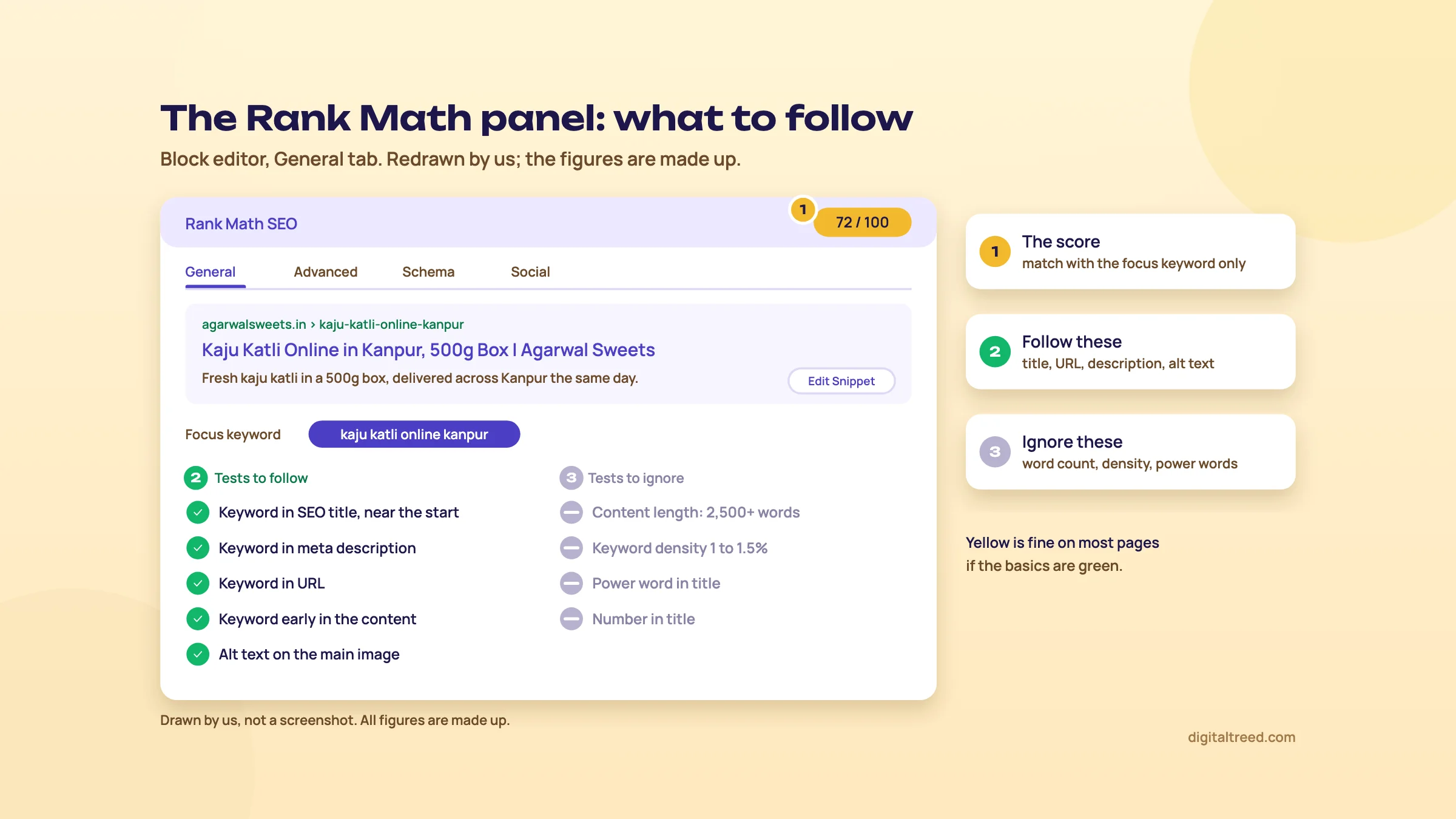 Follow the basic tests, ignore word count and density targets. Drawn by us; not a screenshot.
With titles in place, chapter 4 adds the parts search engines read but visitors don't see: schema, sitemaps and redirects.
Schema, local SEO, WooCommerce, sitemaps, redirects and the 404 monitor
Quick answer
Rank Math adds schema from defaults you set per post type, and the Schema Generator lets you change it per page. Local SEO adds your address and hours as LocalBusiness markup, and WooCommerce products get Product schema. The sitemap builds itself. Redirections and the 404 Monitor catch broken addresses, so you can send them to the right page.
None of this shows on the page itself. It's the part of SEO that search engines read in the code, and it's where a free plugin saves you the most work.
Schema: defaults first, then per page
Schema is structured data: code that tells search engines what a page is about, such as an article, a product or a local business. Our intermediate guide explains what it does and doesn't do for rankings: structured data basics.
Rank Math works in two layers. First, each post type gets a default schema type under Rank Math SEO > Titles & Meta, such as Article for posts.[21] Then, in the editor, the Schema tab opens the Schema Generator, where you can switch one page to another type and fill in its fields.[21] Rank Math's schema types include Article, Book, Course, Event, Job Posting, Person, Product, Recipe, Restaurant, Service, Video and Local Business.[1] PRO adds an advanced schema builder, schema templates and import of schema from other websites;[1] in the free version, the Custom Schema tab is visible but asks you to upgrade.[21]
Warning
Rank Math still offers FAQ and HowTo schema, through its editor blocks and, in PRO, the Schema Generator.[21] Google stopped showing FAQ rich results on 7 May 2026,[22] and dropped HowTo rich results in 2023.[23] The markup is still valid and harmless, but don't add it expecting extra space in Google's results.
Rank Math's guide also points out that not every page needs schema.[21] A contact page or a privacy policy is fine without its own type; the site-wide Organization or Person markup from the wizard still applies.
After changing schema, test one URL. Google's Rich Results Test shows which rich results a page qualifies for. Our Schema Markup Validator checks JSON-LD from a URL or pasted code for syntax errors, missing @context or @type, and required fields for 18 common types.
Local SEO for a shop, clinic or coaching centre
Turn on the Local SEO module, then open Rank Math SEO > Titles & Meta > Local SEO.[24] Its fields include business type, address, opening hours, phone number, price range, geo coordinates, and your About and Contact pages.[24] Rank Math turns these into LocalBusiness schema and gives you a contact info shortcode to show the same details on the page.[24] One location is free; multiple locations need PRO.[25]
Add local business details for a Pune coaching centre
- Start with Business Profile Rank Math recommends having a verified Google Business Profile before you fill these settings.[24] Copy the name, address and phone exactly as they appear there. Our Google Business Profile guide covers setting one up.
- Turn on the module Rank Math SEO > Dashboard > Modules > Local SEO.
- Choose Company Under Person or Company, pick Company, then the closest business type from the list. If nothing fits, Rank Math's guide says to choose Organization.[7]
- Fill the details Address with PIN code, phone with +91, opening hours for each day, and the About and Contact pages.
- Show it on the page Add the contact info shortcode to the Contact page footer, so visitors see the same address that the schema says.
- Test Run the home page through the Rich Results Test or our Schema Markup Validator and check that the LocalBusiness block shows the right address.
WooCommerce stores
With WooCommerce active, Rank Math's WooCommerce module adds Product schema and meta tags to product pages automatically.[1] Its settings live under Rank Math SEO > General Settings > WooCommerce.[26] At the time of writing, PRO adds a GTIN field and content tests written for product pages.[26] The plugin's readme also lists GTIN and MPN for variations, custom brands and automatic noindex for hidden products among the PRO WooCommerce features.[1]
For a D2C brand on WooCommerce, we'd start with the free version. Pay for PRO when you need product identifiers in the schema, or when you run a large catalogue with variations.
The XML sitemap
Your sitemap index lives at yoursite.com/sitemap_index.xml, with one sitemap per post type and taxonomy. Settings are under Rank Math SEO > Sitemap Settings.[27] Three settings matter:
- Links Per Sitemap: 200 by default. Rank Math lowered it from 1,000 and says Google responds better to smaller sitemaps.[27] Google's own limit is 50,000 URLs or 50MB per sitemap file,[28] so 200 is Rank Math's own preference, not a Google rule.
- Exclude Posts: type post IDs, comma-separated, for pages that shouldn't be listed, such as a thank-you page.[27]
- Post types and taxonomies: include only the ones with pages worth finding. Untick tags you never use and theme leftovers like portfolio types.
If you connected Google in the wizard, Rank Math says it submits the sitemap to Search Console for you.[7] Check under Sitemaps in Search Console anyway. Our beginner guide covers sitemaps in general: your first site setup.
Redirections
A redirect sends anyone who opens an old address to a new one. Open Rank Math SEO > Redirections and click Add New.[29] You can choose these types:
| Type | Use it when |
|---|---|
| 301 | The page has moved for good. Google shows the new address in results.[30] |
| 302 or 307 | The move is short-term, such as a seasonal offer page |
| 410 | The page is gone and nothing replaces it[29] |
| 451 | You must restrict the page for legal reasons |
The module also supports regex rules and a debugger, and PRO adds categories for keeping redirects organised. It won't let you redirect the home page.[29] Syncing redirects to the .htaccess file is a PRO feature.[29] One setting to switch on: Auto Post Redirect, under Rank Math SEO > General Settings > Redirections, which creates a 301 every time you change a page's slug.[31]
The 404 Monitor
A 404 is the "page not found" response. Rank Math's 404 Monitor logs each address that returned one. In Simple mode, each log row shows the address (URI), the number of hits and the last access time.[8] Advanced mode adds the referring page and the user agent, which tells you where the broken link is and whether a person or a bot hit it.[8] Rank Math suggests Advanced only while you investigate, because it fills the log fast.[8] Change the mode under Rank Math SEO > General Settings > 404 Monitor.
Fix the top 404s after a course page is removed
- Sort by hits Open Rank Math SEO > 404 Monitor and sort by Hits. Start with the top ten.
- Ignore the noise Bots probe addresses like /wp-login.php.bak or random strings. Those don't need redirects.
- Match each real address to its closest page The old /neet-crash-course-2025/ should go to /neet-crash-course-2026/, not the home page.
- Add the redirect In Rank Math SEO > Redirections, click Add New, paste the old address as the source and the new page as the destination, and choose 301. Use 410 if the course is gone for good and nothing replaces it.
- Fix the link at the source If Advanced mode shows a referring page on your own site, edit that link too.
- Test Paste the old addresses into our HTTP Status Checker. It checks up to 10 URLs at once and shows every redirect hop, so you'll spot chains like 301 to 301 to 200.
We'd resist one common shortcut: redirecting every 404 to the home page. A visitor who wanted a NEET course lands on a page that doesn't mention it. Send each address to its closest match, or let it return 404 or 410. Our advanced guide explains how Google handles status codes and redirects: indexing controls.
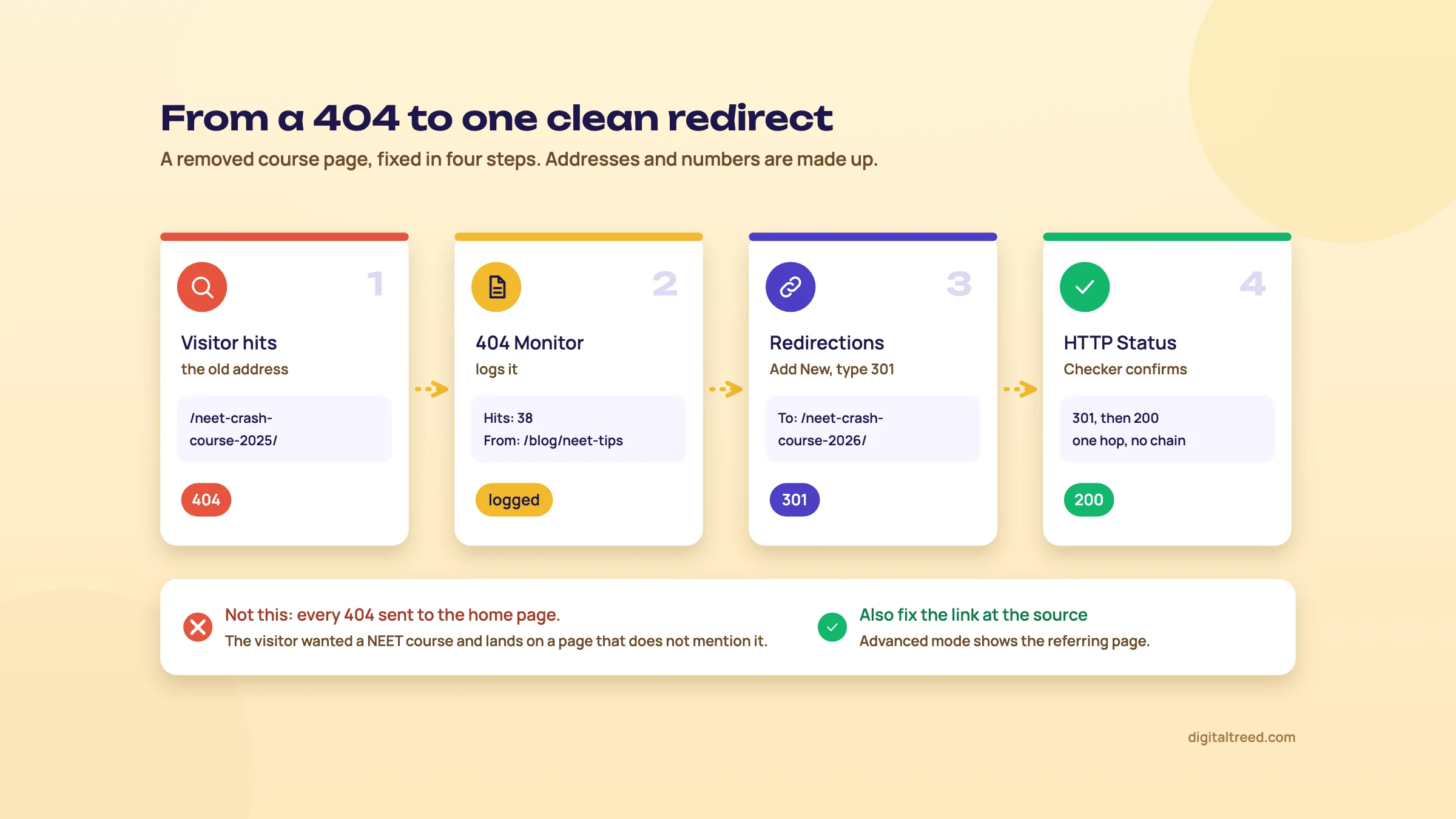 Send each 404 to its closest page, not to the home page. Addresses and numbers are made up.
Chapter 5 covers the modules that talk to search engines and to Google's data: Instant Indexing, Analytics and Content AI.
Instant Indexing, Analytics and Content AI
Quick answer
Instant Indexing sends IndexNow pings to Bing, Yandex and other engines, but not to Google. Google's Indexing API is only for job posting and livestream pages, so don't use it for normal posts. The Analytics module shows Search Console data inside WordPress, and GA4 traffic on PRO. Content AI is a paid add-on with monthly limits per feature, plus a small free allowance.
These three modules connect your site to outside services. They're the ones where the marketing promises most, so this chapter is about what each one actually does.
Instant Indexing is IndexNow
IndexNow is an open protocol: your site tells participating search engines that a URL was added, updated or deleted, so they can crawl it sooner.[32] The engines listed on IndexNow.org today are Bing, Yandex, Seznam, Naver and Yep, plus the Internet Archive and Amazonbot.[33] Google isn't one of them.
In Rank Math, IndexNow is free. Turn on the Instant Indexing module, then open Rank Math SEO > Instant Indexing > Settings, choose the post types to submit, and save. Rank Math creates the API key and hosts it on your site for you.[34] From then on, it pings IndexNow whenever you publish or update a post of those types, and skips URLs set to noindex.[34]
You can also submit by hand. Paste URLs, one per line, in the Submit URLs tab, or use the "Instant Indexing: Submit Page" link and bulk action in the posts list. The History tab shows each submission and its response code, which should be 200.[34]
We'd turn it on for every site. It costs nothing, and Bing matters more than its search share suggests: Microsoft says Copilot Chat turns your prompt into a short Bing query when it searches the web.[35] Our Bing Webmaster Tools and IndexNow guide shows how to check that Bing received your URLs.
Google's Indexing API: what it is officially for
You'll see "instant indexing for Google" advertised. Here's what Google says. Its Indexing API documentation states: "The Indexing API can only be used to crawl pages with either JobPosting or BroadcastEvent embedded in a VideoObject."[36] In other words, job listings and livestream videos. The default quota is 200 publish requests a day per project.[37] All submissions go through spam detection, Google adds, and attempts to abuse the API "may result in access being revoked."[36]
Rank Math makes a separate plugin, Instant Indexing for Google, that uses this API. Its own page says Google recommends the API only for job posting and live streaming websites. Then it adds that "it works on any type of website" and asks users to "proceed with caution."[38]
Warning
Our advice: unless your pages are job postings or livestreams, don't use the Google Indexing API. Using it for blog posts or product pages goes against Google's documented use. For a new or updated page, use URL Inspection and Request Indexing in Search Console, keep the sitemap accurate, and link to the page from pages Google already crawls. Our Search Console guide covers this.
The Analytics module
The Analytics module pulls your Search Console and Google Analytics data through Google's APIs and shows it under Rank Math SEO > Analytics.[6] You connect it under Rank Math SEO > General Settings > Analytics, or in the wizard.[39]
Connect Search Console to Rank Math
- Check your Google account Use the Google account that already owns the site's Search Console property. If there isn't one, Rank Math can verify the site for you, which is why it asks to manage your list of sites.[7]
- Open the settings Rank Math SEO > General Settings > Analytics, then click Connect Google Services.
- Read the permissions Rank Math asks to create and edit Analytics properties, see Analytics data, view AdSense data, view and manage Search Console data, and manage your list of sites.[7] You can untick the ones you don't need, such as AdSense, and lose only those features.
- Pick the property Choose the site in the Search Console drop-down and turn on the Index Status tab.[7] Choose your GA4 property if you have one. If GA4 is already installed by another plugin or tag, don't let Rank Math add the code a second time.
- Wait, then look Data takes a while to arrive. Open Rank Math SEO > Analytics after a day and compare clicks with Search Console's own Performance report.
What you get: an overview of search traffic, impressions, clicks, keywords and average position, for the last 30 days by default. There's also an Index Status tab that reads Google's URL Inspection API for each post.[39] PRO adds a per-post table with SEO score and traffic, the Rank Tracker, top winning and losing keywords and posts, and a filter for traffic from AI platforms.[39]
Two limits to know. The free version refreshes data less often: Rank Math's Analytics guide says every 3 days, with daily updates in PRO.[39] Its comparison page keeps Google data for 90 days on free and 180 days on PRO,[25] and the pricing page shows no limit on Business and Agency.[6] Search Console itself keeps 16 months,[40] so it stays the place for year-on-year comparisons. Our intermediate guide shows how to read it: measuring SEO.
Also, Rank Math's "average position" is the same Search Console average, not a live rank check. If Google retires those APIs, Rank Math notes that its Analytics and Rank Tracker stop working.[6]
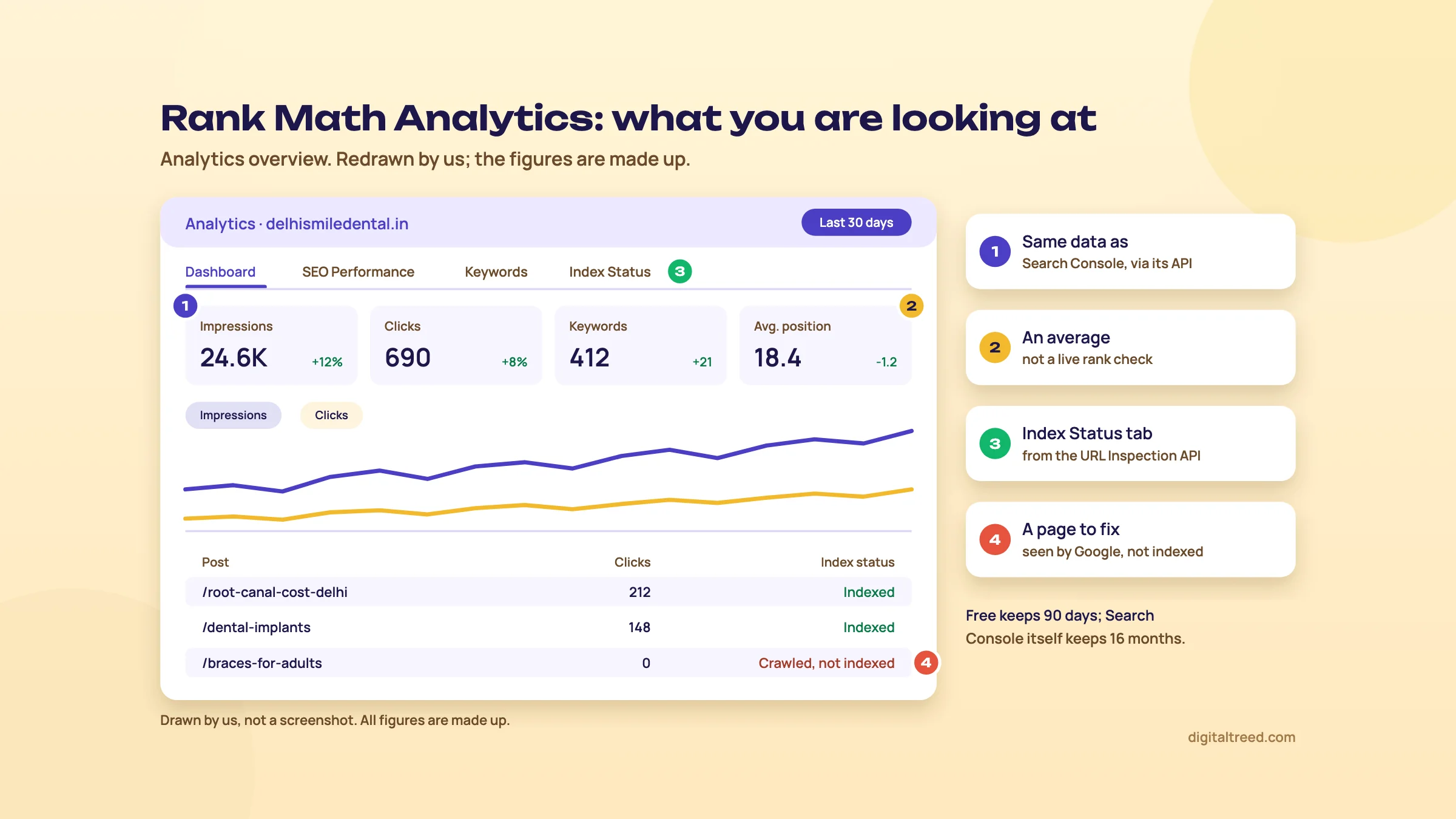 The same Search Console data, inside WordPress. Drawn by us; not a screenshot.
Content AI and its usage limits
Rank Math AI is the paid AI side of the plugin. It has three parts. Content AI is 40+ writing and SEO tools inside the editor, AI Link Genius suggests internal links, and AI Visibility tracks how ChatGPT and Gemini mention your brand.[41] You don't need PRO to buy it, but it only runs inside the Rank Math plugin.[42]
It used to run on credits. Starter plans had 5,000 credits a month, and free users got 750, with one credit roughly one word written.[43] From Rank Math SEO 1.0.269 and PRO 3.0.112, credits were replaced by a monthly allowance for each feature.[43] Each tool now has its own count, and using one doesn't eat into another.
Free plugin users get a small monthly allowance, "typically between one to 5 uses per available feature", and some tools have no free use at all.[41] The paid plans give these monthly allowances:
| Monthly uses | Starter | Creator | Expert |
|---|---|---|---|
| SEO meta (titles, descriptions) | 100 | 500 | Unlimited |
| Long-form articles | 15 | 60 | Unlimited |
| Keyword research | 10 | 30 | 100 |
| Image alt text | 50 | 100 | 500 |
| Fix SEO tests with AI | 500 | 1,000 | Unlimited |
| Brands tracked in AI Visibility | 1 | 10 | 50 |
Figures are from Rank Math's AI plans guide[41] and AI pricing page, where "unlimited" is subject to a fair usage policy.[42] Allowances reset every month and unused uses don't roll over.[41] PRO, Business and Agency buyers get a 15-day trial of Starter, Creator and Expert respectively.[41] Prices are in chapter 6.
Is it worth it? For bulk jobs, such as drafting meta descriptions for 300 products, it can save hours. For writing whole articles, we're less keen. Google's guidance says "It is critical to manually factcheck and review all AI-generated content for accuracy and trustworthiness before publishing", including titles, meta descriptions, structured data and alt text.[44] A 15-article Starter allowance doesn't remove that work. Our intermediate guide covers how to use AI in writing without hurting quality: E-E-A-T and AI-assisted writing.
If you only want to see whether AI tools mention your brand, a free prompt log in a spreadsheet does the basic job first. Our GEO guide explains it: measuring AI visibility.
Chapter 6 puts the prices side by side and helps you decide whether to pay at all.
Free vs PRO, pricing, switching from Yoast, and alternatives
Quick answer
The free plugin is enough for most small business sites. PRO costs €7.99 a month billed yearly in the first year (about ₹10,350 a year), for unlimited sites you own. Business and Agency are for client sites. Switching from Yoast or All in One SEO takes one import. If you already run Yoast happily, stay.
What the free version already does
Everything in chapters 2 to 4 works without paying: the wizard in Easy or Advanced mode, title and description templates, up to 5 focus keywords per post, the SEO score, schema with default types, single-location Local SEO, WooCommerce product schema, the XML sitemap, redirects, the 404 Monitor and IndexNow.[1] Search Console data inside WordPress is free too, refreshed less often.[39]
For a Kanpur sweet shop or a Delhi clinic with 20 to 50 pages, we don't think you need PRO. The free plugin plus Search Console covers the job. Spend the money on photos, a faster host or better pages instead.
What PRO adds that's worth paying for
- Rank Tracker for 500 keywords, using Search Console data, with position history.[6]
- More schema: a schema builder, templates and import of schema from other sites.[1]
- Local SEO with multiple locations, for a chain of clinics or coaching branches.[25]
- News and Video sitemaps, for news sites and video libraries.[7]
- WooCommerce extras such as GTIN and MPN, including on variations.[1]
- Daily Analytics updates and longer data history.[25]
Rank Math prices, checked 16 October 2026
Rank Math's pricing page showed prices in euros to us in India, before taxes, with no rupee option. So the table gives the euro prices from the page and "about ₹" at ₹108 = €1, the X-Rates average for 1 to 16 October 2026.[45] All plans are billed yearly; the lower price is for the first year, and the plan then renews at the full price every year.[6]
| Plan | First year | Renewal, per year | Sites | Keywords tracked | AI trial (15 days) |
|---|---|---|---|---|---|
| Free | ₹0 | ₹0 | Any | None | Small monthly allowance |
| PRO | €7.99/mo, €95.88 (about ₹10,350) | €107.88 (about ₹11,650) | Unlimited personal sites, no client sites | 500 | Starter |
| Business | €24.99/mo, €299.88 (about ₹32,400) | €335.88 (about ₹36,300) | 100 client websites | 10,000 | Creator |
| Agency | €54.99/mo, €659.88 (about ₹71,300) | €779.88 (about ₹84,200) | 500 client websites | 50,000 | Expert |
Prices from Rank Math's pricing page and its FAQ.[6] The page marks every price "ex VAT" and "+ taxes", so expect tax on top at checkout. It also sells a Rank Math plus WP Rocket bundle at €11.99 a month in the first year.[6]
Rank Math AI is priced separately:[42]
| Rank Math AI plan | First year | Renewal, per year |
|---|---|---|
| Starter | €5.99/mo, €71.88 (about ₹7,750) | €83.88 (about ₹9,050) |
| Creator | €10.99/mo, €131.88 (about ₹14,250) | €143.88 (about ₹15,550) |
| Expert | €16.99/mo, €203.88 (about ₹22,000) | €227.88 (about ₹24,600) |
A few terms from the pricing FAQ worth knowing before you pay:[6]
- There's a 30-day refund on new purchases, but not on renewals. Rank Math emails you seven days before a renewal.
- "Personal websites" means sites you own 100%. A client's site, or one you co-own with a partner, needs Business or Agency.
- Sharing a licence or group buying gets the sites blocked.
- Payment is by PayPal, cards or Amazon Pay. Rank Math uses FastSpring for local payment options.
- Keyword tracking stops at the plan limit, counted across all your connected sites.
Switching from Yoast or All in One SEO
Rank Math imports from Yoast SEO, All In One SEO, SEOPress, the Redirection plugin, Schema Pro and All In One Schema.[7] It brings over SEO titles, descriptions and focus keywords; scores show N/A until they're recalculated.[9] If you skipped the import in the wizard, it's under Rank Math SEO > Status & Tools > Import & Export > Other Plugins,[7] in Advanced mode.[10]
Move a Delhi dental clinic's site from Yoast to Rank Math
- Back up Take a full backup, or do this on a staging copy first.
- Record the "before" Run your 10 most important URLs through our Meta Tag Analyzer and save the titles, descriptions and canonicals.
- Install Rank Math with Yoast still active Run the wizard in Advanced mode. On the Import step, tick Recalculate SEO Scores and click Start Import.[9]
- Deactivate Yoast Only after the import shows 100%.
- Compare Run the same 10 URLs through the Meta Tag Analyzer again. Titles, descriptions and canonicals should match your "before" list.
- Check schema and sitemap Validate the home page and one service page with our Schema Markup Validator, and open /sitemap_index.xml. Submit it in Search Console if the address changed.
- Watch for two weeks Check Search Console's Pages report and Rank Math's 404 Monitor for anything that broke.
Our Yoast vs Rank Math guide compares the two feature by feature, and covers moving in the other direction too.
Pros and cons
Pros
- Redirects, a 404 log, several focus keywords and IndexNow are free; in Yoast, redirects are a Premium feature.[46]
- One PRO plan covers every site you own.
- Modules switch off cleanly, so you run only what you use.
- The wizard sets sensible defaults in about ten minutes and imports from the other big plugins.
- Search Console and index status inside WordPress, for people who won't open Search Console.
- 30-day refund on new purchases.
Cons
- Many settings, and PRO and AI add-ons advertised inside the plugin.
- The score rewards 2,500-word posts and a set keyword density, which can push beginners the wrong way.
- Prices showed in euros to us in India, with tax added; no rupee price.
- Its separate Google instant indexing plugin invites use of an API Google limits to jobs and livestreams.
- Some help pages date from 2023, so menu names can differ from what you see.
- Free Analytics keeps 90 days of data and updates less often than PRO.
Alternatives, and which one when
Start with what's free and checks the output. A plugin writes tags; our tools show what's actually on the page. Our Meta Tag Analyzer shows the title, description, canonical and Open Graph tags with a Google and social preview. The Schema Markup Validator checks the JSON-LD. The HTTP Status Checker follows redirects hop by hop. The Free Website Audit crawls up to 25 pages and ranks the fixes. Use them with any plugin.
For the plugin itself, the two main alternatives are Yoast SEO and All in One SEO. Yoast Premium is $118.80 a year for one site, before VAT (about ₹11,400 at ₹96 = US$1).[46] All in One SEO showed us rupee prices: Basic, for one site, is ₹250 a month billed yearly (₹3,000) in the first year, then renews at full price, ₹500 a month (₹6,000 a year). Its FAQ gives the US price as $49.50, renewing at $99.[47] So each plugin showed us a different currency: Yoast US dollars, Rank Math euros and All in One SEO rupees.
| Your situation | Pick | Why |
|---|---|---|
| New WordPress site for a shop, clinic or coaching centre | Rank Math free | Schema, local details, redirects and 404 log at no cost |
| Site already runs Yoast and works | Stay on Yoast (guide) | Switching gains little; our beginner guide says the same |
| Large editorial team that wants the most widely used plugin | Yoast | 10 million+ active installs, so most writers and developers already know it |
| You own several WordPress sites and want rank tracking inside them | Rank Math PRO | Unlimited personal sites, 500 tracked keywords |
| Freelancer or agency with client sites | Rank Math Business, or AIOSEO (guide) | Licences that allow client sites |
| Site not on WordPress | Your platform's own SEO settings | None of these plugins run there |
| You need serious keyword or backlink research | A suite like Semrush or Ahrefs | No WordPress plugin does this well |
If you'd rather someone else set this up and keep it right, our SEO service does it for WordPress sites, and our web development team handles the speed side. For a price, use get a quote.
Next, test yourself with the quiz below, then open Rank Math on your own site and do the chapter 2 setup.
Test yourself
Ten questions on the whole guide. Pick an answer, check it, and see your score at the end.
You got 0 of 10 right.
Frequently asked questions
Frequently asked
Is Rank Math free?
Yes. The free plugin on WordPress.org includes titles and descriptions, schema, an XML sitemap, redirects, a 404 monitor, IndexNow and up to five focus keywords per post. PRO, Business and Agency are paid yearly plans that add rank tracking, more schema options, multiple locations and client-site licences. Rank Math AI is a separate paid add-on.
How much does Rank Math PRO cost in India?
On 16 October 2026 Rank Math's pricing page showed us euro prices, not rupees. PRO was €7.99 a month billed yearly for the first year (€95.88, about ₹10,350). It renews at €107.88 a year (about ₹11,650), plus taxes. Rupee figures use ₹108 = €1. Prices change often, so check the page before you buy.
Is Rank Math an Indian company?
Yes. Its About page gives its headquarters as Gurugram, India, and lists Bhanu Ahluwalia, Nimit Kashyap and Suraj Vibhute as co-founders. Its terms name ONE.COM INDIA PRIVATE LIMITED, with an office in Gurgaon, as the company.
Is Rank Math better than Yoast?
For a new site on a tight budget, Rank Math's free version does more: redirects and a 404 log are free, while Yoast puts redirects in Premium. Yoast has more installs and suits teams that want the most widely used option. If your site already runs one of them well, keep it. Our Yoast vs Rank Math guide compares them in detail.
Can I use Rank Math and Yoast together?
No. Two SEO plugins will both print titles, canonicals and schema, and you'll get duplicates. Keep Yoast active only long enough for Rank Math's import to finish, then deactivate it.
Does a green Rank Math score mean my page will rank?
No. The score only checks how well a page matches the focus keyword you typed. It doesn't see competitors, links, speed or whether the page answers the search. Rank Math itself says a lower-scoring post can still rank. Follow the basic tests and ignore the 2,500-word and keyword density targets.
Does Rank Math's Instant Indexing work with Google?
The Instant Indexing module uses IndexNow, which Google doesn't support; Bing, Yandex, Seznam, Naver and Yep do. Google's separate Indexing API is officially only for pages with job postings or livestream videos. For other pages, use URL Inspection in Search Console and keep your sitemap accurate.
Does Rank Math slow down my site?
Every plugin adds some code, and Rank Math lets you switch off any module you don't use under Rank Math SEO, Dashboard, Modules. On cheap shared hosting, we'd keep only the modules you need. Hosting, images and the theme usually matter far more for speed than an SEO plugin.
What are Content AI credits now?
Credits are gone. From Rank Math SEO 1.0.269 and PRO 3.0.112, Content AI moved to a monthly allowance for each feature. On the Starter plan, for example, that's 100 SEO meta uses and 15 long-form articles a month. Allowances reset monthly and don't roll over. Free users typically get one to five uses per feature, and some tools none.
Can I use Rank Math PRO on client websites?
No. PRO covers unlimited sites you own 100%. Client sites, or sites you co-own with a partner, need Business (100 client websites) or Agency (500). Rank Math says shared licences get blocked.
Sources
References
- Rank Math SEO plugin page and readme (installs, rating, version, date added), WordPress.org, read via the plugins API, accessed 16 Oct 2026
- Know more about the team behind the Rank Math plugin, Rank Math, updated 7 Oct 2026, accessed 16 Oct 2026
- Terms and conditions (owner and company details), Rank Math, accessed 16 Oct 2026
- Yoast SEO plugin page, WordPress.org, accessed 16 Oct 2026
- All in One SEO plugin page, WordPress.org, accessed 16 Oct 2026
- Rank Math SEO plugin pricing (plans and FAQ), Rank Math, prices seen 16 Oct 2026, accessed 16 Oct 2026
- How to setup Rank Math SEO plugin properly, Rank Math Knowledge Base, updated 25 Aug 2026, accessed 16 Oct 2026
- How to monitor 404 errors with Rank Math, Rank Math Knowledge Base, updated 12 May 2025, accessed 16 Oct 2026
- How to update SEO score when N/A is showing, Rank Math Knowledge Base, updated 23 Nov 2024, accessed 16 Oct 2026
- How to Import and Export Settings in Rank Math, Rank Math Knowledge Base, updated 16 Mar 2023, accessed 16 Oct 2026
- WordPress core source, wp-admin/menu.php (Plugins submenu label "Add Plugin", WordPress 6.8 and later), WordPress/wordpress-develop on GitHub, accessed 16 Oct 2026
- Qualify your outbound links to Google, Google Search Central, updated 10 Dec 2025, accessed 16 Oct 2026
- Rank Math plugin source: class-installer.php (default settings and modules on install), Rank Math on GitHub, accessed 16 Oct 2026
- Rank Math plugin source: module manager (module names and descriptions), Rank Math on GitHub, accessed 16 Oct 2026
- Why Google hasn't indexed your post, page, and/or website, Rank Math Knowledge Base, updated 10 Jul 2025, accessed 16 Oct 2026
- Rank Math 'Titles and Meta' options and settings, Rank Math Knowledge Base, updated 30 Dec 2025, accessed 16 Oct 2026
- Score 100/100 with Rank Math post tests, Rank Math Knowledge Base, updated 24 Nov 2025, accessed 16 Oct 2026
- Creating helpful, reliable, people-first content, Google Search Central, updated 5 Oct 2026, accessed 16 Oct 2026
- Spam policies for Google web search, Google Search Central, updated 28 Aug 2026, accessed 16 Oct 2026
- Image SEO best practices, Google Search Central, updated 2 Mar 2026, accessed 16 Oct 2026
- Configuring "Schema Markup" in Rank Math for rich snippets, Rank Math Knowledge Base, updated 23 May 2025, accessed 16 Oct 2026
- Latest Google Search documentation updates, Google Search Central, seen 16 Oct 2026, accessed 16 Oct 2026
- Changes to HowTo and FAQ rich results, Google Search Central blog, John Mueller, 8 Aug 2023, accessed 16 Oct 2026
- Using Rank Math's Local SEO module, Rank Math Knowledge Base, updated 22 Apr 2024, accessed 16 Oct 2026
- Rank Math Free vs. PRO, Rank Math, accessed 16 Oct 2026
- WooCommerce SEO features: Rank Math vs. Rank Math PRO, Rank Math Knowledge Base, updated 30 Jun 2023, accessed 16 Oct 2026
- How to configure sitemaps in Rank Math, Rank Math Knowledge Base, updated 10 Jul 2025, accessed 16 Oct 2026
- Build and submit a sitemap, Google Search Central, updated 8 Jul 2026, accessed 16 Oct 2026
- How to set up redirections, Rank Math Knowledge Base, updated 4 Aug 2023, accessed 16 Oct 2026
- Redirects and Google Search, Google Search Central, updated 14 Apr 2026, accessed 16 Oct 2026
- Rank Math general settings, Rank Math Knowledge Base, updated 30 Dec 2025, accessed 16 Oct 2026
- IndexNow: what it is, IndexNow.org, accessed 16 Oct 2026
- IndexNow participating search engines (searchengines.json), IndexNow.org, accessed 16 Oct 2026
- How to use IndexNow with Rank Math, Rank Math Knowledge Base, updated 26 Sep 2023, accessed 16 Oct 2026
- How web search works in Microsoft Copilot Chat and agents, Microsoft Support, accessed 16 Oct 2026
- Indexing API quickstart, Google Search Central, updated 16 Oct 2026, accessed 16 Oct 2026
- Indexing API quota and pricing, Google Search Central, updated 16 Oct 2026, accessed 16 Oct 2026
- Instant Indexing for Google by Rank Math, Rank Math, accessed 16 Oct 2026
- Making the most of the Analytics in Rank Math, Rank Math Knowledge Base, updated 25 Sep 2025, accessed 16 Oct 2026
- Introducing the new Search Console (16 months of Search performance data), Google Search Central blog, Jan 2018, accessed 16 Oct 2026
- Rank Math AI plans and features: everything you need to know, Rank Math Knowledge Base, updated 24 Sep 2026, accessed 16 Oct 2026
- Rank Math AI pricing, Rank Math, prices seen 16 Oct 2026, accessed 16 Oct 2026
- Content AI migration: credits to feature-based monthly limits, Rank Math Knowledge Base, updated 10 Jul 2026, accessed 16 Oct 2026
- Google Search's guidance on using generative AI content on your website, Google Search Central, updated 1 Oct 2026, accessed 16 Oct 2026
- Monthly average EUR to INR, 2026, X-Rates, October 2026 average over 16 days, accessed 16 Oct 2026
- Yoast SEO Premium, Yoast, price seen 16 Oct 2026, accessed 16 Oct 2026
- All in One SEO pricing, AIOSEO, prices seen 16 Oct 2026, accessed 16 Oct 2026
Get the free checklist
Every step of this guide on one page, to print or tick off. We email you the PDF link.