

The short answer: which plugin for which site
This guide is part of our "SEO tools explained" path. It's for people who have to choose an SEO plugin for a WordPress site, or who wonder whether to switch. Think of the owner of a Kanpur sweet shop, the person who updates a Delhi dental clinic's website, a freelancer building sites for Pune coaching centres, or a small agency with a dozen client sites. You don't need to know any code.
By the end you'll know which plugin suits your kind of site and what each one does for free. You'll also know what you'd pay for, and what it would cost for one site or for ten. And you'll see how to move from one to the other without losing your titles or your redirects.
There are six chapters, about 30 minutes in all. Chapter 1 gives the short answer by situation. Chapters 2 and 3 put the two side by side, job by job: first the basics, then redirects, AI, local businesses and stores. Chapter 4 covers free versus paid, with both price lists. Chapter 5 shows how to switch in either direction, and chapter 6 covers All in One SEO, the third option. Prices were checked on each vendor's own pricing page on 18 October 2026.
This guide builds on our two full guides, Yoast SEO and Rank Math. When you've picked one, go there for the set-up step by step.
Quick answer
Pick Rank Math free for a new WordPress site, because it gives redirects, a 404 log, IndexNow and local schema at no cost. Pick Yoast if your team already knows it, or you want AI tools inside one paid plan. If either is already running and set up, keep it. Never run both at once.
Yoast SEO and Rank Math do the same core job. Each one writes the title and meta description for every page, adds a canonical tag and builds an XML sitemap. Each also outputs schema, the code that tells search engines who runs the site and what each page is. Both have a panel in the post editor that checks your page against a keyword. The difference is in what each one gives you free, what it charges for, and how it bills you.
The two plugins in numbers
10M+
active installations of Yoast SEO on WordPress.org[1]
4M+
active installations of Rank Math on WordPress.org[2]
WordPress.org rounds installs down into bands, so treat these as rough sizes. Yoast's listing on the directory dates from October 2010,[1] though its own readme says the plugin has helped site owners "since 2008".[1] Rank Math was listed on 19 November 2018.[2] Both were updated in October 2026: Yoast to version 28.7 on 13 October,[1] Rank Math to 1.0.280 on 6 October.[2]
Rank Math is an Indian product. Its About page gives its headquarters as Gurugram,[3] and its terms name the company as ONE.COM INDIA PRIVATE LIMITED.[4] Yoast is made by Yoast BV, the name on its plugin's source code.[5] Where a plugin is made changes nothing in Google. It does change the currency you pay in, which chapter 4 covers.
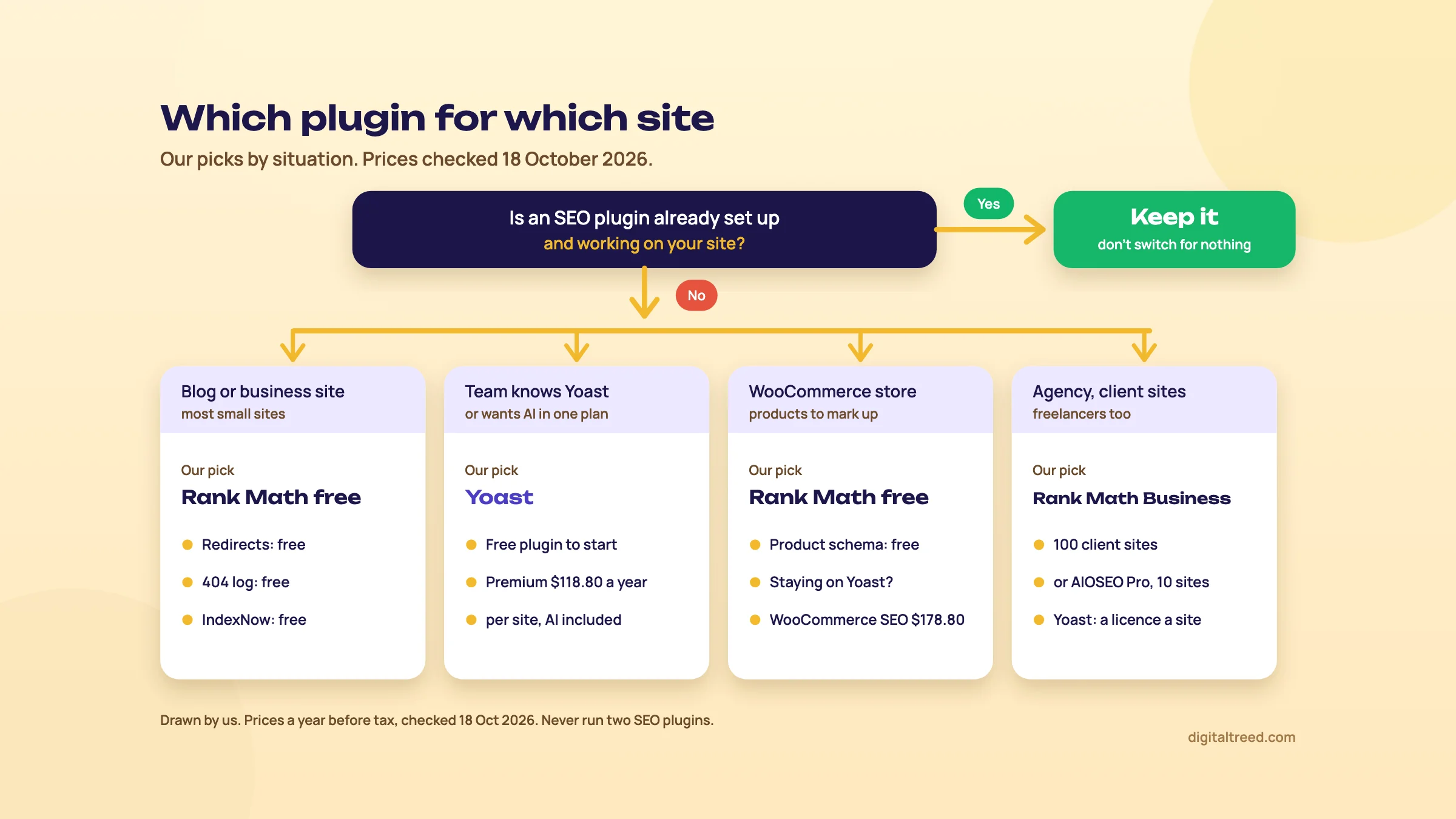 Our pick by situation, with yearly prices before tax checked 18 October 2026. Drawn by us.
The short answer by situation
| Your site | Our pick | Why |
|---|---|---|
| Any site where Yoast or Rank Math is already set up and working | Keep it | Switching gains little and risks titles, schema and redirects. Our beginner guide says the same |
| A new blog | Rank Math free | You'll change slugs sooner or later, and Rank Math's free redirect manager handles it. Yoast charges for redirects |
| A blog run by a team that already knows Yoast | Yoast free | Its readability checks and traffic lights are what many writers already know |
| A local business: a shop, a clinic, a coaching centre | Rank Math free | One location's address and hours become LocalBusiness schema free. Yoast Local SEO comes with Premium |
| A WooCommerce store | Rank Math free, then PRO if you need GTIN and MPN | Product schema is free in Rank Math. In Yoast, product structured data needs WooCommerce SEO |
| An agency or freelancer with client sites | Rank Math Business | One plan covers 100 client sites. Yoast Premium is one licence per site |
| Several sites you own yourself | Rank Math PRO | Unlimited personal sites on one plan |
| A content team that wants AI help without a second subscription | Yoast Premium | Yoast's AI tools come inside Premium; Rank Math's AI is a separate plan |
The reasons in the table come from each plugin's own feature lists, set side by side in chapters 2 and 3.[6] On "keep it", we're repeating our beginner guide's on-page chapter: use the plugin your site already has, because switching on a live site is more trouble than it's worth.
Why we lean to Rank Math for new sites
Take a typical small business site: 15 to 50 pages, one location, no SEO budget. For that site, the free Rank Math does three jobs the free Yoast doesn't. It redirects old URLs, it logs 404 errors so you can see broken links, and it pings Bing through IndexNow when you publish.[2] In Yoast, redirects and IndexNow are Premium features,[7] at US$118.80 a year for one site.[6]
That's not a ranking difference. Google doesn't rank a page higher because a certain plugin wrote its title. It's a cost and convenience difference, and on a small budget it decides the question.
Why Yoast is still a fine choice
Yoast has more than twice Rank Math's installs, so the developers and writers you hire are more likely to have used it. It has fewer settings to get wrong, and its free version covers titles, sitemaps, schema, breadcrumbs, noindex, canonicals and llms.txt, as our Yoast SEO guide shows. If you pay, all its AI writing tools come inside Premium[8] with no credits to buy.[1]
Warning
Never run Yoast and Rank Math together. Both would print a title, a canonical and a schema graph, so every page would carry two of each. If you're testing one, deactivate the other first, and import its data if you're switching (chapter 5).
Before you decide anything, look at what your site outputs today. Paste your home page and one service or product page into our Meta Tag Analyzer. It shows the title, description, canonical and Open Graph tags for up to 10 URLs, with a Google preview and a social preview. If those are already right, the plugin you have is doing its job.
Chapters 2 and 3 compare the two on each job, so you can check our picks against your own site.
Side by side: setup, titles, schema and sitemaps
Quick answer
On the basics there's little between them. Both free plugins write titles, descriptions and canonicals from templates, output schema and build a sitemap at sitemap_index.xml. Yoast is quicker to set up and checks one keyphrase free. Rank Math's wizard asks more questions, takes five keywords free and lets you change the schema type page by page.
Here's the whole comparison in one table. This chapter covers the first jobs, the ones every site needs; chapter 3 covers redirects, AI, local businesses and stores, where the two differ most. "Free" means the plugin you install from WordPress.org. "Paid" means Yoast SEO Premium (or WooCommerce SEO where noted) and Rank Math PRO.
| Job | Yoast SEO | Rank Math |
|---|---|---|
| Setup | First-time configuration, four steps | Setup wizard in Easy or Advanced mode; Custom mode is PRO |
| Titles and descriptions | Free: templates and per-page fields | Free: templates and per-page fields |
| Focus keywords per post | 1 free, up to 5 in Premium | 5 free by default; more with a code filter |
| Content checks | Red, orange and green lights; readability analysis | A score out of 100 from four groups of tests |
| Schema | Free graph; more types in Premium | Free per-page Schema Generator; custom builder and templates in PRO |
| XML sitemap | Free, sitemap_index.xml | Free, sitemap_index.xml |
| Redirects | Premium | Free |
| 404 log | Not in Yoast's plan tables | Free 404 Monitor |
| Internal link suggestions | Premium; free link counter | Free Link Counter; AI link suggestions (AI Link Genius) are paid |
| IndexNow | Premium | Free |
| Search Console data in WordPress | Free, through Google's Site Kit plugin | Free Analytics module; faster updates and rank tracking in PRO |
| llms.txt | Free | Free |
| AI writing tools | Inside Premium, no credits | Separate Rank Math AI plans; small free allowance |
| Local business schema | Yoast Local SEO, included with Premium | Free for one location; several locations need PRO |
| WooCommerce product schema | Yoast WooCommerce SEO only | Free; GTIN and MPN on variations in PRO |
Each row is sourced in its section of this chapter or the next. The plan tables are from Yoast's shop page[6] and Rank Math's plugin readme[2] and Free vs PRO page.[9]
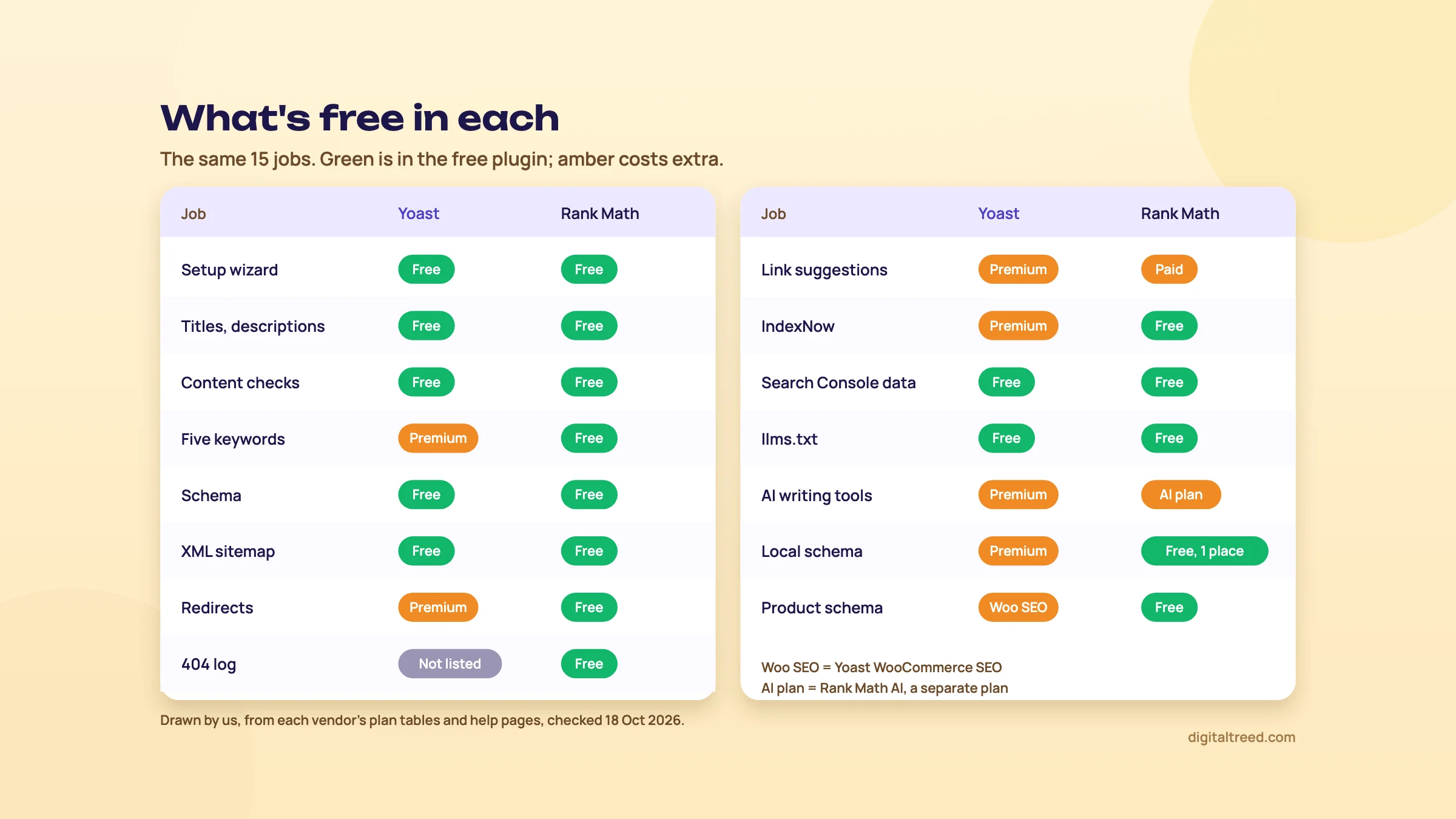 What each free plugin covers and what costs extra, from both vendors' plan tables, 18 October 2026. Drawn by us.
Setup
Yoast's First-time configuration has four steps: SEO data optimization, site representation (organization or person, name and logo), social profiles, and personal preferences.[10] That's it. Most other settings have sensible defaults.
Rank Math's wizard asks you to pick a mode first: Easy, Advanced or Custom, and Custom is for PRO users only.[11] It has more screens, including an import step, sitemap and optimisation choices, and in Advanced mode the 404 Monitor, redirects and schema. Our Rank Math guide says pick Advanced, and walks through each screen.
Our view: Yoast is quicker to set up and harder to get wrong. Rank Math asks more questions, but each one is a free feature you'd pay for elsewhere.
Titles, descriptions and the content checks
Both build titles from templates you set once[12] and override page by page. Yoast's variables have double percent signs, such as %%title%% and %%sitename%%.[13] Rank Math's have single ones, such as %title% and %sitename%.[14] Both show a Google preview in the editor.
The free Yoast checks a page against one focus keyphrase; Premium takes up to five.[1] The free Rank Math takes five by default.[2] More keywords per post sounds better than it is. Most pages should target one main search and its close variants.
The scores look different. Yoast shows red, orange and green lights, and says plainly that not every light has to be green.[15] Rank Math gives a score out of 100: green above 80, yellow from 51 to 80, red below 50. Its own guide calls the tests "a framework or guide, not as absolute answers".[16] We agree with both vendors here. Neither score is seen by Google. Use them as a checklist, and don't pad a page to 2,500 words or repeat a keyword to turn a light green.
Whichever you use, check the live tags, not the editor. Our Meta Tag Analyzer reads the title, description and canonical from the page's HTML, the way a crawler gets them.
Schema
Yoast's free plugin builds one connected schema graph on each page, from the organization or person you set in the configuration. Yoast's shop page says the free version generates "over 50 schema types".[6] Premium outputs more.[1]
Rank Math gives each post type a default schema type. It also adds a Schema Generator in the editor, where you switch one page to another type and fill in its fields.[17] Its free types include Article, Course, Event, Person, Product, Recipe, Service and Local Business. PRO adds an advanced schema builder, templates and import of schema from other sites.[2]
For a normal business site, both are enough. Rank Math gives you more control per page for free; Yoast gives you fewer things to break. Both still offer FAQ blocks with schema, but Google stopped showing FAQ rich results on 7 May 2026,[18] so add one only if the answers help readers.
After any schema change, test one page. Our Schema Markup Validator reads the JSON-LD on a live page or pasted code, and lists missing fields for 18 common types, including Organization, LocalBusiness and Product. Look for two Organization blocks: that means your theme or a second plugin is adding its own.
Sitemaps
No real difference. Both build an index at yoursite.com/sitemap_index.xml[19] with one sitemap per content type, and both update it as you publish.[20] Rank Math lists 200 links per sitemap file by default.[21] Because the address is the same, a switch between the two usually keeps the sitemap URL you submitted in Search Console.
So far it's close. Chapter 3 covers the jobs where the free versions really part ways.
Side by side: redirects, AI, local and stores
Quick answer
This is where they differ. Rank Math's free version adds redirects, a 404 Monitor, IndexNow, Local SEO for one location and WooCommerce product schema. In Yoast, redirects and IndexNow need Premium, product schema needs WooCommerce SEO, and we found no 404 log. Both make llms.txt free, and both can show Search Console data in WordPress.
Redirects and 404s
Redirects are the biggest gap. Rank Math's free redirect manager supports 301, 302, 307, 410 and 451 redirects, plus regex rules and a debugger.[22] Its 404 Monitor logs every address that returned "not found", with hits and the last access time.[23]
Yoast's redirect manager supports the same five types, but only in Premium.[24] Its strength is the prompt: when you move or delete content, Premium asks what to do with the old URL.[1] Rank Math has a setting for this too, Auto Post Redirect, which adds a 301 when a slug changes.[25] We found no 404 log in any of Yoast's plan tables.
Whichever plugin makes the redirect, test it from outside. Paste the old URL into our HTTP Status Checker: you want one 301 hop ending in a 200.
Internal links
Yoast's free text link counter shows how many internal links each post has and receives.[7] Premium suggests related pages to link to as you write, five at a time,[26] and has a workout that finds orphaned posts.[27]
Rank Math's free Link Counter module counts internal and external links per post.[28] Its link suggestions come from AI Link Genius, which its AI guide puts in the paid Rank Math AI;[29] the pricing page now also lists it on the PRO, Business and Agency plans, next to a 15-day AI trial.[30] For a 30-page site, a counter and your own judgement are enough on either plugin.
IndexNow
IndexNow tells participating search engines that a URL changed, so they can crawl it sooner. Bing, Yandex, Seznam, Naver and Yep take part, as do the Internet Archive and Amazonbot; Google doesn't.[31] Rank Math's Instant Indexing module does this free, and creates and hosts the key for you.[32] In Yoast, IndexNow is a Premium feature.[1] It's a nice extra, not a reason to pay. Our Bing Webmaster Tools and IndexNow guide shows how to check that Bing got your URLs.
Search Console inside WordPress
Both can show Google data without leaving WordPress. Yoast does it through Google's own Site Kit plugin: since Yoast SEO 26.7 (January 2026), the Yoast dashboard can show search impressions, clicks, average CTR, average position and organic sessions.[33] You install and connect Site Kit separately.[34]
Rank Math has its own Analytics module, free. It shows Search Console data and an Index Status tab.[35] The free version refreshes the data less often than PRO. Rank Math's own pages disagree on the intervals, though. Its Analytics guide[35] and the plan table on its pricing page say every 3 days on free and daily on PRO, while the FAQ on that pricing page says every seven days on free and every three on PRO.[30] Its comparison page keeps 90 days of data on free and 180 on PRO.[9] PRO also adds a Rank Tracker for 500 keywords.[30]
Search Console itself keeps 16 months of data[36] and is free, so it stays the place for real analysis (our Search Console guide). The plugin view is for people who won't open it.
llms.txt and AI features
Both make an llms.txt file free. In Yoast, turn it on under Settings, Site features, AI tools; it isn't available on multisite.[37] In Rank Math, switch on the LLMS Txt module under Rank Math SEO, Dashboard.[38] It's harmless, but don't expect it to get you cited: Google Search ignores llms.txt (Guide 5, chapter 7).
The AI writing tools are billed in opposite ways. Yoast's come with Premium: AI Generate for titles and descriptions, AI Optimize, AI Summarize and the Content Planner, with "no separate AI subscription" and "no credit top-up to buy".[1] Rank Math AI is its own subscription, with 40+ writing tools, AI Link Genius and AI Visibility, which tracks how ChatGPT and Gemini mention your brand.[29] Free Rank Math users get "typically between one to 5 uses per available feature" a month.[29] Yoast's brand tracking is only in its top plan, Yoast SEO AI+.[6]
Whatever either one writes, read it before you save. Google says it's "critical to manually factcheck and review all AI-generated content", titles and meta descriptions included.[39]
Local businesses
Rank Math's free Local SEO module takes your business type, address, opening hours, phone and geo coordinates, and turns them into LocalBusiness schema.[40] One location is free; several locations need PRO.[9]
Yoast Local SEO is a separate plugin, included with Premium. It adds local schema, a store locator and opening hours.[1] Its maps need a Google Maps API key.[41] That suits a Delhi dental chain with five clinics. A single Kanpur sweet shop is fine on either free plugin plus a correct Google Business Profile, which matters more than any plugin setting (our Business Profile guide).
WooCommerce stores
Rank Math's free WooCommerce support adds Product schema and meta tags to product pages automatically.[2] Its readme lists GTIN and MPN for variations, custom brands and automatic noindex for hidden products among the PRO features.[2]
In Yoast, product structured data isn't in the free plugin or in Premium. It comes with Yoast WooCommerce SEO,[6] which adds product schema with price, reviews and availability, a product sitemap and checks for GTINs, SKUs and short descriptions.[1] For a D2C brand on WooCommerce with no budget, that's the clearest case for Rank Math.
Speed
We can't tell you which is lighter. Rank Math's pricing page calls it "the fastest SEO plugin",[30] and Yoast's readme promises "performance improvements that help reduce load times".[1] Those are the vendors' own words, and we found no independent, dated test comparing the two. What we can say: switch off the Rank Math modules you don't use, and don't add a second plugin for a job one already does.
Note
From our work: teaching SEO. When I taught SEO, my students were already doing client work, and most of the local business sites they handled ran on WordPress with shared hosting. Technical SEO was the hardest part for them, and the problem they met most often was site speed. Our lesson: pick the plugin on features, and treat speed as its own job, with its own tests.
Our Website Speed Test measures it, and Guide 3, chapter 3 covers the usual WordPress fixes. Chapter 4 of this guide puts prices on everything in these two chapters.
Free vs paid, and the prices side by side
Quick answer
Checked 18 October 2026: Yoast SEO Premium is US$118.80 a year for one site (about ₹11,405). Rank Math PRO is €95.88 for the first year (about ₹10,350) for every site you own, then €107.88 a year. For client sites, Rank Math Business covers 100 sites for less than three Yoast Premium licences cost in the first year.
Most small sites don't need either paid plan. Here's what each free version covers, what the paid plans cost, and when paying makes sense.
What you get without paying
Free Yoast covers titles and descriptions, the schema graph, XML sitemaps, breadcrumbs, noindex and canonicals. It also has the SEO and readability analysis with one keyphrase, llms.txt and Search Console data through Site Kit (chapter 3). Free Rank Math covers all of that, plus redirects, the 404 Monitor, five focus keywords, IndexNow, Local SEO for one location and WooCommerce product schema.[2]
So the question "is the free version enough?" has two answers. For Rank Math, yes, for nearly every small business site. For Yoast, yes, as long as you rarely change URLs, or you add a free redirect plugin for the times you do.
How we converted the prices
The two vendors showed us different currencies from India on 18 October 2026. Yoast offers US dollars, euros and pounds, with no rupee price; we use its US dollar price.[6] Rank Math's pricing page showed euros, before taxes.[30] So the tables give the vendor's own price plus "about ₹" at ₹96 = US$1[42] and ₹108 = €1, the X-Rates monthly averages for 1 to 16 October 2026.[43] Both pages give prices before VAT or taxes, so expect tax at checkout. The prices matched what our Yoast and Rank Math guides recorded on 16 October.
Yoast prices, checked 18 October 2026
| Plan | Price a year | About ₹ a year | Sites | Adds |
|---|---|---|---|---|
| Yoast SEO | Free | 0 | Any | The basics above |
| Yoast SEO Premium | $118.80 (about $9.90 a month) | ₹11,405 | 1 | Redirects, 5 keyphrases, link suggestions, AI tools, IndexNow, Local, Video and News SEO, one Google Docs add-on seat, 24/7 support |
| Yoast WooCommerce SEO | $178.80 (about $14.90 a month) | ₹17,165 | 1 | All of Premium, plus product schema, a product sitemap and product AI |
| Yoast SEO AI+ | $358.80 (about $29.90 a month) | ₹34,445 | 1 | All of WooCommerce SEO, plus AI brand tracking in ChatGPT, Gemini, Perplexity and Claude |
All Yoast WordPress plans are billed yearly, shown excluding VAT.[6] One subscription covers one site or domain. You buy one per site, with a bulk discount at checkout, and agencies with 100 or more sites get custom pricing.[27] The shop page shows one yearly price and no separate renewal price. Yoast refunds the full price within 30 days of an initial purchase.[44]
Rank Math prices, checked 18 October 2026
| Plan | First year | Renewal a year | Sites | Keywords tracked |
|---|---|---|---|---|
| Free | ₹0 | ₹0 | Any | None |
| PRO | €95.88 (€7.99 a month), about ₹10,350 | €107.88, about ₹11,650 | Unlimited sites you own; no client sites | 500 |
| Business | €299.88 (€24.99 a month), about ₹32,400 | €335.88, about ₹36,300 | 100 client websites | 10,000 |
| Agency | €659.88 (€54.99 a month), about ₹71,300 | €779.88, about ₹84,200 | 500 client websites | 50,000 |
All plans are billed yearly, "ex VAT" and "+ taxes". The lower price is the first year; each plan then renews at the higher price every year.[30] Its FAQ offers a 30-day refund on new purchases, not on renewals, and says Rank Math emails you seven days before a renewal. Each paid plan includes a 15-day trial of a Rank Math AI plan.[30]
Rank Math AI is priced on its own:[45]
| Rank Math AI plan | First year | Renewal a year |
|---|---|---|
| Starter | €71.88 (€5.99 a month), about ₹7,750 | €83.88, about ₹9,050 |
| Creator | €131.88 (€10.99 a month), about ₹14,250 | €143.88, about ₹15,550 |
| Expert | €203.88 (€16.99 a month), about ₹22,000 | €227.88, about ₹24,600 |
Side by side for three real cases
Plan prices only mean something against your own site count. Here are three cases, first-year prices, before tax:
| Case | Yoast | Rank Math |
|---|---|---|
| One clinic site that needs redirects | Premium, $118.80 (about ₹11,405) | Free |
| One WooCommerce store that wants product schema | WooCommerce SEO, $178.80 (about ₹17,165) | Free; PRO €95.88 (about ₹10,350) for GTIN and MPN on variations |
| A freelancer with 10 client sites, all paid features | 10 Premium licences, $1,188 before any bulk discount (about ₹1,14,050) | Business, €299.88 (about ₹32,400), room for 100 sites |
The arithmetic is ours, from the two price lists above. For the freelancer, Rank Math's renewal (€335.88, about ₹36,300) is still well under Yoast's yearly cost. Note the licence terms, though: PRO is only for sites you own 100%; a client's site needs Business or Agency. The same FAQ says group buying "is strictly not allowed", and sites that share a licence get blocked.[30]
When paying is worth it
- Yoast Premium: a content team that publishes several posts a week, wants AI titles and descriptions inside the editor, and changes URLs often enough that the redirect prompts save mistakes.
- Yoast WooCommerce SEO: a store that's staying on Yoast and needs product schema.
- Rank Math PRO: you own several sites and want rank tracking inside WordPress, or you need more than one location in local schema, or GTIN and MPN on product variations.
- Rank Math Business: a freelancer or agency running client sites.
For a Kanpur sweet shop or a Delhi clinic with 20 pages, we'd pay for neither. Put the ₹10,000 to ₹11,500 into better photos, a faster host or a proper Google Business Profile instead. If you want to track rankings without a plugin, our measuring SEO chapter compares the options.
Chapter 5 shows how to move from one plugin to the other if the numbers above have changed your mind.
Switching from Yoast to Rank Math, or back
Quick answer
Each plugin imports from the other. Going from Yoast to Rank Math, Rank Math's importer also brings Yoast Premium redirects. Going from Rank Math to Yoast, export Rank Math's redirects as an .htaccess file first, because Yoast's import doesn't bring them, and re-enter your settings by hand. Check 10 key URLs before and after.
Switch only for a reason: you need a free feature your plugin charges for, a client insists, or your team already knows the other one. A plugin change on a live site always carries some risk. Done carefully, we'd allow under an hour for a small site.
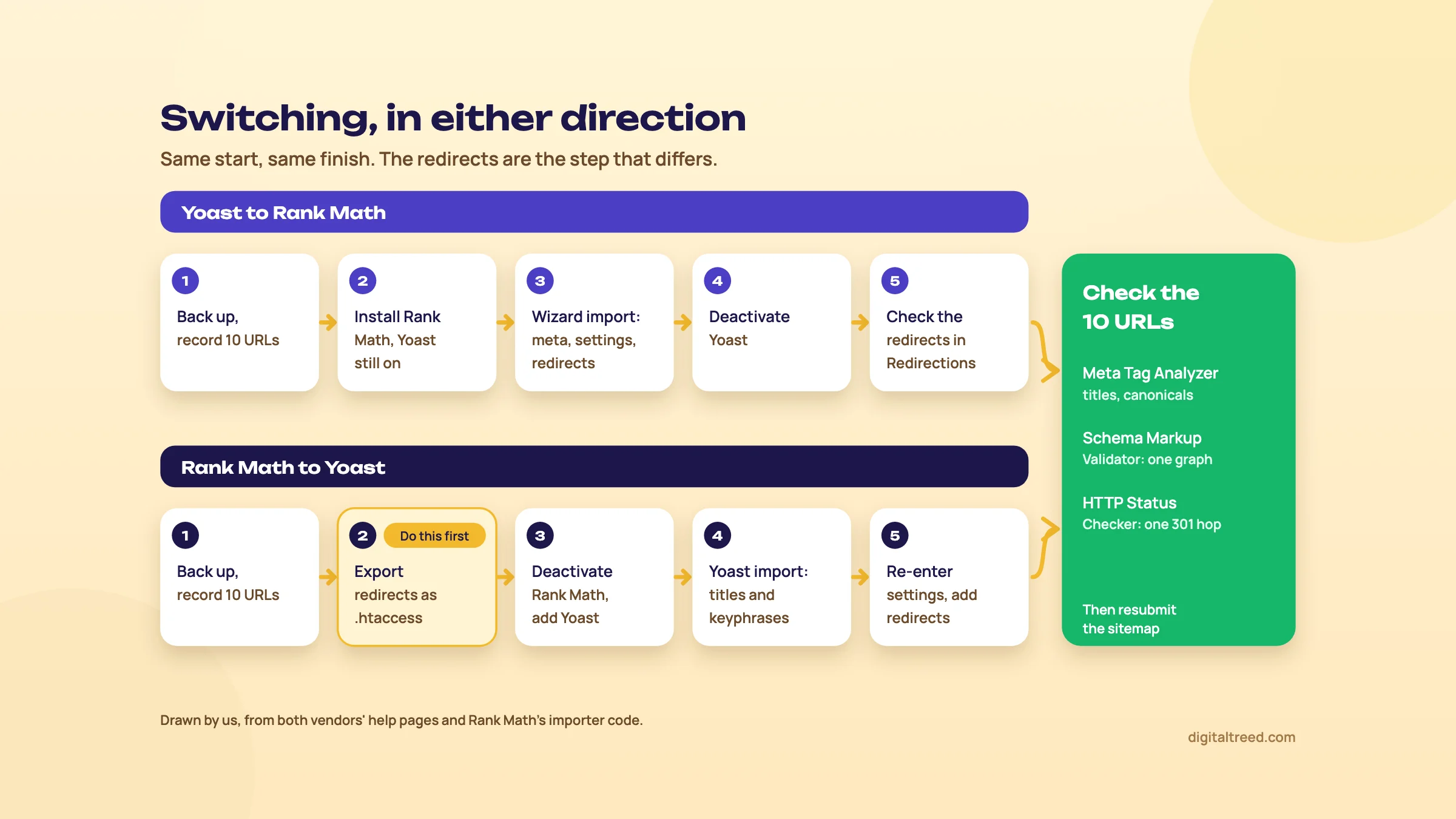 The two switches side by side; only the redirect step differs. Drawn by us.
What each importer brings across
| Data | Yoast to Rank Math | Rank Math to Yoast |
|---|---|---|
| SEO titles and descriptions | Yes | Yes |
| Focus keywords | Yes | Yes |
| Plugin settings | Yes | No; re-enter by hand |
| Redirects | Yes, from Yoast Premium | No; export first |
| Schema added to single posts | Not listed | No |
| Local SEO locations | Yes, from Yoast Local SEO | Not listed |
| FAQ and HowTo blocks | Converted by a separate tool | Not listed |
The Yoast-to-Rank Math column is from Rank Math's importer code, which lists settings, locations, news, video, post meta, term meta, user meta, redirections and blocks among the things it imports.[46] Its redirect step reads the redirects Yoast Premium stores. The other column is from Rank Math's own help page on moving to Yoast. It says Yoast's import brings titles, descriptions and keyphrases, but not Rank Math's settings, schema added to posts or redirects.[47] That page is a competitor describing Yoast's tool, so treat it as a guide and check the result yourself.
Before either switch
- Back up the files and database, or do the whole thing on a staging copy first.
- Pick 10 key URLs: the home page, your main service or product pages, and your best-read posts.
- Record the "before": run them through our Meta Tag Analyzer for titles, descriptions and canonicals, and the home page through our Schema Markup Validator. Save the results.
Yoast to Rank Math
Move a Delhi dental clinic's site from Yoast to Rank Math
- Install Rank Math with Yoast still active Plugins, Add Plugin, search Rank Math SEO, Install Now, Activate. Leave Yoast on until the import is done; Rank Math reads Yoast's saved data, so the import also works if Yoast is already deactivated.[48]
- Run the wizard in Advanced mode The Import step lists Yoast SEO if it finds it.[11] Tick what you want, tick Recalculate SEO Scores, click Start Import and wait for 100%. Without the recalculation, imported posts show N/A as their score until each one is opened in the editor.[49]
- Missed the import? It's also under Rank Math SEO, Status & Tools, Import & Export, in the Yoast SEO tab under Other Plugins.[48] That page needs Advanced mode.[50]
- Deactivate Yoast Only after the import shows 100%.
- Convert Yoast's blocks, if you used them Rank Math's Yoast Block Converter, under Status & Tools, Database Tools, turns Yoast's FAQ and HowTo blocks into Rank Math's. Rank Math warns the action is irreversible, so do it after the backup.[48]
- Check the redirects Open Rank Math SEO, Redirections, and confirm your old Yoast redirects are listed. Test three of them in our HTTP Status Checker.
- Compare the 10 URLs Same titles, descriptions and canonicals; one schema graph, not two. Open /sitemap_index.xml and check it lists Rank Math's sitemaps.
Rank Math to Yoast
This direction needs one extra step at the very start. Our Yoast SEO guide puts it the same way: export Rank Math's redirects before you touch anything else.
Move a Pune coaching centre's site from Rank Math to Yoast SEO
- Export the redirects first In Rank Math SEO, Redirections, export them as an .htaccess file.[22] Unless you synced them to .htaccess, a PRO feature, Rank Math serves the redirects itself, so they go when the plugin goes.
- Note your Rank Math settings Screenshots of Titles & Meta, the Local SEO details and the sitemap settings. They won't come across.
- Deactivate Rank Math, install Yoast Plugins, Add Plugin, search Yoast SEO, Install Now, Activate.
- Import Yoast SEO, Tools, Import and Export, Import from other SEO plugins. Choose Rank Math, click Import, and wait for the notice.[51]
- Run the First-time configuration Then use the import tool's last step to clean up the old Rank Math data.
- Bring back the redirects With Premium, import the .htaccess file under Tools, Import and Export, Import redirects.[52] Without Premium, add them to a free redirect plugin or your server's .htaccess.
- Re-enter what didn't come across Templates, archives and noindex choices from your screenshots. Free Yoast checks one keyphrase per post, so any extra Rank Math keywords won't be analysed unless you buy Premium.
- Compare the 10 URLs Titles, descriptions, canonicals and schema against your "before" list, and every old redirect still returning one 301 hop in our HTTP Status Checker.
After either switch
Both plugins put the sitemap index at sitemap_index.xml, Yoast[19] as well as Rank Math,[21] so the address in Search Console usually stays the same. Open it to check it lists the new plugin's sitemaps, and resubmit it under Sitemaps. Then watch Search Console's Pages report for two weeks for new "not found" or "excluded by noindex" pages. Our site migrations chapter has the fuller checklist if you're changing more than the plugin.
Do not
- Run both plugins at once "to compare"
- Deactivate Rank Math before exporting its redirects
- Switch in the middle of a sale or a busy season
- Judge the switch by the new plugin's score
Do
- Back up, or use a staging copy
- Record 10 URLs before, and compare after
- Test old URLs from outside the site
- Resubmit the sitemap and watch the Pages report
If you're also weighing All in One SEO, chapter 6 shows where it fits and how its importer works.
All in One SEO, the third option, and how to decide
Quick answer
All in One SEO is the third big option, with 2 million+ installs and rupee prices: Basic is ₹3,000 for the first year on one site, then ₹6,000. Its free version has no redirects, so for most small Indian sites it sits behind Rank Math free. Consider it for its guided wizard or rupee prices on the page.
All in One SEO (AIOSEO) is the oldest of the three. Its WordPress.org listing dates from 30 March 2007, and it shows 2,000,000+ active installs and a 4.7 out of 5 star rating from 5,224 ratings.[53] Our All in One SEO guide covers it in full; here's where it fits next to the other two.
What AIOSEO does differently
- The free version (Lite) writes titles and descriptions, builds sitemaps and Organization schema, scores posts with its TruSEO analysis, and can make an llms.txt file.[54] That file stays off until you switch it on.[55] Redirects start on the paid Basic plan.[56]
- Paid features are spread over four levels. Local SEO starts on Plus, Link Assistant and 404 logs on Pro, and Search Console reports inside WordPress (Search Statistics) on Elite only.[57]
- Prices showed in rupees from India, though the same page says "All pricing is in USD".[57]
AIOSEO prices, checked 18 October 2026
| Plan | First year | Renewal a year | Sites |
|---|---|---|---|
| Lite | ₹0 | ₹0 | Any |
| Basic | ₹3,000 (₹250 a month) | ₹6,000 | 1 |
| Plus | ₹6,000 (₹500 a month) | ₹12,000 | 3 |
| Pro | ₹12,000 (₹1,000 a month) | ₹24,000 | 10 |
| Elite | ₹18,000 (₹1,500 a month) | ₹36,000 | 100 |
All plans are billed yearly, and the page says "all renewals are at full price", which is double the first year. Client sites are allowed, and there's a 14-day money-back guarantee.[57] They match what our AIOSEO guide recorded on the same day.
So for one site that needs redirects, AIOSEO Basic is the cheapest paid plan of the three in the first year: ₹3,000, against about ₹11,405 for Yoast Premium. Rank Math does it free, though. For a freelancer with 10 client sites, AIOSEO Pro (₹12,000, then ₹24,000) costs less than Rank Math Business (about ₹32,400, then about ₹36,300) and far less than ten Yoast licences. It covers 10 sites, though, where Business covers 100.
Switching to or from AIOSEO
AIOSEO imports from Yoast SEO, Rank Math and SEOPress under All in One SEO, Tools, Import/Export. For Yoast and Rank Math it brings over titles, meta descriptions, schema settings and social meta, and the old plugin must still be installed for it to see the data.[58] Redirects come in separately; our AIOSEO guide suggests moving Yoast's or Rank Math's redirects by CSV. Going the other way, Rank Math's wizard lists All In One SEO in its import step.[11]
Pros and cons of the two
Yoast SEO:
Pros
- The most installed SEO plugin, 10 million+, so most writers and developers already know it
- Fewer settings, sensible defaults, quick setup
- AI writing tools included in Premium, with no credits to buy
- Premium's redirect prompts when you move or delete content
- Search Console data in its dashboard free, through Site Kit
Cons
- Redirects, IndexNow and link suggestions are paid
- No 404 log in its plan tables
- Priced per site, so client sites add up fast
- Product schema needs WooCommerce SEO
- No rupee prices
Rank Math:
Pros
- Redirects, a 404 Monitor, five focus keywords and IndexNow in the free version
- Free local schema for one location and free WooCommerce product schema
- One PRO plan covers every site you own
- Imports Yoast's data, including Premium redirects
- Modules you don't use switch off
Cons
- More settings and screens to learn
- AI is a second subscription on top of PRO
- Prices in euros, plus tax, and renewals cost more than the first year
- Its own pages give different Analytics refresh intervals
- PRO can't be used on client sites
How to decide, in one table
| Your situation | Pick | Read next |
|---|---|---|
| A plugin is already set up and working | Keep it | The guide for the one you have |
| New blog or business site, no budget | Rank Math free | Rank Math guide |
| Single-location shop, clinic or coaching centre | Rank Math free, plus a Business Profile | Business Profile guide |
| WooCommerce store | Rank Math free; Yoast WooCommerce SEO if staying on Yoast | Chapter 3 of this guide |
| Content team that wants AI in the editor | Yoast Premium | Yoast SEO guide |
| Freelancer or agency with client sites | Rank Math Business, or AIOSEO Pro | Chapter 4 and AIOSEO guide |
| Want rupee prices on the page | AIOSEO | AIOSEO guide |
| Need keyword or backlink research | None of these; a suite | Ahrefs vs Semrush |
Whichever plugin you choose, check what reaches Google with our free tools. Use the Meta Tag Analyzer for titles and descriptions, the Schema Markup Validator for the JSON-LD and the HTTP Status Checker for redirects. Our Free Website Audit runs a wider set of checks across your pages.
If you'd rather have someone set it up and keep it right, our SEO service does it for WordPress sites, and our web development team handles the speed side. For a price, get a quote. Otherwise, take the quiz below, then open the full guide for the plugin you picked.
Test yourself
Ten questions on the whole guide. Pick an answer, check it, and see your score at the end.
You got 0 of 10 right.
Frequently asked questions
Frequently asked
Is Rank Math better than Yoast?
For a new site on no budget, we think so, because its free version includes redirects, a 404 Monitor, IndexNow, local schema for one location and WooCommerce product schema. Yoast charges for those. Yoast is simpler to set up, more widely known, and its Premium plan includes AI tools without credits. Neither ranks a page higher on its own.
Does switching from Yoast to Rank Math improve rankings?
No, not by itself. Google reads the title, description, canonical and schema on the page, not which plugin wrote them. A switch only helps if the new plugin fixes something the old one wasn't doing, such as redirects for broken URLs.
Can I use Yoast and Rank Math together?
No. Both would print a title, a canonical and a schema graph on every page, so you'd get duplicates. Keep one active. During a switch, deactivate Yoast once Rank Math's import finishes; the importer reads Yoast's saved data, so it works whether Yoast is still active or not.
Is the free version of Yoast enough?
For most small sites, yes. It covers titles and descriptions, schema, sitemaps, breadcrumbs, noindex, canonicals and llms.txt. The main gap is redirects: if you change URLs, add a free redirect plugin or buy Premium.
How much do Yoast Premium and Rank Math PRO cost in India?
On 18 October 2026, Yoast SEO Premium was US$118.80 a year for one site, about ₹11,405 at ₹96 to the dollar. Rank Math PRO was €95.88 for the first year, about ₹10,350 at ₹108 to the euro, for every site you own, renewing at €107.88. Both are shown before tax.
Which plugin is better for WooCommerce?
Rank Math, if you want product schema free. Yoast adds product structured data only with Yoast WooCommerce SEO, $178.80 a year. Rank Math PRO adds GTIN and MPN for variations and custom brands.
Which is better for local SEO?
For one location, Rank Math's free Local SEO module turns your address and hours into LocalBusiness schema. Yoast Local SEO comes with Premium and adds local schema for several locations and a store locator, which suit chains. For any local business, a correct Google Business Profile matters more than either plugin.
Will I lose my redirects if I switch from Rank Math to Yoast?
You will if you don't export them first. Yoast's import doesn't bring Rank Math's redirects. Export them as an .htaccess file under Rank Math SEO, Redirections. Then import that file into Yoast Premium or a free redirect plugin, and test old URLs with a status checker.
Does Yoast show Search Console data in WordPress?
Yes, through Google's separate Site Kit plugin. Since Yoast SEO 26.7, released in January 2026, the Yoast dashboard can show impressions, clicks, average CTR, average position and organic sessions. Rank Math does it with its own free Analytics module.
Is All in One SEO a better choice than both?
For most small sites, no: its free version has no redirects. It suits people who want a very guided setup or rupee prices on the page, from ₹3,000 for the first year on one site, renewing at ₹6,000.
Sources
References
- Yoast SEO (plugin page, readme and API data: version 28.7 released 13 Oct 2026, 10,000,000+ active installs, 96/100 from 27,820 ratings, listing added 11 Oct 2010), WordPress.org, accessed 18 Oct 2026
- Rank Math SEO (plugin page, readme and API data: version 1.0.280 updated 6 Oct 2026, 4,000,000+ active installs, 96/100 from 7,514 ratings, listing added 19 Nov 2018), WordPress.org, accessed 18 Oct 2026
- Know more about the team behind the Rank Math plugin, Rank Math, updated 7 Oct 2026, accessed 16 Oct 2026
- Terms and conditions (owner and company details), Rank Math, accessed 18 Oct 2026
- Yoast SEO for WordPress source code (repository of Yoast BV), Yoast BV on GitHub, accessed 18 Oct 2026
- Plans and pricing (prices and feature comparison table), Yoast, prices seen 18 Oct 2026, accessed 16 Oct 2026
- Yoast SEO settings: Site features, Yoast help center, accessed 18 Oct 2026
- Yoast SEO AI features (feature page and plan table), Yoast, accessed 18 Oct 2026
- Rank Math Free vs. PRO, Rank Math, accessed 18 Oct 2026
- Yoast SEO First-time configuration, Yoast help center, accessed 18 Oct 2026
- How to setup Rank Math SEO plugin properly, Rank Math Knowledge Base, updated 25 Aug 2026, accessed 16 Oct 2026
- Rank Math 'Titles and Meta' options and settings, Rank Math Knowledge Base, updated 30 Dec 2025, accessed 16 Oct 2026
- List of available snippet variables in Yoast SEO, Yoast help center, accessed 18 Oct 2026
- Using Variables in the SEO Title and Description, Rank Math Knowledge Base, updated 2 Jan 2026, accessed 16 Oct 2026
- Understanding the Yoast SEO traffic lights, Yoast blog (Edwin Toonen), 7 Mar 2024, updated 17 Dec 2025, accessed 16 Oct 2026
- Score 100/100 with Rank Math post tests, Rank Math Knowledge Base, updated 24 Nov 2025, accessed 16 Oct 2026
- Configuring "Schema Markup" in Rank Math for rich snippets, Rank Math Knowledge Base, updated 23 May 2025, accessed 16 Oct 2026
- Latest Google Search documentation updates (FAQ rich results no longer shown from 7 May 2026), Google Search Central, accessed 18 Oct 2026
- Yoast SEO for WordPress source code: inc/sitemaps/class-sitemaps-router.php (rewrite rule for sitemap_index.xml; redirects sitemap.xml to sitemap_index.xml), Yoast BV on GitHub, accessed 18 Oct 2026
- XML sitemaps in the Yoast SEO plugin, Yoast help center, accessed 18 Oct 2026
- How to configure sitemaps in Rank Math, Rank Math Knowledge Base, updated 10 Jul 2025, accessed 16 Oct 2026
- How to set up redirections, Rank Math Knowledge Base, updated 4 Aug 2023, accessed 16 Oct 2026
- How to monitor 404 errors with Rank Math, Rank Math Knowledge Base, updated 12 May 2025, accessed 16 Oct 2026
- How to redirect a post or page in Yoast SEO Premium, Yoast help center, accessed 18 Oct 2026
- Rank Math general settings, Rank Math Knowledge Base, updated 30 Dec 2025, accessed 16 Oct 2026
- How to use the Yoast SEO internal linking tool, Yoast help center, accessed 18 Oct 2026
- Yoast SEO Premium (product page and FAQ), Yoast, prices seen 18 Oct 2026, accessed 16 Oct 2026
- Rank Math plugin source: module manager (module names and descriptions, including Link Counter and LLMS Txt), Rank Math on GitHub, accessed 18 Oct 2026
- Rank Math AI plans and features: everything you need to know, Rank Math Knowledge Base, updated 24 Sep 2026, accessed 16 Oct 2026
- Rank Math SEO plugin pricing (plans and FAQ), Rank Math, prices seen from India 18 Oct 2026, accessed 16 Oct 2026
- IndexNow participating search engines (searchengines.json), IndexNow.org, accessed 18 Oct 2026
- How to use IndexNow with Rank Math, Rank Math Knowledge Base, updated 26 Sep 2023, accessed 16 Oct 2026
- Site Kit by Google integration available for all Yoast customers (Yoast SEO 26.7), Yoast, 7 Jan 2026, accessed 16 Oct 2026
- How to enable the Site Kit integration, Yoast help center, accessed 18 Oct 2026
- Making the most of the Analytics in Rank Math, Rank Math Knowledge Base, updated 25 Sep 2025, accessed 16 Oct 2026
- Introducing the new Search Console (16 months of Search performance data), Google Search Central blog, Jan 2018, accessed 16 Oct 2026
- How to enable llms.txt with Yoast SEO, Yoast help center, accessed 18 Oct 2026
- How to use the llms.txt feature in Rank Math, Rank Math Knowledge Base, accessed 18 Oct 2026
- Google Search's guidance on using generative AI content on your website, Google Search Central, updated 1 Oct 2026, accessed 16 Oct 2026
- Using Rank Math's Local SEO module, Rank Math Knowledge Base, updated 22 Apr 2024, accessed 16 Oct 2026
- Configuration guide for Local SEO, Yoast help center, accessed 18 Oct 2026
- Monthly average USD to INR, 1-16 October 2026, X-Rates, accessed 16 Oct 2026
- Monthly average EUR to INR, 2026 (October average over 16 days), X-Rates, accessed 16 Oct 2026
- Yoast money-back guarantee and refund policy, Yoast, accessed 18 Oct 2026
- Rank Math AI pricing, Rank Math, prices seen from India 18 Oct 2026, accessed 16 Oct 2026
- Rank Math plugin source: Yoast importer, class-yoast.php (import choices: settings, locations, news, video, postmeta, termmeta, usermeta, redirections, blocks), Rank Math on GitHub, accessed 18 Oct 2026
- How to Migrate from Rank Math to Yoast (vendor page from Rank Math, a competitor), Rank Math Knowledge Base, accessed 18 Oct 2026
- Migrating from Yoast SEO to Rank Math SEO, Rank Math Knowledge Base, accessed 18 Oct 2026
- How to update SEO score when N/A is showing, Rank Math Knowledge Base, updated 23 Nov 2024, accessed 16 Oct 2026
- How to import and export settings in Rank Math, Rank Math Knowledge Base, updated 16 Mar 2023, accessed 16 Oct 2026
- How to migrate from Rank Math to Yoast SEO, Yoast help center, accessed 18 Oct 2026
- How to import redirects using Yoast SEO Premium, Yoast help center, accessed 18 Oct 2026
- All in One SEO (plugin page and API data: version 5.0.3, 2,000,000+ active installs, 94/100 from 5,224 ratings, listing added 30 Mar 2007), WordPress.org, accessed 18 Oct 2026
- Control AI Indexing With the WordPress LLMs.txt Generator, AIOSEO, updated 9 Oct 2025 (accessed 18 Oct 2026)
- all-in-one-seo-pack trunk: app/Common/Options/Options.php (default options; llms.txt enable is false), WordPress.org plugin repository (SVN), accessed 18 Oct 2026
- Logging 404 Errors in All in One SEO, AIOSEO docs, updated 14 Aug 2026, accessed 16 Oct 2026
- Pricing (plans, feature table, pricing FAQ and terms), AIOSEO, prices seen from India 18 Oct 2026, accessed 16 Oct 2026
- Importing Settings From Other Plugins, AIOSEO docs, updated 14 Aug 2026, accessed 16 Oct 2026
Get the free checklist
Every step of this guide on one page, to print or tick off. We email you the PDF link.