
Quick answer
To deploy a web app to the cloud, push it to a Git repo, connect it to a host, set its environment variables, then add your domain and HTTPS. For an example business app, list prices as of October 28, 2026 are $20 a month on Vercel Pro, $13 on Render with a database, or $5 on AWS Lightsail. Pick the host type first.
Say you've built a small app, maybe an order form or a booking page, and it works at localhost on your own machine. Now a customer needs to open it at your domain, over HTTPS, while your laptop is shut. A deployment is a copy of your code that a host builds, starts and keeps running on a server the public internet can reach. This walk-through gets one small example app there, step by step.
First comes what changes when your app leaves your laptop, then which kind of host your first app needs and what each costs a month. Next come getting the repo ready, connecting it and setting environment variables, and why a deploy fails or the page won't load. We finish with your domain and HTTPS, and the checks to run the day the site goes live. Our view: use the simplest host that runs your kind of app.
Key takeaways
- Your server must listen on the host's PORT, not a hard-coded 3000.
- Vercel's free Hobby plan is for non-commercial use, so businesses need Pro.
- A Render Free web service sleeps after 15 minutes without traffic.
- A base Ubuntu Lightsail server opens ports 22 and 80, not 443.
- Vercel applies changed environment variables only to new deployments.
What changes when your app leaves your laptop
Three things change the moment your code runs on someone else's machine. First, the address. The host picks the port and forwards public traffic to it, and on Render that's port 10000 unless you change it, per its web services docs. Second, the settings. Passwords, API keys and the inbox that gets each order can't sit in the code anymore, so they move into environment variables you type into the host's dashboard.
Third, the disk, and it's the one that catches people out. Render's free tier docs say a Free web service has an ephemeral filesystem, so uploaded images and local SQLite databases are lost each time it redeploys, restarts or spins down. That's why a real app gets split into parts: the front end, the server code, a managed database and object storage for files. Our cloud computing architecture guide explains those layers in full, so here we'll only sort out which host runs which part.
Take a made-up business we'll use all the way through, Thistlewick Bakery. It has a one-page order form and a few lines of server code that email each order to the shop.
The page and that code can share one host, but the orders themselves belong in a database, not in a file on the server's disk. For Thistlewick that means three parts: the form, the email code and a small Postgres database. The host you pick decides which of the three you set up and patch yourself.
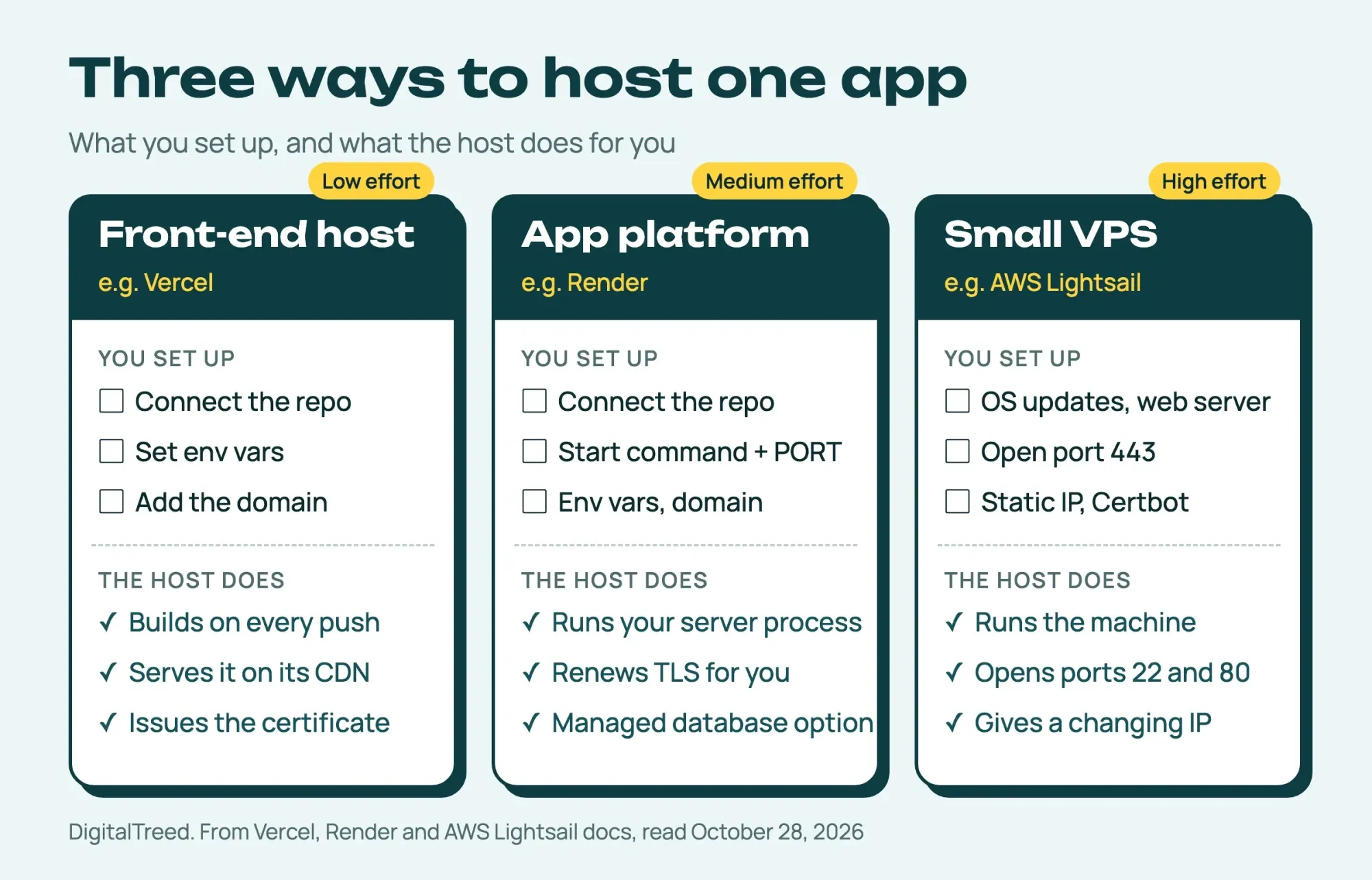 Diagram by DigitalTreed, from Vercel, Render and AWS Lightsail docs read October 28, 2026
Which kind of host does your first app need?
Picking a host turns on one question: does your app run a server process of its own? A front-end host such as Vercel builds your site from the repo and serves it from its network. Vercel's pricing page shows automatic CI/CD and a global CDN even on the free Hobby plan. An app platform such as Render runs your server process for you. A small VPS such as AWS Lightsail is a whole Linux server that's yours to look after. Here's how the three compare for a business app, as of October 28, 2026:
| Host type | Example | Good for | Set-up effort | Business price a month | The catch |
|---|---|---|---|---|---|
| Front-end host | Vercel | Front-end sites | Low | $20 (Pro, 1 developer seat) | Free Hobby plan is non-commercial |
| App platform | Render | Apps with a server | Medium | $7 (0.5 CPU, 512 MB instance) | Free instance sleeps when idle |
| Small VPS | AWS Lightsail | Full control | High | $5 (0.5 GB memory, public IPv4) | You patch the server and set up HTTPS |
Vercel's plan line matters most for a business. Its fair use guidelines say Hobby teams are "restricted to non-commercial personal use only," and ads, selling a product or paying someone to build the site count as commercial.
That puts a shop's site on Vercel Pro, which costs $20 a month per developer seat as of October 28, 2026 and includes $20 of usage credit.
Render splits the bill in two. On Render pricing, the smallest paid instance is $7 a month, billed by the second, and the smallest paid Postgres is $6. One app with a database comes to $13 a month ($7 + $6) as of October 28, 2026. The free Hobby workspace is described as "for individuals building personal projects and prototypes." A team moves to Pro at $25 a month plus compute, so the same app with no database runs $32 ($25 + $7). On Lightsail pricing, the 0.5 GB Linux bundle with a public IPv4 address is $5 a month. A bundle with an IPv6 address only is $3.50.
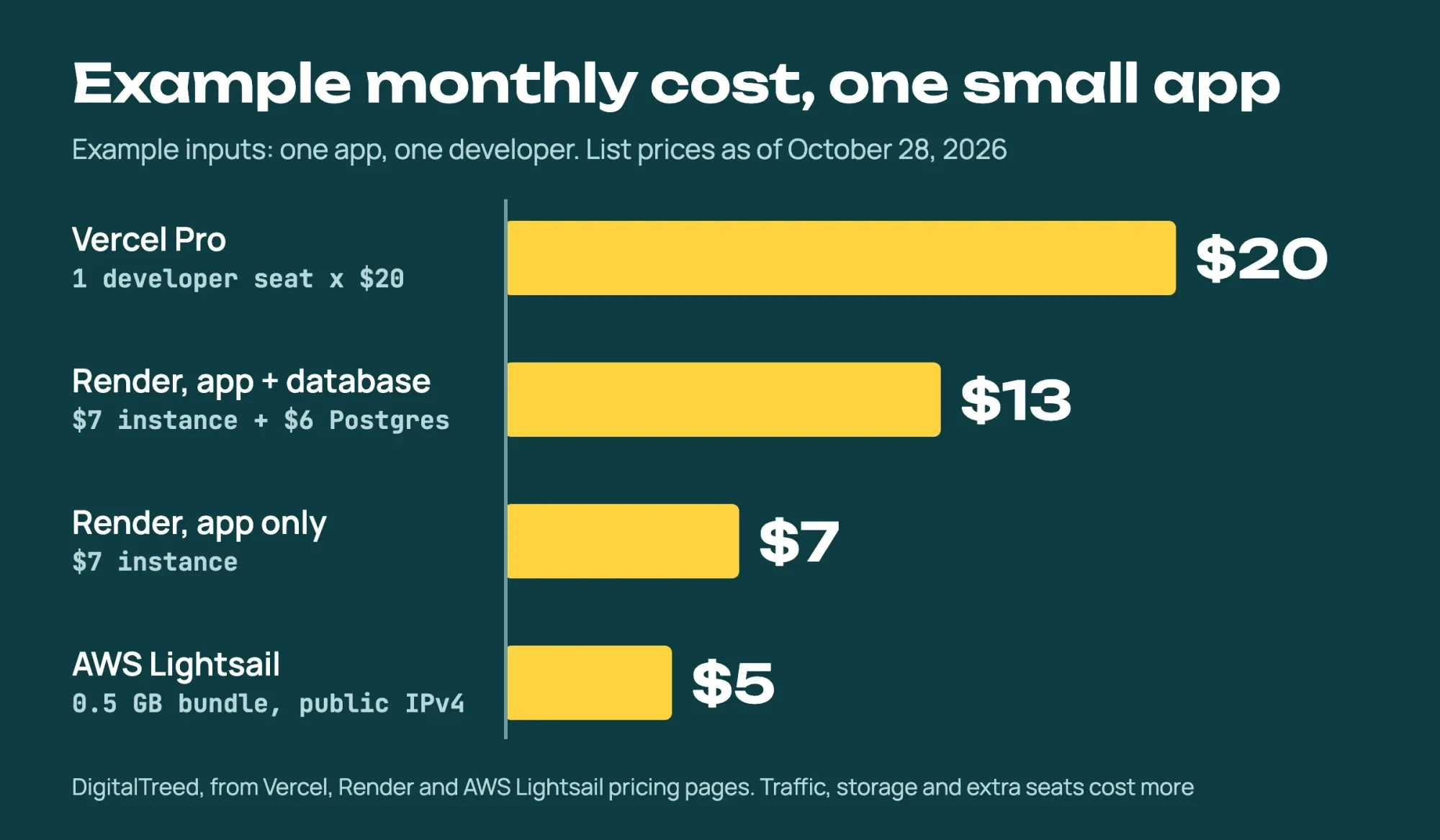 Diagram by DigitalTreed from vendor pricing pages read October 28, 2026, example inputs: one app, one developer
Those are list prices for one example app and one developer, not quotes. Bandwidth, storage and extra seats add to every price.
Render's Free instance has its own catch, as of October 28, 2026: the app spins down after 15 minutes without traffic. It takes about a minute to wake, which is why a business belongs on the $7 instance.
Our pick for a first business app with server code is the app platform, using the Render prices above. As of October 28, 2026, the example app with its database costs $8 a month more on Render than on the $5 server ($13 - $5). Render bills it monthly, prorated by the second.
For that, Render issues and renews the HTTPS certificate and runs the database. There's also no operating system for you to update. If your code is PHP rather than Node, our PHP vs Node.js comparison covers which hosts fit each one.
Get the repo ready before you connect it
Whichever host you pick, it builds from your repo. Vercel's Git docs say it deploys automatically on every push and merge to your production branch, so whatever's in the repo goes out, secrets included. Before you connect anything, make these five small changes:
- Add a .gitignore with .env and node_modules/ in it. GitHub's ignoring files guide says a file that's already checked in must be untracked first, with git rm --cached.
- Commit a .env.example that lists each variable's name with a dummy value, so whoever deploys knows what to set.
- Give the app one start command, such as "start": "node server.js" in package.json.
- Read the port from the PORT variable, and don't pin the server to 127.0.0.1.
- Add a health path such as /healthz that returns 200, so you can check the app is up.
The Twelve-Factor App's config chapter has a handy test for the first two. Ask whether the codebase "could be made open source at any moment, without compromising any credentials." If not, a key's still in the code.
Here's the server file from our test app with all five changes in. It's Node, but a PHP or Python app makes the same moves:
// Version 2: ready for a host. Port from PORT, all interfaces, settings from env vars, a health path.
const http = require('http');
const ORDER_EMAIL = process.env.ORDER_EMAIL;
if (!ORDER_EMAIL) {
  console.error('Missing ORDER_EMAIL environment variable. Set it in the host dashboard.');
  process.exit(1);
}
const port = Number(process.env.PORT) || 3000;
const server = http.createServer((req, res) => {
  if (req.url === '/') { res.writeHead(200, { 'Content-Type': 'text/plain' }); return res.end('Thistlewick Bakery orders (made-up example)\n'); }
  if (req.url === '/healthz') { res.writeHead(200, { 'Content-Type': 'text/plain' }); return res.end('ok\n'); }
  res.writeHead(404, { 'Content-Type': 'text/plain' }); res.end('not found\n');
});
server.listen(port, () => console.log(`listening on port ${port}, all interfaces`));
See that listen() gets a port but no host? The Node.js net docs say that with the host left out, the server accepts connections on the unspecified address. That's :: when IPv6 is available, or 0.0.0.0 otherwise, and it's what lets the host's traffic in. Pass 127.0.0.1 there instead and the server only hears requests from inside its own machine, which is the failure our test reproduces below.
Connect the repo and set environment variables
Once the repo is clean, connecting it is mostly the host's own import screen. On Vercel and Render you pick the repo, confirm the build and start commands, and type in each variable from your .env.example. Those build and start commands are the same ones you'd run at home, such as npm install and npm start, typed into a form instead of a terminal. Render's environment variables docs say they protect you from committing secrets such as API keys or database connection strings to your source. A Lightsail server has no deploy screen, so you copy the code over and set the variables on the server yourself.
One Vercel detail is easy to miss. Vercel's environment variables docs say changes "only apply to new deployments." Edit a value, reload the live page, and nothing's different.
Redeploy after every change. Vercel also lets you set a variable for Production, Preview or both, which keeps a test key off the live site.
A test step before the deploy catches the missing-variable crash from the next section on your own machine, before a customer sees it. If you want that step on every push, our CI/CD tools comparison prices the same pipeline on GitHub Actions, GitLab, CircleCI and Jenkins.
Vercel's Git docs also promise preview deployments for every push, so a branch gets its own build at its own address before anything reaches production. That's the safe place to try a new environment variable, because a typo there breaks a link only you have, not the order page your customers use. Render's pricing page lists single-service previews on its Hobby workspace too, so the same habit works there. A Lightsail server is just a server, so a preview there means a second server or a second folder you set up yourself. For a first app, testing on your laptop and keeping the .env.example current covers most of the same ground.
Why a deploy fails or the page won't load
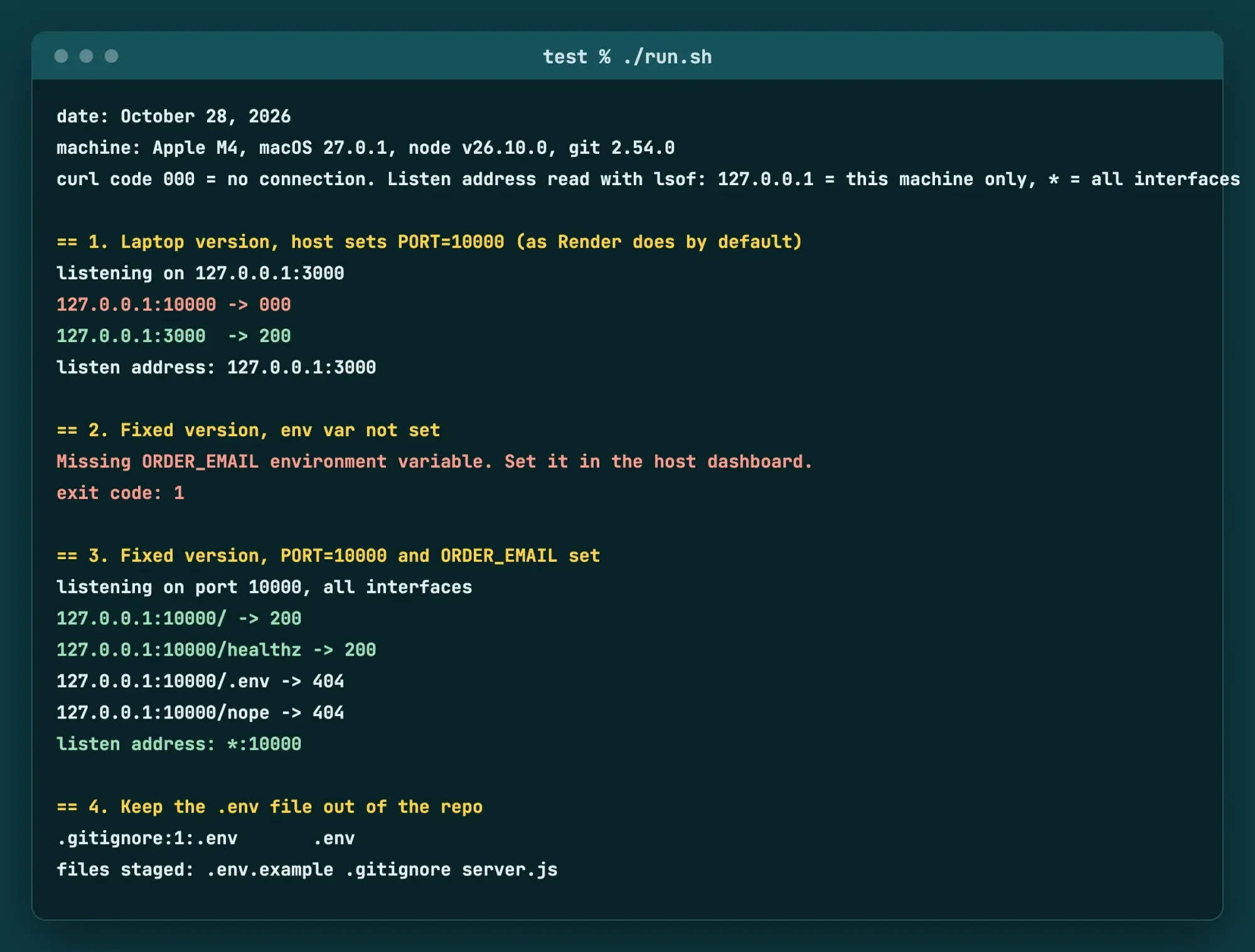
So the variables are in and the build finished, yet the page still won't open, and two causes to check first sit in your code, not the host. Render's web services docs say every web service "must bind to a port on host 0.0.0.0." If Render can't find a bound port, the deploy fails and shows an error in the logs. A missing environment variable is the other one. It crashes the app at start-up instead. We set up both failures on one Mac to see what each looks like before any host gets involved. Fix them in that order. Check the host's logs for a port error, then give every name in .env.example a value, and redeploy.
 Source: our test/run.sh output, unedited, set in a drawn terminal page, October 28, 2026
What we tested
With no host account and nothing pushed, we reproduced both failures on October 28, 2026, using test/run.sh on an Apple M4 Mac (macOS 27.0.1, Node v26.10.0, git 2.54.0). The laptop version of the made-up Thistlewick Bakery order page hard-codes port 3000 on 127.0.0.1. With PORT set to 10000, port 10000 gave no connection (curl code 000), while port 3000 answered 200.
The fixed version with ORDER_EMAIL unset stopped with exit code 1. With both variables set, it listened on *:10000, and the home page and /healthz returned 200 while /.env and a made-up path, /nope, returned 404. Then git check-ignore matched .env to our .gitignore, and git add staged only .env.example, .gitignore and server.js. This Mac's firewall blocks incoming connections, so listen addresses come from lsof, not a second machine.
Point your domain at the host
Your domain needs two kinds of DNS record before customers can reach the app by name. The host gives you the values.
Vercel's domain docs say an apex domain such as example.com uses an A record, while a subdomain such as www uses a CNAME. Add the apex and Vercel prompts you to add www too. Do both.
Render, per its custom domain docs, adds the matching root or www name for you and redirects one to the other. Render also creates and renews TLS certificates for every custom domain, sends all HTTP traffic to HTTPS, and asks you to remove AAAA records because it uses IPv4. If your domain has CAA records, they must allow Render's certificate authorities. Look up what's there now with our DNS lookup tool before you touch your registrar, so you can put it back.
A Lightsail server makes you do each step by hand. Its static IP docs say the default public IP changes every time you stop and restart the instance. So attach a static IP first. Its firewall docs list two default rules for a base Ubuntu server: SSH on port 22 and HTTP on port 80. HTTPS on port 443 isn't one of them, so it's yours to add, and until you do, https:// visits to your domain won't connect.
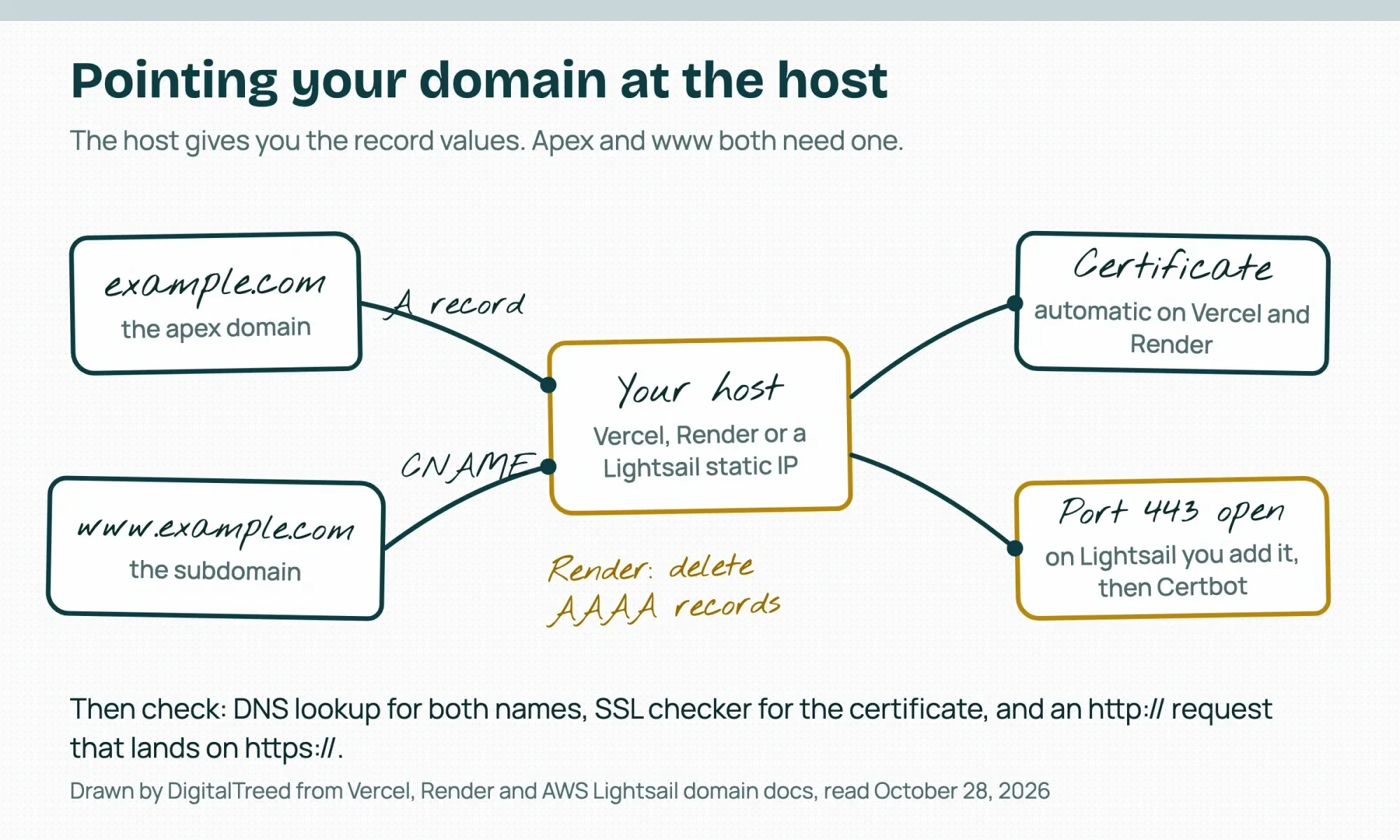 Drawn by us from Vercel, Render and AWS Lightsail domain docs read October 28, 2026
Turn on HTTPS and keep it renewing
That open port 443 still needs a certificate behind it. Let's Encrypt is a free, automated certificate authority, and Certbot is the EFF's client that gets and renews those certificates. Neither costs anything. Certbot's page says its --nginx and --apache modes expect a working HTTP site on port 80 first, so open port 80, get the site answering, then add 443. Renewal has to run without you, because certificates are getting shorter. A CA/Browser Forum ballot cuts the maximum validity "from 398 days to 47 days" in steps from March 2026 to March 2029. Our website uptime monitoring guide covers how to get warned before one runs out. When the certificate's in, run both names through our SSL checker.
Check the site the day it goes live
A domain that loads in your own browser isn't proof the launch worked, since your browser may be showing a copy it cached on your last visit. Each check below has a pass you can see. Run them from a phone on mobile data as well as from your desk:
| Check | How to run it | What a pass looks like |
|---|---|---|
| Home page and one deep page load | HTTP status checker | 200 for both |
| http:// sends visitors to https:// | HTTP status checker on the http:// address | A redirect (301 or 308) to the https:// address |
| Certificate covers both names | SSL checker on example.com and www | Valid for both, with an expiry date shown |
| DNS points at the host | DNS lookup on the apex and www | Records match the host's values, no stray AAAA on Render |
| App is healthy | Open /healthz | 200 and the word ok |
| Secrets aren't served | Open /.env on the live domain | 404, never the file |
When a row fails, go back by symptom. No page or a crash at start-up means the port or a variable, the wrong address means the DNS records, and a browser warning means the certificate.
After launch day, an uptime monitor takes over the first row, and the launch-day list in our website development process guide covers content and pages rather than the server.
Our take: for a first business app with server code, we'd use the app platform. For the example app with its database, that's $13 a month ($7 instance + $6 Postgres, list prices as of October 28, 2026). You get a live HTTPS address with no server to patch. We also bill for this exact job, host, domain and HTTPS, as part of the web development work we sell, so count that as our interest. Send a quote request with your app's language and the domain you own, and we'll price that one move from repo to live URL.
Frequently asked
Can I deploy a web app for free?
For a personal project, yes. Render's free tier docs grant 750 Free instance hours per workspace a month, with no roll-over.
How long does a sleeping Render free app take to wake up?
About one minute, and Render shows visitors a loading page meanwhile, per the Render free tier page.
Can one Lightsail server have more than one static IP?
No. Lightsail's static IP docs say you can attach one static IP to an instance, and only in the same AWS Region.
How much can I store in environment variables on Vercel?
64 KB in total per deployment, for all variables combined, according to Vercel's environment variables docs.
How we made this guide: Nothing here was deployed to a real host. Prices and limits come from the Vercel, Render, AWS Lightsail and other pages linked above, read October 28, 2026. We tested ports, environment variables and .gitignore with a small Node app on one Mac. Facts checked by the DigitalTreed team on October 28, 2026.
First published August 2020. Rewritten October 28, 2026 as a step-by-step guide to deploying one small web app, from repo to live URL.
Sources
- Vercel: Pricing
- Vercel Docs: Fair use guidelines
- Vercel Docs: Deploying Git repositories
- Vercel Docs: Environment variables
- Vercel Docs: Adding and configuring a custom domain
- Render: Pricing
- Render Docs: Deploy for free
- Render Docs: Web services
- Render Docs: Environment variables and secrets
- Render Docs: Custom domains
- AWS: Amazon Lightsail pricing
- AWS Docs: Lightsail firewall and port mappings
- AWS Docs: Lightsail static IP addresses
- Let's Encrypt: How it works
- EFF: Certbot
- CA/Browser Forum: Ballot SC081v3
- The Twelve-Factor App: Config
- GitHub Docs: Ignoring files
- Node.js Docs: net module

Comments
No comments yet. Start the conversation below.