
Quick answer
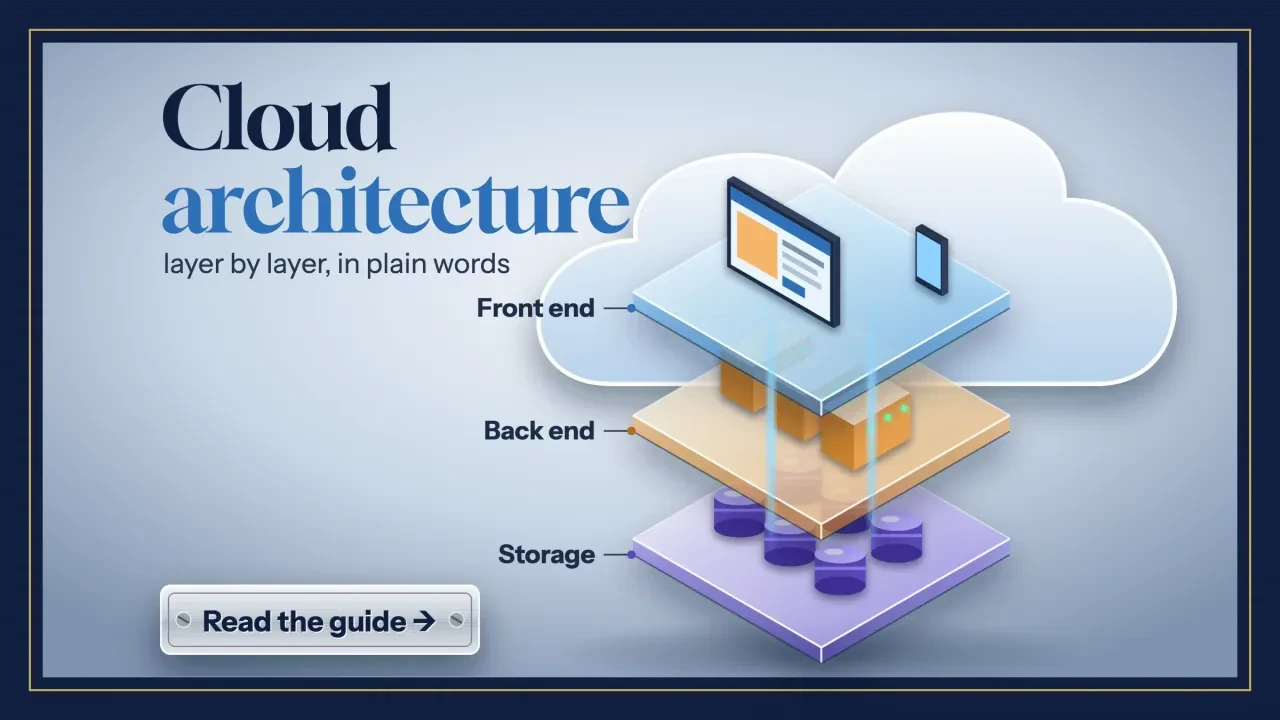
Cloud computing architecture is how a cloud service is put together: a front end (your visitor's browser), a back end (servers, apps, databases and storage) and the network between them, rented on demand from a shared pool. For a business owner, the useful question is simpler: who runs each layer? Your data and logins stay yours.
Most explanations of cloud computing architecture stop at a box diagram.
We'll use the thing you actually own, a business website, and show what we found when we traced 8 US government sites from the outside.
Key takeaways
- Cloud architecture has three parts: a front end, a back end and the network.
- IaaS, PaaS and SaaS decide how many layers of the stack you rent.
- Your data, settings and user identities stay your job in every cloud model.
- Turn on multi-factor sign-in for your host, registrar and email.
- Most small businesses should buy the most managed hosting they can afford.
Cloud computing architecture is a stack of layers someone else runs for you
The definition everyone borrows comes from the National Institute of Standards and Technology. NIST SP 800-145 calls cloud computing "a model for enabling ubiquitous, convenient, on-demand network access to a shared pool of configurable computing resources" that can be "rapidly provisioned and released with minimal management effort."
In plain words, there's a big pool of computers. You take a slice when you need it and hand it back when you don't.
NIST says a service needs five traits to count as cloud: on-demand self-service, broad network access, resource pooling, rapid elasticity and measured service.
The last one is the meter. A footnote in the same document says billing is "typically" done "on a pay-per-use or charge-per-use basis."
Architecture is the plan for how those pieces fit together. Picture a customer tapping "Book now" on your site at 9 p.m. Their phone is the front end. Your server, your database and the folder of photos are the back end. Everything that carries the tap between them is the network.
Each layer has an owner. That's the part that costs you money or sleep.
You'll also hear "cloud infrastructure" used as if it meant the same thing. NIST uses that phrase for the hardware and software underneath, split into a physical layer and an abstraction layer. Architecture, in our words, is how you arrange those parts.
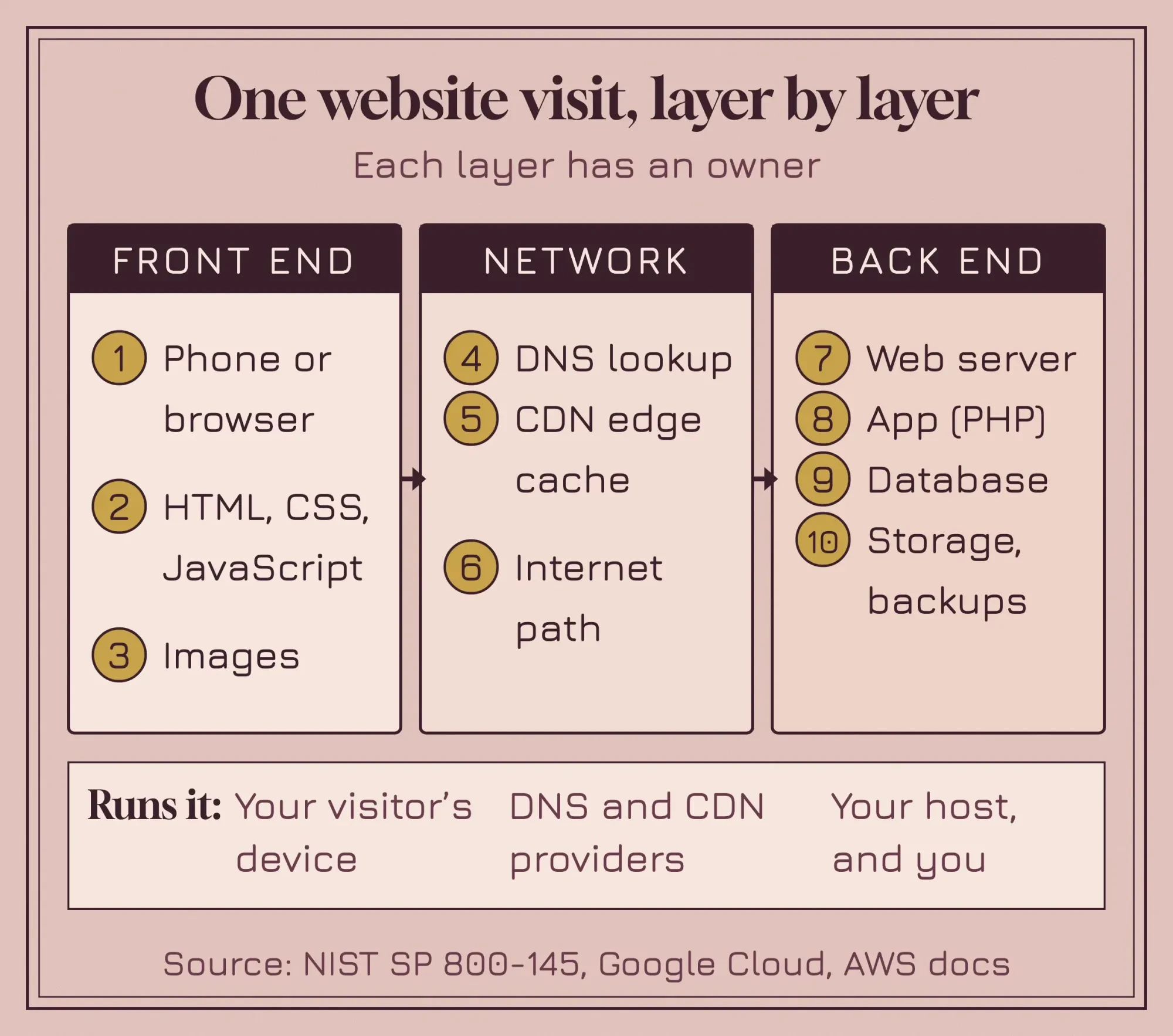 Diagram by DigitalTreed, based on NIST SP 800-145, Google Cloud's list of architecture components and AWS's CloudFront documentation.
The front end is everything your visitor's device handles
That front end starts on the visitor's side of the screen. Google Cloud's own cloud architecture explainer lists "a frontend platform" first and describes it as the user interfaces, client-side apps and devices people use to reach a service. For a website, it's the browser plus the files it downloads: HTML for structure, CSS for the look and JavaScript for anything that moves.
The front end doesn't do much heavy lifting. It asks, waits and draws whatever comes back.
That's why a slow site isn't always a slow server.
Huge photos and heavy scripts make the phone work harder, and no hosting upgrade fixes that. Put your home page through the DigitalTreed website speed test, which is free. You'll see which half is slow: the server's first response, or everything the browser has to download after it.
The network carries the request through DNS and, often, a CDN
So the browser knows what it wants. Next it needs to know where to ask. DNS, the internet's address book, turns yourshop.com into a numeric address. When DNS fails, nothing else loads, and the DNS_PROBE_FINISHED_NXDOMAIN fix we wrote shows what that looks like from the visitor's side.
Many sites then add a content delivery network, or CDN. Amazon's CloudFront documentation describes the flow: DNS sends the request to "the CloudFront POP (edge location) that can best serve the request," which returns a cached copy if it has one and otherwise forwards the request "to your origin server."
The origin is where your site lives; the edge is a copy desk near the visitor.
IBM’s explainer adds that "an internet connection typically connects the front-end with the back-end functions," though a private company network can do that job too. For a small-business website, it's the public internet nearly every time.
The back end is the server, the app, the database and the storage
Behind that network sits the back end, the part most people picture when they hear the word cloud. For a WordPress site, the WordPress requirements page recommends a host that supports "PHP version 8.3 or greater," MySQL 8.0 or MariaDB 10.11 or greater, and HTTPS, and it recommends Apache or Nginx as the web server (as of October 2026).
So a typical small-business back end has four jobs.
The web server answers each request. PHP runs your app and builds the page. The database keeps posts, products and bookings, and storage holds uploads, such as product photos, plus a backup that ideally lives somewhere else.
Then there's a layer you never see.
Most hosting doesn't run on bare machines anymore; it runs on virtual ones. NIST SP 800-125 describes full virtualization as running "one or more operating systems and their applications on top of virtual hardware," and the software that does it is called a hypervisor, or virtual machine monitor. One physical server can carry several virtual ones, each with its own operating system and its own slice of memory.
You notice the back end mostly when it breaks. A 502 bad gateway error, for example, usually means one layer couldn't get a good answer from the server behind it.
IaaS, PaaS and SaaS decide how much of that stack you rent
Now for the part that shows up on invoices.
NIST names three service models, and the difference between them is where your control stops.
With infrastructure as a service (IaaS), you rent raw computing. The NIST definition says you can "deploy and run arbitrary software, which can include operating systems and applications," and you keep control of the operating system, storage and apps. A cloud virtual machine where you install WordPress yourself is IaaS.
With platform as a service (PaaS), the provider runs the operating system and the runtime, and you bring the code. Google Cloud’s responsibility guide says PaaS fits "if you're building an application (such as a website), and want to focus on development not on the underlying infrastructure."
With software as a service (SaaS), you just use the provider's application. NIST says you don't manage the servers, operating systems or storage, or "even individual application capabilities," apart from a few settings. Your business email on Google Workspace or Microsoft 365 is SaaS, and so is a hosted store builder.
We weighed this exact trade in WordPress vs Shopify. Shopify is SaaS, so it carries the stack and you live with its rules, while self-hosted WordPress hands you more layers.
None of the three is "more cloud" than the others.
Picking one is a staffing decision as much as a technical one. If nobody on your team will ever log in to a server, an IaaS bill is a liability, not a saving. Our no-code vs custom development guide walks through the same trade from the build side.
Public, private and hybrid describe whose hardware it is
Service models say what you rent. Deployment models say who else shares the building, and NIST SP 800-145 lists four. A public cloud is "provisioned for open use by the general public" and "exists on the premises of the cloud provider," in NIST's words. A private cloud is for "exclusive use by a single organization," and a community cloud is shared by organizations with common concerns, such as the same security rules.
A hybrid cloud joins two or more of those, "bound together by standardized or proprietary technology" so data and apps can move between them. Using two public providers side by side is usually called multicloud.
If you run a small business, you're almost certainly using public cloud already, whether you call it that or not. Your email and booking app are public SaaS, and even a shared host that isn't strictly cloud keeps your site on someone else's hardware. Private cloud doesn't matter much until a big client's contract asks exactly where your data is kept.
What does the shared responsibility model mean for your website?
The shared responsibility model says the provider secures the platform and you secure what you put on it. AWS calls it security "of" the cloud versus security "in" the cloud, and says the customer's share "will be determined by the AWS Cloud services that a customer selects."
That's exactly where the 2020 version of this page went wrong. It said cloud apps are secure "because of the built-in security."
They aren't, not by default.
AWS's own example makes it concrete. If you run a virtual server on Amazon EC2, you're responsible for "the guest operating system (including updates and security patches)," for the software you install and for the firewall settings. A self-managed VPS from any host puts the same jobs on your desk.
Microsoft’s responsibility matrix is the clearest map we've found. It has 10 rows, from customer data down to the physical datacenter, and we counted who owns each one. On IaaS you own 7 of the 10. On PaaS you own 4, share 2 and Microsoft owns 4, and even on SaaS you still own 3 and share 2.
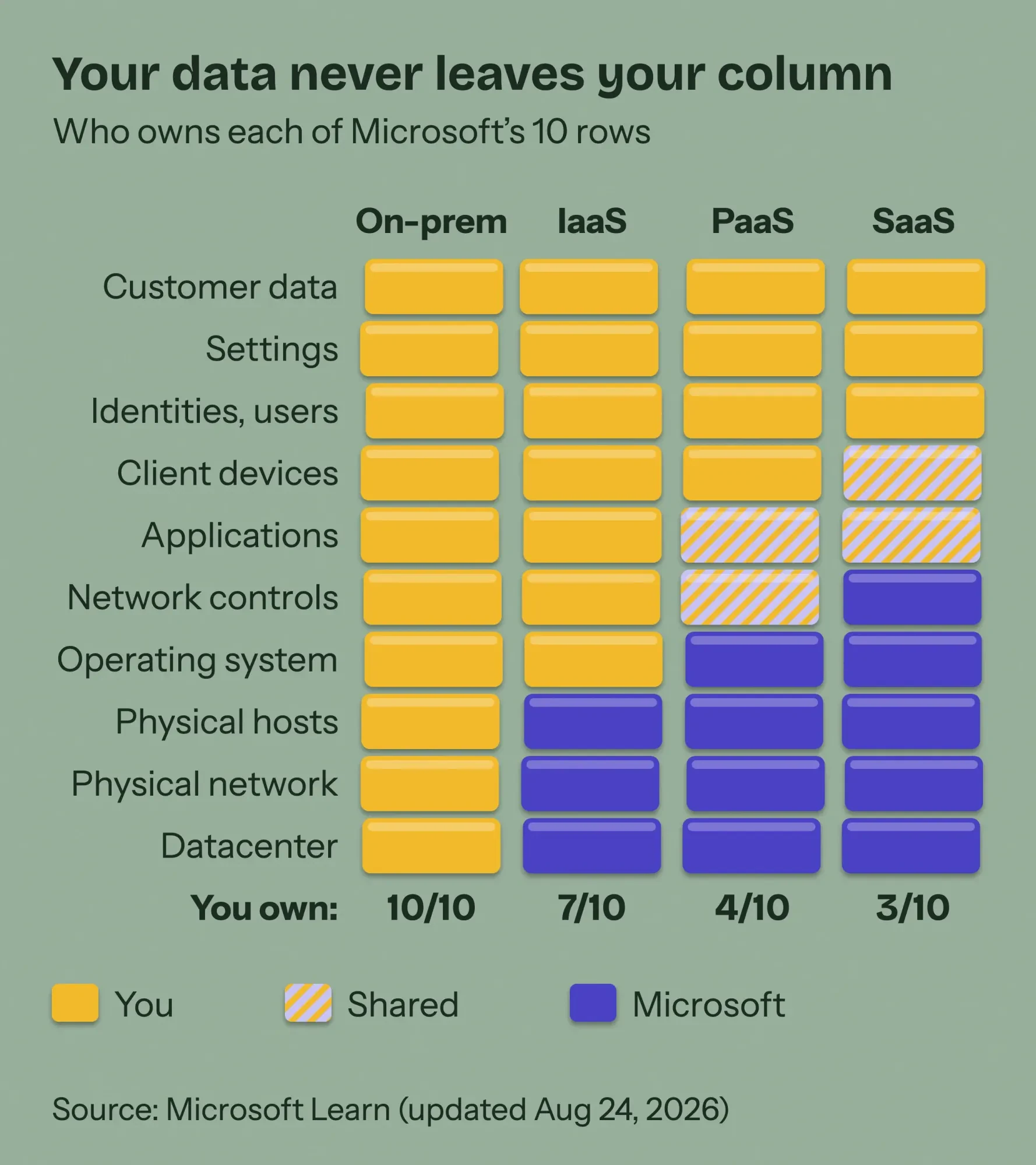 Diagram by DigitalTreed from Microsoft's shared responsibility matrix (page updated August 24, 2026), read October 25, 2026.
Three rows never move.
Customer data, configurations and settings, and identities and users stay with you in every column. Microsoft says it in one line: "For all cloud deployment types, you own your data and identities."
So the cheapest security win sits on your side of the line. CISA says "users who enable MFA are significantly less likely to get hacked," and the five cloud security sheets that CISA and the NSA released on March 7, 2024 open with identity and access management.
Two checks you can do today. Turn on multi-factor sign-in for your host, your domain registrar and your email, and make sure your backups don't live on the server they protect. On a VPS, the HTTPS certificate is your job too, and our free SSL checker shows when yours expires.
We checked where 8 US government websites really run
We wanted to see how much of this layering you can spot from outside, without signing in anywhere. On October 25, 2026, we ran a short script against 8 federal sites, including sba.gov, irs.gov and census.gov. It asked DNS where each site lives and read the headers of one page load, six seconds apart. All 8 answered through a CDN: 3 through Akamai, 3 through Cloudflare and 2 through Amazon CloudFront.
Only one named the web server behind its edge. Its headers listed the server software and the PHP language behind a CloudFront cache hit. We're leaving out which site it was and the version numbers on purpose, because on someone else's server that detail helps an attacker more than a reader.
That's the same basic stack a WordPress site on shared hosting runs.
Here's the lesson we took from it. "In the cloud" often describes the front door, not the house. The edge can be a worldwide network while the origin is an ordinary web server, and both belong to the architecture.
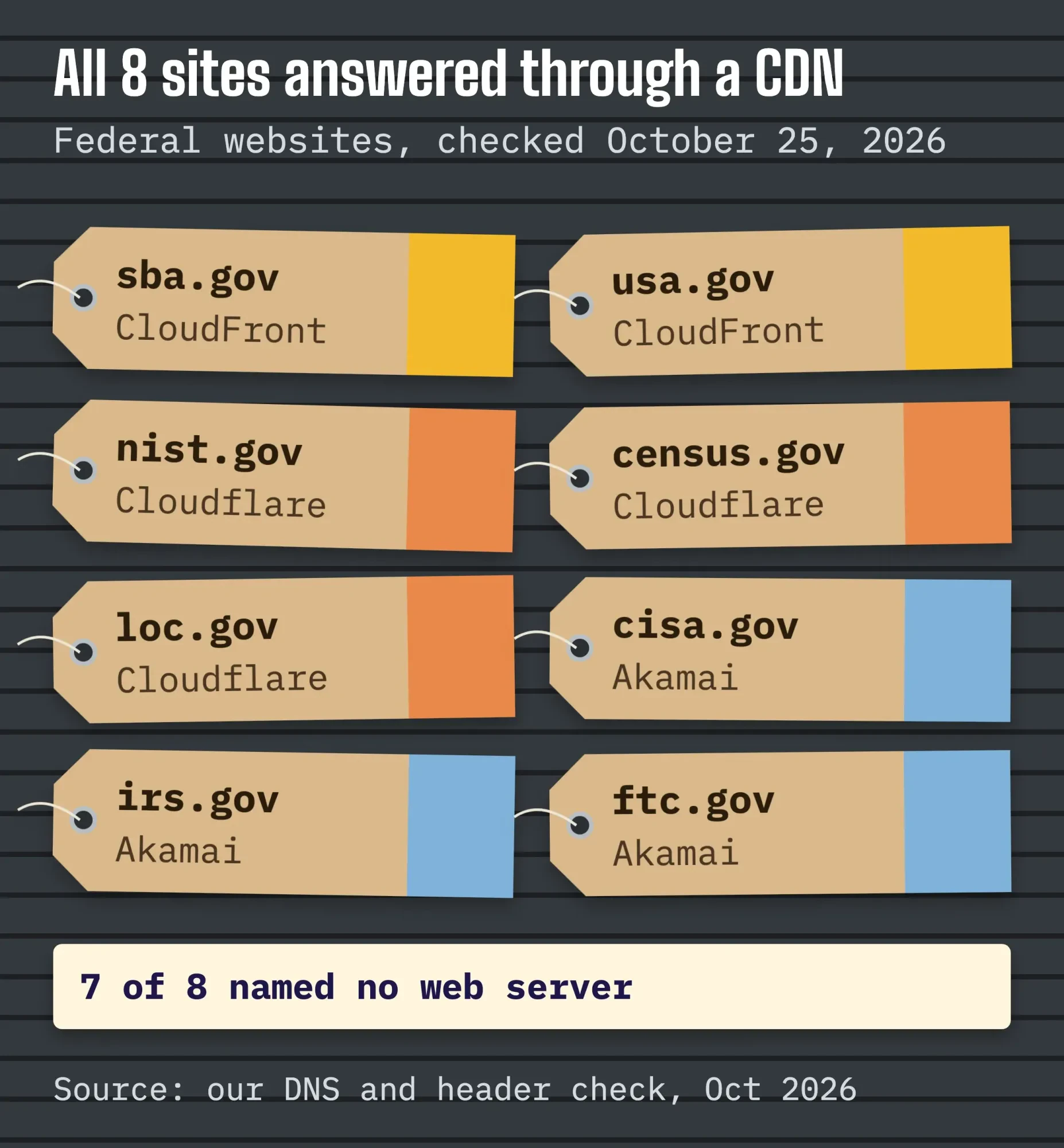 Diagram by DigitalTreed from our own DNS and header check of 8 US federal websites, October 25, 2026.
You can run the same check on your own domain from a Mac or Linux terminal. Both commands only read public answers:
dig +noall +answer www.example.com A

curl -s -o /dev/null -D - https://www.example.com/ \
  | grep -iE '^(server|via|x-cache|cf-ray|x-powered-by)'
A CNAME ending in edgekey.net, a "Server: cloudflare" line, or a "Via" line naming CloudFront means a CDN sits in front. If the page redirects first, paste the address into the DigitalTreed HTTP status tool; it costs nothing and lists each hop and the final code.
Two limits apply. The edge codes in the headers reflect our route from India, not where these sites are hosted. And a site can keep its origin's software out of its headers completely, as 7 of the 8 did.
Shared hosting vs VPS vs cloud hosting comes down to who patches the server
All of this boils down to one buying decision.
Shared hosting, a VPS and cloud hosting run the same back-end parts; what changes is how many layers you're responsible for.
Amazon’s VPS explainer puts it plainly. On shared hosting, "all websites share the same physical server and compete for critical resources," which is why a busy neighbor can slow your site down. A VPS gives you reserved resources on a slice of a server. With unmanaged hosting, "the business owner has to take care of all the server responsibilities and maintenance tasks."
| Hosting | What you rent | Who patches the server | Who updates your site | How it grows |
|---|---|---|---|---|
| Shared hosting | Space on a server many sites share | Host | You | Bigger plan |
| Unmanaged VPS | A virtual machine with reserved resources | You | You | Resize the VM |
| Managed VPS or cloud | A VM or platform the host runs | Host | Depends on the plan | Host adds resources |
| Cloud server (IaaS) | Raw VMs, disks and network | You | You | You add servers |
| App platform (PaaS) | A runtime for your code | Provider | You | A setting |
| Site builder (SaaS) | The finished application | Provider | Provider | Provider |
Example: a picture-framing shop in Pensacola, Florida, runs a WordPress gallery, a consult booking form and about 400 product photos. Shared or managed WordPress hosting is plenty on day one. A VPS starts to make sense when a plugin needs background jobs the host won't allow, or the site keeps hitting its plan's limits. A raw cloud server only makes sense once someone is paid to patch it.
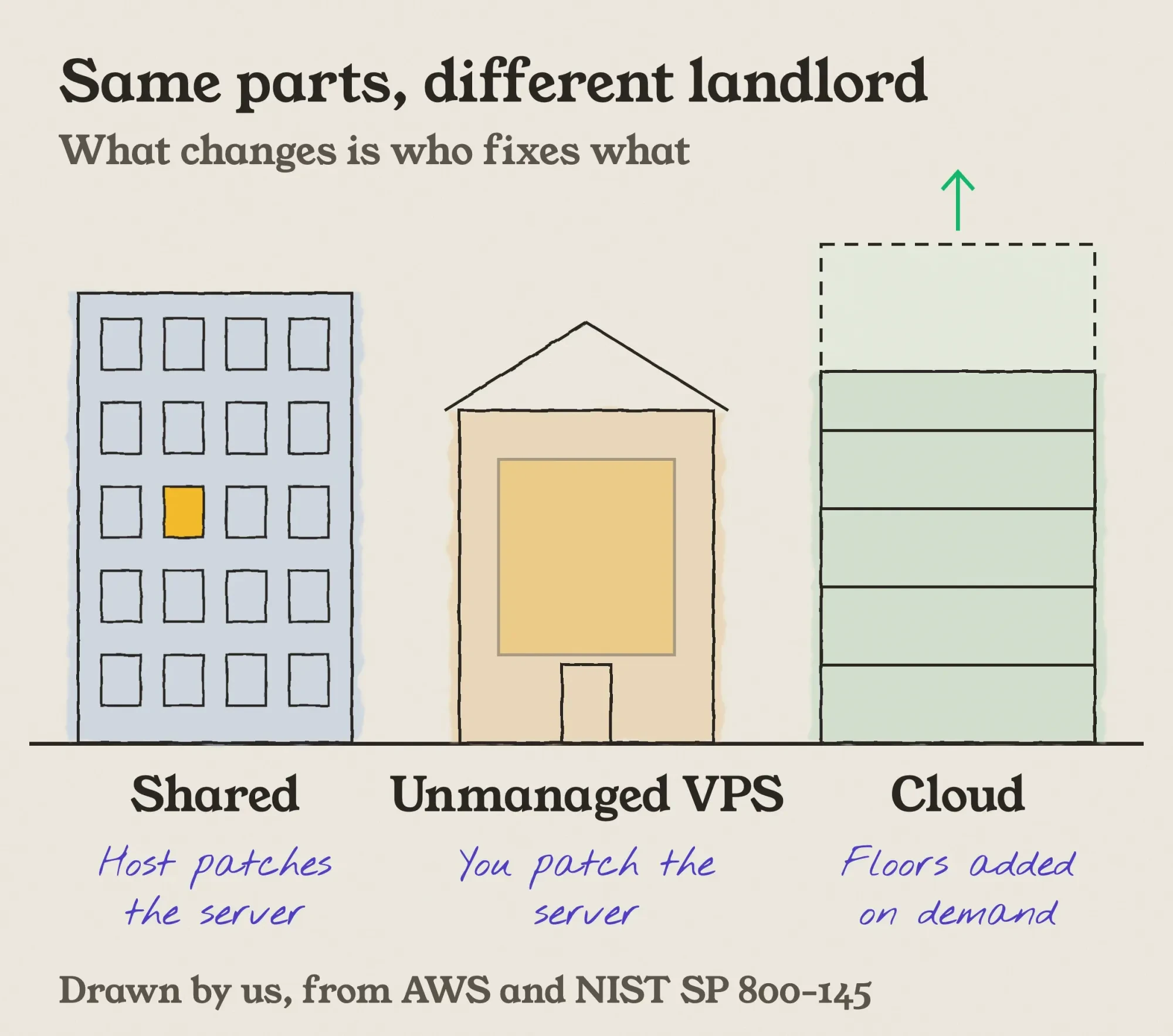 Illustration by DigitalTreed of shared hosting, an unmanaged VPS and cloud hosting, based on AWS's VPS explainer and NIST's definition of cloud computing.
Our take: most small businesses should buy the most managed option they can afford and put the savings into backups and a lighter theme. Unpaid server work is the most expensive way to save money.
Free cloud trials look tempting, but they aren't card-free. As of October 2026, Google Cloud’s Free Trial page offers a "$300 Welcome credit to spend over 90 days," and says you "must provide a credit card or other payment method" to sign up.
Whichever you pick, measure it.
Hosting shows up mostly in the server's first response time, and the PageSpeed Insights guide on our site explains how to read it.
We build and host small-business sites, so we have a stake in this choice. If you'd rather not own the server layers at all, the web development team here can set up the stack and look after it.
Is your architecture good enough? Check it the way the big clouds do
The big three clouds each publish a framework for judging an architecture, and they agree more than they differ. AWS Well-Architected names six pillars: "operational excellence, security, reliability, performance efficiency, cost optimization, and sustainability." Google’s framework covers "security, reliability, performance, cost, operations, or sustainability," and Microsoft’s pillar table starts with reliability.
A small site doesn't need a review board.
Turn the pillars into five questions you can answer this month:
- Security: is multi-factor sign-in on for every admin login?
- Reliability: is there a backup off the server, and have you ever restored one?
- Performance: does your busiest page load quickly on a phone?
- Cost: do you know what renews, at what price, and on which date?
- Operations: who gets the alert when the site goes down?
If the answer to that last one is "nobody," start with our website uptime monitoring setup guide.
Frequently asked
Is a VPS the same as cloud hosting?
Not always. NIST counts a service as cloud when it's self-service, network-reachable, pooled, elastic and metered. A VPS you can resize from a dashboard and pay for by use meets most of that; a fixed plan on one machine that needs a migration to grow doesn't. Ask the host how you add resources.
Not sure which layers you should own? Request a quote and we'll map your current setup before suggesting changes.
How we made this guide: The DigitalTreed team rewrote and fact-checked this page on October 25, 2026. Definitions come from NIST SP 800-145 and SP 800-125, and the security split from the AWS, Microsoft and Google Cloud pages, each read that day and linked where it's used. We ran the 8-site DNS and header check ourselves from a Mac on a network in India, with no sign-ins and one page load per site, and kept the full output. We didn't test any paid hosting plan, and we don't name hosts.
First published August 2020. Rewritten October 25, 2026: the old page followed another site's 2019 tutorial and claimed cloud apps are secure by default. New: NIST definitions, the shared responsibility model with Microsoft's matrix, our own 8-site check, and a hosting comparison by layer.
Sources
- NIST SP 800-145: The NIST Definition of Cloud Computing (September 2011)
- NIST SP 800-125: Guide to Security for Full Virtualization Technologies (January 2011)
- CISA and NSA: cloud security best practices information sheets (March 7, 2024)
- CISA: More than a Password (multi-factor authentication)
- AWS: Shared Responsibility Model
- Microsoft Learn: Shared responsibility in the cloud (updated August 24, 2026)
- Google Cloud: Shared responsibilities and shared fate
- AWS Well-Architected Framework: the pillars
- Microsoft Azure Well-Architected Framework pillars
- Google Cloud Well-Architected Framework
- Google Cloud: What is cloud architecture?
- IBM: What is cloud architecture?
- AWS: How CloudFront delivers content
- AWS: What is a VPS?
- WordPress.org: Requirements
- Google Cloud: Free Trial and Free Tier (updated October 22, 2026)

Comments
No comments yet. Start the conversation below.