

Quick answer
For most US small business websites, PHP is the practical pick as of October 2026. W3Techs finds it on 69.2% of sites with a known server language, against 8.2% for JavaScript. Node.js fits a custom app your team writes in JavaScript, and a commercial Next.js site on Vercel starts at $20 a month. Check your current site's runtime and support date first.
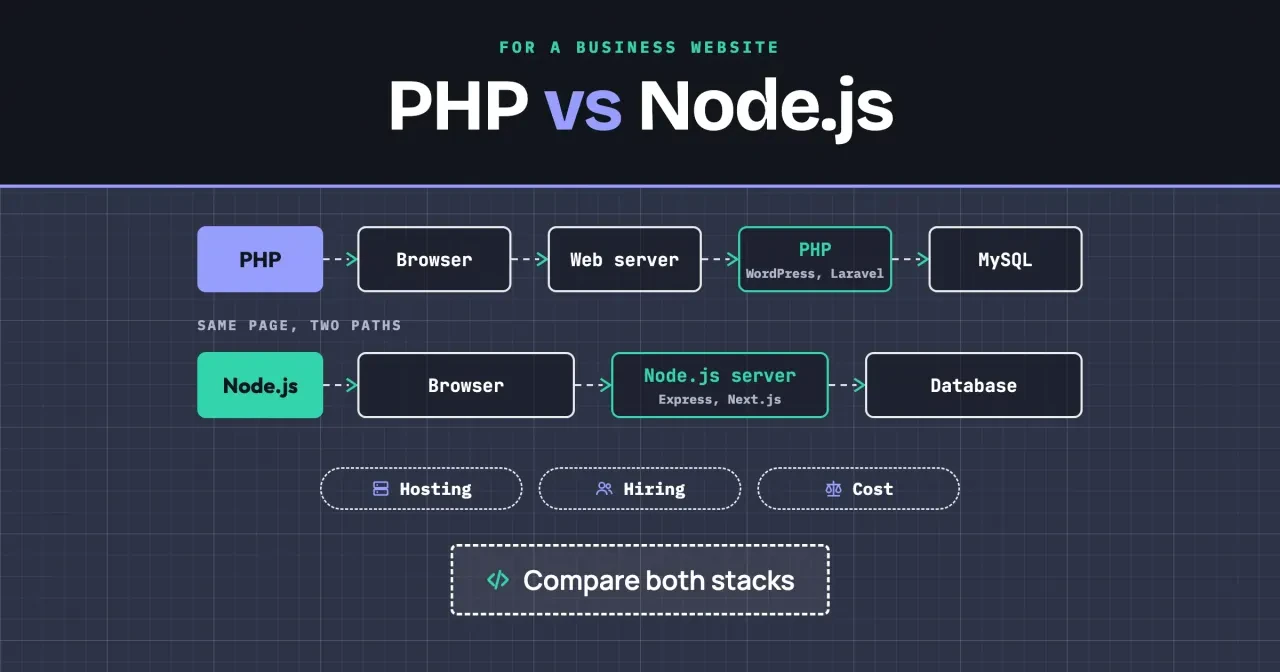
Say your business site runs WordPress, and a developer has just quoted a rebuild in Node.js. PHP is a server-side scripting language that builds each page when a visitor asks for it. Node.js is an open-source JavaScript runtime, and it runs your server code as one program that keeps running. So for you, PHP vs Node.js isn't about which language is nicer. It's about cost, hosting and who you can hire later.
We start with the two request paths, then what each one runs: WordPress and Laravel, or Express and Next.js. Next come hosting costs, speed and memory from our own test, how long each version is supported, and hiring developers. We end with when to choose PHP and when to choose Node.js. Our take, up front: keep PHP unless you're building a custom app in JavaScript.
Key takeaways
- A business Next.js site on Vercel needs the $20 Pro plan, not Hobby.
- PHP 8.2 stops getting security fixes on December 31, 2026.
- PHP runs 69.2% of sites with a known server language, per W3Techs.
- BLS publishes developer pay by job, not by language, so compare quotes.
- In our local test, both stacks averaged under 1 ms per form post.
Two request paths for the same page
Both stacks take the same request from a visitor's browser and send back the same HTML, so the visitor can't tell which one built the page. It's the route that differs. On a PHP site, a web server such as Apache or Nginx takes the request and hands it to PHP. On busier hosts that hand-off goes to PHP-FPM, the FastCGI process manager described in the PHP manual. It keeps a pool of PHP workers ready, so each request gets one.
PHP then runs the script, asks MySQL for the content, sends the page and forgets the request, so nothing carries over to the next visit unless it's saved. That's why the WordPress requirements page says "any server that supports PHP and MySQL will do". Nothing of yours has to stay running between visits.
Node.js works the other way round. Its docs say a Node.js app "runs in a single process, without creating a new thread for every request" (Introduction to Node.js). Your code is the server. It starts once, stays in memory and answers every visitor from there, which suits live chat, dashboards and APIs. The flip side is that something has to keep that process running and restart it after a crash, and that's a job PHP hosting mostly does for you.
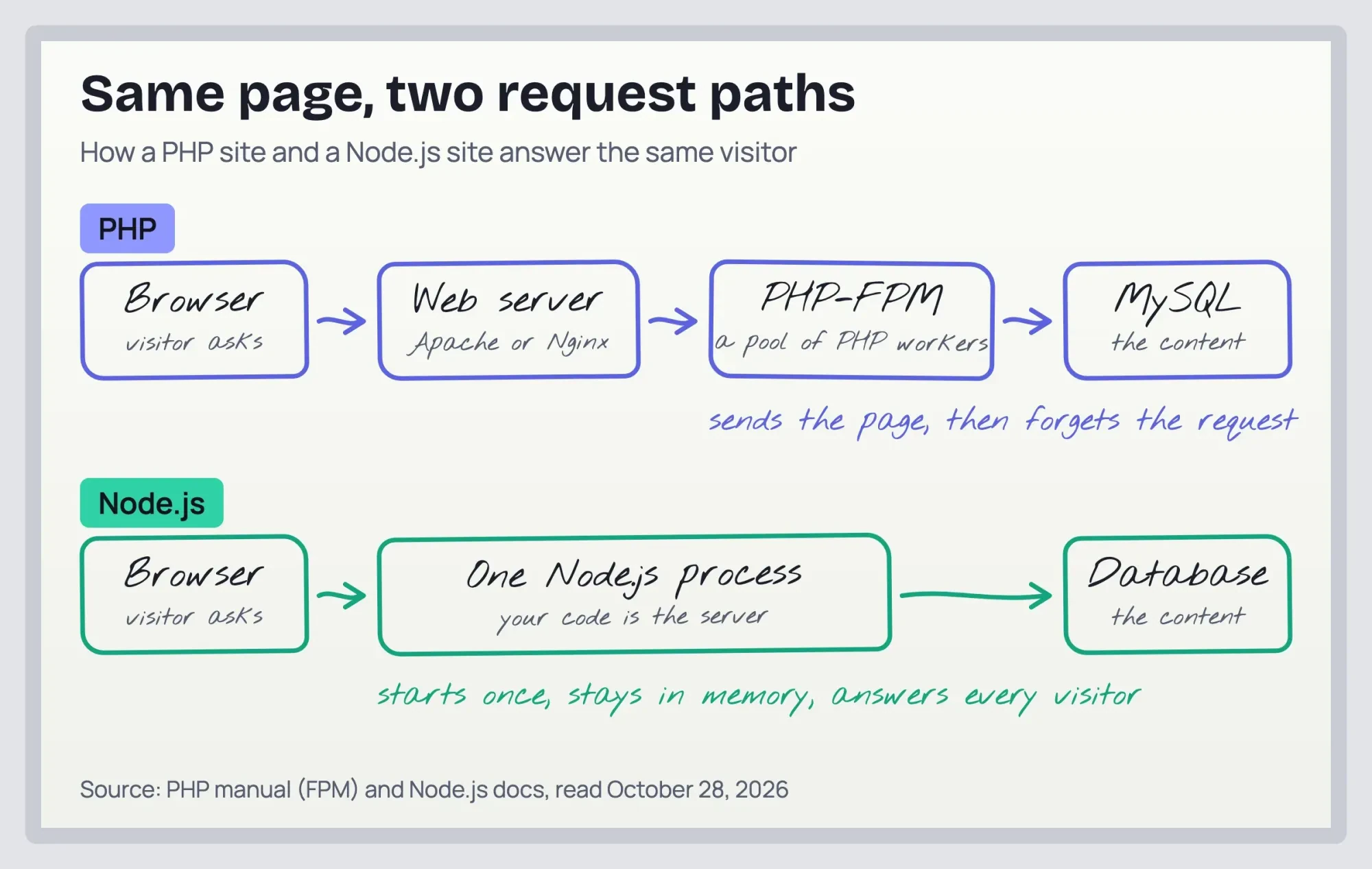 Diagram by DigitalTreed, from the PHP manual and Node.js docs read October 28, 2026
WordPress and Laravel, or Express and Next.js
That process model is only half of it, because the platform you want usually settles the language first. W3Techs counts PHP on 69.2% of websites whose server-side language it can detect, and JavaScript on 8.2% (W3Techs server-side languages, October 27, 2026). WordPress alone runs 39.6% of all websites, per W3Techs WordPress usage, and since it's written in PHP, every one of those sites is a PHP site too.
So WordPress means PHP. Our walkthrough for building a WordPress site shows what that stack involves day to day. For custom work in PHP, we'll use Laravel as the example framework. The Laravel 13 release notes list a March 17, 2026 release, PHP 8.3 to 8.5, and security fixes until March 17, 2028.
On the Node.js side, Express is a small server library and Next.js is a React framework for whole websites. Express 5 needs "a Node.js version 18 or higher" (Express: moving to Express 5). Next.js lists a minimum of Node.js 20.9 (Next.js installation docs). Here's the catch: both of those Node.js lines already show as end of life on the Node.js releases page, so a new build shouldn't sit on the minimum. It should sit on a supported LTS line.
Here's what each of the four asks for as of October 28, 2026:
| Platform | Language | Typical job | Needs (as of October 28, 2026) |
|---|---|---|---|
| WordPress | PHP | Content sites, blogs, small shops | PHP 8.3+ and MySQL 8.0+ or MariaDB 10.11+ |
| Laravel 13 | PHP | Custom portals and business apps | PHP 8.3 to 8.5 |
| Express 5 | Node.js | APIs and small custom servers | Node.js 18+ |
| Next.js | Node.js | React websites and web apps | Node.js 20.9+ |
Read that table by the job, not the language. A brochure site or a small shop fits WordPress. A booking portal can be built well in Laravel or Next.js, so it's the developer's skills that decide it. A feature that pushes live updates to the browser leans toward Node.js because of the single-process design. Not sure you need custom code at all? Our comparison of no-code tools and custom builds is the step before this one.
Hosting costs and what each server needs
So once the platform's picked, hosting's where the two stacks really split. A PHP page can run on almost any web host, while a Node.js app needs a place that keeps its process alive whether anyone's visiting or not. Any host that sells WordPress plans runs PHP, since WordPress won't install without it. A Node.js site needs a virtual server you manage, or a platform that's built to run Node.js apps. We read two public price lists on October 28, 2026, DigitalOcean Droplet pricing and Vercel pricing. The yearly column is the monthly price x 12, before taxes and usage charges:
| Option (as of October 28, 2026) | Runs | Monthly | Yearly (x 12) | The catch |
|---|---|---|---|---|
| DigitalOcean Basic Droplet, 512 MiB | PHP or Node.js | $4 | $48 | You install and patch the server |
| DigitalOcean Basic Droplet, 1 GiB | PHP or Node.js | $6 | $72 | Same work, twice the memory |
| Vercel Hobby | Next.js and other front ends | $0 | $0 | Personal, non-commercial use only |
| Vercel Pro | Next.js and other front ends | $20 | $240 | Includes $20 of usage credit |
The trap for a business is the free tier. Vercel's fair use guidelines say Hobby teams are "restricted to non-commercial personal use only", so a company site belongs on Pro from day one.
On paper, the $4 virtual server (as of October 28, 2026) beats a managed platform. The platform does the server work for you, though you're paying every month and living within its limits. On the $4 server, someone has to apply system and runtime updates every month, and that work belongs in the price before you compare the two.
PHP hosting has its own weak spot. When a host's PHP workers stall or run out, visitors can get a 502 error, and our fix list for 502 bad gateway in WordPress walks through it. On Node.js, the matching risk is a crashed process that nobody restarts, so a managed platform or a process manager belongs in the real price.
Speed and memory on one laptop
Speed is easy to argue about and easy to test, so we measured a small example instead of quoting someone else's benchmark. We wrote the same example contact form handler twice. We didn't use a framework or a database in either one. We kept the two files as close as we could, but the email checks differ.
Each handler reads a name and an email, checks the email, escapes both and returns a thank-you line. A bad email gets a 422 error. For the example inputs, both files sent back the same reply text, character for character. The example inputs were the name "Example Owner" and the email [email protected], and the PHP file came to 12 non-blank lines against 20 for Node.js. That gap's mostly the email check. PHP has one built into filter_var, while our Node.js file had nothing built in to call. So we wrote a short pattern of our own, which a real project would probably swap for a tested package.
We saved the Node.js file as .mjs; as a plain .js file it'd throw the error our Cannot use import statement outside a module fix explains.
Then we fired 2,000 example POST requests per run with ApacheBench, three runs for each setting, first singly and then 10 in parallel. Singly, PHP averaged 0.115 to 0.123 ms per request and Node.js 0.062 to 0.070 ms.
Singly, that's 8,109 to 8,694 requests a second for PHP and 14,358 to 16,219 for Node.js. No request failed. A single curl POST before the runs took 20.5 ms on PHP and 4.6 ms on Node.js, a one-off cold timing we don't read much into.
With 10 in parallel, Node.js handled 44,957 to 50,033 requests a second and PHP 11,391 to 11,596. Mean time per request was then 0.200 to 0.222 ms for Node.js and 0.862 to 0.878 ms for PHP. On throughput, Node.js ran at 3.9 to 4.4 times PHP's rate (44,957 / 11,596 = 3.9; 50,033 / 11,391 = 4.4). It's one example, and it favors Node.js. It doesn't carry over to a real site. PHP's built-in server "runs only one single-threaded process" and "should not be used on a public network", per the PHP manual on the built-in web server. Real PHP sites run under PHP-FPM with several workers, and real pages load a framework and query a database, which ours didn't.
On memory, PHP used less. Idle, the Node.js process used 54,144 KB, which is 52.9 MiB (KB / 1,024), and PHP's built-in server used 12,536 KB, or 12.2 MiB. After the runs, Node.js sat at 108,000 KB (105.5 MiB) and PHP at 15,092 KB (14.7 MiB), so Node.js roughly doubled in the same test while PHP barely moved.
Both fit in a 512 MiB server with room to spare. Linux numbers won't match our Mac, though.
So both stacks answered our example form in under a millisecond on average, even 10 at a time (PHP's slowest mean was 0.878 ms). A real page adds a framework, a database and images, and our test didn't measure any of those. Our free page speed checker shows where your real pages lose time.
What we tested
On October 28, 2026, we ran test/run.sh on an Apple M4 Mac with 16 GB of RAM and macOS 27.0.1. It used XAMPP's PHP 8.2.4 (php -S 127.0.0.1:8301 form.php), Node.js v26.10.0 (node form.mjs, node:http, no packages) and ApacheBench 2.3. Each run was ab -n 2000 -c 1 -p body.txt -T application/x-www-form-urlencoded, then the same with -c 10, three times each. Memory is RSS from ps -o rss before and after the runs, and one curl POST per server gave the reply, its time and the 422 check. We didn't test a database, a framework or a production server.
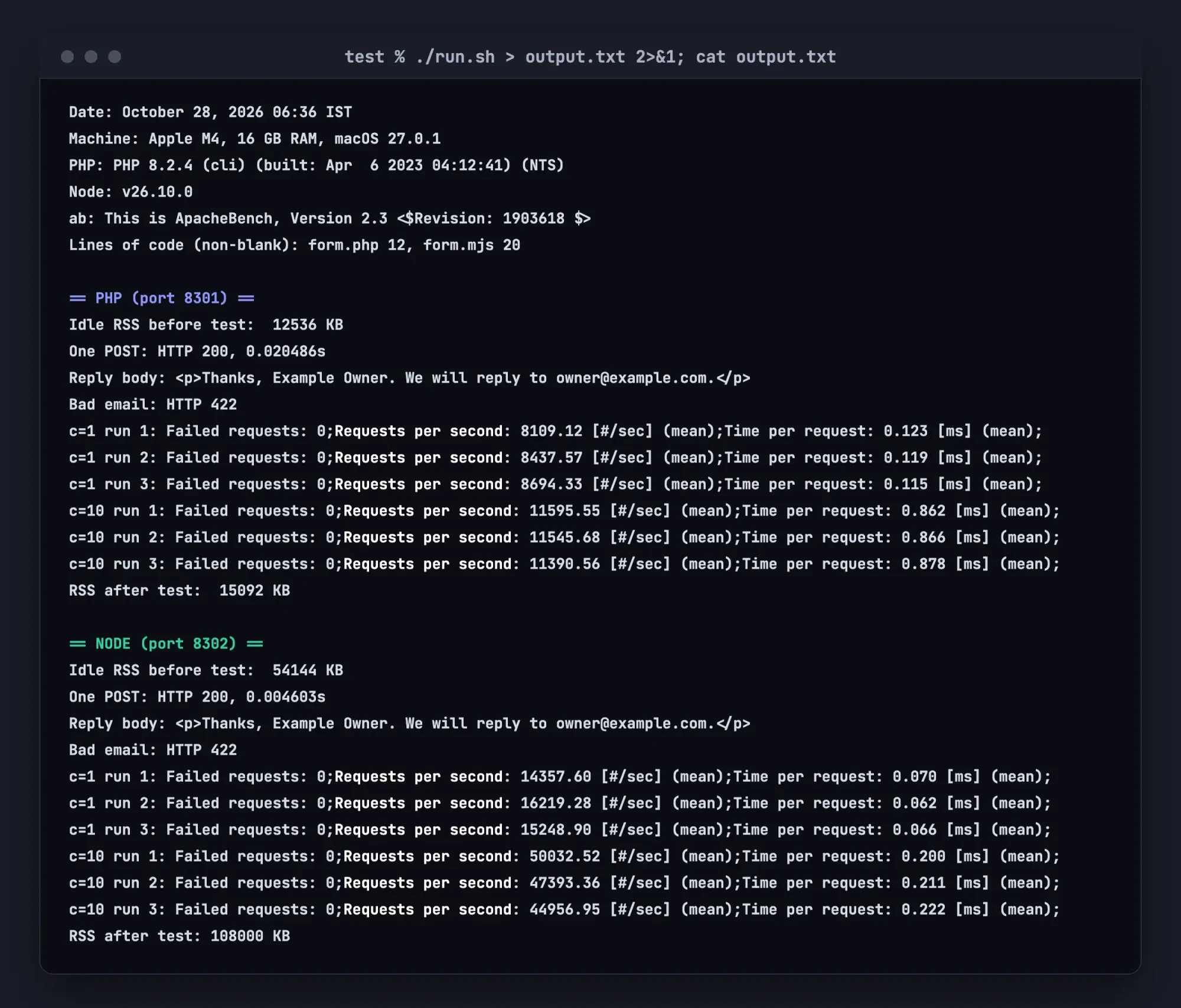 Source: our test output from 127.0.0.1 (test/output.txt, word for word), rendered as a terminal-style page, October 28, 2026
How long is each version supported?
That test is about speed, but a runtime past its end date stops getting security fixes, and that date is a cost you can put in a calendar. The PHP project says "Each release branch of PHP is fully supported for two years from its initial stable release" (PHP supported versions). After that, a branch gets two more years of fixes for critical security issues only.
On that page, PHP 8.2 loses security support on December 31, 2026. PHP 8.3 follows on December 31, 2027, PHP 8.4 on December 31, 2028 and PHP 8.5 on December 31, 2029. Our own XAMPP install shipped PHP 8.2.4, an April 2023 build of a branch with about two months of security fixes left on the day we ran our test.
WordPress already recommends 8.3 or greater, so we'd move a WordPress site off 8.2 before the year ends.
Node.js plans in shorter cycles, and it's stricter about which ones you should run. Its releases page says LTS "typically guarantees that critical bugs will be fixed for a total of 30 months" (Node.js releases). Its next line reads "Production applications should only use Active LTS or Maintenance LTS releases." In the Node.js Release schedule, Node.js 22 ends on April 30, 2027 and Node.js 24 on April 30, 2028. Node.js 26 is scheduled to enter LTS on October 28, 2026 and end on April 30, 2029, though the releases page still listed it as Current that morning. Our test ran on 26.10.0. From Node.js 27 on, every major version moves to LTS on a yearly cycle.
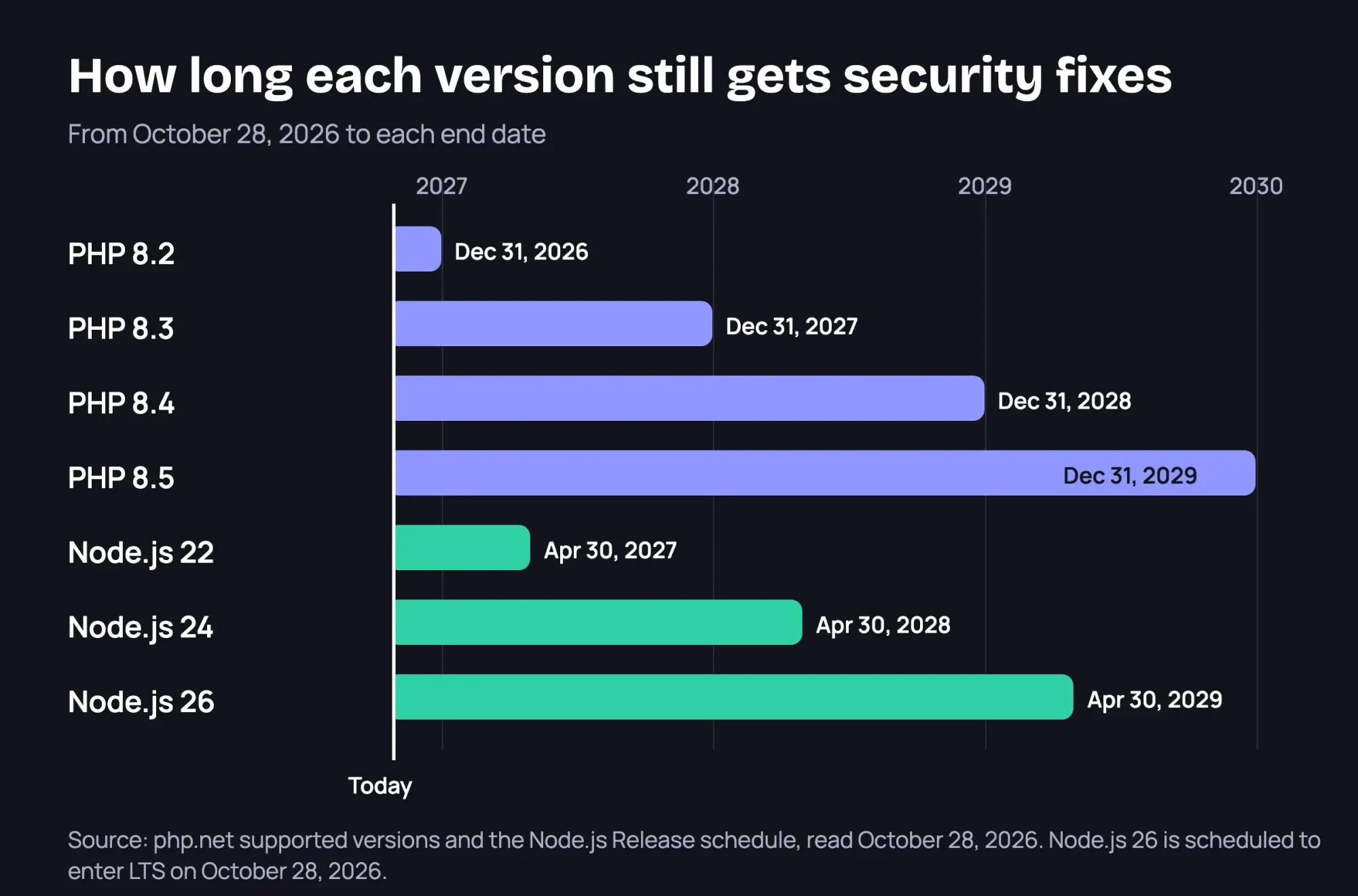 Diagram by DigitalTreed, from php.net and the Node.js Release schedule, read October 28, 2026
So the chore's about the same on both stacks: plan a runtime upgrade every year or two, and write the end date where you'll see it. To see what your site runs now, put your homepage into our HTTP header checker. PHP's expose_php setting adds an X-Powered-By header with the version, and Express sends X-Powered-By by default.
Either header can be switched off, though. A blank result doesn't prove anything.
Hiring developers and what they earn
Hiring is harder to price, and the honest answer starts with a gap in the data. The BLS doesn't publish pay by programming language. It reports occupations, and web developers earned a median $92,650 in May 2025 (BLS OEWS profile, web developers). Software developers earned a median $135,980 in May 2025 (BLS OEWS profile, software developers). Our derived hourly math, not a BLS hourly figure, is annual pay / 2,080 hours: $92,650 / 2,080 = $44.54, and $135,980 / 2,080 = $65.38. They're employee wages, not freelance or agency rates. Neither is a quote.
Talent pool size is easier to estimate. In the Stack Overflow Developer Survey 2026, 62.0% of 14,099 respondents did extensive work in JavaScript and 17.7% in PHP. The survey's global and self-selected. Its JavaScript figure also counts code written for the browser, so it overstates how many of them write Node.js servers. It isn't a US-only sample either.
A WordPress site and a custom app need different hires, whatever the language. Keeping a WordPress site patched isn't the same job as building a Laravel or Next.js app, and a good WordPress freelancer may never have touched either. The reverse holds too. A strong Next.js developer won't necessarily know why a WordPress plugin update broke your checkout page, and that's the kind of support call a WordPress site produces. So ask each candidate about the exact framework and version they'd use, not just the language, and ask who'll keep it updated after launch.
Rates, skill tests and contracts are covered in our full stack developer hiring guide.
Want to read the code yourself? Our first-script JavaScript lesson gets you started, and our list of programming languages to learn by goal compares PHP and JavaScript from a learner's side.
Choose PHP if, choose Node.js if
Here's where we'd land for five common kinds of business site:
- Choose PHP with WordPress if your site is mostly pages, a blog or a small shop.
- Choose PHP with Laravel if you need a custom portal and your developer already writes PHP.
- Choose Node.js if the product pushes live updates, such as chat or a live order board.
- Choose Node.js with Next.js if your team writes React and you'll pay for a platform like Vercel Pro.
- Keep what you have if the site works and its version is still supported.
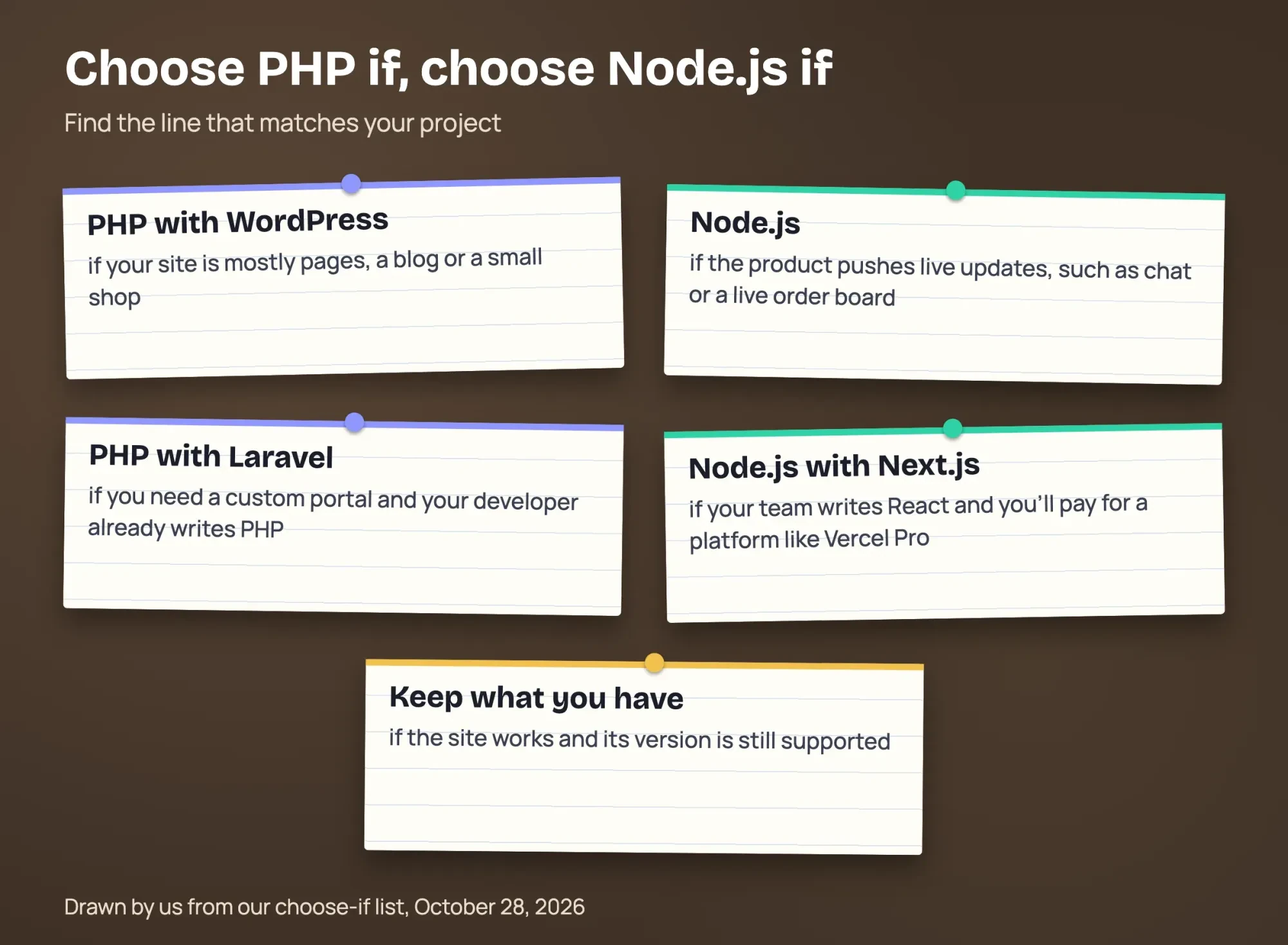 Drawn by us from our choose-if list, October 28, 2026
Whichever line fits, the build follows the same stages laid out in our seven-stage website development process. Ask any developer who quotes a rebuild which runtime version they'll ship on, and when it loses support. If two lines fit, we'd pick the one your trusted developer already works in, since an unfamiliar stack costs more to maintain.
For a business website, PHP with WordPress runs on any host that sells WordPress plans, and that wide choice of hosts and helpers is hard to beat. Node.js earns its place when the product is an app with live features. We build on both stacks as part of our website build service, so we'd be paid for that work. Compare our quote from the quote request page with one or two others.
Frequently asked
Is PHP dying?
Usage says no. W3Techs finds version 8 on 65.6% of PHP sites, but version 7 still on 26.6% (W3Techs PHP versions). PHP 7.4 reached end of life on November 28, 2022, per php.net unsupported branches.
Does a Laravel site need Node.js too?
For building it, usually yes. Laravel's docs say to install "either Node and NPM or Bun" to compile front-end assets (Laravel installation).
What happens after my Node.js version reaches end of life?
It stops getting fixes from the project. The Node.js releases page says commercial support past Maintenance LTS is available through OpenJS Ecosystem Sustainability Program partners (Node.js releases).
Is PHP free to use?
Yes. php.net calls it "A popular general-purpose scripting language that is especially suited to web development", and you pay only for hosting (php.net).
How we made this guide: On October 28, 2026, we read the PHP and Node.js release pages and the WordPress, Laravel, Next.js and Express docs. We also read W3Techs, two hosting price lists, BLS pay data and the Stack Overflow survey, then ran a local form test. Facts checked by the DigitalTreed team on October 28, 2026.
First published July 2023. Rewritten October 28, 2026 as a PHP vs Node.js comparison for business websites.
Sources
- php.net: PHP home page
- php.net: Supported versions
- php.net: Unsupported branches
- PHP manual: FastCGI Process Manager (FPM)
- PHP manual: Built-in web server
- PHP manual: core php.ini directives (expose_php)
- Node.js: Introduction to Node.js
- Node.js: Node.js releases
- Node.js Release working group: release schedule (GitHub)
- WordPress.org: Requirements
- Laravel 13: Release notes and support policy
- Laravel 13: Installation
- Next.js: Installation
- Express: Moving to Express 5
- Express: Security best practices
- W3Techs: Usage of server-side programming languages
- W3Techs: Usage statistics of PHP
- W3Techs: Usage statistics of WordPress
- DigitalOcean: Droplet pricing
- Vercel: Pricing
- Vercel: Fair use guidelines
- BLS OEWS profile: Web developers (15-1254), May 2025
- BLS OEWS profile: Software developers (15-1252), May 2025
- Stack Overflow Developer Survey 2026: Languages


Comments
No comments yet. Start the conversation below.