
Quick answer
Website uptime monitoring is a service that loads your site from outside every few minutes and alerts you when it fails. Free plans check every 3 to 5 minutes. A small business should watch the home page, the page that makes money, the SSL certificate and the domain renewal date.
Website uptime monitoring tells you your site is down before a customer does. That matters even on a good host. A 99.9% uptime promise still allows 43.2 minutes of downtime in a 30-day month, per the Google SRE availability table.
This guide is for owners, not engineers. It covers what to watch, a free setup, what the numbers mean, and what to do when an alert arrives. We also ran our own checker code against public sites on October 22, 2026.
Key takeaways
- A free monitor is enough for most one-site businesses. Pay when each hour down costs real sales.
- Monitor 2 pages, not 1: the home page and the order, booking or contact page.
- SSL certificates are getting shorter: 200 days at most from March 15, 2026, and 47 days from March 15, 2029.
- Let's Encrypt stopped sending expiry reminder emails on June 4, 2025. Something else has to warn you now.
- A host's uptime guarantee is a small credit you must claim, not a promise your site stays up.
What is website uptime monitoring?
Website uptime monitoring is an outside service that loads your site on a schedule and alerts you when it fails. Think of it as a robot visitor. It requests your page from servers outside your office. If the page fails, loads too slowly or returns an error code, it sends you an alert.
Alerts can go to email, a phone app, SMS or a team chat. Most tools also log every outage with a start time and an end time. That log is your proof when you ask a host for a credit.
Key facts about website uptime in 2026
- 99.9% uptime allows 43.2 minutes of downtime in a 30-day month, per the Google SRE availability table.
- Public SSL certificates issued from March 15, 2026, last 200 days at most. From March 15, 2029, the cap is 47 days, per the CA/Browser Forum Baseline Requirements.
- Let's Encrypt stopped sending expiry reminder emails on June 4, 2025, as its June 26, 2025 notice confirms.
- UptimeRobot re-checks a failed site up to 3 times, about 10 to 20 seconds apart, before marking it down, per its help page on locations.
- Google says 5xx server errors make its crawlers slow down, and indexed URLs are dropped if errors continue, per its HTTP status code guide.
What about APM? Application performance monitoring (APM) traces code inside a custom app, such as a booking system your developer built. A brochure site or a hosted store needs uptime, SSL and speed checks instead, which this guide covers.
How do uptime monitors avoid false alarms?
They check again before they alert you. UptimeRobot's help page on monitoring locations says a single failed check does not mark a site down. It first runs up to 3 confirmation re-checks in the same region, about 10 to 20 seconds apart.
On paid plans, UptimeRobot can also check from several regions in turn. Then the incident report shows whether a problem hit one region or many.
Your own security can also cause false alarms. The same page says a firewall that blocks some of its monitoring IP addresses can make a healthy site look down. If a security plugin blocks bots, allow your monitor's published IP list.
Is my website down, or is it just me?
To find out, test the site from a network that is not yours. Open it on your phone over cellular data, not Wi-Fi. Then check it with an outside checker. If both fail, the site is down for everyone.
Your office Wi-Fi, your browser cache or a local network problem can make a healthy site look dead. That is why the outside test comes first.
Then check the page with our free HTTP status checker. It requests the URL from our server and shows the status code. 200 means the page loaded, a 4xx code means it's missing or blocked, and a 5xx code means the server failed.
We tested it on October 22, 2026. We ran our checker's code on a local copy of our site against httpbin.org, a public test service that returns any code you ask for. All 3 test URLs came back with the code they were built to send.
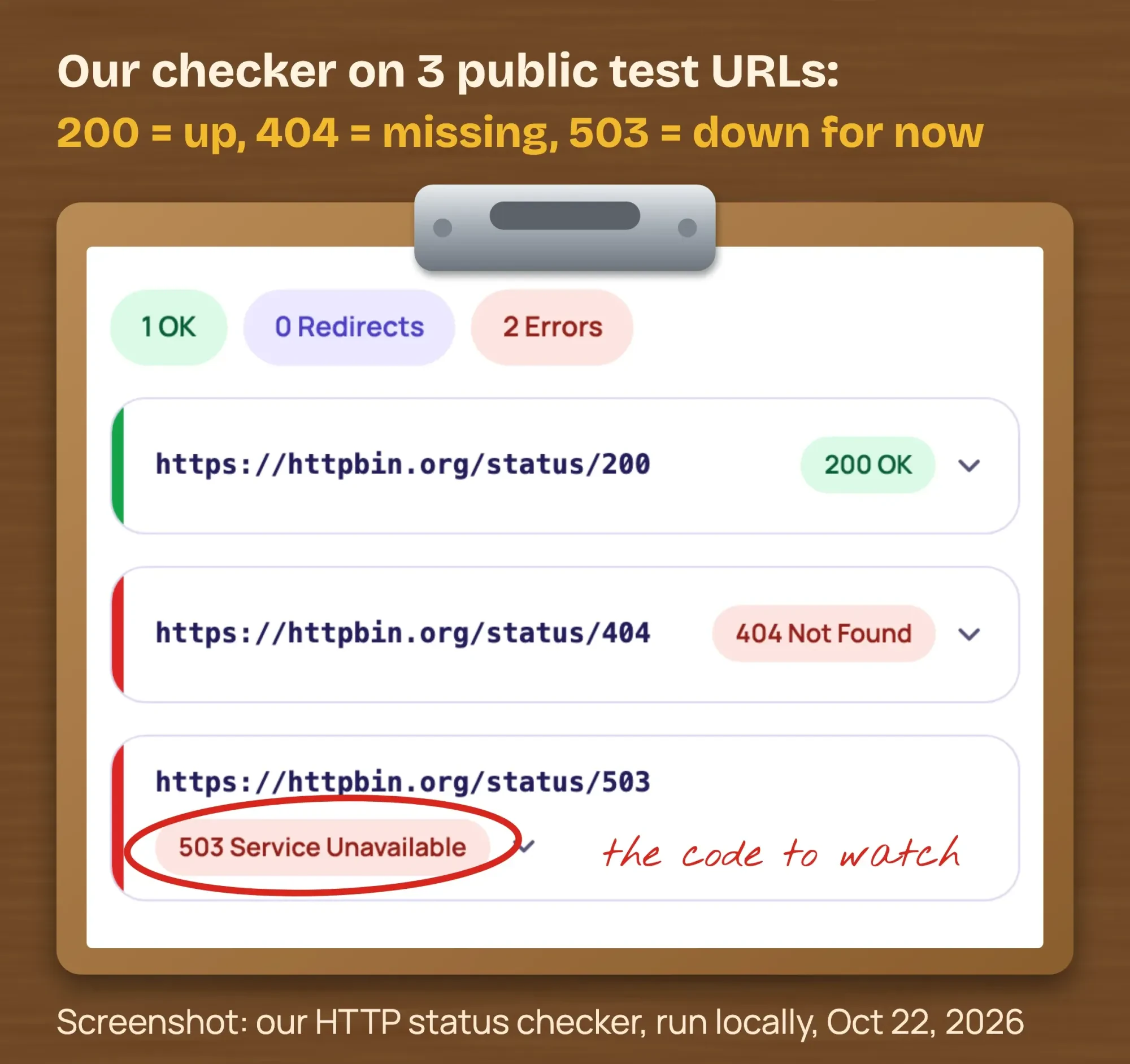 Screenshot: our HTTP status checker code, run locally on public httpbin.org test URLs, October 22, 2026.
Look for a 503 during an outage or planned maintenance. It tells browsers and Google the problem is temporary.
What does 99.9% uptime mean?
99.9% uptime means your site can be down 0.1% of the time. Here is the arithmetic for a 30-day month:
- 30 days x 24 hours x 60 minutes = 43,200 minutes in the month.
- 0.1% of 43,200 minutes = 43,200 x 0.001 = 43.2 minutes of allowed downtime.
- Over a year: 365 x 24 = 8,760 hours, and 8,760 x 0.001 = 8.76 hours.
Those figures match the availability table in Google's SRE book. Each extra 9 cuts the allowed downtime by 10 times.
| Uptime | Allowed downtime per 30-day month | Per year |
|---|---|---|
| 99% | 432 minutes (7.2 hours) | 3.65 days |
| 99.5% | 216 minutes (3.6 hours) | 1.83 days |
| 99.9% | 43.2 minutes | 8.76 hours |
| 99.99% | 4.32 minutes | 52.6 minutes |
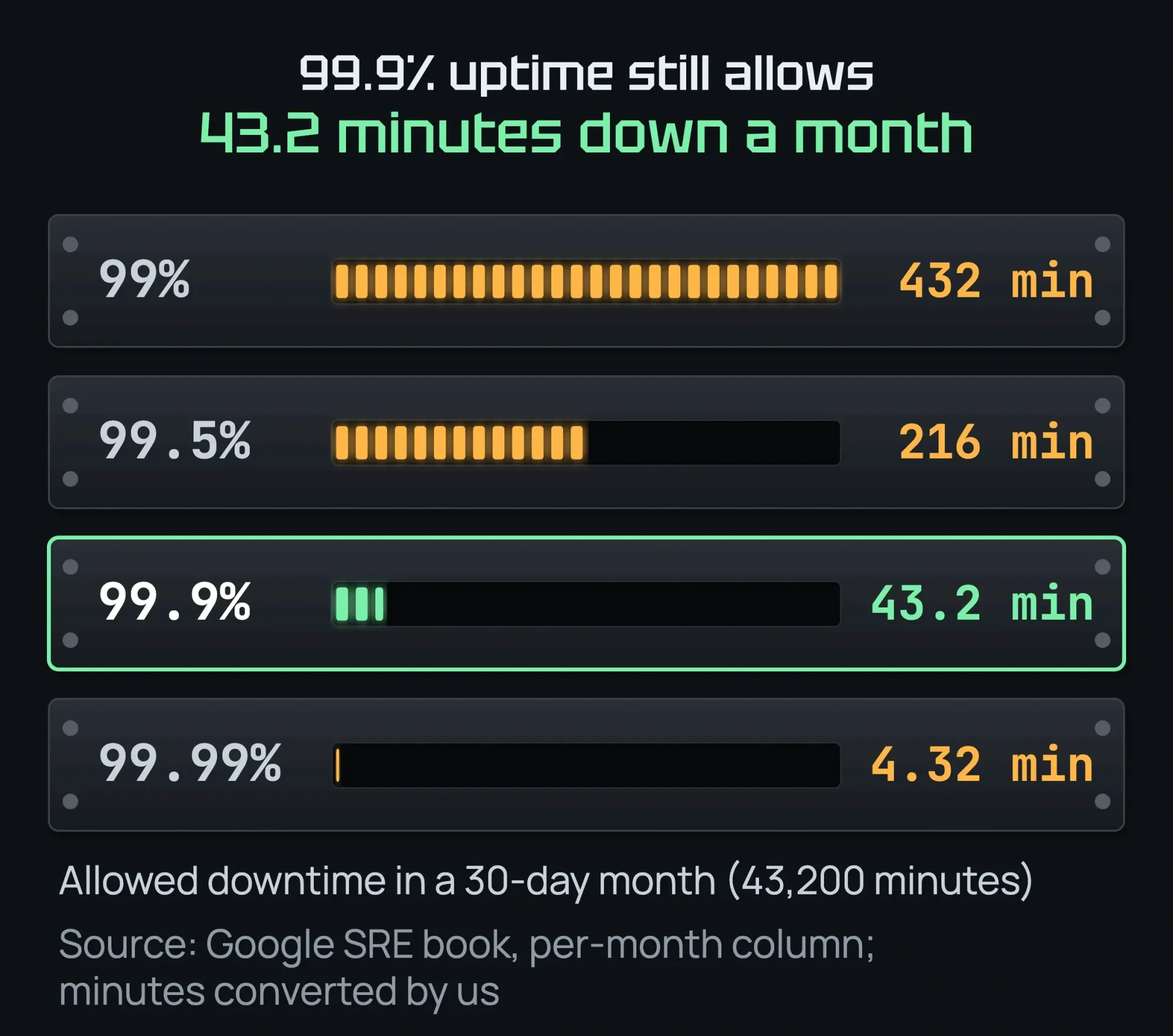 Diagram by DigitalTreed. Source: Google SRE book availability table (per-month column), read October 22, 2026; minutes converted by DigitalTreed.
Google's own engineers say more nines are not always worth it. The SRE book chapter on risk notes that users on a 99% reliable phone can't tell 99.99% from 99.999%.
How do you calculate your uptime percentage?
Take the minutes in the period, subtract the minutes down, divide by the minutes in the period, then multiply by 100. Your monitor's outage log gives you the minutes down.
- A 30-day month has 43,200 minutes.
- Say your site was down for 30 minutes: 43,200 - 30 = 43,170.
- 43,170 / 43,200 = 0.99931, and 0.99931 x 100 = about 99.93%.
- That beats 99.9%, because 30 minutes is under the 43.2 minutes 99.9% allows.
What does a host's uptime guarantee pay?
Usually a small credit, and only if you ask. As of October 2026, the DreamHost terms of service promise 100% uptime. The credit is 1 day of hosting for each hour down, capped at 10% of your next renewal.
DreamHost also says its downtime count starts only when you open a support ticket. Its uptime guarantee excludes errors in your own code or settings; the credit covers only failures in DreamHost's systems. Your monitor's timestamps are the evidence.
Big clouds work the same way. The Amazon EC2 service level agreement promises a single server at least 99.5% a month, and you must open a case to get a credit. Ask the same uptime question of any cloud system that runs your books; our cloud ERP buyer's checklist lists it with six others.
This is general information, not legal advice; check with an attorney for your situation. Read your own host's current terms, because each one sets its own.
What should you monitor besides uptime?
A site can answer "200 OK" and still be broken for customers. Add these checks:
- A keyword check: a word that only shows when the page works, such as "Add to cart". It catches an error page that still loads.
- SSL certificate expiry: an alert 30, 14 and 7 days before the end date.
- Domain expiry: ICANN's renewal reminder policy requires registrars of generic domains such as .com to warn you about 1 month and 1 week before. Those emails go to your registrant address. If the domain expires, your site and your business email address stop on the same day.
- Error codes on key pages: 5xx server errors, 404s and redirect loops.
- Response time: web.dev's guide to TTFB says most sites should aim for a first byte in 0.8 seconds or less.
- A status page, if customers log in or pay on your site. It tells them you know about the outage. Better Stack's free plan includes 1 as of October 2026, per the tools table below.
Which type of uptime monitor do you need?
Our take: most small businesses need 2 types, an HTTPS check and a keyword check. UptimeRobot's monitor types guide describes the others. Here is what each one watches.
| Monitor type | What it checks | Small business need |
|---|---|---|
| HTTP(S) | Requests your URL like a visitor and reads the status code | Yes, on the home page and the money page |
| Keyword | Whether a word is on the page, or missing from it | Yes, on the money page |
| Ping | Whether the server answers ICMP pings | Rarely; a site can fail while the server still answers |
| Port | Whether a service on a port, such as email (SMTP), responds | Only if you run your own mail or other server |
| Heartbeat (cron job) | Waits for your system to call a unique URL on time; silence means down | Only for scheduled jobs or devices you run |
| DNS | Changes to or removal of records such as A, CNAME and MX | Helpful if several people can edit your DNS |
| Transaction | A scripted visit through a flow such as a checkout | Paid; for stores where a broken checkout costs sales |
The transaction row comes from Pingdom's transaction monitoring page. It says the check can "simulate visitor interaction" and alert you when "critical site flows stop working correctly." The other rows come from UptimeRobot's guide.
For the speed side, test your load time with our free website speed test once a quarter. Then read the results with our PageSpeed Insights guide.
Don't send alerts to an email address on the domain you're monitoring. If the domain expires or the mail server goes down with the site, those warnings never arrive.
Why does SSL certificate expiration need watching now?
Because they now expire much sooner. In April 2025, the CA/Browser Forum passed ballot SC-081v3, which cuts the maximum life of a public SSL certificate from 398 days to 47.
The Baseline Requirements, section 6.3.2, set this schedule:
| Certificate issued | Maximum life |
|---|---|
| Before March 15, 2026 | 398 days |
| March 15, 2026 to March 14, 2027 | 200 days |
| March 15, 2027 to March 14, 2029 | 100 days |
| From March 15, 2029 | 47 days |
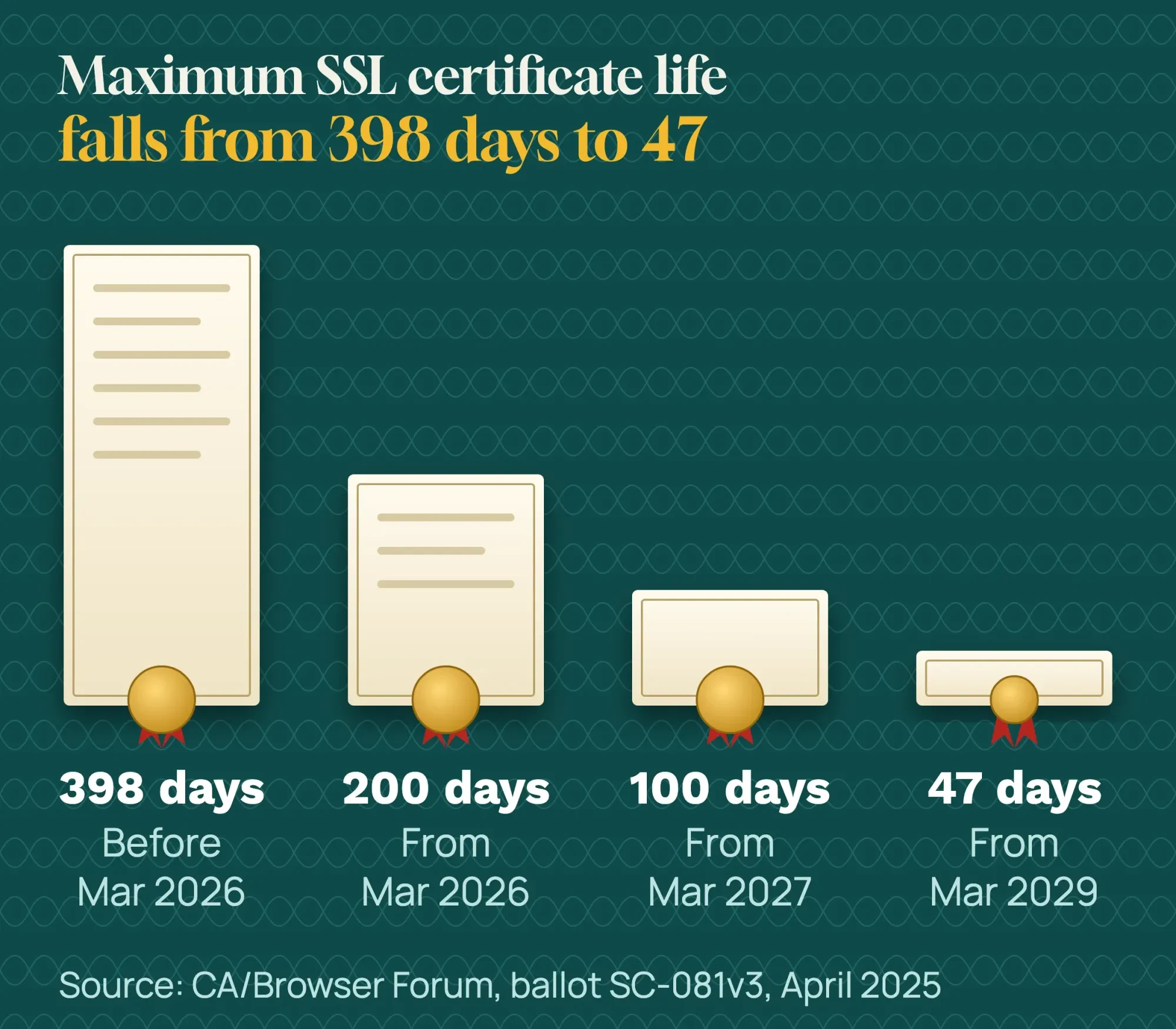 Diagram by DigitalTreed. Source: CA/Browser Forum ballot SC-081v3, April 2025.
The safety net shrank too. Let's Encrypt, the free certificate authority many hosts use, ended its expiry reminder emails on June 4, 2025. It confirmed this in a June 26, 2025 post. It suggests a third-party service if you still want reminders.
Let's Encrypt is also moving from 90-day to 45-day certificates. Its default switches to 64 days on February 10, 2027, and to 45 days on February 16, 2028. It warns that renewing on a fixed 60-day timer "will no longer be sufficient."
We ran our SSL checker code locally on October 22, 2026, against 3 public sites. The certificate on www.sba.gov runs from July 28, 2026, to February 10, 2027. By the Baseline Requirements' count, that is about 198 days, just under the new 200-day cap. The one on www.usa.gov runs 90 days.
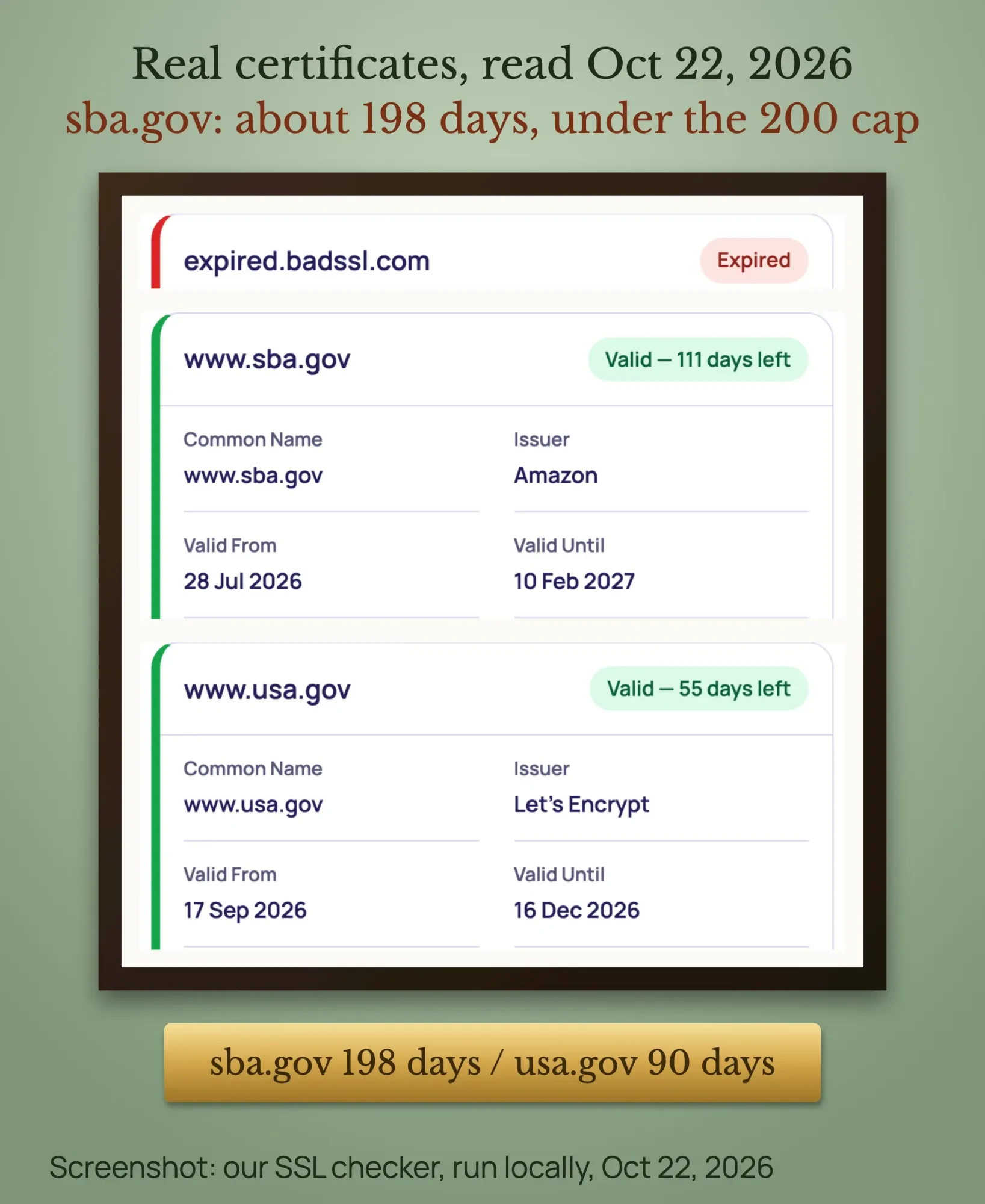 Screenshot: our SSL checker code, run locally on public sites, October 22, 2026.
The third test, expired.badssl.com, is a public test page with a certificate that ended in 2015. It shows what an expired certificate looks like in a report. Check your certificate's end date with our free SSL checker and put the date in your calendar 30 days ahead.
Most hosts renew certificates for you. The risk is a renewal that silently fails, which is why an alert matters more each year.
How to set up free website uptime monitoring
Our estimate: about 15 minutes for one site with no special setup.
Set up free website uptime monitoring
- Pick one free monitor Choose a free plan from the table in the next section, and read its free-plan rules. A 3- or 5-minute check is fine for most small sites.
- Add your 2 key pages Add the home page and the page that makes money, such as the order, booking or contact page, as HTTPS monitors.
- Add a keyword check On the money page, watch for a word that only appears when it works, such as "Book now" or "Add to cart".
- Send alerts to 2 people Use a phone app for the owner and an email address that is not on your own domain.
- Turn on a second opinion for WordPress Turn on Jetpack's free Downtime Monitor as a backup. It is optional.
- Cover SSL and domain dates Pick a plan with expiry alerts, or put both dates in a calendar 30 days ahead.
- Test the alert Add a monitor for a page that does not exist, wait for the alert, then delete it.
Jetpack's support page says its Downtime Monitor is free and checks your site "every five minutes" from its servers. Alerts go to the WordPress.com account that connected Jetpack, so check who that is.
Free uptime monitoring checklist for small businesses
Copy this checklist into your calendar. It uses only free tools, and this guide explains each line.
| When | Check | Free tool |
|---|---|---|
| Always on | Home page and money page, with a keyword check | A free uptime monitor |
| Once a month | Status codes on your 5 most important URLs | Our free HTTP status checker |
| Once a month | SSL certificate end date; calendar alert 30 days ahead | Our free SSL checker |
| Once a quarter | Load time on the home page and money page | Our free website speed test |
| After any outage | Crawl stats, host status | Google Search Console |
| Once a year | Domain renewal date and your host's current uptime terms | Your registrar and host account |
| Once a year | Send a test alert to every person on the alert list | Your uptime monitor |
Which website monitoring tools are free, and when should you pay?
As of October 2026, UptimeRobot and Jetpack have free plans. Better Stack and StatusCake have free plans labelled for personal projects or personal use. Pingdom offers only a free trial. For one small site, a free plan is usually enough. Pay when you need 1-minute checks or SSL alerts.
All prices and free-plan limits below are vendor data, taken from each vendor's own pricing page as of October 2026. We re-read them on October 22, 2026. They change and can differ by country, so check before you buy.
| Tool | Free plan | Cheapest paid plan (as of October 2026) |
|---|---|---|
| UptimeRobot | 50 monitors, 5-minute checks; SSL alerts are paid only | Solo: $12 a month billed yearly ($144 a year), or $13 month to month; 60-second checks |
| Better Stack | 10 monitors, 3-minute checks, 1 status page; labelled "Free for personal projects" | Responder license: $29 a month billed yearly, or $34 month to month |
| StatusCake | Limits differ on its own page (3 monitors at 15 minutes, or 10 at 5 minutes); its FAQ says personal use only | Superior: $20.41 a month billed yearly, or $24.49 month to month; 1-minute checks |
| Pingdom | None (free trial only) | Synthetic monitoring from $16.50 a month billed yearly ($198 a year for 10 uptime checks) |
| Jetpack Downtime Monitor | Free for WordPress, 5-minute checks | n/a |
Sources, all as of October 2026: UptimeRobot pricing, Better Stack uptime page and its pricing page, StatusCake pricing, and Pingdom pricing. We checked the math: $12 x 12 months = $144, and Pingdom's $198 a year / 12 = $16.50.
Read the free-plan rules. StatusCake's pricing FAQ calls its free account "Designed for single, personal use only." UptimeRobot's terms of use allow "any use, including commercial and business use," though its pricing page labels the free plan "Good for hobby and non-profit projects."
Our take: start free. Pay for 1-minute checks and SSL alerts when an hour of downtime costs more than a year of the paid plan.
Is there a free open-source uptime monitor?
Yes. Uptime Kuma is a free, self-hosted monitoring tool under the MIT license. Its latest release, version 2.5.6, came out on October 9, 2026. Its features list includes 20-second intervals, keyword checks, status pages and certificate info.
The catch is that you run it yourself. It needs Docker or Node.js 20.4 or later on a server. Our advice: put it on a different server from your website, or it goes down with the site it watches.
What should you do when the alert fires?
Check the site from your phone, read the error code, then open a ticket with your host. Work through this list in order. It takes about 10 minutes.
- Open the site on your phone over cellular data. If it loads, the monitor may have hit a short blip; watch for a second alert.
- Read the error. A 502 or 504 points to our 502 bad gateway fix. A 500 or "critical error" points to our HTTP 500 error guide. On WordPress, our guide to the WordPress debug log shows how to find the plugin behind it.
- "Error establishing a database connection" has its own database connection fix. A redirect loop is covered in our too many redirects guide.
- If the browser says the address can't be found, read our guide to the DNS_PROBE_FINISHED_NXDOMAIN error, and check the domain renewal.
- Open a support ticket with your host now. Paste the monitor's start time. At some hosts, such as DreamHost, the credit clock starts with your ticket.
- Post a short note on your social pages or Google Business Profile with a phone number for orders.
If you must take the site offline briefly, Google advises returning a 503 for an urgent closure of 1 to 2 days. Don't return a 503 for robots.txt, because that blocks all crawling.
If outages keep coming back, the cause is often the host, the theme or a plugin. A cache plugin can cause it too: a Redis connection error takes every page down at once. Our web development team can move or rebuild the site so it stays up, and you get a fixed quote first. (DigitalTreed sells this service.)
Does downtime hurt your Google rankings?
Short outages usually don't. Google's guide to HTTP status codes says 5xx errors make its crawlers "temporarily slow down" for a while. Indexed URLs are kept at first, "but eventually dropped" if errors continue.
A page that returns a 4xx code is removed from the index, per the same page. So a broken key page needs a fix within days, not weeks.
After any outage, open Search Console's Crawl stats report. Its host status section shows whether Google hit availability problems. Our Google Search Console guide shows where to find it.
Our advanced SEO guide explains what Google does with each status code, including soft 404s that return 200.
If you want a full health check of the site after that, our technical SEO audit checklist covers crawl errors, redirects and speed.
Example: a bakery that lost a Saturday
Example: a family bakery in Columbus, Ohio, takes pickup orders on a WordPress site. The bakery and its numbers are made up. Its shared hosting costs $120 a year and has a 100% uptime guarantee worded like DreamHost's.
One Saturday, the order page returns a 502 for 3 hours. Nobody notices until a customer calls. Here is what the guarantee pays:
- 1 day of credit per hour down: 3 hours = 3 days of hosting.
- $120 / 365 days = about $0.33 a day, so 3 days = about $0.99.
- The cap is 10% of the $120 renewal, or $12, so the full $0.99 applies.
With a free 5-minute monitor, the owner would have heard within about 5 minutes. They could have opened a ticket and posted a "call to order" note before the morning rush. These terms are as of October 2026, from the DreamHost terms.
Frequently asked
Is free website monitoring enough for a small business?
For one brochure site, usually yes. Pay for 1-minute checks, SMS alerts and SSL alerts when an hour of downtime costs real sales.
How often should my site be checked?
Every 3 to 5 minutes on a free plan. Every minute if you sell online and each hour down costs more than the paid plan.
Will my SSL certificate expire sooner now?
Yes. Certificates issued from March 15, 2026, can last 200 days at most. That drops to 100 days in 2027 and 47 days in 2029.
Why did my monitor say my site was down when it was up?
Often a firewall or security plugin blocked the monitor. Allow your monitor's published IP addresses. A short blip can also end before you look.
How do I work out my uptime percentage?
Subtract the minutes down from the minutes in the period, divide by the minutes in the period and multiply by 100. For example, 30 minutes down in a 30-day month is about 99.93%.
Is there a free open-source uptime monitor?
Yes. Uptime Kuma is free and self-hosted, but you need your own server to run it. Put it on a different server from your website.
Do I need a status page?
Only if customers log in or pay through your site. A status page tells them you know about the outage, which cuts phone calls and emails.
Your next step
Today, set up one free monitor on your home page and your money page, and send the alerts to your phone. Then put your SSL and domain end dates in your calendar. If a designer set up your site, our guide to hiring a web designer shows how to check the domain is in your business's name.
If your site goes down often, our web development team can find the cause and fix it, with a fixed quote first.
How we made this guide: it's built from the CA/Browser Forum ballot and Baseline Requirements and Let's Encrypt's posts. We also used Google's documentation, ICANN policy and each vendor's pricing page. On October 22, 2026, we ran our HTTP status checker and SSL checker code on a local copy of our site. Our tools have no version numbers, so we used the code as it stood that day. We tested public sites only (test pages and 2 US government sites) and took the screenshots then. We checked every number and price against its source the same day.
First published January 4, 2024. Rewritten October 22, 2026: a small-business guide with the uptime math, the SSL lifetime changes, a free setup, US prices and our own checker test. Updated October 23, 2026: added a key facts list, a monitor types table and a free monitoring checklist. We also added sections on false alarms, the uptime formula and Uptime Kuma, plus 3 FAQs.
Sources
- CA/Browser Forum: Ballot SC-081v3, reducing certificate validity periods, April 11, 2025
- CA/Browser Forum: TLS Baseline Requirements, section 6.3.2
- Let's Encrypt: Ending support for expiration notification emails, January 22, 2025
- Let's Encrypt: Expiration notification service has ended, June 26, 2025
- Let's Encrypt: Decreasing certificate lifetimes to 45 days, December 2, 2025
- Google SRE book: Availability table
- Google SRE book: Embracing risk
- Google: How HTTP status codes affect Google's crawlers
- Google Search Central: Pause or disable a website
- Search Console Help: Crawl Stats report
- web.dev: Time to First Byte (TTFB)
- ICANN: Expired Registration Recovery Policy
- DreamHost: Terms of service, Guaranteed Uptime (vendor)
- Amazon EC2 service level agreement (vendor)
- UptimeRobot pricing (vendor)
- UptimeRobot terms (vendor)
- Better Stack Uptime (vendor)
- Better Stack pricing (vendor)
- StatusCake pricing (vendor)
- Pingdom pricing (vendor)
- Jetpack: Downtime Monitor (vendor)
- UptimeRobot Help: Locations and multi-location feature (vendor)
- UptimeRobot Help: Monitor types (vendor)
- Pingdom: Transaction monitoring (vendor)
- Uptime Kuma on GitHub (open source, MIT license)

Comments
No comments yet. Start the conversation below.