

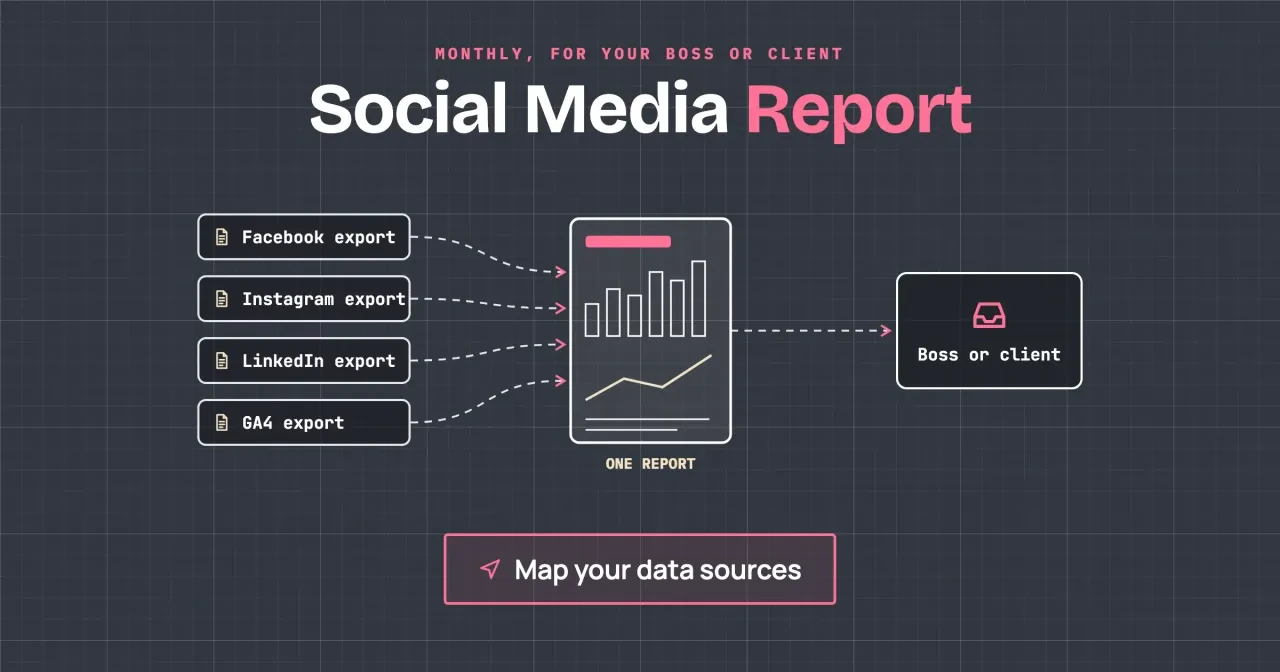
Quick answer
As of October 2026, a monthly social media report fits in 5 slides. They cover a summary, leads and website visits, views and reach per platform, engagement rate, and next month's changes. If your boss only asks whether social brings customers, send slides 1, 2 and 5. Start with our CSV template below.
It's the first week of the month, and the owner or client wants to know if social media was worth the hours. A social media report is a short monthly summary that turns each platform's export into a few numbers someone else can act on. We'll build one for a made-up lawn care company.
We start with the five slides, then why reach, views and impressions mean different things on each platform, and how to calculate engagement rate. Next come where each export lives and the CSV template, with what we tested. Last, how to explain a drop.
Key takeaways
- Put leads and website visits on slide 2, before any likes or views.
- Meta views and LinkedIn impressions are counted differently, so never add them.
- LinkedIn's engagement rate counts clicks, so print your own formula on the slide.
- Instagram insights reach back only 90 days, so export every month.
- In our made-up example, TikTok views more than doubled and brought 0 quote requests.
Five slides, in the order your boss reads them
Put the answer first. The person reading wants to know one thing: did social media bring in business this month? So the report opens with that answer, and the supporting numbers sit behind it. Here's the order we use, with each slide doing one job:
- Summary: three sentences, each with a number and a comparison with last month.
- Leads and website visits: sessions and key events from Google Analytics 4, by platform.
- Views and reach: each platform on its own row, in that platform's own words.
- Engagement rate: one formula, printed on the slide, with last month beside it.
- Next month: three changes, each with a name and a date.
Slide 2 comes before views on purpose. Platform numbers tell you how many people saw a post, while Google Analytics 4 (GA4) tells you who came to the website and asked for a quote. That's the number an owner pays for. Google's URL builder help says tagged link values show up in the Traffic acquisition report, so tag every bio and post link before the month starts. Our UTM link builder writes those tagged links.
If tagged visits land outside the social rows, the GA4 channel rules in our social media audit guide show why.
A client and a boss read the deck a little differently. A boss inside the business has usually heard last month's story in the hallway already, so the summary can stay at three bare lines with numbers. A client you bill each month hasn't watched the accounts, so give each summary line a reason. Here's a made-up one: "Facebook led again because the before-and-after photos got shared." Keep the slide count the same either way. Every extra slide pushes slide 5, the one with next month's changes, further from the start. If someone asks for more detail, put it in an appendix after slide 5 and say it's there.
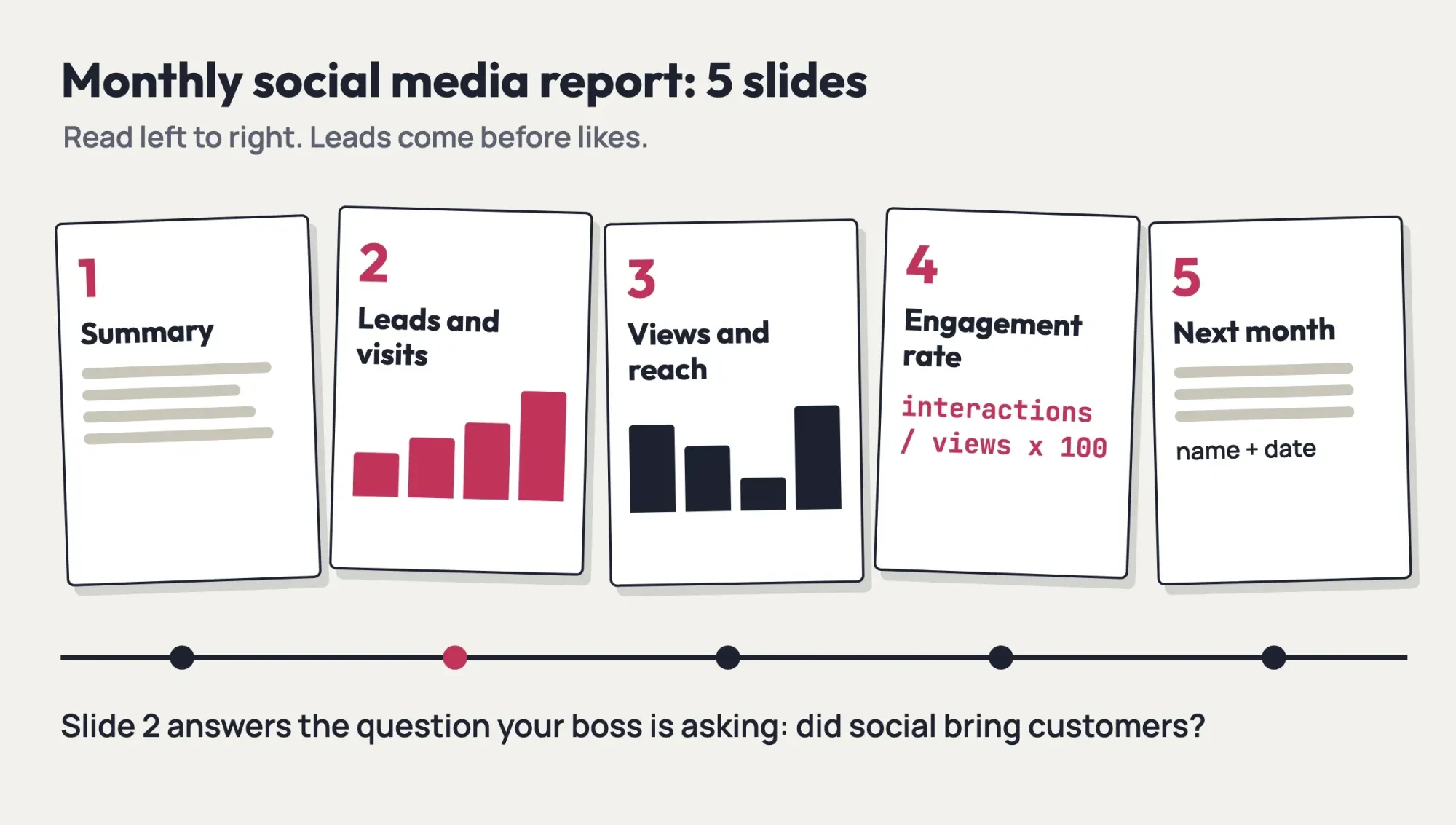 Diagram by DigitalTreed: the five-slide order for a monthly social media report, October 2026.
Slides 3 and 4 need the most care, because the platforms use the same words for different counts.
Reach, views and impressions mean different things on each platform
Check what the platform counted before you copy a number onto slide 3, since the labels changed recently: Meta, which runs Facebook and Instagram, now leads with Views. Instagram's help center defines Views as "The number of times that your content was played or displayed". Viewers counts each account once, however often it saw the post.
Instagram also notes that Views "is being gradually introduced", so an export from before the switch may still carry other labels.
Meta's ads glossary explains the gap between those two ideas. It defines reach as "The number of Meta accounts that saw your ads at least once". It adds that impressions "may include multiple views of your ads by the same Meta accounts." Its impressions page gives an example: an ad on screen for someone twice in a day counts as two impressions.
Those pages cover ads, but Instagram draws the same line for reels: viewers is different from views, which "may include multiple views of your reel by the same accounts."
LinkedIn keeps the older words with its own rules. Its content analytics page counts an impression when at least 50% of a post is on screen for 300 milliseconds, or when someone clicks it. LinkedIn calls the figure an estimate. Members reached is "The number of distinct members and Pages that saw your post." Here's how the three words line up:
| What you want to show | Meta (Facebook, Instagram) | LinkedIn Page | TikTok |
| Every time a post was shown | Views | Impressions | Not confirmed |
| Unique people who saw it | Viewers (reach in ads) | Members reached | Not confirmed |
| Likes, comments, shares and more | Interactions | Interactions (include clicks) | Not confirmed |
TikTok's analytics help page wouldn't open for us, so we haven't listed its definitions. If your own TikTok analytics shows a definition for a metric, copy that wording into your notes; we couldn't confirm where TikTok puts it. On the slide, label each column with the platform's own word, and don't add the rows into one "total reach", since the counts don't share a definition.
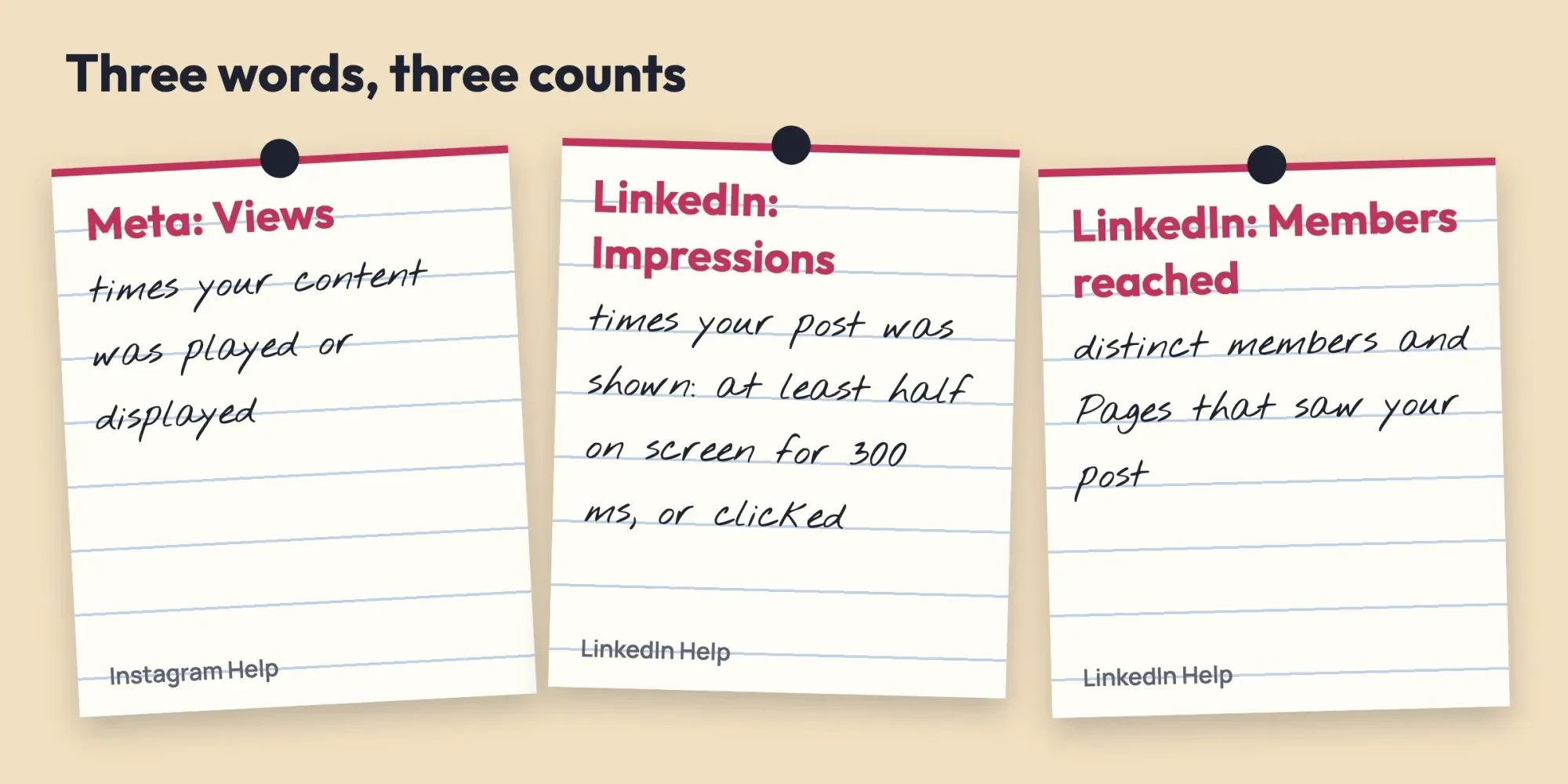 Drawn by us. Definitions shortened from Instagram Help and LinkedIn Help pages read October 28, 2026.
How do you calculate engagement rate for the report?
Engagement rate is where reports drift, because of the pages we could read, only LinkedIn's defines it for you. LinkedIn describes its engagement rate with the words "the ratio of interactions per impressions", and its interactions "include clicks, reactions, comments, and shares." The Meta pages we read list interactions, such as likes, comments, saves and shares, but give no engagement rate. So you pick one formula, write it in small type under the chart, and use the same one every month so the line on the slide means something.
We use interactions divided by views, times 100. Example, with made-up numbers from our test: Instagram had 1,210 interactions on 24,900 views in September, so 1,210 / 24,900 x 100 = 4.9%. For LinkedIn we put impressions in the views column. Its interactions include clicks, while Meta Business Suite lists link clicks as a separate metric. So a post with a link can score higher on LinkedIn than the same post on Facebook.
Report the change in points, not percent.
In the same made-up example, Instagram's rate went from 4.1% in August to 4.9% in September, which is +0.8 points. Written as a percent change, (4.9 - 4.1) / 4.1 x 100 = 19.5%, and that sounds far bigger to someone who skims.
Don't rank platforms by this rate, either: in our example, the 4.9% on Instagram and the 3.9% on LinkedIn come from different counting rules.
Where each platform's export lives
Once you know which numbers you need, pull them from each platform on the same day. A late export can cover different dates from the rest. Facebook Pages and Instagram profiles share one place: Meta Business Suite's Insights section, which covers "your Facebook Page and Instagram profile". You'll need permissions on the Page or profile to see it. The Overview tab focuses on the past 28 days, which isn't a calendar month. Check that your export covers September 1 to September 30, not the last 28 days.
Meta's best-practices page says "To download reports, click on the Export drop-down menu."
Instagram's own insights, in the app or on instagram.com, are narrower. It offers preset ranges from 7 to 90 days, or a custom range that must fall inside the last 90 days. Here's where each file comes from:
| Platform | Where to click | What you get | Date range |
| Facebook Page, Instagram | Meta Business Suite > Insights > Export drop-down | A downloaded report | Check the dates; Overview shows 28 days |
| Instagram (app) | Insights > date drop-down | On-screen numbers | Within the last 90 days |
| LinkedIn Page | Page admin view > Analytics > tab > Export | An XLS file | Timeframe you select |
| TikTok | Not confirmed | Not confirmed | Not confirmed |
| Website visits | GA4 > Acquisition > Traffic acquisition | Sessions and key events | Any range you pick |
LinkedIn's export steps run from the Analytics tab you need (Content, Visitors, Followers or Competitors) to the Export button, then a timeframe, and you get an XLS file. Wait two days after the month ends, because LinkedIn's content analytics page says metrics can take 48 hours to show, except reactions and comments. If a live GA4 dashboard suits your boss better than a monthly file, our Looker Studio dashboard guide builds one.
Export everything on one day, such as the 3rd, so every file covers the same calendar month. We'd keep one folder per month, named like 2026-09, with the raw files untouched and the filled CSV sitting right beside them. Nobody edits the raw files. If someone questions a number in the report, you can open the original export and point to the row it came from. That folder also helps when a platform renames a metric, as Instagram is doing with Views. Last month's file still shows what the old label counted.
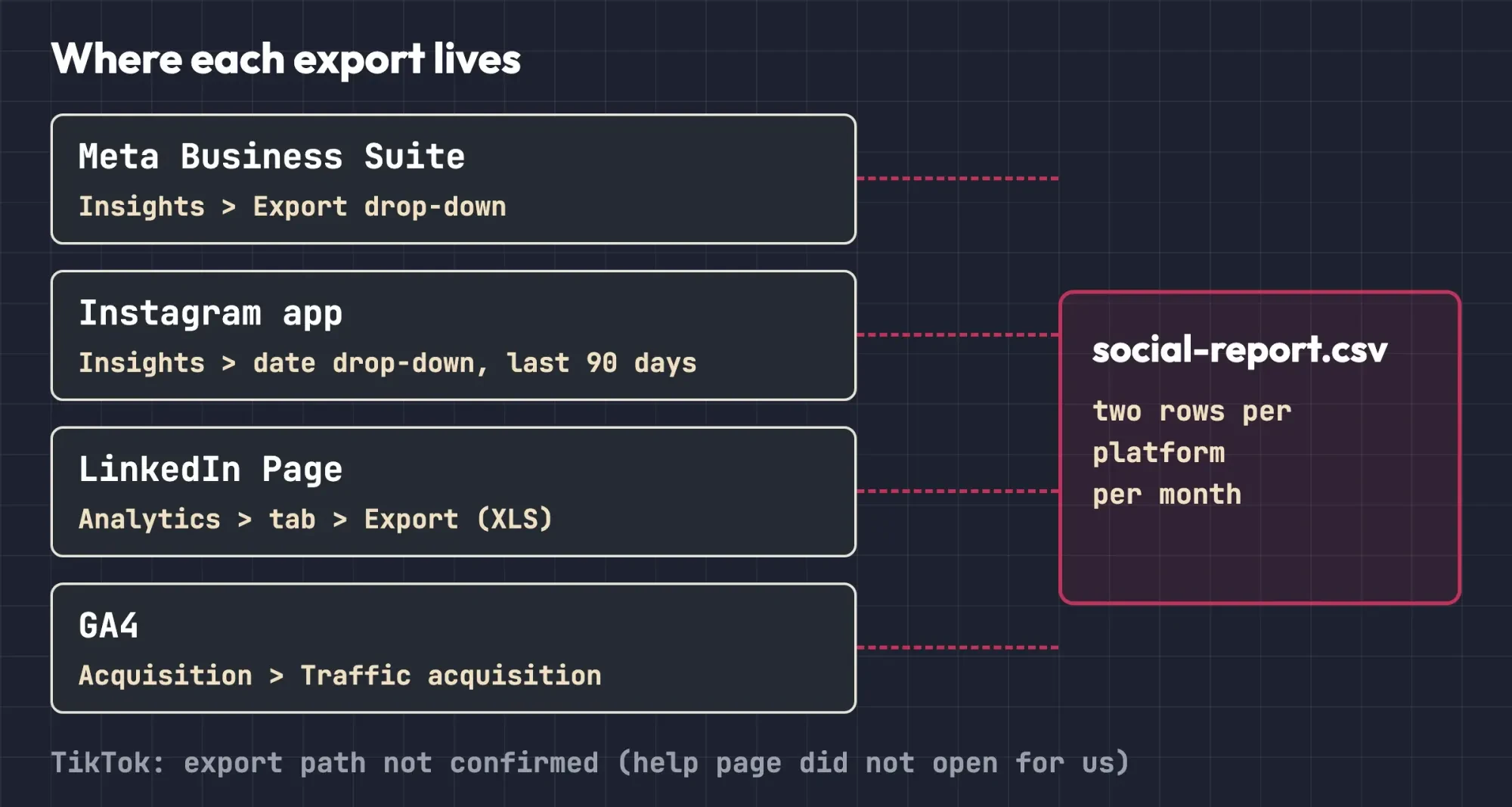 Diagram by DigitalTreed. Menu paths from Meta, Instagram, LinkedIn and Google Analytics Help pages read October 28, 2026. TikTok not confirmed.
Copy the CSV template and fill two rows per platform
With the files downloaded, copy the numbers into one sheet so the report builds from a single source, using the template below saved as social-report.csv. It opens in Google Sheets or Excel. Each platform gets two rows a month, one from its own insights and one from GA4:
source,platform,month,posts,views,viewers,interactions,link_clicks,followers_start,followers_end,sessions,key_events,metric_note
platform,Facebook,2026-10,,,,,,,,,,Meta: Views and Viewers
platform,Instagram,2026-10,,,,,,,,,,Meta: Views and Viewers
platform,LinkedIn,2026-10,,,,,,,,,,LinkedIn: impressions and members reached
platform,TikTok,2026-10,,,,,,,,,,TikTok: the wording your app shows (definitions not confirmed by us)
ga4,Facebook,2026-10,,,,,,,,,,GA4 Traffic acquisition: session source facebook
ga4,Instagram,2026-10,,,,,,,,,,GA4 Traffic acquisition: session source instagram
ga4,LinkedIn,2026-10,,,,,,,,,,GA4 Traffic acquisition: session source linkedin
ga4,TikTok,2026-10,,,,,,,,,,GA4 Traffic acquisition: session source tiktok
Don't leave the metric_note column empty. Write the platform's own word there, such as "Views and Viewers" for Meta or "impressions" for LinkedIn, so whoever opens the sheet in six months knows what was counted. When a platform changes a label, add the date you first saw the new word. Leave a cell blank when the export doesn't have that number. Don't type a zero. Save a copy of each month's file next to the raw exports, named by month, so next month's comparison takes a minute. If you also send a monthly search report, our monthly SEO report builder does the same job for Search Console and GA4 files.
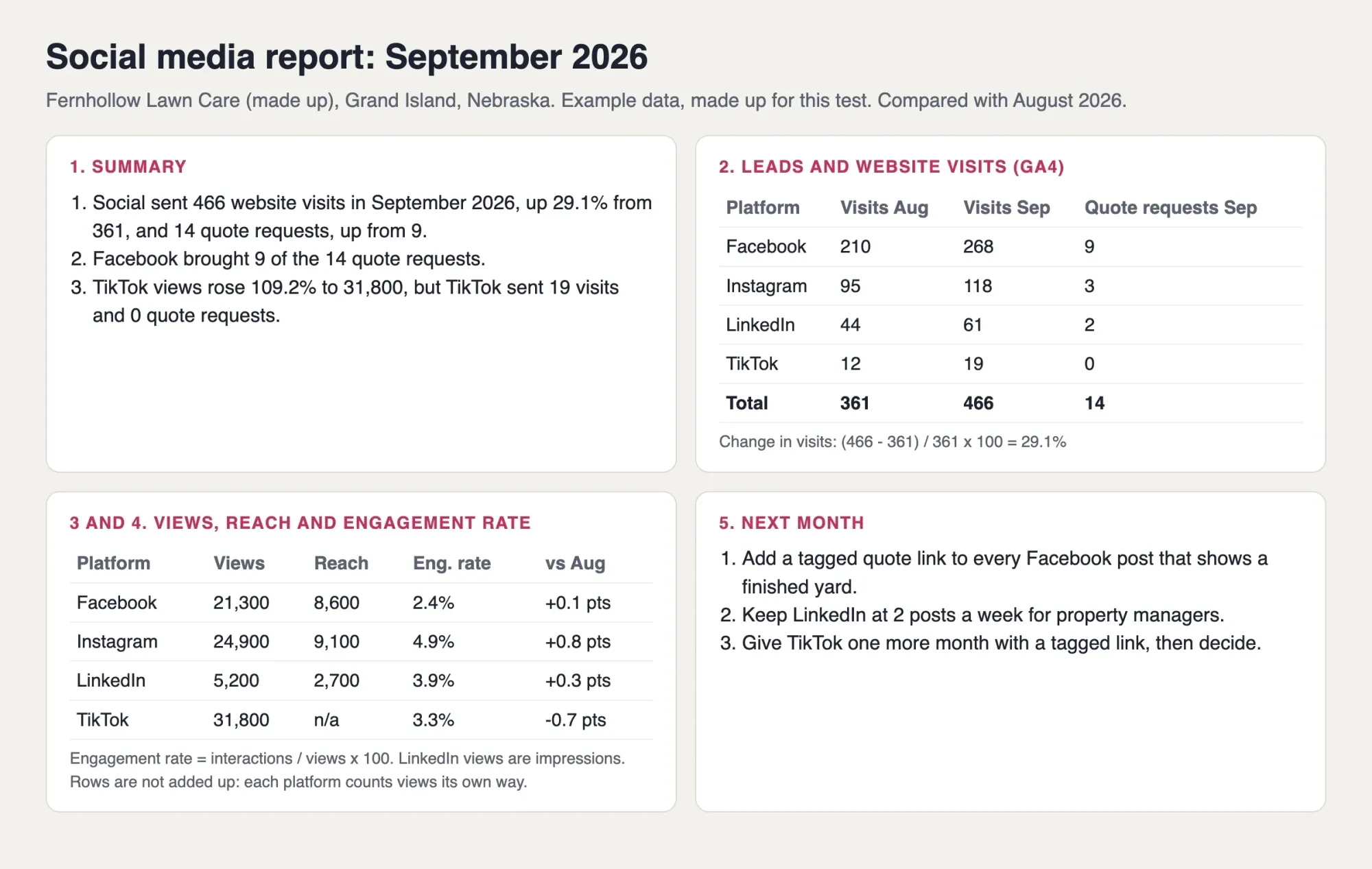 Screenshot: our example report for Fernhollow Lawn Care (made up), built by our Python script and opened on a local computer, October 28, 2026.
That screenshot is the template after two months of made-up numbers, and its summary leads with Facebook, which brought 9 of the 14 quote requests.
What we tested
On October 28, 2026, we filled the template with made-up August and September numbers for Fernhollow Lawn Care, a Grand Island, Nebraska company we invented. A Python script built the report on a local computer. Visits went from 361 to 466: (466 - 361) / 361 x 100 = 29.1%. Quote requests rose from 9 to 14.
Engagement rates were 2.4% (Facebook), 4.9% (Instagram), 3.9% (LinkedIn) and 3.3% (TikTok). Of 6 checks, 4 passed: the four follower carry-overs. Two failed, as we designed them to. Views couldn't be summed, because the rows came from 3 platforms' own labels (Meta, LinkedIn, TikTok), and we had read no TikTok definition. No real exports were used.
Explain a drop in two sentences, not ten
Numbers on a slide still need a sentence that says what happened and what you'll do next. Example, from the same made-up data: Instagram views fell from 26,700 to 24,900, down 6.7%, while its engagement rate rose 0.8 points. Our two sentences were: "Fewer people saw our Instagram posts, but more of them reacted. We'll test two short videos to see if views come back."
Rises need the same care. In the same example, TikTok views went from 15,200 to 31,800, up 109.2%, yet TikTok sent 19 website visits and 0 quote requests. So the summary says that plainly, and slide 5 gives TikTok one more month with a tagged link, wherever the account can add one, before anyone decides.
Don't know why a number moved? Say so, and say what you'll check.
A guessed reason that turns out wrong costs more trust than "we don't know yet", and it's hard to walk back next month. Plan the posts behind slide 5 in your social media content calendar, and if comments mention how the posts sound, the one-page brand voice template is where that gets fixed.
Our take: send the same five slides every month, and treat slide 2 as the one that matters. When the goals behind them change, rework the plan with our small-business social media strategy and keep the report order as it is. For marking a quote form as a key event, see the GA4 setup chapters. If you'd prefer to hand social media over, DigitalTreed's social media management service is one option. That service earns us money, so count this sentence as an ad and get a freelancer's quote as well.
Questions about monthly social media reports
Frequently asked
Why is the audience part of my Instagram report blank?
Instagram shows audience demographics only with a preset timeframe and over 100 accounts reached, per its insights help page.
Why don't my social numbers match Google Analytics?
Platforms count clicks; GA4 counts sessions. Google's channel rules name TikTok as a video site, so TikTok visits can land in Organic Video, not Organic Social.
Can I pull last year's Instagram numbers?
Not from the app. Switching to a private account also removes insights access, and past data comes back only if you go public again within 90 days.
Should the report show follower counts?
Yes, but not first. LinkedIn's follower analytics show "Demographics and sources of followers", which says more than the total.
How we made this guide: On October 28, 2026, our team opened the 11 help pages listed in Sources. TikTok's page showed a block notice from our location, so its definitions are left out. We then built the made-up report with a Python script. Facts checked by the DigitalTreed team on October 28, 2026.
First published April 2023 as a guide to social media presentations. Rewritten October 28, 2026: now a monthly social media report with a slide order, platform definitions, export paths and a CSV template.
Sources
- Instagram Help Centre: About Instagram insights
- Instagram Help Centre: View account and content insights on Instagram
- Meta Business Help Centre: About insights in Meta Business Suite on desktop
- Meta Business Help Centre: Best practices for analysing Insights data in Meta Business Suite
- Meta Business Help Centre: Reach
- Meta Business Help Centre: Impressions
- LinkedIn Help: Content analytics for your LinkedIn Page
- LinkedIn Help: Export your LinkedIn Page analytics report
- LinkedIn Help: LinkedIn Page analytics
- Google Analytics Help: Default channel group
- Google Analytics Help: URL builders, collect campaign data with custom URLs


Comments
No comments yet. Start the conversation below.