

What GA4 is, who needs it, and when you don't
This is the second guide in our "SEO tools explained" path, and it pairs with the Google Search Console guide. Search Console tells you what happens on Google before the click. GA4 tells you what happens after it, and whether it brought business.
It's written for business owners who look after their own site, freelancers and agency staff who report to clients, and anyone who opened GA4 once and closed it again. You don't need any analytics background. If you've read chapter 11 of our intermediate SEO guide, this goes much deeper into the GA4 half.
There are eight chapters, about 45 minutes of reading, plus time in GA4 for the tasks. Chapters 1 to 4 are set-up: what GA4 is, the tag, the day-one settings and key events. Chapters 5 to 7 are reading: organic reports, Explorations and BigQuery, then five real tasks for a sweet shop, a coaching centre, a dental clinic and a D2C brand. Chapter 8 covers GA4 360 and the alternatives, with prices checked on 16 October 2026.
Quick answer
Google Analytics 4 (GA4) is Google's free tool for measuring what people do on your website after they arrive: which page they land on, where they came from, and whether they call, fill a form or buy. Search Console shows what happens on Google before the click. For SEO you want both.
Search Console tells you that 1,200 people clicked your site from Google last month. It can't tell you whether any of them booked an appointment. That second half of the story is GA4's job.
What GA4 measures
GA4 counts events. A page loading is an event (page_view). So is a scroll to the bottom, a click on a link to another site, a file download or a form being sent. You put one small piece of code, the Google tag, on every page, and it sends these events to your GA4 property.[1]
Some events matter more than others. A sweet shop in Kanpur cares about taps on its WhatsApp order button, not about scrolls. GA4 lets you mark those few as key events, the actions that are "particularly important to the success of your business".[2] Chapter 4 shows how.
GA4 also groups visits into sessions and decides whether each one was engaged. An engaged session lasts longer than 10 seconds, has a key event, or has two or more page views. Engagement rate is the share of sessions that were engaged, and bounce rate is simply the rest.[3]
If you used the old Google Analytics (Universal Analytics), it's gone. Google switched it off from the week of 1 July 2024, and its data isn't available any more.[4] Every property you create today is a GA4 property.
GA4 and Search Console answer different questions
| Google Search Console | Google Analytics 4 | |
|---|---|---|
| Question | Does Google show my pages, for which searches, and do people click? | What do visitors do once they're on my site, and where did they come from? |
| Traffic it sees | Google Search only | Every channel: search, social, email, AI assistants, direct |
| Counts | Impressions and clicks on Google | Sessions, users, events and key events on your site |
| History | 16 months[5] | Standard reports keep their history; explorations follow your retention setting (2 or 14 months)[6] |
| Cost | Free | Free; GA4 360 is paid |
Their numbers never match, and that's fine. Search Console counts a click on Google. GA4 counts a session only when the page loads its tag, and, where you ask for consent, only fully when the visitor agrees. Guide 2, chapter 11 explains how to use each for its own question; our Search Console guide covers the other half in depth.
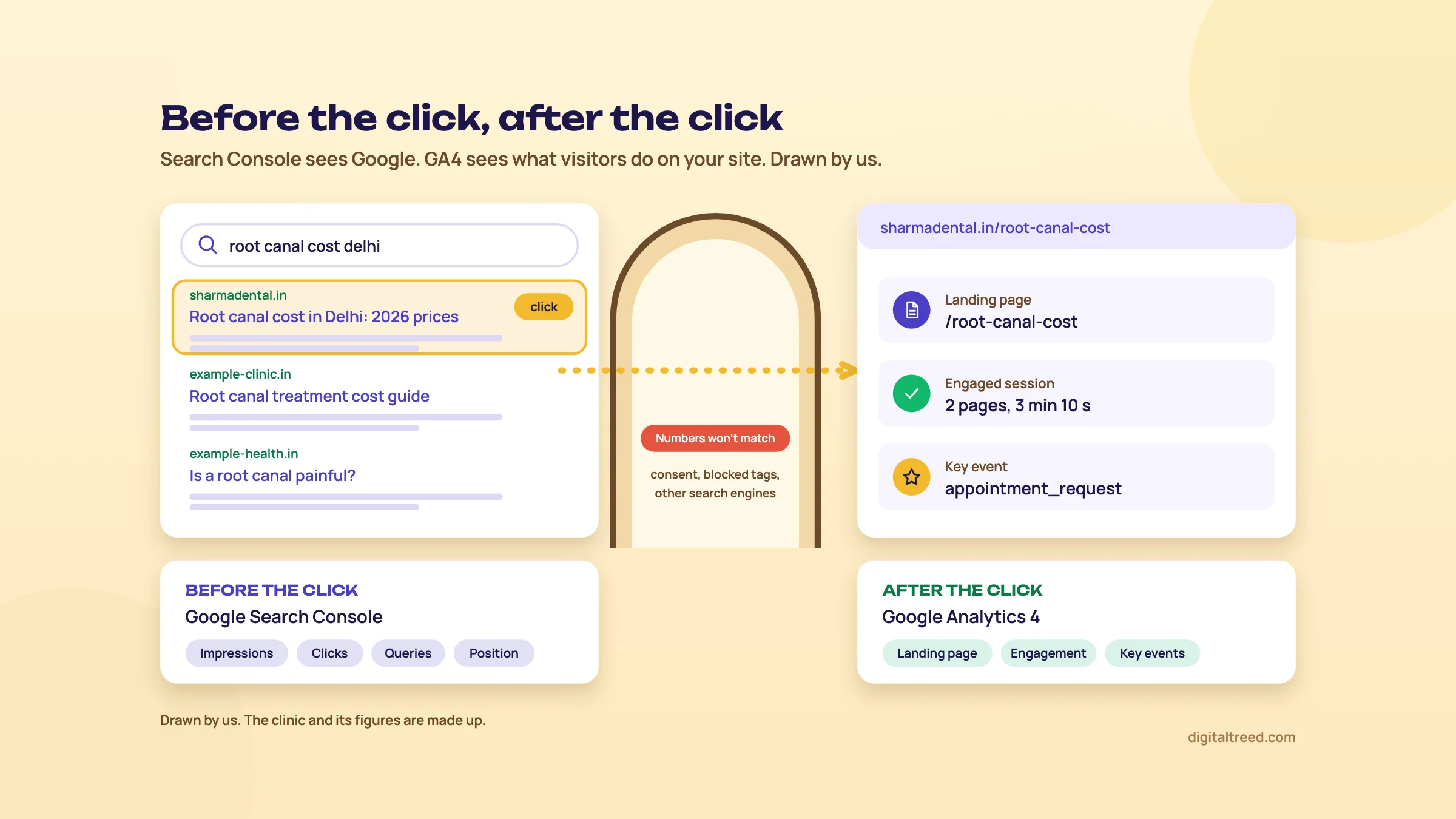 Search Console covers what happens on Google; GA4 covers what happens on your site. Drawn by us; the clinic is made up.
What GA4 does for SEO work
- Organic Search channel. Visits from non-ad search results, including Google's AI Overviews and AI Mode, are grouped as Organic Search.[7]
- Landing pages. Which page each organic visit started on, and what happened next (chapter 5).
- Leads and sales from search. Key events filtered to organic visitors, the number a client actually pays for.
- AI assistant visits. Since 13 May 2026, visits from assistants such as ChatGPT, Gemini and Claude get their own AI Assistant channel.[8]
- Search Console data inside GA4. Once linked, queries sit next to landing pages and their engagement (chapter 3).[5]
New in GA4 this year
Google ships changes to GA4 every few weeks. These 2026 releases matter for SEO users, all from Google's own "What's new" page.[8]
| Date | Change | Why an SEO cares |
|---|---|---|
| 10 Feb 2026 | Generated insights on the Home page: the top three data changes since your last visit | A quick check for sudden drops after an update |
| 29 Apr 2026 | Task Assistant in the left menu, with set-up recommendations | A to-do list for a new property |
| 13 May 2026 | AI Assistant channel in the default channel group | ChatGPT and Gemini visits no longer hide in Referral |
| 8 Jun 2026 | Google Business Profile integration: calls, bookings, directions and website clicks in GA4 | Local SEO results next to website results |
| 11 Jun and 21 Sep 2026 | Hostname filters, first exclude, then include (an allowlist of your own domains) | Keeps spam hits on fake hostnames out of your data |
| 9 Sep 2026 | Dashboards: KPIs on a single report | A built-in alternative to a separate report tool for simple needs |
Who needs GA4, and who doesn't
You need it if your site is meant to bring business: a form, a phone number, a WhatsApp button, a shop. Without it you can say how many people found you on Google, but not how many of them became customers. That's most Indian small businesses with a website, and every agency reporting to a client.
You probably don't need it if the site is a five-page brochure with no form and no shop, and all you want is to know whether Google shows it. Search Console answers that, for free, with less to set up. And if you only want a simple visitor count without cookies, a lighter tool may suit you better. Chapter 8 compares Plausible, Fathom, Matomo, Microsoft Clarity and Ahrefs Web Analytics.
We'd still set GA4 up on almost any business site, because it costs nothing and history can't be added later. A property only starts counting from the day its tag goes live. Chapter 2 does that set-up.
Set up GA4: account, property, data stream and the tag
Quick answer
Create an account and a property at analytics.google.com, add a web data stream for your domain, and put the Google tag on every page. On WordPress use a plugin such as Site Kit, use Google Tag Manager if you'll add more tags later, or paste the gtag.js code yourself. Then check the Realtime report.
The set-up takes about 20 minutes. A wrong setting here usually shows up a year later, when someone asks for last year's numbers and they aren't there. So go slowly.
Three words to know first
- Account
- The top level, usually one per business. One account can hold up to 2,000 properties.[1]
- Property
- Where the reports live, usually one per website. Its time zone and currency are set here.
- Data stream
- The source that feeds the property: a website, an iOS app or an Android app. A website gets one web stream, with a Measurement ID that starts with "G-".[9]
One rule before you start: create the account with the business owner's Google account, then add the agency or freelancer as a user. Agencies change. The data should stay with the business.
Create the account, property and web stream
Create a GA4 property and web data stream
- Start Go to analytics.google.com. If it's your first time, click Start measuring. If you already have an account, go to Admin, click Create, then Account.[1]
- Name the account Use the business name, for example "Sharma Dental Clinic". Choose the data-sharing settings, then click Next.
- Create the property Name it after the website ("sharmadental.in"). Set the reporting time zone to India and the currency to Indian rupee. A visit is dated in your time zone, and changing it later only affects data from then on.
- Describe the business Pick the industry category and business size, then how you intend to use Analytics. Choosing "Generate more leads" gives you a set of lead-generation reports.
- Accept the terms Click Create and accept the Analytics Terms of Service and the Data Processing Amendment.
- Add a web stream Choose Web, enter the site's address and a stream name, keep enhanced measurement switched on, and click Create stream.
- Copy the Measurement ID On the stream details page, copy the ID that starts with "G-". You'll need it for the tag.[9]
Enhanced measurement is worth keeping on. Without any extra code it records page views, scrolls (when 90% of the page becomes visible), outbound clicks and site search. It also records YouTube video plays, file downloads and form interactions (form_start and form_submit).[10] You can switch off single options later in the stream's settings.
Three ways to add the tag
The tag is the code that sends events to your stream. Google documents three routes.[1]
| Method | How it works | Best for | Watch out for |
|---|---|---|---|
| A plugin or built-in field (Site Kit, Shopify, Wix, WooCommerce and others) | You connect your Google account or paste the G- ID into a field the platform provides | WordPress and site-builder sites run by the owner | Limited control over custom events |
| Google Tag Manager | You add Tag Manager's container once, then add a Google Analytics tag with your tag ID inside it[11] | Sites that will add call tracking, ad tags or many custom events | Another tool to learn; see our Tag Manager guide |
| gtag.js pasted by hand | You paste Google's snippet "immediately after the <head> on each page"[1] | Custom-coded sites with a shared header template | Every new custom event needs a developer |
For WordPress, Google's own Site Kit plugin is the easy route. It's free and open source, has more than 5 million active installations, and needs WordPress 5.2 or later and PHP 7.4 or later.[12] You install it from Plugins, Add New, connect your Google account, and follow its set-up flow. It connects Search Console during set-up and can add Analytics, which places the tag, in the same flow or later under Site Kit, Settings. It then shows both on your WordPress dashboard.
Which one would we pick? For a dentist's or coaching centre's WordPress site with one contact form, Site Kit. For a D2C store that runs Meta and Google ads and wants call and WhatsApp tracking, Tag Manager from day one, because moving to it later means redoing every tag.
Warning
Use one method only. If a plugin and a hand-pasted snippet both load the same G- ID, each page view can be sent twice,[13] and your engagement numbers stop meaning anything. When you take over a site, check the theme header and the plugins before adding anything.
Check that it works
Google says data collection can take up to 30 minutes to begin. Open the site on your phone (on mobile data, not the office Wi-Fi, which you'll filter out in chapter 3), then open Reports, Realtime in GA4. You should see yourself within minutes.[1]
Don't judge the other reports on day one. Processing can take 24 to 48 hours, and numbers can change during that time.[14]
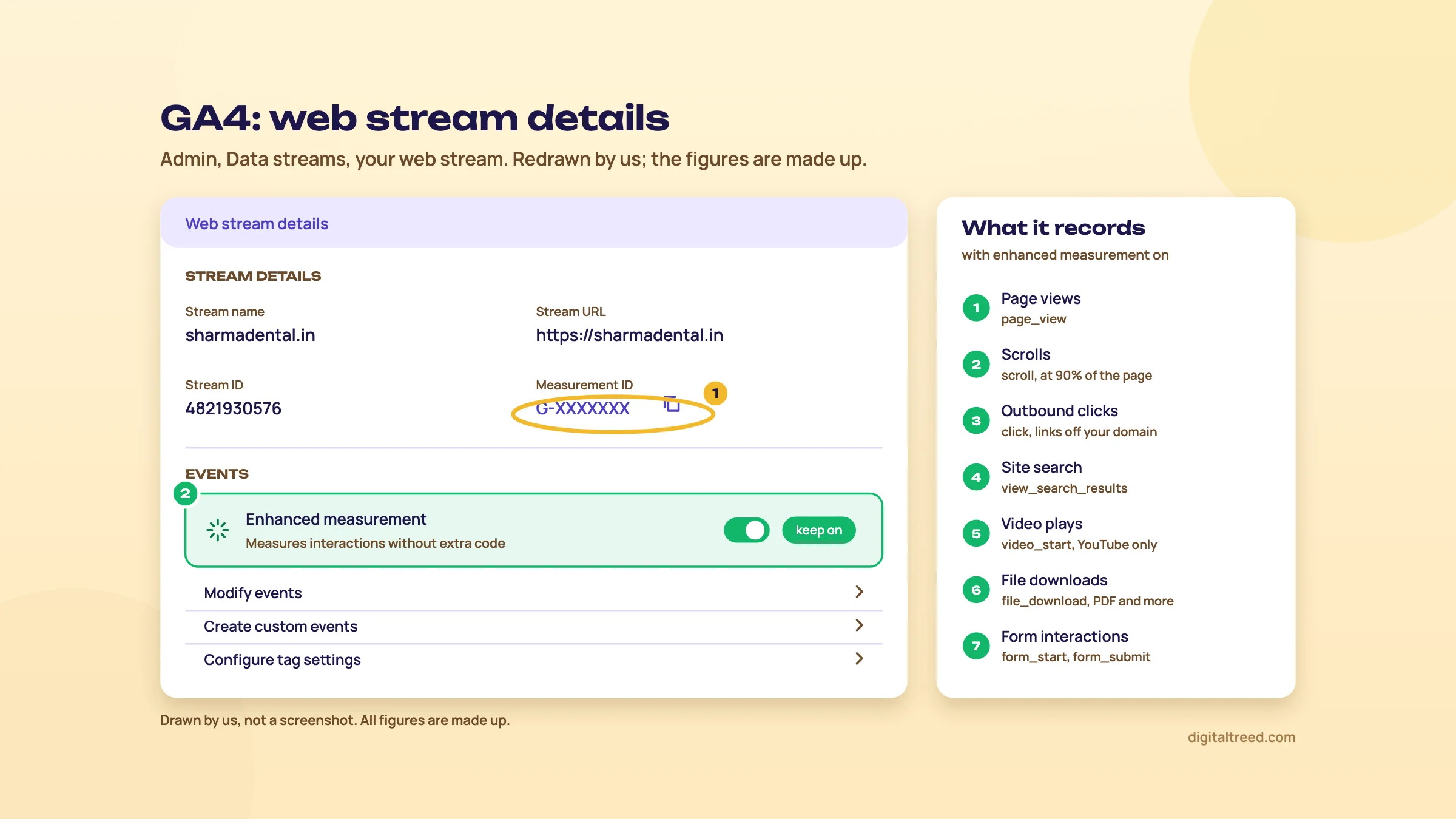 Copy the Measurement ID for the tag and leave enhanced measurement on. Drawn by us; the figures are made up.
Does the tag slow the site?
Every script adds weight, and GA4 is one more. On its own it's rarely the problem; ten tracking pixels, two chat widgets and a slider usually are. After adding the tag, run a speed test and look at the number of requests and third-party scripts.
Our speed test shows server response time, page weight, requests, compression, caching and render-blocking files, scored out of 100. If the score dropped after adding tags, remove the ones nobody uses. Next, chapter 3: the settings to change before you trust a single number.
Day-one settings: retention, internal traffic, consent mode and Search Console
Quick answer
Before you read a single report, change four things. Set event data retention to 14 months, filter out visits from your own office and team, put consent mode behind your cookie banner if you use one, and link Search Console so its queries sit beside GA4's landing pages. Together they take under an hour.
Guide 2, chapter 11 covers retention and the Search Console link in two steps. This chapter goes further: what each setting really changes, what it can't undo, and the limits you'll hit.
1. Data retention: 14 months, today
A standard GA4 property keeps user-level and event-level data for 2 or 14 months, your choice. Key events data follows the user-level setting. GA4 360 adds 26, 38 and 50 months.[6] New properties start at 2.[15]
What it changes is narrower than people think. The setting "only affects explorations and funnel reports". Your standard reports, Traffic acquisition and Landing page included, keep their history whatever you choose.[6] But explorations are where you'll answer the harder SEO questions (chapter 6), and at 2 months you can't compare this Diwali with last Diwali in one.
Four details from Google's help page are worth knowing:
- Raising the period applies to data you've already collected and not yet deleted, so change it early.
- GA4 waits 24 hours before applying a change, and you can revert it in that window.
- Age, gender and interest data is always kept for 2 months.
- If a standard property grows into a "Large" property, retention drops to 2 months automatically. Google emails the administrators before that happens.
To change it you need the Editor role. Go to Admin, check the account and property, open Data retention (under Data collection and modification; older help pages call this section Data settings), choose 14 months for event data retention and save.[6]
2. Filter out your own visits
A dental clinic's receptionist opens the website 40 times a day to check timings. A coaching centre's staff open the fee page every time a parent calls. Left alone, those visits show up as Direct traffic and as engagement on your best pages. GA4 lets you mark traffic from your IP addresses as internal and then drop it.
Filter out internal traffic in GA4
- Find your IP address On the office connection, the "Define internal traffic" screen has a "What's my IP address?" link. Note it.[16]
- Define internal traffic In Admin, under Data collection and modification, click Data streams, then your web stream. Click Configure tag settings, then Show more, then Define internal traffic, then Create.
- Write the rule Give it a name, keep the traffic_type value "internal", set IP address to "equals" your address (or "is in range" for a block), and click Create. Add more conditions for a second branch; any match counts.
- Create the filter in Testing In Admin, under Data collection and modification, click Data filters, then Create Filter, then Internal Traffic. Choose Exclude and set the state to Testing.
- Check it After 24 to 36 hours, build a free-form exploration with "Test data filter name" and Event name as rows and Event count as the value. Your office visits should appear under the filter's name.
- Activate Switch the filter to Active.
Warning
An active filter is permanent. Excluded data "is never processed and will never be available in Analytics or BigQuery".[16] Filters also work only from the day you create them, so they don't clean up past data.[17] That's why the Testing step matters. You can have up to 10 data filters per property, and you need the Editor role.
Two limits to plan for. Filters work on IP addresses, so they can't catch staff who check the site from home on their phones. And if your office connection doesn't have a fixed IP address, the rule stops matching when the address changes. Ask your internet provider which kind you have.
Two other filters sit on the same screen. The developer traffic filter drops activity sent in debug mode.[17] And since 21 September 2026 you can add an Include filter for hostnames: a list of your own domains, so hits sent to your Measurement ID from other hostnames are thrown away. It also blocks events with an empty hostname, and it doesn't apply to Measurement Protocol events.[8] If your reports show visits from domains you don't own, that's the fix.
3. Consent mode, in plain words
If your site shows a cookie banner, consent mode is how the banner tells Google's tags what the visitor chose. Consent mode doesn't provide a banner. It works with the one you have, from a consent management platform or your own code.[18]
It passes a yes or no for several consent types. The two that matter most here are analytics_storage (analytics cookies) and ad_storage (advertising cookies); ad_user_data and ad_personalization cover advertising use of data.[19] There are two ways to set it up.
| Basic consent mode | Advanced consent mode | |
|---|---|---|
| When Google tags load | Only after the visitor interacts with the banner | When the page opens, with consent set to denied by default unless you change it |
| If the visitor says no | Nothing is sent to Google, not even the choice | Tags send cookieless pings instead of storing cookies |
| Modelling | A general model | An advertiser-specific model, which Google says is better |
Source for the table: Google's consent mode overview.[19] With advanced mode, GA4 uses those cookieless pings for behavioural and key event modelling to fill gaps in your reports.[18] Google's best practices include setting a default consent state per region, because privacy laws differ by region, and loading Google tags in all cases rather than only after consent.[18]
Do you need a banner at all? That depends on the law where your visitors are, not on GA4, so ask someone qualified if you sell to Europe or the UK. What matters for SEO reporting is the effect. Every visitor who says no, or never sees the tag, makes GA4's organic sessions smaller than Search Console's clicks. Note the date you add or change a banner (chapter 5 shows annotations), so a drop on that day isn't blamed on Google.
If you use Site Kit, its listing says site owners are responsible for notice and consent, and points to consent plugins that work with it.[12]
4. Link Search Console
Linking puts two Search Console reports inside GA4: Google Organic Search Queries (queries with clicks, impressions, CTR and position) and Google Organic Search Traffic (landing pages with Search Console and Analytics metrics side by side).[5] The second one is the useful one: you see a page's Google clicks next to its engagement and key events.
Link Search Console to GA4
- Check access You need the Editor role on the GA4 property and must be a verified owner of the Search Console property. If you haven't verified the site yet, our Search Console guide shows how.[5]
- Open the links page In Admin, under Product links, click Search Console Links, then Link.
- Choose the property Next to "Link to Search Console properties I manage", click Choose accounts, pick the site, click Confirm, then Next.
- Choose the stream Select your web data stream, click Next, review and submit.
- Publish the reports The Search Console collection is unpublished by default. Open Library in the left menu and publish it so it appears under Reports.
The limits, all from Google's help page:[5]
- One web stream links to one Search Console property, and the other way round.
- The reports show at most 16 months, because that's what Search Console keeps, and data arrives about 48 hours after Search Console collects it.
- Search Console metrics work only with Search Console dimensions plus Landing page, Device and Country. You can't break queries down by key event.
- The reports don't support time-series charts, and links can't be edited, only deleted and recreated.
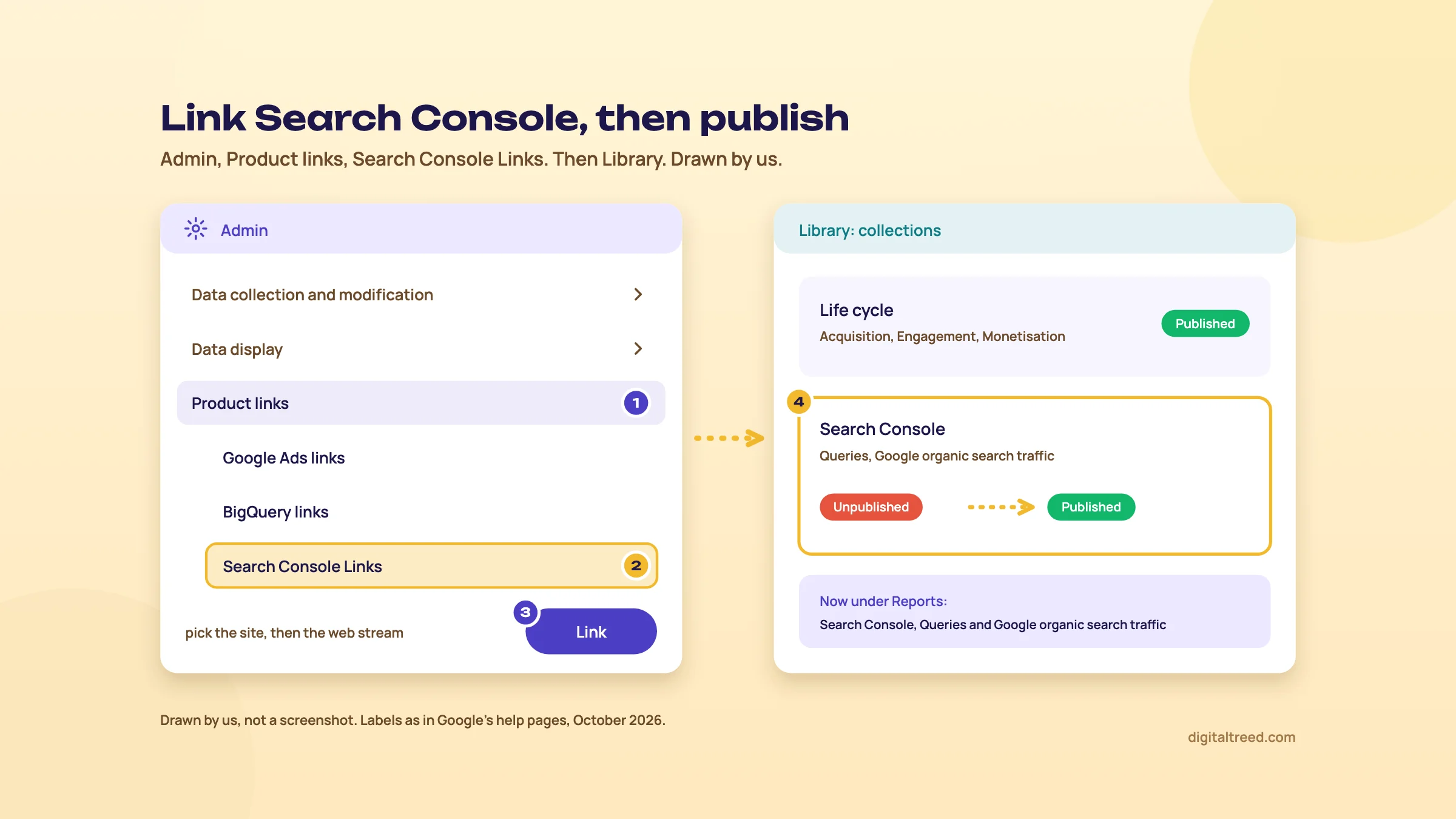 Link Search Console in Admin, then publish the collection in Library. Drawn by us, simplified.
Optional: link your Business Profile
Since 8 June 2026 GA4 can import Google Business Profile metrics: interactions, calls, bookings, directions, website clicks, messages and menus. To link, go to Admin, then under Product links click Google Business Profile links, then Link.[20] Linking adds a Business Profile collection to Reports, and the data covers a rolling 6-month window.[8] For a clinic or a shop, that puts map-pack results next to website results in one place. Our Business Profile guide covers the profile itself.
With these four done, your numbers are worth reading. Chapter 4 makes GA4 count the things that pay the bills.
Key events: count leads, calls, WhatsApp taps and sales
Quick answer
A key event is any event you mark as important to the business: a form sent, a WhatsApp tap, a brochure download, a purchase. GA4 renamed conversions to key events on 27 March 2024. A standard property allows 30. Mark the few that mean money, or every SEO report ends at "traffic".
"Traffic went up 40%" gets a polite nod. "Organic search brought 23 appointment requests, up from 14" gets the next month paid. Key events are how GA4 produces the second sentence.
Key events and conversions are now two things
Until March 2024, GA4 called these "conversions". On 27 March 2024 Google renamed them key events, and kept the word "conversion" for actions used to measure and bid in Google Ads.[21] The flow is now: event, then key event, then (only if you run ads) a conversion created from it in Google Ads.[2] For SEO you only need the first two steps.
The rules, from Google's help page:[22]
- You can mark up to 30 events as key events on a standard property (50 on GA4 360).
- purchase is a key event by default. If you link Google Ads with ads personalisation on, events such as add_to_cart, begin_checkout and view_item become key events too.
- Marking a key event works from that moment on. It doesn't change past data, and it can take up to 24 hours to show in standard reports.
- You need the Marketer role or above.
That second point catches people out. A store with Google Ads linked can suddenly report hundreds of "key events" a day that are just people viewing products. If a key event doesn't mean money or a real lead, unmark it.
What to count, by business
| Business | Key event | How GA4 gets it |
|---|---|---|
| Dentist in Delhi | Appointment form sent | A new event made from the thank-you page's page_view (no code) |
| Sweet shop in Kanpur | Tap on the WhatsApp order button | Enhanced measurement's outbound click, filtered to wa.me links |
| Coaching centre in Pune | Fee brochure PDF downloaded | Enhanced measurement's file_download |
| D2C skincare brand | Purchase, with order value in INR | The store's ecommerce purchase event |
| Any of them | Tap on the phone number | Usually a Tag Manager trigger on tel: links |
Outbound clicks fire "each time a user clicks a link that leads away from the current domain", and file downloads fire for links to common file types, PDF included.[10] A wa.me or api.whatsapp.com link leaves your domain, so it's recorded as a click event with the link URL attached. Phone links are less predictable, which is why we'd set those up in Tag Manager (see our Tag Manager guide).
Task: make the thank-you page a key event
The Delhi clinic's form sends people to /thank-you/ after they book. The page_view event already records that, but marking page_view itself would count every page as a lead. Google's answer is to create a new event from it.[23]
Turn a thank-you page into a key event
- Open Events In Admin, under Data display, click Events, then Create event.[23]
- Name it Enter an event name such as appointment_request. Special characters aren't allowed.
- Mark it Switch on Mark as key event, and choose the default value and counting method. For a lead, you can pick Once per session, so a refresh of the thank-you page doesn't count twice; Google labels it Legacy and recommends Once per event for most key events.[24]
- Choose no code Under "Choose how to create an event", pick Create without code, choose page_view, and enter the thank-you page's full URL.
- Create and test Click Create. Book a test appointment from your phone, then check Realtime. The event appears in the Recent events list only after GA4 has processed it.
Tip
Make sure nobody can reach the thank-you page without filling the form: no link to it in the menu, and noindex on it so Google doesn't send searchers there. Our Noindex Tag Checker confirms the tag is in place.
Task: count WhatsApp taps as a key event
The Kanpur sweet shop takes most orders on WhatsApp. Each tap on its "Order on WhatsApp" button is an outbound click to wa.me.
Make WhatsApp taps a key event
- Check the click arrives Tap the button on your phone, then look for a click event in Realtime.
- Create the event In Admin, Data display, Events, click Create event and name it whatsapp_order.
- Set the conditions Base it on the click event and add a condition that link_url contains wa.me, plus one for api.whatsapp.com if your button uses that address. If your Create event screen only asks for a page URL, add the conditions under Custom configurations, Custom events, as Google's help describes, or set the event up in Tag Manager.[23]
- Mark it On the same Create event screen, switch on Mark as key event (it sits near the top), click Create, and test again.
Give key events a value
If one lead is worth about ₹2,000 to the clinic, say so. Add value and currency parameters to the event: value must be a number and currency an ISO 4217 code such as INR. If either is missing or wrong, GA4 still counts the event, but the value won't be passed to Google Ads.[23] A store's purchase event usually carries the real order value already.
What not to mark
Google's own example marks a scroll to 90% of a lead page as a key event.[2] We wouldn't, for a small business. Scrolls and page views are signs of interest, not leads, and they make your key event rate look healthier than the till. Keep key events to the actions a client would pay for, and read the rest as engagement.
Form interactions are worth a word too. Enhanced measurement records form_start and form_submit,[10] which sounds like the lead count for free. Test it before you trust it: send one real form and one with a required field left empty, and see which of them GA4 records. A thank-you page is harder to fool.
Once the key events are in, chapter 5 shows where to read them against organic traffic.
Reading organic search in GA4: Traffic acquisition, Landing page and the AI Assistant channel
Quick answer
Open Reports, Acquisition, Traffic acquisition and read the Organic Search row: sessions, engagement rate and key events. Then open Engagement, Landing page with the organic comparison on, to see which pages bring those visits. Clicks from AI Overviews and AI Mode count as Organic Search; ChatGPT and Gemini visits sit in AI Assistant.
GA4 has dozens of reports. For SEO you'll spend most of your time in two of them, plus the Search Console pair from chapter 3. This chapter shows what each number means and what to do about it.
Traffic acquisition: where sessions come from
Go to Reports, then Acquisition, then Traffic acquisition. It shows where new and returning visitors came from, session by session. (User acquisition, next to it, shows only how new users first arrived.)[25] The default dimension is Session default channel group, so each row is a channel.
The row you want is Organic Search. GA4 puts a session there when the source is on its list of search sites, or when the medium is exactly "organic".[7] Two things follow from that rule:
- Google's AI Overviews and AI Mode are in Organic Search. Google's channel definition says so, and you can't split them out in GA4.
- Links you tag yourself with utm_medium=organic, such as the website button on a Business Profile, also land in Organic Search. They get their own row only when you look at session campaign. Guide 2, chapter 11 shows the tags.
To see Google only, type "google / organic" in the search box above the table.[25] To see Bing, try "bing / organic".
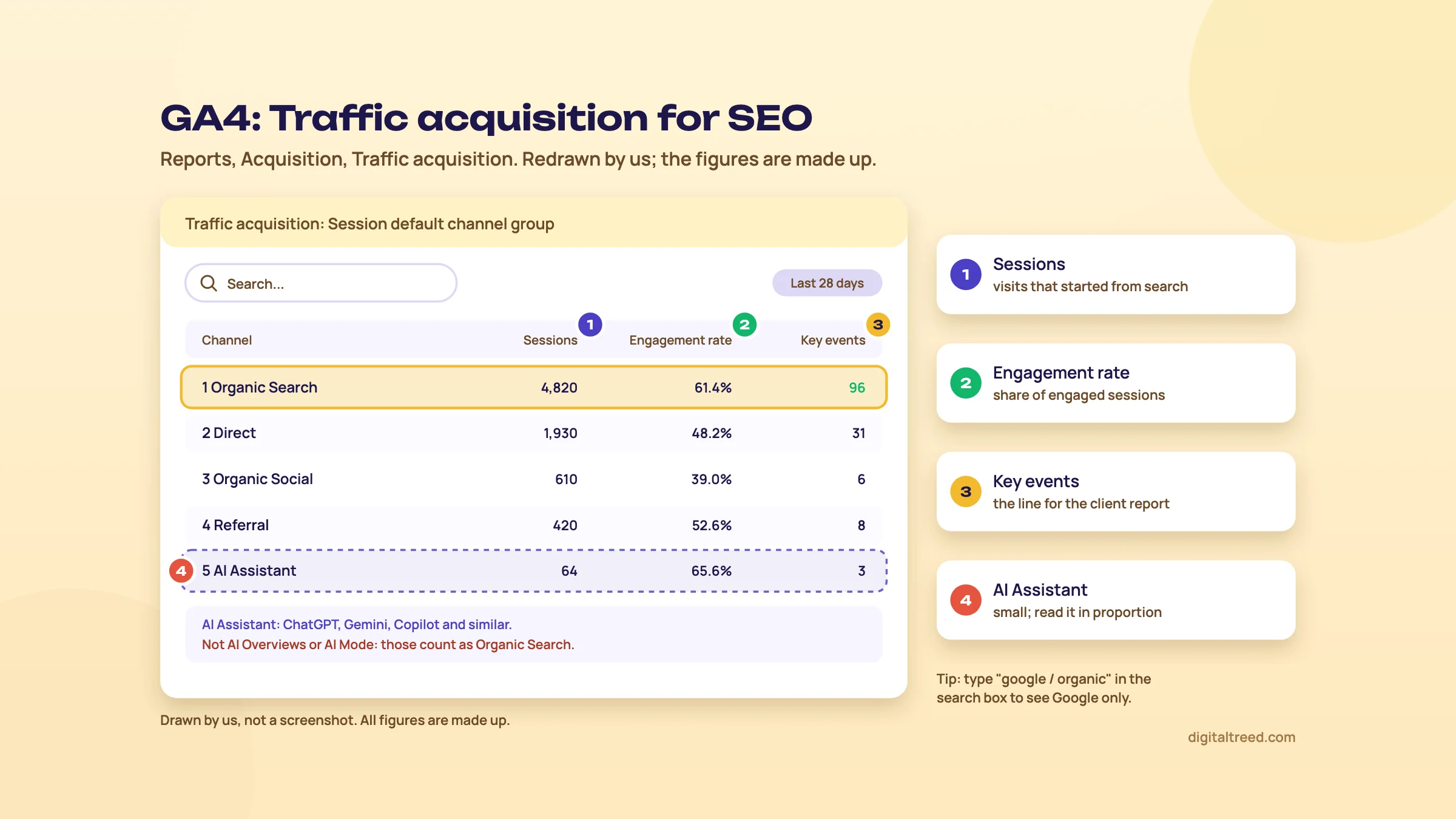 Read the Organic Search row first; keep the AI Assistant row in proportion. Drawn by us; the figures are made up.
What the columns mean, and what to do
| Column | What it means | What to do about it |
|---|---|---|
| Sessions | Visits that started from this channel | Compare with the same month last year, not last month, if you have seasonal demand |
| Engaged sessions | Sessions over 10 seconds, or with a key event, or with 2 or more page views[3] | The honest count of real visits |
| Engagement rate | Engaged sessions as a share of all sessions | If organic is far below other channels, the pages may not match what searchers wanted |
| Average engagement time per session | How long the site was in focus in the visitor's browser[26] | Read it per landing page, not site-wide |
| Key events | How many times visitors triggered a key event (chapter 4) | This is the line for the client report |
Bounce rate isn't shown by default. It's the opposite of engagement rate, and you can add it to a detail report with Customize report if you have the Editor role.[3] We wouldn't bother; engagement rate tells you the same thing the right way up.
Landing page: which pages bring the visits
Go to Reports, Engagement, Landing page. It lists the first page of each session and how many sessions started there, with engagement time, active users, new users and key events.[26] The landing page includes the query string, so /fees/?ref=wa and /fees/ show as separate rows.
On its own, this report mixes every channel. Add a comparison to see organic only. Click the comparison button at the top right, and choose the saved one for organic traffic; GA4 includes prebuilt comparisons for direct, organic, web and mobile traffic.[27] If you don't see it, create a new comparison with Session default channel group exactly matching Organic Search.
Comparisons can hold up to five conditions in all, and values within one condition work as OR while separate conditions work as AND.[27] So "Organic Search" AND "Device = mobile" shows organic mobile visitors only, which is the view that matters when most of your customers search on their phones.
What to look for, page by page:
- Many organic sessions, few key events. The page ranks but doesn't sell. Check the call to action, the phone number and the form on mobile.
- Few sessions, high key event rate. The page converts but few people find it. That's an SEO job: titles, internal links, more depth. Check its queries in the Search Console report or in Search Console itself.
- Low engagement on a page that ranks well. The page may answer a different question from the one people searched. Compare the top queries with the page's headings.
The Search Console reports inside GA4
If you linked and published them (chapter 3), open the Google Organic Search Traffic report. It's the best single SEO view in GA4: each landing page with its Google clicks, impressions, CTR and position, next to GA4's engagement and key events.[5] A page with 3,000 impressions, a 0.5% CTR and good key events needs a better title and description, not new content. Our Meta Tag Analyzer shows how its snippet looks today.
The AI Assistant channel
Since 13 May 2026, GA4 gives AI assistants their own row. When the referrer matches a recognised AI assistant, GA4 sets the medium to "ai-assistant", the campaign to "(ai-assistant)", and the channel to AI Assistant.[8] Google's channel definition names sources "like ChatGPT, Gemini, Deepseek, Copilot, or Grok", and says the channel excludes AI Overviews and AI Mode.[7]
Keep it in proportion. In SE Ranking's study of 101,574 sites with Google Analytics connected, AI referrals were 0.32% of all traffic from January to April 2026, against 42.75% from organic search.[28] It's a vendor study, but the gap is large.
42.75%
of visits from organic search, Jan to Apr 2026[28]
0.32%
of visits from AI referrals, same sites and months[28]
If an assistant you care about still shows up under Referral, Guide 5, chapter 8 shows how to build a wider AI channel with a regex, and how to read AI visibility in Search Console and Bing as well.
Annotations: write down what you changed
Since 20 March 2025, GA4 lets you add notes to line charts.[21] Open a report, right-click any point on a line graph and choose Add annotation. A title can be 60 characters and a description 150; you can pick one date or a range, and a colour. You need the Analyst role or above, and a property can hold 1,000.[29] Each one shows on every report with a line graph, and Admin, Data display, Annotations lists them all.
Annotate the things that move SEO numbers: "New titles on 12 service pages", "Cookie banner added", "Moved to new host", "Google core update starts". Google may also add its own annotations when something affects your data, and those can't be edited.[29] Search Console has its own annotations too, so add the big ones in both.
Give the data two days
Standard properties process the day's data in intervals, and full processing can take 24 to 48 hours.[14] Yesterday's organic sessions may still change. Read weekly and monthly totals, and wait two days before reacting to a dip.
Chapter 6 goes one level deeper, into Explorations, for the questions these reports can't answer.
Explorations, data thresholds, sampling and BigQuery export
Quick answer
Explorations are GA4's build-your-own reports: pick dimensions, metrics, segments and filters to answer what the standard reports can't. They follow your retention setting, may hide small rows (thresholds) and estimate from a sample above 10 million events. For raw, unsampled data, export to BigQuery; the free sandbox is enough to start.
Standard reports answer "how many". Explorations answer "which ones, and what did they do next". Most small sites can live without them for months. When a client asks "which blog posts lead to admissions enquiries?", this is where you go.
What Explorations are
Click Explore in the left menu. Every exploration has three panels: Variables (the dimensions, metrics and segments you've picked), Tab settings (how the current tab uses them), and the canvas with the result. One exploration can hold up to 10 tabs.[30]
GA4 offers seven techniques:[30]
| Technique | What it shows | SEO use |
|---|---|---|
| Free form | A table or chart of any dimensions and metrics | Organic landing pages by key events |
| Funnel exploration | The steps to a goal and where people drop out | Blog post, then course page, then enquiry form |
| Path exploration | The pages people visit in order | What organic visitors read after a guide |
| Segment overlap | How segments overlap | Organic visitors who also came by email |
| Cohort exploration | Groups of users over time | Do organic visitors come back? |
| User exploration | The activity of individual users in a segment | Checking a strange spike |
| User lifetime | Behaviour and value over a user's lifetime | Lifetime revenue of customers first found by search |
Each user can create up to 200 explorations per standard property, and a property can share up to 500.[31] You can share an exploration with other users of the same property and export its data for other tools.[30]
Task: which pages bring organic enquiries
A Pune coaching centre has 60 blog posts and a course page. It wants to know which posts start sessions that end in a brochure download or an enquiry.
Build an organic landing page exploration
- Start blank Click Explore, then Blank. Name it "Organic landing pages".
- Add dimensions Click the plus next to Dimensions and import Landing page and Session default channel group (Landing page, not Landing page + query string, so tagged links group with the plain URL).[32]
- Add metrics Import Sessions, Engaged sessions and Key events.
- Build the table Drag Landing page to Rows, and the three metrics to Values.
- Filter to organic Under Filters, add Session default channel group, exactly matches, Organic Search.
- Set the dates Pick the last 90 days. A longer range than your retention period shows nothing for the extra days.
- Sort Sort by Key events, then look at the rows with many sessions and none.
The retention point in step 6 is real. If retention is 14 months and you pick 14 months and one day, the extra day is blank.[6] At the default 2 months, this exploration can't show last year's admission season at all. That's the strongest reason for the chapter 3 change.
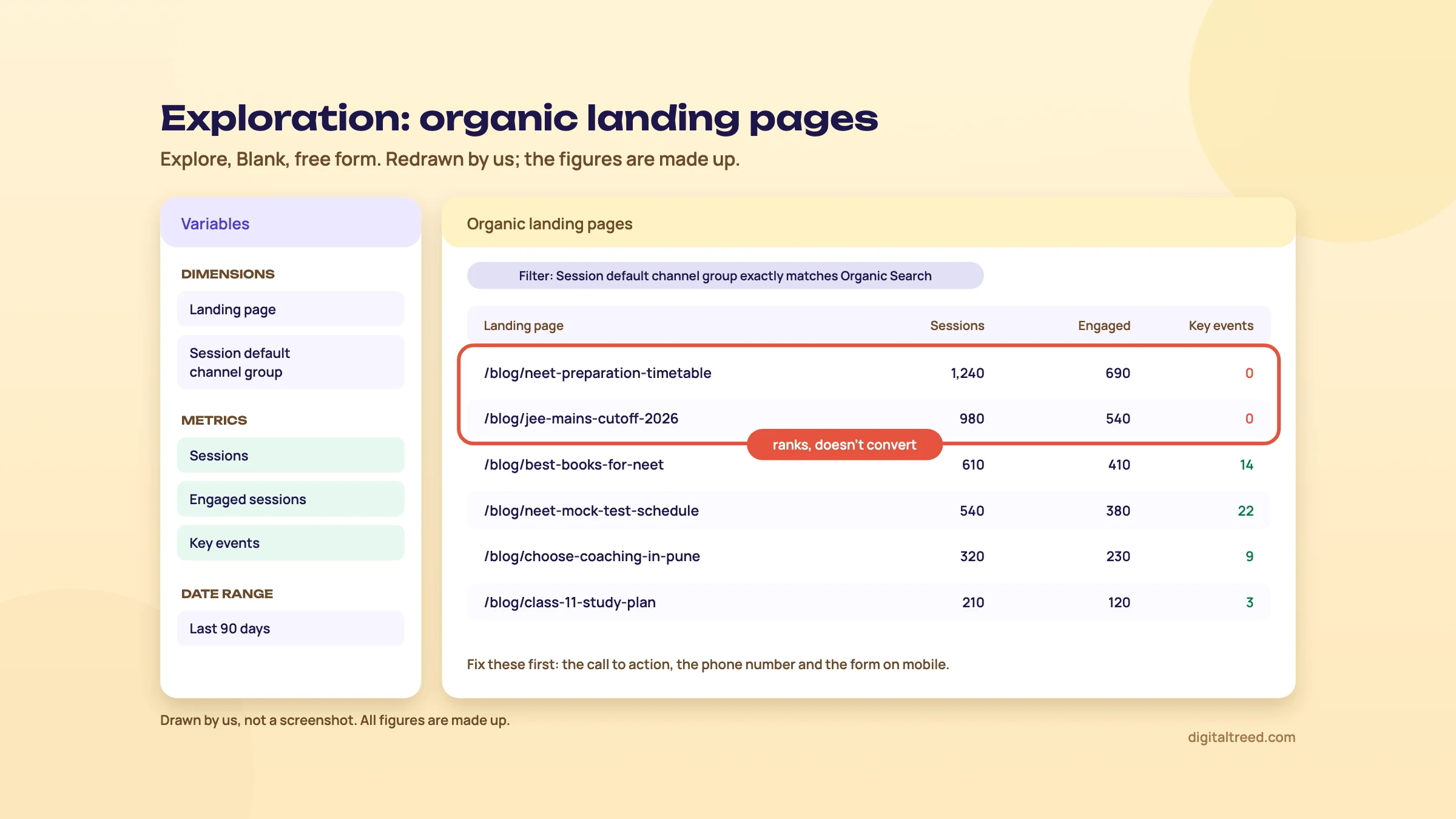 Pages with many organic sessions and no key events are the first to fix. Drawn by us; the figures are made up.
Data thresholds: why rows go missing
Sometimes a report shows a warning that thresholding has been applied, and some rows or cards stay empty. GA4 withholds data so nobody can work out who an individual visitor is. It applies thresholds to demographic data, and to rows with search query information when there aren't enough users. You can't switch thresholds off.[33]
What helps: widen the date range so more users fall into each row. For a small clinic site, a month often works where a week doesn't. Google also points to BigQuery, though data from Google signals isn't exported there.[33]
Sampling: when GA4 estimates
When a report, exploration or API request needs more events than the property's quota, GA4 uses part of the data and scales it up. The data quality icon then shows what percentage it used. The quota is 10 million events per query on a standard property and up to 1 billion on GA4 360.[34]
Ten million events is a lot. A site with 50,000 sessions a month will rarely get near it in one exploration. If you do see sampling, shorten the date range or split the question into two queries.
BigQuery export: your raw data, kept as long as you pay to keep it
BigQuery is Google Cloud's data warehouse. GA4 can export every raw event to it, and once exported, "you own that data".[35] You query it with SQL. That gets you past three GA4 limits at once: no sampling in the export, no 14-month retention cap on what you've exported, and you can join it with your CRM or order data.
| Export type | Standard property | Cost on the BigQuery side |
|---|---|---|
| Daily | Once a day, up to 1 million events a day | Storage and queries |
| Streaming | Within minutes, no volume limit, best effort | Plus $0.05 per GB (about ₹4.80); 1 GB is about 600,000 events |
| Fresh daily | 360 only | Needs Cloud billing |
Source for the table: Google's BigQuery Export page.[35] To set it up, create a Google Cloud project with BigQuery turned on, then in GA4 Admin, under Product links, click BigQuery links, then Link. You need the Editor role in GA4 and Owner access to the Cloud project.[36]
You can export to the free BigQuery sandbox. Read its limits first: 10 GiB of storage for life, 1 TiB of queries a month, no streaming, and every table expires after 60 days.[37] So the sandbox is good for learning SQL on your own data. It's not an archive. For a permanent copy you need a Cloud billing account.
Note
Do you need BigQuery? For a local clinic, a sweet shop or a coaching centre, almost never. Turn it on when you need more than 14 months of event-level history, when you hit sampling every week, or when the client wants GA4 joined with sales data. Turn it on early in those cases, because the export starts from the day you link it.[36]
Chapter 7 puts all of this to work in five real tasks.
Five real SEO jobs in GA4, step by step
Quick answer
Five tasks cover most SEO work in GA4. Find the organic pages that bring orders, compare this season with last year, and check whether a page rewrite helped. Then see what search and AI assistants earn a store, and build a monthly Data Studio report. Each takes 10 to 20 minutes.
The businesses below are examples, not clients. The menus are as Google's help pages describe them in October 2026; GA4 moves things around often, so if a label differs, search the help centre for the report's name.
1. Kanpur sweet shop: which organic pages bring WhatsApp orders?
The shop has a page per sweet and a Diwali gift box page. Orders come in on WhatsApp, which chapter 4 turned into the key event whatsapp_order.
Find the organic pages that bring WhatsApp orders
- Open the report Reports, Engagement, Landing page.[26]
- Keep organic only Apply the organic traffic comparison (chapter 5), or create one on Session default channel group exactly matching Organic Search.[27]
- Pick the key event Open the All events menu on the Key events column and choose whatsapp_order.[38]
- Set the dates Last 90 days, then sort by key events.
- Act Pages with many organic sessions and no orders need a clearer WhatsApp button near the top on mobile. Pages with orders but few sessions need SEO work: titles, internal links from the home page, and more on the page about what's in the box.
2. Pune coaching centre: is this admission season better than last year's?
Admissions peak in a few weeks each year. Comparing with last month is useless; comparing with the same weeks last year is the only fair test.
Compare a season with the same season last year
- Open Traffic acquisition Reports, Acquisition, Traffic acquisition.
- Choose the dates Click the date picker at the top right and pick the season's dates.[39]
- Compare Click Compare, choose Previous year, and click Apply. Each row now shows both years and the change.
- Read the Organic Search row Sessions, engaged sessions and the brochure_download and enquiry key events.
- Note what changed If organic enquiries rose, look at the annotations for that period (new course pages? a refreshed fee page?) and keep doing it.
Standard reports keep their history whatever your retention setting, so this works even on a property left at 2 months.[6] The same question in an exploration doesn't.
3. Delhi dentist: did the rewritten "root canal cost" page help?
The clinic rewrote the page with real price ranges and a clearer booking form on 1 August. The question is whether it brought more bookings from search, not just more visits.
Check whether a page rewrite worked
- Annotate the date On any line chart, right-click 1 August, choose Add annotation and write "Root canal cost page rewritten".[29]
- Wait Give it at least four weeks. Google needs time to recrawl the page, and a week of data is noise.
- Compare equal periods In the Landing page report, filter to the page, pick the 28 days after the change and compare with the previous period.[39]
- Read organic only Keep the organic comparison on. Look at sessions, engagement rate and appointment_request key events.
- Cross-check the clicks In the Google Organic Search Traffic report (chapter 3), see whether Google clicks and position moved too. More bookings with the same clicks means the page converts better; more clicks with the same bookings means it ranks better but the form still needs work.
4. D2C skincare brand: how much does search earn, and do AI assistants matter?
For a store, GA4 can show revenue by channel, as long as the purchase event carries the order value and currency. Shopify and WooCommerce are among the platforms Google lists with their own GA4 set-up instructions.[1]
Compare revenue from organic search and AI assistants
- Check the purchase event Place a test order and confirm the purchase event in Realtime with a value in INR.[23]
- Open Traffic acquisition Set the last 3 complete months.
- Read two rows Organic Search and AI Assistant. Note sessions, key events and total revenue for each.
- Work out revenue per session Revenue divided by sessions, for each row. A small channel that earns well per visit can deserve attention; a small channel that earns little per visit can wait.
- Look at landing pages In the Landing page report, compare Organic Search with an AI Assistant comparison to see which product and blog pages each one starts on.
Expect the AI Assistant row to be small. In SE Ranking's 2026 vendor study of 101,574 sites, AI referrals were 0.32% of traffic.[28] If yours is growing, Guide 5, chapter 8 shows how to track AI visibility beyond GA4.
5. Any business: a monthly report that builds itself
Google's free reporting tool, called Looker Studio for a few years, has been called Data Studio again since April 2026.[40] It connects to GA4 and Search Console, and once built, a report refreshes itself every month.
Connect GA4 to Data Studio
- Check access You need at least Read & Analyze permission on the GA4 property.[41] GA4 now calls that role Viewer.[21]
- Create a data source Sign in to Data Studio, click Create, then Data Source, and choose the Google Analytics connector. Authorise access if asked.
- Pick the property Select the account and property, then click Connect.
- Make the report Click Create report, then Add to report. Add a scorecard for organic key events, a table of landing pages filtered to Organic Search, and a time-series chart.
- Add Search Console Add a second data source with the Search Console connector for clicks and impressions.
- Set the dates Use "Last month" with a comparison to the previous period, and share the report link with the client.
Two limits from Google's docs: GA4 segments and comparisons aren't available through the connector, and reports are subject to GA4 Data API quotas, so a busy dashboard can show quota errors.[41] Rebuild the "organic" view with a filter on Session default channel group instead.
What goes on the page, and in what order, is in Guide 2, chapter 11: outcomes first, then behaviour, then exposure. If you'd rather keep it inside GA4, the Dashboards feature added on 9 September 2026 puts KPIs on a single report.[8]
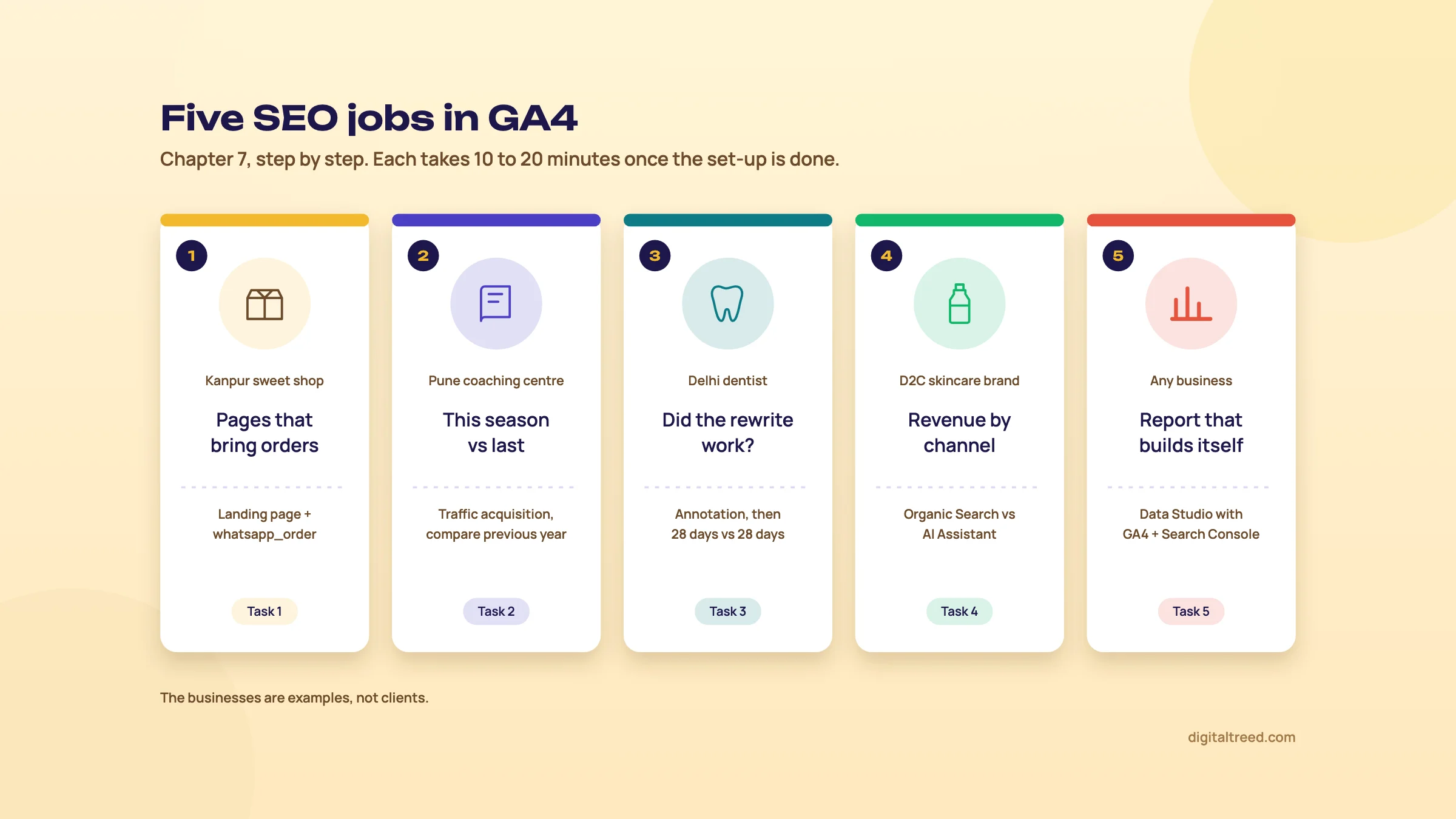 The five tasks in this chapter, each with the GA4 report it uses. Drawn by us.
Before the first monthly report, take a baseline of the site itself, so later months have something honest to compare with.
Our audit runs 50+ checks across 25 pages, from SEO and speed to AI visibility and local SEO, and gives a points-ranked action plan as a PDF. Chapter 8 covers what GA4 costs, what the paid version adds, and when another tool fits better.
GA4 vs GA4 360, pros and cons, and the alternatives
Quick answer
GA4 is free, and enough for almost every Indian small and mid-sized business. GA4 360 is the paid enterprise version, with higher limits, up to 50 months of retention and service agreements; Google's sales team quotes the price. If GA4 feels heavy, Plausible, Fathom or Matomo count visits more simply, and Microsoft Clarity adds free heatmaps.
All prices below were read on the vendors' own pricing pages on 16 October 2026. Where a vendor shows only US dollars, we add "about ₹" at ₹96 = US$1, the X-Rates monthly average for 1 to 16 October 2026. Taxes are mentioned only where the vendor's page mentions them.
Free GA4 vs GA4 360
Google's set-up page says you can connect your site to Google Analytics "free of charge".[1] GA4 360 is sold through Google's sales team: the Analytics 360 page offers "Talk to Sales" and no price.[42] Measureschool, an analytics training company, writes that GA4 360 pricing is usage-based and starts at $50,000 a year (about ₹48 lakh) for 25 million events a month.[43] Treat that as a third-party estimate, not a quote.
| Limit | GA4 (standard) | GA4 360 |
|---|---|---|
| Price | Free | Quoted by Google's sales team |
| Event data retention | 2 or 14 months | 2, 14, 26, 38 or 50 months |
| Key events | 30 | 50 |
| Audiences | 100 | 400 |
| Event-scoped custom dimensions | 50 | 125 |
| Sampling limit in Explore | 10 million events per query | 1 billion events per query |
| Unsampled explorations | Not available | Available, with daily token limits |
| BigQuery daily export | 1 million events a day | Billions of events a day |
| Data API tokens | 200,000 a day | 2 million a day |
| Service level agreements | No | Yes |
Source for the limits: Google's GA4 360 help page.[31] The 360 marketing page adds faster data ("continuous intraday data within an hour after collection") and unsampled results.[42]
Who needs 360? A business sending more than a million events a day to BigQuery, needing event-level history beyond 14 months inside GA4, or needing a contract with service levels. A local clinic, coaching centre or small D2C brand in India almost never fits that list. If you do hit the 1-million daily export limit, GA4's BigQuery settings let you filter events to stay under it before you think about 360.[35]
Pros and cons of GA4 for SEO
Pros
- Free, with the same reports for a 10-page site and a 10,000-page one
- Organic Search, landing pages and key events in one place
- Search Console and Business Profile data can be linked in
- A built-in AI Assistant channel since May 2026
- Free BigQuery export and a free Data Studio connector
Cons
- Hard to learn: menus move, and many reports need customising
- Explorations limited to 14 months of event data on the free version
- Thresholds hide small rows, and sampling starts above 10 million events per query
- Numbers drop when visitors refuse cookies or block the tag
- Processing can take 24 to 48 hours
The alternatives
We don't have an analytics tool of our own, so none of ours appears here. These are the ones we'd consider, by what they do best.
| Tool | What it is | Free option | Paid from (checked 16 October 2026) |
|---|---|---|---|
| Microsoft Clarity | Heatmaps and session recordings, with AI summaries and an AI visibility report | "Free forever"[44] | No paid plan shown |
| Ahrefs Web Analytics | Cookie-free visit counts with a 2 KB script, AI chatbot traffic and a Search Console connection | Free for sites with verified ownership, up to 1 million events a month[45] | Included in Ahrefs Free; a paid Web Analytics add-on raises the limits |
| Matomo | Open-source analytics you can host yourself, or use in Matomo's cloud | On-Premise Community edition, free, unlimited users and hits (you run the server) | Cloud Business ₹1,690 a month for 50,000 hits, excl. tax, or ₹16,900 a year[46] |
| Plausible | Simple, cookie-free analytics, hosted in the EU | 30-day trial, no card | Starter $9 a month (about ₹864) for 10,000 pageviews and one site, or $90 a year[47] |
| Fathom | Simple, privacy-first analytics | 7-day trial, card required; no free plan | $15 a month (about ₹1,440) for 100,000 pageviews, 50 sites included[48] |
A few details from those pages. Matomo Cloud's Business plan includes 30 websites and 24 months of raw data, and On-Premise plugin bundles start at €275 a month.[46] Plausible's Growth plan is $14 a month (about ₹1,344) for up to 3 sites, and Business is $19 (about ₹1,824) for up to 10. Starter keeps 3 years of data, Business 5.[47] Clarity says it runs on more than 2 million sites and apps.[44]
Which one when
| Your situation | Our pick | Why |
|---|---|---|
| Local business or small agency client that wants leads from search | GA4 plus Search Console | Free, key events by channel, and the Search Console link |
| You want to see why visitors don't fill the form | GA4 plus Microsoft Clarity | Clarity's recordings and heatmaps show where people get stuck; GA4 counts the results |
| A simple count without cookies, for a blog or portfolio | Plausible, Fathom or Ahrefs Web Analytics | One screen, no set-up of events, small script |
| You must keep data on your own server | Matomo On-Premise | Free software; you control where the data lives |
| Enterprise with huge volumes and a contract need | GA4 360 | Higher limits, longer retention and service levels |
Running two tools side by side is fine. We'd keep GA4 for key events and channels, and add Clarity when you need to see behaviour. Expect the two to count visits differently, for the same reasons GA4 and Search Console differ.
Where to go next
- The other half of SEO measurement: our Google Search Console guide.
- Call tracking and custom events: the Google Tag Manager guide.
- Calls and directions from Maps: the Google Business Profile guide.
- Every free tool in one place: Best free SEO tools.
If you'd rather we set up GA4, key events and the monthly report for you, see our SEO service or get a quote. Then take the 10-question quiz below.
Test yourself
Ten questions on the whole guide. Pick an answer, check it, and see your score at the end.
You got 0 of 10 right.
Frequently asked questions
Frequently asked
Is Google Analytics 4 free?
Yes. A standard GA4 property costs nothing, whatever the size of your business. The paid version, GA4 360, is for large companies that need higher limits, up to 50 months of event data and service agreements. Google doesn't publish its price; its sales team quotes it.
What's the difference between Google Analytics and Search Console?
Search Console shows what happens on Google before the click: impressions, clicks, queries and average position. GA4 shows what happens after the click, on your site: which page people landed on, how long they stayed, and whether they called, filled a form or bought. For SEO you need both, and you can link them.
Why don't my GA4 and Search Console numbers match?
They count different things. Search Console counts clicks on Google. GA4 counts sessions only when the page loads its tag, and visitors who refuse cookies or block scripts are counted partly or not at all. GA4's Organic Search also includes Bing and other search engines. Use each tool for its own question instead of trying to reconcile them.
How do I see organic search traffic in GA4?
Open Reports, Acquisition, Traffic acquisition and read the Organic Search row. To see which pages bring those visits, open Engagement, Landing page and apply the organic traffic comparison. For Google only, type "google / organic" in the search box above the Traffic acquisition table.
What are key events in GA4?
Key events are the events you mark as important to your business, such as a form submission, a WhatsApp tap or a purchase. They used to be called conversions; Google renamed them on 27 March 2024 and now uses "conversion" for Google Ads. A standard property can have up to 30.
How long does GA4 keep my data?
On a standard property you can keep event and user-level data for 2 or 14 months, and new properties start at 2, so change it to 14 on day one. The setting only affects explorations and funnel reports. Standard reports keep their history. For longer event-level history, export to BigQuery.
Does GA4 track traffic from ChatGPT?
Yes, when the visit arrives with ChatGPT as the referrer. Since 13 May 2026 GA4 puts visits from assistants such as ChatGPT, Gemini, Copilot, DeepSeek and Grok in a channel called AI Assistant. Clicks from Google's AI Overviews and AI Mode count as Organic Search instead. Visits with no referrer land in Direct.
How do I stop my own visits from showing in GA4?
Define internal traffic by IP address in your web stream's tag settings, then create an Internal Traffic data filter. Leave it in Testing for a day or two, check that your visits are caught, then make it Active. Active filters are permanent, and they can't catch staff browsing from home on mobile data.
Do I need Google Tag Manager to use GA4?
No. You can add the Google tag with a plugin such as Site Kit on WordPress, a built-in field on Shopify or Wix, or by pasting the gtag.js code. Tag Manager is worth it when you'll add phone-click tracking, ad tags or many custom events.
What is a good free alternative to Google Analytics?
Microsoft Clarity is free and adds heatmaps and session recordings, so you can run it alongside GA4. Ahrefs Web Analytics is free for verified sites up to 1 million events a month and doesn't use cookies. Matomo's self-hosted edition is free if you run your own server. Plausible and Fathom are paid but very simple.
Sources
References
- Set up Analytics for a website and/or app, Google Analytics Help, accessed 16 Oct 2026
- Conversions vs. key events in Google Analytics, Google Analytics Help, accessed 16 Oct 2026
- [GA4] Engagement rate and bounce rate, Google Analytics Help, accessed 16 Oct 2026
- Google Analytics 4 has replaced Universal Analytics, Google Analytics Help, updated 16 Jul 2025, accessed 16 Oct 2026
- Connect Search Console to Google Analytics, Google Analytics Help, accessed 16 Oct 2026
- Data retention, Google Analytics Help, accessed 16 Oct 2026
- [GA4] Default channel group, Google Analytics Help, accessed 16 Oct 2026
- What's new in Google Analytics, Google Analytics Help, 2026 entries, accessed 16 Oct 2026
- [GA4] Find your Google tag ID, Google Analytics Help, accessed 16 Oct 2026
- Enhanced measurement events, Google Analytics Help, accessed 16 Oct 2026
- Set up Google Analytics in Tag Manager, Tag Manager Help, accessed 16 Oct 2026
- Site Kit by Google: Analytics, Search Console, AdSense, Speed, WordPress.org plugin directory, version 1.189.0, accessed 16 Oct 2026
- How to avoid duplicated tracking events (Google & YouTube app on Shopify), Google Merchant Center Help, accessed 16 Oct 2026
- Data freshness, Google Analytics Help, accessed 16 Oct 2026
- Google Analytics 4 data retention settings 101, InfoTrust (Ben Brooks), 3 May 2023, accessed 16 Oct 2026
- Filter out internal traffic, Google Analytics Help, accessed 16 Oct 2026
- Data filters, Google Analytics Help, accessed 16 Oct 2026
- Consent mode on websites and mobile apps, Google Analytics Help, accessed 16 Oct 2026
- Consent mode overview, Google for Developers, Tag Platform, updated 30 Jul 2026, accessed 16 Oct 2026
- Connect your Business Profile to Google Analytics, Google Business Profile Help, accessed 16 Oct 2026
- What's new archive (2019-2025), Google Analytics Help, accessed 16 Oct 2026
- Mark events as key events, Google Analytics Help, accessed 16 Oct 2026
- Create or modify key events, Google Analytics Help, accessed 16 Oct 2026
- Change the counting method of key events, Google Analytics Help, accessed 16 Oct 2026
- [GA4] Traffic acquisition report, Google Analytics Help, accessed 16 Oct 2026
- [GA4] Landing page report, Google Analytics Help, accessed 16 Oct 2026
- Apply comparisons to reports, Google Analytics Help, accessed 16 Oct 2026
- AI traffic grew 16x from 2024 to 2026: here are the top AI search engines driving visits to websites, SE Ranking (vendor study), 18 Jun 2026, accessed 16 Oct 2026
- About annotations, Google Analytics Help, accessed 16 Oct 2026
- Get started with Explorations, Google Analytics Help, accessed 16 Oct 2026
- [GA4] Google Analytics 360 (Google Analytics 4 Properties), Google Analytics Help, accessed 16 Oct 2026
- API dimensions and metrics, Google Analytics Data API, Google for Developers, accessed 16 Oct 2026
- [GA4] About data thresholds, Google Analytics Help, accessed 16 Oct 2026
- About data sampling, Google Analytics Help, accessed 16 Oct 2026
- BigQuery Export, Google Analytics Help, accessed 16 Oct 2026
- Set up BigQuery Export, Google Analytics Help, accessed 16 Oct 2026
- Use the BigQuery sandbox, Google Cloud documentation, updated 15 Oct 2026, accessed 16 Oct 2026
- About key events, Google Analytics Help, accessed 16 Oct 2026
- Change and compare date ranges in reports, Google Analytics Help, accessed 16 Oct 2026
- Data Studio returns as new home for Data Cloud assets, Google Cloud blog (Sean Zinsmeister, Jennifer Skene), 11 Apr 2026, accessed 16 Oct 2026
- Connect to Google Analytics (Data Studio), Google Cloud documentation, accessed 16 Oct 2026
- Google Analytics 360, Google Marketing Platform, accessed 16 Oct 2026
- How much does Google Analytics cost?, Measureschool (third-party estimate), 3 Jul 2024, accessed 16 Oct 2026
- Microsoft Clarity: free heatmaps and session recordings, Microsoft, accessed 16 Oct 2026
- Ahrefs Web Analytics, Ahrefs, accessed 16 Oct 2026
- Matomo pricing (Cloud and On-Premise), Matomo, prices seen 16 Oct 2026 (Cloud shown in INR), accessed 16 Oct 2026
- Plausible Analytics pricing, Plausible Analytics, prices seen 16 Oct 2026, accessed 16 Oct 2026
- Fathom Analytics pricing, Fathom Analytics, prices seen 16 Oct 2026, accessed 16 Oct 2026
Get the free checklist
Every step of this guide on one page, to print or tick off. We email you the PDF link.