
Quick answer
A good email marketing strategy for a small business is simple. Collect addresses only from people who ask to hear from you. Set up your domain so Gmail and Yahoo trust it. Send a welcome series automatically. Email your list every week or two with one useful idea. Judge results by clicks and sales, not opens.
Key takeaways
- Since February 2024, Gmail and Yahoo require every sender to authenticate their domain and keep spam complaints under 0.3%. Bigger senders also need SPF, DKIM, DMARC and one-click unsubscribe.
- As of October 2026, the FTC says each email that breaks the CAN-SPAM Act can cost up to $53,088. The law covers business-to-business email too.
- Apple Mail Privacy Protection loads email content in the background, which can count as an open. Open rates are no longer reliable, so track clicks, replies and sales instead.
- In Omnisend's 2025 data, automated emails were 2% of sends but brought in 30% of email-attributed revenue.
This guide is for US small business owners who haven't started email yet, or who send an occasional newsletter and can't tell if it works. It covers what changed since most email advice was written: new inbox rules from Gmail, Yahoo and Microsoft, and privacy features that broke open rates. It also shows free tools that can automate email for a list of 200 people.
What is an email marketing strategy?
An email marketing strategy is your plan for who you email, what you send them, how often, and how you judge the results. For a small business, it covers 5 parts: a permission-based list, a trusted sending domain, automated emails, regular campaigns and a few numbers you track.
A campaign is a single email or series, such as a spring sale. The strategy decides which campaigns you send and why. The 7 steps below build it in order.
Set one goal first
Pick one goal before you write anything: more repeat sales, more bookings or more leads. Then pick the number that proves it, such as orders or bookings that came from email. Step 7 shows how to track it.
Why email still matters for a small business
Email is the one channel you own. A social network can change what your followers see overnight; your email list stays yours. It's also cheap: all 4 tools in Step 4 have free plans for small lists.
People still respond, too. In Litmus's 2025 State of Email survey, 35% of marketing leaders said they get $10 to $36 back for every $1 spent. Another 30% said $36 to $50. These are their own estimates. And 21% said they don't measure ROI at all, so treat the figures as a sign of potential, not a promise.
Key facts about email marketing in 2026
- Since February 1, 2024, Gmail requires anyone sending more than 5,000 messages a day to Gmail accounts to meet stricter bulk-sender rules.
- Gmail calculates spam rate daily. Bulk senders above 0.3% lose delivery help until they stay below it for 7 days in a row.
- As of October 2026, the FTC lists penalties of up to $53,088 for each email that breaks the CAN-SPAM Act.
- In September 2026, Litmus attributed 76.56% of tracked opens to Apple, a share that includes Mail Privacy Protection opens.
- In Litmus's 2025 survey, 35% of marketing leaders said email returns $10 to $36 for every $1 spent (vendor survey).
- Mailchimp's benchmarks put the average click rate at 2.62% across all its users (December 2023, vendor data).
Step 1: Build your list the right way
The fastest way to ruin email is to send to people who didn't ask. Google's sender guidelines are blunt: "Don't purchase email addresses from other companies". They also say: "Don't send messages to people who didn't sign up to get messages from you". Bought lists bring spam complaints, and a high complaint rate hurts delivery for all of your email.
Better ways to grow a list for a local or online business:
- A signup form on your homepage, footer and contact page, with a clear reason to join (a guide, a first-order discount, early access)
- A checkbox at checkout or booking that is not ticked by default; Google says to "avoid opt-in forms that are checked by default"
- A QR code at the counter or on receipts that opens your signup form
- Past customers: CAN-SPAM doesn't require their prior consent, but every message must follow its rules, including an easy opt-out. Asking them to join first keeps complaints down.
Tip
Turn on double opt-in, where new subscribers click a link to confirm. It isn't a legal requirement in the US, but Google recommends it: "Confirm each recipient's email address before subscribing them". It also keeps typos and fake addresses off your list.
Step 2: Pass the inbox rules from Gmail, Yahoo and Outlook
This is the part most email guides still skip. Since February 2024, Gmail and Yahoo have required all senders to authenticate their domain and keep spam complaints low. Stricter rules apply to anyone sending about 5,000 or more messages a day.
Microsoft's Outlook.com added similar rules for high-volume senders in May 2025. Google says that from November 2025 it is "ramping up its enforcement", including rejecting messages that don't comply.
| Rule | Who it applies to | What to do |
|---|---|---|
| SPF or DKIM authentication | All senders to Gmail and Yahoo | Have your email tool set up its records on your domain |
| Spam complaints under 0.3% | All senders to Gmail and Yahoo | Email only people who opted in; make unsubscribing easy |
| SPF and DKIM, plus DMARC | Bulk senders (Gmail: about 5,000+ a day; Outlook.com: over 5,000 a day) | Add a DMARC record; p=none is accepted to start |
| One-click unsubscribe | Bulk senders' marketing email (Gmail, Yahoo) | Use a tool that adds the one-click header and a visible unsubscribe link |
| Honor unsubscribes fast | Bulk senders | Gmail recommends within 48 hours; Yahoo says within 2 days |
Google is specific about spam complaints. Its sender guidelines say to keep them "below 0.10% and avoid ever reaching a spam rate of 0.30% or higher". That's 1 complaint per 1,000 emails.
A list of 500 people is far below the bulk limits, but the all-sender rules still apply. Setting things up properly now means you won't have to fix them later.
SPF, DKIM and DMARC in plain words
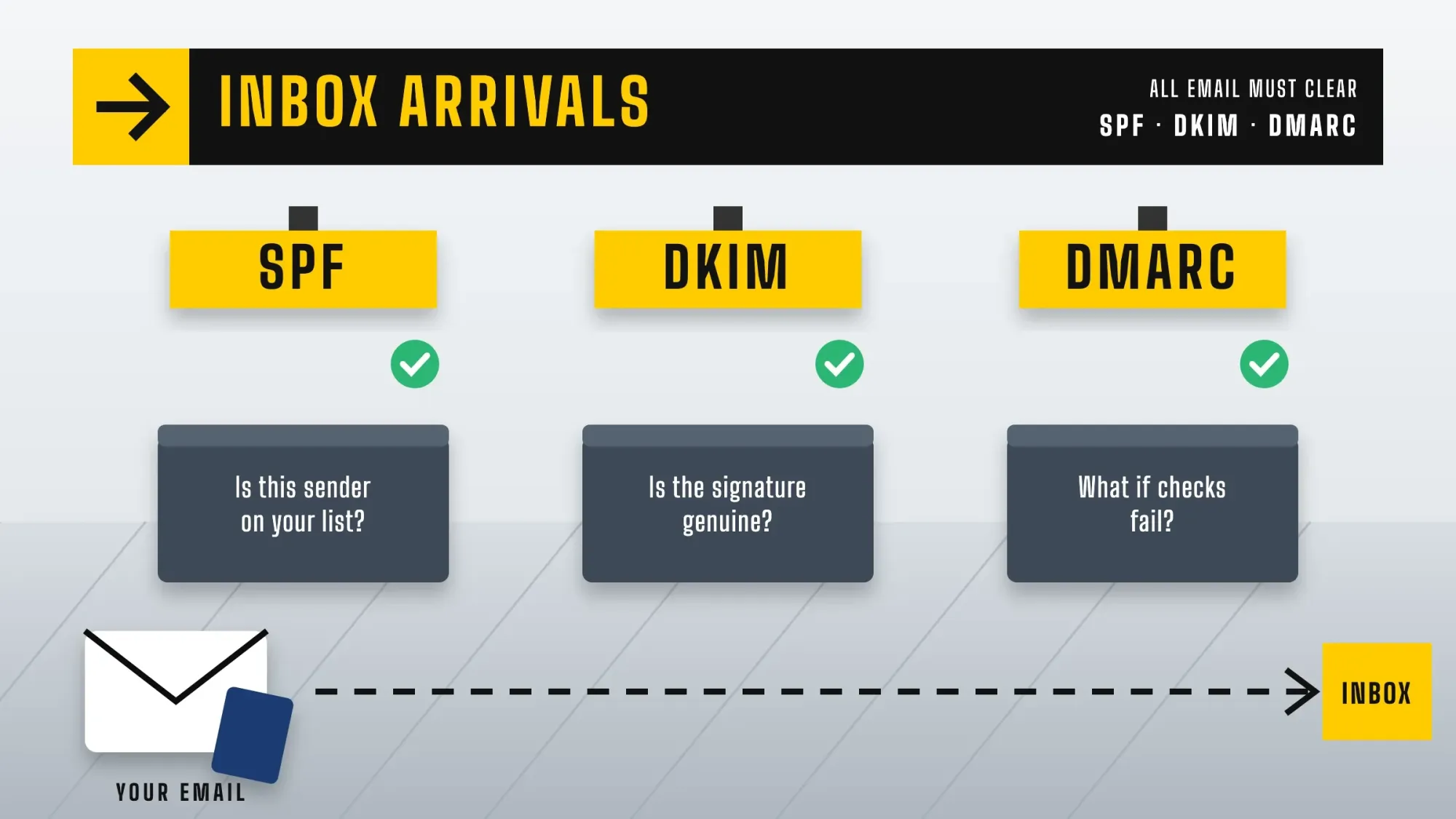 Illustration: SPF, DKIM and DMARC work like passport control for your email.
- SPF is a line in your domain's DNS that lists which services may send email for you. Google says SPF "prevents spammers from sending unauthorized messages that appear to be from your domain."
- DKIM is a digital signature your email tool adds to each message. A matching key in your DNS lets inboxes check the email really came from you.
- DMARC is a DNS record that tells inboxes what to do with mail that fails SPF or DKIM, and it can send you reports. Start with a policy of "none" and tighten it once the reports look clean.
Set up your sending domain
- Send from your own domain Use an address like [email protected], not a free Gmail or Yahoo address.
- Add your tool's records Your email platform shows the SPF and DKIM records to copy into your domain's DNS settings; keep one SPF record per domain.
- Add a DMARC record A simple starting record uses p=none with an email address for reports.
- Check the unsubscribe Send yourself a test and make sure there's a visible unsubscribe link; most tools also add the one-click header.
- Watch your spam rate Sign up for Google Postmaster Tools for your domain once you send enough volume, and keep complaints under 1 per 1,000 emails.
Step 3: Follow CAN-SPAM
The CAN-SPAM Act is the US law for commercial email. It doesn't require prior consent, but it sets rules for every marketing email you send. As of October 2026, the FTC says "each separate email in violation of the CAN-SPAM Act is subject to penalties of up to $53,088". It also notes "the law makes no exception for business-to-business email." The FTC's compliance guide lists these requirements:
- "Don't use false or misleading header information."
- "Don't use deceptive subject lines."
- "Identify the message as an ad."
- "Tell recipients where you're located", with a valid physical postal address
- "Tell recipients how to opt out of receiving future marketing email from you."
- "Remember that subscribers and members can opt out of marketing emails, too."
- "Honor opt-out requests promptly": within 10 business days
- "Monitor what others are doing on your behalf": you can be responsible for an agency that emails for you
Receipts vs marketing emails: which rules apply?
CAN-SPAM's full rules apply to commercial email, whose primary purpose is to promote a product or service. A receipt or order update that contains nothing else is a transactional or relationship message.
The FTC's guide says those messages are exempt from most of the law, but their routing information must still be truthful. Mixing the two is where businesses slip. A message counts as commercial if its subject line suggests an ad. It also counts as commercial if the transactional part is not mainly at the beginning.
Note
Texts are different. An email subscriber hasn't agreed to text messages. The FCC says "Commercial texts require written consent", so collect SMS permission separately if you plan to text. This is general information, not legal advice; check with an attorney for your situation.
Step 4: Pick a tool you can grow into
For a small business, the right tool is the one you'll actually use. All 4 below have free plans. Prices and limits are as of October 2026, read from each company's US pricing page:
| Tool | Free plan | Paid plans start | Good fit for |
|---|---|---|---|
| Mailchimp | 250 contacts, 500 sends a month (automations need a paid plan) | Essentials plan (see its calculator); Standard from $20/month | General small businesses that want templates and simple automation |
| Klaviyo | 250 active profiles, 500 email sends a month | Priced by list size (see its calculator) | Online stores that want shop data in their emails |
| Kit | Up to 10,000 subscribers (no automated sequences) | Creator $33/month billed yearly | Creators, coaches and newsletters |
| Brevo | Up to 300 emails a day | Starter $9/month | Tight budgets that need email and some SMS |
Whichever you pick, make your own emails look as professional as your newsletters; a clean signature with your address and phone number helps every reply.
Step 5: Automate before you send campaigns
Most small businesses start by writing newsletters. We'd start with automations, because they work while you're busy. In Omnisend's report on 2025 data from more than 150,000 ecommerce brands, automated emails were 2% of sends but generated 30% of email-attributed revenue.
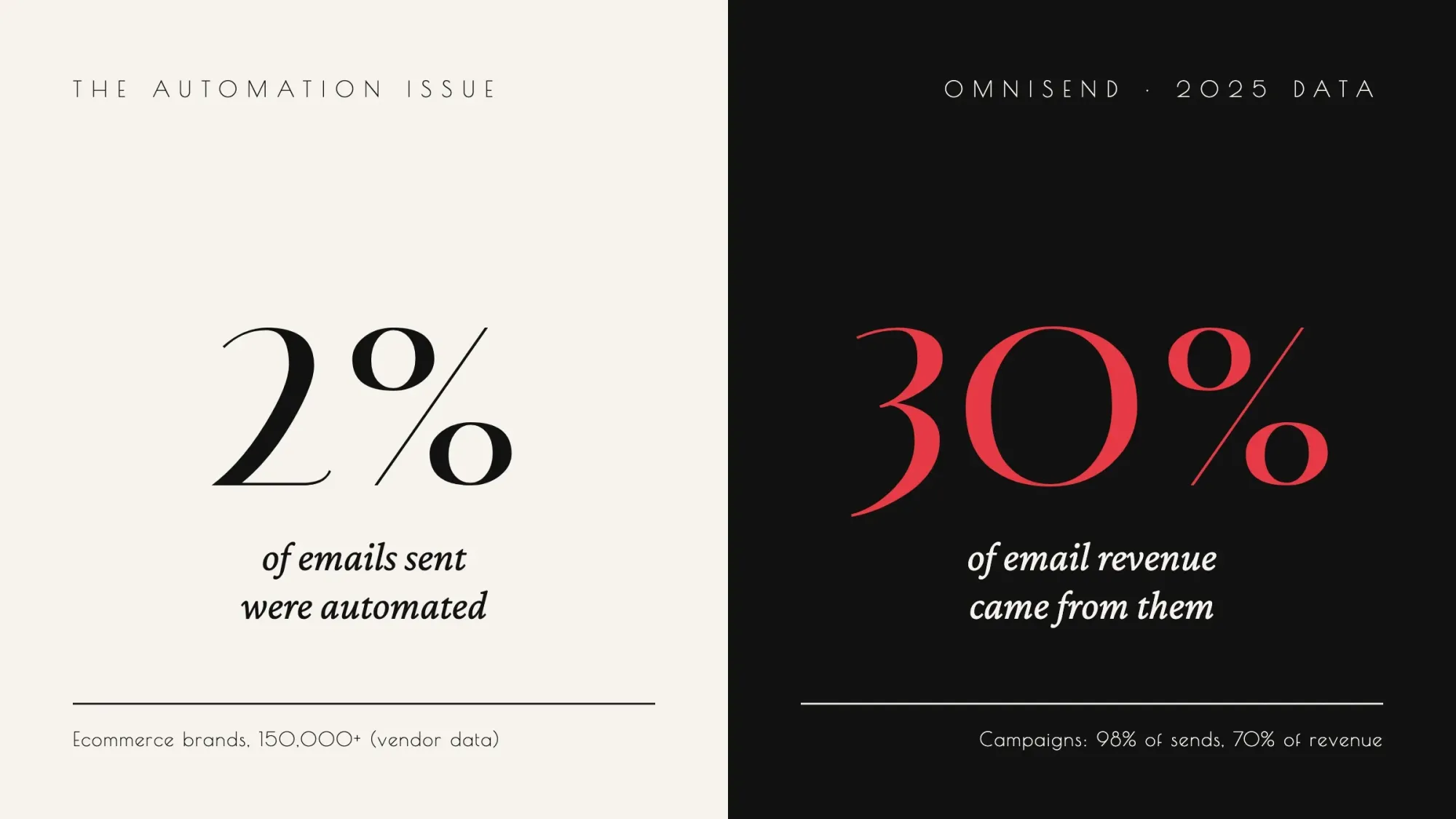 Share of sends and email-attributed revenue, automated emails vs scheduled campaigns; campaign shares are the remainder. Source: Omnisend 2026 Ecommerce Marketing Report press release, January 2026 (2025 data from 150,000+ ecommerce brands, vendor data).
A 4-email welcome series
- Right away: deliver what you promised (the guide or discount), say how often you'll email, and ask them to reply with a question
- Day 2: your story or the problem you solve, plus one best-seller or popular service
- Day 4 or 5: proof: a review, a customer story, an answer to a common question
- Day 7 or 8: a gentle offer or booking link, with any deadline on the welcome code
Klaviyo's benchmarks, from more than 110,000 of its customers, show welcome emails with the highest average click rate of the flows it compared, at 6.5%. If you sell online, add an abandoned cart series next. As of October 2026, Klaviyo puts its average click rate at 6% and revenue at $6.77 per recipient. Our guide to building an ecommerce website covers the checkout side.
Step 6: Send campaigns people look forward to
Once your automations run, send a regular email every week or two. The formula that works for most small businesses is one useful idea plus one offer or next step. Our guide to content marketing explains how useful content brings in leads.
A landscaper's spring email might explain when to aerate a lawn in your region, then offer a booking slot. A bakery might share the story behind a new seasonal loaf, then link to preorders.
Writing that useful idea every week is the hard part for most owners. Our content marketing service writes articles and turns each one into newsletter lines, with the price agreed before work starts. (DigitalTreed sells this service.)
Types of marketing emails a small business needs
| Type | What it does | When it goes out |
|---|---|---|
| Welcome series | Delivers what you promised and introduces your business | Automatically, right after signup (Step 5) |
| Newsletter | Shares one useful idea plus one offer | Every 1 to 2 weeks |
| Promotional email | Announces a sale, launch or event | When you have a real offer or event |
| Abandoned cart | Reminds shoppers about items left in their cart | Automatically, for online stores |
| Re-engagement | Asks inactive subscribers if they still want your email | After 2 or 3 months without a click |
| Transactional | Confirms an order, booking or payment | Automatically, with no promotions mixed in |
Email marketing tips for small businesses
- Write subject lines that say what's inside. Deceptive subject lines break CAN-SPAM, and Google warns against fake "Re:" or "Fwd:" tricks.
- Segment even a small list: customers vs leads, by location, or by the interest someone picked when they signed up.
- Design for phones: use 1 column, short paragraphs and 1 clear button.
- Keep email types apart. Google advises against putting promotions into receipts and other transactional emails.
- Fill in the preview text, the line shown after the subject in the inbox list. Use it for a detail the subject line leaves out.
- Test one change at a time, such as 2 subject lines. Pick the winner by clicks or sales, because opens are unreliable (see Step 7).
Step 7: Measure what counts (not opens)
Open rates used to be the number everyone watched. Then Apple added Mail Privacy Protection, which Apple says "prevents senders from seeing if you've opened the email message they sent you". When it's on, it downloads remote content such as images in the background, whether or not you open the email.
Litmus counted more than 1.5 billion opens in September 2026 and attributes 76.56% of tracked opens to Apple. That share includes Mail Privacy Protection opens, which Litmus says are not reliable opens.
So watch clicks, replies, unsubscribes, spam complaints and, above all, sales or bookings from email. Mailchimp's own benchmarks put the all-industry average click rate at 2.62% and the unsubscribe rate at 0.22%. It warns that open rates may be affected by Apple's changes.
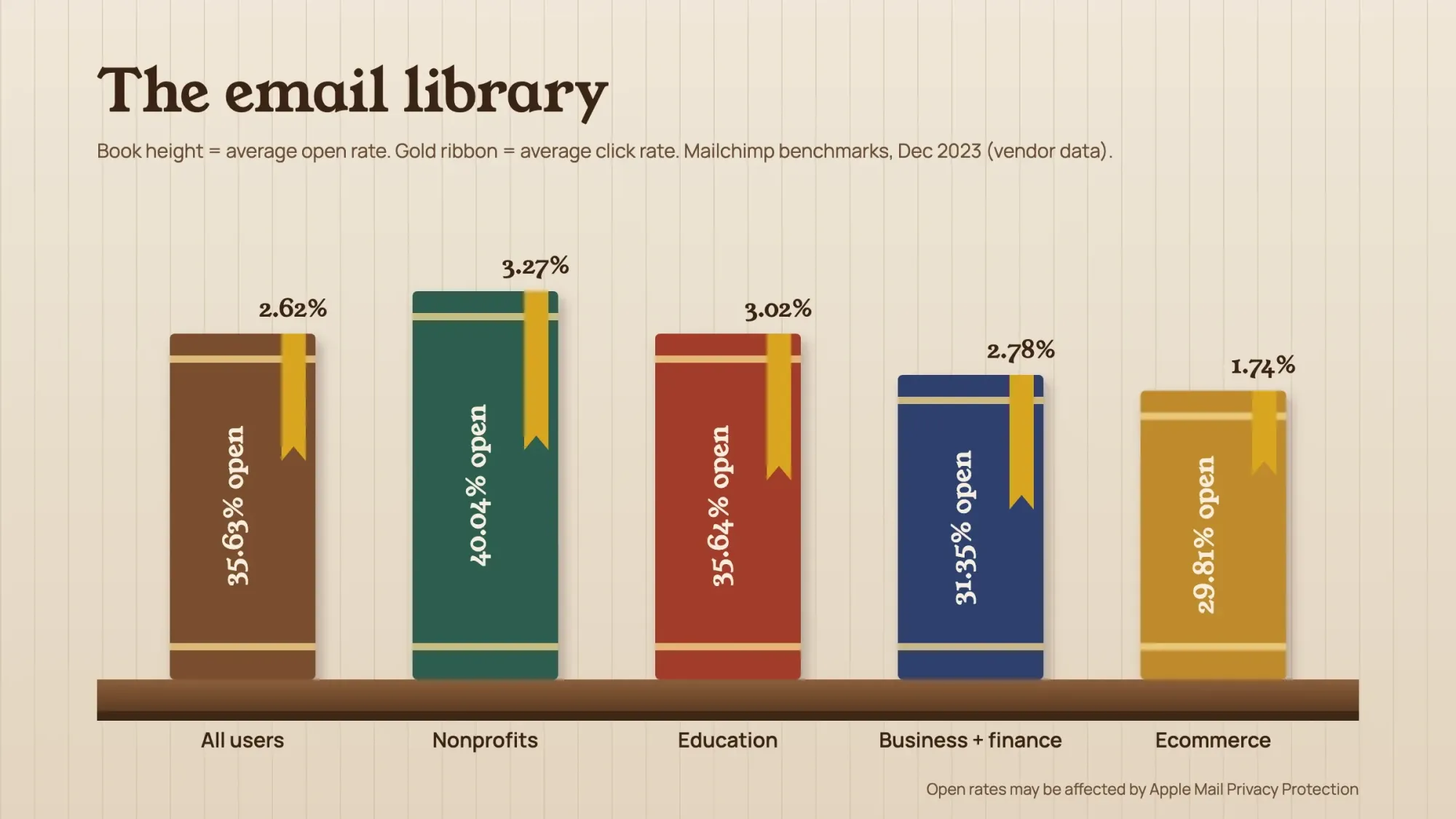 Average open and click rates by industry. Source: Mailchimp Email Marketing Benchmarks, December 2023 (vendor data). Mailchimp notes open rates may be affected by Apple Mail Privacy Protection.
Email marketing metrics cheat sheet: formulas and benchmarks
Use this free cheat sheet after every send. Open and click rate use delivered emails, the way Mailchimp calculates its rates. The other formulas are our own working, and each benchmark names its source.
| Metric | How to work it out | What to aim for |
|---|---|---|
| Click rate | Emails with at least 1 click ÷ delivered emails × 100 | All-industry average 2.62% (Mailchimp, December 2023, vendor data) |
| Unsubscribe rate | Unsubscribes ÷ delivered emails × 100 | Average 0.22% (Mailchimp, same data) |
| Spam complaint rate | Read it in Google Postmaster Tools, which calculates it daily | Below 0.1%, and never 0.3% or higher (Google) |
| Open rate | Emails opened ÷ delivered emails × 100 | Average 35.63% (Mailchimp, December 2023, vendor data), inflated by Apple Mail Privacy Protection; watch the trend only |
| Revenue per recipient | Revenue from the email ÷ people who received it | Abandoned cart flows average $6.77, as of October 2026 (Klaviyo, vendor data) |
| Unsubscribe speed | Time from request to removal | Gmail: within 48 hours for bulk senders. The law: within 10 business days (FTC) |
Mistakes that send email to spam
Do not
- Buy or rent email lists
- Use pre-checked signup boxes
- Send from a free @gmail.com address
- Use misleading subject lines or fake "Re:" prefixes
- Hide promotions inside receipts
Do
- Email only people who signed up or bought from you
- Authenticate your domain with SPF, DKIM and DMARC
- Make unsubscribing obvious, so people don't hit the spam button instead
- Grow volume gradually when you start or restart sending
- Remove people who haven't engaged in months, after one re-engagement email
A 90-day email marketing plan from zero subscribers
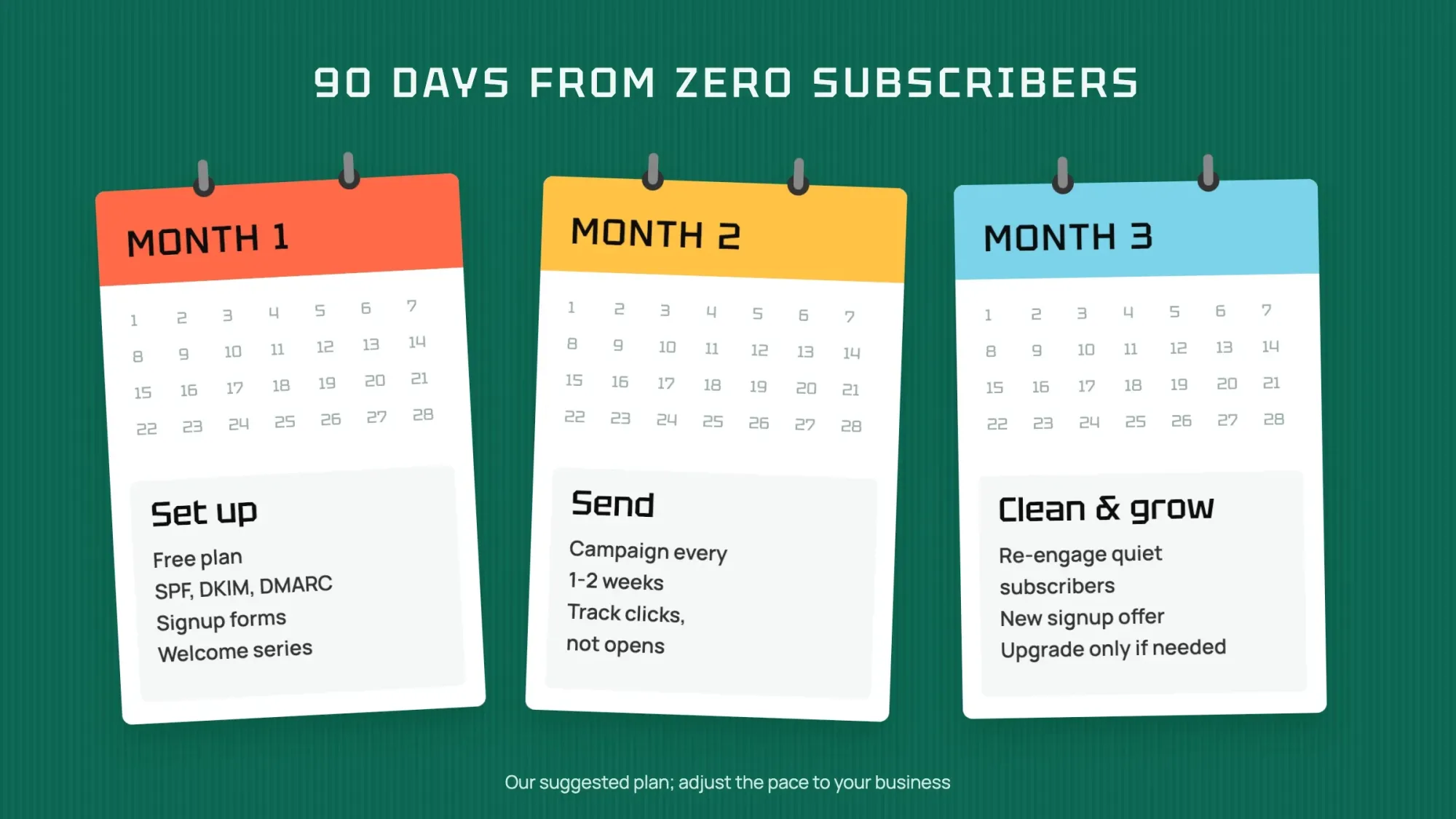 Illustration: the 90-day plan at a glance.
| When | What to do |
|---|---|
| Days 1-14 | Pick a plan that includes automations (Klaviyo's and Brevo's free plans do; Mailchimp's starts at Essentials), set up SPF, DKIM and DMARC, add your postal address to the footer, create one reason to subscribe and put signup forms on your site and at the counter |
| Days 15-30 | Build the 4-email welcome series (and an abandoned cart series if you sell online); set up 2 or 3 simple segments |
| Days 31-60 | Send a campaign every 1 to 2 weeks; track clicks, replies, unsubscribes and complaints; test one thing at a time, like the subject line |
| Days 61-90 | Send a re-engagement email to anyone who hasn't clicked in 2 or 3 months, then stop emailing those who don't respond; add a second signup offer; upgrade only when you pass the free limit |
Frequently asked
Is email marketing still effective in 2026?
Yes, for businesses that email people who asked to hear from them. In Litmus's 2025 survey, most marketing leaders who measure it reported a return of $10 or more for each $1 spent. The rules for reaching the inbox are stricter now, so setup matters more.
What is the difference between an email marketing strategy and a campaign?
A campaign is one email or one series with a single aim, such as a holiday sale. The strategy is the plan behind all of them: who you email, what you send, how often and how you measure it.
How do I start email marketing for free?
Pick a tool with a free plan. As of October 2026, Mailchimp is free up to 250 contacts, Brevo allows 300 emails a day and Kit is free up to 10,000 subscribers. Then set up SPF, DKIM and DMARC, add a signup form and write a welcome series. To send it automatically on a free plan, use Klaviyo or Brevo (see Step 4).
Does the same email marketing strategy work for B2B?
Mostly, yes. The FTC says "the law makes no exception for business-to-business email", so CAN-SPAM applies in full. The content changes more than the rules; our guide to B2B vs B2C marketing covers those differences.
Do I need permission to send marketing emails in the US?
CAN-SPAM doesn't require prior consent, but it requires an easy opt-out, your postal address and honest headers and subject lines. Gmail and Yahoo filter mail from senders whose recipients didn't sign up, so in practice permission is what gets you delivered.
Can I buy an email list?
You shouldn't. Google's sender guidelines say not to purchase email addresses, and bought lists bring spam complaints that hurt delivery for your whole list.
What is a good open rate?
Open rates are unreliable since Apple Mail Privacy Protection, which loads email content automatically in the background. Mailchimp's benchmarks show averages around 30% to 40%. Focus instead on click rates (its all-industry average is 2.62%) and sales.
How often should a small business send emails?
Every week or two works for most, plus automated emails like a welcome series. Sending regularly helps inboxes recognize you; Google notes you can grow volume faster when you send daily rather than weekly.
Why are my emails going to spam?
The usual causes are missing SPF, DKIM or DMARC records, or sending from a free email address. Others are a high spam complaint rate, emailing people who didn't sign up, or a hard-to-find unsubscribe link.
How much does email marketing cost?
Mailchimp, Klaviyo, Kit and Brevo all have free plans for small lists. As of October 2026, paid plans start at $9 a month on Brevo Starter and rise with your list size. Check each tool's pricing page or calculator.
Your next step: this week, pick a tool and set up SPF, DKIM and DMARC. Next week, write your 4-email welcome series. If you want help with the weekly useful idea, our content marketing service can write it for you.
First published July 2020. Rewritten October 2026: new Gmail, Yahoo and Outlook.com sender rules, the current per-email penalty, Apple's effect on open rates and a 90-day plan.
How we made this guide: it is built from Google's and Yahoo's sender guidelines, Microsoft's Outlook.com announcement, the FTC's CAN-SPAM guide and the CAN-SPAM statute. We also used Apple's and the FCC's help pages, the 4 tools' US pricing pages and vendor data from Litmus, Mailchimp, Klaviyo and Omnisend. We checked every number against the source named next to it on October 22, 2026. Omnisend's figures and the FCC quote come from our October 21, 2026 reading, because those pages blocked our checker the next day. Updated October 23, 2026: added a definition and a goal step, a key facts list and a table of email types. We also added a section on receipts vs marketing emails, a metrics cheat sheet, 2 tips and 3 FAQs. We checked the new parts against their sources on October 23, 2026.
Sources
- Google: Email sender guidelines
- Google: Email sender guidelines FAQ
- Yahoo Sender Hub: Sender best practices
- Microsoft: Outlook's new requirements for high-volume senders (April 2025, updated)
- RFC 8058: Signaling One-Click Functionality for List Email Headers (January 2017)
- FTC: CAN-SPAM Act, a compliance guide for business (read October 22, 2026)
- 15 U.S.C. 7704: Requirements for transmission of messages (CAN-SPAM Act) (Cornell Law School LII)
- FCC: Stop unwanted robocalls and texts
- Apple: Use Mail Privacy Protection on iPhone
- Litmus: Email client market share (September 2026)
- Litmus: The ROI of email marketing (July 16, 2025, vendor survey)
- Mailchimp: Email marketing benchmarks (last updated December 2023, vendor data)
- Mailchimp: About open and click rates (checked October 23, 2026)
- Omnisend 2026 Ecommerce Marketing Report press release (January 29, 2026, vendor data)
- Klaviyo: Abandoned cart benchmarks (October 2, 2026, vendor data)
- Mailchimp: Pricing
- Klaviyo: Pricing
- Kit: Pricing
- Brevo: Pricing
Comments
No comments yet. Start the conversation below.