
Quick answer
To promote your blog posts, link each new post from older pages on your site, then email it to your list. Share it on the 1 or 2 networks your customers use, and post it on your Google Business Profile. Tag every shared link with UTM tags so Google Analytics shows which channel sent readers.
Learning how to promote your blog posts matters because a new post starts with no readers and no links. Google's SEO Starter Guide says promotion "will lead to faster discovery" by interested readers "and also by search engines."
This guide gives a small business one order of work for each post, about 2 hours in total (our estimate). We also tested the link tags in our own UTM builder on October 22, 2026. We show which Google Analytics channel each one maps to under Google's rules.
Key takeaways
- Promote in order of who already knows you: your own site, your email list, your social pages, then your Google Business Profile.
- Tag every link you share. In our UTM builder test, utm_medium=email mapped to Email, social in Organic Social, and google/organic in Organic Search.
- The easy mistake: utm_medium=newsletter lands in Unassigned, because Google Analytics has no channel rule for it.
- Treat a blog newsletter as commercial email: postal address, a working opt-out, and opt-outs honored within 10 business days.
- Business Profile posts show on Google Search and Maps and are archived after 6 months, so repeat them.
What is blog promotion?
Blog promotion is the work of putting a published post in front of readers through your own site, email, social media, Google and other sites. Writing the post is step one. Promotion is what gets it read, linked and found by search engines sooner.
Blog promotion key facts
- Google says crawling a new page "can take anywhere from a few days to a few weeks," per its recrawl help page.
- Business Profile posts older than 6 months are archived unless a date range is set, per Google Business Profile Help.
- Each email that breaks CAN-SPAM can cost up to $53,088, and opt-outs must be honored within 10 business days, per the FTC.
- Senders of more than 5,000 messages a day to Gmail must support one-click unsubscribe on marketing email, per Gmail Help.
- 84% of US adults say they ever use YouTube and 70% Facebook, per Pew Research Center (fact sheet dated October 19, 2026).
What does a simple plan to promote a blog post look like?
A simple plan to promote a blog post has 4 stages over about 3 months. Day 0 is for your own site, and day 1 is for email, social and your Business Profile. Weeks 2 to 4 add one repurposed version, and month 3 is for numbers and a refresh.
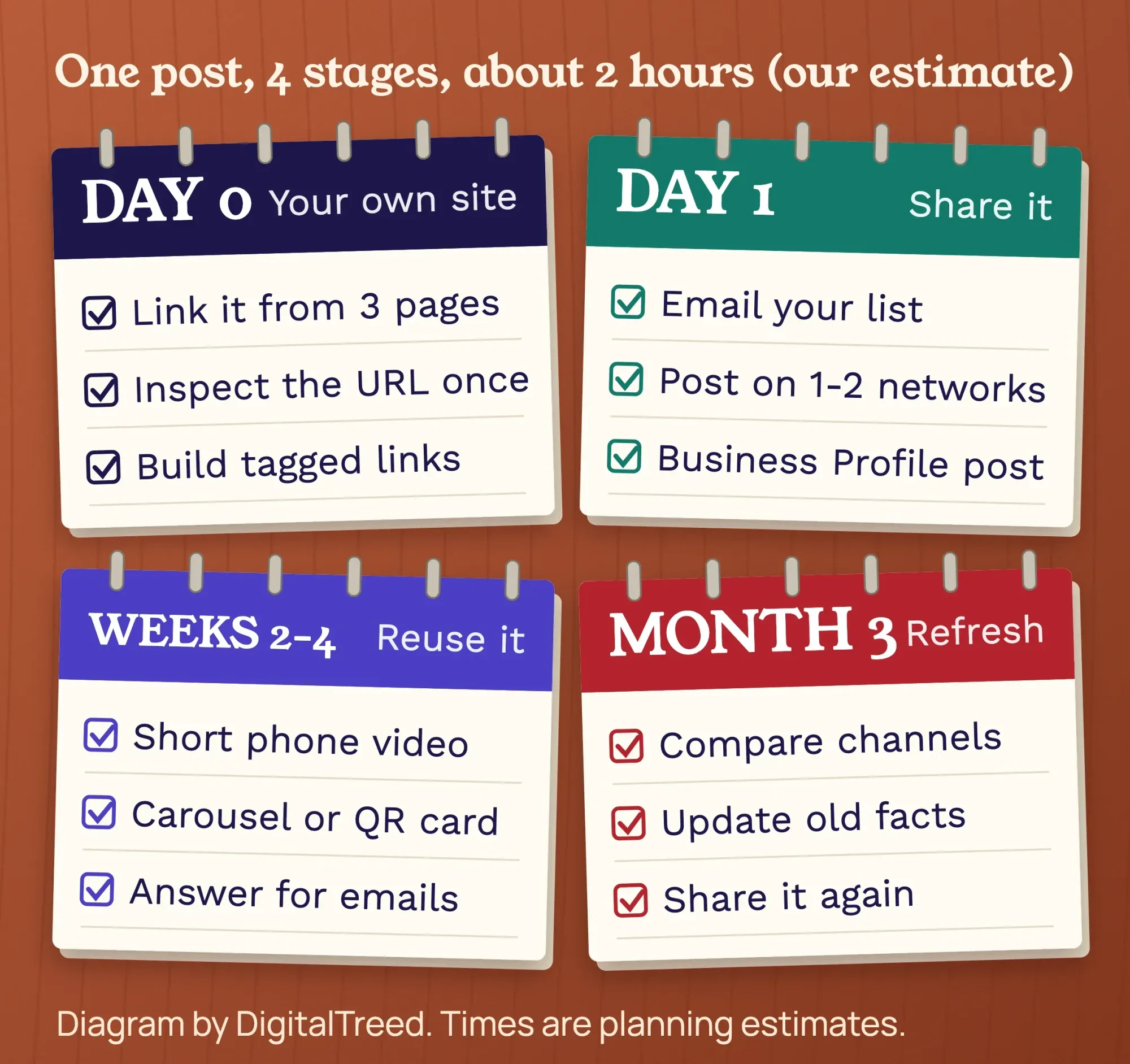 Diagram by DigitalTreed. Times are our planning estimates, not measured averages.
All of this assumes the post itself is worth sharing. If you are still writing it, start with our SEO content writing tips, then come back here.
What should you do the day you publish?
On the day you publish, link the new post from 2 or 3 older pages on your site and request indexing once. Start there, because you control your own site fully. Google's link best practices say: "Every page you care about should have a link from at least one other page on your site."
- Link the new post from 2 or 3 older posts on the same topic. Put each link inside a sentence.
- Add a link from the service page it supports. A furnace checklist post fits on the furnace repair page.
- Request indexing once in Search Console with the URL Inspection tool, then leave it alone.
To find the older pages, run your site through our free internal link checker. Our guide on how to find internal links shows 5 other ways.
Don't keep asking Google to crawl the page. The recrawl help page says crawling "can take anywhere from a few days to a few weeks" for a page. Asking again "won't get it crawled any faster."
What is a UTM link, and how do you tag each blog link?
A UTM link is a normal link with 3 tags added: source, medium and campaign. The tags tell Google Analytics where each visit came from. Google's URL builder help page says you "should always use utm_source, utm_medium, and utm_campaign."
Google Analytics 4 then sorts each visit into a channel, such as Email or Organic Social, by its default channel group rules. The medium you type decides most of it.
We built links for a made-up furnace checklist post in our free UTM builder on October 22, 2026. The tool shows which channel each link lands in before you share it.
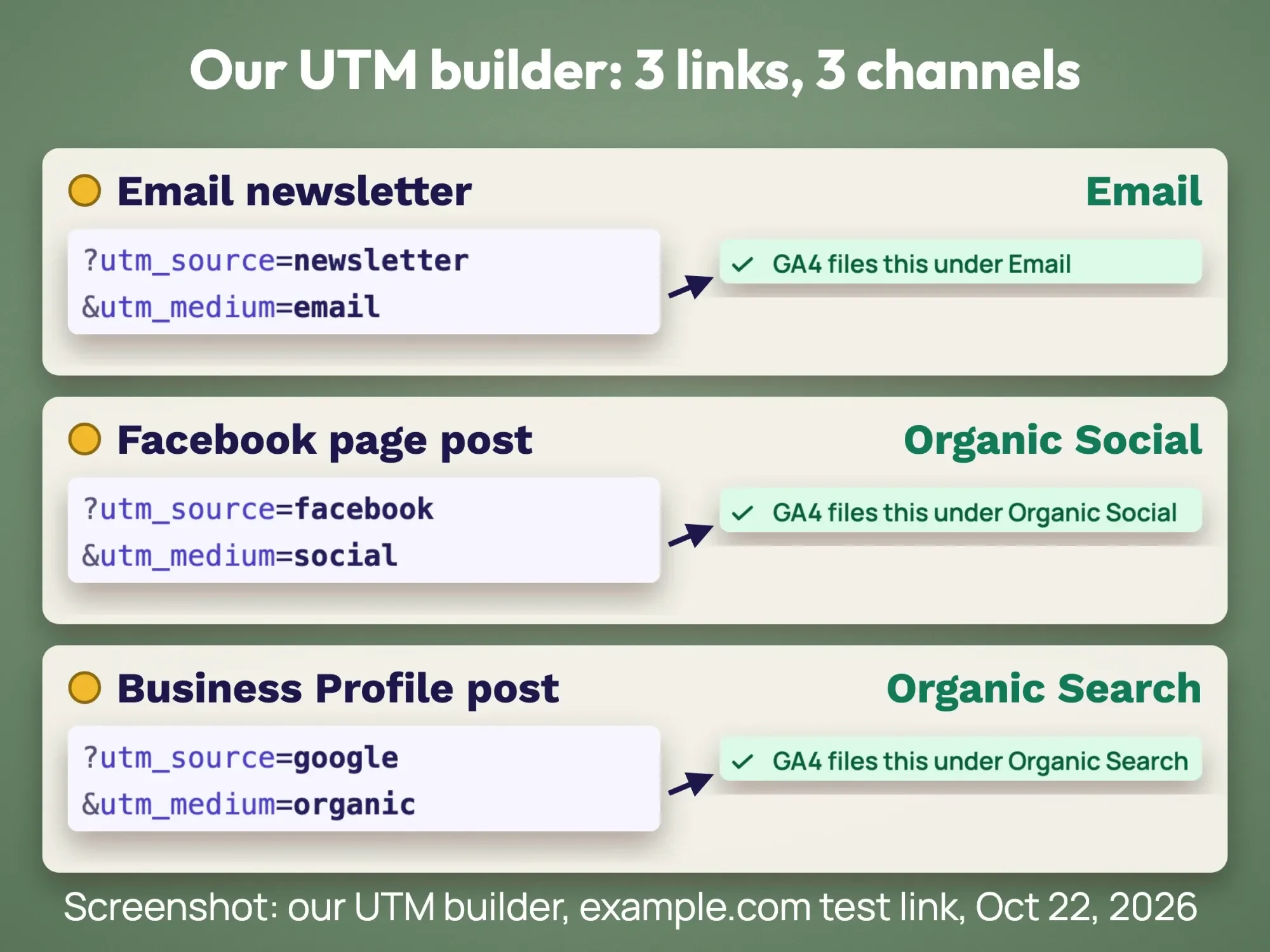 Screenshot: our UTM builder on dev.digitaltreed.com with an example.com test link, October 22, 2026.
| Where you share it | utm_source | utm_medium | Channel (GA4 rules) |
|---|---|---|---|
| Email newsletter | newsletter | ||
| Facebook page post | social | Organic Social | |
| Instagram profile link | social | Organic Social | |
| Google Business Profile post | organic | Organic Search | |
| Flyer QR code | flyer | qr-code | Unassigned |
| Boosted Facebook post (paid) | paid_social | Paid Social |
Use the post's slug as utm_campaign every time, such as furnace-checklist. Then one filter in Google Analytics shows every channel for that post.
The mistake we expected most is typing newsletter as the medium. The tool filed it under Unassigned. Google's rules agree: the Email channel needs email in the source or the medium.
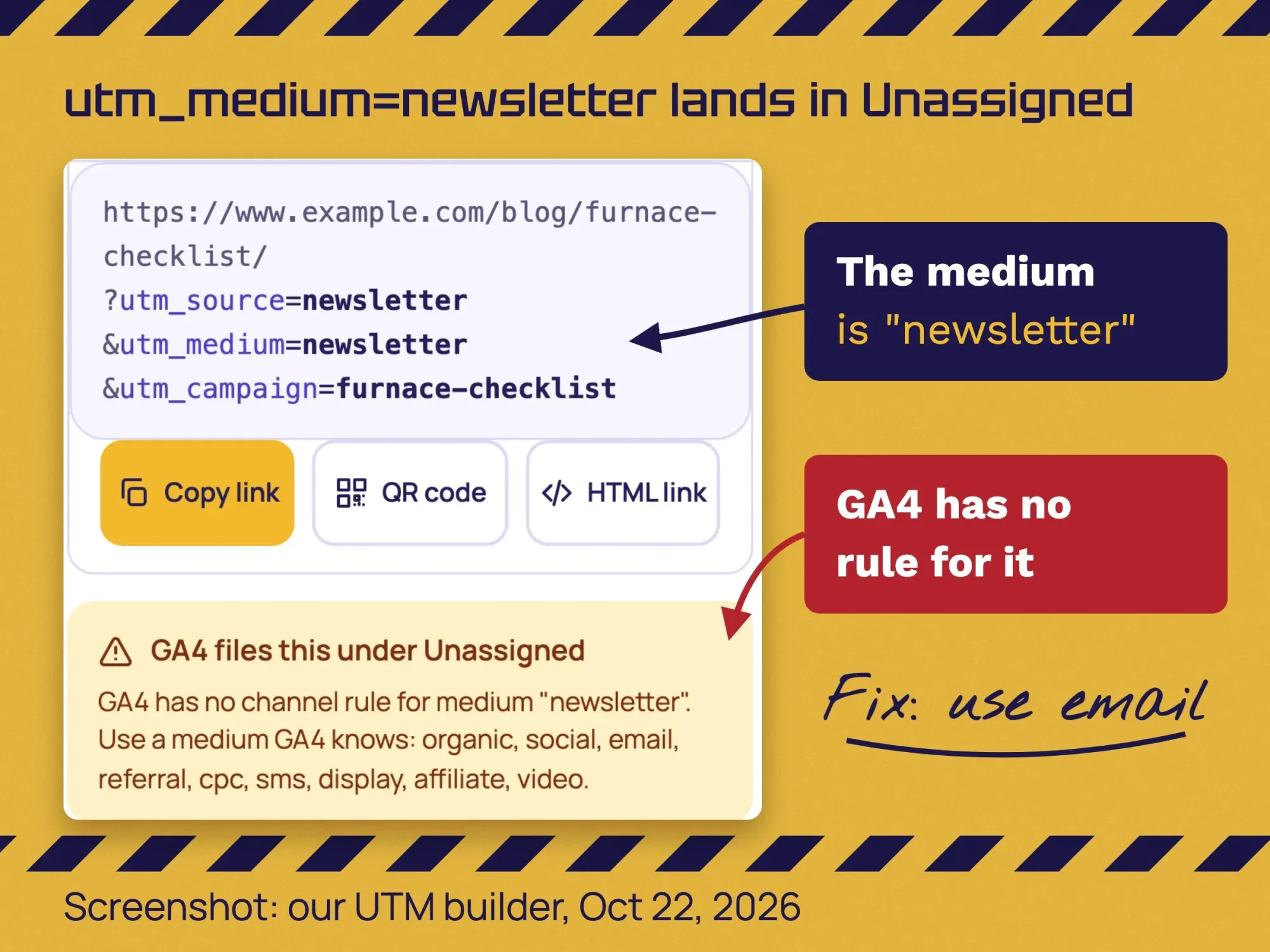 Screenshot: our UTM builder on dev.digitaltreed.com, medium set to newsletter, October 22, 2026.
Capital letters cause a smaller problem. Google's channel rules "aren't case sensitive," so Facebook and facebook both reach Organic Social. But the URL builder page says parameter values are case sensitive, so your report shows 2 rows. Google's advice: "Use lowercase as a standard practice."
Our take: never tag links between your own pages. A tag on an internal link replaces the visitor's real source with your own label. Tag only links that sit on other sites, in emails or in print.
How do you email a blog post without breaking CAN-SPAM?
Treat a blog newsletter as commercial email. Use an honest subject line, include your postal address and a working opt-out, and honor each opt-out within 10 business days.
The FTC's CAN-SPAM compliance guide says the law covers "email that promotes content on commercial websites," and "makes no exception for business-to-business email."
Whether a mixed message counts as commercial depends on its "primary purpose," defined in 16 CFR 316.3. Following the rules on every send is simpler than judging each email.
- Use a From name and subject line that match the email. The subject line "must accurately reflect the content" of the message.
- Say clearly that the message is an advertisement. Include your valid physical postal address. A registered PO box counts.
- Explain clearly how to opt out, and honor each opt-out within 10 business days.
- Stay responsible when an email tool sends for you. You "can't contract away your legal responsibility."
The FTC says each email that breaks the law can cost "up to $53,088" in penalties. The same figure, $53,088, is in 16 CFR 1.98, for penalties assessed after January 17, 2025.
Gmail has its own rules too. Gmail's email sender guidelines require all senders to set up "SPF or DKIM." Above 5,000 messages a day, marketing emails need one-click unsubscribe.
Keep the email short: a 3 to 5 line summary, one tagged link and one reason to click. List building and inbox rules are covered in our email marketing strategy for small businesses.
This is general information, not legal advice; check with an attorney for your situation.
How do you promote your blog on social media?
Pick the networks your customers use. In Pew Research Center's 2026 social media fact sheet, 84% of US adults say they ever use YouTube and 70% say they ever use Facebook. Instagram is at 51%, LinkedIn at 31% and Nextdoor at 18%.
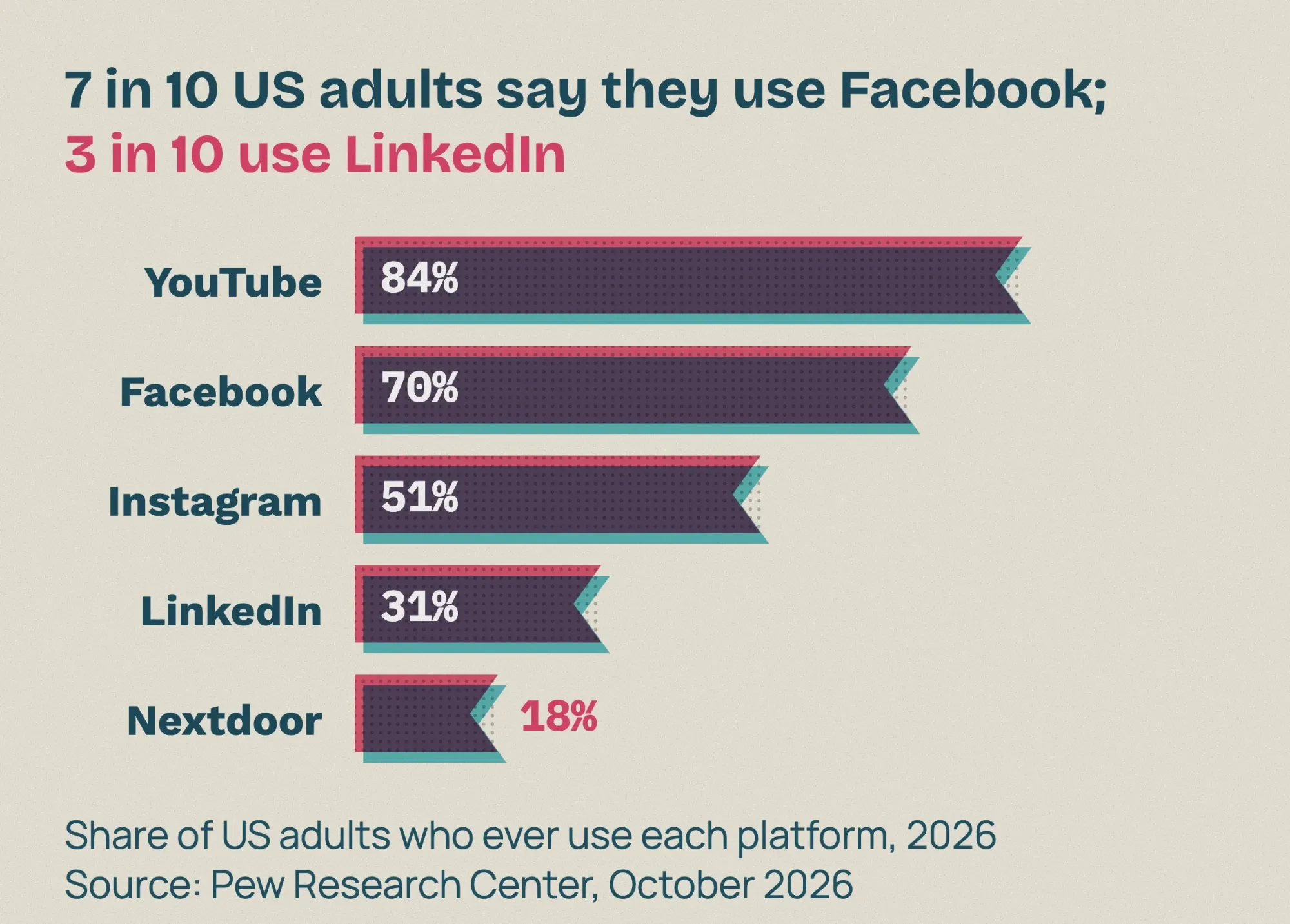 Source: Pew Research Center, Americans' Use of Social Media in 2026, October 2026.
A home service business usually starts with its Facebook page. A B2B firm starts with LinkedIn. Our social media marketing strategy for small businesses helps you pick 1 or 2.
Our take: Pinterest suits visual how-to topics, such as recipes, decor and DIY. Pew's 2026 table has no Pinterest figure. The last one it lists, from 2024, is 36% of US adults, in the same Pew fact sheet.
Before you share, check the link preview. Meta's sharing guide for webmasters says images "won't be updated unless the URL changes" once shared. Our free social preview checker shows the title and image without a Facebook login.
- Write a post for the network, not just the link: one useful tip from the article, then the tagged link.
- On Instagram, put the tagged link in your profile links and say "link in profile" in the caption.
- Post at a time your customers are online. We tested timing in the best time to post on Facebook.
If staff or paid partners share it with praise, they should say they work with you. The FTC's Endorsement Guides, 16 CFR 255.5 require that connection to be disclosed "clearly and conspicuously." When a brand pays to appear in your post, the same rule applies; see where the label goes in our sponsored post disclosure guide.
A scheduler saves time if you post often. Buffer's free plan connects up to 3 channels with 10 scheduled posts per channel. Essentials is $5 a month per channel, billed yearly at $60, as of October 2026.
How do you promote a blog post on Instagram?
Put the tagged link in your profile links, then point to it from a post or Reel. If you use a link page, our Linktree for business guide compares Linktree with a /links page on your own site. In Stories, add a link sticker. Instagram's link sticker help page says people who tap it are "redirected to the linked website."
The same page says link stickers work only in organic Stories, not in Story ads. Our Instagram Story ideas for business show how to track each Story link.
Can you put a blog post on your Google Business Profile?
Yes, as an Update post with a button that links to the article. Google's Business Profile posts help page says you can share updates "directly with your customers on Search and Maps" this way. An Update post can include "a description, photo, video, and an action button with a link" too.
Share a blog post on your Google Business Profile
- Write the Update Choose an Update post, write 2 or 3 lines on what the article solves, and add a real photo.
- Add the button Add a button such as "Learn more," and paste the tagged link with source google and medium organic (our convention, explained below).
- Leave out phone numbers Leave phone numbers out of the text. Google says those posts "might get rejected" if it can't verify them.
- Repeat it later Post a fresh Update later. Google says posts older than 6 months are archived unless a date range is set.
Our take: keep source google and medium organic for these links. The visit stays in Organic Search, and the campaign name gives it its own row. Our Google Business Profile guide covers the rest of the profile.
Where else can you promote blog posts after publishing?
After your own channels, promote a blog post in online communities, through people you mention, on other sites and with paid ads. Google's SEO Starter Guide lists "Community engagement" and "Advertisement, both offline and online" among the ways to promote a site.
Communities: Reddit, Facebook groups and forums
Answer real questions where your customers already ask them, such as a local Facebook group or a subreddit for your city. Link the post only when it answers the question better than a short reply.
Read each group's rules first. The Reddit Rules say to "Participate authentically in communities where you have a personal interest" and not to spam. In Pew's 2026 fact sheet, 25% of US adults say they ever use Reddit.
Email signature, partners and people you mention
Add the post to your email signature for a few weeks. Tell partners and suppliers you mention in it, and ask them to share it only if it helps their customers.
Never pay or trade for links. Our off-page SEO checklist shows which links are worth earning instead. Google's spam policies list "Buying or selling links for ranking purposes" as link spam, including "Exchanging goods or services for links."
LinkedIn and other sites
Our take: on LinkedIn or a partner's site, share a short summary with a tagged link back, not the full article. Readers then come to your site, where your tags count them and your service pages sit.
Should you pay to boost a blog post?
Only boost a post that already brings calls or quote requests; that is our rule of thumb. Meta's boost help page says you can boost Page posts "to reach more people and promote your business."
Tag the boosted link with source facebook and medium paid_social. Google's channel rules then file it as Paid Social, because the medium matches "paid.*", instead of mixing it with Organic Social.
The same Meta page warns that boosting in the Facebook app on an iPhone or iPad may add a 30% Apple service fee. That fee started in February 2024. Our Facebook call to action guide covers boost buttons and that fee.
How do you get more out of one post over 3 months?
Share it more than once, in a new form each time. Many readers miss the first share, and a new format reaches people who skip articles. Those same 3 months are the window to register a post's copyright; see how to protect your blog posts from copying.
- Week 2: record a 30 to 60 second phone video of the post's main steps for Facebook and Instagram.
- Week 3: turn the steps into a carousel or a printed card with a QR code.
- Week 4: save a short answer from the post for customer emails and quote replies.
- Month 3: update any fact that changed, then send a "refreshed" email or a new Business Profile Update.
Guest posts and partner sites can help, but watch the links. Google's spam policies list "links with optimized anchor text in articles, guest posts, or press releases" as link spam.
Repurposing is the easiest step to drop, because it never ends. If you'd rather hand it off, our content marketing team can write, repurpose and share each post for you. (DigitalTreed sells this service.)
How do you see which channel worked?
In Google Analytics, open Reports, then Acquisition, then Traffic acquisition. Google's help page says tagged visits are visible in that Traffic acquisition report.
Add a filter for session campaign equal to your post's slug. Compare the channels by sessions and by the actions you care about, such as calls or quote requests.
Keep the channels that send readers who become customers. Drop the rest. Our list of website analytics tools helps if you want more than Google Analytics.
New to these reports? Our Google Analytics 4 guide covers setup, key events and the reports in full.
How to promote your blog posts: a free checklist
Copy this table into a document and tick each row for every new post. Each row gives the timing, the task, the UTM tags and the rule behind it, so you can cite or reuse it.
| When | Task | utm_source / utm_medium | Rule or source |
|---|---|---|---|
| Day 0 | Link the post from 2 or 3 older posts and one service page | No tags on links between your own pages (our take) | Google link best practices |
| Day 0 | Request indexing once with URL Inspection | None | Google recrawl help |
| Day 0 | Check the title and image in the link preview | None | Meta sharing guide |
| Day 1 | Email your list with an honest subject line, postal address and opt-out | newsletter / email | FTC CAN-SPAM guide |
| Day 1 | Post on the 1 or 2 networks your customers use | facebook / social | GA4 channel rules |
| Day 1 | Add a Business Profile Update with a Learn more button | google / organic (our convention) | Business Profile Help |
| Weeks 2 to 4 | Share one repurposed version, such as a short video | Same tags, with a new utm_content for each version | GA4 URL builder help |
| Optional | Boost a post that already brings leads | facebook / paid_social | GA4 channel rules |
| Month 3 | Check Traffic acquisition by campaign, refresh facts and share again | Campaign = the post's slug | GA4 URL builder help |
Example: an HVAC company in Columbus promotes one post
Example (made up, not a client): Maple Street Heating & Air is a 6-person HVAC company in Columbus, Ohio. It publishes "Furnace checklist before winter." All numbers in this example are invented to show the method.
Day 0: the owner links the post from the furnace repair page and 2 older posts, then requests indexing once. Day 1: the office manager emails 1,200 past customers who opted in, posts on Facebook, and adds a Business Profile Update.
Week 2: a technician films a 45-second checklist video. If it goes on YouTube, our YouTube SEO guide shows how to title and describe it so people find it. Month 1: Google Analytics shows sessions for campaign furnace-checklist split into Email, Organic Social and Organic Search. The team plans about 2 hours for all of it.
Common mistakes when promoting blog posts
- Sharing once on day 1 and never again.
- Using utm_medium=newsletter or qr-code, so visits land in Unassigned.
- Mixing capital and lowercase tags, which splits one source into 2 report rows.
- Tagging links between your own pages.
- Emailing without a postal address or a working opt-out.
- Changing the preview image after sharing without changing its URL.
- Paying for guest posts with keyword-rich links.
- Posting on networks your customers don't use.
Frequently asked
How do I promote my first blog post?
Link it from 2 or 3 of your own pages and email it to your list. Then post it on 1 or 2 networks and on your Google Business Profile. Tag each shared link so you can compare them later.
How can I promote my blog without social media?
Use the channels you own. Internal links, email, your Google Business Profile, partners and links in your customer emails all work without a social account.
Do I need permission to email my blog posts to customers?
Follow CAN-SPAM on every send. The FTC's CAN-SPAM guide lists what each email must include: an honest subject line, your postal address and a working opt-out. Gmail spam limits make a list of people who asked for your emails the safer choice. This is general information, not legal advice.
Does sharing a post on social media help SEO?
Google says promotion leads to faster discovery by people and search engines. It doesn't say social shares are a ranking factor. Share for readers.
How can I promote my blog for free?
Almost everything in this plan is free: internal links, email to your own list, social posts and Google Business Profile Updates. Google calls it a free Business Profile. Only boosts and paid tools cost money.
How do you promote an old blog post?
Update any fact that changed, then treat it like a new post. Link it from newer posts, email it as a refreshed guide, and add a new Business Profile Update.
How long until Google indexes a new post?
Google says crawling can take from a few days to a few weeks. Request indexing once, then spend the time on email and social instead.
Your next step
Open your newest post now and link it from 2 older pages. Then build 3 tagged links: email, Facebook and your Business Profile.
If you want every post written and promoted for you each month, see what our content marketing service includes.
How we made this guide: it's built from Google's own help pages for Search, Analytics, Business Profile and Gmail. We also used federal guidance and rules, Meta's sharing guide and Pew Research Center. We tested the link tags in our UTM builder on dev.digitaltreed.com and took the screenshots on October 22, 2026. We checked every number against the source linked next to it the same day. The email penalty figure was checked on 2 government sources. Updated October 23, 2026: added what blog promotion is, key facts, Instagram steps and where else to promote. That covers communities, partners, LinkedIn and paid boosts, with a Paid Social row. A free checklist and 2 FAQs are new, and the Business Profile steps are now a how-to.
First published November 2021. Rewritten October 2026: a 4-stage plan, our UTM test, commercial email rules, Google Business Profile posts and a fictional HVAC example.
Sources
- Google Search Central: SEO Starter Guide
- Google Search Central: Link best practices
- Google Search Central: Ask Google to recrawl your URLs
- Google Search Central: Spam policies for Google web search
- Google Business Profile Help: Create and manage posts
- Google Analytics Help: URL builders, collect campaign data with custom URLs
- Google Analytics Help: Default channel group
- Gmail Help: Email sender guidelines
- FTC: CAN-SPAM Act, a compliance guide for business
- eCFR: 16 CFR 1.98, adjustment of civil monetary penalty amounts
- eCFR: 16 CFR 316.3, primary purpose
- eCFR: 16 CFR 255.5, disclosure of material connections
- Meta for Developers: A guide to sharing for webmasters
- Pew Research Center: Americans' Use of Social Media in 2026
- Buffer: Pricing (vendor)
- Reddit: Reddit Rules
- Meta Business Help: Boost a post from your Facebook Page
- Instagram Help: About Call-to-action Link Sticker on Instagram Stories
- Google Business Profile: Stand out on Google with a free Business Profile
Comments
No comments yet. Start the conversation below.