
Quick answer
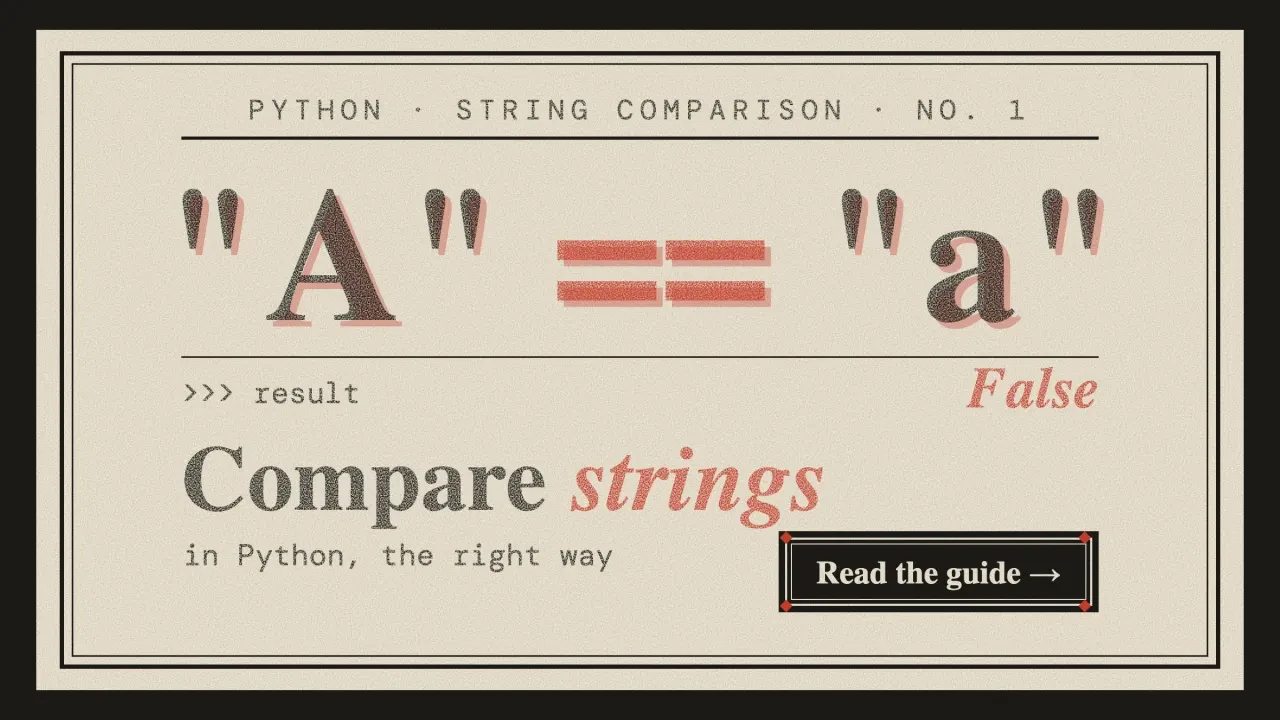
To compare strings in Python, use == to check that two strings are equal and != to check that they differ. The < and > operators compare them character by character by Unicode code point, so "Zebra" sorts before "apple". To ignore case, call casefold() on both sides. Don't use is for text.
We ran every sample below ourselves, so the outputs you see are real.
Our test machine was a Mac with the Python it ships with, 3.9.6, and the run is dated October 24, 2026. That version's old: Python 3.9 reached end of life on October 31, 2025. The comparison rules haven't changed since, but newer versions ship newer Unicode data (13.0 in our 3.9.6, 17.0 in 3.15), so where a newer Python behaves differently, we'll say so.
Key takeaways
- Use == to check that two strings hold the same text.
- Keep is for None and sentinel objects, never for comparing text.
- Call casefold() on both strings to compare them without case.
- Normalize both strings with unicodedata.normalize() before comparing accented text.
- Use secrets.compare_digest() to check passwords, tokens and signatures.
Use == for text, and keep is out of it
In Python, == returns True when two strings hold the same characters in the same order, and != returns True when they don't. The check is case sensitive, so "Apple" and "apple" are different strings.
a = "Apple"
b = "Apple"
c = "apple"

print(a == b)       # True
print(a == c)       # False
print(a != c)       # True

if a == b:
    print("same text")
Now the mistake that bites most often.
The is operator looks similar, but it asks a different question. Per the language reference, x is y is true only if x and y are the same object in memory. JavaScript splits value and identity too: an object only matches itself, so removing an object from a JavaScript array needs findIndex or filter.
Two equal strings are often two separate objects, and that's where it goes wrong.
Old tutorials, including the earlier version of this page, "prove" that is works with two copies of the same literal. It printed True for us too, on Python 3.9.6.
That's luck, not a rule. CPython often reuses identical literals in one file, but nothing promises it, and the sys.intern docs only say that names used in programs are "automatically interned". Text that arrives while the program runs, from input(), a file or a join, is built fresh:
typed = "hello world"
built = " ".join(["hello", "world"])

print(typed == built)   # True
print(typed is built)   # False
We wanted to see the bug the way a real script hits it. So we wrote a tiny login check that compares what the user types against "admin" with is, and ran it through a real pseudo-terminal. Python warned us before it even asked for a name. Then our script typed admin at the prompt, and it answered "Not recognized".
Swapping is for == fixed it on the first try.
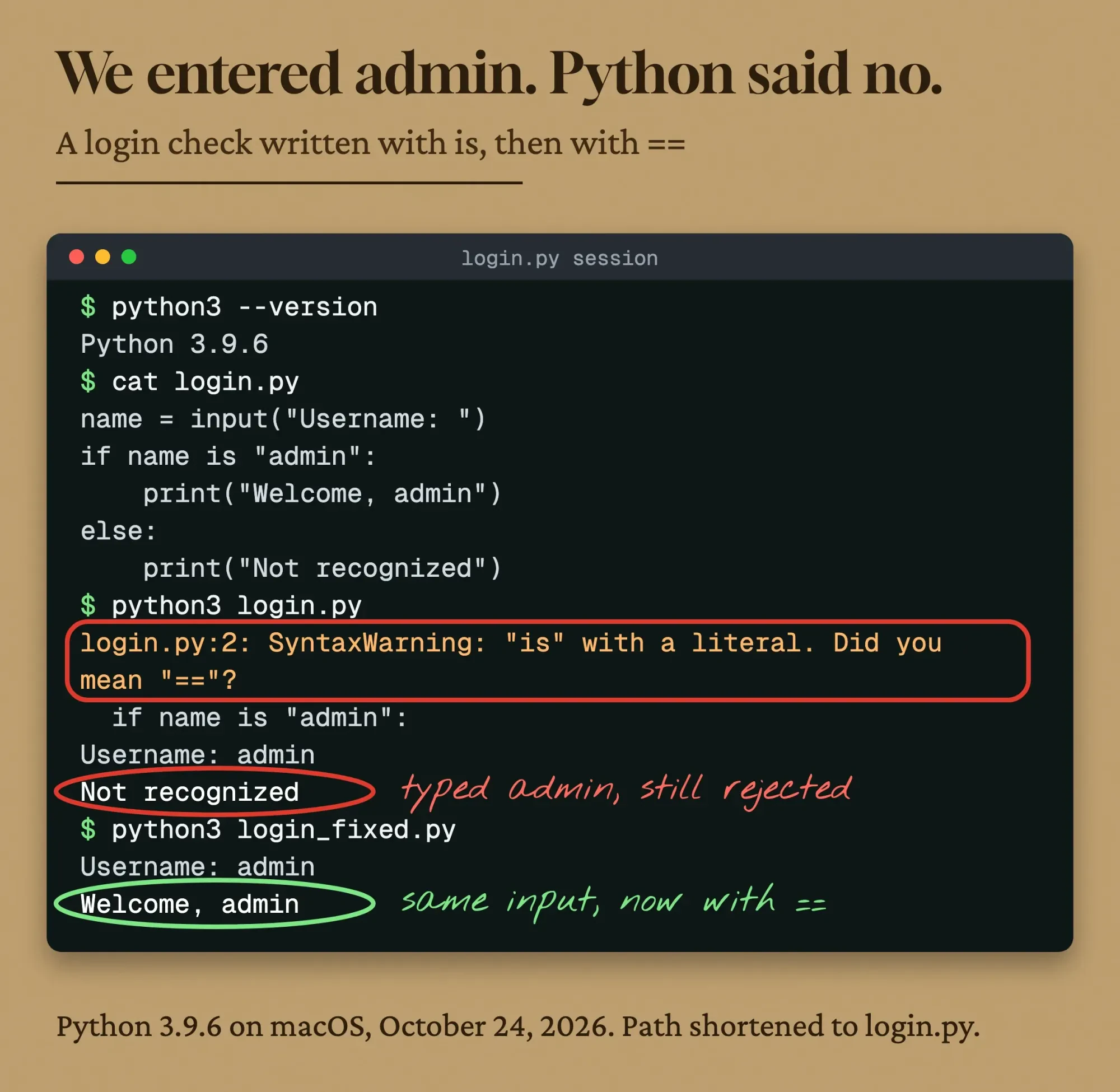 Drawn by us: our recorded terminal session, redrawn line for line (Python 3.9.6 on macOS, October 24, 2026). Only the script path was shortened to login.py.
That warning's your friend.
Since Python 3.8, the compiler raises a SyntaxWarning when is or is not is used with a string or number literal. Read it as "you meant ==", and don't silence it.
Keep is for None and for sentinel objects you made yourself.
Some guides also call __eq__() directly as "another way" to compare. Don't.
With a non-string it returns NotImplemented, and our if on Python 3.9 treated that as true and printed "treated as equal", with only a DeprecationWarning. The Python docs say Python 3.14 and later raise TypeError there instead, so code that leans on it will break when you upgrade.
And a string never equals bytes.
"abc" == b"abc" is False, and < between them raises TypeError, because, in the reference's words, "Strings and binary sequences cannot be directly compared." Decode the bytes first.
Pick the comparison by the job
So == covers plain equality. Most real bugs come from the jobs around it, though, and each one has its own tool in the standard library.
Here's the cheat sheet we built from our run, and every row was tested on Python 3.9.6.
| Job | Use | Our result |
|---|---|---|
| Same text | a == b | "Apple" == "apple" is False |
| Different text | a != b | "Apple" != "apple" is True |
| Same object (not text) | x is None | typed is built was False for equal text |
| Ignore case | a.casefold() == b.casefold() | "Straße" and "STRASSE" match; lower() doesn't |
| Accents typed two ways | unicodedata.normalize("NFC", s) | "café" (4 vs 5 code points) matches after NFC |
| Ignore extra spaces | " ".join(s.split()) | " Jane Doe \n" becomes "Jane Doe" |
| Alphabetical order | sorted(names, key=str.casefold) | apple, banana, Banana, Cherry |
| Order for people | sorted(names, key=locale.strxfrm) | apple, Eagle, éclair, Éclair, zebra |
| Contains or starts with | in, startswith(), endswith() | "Shop" in url was False, "shop" True |
| Close match | difflib.get_close_matches() | "appel" gave apple, ape |
| Show differences | difflib.ndiff() | marks changed characters with ^ |
| Passwords and tokens | secrets.compare_digest(a, b) | non-ASCII text raised TypeError |
| Version numbers | compare tuples of ints | "3.10" < "3.9" is True as text, False as numbers |
Below, each row gets its own section, in the order people search for them. Case comes first.
How do you compare strings in Python ignoring case?
To compare two strings in Python while ignoring case, call casefold() on both and compare the results with ==. That's the whole trick.
Casefolding is the stronger cousin of lowercasing. The str.casefold docs say it's "intended to remove all case distinctions in a string", and it's been there since Python 3.3.
German ß is the classic test, because lower() leaves it alone:
a = "Straße"
b = "STRASSE"

print(a.lower() == b.lower())        # False
print(a.casefold() == b.casefold())  # True
print(a.casefold())                  # strasse
For plain English text, lower() and casefold() give the same answer.
We still default to casefold(), because names and addresses in a US customer list aren't always English, and the extra cost is nothing you'll notice in a script that checks a few thousand rows.
It isn't perfect, though.
Turkish has a dotted capital İ. In our run, "İstanbul".casefold() didn't match "istanbul".casefold(), because Python turns İ into two code points: i plus a combining dot.
Language rules like that need a locale-aware library, not a built-in method.
Email addresses add a twist.
The email standard, RFC 5321, says the part before the @ "MUST BE treated as case sensitive", while the domain is not. It also says exploiting that "is discouraged". So casefolding the whole address is a fair way to flag likely duplicates for review, as long as you keep what the person actually typed.
Two strings can look the same and still not be equal
So case is handled. But case isn't the only invisible difference, and the next one doesn't show up on screen at all.
Unicode lets you write the same letter more than one way, and == compares code points, not what you see.
Take "café". It can end in a single é (U+00E9) or in a plain e followed by a combining accent (U+0301). Text pasted from different apps doesn't always use the same one.
import unicodedata

composed = "caf\u00e9"
decomposed = "cafe\u0301"

print(composed, decomposed)          # café café
print(composed == decomposed)        # False
print(len(composed), len(decomposed))  # 4 5

nfc = lambda s: unicodedata.normalize("NFC", s)
print(nfc(composed) == nfc(decomposed))  # True
Fix it with unicodedata.normalize(). NFC joins letters and accents into single characters where it can; NFD splits them apart.
Normalize both strings to the same form, then compare. That's it.
The Unicode Standard's normalization annex (UAX #15) calls these characters canonically equivalent, and notes that W3C specifications recommend NFC for all content.
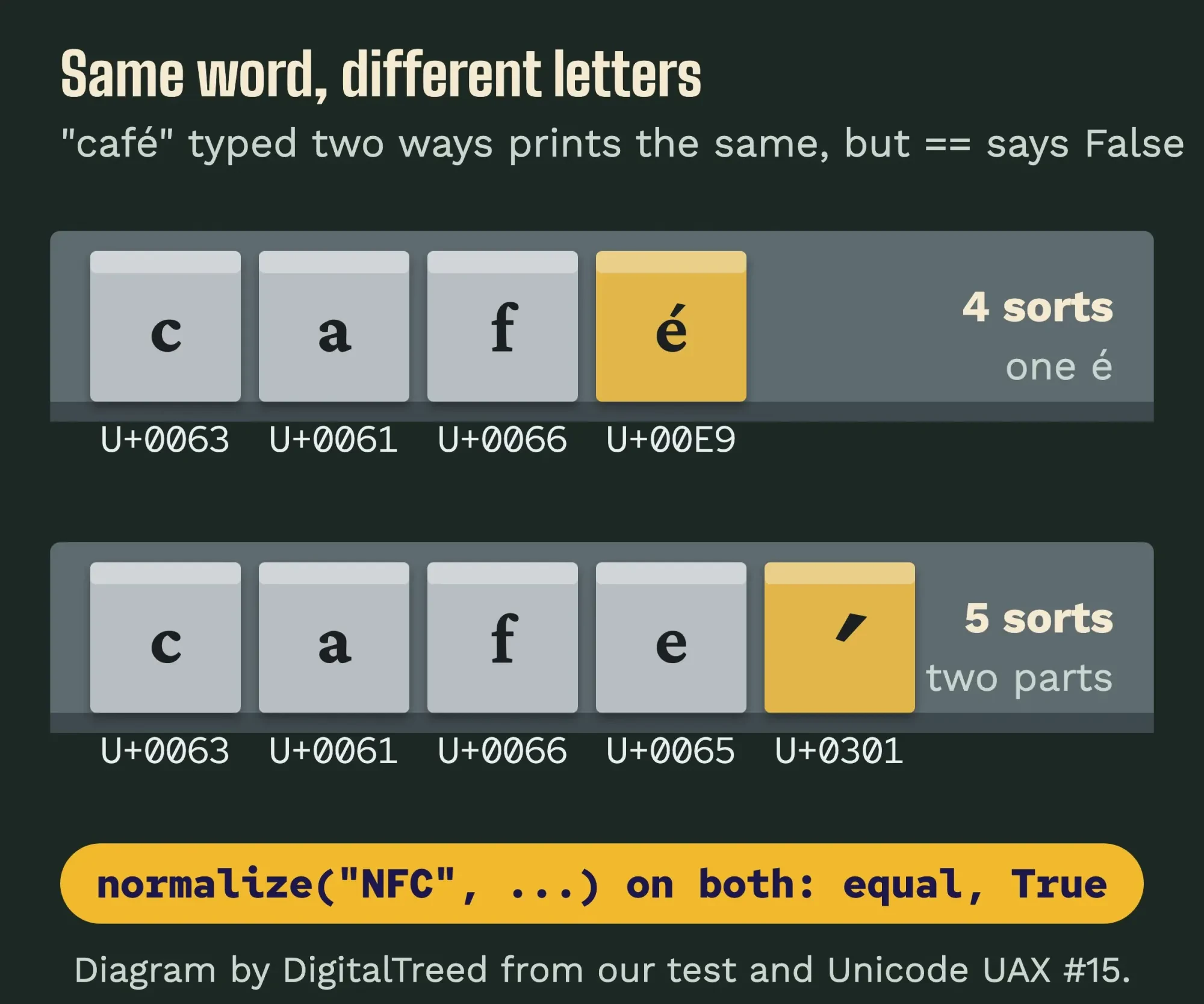 Diagram by DigitalTreed from our test on Python 3.9.6, October 24, 2026, with forms from Unicode UAX #15.
NFKC goes further. It also folds look-alike compatibility characters, so full-width "ABC" became "ABC" and the "fi" ligature became "fi" in our run.
Use it for search boxes and usernames, not for text you need to keep exactly.
Need case and accents handled together? The Python Unicode HOWTO gives this recipe, and it matched "CAFE" plus a combining accent against "café" for us:
import unicodedata

def same_text(s1, s2):
    def NFD(s):
        return unicodedata.normalize("NFD", s)
    return NFD(NFD(s1).casefold()) == NFD(NFD(s2).casefold())

print(same_text("CAFE\u0301", "café"))   # True
print(same_text("Straße", "STRASSE"))    # True
NFD runs twice because casefold() can return text that isn't normalized anymore. It's not a typo.
Clean up spaces before you compare
Even with case and accents sorted, one stray space still makes == return False.
Form fields and CSV exports are full of them.
strip() removes spaces, tabs and newlines from both ends.
It won't touch the double space in the middle of "Jane Doe". For that, split() with no argument treats any run of whitespace as one separator, per the str.split docs, so " ".join(s.split()) squeezes every gap to a single space:
form = "  Jane   Doe \n"
saved = "jane doe"

print(form == saved)                          # False
print(form.strip().casefold() == saved)       # False
print(" ".join(form.split()).casefold() == saved)  # True
That one-liner is the "ignore case and whitespace" answer.
It also handled a no-break space in our test, which strip() wouldn't remove from the middle of a string. More trimming options are in our guide to trimming whitespace in Python.
Example: a music school in Rapid City, South Dakota, keeps its newsletter list in a spreadsheet. The same parent signed up twice, once as "[email protected] " with a trailing space from a phone keyboard, and once in lowercase. A plain == says those are two people, and she gets every email twice. Our email marketing strategy guide covers building that list the right way, double opt-in included.
signups = ["[email protected] ", "[email protected]", "[email protected]"]
seen = set()
for email in signups:
    key = email.strip().casefold()
    if key in seen:
        print("duplicate:", repr(email))
    seen.add(key)
# duplicate: '[email protected]'
Comparing for duplicates isn't the same as checking that an address works, by the way. That's a different job, and our email verification tools compared covers it.
Python sorts strings by code point, not by the alphabet
That deals with equal text. The other half of string comparison is order, and that's where < and > come in. The language reference says strings "compare lexicographically using the numerical Unicode code points" of their characters, which is the number ord() gives you.
Python walks both strings from the left and stops at the first character that doesn't match. The smaller code point wins. If one string runs out first, like "cat" against "catalog", the shorter one is smaller.
That explains the surprises.
print("apple" < "banana")    # True
print("Zebra" < "apple")     # True, ord("Z") is 90, ord("a") is 97
print("cat" < "catalog")     # True
print("10" < "9")            # True, "1" comes before "9"
print(int("10") < int("9"))  # False
Every plain capital letter comes before every lowercase one, and digits come before both.
So numbers stored as text sort like words, not like numbers, which is why a column of order totals saved as text can come out looking random. Convert it with int() or float() first.
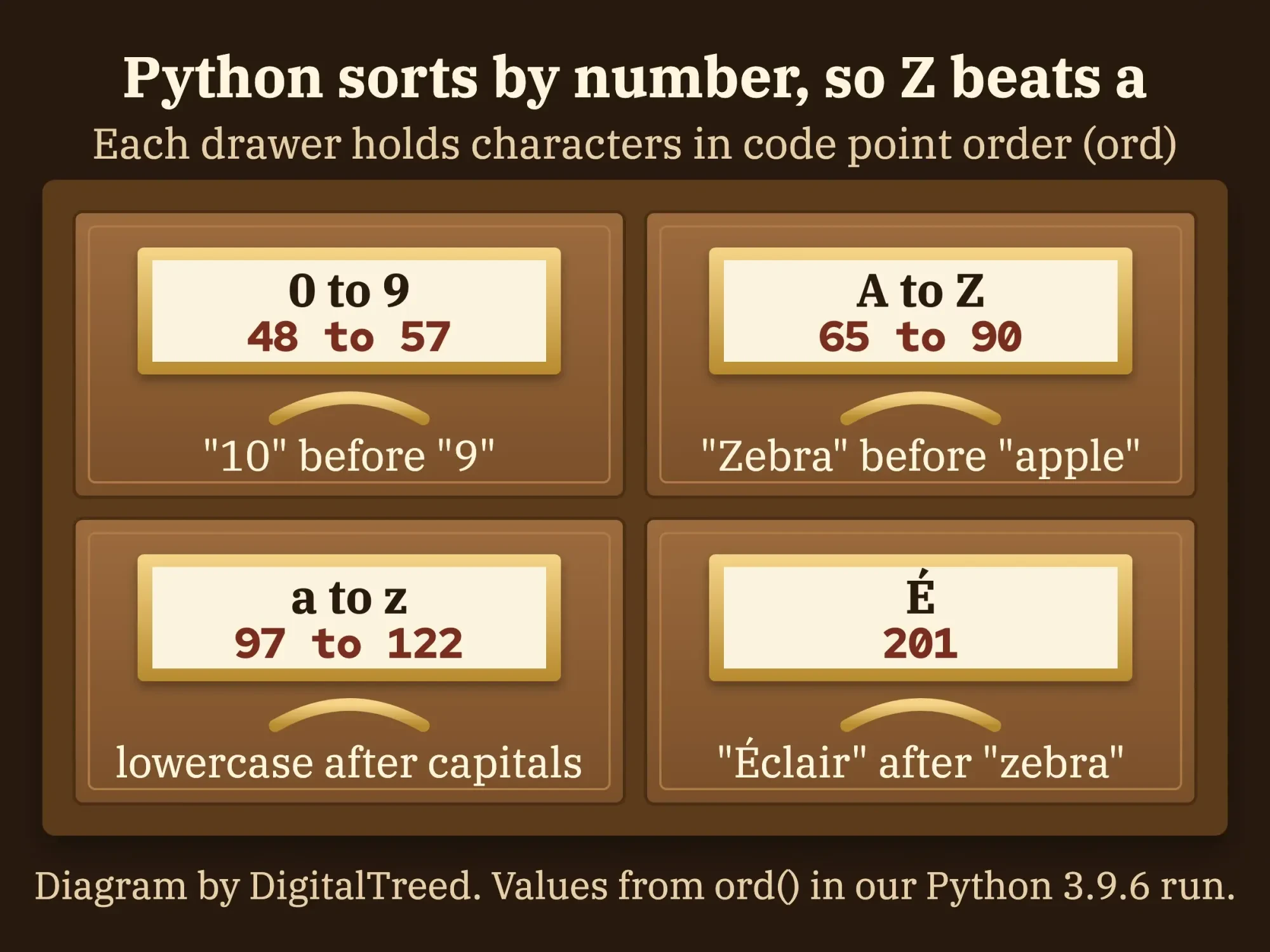 Diagram by DigitalTreed. Code point values from Python's ord() in our run, October 24, 2026.
To sort a list alphabetically without caring about case, pass key=str.casefold. Python's own sorting HOWTO uses the same trick:
names = ["banana", "Cherry", "apple", "Banana"]

print(sorted(names))                    # ['Banana', 'Cherry', 'apple', 'banana']
print(sorted(names, key=str.casefold))  # ['apple', 'banana', 'Banana', 'Cherry']
min(), max() and list.sort() take the same key.
Sort names the way people expect with locale
casefold() fixes case, but it doesn't fix accents.
Plain sorted() put "Éclair" after "zebra" in our run, because É has a higher code point than any plain letter.
For a list that people will read, such as names in a directory, use the locale module. locale.strxfrm turns each string into a key that sorts by the rules of a language:
import locale

words = ["zebra", "Éclair", "apple", "Eagle", "éclair"]
print(sorted(words))
# ['Eagle', 'apple', 'zebra', 'Éclair', 'éclair']

locale.setlocale(locale.LC_COLLATE, "en_US.UTF-8")
print(sorted(words, key=locale.strxfrm))
# ['apple', 'Eagle', 'éclair', 'Éclair', 'zebra']
We've only tested that on macOS.
Locale data comes from the operating system, so check the output on your server too. And call setlocale() once at program start, since the docs warn that it changes the setting for the whole program.
Check part of a string with in, startswith and endswith
Sorting compares whole strings. Sometimes you don't need the whole string to match, though.
Use the in operator to check whether one string contains another, and startswith() and endswith() check the ends. All three are case sensitive.
url = "https://example.com/shop/blue-mug"

print("shop" in url)                          # True
print("Shop" in url)                          # False
print("Shop".casefold() in url.casefold())    # True
print(url.startswith(("http://", "https://")))  # True
print(url.endswith((".jpg", ".png")))          # False
print(url.find("cart"))                       # -1
Two details from the docs are worth knowing. startswith() and endswith() accept a tuple, so one call checks several options, as the str.startswith entry shows. And an empty string is inside every string, so "" in url is True. The membership rules say so outright, and it bites when a search box is left blank.
For patterns like "any digits here", reach for the re module instead.
URLs deserve extra care.
The scheme and domain aren't case sensitive, but the path is. Google’s URL structure guide says its "URL handling is case sensitive", so /Shop and /shop count as two pages. Our test helper lowercases only the scheme and domain and drops a trailing slash:
from urllib.parse import urlsplit, urlunsplit

def same_page(u1, u2):
    def norm(u):
        p = urlsplit(u)
        path = p.path.rstrip("/") or "/"
        return urlunsplit((p.scheme.lower(), p.netloc.lower(), path, p.query, ""))
    return norm(u1) == norm(u2)

print(same_page("https://Example.com/Shop/", "https://example.com/Shop"))  # True
print(same_page("https://example.com/Shop", "https://example.com/shop"))   # False
Before you compare two URLs from a crawl, see where each one actually lands with our free redirect checker. In our technical SEO audit checklist, a short Python script followed each redirect before it checked the page.
Find near matches and show differences with difflib
Everything so far gives a yes or a no. But when a user types "Chicgo" or a teacher's name is misspelled, you want "close".
Python's difflib module does that. SequenceMatcher.ratio() returns a score from 0 to 1, worked out as 2.0*M / T, where M is the matching characters and T is the total in both strings.
import difflib

print(difflib.SequenceMatcher(None, "colour", "color").ratio())  # 0.909...
print(difflib.get_close_matches("appel", ["ape", "apple", "peach", "puppy"]))
# ['apple', 'ape']
get_close_matches() returns up to 3 matches that score at least 0.6, best first. In our run, "apple" scored 0.8 and "ape" 0.75, while "peach" and "puppy" scored 0.4 and didn't make the cut.
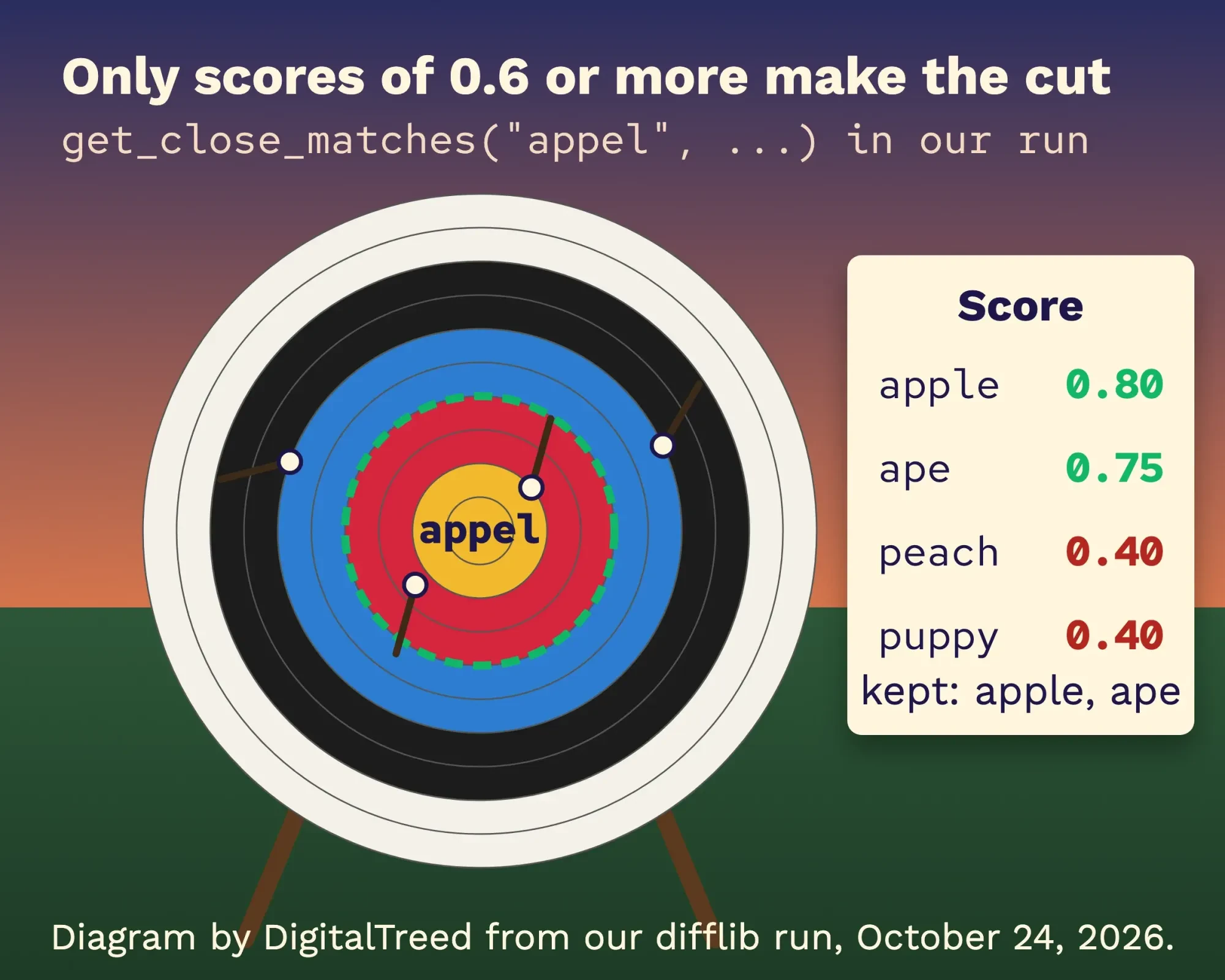 Diagram by DigitalTreed from our difflib run on Python 3.9.6, October 24, 2026.
Back at the Rapid City school, the same call turns a misspelled teacher name into a "Did you mean ...?" suggestion instead of an empty search result.
Need to see what changed, not just how much? difflib.ndiff() marks each changed character with ^:
import difflib

for line in difflib.ndiff(["Open Mon-Fri, 9 to 5\n"], ["Open Mon-Sat, 9 to 6\n"]):
    print(line, end="")
# - Open Mon-Fri, 9 to 5
# ?          ^^^       ^
# + Open Mon-Sat, 9 to 6
# ?          ^^^       ^
For a character-by-character answer, zip the two strings and stop at the first pair that differs. On "invoice-2026-10" and "invoice-2026-11", that gave index 14.
a, b = "invoice-2026-10", "invoice-2026-11"
first = next((i for i, (x, y) in enumerate(zip(a, b)) if x != y), None)
print(first, a[first], b[first])   # 14 0 1
Our take: difflib's enough for a few thousand names.
Matching millions of records is a job for a dedicated library such as RapidFuzz, which we didn't test here.
Compare passwords and tokens with secrets.compare_digest
Fuzzy matching is the last thing you want with secrets.
When you check an API token, a reset code or a webhook signature, == has a quiet flaw: it can stop at the first wrong character, and an attacker who measures response times can use that.
secrets.compare_digest() uses a "constant-time compare" to reduce that risk, according to the Python docs. It returns True or False just like ==, so it's a drop-in swap.
import secrets

expected = "a3f9c2e17b"
print(secrets.compare_digest(expected, "a3f9c2e17b"))  # True
print(secrets.compare_digest(expected, "a3f9c2e17c"))  # False

secrets.compare_digest("café", "café")
# TypeError: comparing strings with non-ASCII characters is not supported
That TypeError surprised us. The hmac.compare_digest docs explain it: both arguments must be the same type, either ASCII-only str or bytes. If a secret can hold other characters, encode both sides to UTF-8 bytes first.
And don't store real passwords as plain text to compare at all. That's what a password hashing library's for.
Version numbers need to be compared as numbers
Secrets need exact matches. Version strings need numbers, and they're the last trap.
As text, "3.10" is smaller than "3.9", for the same reason "10" is smaller than "9".
print("3.10" < "3.9")   # True, which is wrong

def ver(v):
    return tuple(int(part) for part in v.split("."))

print(ver("3.10") < ver("3.9"))      # False, which is right
print(ver("3.10.2") > ver("3.10"))   # True
Tuples compare item by item, as the sequence comparison rules describe, so (3, 10) beats (3, 9).
That helper won't handle anything but plain numbers.
Python package versions such as "1.0a5" or "2.0rc1" follow their own rules, and the packaging library implements them with a Version class. It's a pip install, not part of the standard library, so we didn't run it here. If that install fails, our fix for the subprocess-exited-with-error message walks through the usual causes.
When string checks turn into a cleanup project
One comparison's a one-line fix. A customer list that came from three systems isn't.
Once names, emails and addresses need casefolding, normalizing, trimming and fuzzy matching all at once, you're cleaning data.
And the rules need deciding before anyone writes code. Which record wins? Who reviews the near matches?
If you're weighing who should build that, our guide to choosing a Python development company lists what to ask. New to the language itself? It's on our list of programming languages worth learning.
We build and fix websites and the scripts behind them for small businesses, so we have an interest here.
If duplicate customers or broken search are costing you time, our web development service can take on the cleanup.
Frequently asked
Why is my Python string comparison not working?
Usually there's a hidden character. A line read with readline() keeps its "\n", so in our test it didn't equal "SPRING25" until we called rstrip("\n"). input() removes that newline for you. Case, extra spaces and is instead of == are the other usual causes.
Can you compare strings with a wildcard in Python?
Yes. fnmatch matches shell-style patterns, so "invoice-*.pdf" matched "invoice-2026-10.pdf". Use fnmatchcase() for a case-sensitive match on every system; fnmatch() follows the operating system's case rule.
Can I compare a string with a number?
Not usefully. "10" == 10 is False because they're different types, and "10" < 10 raises TypeError. Convert first: int("10") == 10 is True.
Start with == and casefold(). If the comparisons are part of a bigger data mess, request a quote and we'll scope it with you.
How we made this guide: Every output on this page comes from one run, dated October 24, 2026: Python 3.9.6 on macOS 27.0.1, in a scratch folder we deleted afterwards. We checked each fact against the Python and Unicode documentation that same day. The login session in the first image was captured through a real pseudo-terminal and redrawn line for line. Python 3.15.1 is the current release, so points that changed after 3.9, such as NotImplemented raising TypeError, were checked against its documentation rather than run. We didn't test RapidFuzz, the packaging library or locale sorting on Linux or Windows. You'll find every source linked right where its fact appears.
First published January 2024. Rewritten October 24, 2026: the old version was adapted from another site and taught that is can compare text, which fails on real input. New: tested outputs for every sample, casefold() versus lower(), Unicode normalization, whitespace cleanup, locale sorting, difflib, compare_digest and version strings.
Sources
- Python language reference: Value comparisons
- Python language reference: Identity comparisons
- Python language reference: Membership test operations
- Python docs: str.casefold()
- Python docs: str.startswith()
- Python docs: str.split()
- Python docs: Common sequence operations
- What's New in Python 3.8: SyntaxWarning for is with literals
- Python docs: NotImplemented
- Python docs: sys.intern()
- Python Unicode HOWTO: Comparing strings
- Python docs: unicodedata.normalize()
- Unicode Standard Annex #15: Unicode Normalization Forms
- Python docs: locale.strxfrm()
- Python Sorting HOWTO
- Python docs: difflib
- Python docs: secrets.compare_digest()
- Python docs: hmac.compare_digest()
- Python docs: fnmatch
- PyPA packaging: Version handling
- Python Developer's Guide: Status of Python versions
- IETF RFC 5321, section 2.4
- Google Search Central: URL structure best practices


Comments
No comments yet. Start the conversation below.