
Quick answer
To build an ecommerce website, pick a platform: a hosted one like Shopify, or WordPress with WooCommerce. Connect a domain and add products with clear photos and prices. Set up payments, shipping and sales tax, and write your store policies. Test a real order, then launch and list your products on Google.
Key takeaways
- A small store on a hosted platform can start for a few hundred dollars a year. Card fees of about 2.9% plus 30 cents per order usually cost more than the plan itself (as of October 2026).
- Since the 2018 Supreme Court case South Dakota v. Wayfair, states can require online sellers to collect sales tax. The duty starts once sales into a state pass its threshold, often $100,000 a year.
- In Baymard Institute's research, 40% of US shoppers who abandoned a checkout said extra costs were too high. The count leaves out shoppers who were just browsing, so show shipping and fees early.
- Google lets stores show products for free in its Shopping tab and other surfaces through Merchant Center free listings.
This guide is for US small business owners opening their first online store, or moving a store off a platform that isn't working. It walks through each step in order, with real prices read from the platforms' own pages. It also covers the parts most guides skip: sales tax, payment security, accessibility and the FTC's rules on shipping times and fake reviews.
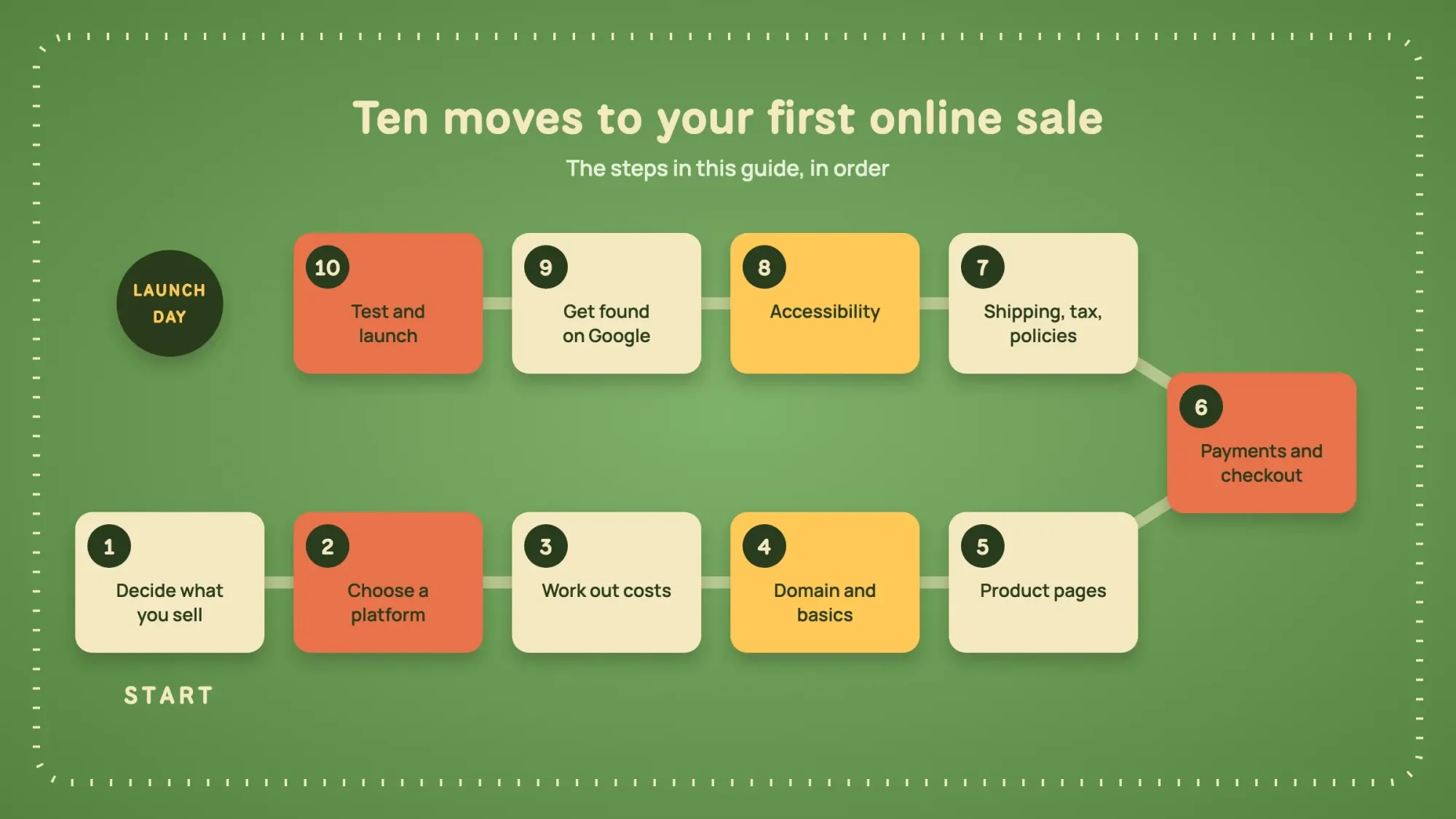 Illustration: the ten steps in this guide, in order.
What is ecommerce website development?
Ecommerce website development is building a site where customers can browse products, pay and get an order confirmation without talking to you. For a small business that usually means configuring a platform, not writing code. You choose a theme, add products, connect payments and shipping, and set up the legal pages. Custom development comes in when you need something the platform can't do, such as a product configurator or an unusual checkout.
The market is still growing. The US Census Bureau puts online sales at 17.1% of all US retail sales in the second quarter of 2026. In the same quarter of 2019, the share was 10.3%.
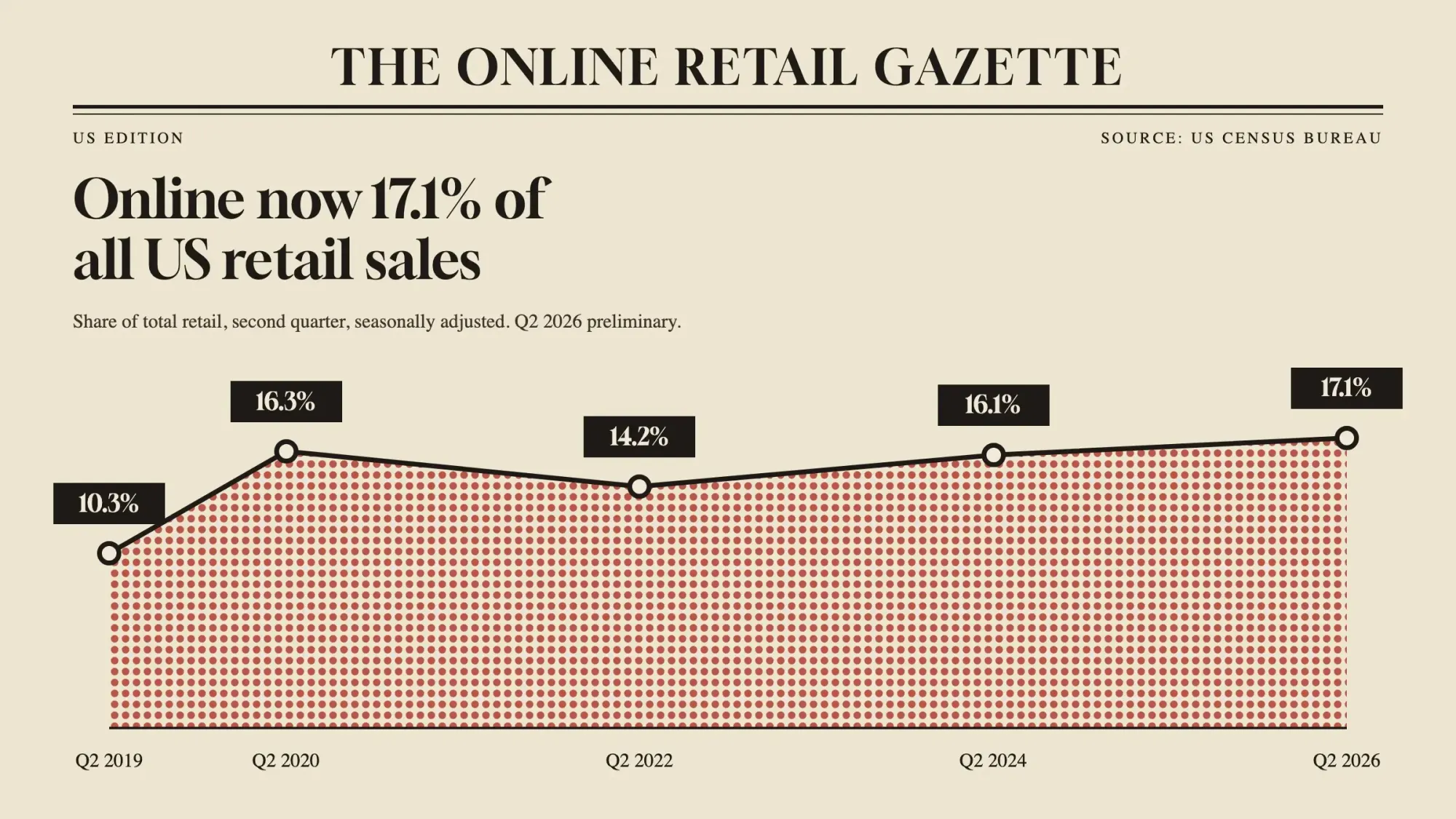 Ecommerce as a share of total US retail sales, second quarter, seasonally adjusted; Q2 2026 is preliminary. Source: US Census Bureau, August 2026.
Key ecommerce facts for 2026
- Online sales were 17.1% of all US retail sales in the second quarter of 2026. That is the US Census Bureau's current published figure, released August 18, 2026. Revised estimates are due November 19, 2026.
- Baymard Institute puts the average cart abandonment rate at 70.22%, across 50 studies (vendor research, updated September 2025).
- Stripe's standard US card rate is 2.9% + 30¢ per successful domestic card payment (as of October 2026).
- The South Dakota law in South Dakota v. Wayfair (2018) covered sellers with over $100,000 in sales or 200 or more transactions there a year.
- Seyfarth Shaw counted 3,117 federal website accessibility lawsuits in 2025.
- Each email that breaks the CAN-SPAM Act can bring penalties of up to $53,088 (as of October 2026), says the FTC.
Step 1: Decide what you're selling and to whom
Before you open a single platform account, write down 4 things. What do you sell, and how many products will you start with? Who buys them, and how will they get them: shipping, local pickup or digital download?
These answers decide your platform, your shipping setup and even your sales tax obligations. A bakery shipping cookie boxes across the country has very different needs from a boutique selling 40 dresses to local customers.
Tip
Start smaller than you think. Launching with your 20 best products and adding more later beats waiting months to photograph 300.
Which ecommerce business model fits you?
Most small stores follow one of a few models. The model changes what you stock, how you ship and which platform features you need.
| Model | How it works | What it means for your store |
|---|---|---|
| Direct to consumer (D2C) | You make or buy products and sell them to shoppers | You hold stock and ship orders, or pay a fulfillment service to do it |
| Business to business (B2B) | You sell to other companies | Look for wholesale prices, quotes and invoice payments |
| Dropshipping | A supplier ships each order straight to the buyer | No stock to hold, but thinner margins and less control over delivery |
| Print on demand | A partner prints your design after each order | No stock, but longer delivery times to promise |
| Subscription | Customers pay on a schedule for repeat deliveries | You need recurring billing, which many platforms add through apps |
| Digital products | You sell downloads, courses or licenses | No shipping, but check your state's tax rules for digital goods |
Step 2: Choose a platform
There are two broad routes. A hosted platform (Shopify, BigCommerce, Squarespace, Wix) runs the servers, security and checkout for a monthly fee.
An open-source setup, most often WordPress with the free WooCommerce plugin, gives you more control. It also makes hosting, updates and security your job. Prices below are as of October 2026, read from each company's US pricing page on October 21, 2026:
| Platform | Starting plan | Online card rate | Good to know |
|---|---|---|---|
| Shopify | Basic $39/mo, or $29/mo paid yearly | 2.9% + 30¢ | Using a payment provider other than Shopify Payments adds a 2% fee on Basic |
| BigCommerce | Core $39/mo, or $29/mo paid yearly | From 2.89% + 29¢ (PayPal Braintree; eligibility rules apply) | Plans have sales limits (Core: up to $30K in trailing 12-month sales, then an automatic upgrade) |
| Squarespace | Basic $25/mo, or $19/mo paid yearly | 2.9% + 30¢ | Basic adds a 2% transaction fee on store sales |
| WooCommerce (WordPress) | Plugin free | About 2.9% + 30¢ with WooPayments | Hosting $25-$350/mo; paid extensions $29-$299/yr each |
Our take: if you don't have someone technical on hand, start hosted. You trade some flexibility for not having to patch plugins at 11 p.m. We compare the two most common choices in detail in WordPress vs Shopify.
How to build an ecommerce website with WordPress
If you pick WooCommerce, you start with a WordPress site on your own hosting. WooCommerce's install guide says to check its server requirements first, to confirm your host is compatible.
- Buy hosting and install WordPress. Our tutorial on how to make a WordPress website walks through it.
- In the WordPress admin, go to Plugins, then Add New Plugin, and search for WooCommerce.
- Click Install Now, then Activate. The WooCommerce Setup Wizard opens on its own.
- Answer the wizard's questions about your store details, industry and product types.
- Set up payments, shipping zones and tax, then add your products.
Can you build an ecommerce website from scratch?
Yes. A developer can code a store from scratch with a web framework instead of a platform. You then own the checkout, the hosting and every security fix.
Our take: for most small stores, a platform does the same job for less. Custom code makes sense for features that no platform, app or plugin offers.
Step 3: How much does it cost to build an ecommerce website?
Building an ecommerce website yourself on a hosted platform costs about $400 to $1,500 in the first year, by our estimate below. One agency, OuterBox, starts a small professional store at $5,000 in its pricing guide (as of October 2026). Card fees of about 2.9% plus 30¢ per order come on top (as of October 2026).
The plan fee is the smallest part for most stores. Here is a rough first-year picture for a small store with 50 to 100 products. Lines marked "estimate" are our ranges, not quoted prices.
Ecommerce website cost table for the first year
| Cost | DIY on Shopify Basic | DIY on WooCommerce | Built by an agency |
|---|---|---|---|
| Platform | $348/yr (paid yearly) | Plugin free | Same as the platform chosen |
| Hosting | Included | $300-$4,200/yr (WooCommerce's range) | Same as the platform chosen |
| Domain | About $10-$30/yr | About $10-$30/yr | About $10-$30/yr |
| Theme | $0-$500 one time | Free to premium (estimate) | Custom design in the build |
| Apps or extensions | $0-$50/mo to start (estimate) | $29-$299/yr each | Plus integrations |
| Build | Your time | Your time | One agency (OuterBox) puts a small professional store at $5,000-$25,000+ |
| Rough first-year fixed cost | $400-$1,500 (estimate) | $350-$5,000+ (estimate) | $5,500-$30,000+ (estimate) |
Then come payment fees on every order, and they grow with your sales.
Example: a store selling $10,000 a month, at an average order of $50, takes 200 orders. On Shopify Basic with Shopify Payments (prices as of October 2026), card fees are 2.9% of $10,000 ($290) plus 200 x 30¢ ($60). That is $350, plus the $29 plan: about $379 a month, or 3.8% of sales. Switch to an outside payment provider at the same card rate, and Shopify's 2% fee adds $200, so about $579, or 5.8%.
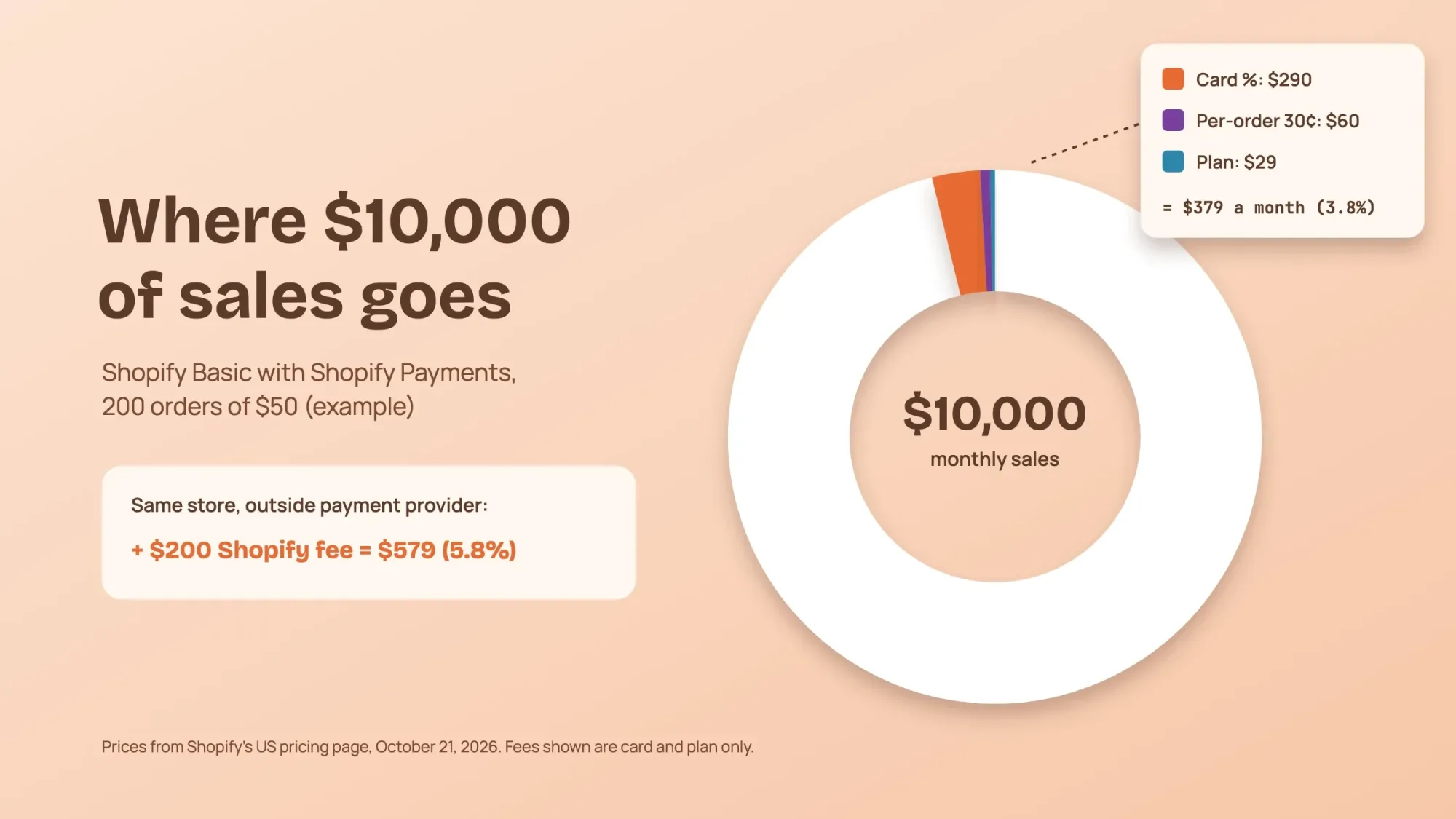 Illustration: example store with $10,000 in monthly sales, 200 orders of $50, on Shopify Basic with Shopify Payments. Prices from Shopify's US pricing page, October 2026.
Warning
Read the fine print on payment providers. On some platforms, using your own processor instead of the built-in one adds a platform fee. That fee comes on top of the processor's own fee. Shopify does this, and so does BigCommerce for providers outside its approved list. BigCommerce calls it the Open Payment Provider Fee: 2.0% of those orders on its Core plan (as of October 2026).
Step 4: Get a domain and set up the basics
Buy a short domain that matches your brand and connect it to your platform. Make sure the site loads over HTTPS; hosted platforms include the SSL certificate. Set up a business email on that domain.
On the business side, a state with a sales tax generally requires a seller's permit (a sales tax license) before you collect. Keep a separate business bank account for store income.
Do you need a business license to sell online?
Usually yes, but the exact licenses depend on your state, your city and what you sell. The Small Business Administration (SBA) says requirements "vary based on your business activities, location, and government rules".
Retail is on the SBA's list of activities commonly regulated at the local level. Check your Secretary of State's website, and your city or county, for the permits you need.
Most businesses also need a federal tax ID, called an Employer Identification Number (EIN). It's free to apply, so skip any website that charges a fee.
Choose a theme and design for phones first
Start from a theme made for online stores, then change the logo, colors and fonts to match your brand. Keep the theme's layout at first, and change it once real shoppers show you what to fix.
Design for phones first. Google uses the mobile version of a site's content for indexing and ranking, so check every page on your own phone.
Every store also needs a few basic pages: home, category and product pages, a cart, about, contact and FAQ.
Step 5: Build product pages that sell
Each product page has one job: answer every question a shopper would ask a salesperson. That means photos from more than one angle and a description written for the buyer: size, material, contents and how it's used.
Add the price, the shipping cost or at least an estimate, and the returns policy one click away. Describe products in the words customers search with, not internal names.
Show genuine customer reviews on product pages once you have them. Our guide on how to automate customer reviews without losing authenticity shows how to ask for them.
Note
From our work: a women's wear store. A women's wear manufacturer with its own online store was aiming every page at short, broad keywords. Those were the same few words the biggest fashion sites fight over. A new store can't win that fight. So we gave each product page its own long-tail search, written the way a shopper describes that exact piece. Within a month the results had started to show. The lesson: when you're small, don't compete for the words everyone wants. Compete for the words that describe exactly what you sell.
Step 6: Set up payments and checkout
Use the platform's built-in checkout or a hosted payment page from a processor like Stripe or PayPal. Both publish standard US rates (as of October 2026). Stripe charges "2.9% + 30¢ per successful transaction for domestic cards". PayPal lists 2.99% plus a 49-cent fixed fee for standard card payments and 3.49% plus 49 cents for PayPal Checkout.
To see what one order costs you, estimate the fee with our PayPal fee calculator.
A hosted checkout also keeps your security paperwork short. Card data security is governed by PCI DSS.
A store usually qualifies for SAQ A, a short self-assessment questionnaire, when card handling is "completely outsourced to PCI DSS validated and compliant third parties". The PCI Security Standards Council updated SAQ A in January 2025. Ask your payment provider which questionnaire applies to you; if they ask you to complete one, it is usually once a year.
Then fix the checkout itself. In Baymard Institute's research on US shoppers who abandoned a checkout, the top reasons were:
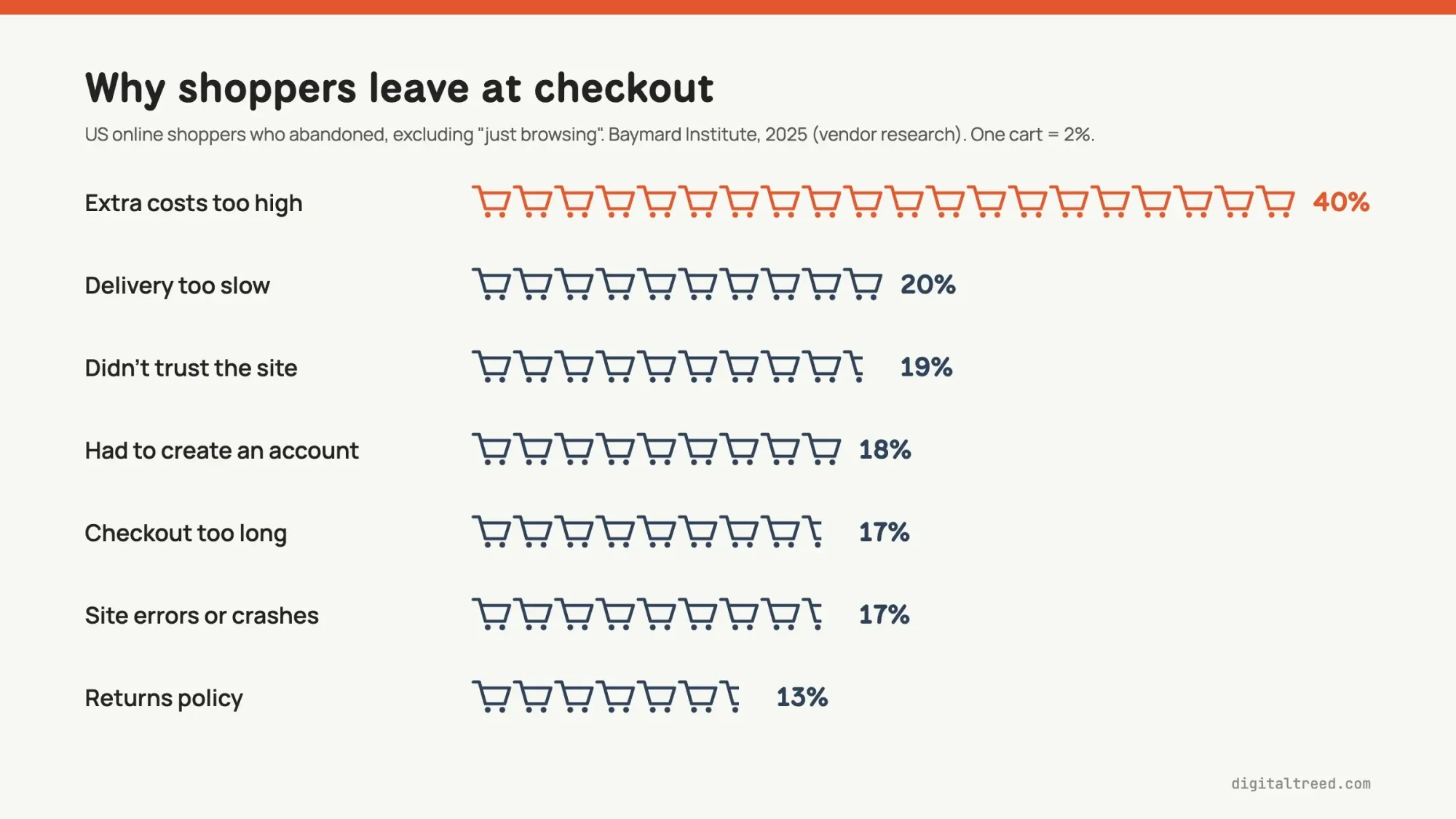 Reasons for abandoning a checkout, US online shoppers, excluding those who were just browsing (vendor research). Source: Baymard Institute, September 2025.
- Show shipping and any fees before the last step, since surprise costs top the list
- Allow guest checkout; making people create an account loses buyers
- Keep the form short and offer wallets like Apple Pay or PayPal
- Show trust signals: a real contact page, reviews, and a clear returns policy
Step 7: Sort out shipping, sales tax and your store policies
Shipping promises have rules
The FTC's Mail, Internet, or Telephone Order Merchandise Rule sets the bar. You need "a reasonable basis for stating or implying that you can ship within a certain time". If you make no shipping statement at all, you must reasonably expect to ship "within 30 days". If you can't ship on time, you have to ask the customer whether they accept the delay or want a refund. Only promise times you can keep.
Sales tax after the Wayfair ruling
Until 2018, an online seller generally only collected sales tax in states where it had a physical presence. In South Dakota v. Wayfair, the Supreme Court ended that physical-presence rule. The case was over a South Dakota law. It covered sellers delivering "more than $100,000 of goods or services into the State" each year, or making "200 or more separate transactions" there.
Since then, every state with a sales tax has set its own threshold for remote sellers. Some have dropped the transaction count and kept only a sales amount. South Dakota itself did so in 2023. Kentucky did the same under House Bill 757, effective August 1, 2026 (PDF).
In practice: if your home state has a sales tax and your products are taxable there, collect it from day one. Turn on your platform's automatic tax calculation and check your sales into each state every quarter. When you pass a state's threshold, register there before collecting.
Thresholds differ, so check each state's revenue department, and talk to an accountant once you sell into many states. This is general information, not tax advice.
Policy pages every store needs
- Shipping policy with realistic processing and delivery times
- Returns and refunds policy
- Privacy policy. California's CCPA applies to businesses above set thresholds, such as more than $26.6 million in yearly revenue (as of January 2025). It also covers businesses that buy, sell or share data on 100,000 or more California residents or households. Many small stores fall below them, but other state laws can still require a privacy policy, so post one either way.
- Terms of service and a contact page with a real email and address
Step 8: Make the store accessible
Accessibility is a legal risk as well as good business. The Department of Justice says "Title III prohibits discrimination against people with disabilities by businesses open to the public". It has long held that this applies online, while giving businesses "flexibility in how they comply".
There's no federal web rule for private stores; the 2024 rule covers state and local governments. Courts are also split on whether web-only businesses are covered. But lawsuits are common: Seyfarth Shaw counted 3,117 federal website accessibility lawsuits in 2025.
Use WCAG 2.1 AA as your checklist. That means alt text on product images, enough color contrast, labels on every form field, and a store you can shop with the keyboard alone. Test it yourself by unplugging your mouse and buying something.
This is general information, not legal advice; check with an attorney for your situation.
Step 9: Get found on Google
These 3 things help a new store show up:
- Merchant Center free listings. Google says "one specific way to show your products at no cost is with a free listing". Free listings can appear across Search, Images, the Shopping tab and more. Most platforms can sync your catalog to Merchant Center.
- Product structured data. Google's documentation separates product snippets from merchant listings, which are "for pages where customers can purchase products from you". Use the merchant listing markup on product pages.
- Speed. Google's Core Web Vitals targets are a largest contentful paint within 2.5 seconds and interaction to next paint of 200 milliseconds or less. The third target is a cumulative layout shift of 0.1 or less. Big images and too many apps are the usual culprits.
Note
From our work: a perfume brand's online store. The client's WordPress site was slow, and that was hurting how well its pages got crawled and indexed. Working with their developer, we moved to a lighter theme, added a caching plugin and optimized the images. With the speed fixed, we published blog posts on topics their competitors were covering and synced the products to Google Merchant Center. Results started in 5 to 6 weeks, including organic orders. The lesson: on a slow site, fix the server side first, because new content can't help pages Google struggles to fetch.
If you also sell from a physical shop, complete your Google Business Profile. If you plan to advertise, read our guide to PPC marketing before you set a budget.
Step 10: Test everything, then launch
Free pre-launch checklist for an online store
Pre-launch test
- Place a real order Buy a product with a real card on your phone, then refund it. Check every email the customer receives.
- Check totals Confirm shipping, tax and discounts calculate correctly for a few different addresses.
- Click every page Policies, contact page, menu links, search and filters on mobile and desktop.
- Run the speed and accessibility checks Test a product page and the homepage for speed, and try checking out with only the keyboard.
- Connect your tools Search Console, Google Analytics and Merchant Center, and submit your sitemap.
After launch, collect only genuine reviews. The FTC's rule banning fake reviews and testimonials took effect on October 21, 2024. It covers fake reviews, paying for reviews that must be positive or negative, and undisclosed reviews from company insiders.
Which launch approach should you pick?
Google's guide to launching an ecommerce website describes 4 approaches. They are a grand reveal, a home page launch, a launch with products out of stock, and a soft launch. Google says a soft launch has the advantage of simplicity, and it lets you test with real shoppers at lower traffic.
| Approach | What you do | Upside | Downside |
|---|---|---|---|
| Grand reveal | Keep the whole site behind a password, then open it on launch day | Nothing is public before your launch campaign | It can take longer to show in Google Search and the Shopping tab |
| Home page launch | Only a "coming soon" home page is public at first | Your store name can be found, and others can start linking to you | Product details won't show on Google until the full launch |
| Products out of stock | The full site is live, with products marked out of stock | Every page can be indexed from day one | Shoppers can't buy yet, so say clearly when you open |
| Soft launch | Everything goes live when ready; the marketing launch comes later | Simple, with real testing at low traffic | People may share the site before your official launch |
One catch from Google: don't switch off add-to-cart to stop early orders. Google may use it to check final prices, including tax and shipping.
Tell Google your store is live
Google's guide also lists these steps for a new store:
- Verify that you own the site in Google Search Console.
- Ask Google to index it: use the URL Inspection tool for a few pages, or submit a sitemap for many.
- Watch the Page Indexing report. Merchant Center may cross-check your products against Google's index.
- Sign up for Google Merchant Center, so your products can appear in places like the Shopping tab.
On WordPress, our guide to getting a new WordPress website indexed by Google covers each step.
How do you get your first sales after launch?
Get your first sales from people who already know you, then build search and email traffic over time. Tell past customers, friends and your social followers. List products on Google for free, and collect email addresses from day one.
- Add an email signup form and send a welcome offer. Our email marketing strategy guide covers what to send next.
- Post on social media where your buyers already spend time. Our social media marketing strategy guide shows how to plan it.
- Write blog posts that answer buyers' questions, and keep your product data in Merchant Center up to date.
- If you run ads, start with a small budget and track the cost of each sale before you spend more.
Every marketing email must follow the CAN-SPAM Act. Include your valid physical postal address and a clear way to opt out. Honor each opt-out request within 10 business days. The FTC says each email that breaks the law can bring penalties of up to $53,088 (as of October 2026).
This is general information, not legal advice.
What to check every month after launch
- Conversion rate: the share of visits that end in an order
- Average order value: total sales divided by the number of orders
- Cart abandonment: how many shoppers add items to a cart but don't buy, next to Baymard's 70.22% average
- Top search terms and pages in Google Search Console
Our Google Analytics 4 guide shows how to track purchases, so these numbers fill in on their own.
Should you build your store yourself or hire a developer?
Build it yourself if you're testing an idea and a store template covers what you need. Hire a developer when you need custom features, a migration, or links to your inventory and accounting systems.
Pros
- DIY on a hosted platform: lowest cost, live in days, you learn your own store
- Hiring help: a store built around your brand and products, fewer early mistakes
- Hiring help: integrations with inventory, accounting or shipping systems done properly
Cons
- DIY: your time, and design and setup gaps you may not notice
- Hiring help: higher upfront cost and a dependency on whoever built it
- Either way: a store still needs products people want and marketing to bring them in
Our take: if you're testing an idea, build it yourself on a hosted plan and spend the savings on photos and marketing. Bring in a developer when sales justify it, or when you need custom features, migrations or integrations a template can't handle. (DigitalTreed sells this service.)
Frequently asked
How do I build an ecommerce website step by step?
Decide what you sell and to whom, then choose a platform and connect a domain. Add products, then set up payments, shipping and sales tax. Write your policies and make the store accessible. List products on Google, test a real order and launch.
Can I build an ecommerce website for free?
Not entirely. WooCommerce is a free plugin, but you still pay for hosting and a domain, and every platform charges card fees on sales. Hosted platforms often offer a trial before the first paid month.
How much does it cost to build an ecommerce website?
A small store built yourself on a hosted platform can cost a few hundred dollars in its first year. Card fees add about 2.9% and 30 cents per order (as of October 2026). One agency's pricing guide puts a small professional store at $5,000 to $25,000 or more, and a custom store at $25,000 and up.
Do I have to collect sales tax on online sales?
Usually in your home state, and in any other state where your sales pass that state's threshold for remote sellers, often $100,000 a year. Rules differ by state, so check each revenue department or ask an accountant.
Do I need a business license to sell online?
Usually. Licenses and permits depend on your state, your city and what you sell, says the Small Business Administration. If your state has a sales tax, ask its revenue department about a seller's permit before you collect it. A federal EIN is free.
Can I start an online store without inventory?
Yes. With dropshipping or print on demand, a partner stocks or makes each item and ships it after the order. You hold no stock, but margins are thinner and delivery times are less in your control.
Does my online store need to be ADA accessible?
The Department of Justice says the ADA applies to businesses open to the public, including online. Seyfarth Shaw counted 3,117 federal website accessibility lawsuits in 2025. The DOJ points to WCAG as helpful guidance, and WCAG 2.1 AA is a common benchmark to follow.
How long does it take to build an ecommerce website?
A simple store on a hosted platform can be ready in a few days to a few weeks, mostly spent on product photos and descriptions. A custom-designed store usually takes longer, depending on features and integrations.
Can I build an ecommerce website using AI?
AI tools on most platforms can draft product descriptions, suggest layouts and write policy outlines. Check every claim, price and policy yourself, and rewrite descriptions so they sound like you.
Your next step: write down your product count, the platform you picked and any systems the store must connect to. With those, price a DIY build from the tables above, or get a quote for a professional build and compare the two.
First published July 2020. Rewritten October 2026: new US platform prices and card fees, a worked fee example and state sales tax thresholds after Wayfair. It also adds PCI SAQ A, accessibility lawsuit numbers and the shipping and fake-review rules for online sellers.
How we made this guide: it is built from the platforms' own US pricing pages for Shopify, BigCommerce, Squarespace, WooCommerce, Stripe and PayPal. It also uses the US Census Bureau's ecommerce report, the Supreme Court's Wayfair decision, FTC business guides and state revenue departments. ADA.gov, Google's documentation and Baymard Institute's checkout research cover accessibility, search and checkout. Sources are linked inline. We checked every number against the source named next to it on October 22, 2026. Shopify's monthly-billing price and Squarespace's prices come from our October 21, 2026 reading of their US pages. Those pages show local prices to our checker's location. Updated October 23, 2026: added ecommerce business models, WordPress setup steps, business licenses, theme and mobile design, and Google's 4 ways to launch. We also added a section on first sales with the CAN-SPAM rules, a key facts list and 2 FAQs. Platform prices were rechecked on their pricing pages that day.
Sources
- US Census Bureau: Quarterly Retail E-Commerce Sales (Q2 2026 release, August 18, 2026)
- Shopify: Pricing (read October 21, 2026)
- Shopify: How much does an ecommerce website cost
- BigCommerce: Pricing
- Squarespace: Pricing
- WooCommerce: Pricing
- WooPayments: Fees
- Stripe: Pricing
- PayPal: Merchant fees (last updated October 1, 2026)
- OuterBox: Ecommerce website pricing (agency)
- PCI Security Standards Council: Updates for merchants validating to SAQ A (January 2025)
- South Dakota v. Wayfair, 585 U.S. 162 (2018)
- South Dakota Department of Revenue: 2023 legislative updates
- Kentucky Department of Revenue: remote retailer threshold change (PDF, July 29, 2026)
- eCFR: 16 CFR Part 435, Mail, Internet, or Telephone Order Merchandise
- FTC: Business guide to the Mail, Internet, or Telephone Order Merchandise Rule
- FTC: Consumer Reviews and Testimonials Rule Q&A
- California Attorney General: CCPA
- California Privacy Protection Agency: CPI adjustment
- ADA.gov: Guidance on web accessibility and the ADA (March 18, 2022)
- Seyfarth Shaw: Federal website accessibility lawsuit filings in 2025 (March 2026)
- Google Merchant Center Help: Free listings
- Google Search Central: Product structured data
- web.dev: Web Vitals
- Baymard Institute: Cart abandonment rate statistics (vendor research, updated September 22, 2025)
- SBA: Apply for licenses and permits (read October 23, 2026)
- WooCommerce: Installing and uninstalling WooCommerce
- Google Search Central: How to launch a new ecommerce website (last updated December 10, 2025)
- Google Search Central: Mobile site and mobile-first indexing best practices (last updated December 10, 2025)
- FTC: CAN-SPAM Act, a compliance guide for business

Comments
No comments yet. Start the conversation below.