

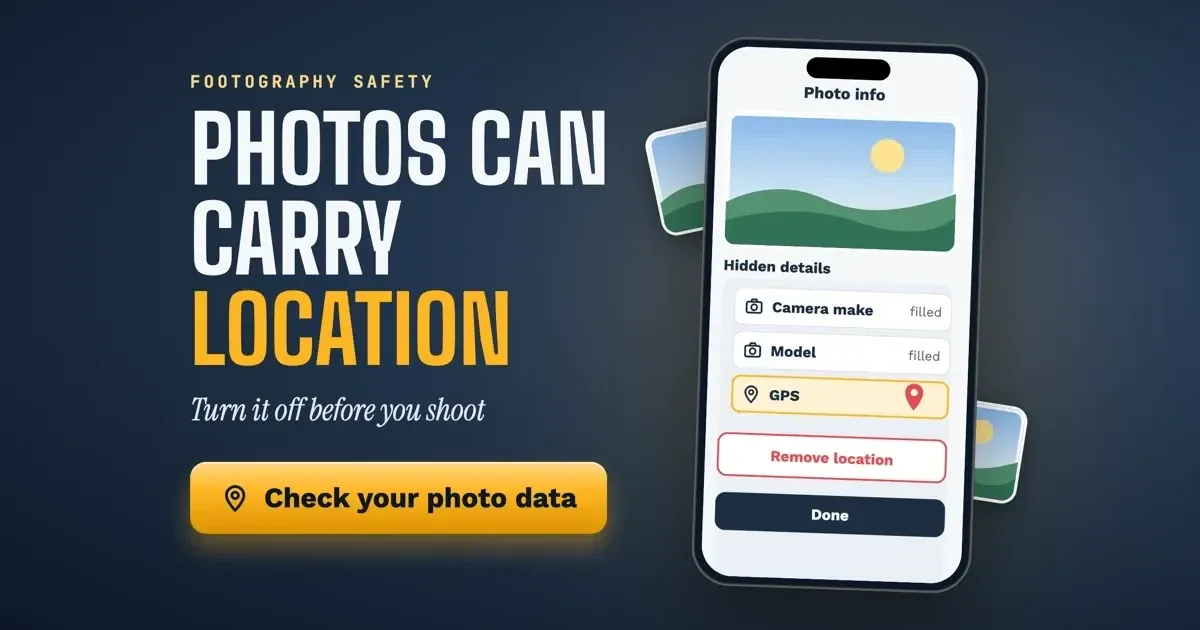
Quick answer
The main footography scams, as of November 2026, are fake checks that overpay, fees or codes demanded before payment, impostors and leak threats. The photo file can also reveal where it was taken; in our test, re-saving it kept the GPS. Report scams at ReportFraud.ftc.gov, and report sales income even below the $20,000 Form 1099-K line.
Maybe a stranger has offered to buy photos of your feet. Or you've seen people talk about it online and want to know the catch before you answer anyone. Footography is a nickname for photographing feet, usually to sell or share the pictures online. This guide skips how to take or sell the pictures. It covers the payment, the messages and the file itself.
Scams aimed at sellers come first. Then the photo file and what it gives away, the under-18 rule, tax on sales and where to report.
Key takeaways
- A buyer who overpays, then asks for a refund, is running a scam.
- Never pay a fee or share a code just to receive money.
- In our test, re-saving or converting a photo kept its GPS location.
- Anyone under 18 is a minor under federal law and should stay out.
- Sales income is reportable even when no Form 1099-K arrives.
Fake checks and the overpayment refund
A classic scam aimed at online sellers starts with a payment that looks too generous. The FTC's fake check scam page says buyers "accidentally" send a check for too much, then ask you to refund the balance. "But that's a scam," the page adds.
Here's how it plays out, with made-up numbers as an example. A buyer agrees to $40 for a photo set, mails a $490 check, and asks you to send back the difference ($490 minus $40, or $450) by app. The money shows up in your account quickly, so the refund feels safe.
It isn't. The bank rules explain why. The FTC says "By law, banks have to make deposited funds available quickly." Seeing the money doesn't mean the check is good, because "Fake checks can take weeks to be discovered and untangled." By then the scammer has your $450 refund. When the check bounces, the FTC says, "you're stuck paying the money back to the bank." Its list of scam warning signs describes the same move from the scammer's side. Some "send you a check (that will later turn out to be fake), then tell you to deposit it and send them money."
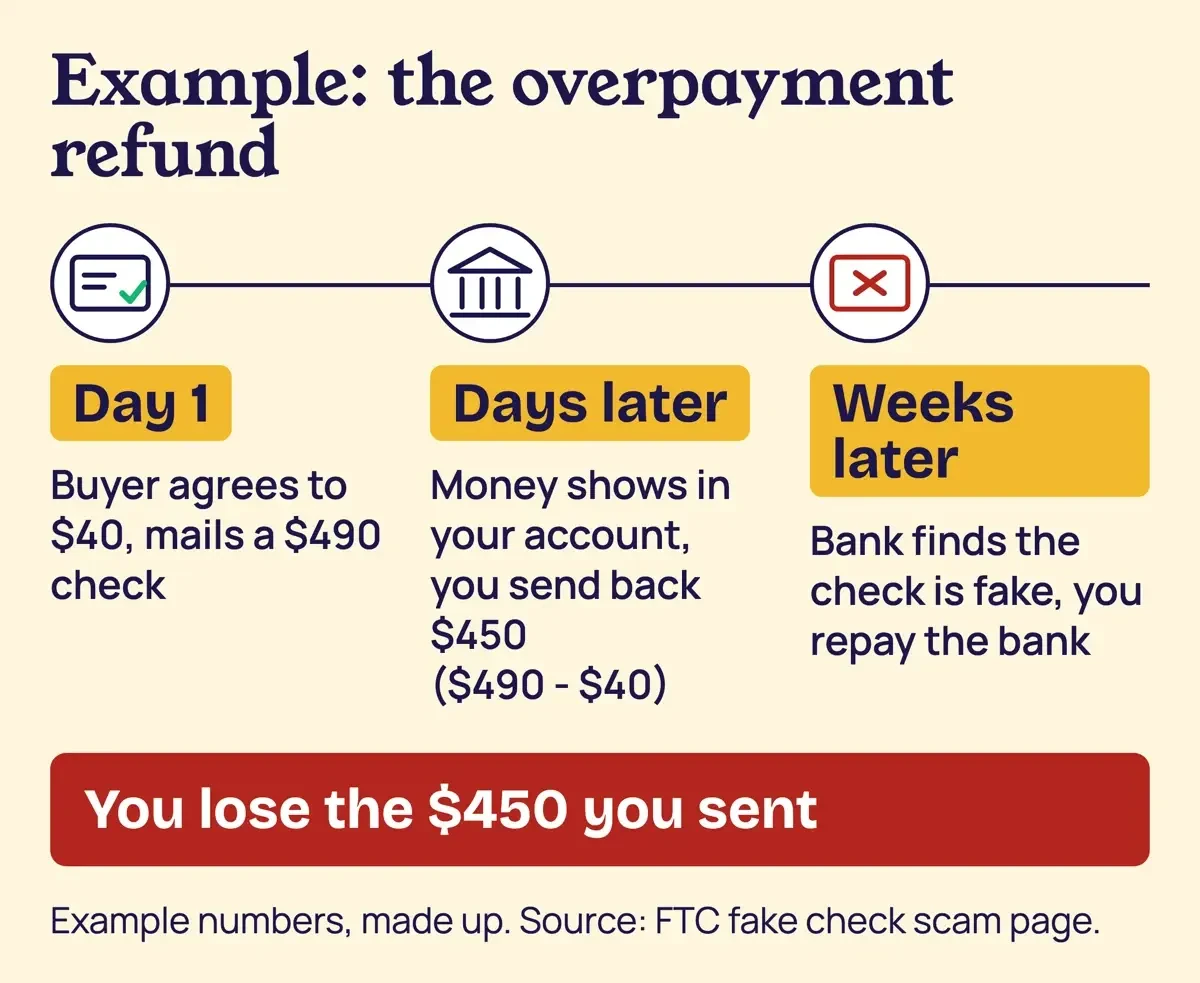 Drawn by us from the FTC fake check scam page, November 2, 2026. Example numbers, made up.
One rule from the FTC page covers it: "Don't accept a check for more than the selling price." If a buyer overpays by any method, cancel instead of refunding, and watch for the app tricks below.
Payment-app tricks and fees to get paid
Payment apps feel safer than checks because the money lands in seconds, but that speed works against you when you're the one sending. The FTC's payment app guide says scammers push app payments because "once you do, it's hard for you to get your money back." The CFPB's list of common scams makes the same point: scammers favor payments "that are hard to trace or recover," and mobile apps are on its list.
A common twist for sellers is a fee you must pay before the buyer's money is released, called a verification fee, an account upgrade or a release charge. The CFPB's warning signs page flags anyone who "Asks you to pay money or taxes upfront to receive a prize or a gift." The FTC's app advice is shorter: "Don't send a payment to claim a prize or collect sweepstakes winnings." So if a buyer says the payment is on hold until you cover one of these charges, don't pay it, and stop replying.
Watch for "agencies" selling sign-up packages, too. The FTC's job scams page is blunt: "If someone asks you to pay to get a job, that's a scam." More pitches like it are in how to spot work-from-home scams.
Then there's the code. A buyer or a fake support agent asks you to read back a six-digit code that just landed on your phone, often to confirm a payment. That code is the second lock on your account, and the FTC's verification code alert explains why scammers want it: "To break into your account, scammers need both keys." Its advice: "Never give your verification code to someone else." The CFPB lists access codes among the things scammers ask for. More on how scammers go after accounts is in the write-up on Snapchat account scams.
Fake platforms, fake agencies, fake police
Impostors are the third big group, and they borrow names you'd trust. The FTC's warning signs page lists four moves. Scammers pretend to be from an organization you know, say there's a problem or a prize, pressure you to act right away and tell you how to pay.
For a seller, that often arrives as a message from a site's payment team or compliance desk. The FTC says "Some scammers say there's a problem with one of your accounts and that you need to verify some information."
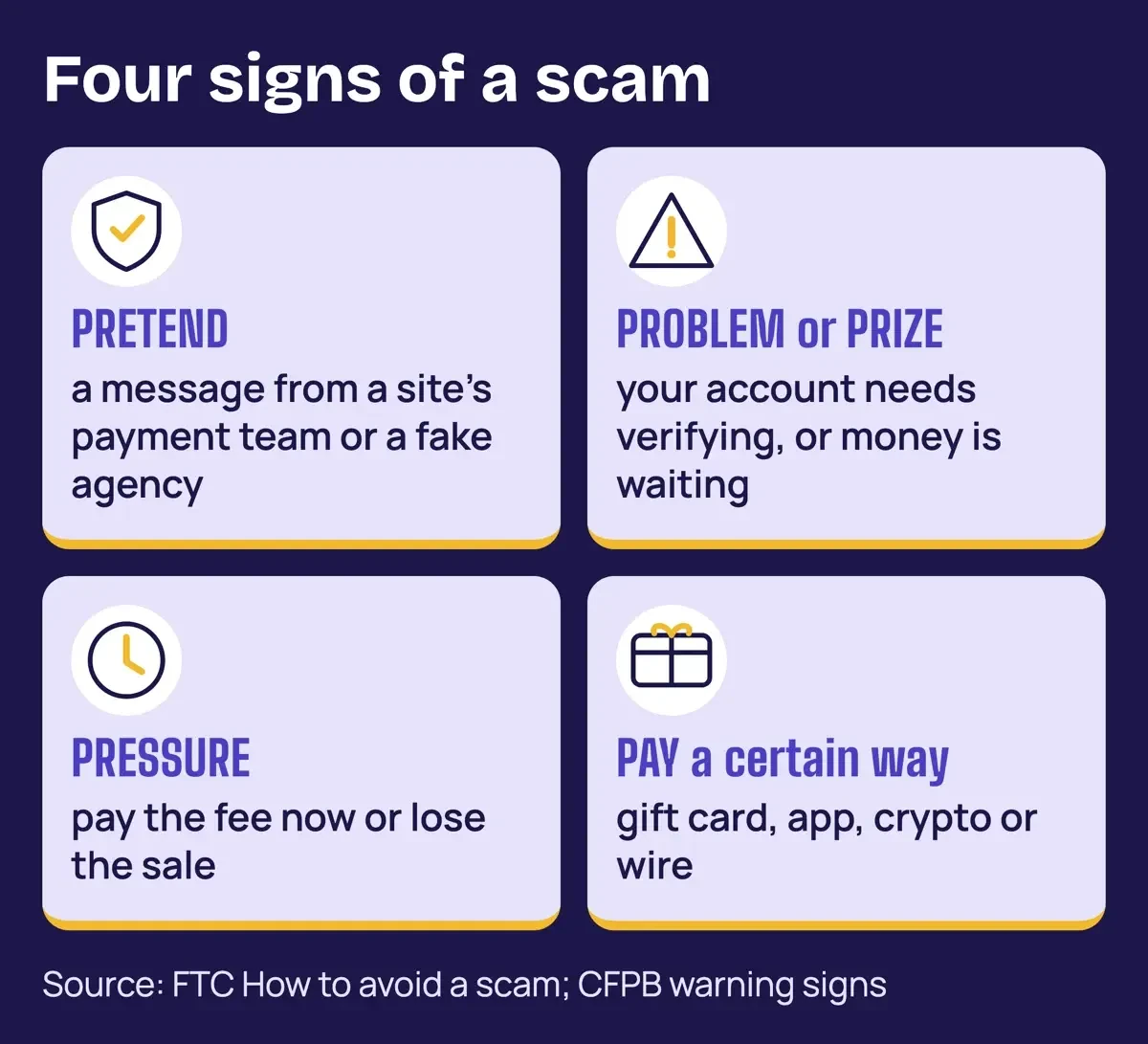 Diagram by DigitalTreed, from the FTC scam warning signs and CFPB warning signs pages, November 2, 2026.
Some impostors claim to be police or a federal agency and say your photos broke a law. The FTC's government impersonation page says "Government agencies will never call, email, text, or message you on social media to ask for money or personal information." Real agencies and banks "do not threaten you or ask you to send money," the CFPB's page on who to contact adds.
Gift cards give a lot of these away. The FTC's fake check page says "Anyone who demands payment by gift card is always a scammer." Its gift card scam page warns, "Don't give them those numbers or send them a photo of the card." The same tactics turn up in free gift card offers that turn out to be scams. Links in these messages can be phishing too, and what to do after a phishing click on a PC, Mac or phone covers the cleanup.
What if someone threatens to share your photos?
The CFPB's list of common scams files this under blackmail: "the blackmailer threatens to share personal or private content about you." The blackmailer wants money. That's why the CFPB's steps start with not sending any.
The CFPB's steps are short. Try to stay calm. "Stop communicating with them and don't send them money." Then "Keep all messages as evidence to give to law enforcement," which means screenshots of the chat, the username and any payment request.
Save them before you block the account or delete anything, and only then report it.
For reporting, the CFPB names the police and your local FBI field office, which you can reach at 1-800-CALL-FBI or tips.fbi.gov. Online scams can also go to the FBI's Internet Crime Complaint Center at www.ic3.gov.
The Justice Department's crime reporting table also lists that center for internet crime. If the threat came through a social app, report the account there as well. The post on Instagram scams and how to report them shows where that button sits on one big app.
If you're under 18, the CFPB says to "tell a trusted adult and report the threat to the National Center for Missing and Exploited Children's CyberTipline." The age section below explains why.
Your photo can carry your location
Before any threat can start, the photo file itself may say too much. Google's Photos help page on locations says "Your photo may have a location if your device's camera saves your location with the photo." Apple's Location Services page lists Camera among the apps that can use GPS and other signals "to determine your location." That saved spot travels inside the file as metadata, the hidden details stored next to the picture. You won't see it by looking at the picture. Google also warns about its own app: "If a location was automatically added by your camera, you can't update or remove the location in Google Photos." So the fix has to happen on the file itself.
In a JPEG, that metadata usually sits in a block called Exif, which the Library of Congress Exif format description says lives in "application marker segments (APP1 and APP2)." If a photo taken at home keeps its GPS, anyone with the original file may see roughly where you live.
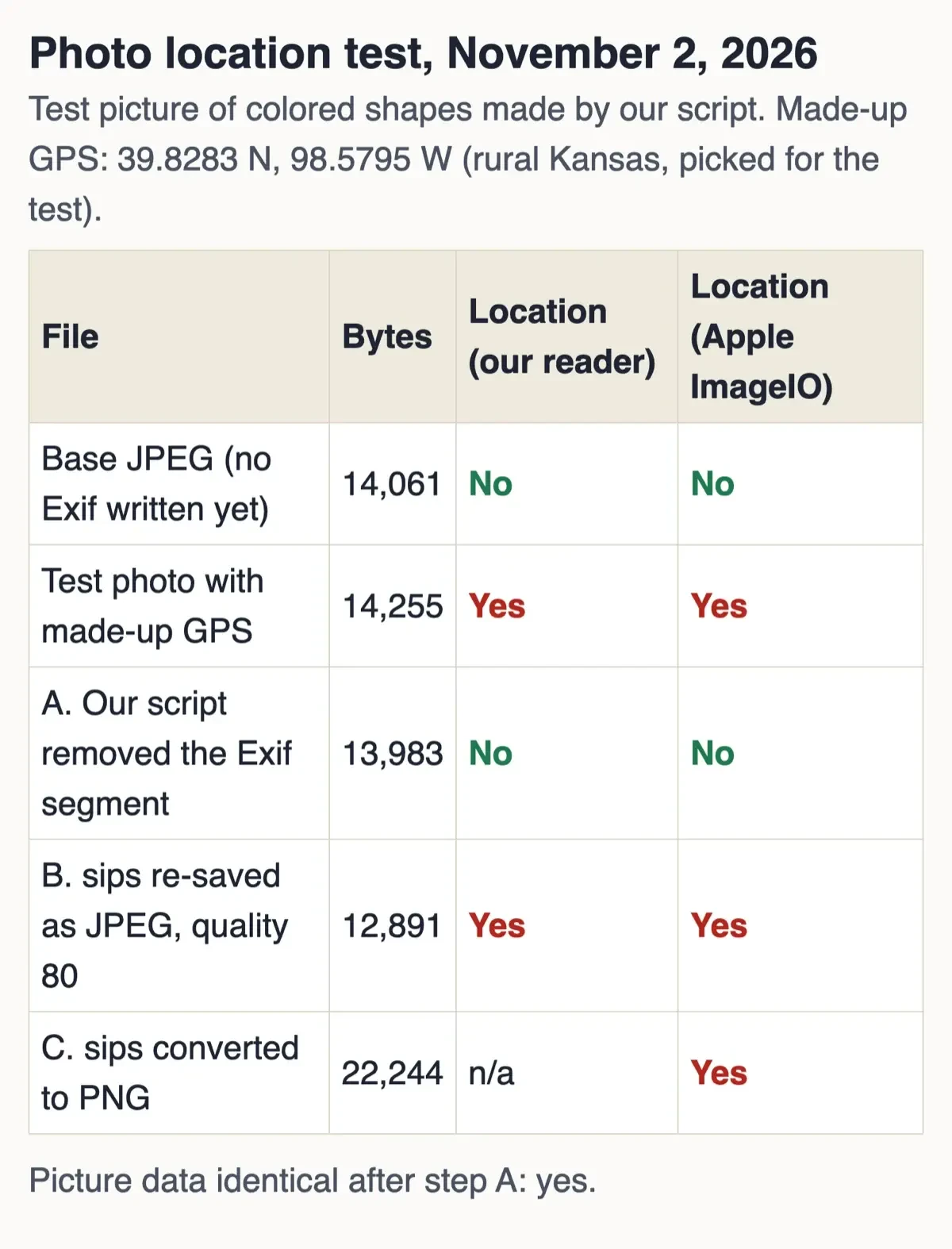
So we tested what actually removes it, on a picture we made ourselves, and both of our readers found the made-up GPS coordinates we wrote into it. Deleting the Exif segment cleared the location for both readers. The compressed picture data stayed byte for byte the same, which a SHA-256 hash of that data confirmed. Re-saving the JPEG with the Mac's built-in sips tool didn't remove it. Converting it to PNG didn't either: Apple's reader still showed 39.8283 N, 98.5795 W in both files.
Here's every file from the test, in the order we made them, with what our two readers found:
- Base JPEG, before we added anything: 14,061 bytes, no location in either reader.
- Test photo with made-up GPS: 14,255 bytes, location found by both readers.
- A. Our script deleted the Exif segment: 13,983 bytes, no location in either reader.
- B. Re-saved as JPEG at quality 80 with sips: 12,891 bytes, location still found by both readers.
- C. Converted to PNG with sips: 22,244 bytes, location still found by Apple's reader (ours reads JPEG only).
The byte counts show that file size tells you nothing about location. The re-saved file got smaller than the original and still kept the GPS.
What we take from it: an edit, export or format change may not strip location. Turn off location for the camera before you shoot, or remove the metadata with a tool that says it does, then check the file again before it leaves your phone. We didn't test screenshots, so check a screenshot's file the same way.
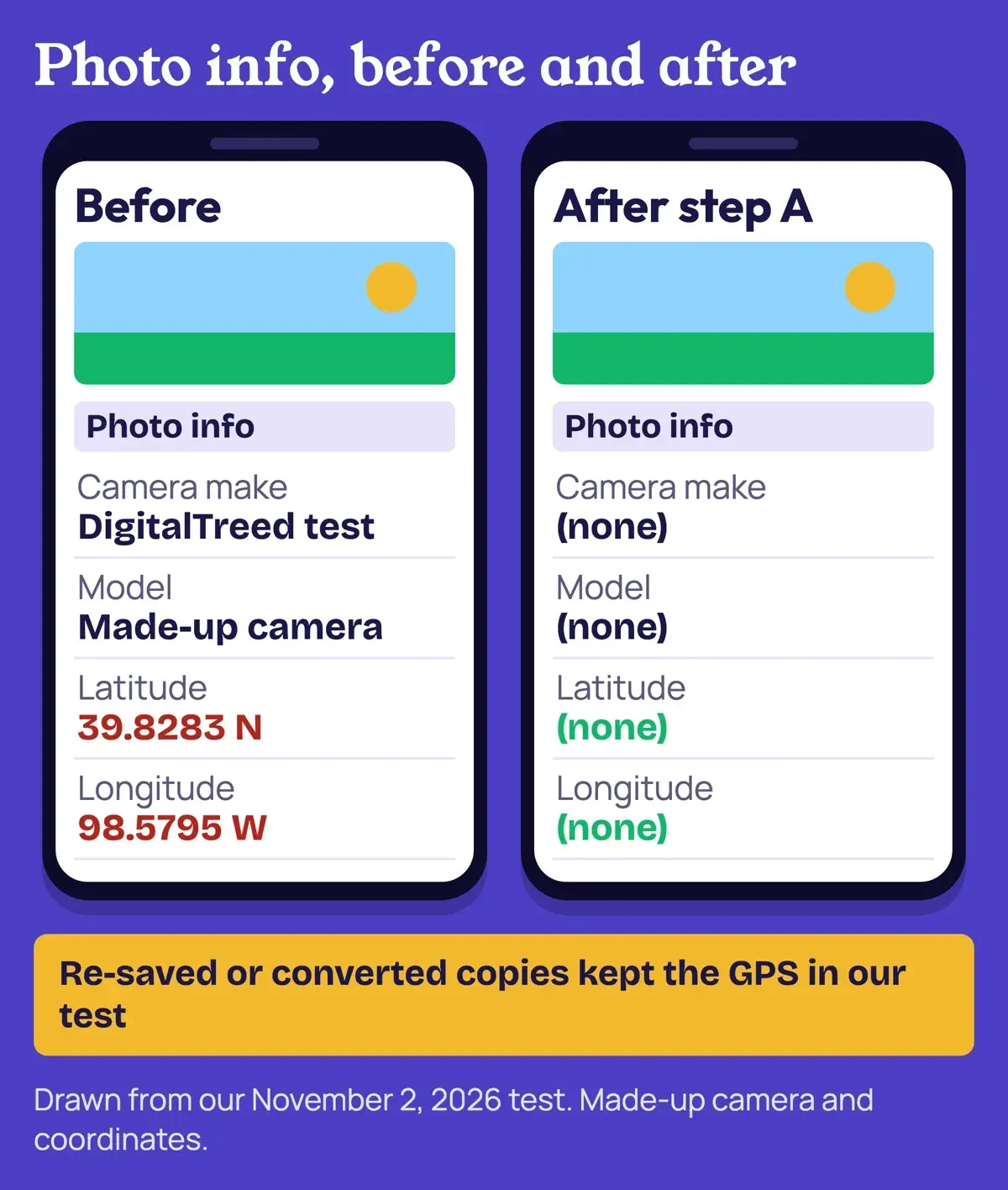 Drawn by us from our November 2, 2026 test results. Made-up camera and coordinates; not a real app screen.
What we tested
We drew a 640 by 400 test picture of colored shapes in Python and saved it as a JPEG with macOS sips. Next, we wrote an Exif block into it with a made-up camera name and test coordinates in rural Kansas. Each file was then read twice: by our own byte parser and by Apple's ImageIO framework, which is built into macOS. No real photo, person or home was involved.
 Screenshot of the report page our test script built, served on 127.0.0.1, November 2, 2026.
Reverse image search can tie photos to you
Location isn't the only way a photo points back to you. A reverse image search takes a picture you give it and looks for the same picture, or close matches, on pages across the web. Google's search with an image help page says results can include "Websites with the image or a similar image."
Anyone can run one, and the FTC's romance scam page even tells people to "Do a reverse image search of the person's profile picture."
A buyer can run the same search on the photos you sell. If the same photo, or one from the same shoot, sits on a personal account under your real name, the results can lead to that account.
The simplest protection is keeping the two worlds apart. Don't reuse pictures that appear anywhere else, keep personal accounts private, and leave out backgrounds, jewelry, tattoos and anything else that shows up in your other photos. Once an image has been copied your options shrink, and protecting website content from copying lays out what US law lets you do. Keep your Social Security number, home address and bank login to yourself too. The piece on people searches by Social Security number explains why that number is worth guarding.
Under 18? Minors should stay out
If you're under 18, don't sell or send photos of your body to strangers online, and that includes feet. Federal law draws the line at 18. 18 U.S.C. 2256 says "minor" means "any person under the age of eighteen years." The Justice Department's citizen's guide to federal law describes a minor as "someone under 18 years of age."
If an adult asks you for pictures while you're under 18, don't reply, even if they call it a sale, and tell a trusted adult.
NCMEC's sextortion page says people who sextort children often "Approach a child on social media" first. It also reports a rise in "financial sextortion where the offender demands money from the child." It adds that "Teenage boys have been the most common targets in these recent cases."
If it has already happened, tell a trusted adult and report it. "The CyberTipline is the place to report child sexual exploitation," NCMEC says on its CyberTipline page.
Images that already spread can sometimes be pulled back. NCMEC's Take It Down service "can help you remove or stop the online sharing" of nude or sexual images taken before you turned 18. Parents will find more steps in protecting children from online predators.
Photo sales are reportable income
For adults who do sell, the IRS gig economy tax center says "You must report income earned from the gig economy on a tax return," side work included. That's true with or without a form. The IRS Form 1099-K page says "Whether or not you receive a Form 1099-K, you must still report any income on your tax return." As of November 2026, the IRS page says an app or marketplace must send the form when payments "total over $20,000 in more than 200 transactions." An IRS news release from October 23, 2025 confirms the same line. The Form 1099-K page also notes "they may send you a Form 1099-K with lower amounts and/or transactions."
Whether your sales are a hobby or a business changes how you report them. The IRS fact sheet on hobby versus business lists questions such as "Is the activity conducted like a business?" For a hobby, the IRS says "they must report the income they receive on Schedule 1," and hobby sellers "can't use a loss from the activity to offset other income." A business files Schedule C instead. IRS Topic 407 says a sole proprietor with "net earnings from Schedule C of $400 or more must file Schedule SE (Form 1040), Self-Employment Tax."
The IRS self-employed tax center uses the same $400 line, counted as net earnings from self-employment, to decide whether you have to file an income tax return at all. This is how the rules read, not tax advice, so talk to a tax professional before you file.
Where to report a scam, and what we'd do first
Use whichever of these fit what happened, starting with the app or bank that moved the money:
- Your payment app or bank, right away, to ask for the payment to be reversed.
- The FTC at ReportFraud.ftc.gov, for any scam, including one paid through an app.
- The FBI's Internet Crime Complaint Center at www.ic3.gov, or tips.fbi.gov, for online fraud and threats.
- Your state attorney general or local police, which the CFPB also lists.
- The NCMEC CyberTipline, if anyone involved is under 18.
The FTC's guide for people who paid a scammer has steps for each payment method, from cards to wires. If we were starting today, we'd do three things before answering any buyer. We'd turn off camera location, check a test photo's metadata, and decide in advance never to refund an overpayment or pay a fee to get paid.
Footography safety questions
Frequently asked
Can I remove the location in Google Photos?
Only some of it. Google's Photos help page says "You can only change or remove estimated locations and locations that you manually added to your photos."
What do I do if I paid a scammer through a payment app?
Contact the app first. The FTC's scam recovery guide says "Report it to the payment app immediately. Ask them to reverse the payment and refund your money."
Is a request for gift card numbers always a scam?
Yes, if they want the numbers off the back. The FTC's gift card scam page says "Scammers will ask you for the gift card number and PIN."
Do I have to share my images to use Take It Down?
No. NCMEC's Take It Down page says "You can remain anonymous while using the service and you won't have to send your images or videos to anyone."
How we made this guide: A script saved the FTC, CFPB, Justice Department, NCMEC, Library of Congress, Google, Apple and IRS pages cited here on November 2, 2026. This page checks every quote against those copies. FBI pages refused our checker and ic3.gov didn't answer, so neither is quoted. Facts checked by the DigitalTreed team on November 2, 2026.
First published March 2025 as a guide to earning from foot photos. Rewritten November 2, 2026 as a safety guide only: scams, photo privacy, the age rule, taxes and reporting.
Sources
- FTC: How to spot, avoid, and report fake check scams
- FTC: How to avoid a scam
- FTC: Mobile payment apps, how to avoid a scam when you use one
- FTC: What to do if you were scammed
- FTC: Job scams
- FTC consumer alert: What is a verification code and why would someone ask me for it?
- FTC: How to avoid a government impersonation scam
- FTC: Avoiding and reporting gift card scams
- FTC: What to know about romance scams
- FTC: ReportFraud.ftc.gov
- CFPB: What are some common types of fraud and scams?
- CFPB: Classic warning signs of possible fraud and scams
- CFPB: Who do I contact for help with a scam or fraud?
- US Department of Justice: Reporting computer, internet-related, or intellectual property crime
- US Department of Justice: Citizen's guide to US federal law on child pornography
- 18 U.S.C. 2256, Definitions for chapter (Cornell LII)
- NCMEC: Sextortion
- NCMEC: CyberTipline
- NCMEC: Take It Down
- Google Photos Help: Understand, find and edit your photos' locations
- Apple Support: About privacy and Location Services
- Library of Congress: Exif format description
- Google Search Help: Search with an image
- IRS: Gig economy tax center
- IRS: Understanding your Form 1099-K
- IRS IR-2025-107: Form 1099-K threshold reverts to $20,000
- IRS FS-2022-38: Know the difference between a hobby and a business
- IRS Topic no. 407, Business income
- IRS: Self-employed individuals tax center


Comments
No comments yet. Start the conversation below.