
Quick answer
To use affiliate links well, put each one where you make the recommendation, write "Paid link" right next to it, and add rel="sponsored" to the HTML. Track sales with the program's own IDs. Save UTM tags for links into your own posts, because tags on a shop's URL report to the shop, not to you.
Most advice on how to use affiliate links is about getting more clicks. That's the easy part.
The harder part is following three sets of rules at once: the FTC's, Google's and each program's own terms.
Then there's tracking, which is where a lot of popular advice quietly goes wrong.
We tested that part ourselves on October 25, 2026. We built two small fake websites on our own Mac, a blog and a shop, and clicked the links in Google Chrome to see what each side recorded. The results changed how we'd set up UTM tags, and they're further down.
We wrote it for a US blogger, YouTuber or small business owner who has already joined a program or two.
Key takeaways
- Place each affiliate link in the sentence where you give your verdict.
- The FTC says "Paid link" right next to the link is adequate disclosure.
- "Affiliate link" alone or a "buy now" button is not a clear disclosure.
- Add rel="sponsored" to paid links so Google knows they are paid.
- A UTM tag on a merchant's URL feeds the merchant's analytics, not yours.
An affiliate link is a normal link with your ID in it
An affiliate link is a regular web link with a tracking code added, so the program knows you sent the buyer. The code might be a tag, a campaign ID or an ID hidden inside a short link.
Programs give you credit for a window of time after the click. On Amazon, the Associates Program Policies (updated April 14, 2026) describe a "single session" that ends when "24 hours elapse from that click" or the customer places an order, whichever comes first.
Other programs set their own windows, so read yours instead of trusting a list on a blog.
Haven't picked what to promote yet? Start with our guide to affiliate product research for YouTube, and see affiliate marketing for beginners for how programs pay.
Put the link where you make the claim
A link earns its click when it sits next to the reason to buy. So put it in the sentence where you give your verdict, not in a block of links at the end.
In a review, that usually means two or three spots. The first is inline, in the sentence that says who the product suits. The second is a clear button right after your verdict. The third is a short comparison near the end, if you tested more than one product.
Google's advice for writing high-quality reviews adds one more idea: "Consider including links to multiple sellers to give the reader the option to purchase from their merchant of choice." If you're in two programs, it costs you nothing.
How many links is too many? Nobody official has set a number, and the "one or two per post" rule on some blogs has no source behind it.
Our rule is simpler: every affiliate link should sit next to a sentence that explains why it's there.
Example: Kilnworth Coffee Gear is a made-up home-brewing blog run by a small roaster in Ithaca, New York. Its grinder review links the grinder once in the verdict sentence and once on a "Check today's price" button. Both carry a label.
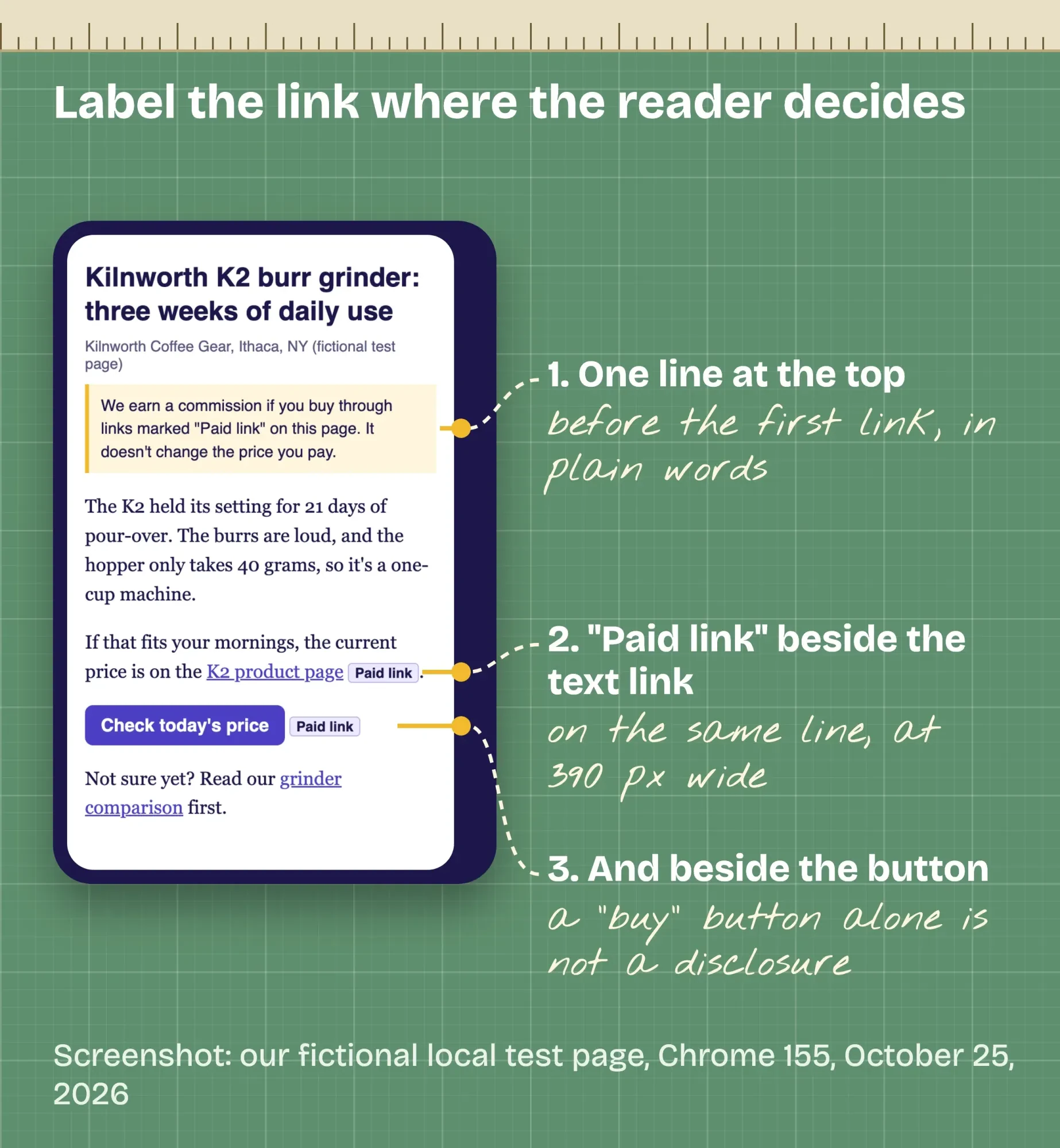 Screenshot: our fictional local test page at 390 px wide in Chrome 155, October 25, 2026, with the disclosure line and "Paid link" labels marked by DigitalTreed.
Affiliate link disclosure: put "Paid link" right next to the link
That label is the FTC's simplest answer. Its staff FAQ, the Endorsement Guides: What People Are Asking, says "'Paid link' right next to an affiliate link should be an adequate disclosure of the nature of the link."
The rule behind it sits in 16 CFR Part 255, the FTC's guides on endorsements. Section 255.5 says a connection that "might materially affect the weight or credibility of the endorsement" must be disclosed "clearly and conspicuously" when readers wouldn't expect it. Its Example 11 is a coffee-maker blogger with affiliate links, and the verdict is that the reviews should disclose the commission.
The exact words matter more than most people think.
The same FAQ says readers "might not understand that 'affiliate link' means that the person placing the link is getting paid," and a "buy now" button "would not be adequate" either. "Commissionable link" is "probably not a clear disclosure," it adds. Plain words win: "Paid link," "ad," or a sentence like "I get commissions for purchases made through links in this post."
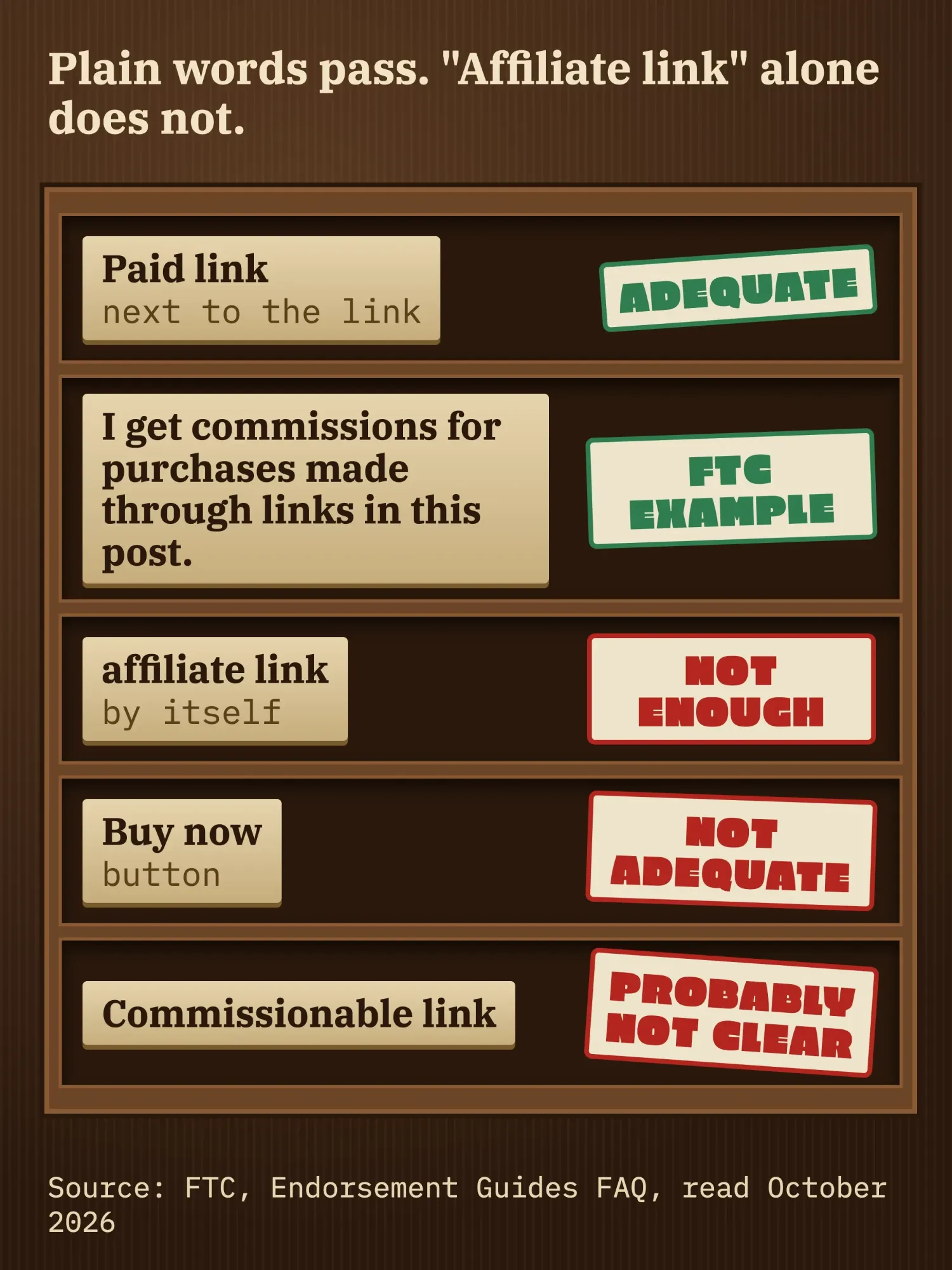 Source: FTC, Endorsement Guides FAQ, October 2026. Illustration drawn by us; the stamps sum up the FAQ's answers.
Where you put it matters just as much. A single home-page disclosure "won't be sufficient," the FAQ says, and readers "may miss a disclosure at the bottom of a blog or page" too. So use two layers: one plain line near the top of the post, before the first link, then "Paid link" beside each link and button.
Some programs ask for their own line too. Amazon's Operating Agreement (updated October 15, 2025) requires the statement "As an Amazon Associate I earn from qualifying purchases."
That's a program rule on top of the FTC's, and it doesn't replace the label at each link.
When a brand pays a flat fee instead of a commission, the same FTC rules apply; our guide to sponsored blog posts and their disclosure covers that case.
Add rel="sponsored" so Google knows it's paid
The label tells readers. rel="sponsored" tells Google. It's a small HTML attribute, and Google's page on qualifying outbound links asks you to mark "advertisements or paid placements (commonly called paid links) with the sponsored value" in your HTML. The older nofollow value still works, the page adds, but Google prefers sponsored.
<a href="https://example.com/go/k2-grinder" rel="sponsored">K2 product page</a>
<span class="paid-label">Paid link</span>
If your site builder has no setting for it, add the attribute in the HTML view of the post, as above.
Skipping it is the real risk. Google's spam policies say paid links aren't a violation "as long as they are qualified with a rel="nofollow" or rel="sponsored" attribute value."
The other SEO risk has nothing to do with the link. Google calls it thin affiliation: product text "copied directly from the original merchant without any original content or added value," in the words of its policy. The same page adds that "Not every site that participates in an affiliate program is a thin affiliate," and your own tests, photos and verdicts are what keep you on the right side.
Redirect links are fine until they hide the shop
That brings us to redirect links. A redirect link is a short address on your own site, such as /go/k2-grinder, that forwards the reader to the affiliate URL. Many bloggers call it cloaking. It's handy: when a program changes a link, you fix it in one place instead of in 40 posts.
Set it up as a temporary redirect, a 302 or 307, the types Google's redirects guide lists as temporary. Then keep search engines out of the folder. Google's outbound links page says that for links within your own site, you should "use the robots.txt disallow rule."
User-agent: *
Disallow: /go/
Here's the catch: some programs limit redirects, so you'll need to read their terms before you build one.
Amazon's Program Policies are the clearest case. Under rule (w), you "will not use a link shortening service, button, hyperlink or other ad placement in a manner that makes it unclear that you are linking to an Amazon Site," Amazon says. Rule (v) bans hiding the page that holds your links "including by use of Redirecting Links," and Amazon won't pay on a Redirecting Link that forwards a buyer with no click. With Amazon, use its own links and say "on Amazon" in the text.
Once a /go/ link is live, run it through our redirect checker to see every hop and status code. One clean 302 is the goal. Don't want to build the redirect folder and click log yourself? Our web developers can set them up; that's a paid service, so weigh the suggestion knowing we sell it.
How to use affiliate links in email, on YouTube and in your bio
Off your blog, each channel has its own rules, and the label always travels with the link.
Email first. Amazon's policies now allow Special Links in email, SMS and direct messages, "provided, that such communications are solicited (i.e., opted into by the receiving customer)." Printed material and mailings are still out. The email itself falls under CAN-SPAM too. The FTC's CAN-SPAM compliance guide says to identify the message as an ad, give your postal address, offer an opt-out and honor it "within 10 business days."
Those rules have teeth. Breaking them can cost as much as $53,088 for each email, the current figure in 16 CFR 1.98 (read October 25, 2026). The guide also says both the promoted company and the sender "may be held legally responsible."
On YouTube, the FTC asks for more than most creators expect. The FTC FAQ says to disclose an affiliate relationship "both in the videos and in the description near the links," because description-only notes are easy to miss. YouTube also has a paid promotion setting for "branded content, sponsorships, endorsements, or other commercial relationships," though that page doesn't say whether affiliate links alone count. Our guide to review videos for affiliate sales covers the script side.
In the description, put your main link and its label in the first lines. The FTC's Disclosures 101 warns that notes behind "MORE" are likely to be missed. Those top lines are what viewers read first anyway.
Instagram and TikTok captions get cut off, too. The same FTC FAQ notes that on Instagram "only the first two or three lines" show, so the disclosure goes at the start of the caption, not after a wall of hashtags. Our guide to making money on TikTok covers telling viewers when a brand paid you.
A link-in-bio page needs a "Paid link" note beside each affiliate button. If you use Linktree, our Linktree guide for business covers setup and tracking its clicks.
We clicked our own test links to see who records what
So who actually sees an affiliate click? We tested it on October 25, 2026 with two tiny websites that ran only on our own Mac. One was a fictional coffee blog with a review page and a /go/ redirect that logged every click. The other was a fictional shop whose product page printed back exactly what it received. Then we clicked the links in Google Chrome 155 and read both logs.
The redirect worked in one hop. Our curl check returned "302 Found" with the shop address and our tag.
Then came the surprises. We clicked a /go/ link carrying three UTM tags for source, medium and campaign. Our blog's log kept all three, but the shop got only the product ID and our tag. The tags stopped at our redirect, because it sends one fixed shop address and doesn't copy them over.
The shop couldn't see which post sent the reader, either. Its Referer header showed our site's address, not the page. Chrome began rolling that default out in version 85: "only the origin is sent in the Referer header of cross-origin requests," per Google’s Chrome team.
We also clicked a direct shop link with a UTM tag pasted on the end.
The shop received it, so a UTM tag on a merchant's URL feeds the merchant's analytics, not yours.
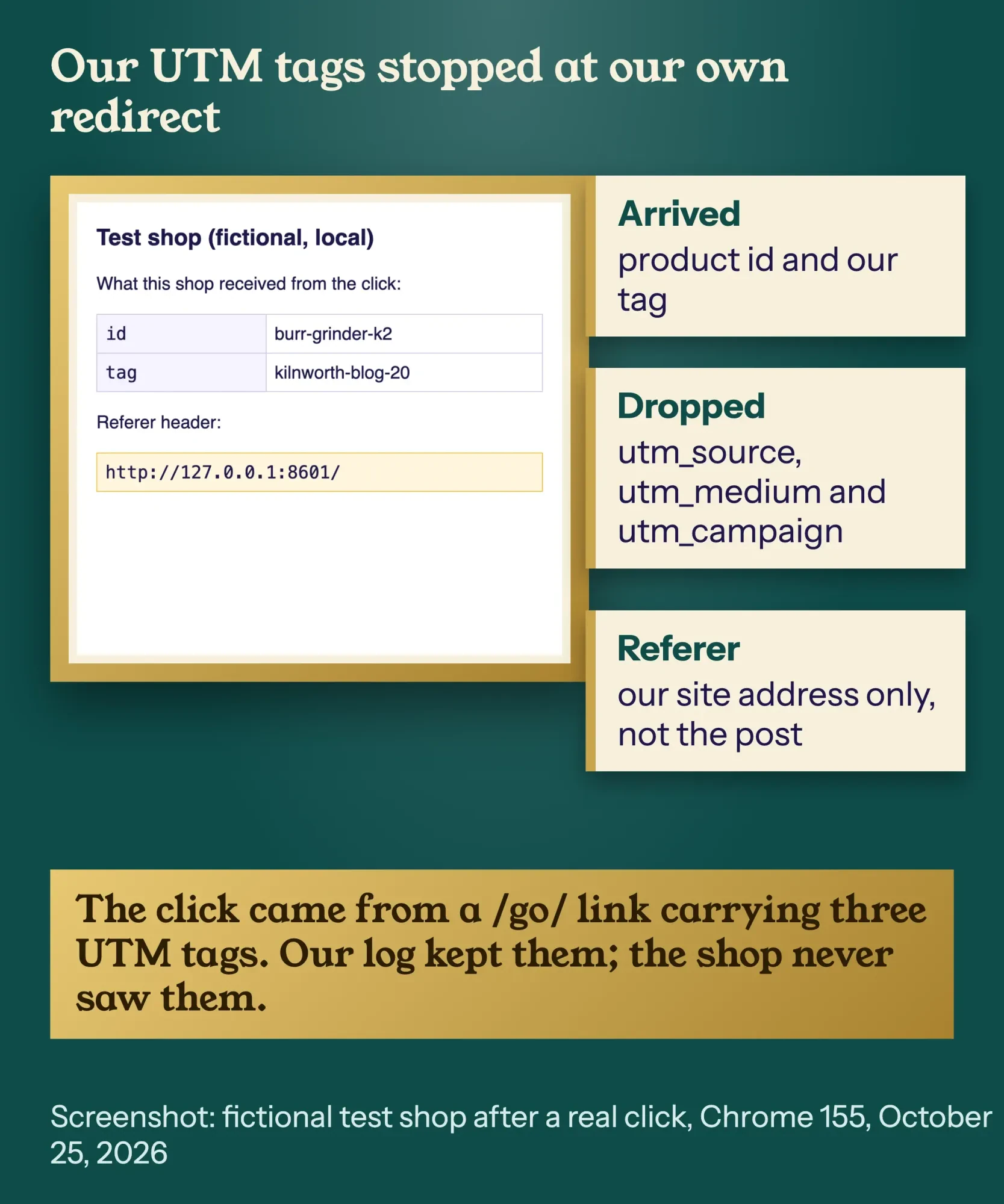 Screenshot: the fictional test shop after a real click on a /go/ link with three UTM tags, Chrome 155, October 25, 2026.
It was a small, local test: one browser, no real program and no real sale. But the logic doesn't depend on the program, and it shapes the next two sections.
Can you add UTM tags to affiliate links?
You can, but they won't report to you.
UTM tags are read by the analytics on the page where the visitor lands, and on an affiliate link, that page belongs to the shop.
Put UTM tags on the links that bring people to your own post instead. Google's Analytics help on campaign URLs says to "always use utm_source, utm_medium, and utm_campaign," and warns that values are case sensitive, so "google" and "Google" become two rows. Pick a naming plan once and stick to it.
Example: Kilnworth links its grinder review from three places. The newsletter link gets utm_source=newsletter and utm_medium=email. The YouTube description gets utm_source=youtube and utm_medium=video, and the Instagram bio gets utm_source=instagram and utm_medium=social. All three share utm_campaign=k2-review. Now GA4 shows which channel sent readers to the review.
Our UTM builder is free and keeps every value lowercase, so the case trap above can't split your reports. For two links in one email, give each a different utm_content value, the way Google's help page suggests.
Track each placement with the program's own IDs
The shop side is tracked by the program, so give the program something to tell your placements apart. Most programs let you add your own label to each link.
On Amazon, that label is a tracking ID. Amazon's help page on tracking IDs says "there is a limit of 100 Tracking IDs per associate account," and each one appears in the Tracking ID Summary Report. On eBay Partner Network, it's the Custom ID field, which "can hold up to 256 alphanumeric characters" and shows in the Performance by Custom ID report. That eBay page showed us a bot check on our final pass, so treat both eBay details as unverified and confirm them in your account.
Kilnworth uses one ID per channel (blog, email and YouTube), which is 3 of its 100.
Your own site can count clicks too. GA4's enhanced measurement logs an outbound click "each time a user clicks a link that leads away from the current domain." A /go/ link points at your own domain, so GA4 doesn't treat it as outbound. Your redirect log is the record for those clicks.
| Tool | What it records | What it misses |
|---|---|---|
| Program report, one ID per placement | Clicks and sales for each ID | Which page, unless each page or channel has its own ID |
| Your /go/ redirect log | Every click and the page it came from | Whether anyone bought |
| GA4 outbound clicks | Clicks on direct links that leave your site | Clicks on /go/ links that stay on your site |
| UTM tags on links to your post | Which channel sent readers to your post | Anything after they leave your site |
| UTM tags on the shop's URL | Nothing you can see; the shop reads them | Your own reports |
The reports where those outbound clicks and UTM sources show up are covered step by step in our free guide to GA4.
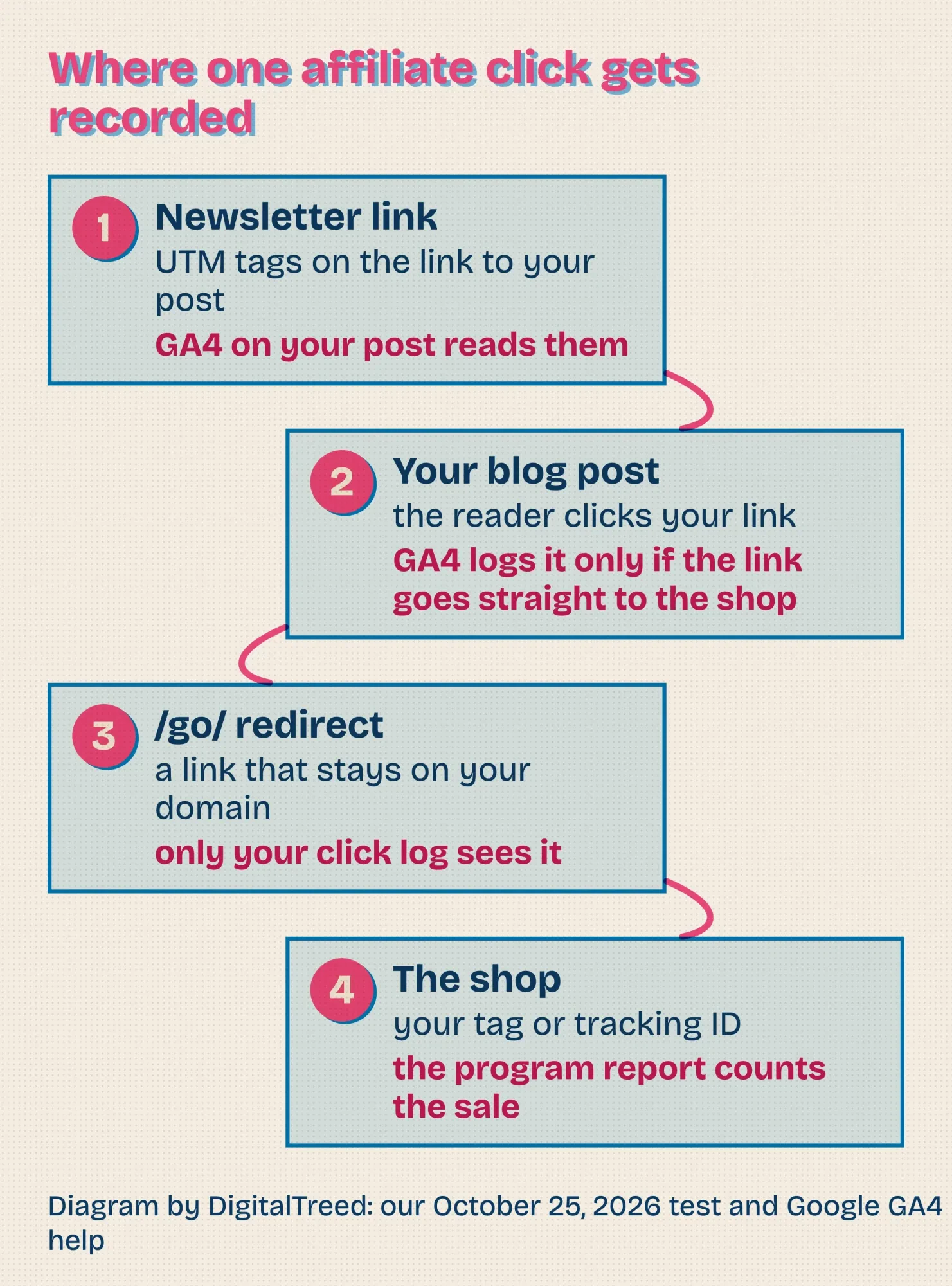 Diagram by DigitalTreed: where one affiliate click gets recorded, based on our October 25, 2026 test and Google's GA4 help.
Check your links once a month
Even a well-tracked link can break quietly.
Products go out of stock, programs change URLs, and a dead link still looks fine in your post.
Once a month, run your top posts through our broken link checker and fix anything that fails. Then compare each program report with your click log. A link that gets clicks but no sales may point to a product page that changed, or to a product your readers didn't want.
Reread the terms, too. Amazon's agreement says it can change terms "by posting a change notice," and its policies page shows its own "Updated" date. Write down the date you last read each program's terms.
Our take: the label next to the link does more for your income than any placement trick, because readers who trust you click again.
If you'd like help writing reviews that earn that trust, our content marketing team does this work. It's a paid service, so read this as a mention from an interested party.
Frequently asked
Do I have to disclose links I'm not paid for?
No. The FTC FAQ says that if you link to retailers as a convenience and aren't paid, "there isn't any connection you need to disclose." A free or discounted product is different: 16 CFR 255.5 counts it as a material connection.
Is #ad better than writing "Ad"?
No. The FTC says "There is nothing special about hashtags from a disclosure perspective." Disclosures 101 adds a warning: "Don't mix your disclosure into a group of hashtags or links."
Do the rules apply to my links on other sites and on X?
Yes. The same FTC FAQ says "The same guidance applies anytime you endorse a product and get paid through affiliate links," including reviews on someone else's site and in tweets.
We're marketers, not lawyers, so treat the FTC and program sections as our plain-English reading of those pages on October 25, 2026. If affiliate income pays real bills, have a US advertising lawyer look over your disclosures and your program's current terms.
How we made this guide: On October 25, 2026, the DigitalTreed team matched every quote, dollar figure and program limit in this post to the page it came from. Our reading covered 16 CFR Part 255 on eCFR, plus the FTC's FAQ on endorsements and Disclosures 101. We also read Google's pages on paid links, spam, reviews, redirects and GA4, plus the public Amazon Associates and eBay Partner Network pages. Only the eBay page blocked our final re-check, so its details are marked unverified. We built the test blog and shop ourselves and clicked them in Chrome 155 on a Mac in India; no real program account was used. You'll find each source linked right where we use it.
First published July 2023. Rewritten October 25, 2026: the 2023 version was 15 one-line tips without a single source. New: FTC wording and placement for disclosures, rel="sponsored", redirect rules from Amazon's policies, email and YouTube rules, and our local test of what UTM tags and redirects really pass on.
Sources
- eCFR: 16 CFR Part 255, Guides Concerning the Use of Endorsements and Testimonials in Advertising
- eCFR: 16 CFR 255.5, Disclosure of material connections
- FTC: FTC's Endorsement Guides: What People Are Asking
- FTC: Disclosures 101 for Social Media Influencers (November 2019)
- FTC: CAN-SPAM Act, A Compliance Guide for Business
- eCFR: 16 CFR 1.98, Adjustment of civil monetary penalty amounts
- Google Search Central: Qualify your outbound links to Google
- Google Search Central: Spam policies for Google web search
- Google Search Central: Write high quality reviews
- Google Search Central: Redirects and Google Search
- Google Analytics Help: Collect campaign data with custom URLs
- Google Analytics Help: Enhanced measurement events
- YouTube Help: Add branded content restrictions and disclosure labels
- Chrome for Developers: A new default Referrer-Policy for Chrome
- Amazon Associates: Program Operating Agreement (updated October 15, 2025)
- Amazon Associates: Program Policies (updated April 14, 2026)
- Amazon Associates Help: How do I request multiple tracking IDs?
- eBay Partner Network: Optimizing using tracking parameters
Comments
No comments yet. Start the conversation below.