
Quick answer
As of October 29, 2026, GA4 files a session as Unassigned when it matches none of the 19 manual-traffic channel rules on Google's help page. Usually the utm_medium is missing or isn't a value those rules know, and sessions with no session_start event land there too. Start by adding Session source / medium next to the Unassigned row.
If you've opened Traffic acquisition and found a row called Unassigned among your channels, this is for you. GA4 unassigned traffic is the share of sessions GA4 couldn't place in any channel. Unassigned is the value GA4 gives a session when no other channel rule matches its data, according to Google's default channel group page. Those visits still count toward your totals, but they can't tell you which newsletter, ad, partner post or printed flyer actually sent the person to your site.
First comes what Unassigned means and its two routes in: tagged links the rules can't read, and sessions GA4 never got a source for. After that you'll track down the rows in your reports, see our Lantern Bay test of 21 example rows, and get a UTM naming sheet. It ends with how to re-sort past sessions with a custom channel group and how to tell the fix is working. Our view: fix the naming first, because every new link adds to the pile.
Key takeaways
- An unknown utm_medium caused 7 of our 9 example Unassigned rows.
- In our example run, 9 of 21 rows landed in Unassigned.
- Google's example medium organic_search doesn't meet the Organic Search rule alone.
- Capital letters keep the channel but split the source / medium row.
- Custom channel groups re-sort past sessions; the default group can't be edited.
Unassigned means no channel rule matched the session
GA4 doesn't guess where a session belongs. It checks the session's source, medium and campaign against fixed rules.
Google's page lists 19 rules for manually tagged traffic, from Direct down to Mobile Push Notifications, and separate ones for Google Ads and its other ad platforms. Most of them lean on the medium. Email wants a medium of email, e-mail, e_mail or e mail. Referral wants referral, app or link, and Affiliates wants exactly affiliate. Organic Search takes a source on Google's list of search sites, or a medium that exactly matches organic. A few rules also accept a known source, so a link from facebook can still reach a social channel when its medium is odd. Those site lists sit in a spreadsheet linked from the page. If nothing fits, it's Unassigned.
Two other labels get mixed up with it. Google's help page on (not set) calls (not set) a placeholder for a dimension that got no value, and it shows up inside Session source / medium. Direct is a real channel with its own rule, which needs the source (direct) together with a medium of (none) or (not set), so it isn't a catch-all. Unassigned sits a level above both, at the channel. When (not set) shows up beside an Unassigned row, that pair already hints at the cause. Google also says channel definitions aren't case sensitive and can't be edited. That second point decides how you fix old data, which comes near the end.
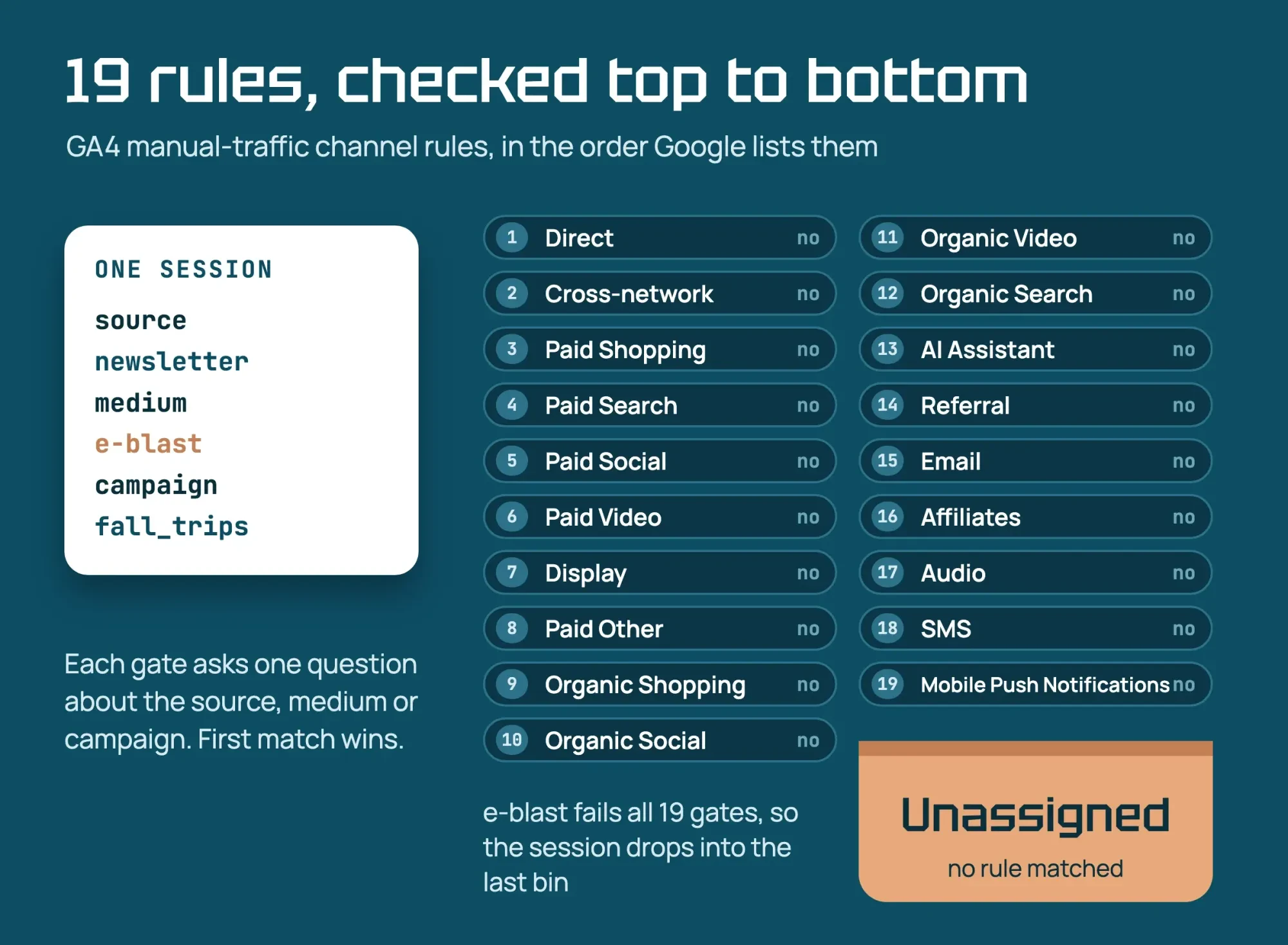 Diagram by DigitalTreed, drawn from the Google Analytics default channel group page read October 29, 2026
Why do tagged links land in Unassigned?
So which sessions match nothing? Tagged links, mostly, and it's rarely because the tags are missing entirely. Google's URL builder page says to always set the source, medium and campaign tags, and it warns that missing UTM parameters produce (not set) values.
A newsletter link with a source and a campaign but no medium arrives with a medium of (not set). The source newsletter isn't on Google's search, social, video or shopping lists either, so not one of the 19 rules has anything to catch it with.
Then there's the medium the rules don't know. Seven of our 21 example rows hit this, more than every other cause put together. Values like e-blast, emails, social_media, guest_post, qr and affiliates look sensible, and not one of them matches. The Organic Social rule accepts social-media with a hyphen and social media with a space, yet it rejects social_media joined by _, and Affiliates wants affiliate in the singular. One wrong character is enough. Each has a listed twin: email for e-blast and emails, social for social_media, referral for guest_post and affiliate for affiliates. Google's own advice has a catch here too, since its UTM best-practice table suggests mediums like paid_social and organic_search.
The first of those works, since the paid rules take anything starting with paid, but the second doesn't, because Organic Search wants a medium that exactly matches organic. A Business Profile button tagged organic_search only reaches Organic Search if its source is on Google's search list.
Chapter 5 of our GA4 guide tags that button with utm_medium=organic, which the Organic Search rule matches exactly.
Capital letters behave differently. A link tagged utm_medium=Email still reaches Email, because Google calls channel definitions case insensitive. Google's URL builder guidance, though, treats parameter values as case sensitive, so newsletter / Email and newsletter / email become two source / medium rows. Rows 1 and 2 of our test show it: one channel, two report rows.
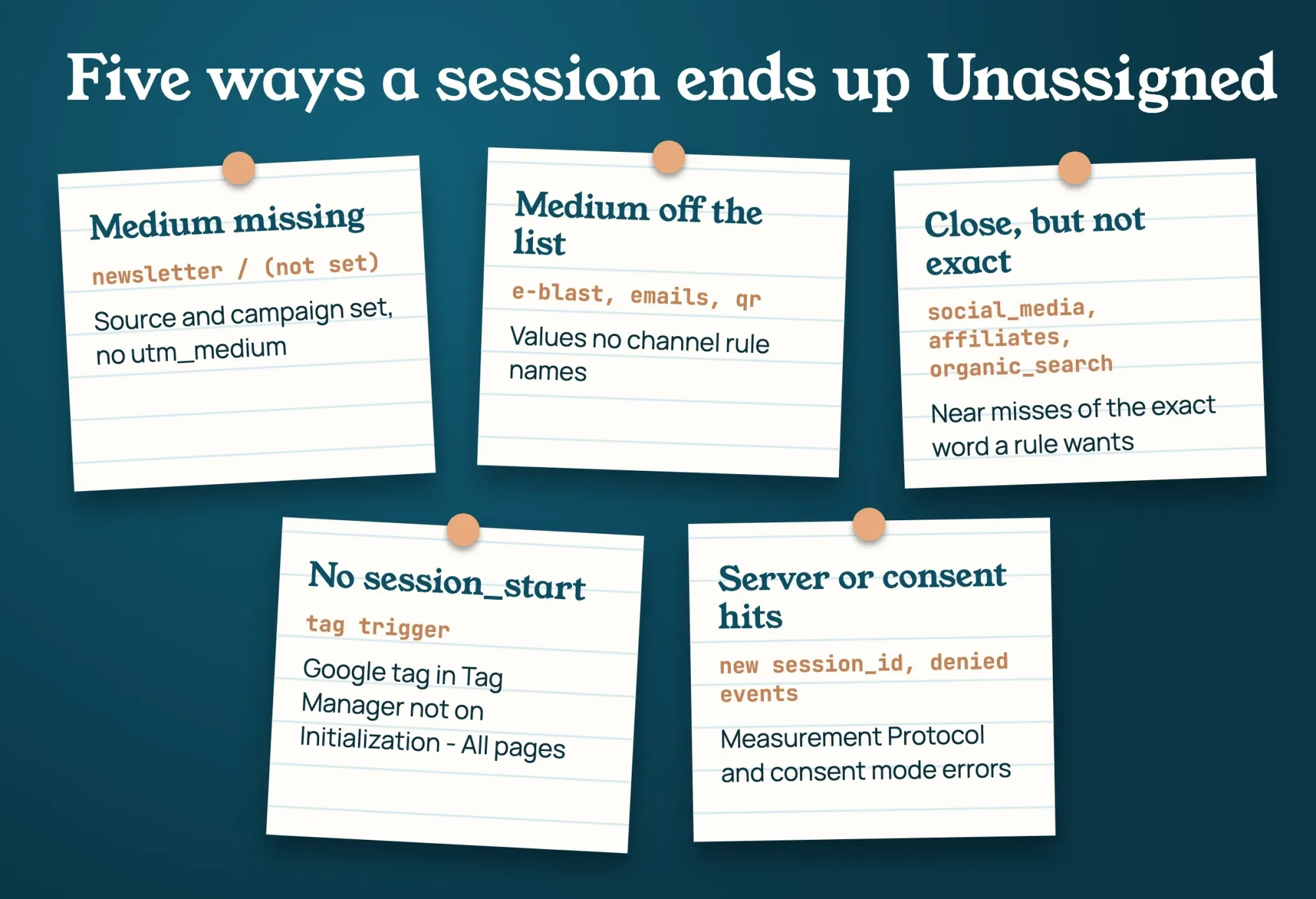 Drawn by us: causes from Google Analytics help pages on channels, UTM builders and (not set), read October 29, 2026
Sessions GA4 never got a source for
Some Unassigned sessions don't have a bad tag at all; GA4 just never learned where they came from. Google's page on sessions says the session_start event carries the attribution: the gclid, the UTM parameters and the referrer. The (not set) page then says Session source / medium reads (not set) when session_start is missing, and that such traffic shows as Unassigned. It names one cause outright: a Google tag in Tag Manager whose trigger isn't Initialization - All pages, fixed by swapping in that trigger and removing the old one.
Server-side hits are the next suspect. When a booking system, CRM or checkout sends events to GA4 from a server, it uses the Measurement Protocol. Google says that protocol is meant to add to events from the Google tag, and that sending only through it gives "only partial reporting." The sessions page adds that the session ID isn't included automatically in Measurement Protocol events. Google's sending guide says a new session_id starts a new session without a session_start event. So a server event that opens its own session has nothing to attribute it to. That's our reading of three pages, not Google's words, and the fix is passing the browser's session_id along.
The protocol overview wants session_id within 24 hours of the session start if the event should carry the device and location data of the visit it belongs to. Events meant to join browser events should arrive within 48 hours, the sending guide adds.
Consent mode can lose session_start too. The (not set) page lists two set-up errors. One is using the default command to record the choice a visitor makes on your banner, when Google says the update command is the one to use there. The other is sending extra events marked denied after the visitor said yes, which GA4 treats as a separate session. Google's consent mode page covers the basic and advanced set-ups.
Chapter 3 of our GA4 guide explains both set-ups. Here, only those two errors matter, since they're the ones that cause Unassigned.
Last, look at places where a visit crosses sites. Google's cross-domain page says a visitor who moves between two root domains without cross-domain measurement counts as two users and two sessions. The page warns, too, that self-referrals can appear and may mean traffic is attributed incorrectly. They'll show up as referrals, not Unassigned, but they come from the same kind of gap.
A payment processor causes the same break, and the unwanted referrals setting takes up to 50 domains per web stream. Fix those in the same pass as your tags.
Track down the Unassigned rows in your reports
In GA4's Traffic acquisition report, Session default channel group is the default dimension. Add Session source / medium as a secondary dimension, then type Unassigned into the search bar above the table so only the unsorted pairs stay on screen.
Each pair that comes back is a clue. A pair like newsletter / (not set) means a missing medium, and newsletter / e-blast means a medium off the list.
A (not set) / (not set) pair sends you back to the tag trigger, the server events or consent mode. Explorations go further. Build a free-form one. Google's Explorations guide describes it as a crosstab you fill from the Variables panel, with filters. Put Session default channel group, Session source / medium and Session campaign in the rows, filter the channel to Unassigned, and add Landing page. The (not set) page says Landing page reads (not set) when a session had no page_view, which hints at a server or consent problem. Compare those sessions' landing pages with your checkout or booking pages first. If you report through Looker Studio, our GA4 dashboard guide shows where the same dimensions sit there.
Lantern Bay test: 21 example rows through the channel rules
We wrote a small test to watch those rules run. Lantern Bay Kayaks is a made-up kayak rental, and every link in it is an example we wrote. We didn't touch a GA4 property, and we didn't see any real reports.
What we tested: one script, 21 rows
A Python script we wrote ran on one Mac on October 29, 2026, reading 19 example campaign links and 2 example session rows. It sorted each with the 19 manual-traffic rules in the order Google lists them, first match wins, ignoring case. Google's search, social, video and shopping site lists come as a spreadsheet we didn't download, so the script used short stand-in lists of our own instead.
What the 21 example rows showed
That run put nine of the 21 example rows in Unassigned. Row 5 was a newsletter link with no medium. Row 20 was a (not set) / (not set) session, written the way Google describes one with no session_start. The other seven had a medium no rule knows: e-blast, emails, organic_search, social_media, guest_post, qr and affiliates. The remaining 12 rows found a channel.
Rows 1 and 2 went to Email, but their mediums differed only by a capital E, so they made two separate source / medium rows in the report. Row 6 reached Email with no medium at all, because its source was literally email. Rows 12 and 14 went to Organic Social, one through its instagram source and one through the medium social. Rows 8, 10 and 16 reached Organic Search, Paid Social and Referral as tagged. Row 19 reached SMS through its source, even though its medium was text. Row 11 went to Paid Other because meta_ads isn't on our stand-in social list, though Google's full list might know it, and row 21 was Direct.
Row 7 needs a closer look. It was a normal newsletter link with medium email, but its campaign was gift_shop_sale. Google's Organic Shopping rule matches campaign names that contain shop, and that rule sits above Email in the list. Under first-match order, the link landed in Organic Shopping. Google's custom channel group page describes first-match order for custom groups; applying it to the default group is our reading.
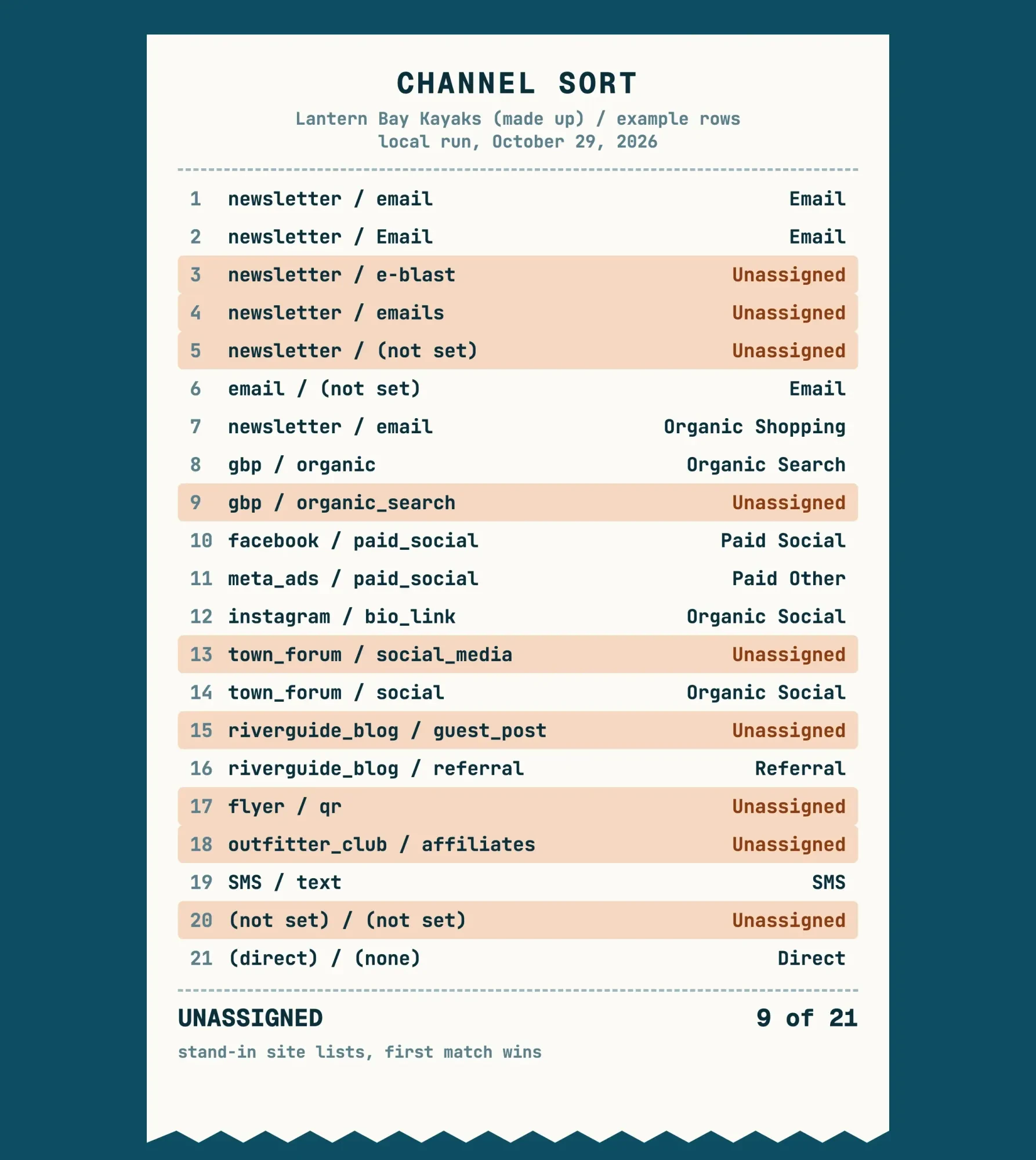 Source: our October 29, 2026 local script run; 19 example links and 2 example session rows for a made-up business, stand-in site lists
A UTM naming sheet that maps to channels
The test points at a plain fix for new links: pick mediums from the rules, not from habit. This sheet covers the channels a small business tags most, with medium values copied from Google's rules. Copy the words exactly. Every value is lowercase, so case never splits a row.
| Channel you want | utm_medium to use | Example utm_source | Values that miss |
|---|---|---|---|
| newsletter | e-blast, emails, newsletter | ||
| Organic Social | social | facebook, instagram | social_media, post |
| Paid Social | paid_social or cpc | facebook (a listed social site) | boosted, ads |
| Organic Search (Business Profile button) | organic | gbp | organic_search, local |
| Referral | referral | partner_blog | guest_post, partner |
| Affiliates | affiliate | the partner name | affiliates, aff |
| SMS | sms | sms | text, txt |
| Display | display or banner | the ad network | image_ad |
The misses assume the source isn't on one of Google's site lists. Paid Social needs both halves: a medium that starts with paid, contains cp, or is ppc or retargeting, plus a source on Google's social list. A text-message link can carry sms as either the source or the medium, since Google's SMS rule accepts both. Print is the odd one out. It has no channel of its own, so a flyer QR code tagged qr or print stays Unassigned until a custom group gives it a channel. The DigitalTreed UTM builder, free to use, keeps values lowercase and shows which GA4 channel each link will reach before you print or send it.
Keep the sheet wherever links get made. Newsletter links were the largest group in our Unassigned examples, 3 of 9, so pin it to the links step of our email campaign checklist. Partners often add their own tags, and our affiliate link tracking guide shows what each program records. For a team posting on several networks, our social media planning guide keeps the tags consistent.
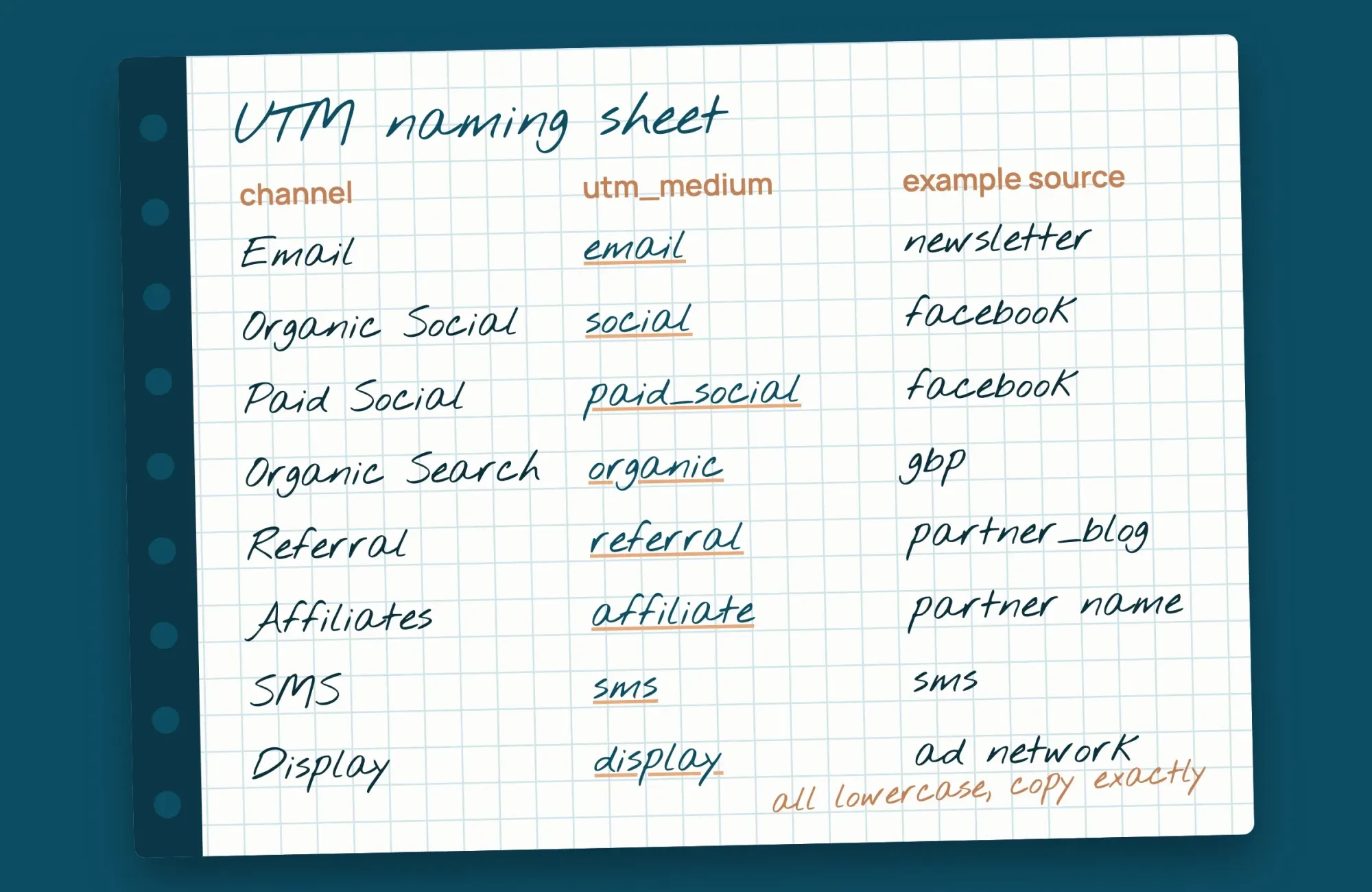 Drawn by us: the naming sheet in this guide, values from the Google Analytics default channel group rules
Re-sort past sessions with a custom channel group
New naming only fixes new sessions, so the old Unassigned rows need another tool. You can't edit the default group. Google's custom channel groups page, though, says custom groups apply to your reports retroactively. A standard property can hold 2 custom groups with 50 channels each.
Start with Create new channel group, which copies the default group. Name it plainly, such as Cleaned channels, so nobody mistakes it for the default. Google's page walks through the same steps with a worked example for a social campaign. Then widen the channels you already use: add e-blast and emails to Email, add social_media to Organic Social, and create a Print channel for medium qr. Order matters here, because Google's page says traffic goes to the first channel whose definition it matches, in the order the channels sit in the group. Move Print and your edited channels above anything that could catch them first, such as Organic Shopping for campaign names with shop in them.
Then pick the new group as the primary dimension in Traffic acquisition and compare it with the default. If e-blast, emails and qr now sit under Email and Print in that view, the old data is sorted, and you can stop reading those rows as lost. You can also make it the primary channel group in Admin, but it won't rewrite the past. Google says that change only fills data from then on, so keep the custom group itself for any report that looks back before the switch.
Want the tags audited and the group built for you? That's paid work we sell, so this is advice and a pitch at once: request a quote if it helps.
How do you know the fix is working?
Now watch new sessions, not totals. Pick the date your naming sheet went live, then compare Unassigned sessions over the same number of days before and after it, using the exploration you built earlier. If the cause was tagging, links built from the sheet shouldn't add to it.
Expect a tail, though. Google's page on traffic-source scopes says sessions started by direct entrance take that user's earlier UTM values. Someone who first came through a badly tagged link can keep showing up under it for a while.
A row that keeps growing after the change is most often a server, consent or tag-trigger problem. Our website analytics tools guide has a monthly check list, so add the Unassigned share to it.
Some rows won't ever fully clear. A forwarded link with its medium stripped, or a partner who ignores your sheet, keeps sending a trickle. What you're aiming for is an Unassigned row small enough that no budget or campaign decision rests on it, and a naming sheet everyone actually uses.
FAQ about GA4 Unassigned traffic
Frequently asked
Is Unassigned the same as (not set) in GA4?
No. Unassigned is a channel, while (not set) is a placeholder inside a dimension. Google's (not set) page also names "(data not available)" as a related value you typically can't reduce.
Does traffic from ChatGPT show up as Unassigned?
Usually not, since GA4 gives AI assistants their own channel, as chapter 5 of our GA4 guide explains. In a custom channel group, though, Google's custom channel groups page says to place AI Assistants above Referral.
Does clicking a second tagged link start a new session?
No. Google's campaigns and traffic sources page says each session has only one campaign or source. A new campaign mid-session doesn't start a new session.
Can I get my traffic source added to Google's site lists?
Yes, you can ask. Google's default channel group page, linked above, gives an email address for requests. It says Google reviews them at least once per year.
How we made this guide: Fourteen Google pages back this guide, 12 from Analytics Help and 2 on the Measurement Protocol, each read on October 29, 2026. The Lantern Bay script sorted 21 example rows for a made-up business with a local script, using no GA4 property and no account. Facts checked by the DigitalTreed team on October 29, 2026.
First published July 2020 as a Google Analytics tutorial for beginners. Rewritten October 29, 2026 to cover one GA4 problem, Unassigned traffic, while set-up now lives in our GA4 guide.
Sources
- Google Analytics Help: Default channel group
- Google Analytics Help: URL builders, collect campaign data with custom URLs
- Google Analytics Help: What the value (not set) means in your reports
- Google Analytics Help: About Analytics sessions
- Google Analytics Help: Campaigns and traffic sources
- Google Analytics Help: Scopes of traffic-source dimensions
- Google Analytics Help: Consent mode on websites and mobile apps
- Google Analytics Help: Set up cross-domain measurement
- Google Analytics Help: Identify unwanted referrals
- Google Analytics Help: Custom channel groups
- Google Analytics Help: Get started with Explorations
- Google Analytics Help: Traffic acquisition report
- Google for Developers: Measurement Protocol
- Google for Developers: Send Measurement Protocol events

Comments
No comments yet. Start the conversation below.