
Quick answer
Website analytics tools count your visitors, show where they came from and what they did. Most US small businesses need only 2 free tools. Google Search Console covers searches before the click, and Google Analytics 4 covers visits and leads after it. Add Microsoft Clarity for heatmaps, or a paid cookieless tool for privacy.
Most "best website analytics tools" lists rank 9 to 35 products. You don't need that many. Google Analytics alone runs on 46.9% of all websites, per W3Techs usage data from October 22, 2026.
This guide sorts the tools by the job you need done. On October 22, 2026, we also measured how much code each tracking script adds to your pages.
Key takeaways
- Start with 2 free tools: Search Console (before the click) and GA4 (after the click).
- Mark your lead actions as key events on day one. GA4 does not add them to older data.
- Tag every link you share with lowercase UTM values, or GA4 can't tell your posts and emails apart.
- In our test, the Google tag for a public site was 131 times the size of Plausible's script.
- There is no single US cookie-banner law. Your tool's terms, the FTC and state laws like the CCPA set the rules.
What do website analytics tools measure?
A website analytics tool is software that records visits to your site and reports where each visit came from and what happened next.
Website analytics tools measure 4 things: how many people visit, where they came from, which pages they view, and which actions they take. The actions matter most to a business, such as a form sent or a phone tap.
Many sites measure nothing. W3Techs found that 42.9% of websites use none of the traffic tools it tracks. Microsoft Clarity was on 4.2% of sites and Plausible on 0.2%.
Website analytics tools: key facts
- An engaged session lasts longer than 10 seconds, has a key event, or has 2 or more page views, per Google Analytics Help.
- A standard GA4 property keeps user-level and event data for 2 or 14 months, per Google's data retention page.
- You can mark up to 30 key events on a standard GA4 property, per Google's key events page.
- Search Console keeps 16 months of data, and linked data reaches GA4 48 hours after collection, per Google's Search Console linking page.
- Microsoft Clarity is free with no traffic limits and keeps most recordings for 30 days, per the Clarity FAQ.
- In GA4, IP addresses "are not logged or stored," per Google's IP masking page.
What types of website analytics tools are there?
There are 6 main types, and in our view most small sites need only the first 3. Each type answers a different question, so one tool rarely covers them all.
| Type | What it shows | Example |
|---|---|---|
| Search analytics | Searches that show your site, before the click | Google Search Console (free) |
| Traffic analytics | Visits, sources and leads on your site | Google Analytics 4 (free) |
| Behavior analytics | Clicks, scrolls and session recordings | Microsoft Clarity (free) |
| Privacy-first analytics | Visit counts with a privacy-first design | Plausible, Fathom, Cloudflare Web Analytics |
| Product analytics | Funnels, retention and user paths inside an app | Mixpanel |
| Competitor estimates | Modeled traffic for other people's sites | Similarweb |
Check your website builder first, too. Shopify's help center, for example, says its main analytics features are available on any Shopify plan.
Product analytics fits apps and software more than a service website. Mixpanel's pricing page lists funnels, retention and flows reports. Its free plan covers up to 1 million events a month, as of October 2026 (vendor data).
Can you check another website's traffic?
Only as an estimate, because only the site's owner sees its real visits. Similarweb's methodology page says it builds its numbers with machine learning and "predictive models."
Its inputs include sites that share their own analytics and anonymous device data from consumer products. Treat these figures as a rough range for comparing sites, not as a count.
Which free website analytics tool fits which job?
Our take: most small businesses can answer the key questions with free tools: Search Console for searches, GA4 for visits and leads, and Clarity for clicks. Paying makes sense for cookieless counts or a longer data history. Each row below names a free starting point.
| Your question | Free tool | When to pay |
|---|---|---|
| Which Google searches show my site? | Google Search Console | Never for this job |
| How many visits, from where, and which became leads? | Google Analytics 4 | Google Analytics 360, only at very large scale |
| Which post, email or ad sent the visitor? | GA4 plus UTM tags | Never for this job |
| Where do visitors click, scroll or get stuck? | Microsoft Clarity | Hotjar (Contentsquare) Growth, for longer data access |
| Simple counts with no cookies? | None | Plausible or Fathom |
| Keep all data on my own server? | Matomo On-Premise | Matomo Cloud, if you don't want to run a server |
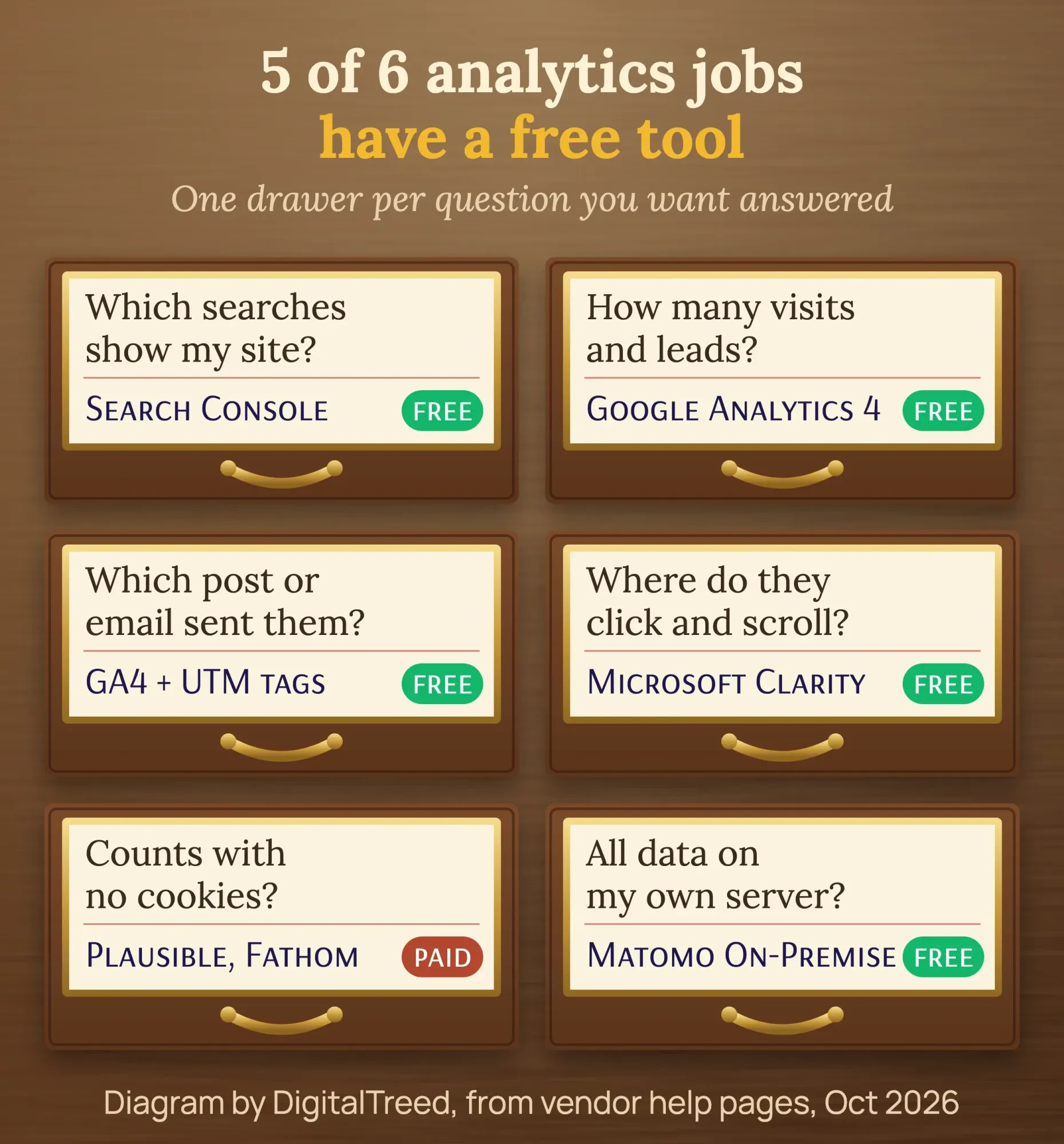 Diagram by DigitalTreed, from Google, Microsoft and vendor help pages, October 2026.
GA4 is free. Google's Analytics terms of service say the service is "provided without charge" for GA4 properties. The paid version, Google Analytics 360, raises limits such as data retention to "Up to 50 months."
Do you need Search Console or GA4?
You need both, because they answer different questions. Google explains that Search Console shows how your site performs in Google Search, such as impressions, clicks and search terms. GA4 shows what visitors do on your site.
So Search Console covers the moment before the click. GA4 covers everything after it, from every source, not only Google.
Don't expect the numbers to match. The same Google page warns that the data "won't match completely," and Search Console data can be "delayed by a couple of days." For setup and the Performance report, see our guide to SEO analysis tools.
Link the 2 tools, so GA4 shows your Google search queries next to what visitors did. Google's linking guide starts in GA4 Admin, under Product links, with Search Console Links.
You need the Editor role in GA4 and verified ownership in Search Console. The 2 linked reports are unpublished at first, so publish the Search Console collection from the Library. For every report inside Search Console, read our Google Search Console guide.
How do you set up GA4 the right way?
Google's GA4 setup guide has 4 parts: create an account, create a property, add a data stream and set up data collection. These are the steps that matter most for a small business.
Set up GA4 for a small-business website
- Create the account and property Name the property after your business. Pick your US time zone and USD as the currency.
- Add a web data stream Enter your site address. Install the Google tag it gives you, or use your website platform's Google Analytics setting.
- Set data retention to 14 months In the property column, open Data Settings, then Data Retention, and choose 14 months.
- Mark your key events In Admin, under Data display, open Events and click the star next to each lead action, such as a form sent.
- Link Search Console In Admin, under Product links, click Search Console Links, then Link. Choose your Search Console property and your web data stream.
- Update your privacy policy Say that you use Google Analytics and cookies, and link to Google's page on how it uses data from partner sites.
Retention matters more than it looks. Google says the retention setting affects explorations and funnel reports, not standard reports. The options for standard properties are 2 months or 14 months.
Key events are your leads. Google lets you mark up to 30 events as key events on a standard property. Marking one "doesn't change historic data," so do it on day one.
Phone taps and form sends often need a tag set up first. Our Google Tag Manager guide shows how to track them. Our web development team can set up the tags, key events and privacy policy for you (DigitalTreed sells this service).
Which website metrics should you track?
Track 6 numbers: users, sessions, engagement rate, bounce rate, key events and the source of each visit. Together they show who came, from where, and whether the visit became a lead. Google defines a session as "a period during which a user is engaged" with your site.
| Metric | What it tells you | Why it matters |
|---|---|---|
| Users | How many people visited | Shows your reach |
| Sessions | How many visits they made | One person can visit many times |
| Engagement rate | Share of sessions that were engaged | Low rates point to weak pages or channels |
| Bounce rate | Share of sessions that were not engaged | The opposite of engagement rate in GA4 |
| Key events | Lead actions, such as a form sent | Your real business result |
| Session source / medium | Where each visit came from | Shows which channel brings leads |
In GA4, an engaged session lasts longer than 10 seconds, has a key event, or has 2 or more page views. Google calls bounce rate the opposite of engagement rate. So a high bounce rate means few engaged visits, not only one-page visits.
GA4 leaves engagement rate and bounce rate out of most reports at first. To add them, open a detail report such as Pages and screens, click Customize report, then add both metrics.
To turn these numbers into monthly goals, see the measuring section of our intermediate SEO guide on GA4 and KPIs.
How do you see which post or email sent a visitor?
Add UTM tags to every link you share. Google's UTM rules say you "should always use utm_source, utm_medium, and utm_campaign." Values are case sensitive. So "Facebook" and "facebook" show up as 2 different sources.
Build your links with our free UTM builder. It keeps values lowercase and tells you which GA4 channel the visit will land in. We tested it with the fictional bakery link below.
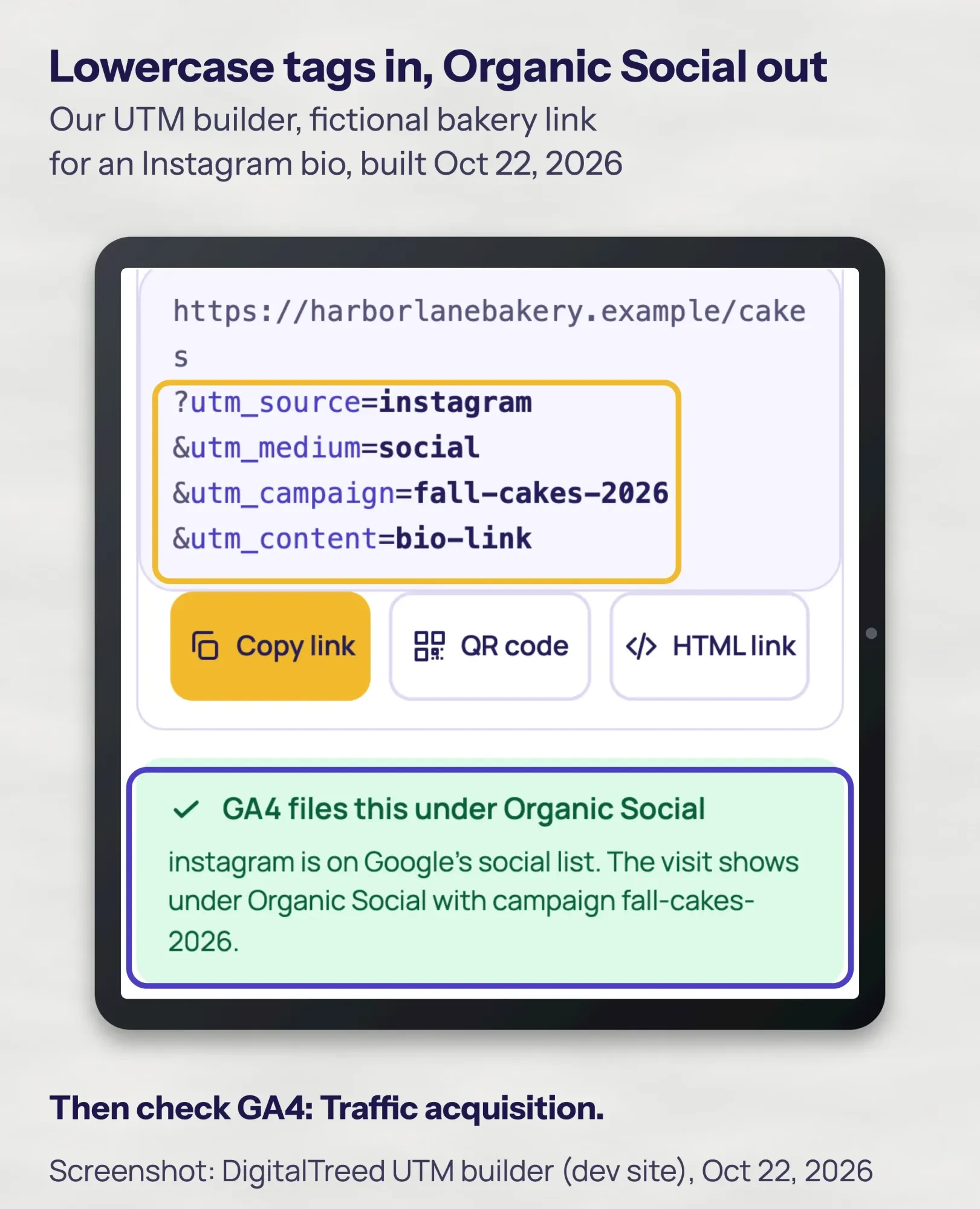 Screenshot: DigitalTreed UTM builder on our dev site, fictional bakery link, October 22, 2026.
Then look in GA4 under Acquisition, then Traffic acquisition. Google says links with missing UTM values show "(not set)" there, which hides where your visits came from. UTM tags on a shop's URL report to the shop, not to you, as our affiliate link tracking test showed.
Social posts are where most small businesses lose track. Our social media strategy guide shows how to plan posts you can measure. Our post on the best time to post on Facebook uses the same tags.
Which tools show heatmaps and session recordings?
Microsoft Clarity is the free pick. Its FAQ says "Clarity is 100% free - forever," with no traffic limits. It keeps recordings for 30 days, except favorites and a random sample, which it keeps up to 9 months.
Hotjar is now sold under the Contentsquare name. Its pricing page lists a free plan with 1 month of data access. Growth costs $39 a month billed yearly, or $468 a year, as of October 2026 (vendor data).
Recordings can capture what people type. Keep form fields masked, and never record pages with health or payment details.
What do privacy-first Google Analytics alternatives cost?
Privacy-first Google Analytics alternatives start at $9 a month for Plausible and $15 for Fathom, as of October 2026. Cloudflare Web Analytics is free. Plausible and Fathom count visits without cookies and don't feed ad networks. These are vendor prices in USD.
| Tool | Lowest paid plan | Free option |
|---|---|---|
| Plausible | $9 a month billed monthly, up to 10,000 monthly pageviews, 1 site | 30-day trial, no card |
| Fathom | $15 a month, up to 100,000 monthly pageviews, 50 sites | 7-day trial, card required |
| Matomo | Cloud: monthly price by traffic, shown in your local currency | On-Premise software is free if you host it |
| Cloudflare Web Analytics | No paid plan | Free with a Cloudflare account |
| Microsoft Clarity | No paid plan | Free |
| Hotjar (Contentsquare) | $39 a month billed yearly (Growth) | Free plan |
As of October 2026, Plausible's pricing shows $90 a year for the same plan on yearly billing. Fathom's pricing page says prices "are in USD and renew automatically unless cancelled."
Matomo's pricing page prices Cloud by monthly hits, with a free trial. The currency it shows depends on where you are, so check the price in your own browser.
Cloudflare Web Analytics is the free pick in this group. Cloudflare's docs call it "free, privacy-first analytics" that works "without changing your DNS." It "does not collect or use your visitors' personal data."
You need a Cloudflare account and a small script on each page. Its FAQ sets a soft limit of 10 sites per account.
Our take: pay for one of these only if you want to drop GA4, or if your privacy policy promises no tracking cookies.
Does analytics slow down your site?
Yes, a little: every analytics tool adds a script that each visitor downloads, and the size differs a lot by tool. In our October 22, 2026 test, the Google tag sent 168,352 bytes and Plausible sent 1,283 bytes.
Our test: how much code each analytics script adds
On October 22, 2026, at 17:44 UTC, we downloaded each public tracking script once with curl 7.53.1 on macOS. We used a Chrome user agent, no account and no cookies, and counted the bytes sent with gzip compression.
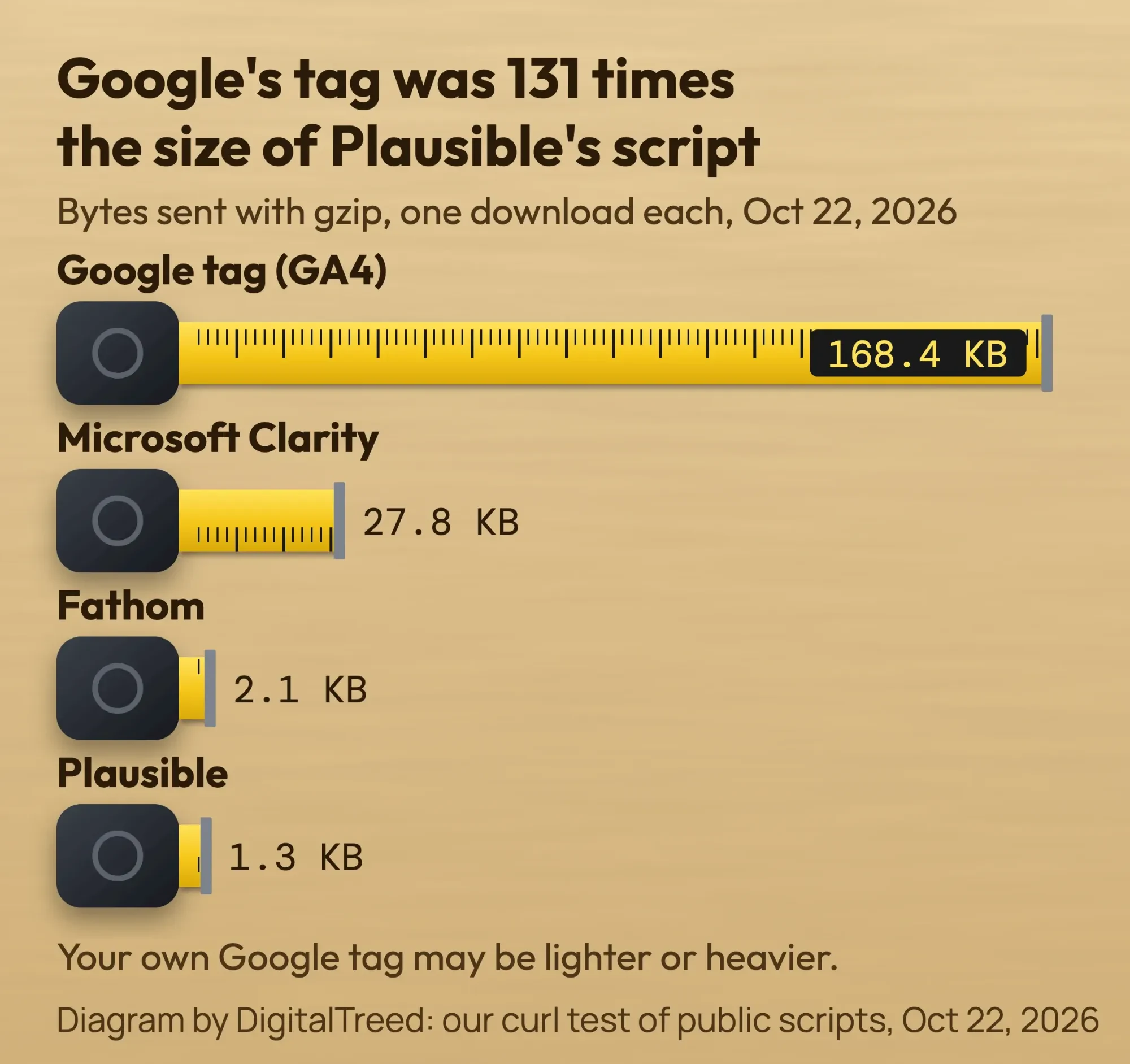 Diagram by DigitalTreed: our curl test of public scripts, October 22, 2026.
- Google tag (gtag.js) for the GA4 ID on weather.gov: 168,352 bytes (487,944 uncompressed).
- Microsoft Clarity, loader plus main script, from a public site's tag: 27,776 bytes.
- Fathom: 2,090 bytes.
- Plausible: 1,283 bytes.
So the Google tag was 131 times the size of Plausible's script in our test. The Google tag's size depends on each property's settings, so your own tag may be lighter or heavier.
Whether that slows your pages depends on the rest of the site. Check yours with our free website speed test before and after you add a tool.
Do you need a cookie banner in the US?
There is no single US cookie-banner law like the EU's. What you must do comes from 3 places: your tool's contract, the FTC and state privacy laws.
First, the contract. GA's terms say you "must post a Privacy Policy" that discloses Google Analytics. They also ask for consent "where ... required by law." Google suggests linking to its page on how Google uses data from partner sites.
Second, the FTC. Its privacy guidance tells businesses to reread their privacy policy. The goal is "honoring the promises you've pledged." If your policy says you don't track visitors, don't run tracking tools.
Health businesses need extra care with ad pixels. The FTC's report on pixel tracking says pixels can "track and send all sorts of personal data."
Third, state laws. The California Attorney General says the CCPA applies to for-profit businesses that do business in California and meet any 1 of 3 tests.
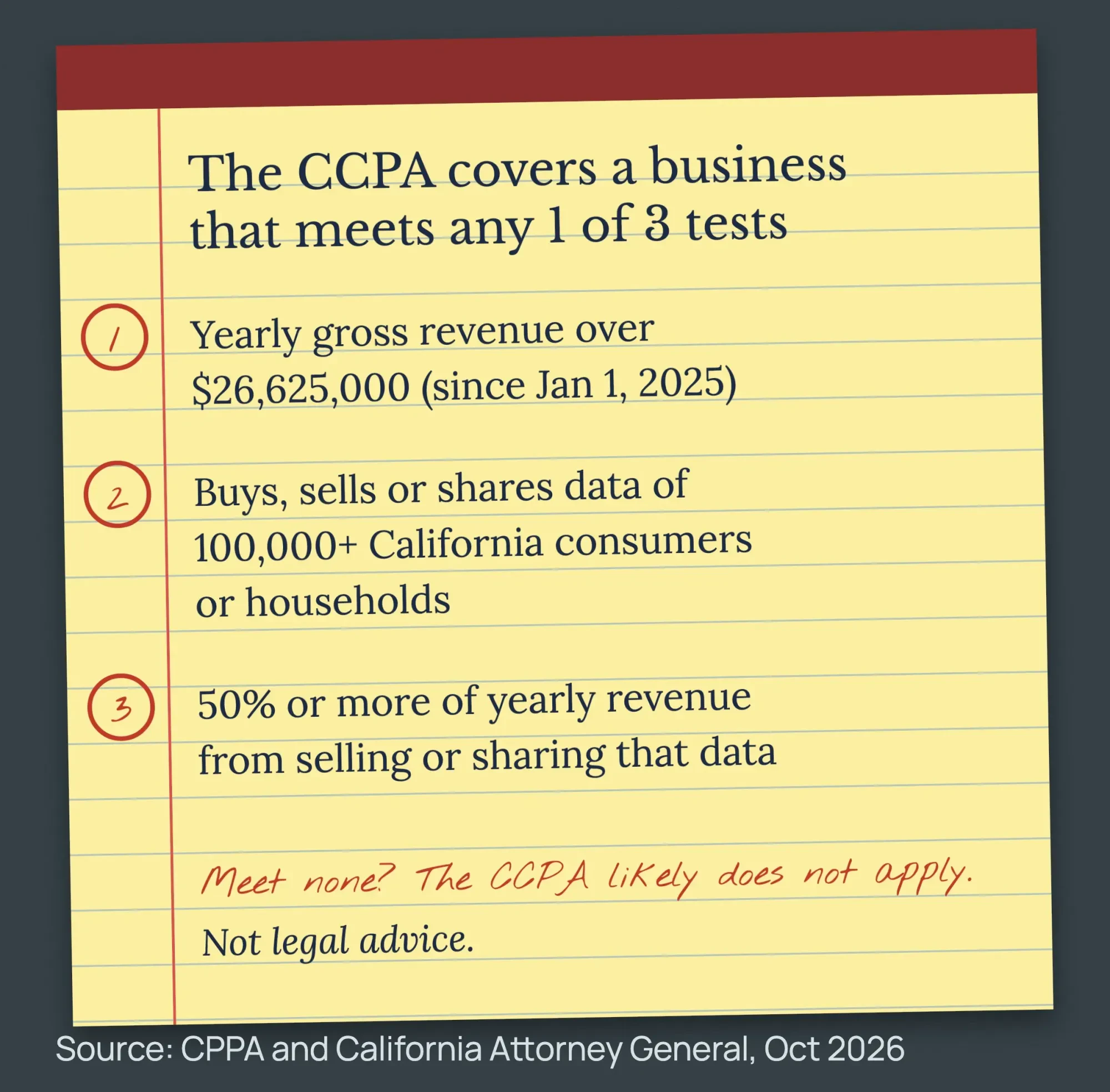 Source: California Privacy Protection Agency and California Attorney General, October 2026.
- Annual gross revenue over $26,625,000. The California Privacy Protection Agency set that figure, effective January 1, 2025. The Attorney General's page still says "over $25 million."
- You buy, sell or share the personal information of 100,000 or more California consumers or households, per Civil Code section 1798.140.
- You make 50% or more of your yearly revenue from selling or sharing California consumers' personal information. The Attorney General's page says only "selling."
Most small businesses meet none of the 3 tests. The "sharing" risk starts with ad pixels that feed retargeting, not with plain visit counts.
EU visitors bring other rules. Google's consent mode changes how its tags behave based on each visitor's choice. Microsoft Clarity has enforced consent signals for visits from the EEA, UK and Switzerland since October 31, 2025.
This is general information, not legal advice; check with an attorney for your situation.
Example: a bakery picks its tools
Example: Harbor Lane Bakery is a made-up bakery with 2 shops in Portland, Maine. Its 9-page site takes custom cake orders through a form.
The owner sets up Search Console and GA4 and marks the cake order form as a key event. Clarity shows where people stop on the order page. Software cost: $0, as of October 2026, per Clarity's FAQ and Google's terms.
Every Instagram bio link carries UTM tags, like the one in our screenshot above. Our guide to Linktree for business shows how to tag every button on a bio link page. After a month, GA4's Traffic acquisition report shows which campaign brought cake orders.
The bakery handles data on far fewer than 100,000 California consumers. It also earns far less than the CPPA's $26,625,000 figure, as of October 2026. So it meets none of the CCPA tests, but it still lists GA4 and Clarity in its privacy policy.
Which mistakes cost small businesses the most data?
- Mixed-case UTM values, which split one source into 2 rows.
- Key events added months late, because past visits are not counted.
- Data retention left at 2 months, so older explorations vanish.
- Expecting GA4 and Search Console to show the same numbers.
- Names or emails in page addresses or UTM values. GA's terms ban sending personal information to Google.
- A privacy policy that doesn't name the tools you run.
- 5 tools installed "just in case," each adding code and another company to disclose.
What should you check every month?
Set aside 20 minutes once a month. Open Search Console and note clicks and top search terms. Then open GA4's Traffic acquisition report and compare key events by channel.
Once a quarter, run our free website audit to catch broken pages and slow scripts. Our guide to your first SEO audit shows a simple ranking routine.
If you publish a blog, measure each post you promote. Our blog promotion checklist with UTM tags shows which tag to use for each channel.
Frequently asked
Is Google Analytics free?
Yes. Google's terms say GA4 is provided without charge. Google Analytics 360 is the paid version for very large sites, and Google's help page lists no price.
Are free website analytics tools enough?
For most small businesses, yes. GA4 and Microsoft Clarity cost $0, as of October 2026, per GA's terms and Clarity's FAQ. Pay when you want cookieless counts, data history past 14 months, or longer recording storage.
What is the best free alternative to Google Analytics?
It depends on the job. Microsoft Clarity is free for heatmaps and recordings. Matomo On-Premise is free software if you can run your own server.
How long does GA4 keep my data?
Standard properties keep user-level and event data for 2 or 14 months. That setting affects explorations and funnel reports, not standard reports.
Do website analytics tools slow down my site?
They add code. In our October 2026 test, the Google tag sent 168,352 bytes and Plausible sent 1,283 bytes. Test your pages before and after adding a tool.
Can Google Analytics track individual users?
Not by name or IP address. Google says that in GA4, IP addresses "are not logged or stored." GA4 still derives rough location, such as country and city, from IP addresses. GA's terms also ban sending personal information, such as emails, to Google.
What is the difference between web analytics and product analytics?
Web analytics tools such as GA4 report visits, sources and leads across a website. Product analytics tools such as Mixpanel track funnels, retention and user paths inside an app or software product.
Can I use more than one analytics tool?
Yes. Search Console, GA4 and Clarity work side by side, because each answers a different question. Each extra script adds code and another company to name in your privacy policy.
Do I need cookie consent for Google Analytics in the US?
No single federal law requires a banner. Follow GA's terms, keep your privacy policy true, and check state laws like the CCPA. This is not legal advice.
Your next step
Today, open GA4 and check 2 settings: data retention at 14 months, and your lead form marked as a key event.
Want the tools set up, tagged and listed in your privacy policy? Ask for a free quote, and you get a fixed price first.
How we made this guide: we read Google's Analytics and Search Central help pages, Microsoft's Clarity docs and each vendor's pricing page. For privacy, we read the FTC, the California Attorney General, the CPPA and the CCPA statute. We downloaded each tracking script with curl on October 22, 2026, and built the UTM example in our own tool that day. Sources are linked inline, and we checked every number against them on October 22 and 23, 2026. Updated October 23, 2026: added a metrics table, tool types, key facts, Search Console linking, Cloudflare Web Analytics, competitor traffic estimates and 4 FAQs.
First published July 2020. Rewritten October 22, 2026: tools sorted by job, GA4 setup steps, UTM tagging, dated US prices, our own script-size test and US privacy basics. Old unsourced statistics were removed.
Sources
- Google Analytics Terms of Service (US)
- Google: How Google uses information from sites or apps that use our services
- Google Analytics Help: Set up Analytics for a website and/or app
- Google Analytics Help: About key events
- Google Analytics Help: Data retention
- Google Analytics Help: Google Analytics 360
- Google Analytics Help: URL builders and UTM parameters
- Google Search Central: Using Search Console and Google Analytics data
- Google Tag Platform: Consent mode overview
- Microsoft Clarity FAQ
- Microsoft Clarity: Consent API v2
- W3Techs: Usage of traffic analysis tools, October 22, 2026
- Hotjar (Contentsquare) pricing (vendor)
- Plausible pricing (vendor)
- Fathom pricing (vendor)
- Matomo pricing (vendor)
- FTC: Privacy and security business guidance
- FTC Office of Technology: Lurking Beneath the Surface, Hidden Impacts of Pixel Tracking (March 2023)
- California Attorney General: California Consumer Privacy Act (CCPA)
- California Privacy Protection Agency: Updated monetary thresholds in the CCPA
- California Civil Code section 1798.140
- Google Analytics Help: Engagement rate and bounce rate
- Google Analytics Help: Connect Search Console to Google Analytics
- Google Analytics Help: IP masking (GA4 does not log or store IP addresses)
- Google Analytics Help: EU, Switzerland, or UK-focused data and privacy
- Cloudflare Web Analytics docs: About
- Cloudflare Web Analytics docs: FAQs
- Shopify Help Center: Shopify analytics
- Mixpanel pricing (vendor)
- Similarweb: Data methodology (vendor)

Comments
No comments yet. Start the conversation below.