
Quick answer
To make screen print transfers, print plastisol ink in reverse onto release paper and gel it at 225-260°F. Then press it onto cotton at 350-375°F for 10-15 seconds, per one ink maker's sheet read in November 2026. Polyester changes the method: sublimation needs white or light polyester at 390-400°F, and DTF presses polyester at 265-284°F. Start with the fabric table below.
Say you've got a heat press in the garage and a club order for 24 shirts, half cotton and half polyester. Printing screen print transfers ahead lets you press each shirt in seconds when it sells, instead of setting up a wet screen every time. A screen print transfer is a design printed in plastisol ink on release paper, gelled, and pressed onto the garment later. We'd pick the method by fabric first, since the sublimation and plastisol sheets rule out whole fabrics before you buy a single blank.
The fabric table comes first. Sericol's plastisol sheet wants at least 50% cotton, and Epson's sublimation page wants polyester. Each method then gets its gel or press settings from the maker's own sheet. After the four methods come the printer and press each one needs, shop rules for mineral spirits and DTF powder, and our check on six made-up garments.
Key takeaways
- Gel plastisol on the paper at 225-260°F; the press does the curing.
- Sublimation fit one of our six made-up garments: white 100% polyester.
- Sericol's plastisol sheet wants at least 50% cotton, or an adhesive.
- Epson presses DTF at 338°F on cotton and 284°F on polyester.
- Mineral spirits flash at 102-110°F, so keep cleanup away from the press.
Which method fits your fabric?
Each process bonds to fibers in a different way. Plastisol sits on the fabric's surface, sublimation dye goes into polyester, and DTF glues a printed film layer down with powder adhesive. Read the fiber line on the shirt's care label before you pick one. The Sericol plastisol transfer sheet lists garments of cotton or "blends of at least 50% cotton". The International Coatings Multipurpose plastisol sheet says "Cotton and some cotton/polyester blends" and tells you to test-print the fabric first. Epson's dye-sublimation page for makers is blunter: "Dye-sublimation only works on polyester fabrics or hard surfaces with a polyester coating."
| Method | Fabric the maker names | Source |
|---|---|---|
| Plastisol transfer (cold or hot peel) | Cotton and blends of at least 50% cotton; synthetics with an added adhesive | Sericol, International Coatings |
| Sublimation | Polyester fabric or polyester-coated items, white or light colors | Epson, Nekoosa |
| DTF | Cotton, polyester, blends, tri-blends and more, with separate settings | Uninet, Epson |
Cotton gets no mention on that Epson page, and Epson wants white or light blanks, so a black cotton tee fails on fiber and on color.
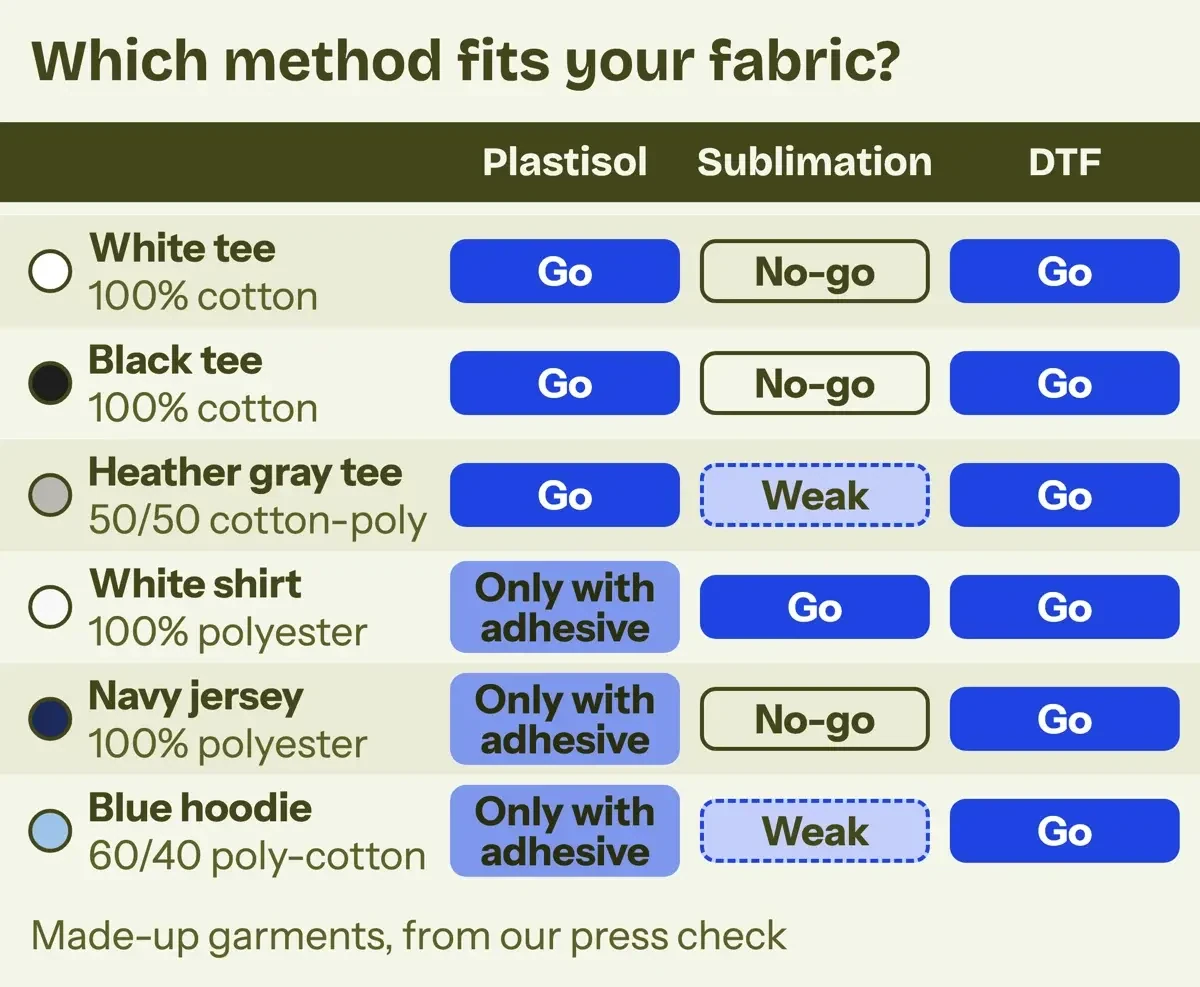 Diagram by DigitalTreed: which method fits six made-up garments, from our press check on maker sheets.
What we tested
We copied 18 settings from the saved maker sheets into a script, test/press_check.py, which we ran November 6, 2026. It confirmed each quoted setting is on its sheet, converted every Celsius figure to Fahrenheit, and ran six made-up garments through the fabric rules above.
Method 1: print your own plastisol screen print transfers
A plastisol transfer is printed like any screen print, with one change. You stop at a gel. The International Coatings sheet says cold peel inks should only be gelled at this stage. Ink that's cured on the paper won't have enough adhesion when it's pressed later. Sericol's sheet makes the same point from the other side: "It is important not to over cure." International Coatings sets its direct-print cure at 325°F for the entire ink film, so a gel at 225-260°F stays well short of it.
- Reverse the art so it reads backward on the paper; it flips when you press it.
- Separate colors and burn one screen per color. International Coatings lists 60-305 threads per inch, and Triangle calls 110 the popular choice.
- Print onto plastisol transfer release paper, print side up, in reverse color order so the top color goes down first.
- Gel each color on the paper: 225-260°F on the International Coatings sheet. Sericol's sheet gives 110-120°C (230-248°F) for 30-60 seconds, until the print is touch dry.
- Let the stack cool flat and keep it away from heat until press day.
For dark shirts you'll want an opaque white behind the colors. The Wilflex transfer ink page describes its TFX Super line as hot split and hot peel ink "for highly opaque, soft hand transfers for dark fabric". Clean the screens with what your ink's sheet names; both International Coatings and Triangle Ink's Tri-Flex 1100 sheet list mineral spirits. If you build the art in a vector program, our Illustrator vs Photoshop comparison for print work covers when print art needs a vector master file. Art that also goes on pins or stickers hits the same file problems, and the button pin printing mistakes guide walks through bleed and resolution.
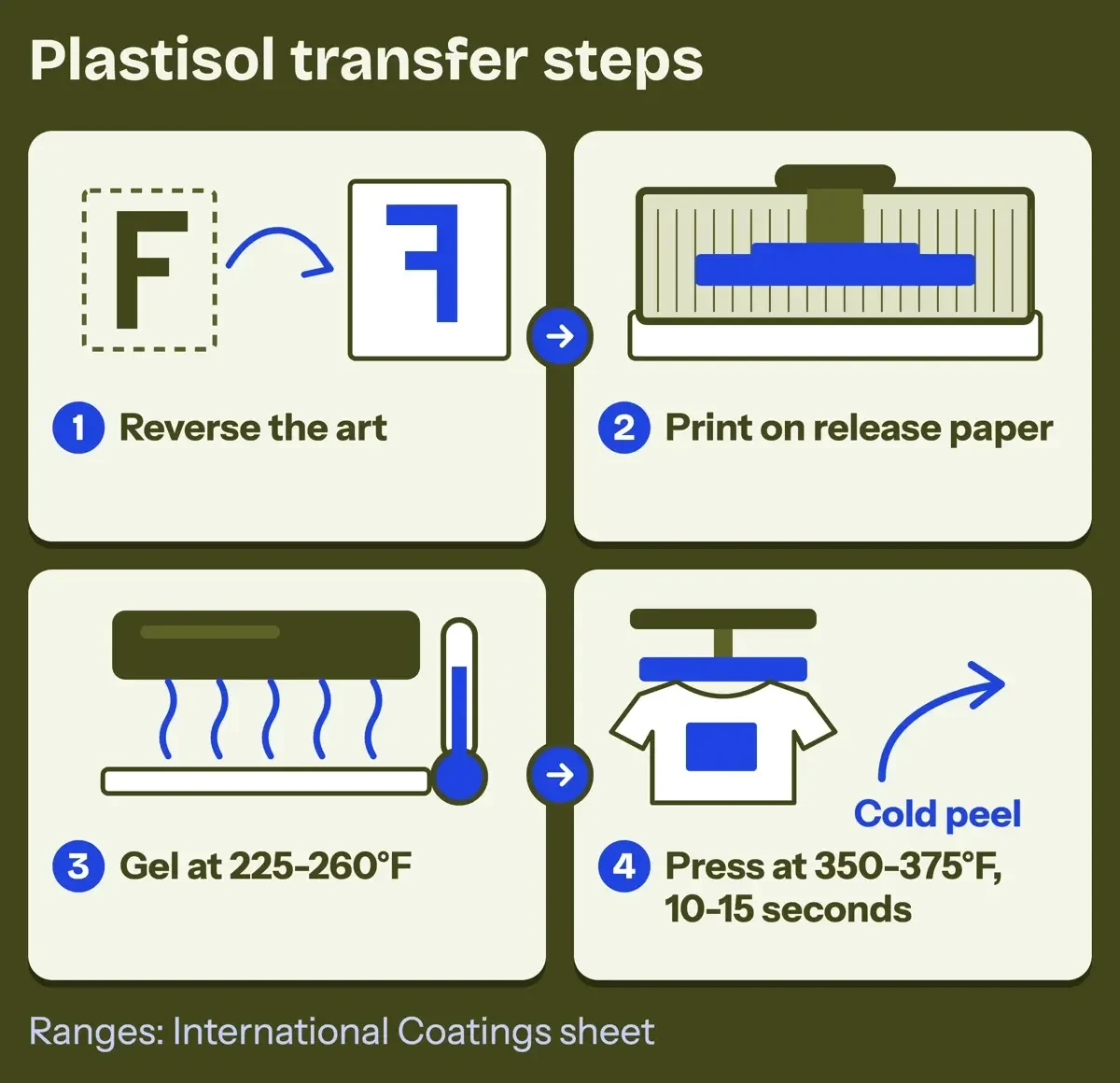 Diagram by DigitalTreed: the plastisol transfer steps with the International Coatings gel and cold peel ranges.
Method 2: press plastisol transfer paper onto the shirt
The full cure happens at the press, not on the paper. The Wilflex Epic Transflex bulletin lists "Hot-split, hot-peel, and cold-peel capabilities" on coated and uncoated release papers. Cold peel moves the whole ink film onto the shirt, Sericol says, and you wait for the paper to cool before peeling. Hot peel is the faster press. It needs its own ink mix and paper. International Coatings adds its 500 Quick-Trans Additive and prints on hot peel release paper. Its sheet doesn't recommend hot peel for its glitter or metallic inks.
| Peel style | Temperature | Time | Pressure | Sheet |
|---|---|---|---|---|
| Cold peel | 350-375°F | 10-15 seconds | Medium, 40 lbs | International Coatings |
| Cold peel | 185-190°C (365-374°F) | 10-15 seconds | High | Sericol |
| Hot peel | 375-400°F | 3-7 seconds | Medium to heavy, 40-60 lbs | International Coatings |
| Cold peel with adhesive | 160-170°C (320-338°F) | 10-15 seconds | Per sheet | Sericol |
Hot peel runs 25°F hotter than cold peel for about half the time. Ink and paper work as a pair, though. International Coatings' hot peel numbers assume its Quick-Trans additive and a hot peel paper, so they don't carry over to a cold peel stack. For synthetic fabrics, Sericol prints a clear or white adhesive over the ink, which also lets the press run as low as 160°C (320°F) for 10-15 seconds. Wilflex lists printable adhesives for challenging fabrics such as workwear, "as an alternative to adhesive powders". Its bulletin says the transfer inks suit both uncoated and coated release papers, so check which one your paper supplier sends before you set the press.
Tell your customers how to wash it. Sericol rates its cold peel prints for washes up to 60°C (140°F), and it says they're "not resistant to ironing" either. A care card that says turn it inside out and don't iron the print can save you a return.
Sericol also rates the prints not suitable for dry cleaning or industrial washing, so workwear sent to an industrial laundry needs another method.
Method 3: sublimation transfers for polyester
Unlike plastisol, sublimation doesn't leave an ink layer on top. Nekoosa calls it a permanent image transfer into polyester or poly-coated surfaces. Epson says polyester locks in the ink, so prints don't peel or crack. Epson's maker page also says the design prints mirrored onto dye-sub transfer paper and looks less bright on the paper, which Epson calls normal. Since sublimation uses no white ink, Epson says blanks should be white or light.
The Nekoosa dye sublimation paper sheet lists synthetic fabric at 400°F for 45-75 seconds with light-medium pressure, and it lists metal, tiles and mugs separately. Brother's heat press guide gives a polyester T-shirt 390°F for 45 seconds, which is 200°C on the same line. That's 15 to 50°F above the International Coatings cold peel range, held at least three times as long. Brother also recommends a heat press mat for sublimation and says to smooth out wrinkles so the transfer surface is even. Its guide says to run the press "only in a well-ventilated area as heating will emit vapors".
Epson says more polyester gives stronger color, which is why our made-up 50/50 gray tee came out as a weak fit: only the polyester half takes the dye.
Epson's tips say "Avoid cotton or dark fabrics". Its maker page also answers no when asked about dark-colored T-shirts. So a mostly cotton order and a navy polyester jersey both need another method.
Method 4: DTF transfers on film
DTF, short for direct to film, is the method left for that navy jersey, and it's the one method here with a setting for both halves of a mixed order. Uninet lists cotton, polyester, blends and tri-blends among its garment types. You print the design in color plus white onto a clear film. Then you coat the wet ink with hot melt powder, melt it and press the film onto the shirt. The white layer isn't optional. Epson's DTF Film Printing Guide says "The powder will not stick to the film unless White ink is used".
- Print the film in white ink mode, on the printing side of the film.
- Sprinkle powder over the whole print before the ink dries, then flick the back to shake off the extra. Keep the powder tray away from the printer; Epson warns powder inside it may cause a malfunction.
- Melt the powder: Epson gives 338°F for 150 seconds in a conveyor oven, Uninet 250°F for 120 seconds for A4 or smaller sheets.
- Press the film: Epson uses 338°F for 5 seconds on cotton and 284°F on polyester.
- Peel when the film's own instructions say, hot or cold, then press again to fix the print.
Epson's fix step is another 25 seconds at the same temperature, under silicone paper. A Uninet-branded DTF application sheet, a copy on a store's file server, runs a little cooler and longer. It gives 300-325°F for 10-12 seconds on cottons and blends and 265-275°F for 8-10 seconds on polyester, then a 5-10 second post press.
Uninet adds a warning: garment dye can migrate into DTF ink on polyester, so it suggests a 24-hour test on one shirt before a full run.
Epson's numbers come from a guide for its own garment printers, and the guide says temperature and time vary with film, powder, fabric and the amount of ink. We'd start at the film maker's printed setting. Then we'd adjust one test shirt at a time.
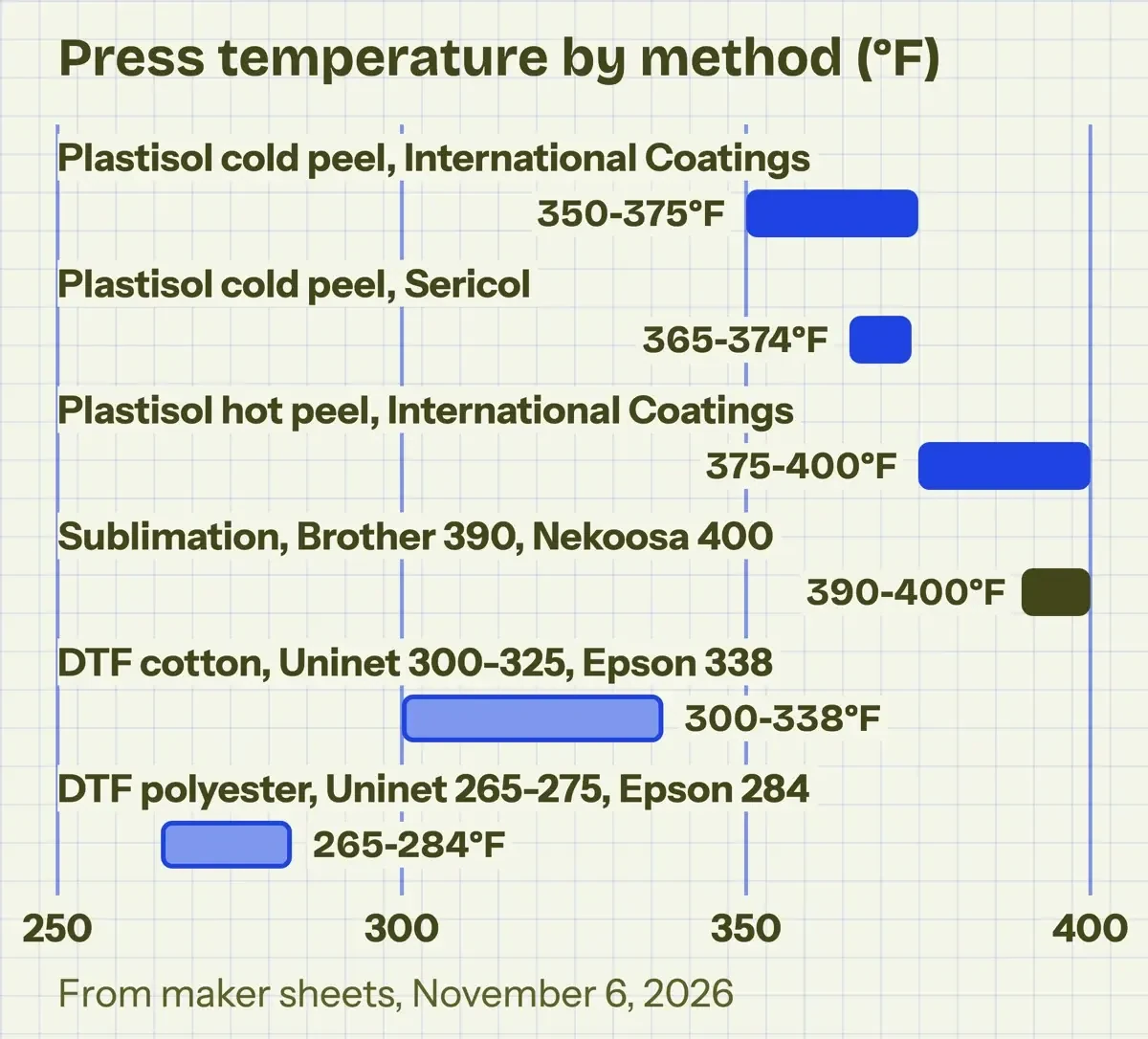 Diagram by DigitalTreed: press temperature ranges from the International Coatings, Sericol, Nekoosa, Brother, Epson and Uninet sheets.
What printer and press does each method need?
Those Epson numbers assume an Epson garment printer, but plastisol transfers don't need an inkjet for the ink at all, since every color goes through a screen mesh. Sublimation needs a printer that runs sublimation ink, and Epson's maker page lists design software, transfer paper, a heat press and blanks as the other things you'll need. DTF needs a printer that lays white ink under the color; Epson's guide says its garment printers can't print DTF film in high speed color mode. The same guide wants a platen without a grip pad, larger than the film, so the film edges don't strike the print head.
All four methods end on a heat press. Epson's heat press FAQ says your press "needs to be larger than your platen". It also has to hold 338°F (170°C) or more for 90 seconds. Epson doesn't sell presses, the same FAQ says. For sublimation at 400°F, that means a press that's rated for 400°F, not one that only holds DTF heat. If you'd rather buy finished transfers or blanks than print them, our promotional products companies comparison shows how ordering from a supplier works. And if the shirts are for your own shop, the print-on-demand business guide covers selling before you print.
Shop safety: solvents, powder and fumes
Mineral spirits, the screen wash both plastisol sheets name, is listed as Stoddard solvent in the NIOSH Pocket Guide entry. Its flash point is 102-110°F. That's far below a 375°F platen. The entry classes it as a Class II combustible liquid, so keep rags and solvent cans away from the press. The entry also gives an OSHA limit of 500 ppm averaged over a shift. Its symptom list includes eye, nose and throat irritation and dizziness. The other two methods add their own gear. Epson's guide lists a mask and protective eyewear for the powder step, and Brother's guide asks for a well-ventilated room.
Screen cleaning is where the vapor gets breathed in, according to an EPA Design for the Environment screen printing bulletin from July 1996. It says reclamation solvents "may be hazardous to the health of employees if inhaled, ingested, or absorbed through the skin". It names the usual habit, scrubbing screens hard in a wash-out booth with your face close to the chemicals, as the thing that raises the chance of inhaling vapors. The bulletin then compares high pressure screen washers, automatic screen washers and baking soda spray as ways to cut that exposure.
Once you hire help, federal rules apply. OSHA's hazard communication standard at 29 CFR 1910.1200 says the employer "shall maintain in the workplace copies of the required safety data sheets for each hazardous chemical". The same section allows electronic access instead of paper copies, as long as nothing blocks workers from reaching the sheets. It also requires training on the chemicals in the work area when a worker starts and whenever a new chemical hazard comes into that area.
This is a summary of official pages, not legal advice. Your state OSHA office or a lawyer is the place to ask what applies to your shop.
Our press check: every result
All 18 quoted settings were on the saved sheets, and every printed Celsius and Fahrenheit pair was within 2°F of the exact math (F = C × 9 ÷ 5 + 32). Sericol prints Celsius only. The two widest were Brother's 200°C printed as 390°F (exact 392°F) and Uninet's 120°C printed as 250°F (exact 248°F).
| Made-up garment | Plastisol | Sublimation | DTF |
|---|---|---|---|
| A: white 100% cotton tee | Go | No-go, no polyester | Go, cotton setting |
| B: black 100% cotton tee | Go, opaque white needed | No-go, no polyester | Go, cotton setting |
| C: heather gray 50/50 cotton-poly tee | Go | Weak, half takes dye | Go, cotton setting |
| D: white 100% polyester running shirt | Only with adhesive | Go, 390-400°F | Go, polyester setting |
| E: navy 100% polyester jersey | Only with adhesive | No-go, dark fabric | Go, polyester setting |
| F: light blue 60/40 poly-cotton hoodie | Only with adhesive | Weak, blend | Go, polyester setting |
DTF had a setting for all six garments. Plastisol needed an adhesive on three. Sublimation fit only garment D, the white 100% polyester running shirt. Our rules are a reading of the sheets, not a wash test. Shirt C's "go" for plastisol rests on Sericol's 50% cotton line, and garment B still needs an opaque white under the colors. Garment E is the hard case. Navy polyester rules out sublimation by color and plain plastisol by fiber, which leaves DTF or a plastisol adhesive. Garment F, the light blue hoodie, is 60% polyester, so the script gave it Epson's 284°F polyester setting, though Uninet says hoodies may need 325°F and up.
Next, the script added up press time for an example 24-shirt order. The formula is press seconds per shirt × 24, at the upper end of each sheet's range.
The formula leaves out loading, peeling, cooling, powder cure and gel time on the paper. Epson's conveyor oven alone adds 150 seconds per DTF film before any shirt is pressed.
| Method (sheet) | Seconds per shirt | 24 shirts (example) |
|---|---|---|
| Plastisol hot peel (International Coatings) | 7 | 168 s, 2.8 min |
| Plastisol cold peel (International Coatings) | 15 | 360 s, 6.0 min |
| DTF on cottons and blends (Uninet, 12 + 10 post press) | 22 | 528 s, 8.8 min |
| DTF on cotton (Epson, 5 + 25 fix) | 30 | 720 s, 12.0 min |
| Sublimation (Brother) | 45 | 1,080 s, 18.0 min |
| Sublimation (Nekoosa) | 75 | 1,800 s, 30.0 min |
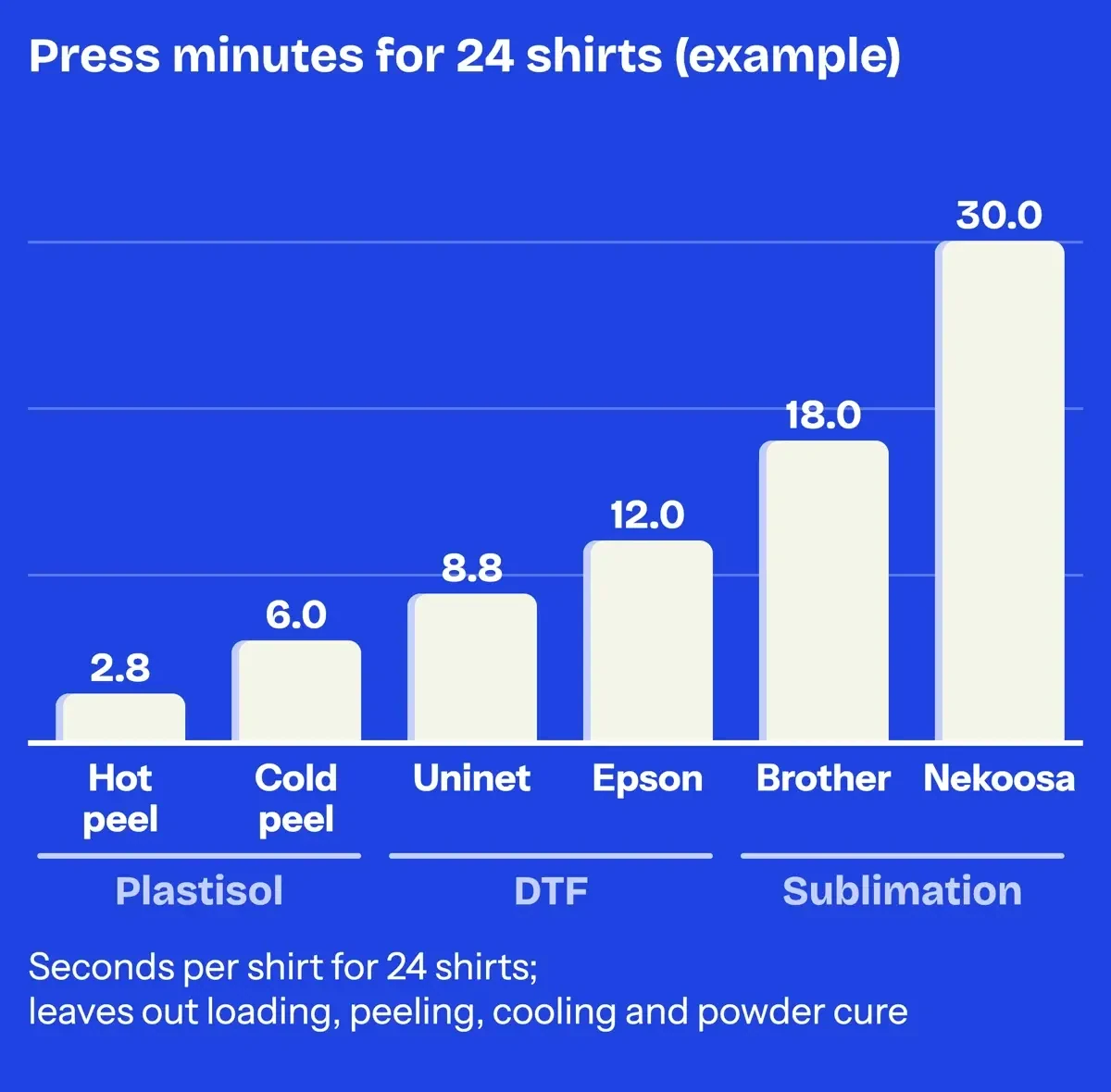 Diagram by DigitalTreed: press minutes for an example 24-shirt order, from our press check (seconds per shirt × 24).
Hot peel came out fastest at 2.8 minutes for the example order. DTF and plastisol both add prep before the press. On press day, though, plastisol is still quicker than DTF.
Plastisol is the method we'd print ahead for a cotton-heavy order. For the mixed 24-shirt club order, we'd print plastisol transfers for the cotton half and DTF film for the polyester half.
For selling the finished shirts, our guide to editing product photos in Photoshop covers the listing photos. Our ecommerce website guide covers the store itself. The clothing business marketing guide covers finding buyers.
Frequently asked
Can you apply a plastisol transfer with a household iron?
The sheets don't support it. Sericol's sheet lists only flat-bed and rotary transfer presses as recommended equipment.
Can you sublimate on a cotton shirt?
Not with standard sublimation. As of November 2026, Sawgrass's homepage says its separate VersiFlex system "decorates cotton". That is Sawgrass's own claim, and we didn't test it.
Are DTF transfers the same as screen print transfers?
No. DTF is printed by inkjet and bonded with powder. Uninet's DTF sheet lists 60 lbs of pressure for pressing it.
Why does my plastisol transfer peel off after washing?
Check the cure first. Triangle Ink's Tri-Flex 1100 sheet says failure to properly cure "is the primary reason for ink adhesion failure".
How we made this guide: Every setting here comes from maker sheets and printer guides saved on November 6, 2026. The safety facts come from NIOSH, EPA and federal rule pages. Our press check script matched all 18 settings we quote and ran six made-up garments. Facts checked by the DigitalTreed team on November 6, 2026.
First published December 2023 with four methods and five printer models, and no sources. Rewritten November 6, 2026, when the old 15-minute DTF press time and the printer list were cut.
Sources
- International Coatings: Multipurpose Series plastisol ink sheet
- Fujifilm Sericol: General purpose plastisol transfers
- Avient: Wilflex Epic Transflex inks product bulletin (2024)
- Avient Specialty Inks: Wilflex transfer inks
- Triangle Ink: Tri-Flex 1100 Series plastisol sheet (copy on a store file server)
- Nekoosa: Dye sublimation paper sheet (October 17, 2025)
- Brother: Heat press guide for sublimation
- Epson: Sublimation printers for makers
- Epson Europe: DTF Film Printing Guide
- Epson: SureColor F2270 heat press FAQ
- Uninet: DTF application instructions (copy on a store file server)
- Sawgrass: Homepage, decorating systems (as of November 2026)
- NIOSH Pocket Guide to Chemical Hazards: Stoddard solvent
- LII: 29 CFR 1910.1200, Hazard communication
- EPA Design for the Environment: Screen Printing Project Bulletin 1 (July 1996)


Comments
No comments yet. Start the conversation below.