

Quick answer
Use Illustrator for logos and signs and Photoshop for product photos; each costs $22.99 a month on Adobe's annual plan, billed monthly, as of October 28, 2026. If you need both apps, two single plans come to $45.98 a month, while Creative Cloud Pro lists $69.99 at its regular price. Start with the job table, then ask your designer for the files below.
If you're paying for a logo, ordering a storefront sign or making your own social posts, the Illustrator vs Photoshop question shows up fast. Illustrator is a vector-based program and Photoshop is a raster-based one, per Adobe's raster vs vector guide. That split decides which file each graphic needs.
We match each graphic to an app, explain vector and raster, then cover logos and signs (with our file test), product photos, social posts and web banners. Then come the files to ask your designer for, the price of one app or both, and when to choose each. Our view: sort out your files before buying either app.
Key takeaways
- Our enlarged PNG had 10.5 times the vector render's blended edge pixels.
- Keep the logo as a vector master; export PNGs per job.
- A 24-inch sign at 300 ppi needs 7,200 pixels.
- Product photos are pixels, so retouch them in Photoshop.
- Two single plans cost $45.98 a month, as of October 2026.
Match each graphic to an app
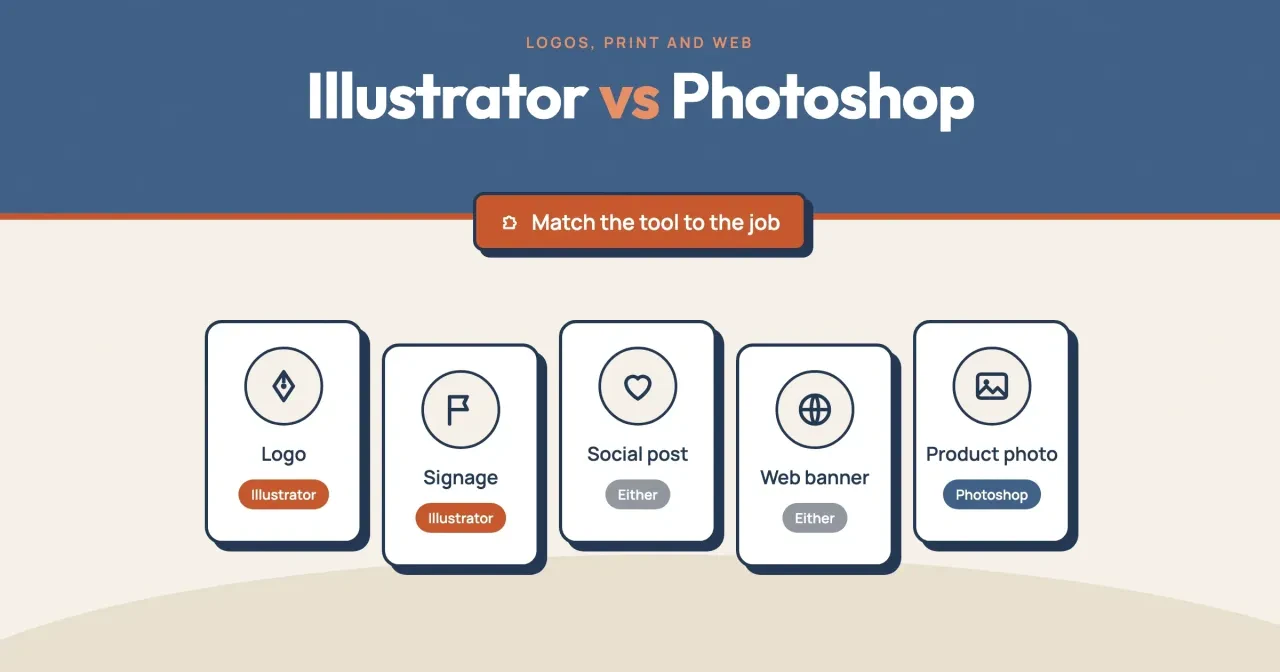
This guide covers five common graphics, and each one points to a file type before it points to an app. Here's the short version, with the master file you keep and the copy you hand out:
| Job | App to make it | Master file to keep | File you hand out |
|---|---|---|---|
| Logo | Illustrator | AI, or a PDF or SVG that keeps Illustrator editing | SVG for the website, PNG for social, JPEG for a trademark filing |
| Signage | Illustrator | AI or PDF (vector) | Vector PDF or AI, whichever the sign shop asks for |
| Social post | Either | AI or layered PSD | PNG or JPEG at the size the platform shows |
| Web banner | Either | AI or layered PSD | WebP, PNG or JPEG |
| Product photo | Photoshop | Layered PSD | JPEG or WebP |
Social posts and web banners get "either" because both apps make them and both end as pixels on a screen.
What is the difference between vector and raster?
That table rests on how each file stores a picture. Raster files are built from pixels, tiny color squares, while vector files use equations, lines and curves and hold no pixels, per Adobe's raster vs vector guide. Because that math recalculates at any size, a vector shape can grow without losing quality, while a raster image keeps the fixed pixel count it was made with. Adobe's Photoshop help on raster and vector files says enlarging one can cause blur or pixelation.
Each app can open the other kind, with limits. Photoshop can bring in a vector file as a smart object or as a rasterized layer. Illustrator's Image Trace panel turns a pixel image into editable paths, with presets from Black and White to High Color. Still, a traced photo isn't a clean logo, and a logo rasterized in Photoshop is just pixels again. Photoshop itself supports both kinds of image, raster and vector, according to Adobe's Photoshop help, so a PSD can hold vector shapes and type layers next to photos. So a logo drawn with Photoshop's shape tools stays crisp inside the PSD, but the PNG you send out holds only the pixels you picked at export.
File names usually give it away. MDN's image format guide describes SVG as a vector format for icons and diagrams that "must be drawn accurately at different sizes." JPEG, PNG, WebP and PSD hold pixels, while a PDF can hold either, so zoom a designer's PDF to 400% and look for soft edges.
Logos and signs need a vector master file
That's why logo work starts in Illustrator. Adobe's comparison page names the classic case, a logo that has to fit on a business card and a billboard.
Print is where missing pixels show. Adobe's Photoshop help on image size gives the formula, pixel dimensions = physical size × resolution, and says professional printing typically needs 300 ppi. So a 24-inch-wide sign at 300 ppi needs 24 × 300 = 7,200 pixels across. Take an example 500-pixel logo PNG from a website. At 300 ppi it covers 500 ÷ 300 = 1.67 inches, and stretching it to 24 inches means upsampling. Adobe says upsampling can reduce sharpness and can't add detail that wasn't there. For comparison, the 1,500-pixel file from our test below covers 1,500 ÷ 300 = 5 inches, still far short of the sign.
The formula also runs backwards. Divide any file's pixel width by 300 and you get the widest print it fills at 300 ppi, which is the number to send the sign shop before they quote. An example 3,000-pixel photo covers 3,000 ÷ 300 = 10 inches. Logos don't need this step if they're vector.
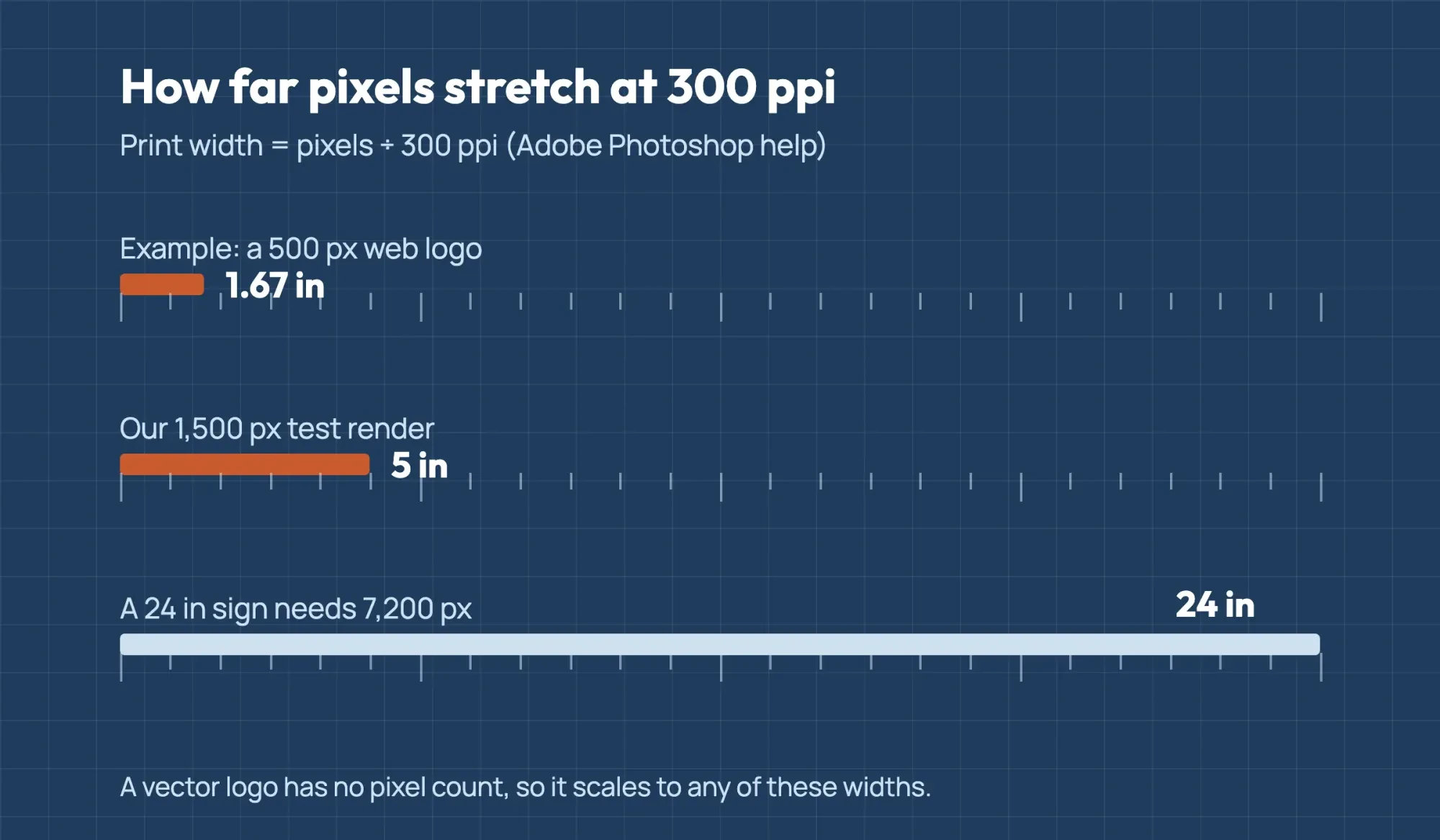 Diagram by DigitalTreed, using the formula in Adobe Photoshop help read October 28, 2026; the 500 px logo is an example
A vector master skips that math, because the sign shop scales the same paths to 24 inches or 24 feet and the edges stay sharp at both sizes. Ask for that file the day the logo's delivered, since the person who drew it is easier to reach now than in three years. Vector files are usually lighter too. Adobe's guide calls them much more lightweight than raster files, because they store only the formulas that describe the design, while a raster file can hold millions of pixels. The help page adds a fair warning: complex vector artwork can grow large, so a detailed illustration won't stay tiny.
A simple logo with a few shapes and two or three colors suits vector well, since there's little math to store. Ours, a circle, a mountain, a sun and a bar, needed 330 bytes.
What we tested
On October 28, 2026, we hand-wrote a made-up three-color logo as a 330-byte SVG and ran our script, vecras.py, on an Apple M4 Mac. Headless Chrome drew the SVG at 300 and 1,500 pixels, and macOS's sips tool stretched the 300-pixel PNG to 1,500 pixels. The script then counted blended edge pixels, meaning any pixel that isn't one of the logo's three exact colors.
In the two 1,500-pixel files, the vector render had 7,726 blended edge pixels (0.34%) and the stretched PNG had 81,487 (3.62%). That's 10.5 times as many (81,487 ÷ 7,726). On one scan line, the soft edge was 2 pixels wide against 9. The vector render was 47,164 bytes and the stretched PNG 184,367. That's one simple logo's result, not a rule for every logo. We didn't open Illustrator or Photoshop.
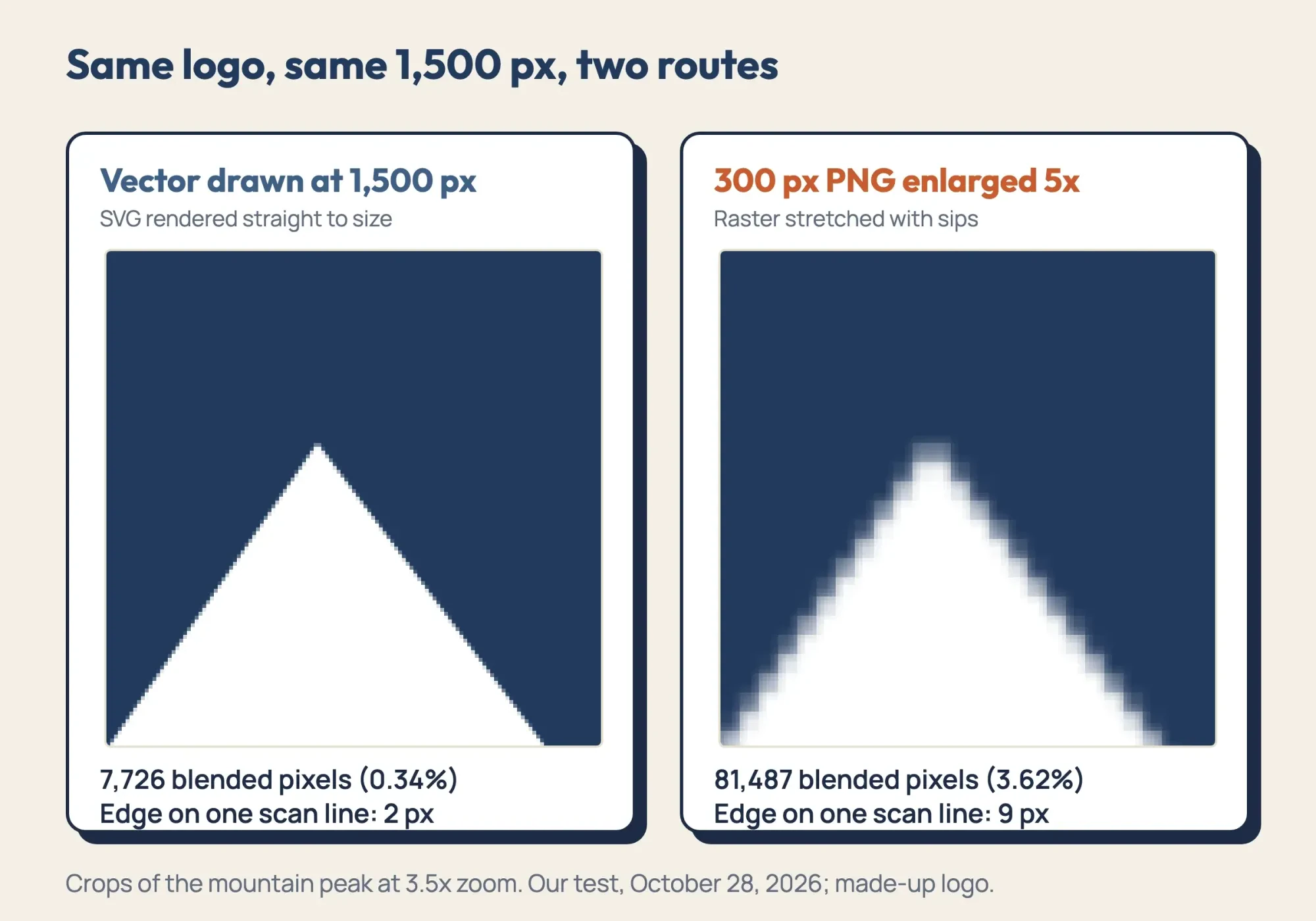 Source: our vecras.py test files, zoomed 3.5 times, October 28, 2026
Product photos stay in Photoshop
That logic flips for photos. Adobe's guide says digital photographs are usually raster files, with finer light and shading than vectors. Illustrator can trace a photo with its High Color preset, but Adobe's raster and vector help warns that converting photos to vector formats can create large files.
So you keep the pixels and edit them in Photoshop. You fix exposure, clean the background, straighten the shot and keep a layered master copy that holds every change on its own layer, so nothing is lost. Adobe's file formats overview says a PSD keeps layers, effects and masks, and it supports files up to 2GB. For the store page or marketplace listing, you export a JPEG or WebP copy at the size the page shows. Keep the PSD, so the next edit starts from your layers and not a flattened file.
Cutouts don't need Photoshop at all. Our free background remover handles plain product shots, and the cut-out copy belongs in PNG, which Adobe's raster help says supports transparency with no quality loss. If light retouching is the whole job, our free photo editors roundup lists no-cost options.
Social posts and web banners work in either app
That leaves social posts and banners, which both apps can build and which both end as pixels. Illustrator's export options include PNG, JPEG, SVG, WebP and PDF. Photoshop saves JPEG, PNG and WebP too, per its file formats overview, so the export step doesn't settle it. Pick by what the post holds. A promo built from your logo, shapes, text and a price stays sharp and easy to edit in Illustrator. A post built around a product photo belongs in Photoshop, where the photo already sits. If you mostly start from templates, our Photoshop vs Canva comparison covers that cheaper route.
Illustrator does help when one design has to go out in several sizes. A single file can hold several artboards, say a square post, a story and a banner, and Adobe's save help says the native formats keep all of them. With Use Artboards selected, the export writes each artboard as its own file. Because that artwork is vector, you can export the same artboards at double the size next month and the edges won't go soft.
On your website the logo can stay vector, since Google's image SEO guide lists SVG among supported formats, next to BMP, GIF, JPEG, PNG, WebP and AVIF. The W3C SVG 2 spec adds that SVG content is scalable to different display resolutions, so one SVG header logo stays sharp on any screen. Banners with photos go out as WebP or JPEG instead. Skip SVG for those. MDN pitches it at icons and diagrams, not photographs. Adobe's export help says WebP gives lossless and lossy compression for web images, and our image compressor trims the file further before upload.
The files to ask your designer for
Once the jobs are sorted, the list is short. Whoever makes your logo or brand graphics, ask for these files by name before the final invoice:
- An AI file, or a PDF or SVG saved with Preserve Illustrator Editing Capabilities, as the logo master. Adobe's save help calls AI, PDF, EPS, FXG and SVG Illustrator's native formats.
- An SVG of the logo for your website, with fonts saved as outlines, which Adobe's export help calls the most compatible choice.
- PNG copies of the logo with a transparent background, for social profiles and documents.
- A JPEG of the logo, if you plan to register it as a design mark.
- A layered PSD for each photo-based graphic, plus the exported JPEG or WebP.
EPS still shows up on older lists. Adobe's save help now says EPS, "commonly used in the past, isn't suitable for modern workflows." Take it only when a printer asks. If the logo is part of a wider refresh, our branding strategy plan covers the steps around it.
Even a vector logo needs one raster copy if you plan to file it as a US trademark. The USPTO says a trademark can be a word, phrase, symbol or design, so a logo can qualify. Under 37 CFR 2.53(c), a special form drawing filed online must be a .jpg at 300 to 350 dots per inch. Each side must be 250 to 944 pixels.
Our test made a 900-pixel JPEG at 300 dpi from the vector render, and it fits those numbers. Whether its lines are "clean, sharp and solid" is a person's call. The filing itself is a question for a trademark attorney, not for this guide.
Check the files the day they arrive. Open the SVG in a web browser and zoom in as far as it goes. The edges should stay sharp, as Adobe's guide says a vector's will. Then open each PNG on a dark background, or drop it onto a dark slide in whatever presentation app you already use, and look at the corners. A clear background shows the dark color through; a white box means the transparency is missing.
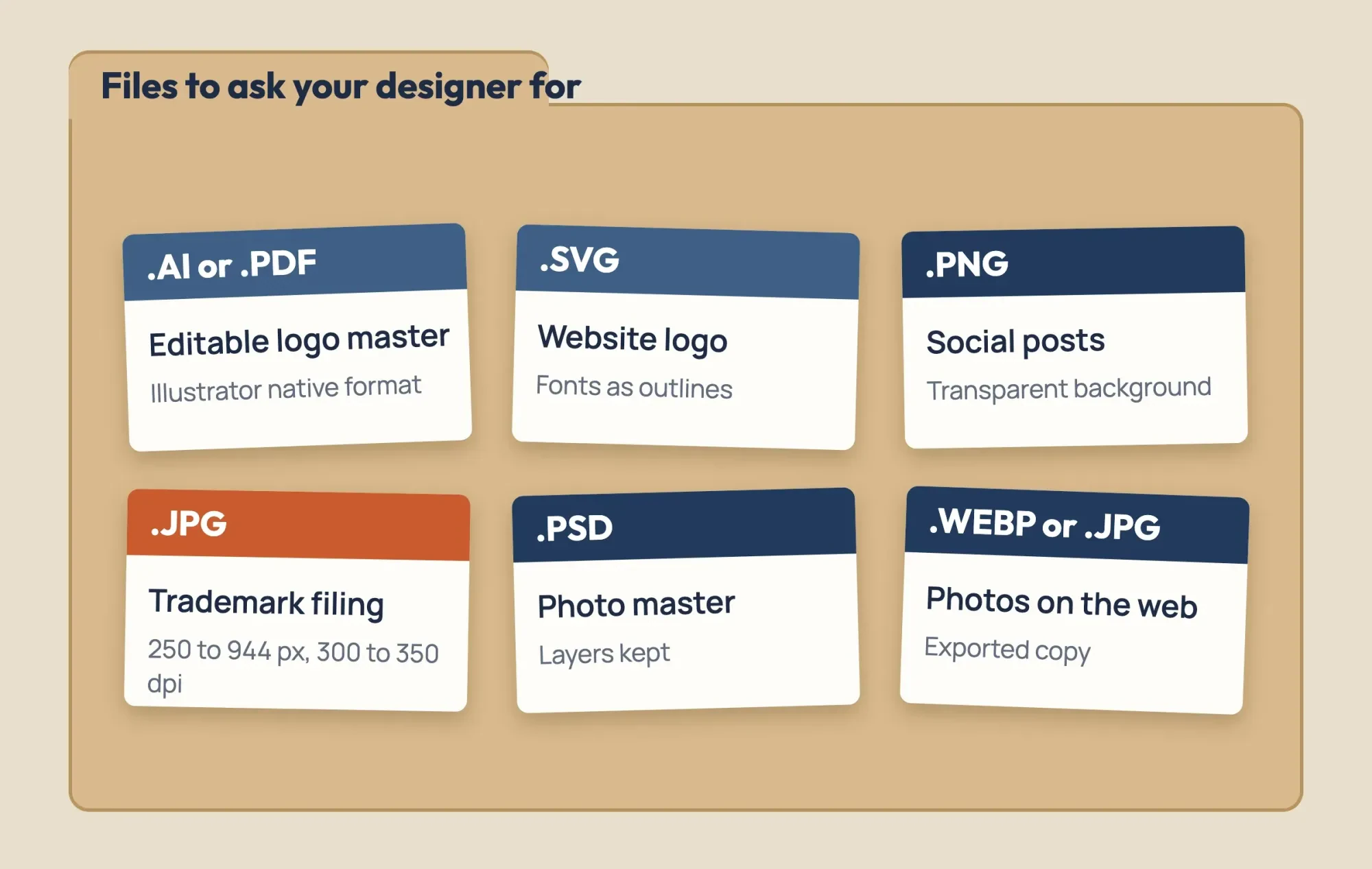 Drawn by us from Adobe Illustrator and Photoshop help pages and 37 CFR 2.53(c), read October 28, 2026
Price: one app, both, or the full bundle
Once you know the files, price is the easy part. Each app costs the same alone. Here are four ways to get one or both, priced from Adobe's Illustrator plans page and Photoshop plans page on October 28, 2026:
| Illustrator only | Photoshop only | Both, bought separately | Creative Cloud Pro | |
|---|---|---|---|---|
| Per month | $22.99 | $22.99 | $45.98 ($22.99 + $22.99) | $69.99 (regular) |
| 12 months at that rate | $275.88 ($22.99 × 12) | $275.88 ($22.99 × 12) | $551.76 ($45.98 × 12) | $839.88 ($69.99 × 12) |
| Design apps you get | Illustrator | Photoshop | Illustrator and Photoshop | Both, plus 20+ other apps |
| Cloud storage | 100GB | 100GB | 100GB each | 100GB |
Read the 12-month row and the bundle question mostly settles itself. Buying Illustrator and Photoshop separately comes to $551.76, which is $288.12 under Creative Cloud Pro's regular $839.88 ($839.88 − $551.76), as of October 2026.
The bundle earns its price only if InDesign, Acrobat Pro or another of its 20+ apps is already on your list. Its $34.99 rate, as of October 2026, lasts just the first 3 months, and only for new subscribers.
The Photoshop page also lists two plans at $19.99 a month that look alike and aren't. Firefly Pro gives you Photoshop on web and mobile only, with no desktop app. The Photography plan does include desktop Photoshop, bundled with Lightroom. If you edit on a laptop, check the plan's app list before you pay, because neither plan name says whether the desktop version of Photoshop is included. Our Photoshop CS6 vs Creative Cloud guide works through that plan's yearly cost in full. Photoshop alone can also be prepaid at $263.88 for the year. Illustrator's page showed no prepaid price on October 28, 2026, so the table uses monthly billing for both.
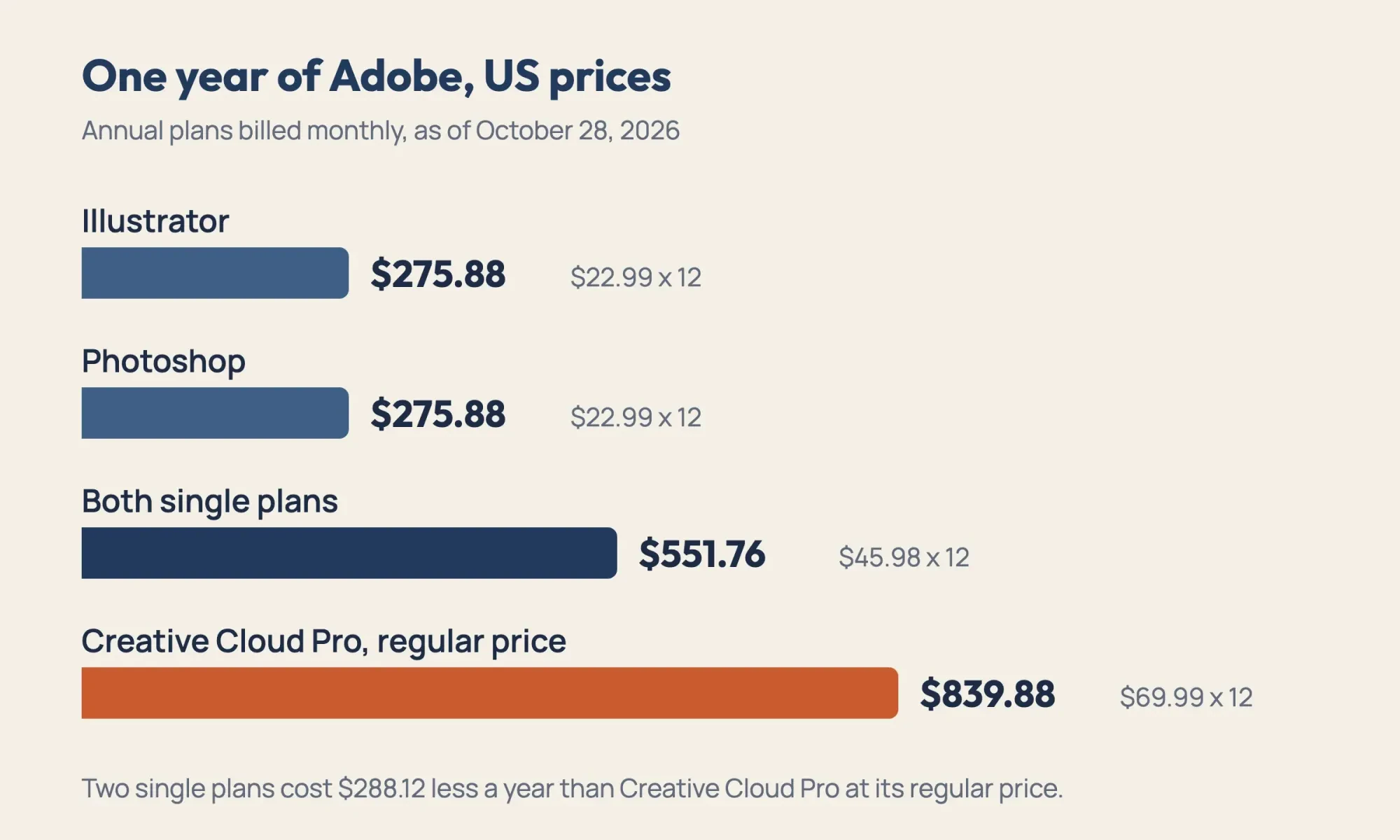 Diagram by DigitalTreed: twelve months of each option at the US list prices on Adobe plans pages, checked October 28, 2026
Choose Illustrator, Photoshop, both or neither
So, with the job table and the prices side by side, here's how we'd decide:
- Choose Illustrator if you design your own logo, signs, menus or flyers, where type and shapes must stay sharp at every size.
- Choose Photoshop if most of your work is product photos, and price the $19.99 Photography plan named above before you pay $22.99 for Photoshop alone (both as of October 2026).
- Choose both only if you make vector graphics and retouch photos every week, at $45.98 a month for two single plans.
- Choose neither if a designer makes your logo once and you post from templates; just collect the files listed above.
Our take: for many shops, the logo is the only vector file that matters, and it's made once. Get the vector master first.
After that, spend any monthly budget on the app that matches your weekly work. If you're weighing a designer's fee against a subscription, our graphic designer cost guide has US rates.
Full disclosure: we make logo files like these for paying clients, as part of the graphics and video work we sell. If you want a figure for your own logo, a quote request gets one, and setting it next to another designer's figure is the fair test.
Frequently asked
Can you make a logo in Photoshop?
Yes, as pixels. Adobe's raster vs vector FAQ says any PDF created in Photoshop is saved as a raster file.
Can Illustrator edit photos?
It traces them; it doesn't retouch them. Adobe's Image Trace options include Low Color, which makes simplified photorealistic artwork.
Is Illustrator free?
No. Adobe's Illustrator plans FAQ lists a 7-day free trial, then a paid subscription; the regular Adobe Express is free forever.
Can an SVG logo file get smaller?
Yes. Adobe's save help says compressed SVG (SVGZ) cuts file size by 50% to 80%, but can't be edited as text.
How we made this guide: We drew one made-up logo as an SVG, rendered and stretched it with headless Chrome and sips, and counted edge pixels. Neither Adobe app was opened. Prices and file facts come from the pages linked inline, read October 28, 2026. Facts checked by the DigitalTreed team on October 28, 2026.
First published July 2023. Rewritten October 28, 2026 as a job-by-job comparison with a vector and raster file test.
Sources
- Adobe: Raster vs. vector
- Adobe: Understand raster and vector files (Photoshop)
- Adobe: Image size, resolution and resampling
- Adobe: Save artwork in Illustrator
- Adobe: Export artwork in Illustrator
- Adobe: Image Trace panel options
- Adobe: Photoshop file formats overview
- Adobe: Illustrator plans
- Adobe: Photoshop plans
- MDN: Image file type and format guide
- W3C: Scalable Vector Graphics (SVG) 2
- Google Search Central: Image SEO best practices
- USPTO: What is a trademark?
- 37 CFR 2.53, Requirements for drawings filed through TEAS (Cornell LII)
Comments
No comments yet. Start the conversation below.