

Quick answer
Printing button pins for your business starts with the cut size. A 2.25-inch button needs artwork that reaches a 2.625-inch circle on American Button Machines' standard template, as of November 2026. ABM's layout file for a Badge-a-Minit press marks 2.747 inches, and Busy Beaver's template measured 2.511 in our test. Get your press's own template first, then check 300 dpi and color mode.
Say a summer reading club or a trade-show table needs 250 buttons. Printing button pins for your business is mostly a file-prep job. A pinback button is a metal shell covered by printed paper and a clear Mylar film, crimped onto a pinned back. The paper is cut bigger than the button because its edge wraps around the shell, and most costly errors start there.
Three errors only show once buttons are pressed: a template from another press, art short of the bleed, and a 72 dpi logo where shops ask for 300 dpi resolution. Shops also split on CMYK or RGB, and stock photos, logos and kids' buttons bring rights and CPSC checks. Each of our five made-up files failed at least one of three templates, and our checklist turns these checks into ten lines you can copy. Download the template from the press that will make your buttons before anyone opens a design app.
Key takeaways
- 2.25-inch cut circles: 2.511 (Busy Beaver, our measurement), 2.625 and 2.747 inches (ABM).
- A 2.625-inch cut circle needs at least 788 pixels across at 300 dpi.
- Busy Beaver and People Power Press ask for CMYK; Portland Button Works asks RGB.
- iStock's standard license bars stock images on goods whose value is the image.
- Buttons made mainly for kids 12 or under need third-party lab testing.
Which template size does your button need?
Button sizes name the face you see, not the paper you print. American Button Machines' template PDFs print a 1.313-inch cut circle on the 1-inch sheet, as of November 2026. ABM's size chart gives 2.625 inches for a 2.25-inch button. Each template also marks a smaller picture circle. Busy Beaver's template files print no numbers. The last two columns below are our own measurements of its drawn lines.
| Button face | ABM cut line | ABM picture circle | Busy Beaver cut line (measured) | Busy Beaver live area (measured) |
|---|---|---|---|---|
| 1 inch | 1.313 in | 0.875 in | 1.258 in | 0.912 in |
| 1.25 inches | 1.629 in | 1.156 in | 1.546 in | 1.232 in |
| 1.5 inches | 1.837 in | 1.375 in | 1.778 in | 1.413 in |
| 2.25 inches | 2.625 in | 2.063 in | 2.511 in | 2.180 in |
| 3 inches | 3.451 in | 2.875 in | 3.362 in | 2.982 in |
ABM's own Badge-a-Minit layout for 2.25-inch buttons prints a 2.747-inch cut line and a 2.187-inch picture circle. So the size name alone won't tell you the cut.
ABM's size page warns: "If your circle or mylar do not fit these measurements then you are not working with an industry standard button maker." We measured 2.511 inches on Busy Beaver's template, and ABM's Badge-a-Minit layout file prints 2.747. That spread is 0.236 inches, about 6 mm of paper, for buttons sold under one size name.
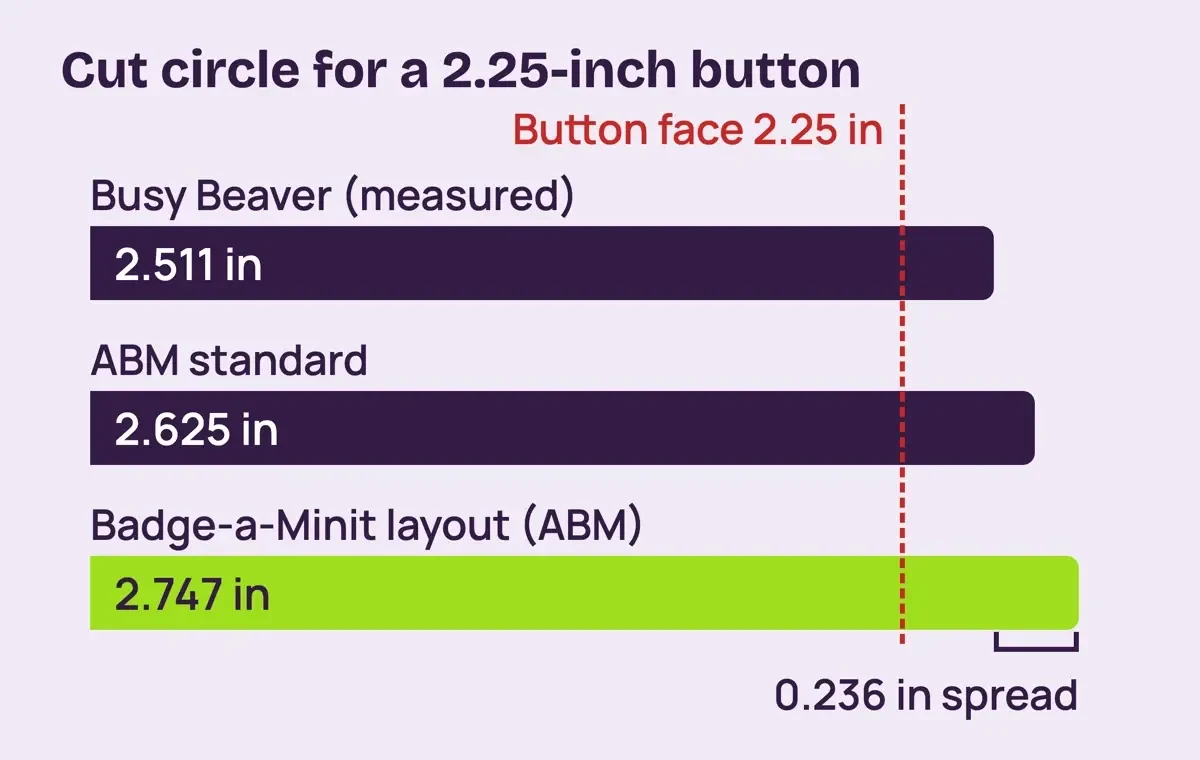 Diagram by DigitalTreed: cut circle by template for a 2.25-inch button, from ABM's size chart and layout label and our measurement of a Busy Beaver template (November 6, 2026).
So skip the generic template from a search result. Use your shop's own template, or cut a circle with your punch cutter and measure it edge to edge, as ABM suggests.
Bleed and safe zone: where artwork gets cut off
Bleed is the ring of paper between the face line and the cut line, and it folds under the edge of the shell, out of sight from the front. Wrap per side is (cut diameter - face diameter) / 2. That gives 0.188 inches on ABM's 2.25-inch template and 0.249 inches on the Badge-a-Minit layout. Busy Beaver's works out to 0.131 inches from our measurement. On a 1-inch button the same formula gives 0.157 inches on ABM's template and 0.129 inches on Busy Beaver's (measured). Small buttons have even less room.
ABM's instructions say to "extend your background color all the way out to the cut line", and People Power Press's template page gives the same rule. Stop the background at the face line and every button shows a bare paper edge. ABM's template page says to print its sizing guide at 100%, with no "fit to page", since a scaled sheet shrinks every circle.
The safe zone is the inner limit. Portland Button Works tells you to keep essential text and logos inside the inner circle, and most templates draw four guides:
- Cut line: the outer circle where the paper is trimmed; Portland Button Works wants it left visible.
- Face line: the edge of the flat front of the button.
- Safe or picture line: names, dates, prices and logos go inside it (2.063 inches on the ABM 2.25-inch sheet).
- Rim text band: People Power Press says edge text must fit between its two dotted guide lines.
Busy Beaver's artwork FAQ calls that edge text backrim text, visible "only from the side or back", and it's free as of November 2026. A web address fits there without crowding the front.
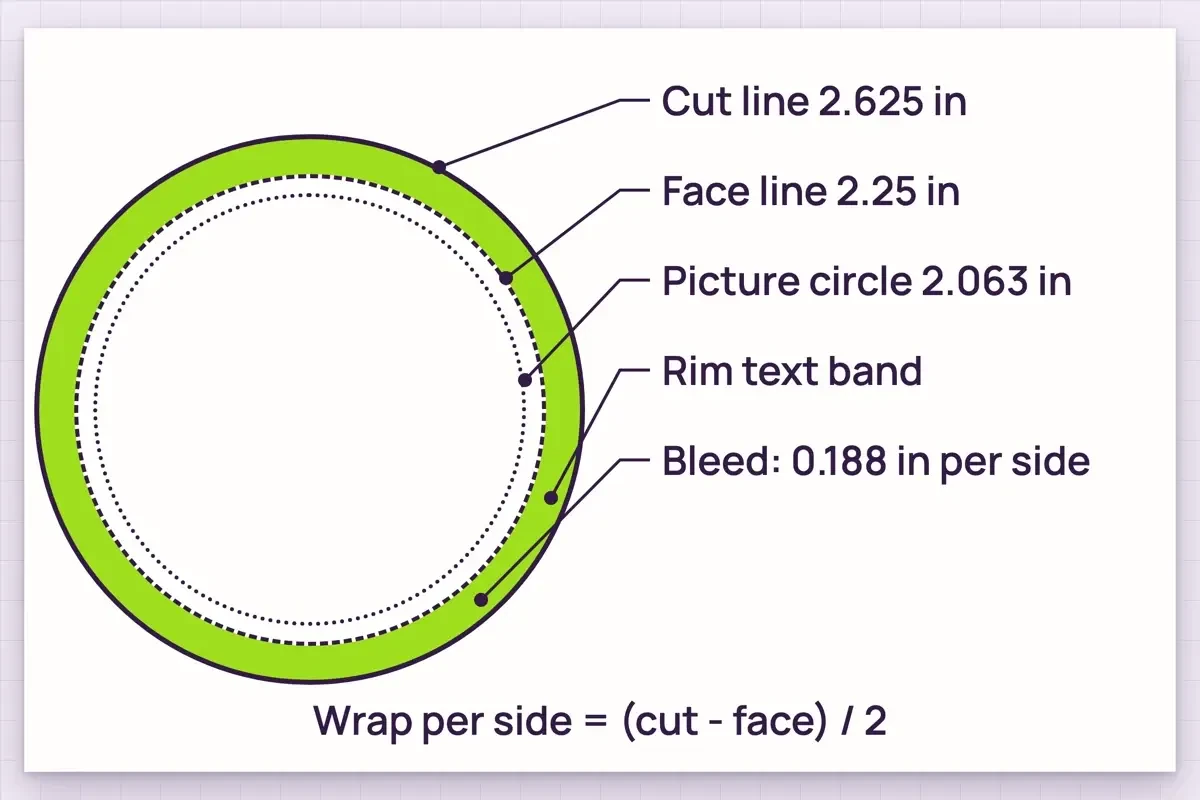 Diagram by DigitalTreed: the guides on a 2.25-inch button template, with sizes from ABM's size chart and template labels.
Resolution: 300 dpi at the cut size, not the face
Busy Beaver, People Power Press and Portland Button Works all ask for 300 dpi, as of November 2026. Busy Beaver's FAQ adds that "Images from the internet or social media are typically 72 dpi". A logo saved from your own website can be one of those. Pixels needed = cut diameter x 300, rounded up. So a 2.625-inch circle needs 788 pixels across, and a 3.451-inch one for a 3-inch ABM button needs 1,036. In our made-up set, a 600-pixel logo spread over 2.625 inches came out at 228.6 pixels per inch, so it failed the resolution check on all three templates.
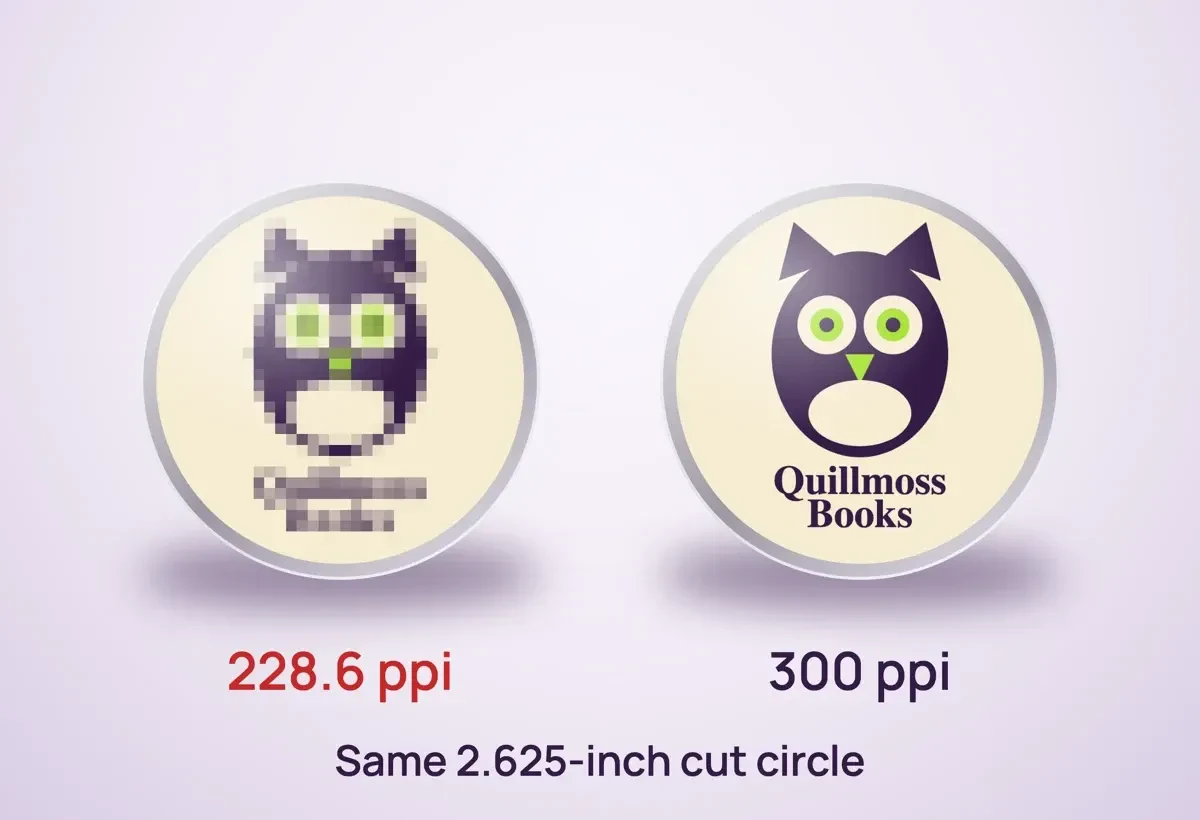 Drawn by us: the same made-up logo at 228.6 and 300 pixels per inch on a 2.625-inch cut circle.
Busy Beaver also asks for fonts of 5pt or above, lines at least 0.5pt thick and all fonts outlined.
If you're preparing photos yourself, our test of free photo editors shows what each free tool exports, which matters when a shop wants an exact pixel size. Photoshop vs Canva for small business compares the two for print work.
CMYK or RGB? Ask the shop that prints it
People Power Press says "Create artwork at 300dpi in CMYK format". Busy Beaver's FAQ says it uses a CMYK printer. Portland Button Works asks for RGB files instead, because its laser printing is "optimized for RGB" to keep colors from turning muddy. Busy Beaver's FAQ also notes that colors often look different on a monitor and in print, and as of November 2026 it offered free color matching on request. It asks for a Pantone Solid Uncoated color in the order comments. For a logo with one exact brand color, give the shop that Pantone number and then read a digital proof for color and spelling before the full run.
Our Illustrator vs Photoshop guide covers which app keeps a vector logo sharp at any size. Vector files have no pixel limit. That's why our made-up PDF passed every resolution check.
Image rights: stock licenses, copyright and trademarks
That proof is also your last chance to catch an image you don't have rights to. Under 17 U.S.C. 106, the copyright owner has the exclusive right to reproduce a work and distribute copies. The Copyright Office's FAQ on using others' work answers the permission question with "You can ask for it". It adds that no legal rule permits a specific count of words, notes or a "percentage of a work". Among the four factors in 17 U.S.C. 107, the Copyright Office's fair use page lists first "whether the use is of a commercial nature". That factor works against a button made to promote a business.
Get permission or use art you own, and read any stock license for its merchandise terms before its art goes on a button. As of November 2026, Unsplash's license says images "cannot be sold without significant modification." The standard iStock license bars goods "intended for resale or distribution where the primary value lies in the content itself". That names distribution, not only sales, so a free giveaway button whose whole face is one iStock photo can still need its extended license.
The USPTO defines a trademark as any word, phrase, symbol or design that identifies goods or services. Its infringement page describes unauthorized use likely to cause confusion, "deception, or mistake about the source of the goods". Under 15 U.S.C. 1114, a registered mark's owner can sue over that kind of use on goods. The USPTO page says courts in most cases weigh how similar the marks are and whether buyers would wrongly assume the goods share one source. So a team logo, a cartoon character or another brand's slogan on your button calls for the owner's license, even on a free giveaway. We're not giving legal advice here. An intellectual property attorney can review a specific design.
If you're still picking a slogan, our business naming checklist includes a USPTO trademark search. ChatGPT image generation for business covers the rules for AI-made art. If a designer makes the art, our US guide to graphic designer costs helps with the budget, and the contract should say who owns the final files.
Giving buttons to kids: the CPSC rules
A pinback has a metal pin, and when buttons go to kids, CPSC rules cover sharp points, small parts and lead. Federal law calls a product a children's product when it's "designed or intended primarily for children 12 years of age or younger". The same words appear in 15 U.S.C. 2052 and on the CPSC's children's products page. Under 16 CFR 1200.2, the CPSC looks at four things. Those are the maker's stated use, how "packaging, display, promotion, or advertising" presents it, what buyers commonly recognize, and its age guidelines.
The CPSC page calls products made for all ages general use products, and a plain logo button handed to parents and kids alike may land there. A cartoon button made for a kids' reading club looks much more like a children's product. The CPSC lead page adds that even with materials exempt from testing, a finished product found over 100 ppm lead can still leave the firm responsible. If yours is a children's product, five rules apply together:
- Lead content: more than 100 ppm lead in an accessible part is banned, per the CPSC lead page and 15 U.S.C. 1278a.
- Paint and coatings: the lead limit is 0.009% (90 ppm) under 16 CFR 1303.1.
- Certificate: a CPSC-accepted lab tests it, and a written Children's Product Certificate follows.
- Small parts: for children under 3, nothing may fit the cylinder in 16 CFR 1501.4.
- Sharp points: articles for children under 8 face the test in 16 CFR 1500.48.
The certificate falls on domestic manufacturers and importers. It rests on "test results from a third-party, CPSC-accepted laboratory", and the CPSC says the certificate and its supporting test reports must be in English. So ask your button shop in writing whether it can supply a CPC, with the lab's test report, before you order any buttons meant for kids 12 or under. For toddlers we'd skip pins and hand out a printed card. The small parts ban covers anything that fits the cylinder "without compressing and in any orientation". We aren't giving legal advice here; a product-safety attorney or a CPSC-accepted lab can say what your design needs.
What we tested
On November 6, 2026 we rendered ABM and Busy Beaver template PDFs at 600 dpi, and a short Swift script measured each drawn circle along 161 rays from the center.
A control circle drawn at 2.625 inches measured 2.626. A row scan across ABM's 2.25-inch sheet read its cut line at 2.624 inches, against 2.625 in ABM's size chart. Busy Beaver's came out at 2.511 inches.
Five made-up files, three templates
Then we ran five made-up artwork files for Quillmoss Books, a made-up bookstore, through our bleed calculator. Each file got three checks per 2.25-inch template. They're 300 ppi plus enough pixels for the cut circle, background to the cut line, and text inside the picture circle.
| Made-up file | What it is | ABM 2.625 | Badge-a-Minit 2.747 | Busy Beaver 2.511 |
|---|---|---|---|---|
| owl-logo.png | 600 px, RGB, background to 2.625 in | 2/3 | 1/3 | 2/3 |
| story-hour.pdf | vector, CMYK, background stops at 2.25 in | 2/3 | 2/3 | 2/3 |
| reading-club.jpg | 1,000 px, CMYK, background to 2.747 in, text 2.12 in wide | 2/3 | 3/3 | 3/3 |
| staff-pick.tif | 800 px, CMYK, background to 2.625 in | 3/3 | 1/3 | 3/3 |
| summer-reading.png | 788 px, RGB, background to 2.625 in | 3/3 | 1/3 | 3/3 |
No file passed all three templates. Only the file built on the Badge-a-Minit cut passed that layout, and it failed ABM's safe zone because its text ran 2.12 inches wide inside a 2.063-inch picture circle. The 788-pixel file passed ABM and Busy Beaver, but on the Badge-a-Minit layout its pixels fell 37 short of 825. Its background circle also came up 0.122 inches short across, or 0.061 per side. We built the same calculator as a local page for the screenshot below. We didn't print or order any buttons.
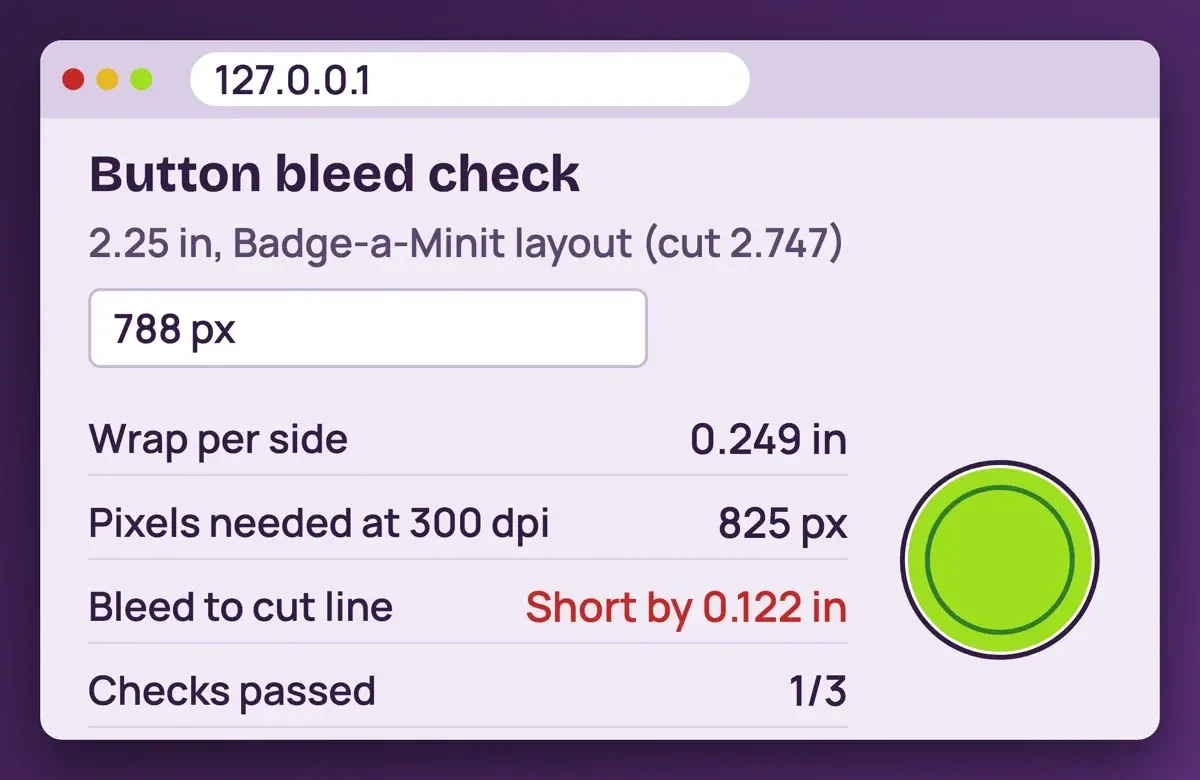 Diagram by DigitalTreed: results from our local bleed check page at 127.0.0.1 with a made-up 788-pixel file on the Badge-a-Minit layout.
A pre-press checklist you can copy
Run the list once per design and per button size. Lines 3, 4 and 5 are the three checks our made-up files failed; the other seven come from the shop pages and agency rules above.
- Template downloaded from the shop or press that will make the buttons.
- Cut size on the template matches the button face size you ordered.
- Background runs all the way out to the cut line.
- Names, dates, prices and logos sit inside the safe or picture circle.
- Image is at least 300 dpi across the full cut circle.
- Color mode matches what the shop's artwork page asks for.
- Fonts outlined, with no text under 5pt.
- Every photo, logo and character is yours or licensed for merchandise.
- Kids 12 or under? Ask the shop about a Children's Product Certificate first.
- Digital proof read for spelling, dates and phone numbers.
Our take: order a small first run, look at the edge of a pressed button in daylight, and only then print the full order.
If the layout feels crowded, these graphic design tips show how to trim it. If the same art is going on shirts, our screen print transfers guide covers the heat-press side.
Frequently asked
What size should I print a 2.25-inch button?
Print at your press's cut size, such as 2.625 inches on ABM's standard template. ABM's 2.25-inch layout sheet should print at 100%, never fit to page.
Can I put a sports team logo on a button for my store?
Not without the owner's license. If you can't tell who owns the art, the Copyright Office FAQ says you can ask it to search its records.
Do buttons for a school event need lab testing?
If they're made mainly for kids 12 or under, yes. The CPSC certificate page lists the rules a CPC must cite and links example certificates.
How small can text be on a 1-inch button?
Busy Beaver's FAQ asks for 5pt or larger. Its button size page says a 1-inch round pin is the size of a quarter.
How we made this guide: Our script measured five Busy Beaver template PDFs after a control test, and we read the printed sizes on seven ABM template PDFs. Rules come from the Copyright Office, USPTO, CPSC, and the US Code and CFR on Cornell's LII, matched quote by quote. Facts checked by the DigitalTreed team on November 6, 2026.
First published January 2022 as an unsourced five-point list. Rewritten November 7, 2026 with sourced specs and rules.
Sources
- American Button Machines: What size button maker do I have?
- American Button Machines: Free button making templates
- American Button Machines: Badge-a-Minit 2.25-inch button graphic layout (PDF)
- American Button Machines: 2.25-inch button layout sheet (PDF)
- Busy Beaver Button Co.: FAQs, artwork and guidelines
- Busy Beaver Button Co.: Button templates
- Busy Beaver Button Co.: Button sizes
- People Power Press: Button design templates
- Portland Button Works: Design templates and technical specifications
- Unsplash: License
- iStock: Content license agreement
- American Button Machines: 1-inch button graphic layout (PDF)
- LII: 17 U.S.C. 106, Exclusive rights in copyrighted works
- LII: 17 U.S.C. 107, Fair use
- U.S. Copyright Office: Can I use someone else's work?
- U.S. Copyright Office: Fair use index
- USPTO: What is a trademark?
- USPTO: About trademark infringement
- LII: 15 U.S.C. 1114, Remedies; infringement
- CPSC: Children's products
- LII: 15 U.S.C. 2052, Definitions
- LII: 16 CFR 1200.2, Definition of children's product
- CPSC: Total lead content
- LII: 15 U.S.C. 1278a, Children's products containing lead
- LII: 16 CFR 1303.1, Lead-containing paint ban
- CPSC: Children's Product Certificate
- CPSC: Small parts ban and choking hazard labeling
- LII: 16 CFR 1501.4, Size requirements and test procedure
- LII: 16 CFR 1500.48, Sharp points for children under 8


Comments
No comments yet. Start the conversation below.