

Quick answer
To pin a post on Instagram, open your profile in the app, tap the post, open its menu and tap "Pin to your main grid." That was the label in our Android test in November 2026; Instagram Help calls it "Pin to main grid." Free accounts can pin 3 posts, and Instagram Plus raises that to 6. Pinning does not work from a computer.
You posted a reel that explains what you sell, and two days later it sat under a meme and a holiday post. A pinned post is a post you fix to the top of your profile grid. It stays first, however much you share after it, and those top squares are what a new visitor sees.
Below is how to pin a post on Instagram in four taps, and how to unpin it. Then come the two reel pins, the 3-pin limit and Instagram Plus. After that: why a computer won't let you pin, why the option goes missing, and which three posts a business should pin.
Key takeaways
- Pin from the post menu in the Instagram app, not a browser.
- Free accounts get 3 pins; a 4th replaces your oldest pin.
- Reels have a second pin for the top of your Reels tab.
- Instagram Plus lists up to 6 profile pins.
- You can only pin posts you own.
Pin a post to the top of your profile in 4 taps
The steps below come from Instagram Help on pinning posts and match what we saw on our own account. They work the same way for a photo, a carousel or a reel that sits on your main grid.
- Open the Instagram app and tap your profile picture in the bottom right.
- Tap the post you want to show first.
- Tap the options menu at the top right of the post.
- Tap "Pin to your main grid." Help names it "Pin to main grid."
In our test on Android, the option sat at the very bottom of a long menu, under Allow reuse. Scroll the sheet up if you don't see it.
Note
Instagram moves these menu items around often, and the names change too. Help says "Pin to main grid," while our app said "Pin to your main grid" on November 26, 2026. In two or three months the option may sit higher, lower or under a new name. If it isn't where we show it, scan the whole menu for the pin icon.
Prefer to watch? Our 33-second Short shows the same taps on a phone.
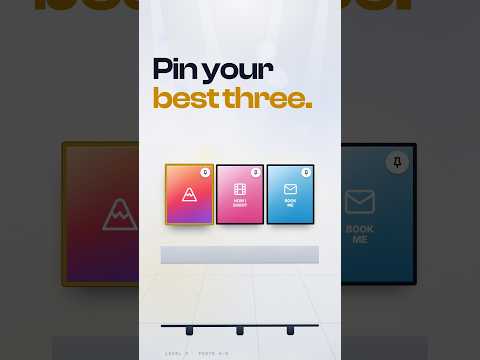
Once pinned, the post jumps to the first row of your grid. You'll spot a small white pin icon in its top right corner. That's it.
Changed your mind? Unpinning is just as quick.
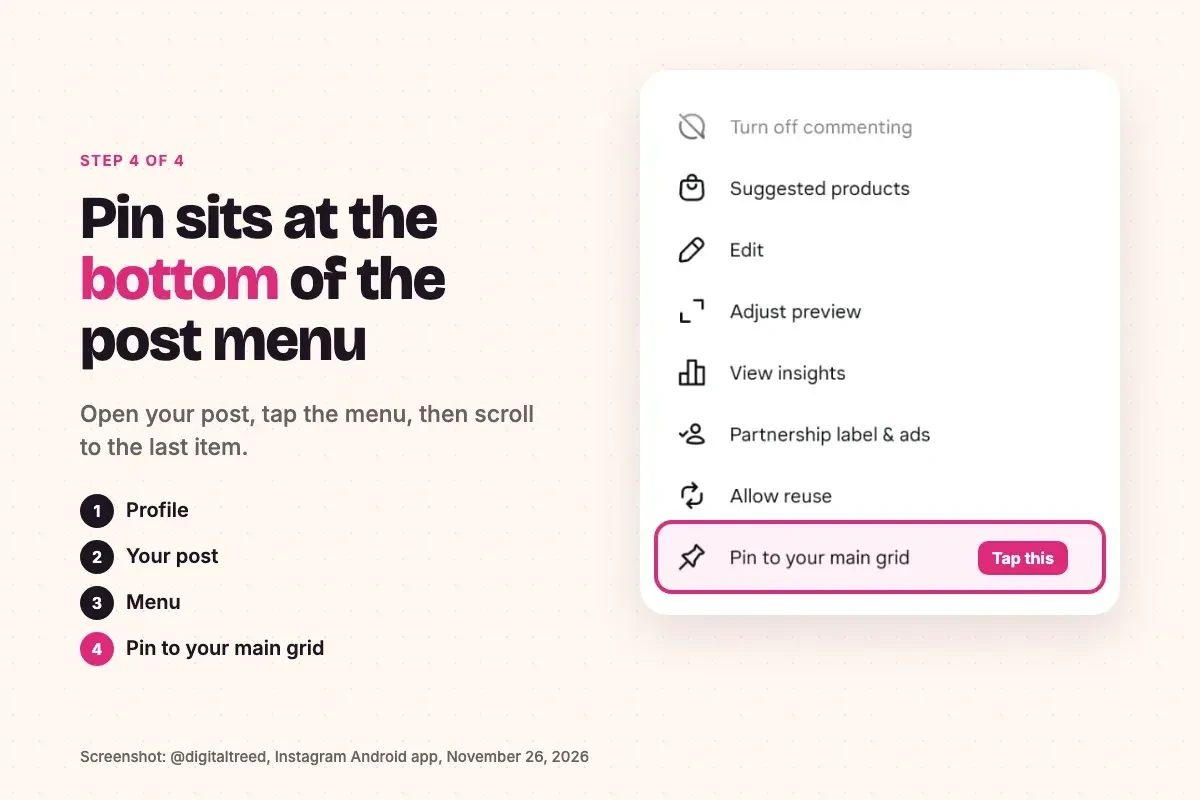 Screenshot from our @digitaltreed account, Android app, November 26, 2026. The pin option is the last item in the menu.
Open the same post, tap the menu again and choose "Unpin from main grid." Instagram Help says it then returns to its original spot in your profile grid, so it drops back to the date you shared it. Nothing else about the post changes when you unpin it, so its likes, comments and views stay exactly where they were before you pinned it in the first place.
How do you pin a reel on Instagram?
Those four taps work on a reel too, but a reel can be pinned in a second place as well. When Instagram launched pinning in June 2022, TechCrunch reported you could pin up to three posts, "including photos or Reels." That's the grid pin.
The second pin only affects your Reels tab, the play-button tab under your bio. It sits one level deeper, so open the reel, tap the menu and then tap "Manage" to reach it. The "Manage your reel" sheet lists "Pin to your reels" next to Edit and Archive.
| Pin | Where it shows | Menu path in our test |
|---|---|---|
| Pin to your main grid | First row of your profile grid | Post menu, last item |
| Pin to your reels | Top of your Reels tab only | Reel menu, Manage, Pin to your reels |
So a reel pinned only on your Reels tab won't be the first thing profile visitors see, because they land on your main grid before they ever open a tab. Instagram's page on managing reels notes that these reel tools aren't available on computers.
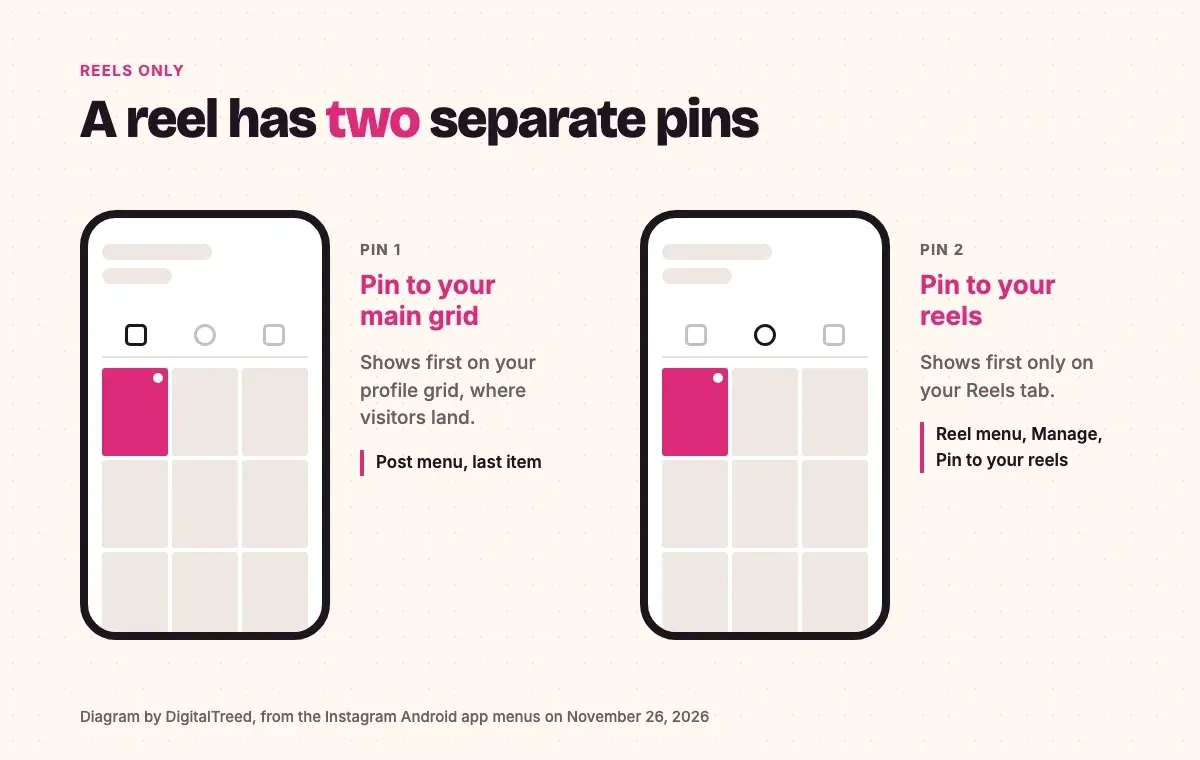 Diagram by DigitalTreed, based on the menus in our November 26, 2026 test.
Our tip: pin an important reel in both places. It's one extra tap.
You can pin 3 posts free, or 6 with Instagram Plus
Now that you know where the pins live, here's how many you get. Instagram Help puts the free limit plainly: "You can pin up to 3 posts you share on Instagram to the top of your profile." We tried a fourth on our account, which already had three pins, and a box titled "Pin limit reached" popped up on the screen. The message read: "Pinning this post will replace your oldest pinned post." It offered Confirm or Cancel, so Instagram doesn't block a fourth pin. It swaps out the pin you made first, and that may not be the one you'd want to lose.
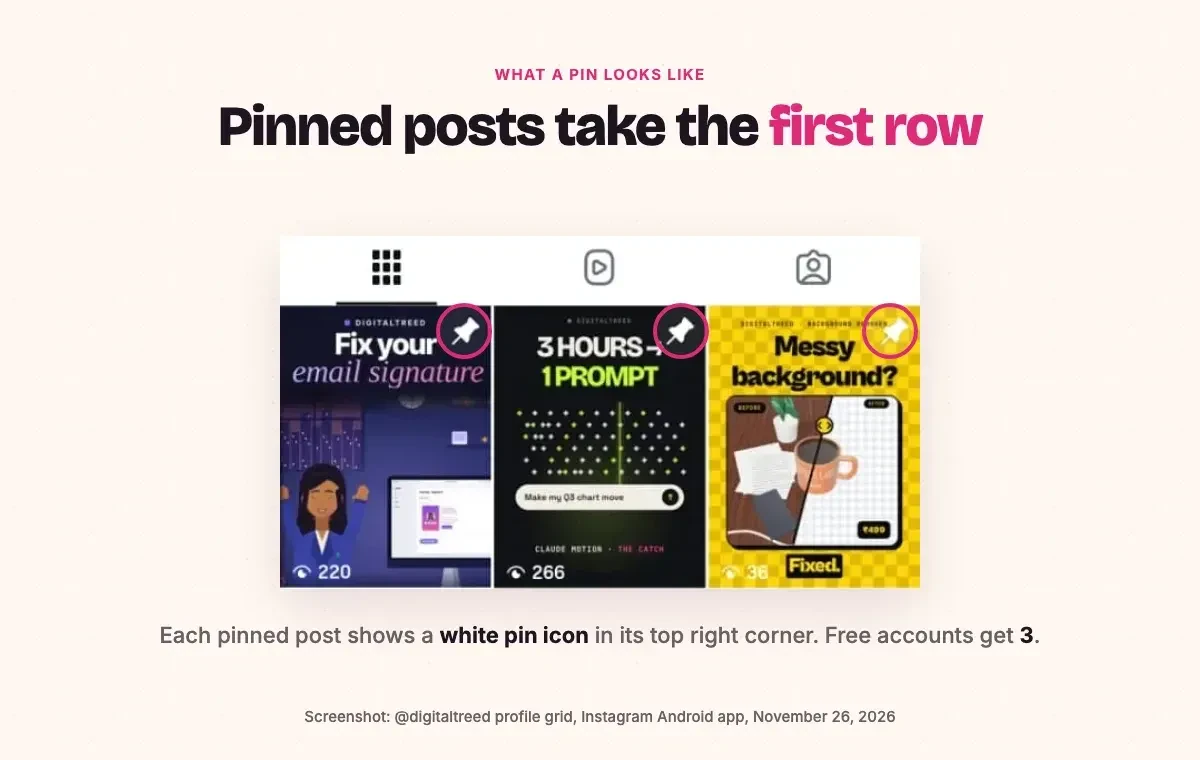 Screenshot of our @digitaltreed profile grid with three pinned posts, Android app, November 26, 2026.
To keep control, unpin the post you're done with first and then pin the new one, so you decide which pin goes instead of letting Instagram pick for you.
The limit is higher with Instagram Plus. It isn't free, though. Instagram's launch post from June 4, 2026 lists "More Profile Pins": "Pin up to 6 posts to your profile to highlight what matters most." It also says "Included benefits may vary," so check what your own account is offered before you pay. CBS News reported a price of $3.99 a month at launch in June 2026.
On our business account, Plus showed up in two places. A long press on a grid post offered "Pin more posts" with the note "Try Instagram Plus." In Settings and activity, under Subscriptions, a Meta One plan listed Instagram Plus and "Pin more posts" among its benefits, without a number. Instagram's Instagram Plus page says to check your settings to see if it's in your market.
Can you pin 4, 6 or 9 posts?
A free account stops at 3, Instagram Plus lists up to 6, and we didn't find any official way to pin 9 posts on any plan.
Skip any app that promises 9.
There's a second way to move a post up without a pin. Instagram Help on reordering your profile grid says you can tap and hold a post and select "Reorder grid," then drag it into place. We saw Reorder grid in the same long-press menu. It's one of the newer grid tools, along with others in our roundup of Instagram features for creators.
You can't pin from a computer or Mac
Whether you pay for Plus or not, pinning only works in the phone app. We checked this on November 26, 2026 with our own account at instagram.com, first in a normal desktop Chrome window. The menu on a post we own had eight items, from Delete and Edit to Copy link and Embed, but Pin wasn't one of them.
Next we switched Chrome's developer tools to iPhone mode, which makes instagram.com load the way it would in Safari on a phone, touch screen and all. The same post showed the same short menu, minus Edit, plus a "Use the app" bar at the bottom. Instagram Help pages for reel tools and grid reordering say the same thing: "This feature isn't available on computers."
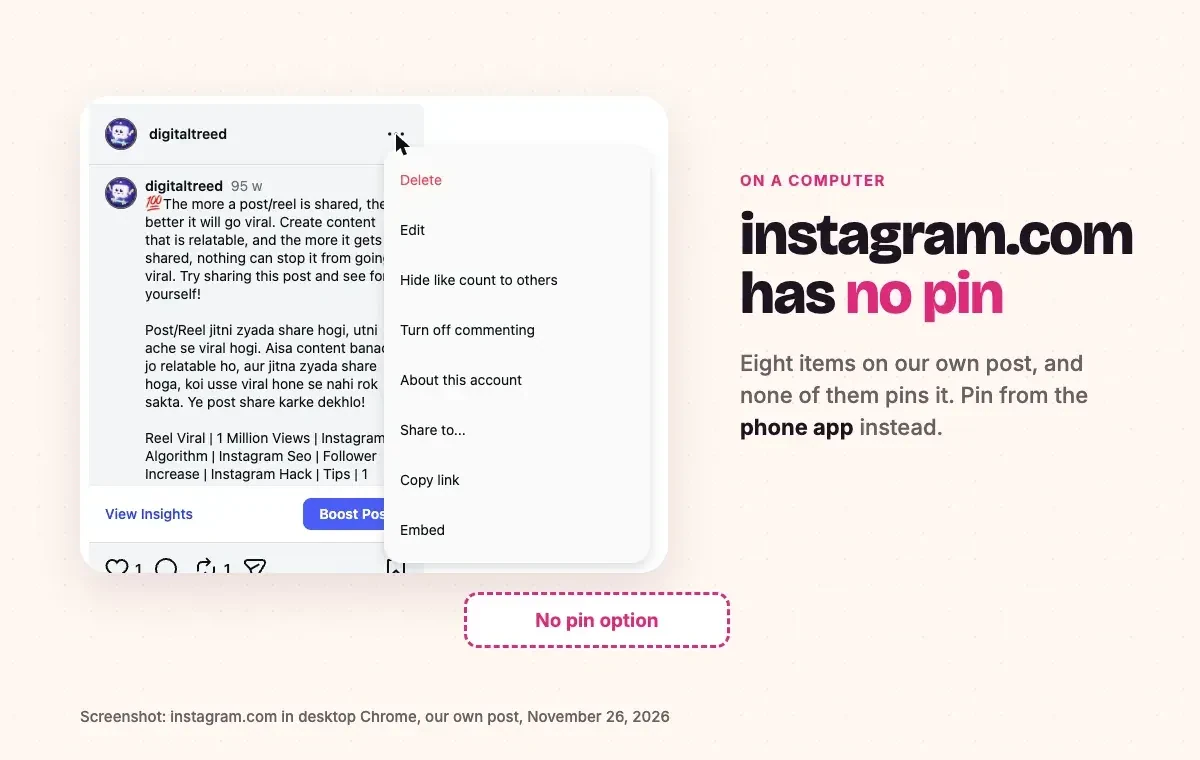 Screenshot from instagram.com on our own post, Chrome, November 26, 2026. There is no pin option in the browser.
If you plan posts on a computer, schedule them as usual, then pin from your phone once the post is live. Don't trust memory. A quick reminder helps, and our free social media content calendar template has a column you can use for it.
What we tested
On November 26, 2026 we tested our @digitaltreed business account on an Android phone, in desktop Chrome and in Chrome's iPhone mode. We opened the pin menus, tried a fourth pin and checked a collab reel.
Why can't I pin a post on Instagram?
So what if you're in the app and the pin still isn't there? It's usually one of these five things, roughly from most to least likely. Start at the top.
Not your post: you can only pin posts on your own profile. Collab posts are the tricky case. We opened a collab reel that another account started, and on our side the menu had "Remove from profile grid" and "Stop sharing," but no pin. Instagram's page about collab posts explains how the shared post appears on both profiles.
Computer or phone browser: as our test above showed, only the app shows the pin option, so open the post in the app instead.
Archived post: an archived post is hidden from your profile, so there's nothing to pin. Instagram Help explains how to show an archived post again, then you can pin it.
Old app: pinning has moved around the menus over the years, so update Instagram from the App Store or Google Play and check again. Instagram's page on what to do if the app isn't working covers app updates too.
A glitch: if you own the post, you're in the app and the pin still isn't there, close the app and open it again. If the app freezes too, our guide to fixing Instagram when it keeps stopping walks through the reset steps. You can also report a technical problem to Instagram from the app.
Which 3 posts a business should pin
Here's why the pins matter. Your profile is a storefront, and plenty of people walk past it. Half of US adults say they use Instagram, according to a Pew Research Center survey from 2025. Three pins give each new visitor the answer to three questions: what do you sell, can I trust you, and who are you?
Three slots, three jobs.
We'd fill the three slots like this: one post with your main offer or a current sale, one piece of proof, and one short intro to you or your team. Proof can be a customer review, a before and after, or a result in numbers. Don't overthink it. Keep the intro short, since people skim it on a small screen.
Example: a home bakery pins its holiday order reel, a customer's cake photo with their review, and a 20-second reel of the baker at work. When the sale ends, it swaps the first pin for the next offer and leaves the other two alone.
Rotate the offer pin with your campaigns, and check all three each month. Our four-week Instagram marketing plan shows where pins fit into a posting schedule. For the proof pin, a calm public reply to criticism can work as well as a review; see our tips on responding to negative comments.
Pins aren't the whole job. They're one part of a tidy profile, along with your bio, link and highlights. Our guide to social media optimization covers the rest. For a done-for-you setup, our social media services cover profiles too.
Frequently asked
Can you pin a comment on Instagram?
Yes. It's a separate feature for comments under your own posts, with its own steps.
Does pinning a post boost its reach?
Instagram hasn't said so. Its ranking explainer from 2023 doesn't mention pinned posts. Pinning changes what profile visitors see first.
Do followers get notified when you pin a post?
Instagram's pinning help page doesn't mention one, and we found no official source saying it does.
Can you pin someone else's post or a collab post?
No. Only your own posts, and a collab started by another account showed no pin on our side.
Can you pin an Instagram post from Meta Business Suite?
Not on desktop in our check on November 26, 2026. The Instagram post's menu in Meta Business Suite offered Edit post, Delete post and Create ad in Ads Manager, but no pin, so pin from the Instagram app.
How we made this guide: We read Instagram's pages and tested our own account in the app and on the web. Facts checked by the DigitalTreed team on November 26, 2026.
Sources
- Instagram Help: Pin a post to the top of your profile
- Instagram Help: Manage reels on Instagram
- Instagram Help: How to reorder content on your profile grid
- Instagram Help: About collab posts
- Instagram Help: Show an archived post again
- Instagram Help: What to do if the app isn't working
- Instagram Help: Report a technical problem
- Instagram: Introducing Instagram Plus (June 4, 2026)
- Instagram: Instagram Plus feature page
- CBS News: Instagram Plus price at launch (June 2026)
- TechCrunch: Instagram lets users pin posts (June 7, 2022)
- Instagram: Instagram ranking explained (2023)
- Pew Research Center: Americans' social media use 2025
Comments
No comments yet. Start the conversation below.