
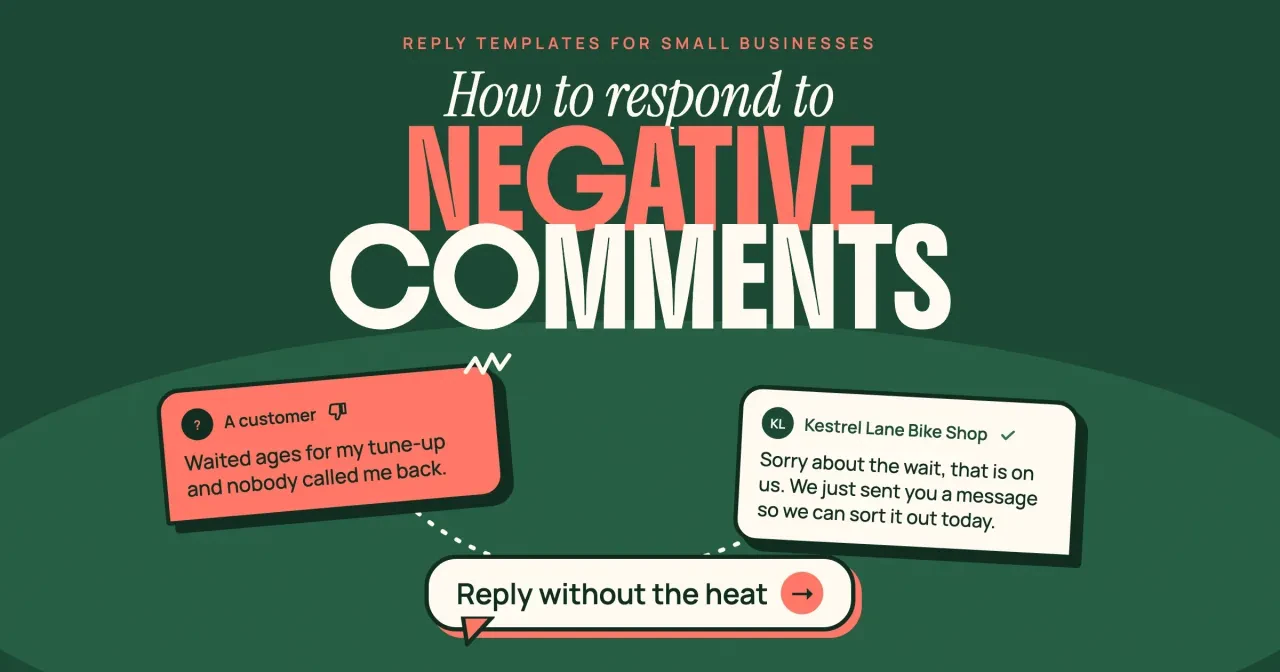
Quick answer
As of October 29, 2026, respond to negative comments on social media with one public reply of 2 or 3 sentences: apologize, own your part and offer a direct message. Hide or delete only spam, abuse or private data; on Facebook and Instagram, a hidden comment still shows to the person who wrote it. Then copy the reply template below that fits the complaint.
If you run the Facebook Page or Instagram account for your own shop, a sharp comment under last week's post can ruin an evening. A negative comment is a public complaint posted under your business's post or profile, and your answer is read by every customer who scrolls past it later. We wrote these steps for US owners who answer those comments between other jobs, without a social media team.
We start with how to sort the comment, then cover what hide, delete and block do on each platform. Next comes the public reply and the reply templates by complaint type, which we ran through a checker along with five failing drafts. After that: how fast to reply, the FTC review rules, when to escalate, and replies that make a complaint bigger. Our advice in one line: answer real customers in public, and save the delete button for abuse.
Key takeaways
- Reply once in public, then move the details to a direct message.
- Facebook still shows a hidden comment to its writer and their friends.
- Six of our eleven made-up replies passed all six of our checks.
- Google won't remove a review just because you dislike it.
- A groundless legal threat over a review can break FTC rule 465.7.
Sort the comment before you answer it
Before you type a word, decide which kind of comment you're looking at, since each kind gets a different first move. Most of what lands under a small business post fits one of five groups:
- A customer with a real problem, such as a late job, a wrong bill or a rude visit: reply in public, then take it to a message.
- A customer who misread a policy or a price: answer the facts kindly in public, then offer a message.
- Someone you have no record of: reply without accusing them, and ask for a date by message.
- Spam, scams, slurs or sexual content: hide or delete it, and block the account if it comes back.
- Threats, another person's private data, or a legal claim: save a screenshot, remove the data and escalate.
When you can't tell which group a comment belongs to, treat it as the first one. If you guess wrong, a calm two-sentence reply to a troll has cost you a minute. Deleting a real customer's complaint can cost you that customer, and other readers may have seen it before it went.
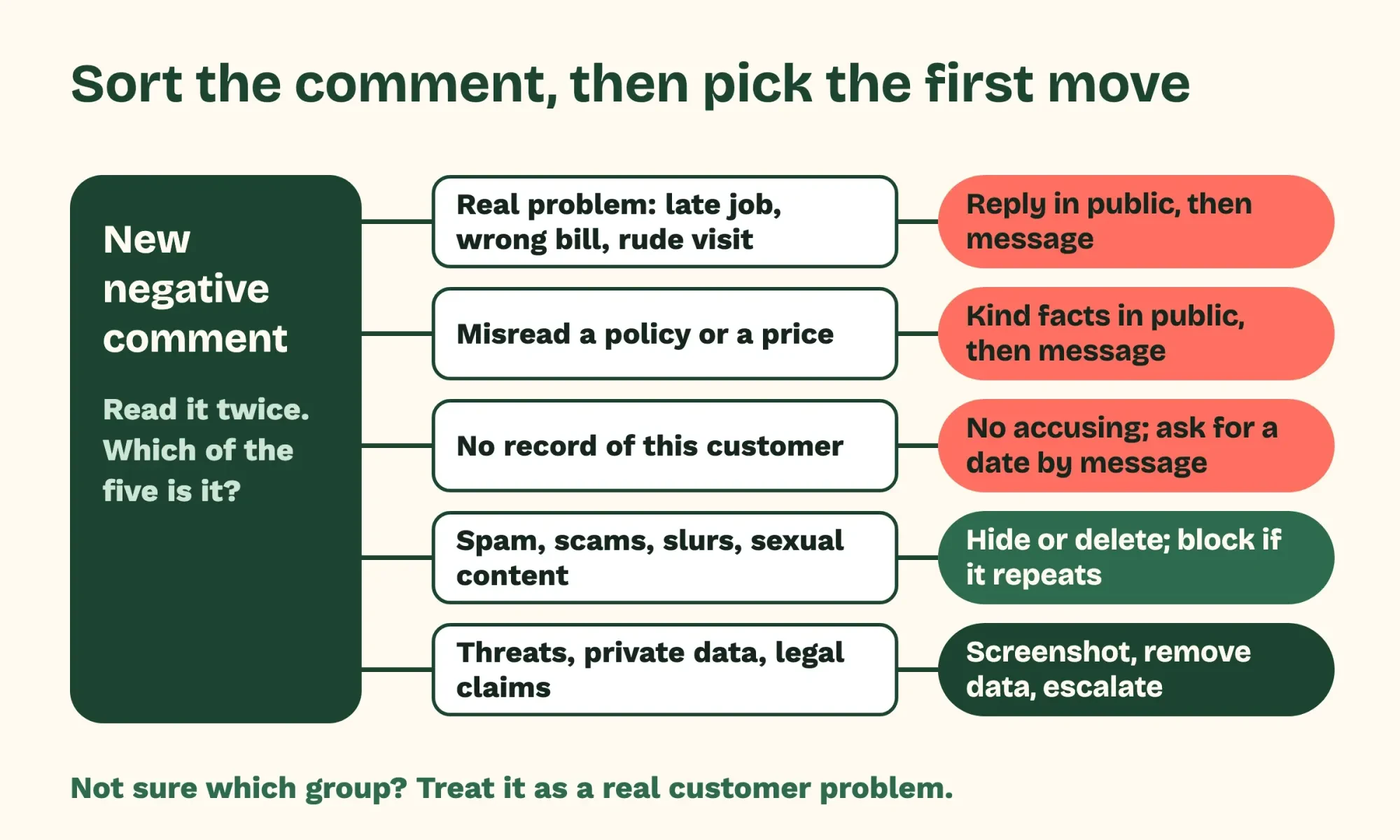 Diagram by DigitalTreed: our sorting rule for negative comments, the same five groups and first moves as the list above
What hide, delete and block do on each platform
Hide sounds gentler than delete, but on Facebook it isn't invisible. When a Page hides a comment, the writer and their friends still see it, per Meta's help page on hiding Page comments. Everyone else stops seeing it, along with its replies. Deleting removes it from the post outright, per Facebook's page on deleting Page comments. People with only task access to a Page can't hide, sort or delete comments on Page posts.
Instagram works differently. A comment you hide by hand is visible only to you and the person who wrote it, per Instagram's page on hiding comments. You can only do that on your own posts, and only in the Instagram app on an iOS or Android device. Restricting an account goes further: that person's new comments show only to them until you approve one. On your own posts, Instagram's delete page lets you remove anyone's comment.
The table sums up what each help page we read offers a business account. A dash means the pages we read didn't cover that action, not that it can't exist.
| Action | Facebook Page | LinkedIn Page | Google reviews | |
|---|---|---|---|---|
| Hide a comment | Yes, still seen by writer and friends | Yes, seen only by you and the writer | - | No |
| Delete a comment | Yes | Yes, on your own posts | - | No, report it if it breaks policy |
| Block or restrict | Block a profile from the Page | Restrict or block | Block a member | Report the user profile |
| Word filter | Up to 1,000 keywords plus a profanity filter | Hidden words list | - | - |
| Turn comments off | - | Yes, or limit who comments | Yes, per post | - |
The three LinkedIn help pages we read cover blocking and turning comments off; none covers hiding or deleting a member's comment, so the table leaves those blank. According to LinkedIn's guide to blocking a member from a Page, a blocked member can't comment, reshare or message the Page, but existing comments and messages stay visible. The member isn't told. Turning comments off works on a new Page post or an existing one, the second on desktop only, and LinkedIn describes both as settings for super and content admins.
On Google, the review pages we read list two moves. You can reply to a review or report it, but you can't hide or delete it.
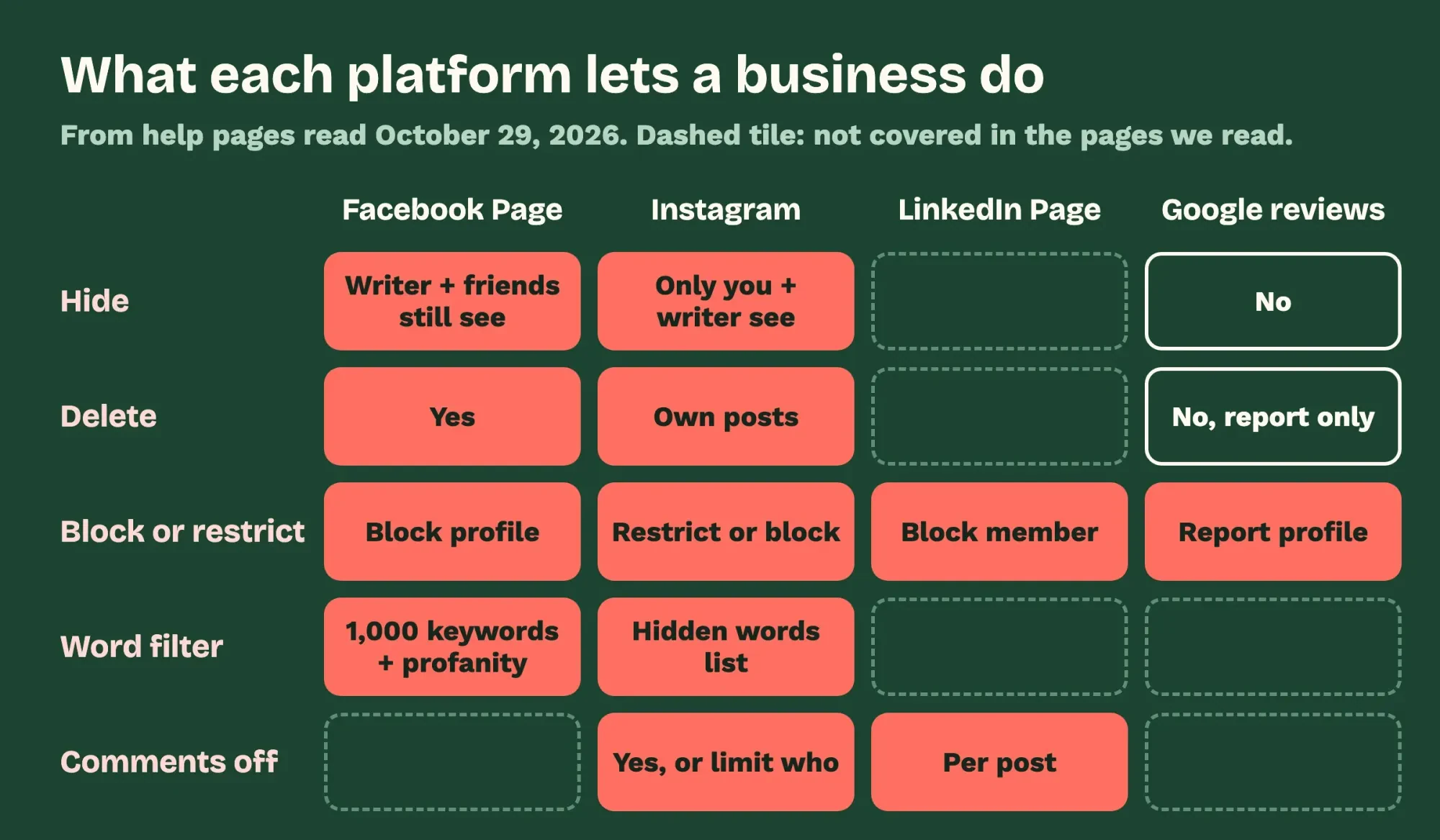 Diagram by DigitalTreed, from Facebook, Instagram, LinkedIn and Google Business Profile help pages read October 29, 2026; blank tiles mean the pages we read did not cover it
A public reply in three moves
For a real complaint, the public reply has one job: show everyone else that you heard it and are fixing it. We write it in three moves, and each one comes from Google's advice on review replies.
First, say sorry for the specific thing, not for the customer's feelings. Google's tips for review replies say to apologize when appropriate and to acknowledge the reviewer's specific feedback. Second, own your part and only your part. Google also says to admit mistakes but not to take responsibility for things outside your control. Third, move the details out of public view. For a complex case, Google's tips say to ask the reviewer to get in touch by phone or email so it can be settled privately. On Facebook, the help page on replying to Page comments lets you answer a comment by direct message. A note under the comment then tells everyone your Page responded privately.
Here's what that looks like for Kestrel Lane Bike Shop, a made-up repair shop. A made-up customer writes: "Waited ages for my tune-up and nobody called me back." The shop's reply: "Sorry about the wait, that is on us. We just sent you a message so we can sort it out today." That's 21 words. It apologizes for the wait itself, owns the missed call and tells readers when it gets fixed. It also leaves out why the shop was busy, the work order and any discount, since each of those would turn a short answer into an argument.
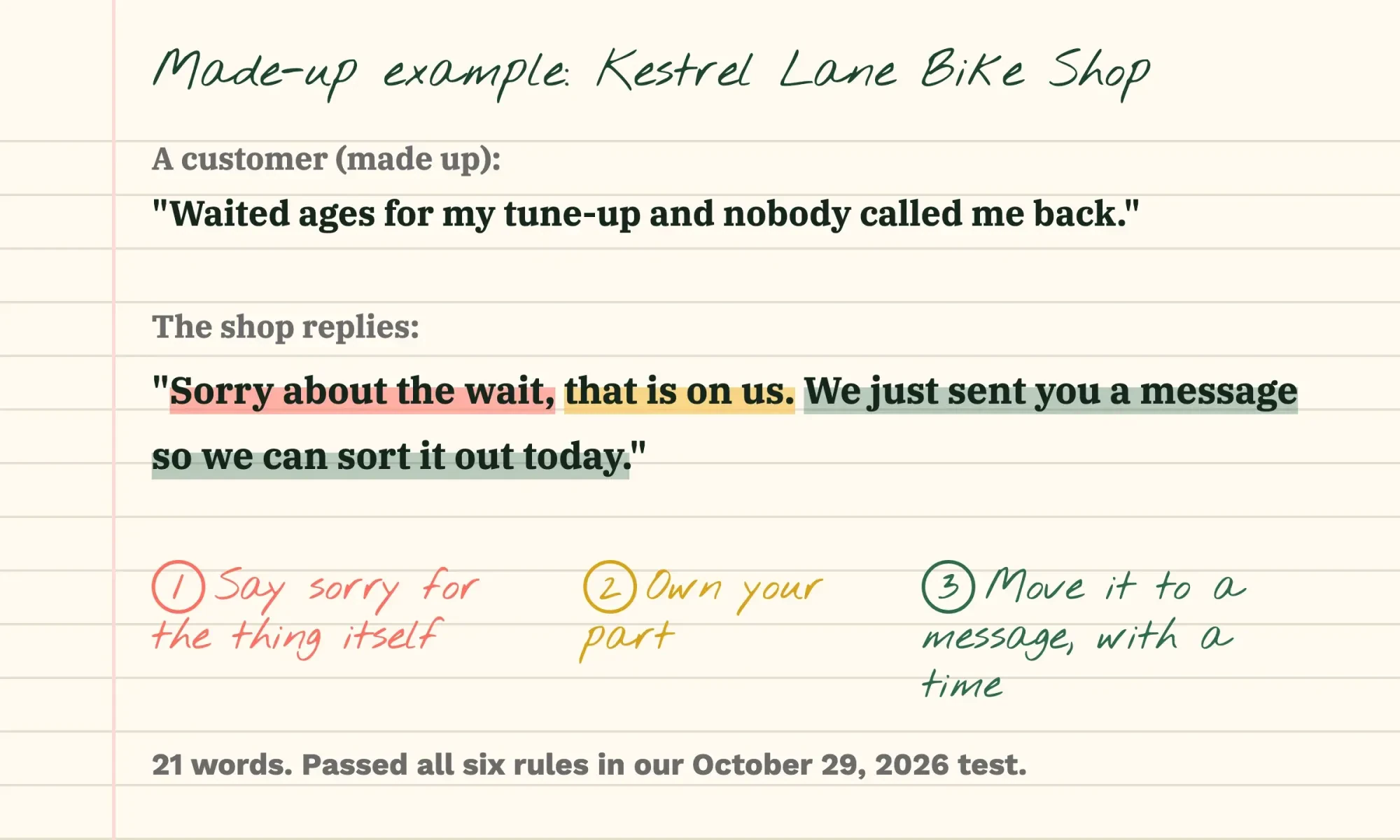 Drawn by us: the made-up Kestrel Lane Bike Shop reply from our test, marked with the three moves
Reply templates by complaint type
These six templates cover the complaints a service business sees most, written for the made-up bike shop and kept short enough to read in a few lines on a phone. All six passed our checker below. Swap in your own details. Keep the shape, and adjust the wording until it sounds like you. If your business has a set apology tone, our brand voice guidelines show how to write it down.
Slow service or no call back
"Sorry about the wait, that is on us. We just sent you a message so we can sort it out today."
Use this when the delay was yours. Only promise "today" if someone really will message today. Send that message before you post the reply.
A bill higher than the quote
"Sorry, a bill that doesn't match the quote isn't okay. Could you send us a message with your receipt so the owner can check it today?"
Keep the dollar amounts for the private message. A public reply that argues the math puts the customer's invoice on display for every follower, which is the kind of private detail Google's tips say to keep out.
Staff attitude
"Thanks for telling us, and sorry the counter visit felt that way. That's not how we want anyone treated. Please message us so we can hear the details and make it right."
Don't name the employee. Don't defend them in public either. Talk to the employee in private first, then follow up with the customer by message once you know what happened at the counter that day.
A part or product that failed soon after the job
"Sorry it went flat so soon. A new tube shouldn't do that, and we'd like to check the tire for the cause. Message us and we'll fit you in for a free look."
Offering to fix the actual problem is different from a coupon, which Google asks businesses to keep out of review replies.
Someone you have no record of
"We're sorry to read this, and we couldn't find a matching repair in our records. Could you send us a message with the date so we can look into it?"
It states what your records show. It never calls the customer a liar. If the comment turns out to be about another shop, a private message clears that up without a public spat.
A complaint about a posted policy
"Sorry the storage fee came as a surprise. We charge it after a week so the racks stay free for repairs, and we should have reminded you. Send us a message and we'll look at your bill."
It explains the rule once, without "clearly" or "as posted." To check that a reply reads easily before you post it, paste it into our readability checker.
Eleven made-up replies through a six-rule checker
Templates are easy to write and easy to get slightly wrong, so we tested ours. We also wrote five weaker drafts of the kind a stressed owner might post, to see whether simple rules would catch them.
What we tested: how the script scored eleven bike shop replies
On October 29, 2026, a Python script on one Mac checked 11 made-up replies to 7 made-up comments for Kestrel Lane Bike Shop. Each reply was scored on six rules: an apology, no blame phrases, an offer to move to a message, no private data, 15 to 70 words, and no promo wording. Five rules come from Google's reply tips; the blame word list and the 15-70 word band are our own choices. No social account or real customer was involved.
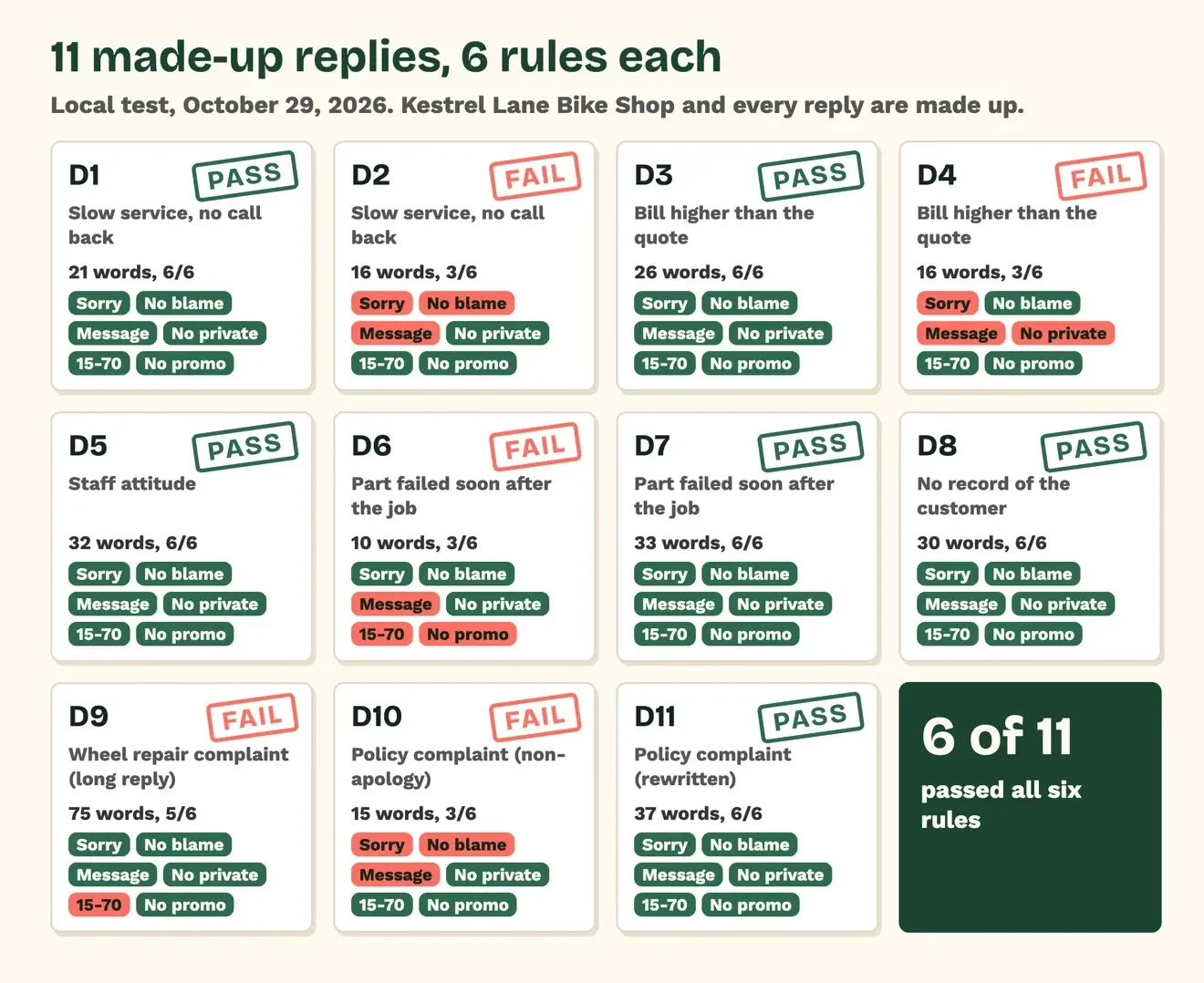 Source: our October 29, 2026 local test of 11 made-up replies; rules from Google Business Profile reply tips, 15-70 word band ours
Where the five failing drafts went wrong
Six of the 11 drafts passed all six rules, and they're the six templates above, word for word, so each template you copy has already cleared the same six checks. The other five each failed at least one rule, and the per-rule counts show where weak replies tend to slip. By rule, 8 of 11 drafts had a real apology, 9 had no blame phrase, and 7 offered a message. Ten kept private data out, 9 landed inside the length band and 10 had no promo wording. Here's every failing draft, in full, with what the script caught:
- D2, 16 words: "Actually we were slammed that week and you should have called the shop instead of waiting." Failed apology, blame ("actually", "you should have") and the move to a message.
- D4, 16 words: "Hi Dana Ruiz, invoice #4471 shows you approved extra pads by phone at 555-0142 on Tuesday." Failed apology, the move to a message and private data (phone number, invoice number, full name). Dana Ruiz is made up.
- D6, 10 words: "Sorry! Use code SORRY20 for 20% off your next tune-up." Failed the move to a message, length and promo ("code").
- D9, 75 words: "Hi there, thank you so much for taking the time to share this feedback with us, we really do appreciate hearing from every single customer who comes through our doors. We are truly sorry about your experience with the wheel truing. Our team works very hard every day to give great service, and we always aim to do better. Please send us a message whenever you have a moment and we will look into it." It apologizes and offers a message, so it failed only length.
- D10, 15 words: "We're sorry you feel that way, but our policy is clearly posted at the counter." Failed apology ("sorry you feel" isn't one), blame ("clearly", "sorry you feel", "but our policy") and the move to a message.
The move to a message was the rule broken most often, by 4 of the 11 drafts. Three of those four, D2, D6 and D10, answer the comment in public and stop there, and D4 posts the customer's details instead. D9 was polite and still failed, because at 75 words it ran past the 70-word top of the length band we set ourselves. Long replies bury the fix, and Google's tips ask for short ones. Both blame failures, D2 and D10, came from replies defending a busy week or a posted rule. The facts in them may be true, yet the wording still reads as an argument to everyone scrolling past.
How fast should you reply to a negative comment?
The same day, if you can. Google's reply tips ask for a prompt response but give no hour count. Step 8 of the small business social media plan gives the survey numbers on what customers expect, and it sets a one-day reply habit. We'd check comments twice a working day, once mid-morning and once before closing. On Google, "posted" doesn't mean live right away. Google says in its review replies help that replies are checked against its content policies first. Most clear within 10 minutes, but some take as long as 30 days. The reviewer gets a notice when you reply, so a careless line gets read by the one person you most want to win back.
Filters change what you see, too. Facebook keeps everything its profanity filter and blocked words catch under the "Hidden by this Page" view, and Instagram sends no notices for new comments from accounts you've restricted. Once a week, scan those places for a real complaint that got caught by mistake. From Facebook's hidden view you can unhide a comment, or block or report the profile behind it. If you want more good reviews to balance the bad ones, our free tool for Google review request links builds one you can text to customers.
Where the FTC review rules draw the line
Removing abuse is one thing, but silencing honest criticism can cross a federal line. The FTC's rule on consumer reviews, 16 CFR 465.7, lists the tactics it treats as unfair or deceptive. They're "an unfounded or groundless legal threat, a physical threat, intimidation, or a public false accusation" used against a review to stop it or get it removed. The false-accusation part applies when the accuser knows it's false or shows reckless disregard for the truth.
The same section covers businesses that show reviews on their own site. It bans implying those reviews are most or all of the ones submitted while reviews are being suppressed "based upon their ratings or their negative sentiment." Holding a review back isn't suppression when the same test is applied to every review without regard to sentiment. The rule's examples include defamatory or abusive content, another person's private information, a review the seller reasonably believes is fake, or one wholly unrelated to what you sell.
Older FTC guidance points the same way. The Endorsement Guides at 16 CFR 255.2(d) cover suppressing, reporting and editing reviews. Advertisers "should not take actions that have the effect of distorting or otherwise misrepresenting what consumers think of their products."
The FTC has acted on review suppression before. In January 2022, Fashion Nova agreed to pay $4.2 million to settle FTC allegations that it blocked negative reviews from posting on its website by holding lower-starred ones back. Knowing violations of an FTC trade rule can bring civil penalties as high as $53,088 per violation. That's the figure 16 CFR 1.98(d) gives for section 5(m)(1)(A) of the FTC Act, for penalties assessed after January 17, 2025.
What follows is how we read the rule's wording as marketers, and it is not legal advice. Section 465.1(d) defines a consumer review as an evaluation published on a website or platform dedicated "in whole or in part" to reviews. Whether a comment under a Facebook post fits that definition is a question for a lawyer, so we treat honest complaints as if it does. If a lawyer's letter is already involved on either side, talk to your own lawyer before you post anything. Keep screenshots of the whole thread either way.
Escalate threats, private data and pile-ons
Most negative comments end with one reply and one message, but a few need the owner the same hour. Name that person now, before you need them, and give them these four triggers so nobody on the team has to guess at a bad moment:
- A threat of violence: screenshot it, report it to the platform and call local police if it seems real.
- Someone's private data in a comment, such as a phone number or address: hide or delete it at once where the platform allows, or report it.
- A legal or safety claim, such as "your brake job failed on a hill": the owner calls the customer that day.
- A pile-on, with many comments from strangers in an hour: turn comments off on that post where you can.
For a pile-on, Instagram and LinkedIn give you more than replies. Instagram's restrict page points to a setting that temporarily limits unwanted comments from groups of accounts, and LinkedIn lets admins switch off comments on a single post. On Facebook, the help pages we read cover filters rather than a comment switch. A Page can block up to 1,000 keywords, and Facebook hides common misspellings of them without counting them toward that limit. Google's page on reporting reviews also links a separate route for negative review extortion scams. If you also run a community group, our Facebook group guide covers group rules and admins.
Replies that make a complaint bigger
Our test caught three of these mistakes, and Google's reply tips warn against each of them. The first is arguing. Words like "actually" and "clearly" read as blame even when the facts are on your side. The second is posting details only you should know, as D4 did with a name, phone number and invoice; Google's tips say never to share a reviewer's private information. Coupons are the third, since Google asks businesses not to offer deals in replies. Google's review tips page also says offering incentives for removing a negative review is strictly prohibited.
Two more come from Google's pages rather than our test. Google's tips say to skip the same thank-you under every review and to answer where you can add a useful update. Reporting a review just because you dislike it won't work either, since Google says only reviews that break its policies are eligible for removal. Getting more fair reviews in is the other half of the job, and it's covered in how to automate review requests honestly.
To spot patterns over a quarter, log each complaint in the social media audit template, and show the trend in your monthly social media report.
Some owners would sooner pass the inbox to someone else. DigitalTreed's social media marketing team handles comment replies for clients for a fee. That service is how we get paid, so read this paragraph as our sales pitch; the templates and checks above are yours to use on your own. If someone else answers for you, hand them the six templates and the four escalation triggers above, and ask for a copy of every reply they post.
Questions about hiding, deleting and review replies
Frequently asked
Does someone know if I hide their Instagram comment?
No. Instagram's hidden comments page says the person who sent a hidden comment won't know. Hidden comments still count in your total comment count, so the number under the post won't drop.
What happens when I block someone from my Facebook Page?
Facebook's Page blocking help says that profile can no longer see your Page's posts, tag the Page or start a conversation with it. If it followed your Page, it's also removed as a follower.
Can I appeal if Google keeps a review I reported?
Yes, once. Google's review reporting page says evaluation typically takes several days, and you can then file a one-time appeal from the Reviews Management Tool, covering up to 10 reviews.
Can a customer change a Google review after I reply?
Yes. Google's review management page says customers can still change their review after reading your reply. If they do, the review's date changes to show the latest update.
How we made this guide: Before writing the templates, we put eleven made-up replies for a made-up bike shop through a six-rule script on one Mac. No social account or real customer was involved. The rules and platform details come from Meta, Instagram, LinkedIn and Google Business Profile help pages, all opened on October 29, 2026. The law lines come from three eCFR sections, 16 CFR 465, 255.2 and 1.98, read the same day through the eCFR API. The FTC's Fashion Nova press release blocked our script, so that line rests on notes from an earlier DigitalTreed guide; it opens in a browser. Facts checked by the DigitalTreed team on October 29, 2026.
First published April 2020 as a weekly social media news roundup. Rewritten October 29, 2026 as an evergreen guide to answering negative comments, with tested reply templates; the wider plan for posting and replying sits in the step-by-step social plan.
Sources
- Facebook Help: Hide a comment from a post on your Facebook Page
- Facebook Help: Delete a comment from a post on your Facebook Page
- Facebook Help: Reply to comments on your Facebook Page posts
- Facebook Help: Block certain words from appearing in comments on your Facebook Page
- Facebook Help: Turn the profanity filter on and off for your Facebook Page
- Facebook Help: Block or unblock profiles from your Facebook Page
- Instagram Help: Hide comments or message requests that you do not want to see
- Instagram Help: Restrict or unrestrict someone on Instagram
- Instagram Help: Delete a comment on Instagram
- LinkedIn Help: Turn off comments on a new LinkedIn Page post
- LinkedIn Help: Turn off comments on an existing LinkedIn Page post
- LinkedIn Help: Blocking a member from your LinkedIn Page
- Google Business Profile Help: Manage customer reviews
- Google Business Profile Help: Tips to get more reviews and write better replies
- Google Business Profile Help: Report inappropriate reviews on your Business Profile
- eCFR: 16 CFR 465.7, Review suppression
- eCFR: 16 CFR 255.2, Consumer endorsements
- eCFR: 16 CFR 1.98, Adjustment of civil monetary penalty amounts
- FTC: Fashion Nova will pay $4.2 million (January 2022)


Comments
No comments yet. Start the conversation below.