
Quick answer
Social media optimization (SMO) is setting up your profiles, posts and shared links so the right people find you in each app and on Google. It also means every link you share shows a clean preview. When we checked 6 top-ranking pages on this topic, 4 had link-preview warnings. Most fixes take an afternoon.
Picture a neighborhood group chat. Someone asks for a dentist who can fit them in this week, and a friend pastes your link. What shows up is a gray box and a cut-off title.
This guide starts with that small moment.
Social media optimization covers the things people see before they follow you or tap: your name, your bio, the words in your posts and the card your link turns into. We wrote it for US owners who run their own accounts. The platform rules come from each platform's own help pages, the legal part comes from the FTC, and the link-preview test is ours.
Key takeaways
- SMO tunes your profiles, posts and link previews, not your whole marketing plan.
- Write captions the way a customer would describe the job.
- Shared link cards come from Open Graph tags on your own website.
- Only 2 of the 7 pages we checked passed on every app.
- Put ad disclosures in the post itself, not only in your profile.
SMO means tuning what people see before they follow you
Social media optimization is the work of setting up and keeping up your profiles, posts and shared links so people can find you and trust what they find. The term is older than most of the apps it now covers. Marketer Rohit Bhargava first described it on his blog in August 2006, according to the history in Wikipedia's entry on social media optimization.
SMO is narrower than social media marketing. Marketing is the whole plan: which platforms you're on, what you post, how often, and what you pay to boost. We cover that bigger job in our guide to planning a social media strategy. SMO is the tune-up on what you already have, so the plan has somewhere good to send people.
Think of it as dressing the shop window before any ad campaign starts.
Four places SMO works, from your bio to Google
That shop window has four panes. There's your profile, your posts, the preview card your links make, and Google's own results.
Your profile is the name, photo, bio, contact details and link a stranger checks before following. Your posts carry the words that each app's search reads. The preview card is built from tags on your own website, so nothing you change inside the app will fix it. And Google now shows social posts and profiles in its results, with free reports for some of them.
Most of the guides you'll find cover the first two panes and stop.
On the morning of October 24, 2026, we read the six top results we could load for "social media optimization" and for the profile-checklist search, with US settings. None of them mentioned Open Graph tags or why a shared link can show no image. Only one touched Google's side of things, and not one mentioned the FTC. Most are written by companies that sell social media tools, and most end in a pitch for that tool.
Your profile is the part people judge first
So start with the profile. It should tell a stranger who you are, where you work and what to do next, in the few seconds they'll give it. Each platform asks for this a little differently, and here's what their own help pages say.
On Instagram, the name field does real work. Meta's explainer on Instagram search lists "the similarity between the words used in your search and those in the account's username or profile name" as a signal for account suggestions. So it's worth putting what you do in the name field, as long as it still reads like a name. The bio isn't on that list, and we won't pretend it is.
Facebook Pages have an Intro (a short bio), a category, links, services and offers, according to Facebook’s help page on Page profiles. Facebook adds that "this feature is not yet available to everyone," so if a section is missing on your Page, it doesn't mean you've done something wrong.
LinkedIn says "Pages with complete information get 30% more weekly views," though it doesn't give a date or a method for that number. Its advice for the Overview is to "lead with relevant terms" because members search by keywords. It also asks for your website, location, industry and company size.
YouTube handles start with @ and run 3 to 30 characters, per YouTube’s handle rules. YouTube’s channel help lets you show up to 14 links, and the first one sits near the Subscribe button. Don't rename the channel on a whim, though. You get two name changes in 14 days, and a change removes the verification badge. Titles and descriptions are their own topic, covered in our YouTube video SEO guide.
Pinterest lets you claim your website. Once you do, "your profile picture will appear alongside the Pin" when someone saves an image from your site, per Pinterest’s help center. You'll need to own the domain and be able to edit your site's code.
X's help pages wouldn't load for us on test day, so we won't quote its limits here. Our X marketing guide covers how a business account fits into a wider plan.
Whatever the app, end the bio with one action, like "Book online" or "Call for same-day repairs." Our guide to calls to action on Facebook shows how to word that line. Then pin a post that answers "what do you do, and how do I buy?" On Instagram, Story Highlights can do the same job, and our Instagram Story ideas will help fill them.
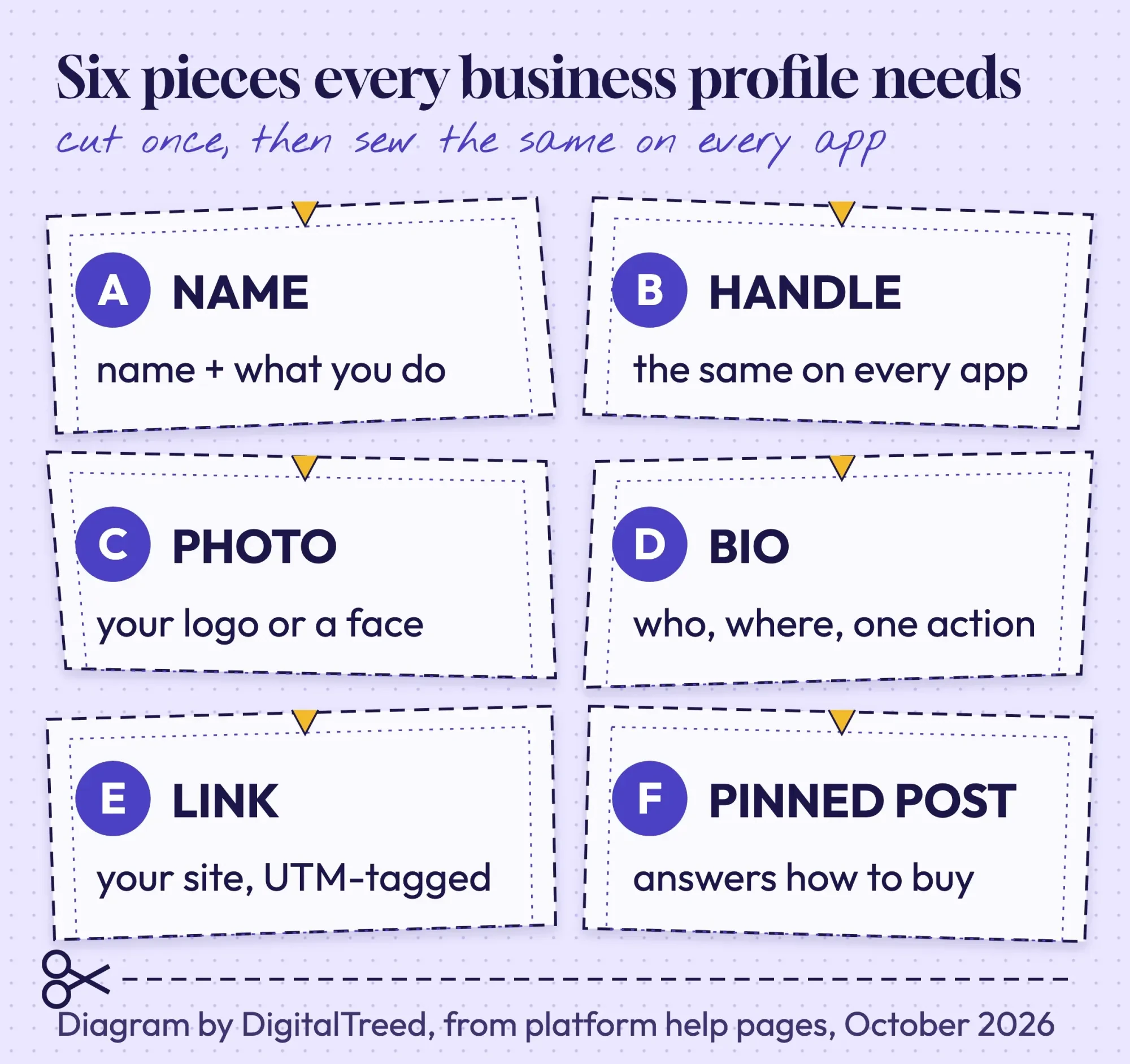 Diagram by DigitalTreed, based on Meta, LinkedIn, YouTube and Pinterest help pages read October 24, 2026.
In-app search reads your words, so write for people
That name field is one piece of a bigger change: people now search inside the apps. The good news is that the platforms say what they read, and the one that talks about keyword piles, TikTok, warns against them.
TikTok is blunt about it. Its Creator Academy page on search calls it a myth that tiny keyword text swiped off screen will boost a video. Adding unrelated text that way "can get your video flagged for spam," it warns. Stuffing a caption with loosely related keywords or hashtags "can actually work against you," it adds. What TikTok does recommend is using the description, voiceover, captions and on-screen text to make clear what the video is about.
YouTube says much the same. It estimates relevance from "how well the title, tags, description, and video content match your search query," per How YouTube Works. It also says it doesn't accept payment for better placement in organic search.
Instagram adds a check that's easy to miss. Instagram’s ranking explainer says you can now see whether your account is eligible to appear in Search or as a suggested account, and appeal if it isn't.
So write captions the way a customer would describe the job.
"Same-week crown repair in Corpus Christi" tells both people and search what the post is about. Thirty hashtags under it won't add much, and TikTok, at least, says they can hurt.
Shared links run on Open Graph tags from your own website
Now for the part the top guides skip. When you paste your website link into a post, a DM or a group chat, the app's crawler visits your page and builds the preview card from tags in its code.
Those tags come from the Open Graph protocol. It names four required properties for every page: og:title, og:type, og:image and og:url, all placed in the page's head section.
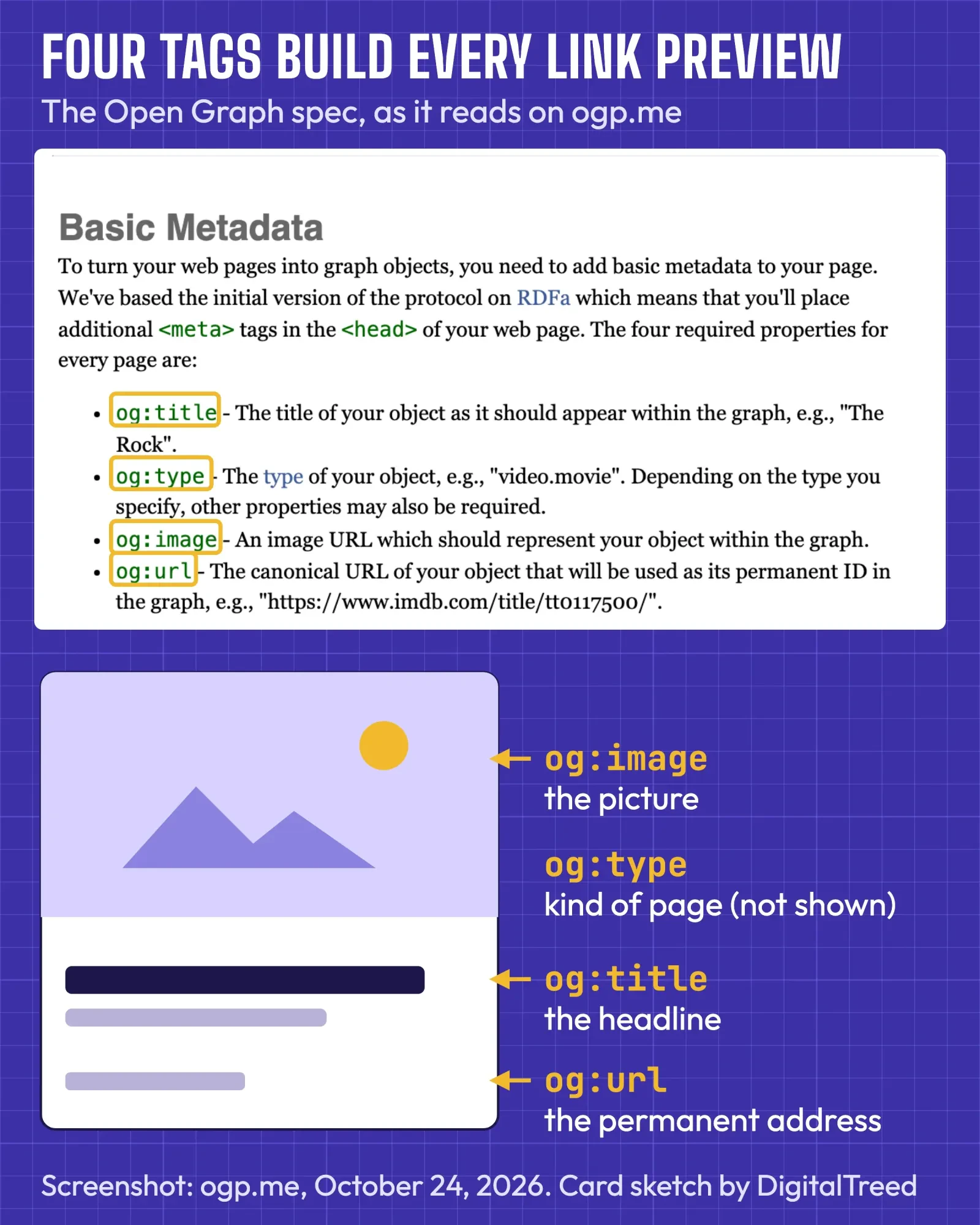 Screenshot: ogp.me, Basic Metadata section, October 24, 2026 (column narrowed for reading; notes ours).
Meta's sharing guide for webmasters adds two details that trip owners up. First, set og:image:width and og:image:height so "the image loads properly the first time it's shared," in Meta's words. Second, images are "cached based on the URL and won't be updated unless the URL changes," the guide says.
So if you swap the picture but keep the same file name, people may keep seeing the old one.
For size, Meta's sharing best practices ask for images "at least 1080 pixels in width" and, for rectangular images, a 1.91:1 ratio, such as 600 x 314. A 1200 x 630 image fits that shape. If yours is a heavy PNG, our free image compressor can shrink it before you upload it.
Those tags work twice. Pinterest's Rich Pins read Open Graph or Schema.org markup for article, product and recipe Pins, so one set of tags helps both. For a deeper look at the markup, our intermediate SEO guide has a chapter on Open Graph and social previews.
Only 2 of the 7 pages we checked passed everywhere
We wanted to know how often this goes wrong in the wild. So on the morning of October 24, 2026, we ran the code behind our Social Preview Checker on 7 public pages. Five were the top readable guides for "social media optimization," one was the top profile-checklist page, and the seventh was ogp.me, the Open Graph protocol's own site. The run was local, on our own machine, with no accounts and no sign-in. Four of the 6 ranking pages came back with at least one warning, and so did ogp.me.
Metricool's and Socialinsider's guides had no width and height tags, so the checker warned that Facebook might show no image on the first share. Socialinsider's image was also a 638 KB PNG, and WhatsApp's link-preview docs say the image "should be under 600KB in size," so the checker expected a small thumbnail there. Hootsuite's square 1080 x 1080 image and Small Business Fanatics' 1030 x 360 banner both fell short of the 1200 x 627 minimum in LinkedIn's sharing help. WordStream and SocialPilot passed everywhere.
Then there's ogp.me itself. Its 300 x 300 image is a quarter of LinkedIn's minimum width, so our checker expects a small card there and on Facebook. It has no twitter:card tag either, so our checker expects a small card on X as well; that last verdict is our tool's rule, because X's own card docs wouldn't load for us that day.
If the spec's own home page skips a step, a busy owner can be forgiven for missing one.
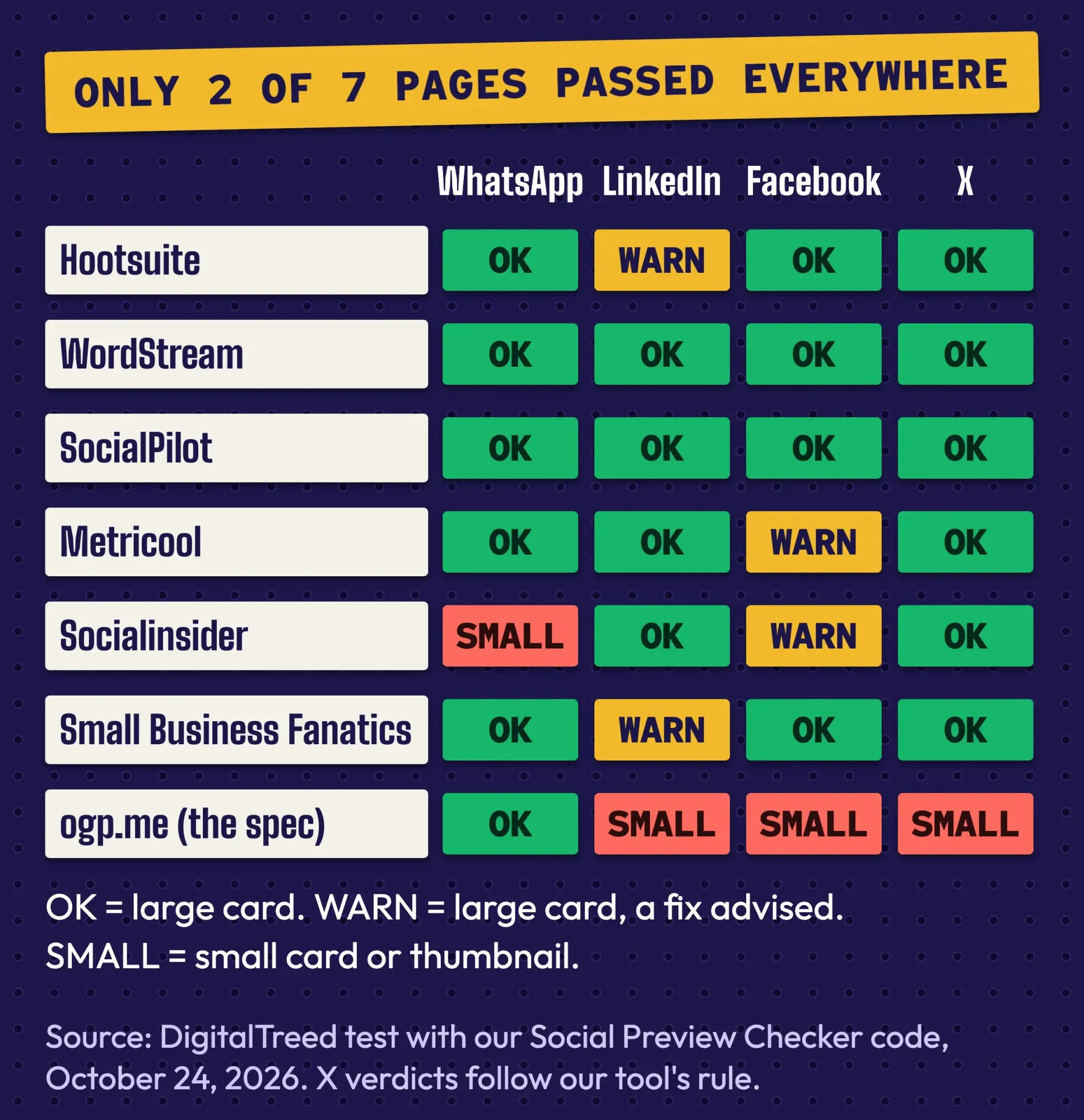 Source: DigitalTreed test with our Social Preview Checker code, October 2026 (7 public pages, run October 24, 2026).
You can run your own pages through our free Social Preview Checker before you share them. It shows the card each app is likely to draw and what to fix. Two caveats, though: its verdicts follow rules we last checked against each platform's docs on October 20, 2026, and on test day we re-read only the WhatsApp and LinkedIn image rules. Our requests also went out from outside the US, so a US visitor could see slightly different results.
Our take: fix your link previews before you spend a minute on hashtags. It's a one-time job on your own site, and every share after that looks better.
How is SMO different from SEO?
SEO is about your website in Google's results, while SMO is about your profiles and posts inside each app, plus the preview your links make. They meet in one place, and that place is growing: Google now shows social content in search.
Instagram’s help center says it lets search engines index photos and videos from public posts and reels uploaded since January 1, 2020. That only applies to accounts that are public, professional and run by someone over 18. Switch to a professional account and that door opens; stay personal and it stays shut.
Google's Search Console help describes platform properties that show how people find your Instagram, TikTok, X or YouTube content in Google Search. Google says it's "rolling out this feature gradually," so you may not see it yet. A December 2025 Search Central post added social channels to Search Console Insights, but only for channels Search Console "has identified automatically."
If either shows up in your account, it's free data worth a look.
A Business Profile on Google can hold one link each for Facebook, Instagram, LinkedIn, Pinterest, TikTok, X and YouTube, per Business Profile help. Google says the feature is in "select regions" and doesn't track clicks on those links. We walk through the rest of that listing in our guide to Google Business Profiles.
On your website, Organization structured data can list your profiles in a sameAs property. Google says this markup helps it "disambiguate your organization in search results" (Google’s Organization markup docs).
One more, mostly for later. Google's new Search profiles need at least 10,000 followers on one platform and are offered in the US, Canada and India, so most local businesses won't qualify yet.
Two myths that waste an owner's afternoon
Overlap with Google breeds myths. The biggest is that likes and shares push your website up in Google.
Google's starter guide to SEO lists social media promotion as one way to help people and search engines discover new content.
Nothing in it says shares lift rankings.
The guide even warns that overdoing promotion can look like "manipulation of search results." Our off-page SEO checklist sorts the profiles that are worth it for SEO from the ones that aren't.
The second myth is that alt text is a secret keyword slot. Instagram says the description you write "will only be read if someone is using a screen reader," per its alt text help page, and LinkedIn’s help says the same of its Alt.text field. Write it for the customers who can't see the photo, because that's who reads it.
FTC rules reach your profile too
One shortcut is now a federal problem: buying followers. Since October 2024, the FTC's rule on reviews and testimonials, 16 CFR 465.8, bars buying fake indicators of social media influence when two things are both true. The buyer knew or should have known they were fake, and the numbers materially misrepresent the buyer's influence or importance for a commercial purpose. The rule covers followers, likes, views and comments, among others. Penalties can reach $53,088 per violation under 16 CFR 1.98.
Disclosures belong in the post, not the profile. The FTC's Disclosures 101 guide says a disclosure is likely to be missed if it sits "only on an ABOUT ME or profile page," at the end of a post, or behind a MORE click. It also says not to mix it into a group of hashtags or links. So "#ad" in your bio doesn't cover your posts.
Plain words such as "ad" or "sponsored" are often enough, the same guide says, as long as they're hard to miss. The Endorsement Guides define a clear and conspicuous disclosure as one that's "difficult to miss" and "easily understandable by ordinary consumers" (16 CFR 255.0).
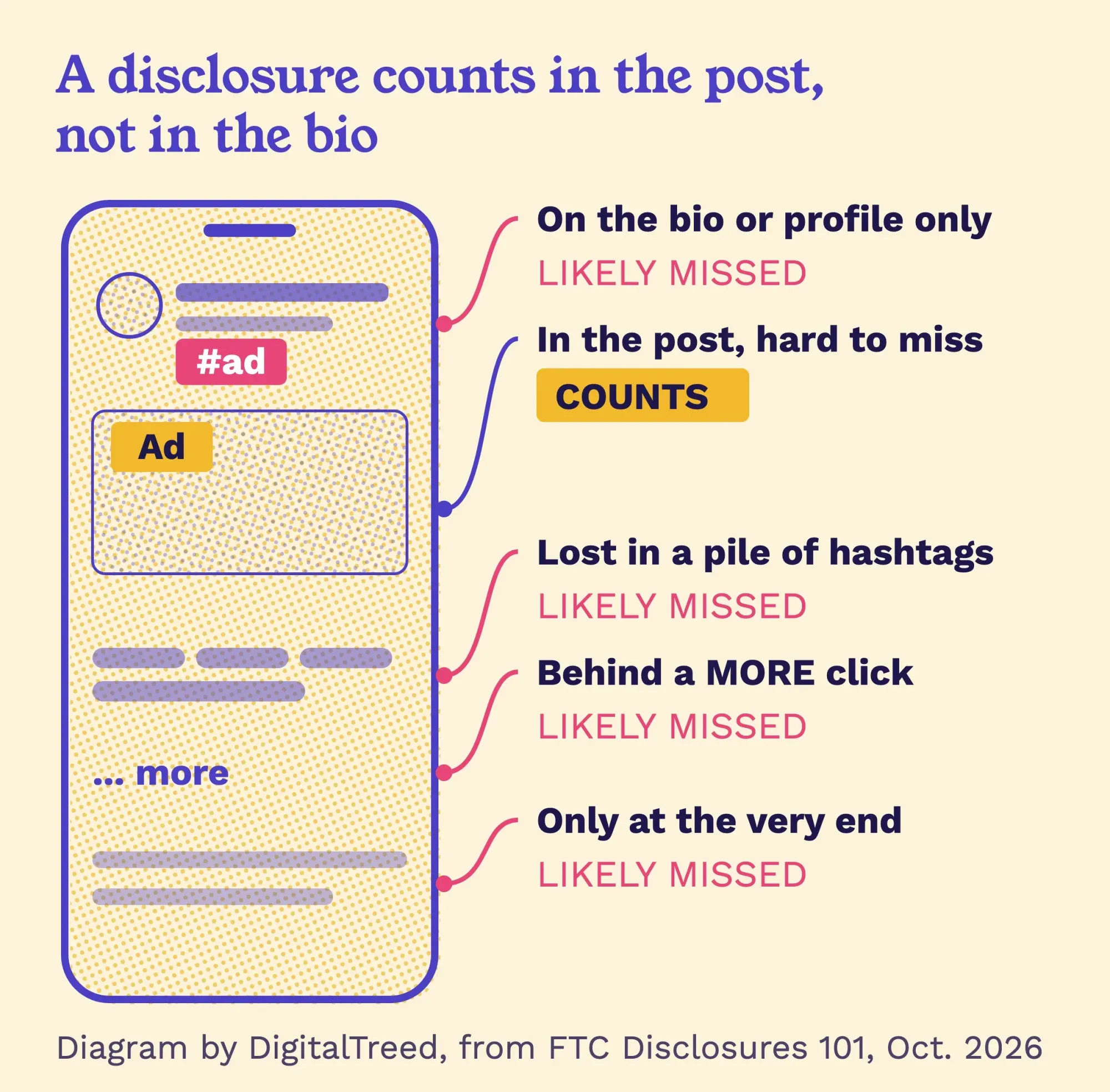 Diagram by DigitalTreed, based on the FTC's Disclosures 101 for Social Media Influencers, read October 24, 2026.
Staff count too. Under the FTC Endorsement Guides, an employee who promotes your business online should clearly disclose that they work for you. The FTC's answers on the guides add that people likely won't read "#employee" that way.
We've kept this to what touches a profile, and it's a plain-English summary rather than legal advice. If you're planning paid creator deals or a staff posting policy, have a lawyer who knows FTC rules read your exact wording.
Example: a dental practice's one-afternoon cleanup
Example: Saltgrass Dental is a made-up two-dentist practice in Corpus Christi, Texas. Its Facebook Page shows the name "SGD Family LLC," with no hours and no category. Instagram is still a personal account, the bio has no action, and the website link goes to the home page with nothing to track it. When a patient shares the new-patient page, the preview has no image.
The office manager blocks out one afternoon. She renames the Instagram profile "Saltgrass Dental | Corpus Christi," switches it to a professional account, and ends the bio with "Book a cleaning online." On Facebook she adds the category, hours and a services list. The bio link gets UTM tags from our UTM builder, so visits from Instagram show up on their own in analytics. Then the practice's web developer adds a 1200 x 630 preview image with width and height tags.
None of it costs money.
It's mostly fields that someone filled in once, years ago, and never opened again.
Frequently asked
How do I make Facebook show my new link preview?
Use a new file name for the new image, then run the page through Meta's Sharing Debugger. Meta's sharing guide for webmasters says the debugger triggers a fresh scrape of your page, so you can update the card after you fix your tags, as of October 2026.
Do I need a Pinterest business account?
If you want Pin analytics or ads, yes, and it's free. The Pinterest business account help page says business accounts are public, so a private account must go public first. Your Pins and followers stay the same, and you can switch back at any time, as of October 2026.
How often should a business post on LinkedIn?
Aim for at least once a week. LinkedIn's Pages best practices say companies that post weekly see a 2x lift in engagement. LinkedIn gives no date or method for that figure, so treat it as a guide rather than a promise.
Your profile checklist, and how often to run it
Here's the checklist we'd run on any small business's accounts, one platform at a time. Each row traces back to a rule or help page quoted above.
| Check | What good looks like |
|---|---|
| Name | Same business name everywhere; what you do in Instagram's name field |
| Handle | Short and matching across apps; 3-30 characters on YouTube |
| Photo and banner | Your logo or a face, set on every app |
| Bio | Who you serve, where, and one action |
| Contact | Category, hours, phone or email, service area where offered |
| Link | Your site with UTM tags, or a link page |
| Pinned post | Answers "what do you do, and how do I buy?" |
| Alt text and captions | On every image and video |
| Account type | Professional or business account turned on |
| Website tags | Four Open Graph tags plus image width and height, preview tested |
| Social links on your Business Profile; sameAs on your site | |
| Rules | Disclosure inside each paid post; no bought followers |
If you want several links in one bio, our guide to using a link page like Linktree weighs that option against linking straight to your site.
How often should you run it? None of the help pages we read gives a number. Our own habit is once a quarter, plus any time you rebrand, move or change your phone number.
Prefer to hand it off? Our social media service can set up the profiles and keep the posting going. (We sell that service, so weigh our advice with that in mind.)
How we made this guide: on Saturday, October 24, 2026, our editors checked each platform rule against that platform's own help page and checked the FTC points against the eCFR and the FTC's guidance pages. The link-preview test is first-hand: we ran our Social Preview Checker's code on 7 public pages that morning and kept the raw results. Where we couldn't read a platform's page that day (X, and TikTok's help center), we left its rules out. Links to every source sit beside the claims they back.
First published August 2020. Rewritten Saturday, October 24, 2026: the old services page is now a US explainer, with profile rules from each platform's help pages, our own link-preview test, Google's social features and the FTC rules that touch a profile.
Sources
- The Open Graph protocol (ogp.me)
- Meta for Developers: A guide to sharing for webmasters
- Meta for Developers: Sharing best practices
- Meta for Developers: WhatsApp link previews
- Meta Transparency Center: Instagram Search
- Instagram Help Center: Search engine results for public posts
- Instagram Help Center: Alt text
- Instagram: Instagram ranking explained
- Facebook Help Center: Page profile sections
- LinkedIn: LinkedIn Pages best practices
- LinkedIn Help: Add alternative text to images
- LinkedIn Help: Make your website shareable on LinkedIn
- YouTube Help: Handles
- YouTube Help: Manage your channel profile
- How YouTube Works: Search
- TikTok Creator Academy: Getting discovered with Search
- Pinterest Help: Claim your website
- Pinterest Developers: Rich Pins overview
- Google Search Central: SEO Starter Guide
- Search Console Help: Platform properties
- Google Search Central Blog: Social channels in Search Console Insights (December 2025)
- Google Business Profile Help: Social media links
- Google Search Central: Organization structured data
- Google Search Help: Search profiles
- eCFR: 16 CFR 465.8, Fake indicators of social media influence
- eCFR: 16 CFR 1.98, Adjustment of civil monetary penalty amounts
- eCFR: 16 CFR 255.0, Purpose and definitions
- eCFR: 16 CFR 255.5, Disclosure of material connections
- FTC: Disclosures 101 for Social Media Influencers
- FTC: FTC's Endorsement Guides, What People Are Asking
- Wikipedia: Social media optimization (history of the term)


Comments
No comments yet. Start the conversation below.