
Quick answer
Geofencing marketing shows ads to phones inside, or recently inside, a virtual boundary around a real place. Google Ads won't target a radius under 1 km, so building-sized fences come from vendors, at $3.50 to $8.50 per 1,000 impressions on the two vendor price pages we read, as of October 2026. Keep every fence away from clinics and hospitals.
The first version of this post made one point: local ads should reach people on their phones. That still holds. What it skipped was everything you need to act on it, like which platform to use, what it costs, how small the circle can get, and which places are off limits.
This rewrite covers those for one-location US businesses, plus a small test of our own on the measuring side.
One rule before anything else: we won't suggest fencing a hospital, a clinic or any other health provider, and your vendor shouldn't either.
Key takeaways
- Google Ads won't target a radius smaller than 1 km.
- Set Google's location option to Presence so a walk-in shop reaches nearby people.
- Building-sized fences come from vendors, at $3.50 to $8.50 per 1,000 impressions.
- Four states restrict geofences around health care sites, so keep clinics out.
- Give each fence its own tagged link, using a medium such as display.
Geofencing marketing puts a fence around a place and targets the phones inside
Geofencing marketing is showing ads or messages to phones that enter, or were recently inside, a virtual boundary drawn around a real place. The place might be your shop, a rival's lot, a fairground or a convention hall. The fence is only a shape on a map.
The ad follows the phone after it crosses the line.
How does anyone know the phone was there? Apps with location permission pass a position, worked out from GPS, Wi-Fi or cell signals, into the ad market. Vendors match those positions to their fences and bid to show ads in other apps the same phone opens later. Some also watch for a later visit to your store and call it a conversion.
Geotargeting is the wider cousin. It aims ads at a city, a ZIP code or a radius, based on where people are or what they search for. Geofencing is the tight version: one building, one block, one parking lot. Plenty of owners think they're buying the tight version and end up with the wide one, which is fine as long as you know which one you paid for.
That gap shows up most on the two ad platforms you probably already use.
Google Ads and Meta give you a radius, not a building
Google Ads and Meta are the cheapest places to start, but their smallest circle is bigger than most people expect. Google's location targeting page says "Radius targeting requires setting a radius of at least 1 km around any given location." That's about 3,281 feet, or 0.62 miles. The same page warns that with a small target your "ads might only show intermittently or not at all."
The setting local shops miss sits one click deeper. By default, Google's advanced location options reach people in your area and people who've shown interest in it. A tire shop in Reno doesn't need a driver in Phoenix who once searched for Reno. Switch to Presence, which shows ads to "people who are likely to be located, or regularly located in the locations you've targeted."
Meta is looser on shape and vaguer on size. Its locations help page allows up to 250 cities or 50,000 ZIP codes, and says the "Radius minimum and maximum vary by location type" without giving numbers. It also says "Complete accuracy is not guaranteed" for its location targeting. We couldn't find a minimum radius in miles on Meta's own pages, so we won't print one.
One more Meta rule catches real estate agents, recruiters and lenders. In Meta's special ad categories, US ads can't target by ZIP code, and city or pin-drop audiences get what Meta calls "an expanded radius" instead. Our real estate local SEO guide covers the organic side for agents, and our Facebook call to action guide covers the ad buttons.
So if you need a fence the size of one parking lot, you'll need a vendor.
Vendors buy app location signals and ad space, then draw fences down to a single building. That precision is what you pay for.
It's also where the legal questions start.
How much does geofencing marketing cost?
Before the law, the money. Google Ads and Meta have no fixed entry price for location targeting, because you set the daily budget yourself; our guide to PPC marketing explains how bids and budgets work. Managed vendors sell packages, and two of the vendors that rank for this topic publish prices on their own pages. We read both on October 24, 2026.
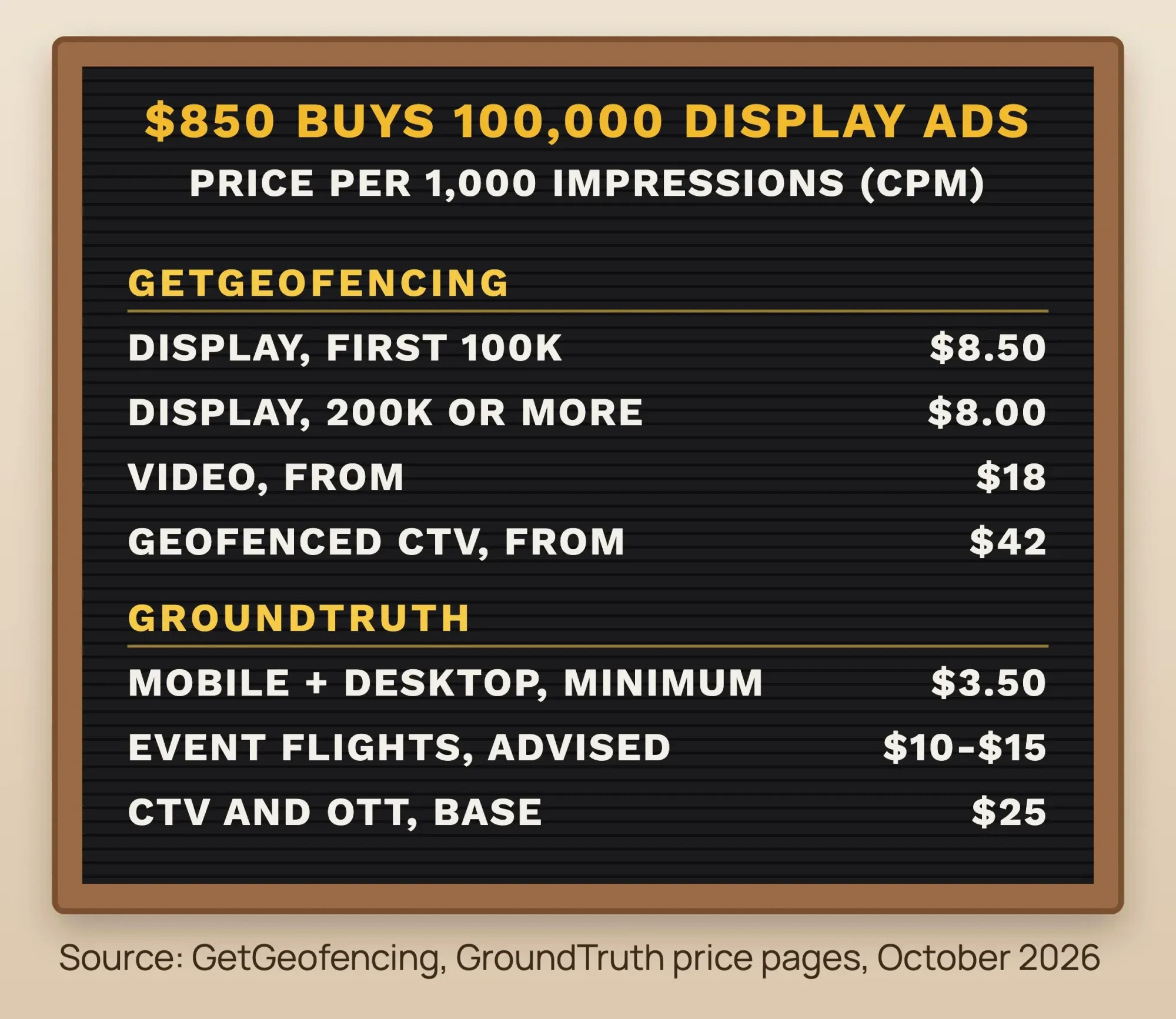 Source: GetGeofencing and GroundTruth price pages, October 2026. CPM means cost per 1,000 impressions.
GetGeofencing's pricing page says, as of October 2026, that its "managed display campaigns start at $850 for 100,000 impressions over a 30-day flight." That works out to $8.50 per 1,000 impressions. At 200,000 impressions or more, the page lists $8 CPM, so $1,600 buys 200,000. Video starts at $18 CPM, and streaming TV aimed by geofence starts at $42.
GroundTruth publishes a lower floor. Its cost FAQ, as of October 2026, says "our minimum CPM price for both mobile and desktop targeting is $3.50," and it recommends $10 to $15 for event or short-flight campaigns. Its base price for connected TV is $25 CPM.
What does $850 actually buy? Say 0.5% of those 100,000 impressions get a click, a rate we picked for illustration, not a benchmark. That's 500 clicks at $1.70 each, using GetGeofencing's price as of October 2026. Whether that's cheap depends on what one customer is worth to you, which is why the measuring section matters more than the CPM.
Agencies quote monthly ranges too. We left out every range that didn't say where its number came from.
Fence your own area, your rivals and your events
Once you know the price, spend it on places your customers already go. Four kinds of fence do most of the work for a shop like yours:
- Your own area: a radius around the shop on Google or Meta, with an offer worth a short drive.
- A rival's lot: a vendor fence around a competitor, with a reason to switch. Marketers call this conquesting.
- An event: a fence around a car show, home show or game, live only for those hours.
- A trade show: B2B sellers fence the convention hall for the show's dates.
Example: Lantern Tire & Brake is a made-up, one-location shop in Reno, Nevada. It runs Google Ads on a 3 km radius set to Presence for brake searches, plus a Meta radius ad for a $20-off oil change. A vendor quote covers fences around two rival tire shops and a weekend car show at the fairgrounds.
There's an urgent care clinic two doors down, and it stays out of every fence. Nevada's ban turns on purpose, like tracking patients or sending health-related ads, and on its face a brake ad is neither. The owner still keeps every vendor fence off that block and asks a lawyer before drawing one nearby.
And one kind of place never goes on the list.
While researching this post, we read a ranking vendor page that names hospitals, urgent care centers and specialty clinics among the best places to fence. Don't do it. Four states restrict exactly that, and sensitive places are what put location data companies in front of the FTC. Health practices have safer options, and our dermatology marketing guide sticks to plain location targeting for that reason.
Is geofencing legal in the US?
That warning has a legal basis. Geofencing ads are legal in general across the US, but four states restrict geofences around health care sites, and several more treat precise location as sensitive data. The table puts each rule side by side, using each law's own distances.
| State | What the law restricts | Distance | Places covered |
|---|---|---|---|
| Washington | Geofences used to track people seeking care, collect health data or send health-related ads | 2,000 ft from the perimeter | In-person health care providers |
| New York | Geofences used for ads, consumer profiles or health inferences | 1,850 ft radius | Health care facilities other than your own |
| Connecticut | Geofences used to identify, track, collect data from or notify people about their health data | 1,750 ft | Mental, reproductive or sexual health facilities |
| Nevada | Geofences used to identify or track patients, collect health data or send health-related ads | 1,750 ft | Medical facilities and other in-person health care |
| California | Precise geolocation is sensitive personal information (limits and opt-outs, not a ban) | 1,850 ft radius | Any location |
| Maryland | No sale of sensitive data, including precise geolocation | 1,750 ft radius (a definition, not a geofence ban) | Any location |
| Oregon | No sale of data that places a consumer within the radius | 1,750 ft | Any location |
Washington's rule is the best known, and our hyperlocal marketing guide covers it, so here we'll only add that the state attorney general says the geofence section applied from July 23, 2023.
New York's General Business Law 394-g bars a geofence of 1,850 feet or less around any health care facility "other than their own" when it's used to deliver ads, build consumer profiles or infer health status. That exception comes from New York's text, so don't assume it carries over to other states.
Connecticut's CGS 42-526 draws its line at 1,750 feet around mental health, reproductive and sexual health facilities. Nevada's SB 370 uses the same distance for any provider of in-person health care, and section 36 of the bill made it effective March 31, 2024.
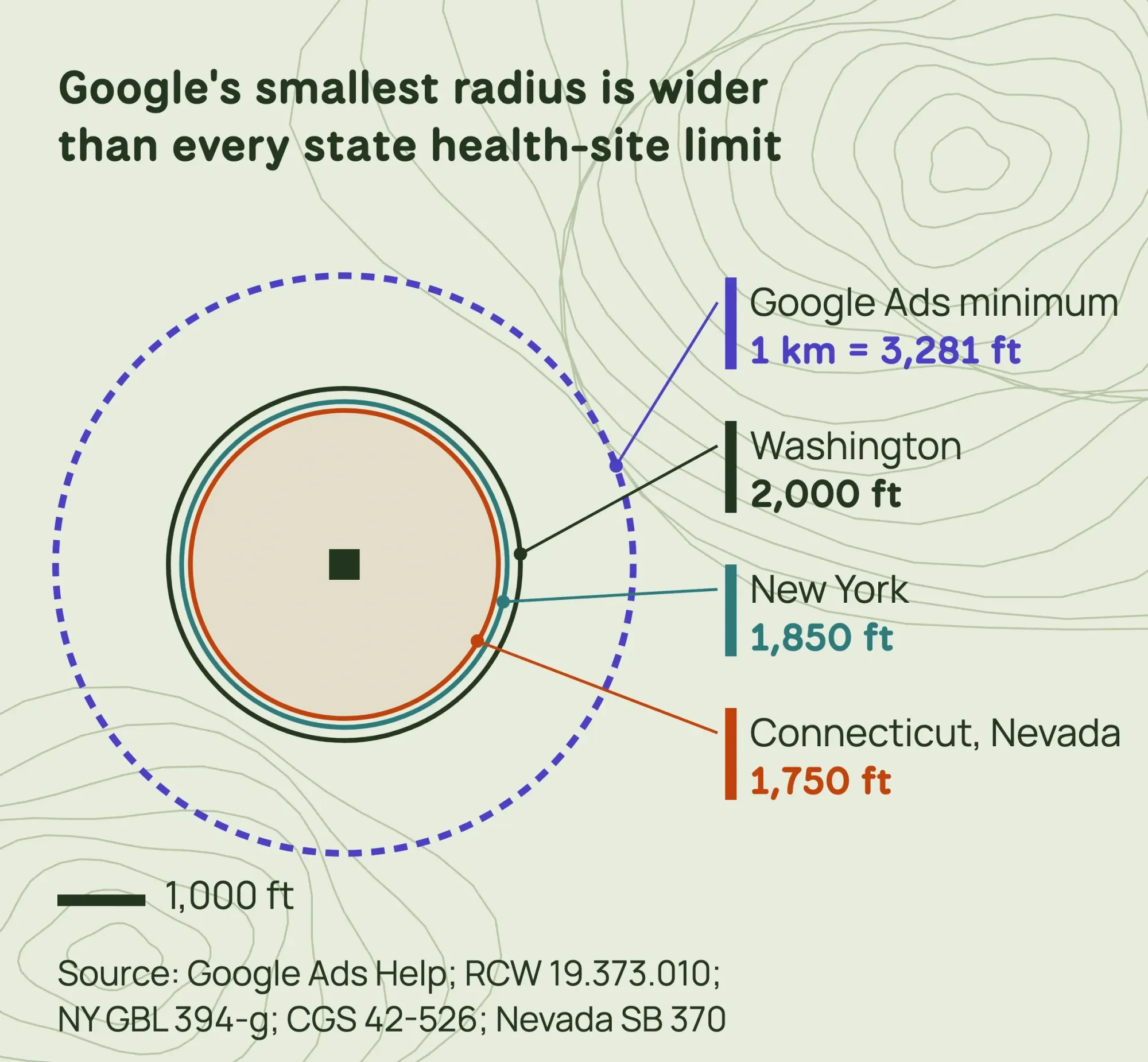 Diagram by DigitalTreed, to scale; Washington measures from a site's perimeter, drawn here from one point. Sources: Google Ads Help, RCW 19.373.010, NY GBL 394-g, CGS 42-526 and Nevada SB 370, read October 2026.
Look at the rings together and one thing stands out. Google's smallest radius is wider than every one of these health-site limits, so a single Google circle can swallow a clinic without you noticing.
California takes a different route. Under the CCPA, "precise geolocation" means data that can place a person within a circle with a radius of 1,850 feet, and it counts as sensitive personal information. Consumers can limit its use, per the California Privacy Protection Agency. The law reaches businesses with $26.625 million or more in gross annual revenue, among other tests, so most small advertisers fall below it.
Your vendor and the ad platforms usually don't.
Maryland's Online Data Privacy Act took effect October 1, 2025, and the Maryland attorney general's page says a controller "may not sell sensitive data," which includes precise geolocation. Maryland's Commercial Law 14-4701 defines precise geolocation as accurate within 1,750 feet, but that's a data definition, not a geofence ban; the 1,750-foot geofence bans some guides credit to Maryland are Connecticut's and Nevada's. Oregon's HB 2008 (2025) bars selling data that places a consumer within 1,750 feet.
We plan ad campaigns; we don't practice law. Read this table as a starting point dated October 24, 2026, and have a lawyer licensed in your state review your plan before any fence goes near a health provider.
Four questions to ask a geofencing vendor
Most of those laws land on the companies holding the data, and so have the federal cases. None of the four cases below is against a shop that bought geofenced ads. They target the brokers whose data feeds this market, and each one suggests a question to ask before you sign.
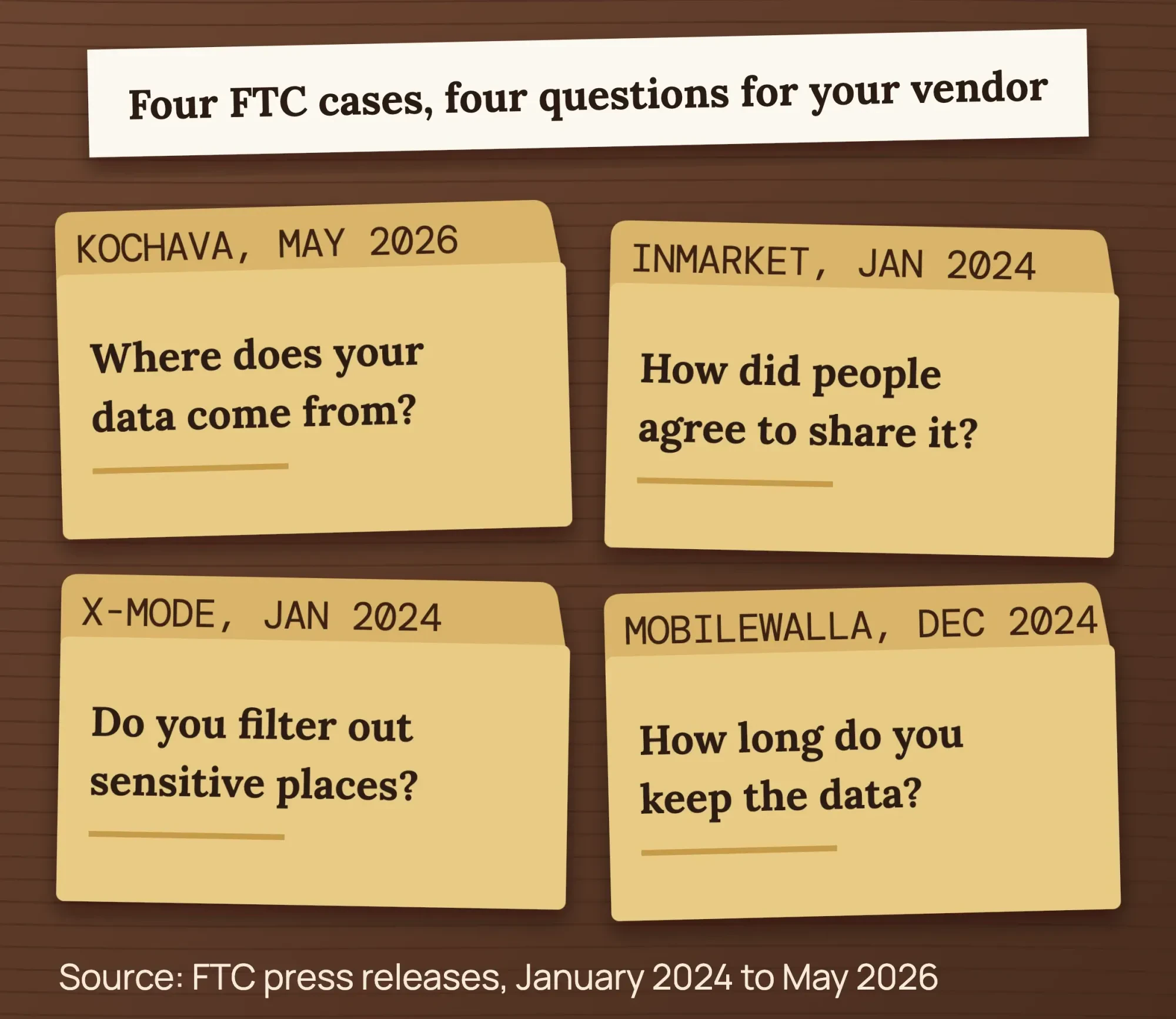 Source: FTC press releases, January 2024 to May 2026.
- Where does your location data come from? In May 2026 the FTC settled with Kochava over location data "from hundreds of millions of mobile devices."
- How did people agree to share it? InMarket faced charges that it "did not fully inform consumers and obtain their consent," per the FTC's release.
- Do you filter out sensitive places? The FTC's X-Mode release describes data that could track visits to clinics, places of worship and domestic abuse shelters.
- How long do you keep it? The FTC called InMarket's five-year retention unnecessary, and said Mobilewalla kept bid data "even when it didn't have a winning bid".
A vendor that can't answer in plain words is telling you something.
A good one will send its privacy policy and explain its sensitive-place filter without being chased.
A first campaign in eight steps
With those answers in hand, you can set up a first test. Here's the order we'd follow:
- Pick one goal and one offer: store visits, calls or event sign-ups.
- Choose the route: a Google or Meta radius for small budgets, a vendor for building-sized fences.
- Draw the area: 1 km or more on Google, set to Presence; a radius or pin drop on Meta.
- Check the map for hospitals, clinics and other health providers, and keep fences clear of them.
- Send the vendor the four data questions above, in writing.
- Write the ad for someone a few blocks away: your place name, the offer, a map or call button.
- Tag every link, with one campaign name per fence.
- Run 30 days, then compare cost per call, visit or sale with your search ads.
Step 6 has a catch. The ad is only half the trip, and the page it opens has to load quickly on a phone using cell data. Check that page in our website speed test before launch, and fix anything slow first.
If you want the Google side done for you, our search ads team builds local campaigns with these settings. (That team is paid work for us, which is worth knowing as you read this.)
Tag each fence, or you can't tell which one worked
Step 7 is the one most campaigns skip, and it decides whether you learn anything. Vendors often report store visits matched from location data. A visit count with no comparison group can't tell you whether the ad caused the visit, so your own analytics need clean tags too.
We tested that tagging on October 24, 2026, in our UTM builder tool on a test copy of our site. We built links for the Reno example with one campaign name, geo-brake-3km, and a content tag for the car show fence. Our first pick for the vendor's medium was "geofence," since that's what we were buying. The builder flagged it at once: GA4 would file every one of those visits under Unassigned. Changing the medium to "display" moved the same link into the Display channel.
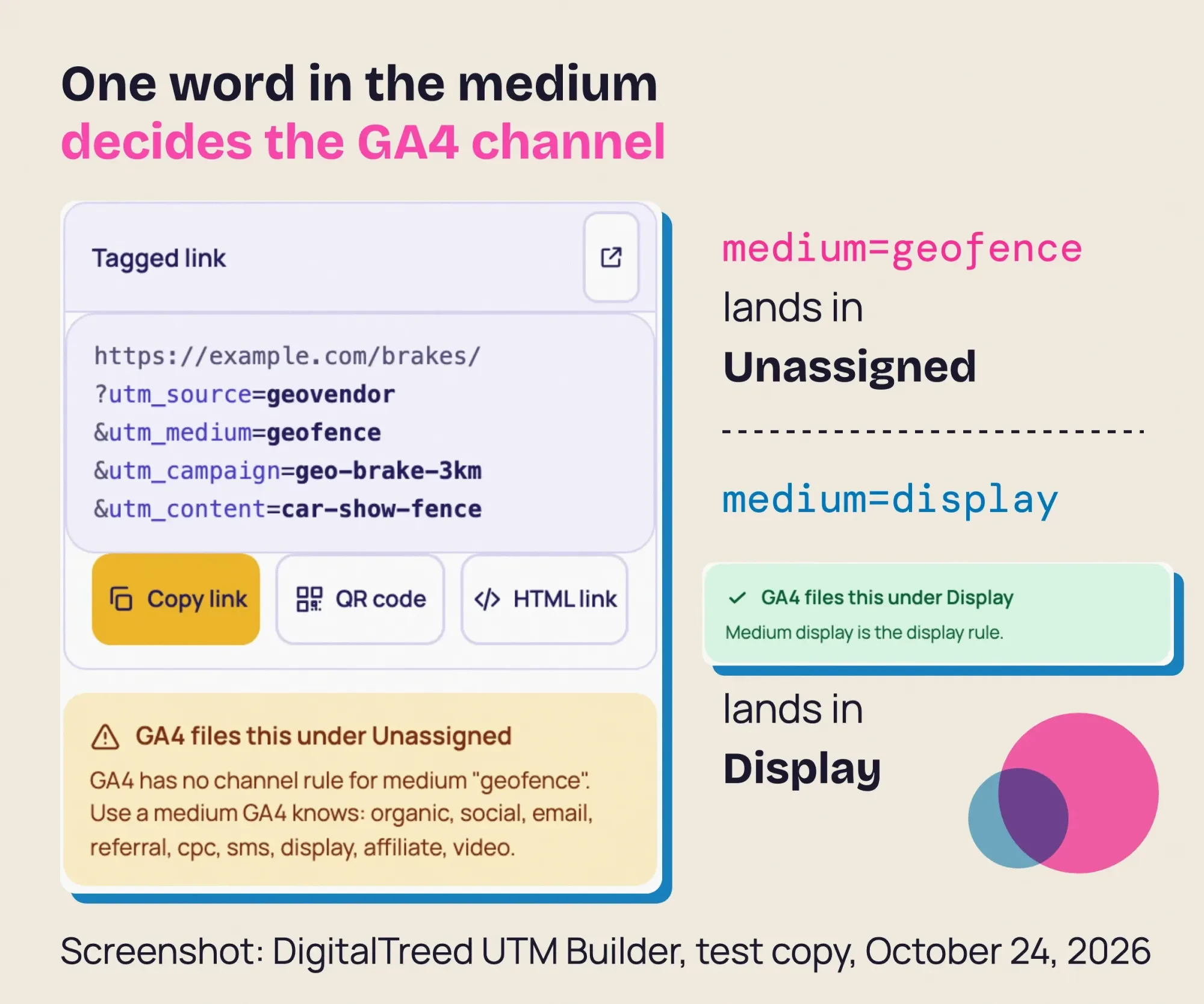 Screenshot: DigitalTreed UTM Builder on a test copy of our site, October 24, 2026.
That matches Google's default channel rules. Display needs a medium such as "display," "banner" or "cpm," and Unassigned is what Analytics uses "when there are no other channel rules that match." In the same test, a facebook / paid-social pair landed in Paid Social. For Google Ads itself, the builder pointed us to auto-tagging, which already passes the click data.
Two cheap checks work outside analytics. Give each fence its own offer code at the register, and ask "How did you hear about us?" at checkout. Neither is perfect, but together they catch people who saw the ad and drove over without clicking.
Paid fences also work better next to a strong map listing. Our local SEO guide covers that free side, and our guide to Google Business Profile walks through the listing itself.
When geofencing wastes your money
Those numbers will also tell you when to stop. Geofencing is a poor fit when your budget can't reach a vendor's package, when there's no place nearby worth fencing, or when your customers are patients, since both the state laws and the FTC cases point the other way.
These five mistakes burn the most budget:
- A tiny Google target, where ads may show "intermittently or not at all."
- The default "interest" setting on a walk-in business.
- One generic ad for every fence.
- Trusting a vendor's visit count without a comparison.
- Housing, job or credit ads with ZIP targeting on Meta.
Our take: for most one-location shops, a Google radius set to Presence plus tagged links is the right first test. Buy a vendor fence only when you have a specific place in mind, like a rival's lot or a big weekend event, and a way to count what it brought in.
If a vendor quote has landed on your desk, send it through our quote form and we'll tell you whether we'd run it. (We sell ad management, so factor that in.)
How we made this guide: our editors checked every fact here on October 24, 2026. They read Google's and Meta's targeting pages, the state laws in the table, four FTC releases and both vendors' price pages from India over October 23 and 24. The one thing we tested ourselves was link tagging, in our UTM builder on a test copy of digitaltreed.com. We ran no paid campaign, so there are no ad results of ours in this guide. Each source is linked at the claim it supports, and Eram N. reads and approves this version before it's published.
First published December 2023. Rewritten October 24, 2026: now a guide to geofencing marketing, with Google and Meta targeting limits, vendor prices, state health-site rules, vendor questions from FTC cases and our UTM test.
Frequently asked
Is geofencing legal in Texas?
Yes, but location data is treated as sensitive. The Texas attorney general's page on the state privacy act lists precise geolocation as sensitive data. As of October 2026, SBA-defined small businesses are mostly exempt. Even so, a small business must get consent before selling anyone's sensitive data.
How accurate is geofencing?
Only as accurate as the phone's location. GPS.gov's accuracy FAQ says GPS smartphones are typically accurate within 4.9 m (16 ft) under open sky. It also says accuracy gets worse near buildings, bridges and trees. So a tight fence in a busy plaza can catch some phones next door.
Can Google Ads show whether people visited my store?
Sometimes. Google's store visits help page says your ads need location assets, enough clicks or impressions, and enough foot traffic to pass privacy limits. It adds that more locations make an account more likely to qualify. So a one-location shop may not get store visit reports.
Sources
- Google Ads Help: Target ads to geographic locations
- Google Ads Help: Advanced location options
- Google Analytics Help: Default channel group
- Meta Business Help: Choose locations for your ads
- Meta Business Help: Special ad categories
- GetGeofencing: How much does geofencing cost? (vendor, read October 24, 2026)
- GroundTruth: How much does geofencing cost? (vendor, read October 24, 2026)
- Revised Code of Washington 19.373.080: Geofence restrictions
- Washington Attorney General: My Health My Data Act
- New York General Business Law 394-g
- Connecticut General Statutes 42-526
- Nevada SB 370 (2023), enrolled text
- California Consumer Privacy Act, Civil Code 1798.140 (CPPA copy)
- California Privacy Protection Agency: FAQ
- Maryland Attorney General: Maryland Online Data Privacy Act
- Oregon HB 2008 (2025), enrolled text
- FTC press release, January 2024: X-Mode Social order
- FTC press release, January 2024: InMarket order
- FTC press release, December 2024: Mobilewalla
- FTC press release, May 2026: Kochava settlement


Comments
No comments yet. Start the conversation below.