
Quick answer
Hyperlocal marketing aims at people within a few miles of your door, often one neighborhood or a few ZIP codes. Most of it is free: a complete Google Business Profile, steady reviews and local posts. Ads come later, and Google Ads won't go below a 1 km radius. Read the US review and texting rules too.
The term sounds like agency jargon, but the idea is old. A hardware store owner who sponsors the Little League team and knows which streets flood is already doing it. The online version just hands that owner sharper tools: a map listing, a neighborhood feed and ads that stop at a set distance.
This playbook is for one-location shops and service-area businesses in the US, in the order we'd do the work.
We also ran two of our own free tools through a pretend local campaign on a test copy of our site. Our test date was October 23, 2026, and both tests changed our advice.
You'll see where.
Key takeaways
- Hyperlocal marketing targets a mile or two, a few ZIP codes or neighborhoods.
- Draw the map first: a radius, a ZIP code list and neighborhood names.
- Google Ads won't target a radius under 1 km, about 0.62 miles.
- Never offer free or discounted goods or services for Google reviews.
- Tag every local link with UTM tags so you can see what worked.
Hyperlocal marketing works on a few miles, not a whole city
Hyperlocal marketing is marketing aimed at the small area your customers actually come from: a radius of a mile or two, a short list of ZIP codes, or named neighborhoods. Local marketing usually means a city or a metro area. Hyperlocal cuts that down to the blocks around you.
It overlaps with local SEO, but they aren't the same thing. Local SEO is about showing up in Google's map results, and our guide to what local SEO is covers that part in depth. Hyperlocal marketing also takes in the neighborhood feed, the flyer on the coffee shop board and the ad that only runs within 3 miles.
Why go this small? Distance is already built into how people choose and how platforms rank. Google's help page on local ranking says local results are "mainly based on relevance, distance, and popularity," and distance means "how far each business is from the customer who's searching."
So a dentist 10 minutes away starts with an edge over one 40 minutes away. That's the whole case for going small.
The flip side is just as true: a broad ad pays for clicks from people who'll never make the drive.
Draw the map before you spend a dollar
That drive is why the map comes first, since every later step uses it.
Look at where your customers come from today. Check the ZIP codes on invoices, the delivery addresses and the neighborhoods people mention at the counter. Most single-location shops find a tight cluster with a few strays, and that cluster is your map.
Write the area down three ways, because each platform takes a different format: a radius, a list of ZIP codes, and the names locals use for their neighborhoods.
Service-area businesses, such as plumbers, cleaners and mobile groomers, work a little differently. Google's Business Profile guidelines say they "should have one profile for the central office or location with a designated service area," and that the area "shouldn't extend farther than about 2 hours of driving time" from the base. The same page says a service-area business "should hide your business address from customers." A hybrid, like an auto shop that also does roadside calls, can show its address and a service area.
Two hours is Google's usual ceiling (it allows more for some businesses), not a goal, so draw the area you can really serve on a busy Tuesday.
The Business Profile carries most of the load
Once the map exists, put it on Google. Your Business Profile is where most nearby searches end up, and it's free. Check the basics first: the exact business name, the main category, hours, the address or service area, and photos that look like the place today.
Keep the name and address to what's on your sign.
The same guidelines say not to put anything in address lines "that doesn't pertain to your business's physical location, like URLs or keywords."
Then post. Google lets you add updates, offers and events that appear on Search and Maps. An Offer with a real end date, or an Event for a Saturday clinic, says "we're open and close by" far better than a generic update. Once a week is plenty for most shops.
Don't post the same text to every channel, though. Google readers want hours and offers; neighbors want the story.
If your website has a location page, write it for the neighborhood: the streets you serve, the landmarks people know, the way in from the main road. Then add LocalBusiness markup with the same name, address and hours as the profile. Our free schema markup generator builds it. For the full setup, follow our Google Business Profile optimization guide or the longer Google Business Profile guide.
Ask every customer for a review, the same way
Once the profile's in shape, reviews are the next lever. Under "prominence," Google's ranking page says "More reviews and positive ratings can help your business's local ranking." The method isn't clever.
Ask everyone, soon after the visit, with a link that skips the search.
We tested that kind of link the day we rewrote this guide. On a local test copy of our site, we pasted the sample Place ID from Google's Place ID page into our Google Review Link Generator, and it built a write-a-review link plus a QR card. Then we opened the link in a fresh, signed-out Chrome window on our machine in India. It didn't open a review box. It opened Google's sign-in page, which fits Google Maps help: the first step to write a review is to sign in.
One honest limit: that sample ID points to a street address in Wilmington, North Carolina, not a business, because we didn't want to test on a real company's listing.
So the link works best for customers who are already signed in to Google on their phone. Send it by text or email right after the visit, and add a short line on the counter card saying a Google account is needed. It's a small fix, and it means fewer people give up halfway.
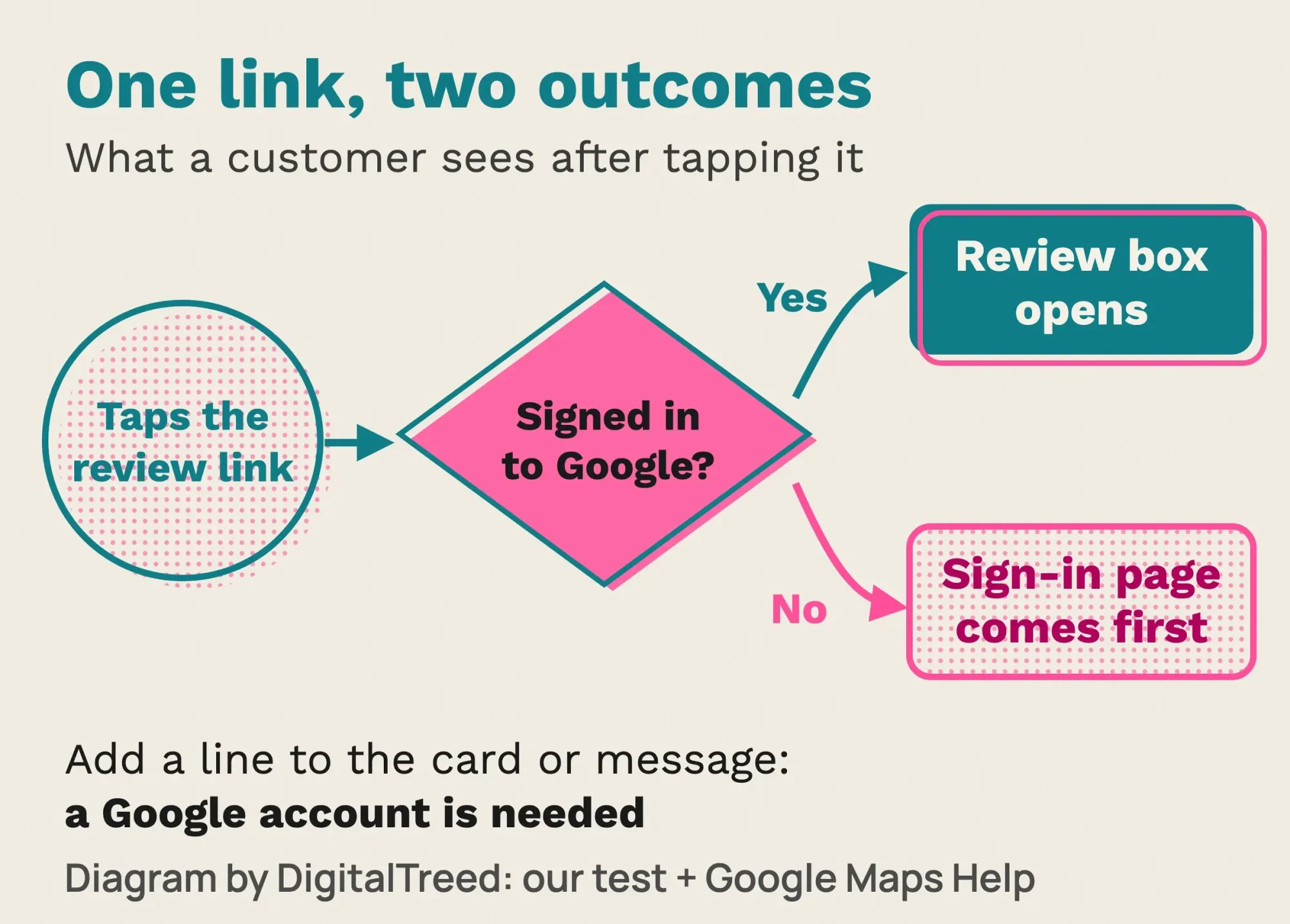 Diagram by DigitalTreed, from our signed-out test of October 23, 2026 and Google Maps Help.
Now the rules. Google's review policy says offering "free or discounted goods or services" for reviews "is considered fake & misleading content and is strictly prohibited." The FTC's review rule attacks the same habit from the legal side. A business can't offer anything for reviews "expressing a particular sentiment, whether positive or negative." Google's ban is wider, so follow Google's.
Family reviews are where people over-correct. The FTC's questions and answers on the rule say a small business may ask family members for reviews, "but ask them to clearly and conspicuously disclose their relationship." That's a disclosure, not a ban.
Our guide to automating review requests covers the rest of the rules for review tools.
Nextdoor gives you a free spot in the neighborhood feed
Those reviews build trust on Google. Nextdoor does a similar job one step closer to home. Its small business page says 1 in 3 US households are on Nextdoor; that's the company's own figure, so read it as a claim. The same page offers "a free Business Page" and "free posts that show up in the most visible part of Nextdoor, the neighborhood newsfeed."
The free side is worth doing for almost any shop that serves a neighborhood. Claim the page and fill it in the way you did your Google profile. Then post things neighbors would actually talk about: a road closure that changes your parking, a weekend repair clinic, new winter hours. Nextdoor also lets customers recommend you, which is about as close to online word of mouth as it gets.
Write like a neighbor, not a flyer. A post that only says "20% off!" reads like spam in a feed full of lost-dog notices.
Nextdoor sells ads too, but we couldn't confirm current ad prices on Nextdoor's own pages, so we won't quote any.
Hyperlocal social media marketing on Instagram and Facebook
That neighborly tone works on Instagram and Facebook too, and one free feature does most of the work there.
Hyperlocal social media marketing is posts and ads tied to a place on Instagram and Facebook. On Instagram, the location tag is the easy win. Instagram's help page says that when people tap the location on your post, "they will be able to see your content and other content tagged at the same location on the Instagram map."
That puts a tagged post right next to everything else tagged at your address. Tag the shop, tag the farmers market when you're there, and use the neighborhood's real name in captions. It's free, and it takes seconds.
On Facebook, local content beats generic content. Share the street fair schedule, congratulate the team you sponsor, show the person behind the counter. Our social media strategy guide covers planning a month of posts, and our post on the best time to post on Facebook covers timing. X's free Professional Account adds a Location Spotlight with hours and contact buttons; our X marketing guide walks through it.
We'd spend less time hunting for local hashtags; a tagged place and a named neighborhood do the job with less guesswork.
Local ads need a small radius, but not too small
Free posts reach whoever happens to scroll past. Ads reach the rest of the block on purpose, and that's where the platform rules start to bite.
Google Ads won't go under 1 km, about 0.62 miles. Its location targeting page says "we do not allow radius targeting under 1 km," and warns that with a tiny area your "ads might only show intermittently or not at all." The bigger trap is a default. Google also reaches people who've shown interest in your area unless you switch the location option to Presence, which means people "in or regularly in your targeted locations." A shop that needs walk-ins usually wants Presence.
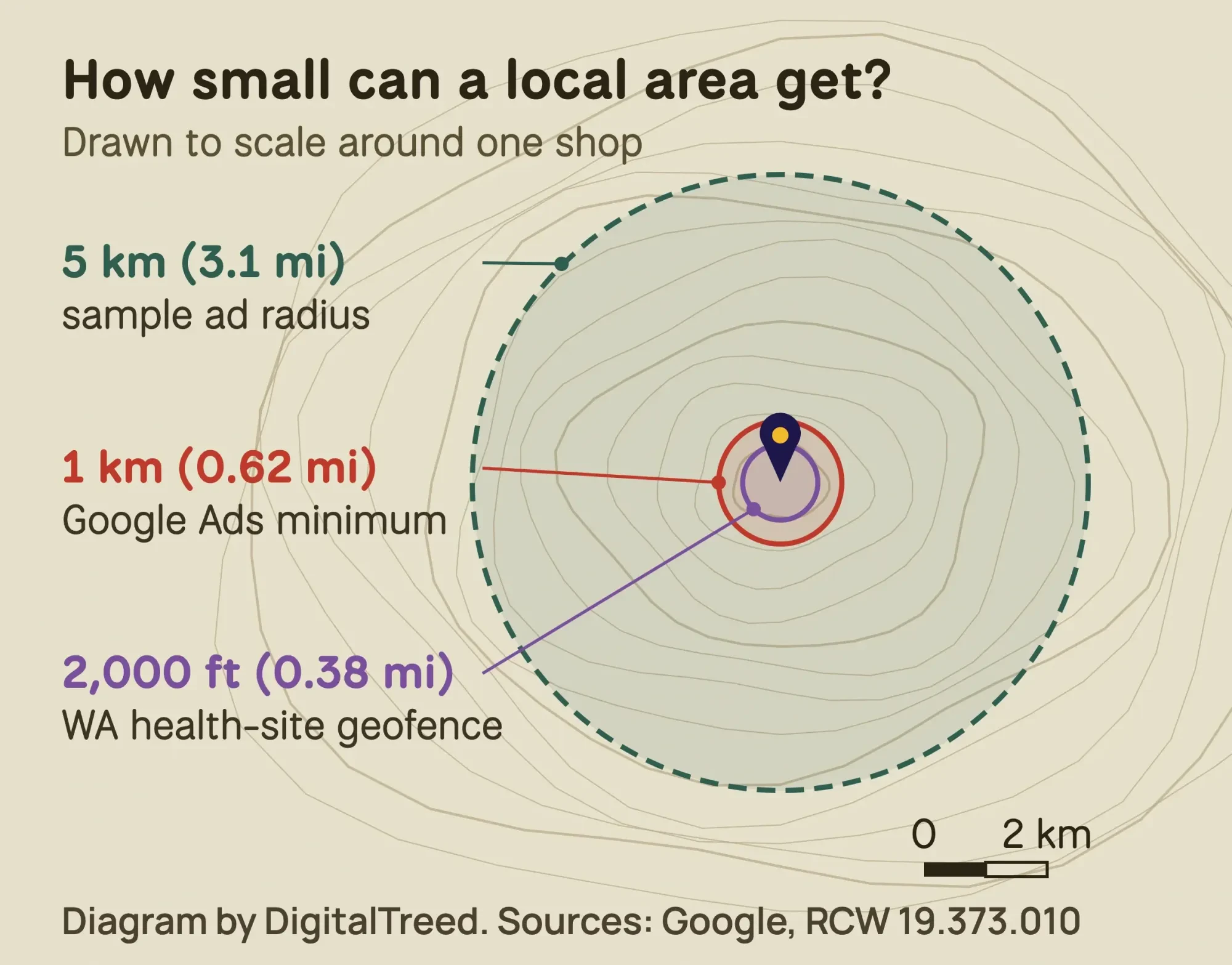 Diagram by DigitalTreed. Sources: Google Ads Help and RCW 19.373.010, read October 2026.
Meta lets you pick up to 250 cities or 50,000 ZIP codes, per its locations help page, and "Radius minimum and maximum vary by location type." Some advertisers get much less. In Meta's special ad categories, such as housing, employment, and financial products and services, US ads can't use "age, gender, ZIP code or postal code" targeting, and city or pin-drop audiences get an expanded radius. Real estate agents hit this first; our real estate local SEO guide covers the rest of their setup.
| Platform | Smallest area | Watch out for | Cost to start |
|---|---|---|---|
| Google Ads | Radius of at least 1 km | Default "Presence or interest" setting | Your daily budget |
| Meta ads | Varies by location type | Special ad categories: no ZIP, age or gender | Minimum varies by country and objective |
| Google Business Profile | Address or a service area | Service area up to about 2 hours' drive | Free |
| Nextdoor | Your neighborhood feed | Ad prices not published where we looked | Free page and posts |
The table sums up each platform's own help pages, read in October 2026.
Neither Google nor Meta asks for a big budget. Google's budget page, read in October 2026, gives an example: set $10 USD a day, and "the maximum you'd pay is $304 USD" for the month, which is 30.4 days times $10. Meta says only that minimum budgets "may vary by country and objective," so check Ads Manager before you plan around a number.
If you'd rather not set this up yourself, our search ads team runs local Google campaigns with these settings. (Full disclosure: that's a paid service of ours.)
Geofencing, briefly
Geofencing marketing draws a virtual fence around a place and targets phones that cross it, usually through a vendor that buys location data. It can make sense around an event venue. Ask any vendor where its data comes from, though. In January 2024 the FTC announced an order barring X-Mode Social from selling sensitive location data, and FTC Chair Lina M. Khan warned that such data can reveal "which medical treatments they seek and where they worship." Our geofencing marketing guide covers what two vendors publish, Google's 1 km limit and the state rules near health care.
Borrow the neighbors' audiences
Ads rent attention. Partners lend it.
The business next door already has the customers you want, and it already has their trust. Swap counter cards with a shop that sells to the same people, like a bike shop and a coffee shop. Sponsor a youth team or a school fun run where your name ends up on shirts. Run a joint event: a Saturday repair clinic outside a brewery reaches people neither business would reach alone. If a partner wants a giveaway, read our guide to giveaway rules first, since prize promotions bring their own rules.
Local creators count too, and that's where a federal rule applies. The FTC's Disclosures 101 for influencers tells creators to disclose "any financial, employment, personal, or family relationship with a brand," and adds that "Financial relationships aren't limited to money." A free dinner for a food blogger counts. Ask for a plain disclosure in the post itself, not buried in a pile of hashtags.
Which US rules apply to hyperlocal marketing?
That disclosure rule is one of five that come up most in local campaigns, each with its source:
- Reviews: no rewards tied to a review's sentiment under the FTC's review rule, 16 CFR 465, and no rewards at all under Google's policy.
- Creators: a clear disclosure of any free product, payment or personal tie, per the FTC guidance above.
- Texts: the FCC's consumer guide says "Commercial texts require written consent."
- Geofences near clinics: Washington makes it unlawful to geofence an in-person health care provider to track visitors, collect health data or send them health-related ads.
- Location data: if a vendor sells you location audiences, ask how people agreed to share it.
The texting rule is the accident waiting to happen. A phone number someone gave you for appointment reminders isn't permission to send promotions. Collect consent with a clear checkbox, and keep a record of when and how you got it.
Washington's rule is narrow, since it covers only geofences around in-person health care sites. The act's definitions call a geofence a boundary "2,000 feet or less from the perimeter of the physical location."
We're marketers, not lawyers, and state privacy laws keep changing. Use this list as a map of where to look, and ask a lawyer licensed in your state before a campaign that texts customers, tracks locations or touches health care.
Tag every local link, or you're guessing
Those rules keep you out of trouble. Tags tell you what worked.
Add UTM tags to every link you post, so Google Analytics can split visits by channel instead of lumping them together.
Our second test is the reason this section exists. That same day, we built links for one made-up fall campaign in our UTM Builder, on the same local test copy of our site. The four placements were a Business Profile post, a Nextdoor post, an Instagram bio link and a door-flyer QR code. Our first instinct for the medium was "local," since it's a local campaign. The tool flagged it straight away: GA4 would file the Business Profile, Nextdoor and flyer visits under Unassigned. Only Instagram escaped, because "instagram" is on Google's list of social sources.
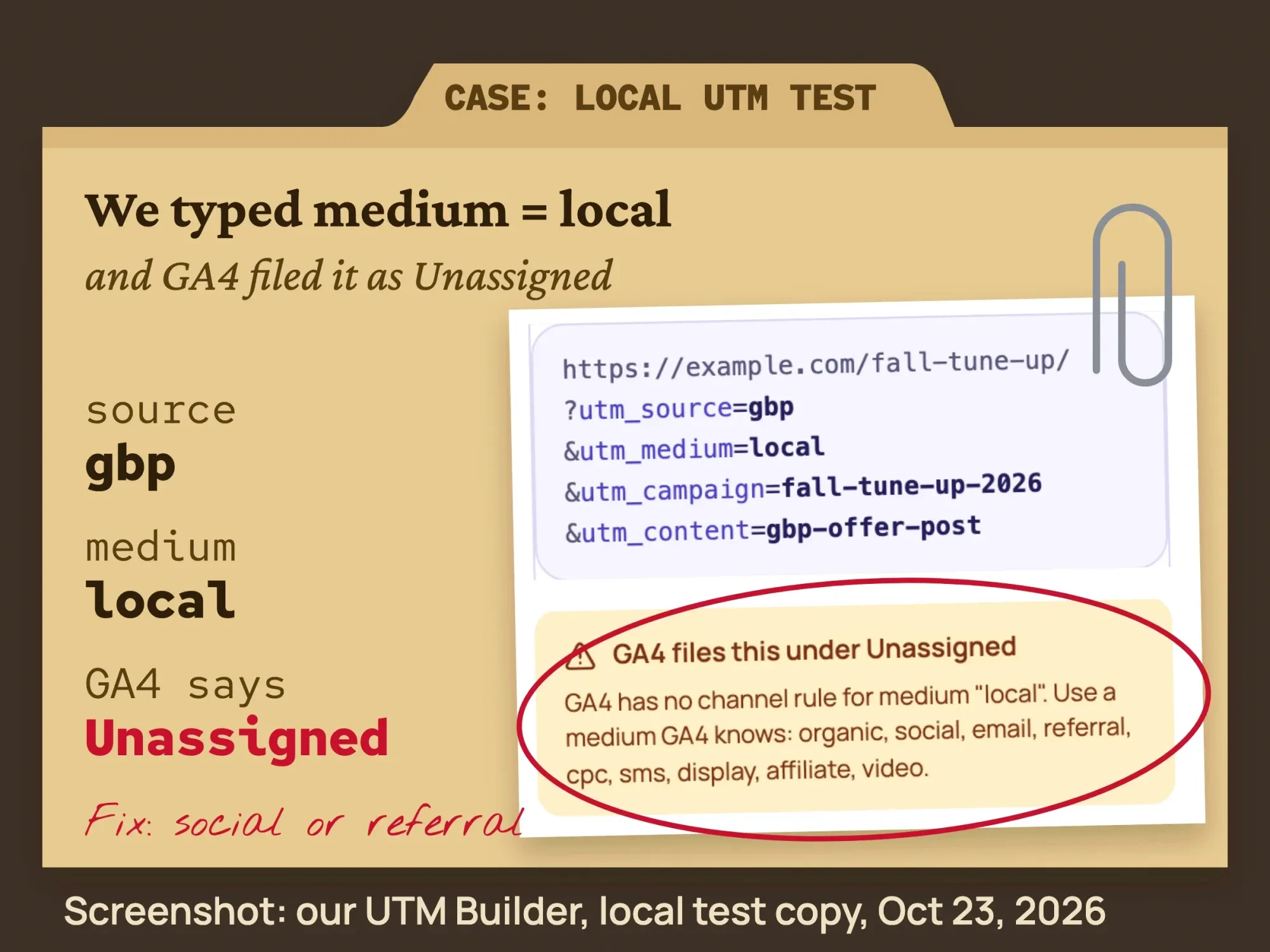 Screenshot: DigitalTreed UTM Builder on a local test copy of our site, October 23, 2026.
That matches Google's default channel rules. Organic Social needs a known social source (Instagram is on Google's list, Nextdoor isn't) or a medium such as "social," Referral needs "referral," "app" or "link," and anything that matches no rule is Unassigned. Our tries with "print" and "qr-code" for the flyer landed in Unassigned too. So we kept GA4's mediums for the online links and accepted Unassigned for the flyer, where the campaign and content tags still show which flyer drove the visit.
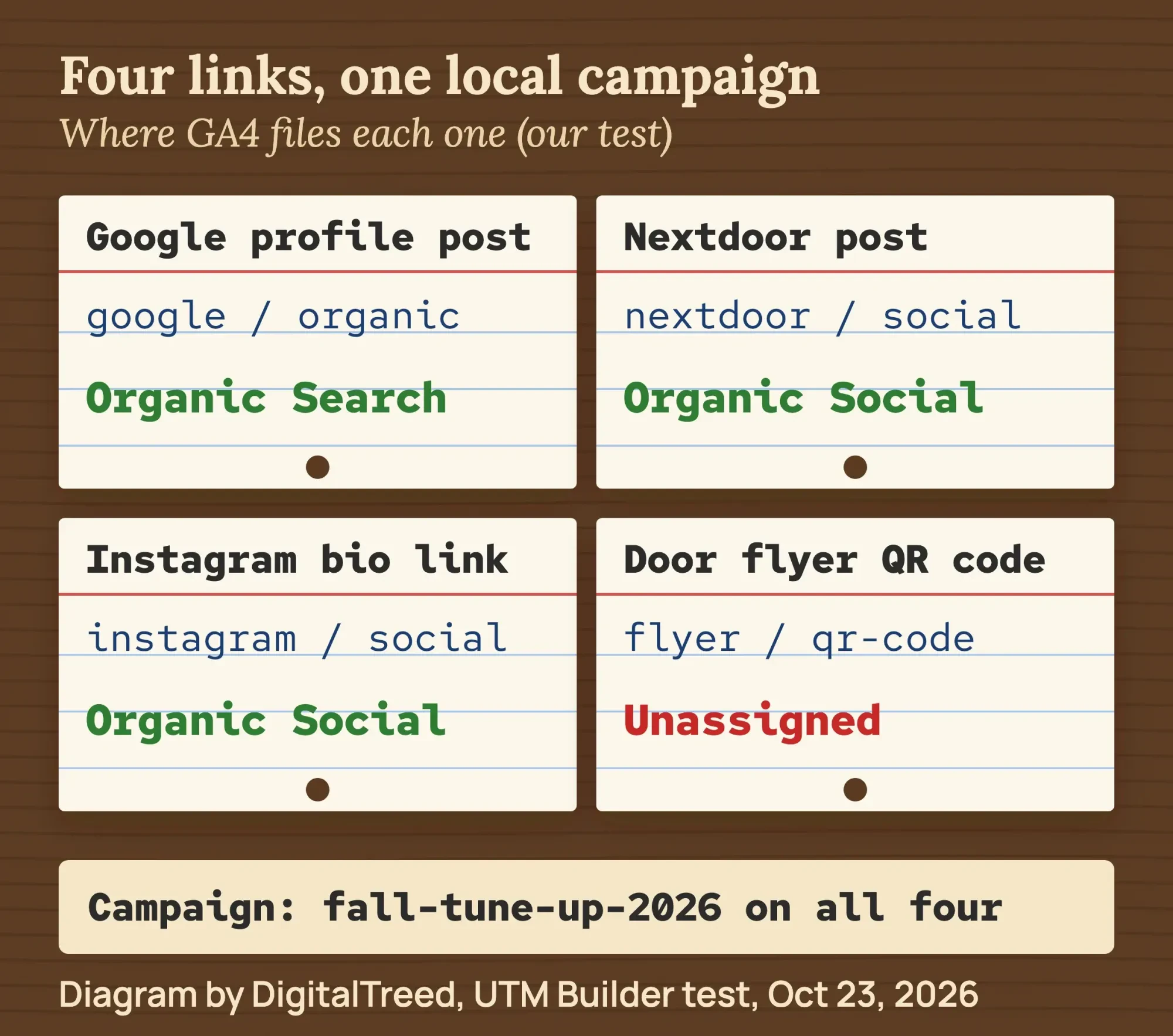 Diagram by DigitalTreed with results from our UTM Builder test, October 23, 2026.
Two more numbers sit outside your analytics. Your Business Profile's performance report counts calls and direction requests, and an offer code per channel ("NEXTDOOR10" at the register) catches people who never click at all. Our post on promoting a business blog walks through UTM tags in more detail.
A six-week plan for one bike shop
Example: Fernwood Cycle Works is a made-up two-mechanic bike repair shop in Tacoma, Washington. Most of its customers live within about 3 miles, and spring tune-ups pay the bills.
Weeks 1 and 2 cost nothing but time. The owner fixes the Business Profile hours and category, adds fresh photos and posts an Offer for a spring tune-up with a real end date. She claims the Nextdoor page and posts about a free flat-fix clinic on Saturday. Customers who agreed to texts get the review link by text that week; everyone else sees the counter card.
Weeks 3 and 4 add one paid test. She runs a Google Ads campaign at $10 a day on a 5 km radius with the Presence setting, so by Google's math, read in October 2026, the most she can pay in a month is $304. A swap of counter cards with the coffee shop two doors down costs nothing.
Weeks 5 and 6 are for reading the numbers. Each link is tagged the same way as the template above, under a spring campaign name, and each channel has its own code at the register. If Nextdoor brings bookings and the ads bring only clicks, the money moves to Nextdoor posts and the clinic.
If a vendor pitches geofencing, Washington adds one rule: no geofence around the urgent care clinic on the corner, however busy it looks.
Our take: for a shop like this, the free steps do most of the work.
The ad test earns a bigger budget only after the tags show it brings people through the door.
What we'd skip
That plan works partly because of what it leaves out. These five habits waste the most money or trust:
- A 1 km radius on a quiet street, where Google says ads may barely show.
- The "Presence or interest" default on a walk-in business.
- Keywords stuffed into the profile name or address.
- Discounts, freebies or prize draws for reviews.
- Promo texts to numbers collected for reminders.
If you'd like help running the whole plan, we do this for local shops through our social media management service, and we'll tell you when the free steps are enough. (That's paid work, so weigh our view accordingly.)
How we made this guide: our team read every Google, Meta, Instagram, Nextdoor, FTC, FCC and Washington source linked in this guide, and the table uses only those pages. The reading and both tests were done October 23, 2026. We ran the review link and UTM tests on a local test copy of digitaltreed.com, from India, with a signed-out browser for the review link. Each source sits next to the claim it backs, and the author reviews the rewrite before it goes live.
First published November 2023. Rewritten October 23, 2026: a plan in stages, targeting rules from Google and Meta, Nextdoor's free tools, the US rules on reviews, creators, texts and geofences, and our own review link and UTM tests.
Frequently asked
Should I make a separate web page for every nearby town?
Only if each page has something real to say. As of October 2026, Google's spam policies list pages targeted at specific regions or cities that funnel users to one page as doorway abuse. A page with jobs, photos and directions for a town you serve is different from swapping the town name.
Are Google Local Services Ads worth trying for a neighborhood business?
For service trades, they can be. As of October 2026, Google's Local Services Ads help page says you pay only when a customer gets in touch from your ad, not per click. The Google Verified badge is offered in select business categories only, so check yours first.
Which is better for a local shop, Google Ads or Local Services Ads?
They do different jobs. Google Ads lets you write the ad and draw the radius, while Local Services Ads show a verified profile and charge per lead. As of October 2026, Google's Local Services Ads page says customers pick your profile from the others shown. Pick the one that fits how your customers book.
Sources
- Google Business Profile Help: Tips to improve your local ranking on Google
- Google Business Profile Help: Guidelines for representing your business
- Google Business Profile Help: Create posts on your Business Profile
- Google Business Profile Help: Policies for reviews
- Google Business Profile Help: Understand your Business Profile performance
- Google Maps Help: Write reviews
- Google Maps Platform: Place IDs
- Google Ads Help: Target ads to geographic locations
- Google Ads Help: Advanced location options
- Google Ads Help: About average daily budgets
- Google Analytics Help: Default channel group
- Meta Business Help: Choose locations for your ads
- Meta Business Help: Special ad categories
- Meta Business Help: Minimum budgets
- Instagram Help: Location tags
- Nextdoor: Small business advertising (vendor)
- 16 CFR Part 465: Use of Consumer Reviews and Testimonials (eCFR)
- FTC: Consumer Reviews and Testimonials Rule, questions and answers
- FTC: Disclosures 101 for Social Media Influencers
- FCC: Stop Unwanted Robocalls and Texts
- Revised Code of Washington 19.373.080: Geofence restrictions
- Revised Code of Washington 19.373.010: Definitions
- FTC press release, January 2024: X-Mode Social order


Comments
No comments yet. Start the conversation below.