
Quick answer
A Facebook call to action is the one thing you ask people to do next: book, call, buy or get a quote. It lives in 3 places: the action button on your Page, the button on ads and boosted posts, and the wording of your posts. Tag every link so you can see which one brought customers.
Most advice on the Facebook call to action stops at "add a Shop now button." That button is only one of 3 places. Meta's list of ad buttons also changes with your campaign goal and with where the click goes.
This guide covers all 3 places, the rules that cut your reach, and how to see real results in Google Analytics. On October 22, 2026, we built the tracking links in our own UTM builder and took the screenshots.
Key takeaways
- Your Page gets one action button, such as Book now or Call now. It is free and always on.
- Ad buttons come from Meta's list. You can't type your own button text, and the list depends on your goal and destination.
- Asking for likes, shares, tags or votes as the call to action can lower your reach. Offering a discount, gift or cash prize for a like breaks Meta's spam rules.
- Boosting in the Facebook iPhone or iPad app can add Apple's 30% fee. Boost on facebook.com instead.
- Tag post links with utm_medium=social and ad links with paid-social. Google Analytics 4 (GA4) then splits them into Organic Social and Paid Social.
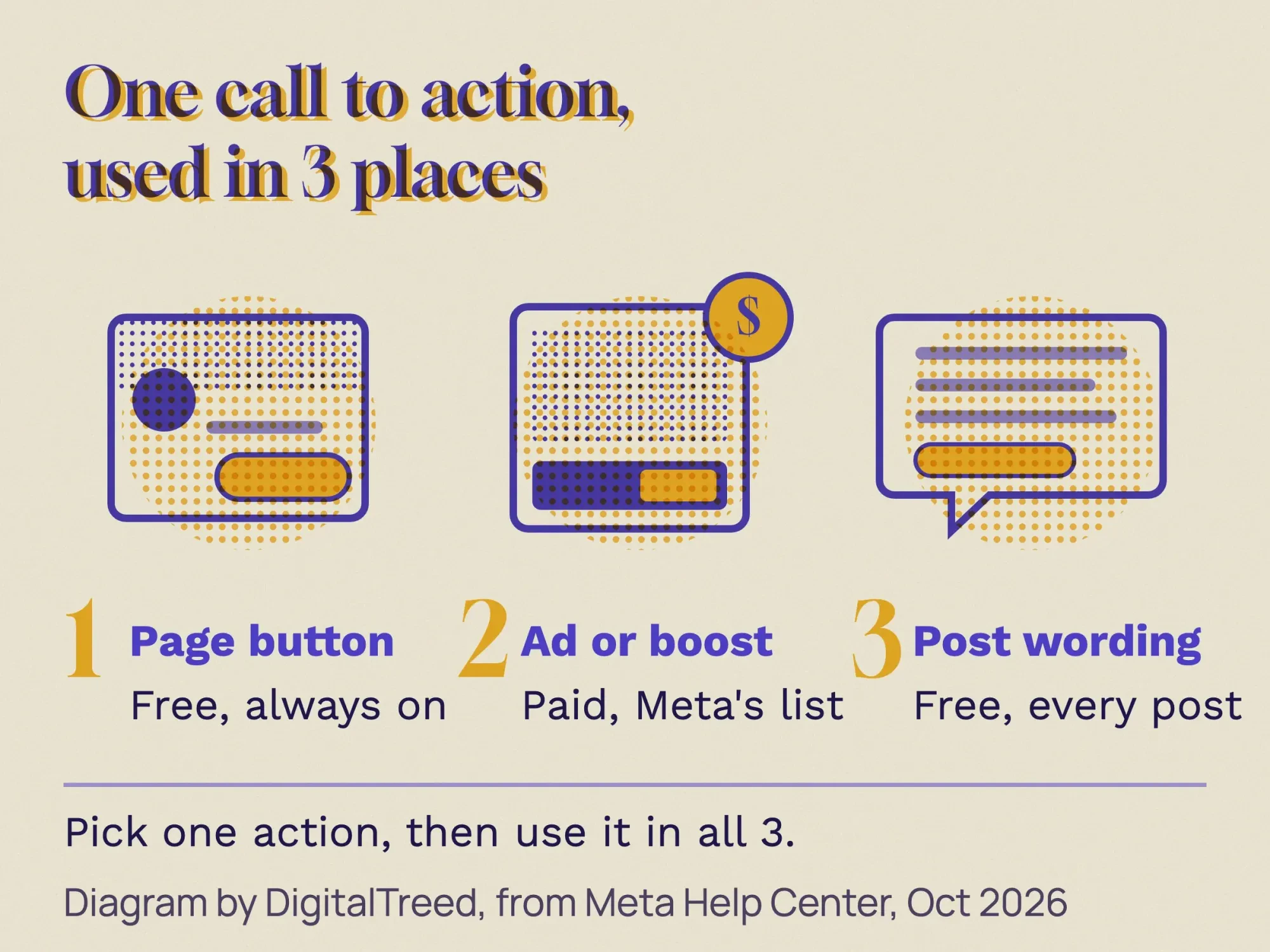 Diagram by DigitalTreed, based on Meta Help Center pages read October 22, 2026.
What is a Facebook call to action?
A Facebook call to action (CTA) is the step you want someone to take after they see your post or ad. On Facebook it shows up in 3 forms:
- The action button on your business Page, free and always visible.
- The button on an ad or a boosted post, which you pay for.
- The words in a normal post, such as "Book your tune-up for Saturday."
Pick one action that pays the bills, such as calls, bookings or quote requests. Then use it in all 3 places. If you don't have a plan for Facebook yet, start with our social media marketing strategy guide.
Facebook call to action key facts
- Meta's ad button list covers 6 campaign objectives, and the list "differs for each campaign objective," per its Ads Manager button page.
- Page buttons fall into 5 goals: Book, Contact, Learn, Shop and Download, per Meta's call-to-action ads guide.
- Since February 2024, boosts made in the Facebook iOS app are paid through Apple. Boosting on facebook.com saves 30% of the total ad payment, per Meta's Apple fee page.
- With a cost-per-result goal, your daily budget should be at least 5 times that goal, per Meta's minimum budget page.
- As of January 1, 2024, Meta may add its own source and a "paid" medium to ad traffic, per its URL parameters page.
- A Meta Business Suite A/B test can compare up to 4 versions of a post, per Meta's post testing steps.
How do you add a Facebook Page action button?
Meta's steps to add an action button to your Page, as of October 2026: switch into your Page, click Options, then click Add action button. Select a button, click Next, follow the steps on screen and click Save. You need Facebook access to the Page to do this.
Meta sorts Page buttons into 5 goals in its guide to call-to-action ads:
| Goal | Buttons Meta lists | Good fit for |
|---|---|---|
| Book | Book now | Salons, HVAC, dentists, tutors |
| Contact | Call now, Contact us, Send email, Send message, Sign up | Plumbers, lawyers, consultants |
| Learn | Learn more, Watch video | Clinics, schools, B2B services |
| Shop | See offers, Shop now | Online stores, boutiques |
| Download | Play game, Use app | Businesses with their own app |
To change or delete it later, Meta's edit or delete steps are: Options, then Edit Action Button, then Change Button. To remove it, choose Delete Button, then Confirm. Closing or merging the whole Page instead? Our guide to deleting a Facebook business page covers the 14-day window and what to save. Test the new button from your phone, logged out if you can. A broken booking link turns away a customer who was ready to book.
Our take: choose the button that matches how customers already buy from you. If 8 of 10 jobs start with a phone call, use Call now, not Learn more.
Why is the Facebook Page action button not showing?
Check your Page access first. Meta's action button help page, linked above, says you need Facebook access to the Page to add the button. People with task access manage the Page from other tools, such as Meta Business Suite.
If you can't see Options or Add action button on the Page, ask a Page admin to give you Facebook access. Then switch into the Page and try again.
Want a WhatsApp number linked to your Page? Meta's WhatsApp connection steps are: Page Settings, then Linked accounts under Permissions, then WhatsApp. Enter your WhatsApp Business number and the code Meta sends. To switch numbers, disconnect it there and connect the new one.
Which Facebook call to action button options can ads use?
Meta says its list of buttons "differs for each campaign objective." Its Ads Manager button table covers 6 objectives: Awareness, Traffic, Engagement, Leads, App promotion and Sales. Inside each one, the choice also depends on where the click goes, such as a website, Messenger, WhatsApp or a phone call.
We read the Traffic table on October 22, 2026, and picked 7 buttons that fit most small businesses. Three things stood out:
- Call now works only when the ad sends people to a phone call.
- Send message works only with Messenger.
- Like Page isn't offered for Traffic at all. In the Engagement table, it is ticked only for the Facebook Page destination.
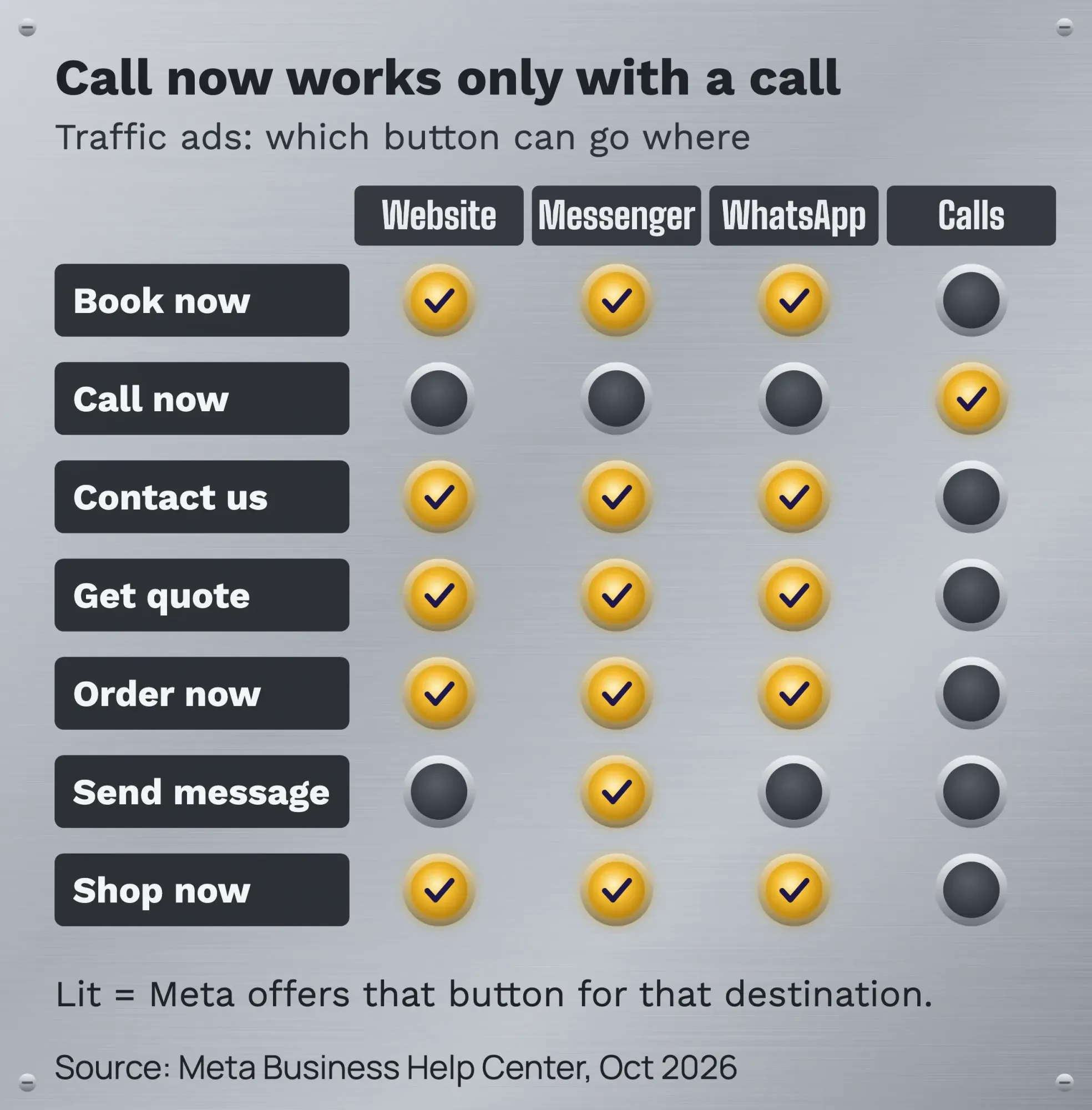 Source: Meta Business Help Center, Available call-to-action buttons in Ads Manager, October 2026.
You can't write your own button text. You pick a button from Meta's list, then put your own words in the ad text and headline. Ads Manager has no setting for the button's color or size, so there is nothing to test there.
There is also a shortcut. Meta's call-to-action ad from your Page promotes the button you already have. If your Page has Book now, you choose "Get more bookings" and set a budget. New to paid clicks? Our guide to PPC marketing explains how paying per click works.
How do you add a call to action in Facebook ads?
You pick the button while you build the ad in Ads Manager. Meta's steps to add a call-to-action button put it in the ad step, right after your images and text. Here is the short version, as of October 2026:
Add a call-to-action button to a new Facebook ad
- Start the campaign In Ads Manager, click + Create, choose a campaign objective and click Continue.
- Set up the campaign and ad set Fill in the campaign, click Next, then set up the ad set and click Next again.
- Pick the Page and format Select the Facebook Page the ad runs from, then choose an ad format. An Instant Experience can't carry a button.
- Add images and text Choose your images or video and write the ad text and headline.
- Choose the button Pick an option from the Call to action dropdown and check the preview of the ad.
- Publish Click Publish. Once the ad runs, people can tap the button.
One catch with the Awareness objective: the dropdown shows only after you click Add a destination and select Website, Meta says.
How do you change the call-to-action button on a live Facebook ad?
In Ads Manager, open the Ads tab, tick the ad and click Edit. Change the call to action, then click Publish. Meta's ad editing help says a published ad's headline, text, image and call to action can all change.
- Ads built from an existing post: Meta says their button can't be edited.
- Ads made in Meta Business Suite or from your Page: edit them there, not in Ads Manager.
- Boosted posts: you can change the audience, budget or duration on facebook.com, not in the iOS app. The text, images and video stay fixed, per Meta's boosted post editing page.
Edits have a cost. Meta's ad editing guide says some changes may restart the learning phase or send the ad back to review. The new version also replaces the old one, and you can't split the results before and after. To compare 2 buttons, run an A/B test instead.
How does boosting a post work, and what does it cost?
A boosted post is an ordinary post you pay to show to more people. Meta's boost steps, as of October 2026, are: Ads center, then Advertise, then Boost Facebook content, then Boost post. Meta's form asks for details such as the goal, how long it runs and where it shows. For ads aimed at one neighborhood or venue, read our guide to geofencing marketing first.
There is no single minimum price on Meta's minimum budget page. It says minimums may vary "by country and objective" instead. One rule is fixed: with a cost-per-result goal, your daily budget should be at least 5 times that goal. A $5 goal means at least $25 a day, as of October 2026.
Note
Check where you boost from. Meta's Apple fee page says that since February 2024, boosting in the Facebook iOS app means paying through the Apple App Store. An Apple fee of "30% of your total ad payment, before any taxes and local fees" may apply, and Apple keeps it. Boost on facebook.com, Meta Business Suite or Ads Manager to avoid it. You can also add funds to a prepaid balance on facebook.com first. We re-read this page and Meta's boost steps on October 22, 2026.
Some ads need a Special Ad Category. Turn it on if your ad is about housing, jobs, financial products or services, or social issues, elections or politics. Meta's Special Ad Category guide asks you to keep the audience broad and not discriminatory. That covers a landlord's "Apply now" or a lender's "Get quote" ad. Crypto exchanges and trading wallets need Meta's written permission before any ad runs, as our crypto marketing guide explains.
A boost with the wrong goal, button or audience spends money without bringing bookings. If you'd rather have it handled, our social media marketing team sets up Page posts, boosts and ad tracking for you. (DigitalTreed sells this service.)
How should you word a call to action in a Facebook post?
A normal, unpaid post has no button. Meta's help pages describe buttons on your Page, on ads and on boosted posts. We found no Meta help page that adds a button to an ordinary post. So in a post, the words do the work.
- Put the offer in the first line: what, when, how much.
- Ask for one action, with one link.
- Say what happens after the click, such as "pick a time in 30 seconds."
- Add one useful fact: the price, the deadline or the area you serve.
Say plainly what is behind the link. Meta's clickbait guideline names phrases like "You won't believe..." and "all capital letters" as signs of clickbait, which gets less reach. Before you post, run the link through our free social preview checker to see the image and title people will get.
Timing matters too. Our study roundup on the best time to post on Facebook shows when your post has the best chance to be seen.
Which CTA wording breaks Meta's rules?
Meta calls it engagement bait when a post asks for "votes, shares, comments, tags, likes, or other reactions" for their own sake. In its 2017 announcement, Meta said those posts lose reach. Pages that repeat it "will see more significant drops."
Real questions are fine. Meta said posts that ask "for help, advice, or recommendations" are not hurt. "Which day should we add evening hours?" is a real question. "Vote with a heart for Tuesday" is bait.
Trading value for engagement goes further: it breaks Meta's Spam Community Standard. The standard bans "anything of monetary value in exchange for engagement." So "Like our Page for 15% off" is out, because a discount has monetary value. The standard also bans like-gating: locking exclusive content until someone likes, shares or follows. Running a contest? Read our Facebook giveaway rules first.
| Goal | Bait or spam | Safe call to action |
|---|---|---|
| Bookings | Like this if you need a tune-up! | Book your 30-minute tune-up for Saturday: [link] |
| Calls | Share with a friend who needs AC! | Call (614) 555-0142 before 5 p.m. for a same-day visit. |
| Quotes | Comment QUOTE below (gray area, see below) | Tap Send message for a written quote in 24 hours. |
| Orders | Tag someone you'd eat this with | Order the fall menu for pickup: [link] |
| Offers | Like our Page to get 15% off | 15% off brake pads through November 30: show this post at the counter. |
Our take on the table: "Comment QUOTE below" is a gray area. Meta's guideline lists missing people, fundraising and petitions as allowed calls to action, not sales. Its 2017 example of comment bait asked people to comment "YES." Meta hasn't said whether a keyword comment for a quote counts, so it may lose reach. A Send message button gets you the same lead without the risk. The phone number above uses the 555-01 range, which is set aside for fiction.
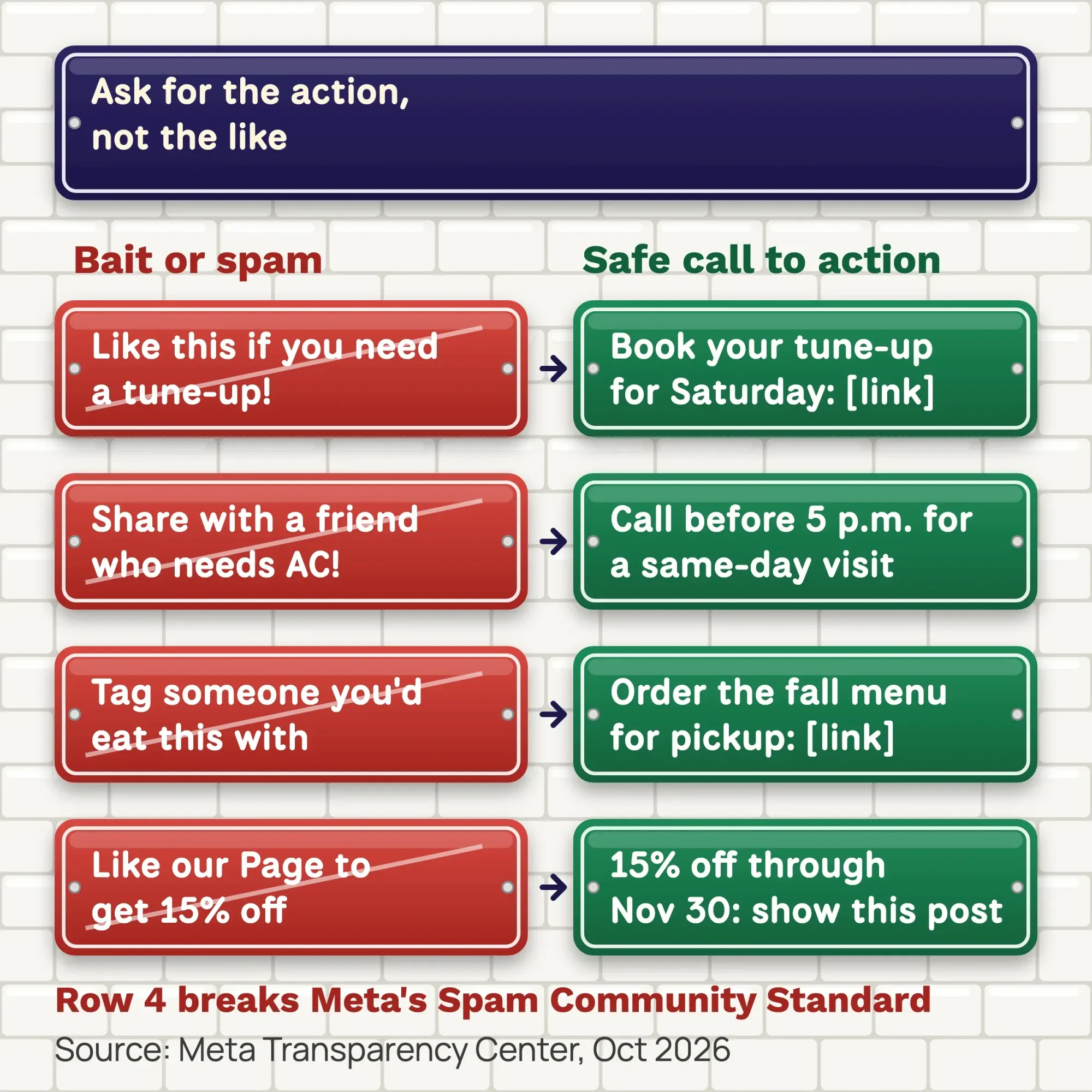 Source: Meta Transparency Center, engagement bait guideline and Spam Community Standard, October 2026.
An offer in a CTA must also be true. The FTC's advertising FAQs for small business say ads must be truthful, backed by evidence and not unfair. A "free" offer tied to a purchase can't come with a raised price, under the FTC Guide on the word free. A "Get offer" button needs a real offer on the page it opens.
This is general information, not legal advice; check with an attorney for your situation.
Facebook call to action examples: a button picker by goal
The best Facebook call to action asks for one next step in all 3 places. This table pairs each goal with a Page button, an ad button and a post line. We checked every button against Meta's tables on October 23, 2026.
| Goal | Page button (Meta goal) | Ad objective, destination: button | Example post line | utm_content |
|---|---|---|---|---|
| Bookings | Book now (Book) | Traffic, Website: Book now | Book your 30-minute tune-up for Saturday: [link] | post-book |
| Phone calls | Call now (Contact) | Traffic, Calls: Call now | Call (614) 555-0142 before 5 p.m. for a same-day visit. | none (no link) |
| Messages | Send message (Contact) | Traffic, Messenger: Send message | Tap Send message for a written quote in 24 hours. | none (Messenger) |
| Quote requests | Contact us (Contact) | Leads, Website: Get quote | Get a written roof estimate in 2 minutes: [link] | post-quote |
| Online orders | Shop now (Shop) | Traffic, Website: Order now | Order the fall menu for pickup: [link] | post-order |
| Offers | See offers (Shop) | Traffic, Website: Get offer | 15% off brake pads through November 30: [link] | post-offer |
| Email sign-ups | Sign up (Contact) | Leads, Website: Sign up | Get our 1-page winter checklist by email: [link] | post-signup |
| Learning first | Learn more or Watch video (Learn) | Traffic, Website: Learn more | See how a furnace tune-up works in 90 seconds: [link] | post-video |
Facebook call to action button picker by DigitalTreed, from Meta's Page button goals and Ads Manager button tables, checked October 23, 2026. The example lines and tags are ours. Use it as a free template: copy the row for your goal before you post or boost.
How do you track clicks from your Facebook CTA?
Facebook can count clicks on its side, but it can't see what people do on your website. Meta's URL parameters page says you'll need "a website analytics tool to track the results" for that. UTM tags are short labels you add to the end of a link, so Google Analytics knows where each visit came from.
Google's UTM guide for GA4 says to always use utm_source, utm_medium and utm_campaign. Use utm_content to tell 2 calls to action apart. Keep every value lowercase, because "Facebook" and "facebook" count as 2 different sources.
Build each link with our free UTM builder. Choose the "Facebook page" preset for posts or "Meta ads" for ads, then add your page, campaign and content name. It shows which GA4 channel the visit will land in.
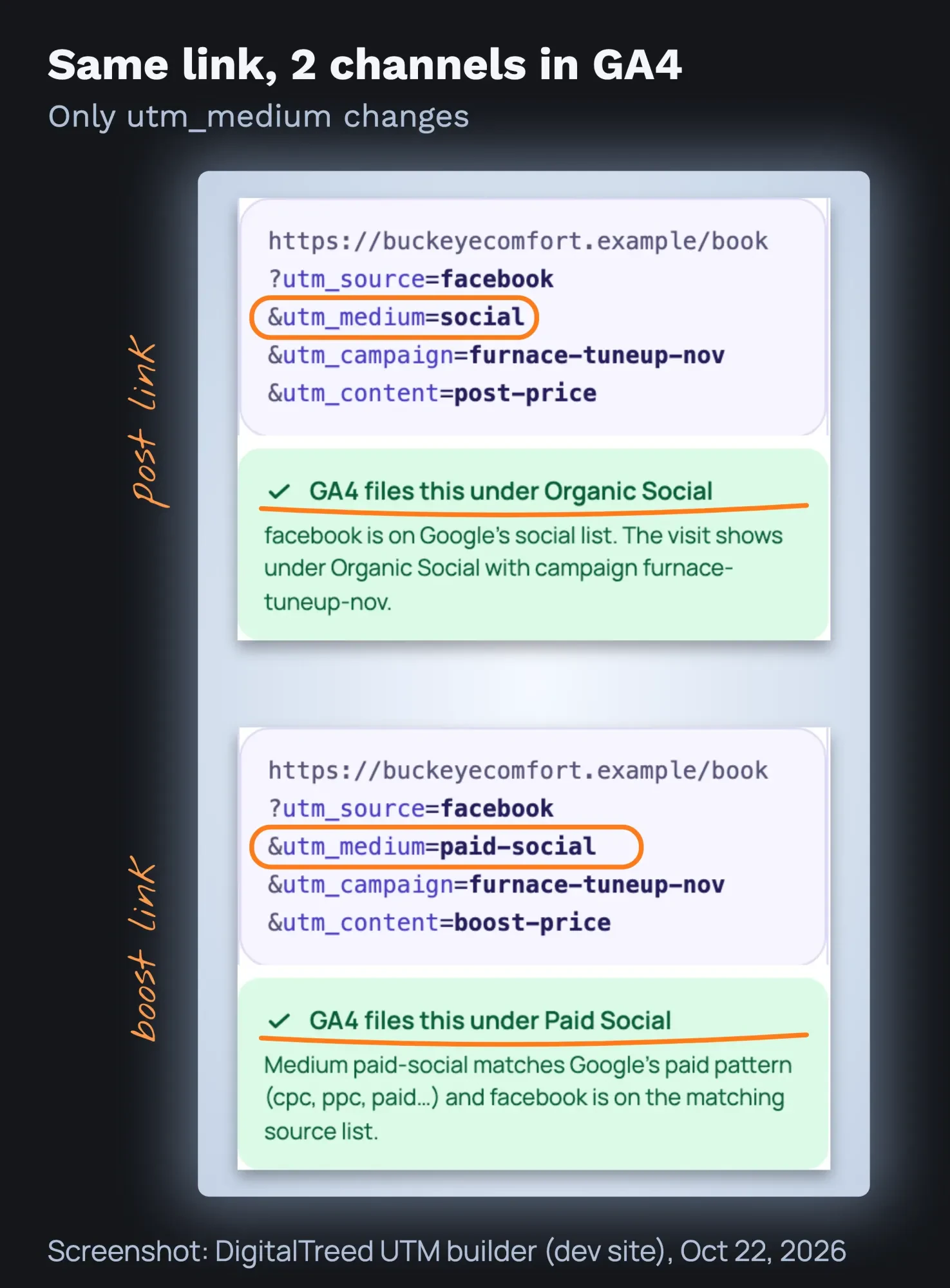 Screenshot: DigitalTreed UTM builder (dev site), October 22, 2026. Example link for a made-up business.
Here is why that matters. In Google's default channel rules, a social source with medium "social" is Organic Social. With a social source, a medium that starts with "paid" is Paid Social. So one link, tagged 2 ways, lets you compare the free post with the paid boost. Promoting a blog post? Our blog post promotion checklist gives the tags for email and your Business Profile too.
For ads and boosts, add the tags in Ads Manager under Tracking, in the URL parameters field. Meta's dynamic parameters can fill in the campaign and ad names for you. Name them in lowercase with hyphens, because Meta passes the names exactly as typed:
utm_source=facebook&utm_medium=paid-social&utm_campaign={{campaign.name}}&utm_content={{ad.name}}One catch: tags you add under Tracking apply only to clicks on the ad. People who see the same post without paying for it click an untagged link. So tag the link inside the post too. Meta also says that since January 1, 2024, it may add its own source and a "paid" medium to ad traffic.
Tag your Page button too. If it links to your website, add utm_content=page-button to that link. GA4 then shows the button's visits apart from your posts.
To read the results, open Reports, then Acquisition, then Traffic acquisition in GA4. Our Google Analytics 4 guide walks through that report. For a bio link page, our Linktree for business guide shows the same tagging.
How do you test which Facebook call to action works?
Use Meta's test tools, not guesswork. An A/B test in Ads Manager shows each version to a separate part of your audience, so nobody sees both. Meta advises against testing by turning ad sets on and off by hand.
For unpaid posts, Meta Business Suite has A/B tests for posts under Content. You can test up to 4 versions and pick a key metric. When the test ends, Meta shares only the winning version from then on.
What should you count? For call-to-action ads, Meta's metrics page names link clicks, cost per link click, people reached and post engagement. With a Send message button, it adds messaging conversations started.
Our take: change one thing per test, either the button or the first line of the post. Pick the winner by bookings or calls in GA4, not by clicks alone.
Example: an HVAC company in Columbus
Example: a made-up 2-truck heating company, "Buckeye Comfort Heating & Air" in Columbus, Ohio, wants more furnace tune-up bookings in November 2026.
- Page button: Book now, linked to the booking page.
- Post 1, November 3 (made-up price, as of November 2026): "Furnace tune-ups this month: $89, 45 minutes, Columbus and suburbs. Book online: [link]." The link carries utm_medium=social and utm_content=post-price.
- Post 2, November 10: the same offer as a 7-point checklist, tagged utm_content=post-checklist.
- The better post gets a 7-day boost at $10 a day, so $70 in total, set up on a laptop. Button: Book now. Tags: utm_medium=paid-social and utm_content=boost-price.
The $89 price and the $70 budget are made-up examples, as of November 2026. Had the owner boosted in the iPhone app, Meta's fee page says boosting on facebook.com instead saves 30% of the total ad payment, before taxes. On $70, that is $21. After 14 days, the owner compares bookings from Organic Social and Paid Social in GA4, not likes.
Common mistakes with Facebook calls to action
- Asking for likes, shares, tags or votes as the call to action.
- Offering a discount, gift or cash prize for a like or a follow.
- Leaving links untagged, so GA4 can't tell Facebook visits apart.
- Mixing "Facebook" and "facebook" in tags, which splits your reports.
- Tagging only the ad, so unpaid clicks on a boosted post stay untagged.
- Boosting from the iPhone app and paying the Apple fee.
- A "Get offer" button with no offer on the page it opens.
- Judging a CTA by likes instead of calls, bookings or forms.
Frequently asked
Can I write my own text on a Facebook ad button?
No. You pick the button from Meta's list for your objective. Put your own words in the ad's text and headline instead.
Can a normal Facebook post have a call-to-action button?
Meta's help pages describe buttons on your Page, ads and boosted posts, not ordinary posts. In a normal post, write one clear action with a tagged link, or boost the post to add a button. The one exception in Meta's help is a Donate button on a post that raises money for a nonprofit.
Can I add a call-to-action button to an existing Facebook post?
Not to the post itself. You can boost it, or use it in a new ad in Ads Manager. Meta's ad steps allow existing posts with the Awareness, Traffic, Engagement, Leads and Sales objectives. The button on an existing-post ad can't be edited later.
What is the best call to action for Facebook ads?
There is no single best button. Meta says the button you choose "should align with the objective you select for the campaign," in its guide to ad buttons. Pick the one that names your real next step, then compare 2 versions with an A/B test.
Is "comment below" against Facebook's rules?
A real question that asks for advice or recommendations is fine. Asking for comments, likes or shares for their own sake is engagement bait and can lower your reach.
Do the same rules apply on Instagram?
Instagram has its own tools and rules. For Stories, see our Instagram Story ideas for business. The UTM tagging works the same way, with instagram as the source.
Your next step
Today, check your Page button from your phone. Your Page's Intro and links matter as much as the button; our social media optimization guide covers them. Then tag the link in your next post with utm_medium=social, so you can see in 2 weeks what it brought in.
If you want posts, boosts and tracking run for you, see our social media marketing service. You get a plan and a fixed price before any work starts.
How we made this guide: we built it from Meta's Business Help Center, Meta's Transparency Center, Google Analytics help and the FTC. We read Meta's button table and its 2 Apple-fee pages on October 22, 2026. We built the example links in our own UTM builder and took the screenshot that day. Every source is linked where it is used, and we checked every number against it on October 22, 2026. Updated October 23, 2026: added key facts, a missing Page button fix and Ads Manager steps. We also added how to change a live ad's button, a button picker by goal, A/B testing and 2 FAQs.
First published July 2023. Rewritten October 2026: all new text, current Page and ad buttons, boost costs, the Apple fee, bait and spam rules, and GA4 tracking.
Sources
- Meta: Available call-to-action buttons in Ads Manager
- Meta: Add an action button to your Facebook Page
- Meta: Edit or delete your Page's action button
- Meta: About call-to-action ads on Facebook
- Meta: Create call-to-action ads from your Facebook Page
- Meta: Boost a post from your Facebook Page
- Meta: Avoid the Apple service fee when boosting Facebook ads
- Meta: Best practices for minimum budgets
- Meta: How to choose a Special Ad Category
- Meta: Add URL parameters to your Meta ads
- Meta: Specifications for URL dynamic parameters
- Meta: About call-to-action buttons in Ads Manager
- Meta: How to add a call-to-action button to an ad in Ads Manager
- Meta: How to edit ad campaigns in Ads Manager
- Meta: Troubleshoot ad editing issues in Ads Manager
- Meta: How to edit boosted posts from a Facebook Page
- Meta: About A/B testing
- Meta: How to A/B test content in Meta Business Suite
- Meta: Metrics for call-to-action ads
- Meta: Connect your Facebook Page and WhatsApp account
- Meta: Add a donate button to your Facebook post
- Meta Transparency Center: Engagement bait
- Meta Newsroom: Fighting engagement bait on Facebook, December 18, 2017
- Meta Transparency Center: Clickbait links
- Meta Transparency Center: Spam Community Standard
- Google Analytics Help: Collect campaign data with custom URLs
- Google Analytics Help: Default channel group
- FTC: Advertising FAQs, a guide for small business
- 16 CFR 251.1: Guide concerning use of the word "free"
Comments
No comments yet. Start the conversation below.