
Quick answer
As of October 2026, Instagram says a follower app you give your password or an access token can gain complete access to your account. The name you searched, Naz Tricks or another, doesn't change that. Still able to log in? Work through 6 steps, starting with your email and a new password. Locked out? Use instagram.com/hacked instead, as the steps below show.
Naz Tricks is a name you'll find in searches for free Instagram followers, and we could not find who runs it. Maybe you're a small-business owner or creator who typed your password into a site like that, or you're about to. Either way, you can protect the account without knowing how the site works.
First comes what we could and couldn't confirm about Naz Tricks, then how a free follower site takes over an Instagram account and how to spot a fake login page. After that: the 6 steps if you gave your password, the route if you're locked out, and what to do once you're back in. Our view: keep your password off every follower site, and lock down your email first if it's already out.
Key takeaways
- An access token gives a follower app the same complete access as your password.
- A new Instagram password signs out every logged-in device, suspicious ones included.
- Removing a connected app does not delete what it already stored.
- Instagram never contacts you about account security by direct message.
- If your email was changed, the [email protected] email may let you undo it.
Naz Tricks: what we could and couldn't confirm
Before the steps, here's what we know, and it's short. We looked for who runs Naz Tricks and could not find out. None of the Instagram, FTC and CISA pages we read on October 30, 2026 names it or anyone behind it. We also didn't open the site, type anything into it or look up its domain. So this guide won't say what Naz Tricks offers or charges. If a page under that name ever asks for your Instagram login, give that box the same trust you'd give a stranger asking for your house keys.
Our older post on this page described Naz Tricks without a single source. That text is gone.
The pattern, though, is well documented. To check a site's address and domain age first, see our walkthrough on checking a free follower site like Cookape before you log in.
How a free follower site takes over an Instagram account
That login is what these sites are after. Instagram's help page on apps that offer likes and followers says some outside apps "offer likes or followers in exchange for your Instagram login details." None of them, it adds, are affiliated with or endorsed by Instagram. Its page on data scraping restrictions lists giving your username and password to such an app as one reason an account gets flagged.
There are two ways in, and Instagram treats them as equally dangerous. The first is the password you type into its form, and the second is an access token, a key you approve that lets an app act without the password. Instagram puts both in one sentence: "whether with an access token or by giving them your username and password, they can gain complete access to your account." That line appears on the follower-apps page and on Instagram's account security page. Complete access means these apps "can see your personal messages, find information about your friends, and potentially post spam or other harmful content on your profile."
For a business account, that's customer DMs, supplier chats and anything you've said in private. Instagram's phishing page warns about anyone who gets into an account: "they may use your account to send spam." Your followers then see that spam coming from you.
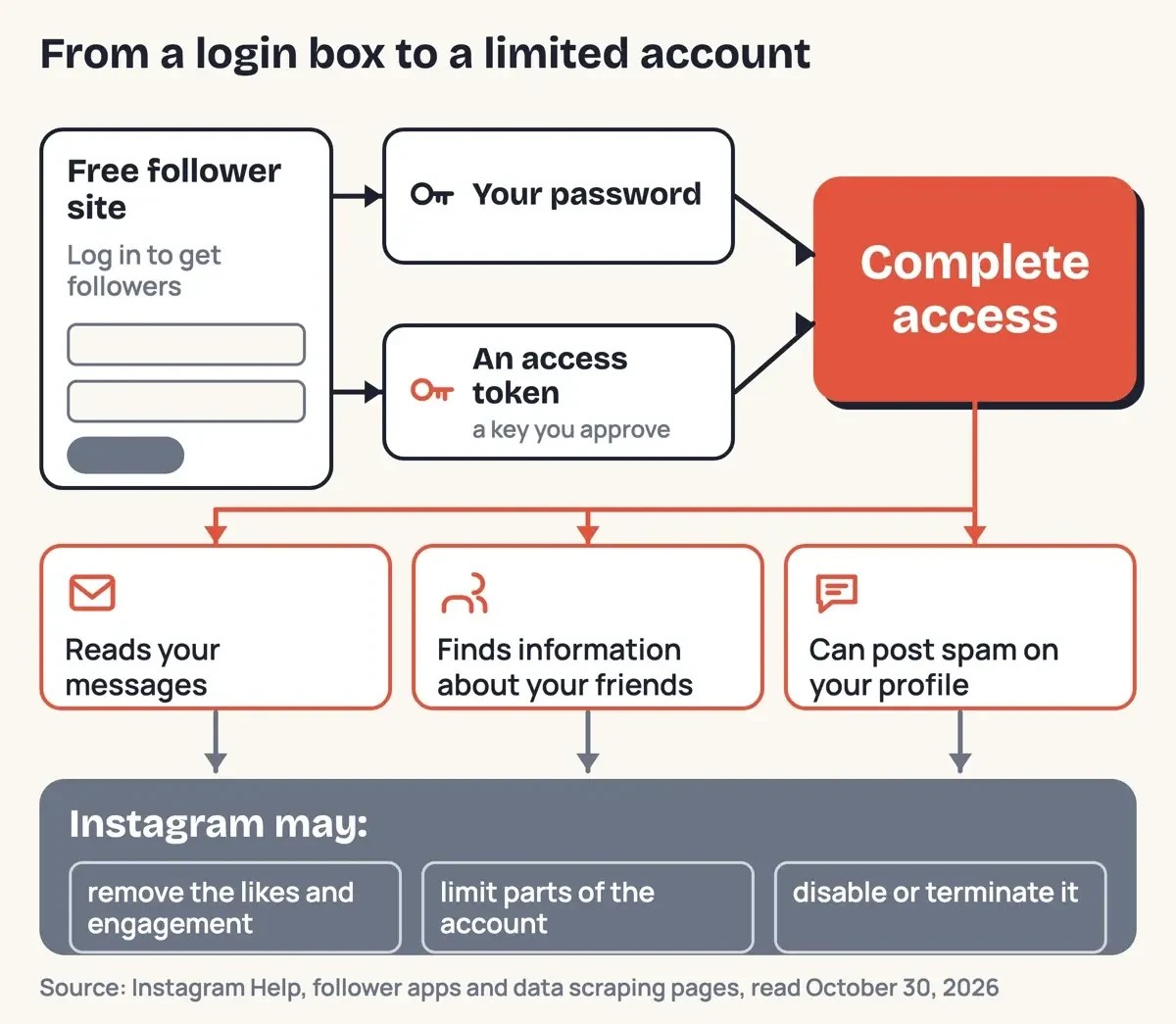 Diagram by DigitalTreed, from Instagram Help pages on follower apps and data scraping, read October 30, 2026.
Instagram's rules cut against these sites, too. The Instagram Terms of Use say you can't "request or collect Instagram usernames, passwords, or misappropriate access tokens." Your own account pays a price as well. If it looks like you shared your login with one of these apps, Instagram says it "may remove any likes or other engagement that they generated." Accounts that keep using them "may notice that certain parts of their Instagram account are limited," and the page warns an account "may be disabled or terminated." So the followers you wanted can vanish, and the account can shrink with them.
What Instagram limits look like, and how to get out of one, is covered in our piece on Instagram's rules for follow exchanges like Expert Kamai. If you paid for followers instead of trading a login, the money and US law side sits in the real cost of buying followers from sites like Mega Famous.
How do you spot a fake Instagram login page?
Phishing starts with a page or message that looks official enough on a busy day. CISA's phishing guide lists the signs, starting with "Urgent or emotionally appealing language" and "Incorrect email addresses or links." The FTC's phishing guide gives the stories scammers tell. They "say they've noticed some suspicious activity or log-in attempts," or they "offer a coupon for free stuff." A free follower offer is that second story with a new label. Instagram adds its own warning sign. Its phishing page flags messages that "claim that your account will be banned or deleted if you don't follow their directions."
It's also blunt about the cost: "If you accidentally entered your username or password into a strange link, someone else might be able to log in to your account." So check the address bar before the logo. A logo is easy to copy.
Email is the second door, since a fake security alert often links to a fake login page that asks for the same username and password. Instagram's page on reviewing recent emails from Instagram says real security messages come only by email, from these five domains:
- @support.facebook.com
- @support.instagram.com
- @facebookmail.com
- @mail.instagram.com
- @global.metamail.com
Two more lines on that page do a lot of work. First, "Instagram will never reach out to you about profile security through Direct Messaging." Second, you can "view official Instagram emails sent within the last 14 days from your Settings." If an alarming email isn't on that list, don't click it, and remember that CISA says to "type the address yourself if you're sure you know it." The FTC agrees: use a website you know is real, not the link in the message. For more practice beyond Instagram, our tips to avoid phishing cover email, texts and calls.
What we tested
We fed a short offline script 18 made-up addresses on October 30, 2026. Ten senders had to match one of Instagram's five security domains exactly. Eight login pages needed https and an instagram.com host. Thirteen failed, the http copy of the real login address among them, and 9 of those still contained the word "instagram."
FAIL https://instagram.com.free-followers.example/login
Senders: 3 pass, 7 fail. Login pages: 2 pass, 6 fail.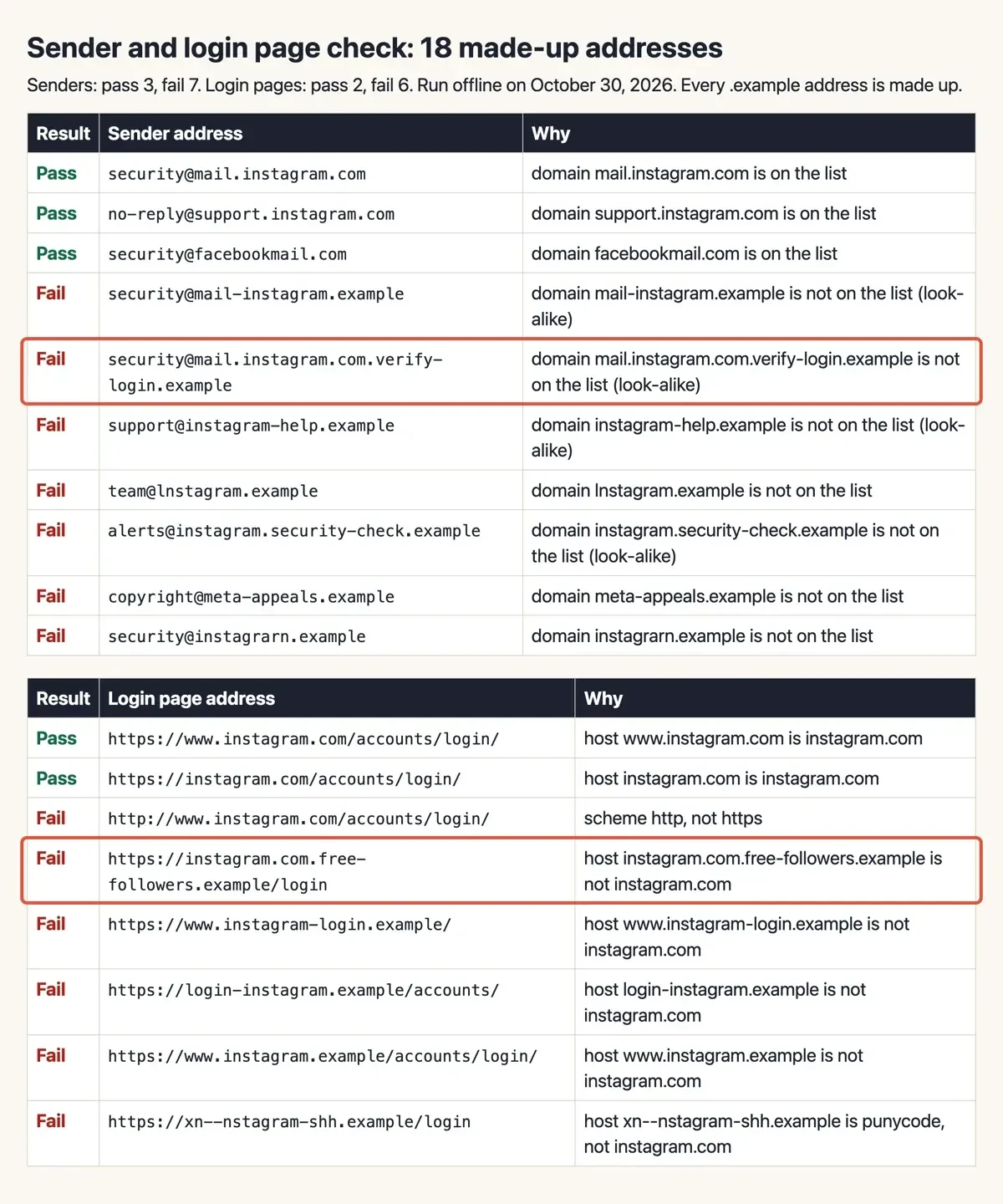 Screenshot: our offline check, served from 127.0.0.1 on October 30, 2026.
Gave your password to a follower site? Do these in order
Once a password is out, speed matters more than anything else. If you can still log in, Instagram's follower-apps page is plain about it: "you should change your Instagram password to protect your account." Here's our running order, built from Instagram's hacked account page and the FTC's guide to recovering a hacked account:
- Secure the email account on your Instagram profile first: a new password and two-factor login.
- Change your Instagram password under Profile, Menu, Password and security, Change password.
- Open Login activity, then tap This Wasn't Me or Log out on any login you don't recognize.
- Confirm the email address and phone number in your settings are yours.
- If the follower app is listed, remove it on a computer under Settings, Website permissions, Apps and Websites, Active.
- Turn on two-factor authentication with an authentication app, and save the backup codes.
Why email first? Instagram's security page says "Anyone who can read your email can probably also access your Instagram account." The FTC spells out how: someone in your inbox could "request a password reset link for any of your other accounts" and lock you out. If your email and Instagram share a password, the email is the bigger leak. Step 2 does more than you'd expect, too. Instagram's scraping page says changing it "will log you out of all logged in devices, including any suspicious logins." Its login requests page adds that after you deny an unknown login, a reset means anyone holding your current password "will no longer have access."
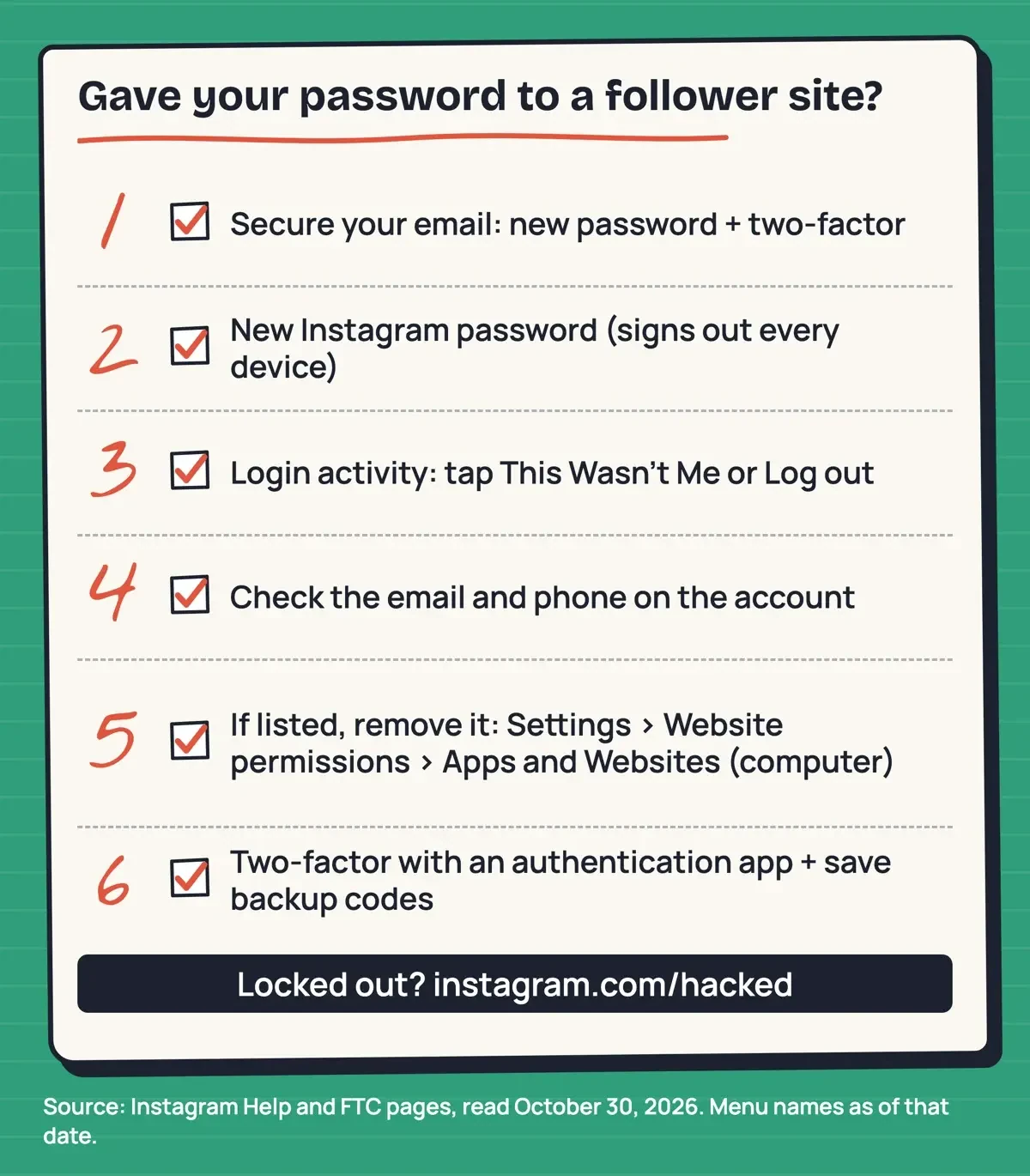 Drawn by us, from Instagram Help and FTC pages, read October 30, 2026. Menu names as of that date.
Length is where people cut corners. Instagram's password page suggests at least 6 numbers, letters and punctuation marks, while CISA's password guide says at least 16 characters, and CISA's is the number to use.
Typing 16 random characters by hand is a chore. Our free password generator makes a long random one.
Removing the app has a limit worth knowing. Instagram's page on apps and websites connected to your account says "The app or website may have stored information from when you were using it." Removal "only prevents it from continuing to access your non-public information through Instagram," so what it kept stays with it. Remove it the day you notice, then, before it can pull anything newer. Asking for that data back is covered in our piece on what sites like YT Teacher can keep and how to get it back.
Two-factor login is the step that blocks a password someone already has. Instagram's two-factor page recommends an authentication app, such as Duo Mobile or Google Authenticator, over its other two methods, text messages and WhatsApp codes. Only the Instagram app for Android and iPhone can switch the app method on. It also says a backup code gets you in if you lose your phone, so keep those codes where you'll find them. CISA's MFA page explains the payoff: "Even if an unauthorized user steals your password, they won't be able to meet the second step requirement." Last, change that password anywhere else you've used it. CISA's rule is short: "Use a different strong password for each account."
Locked out: Instagram's hacked-account route
But if the password no longer works, the starting point changes. Start with the device. The FTC's recovery guide says to "make sure your computer security software is up to date, then run a scan" before you follow the provider's recovery steps. Otherwise you could type a new password into a device that's leaking it.
Keep your old email and phone close, too. Instagram's login link goes to one of them.
Next, check your inbox for a message from Instagram. Its hacked account page says you "may be able to undo this change" with the secure my account option in an email from [email protected]. Instagram's page on an email address that was changed explains why. It sends one email to the old address and one to the new, and the old-address email carries "a special link you can click to reverse the email change."
No such email? Instagram's security page sends you to instagram.com/hacked, on a computer or a phone browser.
From the login screen, you can also tap Forgot password? and ask for a login link by email or text. If that fails too, the hacked account page says you may be able to request support from a mobile device. Use "a secure email address that only you can access" for that request.
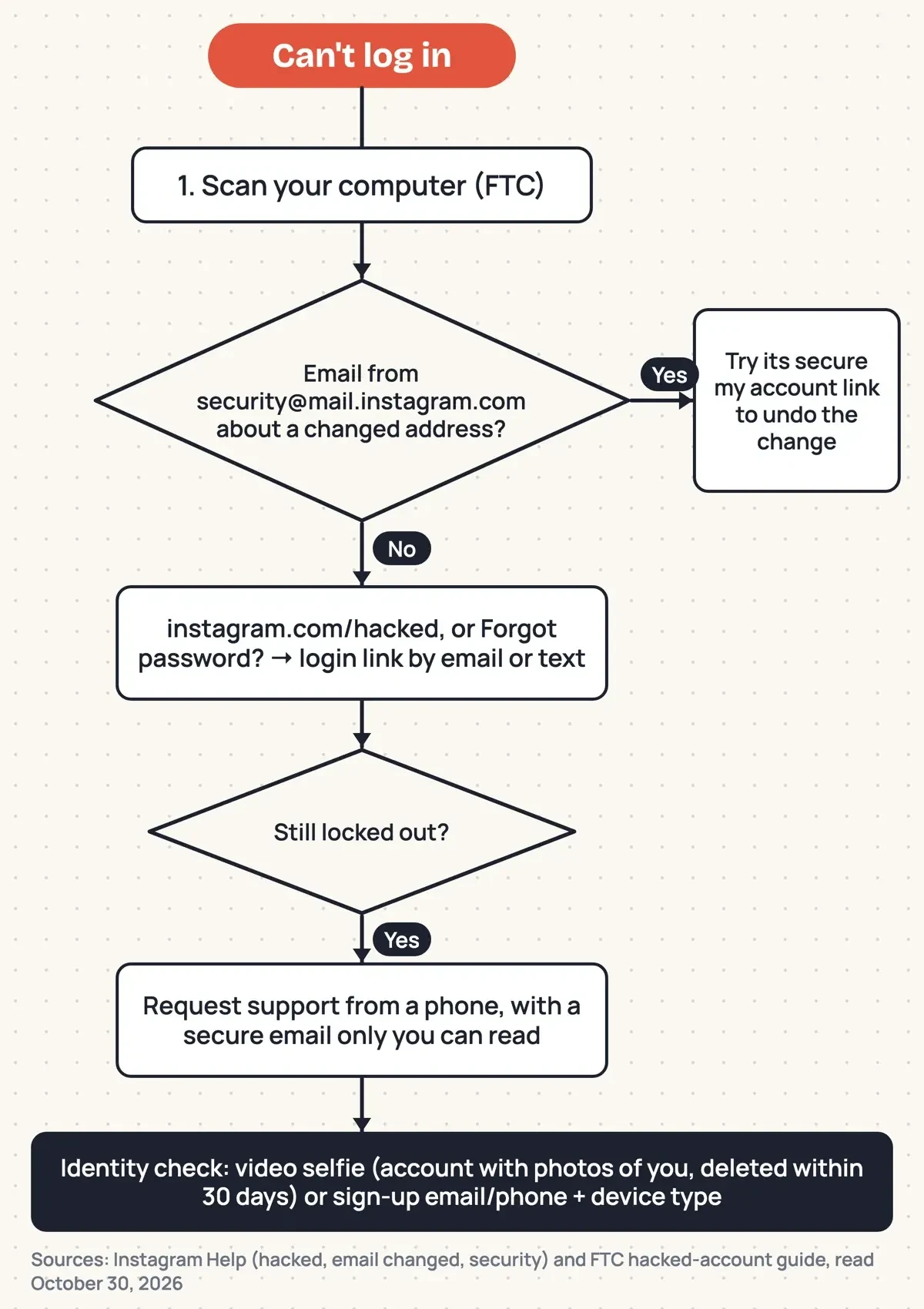 Diagram by DigitalTreed, from Instagram Help hacked-account and email-change pages and the FTC recovery guide, read October 30, 2026.
Instagram may then ask you to prove the account is yours. For an account with photos of you, it asks for "a video selfie of you turning your head in different directions." Instagram says that video "will never be visible on Instagram and will be deleted within 30 days." Without photos of you, it asks for the email or phone you signed up with. It also wants the type of device you used at sign-up, so find that out before you start. If the video doesn't confirm it's you, Instagram says you can submit a new one for another review.
After you're back in: contacts, reports and what comes next
Once you're back in, the job isn't done, because the intruder may have used the account while you were out. The FTC's recovery guide says to look for messages the hacker posted or sent, "or for new friends you don't recognize." On Instagram, that means your DMs, your recent posts and the list of accounts you follow, checked against what you remember following. Then tell your contacts "not to click on links in emails from you and to ignore pleas for help or money," in the FTC's words. After that, report it. Instagram's phishing page says "You can always report strange emails to [email protected]."
The FTC's phishing guide adds [email protected] for email, SPAM (7726) for texts and ReportFraud.ftc.gov for the attempt itself. Worried about the device after a click? Our steps for a phishing link you already clicked split the fixes by phone and computer. Our take: no follower count is worth a login that can read your customers' messages. Follower sites aren't the only tools asking for more than they need. Our look at anonymous Instagram story viewers like Instanavigation covers another kind, and these settings to hide Instagram stories from viewers limit who sees yours. For growth without handing over a password, DigitalTreed offers social media marketing services, the one paid service linked here.
Questions about follower-site logins
Frequently asked
Will Instagram know I used a follower site?
It may. Instagram's data scraping page says your account "may have been restricted and flagged for further review" when Instagram detects "activity that goes against our Terms of Use."
Does two-factor login help if someone has my password?
Yes. Instagram's login requests page says it alerts you to logins from unrecognized devices, so you can deny them.
Is a security message in my Instagram DMs real?
No. Instagram's recent emails page says it "will never reach out to you about profile security through Direct Messaging."
Should I tap Trust this device on a shared computer?
No. Instagram's two-factor page says not to on a public or shared device.
How we made this guide: We read 11 Instagram Help pages, its Terms of Use, two FTC guides and three CISA pages, signed out. We visited no follower site, and our check ran offline. Facts checked by the DigitalTreed team on October 30, 2026.
First published December 2023, describing Naz Tricks as a follower tool. Rewritten October 30, 2026 to explain follower-site logins, fake login pages and account recovery.
Sources
- Instagram Help: Why you should not use apps that offer likes and followers
- Instagram Help: Secure your Instagram account
- Instagram Help: Protect yourself from phishing
- Instagram Help: Why your account has been restricted for data scraping
- Instagram Help: Turn login requests on or off
- Instagram Help: Two-factor authentication
- Instagram Help: Change your Instagram password
- Instagram Help: If you think your Instagram profile has been hacked
- Instagram Help: If the email for your account was changed
- Instagram Help: Review recent emails sent from Instagram
- Instagram Help: Apps and websites connected to your account
- Instagram Terms of Use
- FTC: How To Recover Your Hacked Email or Social Media Account
- FTC: How To Recognize and Avoid Phishing Scams
- CISA: Recognize and Report Phishing
- CISA: Turn On Multifactor Authentication
- CISA: Use Strong Passwords


Comments
No comments yet. Start the conversation below.