
Quick answer
A follower site like YT Teacher that gets your Instagram password or token can gain complete access, messages included, Instagram says (as of October 2026). If you live in California and the business behind it meets a CCPA threshold, it has 45 calendar days to answer a deletion request. First, remove its access under Website permissions.
YT Teacher is a search term tied to free Instagram followers, and the official sources we read name no one who runs it. Maybe you gave a site like that your login, or tapped Allow. Now you want it to let go.
First, who runs YT Teacher and what a follower site can see with your login. Then the steps to cut off its access and export your Instagram information. After that, how to delete your data under California law, Texas as an example elsewhere, and where to file complaints. Our view? Remove access today and send the request anyway.
Key takeaways
- Removing a follower app stops new access but not what it stored.
- Instagram says a token and a password both give complete access.
- Only California residents can use CCPA deletion rights.
- A covered business must answer a deletion request within 45 calendar days.
- Your Instagram export lists what a full-access app could have read.
What we know about who runs YT Teacher
Before the data question, a word on the site itself. We tried to learn who runs YT Teacher and came up empty. It isn't mentioned in any Instagram, FTC, California, Texas, Apple or Android page used for this guide on October 30, 2026. We never opened the site, looked up its domain or typed anything into it. That means this guide makes no claim about what YT Teacher collects or charges, and you shouldn't trust one that does without a source. That gap matters for everything below, because a deletion request needs a business to receive it.
Our December 2023 text described the site without sources, so that text is cut. Our Cookape walkthrough on domain age, URL scanners and copy domains shows how to check a site yourself.
What can a follower site see once it has your Instagram login?
On the data, Instagram's warning about apps that trade likes and followers for logins says those apps ask for "your Instagram login details."
Then comes the key line: "whether with an access token or by giving them your username and password, they can gain complete access to your account." Its account security page repeats that sentence word for word. So a token isn't safer than a password. Complete access means the app can "see your personal messages, find information about your friends, and potentially post spam or other harmful content on your profile." Your followers would see that spam as yours. On a business account, those messages can hold customer questions, order details and supplier chats. Instagram may also strip likes those apps generated, as our piece on Instagram's rules for coin-based follow exchanges explains.
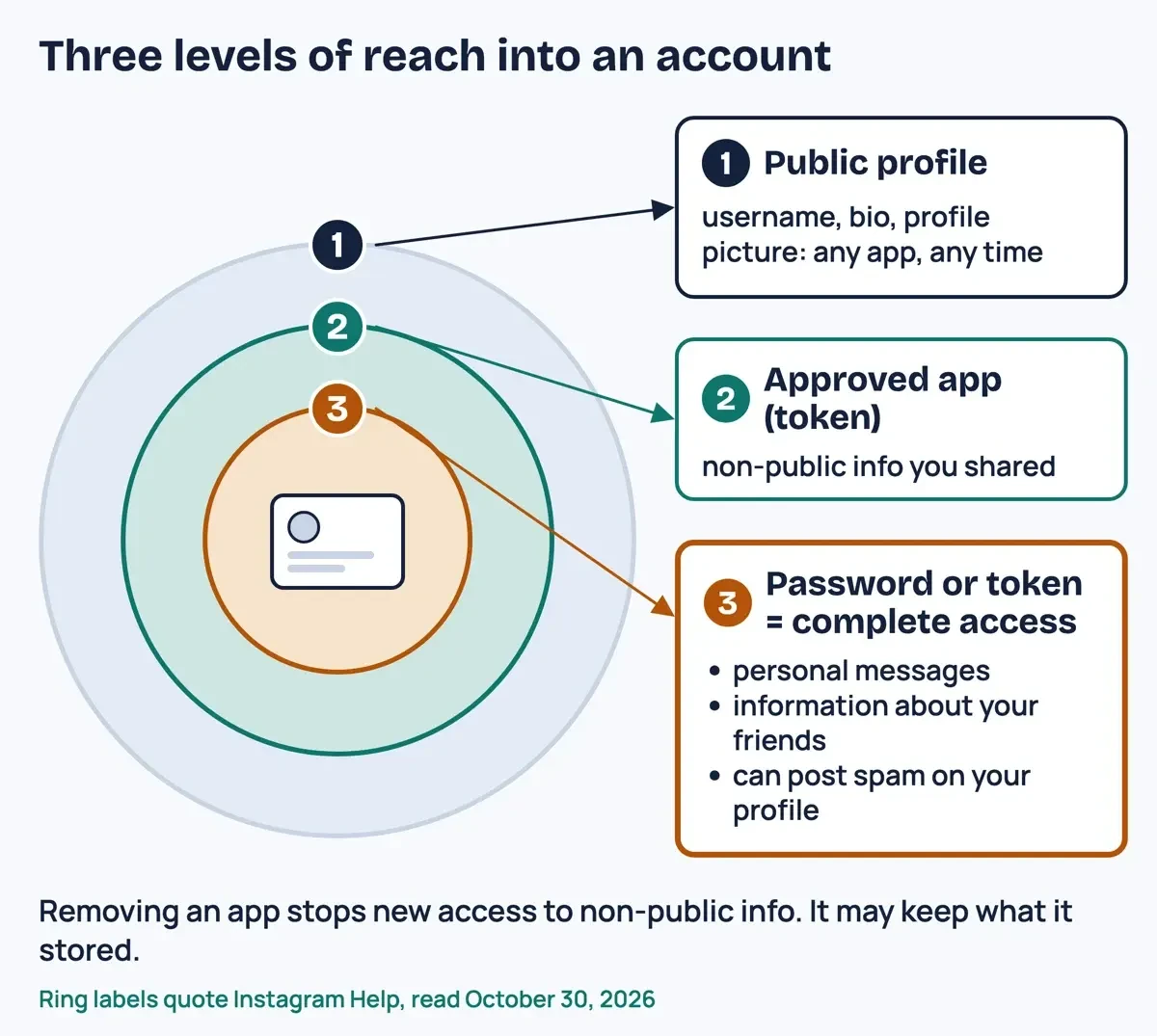 Diagram by DigitalTreed. Ring labels quote three Instagram Help articles, on follower apps, connected apps and data scraping, as read October 30, 2026.
Some of your data was never locked at all. Instagram's help page on connected apps and websites says an app can reach public information "at any time." It names "your username, bio and profile picture" as always public. Its data scraping page adds: "By default, your Instagram account is public." Anyone can collect that layer, login or not.
Two of our other guides start from that public layer: how anonymous story viewers like Instanavigation reach public stories, and the settings that hide your stories from viewers. Neither depends on your login.
An installed app opens a second door: the phone. The FTC's tracking guide warns that "Some apps may ask for access to information from your device, like your location, your contacts, or your photos." On an iPhone, Apple's guide to app access puts those switches under Settings > Privacy & Security. Its App Privacy Report there "shows you how apps are using the permissions you granted them." On Android, Google's app permissions page puts them under Settings, Apps, then Permissions. Turn off anything a follower app didn't need.
Websites have their own reach. The same FTC page says sites "may track your online activity by using a cookie or pixel to identify you even after you leave the site." If you don't want ads based on that activity, its advice is to "delete cookies and clear your browsing and search history."
Cut off the access a follower site still has
So the next job is closing both doors, because they sit in different places. Apps you approved show up in Instagram's app list, while a site that typed in your password shows up as a logged-in device instead. On a computer, Instagram's connected-apps page gives this path to remove an app:
- Click More in the bottom left, then Settings.
- Below Your app and media, click Website permissions.
- Click Apps and Websites, then Active.
- Click Remove next to the follower app.
Repeat that for every account the site touched. Instagram sorts connected apps into three states. An Active app, one you seem to have used in the last 90 days, "can access any information on Instagram you've shared with it at any time." An Expired app loses non-public access after 90 days on a private personal account. Even so, Instagram says it "may still have non-public information you previously shared with it." And permissions used to manage business and creator accounts don't expire after 90 days at all. If yours is a business account, remove the app rather than wait it out.
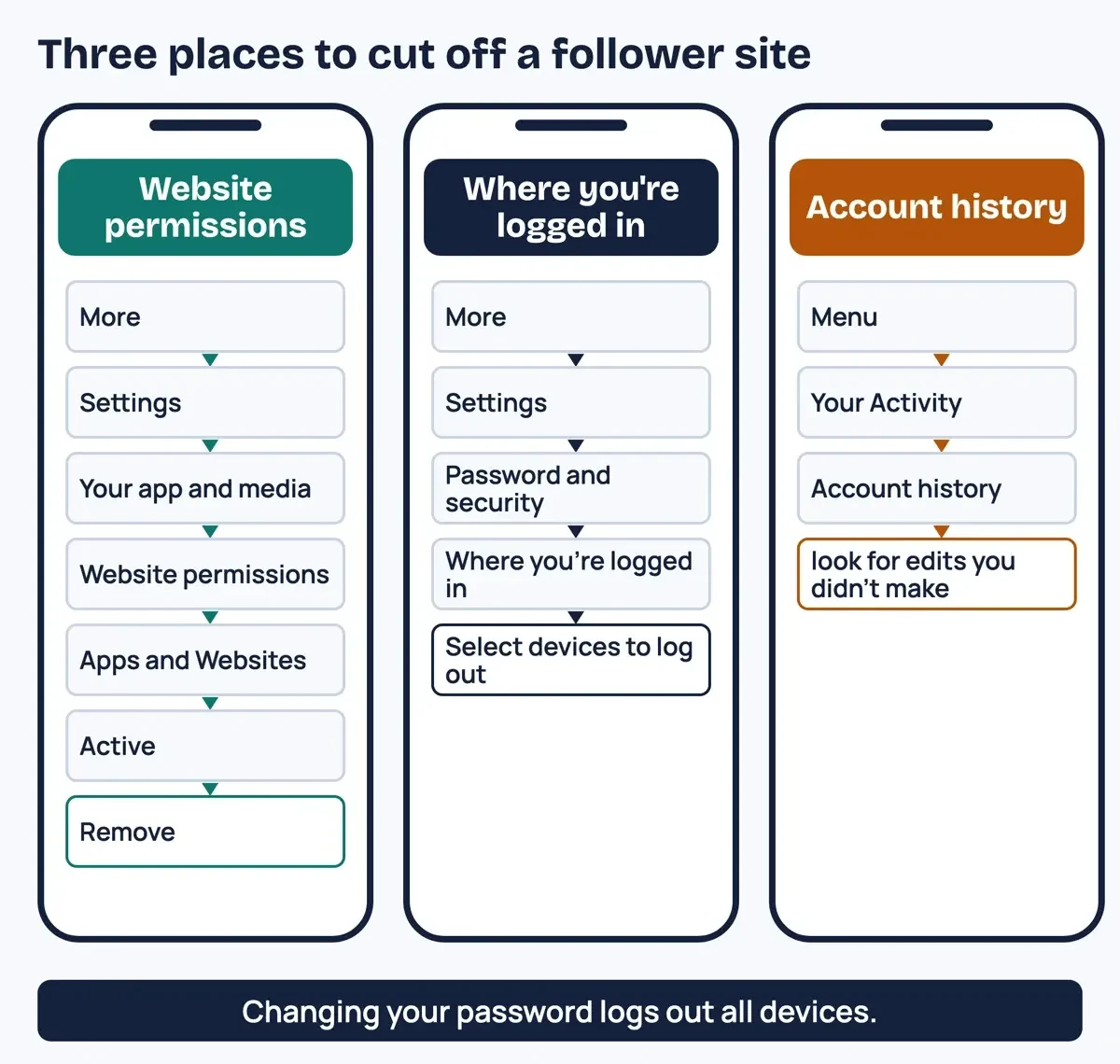 Drawn by us. Menu paths copied from Instagram's computer help for connected apps, login activity and account history on October 30, 2026; labels can change.
Removal has a limit, and Instagram says so plainly. A removed app "may have stored information from when you were using it." Removing it "only prevents it from continuing to access your non-public information through Instagram." Whatever the site copied before you clicked Remove stays with the site, and getting that copy deleted takes a legal request, which we cover two sections down.
Next, check the password side. Instagram's login activity page lists devices that recently logged in, under Settings, Password and security, then Where you're logged in (older menus show Login Activity instead). For a login you don't recognize, Instagram Help lets you log out of that location or device and "let us know that the login wasn't you." Changing your password goes further, since the scraping page says it "will log you out of all logged in devices, including any suspicious logins." Our guide on what to do after giving your password to a site like Naz Tricks has the full lockdown order.
One more screen is worth a look. Account history, under Your Activity, shows "changes you've made to your account," per Instagram's export help page. Look for a changed email, phone number or username you didn't make.
See what your account held: export your Instagram information
Once the door is shut, you'll want to know what sat behind it, and while you can't see the site's copy, you can see the original. Instagram's export page gives the route: Settings, Meta Account, Your information and permissions, then Export your information and Create export (some accounts show Accounts Center instead). Pick the profile, types and date range, then save it to your device. Instagram says "It may take up to 30 days for us to email you an export link." Once the file is ready, you've got 4 days to download it. Instagram's guide to information available to download says the Specific types option lets you pick items "such as photos, messages or data logs."
Tick messages if customer chats worry you; that list feeds the request below.
Ask YT Teacher or any follower site to delete your data
Now for the part most guides skip: making the site erase what it kept. In California, that right comes from the California Consumer Privacy Act, which voters amended in November 2020 by approving Proposition 24, the CPRA. Under the Attorney General's CCPA page, you can "request that businesses delete personal information they collected from you and tell their service providers to do the same." Exceptions apply. The California Privacy Protection Agency FAQ lists the same right, plus the right to know what was collected, from which sources and why. Our letter asks for both.
Two limits decide whether the law backs you. The first is where you live: "Only California residents have rights under the CCPA," the Attorney General's page says. The second is who runs the site. Per the CPPA FAQ, a covered business is a for-profit one that collects and controls personal information and must "do business in California, and meet any of the following thresholds:"
- "a gross annual revenue of $26.625 million or more," effective January 1, 2025, per the CPPA's threshold adjustment page
- "Buy, sell, or share the personal information of 100,000 or more California residents or households"
- "Derive 50% or more of their annual revenue from selling or sharing California residents' personal information"
We can't say whether YT Teacher meets any of these. Don't count on a reply.
Your login itself gets extra protection under this law. The Attorney General's page lists an account log-in as sensitive personal information, along with any "password, or credentials allowing access to an account." The CPPA FAQ says businesses must tell you if they're collecting "account passwords."
To send the request, start with the site's privacy policy. The Attorney General's page says it "must include instructions on how you can submit your request to delete." Businesses must offer at least two ways, but one that "operates exclusively online" only needs to provide an email address. So an email-only policy can be lawful; send your letter to that address and keep the sent copy. And they "cannot make you create an account just to submit a deletion request." Here's the letter we drafted for our test, with your details in the braces:
Subject: Request to know and delete my personal information (CCPA)

Date: {DATE}

To the operator of {SITE}:

I am a California resident. Under the California Consumer Privacy Act, I ask you to:

1. Tell me the categories of personal information you collected about me, and the categories of third parties you disclosed it to.
2. Then delete the personal information you collected from me, including my Instagram password, any access token, and any messages, photos or follower lists you copied from my account, and tell your service providers to delete it too.

I used your site in {WHEN} with the Instagram username {IG_USERNAME}. You can reach me at {EMAIL}.

Please confirm in writing that you received this request, and respond within 45 calendar days.

{NAME}
Leave out your phone number, birth date and new password. Send it from an address you'll keep checking.
A business may ask for more information to verify you, and it "can only use that information for this verification purpose," per the Attorney General's page. It may still refuse, for reasons such as needing the data "to comply with legal obligations." If it does, ask for its reason in writing. On timing, the CPPA FAQ says businesses "must confirm receipt of your request within 10 business days." The answer is due within 45 calendar days, or 90 if they notify you of an extension.
Where you send it matters as much as what it says. The Attorney General's page says a designated method "may be different from its normal customer service contact information." Replying to a marketing email from the site may not count. If the policy's method doesn't work, the page says to notify the business in writing and use another designated method if possible. And if a payment processor or shipping company answers that it's only a service provider, the page is clear: "You must submit your request to the business itself." That's harder when the business has no name, and the Attorney General's page admits that finding it can be "difficult or impossible."
What we tested
We ran our request kit offline on October 30, 2026, filling the letter above with made-up details. All 10 checks passed on the 136-word letter; two of them, for blank placeholders and new personal details, are our own rules. It also worked out deadlines for three example send dates, skipping weekends but not holidays.
| Example send date | Confirm receipt by (10 business days) | Answer by (45 days) | Latest with one extension (90 days) |
|---|---|---|---|
| Fri October 30, 2026 | Fri November 13, 2026 | Mon December 14, 2026 | Thu January 28, 2027 |
| Wed November 25, 2026 | Wed December 9, 2026 | Sat January 9, 2027 | Tue February 23, 2027 |
| Mon December 28, 2026 | Mon January 11, 2027 | Thu February 11, 2027 | Sun March 28, 2027 |
Two of those dates land on a weekend: the 45th day after November 25 is a Saturday, and the 90th day after December 28 is a Sunday. Veterans Day and Thanksgiving still count as business days in our table, so treat each confirm-by date as the earliest it could fall and mark it on your calendar.
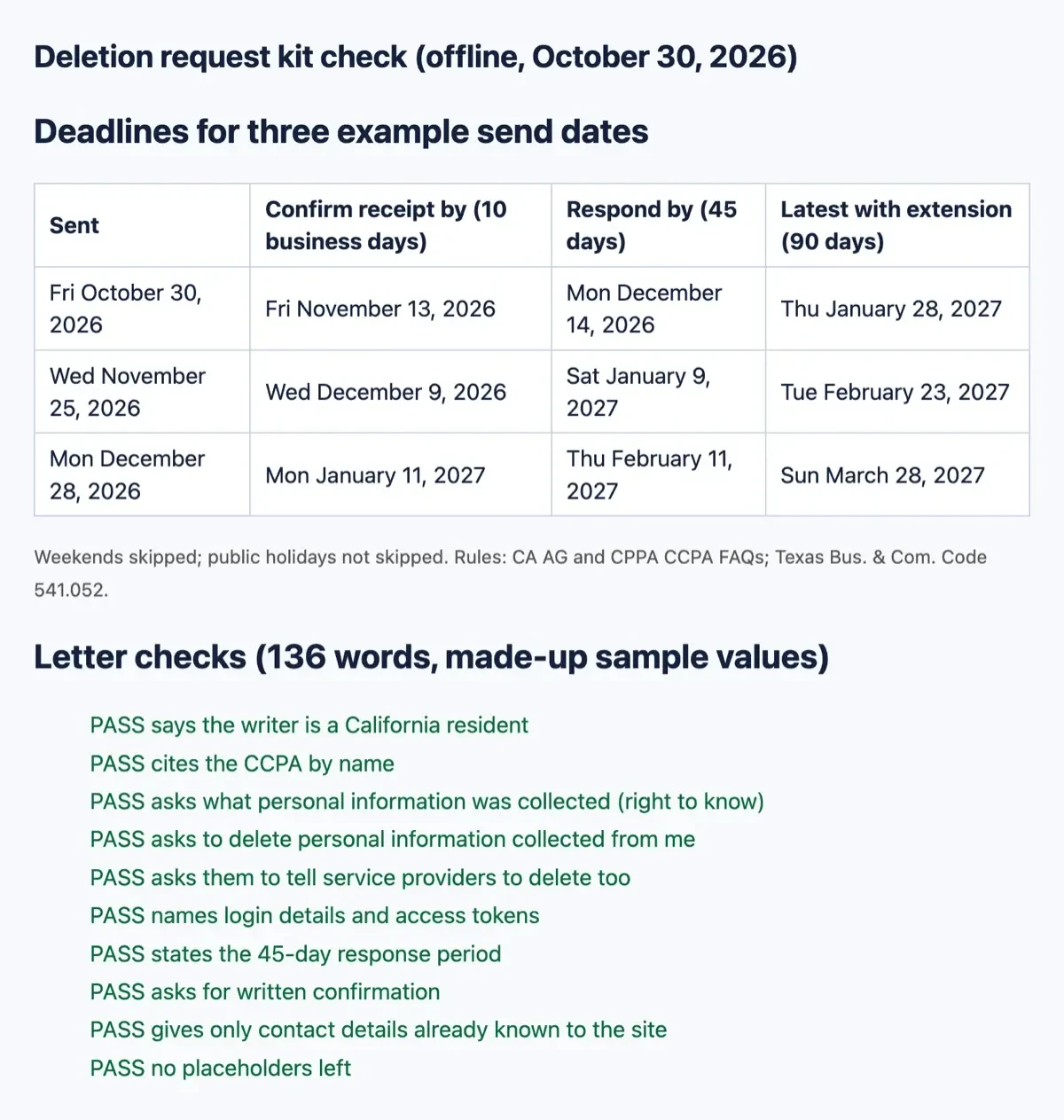 Screenshot: request kit results served on 127.0.0.1, captured October 30, 2026, with made-up sample values.
Not in California? The Texas law as one example
Other states write their own rules. Texas's law has been in force since July 1, 2024.
Texas residents get a similar right. The Texas Attorney General's page on the Texas Data Privacy and Security Act says it "grants Texas residents several key rights over their personal data." One is the "Right to delete personal data provided by or obtained about the consumer." The enrolled House Bill 4 text gives a company 45 days to respond, plus one extra 45 days "when reasonably necessary."
There's a catch for small operators, since the Texas page adds that "Small businesses (as defined by the federal Small Business Administration) are generally exempt from the Act." Selling sensitive data is the exception, since a small business must get consent first. Elsewhere, check your own state attorney general's site, and swap your state's law into the letter.
If the site never answers: complaints and what to keep
Even a well-written letter can meet silence, especially from a site whose owner you can't name. The Attorney General's page says "You cannot sue businesses for most CCPA violations," apart from some data breaches, and only it or the CPPA can act on the rest. The CPPA takes complaints online, but its form says "The Agency does not represent individual consumers and cannot act as your attorney."
A complaint still adds up. The CPPA FAQ says each one helps it identify trends and, when appropriate, pursue "inquiries, sweeps, and investigations." Name the site exactly as it appeared to you, since a sworn complaint names the business, the facts behind each alleged violation and the documents that support them. So keep your letter, the date and method you used, any reply and your Instagram export. Before filing, the Attorney General's page suggests checking that you used the designated method and following up with the business, which costs you one more email. California residents can also file a consumer complaint with the Attorney General's office, the CPPA FAQ says. Keep it factual.
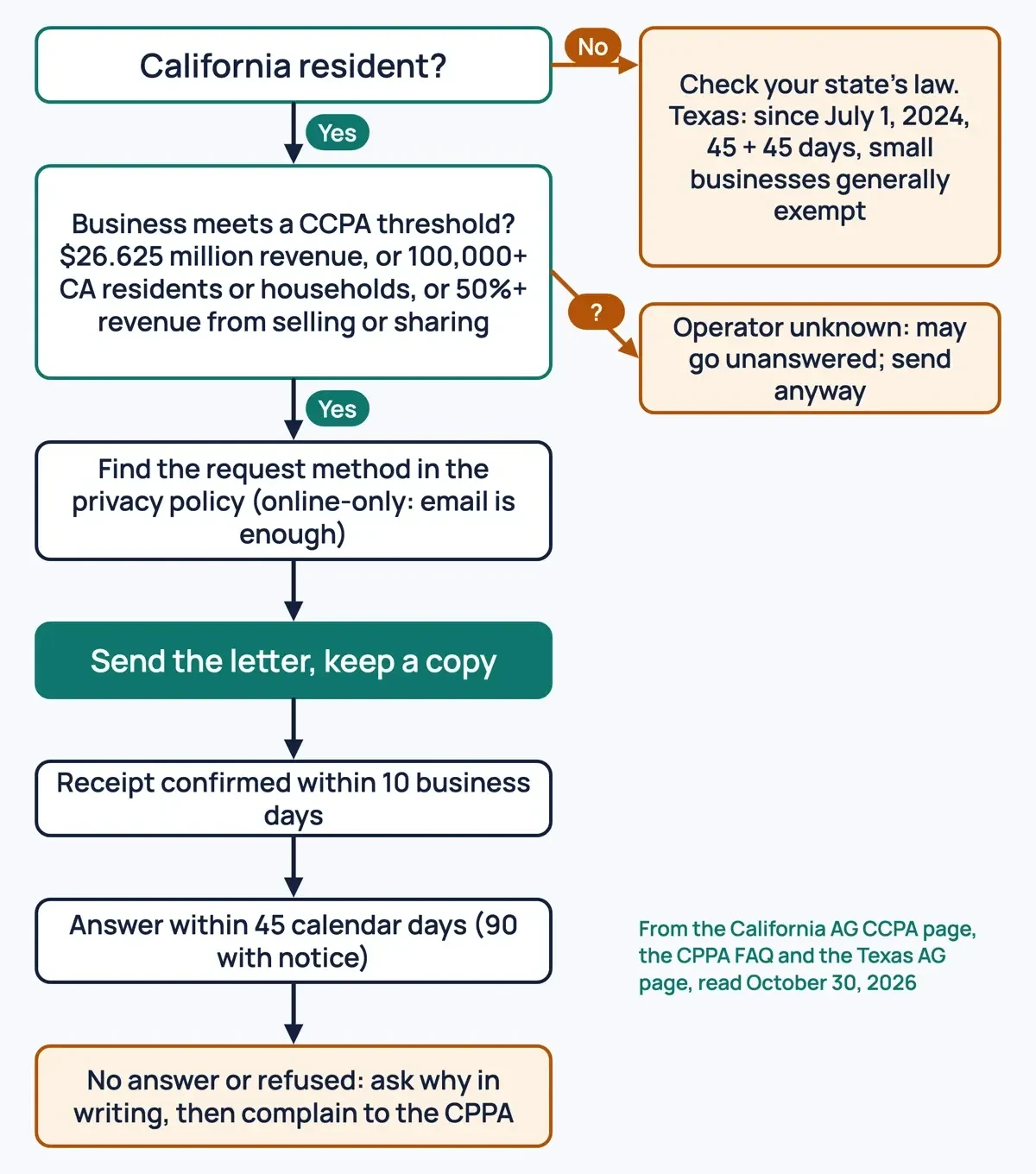 Diagram by DigitalTreed, from the California Attorney General CCPA page, the CPPA FAQ and the Texas Attorney General page, read October 30, 2026.
Our take: remove the app and log out unknown devices first, because no letter works as fast as a closed door. Then send the request anyway, and keep the paper trail. The money and legal side of buying followers is in our look at what Mega Famous-style follower packages really cost. And if you'd rather grow an audience without handing over a login, we offer help with Instagram growth for small businesses.
Data and deletion questions
Frequently asked
Does an expired follower app still have my photos?
It may. Instagram's connected apps page says it "may still have non-public information you previously shared with it," photos and videos included.
Can California's one-request delete tool reach a follower site?
Only a registered data broker. The CPPA FAQ says the mechanism covers "all data brokers" through "a single deletion request."
How fast must a business stop selling my data after I opt out?
The CPPA FAQ says "as soon as feasibly possible, up to a maximum of 15 business days" after it gets your request.
How we made this guide: We read seven Instagram Help pages, two FTC pages, Apple and Android help, and the California Attorney General, CPPA and Texas pages, signed out. No follower site was visited, and our request kit ran offline with made-up details. Facts checked by the DigitalTreed team on October 30, 2026.
First published December 2023 as a walkthrough for getting followers through YT Teacher. Rewritten October 30, 2026 around the data side: what follower sites can reach, how to cut access and how to request deletion.
This guide explains privacy rights in general terms and isn't legal advice. For a dispute, talk to a lawyer licensed in your state.
Sources
- Instagram Help: Why you should not use apps that offer likes and followers
- Instagram Help: Secure your Instagram account
- Instagram Help: Apps and websites connected to your account
- Instagram Help: Why your account has been restricted for data scraping
- Instagram Help: View your recent Instagram login activity
- Instagram Help: Review and export a copy of your Instagram information
- Instagram Help: Information available to download from your Instagram profile
- FTC: How Websites and Apps Collect and Use Your Information
- FTC: What To Do if You Were Scammed
- Apple iPhone User Guide: Control access to information in apps
- Android Help: Change app permissions on your Android phone
- California Attorney General: California Consumer Privacy Act (CCPA)
- California Privacy Protection Agency: Frequently Asked Questions
- California Privacy Protection Agency: CCPA monetary threshold adjustments
- California Privacy Protection Agency: Complaint form
- Texas Attorney General: Texas Data Privacy and Security Act
- Texas Legislature: House Bill 4, enrolled text (88th Legislature)
Comments
No comments yet. Start the conversation below.