
Quick answer
Check Cookape in four steps before any login: Google Safe Browsing status, the RDAP domain record, the exact address, and what the page asks for. On October 30, 2026, all four Cookape names read "No unsafe content found," yet cookape.org.in isn't even registered. Treat a clean scan as a floor, and never type your Instagram password there.
You saw a free-follower offer, searched "cookape," and now a page wants your Instagram details. A free follower site is a web page that promises Instagram followers or likes at no cost. Instagram's own 2018 post on inauthentic activity said people who use these apps "share their username and password." Cookape is one such name, spread over several web addresses.
This guide begins with who runs Cookape and what the public records show. Then come the checks: Google Safe Browsing, the RDAP domain record, the copy domains, and what HTTPS proves. Last, we read a MalwareTips score, explain why a follower site wants your Instagram login, and cover what to do if a check fails. Our view: no free follower count is worth an Instagram password.
Key takeaways
- Instagram's Terms ban collecting other users' passwords or access tokens.
- Unregistered cookape.org.in still read "No unsafe content found" on October 30, 2026.
- An RDAP record shows the registration date and registrar, not Cookape's owner.
- A padlock means a private connection, not a trusted owner.
- MalwareTips rated cookape.org High Risk, 27/100, on July 21, 2026, with zero detections.
Who runs Cookape? What the public records show
Start with the question the old Cookape pages never answer: who is behind them. We checked four names tied to the brand, cookape.com, cookape.org, cookape.com.in and cookape.org.in, using public domain records only. The records named a registrar for three of them. None named an owner. Hostinger's record for cookape.com says "Registrant contact data has been redacted for privacy protection." The record for cookape.com.in says "Some of the data in this object has been removed." We couldn't find who runs Cookape, then, and we won't guess at an owner, a country or a launch date. Everything below comes from outside: Google's site status, the domain registries and the address itself.
We also didn't open any Cookape page, because the point is to judge a site before it gets your login.
Run the address through Google Safe Browsing
Google's site status is the first of those outside checks. Its Safe Browsing page offers a Site Status tool "that you can use to see whether a site currently contains content that Safe Browsing has determined to be dangerous." Its policies cover malware, unwanted software and phishing, "where a page tries to steal a user's password or other personal data."
You open the Safe Browsing site status page, paste the address into the search box and read one line, Current status, which is the line that holds the verdict.
Google says Safe Browsing helps protect "over five billion devices every day" by "showing warnings to users when they attempt to navigate to dangerous sites or download dangerous files." Those warnings cover only what Safe Browsing has already flagged, so a page that's new, or simply not yet checked, can carry none.
We ran all four Cookape names through it on October 30, 2026, and here's what each one showed, next to the date Google says it last updated that entry:
| Domain | Current status | Last updated by Google (UTC) | Registered (RDAP) |
| cookape.com | No unsafe content found | October 25, 2026 | Yes |
| cookape.org | No unsafe content found | October 30, 2026 | Yes |
| cookape.com.in | No unsafe content found | October 2, 2026 | Yes |
| cookape.org.in | No unsafe content found | August 13, 2026 | No (RDAP 404) |
Look at the last row. The name cookape.org.in has no registry record, and DNS returned no web address, name server or mail record for it. Yet its status line reads exactly like the other three. "No unsafe content found" means Google hasn't flagged anything there. That's all. Google's Safe Browsing developer terms admit that "some risky sites may not be identified, and some safe sites may be identified in error." A clean result can't tell you what a page does with your password, which is why the next check looks at the name itself.
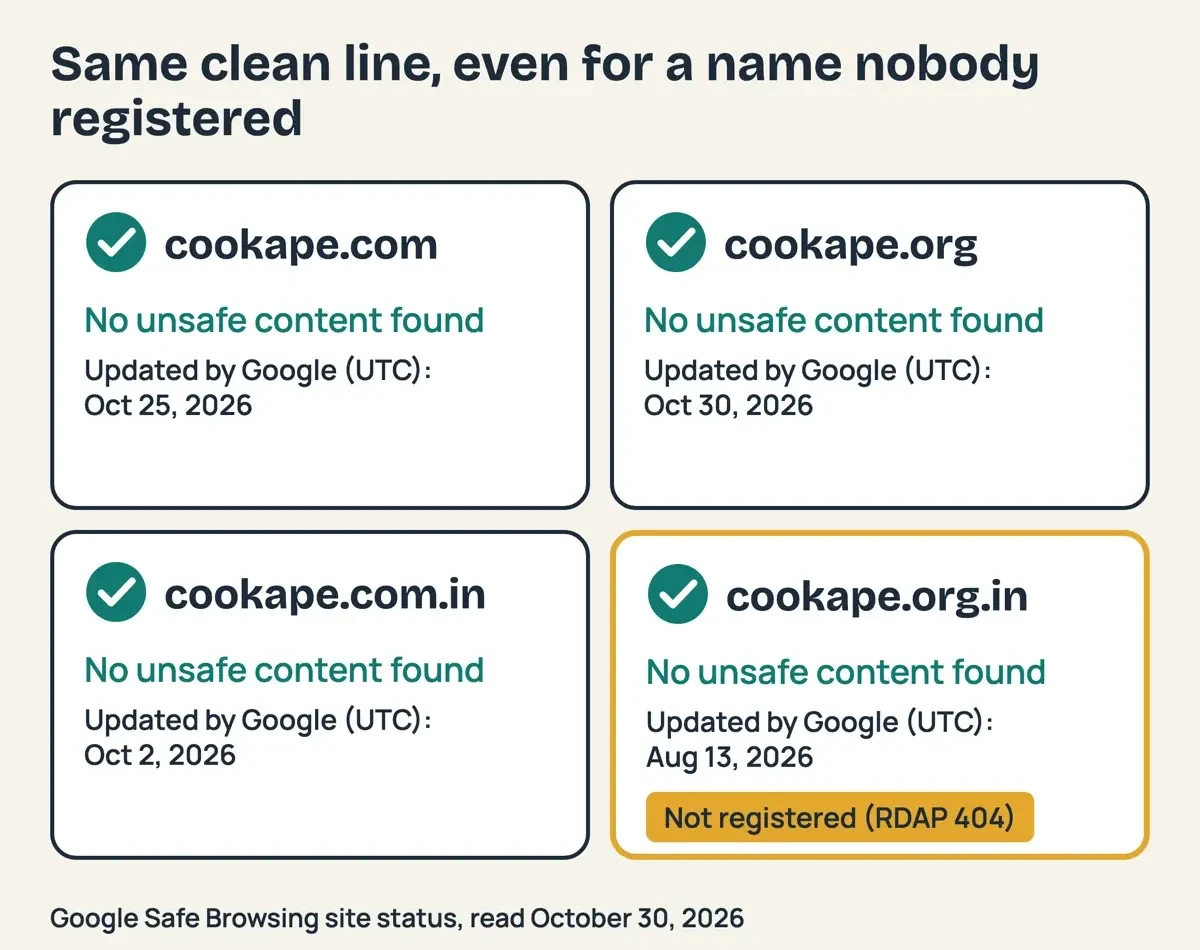 Diagram by DigitalTreed, from Google Safe Browsing site status (UTC dates) and RDAP lookups, October 30, 2026.
Read the domain record with RDAP
That name has a public record, and RDAP is how you read it. ICANN's RDAP overview says the protocol "enables users to access current registration data and was created as the replacement for the WHOIS protocol." The format comes from IETF RFC 9083, where a "registration" event means "The object instance was initially registered." Put simply, it's the day the name was first registered.
You don't need code. Type the domain into ICANN Lookup and read three lines: the registration date, the registrar and the expiration date. We ran the same lookups with a short script that asks each registry server listed in IANA's RDAP bootstrap file, the method RFC 9224 sets out. It also asked DNS for each name's web addresses, name servers and mail servers, all public records that any computer on the internet can request.
Age is the count of full days from the registration time to our lookup at 12:57 UTC on October 30, 2026. Registered at 15:05 UTC on April 17, 2021, cookape.com was 2,021 days old, one less than a plain date subtraction gives. Here are all four names:
| Domain | Registered | Age on October 30, 2026 | Registrar | Expires |
| cookape.com | April 17, 2021 | 2,021 days | Hostinger operations, UAB | April 17, 2027 |
| cookape.org | November 3, 2023 | 1,091 days | TuringSign Inc. d/b/a Cosmotown | November 3, 2027 |
| cookape.com.in | December 1, 2023 | 1,063 days | Dynadot, LLC | December 1, 2026 |
| cookape.org.in | No record (404) | None | None | None |
The fourth row is the odd one. Its RDAP server answered 404, and RFC 7480 says a server sends 404 when there's "no data appropriately satisfying the query." Our DNS lookup found no web address or mail server for that name either, so as far as the registry is concerned, cookape.org.in isn't registered to anyone. The status lines are worth a glance too. All three registered names carry "client transfer prohibited." ICANN's EPP status code guide says that status "tells your domain's registry to reject requests to transfer the domain from your current registrar to another." It's a lock against hijacking. It tells you nothing about who holds the name.
The cookape.org record also showed "renew period," which RFC 3915 defines as a grace period after a registration is "explicitly extended (renewed) by the registrar." So someone renewed cookape.org recently, and its record now runs to November 3, 2027. Domain age has the same limit, since it tells you how long a name has existed and nothing about who runs it today. What the record does give you is a place to report. All three records listed an abuse email for the registrar, at Hostinger, Cosmotown and Dynadot. RFC 9083 defines that abuse contact as the one that "handles network abuse issues on behalf of the registrant of the registration."
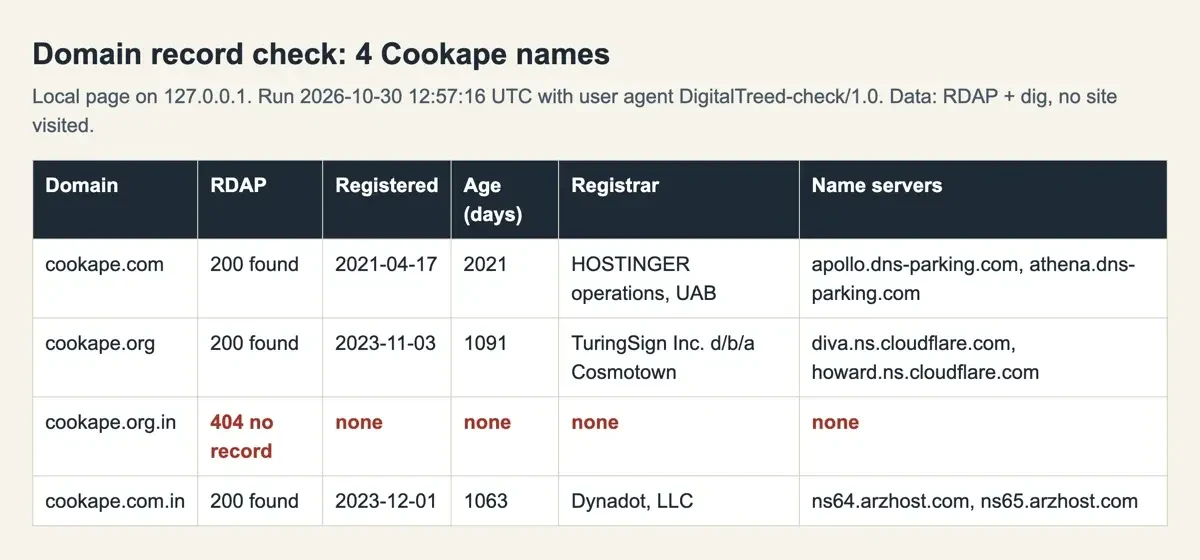 Screenshot: our local results page on 127.0.0.1, built from our RDAP and DNS lookups of October 30, 2026. Not a Cookape page.
Cookape copy domains and lookalike addresses
Those three registrars point to the next problem. Cookape doesn't live at one address. The names cookape.org, cookape.org.in and cookape.com.in all carry the same brand word as cookape.com, each with a different ending after the dot. CISA's phishing guide lists "Incorrect email addresses or links, like amaz a n.com" as a warning sign. The FTC's phishing advice says to reach a company through "a phone number or website you know is real." Our lookalike finance website check shows how such copies are built and why you read an address from the right.
With Cookape, nobody can point to the real one. Our lookups found three registered names at three different registrars, each pointing at its own set of name servers, with nothing in the records to tie them together. The name servers for cookape.org are Cloudflare's, and cookape.com.in uses arzhost.com servers. The ones for cookape.com have "dns-parking" in their names.
Different setups could mean one owner or several. The public records don't say which.
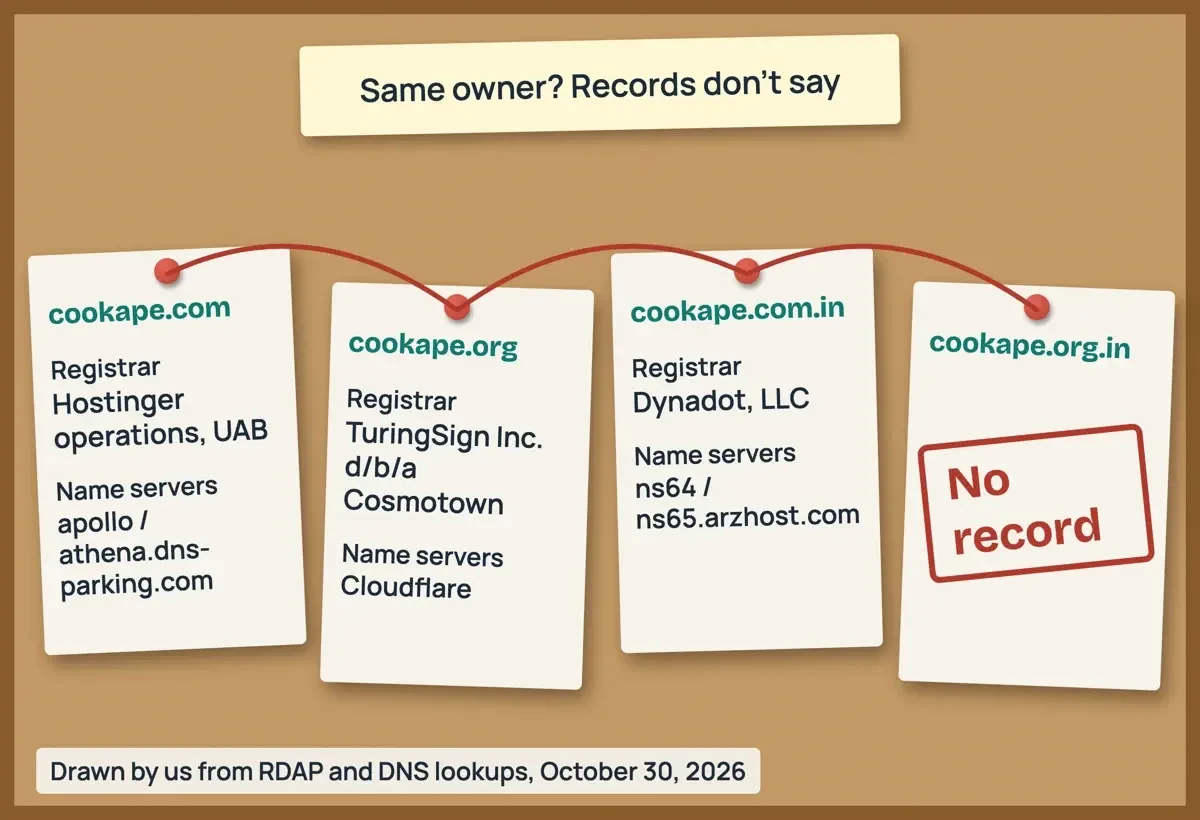 Drawn by us, from our RDAP and DNS lookups of October 30, 2026.
HTTPS shows a private connection, not who is behind it
Even a copy address can show the secure icon, and that icon answers a narrower question than it seems. Google's Chrome Help page on secure connections says that on a secure connection, "Information you send or get through the site is private between you and the site." The same page adds: "Even when connected to a site securely, always be careful when you share sensitive or personal information."
So a password typed into an encrypted page still travels, privately, to whoever runs that page. The icon doesn't say who that is.
CISA's own site banner makes the same split: "Share sensitive information only on official, secure websites." Official and secure are two separate tests, and a follower site can pass the secure test while still not being Instagram's official site.
Our SSL checker shows a certificate's issuer, expiry and hostname match, which is handy for your own site. None of those fields tells you who'll read your password.
What a MalwareTips score of 27 out of 100 does and does not mean
Third-party scanners add one more opinion. The MalwareTips URL scanner keeps saved reports by domain, and on October 30, 2026, only cookape.org had one there. The other three names showed "No scan yet," and we didn't start a scan. The cookape.org report read "27 / 100" and "High Risk," and it was "Checked on Jul 21, 2026." Its antivirus line says 57 of 92 engines answered, with "no detections across 57 engines," and its web research step is marked "not run." On its scale, High Risk runs from 21 to 44.
So what does the score measure? The report says "The score combines saved evidence strength and analysis quality," and the scanner's home page names antivirus engines, a sandbox render and "an AI analyst" behind it. It's MalwareTips's own automated judgment, and it was 101 days old on our check (July 21 to October 30, 2026). It isn't a finding by a regulator or a court, so it can't settle whether the site is safe, and it can't show what a page does with a password.
The zero detections matter less than they look. Google's Safe Browsing policies define malware as "software specifically designed to harm a device," and list phishing as a separate threat. A page that only asks you to type your Instagram password needs no harmful software at all, so zero antivirus detections and a password form can easily coexist.
What we tested
Here's exactly what we ran, with no visit to any Cookape page. Our script used dig and one RDAP request per name, with the user agent DigitalTreed-check/1.0.
We read Google's site status and the saved MalwareTips reports in a browser, signed out.
2026-10-30 12:57 UTC, dig + RDAP
cookape.com     200  2021-04-17  2,021 days
cookape.org     200  2023-11-03  1,091 days
cookape.com.in  200  2023-12-01  1,063 days
cookape.org.in  404  no DNS records
Why does a follower site want your Instagram login?
That leaves the one thing no outside check can see, however careful you are with the address: what happens to your account after you log in. Instagram's Terms of Use bar asking for or collecting other people's Instagram usernames, passwords or access tokens. Instagram's 2018 post explains what the login is for: the apps use those accounts to like, follow and comment on other accounts. So the followers such a site hands out come from accounts like yours, run with their owners' logins.
Each part of this has its own guide. What Instagram does to accounts caught in a follow scheme, from removed follows to account limits, is in our page on Instagram's rules on coin-based follow exchanges. The data a site can keep, and how to cut its access, is in what follower sites can take from your account. Old price lists and the FTC rule on fake followers are in what buying followers really costs. Story viewer sites make a similar something-for-nothing promise, as our Instanavigation story viewer risk guide explains. To choose who sees your own stories, hiding Instagram stories from viewers walks through the settings.
If a check fails, or you already logged in
If Safe Browsing shows a warning, or the page asks for your Instagram password before it gives you anything, close the tab and report the address.
Google takes reports through its Safe Browsing report form, and the FTC's phishing advice says to report attempts at ReportFraud.ftc.gov.
Already typed your password in? Change it first, then turn on two-step login. The FTC and CISA both say a second step keeps out someone who holds only your password. The full recovery order, locked accounts included, is in our Naz Tricks login theft guide.
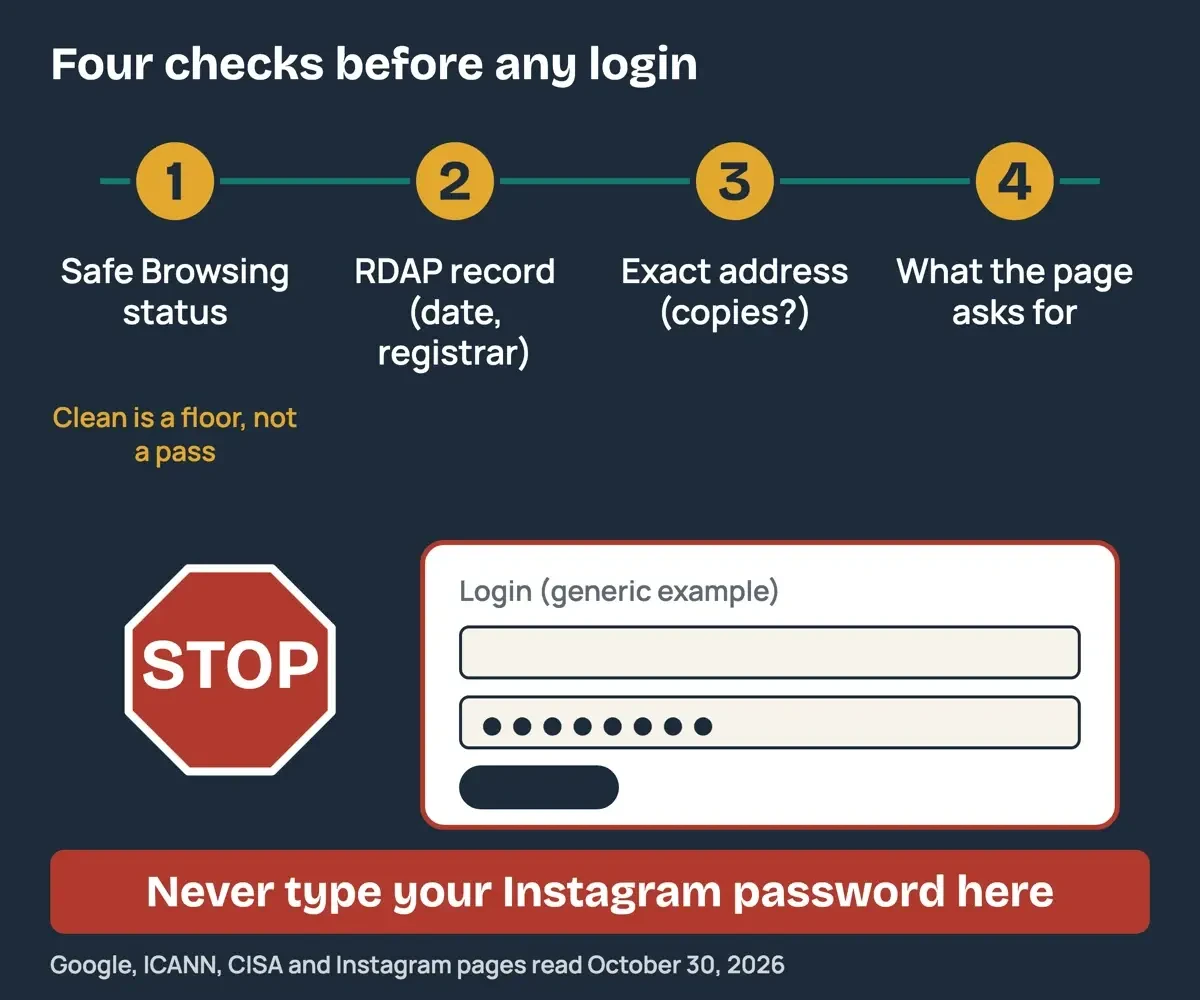 Diagram by DigitalTreed, from Google, ICANN, CISA and Instagram pages read October 30, 2026.
Our take: run all four checks before you ever reach a login box, and treat a clean result as a reason to keep checking rather than a reason to type. A page that wants your Instagram password has already answered the question.
Site check questions
Frequently asked
What does a Safe Browsing warning look like in Chrome?
A full-page red screen. Chrome Help says it means "the site has been flagged as unsafe by Safe Browsing."
What does Chrome's "Not secure" label mean?
That the connection itself has a problem. Chrome Help says "Something is wrong with the privacy of this site's connection," and someone "might be able to find the information you send or get through this site."
Do spelling mistakes still give phishing away?
Not reliably. CISA says poor grammar or misspellings used to be a common sign, but "in the era of artificial intelligence (AI) some emails will now have perfect grammar and spelling."
What if Safe Browsing flags my own business site?
Google says webmasters can sign up for Google Search Console "to receive notifications and help with security issues."
How we made this guide: Our sources were five Google pages, three ICANN pages, IANA's bootstrap file, four IETF RFCs, two CISA pages, one FTC guide and two Instagram pages. The lookups touched only DNS and registry servers, never a Cookape page. Facts checked by the DigitalTreed team on October 30, 2026.
First published December 2023, when it told readers how to get followers through Cookape. Rewritten October 30, 2026: now a four-step check of the site from public records, with our own domain lookups.
Sources
- Google Safe Browsing
- Google Transparency Report: Safe Browsing site status
- Google for Developers: Safe Browsing usage limits and user protection notice
- Google Chrome Help: Check if a site's connection is secure
- Google Safe Browsing: Report a page
- ICANN: Registration Data Access Protocol (RDAP)
- ICANN: EPP Status Codes, What Do They Mean
- IETF RFC 3915: EPP Grace Period Mapping
- ICANN Lookup
- IETF RFC 9083: JSON Responses for RDAP
- IETF RFC 7480: HTTP Usage in RDAP
- IETF RFC 9224: Finding the Authoritative RDAP Service
- IANA: RDAP bootstrap file for domain names
- CISA: Recognize and Report Phishing
- CISA: Turn On Multifactor Authentication
- FTC: How To Recognize and Avoid Phishing Scams
- FTC: ReportFraud.ftc.gov
- Instagram: Terms of Use
- Instagram: Reducing Inauthentic Activity on Instagram (November 19, 2018)

Comments
No comments yet. Start the conversation below.