
Quick answer
Brevo email marketing is free for up to 300 emails a day, and paid plans start at $9 a month (Starter) or $18 (Standard), as of October 2026. Your contact count can raise that: the 5,000-email tiers allow only 500 contacts, so our example 1,200-contact list needs the $9 + $8 = $17 Starter tier. Authenticate your domain before your first campaign.
Say you run a small shop and you've collected a few hundred customer emails at the register. Now you want a monthly newsletter that doesn't cost much. Brevo is an email marketing platform, formerly called Sendinblue, that lets you design campaigns, store contacts and send from your own domain. Its free plan is generous on contacts and tight on daily sends, and we'd start there.
We start with what Brevo is after the Sendinblue rename and what the free plan includes. Then come pricing in US dollars, how to authenticate your domain and how to import contacts who asked to hear from you. After that: your first campaign, our pricing and DNS check, and which plan fits.
Key takeaways
- The 5,000-email paid tiers allow only 500 contacts, so count yours first.
- Our example 1,200-contact list costs $9 + $8 = $17 a month on Starter.
- Brevo's free plan sends 300 emails a day, shared with transactional email.
- Brevo asks for three TXT records: brevo-code, DKIM and DMARC.
- Brevo bans bought or scraped lists on every plan, free included.
Brevo is Sendinblue under a new name
If an old tutorial tells you to open Sendinblue, it means Brevo. Same product. The company announced the change in a press release dated May 4, 2023, which described the company as the platform "formerly known as Sendinblue" and announced its rebranding as Brevo. The login, the editor and your contacts moved with it, so older guides, including the 2020 version of this one, still describe the right product with the wrong name.
What you'll use first is the campaign side. Brevo's email marketing page promises you can "Build from scratch with the drag and drop editor or choose a ready-made template," then track how each email performs. The same account also sends transactional email like receipts. That detail matters more than it looks, because receipts and newsletters share the free plan's daily cap.
What does the Brevo free plan include?
That daily cap is the heart of the free plan, which costs nothing and needs no card. Brevo's pricing page FAQ says sign-up only needs "your email address and the name of your organization." It adds that once Brevo approves your account for sending, "you can start sending up to 300 emails per day." So there's a review step between creating the account and sending, and a launch-day campaign has to wait until that approval clears, however ready the design is.
The 300 is a daily number, not a monthly one. The pricing calculator labels it "Daily email volume (campaigns & transactional)," so order confirmations sent through Brevo eat into the same 300. Storage is far looser. Brevo's pricing file includes 100,000 marketing contacts on the Free plan. At 300 a day, a 30-day month tops out at 300 x 30 = 9,000 emails, and that's with every day used.
Here's what that means for a real list. Take Quillfeather Pottery, a made-up shop with an example list of 1,200 contacts. One campaign to the whole list takes 1,200 / 300 = 4 days on the free plan, and four campaigns a month would use 4 x 4 = 16 days. That's fine for a slow monthly newsletter, with 300 customers getting it each day until the whole list has it by day four. It isn't fine for a flash sale that has to land on one morning, or for a shop whose website also sends its receipts through the same Brevo account. In that case the receipts and the newsletter compete for the same 300 slots every day, and something waits.
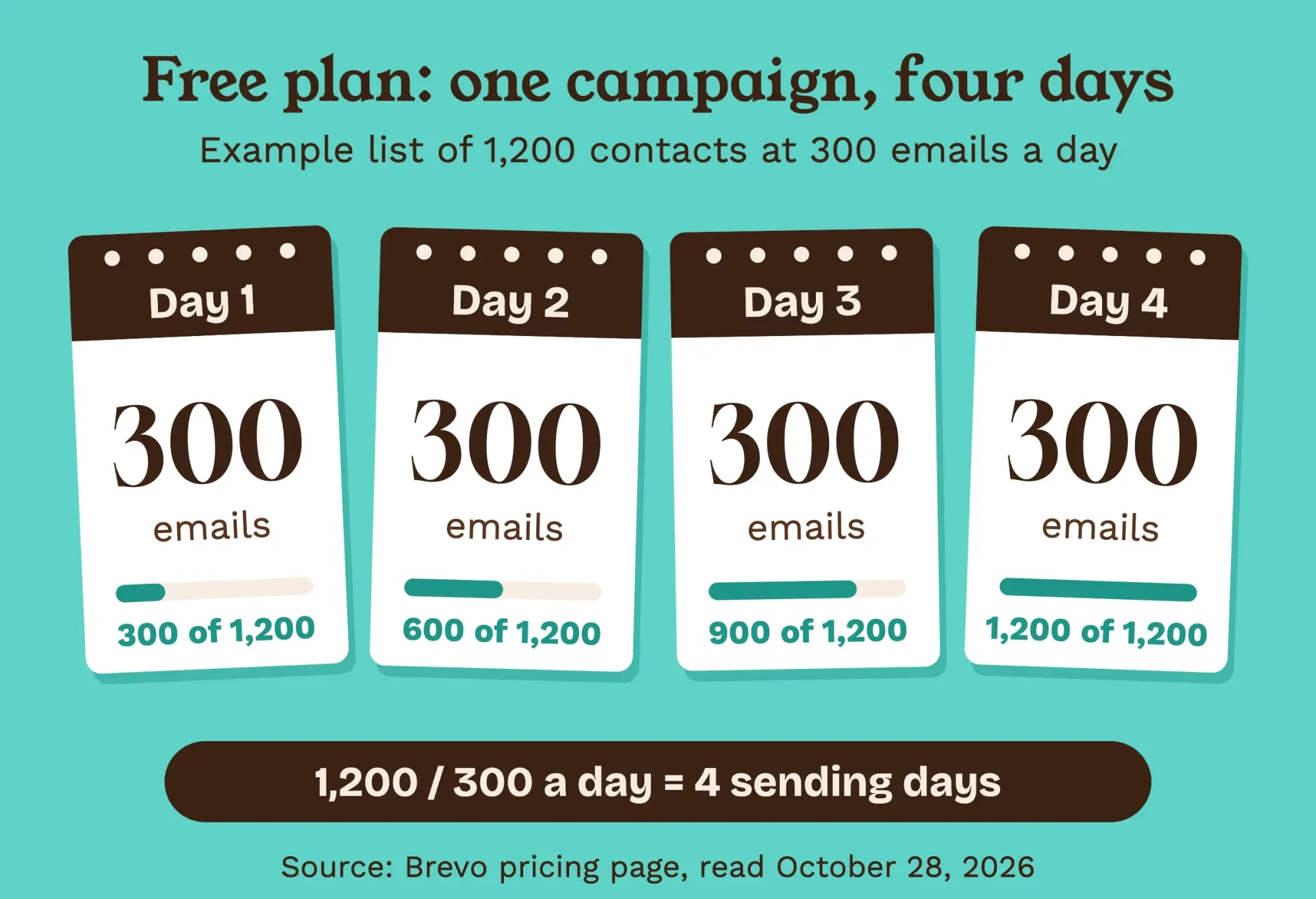 Diagram by DigitalTreed, example list of 1,200 contacts at Brevo's free-plan limit of 300 a day, from Brevo's pricing page, read October 28, 2026.
If one-day delivery matters, you'll need a paid plan.
Brevo pricing in US dollars: Starter, Standard and Professional
So what does a paid plan cost? Brevo prices them by monthly email volume, and the figures below come from its own machine-readable pricing file, generated September 29, 2026. The pricing page shows the same $9, $18 and $499 entry prices as of October 2026, billed monthly unless the yearly column says otherwise.
| Plan | US price a month | Yearly total | Emails included | Contact limit at that tier | Brevo logo |
| Free | $0 | $0 | 300 a day | Stores up to 100,000 | No removal option listed |
| Starter | $9 | $97 | 5,000 a month | 500 | Removal is a $12 add-on |
| Standard | $18 | $194 | 5,000 a month | 500 | Removal included |
| Professional | $499 | $5,389 | 150,000 a month | 2,000,000 | Removal included |
Look at the contact column first. Brevo's pricing file sets a contact limit for each volume tier on both Starter and Standard. It's 500 contacts at 5,000 emails, 1,500 at 10,000 emails and 2,500 at 15,000 emails. That's 5,000 / 500 = 10 emails per contact a month at the bottom tier, and 15,000 / 2,500 = 6 at the third. A once-a-month newsletter uses 1. Moving Starter up to 10,000 emails adds $8 a month, and Standard adds $17, as of October 2026. Example: 600 contacts is over the 500 cap, so even one email a month needs the second tier, $9 + $8 = $17 on Starter.
What does Standard buy over Starter? The pricing page lists marketing automation, A/B testing, one landing page and logo removal as "Everything in Starter, plus." Starter allows one user and Standard up to three, with each extra seat at $12 a month as of October 2026. Yearly billing saves 10%, and the pricing FAQ says you pick monthly or yearly when you sign up.
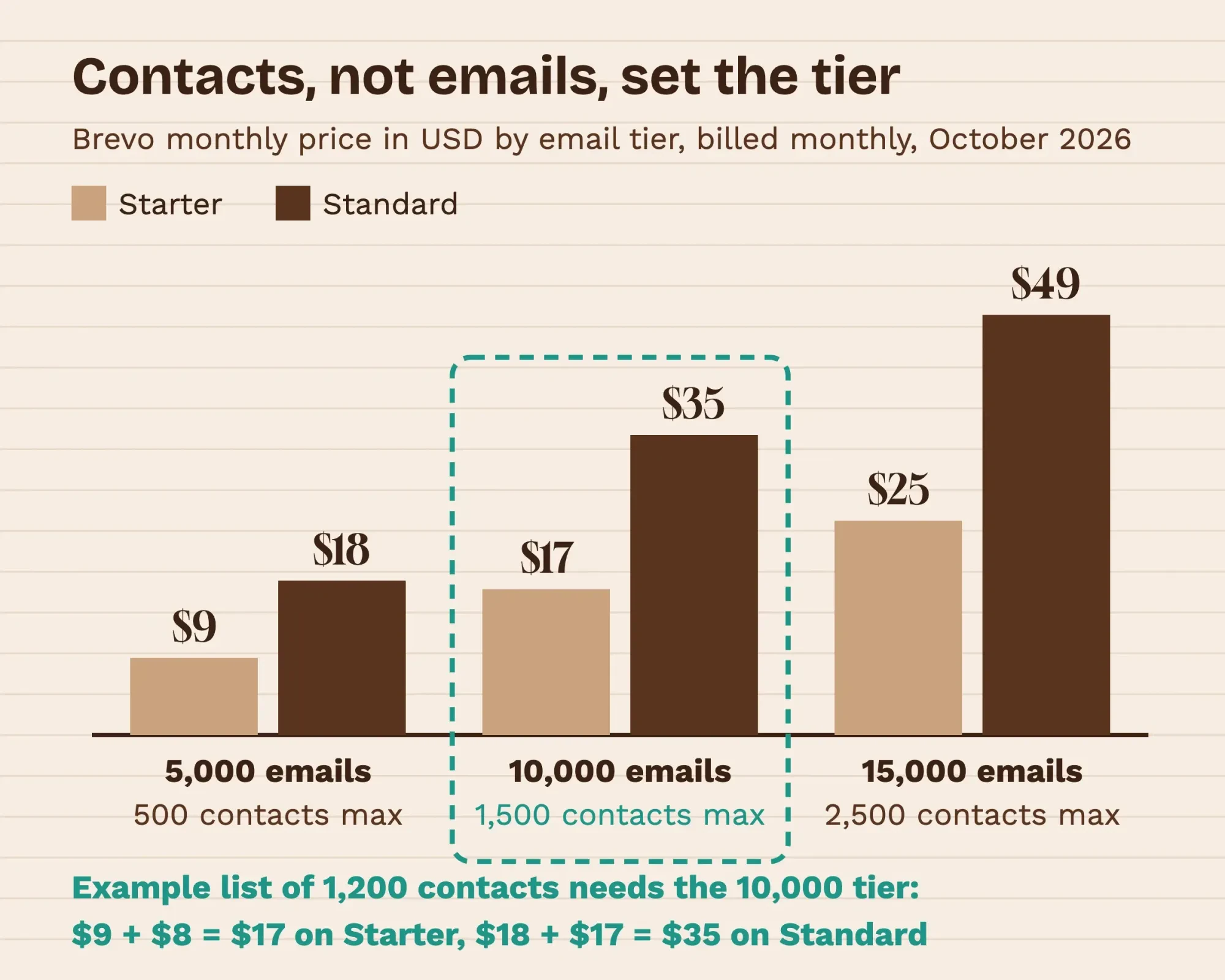 Source: Brevo pricing file (brevo.com/pricing.md), USD, billed monthly, as of October 2026. Diagram by DigitalTreed.
Whichever tier you land on, the domain records come first, and they're free. You can add them while you're still on the free plan.
Authenticate your domain before the first send
Those records are what tell Gmail and Yahoo that Brevo may send as your shop. Brevo's senders and domains guide says to "authenticate the domain so the sender appears as verified." Its domain authentication doc shows the three TXT records Brevo checks in its sample. Copy the exact host and value Brevo gives you for your own domain into wherever your DNS lives:
- A Brevo code at the root of the domain, with a value that starts brevo-code: and proves you own it.
- A DKIM key at the host mail._domainkey, with a value that starts k=rsa;p= and signs each email.
- A DMARC policy at the host _dmarc, with a value like v=DMARC1; p=none and a reporting address.
The p tag isn't optional. RFC 7489, the DMARC standard, marks it "REQUIRED for policy records," and a value of p=none simply asks receivers to send reports rather than block anything. If your DNS panel adds the domain to the host name for you, type mail._domainkey alone, because typing the full name there puts the record in the wrong place. After saving, run your domain through the free DNS lookup tool and check that all three TXT records show up.
Don't skip DMARC because p=none blocks nothing; bulk senders need it anyway.
Brevo isn't being fussy here, because Gmail and Yahoo ask the same of every sender. Google's email sender guidelines have required SPF or DKIM from all senders since February 1, 2024, along with a spam-complaint rate under 0.3%. Send 5,000 or more messages a day to Gmail and DMARC becomes required too. One busy day is enough, since Google's sender FAQ keeps you "permanently considered" a bulk sender after it. Yahoo draws the same 0.3% line for all senders and asks bulk senders for a DMARC policy of at least p=none, the setting in Brevo's sample record. Our cold email software comparison covers these sender rules in more depth.
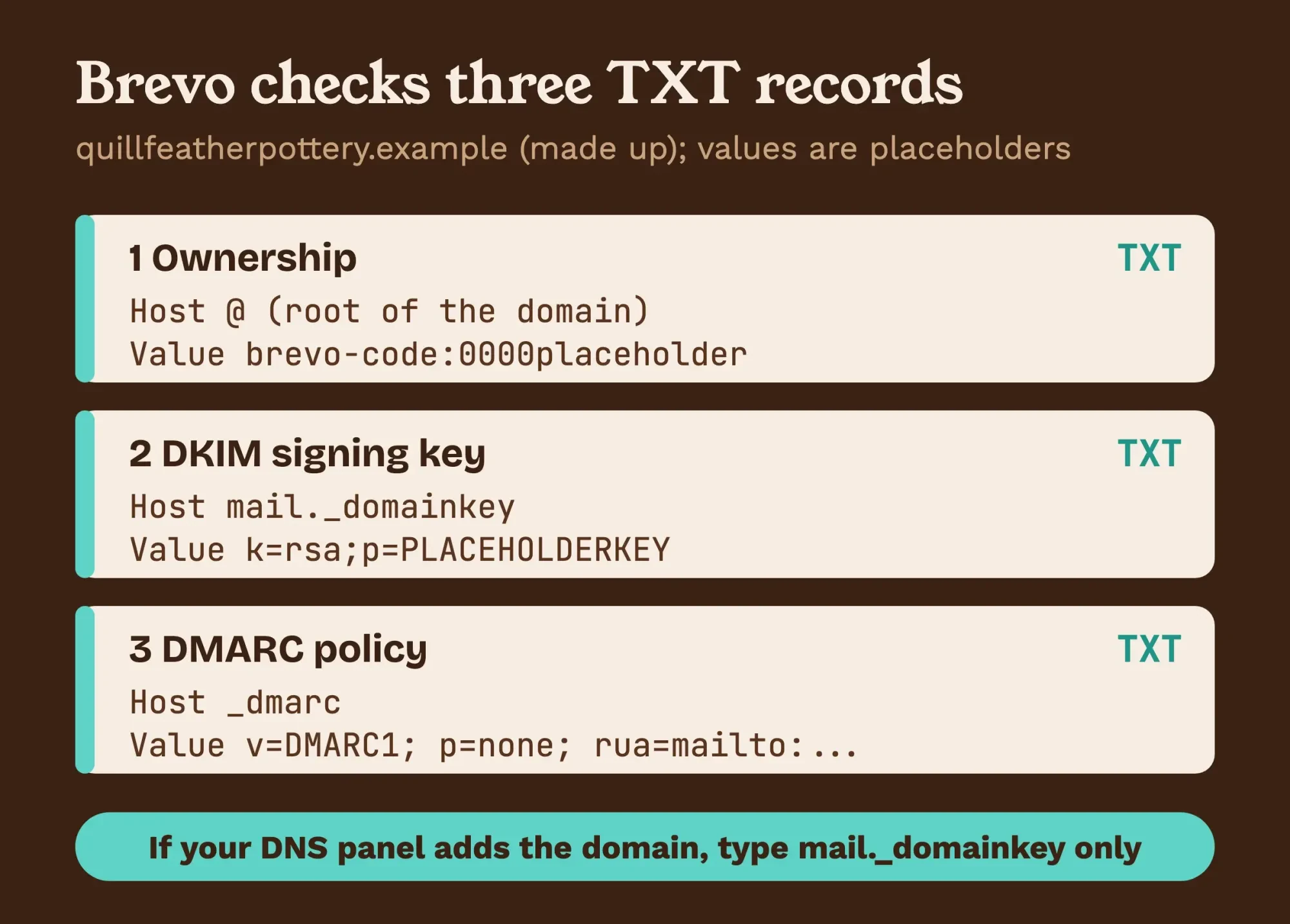 Diagram by DigitalTreed, from Brevo's domain authentication doc, read October 28, 2026. Domain made up; key values are placeholders.
The mailbox itself, with its own SPF and MX records, is a separate job. Our walkthrough on how to create a business email address covers it, and both should be done before any contacts go in.
Import only contacts who asked to hear from you
Those contacts are where Brevo gets strict, on every plan. Its anti-spam policy says lists that were "scraped on the internet, acquired or purchased from a third-party" are "strictly prohibited." It also says "You must be able at any time to provide a proof of opt-in for each of your Contacts."
In practice, proof means a sign-up form, a checkbox at checkout or a register note with the date someone agreed. Keep that record, with the date and where each person signed up, in its own column of your CSV file before you import anything into Brevo. Emailing strangers is cold outreach, which needs dedicated cold email software rather than a newsletter tool, and Brevo's policy wouldn't allow that list anyway. Run an older list through an email verification tool first, since dead addresses bounce.
Got a list from a trade show you can't trace? Leave it out.
US law adds rules of its own. The Federal Trade Commission's guide to the CAN-SPAM Act says "Your message must include your valid physical postal address." It also says "You must honor a recipient's opt-out request within 10 business days." As of October 2026, the FTC puts the penalty at as much as $53,088 for each separate email that breaks the law. Brevo's policy requires an unsubscribe link in every marketing email, so put your street address in the footer once and reuse that footer in every template. This is a summary of the FTC's guide, not legal advice; a lawyer can answer questions about your own list.
Build and send your first Brevo campaign
With the domain verified and the list in, the campaign is the short part. We didn't open Brevo's editor while writing, so the steps below follow its email marketing page, which offers a drag and drop editor or ready-made templates. Here's the order.
- Create a campaign, name it, and pick your verified address as the sender.
- Write a subject line that says what's inside, since the FTC guide says not to use deceptive ones.
- Build the email from blocks: a header, one image, a short text block and one button.
- Send a test to your own Gmail and phone, and click every link.
- Pick the list or segment, then schedule it for a time your customers read email.
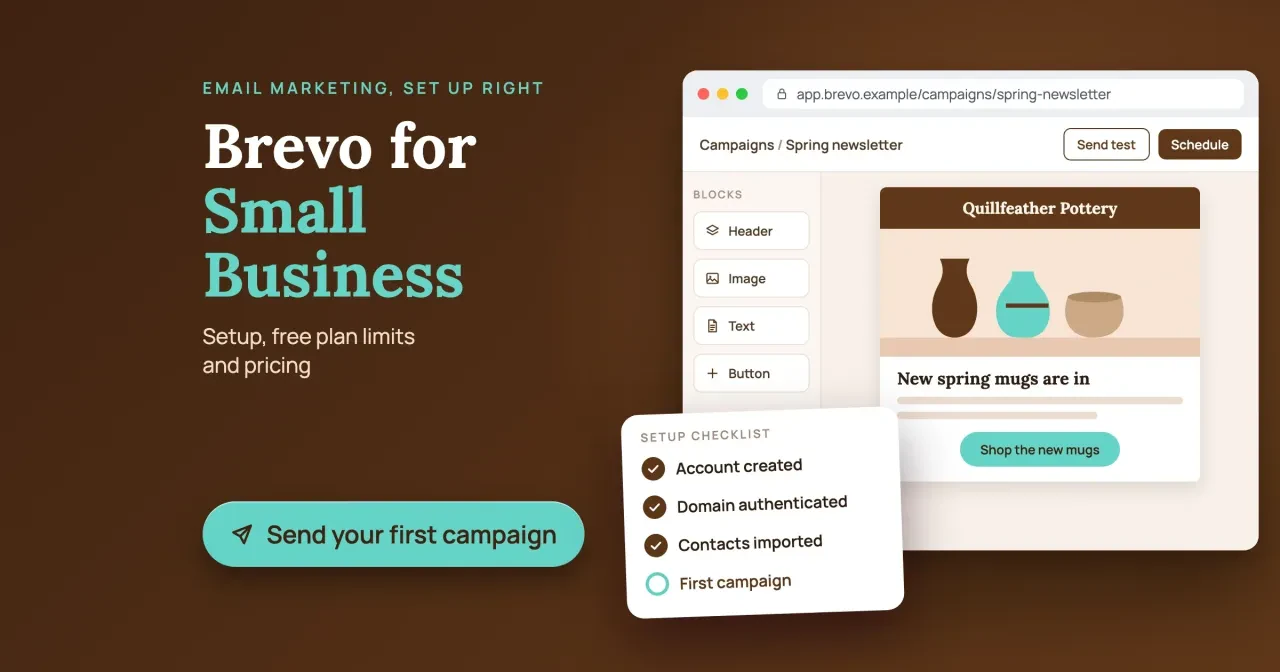
Keep the first one short. The example campaign we drew for our featured image, for the made-up Quillfeather Pottery, has one headline, one product photo and one "Shop the new mugs" button. That's plenty. Your sign-off counts too, so build a clean footer and signature with the free email signature generator and paste it into the template.
Stuck on what to send first? Our small business email marketing examples show 15 formats. The 20-point email campaign checklist lists everything to check before you hit send.
Our pricing and DNS check
Those steps assume you've picked the right plan and typed the records right. So we checked both. Brevo's pricing page shows prices, but it doesn't price your list for you. We wrote one Python script that reads only local files: our saved copy of Brevo's pricing file and two zone files we wrote. There was no Brevo account, no sign-in and no live DNS lookup.
For the pricing part, we used Quillfeather Pottery's example inputs: 1,200 contacts and 4 campaigns a month. That's 1,200 x 4 = 4,800 emails a month. The 5,000-email tier covers that volume but fails on contacts, since it allows 500. The next tier up, 10,000 emails with 1,500 contacts, is the cheapest one that fits both the example's monthly volume and its contact count. On Starter that's $9 + $8 = $17 a month, and on Standard it's $18 + $17 = $35, as of October 2026.
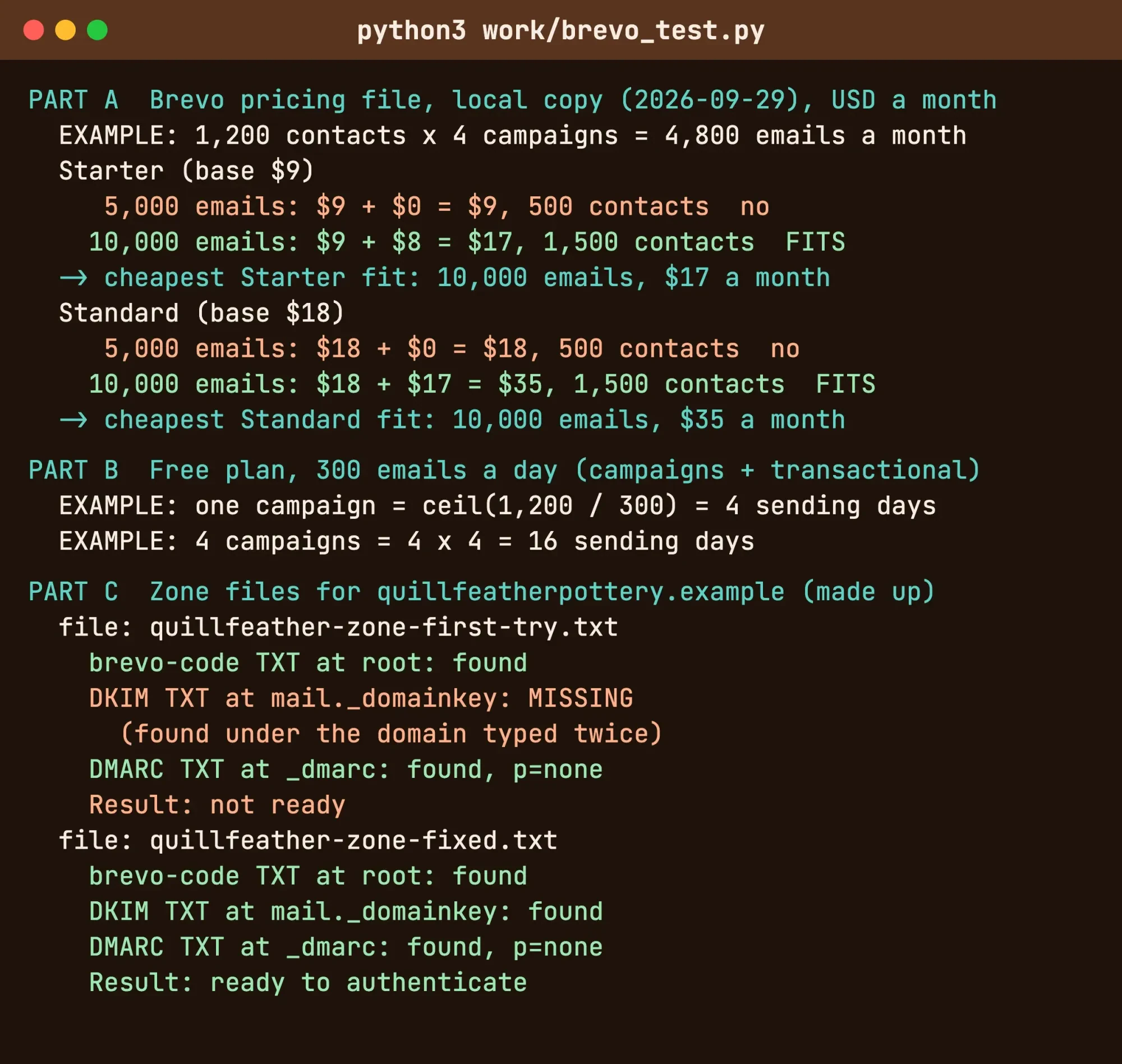 Screenshot: our local pricing and DNS check, run October 28, 2026 (trimmed). Example inputs; made-up domain.
Brevo regenerates that file. When its date changes, rerun the math.
For the DNS part, we wrote two zone files for the made-up quillfeatherpottery.example, modeled on Brevo's sample records. The first had the DKIM host typed with the domain twice, the mistake we warned about above. The script found the brevo-code and DMARC records but flagged DKIM as missing, so the domain wasn't ready. With the host fixed to mail._domainkey, all three records passed.
If Brevo says your domain isn't verified, check the DKIM host first.
What we tested
On October 28, 2026 we ran one local script over our saved copy of Brevo's pricing file, generated September 29, 2026. The example list, 1,200 contacts x 4 campaigns = 4,800 emails, needed the 10,000-email tier: $9 + $8 = $17 on Starter. Of our two made-up zone files, the first failed on the DKIM host and the fixed one passed.
Free, Starter or Standard: which Brevo plan fits
That example result, $9 + $8 = $17 a month on Starter as of October 2026, points to a simple method. Pick the cheapest plan whose sends and contact limit both cover your list. Start from your contact count, because the cheapest tiers allow only 6 to 10 emails per contact a month, so a monthly newsletter hits the contact limit first.
Example: 1,600 contacts tops the 1,500 cap, so you'd pay $9 + $16 = $25 a month on Starter as of October 2026.
Our take: stay on the free plan while your list is small and a campaign can go out over a few days. Move to Starter when one-day delivery matters, and size the tier by contacts rather than emails, as the example 1,200-contact list in our test shows. Pay for Standard only when you'll use automation or A/B tests. It costs about twice as much at every tier we priced as of October 2026 ($18 vs. $9, $35 vs. $17, $49 vs. $25), per Brevo's pricing file.
Tag your campaign links with the UTM builder so newsletter visits show up in your analytics. Your website's contact form and receipts are a different job, better handled by an SMTP relay service, even if it's Brevo's own.
DigitalTreed sells website and marketing work to small businesses, so we're not neutral on this last point. To have someone set up the domain records and the first campaign, request a quote from DigitalTreed.
Frequently asked
Can I use a Gmail address as my Brevo sender?
Use your own domain instead. Google's sender guidelines say "Don't impersonate Gmail From: headers" and that "Gmail will begin using a DMARC quarantine enforcement policy."
Do Brevo email credits expire?
Pay-as-you-go credits don't. Brevo's pricing FAQ says "PAYG credits do not expire" and "One email sent equals one credit deducted."
Does a promotions subdomain get its own 5,000 Gmail limit?
No. Google's sender FAQ says "Messages sent from the same primary domain count toward the 5,000 limit."
Can Brevo send my website receipts too?
Yes. Brevo's free SMTP page calls Brevo "a free SMTP service," and on the free plan receipts share the 300 a day.
How we made this guide: We read 13 pages on October 28, 2026. They were Brevo's pricing page and pricing file, its docs, policy and press release, plus Google, Yahoo, IETF and federal pages. We ran a local script on an example list and made-up zone files, without a Brevo account. Facts checked by the DigitalTreed team on October 28, 2026.
First published July 2020. Rewritten October 28, 2026: now a set-up and pricing guide under the Brevo name, with free-plan limits, contact limits by tier and domain records.
Sources
- Brevo: Pricing plans
- Brevo: Pricing (machine-readable)
- Brevo: Free SMTP server
- Brevo: Email marketing features
- Brevo press: Sendinblue becomes Brevo
- Brevo developers: Senders and domains
- Brevo developers: Domain authentication and validation
- Brevo: Anti-spam policy
- Google: Email sender guidelines
- Google: Email sender guidelines FAQ
- Yahoo Sender Hub: Sender best practices
- IETF RFC 7489: DMARC
- FTC: CAN-SPAM Act, A Compliance Guide for Business
Comments
No comments yet. Start the conversation below.