

Quick answer
For an example 10,000 emails a month, an SMTP relay service costs $1.00 on Amazon SES a la carte (10 x $0.10 per 1,000) as of October 2026. Mailgun and Postmark charge $15, and SendGrid starts at $19.95. Send under 3,000 a month and it can cost $0, since Mailgun's free plan allows 100 emails a day and Brevo's allows 300. Start with the table below.
If your website's booking form says "Message sent" but nothing reaches your inbox, the form itself may be fine. The weak link is often how the site hands off its email. An SMTP relay service is a hosted mail server that takes your site's messages after a login and delivers them under your domain's DNS records. Our view: start free, then pay $15 a month for Mailgun or Postmark unless you're already in AWS.
We start with why a website needs an SMTP relay service, then put SendGrid, Mailgun, Amazon SES, Postmark and Brevo side by side. Next come the free plans, what 10,000 emails a month costs on each relay, and which relay fits which kind of site. Then it's SPF, DKIM and DMARC, what we tested, and how to connect WordPress to the relay.
Key takeaways
- An example 10,000 emails cost $1.00 on SES a la carte: 10 x $0.10.
- Mailgun Basic and Postmark Basic both charge $15 for 10,000 emails.
- Brevo's free plan sends 300 emails a day, three times Mailgun's 100.
- In our local test, relay defaults failed DMARC alignment; own-domain DKIM aligned.
- WordPress returning true from wp_mail() doesn't prove the email arrived.
Why a website needs an SMTP relay service
Out of the box, WordPress sends mail through PHP, and that path has no login and no proof of who sent it. The WordPress reference for wp_mail() warns that "A true return value does not automatically mean that the user received the email successfully." It only means PHP took the job. So a form plugin can show a green success message while the email bounces, lands in spam or never leaves the server, and you won't know until a customer calls.
Cloud hosting adds a second problem. Google Cloud says connections to TCP port 25 "are blocked when the destination is external to your VPC network," though some projects are exempt. Amazon notes that EC2 "throttles email traffic over port 25 by default." Port 25 is how mail servers pass messages to each other under RFC 5321. A relay sidesteps it, because your site logs in on a submission port instead.
That's usually port 587, which RFC 6409 reserves "for email message submission." The other choice is 465, where RFC 8314 starts TLS before anything else is sent. Either way, the relay knows who you are before it accepts a single message.
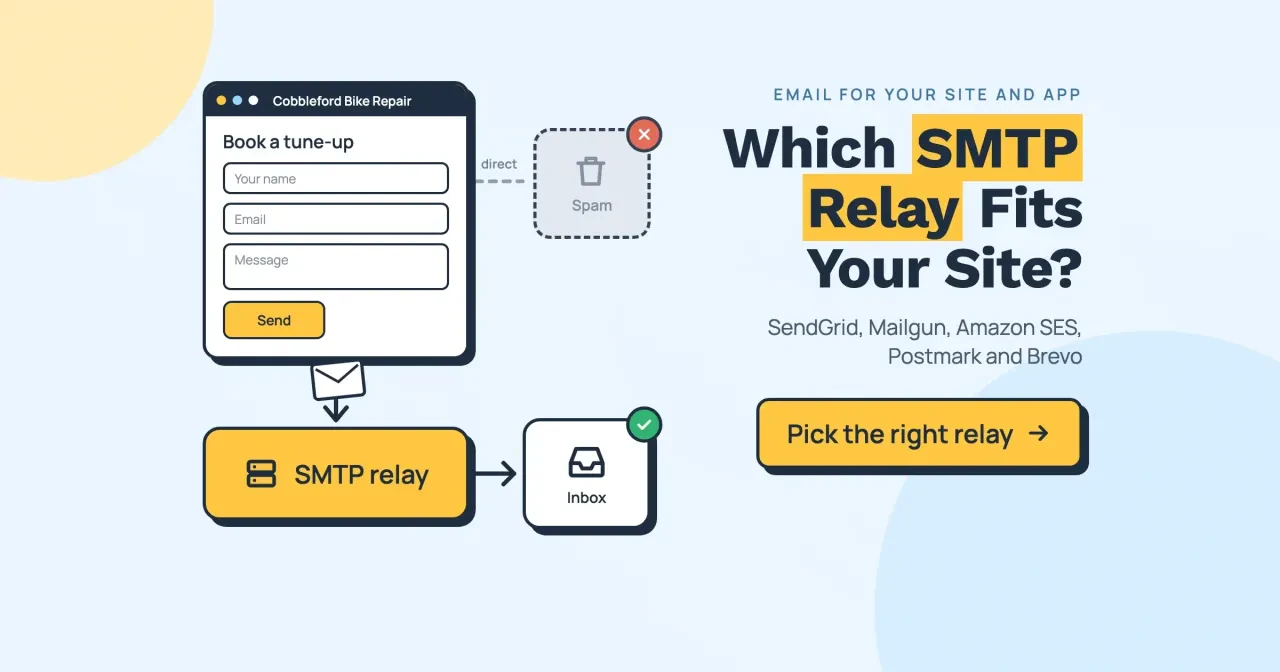
Take Cobbleford Bike Repair, a made-up shop from our featured image, as the example. Its booking form sends one email to the shop and one confirmation to the customer per booking. That's a few hundred messages a month, and each one matters more to the shop than a newsletter does, because a lost booking is a lost customer. If you're still building the site, our guide to making a WordPress website covers the parts before email. Here's the route a relay adds.
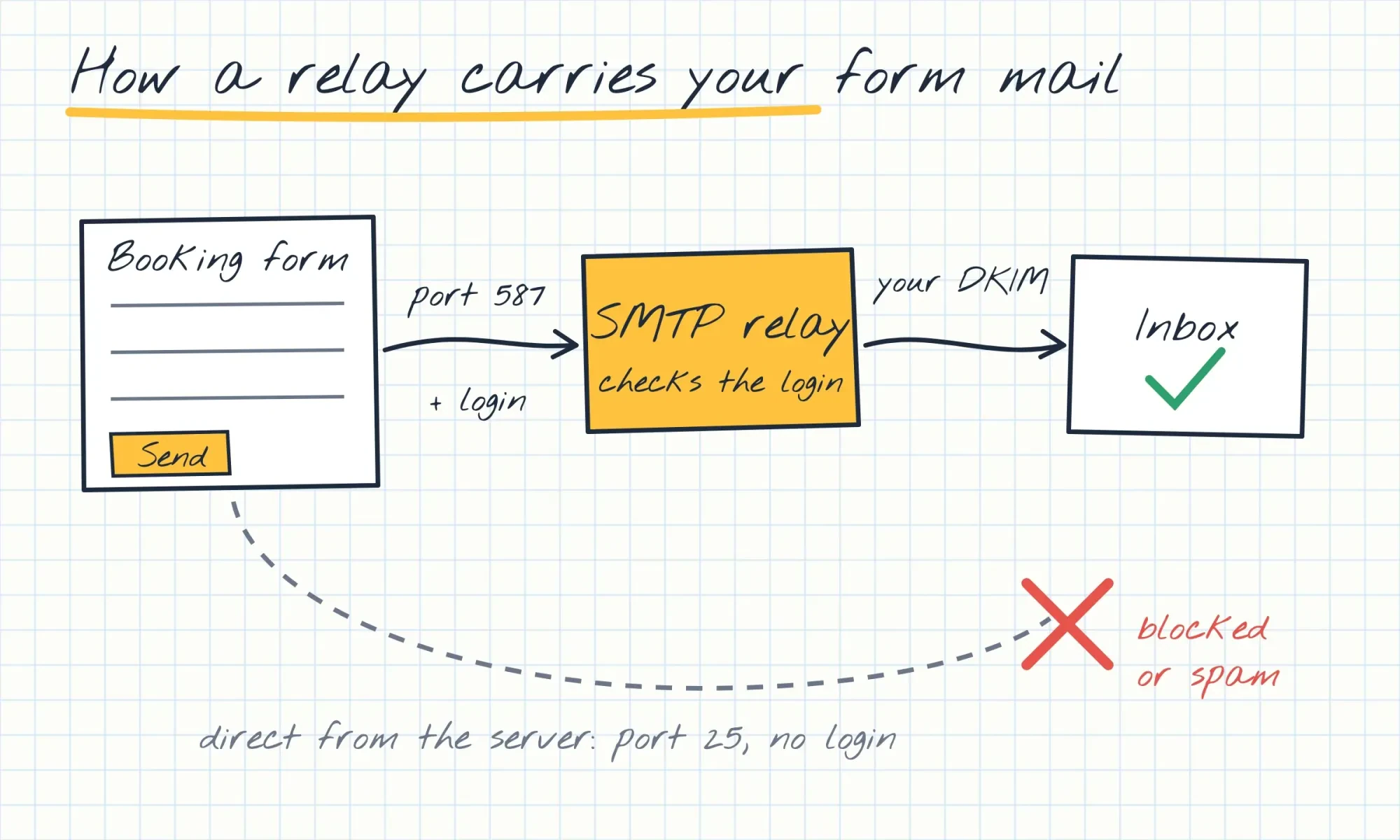 Drawn by us, from RFC 6409, RFC 8314, Google Cloud and Amazon SES docs read October 28, 2026.
SendGrid, Mailgun, Amazon SES, Postmark and Brevo side by side
So which relay takes that route for you? All five sell the same core thing: an SMTP host, a login and delivery under your domain. What differs is how they charge and how much they include before the bill starts. The prices in this table were copied from each company's pricing page on October 28, 2026, except Brevo's tiers, which come from its pricing file dated September 29, 2026.
| Relay | Entry paid plan, US price a month | Emails included | Extra emails | Free allowance |
| SendGrid | Essentials, from $19.95 | Set by a volume slider, not printed | Not printed | Trial: 100 a day for 60 days |
| Mailgun | Basic, $15 | 10,000 a month | $1.80 per 1,000 | 100 a day |
| Amazon SES | No plan fee on Essentials | None, pay per email | $0.16 per 1,000 (Essentials) or $0.10 (a la carte) | Sandbox: 200 per 24 hours, verified addresses only |
| Postmark | Basic, $15 | 10,000 a month | $1.80 per 1,000 | 100 a month |
| Brevo | Starter, $9 | 5,000 a month | $8 for the 5,001 to 10,000 tier | 300 a day |
Read the table by your monthly volume first. Two plans look identical on paper: Mailgun Basic and Postmark Basic both charge $15 for 10,000 emails and $1.80 for each extra 1,000, as of October 2026. Postmark's upper plans cut that extra rate to $1.30 on Pro at $16.50 and $1.20 on Platform at $18. Brevo prices its Starter plan by tiers, so 10,000 emails cost $9 plus $8.
SendGrid is the one we can't price per email. Its plan cards change with a volume slider, so no email count is printed beside a price. What the page does say is that Essentials starts at $19.95 a month, and its FAQ places 50,000 to 100,000 emails a month on Essentials.
Below about 3,000 emails a month, the free column decides more than the price column does.
Free plans: what each relay lets you send for $0
A booking form may never pass a few hundred emails a month, so for a small site the free allowance can be the whole bill. Each relay states its limit a different way, so we turned every one into a 30-day month with one formula: daily limit x 30.
- Brevo: 300 a day x 30 = 9,000 a month at most, on what its free SMTP page calls the "forever free plan."
- Amazon SES sandbox: 200 per 24 hours x 30 = 6,000, but only to verified addresses, so it's for testing.
- Mailgun Free: 100 a day x 30 = 3,000, with 1 custom sending domain and 1 day of logs.
- SendGrid trial: 100 a day x 30 = 3,000, but only for 60 days.
- Postmark Developer: 100 a month with no overage, and its pricing FAQ says it never expires.
By daily cap, Brevo's free plan is the roomiest of the five.
For the made-up Cobbleford shop, Brevo's and Mailgun's free plans both cover a form that sends a few hundred emails a month. The catch is the daily cap, not the monthly total, and it bites on exactly the days a shop is busiest. An example Saturday with 120 emails would break Mailgun's 100 a day but wouldn't touch Brevo's 300. New AWS customers also get up to $200 in Free Tier credits, used within 12 months, per the SES pricing page. Credits don't get customer mail out of the sandbox, though.
At 10,000 emails a month, SES costs $1.00 and the rest $15 or more
Free plans run out once a site sends receipts and password resets on top of form mail. So we priced one example month of 10,000 emails on every plan that prints its volume. The formula is the same for all of them: plan price + (emails over the included amount / 1,000 x extra rate).
| Plan (example: 10,000 emails a month) | Formula | Monthly cost | Per 1,000 emails (cost / 10) |
| Amazon SES, a la carte | 10 x $0.10 | $1.00 | $0.10 |
| Amazon SES, Essentials | 10 x $0.16 | $1.60 | $0.16 |
| Mailgun Basic | $15 + 0 extra | $15.00 | $1.50 |
| Postmark Basic | $15 + 0 extra | $15.00 | $1.50 |
| Postmark Pro | $16.50 + 0 extra | $16.50 | $1.65 |
| Brevo Starter | $9 + $8 tier | $17.00 | $1.70 |
| Postmark Platform | $18 + 0 extra | $18.00 | $1.80 |
| Mailgun Foundation | $35, 50,000 included | $35.00 | $3.50 |
| SendGrid Essentials | Volume not printed | From $19.95 | Not shown |
On price alone, SES wins. On this example, Amazon SES has the lowest per-1,000 rate of the plans that print their volume: $0.10 against $1.50 and up. The SES pricing page also lists $0.12 per GB of attachment data and warns of possible EC2 data transfer charges, so a receipt with a PDF costs a little more. Also, new SES accounts start on the Essentials plan from July 21, 2026, at $0.16 per 1,000, and you can move to a la carte "at any time."
Volume changes the order.
At an example 50,000 emails a month, Mailgun Foundation at $35 includes exactly that many, which works out to $0.70 per 1,000; each 1,000 past 50,000 adds $1.30. Brevo Starter costs $9 + $47 = $56 for the same month, and SES costs 50 x $0.10 = $5.00. We've left Postmark out of that comparison because its page printed only the 10,000-email tier.
Small overruns matter more than the headline price for a growing shop. Say the example site sends 12,000 emails next month instead of 10,000, so every plan above has 2,000 emails over its included amount. Mailgun Basic and Postmark Basic both become $15 + 2 x $1.80 = $18.60, while Postmark Pro becomes $16.50 + 2 x $1.30 = $19.10 and Platform $18 + 2 x $1.20 = $20.40. Brevo Starter moves up a whole tier instead, to $9 + $16 = $25, because its credit tiers jump from the 5,001 to 10,000 step straight to the 10,001 to 15,000 step. Amazon SES simply charges 12 x $0.10 = $1.20 a la carte.
On SES, the extra 2,000 emails cost 20 cents.
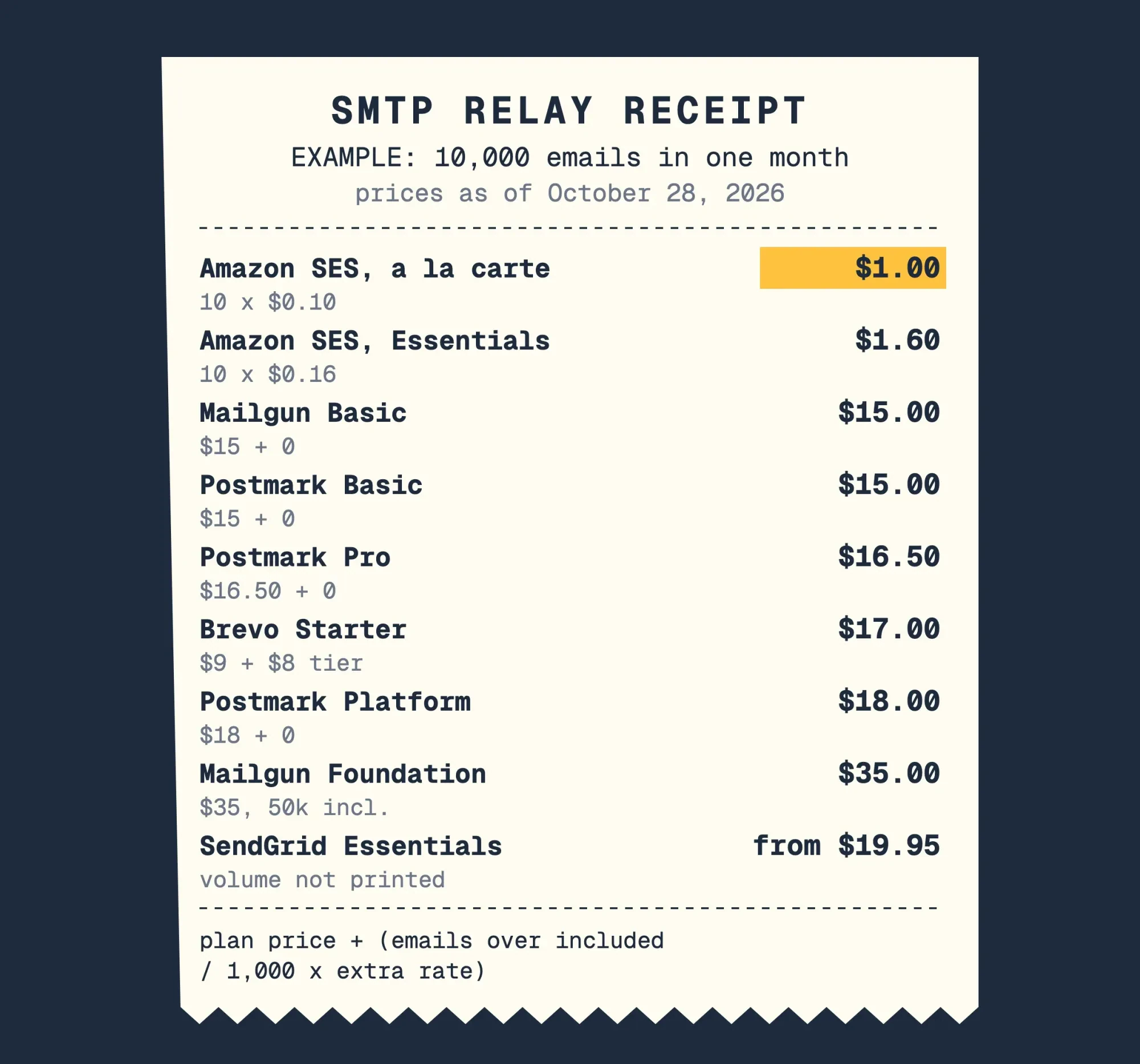 Diagram by DigitalTreed: one example month of 10,000 emails, priced on October 28, 2026 from the five companies' own price lists. SendGrid shows no volume per plan.
Which relay fits which kind of site
Price settles only part of it. The other part is who will run the account day to day and whether the same domain also sends newsletters, since those two points split SES, Postmark and Brevo apart.
Choose Amazon SES if someone on your team already works in AWS. It has the lowest rate in our example, but every new account starts in a sandbox that allows 200 messages per 24 hours and 1 per second. You'll have to request production access before customers get mail, and the sandbox applies per AWS Region. That's one more request to file with AWS before the form can email anyone.
Choose Postmark if the site sends mostly receipts, bookings and password resets. Its SMTP guide splits transactional mail (smtp.postmarkapp.com) from broadcasts (smtp-broadcasts.postmarkapp.com). That keeps a newsletter's complaints away from your receipts. Choose Mailgun for the same $15 a month, or if you're heading toward 50,000 emails, where Foundation's $35 includes 50,000 and charges $1.30 per 1,000 after that.
Choose Brevo if you already send newsletters there, because its pricing page says "All Brevo plans give you access to transactional email features." Our Brevo email marketing guide covers the newsletter side. Choose SendGrid if you need its API more than a known price; its 60-day trial is the only free option here with an end date, so note day 60.
For the made-up Cobbleford shop, that leaves three real options: Brevo's free 300 a day, or Mailgun Basic or Postmark Basic at $15.
Our take: start on Brevo's or Mailgun's free plan while the site is small. When you pass the daily cap, move to Postmark Basic or Mailgun Basic at $15 a month. That buys a relay with logs and support, and there's no AWS console to learn.
Do you need SPF, DKIM and DMARC for an SMTP relay?
Whichever relay you pick, yes, and it can't publish them for you. They're DNS records on your domain, and Gmail and Yahoo check them on incoming mail.
Both mailbox companies publish the rules. Google's email sender guidelines have been in force since February 1, 2024. They want SPF or DKIM from any sender and a spam rate under 0.3%, plus DMARC past 5,000 Gmail messages a day. Yahoo's Sender Hub sets the same floor. Our cold email software comparison walks through these rules line by line, so here we only show how they hit a relay.
Each record proves something different. SPF (RFC 7208) lists the servers allowed to send for a domain and caps DNS lookups at 10. DKIM (RFC 6376) signs each message with a key published under a domain, named in the signature's d= tag. DMARC (RFC 7489) passes only when SPF or DKIM passes for a domain that matches the From address. The RFC calls that match alignment.
Alignment is the part a relay's default settings miss. In set-up 1 of our test, the relay's own domain sat in both the bounce address and the DKIM d= tag. SPF and DKIM can each pass that way, yet DMARC fails, because neither domain matches the From address. Each relay's domain set-up gives you DKIM records for your own domain, so add those first. Then add a DMARC record at p=none, the RFC's "no specific action" policy. Our business email address guide covers the mailbox's own records, and the free DNS lookup tool shows what your domain publishes now, before and after you add anything.
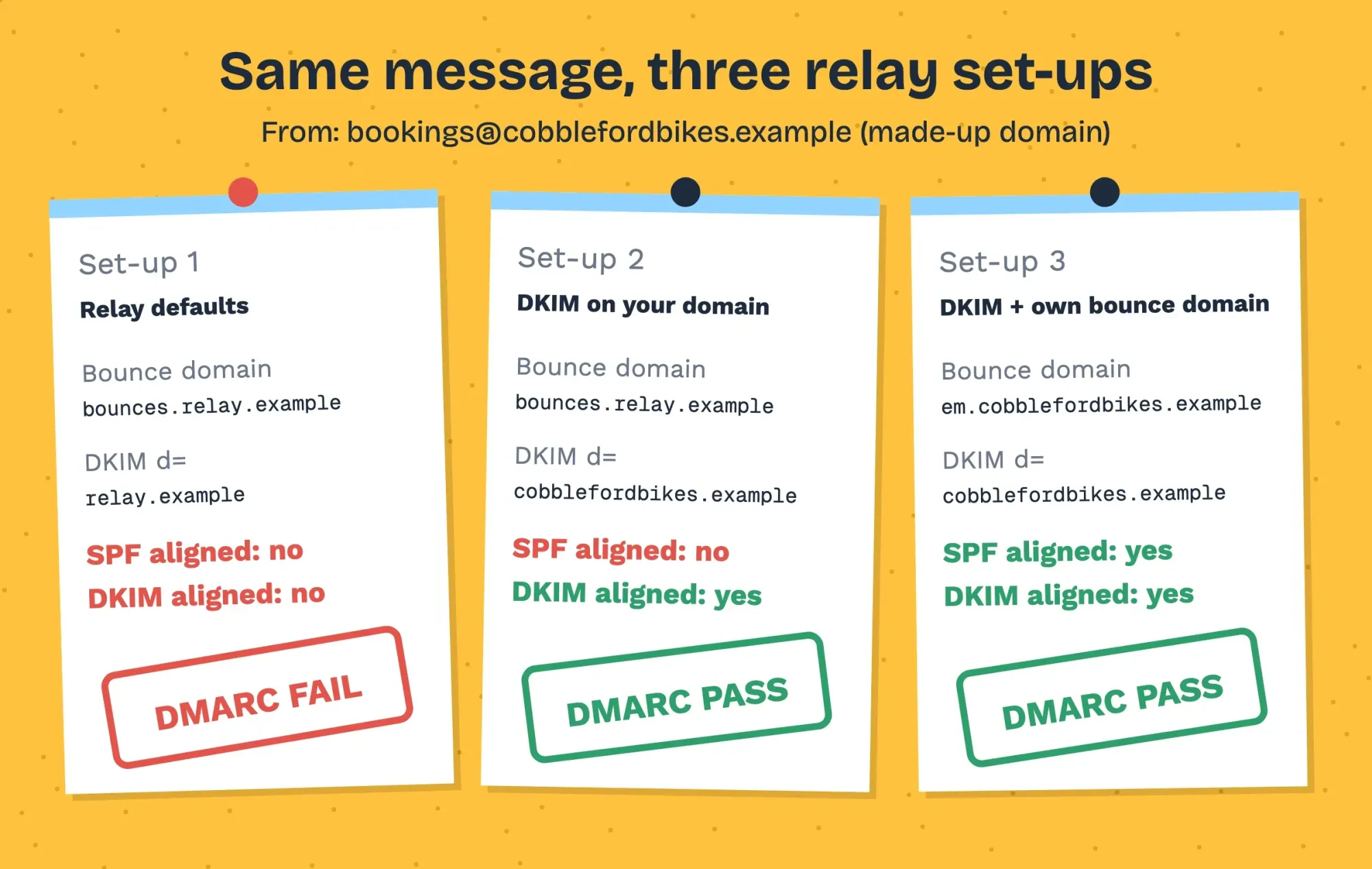 Diagram by DigitalTreed, from our local alignment check run October 28, 2026 (made-up domains).
Transactional mail gets one break. Google's sender FAQ says one-click unsubscribe "is required only for marketing and promotional messages," so a booking confirmation doesn't need it. A monthly promotion sent through the same relay would need it.
What we tested
We didn't sign up for any of the five relays. On October 28, 2026, we ran a tiny relay of our own on 127.0.0.1 that refuses mail until the client logs in. A Python script played the Cobbleford form three times: no login got 530, a wrong key got 535, and the right key was accepted.
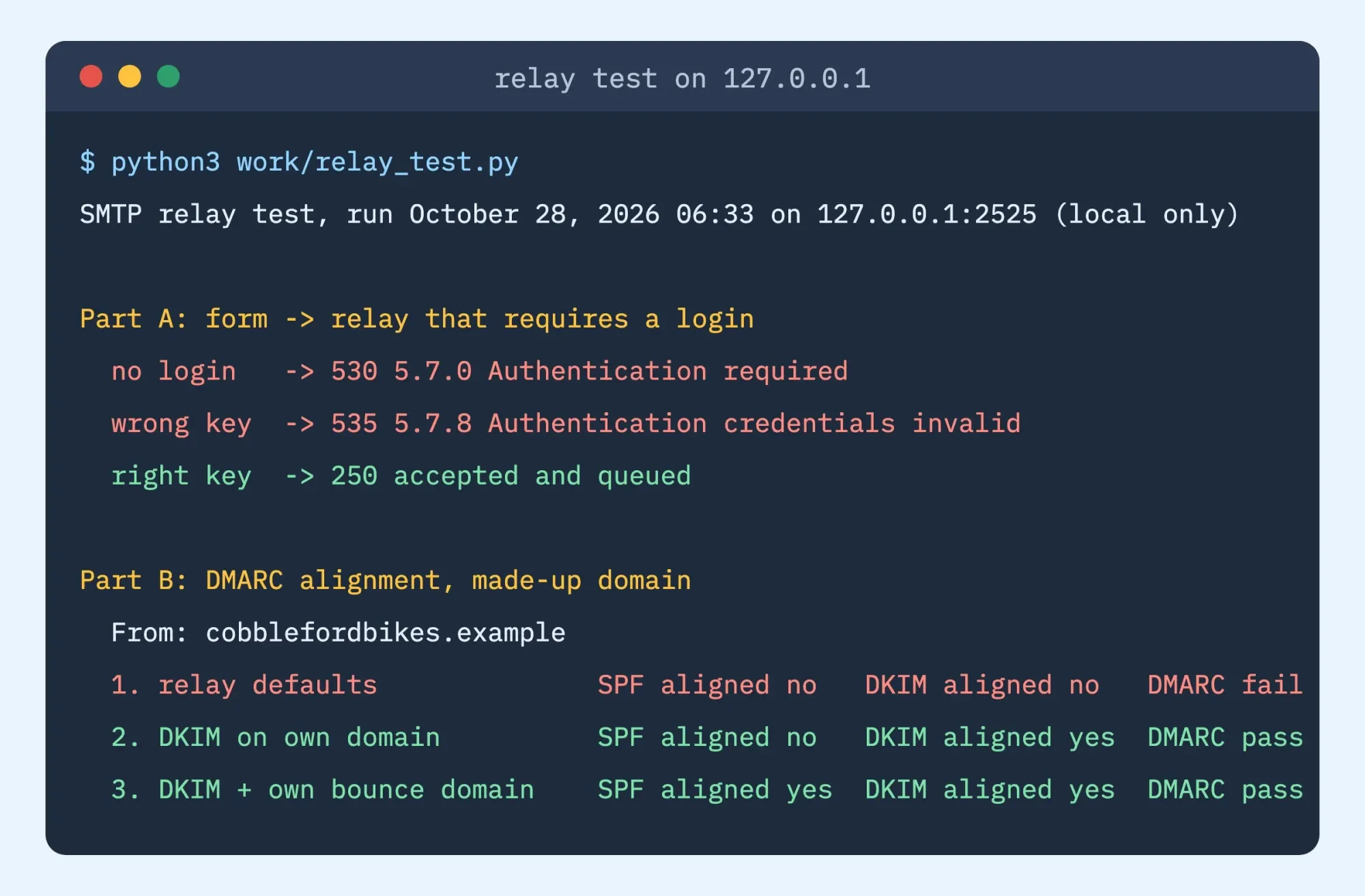 Screenshot: our local relay test on 127.0.0.1, run October 28, 2026 (trimmed).
Next, we applied DMARC's relaxed alignment rule (RFC 7489, section 3.1) to that message's From domain under three made-up set-ups. With relay defaults, nothing aligned and DMARC failed. With a DKIM d= on our own domain, DKIM aligned and DMARC passed. Adding our own bounce domain aligned SPF as well. We only compared domain names; no DKIM signature was created or verified.
Connect WordPress to the relay
Once the records verify and the login works, WordPress needs four settings: host, port, username and password. Each relay names them differently, so copy them from its own docs, not a forum post. One wrong character in the host name stops every message.
| Relay | SMTP host | Ports | Username | Password |
| SendGrid | smtp.sendgrid.net | 25, 587, 2525; 465 (SSL) | The word apikey | An API key |
| Mailgun | smtp.mailgun.org | 25, 465 (TLS), 587, 2525 | Your SMTP user | Its SMTP password |
| Amazon SES | Your Region's endpoint, from the console | 587, 2587 (STARTTLS); 465, 2465 (TLS) | SES SMTP user name | SES SMTP password |
| Postmark | smtp.postmarkapp.com | 25, 2525, 587 | Server API token | The same token |
| Brevo | Shown in your SMTP settings | 587, 2525; 465 with SSL or TLS | Your SMTP login | An SMTP key, not an API key |
Use 587 unless your host blocks it. The table comes from the SendGrid, Mailgun, Amazon SES, Postmark and Brevo SMTP docs.
Most sites type these into an SMTP plugin, and our HTML contact form guide explains when a form needs one. A plugin keeps the key in the database and usually adds a test button and a send log, which helps when you're not the one who set it up. Code keeps the key in a file that nobody can switch off from the dashboard by accident, which suits a site where several people have admin access. Don't want a plugin? WordPress's phpmailer_init hook "Fires after PHPMailer is initialized," and a short must-use plugin can point it at the relay.
<?php
// wp-content/mu-plugins/smtp-relay.php
// RELAY_SMTP_USER and RELAY_SMTP_PASS are defined in wp-config.php
add_action( 'phpmailer_init', function ( $phpmailer ) {
    $phpmailer->isSMTP();
    $phpmailer->Host       = 'smtp.postmarkapp.com'; // your relay's host
    $phpmailer->Port       = 587;
    $phpmailer->SMTPAuth   = true;
    $phpmailer->SMTPSecure = 'tls';                  // STARTTLS on 587
    $phpmailer->Username   = RELAY_SMTP_USER;
    $phpmailer->Password   = RELAY_SMTP_PASS;
} );
Keep the username and key in wp-config.php, as the comment says, so they're never in a theme file. Then send a test from the real form, not just a plugin's test button, because the form may use a different From address. Then open the message's headers. You're looking for dkim=pass and dmarc=pass. If nothing arrives, turn on the log from our WordPress debug log guide and read the PHPMailer error. In our test, 535 meant a bad key, so that's the first thing we'd check. Prefer not to touch code or DNS at all? DigitalTreed's web development service sets up site email on the sites we build. We sell that work, so we aren't neutral here.
Frequently asked
Is Amazon SES free?
Only for a while. The SES pricing page gives new AWS customers up to $200 in Free Tier credits, and its free plan lasts "6 months after account creation."
What happens if my SPF record has too many lookups?
SPF fails. RFC 7208 says that past 10 lookup terms, the check "MUST return permerror".
Is a dedicated IP worth it for an SMTP relay?
Not for a small site. Postmark sells dedicated IPs from $50 a month per IP, and only to senders of "300,000 emails per month or more."
Does Gmail treat a website's emails as bulk mail?
Only at volume. Google's sender FAQ calls you a bulk sender at "close to 5,000 messages or more" to personal Gmail in 24 hours.
For a done-for-you set-up of the relay, the records and the test, ask DigitalTreed for a quote.
How we made this guide: We read the pricing pages and SMTP docs of all five relays and the Google, Yahoo, WordPress, Google Cloud and IETF pages cited here. All were read on October 28, 2026. We priced the example months with a short script and ran the relay test on 127.0.0.1. We didn't sign up for, trial or buy any relay. Facts checked by the DigitalTreed team on October 28, 2026.
First published February 2021. Rewritten October 28, 2026: now a comparison of five relays on price, free plans, DNS records and WordPress set-up.
Sources
- Twilio SendGrid: Email API pricing
- Twilio SendGrid: Integrating with the SMTP API
- Mailgun: Pricing
- Mailgun: Send via SMTP
- Amazon SES: Pricing
- Amazon SES: Request production access
- Amazon SES: Connecting to an SMTP endpoint
- Postmark: Pricing
- Postmark: Send email with SMTP
- Brevo: Pricing
- Brevo: Pricing (machine-readable)
- Brevo: Free SMTP server
- Brevo: SMTP integration
- Google Cloud: Sending email from an instance
- WordPress Developer Resources: wp_mail()
- WordPress Developer Resources: phpmailer_init
- Google: Email sender guidelines
- Google: Email sender guidelines FAQ
- Yahoo Sender Hub: Sender best practices
- IETF RFC 5321: Simple Mail Transfer Protocol
- IETF RFC 6409: Message Submission for Mail
- IETF RFC 8314: Cleartext Considered Obsolete
- IETF RFC 7208: Sender Policy Framework
- IETF RFC 6376: DKIM Signatures
- IETF RFC 7489: DMARC

Comments
No comments yet. Start the conversation below.