

Quick answer
Cold email software costs a small business $29 to $69 a month on an entry plan billed monthly, as of October 2026. That covers the six of our eight tools that show a monthly price. The send cap changes the answer: Mailshake's $29 plan stops at 1,500 emails, so a 1,950-email month needs a $39 plan or higher. Start with the table below.
Say you sell to other businesses and want to email prospects yourself, and by now you've probably found a dozen tools that all promise inbox rotation and warm-up. Cold email software is a tool that sends a short sequence of personal emails from your own mailboxes and stops when someone replies. Picking one is mostly about volume, so we'd size the plan to a real sequence first. Still torn between email and the phone? Read cold calling vs cold email for small B2B sales first.
We start with prices, send caps and warm-up for all eight tools in one table. Then come the tools that charge by emails sent, the two with the simplest plans, and the three that cost more for more channels. Then we cover your mailbox's daily limit and what CAN-SPAM requires. We close with our sender records and sequence volume check, and how to choose by volume.
Key takeaways
- Six of the eight entry plans cover a 1,950-email month.
- Smartlead Base at $39 a month was the cheapest plan that fit our sequence.
- Our sample sequence needed about 30 emails per inbox per weekday.
- Google Workspace caps each user at 2,000 messages a day.
- CAN-SPAM covers B2B email, and the fine per violating email goes up to $53,088.
Prices, send caps and warm-up for all eight tools
Every number in the table below comes from the vendor's own pricing page, read on October 28, 2026. We list the cheapest plan billed monthly where the page showed one, since that's what you'd pay to try a tool for a month and quit. Klenty and Mixmax only printed yearly prices, so their rows say so.
| Tool | Entry plan | US price a month | Emails a month | Contacts | Mailboxes and warm-up |
| Smartlead | Base | $39 monthly, $32 yearly | 6,000 | 2,000 | Unlimited accounts, warm-up pool |
| Saleshandy | Starter | $41 monthly, $34 yearly | 6,000 | 2,000 active | Unlimited mailboxes and warm-up, rotation across 10 |
| Instantly | Outreach Growth | $47 monthly, $37.60 yearly | 5,000 | 1,000 uploaded | Unlimited accounts and warm-up |
| QuickMail | Starter | $49 monthly | 5,000 | 1,000 uploaded | Unlimited senders, free warm-up |
| Mailshake | Starter | $29 monthly, $25 yearly | 1,500 | Unlimited | 1 address, unlimited warm-up |
| lemlist | $69 monthly, $55 yearly | 50,000 | Unlimited | Unlimited senders, warm-up | |
| Klenty | Starter | $50, billed yearly | 75,000 | 15,000 a month | Unlimited mailboxes |
| Mixmax | 100 recipients | $29 per user, billed yearly | Not stated | 100 recipients | Works inside Gmail |
Read the table from the right, not the left. Five of these tools give you unlimited mailboxes and warm-up on the cheapest plan, so those features stopped being a reason to pay more. Mailshake's cheapest plan allows one address. What separates the plans is the monthly email cap and the contact cap, and those two decide which tier you'll need once real prospects go in. So the next sections take the tools in three groups, by how they charge.
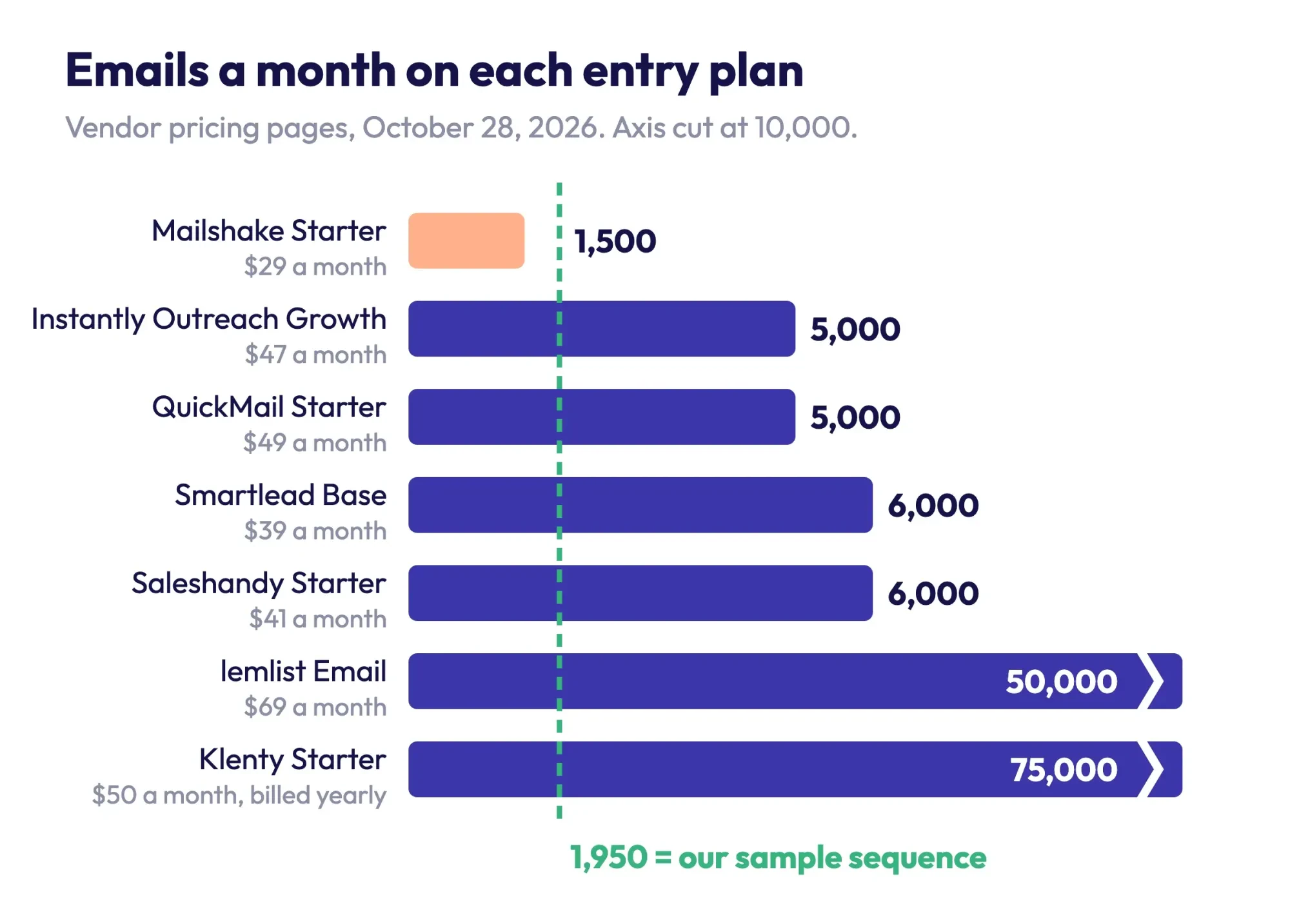 Diagram by DigitalTreed, from each vendor's pricing page, read October 28, 2026. Mixmax counts recipients, not emails, so it isn't charted.
Instantly, Smartlead and Saleshandy charge by emails sent
As of October 2026, these three price almost the same way. You connect as many mailboxes as you like, warm-up is included, and the plan tier sets how many emails and contacts you get each month.
Smartlead
Smartlead's pricing page lists Base at $39 a month, or $32 a month on yearly billing, with 6,000 email sends and 2,000 contacts. Its FAQ says the two "are separate counters." A contact is "a unique email address (prospect) stored in your account," so old prospects keep counting until you delete them. Plan for that. The page says Smartlead "automatically rotates sending across all connected mailboxes within a campaign," and that every plan includes "unlimited email accounts at no extra cost." Pro costs $94 a month for 90,000 sends and 30,000 contacts.
Saleshandy
Saleshandy's pricing page shows Starter at $41 "if paid monthly" or $34 a month on yearly billing, which is $408 a year. It adds that rates "are exclusive of applicable taxes." Starter allows 6,000 emails a month and 2,000 active prospects, defined as "Contacts you can keep in live sequences at once." That's friendlier than a stored-contact cap, since finished prospects free up room. Sender rotation on Starter covers 10 email accounts, and there's a 7-day free trial.
Instantly
Instantly's pricing page lists the Outreach Growth plan at $47 a month, or $37.60 on yearly billing. You get "Unlimited Email Accounts," "Unlimited Email Warmup," 5,000 emails monthly and 1,000 uploaded contacts. The page doesn't say whether that contact count resets each month, and if it doesn't, 650 new prospects a month would use it up in under two months. Hypergrowth, at $97 a month, raises the limits to 125,000 emails and 25,000 contacts.
So ask support before you upload a big list.
Among the three, Smartlead and Saleshandy give you the most room for the least money, while Instantly costs a little more and caps contacts lower. For a steady weekly sequence, that's the cap you'll hit first.
QuickMail and Mailshake have the simplest plans
QuickMail and Mailshake each fit on one short pricing page. QuickMail's trial won't auto-charge you, and Mailshake's $29 plan stops at 1,500 sends.
QuickMail
QuickMail's pricing page lists Starter at $49 a month with unlimited email senders, 1,000 uploaded contacts, 5,000 emails a month and a free warm-up tool called AutoWarmer. Each plan has a 14-day free trial. Its FAQ answers the trial question directly: "We won't charge your card nor subscribe your account to a paid plan when the free trial ends." That's the trial term we'd want. Growth is $99 a month for 25,000 contacts and 100,000 emails.
Mailshake
Mailshake has the lowest entry price here, but read the limits. Its pricing page shows Starter at $29 a month with "1 email address per account" and "1,500 email sends per month." Email Outreach, at $49 a month, removes the send cap, allows 2 addresses and adds email rotation. There's no free trial, so you'll pay before you send a single email. The FAQ says "No, we collect payment up front."
Mailshake's $29 plan suits one mailbox and a few dozen prospects a week, and past that you're comparing its $49 tier against Smartlead at $39 and Saleshandy at $41.
lemlist, Klenty and Mixmax cost more for more channels
These three cost more on paper. In return, they bundle phone, LinkedIn or Gmail features, or much higher caps that a small business may not use.
lemlist
The lemlist pricing page lists its Email plan at $69 a month, or $55 billed yearly, with unlimited users and email senders and 50,000 emails a month. Warm-up and a deliverability hub are included, and the comparison table lists inbox rotation and sending limits management. The Multichannel plan, at $109 a month, adds LinkedIn, SMS and calling. The page's FAQ describes a 14-day free trial. It's the highest monthly price in our table.
Klenty
Klenty's pricing page showed only a yearly price: Starter at $50 a month billed annually, which is $600 for the year. For that you get 15,000 contacts and 75,000 emails a month with unlimited users and mailboxes, which is far more room than our sample sequence needs. Klenty doesn't list warm-up on Starter, but it does list random sending intervals and email volume control. The page offers yearly and quarterly billing but no monthly price, so you can't pay month to month.
Mixmax
Mixmax works inside Gmail. It doesn't price by emails sent at all. Its pricing page defines a recipient as "a person you add to automated email outreach (a sequence)." Prices are "per user per month, billed yearly": $29 for 100 recipients a month and $89 for 1,500. A free tier covers 50 recipients, and the trial runs 14 days. Each user pays separately. That's cheap for one light user and adds up fast for a team.
For a one-person shop these three are hard to justify on email alone, but they make sense if you'll also call or message people on LinkedIn from the same tool.
Your mailbox has a daily limit before the software does
Whichever tool you pick, it sends through mailboxes you own, and those mailboxes have their own daily caps. Gmail and Yahoo also set rules that every sender must follow.
A personal Gmail account hits a wall at "more than 500 emails sent in a day," according to Gmail Help. Sending resumes "within 1 to 24 hours." Google Workspace allows more: its sending limits page lists a "Daily sending limit per user account" of 2,000, and 500 for trial accounts. Trials are tight. Microsoft 365 Business plans list a recipient rate limit of 10,000 recipients per day on Microsoft's Exchange Online limits page. That page also says bulk email should go through "third-party providers that specialize in these services."
Since February 1, 2024, Google's email sender guidelines have required every sender to "Set up SPF or DKIM email authentication for your sending domains." They also say to "Keep spam rates reported in Postmaster Tools below 0.3%." Senders of more than 5,000 messages a day to Gmail accounts also need DMARC, and their marketing messages must support one-click unsubscribe. Google's sender FAQ adds that anyone who crosses that line once is "permanently considered" a bulk sender.
Yahoo's Sender Hub asks for the same records and the same 0.3% spam rate, and tells bulk senders to "Honor unsubscribes within 2 days." Your cold email tool can rotate inboxes and warm them up. It can't fix missing DNS records, though. The DigitalTreed business email setup guide walks through adding SPF, DKIM and DMARC, and the free DNS lookup tool shows what your domain publishes now. Check yours before the first send.
None of this bites at 30 emails a day. It bites when a tool makes it easy to send 3,000.
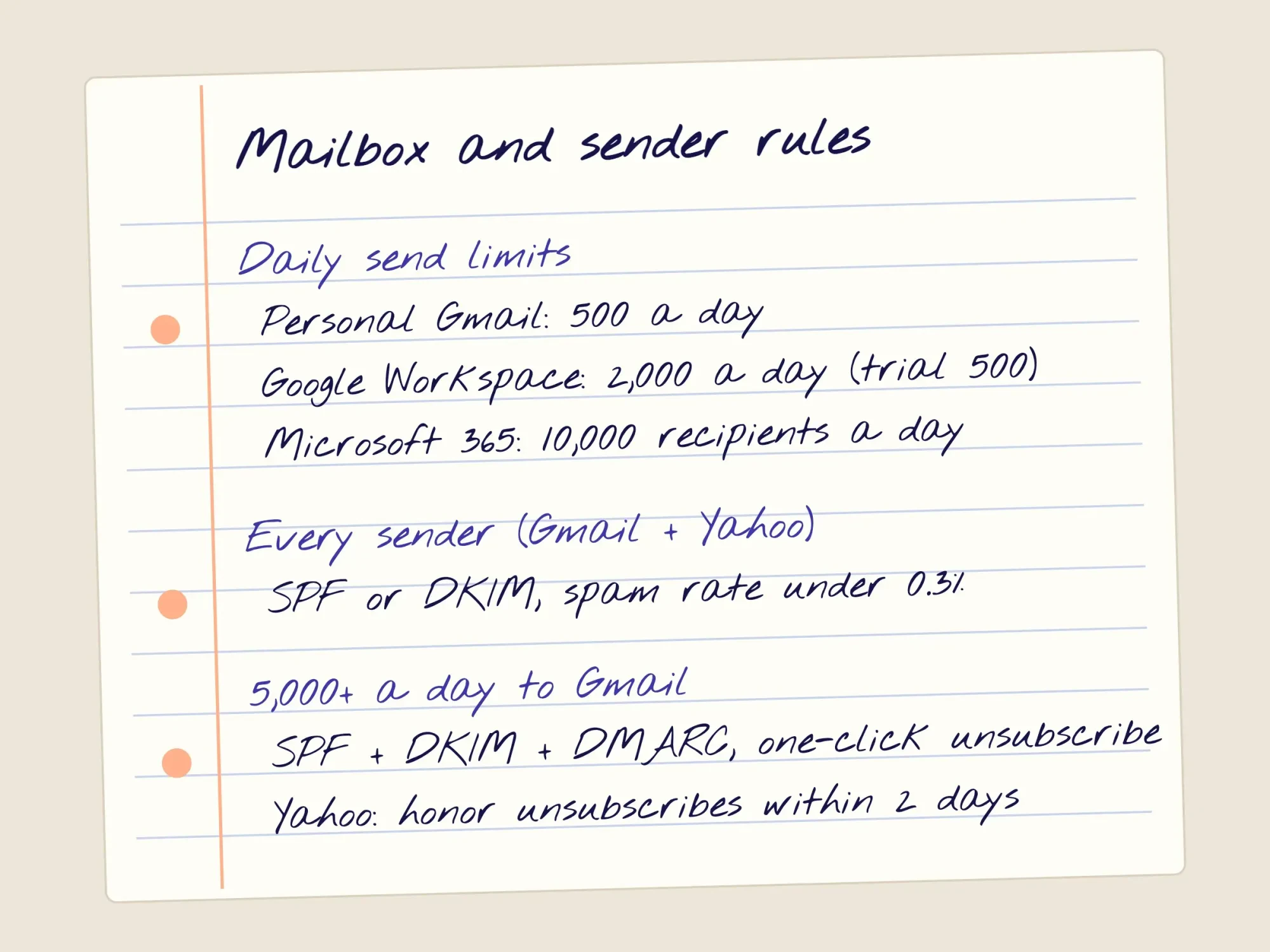 Drawn by us, from Google, Yahoo and Microsoft help pages read October 28, 2026.
What does CAN-SPAM require in a cold email?
US law doesn't care which tool sent the message. The FTC's CAN-SPAM compliance guide says plainly: "The law makes no exception for business-to-business email." So a note to a property manager's work address is covered the same way a newsletter is.
The guide lists the rules in short commands, and four of them shape a cold sequence:
- "Don't use deceptive subject lines."
- "Identify the message as an ad."
- "Your message must include your valid physical postal address."
- "You must honor a recipient's opt-out request within 10 business days."
The FTC adds that "Each separate email in violation of the CAN-SPAM Act is subject to penalties of up to $53,088." A three-step sequence is three separate emails per prospect, so every step needs your address and a working opt-out. Your tool may add an unsubscribe link for you, but check that your postal address is in every template too. Don't skip it. This is a summary of the FTC's guide, not legal advice, so ask a lawyer if your outreach is unusual. Our email campaign checklist covers the footer rules for newsletters in more detail.
Our sender records and sequence volume check
Pricing pages don't tell you two things. Would a typical setup pass the basic sender checks? And how much sending does a real small-business sequence need? We answered both with one Python script that reads local files only, with no accounts and no live DNS.
For the first test, we wrote a local zone file for three made-up sending domains of Ferncliff Roofing, a made-up company. The script counted SPF records and DNS-lookup terms, which RFC 7208 caps at 10. It also looked for a DKIM key and checked for a DMARC record with the "p" tag that RFC 7489 marks REQUIRED. Only 1 of 3 domains was ready. One had two SPF records and no DMARC record, which is what you get when a setup guide says "add this SPF record" and you add a second one. The other had 11 lookup terms, an empty DKIM key and a DMARC record with no policy.
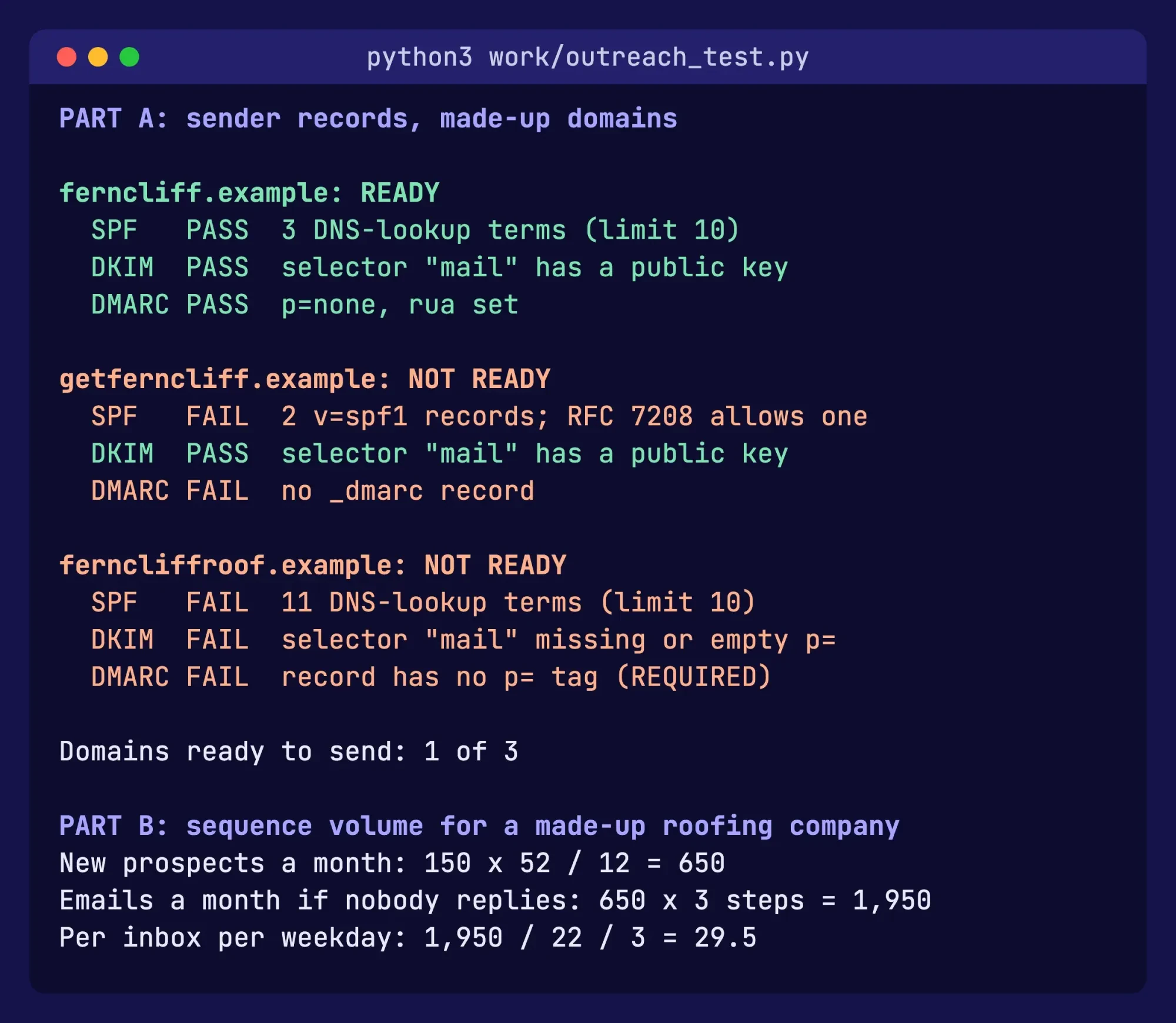 Screenshot: our local sender check on made-up domains, run October 28, 2026 (trimmed).
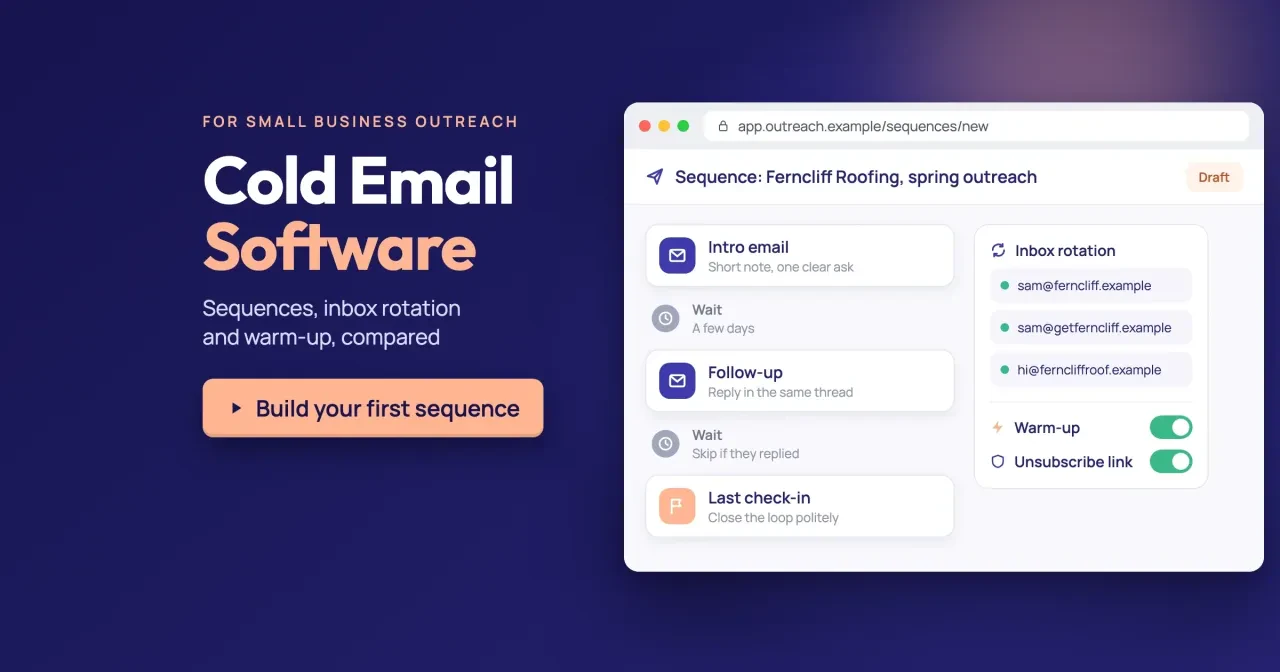
For the second test, we took the 3-step sequence in our featured image. We set the timing ourselves: an intro, a follow-up 3 days later and a last check-in on day 7. At 150 new prospects a week, that's 150 x 52 / 12 = 650 prospects a month. If nobody replies, 650 x 3 = 1,950 emails. Spread over 22 weekdays and 3 inboxes, it's 1,950 / 22 / 3 = 29.5 emails per inbox per day. That's a light load. It sits far below Gmail's 500 and Workspace's 2,000 a day, per Google, and it fits the monthly cap of every entry plan except Mailshake Starter's 1,500. Mixmax's $29 plan, with 100 recipients, is too small as well. Six entry plans fit.
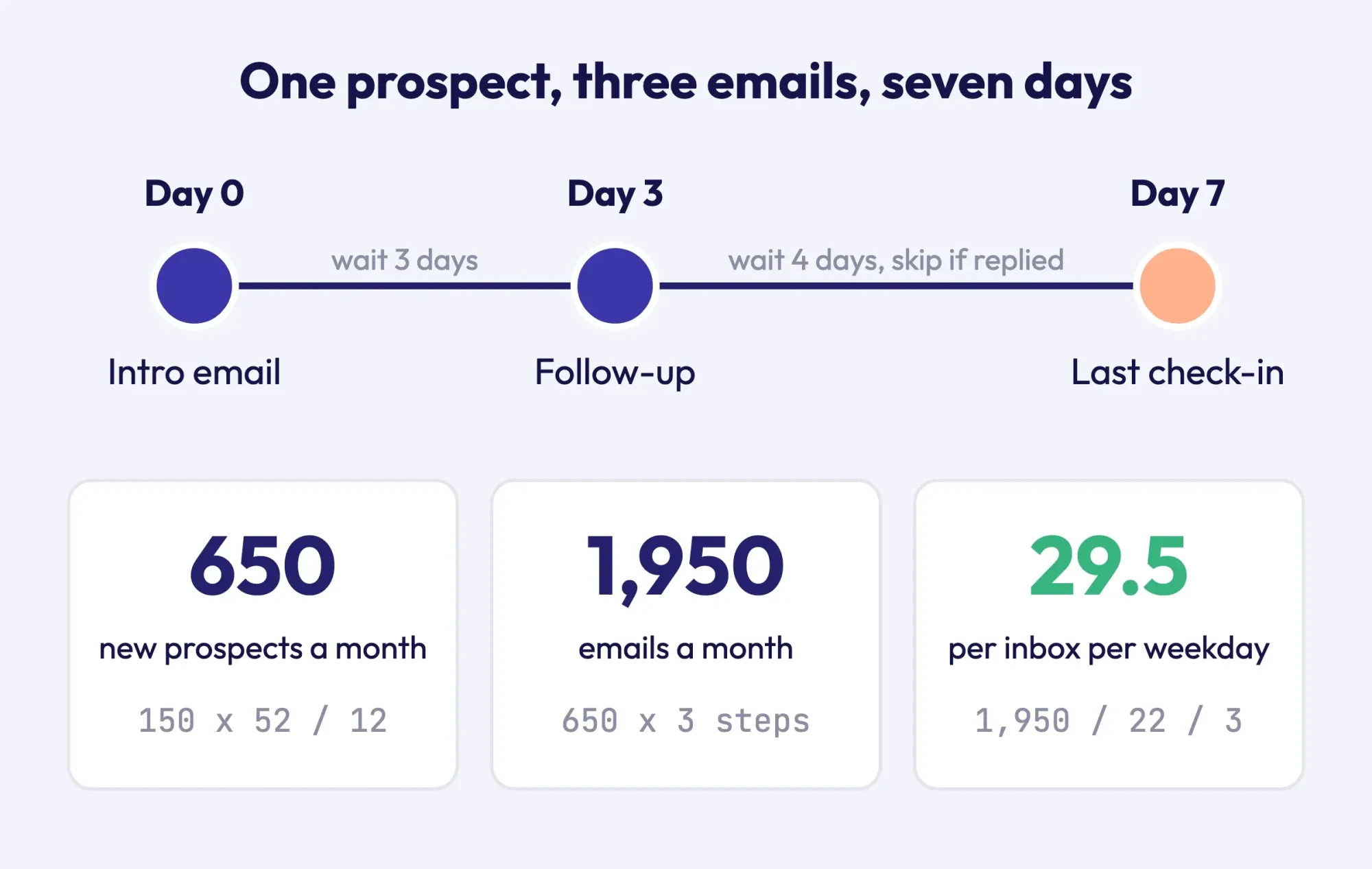 Diagram by DigitalTreed, from our sequence math, October 28, 2026.
What we tested
We ran one local script on October 28, 2026: a sender-record check on a made-up zone file and the sequence math above. One of three domains passed. The sequence needed 1,950 emails a month, and six of eight entry plans covered it.
How to choose cold email software for your volume
So pick by volume first, then by price. Our method: the lowest monthly list price whose send cap and contact cap both cover one month of your sequence.
For our 1,950-email month, that's Smartlead Base at $39, with 6,000 - 1,950 = 4,050 emails of headroom. Its 2,000-contact cap counts stored contacts, so at 650 new prospects a month it fills in 2,000 / 650 = 3.1 months unless you clear finished ones. Saleshandy Starter at $41 is the close second. Its cap only counts prospects in live sequences, so finished ones don't use it up. If your volume is under 1,500 emails a month and one mailbox is enough, Mailshake's $29 Starter is cheaper still. Before you send, run the list through an email verification tool so bounces don't hurt the new domain.
Our take: buy a monthly plan from Smartlead or Saleshandy. Connect two or three warmed mailboxes on a domain with SPF, DKIM and DMARC, and don't send until your postal address is in the footer. Tag the links in your emails with the UTM builder so replies and site visits show up in your analytics. Our CRM automation guide covers logging those replies without copying them by hand. Cold email turning into a regular newsletter? The DigitalTreed guide to email marketing strategy covers that side. Receipts and contact forms sent by your website are a different job, and an SMTP relay service fits them better.
DigitalTreed sells website and marketing work to small businesses, so we're not neutral on this last point. To have someone else set up the domain and the first sequence, request a quote from DigitalTreed.
Frequently asked
Does sending from a subdomain keep me under Gmail's 5,000 limit?
No. Google's sender FAQ says "Messages sent from the same primary domain count toward the 5,000 limit," so a promotions subdomain adds to the main domain's count.
What happens if my cold emails break Gmail's sender rules?
Google's FAQ says it began "ramping up its enforcement" in November 2025. Messages that fail the requirements can face "temporary and permanent rejections."
Does every cold email need a one-click unsubscribe header?
What is email warm-up, and do I need it?
Warm-up means sending a small, slowly rising volume from a new mailbox. Google's sender FAQ lists "increasing sending volumes gradually" among the practices it expects from senders.
How we made this guide: We read the pricing pages of all eight tools, plus the Google, Yahoo, Microsoft, IETF and FTC pages cited here. That's 18 pages, read on October 28, 2026. We saved copies of 17 and the quoted lines of the FTC page. We also checked Woodpecker, Reply.io, GMass, Apollo and YAMM, and left them out because their pages showed us no US dollar price we could read. We then ran a local script on a made-up zone file and a sample sequence, but we didn't sign up for, trial or buy any of the tools. Facts checked by the DigitalTreed team on October 28, 2026.
First published June 2023. Rewritten October 28, 2026: now a comparison of eight tools on price, send caps and warm-up, with Gmail, Yahoo and CAN-SPAM rules.
Sources
- Smartlead: Pricing
- Saleshandy: Pricing
- Instantly: Pricing
- QuickMail: Pricing
- Mailshake: Pricing
- lemlist: Pricing
- Klenty: Sales Engagement Platform Pricing
- Mixmax: Pricing
- Google: Email sender guidelines
- Google: Email sender guidelines FAQ
- Google Workspace: Gmail sending limits
- Gmail Help: Limits for sending and getting mail
- Yahoo Sender Hub: Sender best practices
- Microsoft Learn: Exchange Online limits
- IETF RFC 7208: Sender Policy Framework
- IETF RFC 7489: DMARC
- IETF RFC 8058: One-click unsubscribe
- FTC: CAN-SPAM Act, A Compliance Guide for Business

Comments
No comments yet. Start the conversation below.