
Quick answer
The best email marketing examples for small shops and service businesses are simple: a welcome email, an abandoned cart reminder, a holiday sale, a review request and a win-back note. Below are 15 campaigns, each with a made-up US business, a subject line and the reason it works. Judge yours by clicks and sales, not opens.
You won't find screenshots of big-brand emails here.
That's on purpose. A national retailer's email has a design team and a budget behind it, and copying it rarely fits a yarn shop or a barbershop. So every business in these email marketing examples is made up and labeled that way. Each is sized like yours: one location, a few hundred to a few thousand addresses, and an owner who writes emails between other jobs.
What you do get is the shape of each email, a subject line you can adapt, the trigger that sends it, and why it works. If you haven't set up your list or your sending tool yet, start with our small business email strategy guide and come back here for what to send.
Key takeaways
- Each email should ask the reader to do one thing.
- Seven of the 15 examples send themselves once they are set up.
- Show the shipping cost up front in an abandoned cart reminder.
- Send review requests to every customer, never only the happy ones.
- Every marketing email needs a postal address and a working opt-out.
Every example here follows one rule: one email, one job
So before the list, here's the rule that ties all 15 together.
Each email asks the reader to do one thing. Click to finish the order. Book the class. Leave the review. When an email asks for three things, people usually do none of them. One job per email.
We've grouped the examples by where the customer is with you: just met, ready to buy, already a regular, or drifting away. That order also matches how you'd build them, starting with the emails that send themselves.
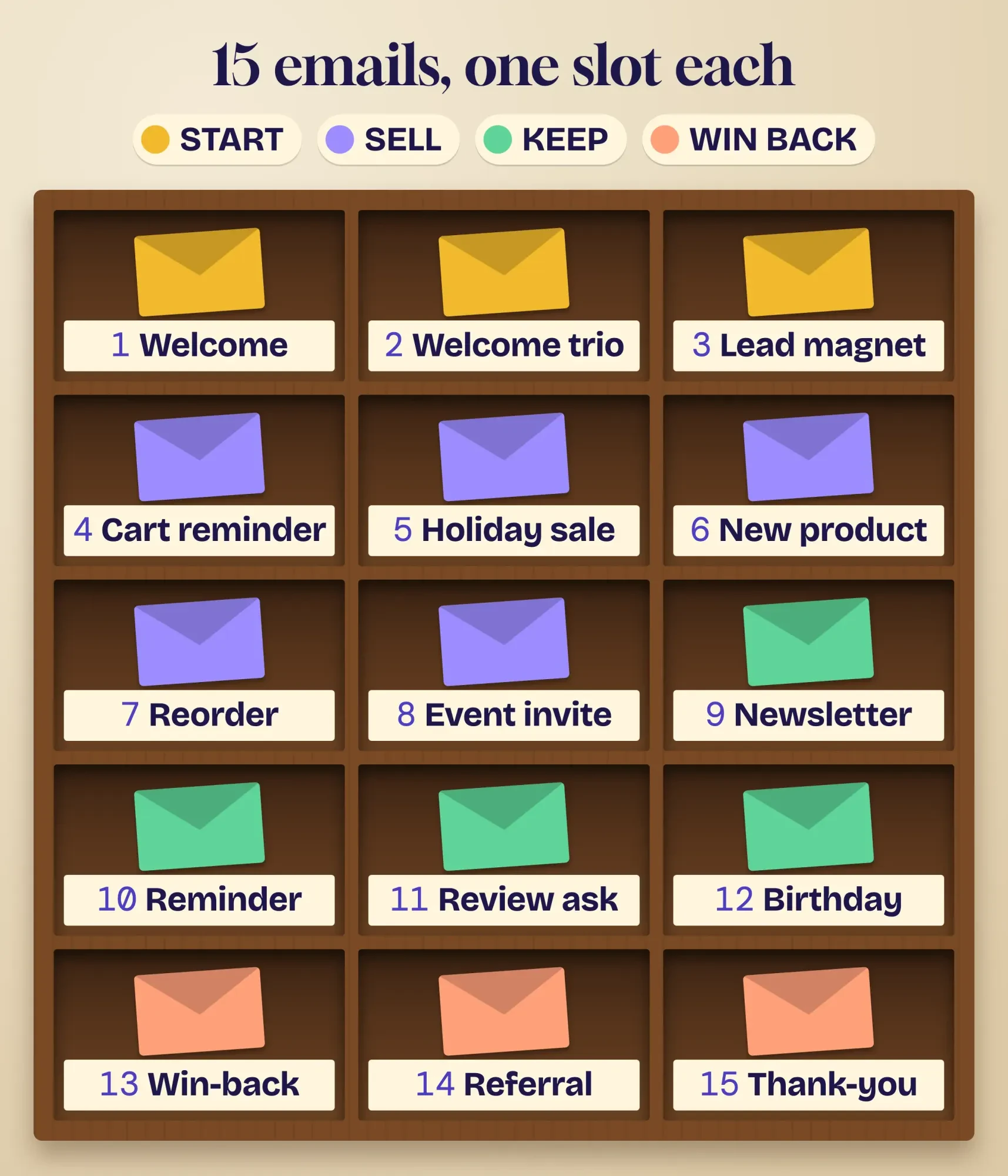 Drawn by us: the 15 email marketing examples in this guide, sorted by where the customer is.
Emails that start the relationship
That order starts with the stage most small businesses skip: the minute someone says "yes, email me."
1. The welcome email that sets expectations
Purl & Pine Yarn, a made-up shop in Concord, New Hampshire, asks for emails at the register. The welcome email goes out the moment someone joins.
Subject: "You're in. Here's what we'll send (and what we won't)."
It says what's coming (a pattern a month, first look at new yarn), how often (twice a month), and gives one link to this month's free pattern. We think that one promise does a lot of quiet work. People who know what's coming have less reason to hit "spam." And spam complaints are what Gmail watches. Its sender guidelines tell all senders to keep the rate it reports below 0.3%.
For the sign-up itself, a small card by the register with a QR code to your form works better than a clipboard. Our free QR code generator makes one you can print.
2. The welcome series for a service business
Halfmoon Pilates, a made-up studio in Huntsville, Alabama, sends three emails instead of one, spaced over the first five days so a new student isn't buried on day one.
- Day 0: "Your first class, without the nerves" (what to wear, where to park, one link to book).
- Day 2: "Meet the 4 instructors" (a photo and one sentence each).
- Day 5: "Still deciding? Here's the intro week schedule" (one button).
A service business sells trust before it sells a class, so each email answers the next worry a nervous beginner has, in the order that beginner feels it.
3. The lead magnet delivery
Steady Ridge Roofing, a made-up roofer in Joplin, Missouri, offers a one-page "after the storm" checklist on its site. The email's only job is to deliver it.
The subject line says exactly what's inside: "Your storm damage checklist (PDF inside)."
Keep this one plain: the link, one line on who you are, and your phone number. Send it from an address at your website's domain, not a free webmail address, so it looks like the business it is. Our walkthrough for setting up a business email address covers that. The sales follow-up can come a week later, as its own email.
Emails that sell without shouting
Once people know you, the next five emails ask for money. Each one gives the reader a reason first.
4. The abandoned cart reminder
Shoppers leave carts all the time. Baymard Institute averaged 50 studies and put the cart abandonment rate at 70.22% as of its September 22, 2025 update.
Prairie Ember Candles, a made-up candle maker in Amarillo, Texas, sends one reminder a few hours after a cart is left.
Subject: "Your cedar candle is still in your cart."
It shows the item, the price, and the shipping cost up front. That last part matters: in the same Baymard research, US shoppers who left during cart or checkout named extra costs like shipping, tax and fees most often, at 40%. People who were just browsing are counted apart. Hiding the shipping cost again in the reminder just repeats the problem.
5. The Small Business Saturday sale
The SBA describes Small Business Saturday as "Observed every year on the Saturday after Thanksgiving." In 2026, that's November 28.
Marble Jar Toys, a made-up toy shop in Frederick, Maryland, sends one email the Tuesday before. We build that exact email, start to finish, further down.
6. The new product email
Blue Heron Coffee Roasters, a made-up roaster in Roanoke, Virginia, gets a small lot of a new coffee.
Subject: "Just roasted: 40 bags of a Colombian we're excited about."
One product, one photo, one honest reason it's worth trying, and the real number of bags.
A real limit is fine; a fake countdown timer isn't.
Product photos are the heaviest part of most emails. Squeeze them first with our free image compressor so the email loads fast on a phone.
7. The reorder reminder
Barkley Street Pet Supply, a made-up pet store in Peoria, Illinois, can see from past orders how long each customer's usual bag of dog food lasts.
The subject line uses the dog's name: "Running low on Max's food?"
Just before that point, it sends a reminder with a one-click reorder link. It's helpful, because it's timed to a real need instead of the store's sales calendar. Timing does the selling.
8. The event invite
Saltbox Hardware, a made-up hardware store in Paducah, Kentucky, runs a free Saturday class on fixing a running toilet.
Subject: "Free class Saturday: fix that running toilet in 20 minutes."
Send it two to three weeks out with the date, time, the one thing to bring and an RSVP button, then post the same event on Facebook. Our Facebook post ideas for small businesses cover the event post side.
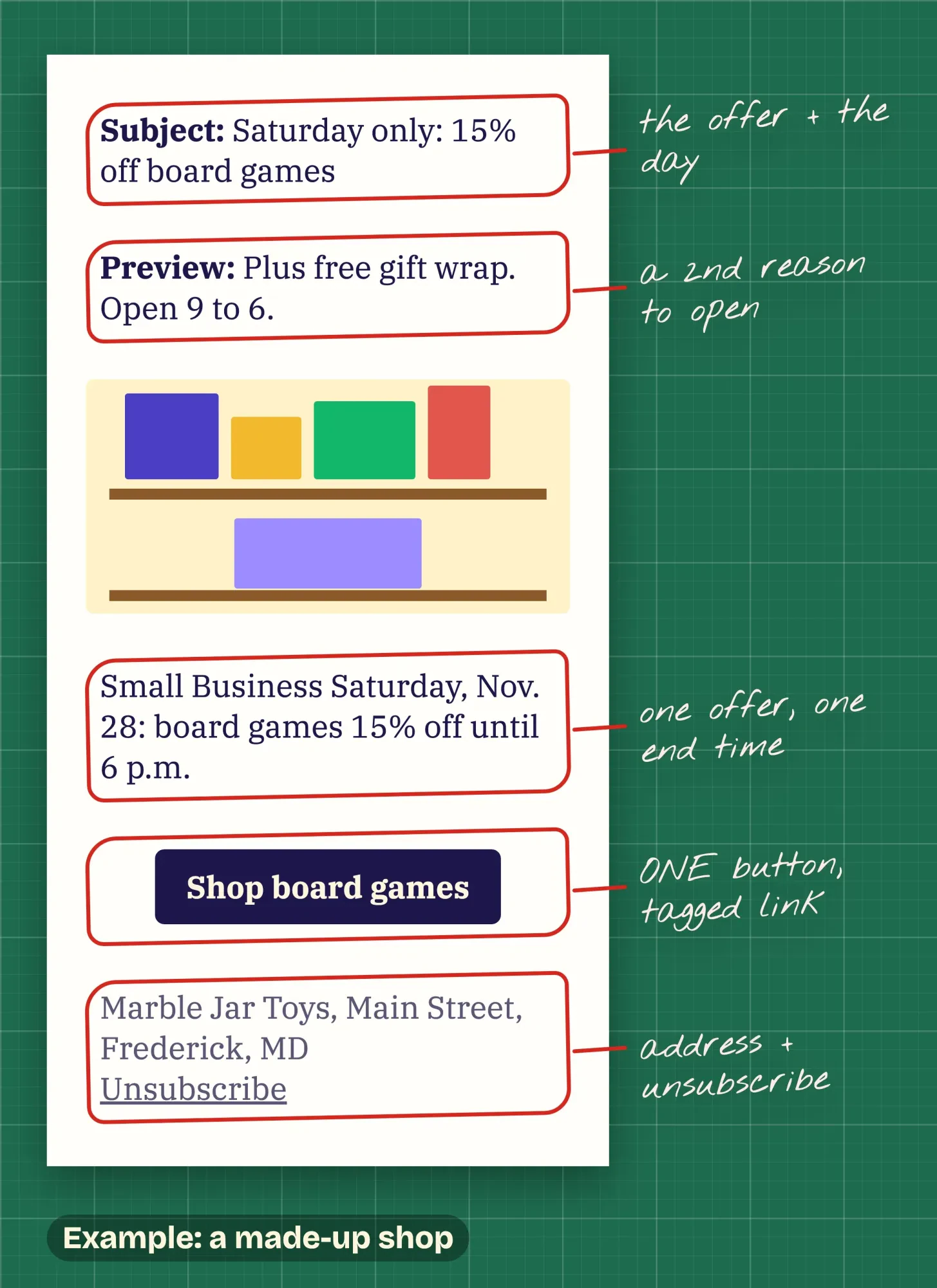 Drawn by us. Example: Marble Jar Toys is a made-up shop; the notes mark what makes the email work.
Emails that keep customers coming back
Once the sale is made, the job changes. These four emails keep a customer from forgetting you between visits.
9. The one-tip newsletter
Greenway Lawn Care, a made-up crew in Las Cruces, New Mexico, sends one email on the first Monday of the month.
Subject: "October in the desert: the one lawn job worth doing now."
One tip, two short paragraphs, a photo from a real job, plus a link to the longer blog post. That's a newsletter people open because it's useful, not because it's a coupon. If you blog, our plan for promoting your blog posts shows where the newsletter fits.
10. The appointment reminder
Silver Comb Barbershop, a made-up shop in Shreveport, Louisiana, sends a reminder the day before each booking.
The subject line is the appointment itself: "See you tomorrow at 10:30, Marcus."
Time, address, a reschedule link, and nothing else. Boring is good here.
Under the FTC's CAN-SPAM guide, an email that "Facilitates, completes, or confirms a commercial transaction that the recipient already has agreed to" is transactional. So keep the sales pitch out of it. Add a coupon, and the email may start to count as marketing.
11. The review request
Glossbox Auto Detail, a made-up detailer in Toledo, Ohio, sends a review request the evening after each job.
Subject: "How did your car turn out?"
It goes to every customer, happy or not, with one link to the shop's Google profile. It's also what the rules ask for. Google's content policy says merchants may not "selectively solicit positive reviews from customers" or offer discounts for posting any review. The FTC's 2024 rule also prohibits businesses from providing compensation or other incentives conditioned on the writing of consumer reviews that express a particular sentiment.
Google's own help says you can ask customers to visit a Google link or scan a QR code. Our free review link tool makes that link. For replying to what comes in, see the Business Profile reviews chapter in our guides, and for timing and follow-ups, read how to automate review requests safely.
12. The birthday email
Two Spoons Creamery, a made-up ice cream shop in Racine, Wisconsin, asks for a birth month at sign-up (month only, no year).
Subject: "It's your birthday month. Your scoop's on us."
It's short, warm, and the offer has a clear end date. Asking for the month only keeps the sign-up form light, and it means the shop never holds a full birth date it doesn't need and would have to protect.
Emails that win people back and bring friends
Even regulars drift. The last three examples bring them back, or bring a friend instead.
13. The win-back email
Spoke & Stone Cycle Studio, a made-up spin studio in Olympia, Washington, emails members who haven't clicked or booked in four months.
It asks a straight question in the subject line: "Should we keep sending you class news?"
Two buttons: "Yes, keep me" and "No thanks." Either answer helps. People who never respond get removed from the list, which lowers the chance that your emails land in spam folders instead of the inboxes of people who want them. Before a big send, it also pays to check the old addresses with one of the email verification tools we compared.
14. The referral ask
Tidy Owl Cleaning Co., a made-up house cleaner in Kokomo, Indiana, emails customers after their third cleaning.
Subject: "Know someone who'd love a clean house?"
Give both people the same thing, $20 off the next cleaning, and make sharing one tap. Ask after a few good visits, not after the first.
15. The year-in-review thank-you
Old Mill Bookshop, a made-up bookstore in Dothan, Alabama, sends one email in late December.
Subject: "Our year, thanks to you: 212 book club picks and one very tired cat."
A few numbers from the shop's own year, the top three books, and a thank-you.
No sale, and it's the email people reply to.
Why do automated emails bring in so much of the revenue?
Look back at those 15 and you'll spot a pattern. Seven of them send themselves once they're set up: the welcome, the series, the lead magnet, the cart, the reorder, the reminder and the birthday email.
That's where the money tends to be. In vendor data from Omnisend's 2026 ecommerce marketing report, automations "made up just 2% of all email sends, yet generated 30% of total email-driven revenue" across 150,000 brands in 2025. The same report says abandoned cart and welcome messages drove 76% of the orders that automations made.
It's one vendor's customer base, mostly online stores, so read it as a direction, not a forecast for your shop.
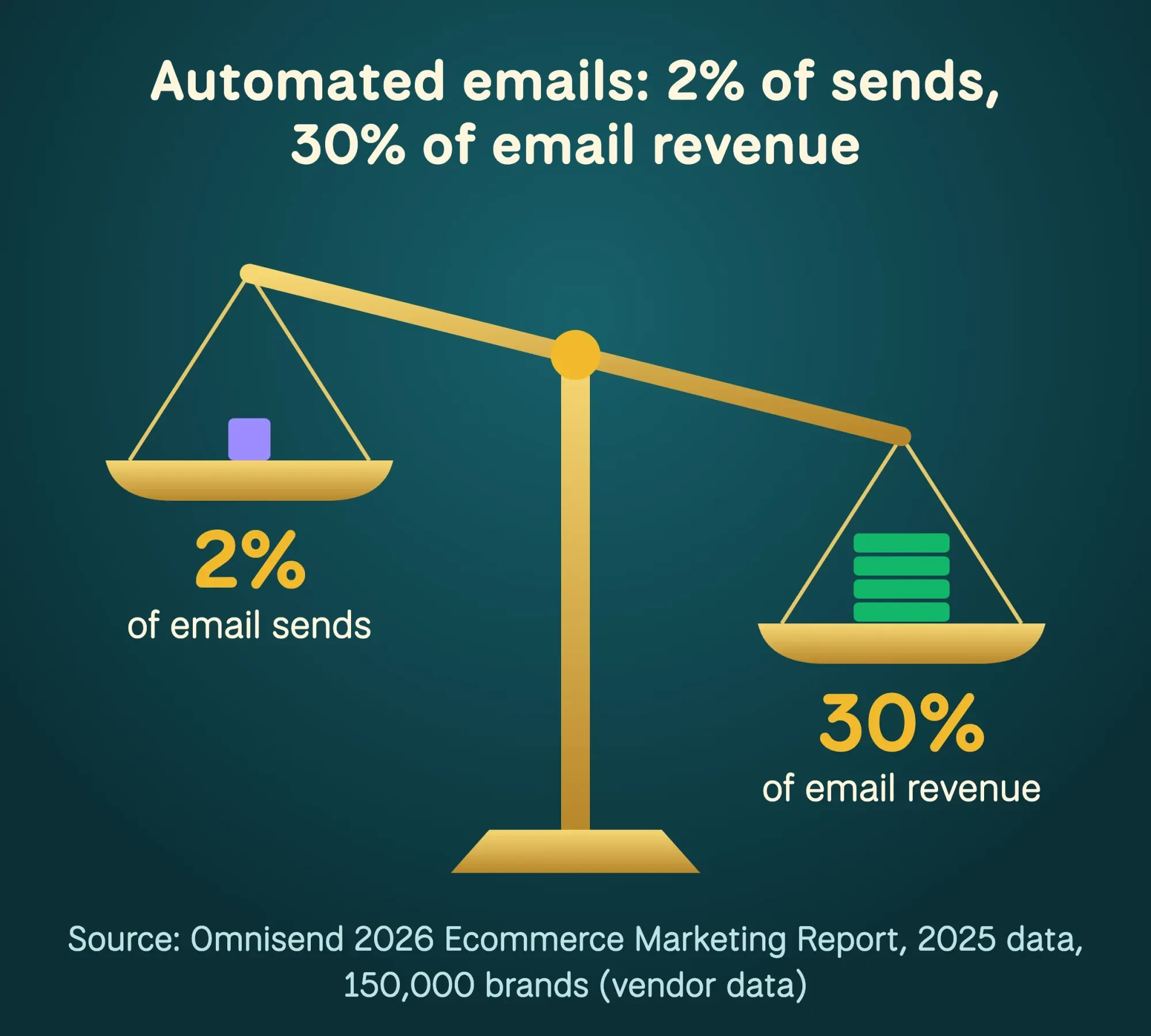 Source: Omnisend, 2026 Ecommerce Marketing Report (vendor data, 2025 sends).
And don't pick winners by open rate. Apple Mail's Protect Mail Activity setting will "privately download remote content in the background when a message is received", so an email can count as opened when nobody read it.
Our take: build the welcome email and the review request first, then the cart reminder if you sell online. They work while you're busy, and clicks, replies and sales tell you more than any open rate will.
Example: one Small Business Saturday email, start to finish
Now here's how the Small Business Saturday idea looks once it's actually written. Marble Jar Toys is made up; the steps are the ones we'd follow for a real shop.
- Subject: "Saturday only: 15% off board games, in store and online."
- Preview text: "Plus free gift wrap. Open 9 to 6 on Main Street."
- One photo of the game wall, then two sentences on what's on sale and when it ends (Saturday, November 28, at 6 p.m.).
- One button, "Shop board games," with a tagged link.
- Footer: the shop's postal address and an unsubscribe link.
We tested the tagging step on October 26, 2026, using our UTM builder on our development copy (same code as the live tool).
We clicked the "Newsletter" preset, typed a made-up landing page and the campaign name small-biz-saturday-2026. The UTM builder filled in source "newsletter," medium "email" and content "top-button," and its check said "GA4 files this under Email." That matches Google Analytics' default Email channel rule, which counts any link whose source or medium is "email" (or e-mail). We didn't send the email or open a real Analytics account; the test only checks that the link lands in the right report.
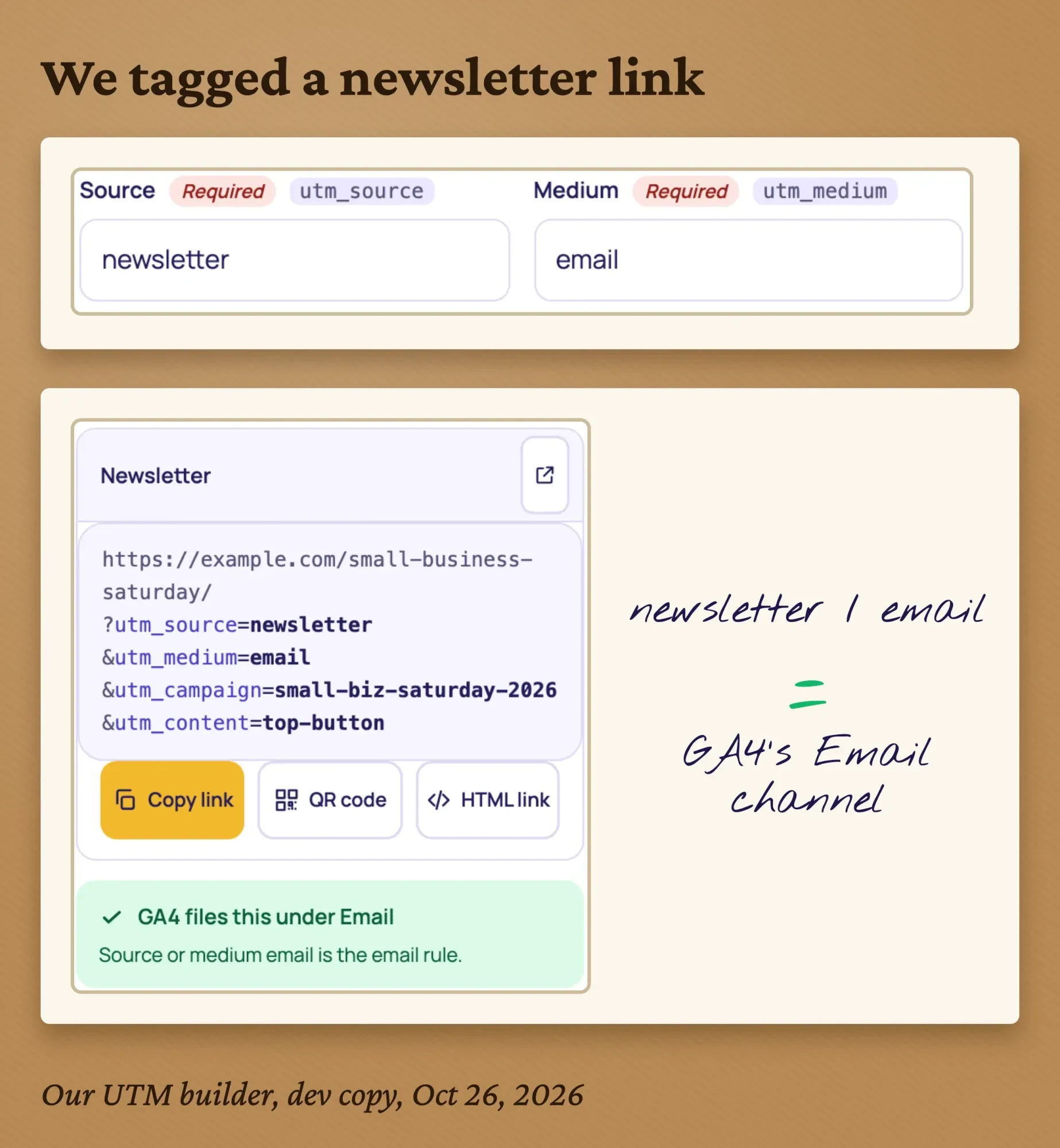 Screenshot: our UTM builder on our dev copy, October 26, 2026, with a made-up landing page.
Use content tags to tell buttons apart (top-button, footer-link), then read the results in Traffic acquisition. Our GA4 setup guide shows where to find that report. And before you send, run the email through our pre-send email campaign checklist.
The rules every example above follows
That footer in the Marble Jar email isn't decoration. It's the part of every example here that the law cares about.
The FTC's CAN-SPAM compliance guide says the law "covers all commercial messages" and "makes no exception for business-to-business email". For a marketing email, the guide says: "Your message must include your valid physical postal address." It also says "You must honor a recipient’s opt-out request" and gives you 10 business days to do it.
Each mistake can be expensive.
As of October 2026, the same FTC guide says "Each separate email in violation of the CAN-SPAM Act is subject to penalties" and puts the ceiling at $53,088 per email.
What about the receipts and reminders? The FTC's answer for mixed emails is: "When an email contains both kinds of content, the primary purpose of the message is the deciding factor." That's why the table below marks each example commercial or transactional.
The inbox providers add their own rules. Gmail's sender guidelines say that for senders of more than 5,000 messages a day, "Marketing messages and subscribed messages must support one-click unsubscribe." Yahoo tells bulk senders to honor unsubscribes within 2 days. Most email tools handle the button for you; check that yours does.
This is a plain-English summary for owners, not legal advice about your business. Our strategy guide goes deeper on sender rules, and a lawyer is the right call for anything unusual.
All 15 examples at a glance
So here are all 15 email marketing examples in one table, so you can pick the next one to build. "What to watch" is the number we'd check for each, chosen so it doesn't rely on opens.
| 1. Welcome email | Start | Someone joins your list | Commercial | Clicks on the one link |
| 2. Welcome series | Start | A new lead, then days 2 and 5 | Commercial | First bookings |
| 3. Lead magnet delivery | Start | A form download | Mostly transactional | Quote requests later |
| 4. Abandoned cart | Sell | A cart left at checkout | Commercial | Recovered orders |
| 5. Holiday sale | Sell | A date on the calendar | Commercial | Orders with the code |
| 6. New product | Sell | Something new arrives | Commercial | Clicks to the product |
| 7. Reorder reminder | Sell | Time since the last order | Commercial | Repeat orders |
| 8. Event invite | Sell | An event 2-3 weeks out | Commercial | RSVPs |
| 9. One-tip newsletter | Keep | A fixed day each month | Commercial | Clicks, replies |
| 10. Appointment reminder | Keep | A booked visit | Transactional | No-shows going down |
| 11. Review request | Keep | A finished job | Commercial (safest) | New reviews |
| 12. Birthday email | Keep | A birth month on file | Commercial | Redemptions |
| 13. Win-back | Win back | No clicks or orders for months | Commercial | Clicks, or a clean list |
| 14. Referral ask | Win back | A happy repeat customer | Commercial | Referred bookings |
| 15. Year-in-review thank-you | Win back | Year end | Commercial | Replies |
"Mostly transactional" means the email is transactional only while it sticks to its job. A review request is safest treated as commercial. For the lead magnet email, add a promotion and it starts to look commercial. Start with one or two from the top of the table, get them working, then add the rest.
Want help writing them? We write email and blog content for small businesses as part of our content marketing service. We make money when clients hire us, so weigh us against a couple of other writers first.
How we made this guide: every rule and number here comes from a page we read ourselves, on October 26, 2026. That means the FTC's CAN-SPAM guide and its 2024 review rule announcement, Gmail's and Yahoo's sender pages, and Apple's Mail privacy help. It also means Google's review policy and Analytics help, the SBA's observances page, Baymard Institute's research and Omnisend's 2026 report.
Our first-hand test was the UTM builder check described above, on our development copy. We didn't send any of these emails to a real inbox. Every business in the examples is made up; no real brand's email is copied or described. Each claim carries its own link in the same sentence, so you can check it yourself. Eram N., the author, will read and sign off on every line ahead of publishing.
First published July 2020. Rewritten October 26, 2026: we replaced five undated big-brand case studies with 15 small-business campaigns, each with a made-up example and subject line. We also added the research behind them, the CAN-SPAM and review rules, a worked Small Business Saturday email with our tagging test, and a table of all 15.
Frequently asked
Do I need permission to email customers in the US?
Federal law sets opt-out rules, not an opt-in rule, but the inboxes ask for more. As of October 2026, Gmail's sender guidelines tell senders to make sure recipients opt in. They also say not to buy email addresses from other companies.
How often should a small business send marketing emails?
No law sets a number. As of October 2026, Gmail's sender guidelines ask senders to send at a consistent rate and avoid bursts. They also advise starting with a low volume to engaged readers and raising it slowly. A steady schedule you can keep beats a sudden flood before a sale.
Do I need SPF or DKIM to send marketing email?
For Gmail, yes. As of October 2026, Gmail's sender guidelines ask every sender to set up SPF or DKIM for the sending domain. Senders of more than 5,000 messages a day need SPF, DKIM and DMARC.
How long must my unsubscribe link keep working?
At least 30 days after you send the email. As of October 2026, the FTC's CAN-SPAM guide says you must be able to process opt-out requests for that long. Once someone opts out, you can't sell or transfer that address, even as part of a mailing list.
Sources
- FTC: CAN-SPAM Act, A Compliance Guide for Business (August 2023, edited January 2024)
- FTC: Federal Trade Commission announces final rule banning fake reviews and testimonials, August 14, 2024
- Google Maps user-generated content policy: Prohibited and restricted content
- Google Business Profile Help: Tips to get more reviews
- Google Workspace Admin Help: Email sender guidelines
- Yahoo Sender Hub: Sender best practices
- Apple Support: Change Privacy settings in Mail on Mac
- Google Analytics Help: Default channel group
- Baymard Institute: Cart abandonment rate statistics, updated September 22, 2025
- Omnisend: 2026 Ecommerce Marketing Report (vendor data)
- U.S. Small Business Administration: Observances
Comments
No comments yet. Start the conversation below.