

Quick answer
The requested URL was not found on this server in WordPress is Apache's own 404 page. It means the server never passed your pretty permalink to WordPress's index.php. In our November 2026 test on 127.0.0.1, 4 of 8 Apache setups showed it. Nginx has no .htaccess, so there the fix is try_files. Start by saving Settings > Permalinks once.
Your home page loads, but every post shows a bare white page with a Not Found heading and the line "The requested URL was not found on this server". Your posts are almost certainly still there. That bare page is the default 404 text built into Apache's source code, and WordPress never got the request. It often follows a host move, a permalink change or a plugin's edit to .htaccess.
Work through the fixes in order, since each one costs more than the one before. Fix 1 is a single click in Settings > Permalinks. Fix 2 means opening .htaccess over FTP or a file manager. Fixes 3 and 4 need someone who can edit the Apache or Nginx config, and on shared hosting that's your host. Fixes 5 and 6 cover a wrong site URL after a move and an old 404 held in a cache or CDN. Our local test and a dated list of what we could and couldn't verify close the guide.
Key takeaways
- A bare Apache Not Found page means WordPress never saw the request.
- Opening Settings > Permalinks flushes the rewrite rules without changing anything.
- With AllowOverride None, Apache skips .htaccess and the permalink rules never run.
- Nginx ignores .htaccess, so WordPress needs a try_files line pointing at index.php.
- A one-space typo in RewriteRule gave us a 500, not this 404.
What does "The requested URL was not found on this server" mean?
Apache sent that message, not WordPress. In Apache's source file http_protocol.c, the default body for a 404 is that one sentence under a Not Found heading. Some servers add "If you entered the URL manually please check your spelling and try again." That line comes from Apache's multi-language error page for 404, which a server turns on with one Include line, as Apache's custom error response docs show. Visitors who arrive from a link get a different line instead, saying the link on the referring page "seems to be wrong or outdated". XAMPP on our test Mac had it on, and its version tops both lines with the heading Object not found! instead.
Either way, the status code is 404, which RFC 9110, the HTTP standard, defines as the server not finding "a current representation for the target resource".
For a WordPress post, that's misleading. The post is safe in the database. Apache looked on disk for a real file or folder called /your-post-slug/, didn't find one and answered before index.php could look the slug up.
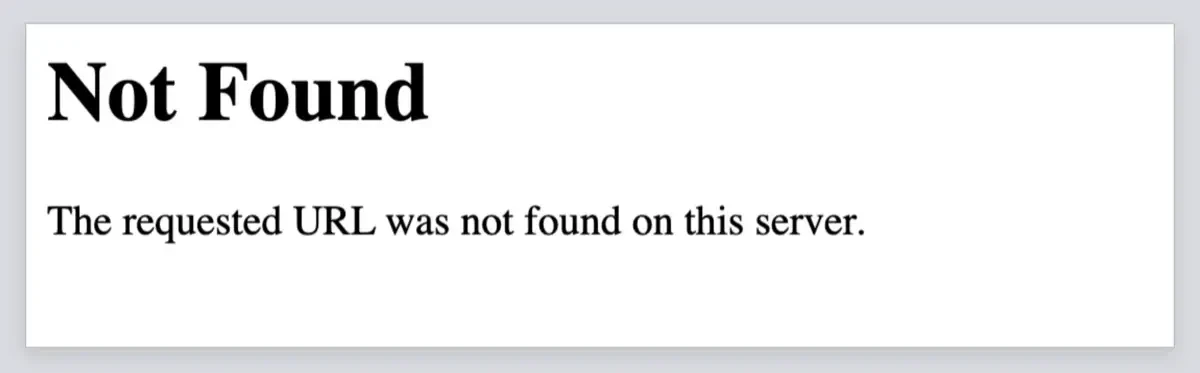 Screenshot: Apache 2.4.56 answering /off/sample-post/ on our 127.0.0.1 test server, where AllowOverride None hid the .htaccess file.
Apache page or theme page: which one sent the 404?
WordPress has its own 404 page, and the two look nothing alike. When WordPress handles a missing post, your theme draws the 404 page itself, with your usual header, menu and footer, and often a search box under the message. Apache's page is plain text on white, with no logo, no menu and no styling at all.
That difference tells you where to look: a themed 404 means rewriting works, but the slug is wrong, deleted or changed since the link was made. Check the post's address in the editor, or add a redirect. A bare Apache page on every post, while the home page loads, points at the rewrite layer, which is what the rest of this guide fixes. To test several addresses at once, paste them into the DigitalTreed HTTP status checker, which lists the code for each. A bare Forbidden page instead is a 403, which our 403 Forbidden WordPress guide covers.
One more test takes ten seconds. If example.com/?p=123 opens the post but example.com/sample-post/ doesn't, the database is fine and only pretty permalinks are broken.
WordPress's guide to customizing permalinks says Plain, the ?p=123 form, is the default every install starts with.
Fix 1: re-save permalinks after a WordPress permalinks 404
Once you've confirmed it's Apache's page, go to Settings > Permalinks, leave your structure alone and click Save Changes. Try this first when a WordPress 404 after a permalink change, a migration or a plugin update hits a site that worked fine the day before. The Permalinks screen documentation notes that just visiting that screen flushes the rewrite rules, and saving also tries to write them into .htaccess. Then read the notice WordPress shows. "Permalink structure updated" means it could write the file. "You should update your .htaccess now." means it couldn't. In that case the rules appear in a box at the bottom, and you'll paste them in by hand.
Under the hood, save_mod_rewrite_rules() writes only when the file is writable and Apache's mod_rewrite is detected, so on Nginx nothing's written at all.
With shell access, you can run wp rewrite flush --hard in WP-CLI instead. The WP-CLI rewrite flush docs say a hard flush works only on single-site installs, and it needs mod_rewrite listed under apache_modules in wp-cli.yml before it'll rewrite .htaccess. If your trouble is a custom structure rather than this Apache page, see the post on fixing permalinks not working in WordPress.
Fix 2: put back the default WordPress .htaccess block
Still seeing Apache's page after the save? Open .htaccess next. It lives in the same folder as wp-config.php, wp-admin and wp-content. Files that start with a dot are hidden on most servers, so turn on hidden files in your file manager or FTP app before you go looking. Then download a copy before you touch it, so you can put the old file back in seconds if your edit breaks something.
The WordPress .htaccess documentation gives the standard block for a single site, and its current home is the Apache page of the WordPress Advanced Administration Handbook. That page says the block "may be used to restore a corrupted .htaccess file", which is exactly the situation after a plugin or a bad paste breaks it. As of November 2026 it reads:
# BEGIN WordPress
RewriteEngine On
RewriteRule .* - [E=HTTP_AUTHORIZATION:%{HTTP:Authorization}]
RewriteBase /
RewriteRule ^index\.php$ - [L]
RewriteCond %{REQUEST_FILENAME} !-f
RewriteCond %{REQUEST_FILENAME} !-d
RewriteRule . /index.php [L]
# END WordPress
Paste it over everything between # BEGIN WordPress and # END WordPress, or into an empty file. Keep both marker lines. WordPress rewrites only what's between them when it updates the file, and plugin rules above or below the markers stay put. A subfolder install changes two lines. For a site at example.com/blog/, use RewriteBase /blog/ and point the last rule at /blog/index.php. We tried the mistake on purpose: a root block copied into a /blog/ install sent every post to /index.php at the domain root. Nothing lived there, so Apache's own page came back with exactly this message.
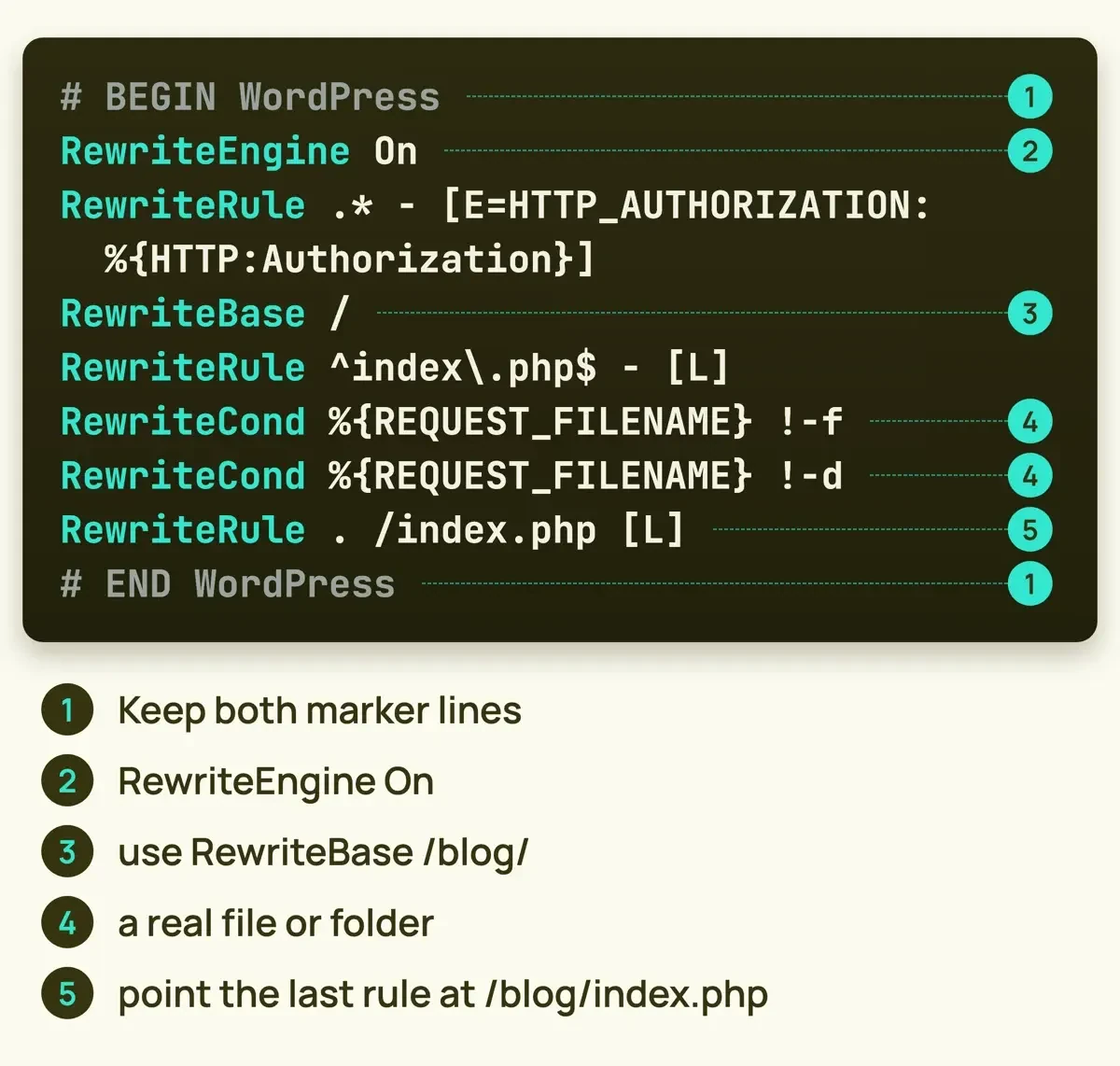 Diagram by DigitalTreed: the Basic WP block from the WordPress handbook, line by line.
Fix 3: check AllowOverride and mod_rewrite on the server
Even a clean block fails if Apache isn't reading it. You can check this yourself on a VPS, a fresh local install or a new server image; on shared hosting it's the host's setting. Apache reads .htaccess only when the server config allows it, and the AllowOverride reference in the Apache core docs gives the default for that setting as None. With None, the server "will not even attempt to read .htaccess files". The mod_rewrite docs list FileInfo as the override class for RewriteEngine and RewriteRule, so AllowOverride needs at least FileInfo. Per-directory rewriting also needs FollowSymLinks or SymLinksIfOwnerMatch in Options. Here's the Directory section with a sample path; use your own:
<Directory "/var/www/html">
    Options FollowSymLinks
    AllowOverride All
    Require all granted
</Directory>
The LoadModule line for mod_rewrite has to be active too. Restart Apache after any change.
In our run, the same correct block gave a 404 with AllowOverride None, because Apache never opened the file it'd been told to ignore. With AllowOverride AuthConfig it gave a 500, and the error log said "RewriteEngine not allowed here". The Apache .htaccess how-to adds a cost: allowing .htaccess makes httpd look for the file in every directory, on every request. You can't edit the server config on shared hosting, so send the host your error log line instead. Not sure where the log is? Hosts keep it in different places, as our WordPress server error logs guide shows.
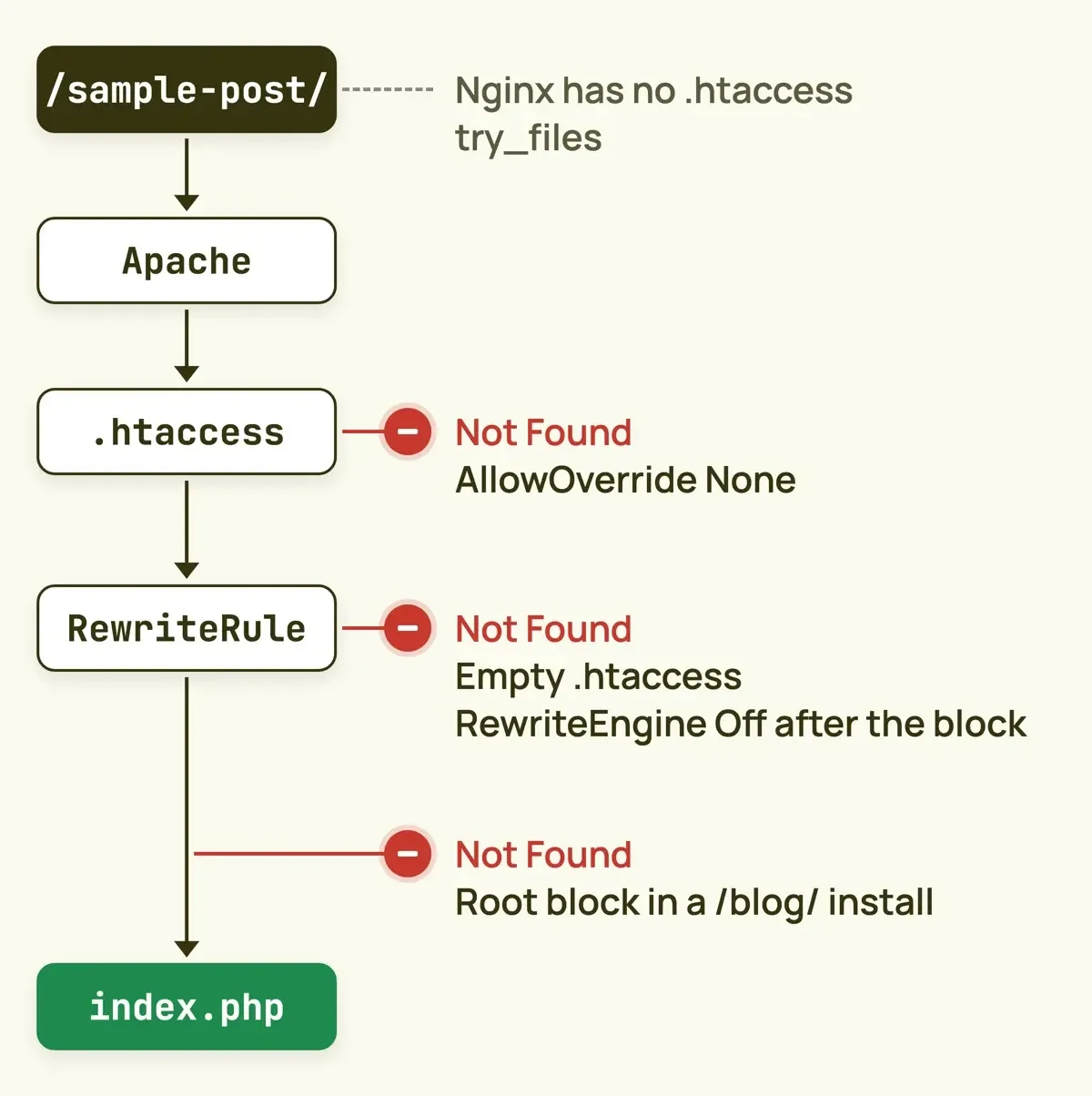 Diagram by DigitalTreed: where a pretty permalink request can stop before WordPress, from the Apache and WordPress docs cited here.
Fix 4: on Nginx, the rules live in try_files
On Nginx, saving permalinks updates the database and nothing else. The Nginx page of the WordPress handbook says Nginx has no directory-level config file like Apache's, so WordPress can't write the rules for you. Your location block needs this line:
location / {
    try_files $uri $uri/ /index.php?$args;
}
The nginx.org reference for try_files explains the order. Nginx checks for a file, then a directory, which is what the trailing slash in $uri/ means. If neither exists, it makes an internal redirect to the last parameter, which in the WordPress line above is /index.php with the original query string attached.
End the line with =404 instead and every pretty permalink becomes a 404. Keep the ?$args part as well, because the handbook's own comment says it stops non-default permalinks from breaking when a query string is used. Run nginx -t before you reload; the nginx.org reference says it checks the syntax.
Fix 5: a wrong site URL after a move
After a move to a new domain or folder, the same page can come from a wrong site URL. WordPress's guide to moving and changing the site URL explains two fields on Settings > General. WordPress Address (URL) is where the core files live. Site Address (URL) is the address visitors type. If either still points at the old domain or folder, links lead to paths the new server doesn't have.
After changing those fields, the guide says, you'll need to update .htaccess if you use permalinks or any other rewrites or redirects on the site. Change them before the files move and you should "expect to see a 404 page". If you're locked out of the dashboard, set WP_HOME and WP_SITEURL in wp-config.php, as that page explains, though the General screen can't edit them while they're hard-coded.
Watch out for a plain search and replace across the database. The same guide warns it can break serialized data, so use a tool made for WordPress moves.
If the move also switched the site to HTTPS and pages now bounce between two addresses, that's a redirect loop, not a 404. Our guide to too many redirects in WordPress covers it.
Fix 6: a 404 that stays in a cache or CDN
Even after the server's fixed, visitors can keep seeing the old error for a while. RFC 9110 calls a 404 "heuristically cacheable", which means a cache can keep serving it unless the cache headers say otherwise. Your page cache plugin, your host's cache or a CDN such as Cloudflare may still hold the old error. Clear your cache plugin first. Then purge at the CDN. Cloudflare's cache purge docs list purge by URL, hostname, tag, prefix and Purge Everything on every plan, Free included, as of November 2026. They recommend single-file purge by URL. Afterward, load the post in a private window. Or paste the address into the DigitalTreed redirect checker, which shows each hop and its status code.
Our local test: which mistakes show this exact message
The fixes above come from the docs. We wanted to know which mistakes give this exact page on a real server and which give a different error. On November 20, 2026, we set up two checks on our test Mac. First, a small Python checker reads a .htaccess file and flags a missing or broken WordPress block. Second, we ran XAMPP's Apache 2.4.56 binary as its own process on 127.0.0.1, with a separate config file, serving eight made-up WordPress folders. PHP wasn't loaded. So index.php was a stub file, and a 200 only proves the request reached it.
What we tested
We ran test/htaccess_check.py over seven sample files, then asked each Apache folder for /sample-post/.
| Setup (made up) | Checker | Apache 2.4.56 |
|---|---|---|
| Handbook block, AllowOverride All | Pass | 200 |
| Same block, AllowOverride None | Pass | 404, this message |
| Same block, AllowOverride AuthConfig | Pass | 500 |
| Empty .htaccess | Flag: no block | 404, this message |
| RewriteRule. with no space | Flag: bad directive | 500 |
| Root block in a /blog/ install | Flag: wrong base | 404, this message |
| RewriteEngine Off after the block | Flag: engine off | 404, this message |
| Correct /blog/ block | Pass | 200 |
| No END marker | Flag: markers | Not run |
The checker passed 2 files and flagged 5. Apache's answer was this exact message 4 times, a 500 twice and a 200 twice. The No END marker file went through the checker only, so its row has no Apache result.
What the results say about the order of fixes
That table shows the checker and the server don't always agree. Only one of the four 404s and one of the two 500s came from a file that passed our checker. With AllowOverride None, Apache never opened .htaccess, so no edit to it could've helped. That's why the server check comes right after the file fix here, not at the very end.
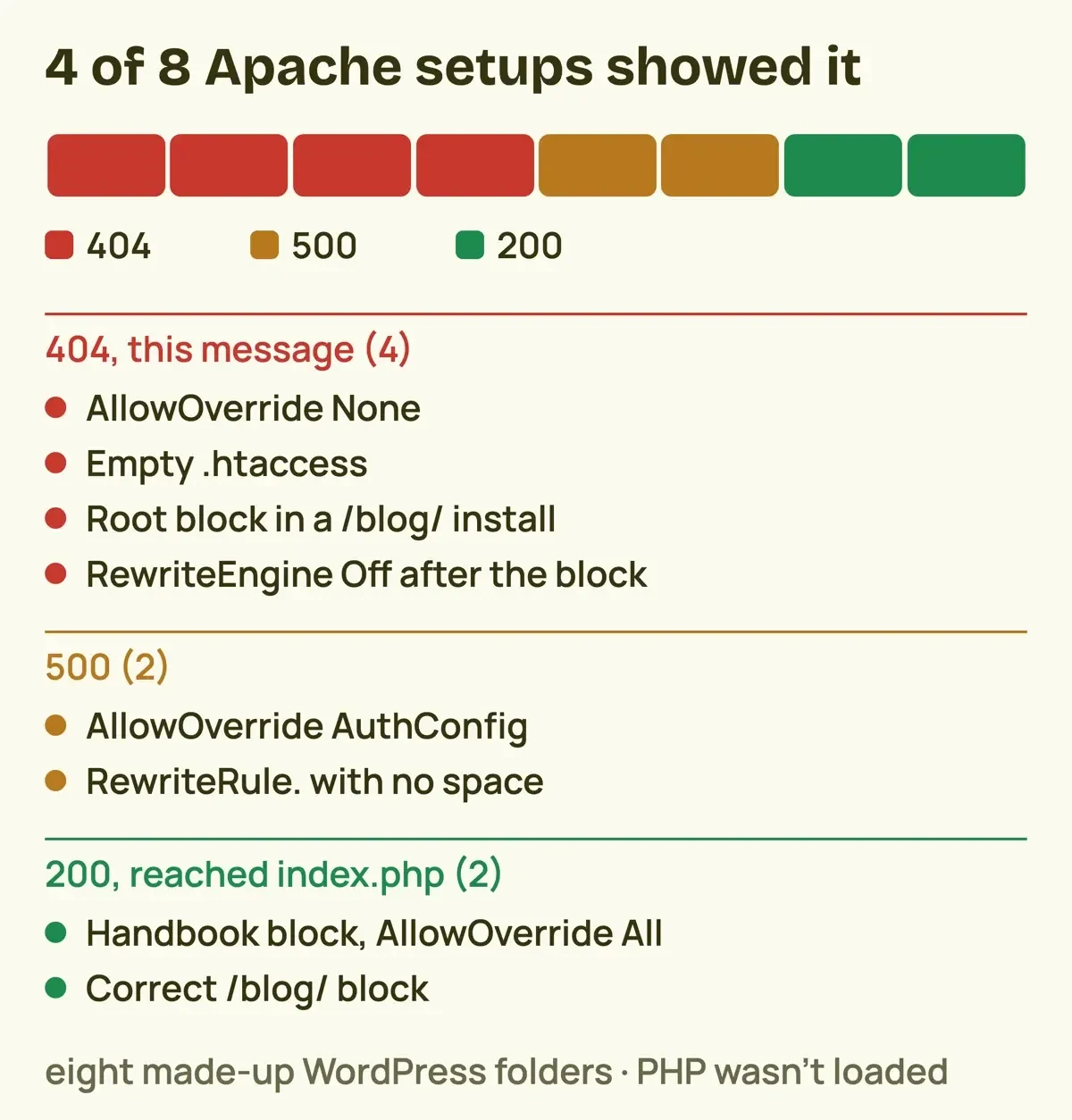 Drawn by us: results of our 127.0.0.1 Apache test, from test/apache-results.json.
A typo in the block gives a different error. Write RewriteRule. with no space before the dot and you won't get this 404 at all. Apache stops with a 500 and logs "Invalid command 'RewriteRule.'". When this post first ran in 2020, its block had that same typo. If a 500 shows up right after you edit .htaccess, check the line you pasted, then see our 500 internal server error guide for WordPress.
The last 404 came from below the WordPress block. One line, RewriteEngine Off, sat after # END WordPress and switched rewriting off for the whole folder. The block above it was correct, and rewriting stayed off anyway.
Read the file to the bottom, not just the WordPress part. If you still need your host after that, send these, since the ?p= test and the server type tell support where to start:
- The full address that fails and one address that works.
- Whether example.com/?p= plus the post ID opens the post.
- The exact message on the page, short or long version.
- Whether the server runs Apache or Nginx.
- The last change before the error: a move, a plugin, a permalink change.
- The error log line from the time of a failed request.
What we could verify on November 20, 2026
On November 20, 2026, we confirmed the message text in Apache's source and its multi-language error page. We also confirmed the handbook's WordPress block, the Permalinks screen notices, the AllowOverride default, the try_files order on nginx.org and Cloudflare's purge options, all on pages saved that day. One page didn't open. codex.wordpress.org/htaccess, the page this post has always linked, sent a 403 to our fetch script. That looks like a bot block, so open it in a browser; the same block is on the handbook page.
We didn't test LiteSpeed or IIS servers, the control panels hosts give you, or a real PHP stack with WordPress itself installed and running on top. Our Apache run served a stub index.php, so it shows where requests went, not what WordPress would've drawn. Before you edit any server config, check your host's documentation for where that file lives and whether you're allowed to change it on your plan at all.
Frequently asked
Does a WordPress 404 after a permalink change hurt Google rankings?
It can if it lasts. Google's page on HTTP status codes says indexed URLs returning a 4xx are dropped from the index.
Should a page I deleted on purpose return 404 or 410?
RFC 9110 prefers 410 Gone when the server knows the removal is permanent.
Why can't I see the .htaccess file?
It's hidden because it starts with a dot. The Permalinks screen docs suggest uploading htaccess.txt, then renaming it.
Can I switch to Plain permalinks to make the error go away?
Posts will open, but every address changes to ?p=123, so old links break.
How we made this guide: We read the pages listed below and ran both local scripts on November 20, 2026. Facts checked by the DigitalTreed team on November 20, 2026.
Our take: save permalinks first, then read .htaccess to its last line, then check the server config. If you're building a new site, our WordPress website tutorial covers setup from day one. If the server still won't cooperate, the DigitalTreed web development service can take it over.
First published June 2020 with a set of WordPress 404 fixes, and rewritten November 2026 from Apache, WordPress and nginx.org sources plus a local test. We cut the old Internet Explorer header fix, which no source supported, and fixed the typo in the old .htaccess block.
Sources
- Apache httpd source: modules/http/http_protocol.c
- Apache httpd source: docs/error/HTTP_NOT_FOUND.html.var
- Apache HTTP Server 2.4: Custom error responses
- Apache HTTP Server 2.4: core features, AllowOverride
- Apache HTTP Server 2.4: mod_rewrite
- Apache HTTP Server 2.4: .htaccess files how-to
- WordPress Codex: htaccess
- WordPress Advanced Administration Handbook: Apache HTTPD / .htaccess
- WordPress Advanced Administration Handbook: Nginx
- WordPress Advanced Administration Handbook: Moving WordPress
- WordPress documentation: Settings Permalinks screen
- WordPress documentation: Customize permalinks
- WordPress code reference: save_mod_rewrite_rules()
- WP-CLI: wp rewrite flush
- nginx.org: ngx_http_core_module, try_files
- nginx.org: command-line parameters
- RFC 9110, HTTP Semantics: 404 Not Found
- Google: How HTTP status codes affect Google's crawlers
- Cloudflare: Purge cache

Comments
No comments yet. Start the conversation below.