

Quick answer
A 403 Forbidden error means the server understood the request and refused it. In WordPress, the refusal can come from a firewall or CDN, a security plugin, a server rule in .htaccess, wrong file permissions, or WordPress itself. Find which one said no first. Then fix that one thing.
A 403 Forbidden WordPress error can lock you out of wp-admin, block your login page or take down the whole site. The HTTP standard, RFC 9110, says a 403 means the server "understood the request but refuses to fulfill it."
We caused 403 errors on purpose on a local test copy of WordPress 7.1.3 under Apache 2.4.56 on October 22, 2026. Some results surprised us, and one of them is the folder advice that older guides, including ours, gave. With the site folder at an emulated 744, every page returned 403. An unreadable index.php returned a 500, not a 403.
Key takeaways
- Read the error page before you change anything. Its look tells you whether Cloudflare, a security plugin, your web server or WordPress sent it.
- In our emulated test, giving the web server only 744-style access to folders caused a 403. Use 755 for folders and 644 for files.
- WordPress sends its own 403 for a missing permission or an expired link. No file fix touches those.
- If wp-admin is the page that is blocked, turn off plugins by renaming the plugins folder in your host's File Manager.
- Google drops pages that return a 403 from its index, so fix public pages fast.
What does 403 Forbidden mean in WordPress?
A 403 Forbidden error is the HTTP status code a server sends when it understands a request but refuses to carry it out. In WordPress, that refusal can come from a firewall, a security plugin, an .htaccess rule, file permissions or WordPress itself. RFC 9110 also says a request "might be forbidden for reasons unrelated to the credentials." So logging in again often won't help.
Don't mix it up with a 401. A 401 asks you to log in. A 403 refuses even when the server knows who you are.
Compare it with a 404, which means the page isn't there. The same RFC lets a server hide a forbidden page by sending a 404 instead. So a 404 can sometimes hide a block.
Key facts about 403 Forbidden in WordPress
- RFC 9110, published in June 2022, defines the 403 status code in section 15.5.4.
- WordPress's file permissions page says folders should be 755 or 750, files 644 or 640, and wp-config.php 440 or 400.
- In Apache HTTP Server 2.4, "Require all denied" means "Access is denied unconditionally."
- Google doesn't index URLs that return a 4xx status code, per its crawler status code guide.
Which layer said no?
A WordPress 403 can come from a CDN such as Cloudflare, a security plugin, a host firewall, your web server or WordPress itself. Each one uses its own error page, so the page you see tells you which layer said no.
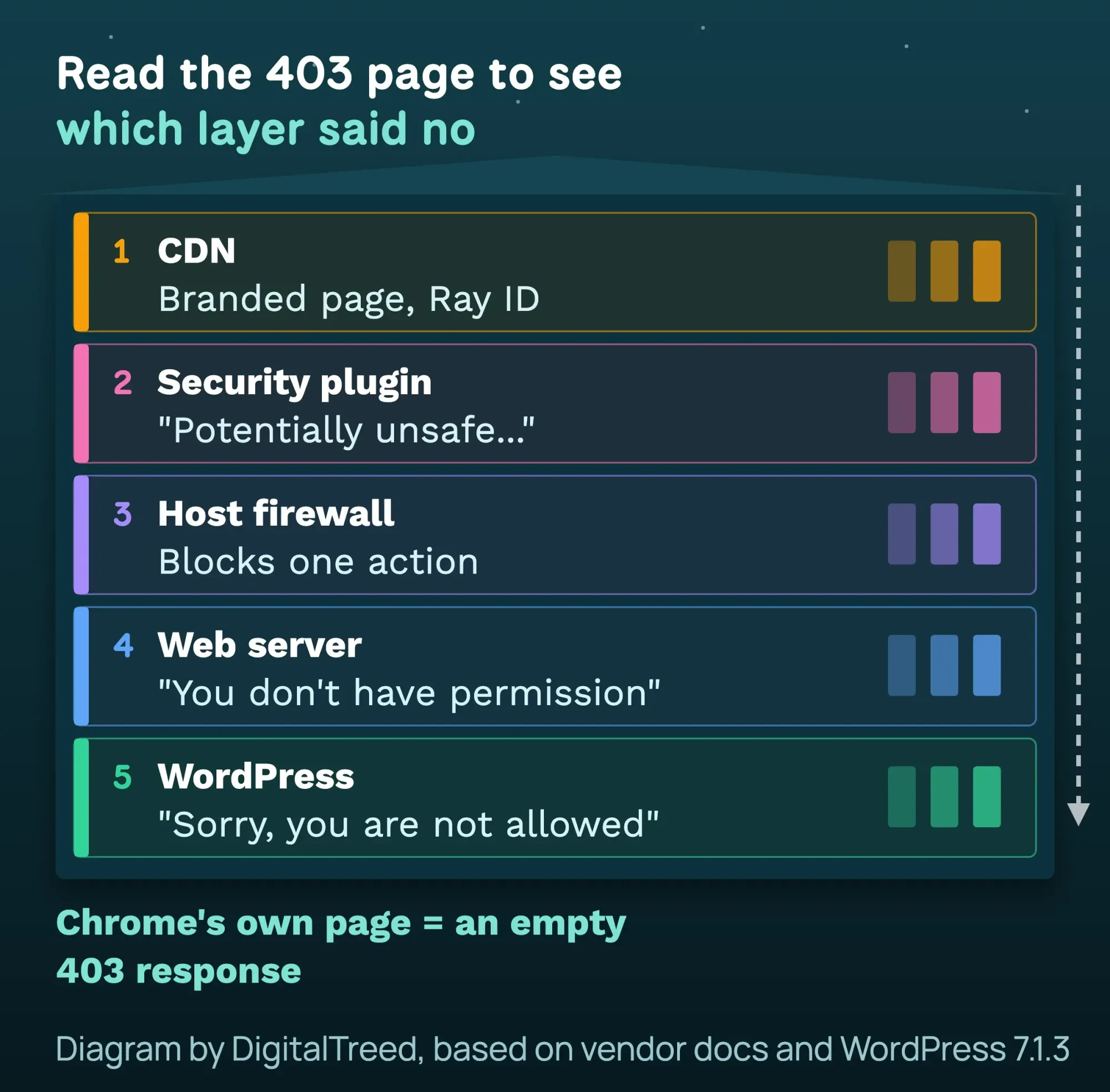 Diagram by DigitalTreed, based on Cloudflare, Wordfence, Apache and WordPress 7.1.3 sources, October 2026.
403 triage table: who sent the Forbidden or Access denied page
| What the page says | Who sent it | Where to look |
|---|---|---|
| Cloudflare branding and a Ray ID | Cloudflare | Cloudflare Security events |
| "A potentially unsafe operation has been detected" | Wordfence firewall | Wordfence allowlist or Live Traffic |
| "Sorry, you are not allowed to access this page." | WordPress | Your user role |
| "The link you followed has expired." | WordPress | Reload, log in again |
| Plain "Forbidden. You don't have permission to access this resource." | Your web server | .htaccess, permissions, index file, host firewall |
| Chrome's "Access to example.com was denied" | Your server, with an empty page | Same as the row above |
Cloudflare's 403 guide gives the key rule: a 403 "without the Cloudflare branding" comes from the origin web server, not Cloudflare. The Wordfence firewall help page quotes its own block text, shown in the table.
In our test, a 403 with an empty body made Chrome show its own page with "Access to 127.0.0.1 was denied". That line comes from Chrome's error page strings.
Next, check the status from outside your own Wi-Fi. Paste the URL into our free HTTP status checker. If it shows 200 while you see 403, the block is tied to you: your IP, your VPN or your cookies.
Why does only wp-admin or the login page show 403?
When only wp-admin or wp-login.php returns 403 while the home page loads, a rule that guards the login is the usual cause. That rule usually sits in a security plugin, a host firewall, or WordPress's own role and link checks. WordPress's hardening guide says many attacks are run by bots.
Brute-force password guessing is one of the two most common attacks it names. So security tools and hosts often lock down the login. These are the usual suspects:
- A security plugin rule. Wordfence country blocking can block chosen countries from just the login page. It also offers a bypass link for a team member to visit before a trip.
- Extra password protection on wp-admin. The hardening guide suggests it, but warns it "might also break" some features, such as admin-ajax.php. This lock usually shows a password box or a 401, so check it if admin-ajax.php fails after you add it.
- A host firewall rule on the login page. Send your host the note in the firewall step below.
- WordPress itself. A missing role or an expired link also shows up in wp-admin. See the WordPress 403s section below.
Test on phone data first. If wp-admin opens there, your IP or network is blocked. If you're locked out everywhere, rename the plugins folder as shown in the fix steps.
What should you do before changing anything?
Before you change anything, take a backup and note what changed in the last 24 hours. Then test the page in a private window and on your phone's data, so you know whether the block is tied to your network.
- Take a backup with your host's tool or a plugin. The WordPress backup guide explains what to save.
- Write down what changed in the last 24 hours: a new plugin, a host move, a security setting, a Cloudflare rule.
- Open the page in a private window. Then try it on your phone's data, with Wi-Fi and any VPN off.
- Note the exact URL, the time and your IP address. Your host will ask for all three.
Page loads on phone data? Then a firewall is blocking your network or IP. Skip to the firewall step.
How to fix a 403 Forbidden error in WordPress
Work down this list in order. Each step is safe to undo. Test the page after each step.
- Clear cookies for the site: clear cookies and cache for your domain only, then log in again. This often fixes expired-link 403s.
- Turn off plugins: rename wp-content/plugins to plugins-off in File Manager or SFTP. Test, rename it back, then turn plugins on one by one. Start with security plugins.
- Reset .htaccess: download a copy, then replace the WordPress block with the default one below. Keep any lines your host added.
- Fix file permissions: folders 755, files 644, wp-config.php 440 or 400. Never 777, and never 744 on folders.
- Check for a missing index file: make sure index.php sits in your site's main folder. On nginx, the server block needs "index index.php;".
- Check Cloudflare and hotlink rules: pause Cloudflare or the rule, test, then fix the rule and turn protection back on.
- Ask your host about the firewall: send the URL, time and your IP. Ask which ModSecurity or firewall rule blocked it.
- Scan for malware: if .htaccess keeps changing by itself or files appear that you didn't add, scan the site and change every password.
Turn off plugins when you can't log in
Most guides say "deactivate your plugins." That's hard when wp-admin is the page that returns a 403. Rename the folder instead. WordPress can't find the plugins, so it skips them all.
When wp-admin still opens, the Health Check and Troubleshooting plugin can turn plugins off for your login only. As of October 2026, its last update was July 2024, so test it on a copy first.
Reset .htaccess when it causes a 403
One wrong line in .htaccess can block the whole site. Apache's authorization module docs say "Require all denied" means "Access is denied unconditionally". We added that line above the WordPress block in our test, and every page returned 403.
Replace the WordPress part with the default block that WordPress writes. The same rules are on the WordPress .htaccess page:
# BEGIN WordPress
<IfModule mod_rewrite.c>
RewriteEngine On
RewriteRule .* - [E=HTTP_AUTHORIZATION:%{HTTP:Authorization}]
RewriteBase /
RewriteRule ^index\.php$ - [L]
RewriteCond %{REQUEST_FILENAME} !-f
RewriteCond %{REQUEST_FILENAME} !-d
RewriteRule . /index.php [L]
</IfModule>
# END WordPress
Then open Settings > Permalinks and click Save Changes, which rewrites the block. If links break after that, see our guide to fixing permalinks that stop working.
Set the right file permissions
The WordPress file permissions page says: "All directories should be 755 or 750." Files should be 644 or 640, and wp-config.php 440 or 400. It also says no folder should "ever be given 777."
Older guides, including the earlier version of this post, said folders could be 744. We tested that. On many hosts the web server runs as a different user from the one that owns your files. Under 744, that user can read a folder's list but can't open the folder.
Our test server ran as the file owner, so we copied this by giving it only that access to the site folder. Every page returned 403. Apache's page added a second line: "Server unable to read htaccess file, denying access to be safe". With the theme folder only, pages loaded but the stylesheet returned 403, so the site looked broken.
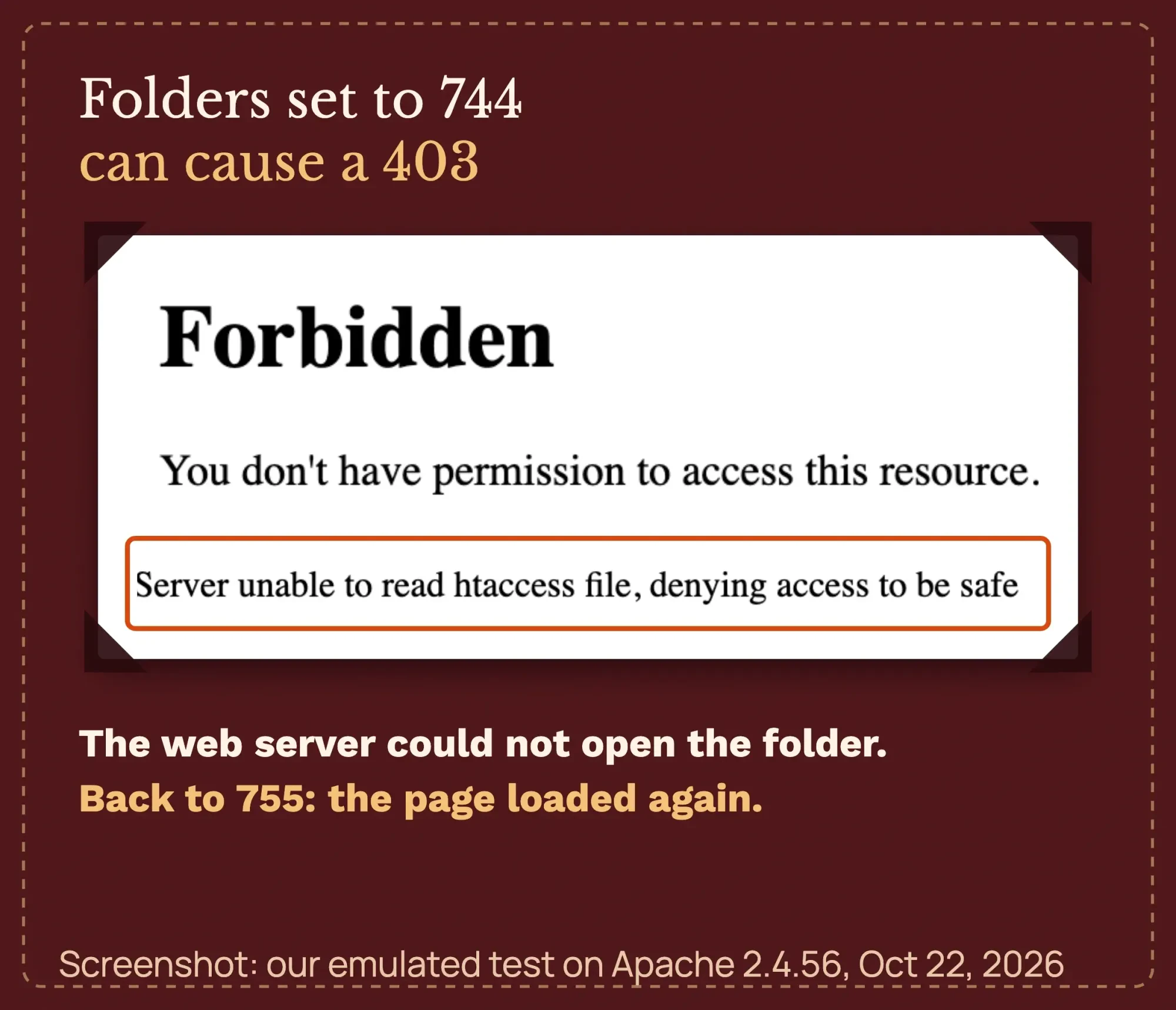 Screenshot: our emulated test on Apache 2.4.56 and WordPress 7.1.3, with the web server given only 744-style folder access, October 22, 2026.
Ownership matters too. The same WordPress page says files should "typically" be owned by your own user account, and on shared hosts never by the web server process.
After a site move, ownership can end up wrong. Then the numbers look right, but the 403 stays.
Your host's File Manager can set these numbers. If the owner of the files is wrong after a site move, usually only the host can fix that. Wrong permissions also break uploads, as our guide to the missing temporary folder error shows.
Check for a missing index file on Apache or nginx
A real folder with no index file returns a 403 when directory listing is off. We created a folder called /menu/ without index.php. It returned 403, and Apache logged "No matching DirectoryIndex." The Apache DirectoryIndex docs explain which file names it looks for.
On nginx, the nginx index module defaults to "index index.html;" A WordPress server block needs index.php in that line, as the WordPress nginx page shows. We didn't test nginx ourselves.
One more thing from our test: when index.php itself was unreadable, the site returned a 500, not a 403. An unreadable image returned a 403.
Check hotlink protection
Pages load, but some images are broken or return 403? Check hotlink protection. It stops other sites from showing your images, and a wrong setting can block your own.
Cloudflare's hotlink protection docs explain the rule. It "denies access to requests when the HTTP referer does not include your website domain name" and is not blank. It covers gif, ico, jpg, jpeg and png files.
In cPanel, Security > Hotlink Protection keeps a list of allowed sites. cPanel's hotlink docs say to allow your website's subdomains too. Add every version of your domain, such as the www one.
Clicking Disable there deletes that list, so cPanel suggests saving a copy first.
Check Cloudflare, security plugins and the host firewall
Firewalls block requests that look like attacks. A post with code in it, a form, or a page builder save such as Elementor can look like one.
Cloudflare lists "Mod_security rules" among the origin causes. ModSecurity often runs the OWASP Core Rule Set, whose anomaly scoring docs explain that a request is blocked once its total score reaches a threshold. One harmless post can add up enough points.
Wordfence says an admin can allowlist a blocked action or use its Learning Mode. On Cloudflare, check Security events for the Ray ID. On shared hosting, you can't see the firewall, so send your host this note:
Note
Hi, my WordPress site example.com returns 403 Forbidden on [URL] since [date, time, time zone]. My IP is [your IP]. It happens when I [log in / save a post / open the home page]. Please check the server error log and the ModSecurity or firewall log for that time, and tell me which rule blocked it. Thanks.
This step is the hardest to do alone. Our WordPress development team can find the rule and fix it with your protection still on. (DigitalTreed sells this service.)
Fix a 403 in cPanel
On a cPanel host, here is where each fix lives:
- See hidden files. In cPanel's File Manager, open Settings and tick "Show Hidden Files (dotfiles)". Without it, .htaccess stays hidden.
- Rename the plugins folder or .htaccess. Click the file or folder, then click Rename in the toolbar.
- Change permissions. Select a file or folder, then click Permissions in the toolbar.
- Read the error log. Metrics > Errors shows up to 300 of the newest entries, per cPanel's Errors page. Look for the time of your 403.
- Test ModSecurity. cPanel's ModSecurity page lets you turn it off for one domain. cPanel strongly recommends keeping it on. Turn it off only while you troubleshoot, then turn it back on.
Don't see ModSecurity in your cPanel? cPanel says to ask your host in that case, so send the note above.
Which 403s does WordPress send itself?
WordPress itself sends a 403 when your user role lacks a permission, a link's security token expires, or the block editor's cookie check fails. The first two show WordPress's plain gray-and-white page, and no file fix on the server will change any of them.
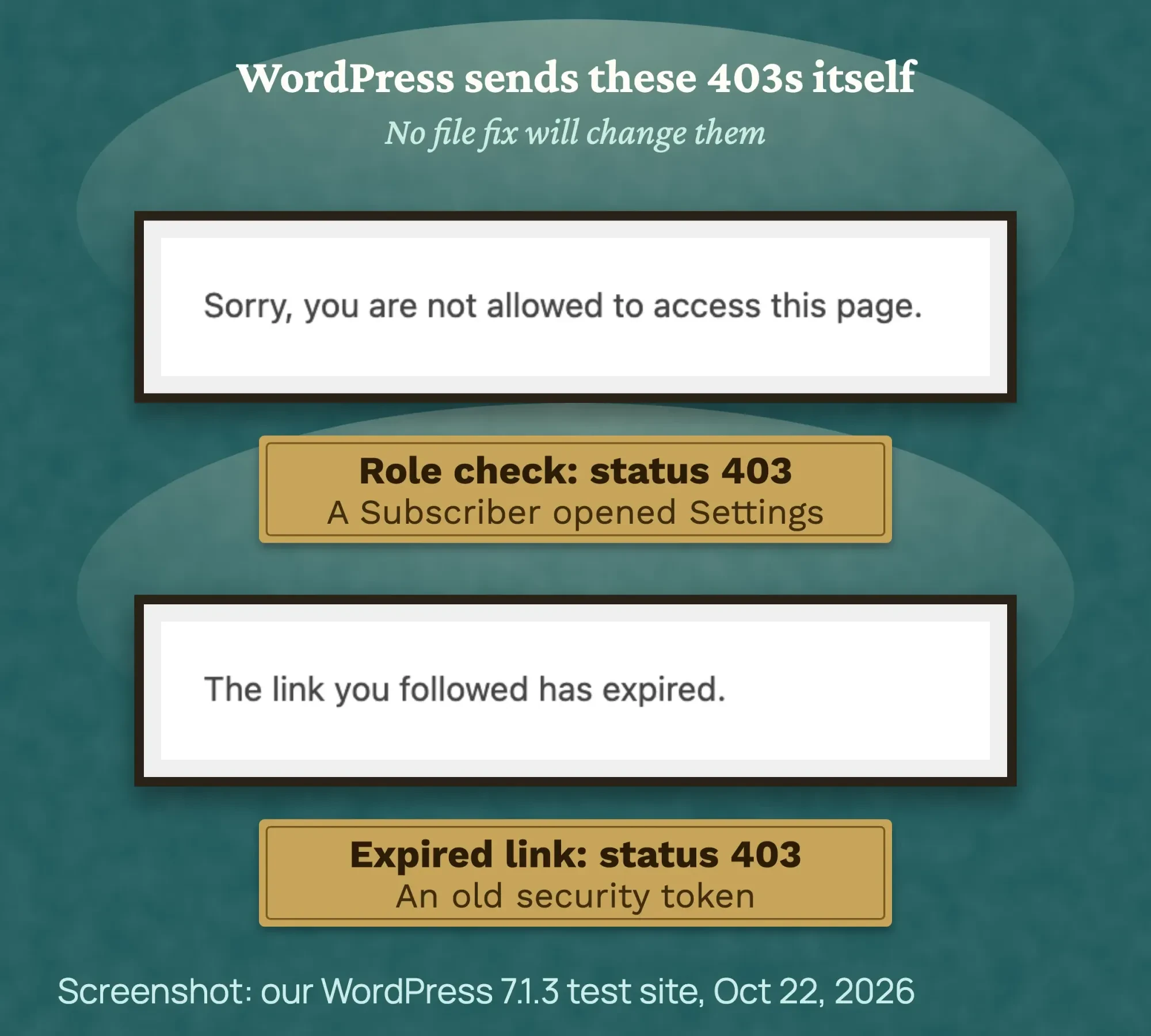 Screenshot: our WordPress 7.1.3 test site as a Subscriber and with an old link, October 22, 2026.
- "Sorry, you are not allowed to access this page." Your user role lacks a permission. The WordPress 7.1.3 admin menu code sends it with status 403. Ask another admin to check your role.
- "The link you followed has expired." The security token in the link is too old. The WordPress functions file sends it with status 403. Go back, reload and try again.
- "Cookie check failed" in the block editor. Your login cookie and the editor's token no longer match. The WordPress REST API code returns it as a 403. Log out and back in.
We saw all three in our test. A test Subscriber who opened Settings got the first page. The WordPress roles guide lists what each role can do.
If the editor shows "Updating failed," see our guide to fixing the WordPress updating failed error. Firewalls can block those editor saves too. For WordPress-made 403s, the WordPress debug log can help. For server 403s, ask your host for the server error log instead.
Does a 403 hurt your Google rankings?
Yes, a 403 can drop a page from Google if Googlebot gets it, because Google doesn't index URLs that return a 4xx code. Pages already in Google's index "are removed from the index," according to its HTTP status code guide.
Search Console lists these pages under "Blocked due to access forbidden (403)". Its Page indexing report help notes that "Googlebot never provides credentials," so a 403 on a public page is a mistake to fix.
Security plugins sometimes block fake "Googlebot" visitors. Before you block an IP that claims to be Google, verify the Google crawler first. After the fix, use URL Inspection, as our Google Search Console guide shows.
How is a 403 different from other WordPress errors?
A 403 means the server is up and refusing the request, while most other WordPress errors mean something broke. A 500 points to a PHP or database fault, a 502 to a server that didn't answer, and a redirect loop to clashing settings.
| What you see | Status | Likely cause |
|---|---|---|
| 403 Forbidden | 403 | A firewall, rule or permission refuses the request |
| Error establishing a database connection | 500 | WordPress can't log in to its database |
| There has been a critical error on this website | 500 | A PHP error, often a plugin or theme |
| 502 Bad Gateway | 502 | The server behind your site didn't answer |
| ERR_TOO_MANY_REDIRECTS | Redirect loop | Two settings keep sending visitors back and forth |
For the others, read our guides to the database connection error, the HTTP 500 error and the 502 bad gateway error. A loop of redirects needs our too many redirects fix.
Example: a bakery owner locked out on a trip
Example: a made-up bakery in Tucson, Arizona, runs WordPress on shared hosting. The owner turns on a security plugin rule that blocks logins from outside the US.
The next week she tries to log in from a hotel in Toronto and gets 403 on wp-login.php. The home page still loads. Her shop manager in Tucson logs in fine, adds an allow rule for her, and the 403 is gone in 15 minutes.
Without the manager, she could rename the plugin's folder in File Manager, log in, add the rule and rename it back. Either way, the fix costs nothing.
How to keep 403 errors away
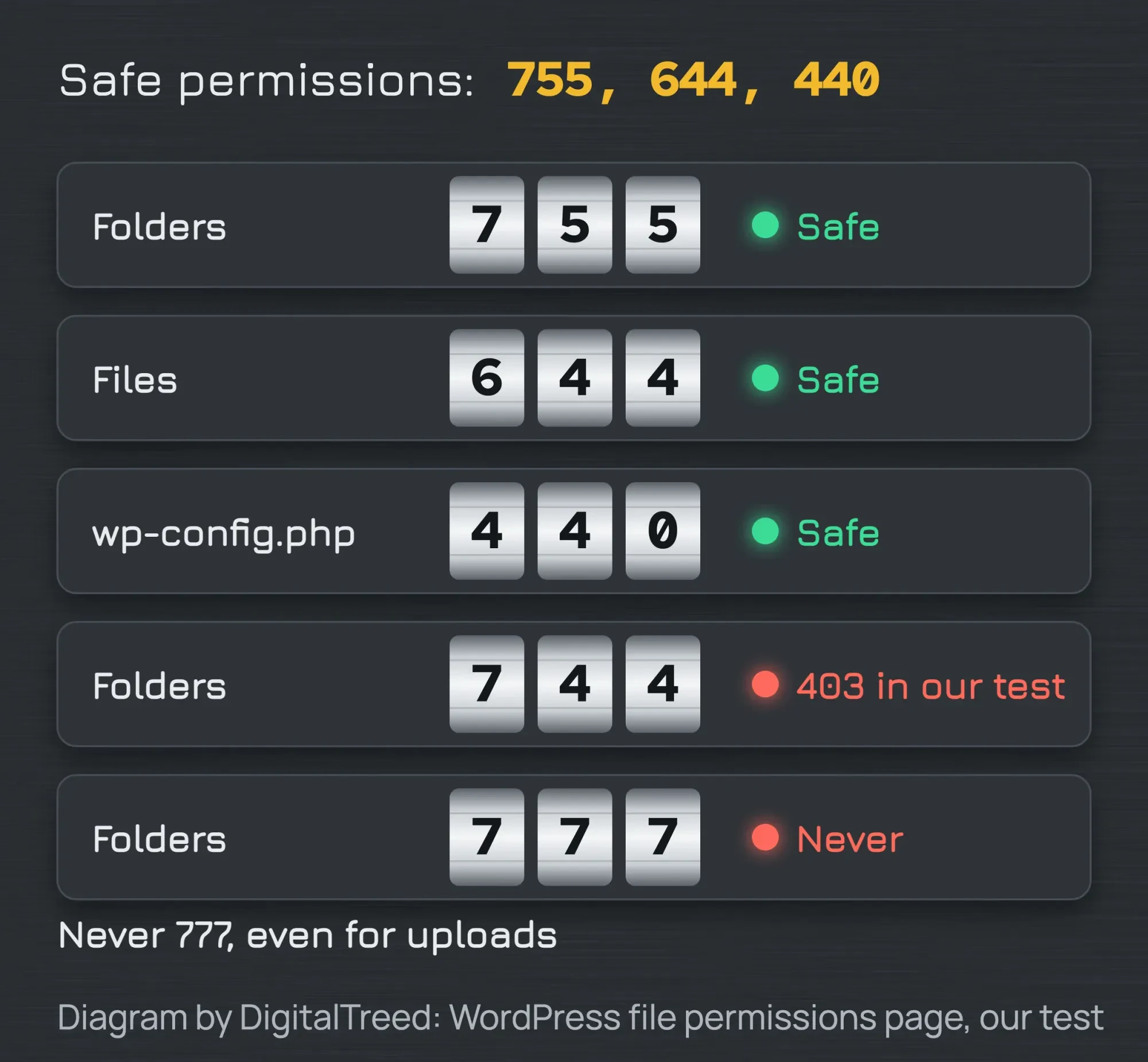 Diagram by DigitalTreed, based on the WordPress file permissions page and our test, October 2026.
- Change one security setting at a time, and test logins from a second device after each one.
- Keep a note of every firewall and Cloudflare rule you add, with the date.
- Never fix a 403 with 777 or 744. Use 755 and 644.
- Turn protection back on after every test.
- Run our free website audit after a fix to find other pages that return errors.
As of October 2026, Wordfence pricing lists Free at $0 and Premium at $149 a year. Care is $590 a year, and Response is $1,250 a year. Free gets new firewall rules 30 days later than paid plans.
If you hire help, the US Bureau of Labor Statistics lists a 2025 median of $47.85 an hour for web developers and digital designers. That's employee pay, not a freelance rate.
Frequently asked
Can a visitor fix a 403 on someone else's site?
Only a little. Clear cookies, turn off a VPN or try another network. If it still fails, the site owner has to fix it.
What is the fastest fix if I'm locked out of wp-admin?
Rename wp-content/plugins to plugins-off in your host's File Manager. If wp-admin opens, rename it back and turn plugins on one by one.
Should I delete .htaccess?
Download a copy first, then replace only the WordPress block. Many hosts add their own caching or security lines that you should keep.
Why do I get a 403 error in Elementor?
There are two cases to know. Saving a page can trip a host firewall rule, as in the firewall step. A 403 can also appear when you activate an Elementor Pro license. Elementor's help page lists .htaccess, IP blocks and firewalls as causes. It suggests clearing cookies, turning off your VPN, turning off plugins and asking your host.
Why do I get a 403 only on a VPN?
A VPN gives you a different IP address. If a firewall blocks that IP or its range, you get a 403. Cloudflare's 403 guide lists "IP deny rules" among the causes. Turn the VPN off and test. If it's your site, allow that IP.
Why do I get 403 only when I save a post?
A firewall often flags the content of the save, not you. Ask your host which rule blocked it, or check your security plugin's log.
Your next step
Right now, look at the 403 page and match it to the table above. That tells you whether to call Cloudflare, your host or another admin, or to fix a file.
Building or rebuilding a site? Our step-by-step guide to making a WordPress website covers the setup from the start.
If the 403 keeps coming back, our WordPress team can find the cause, and you get a fixed quote first.
How we made this guide: it's built from RFC 9110, Google Search Central, WordPress's developer docs and the WordPress 7.1.3 source code. We also used Apache, nginx, Cloudflare, Wordfence and OWASP Core Rule Set docs. On October 22, 2026, we ran WordPress 7.1.3 on a separate local Apache 2.4.56 server and caused 403s on purpose. We tested a "Require all denied" rule, 744-style folder access (emulated), an unreadable file and a folder without an index file. We also tested WordPress's own role, expired-link and REST nonce checks. We did not test Wordfence, Cloudflare or nginx. We checked every number against the source named next to it the same day. Updated October 23, 2026: added sections on 403s only in wp-admin, hotlink protection and cPanel. We also added a note on file ownership and FAQs on Elementor and VPNs.
First published June 2020. Rewritten October 2026: all-new text, our own 403 test, a triage table, WordPress's own 403 pages, 755 folders instead of 744, and a host email. Updated October 25, 2026: each question heading now opens with a short answer. We also labeled the triage table, listed sourced facts and our test's main results, and numbered the fix steps.
Sources
- RFC 9110, HTTP Semantics, section 15.5.4 (403 Forbidden)
- Google Search Central: How HTTP status codes affect Google's crawlers
- Search Console Help: Page indexing report
- Google Search Central: Verifying Googlebot and other Google crawlers
- WordPress Developer Resources: File permissions
- WordPress Developer Resources: Apache HTTPD / .htaccess
- WordPress Developer Resources: Nginx
- WordPress 7.1.3 source: wp-admin/includes/menu.php
- WordPress 7.1.3 source: wp-includes/functions.php
- WordPress 7.1.3 source: wp-includes/rest-api.php
- WordPress.org: Roles and capabilities
- WordPress Developer Resources: Backups
- WordPress.org plugin directory: Health Check and Troubleshooting
- Apache HTTP Server 2.4: mod_authz_core
- Apache HTTP Server 2.4: mod_dir
- nginx: ngx_http_index_module
- Chromium source: error_page_strings.grdp
- Cloudflare Docs: Error 403 (vendor)
- Wordfence Help: Firewall (vendor)
- Wordfence: Pricing, read October 22, 2026 (vendor)
- OWASP Core Rule Set: Anomaly scoring
- US Bureau of Labor Statistics: Web Developers and Digital Designers
- WordPress Developer Resources: Hardening WordPress
- Wordfence Help: Country blocking (vendor)
- Cloudflare Docs: Hotlink Protection (vendor)
- cPanel Docs: Hotlink Protection (vendor)
- cPanel Docs: File Manager (vendor)
- cPanel Docs: Errors (vendor)
- cPanel Docs: ModSecurity (vendor)
- Elementor Help: 403 error, cannot activate license (vendor)


Comments
No comments yet. Start the conversation below.