

Quick answer
Too many redirects in WordPress means two settings keep sending visitors back and forth, so the browser gives up. The usual causes are Cloudflare's Flexible SSL mode, WordPress Address and Site Address that don't match, or two rules that both force HTTPS. Fix them in that order, after clearing the site's cookies.
Your site shows "redirected you too many times," and nothing loads. Chrome stops after 20 redirects, a limit set in the Chromium source code. Two rules just can't agree on your page's address.
We recreated a redirect loop on a local WordPress 7.1.3 test site on October 22, 2026, using a rule that forces HTTPS. This guide shows what we saw, then the fixes in safe order, with an undo for each one.
Key takeaways
- Read the second line of the error. "Redirected you too many times" is a loop. "HTTP ERROR 500" is a server error.
- Test in a private window and on your phone first. If the loop only shows in one browser, clear that site's cookies.
- Cloudflare on Flexible plus a host that forces HTTPS makes a loop. Switch Cloudflare to Full (strict).
- WordPress Address and Site Address must match exactly: same https, same www choice, no slash at the end.
- Force HTTPS in one place only: Cloudflare, your host, a plugin or .htaccess. Not two of them.
What does ERR_TOO_MANY_REDIRECTS mean?
ERR_TOO_MANY_REDIRECTS is the error Chrome shows when a page keeps redirecting and never reaches a final address. A redirect sends the browser from one address to another. A loop happens when address A sends it to B, and B sends it back to A. The page never loads.
Browsers count the hops and stop. Chrome gives up after 20. Firefox also stops at 20, per its default settings file. The HTTP standard, RFC 9110, says a client "SHOULD detect and intervene in cyclical redirections."
Your content is safe. The cause sits on the server side, in your settings. As the MDN guide to redirections puts it, "there is a loop that will never be finished and no page will ever be found."
Firefox words it differently. Its error page title reads "The page isn't redirecting properly," per Firefox's error page strings. It is the same loop.
What causes too many redirects in WordPress?
Too many redirects in WordPress usually comes from two settings that disagree about the site's address. The top causes are Cloudflare's Flexible mode, mismatched site addresses and HTTPS forced twice. Each cause below has a sign you can spot and a step in the fix list. Match the sign first, then jump to that step.
| Cause | Common sign | Where to fix it |
|---|---|---|
| Cloudflare on Flexible while your host forces HTTPS | It started right after you added Cloudflare | Step 2: Cloudflare SSL mode |
| WordPress Address and Site Address don't match | One field has www or http and the other doesn't | Step 3: match the two addresses |
| HTTPS forced in two places | It started after you turned on SSL or an SSL plugin | Step 4: one HTTPS switch |
| Old or clashing rules in .htaccess | It started after an .htaccess edit | Step 5: reset .htaccess |
| A plugin or the theme | It started after an install or an update | Step 6: plugins, then the theme |
| Cloudflare redirect rules or Page Rules that clash | Two rules send visitors to each other | Cloudflare's rule check |
| An old cookie or a saved 301 | It loops in one browser only | Step 1: clear the site's cookies |
| The old address left after a move | It started after a move or a domain change | The move section below |
Our test: what a WordPress redirect loop looks like
On October 22, 2026, we built a redirect loop on a local WordPress 7.1.3 test site. We set up a rule that forced HTTPS but never saw HTTPS arrive. So every request was sent back to the same address. Chrome showed four lines:
- This page isn't working
- 127.0.0.1 redirected you too many times.
- Try deleting your cookies.
- ERR_TOO_MANY_REDIRECTS
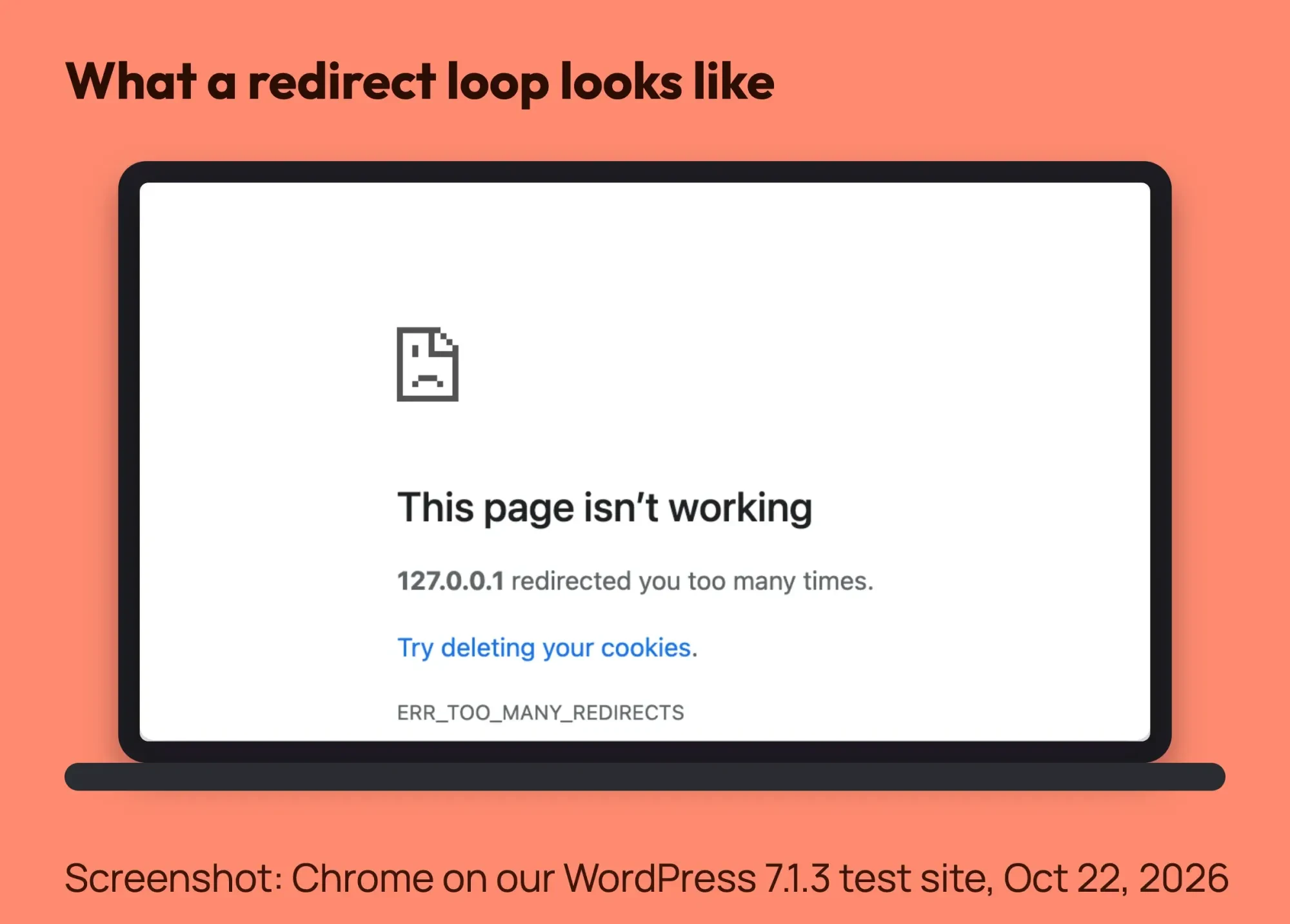 Screenshot: Chrome on our local WordPress 7.1.3 test site with a redirect loop, October 22, 2026.
Our check with curl, a command-line tool, counted 25 redirects before it stopped. Watch the heading, though. In the Chrome error page strings, "This page isn't working" is the same heading Chrome uses for HTTP 5xx server errors.
Skip the heading and read the line under it. "Redirected you too many times" means a loop. "HTTP ERROR 500" means a server error, which needs a different fix.
Is it your browser or your site?
It's your browser if the site loads in a private window or on your phone, and your site if it loops everywhere. Test both, using cellular data on the phone. If it loads there, your normal browser holds an old cookie or a saved redirect.
Browsers can keep a 301 redirect after the site is fixed. RFC 9110 says a 301 "is heuristically cacheable." Clear cookies and site data for that one domain, not your whole history.
If the loop shows everywhere, the problem is on the site. Move on to the next section.
How can you see where the loop goes?
A redirect trace shows every hop in order. Paste your address into our free redirect checker to check your redirect chain. It follows up to 10 hops, as Googlebot does, and names the two addresses that send to each other.
Each hop pattern points to a cause:
- The same address sends to itself: Cloudflare on Flexible while your host forces HTTPS.
- http to https and back to http: two rules disagree about HTTPS.
- www to no-www and back: your Site Address and a host or Cloudflare rule disagree about www.
- /page to /page/ and back: two rules disagree about the trailing slash.
- Only /wp-admin/ or the login page loops: a login cookie, a cookie setting or a security plugin.
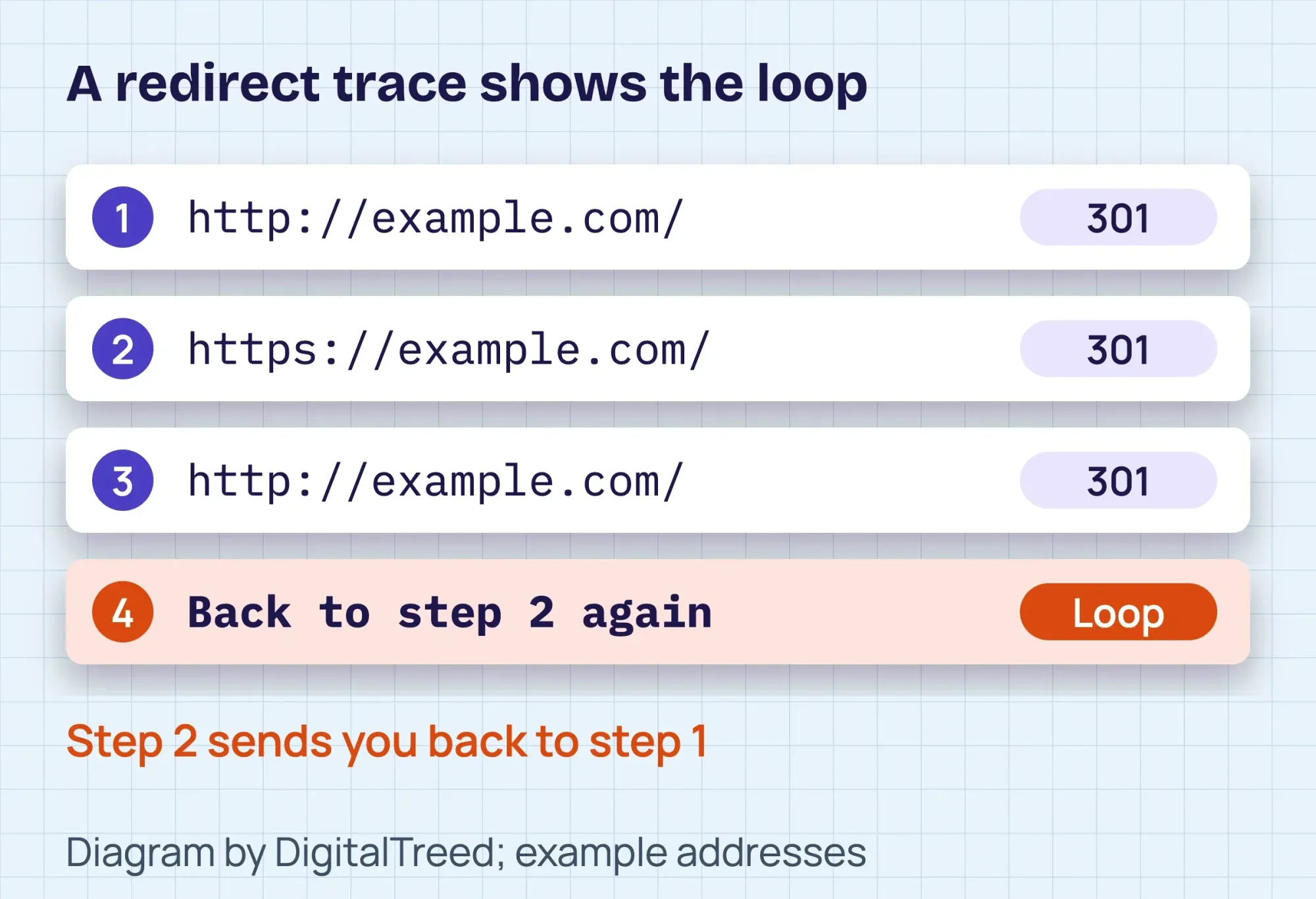 Diagram by DigitalTreed: how a redirect trace lists each hop and shows where it starts going in circles.
One limit: the checker fetches your site with no cookies and no login. A loop that only hits logged-in users will not show up there. We didn't run the checker in our own test.
How to fix too many redirects in WordPress
First, write down what changed last: SSL turned on, Cloudflare added, a plugin updated or the site moved. That usually points to the right step.
Then download copies of wp-config.php and .htaccess from your site's main folder. If an edit goes wrong, upload the copy back. Work down this list in order.
- Clear the site's cookies. Delete cookies for this one domain, then do a hard reload that bypasses the browser cache. Undo: just log in again.
- Fix the Cloudflare SSL mode. If you use Cloudflare, set SSL/TLS to Full (strict), then purge the homepage by URL. Undo: set the old mode back.
- Match the two WordPress addresses. Make WordPress Address and Site Address identical in Settings > General, or in wp-config.php if you are locked out. Undo: type the old values back, or delete the two lines.
- Force HTTPS in one place only. Check Cloudflare, your host panel and any SSL plugin. Keep one HTTPS switch on and turn the others off. Undo: switch them back on.
- Reset .htaccess. Rename .htaccess to .htaccess_old, load the site, then rebuild it from Settings > Permalinks. Undo: rename it back.
- Turn off plugins. Start with SSL, redirect, cache and security plugins. If locked out, rename that plugin's folder in wp-content/plugins. Not sure which one? Rename the whole plugins folder to plugins.off. That also turns off forms and shop plugins for visitors. Undo: rename it back.
- Clear every cache. Empty the cache plugin, the host cache and Cloudflare's cache. Undo: none needed. Nothing is lost, and pages rebuild.
- Fix the proxy setting. If Cloudflare is on Full or Full (strict) and the loop stays, a developer adds the proxy lines shown below to wp-config.php.
- Hand server rules to your host. Nginx rules, panel redirects and multisite networks are jobs for your host or a developer.
How do you fix ERR_TOO_MANY_REDIRECTS with Cloudflare?
Cloudflare's redirect troubleshooting page explains it. On Flexible, Cloudflare talks to your server over plain HTTP. If your server "automatically redirects all HTTP requests to HTTPS," it loops.
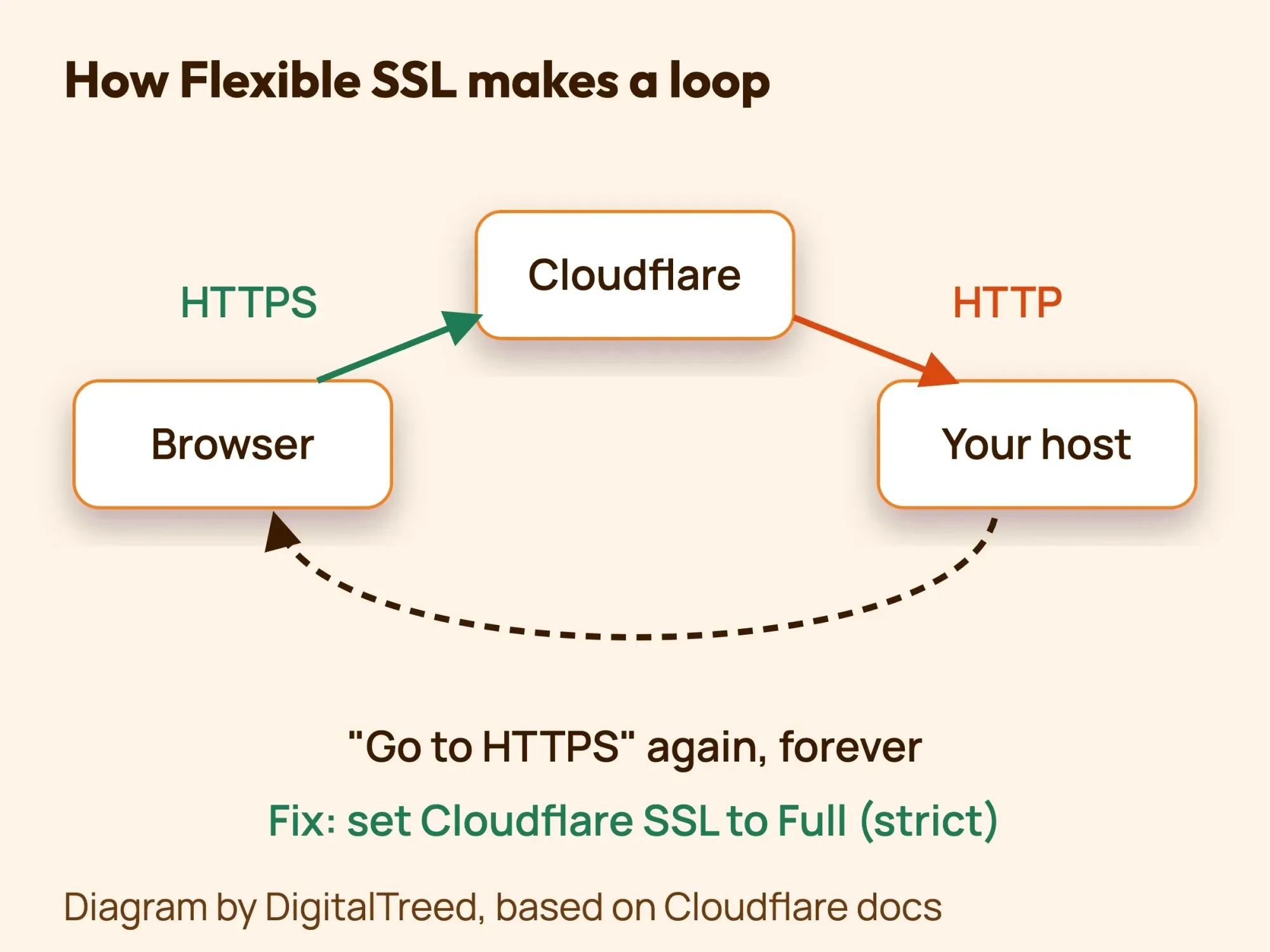 Diagram by DigitalTreed: why Flexible mode plus a host that forces HTTPS sends visitors in a circle.
One setting fixes it. In Cloudflare, open SSL/TLS Overview and pick Full (strict). The Flexible mode page says to use Full or Full (strict) if your origin forces HTTPS.
Full (strict) needs a valid SSL certificate on your host first. A free Cloudflare Origin CA certificate also counts. Check yours with our free SSL checker before you switch. Cloudflare's encryption modes page also lists a newer "Automatic SSL/TLS (default)" mode, so check which mode is really active.
Then clear Cloudflare's copy of the page. Its purge guide "strongly recommends" purging single URLs instead of the whole cache, so purge the homepage first.
Still looping on Full (strict)? Cloudflare's same loop page says your host may be sending HTTPS back to HTTP. It also lists HSTS and clashing redirect rules as causes. It says to review your redirect rules and Page Rules so none of them conflict.
To test whether Cloudflare is part of the loop at all, pause it. Its pause guide puts the switch under Overview > Advanced Actions > Pause Cloudflare on Site. Traffic then goes straight to your host.
While paused, Cloudflare's certificates and rules are off too, per the same guide. So keep the test short, and turn Cloudflare back on when you are done.
How do you make the two WordPress addresses match?
Go to Settings > General and use the same www choice in both fields. The WordPress guide to changing the site URL says both "should include the https:// part and should not have a slash / at the end."
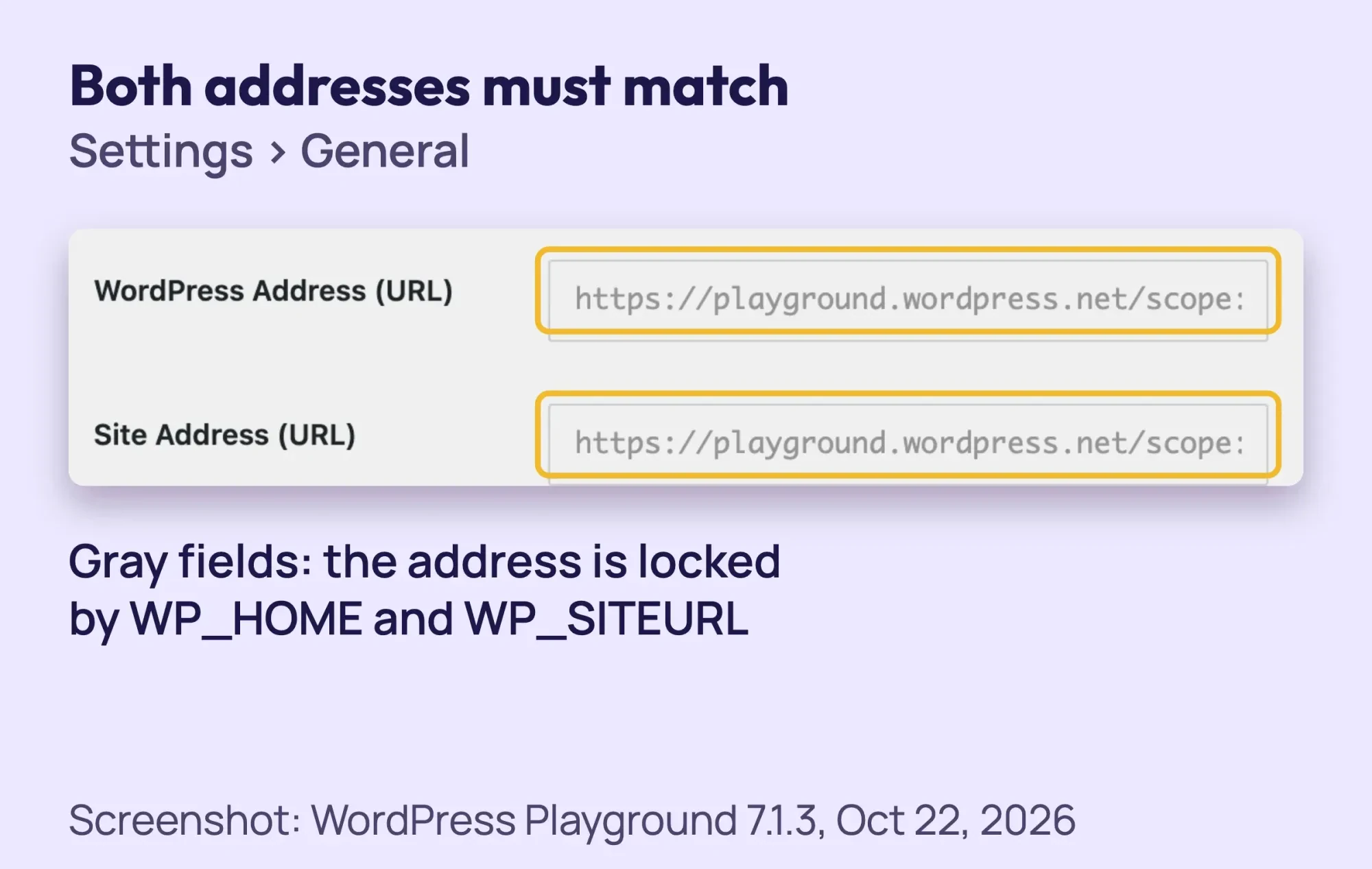 Screenshot: Settings > General in WordPress Playground 7.1.3, October 22, 2026. The fields are gray because the address is set with WP_HOME and WP_SITEURL, the same lines shown below.
Locked out of the dashboard? Add these 2 lines to wp-config.php, just above "That's all, stop editing!" Use your own address. The wp-config.php documentation says they override the values stored in the database.
define( 'WP_HOME', 'https://example.com' );
define( 'WP_SITEURL', 'https://example.com' );
While these lines are there, the two fields are locked in the dashboard. One typo in wp-config.php can cause a white screen, so keep your backup copy close. WordPress also redirects www and non-www to match your Site Address, per the redirect_canonical reference. A host rule that does the opposite makes a loop.
How do you force HTTPS in one place only?
HTTPS can be forced in up to four places: Cloudflare, your host panel, an SSL plugin and .htaccess. Cloudflare's Always Use HTTPS page warns that redirects at your origin server "can cause redirect loop errors."
Pick one place and turn the others off. Take a screenshot of each setting before you change it, so you can switch it back.
How do you reset .htaccess?
This step applies to Apache and LiteSpeed hosts only. Sites on Nginx have no .htaccess file, so the host must check the server settings. Show hidden files in your host's File Manager, then rename .htaccess to .htaccess_old.
Once the homepage loads, open Settings > Permalinks and click Save Changes. Inner pages may show a 404 until you do, as our permalinks fix guide explains. The WordPress .htaccess page gives the basic block:
# BEGIN WordPress
RewriteEngine On
RewriteRule .* - [E=HTTP_AUTHORIZATION:%{HTTP:Authorization}]
RewriteBase /
RewriteRule ^index\.php$ - [L]
RewriteCond %{REQUEST_FILENAME} !-f
RewriteCond %{REQUEST_FILENAME} !-d
RewriteRule . /index.php [L]
# END WordPress
How do you test plugins and the theme?
Start with the plugins most likely to redirect: SSL, redirect, cache and security plugins. Turn them off one at a time in Plugins > Installed Plugins. Reload the site after each one.
Locked out? WordPress's troubleshooting FAQ says to rename wp-content/plugins to something like plugins.hold. That turns off every plugin but keeps their settings.
After you rename the folder back, all plugins stay off, per the same FAQ. Turn them back on one by one, and reload after each. The one that brings the loop back is the cause.
No plugin to blame? Test the theme next. Our HTTP 500 fix guide walks through the theme test, which works the same way for a loop.
What if WordPress sits behind Cloudflare or a proxy?
This is the hardest step, and it's for a developer. WordPress needs to read the X-Forwarded-Proto header. Without it, the WordPress HTTPS guide warns, a proxy that provides SSL can "send any requests into an infinite redirect loop."
Use this code only with Cloudflare on Full or Full (strict). These lines go above "That's all, stop editing!" We added an isset() check so PHP does not warn when the header is missing.
if ( isset( $_SERVER['HTTP_X_FORWARDED_PROTO'] ) && strpos( $_SERVER['HTTP_X_FORWARDED_PROTO'], 'https' ) !== false ) {
    $_SERVER['HTTPS'] = 'on';
}
If you'd rather not edit server code, our WordPress development team can trace the loop and fix it. (DigitalTreed sells this service.)
Why does wp-admin show too many redirects?
When only /wp-admin/ or the login page loops, the cause is usually a login cookie, a cookie setting or a security plugin. Start with cookies. Clear the site's cookies and try a private window. Then check that both WordPress addresses match.
Next, look in wp-config.php for a COOKIE_DOMAIN line, which sets the domain for login cookies. If it doesn't match your domain, that's a suspect. WPBeginner lists it as a wp-admin loop cause. Also turn off security or login-URL plugins one folder at a time.
A FORCE_SSL_ADMIN line in wp-config.php forces logins over HTTPS. Behind a proxy it can loop too. The proxy code above fixes that, and it's a developer job.
What if it started after a move or a domain change?
When a loop starts after a move or a domain change, the old address is usually still saved somewhere. It often stays in the database or in an old host rule. The fix is a search and replace of the old address in the database.
That needs a full database backup first, and it's a developer job. Partial replaces can break the site. On a multisite network, the WordPress URL guide says "you will need to manually edit your database."
How do you check that the loop is gone?
The loop is gone when a redirect trace shows a short chain that ends on a 200 status. Test from outside your own browser, since it may still hold a saved redirect. Run your address through our redirect checker again to see the full chain.
On a Mac or Linux terminal, curl does the same job. Its manual says -L follows redirects and --max-redirs caps how many. Without a cap, curl follows up to 50.
curl -sSIL --max-redirs 10 https://example.com/ | grep -iE '^(HTTP|location)'Use your own address. Each hop prints a status line, and each redirect adds a Location line. A fixed site ends on a 200 line. If it still loops, curl stops at 10 and prints "Maximum (10) redirects followed."
How do you stop the loop from coming back?
You stop the loop from coming back by changing one redirect setting at a time and forcing HTTPS in one place only. Most causes in the table start with a change to HTTPS, Cloudflare, a plugin or the site address. These habits keep that change from making a new loop:
- Force HTTPS in one place only, and write down which one you chose.
- Keep Cloudflare on Full (strict), never Flexible, when your host forces HTTPS.
- Change one setting at a time, then reload the site in a private window.
- Download wp-config.php and .htaccess before every edit, so you can undo it.
- Before you add a redirect in Cloudflare, a plugin or your host panel, check the other two for one that does the opposite.
- Run the redirect checker after any change to SSL, Cloudflare or your domain.
Setting up a new site? Our step-by-step WordPress website guide covers securing it before launch.
Does a redirect loop hurt SEO?
Yes, a redirect loop hurts SEO while it lasts, because Google's crawlers can't reach the page at all. Google's crawler documentation says its crawlers "follow up to 10 redirect hops." A loop never ends, so Googlebot never gets the page.
Search Console's Page indexing report lists these pages under "Redirect error," and "A redirect loop" is one of its causes. After the fix, check that report with our Google Search Console guide. Google's docs don't mention any lasting penalty.
Once the loop is gone, open the "Redirect error" row in that report and click Validate fix. Then our technical SEO audit checklist shows how to find other redirect chains and sitemap errors. Google's help for that report says validation "typically takes up to about two weeks," though it can take longer.
How is this different from other WordPress errors?
Redirect loops come from settings that disagree, not from broken code or a failed server. Other WordPress errors point elsewhere. A 500 points to PHP or the server, a database error to the database login, and a 502 to a server that didn't answer. A page that refuses you outright is a 403, and our 403 Forbidden WordPress fix covers that one. The table matches each message to its fix.
| What you see | What it is | Read next |
|---|---|---|
| Redirected you too many times / ERR_TOO_MANY_REDIRECTS | A redirect loop | This guide |
| This page isn't working / HTTP ERROR 500 | A server or PHP error | HTTP 500 error fix |
| Error establishing a database connection | WordPress can't log in to its database | database connection fix |
| 502 Bad Gateway | The server behind your site didn't answer | 502 bad gateway fix |
| A blank white page | Often a PHP error with display turned off | debugging WordPress |
Example: a heating and cooling company in Tulsa
Example: a made-up family HVAC company in Tulsa, Oklahoma, adds its domain to Cloudflare's free plan on a Monday morning. By lunch, the site shows "redirected you too many times."
Its host already forces HTTPS, and Cloudflare is on Flexible. A redirect trace shows the homepage pointing to itself. The SSL checker confirms the host's certificate is valid.
The owner sets SSL/TLS to Full (strict), purges the homepage and clears the site's cookies. The site loads. Plugins, .htaccess and the database were never touched.
When should you call your host?
Call your host when the loop survives every fix above, or when the cause sits in server rules you can't reach. Nginx sites, multisite networks and loops after a move usually need your host or a developer. Check this list first:
- The loop stays after you clear cookies and caches and check Cloudflare, the addresses and the HTTPS switches.
- Your site runs on Nginx, or the panel shows no redirect settings you can change.
- It started after a move or a domain change.
- Your site is a multisite network.
- It redirects to a domain you don't know. Treat that as a possible hack, not a loop.
Send your host a short, specific email. Copy this one and swap in your own address, time and last change:
Note
Subject: Redirect loop on example.com, ERR_TOO_MANY_REDIRECTS. My WordPress site shows "redirected you too many times" in every browser since 10:15 a.m. CT. Just before that, I connected Cloudflare. A redirect trace shows https://example.com/ sending to itself. I cleared cookies, and both WordPress addresses are https://example.com. Please check for HTTPS or www redirects at the server level and tell me which rule sends visitors back.
Frequently asked
Is my site hacked?
Usually not. A loop is two settings that disagree. If the site sends visitors to a domain you don't recognize, treat it as a hack and call a developer.
Will fixing it delete my content?
No. None of these steps edit posts or pages. They change settings, file names and caches. Back up first anyway.
Why does it work on my phone but not my laptop?
Your laptop's browser likely holds an old cookie or a saved 301 redirect. Clear that one site's cookies and data, then reload.
How many redirects is too many?
For a loop, any number is too many, because it never ends. Chrome and Firefox stop after 20 redirects, and Google's crawlers follow up to 10. For normal redirects, link straight to the final address so visitors skip extra hops.
How do I fix it on an iPhone or in Safari?
Clear that site's website data in Safari's settings. If the loop stays, the fix is on the site, and the steps above are the same.
Your next step
Right now, open the site in a private window and read the second line of the error. Then check Cloudflare's SSL mode and your two WordPress addresses.
If the loop comes back, or it started after a move, our WordPress development team can find the rule that loops and fix it.
How we made this guide: it's built from WordPress's developer documentation, Cloudflare's SSL docs and Google's crawler docs. We also used RFC 9110 and the Chromium and Firefox source code. We recreated a loop on a local WordPress 7.1.3 test site with a rule that forces HTTPS, and took the screenshot on October 22, 2026. We checked every number against the source named next to it the same day. Updated October 23, 2026: added a causes table, Firefox's wording and Cloudflare's pause test and rule check. We also added a plugin and theme test, a curl check of the fix and habits that stop new loops.
First published June 2020. Rewritten October 22, 2026: our own loop test, Chrome's exact wording, Cloudflare first, an undo per step, wp-admin and migration loops, and a host email. Updated October 25, 2026: short answers open each question section, our loop test got its own heading, and we linked our WordPress guide.
Sources
- WordPress Developer Resources: Changing The Site URL
- WordPress Developer Resources: wp-config.php
- WordPress Developer Resources: HTTPS
- WordPress Developer Resources: Apache HTTPD / .htaccess
- WordPress Developer Resources: redirect_canonical()
- Cloudflare docs: ERR_TOO_MANY_REDIRECTS (vendor)
- Cloudflare docs: Flexible encryption mode (vendor)
- Cloudflare docs: Encryption modes (vendor)
- Cloudflare docs: Always Use HTTPS (vendor)
- Cloudflare docs: Purge everything (vendor)
- Google: HTTP status codes, network and DNS errors
- Google Search Console Help: Page indexing report
- RFC 9110, HTTP Semantics, section 15.4 (Redirection 3xx)
- MDN: Redirections in HTTP
- Chromium source: net/url_request/url_request.h
- Chromium source: components/error_page_strings.grdp
- Firefox source: modules/libpref/init/all.js
- WordPress Documentation: FAQ Troubleshooting
- Cloudflare docs: Pause Cloudflare (vendor)
- curl man page
- Firefox source: toolkit/locales/en-US/toolkit/neterror/certError.ftl
- WPBeginner: How to Fix Error Too Many Redirects Issue in WordPress (third party)


Comments
No comments yet. Start the conversation below.