
Quick answer
Selling feet pics online safely means letting a platform take the payment and reporting every dollar to the IRS, as of November 2026. That's true even when your sales stay under the $20,000 Form 1099-K threshold. Adobe Stock lists $0.33 to $3.30 per standard photo download, while OnlyFans keeps 20% of each fan payment. Before your first sale, turn off camera location and open separate accounts.
Selling feet pics online means licensing or selling photos of your feet through a platform or straight to a buyer, and the IRS counts that money as income. Taking the photos is the simple part. It's the money that gets lost: to checks that bounce after you've sent change back, to location data saved in files, and to tax bills nobody saved for.
This guide doesn't rank or recommend any platform below. Before the first sale, have a licensed tax pro or attorney check the plan against your own facts.
Key takeaways
- Report every sale to the IRS, whether or not a Form 1099-K shows up.
- Adobe Stock listed $0.33 to $3.30 per standard photo download in November 2026.
- OnlyFans terms take a 20% fee from every fan payment.
- Refuse any buyer who overpays by check and asks for change back.
- Self-employment tax starts once profit times 92.35% reaches $400.
Three ways a foot photo gets sold
Before choosing a site, check what it accepts. Shutterstock reviews uploads, and its rejection guide, dated July 8, 2025, turns away "explicit nudity" outright. It takes "Sexual or suggestive content" only with a mature content model release. Its Mature Content page says tagged images appear on Shutterstock.com only when Safe Search is off. Adobe's content rules sit on a help site that sent our checker a 403 error on November 12, 2026, so this guide can't say how Adobe reviews these photos.
- Stock license: you upload to an agency such as Adobe Stock or Shutterstock, a customer buys a license at checkout, and the agency pays you a share.
- Creator platform: fans pay the platform for access to your posts, and it keeps a fee before paying you.
- Direct sale: a stranger DMs you, asks for a custom set and offers to pay by app, check or gift card.
On the first two routes, the platform collects the buyer's money before you see a cent, so a fake check never gets anywhere near your own bank account. A direct sale skips that step. The FTC's fake check guide describes the classic version: an online buyer "accidentally" overpays by check, then wants the extra sent back. The same guide warns that "It can take weeks for a bank to figure out that the check is a fake."
Adobe's contributor page says "Your submissions will fuel Adobe Stock, Firefly, Express, and Creative Cloud". It calls the deal a non-exclusive partnership, which means you keep your rights and can license the same photo elsewhere, while Adobe promotes and licenses it across its own apps.
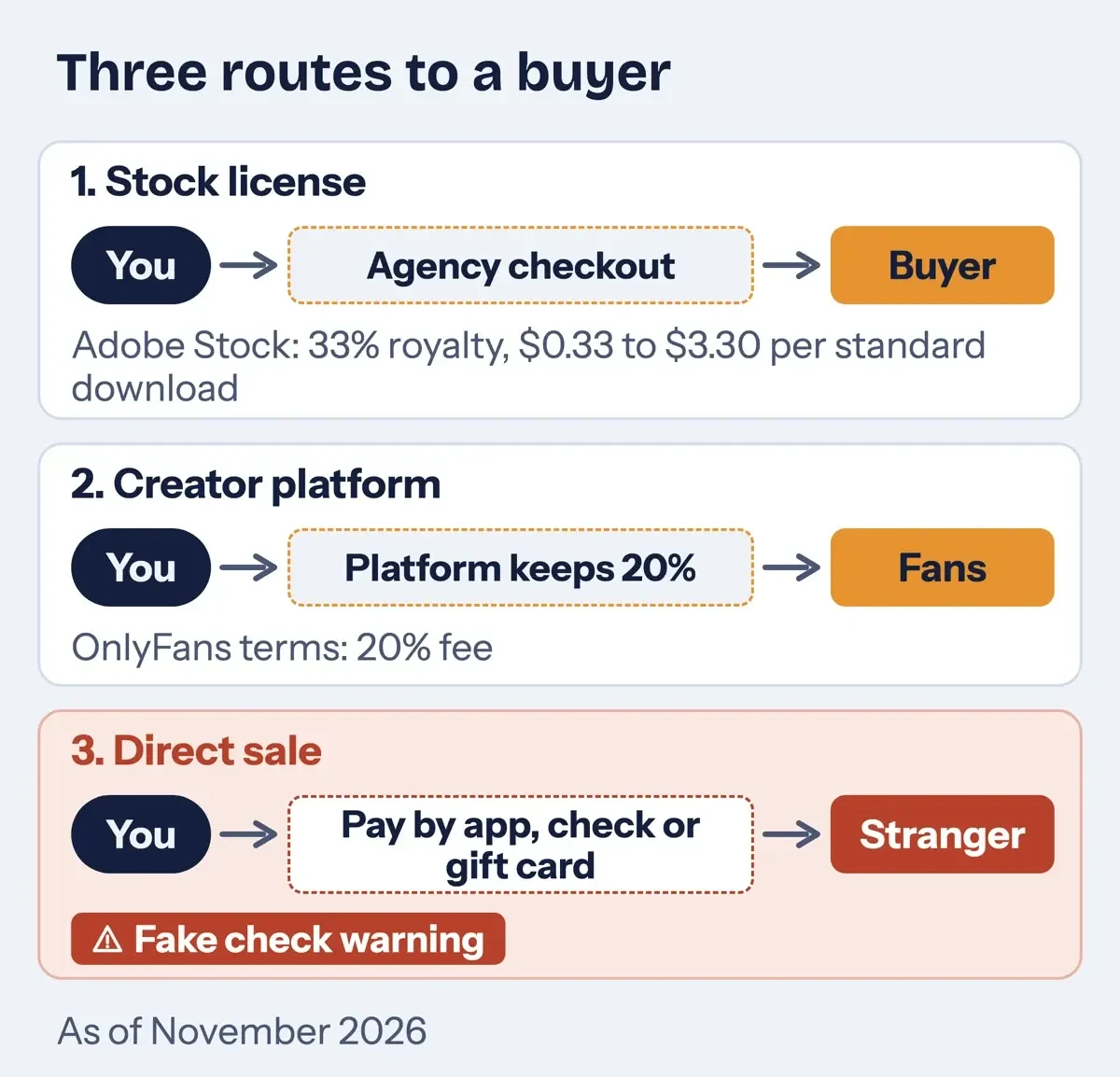 Diagram by DigitalTreed: three routes a foot photo takes to a buyer, with what each platform keeps as of November 2026.
What Adobe Stock, Shutterstock and OnlyFans keep
We read each platform's own terms and help pages on November 12, 2026, without creating an account or viewing any seller dashboard.
| Platform (pages read November 12, 2026) | What you keep, per its own pages | Age and ID | Tax form or payout rule |
|---|---|---|---|
| Adobe Stock | 33% royalty on photos; $0.33 to $3.30 per standard download, by buyer plan, at US prices | At least 18 and the sole owner of what you submit | Neither Adobe page we read covers it |
| Shutterstock | A percentage of the license price that varies with your earnings level; the level rates sit on a page our checker couldn't load | At least 18; parents may not open accounts for children | Form W-9 requested at $10.00 in earnings; no payment until it's on file |
| OnlyFans (Terms of Service, named without a link) | 80% of each payment after its 20% fee, before any currency conversion fees | At least 18, ID photos and identity verification | Tax documents and a minimum payout amount |
On Adobe Stock's annual 10-credit plan, its royalty page shows $0.99 a download as of November 2026. As an example, keeping $100 at that rate takes 102 downloads ($100 / $0.99, rounded up). At $3.30 on a 3-credit monthly plan, it takes 31 ($100 / $3.30, rounded up). On OnlyFans, an example $10 payment leaves $8.00 after the 20% fee, so the example $100 takes 13 payments ($100 / $8.00 = 12.5, rounded up). Adobe adds that "Earnings per download are based on pricing for US customers." On the biggest buyer plans, of 350 credits a month or more, its royalty page lists a "Minimum guaranteed $0.33 to $0.40" per download instead.
Shutterstock's earnings FAQ prices one customer plan at $49 a month for 10 images. That's $4.90 an image, and your share is a percentage of it. The OnlyFans terms phrase the fee this way: "Our fee for Creator Interactions is calculated as 20% of the total User Payment." Payouts also wait until your balance meets a minimum. We tried FeetFinder's FAQ, terms and pricing pages too. Each one returned a 403 error to our plain, honest-agent checker on November 12, 2026, so none of FeetFinder's fees appear in the table or anywhere in this guide. FunwithFeet's terms are in our FunwithFeet review.
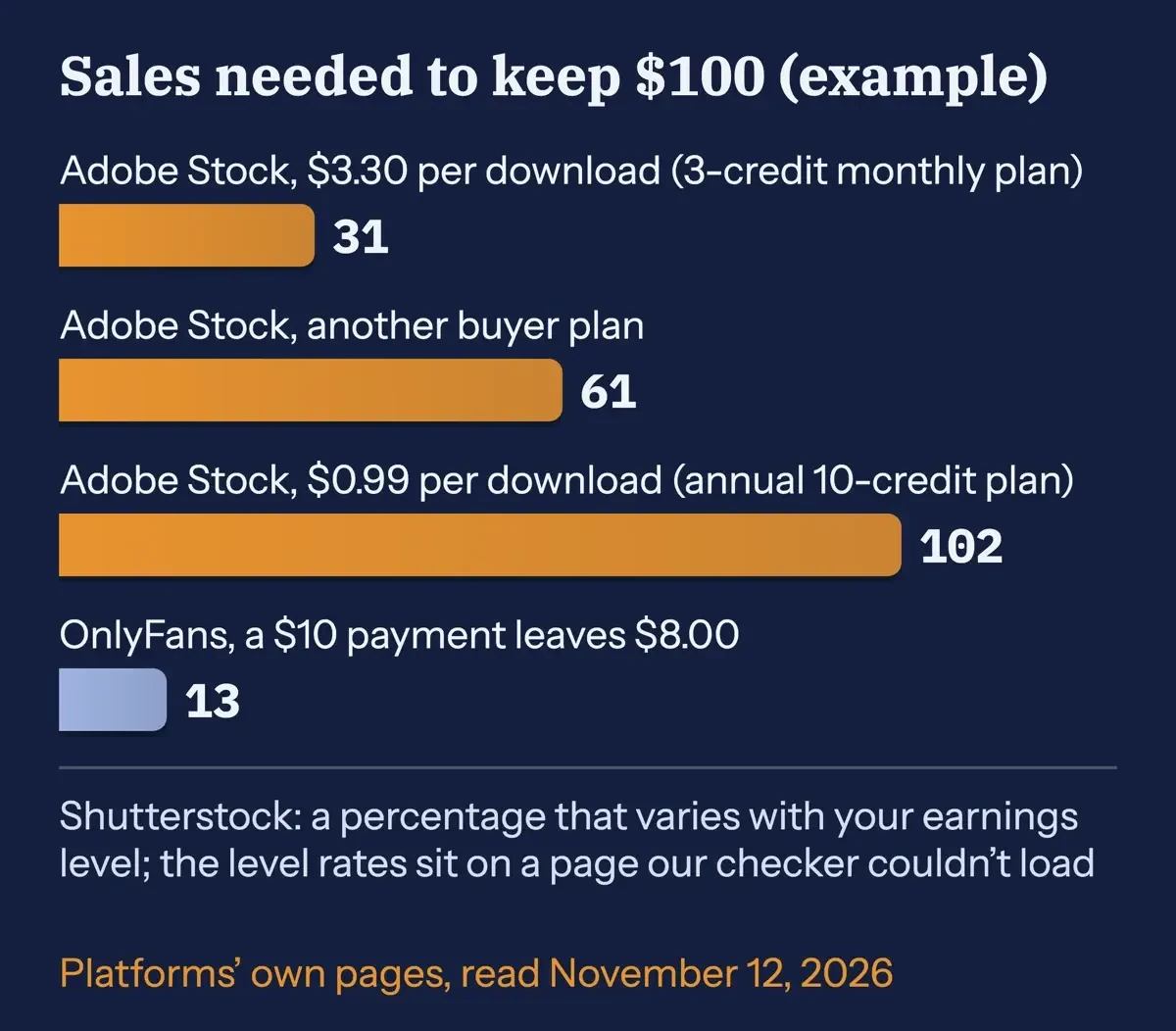 Diagram by DigitalTreed: sales needed to keep $100 (example), from each platform's own published numbers as of November 2026.
How do fake buyers try to take your money?
Scams aimed at sellers flip the usual flow of money: the buyer needs you to send something first. We turned the five patterns below, from FTC, CISA and FBI pages, into rules for our test script, and each one caught at least one made-up message.
- Overpayment. A check for more than your price, then a request to send back the difference. The FTC adds that seeing the money in your account proves nothing: "Even if you see the funds in your account, that doesn't mean it's a good check."
- Gift card fees. A fee you must pay with a gift card to release your money. The FTC gift card page puts it bluntly: "Only scammers will tell you to buy a gift card" and hand over the numbers.
- Codes and logins. A fake support message asking for the code just texted to you. The FTC payment app advice says never to hand your login details to anyone who contacts you, and to add multi-factor authentication or a PIN.
- Payout links. A note that your payout is on hold until you verify it at a link. CISA's phishing page lists "Urgent or emotionally appealing language" as a sign.
- Face, ID and threats. A request for a selfie or your license, sometimes followed by a demand for money. An FBI alert from June 5, 2023 says criminals edit benign photos into explicit fakes for extortion.
CISA's list goes past urgency: it also names "Requests to send personal and financial information" and untrusted shortened URLs. So a buyer who wants your bank details before paying fails the test on its own. The FTC's gift card page adds a practical step: keep the card itself and the store receipt, since you'll need both to report the scam.
If a message fits any of these patterns, stop replying, take screenshots of the whole thread and the profile, and only then block the account and report it. The FTC's scam advice says to "never deposit a check and send money back to someone." Report fraud at ReportFraud.ftc.gov. Threats, extortion and any demand for money tied to your photos go to the FBI's Internet Crime Complaint Center, which it runs as the central hub for cyber-enabled crime reports. Tapped a payout link already? Our phishing link cleanup guide covers the cleanup steps. The same tricks show up where buyers find sellers, and our pieces on Instagram scams and Snapchat scams show how they look in DMs.
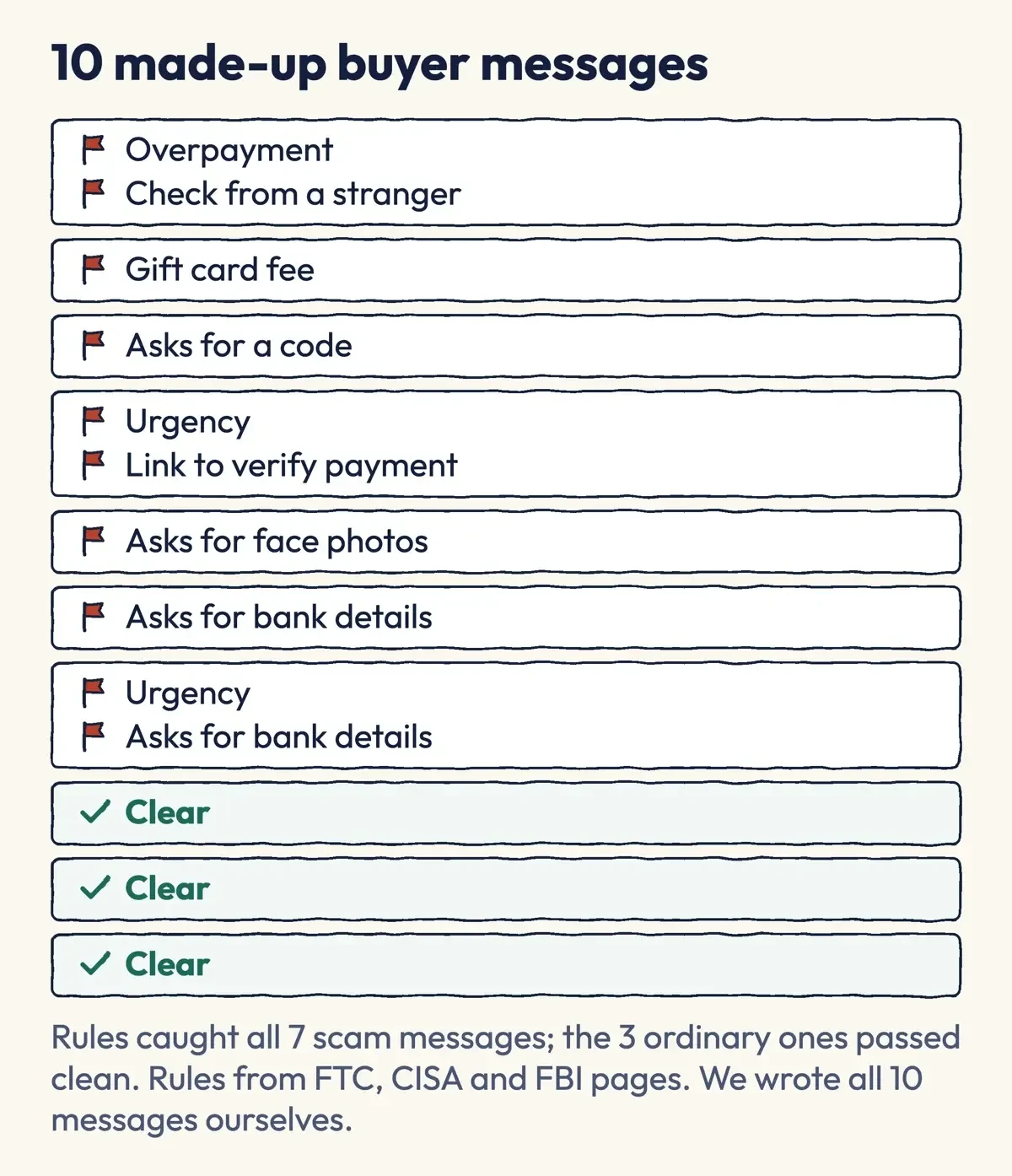 Drawn by us: our red-flag rules run on 10 made-up buyer messages, November 12, 2026.
Keep your location and real name out of the files
A buyer who never sees your face can still learn where you live from the location that's saved inside a photo file. Google's Photos help page says a phone camera can save your location with each photo. It also says: "If a location was automatically added by your camera, you can't update or remove the location in Google Photos." So fix it before you shoot. Apple's Location Services page shows how to turn Location Services on or off for individual apps, so you can switch it off for the camera. Photos also carry Exif data, a file standard the Library of Congress documents for digital cameras. We tested stripping it in our footography guide.
Set up a separate selling identity before you've posted anything:
- Open a new email address that's only for selling, with no part of your real name in it.
- Give each selling account a password of at least 16 characters, as CISA's password page advises, and keep them all in a password manager instead of a phone note.
- Turn on two-factor sign-in with an authenticator app or a security key; the FTC calls those the more secure types, and CISA covers setup.
- Take payment only inside the platform, and don't send bank or routing numbers in chat.
- Crop or cover tattoos, rings, mail, rugs and windows that could tie a photo to you or your home.
The OnlyFans terms state "Your Content is not confidential" and let fans view it "for their own lawful and personal use." If someone uses your personal information, the FTC points people to IdentityTheft.gov for a recovery plan. Keep a dated log of where each photo's been posted, so you'll have the dates for any takedown request.
Age, consent and model release rules
Every platform we read draws the same first line, and Shutterstock spells out that a parent can't open an account or submit work for a child: you must be 18. Adobe says contributors "must be at least 18 years or older", and the OnlyFans terms say "You must be at least 18 years old."
Stock agencies also want paperwork when a person can be recognized, and that includes you. Shutterstock's model release page requires "a valid model release for every recognizable person - even if the model is yourself." It adds: "A partially visible face is still considered recognizable." Anyone else in the frame, such as a friend's foot in the corner or a partner's hand on your ankle, needs to give their own OK. If they're identifiable, a stock agency wants their signed release too. The OnlyFans terms ask for "written consents and releases" for third-party material.
The Justice Department's citizen's guide calls a minor "someone under 18 years of age." It says a state's age of consent doesn't change that for images. A separate law, 18 U.S.C. 2257, requires anyone producing explicit images to verify every performer's name and date of birth from an ID document. This guide covers non-explicit photos only.
Say a private image of you is posted without consent. The TAKE IT DOWN Act at 47 U.S.C. 223a gives covered platforms 48 hours to remove it after a valid request. For images taken when you were under 18, the free Take It Down service from NCMEC doesn't need copies of the images. Its site says "You can remain anonymous while using the service."
These are summaries, not legal advice. A lawyer in your state can apply them to your photos.
What we tested
Once the pages were saved, we ran one local script, test/calc.py, offline on November 12, 2026. It checked every input against those copies before doing any math. To keep an example $100, it needed 31, 61 or 102 Adobe Stock downloads, or 13 OnlyFans payments of $10. Shutterstock is left out. Its level rates weren't on a page we could load. Three made-up example sellers, with profits of $2,650, $380 and $10,500, owed $374.43, $0 and $1,483.60 of self-employment tax. Eight red-flag rules caught all 7 made-up scam messages, while the 3 ordinary ones passed clean. We wrote all 10 messages ourselves, so the result doesn't show how often real buyers lie, only that the rules catch known patterns.
Income tax, self-employment tax and the 1099-K line
Tax starts with the first sale. The IRS page on Form 1099-K says an app or marketplace must send one when payments "total over $20,000 in more than 200 transactions." The IRS 1099-K FAQs credit the One, Big, Beautiful Bill with restoring that line retroactively. A platform may still send one for smaller totals, and either way you must report all income. The IRS page for gig workers adds that side income is taxable even when it's "Paid in any form, including cash, property, goods, or virtual currency." So a gift card from a buyer counts, and so does a pair of shoes sent as payment.
Sales you make regularly for profit go on Schedule C, the IRS form for a business run by a sole proprietor. The IRS calls an activity a business when your main purpose is income or profit. You also have to be involved "with continuity and regularity."
Self-employment tax comes on top of income tax. The IRS rate is 15.3%: 12.4% for Social Security and 2.9% for Medicare. On the 2026 Schedule SE, you multiply profit by 92.35% first, and if the result is under $400 you don't owe any. That's about $433 of profit ($400 divided by 0.9235). In an example for a made-up seller, sales of $3,000 minus $350 in costs leave $2,650 of profit. Times 0.9235, that's $2,447.28, and 15.3% of it is $374.43 of self-employment tax before income tax. Half, $187.22, comes off your income as the employer-equivalent deduction.
That deduction only lowers income tax; the IRS says it doesn't change your net earnings from self-employment or the SE tax itself.
The Social Security part also has a ceiling, since for 2026 it applies only to the first $184,500 of combined wages, tips and net earnings.
Expect to owe $1,000 or more when you file? The IRS estimated tax page says to pay during the year, across four payment periods, using Form 1040-ES. Its estimated tax FAQ uses the same $1,000 line, plus a test of how much tax you've already covered through withholding. Keep what the IRS record-keeping page lists as proof of gross receipts, such as deposit information and invoices. Keep receipts for the costs too, such as props, lighting or a phone tripod, because profit, not sales, is the number that drives the self-employment tax math above. Our guides to reselling items online and becoming a freelancer cover the same habits for other side income.
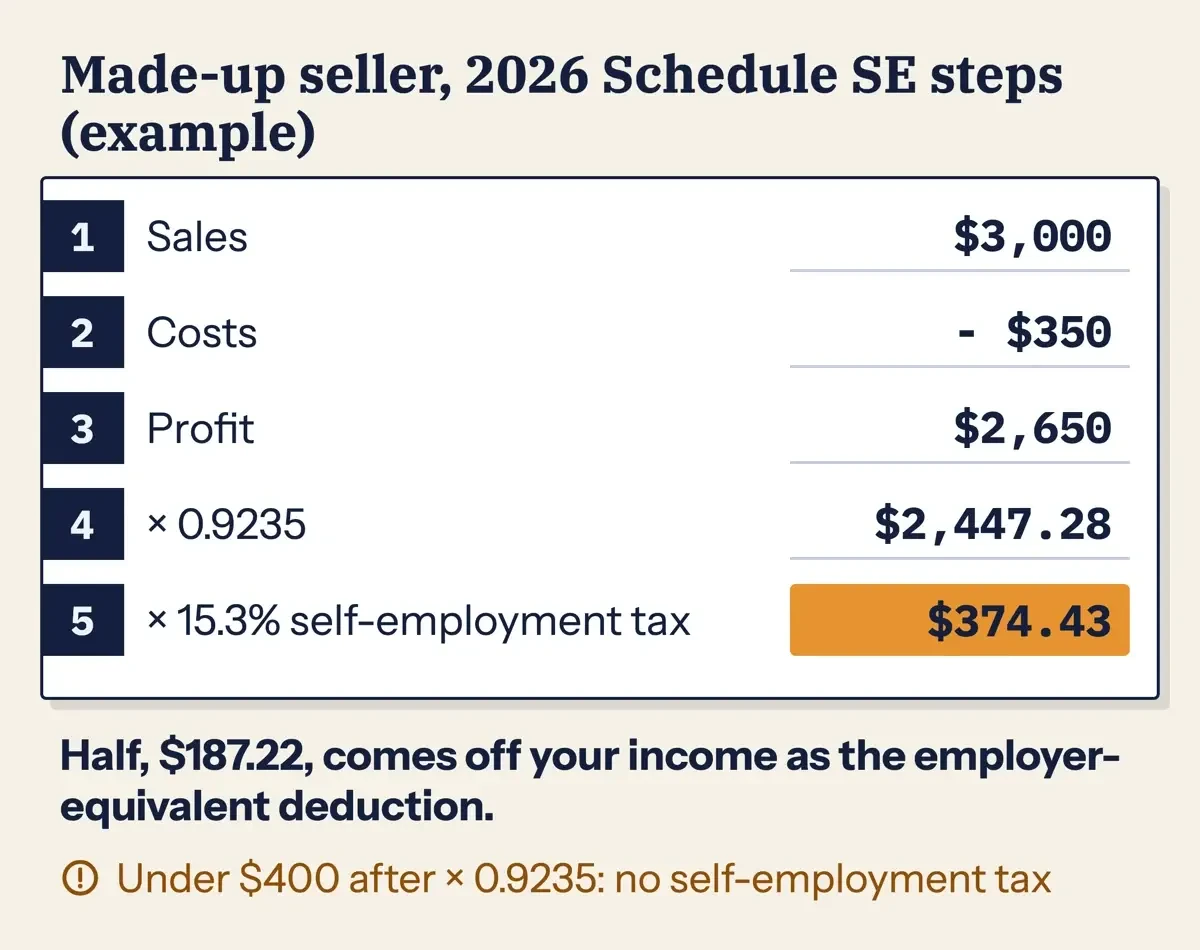 Diagram by DigitalTreed: 2026 Schedule SE steps for a made-up seller (example).
Before your first payout, have a CPA, enrolled agent or tax attorney look at your full return. The IRS page on choosing a tax professional explains each credential.
Frequently asked
Can I sell feet pics without showing my face?
Yes, and the steps above assume it. Watch tattoos, though: Shutterstock's legal center says tattooed models need "both a property release and a model release" for commercial use.
Why does a selling site ask for my Social Security number?
It's for IRS reporting: you use Form W-9 "to provide your correct Taxpayer Identification Number (TIN)" to the filer. Shutterstock asks for one at $10.00 in earnings.
What should I do if someone threatens to post my photos?
Don't pay; save the messages and report them to IC3. A caller claiming to be IC3 is another scammer: IC3's home page says "The IC3 will never directly contact you for information or money."
Is selling feet pics a hobby or a business for taxes?
The IRS looks at how you run it. Its hobby or business fact sheet asks, for example, "Does the taxpayer maintain complete and accurate books and records?"
How we made this guide: We saved the pages in Sources on November 12, 2026 with plain requests, signed up for nothing and opened no seller page. A script compared each quote with those copies. Facts checked by the DigitalTreed team on November 12, 2026. It sums up public rules and isn't legal or tax advice.
First published March 2024 as a general how-to with no sources. Rewritten November 12, 2026 around scams, privacy, platform terms and IRS rules. The old income stories, pros and cons and buyer list had no record, so they're gone.
Sources
- Adobe Stock Contributor: Royalties
- Adobe Stock Contributor: Home and FAQ
- Shutterstock Contributor: Earnings structure FAQ (December 10, 2025)
- Shutterstock Contributor: Minimum age for contributors (April 21, 2025)
- Shutterstock Contributor: W-9 frequently asked questions (July 16, 2025)
- Shutterstock Contributor: Requirements for model releases (September 13, 2025)
- Shutterstock Contributor: Why was my content rejected as being objectionable, explicit or inappropriate (July 8, 2025)
- Shutterstock Contributor: Why was my content rejected for Mature Content designation (July 16, 2025)
- Shutterstock Contributor: Legal center
- OnlyFans: Terms of Service (read November 12, 2026; named without a link)
- FTC: How to spot, avoid and report fake check scams
- FTC: How to avoid a scam
- FTC: Avoiding and reporting gift card scams
- FTC: Mobile payment apps, how to avoid a scam
- FTC: Protect your personal information from hackers and scammers
- CISA: Recognize and report phishing
- CISA: Use strong passwords
- CISA: Turn on MFA
- FBI IC3: Malicious actors manipulating photos and videos (June 5, 2023)
- FBI: Internet Crime Complaint Center
- Google Photos Help: Manage your photos' location
- Apple Support: Turn Location Services and GPS on or off
- Library of Congress: Exif, version 2.2
- U.S. Department of Justice: Citizen's guide to U.S. federal law on child pornography
- LII: 18 U.S.C. 2257, Record keeping requirements
- LII: 47 U.S.C. 223a, Notice and removal of intimate visual depictions
- NCMEC: Take It Down
- IRS: Understanding your Form 1099-K
- IRS: Form 1099-K FAQs
- IRS: Gig economy tax center
- IRS: About Schedule C (Form 1040)
- IRS: Know the difference between a hobby and a business (FS-2022-38)
- IRS: Self-employment tax (Social Security and Medicare taxes)
- IRS: Schedule SE (Form 1040), 2026
- IRS: Estimated taxes
- IRS: Estimated tax FAQs
- IRS: What kind of records should I keep
- IRS: About Form W-9
- IRS: Choosing a tax professional


Comments
No comments yet. Start the conversation below.