
Quick answer
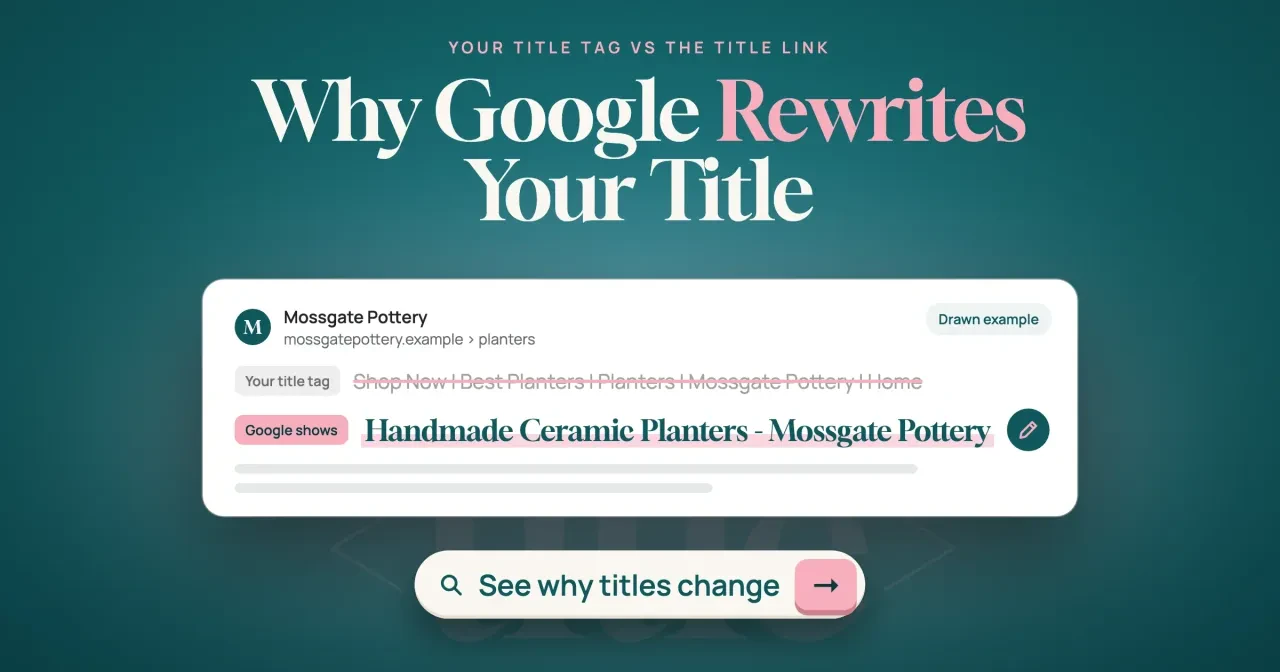
Google rewrites a title when it judges your title tag a poor description of the page. As of October 29, 2026, its title link guide lists 7 common issues, such as half-empty or boilerplate tags. Most tags survive: Google said in September 2021 it kept them around 87% of the time. Fix your page's issue, match the tag to its main heading, then wait for a recrawl.
If you searched for one of your own pages and the blue headline wasn't the title you wrote, you're looking at Google's rewrite. A title link is the clickable headline of a Google result, and Google builds it from your page and from links to it. If you're asking why does Google rewrite my title, this guide is written for US owners of a small store, blog or service site.
We start with how a title link differs from your tag, the nine sources Google pulls from, and why Google rewrites a title. Then comes how to see the title Google shows, our script run on eleven made-up pottery pages and what it flagged. We end with writing a title Google keeps and the recrawl after the fix. Our advice: repair the tag first, because Google still uses it most of the time.
Key takeaways
- Google kept the title element around 87% of the time in 2021.
- Google's title link guide names 7 common issues behind a rewrite.
- Our script flagged 10 of 11 made-up pages before any fixes.
- After the fixes, the same script flagged 0 of 11 pages.
- The Performance report has no title column, so check results by hand.
A title link is Google's choice, and your tag is one input
So what is Google showing, if not your tag? Google's guide to influencing title links defines the title link as a result's title, the part people click to reach your page. It says Google uses "a number of different sources" to set that headline, and a later section of the same page calls the process "completely automated." Your title tag is the strongest of those sources, though not the only one. Most of the time, it wins.
Google's keep rate has moved. In August 2021, Google announced a new title system and said title tags were used "more than 80% of the time." A month later, its follow-up post on titles said title elements were "now used around 87% of the time." Google hasn't published a newer figure on the pages we read. Take 100 indexed pages: at that 2021 rate, about 13 would show a headline you didn't write. That assumes your site behaves like the average, and the 2021 posts give no breakdown by site. A store where one blank template field repeats across hundreds of product tags could land well below that rate.
Three terms get mixed up here. The title tag is the text inside your page's <title> element. The title link is what Google prints as the result's clickable headline, the line a searcher reads first and the one this whole guide is about. The site name is a separate line for the whole site, and Google says it differs from the per-page title link. Title links come from one automated system among many. The systems that decide the order of results are a separate topic, covered in our rundown of Google ranking systems. Mixing the three up sends people chasing the wrong fix, like editing site name settings when the real problem is one page's tag.
Nine sources Google can pull a title from
Your tag sits first on that list, and eight other inputs follow it. Google's title link guide names all nine, in this order:
- Content in
<title>elements - The main visual title shown on the page
- Heading elements, such as
<h1>elements - Content in
og:titlemeta tags - Other large and prominent text styled to stand out
- Other text on the page
- Anchor text on the page
- Text within links that point to the page
- WebSite structured data
Seven of the nine sit on the page itself, from the tag and headings down to the anchor text you write, so you control most of the list. The Open Graph protocol defines og:title as the title of your object "as it should appear within the graph." So a social title written for clicks can feed Google too. The last two live elsewhere: links from other sites carry anchor text you can't edit, and WebSite markup sits on your home page. Your h1 is the source to fix first. In Google's own half-empty and TV-season examples, the repaired title comes from large, prominent text on the page, such as the main heading.
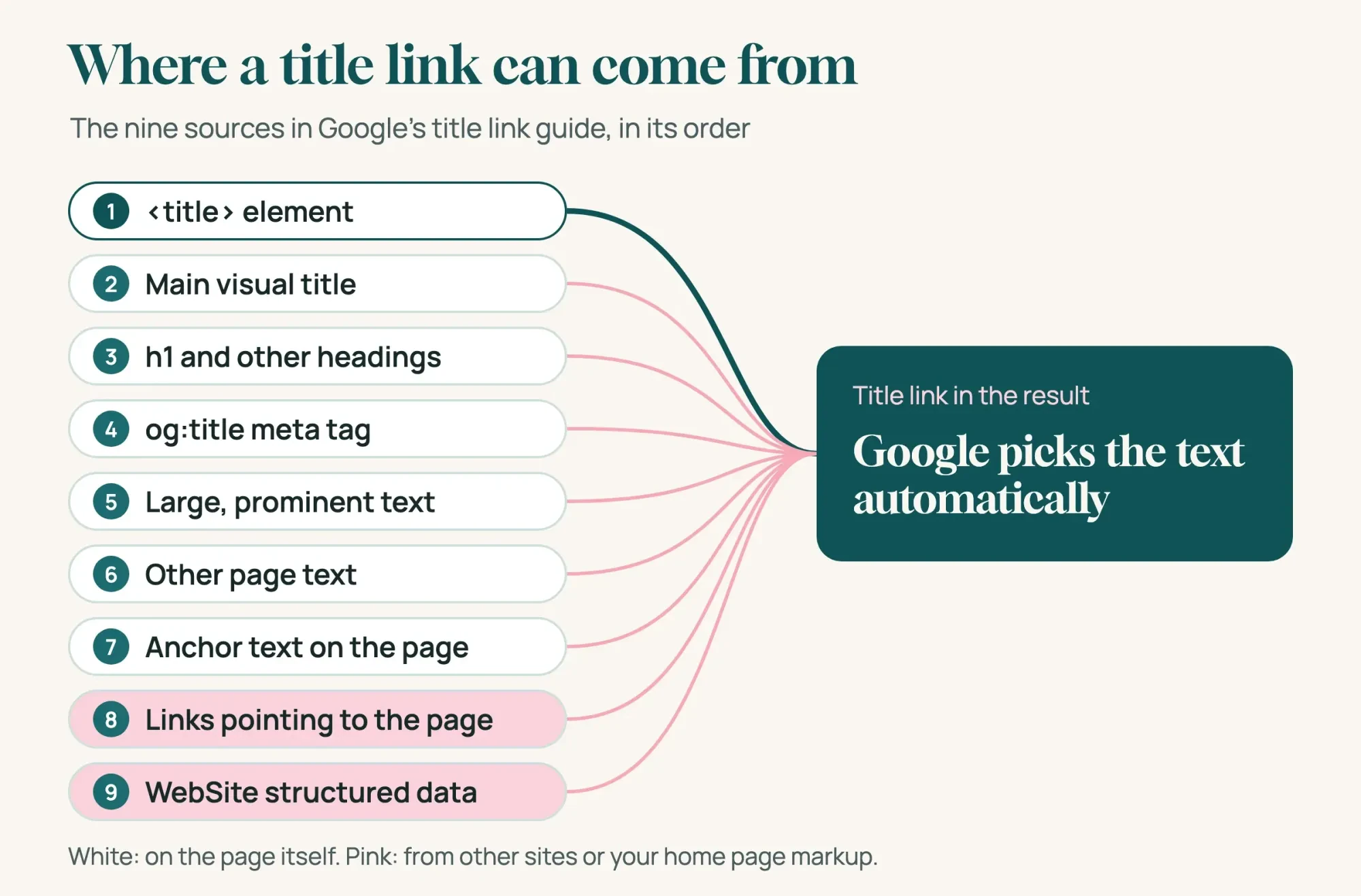 Diagram by DigitalTreed: the nine sources in the order listed in Google Search Central "Influencing your title links," read October 29, 2026
Not sure which heading your page leads with? Our heading structure checker lists every h1 to h6 on a URL, so a second h1 hiding in a banner or footer turns up fast.
Why does Google rewrite my title?
Google rewrites a title when its system finds a problem with the tag. The title link guide says that when Google has detected an issue, it "may try to generate an improved title link" from anchors, on-page text or other sources. The guide's list of common issues has seven entries, and each has a small example:
- Half-empty: part of the tag is missing, as in "| Site Name".
- Obsolete: the tag says 2020 while the page's big headline says 2021.
- Inaccurate: a fixed tag names products a dynamic page doesn't always show.
- Micro-boilerplate: a group of pages shares one tag, such as TV-show season pages without the season number.
- No clear main title: two or more headings look equally prominent, so Google may use the first one.
- Language or writing system mismatch: the tag is in English while the page is in another language.
- Site name duplication: Google may drop a site name the result already shows.
The best-practice section adds three more patterns that cause trouble. Vague tags like "Home" or "Profile" tell searchers nothing. Keyword stuffing, shown with the made-up tag "Foobar, foo bar, foobars, foo bars," can make a result look spammy. Google's spam policies count repeating words "so often that it sounds unnatural" as stuffing. Long tags get cut, since the guide says the title link is truncated "typically to fit the device width." Our post on title and meta description length covers how long is too long. You'll see each of these patterns in our test below, on pages built to look like a small shop, along with all seven issues from the list above.
Long tags don't always get cut from the end, though. For an extremely long title, Google's 2021 announcement says it "might select the most relevant portion" of your text. So the new headline can be a slice of your own tag.
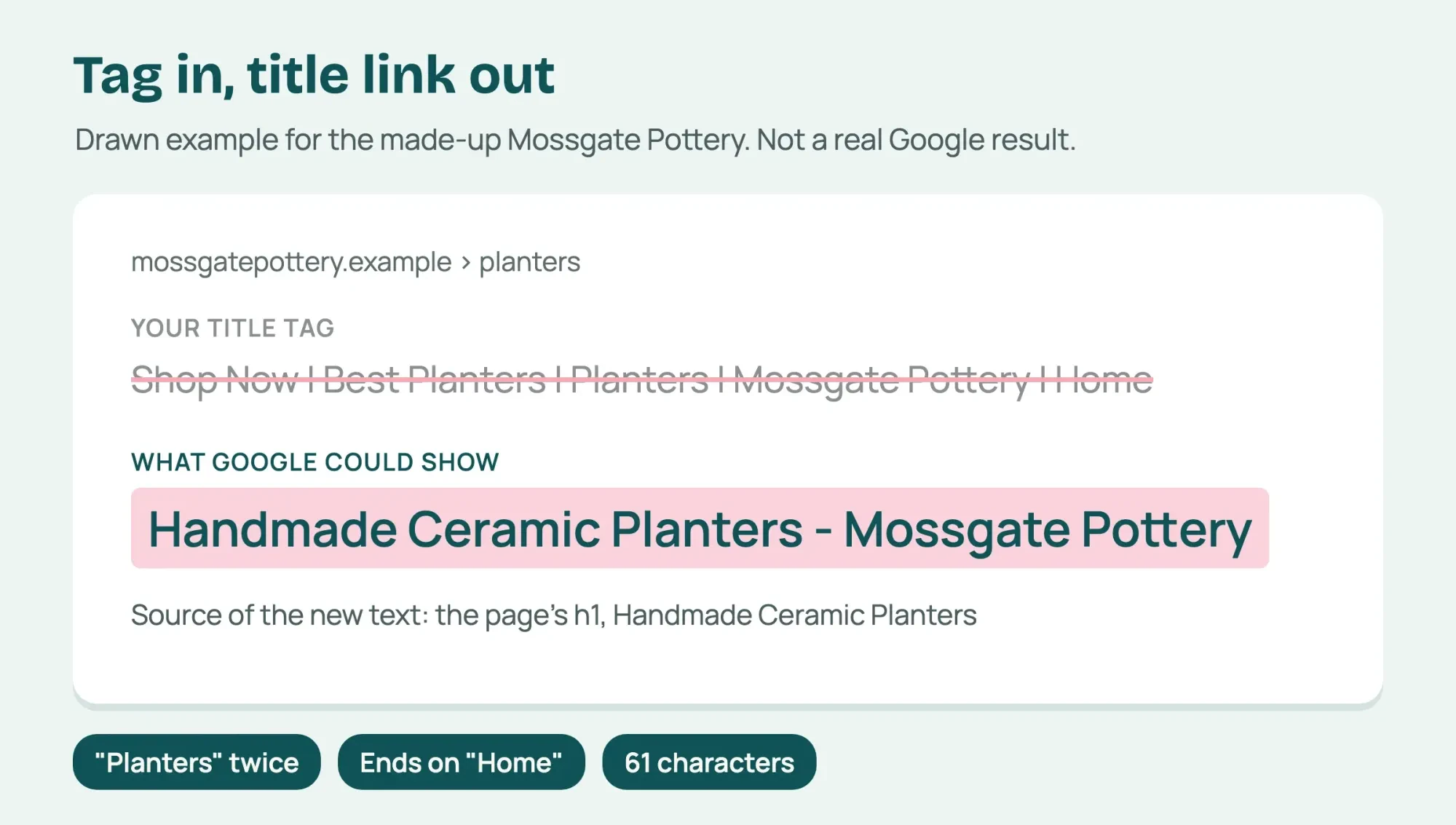 Drawn by us: a made-up example of a rewrite Google could make, based on the issues in Google's title link guide; not a real Google result
Take our example store. Mossgate Pottery is a made-up ceramics shop in Berea, Kentucky. Its planters page has the tag "Shop Now | Best Planters | Planters | Mossgate Pottery | Home" over an h1 that reads "Handmade Ceramic Planters." That tag repeats a word and ends on a vague "Home," so Google would have reason to pull the h1 instead. It also runs to 61 characters. The drawing above shows what that rewrite could look like, not a result we saw in Google.
How to see the title Google shows for a page
Knowing the causes helps only once you've confirmed a rewrite. Search Console's Performance report won't show you one. Its Performance report help lists the table's groupings as Queries, Pages, Countries, Devices, Search appearance and Dates. Title text isn't one of them. So the check is manual. Search Google for the page's topic plus your brand on a phone and a computer, then compare the headline word for word with your page's tag. A site: search for the URL can help, though Google's site: operator page says an indexed URL may show for it, "however it's not guaranteed." Use a private window, so less of your own recent search history comes into play.
Expect some variation between checks. The Performance report help also explains why two checks can disagree: results are "specific to the time, place, device, and recent history of the person searching."
Write down each headline with the date, the device and the search you typed, because that note becomes your baseline when you check again after the fix.
Our SERP snippet preview shows how your own tag sits in a result layout. It can't predict a rewrite, so the manual search still matters.
Our trigger script on eleven made-up pottery pages
Checking pages one by one against Google's list gets slow past a dozen URLs. So we wrote a small script that does it, and ran it on Mossgate Pottery's made-up site of 11 pages.
The rules are exact. C1 flags an empty tag and C2 a segment such as "Home" or "Untitled." C3 flags a tag that starts or ends with a separator, or holds only the site name. C4 flags any word of 4+ letters used twice, ignoring site-name words and a final s on longer words, and C5 the same tag on 2+ pages. C6 flags a year that differs from the h1's, and C7 zero or several h1s. C8 flags a non-English page whose tag shares no 4+ letter word with its h1. C9 flags the site name twice, C10 any tag over 60 characters, and C11 a comma list naming items the page doesn't show.
One rule is ours, not Google's. Google sets no length limit, so the 60-character cut in C10 is a line we picked to mark tags that may get cut on a narrow phone screen. Treat its flags as hints. The script counts every character, spaces and separators included, which put the planters tag at 61, the sale tag at 62 and the repotting tag at 113. The script also can't see what Google will do, because it only flags the patterns Google names, and we checked no real Google results for these pages.
What we tested, and when
A Python script on one Mac served the 11 pages at 127.0.0.1. It read each page's lang attribute, title, every h1 element and the paragraph text, with nothing sent to the internet. We ran it twice on October 29, 2026: once on the pages as drafted, then on a copy with rewritten titles.
Ten pages flagged, and the care guide that passed
The draft run flagged 10 of 11 pages, with 15 flags in all. Here's every flag from test/output.txt:
| Page (made up) | Title tag as drafted | Flags |
|---|---|---|
| Home | Home | C2 vague |
| Planters | Shop Now | Best Planters | Planters | Mossgate Pottery | Home | C2 vague, C4 repeat (planter), C10 long (61) |
| Mugs | | Mossgate Pottery | C3 half-empty |
| Classes | 2025 Wheel-Throwing Classes - Mossgate Pottery | C6 year (h1 says 2026) |
| Spring glazes | Glaze Collection - Mossgate Pottery | C5 duplicate (2 pages) |
| Fall glazes | Glaze Collection - Mossgate Pottery | C5 duplicate (2 pages) |
| Gift cards | Mossgate Pottery Gift Cards | Mossgate Pottery | C7 two h1s, C9 site name twice |
| Spanish planters | Handmade Ceramic Planters - Mossgate Pottery | C8 language (page lang es) |
| Care guide | How to Care for a Stoneware Planter - Mossgate Pottery | None |
| Repotting | How to Repot a Houseplant Into a Ceramic Planter Without Cracking the Pot or Hurting the Roots - Mossgate Pottery | C10 long (113) |
| Sale | Giant Planters, Hanging Planters, Bud Vases - Mossgate Pottery | C4 repeat (planter), C10 long (62), C11 list (2 items missing) |
No page had an empty tag, so C1 never fired. Our 60-character length rule fired most, three times, so read it as a softer warning than the rest. C2, C4 and C5 fired twice each, and the other six rules once each. Two flags deserve a closer look. The Spanish planters page, written for US customers who read Spanish, kept an English tag, which is the language mismatch Google describes, with Hindi pages as its example. The sale page's tag still names giant and hanging planters while the body only mentions bud vases, a small version of Google's stuffed-animal example. Neither page would look broken to a shopper skimming the store.
The planters tag from our featured drawing tripped three rules at once. Two flags come from the category stack, since "Planters" shows up twice and the stack pushes the tag to 61 characters, while the third comes from the trailing "Home."
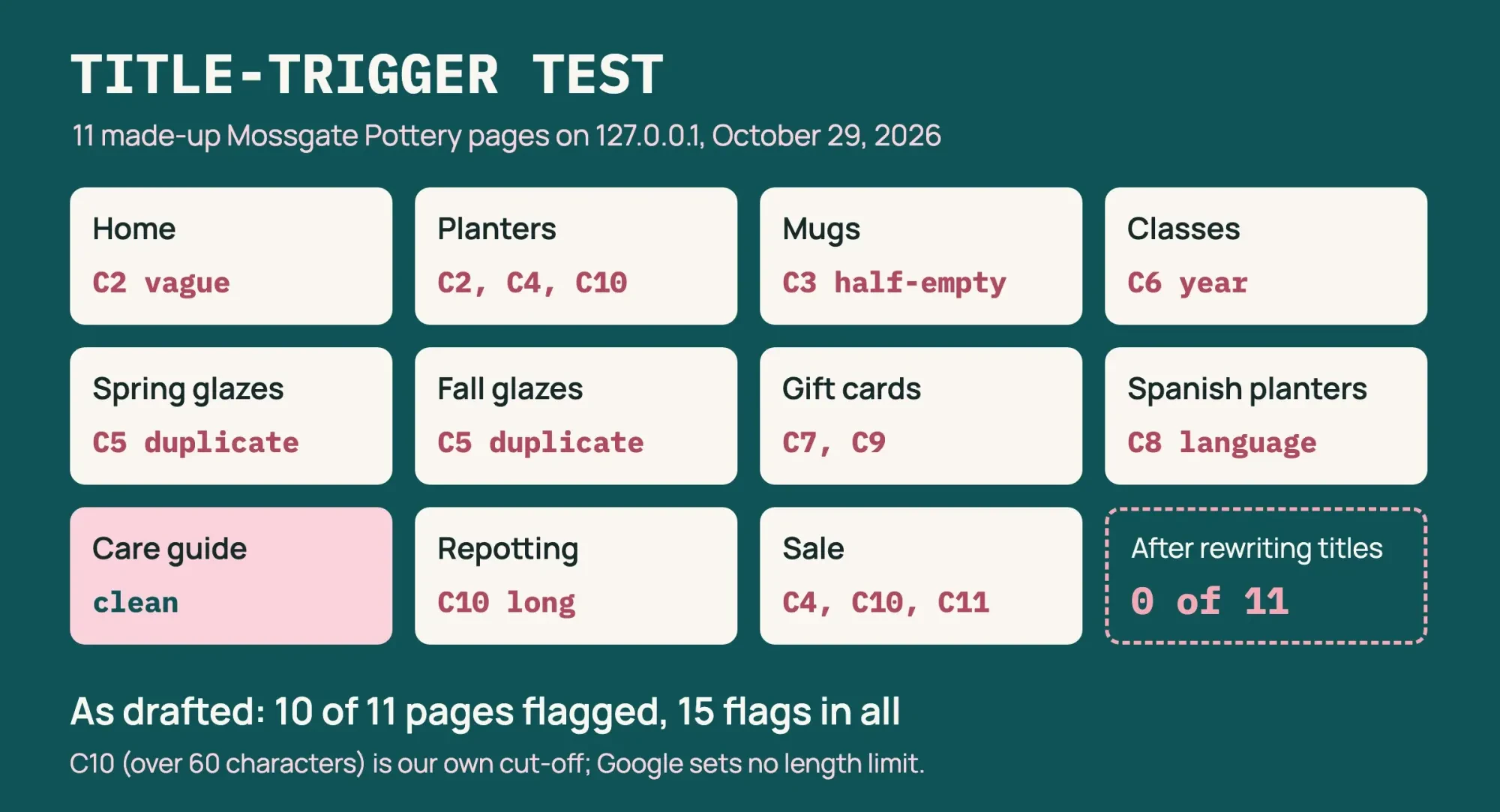 Source: our October 29, 2026 local test on 127.0.0.1, test/output.txt and test/output-fixed.txt; rules modeled on Google Search Central title link guide
Writing a title Google keeps
Then we rewrote the 10 flagged tags and left the care guide alone. We also turned the gift card page's second h1 into an h2. The second run flagged 0 of 11. Each rewrite follows the SEO Starter Guide, which says a good title is "unique to the page, clear and concise" and describes the contents accurately. It adds that a title could include your business name and other details, like the physical location of the business. Title text also shows in browsers and bookmarks, that guide notes.
A clean run proves less than it looks, since we wrote the fixes against our own rules. Here are the changes in the order we'd make them on a real site:
- Give every page its own tag that repeats or closely matches its single h1, like "Spring Glaze Collection - Mossgate Pottery."
- Put the site name once, at the start or the end, set off by one separator such as a hyphen or colon.
- Replace vague words with the page's subject, so "Home" became "Mossgate Pottery: Handmade Stoneware from Berea, Kentucky."
- Update years in the tag when you update the page, as with the 2026 classes.
- Write the tag in the page's language, so the Spanish page got "Macetas de cerámica hechas a mano - Mossgate Pottery."
- Keep one h1 per page and turn extra slogans into h2 headings.
- Name only what the page shows; the sale tag became "Bud Vases on Sale - Mossgate Pottery."
The planters page ended up as "Handmade Ceramic Planters - Mossgate Pottery," the same text as the shown title in our drawing. That's the point of the fix: if your tag already says what Google would build from your h1, Google has little reason to swap it. Our clean run shows the tags avoid every pattern Google lists, though it can't show that Google will use them. The HTML standard adds the browser side: a title should identify its document even out of context, in history, bookmarks or search results. In a bookmark list, "Handmade Ceramic Planters - Mossgate Pottery" still says what the page is, while a tag that opens on "Shop Now" doesn't.
Half-empty tags usually start in a template, as Google's September 2021 post notes, because the template puts a page summary first and that summary goes missing. Here's the mugs page before and after:
<!-- As drafted: the product name field was empty, so the template left only the separator -->
<title> | Mossgate Pottery</title>
<h1>Stoneware Mugs</h1>

<!-- Fixed: the tag repeats the h1, then one separator and the site name -->
<title>Stoneware Mugs - Mossgate Pottery</title>
<h1>Stoneware Mugs</h1>
The cause was small. In the first version, the CMS field for the product name was empty. A template rule that falls back to the h1 would have caught it. Run each fixed URL through our meta tag analyzer to read the tag the page now sends.
Wondering whether keywords in the tag help ranking? That question lives in our Google ranking factors breakdown. Headings and snippets get a longer treatment in the on-page chapter for intermediate SEO.
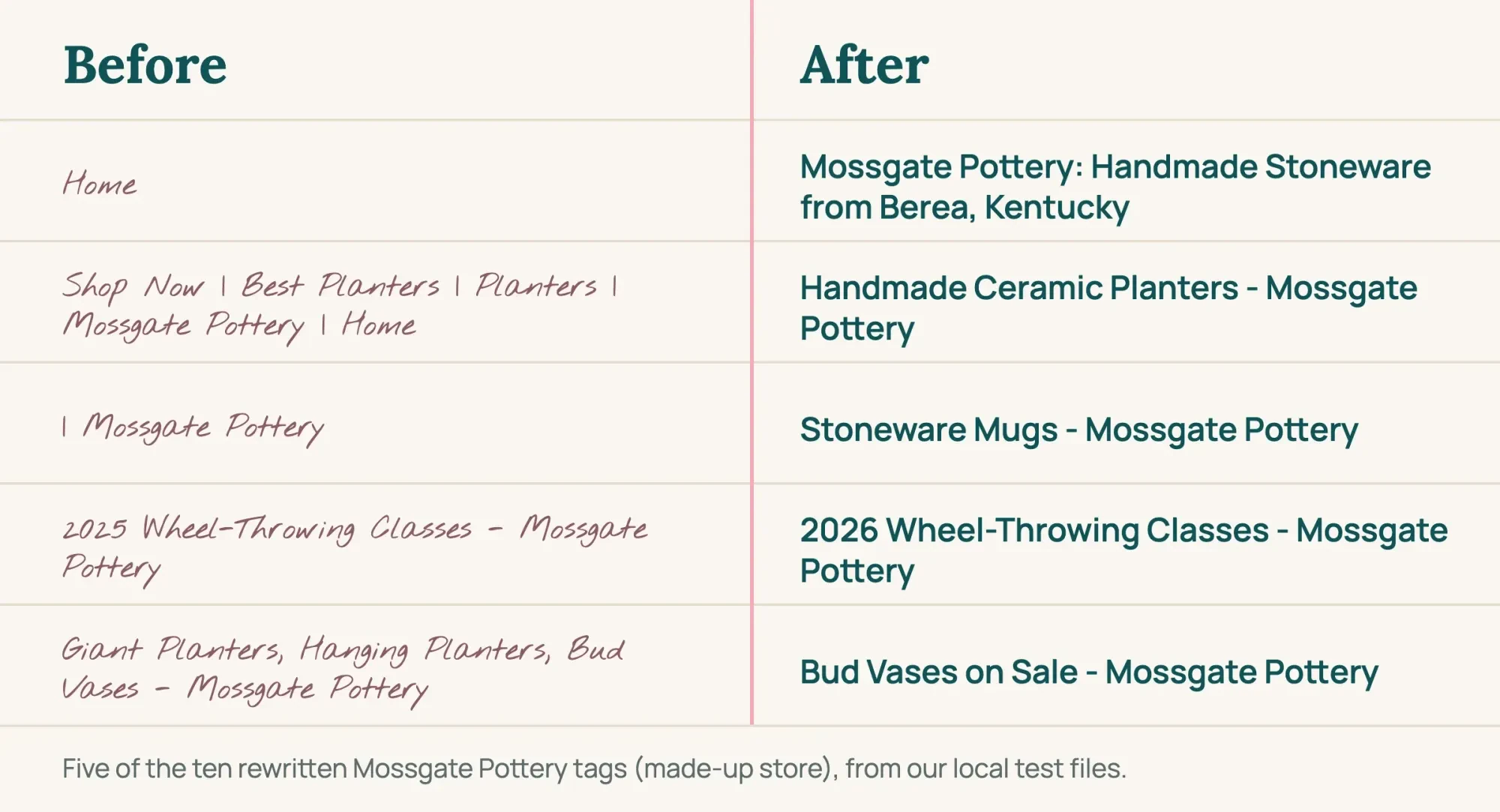 Drawn by us: five of the ten rewrites from our October 29, 2026 local test, copied from test/output.txt and test/output-fixed.txt
After the fix, Google needs a recrawl
Editing the tag doesn't change the result right away, because Google has to crawl and reprocess the page before any of the nine sources counts as updated. Google's recrawl help page says crawling can take "anywhere from a few days to a few weeks." The title link guide gives the same range for changes to any of the nine sources, so a fix made today may not show up until next month.
For a handful of pages, use URL Inspection in Search Console. Its help page says Request indexing runs a quick check first, and you can't request it if the page is non-indexable in that live test. The recrawl page adds that only an owner or full user can request it. There's a quota, and asking twice for the same URL won't speed it up. If you haven't used that screen before, the inspection steps are in our Search Console walkthrough. A template fix that touched dozens of pages is different, and the URL Inspection help calls a sitemap with updated lastmod dates your best choice.
Then repeat the manual search from your notes two to three weeks later, on the same devices. If the headline still differs and none of the listed issues applies, Google's guide suggests asking whether its title fits the query better. Sometimes it does, and borrowing its wording for your tag is the honest move. Big sites are different. A store with hundreds of templated pages needs template work, which our SEO service does. We charge for that, so our suggestion isn't neutral. For a shop with a few dozen pages, we'd keep it in-house and start with the half-empty and vague tags.
FAQ on title links
Frequently asked
Can I stop Google from changing my title?
No setting does that. Google's title link guide says it can't manually change title links for individual sites. What you control is the tag and the page, so remove the issues Google lists and the tag has the best chance of being used.
Why does a page blocked by robots.txt still show a title?
Google may still index a blocked URL it finds through links. Its title link guide says that without access to the page, Google relies on off-page content such as anchor text from other sites. To keep a URL out of results, it points to the noindex rule instead.
Is the site name in my result part of the title?
No. Google treats the site name as a separate line for the whole site. Its site names documentation calls WebSite structured data on your home page the most important way to state your preferred name. An alternateName can list a shorter version.
Does Google change my title for each search?
Mostly not anymore. Google's August 2021 post says titles used to change with the query, and that this "generally will no longer happen" with the new system. Check two or three different searches anyway when you compare.
How we made this guide: Google's title link guide, its two 2021 posts on titles and six other Google help pages set the rules used here. Alongside them sit the HTML standard and the Open Graph page, all opened on October 29, 2026. The test ran on made-up pages at 127.0.0.1, and we looked at no real Google results or Search Console data. Facts checked by the DigitalTreed team on October 29, 2026.
First published July 2020 as a general piece on Google algorithms. Rewritten October 29, 2026 to cover why Google rewrites title tags; Google's ranking systems now have their own ranking systems guide.
Sources
- Google Search Central: Influencing your title links in search results
- Google Search Central Blog: An update to how we generate web page titles (August 24, 2021)
- Google Search Central Blog: More information on how Google generates titles for web page results (September 17, 2021)
- Google Search Central: Site names in Google Search
- Google Search Central: Spam policies for Google web search
- Google Search Central: SEO Starter Guide
- Search Console Help: Performance report (Search results)
- Google Search Central: site: search operator
- Search Console Help: URL Inspection tool
- Google Search Central: Ask Google to recrawl your URLs
- WHATWG HTML Living Standard: the title element
- The Open Graph protocol


Comments
No comments yet. Start the conversation below.