
Quick answer
SEO content writing is writing a page that fully answers what a searcher wants, in words Google can match. Pick one reader and one question, study the results page, add something only you know, then write a clear title. Google's test is people-first content, made for readers and not to game rankings.
These SEO content writing tips follow what Google itself publishes. Its guide to helpful, people-first content, last updated October 5, 2026, says its systems favor content "created to benefit people."
To test that, we wrote a short, thin sample post for a made-up plumber and graded it against Google's questions. It scored 5 out of 19. The steps below show you how to avoid the same misses.
Key takeaways
- Google publishes the questions it wants you to ask about your own page. Use them as a checklist before you hit Publish.
- Our thin sample post got 3 yes, 4 partly and 12 no in our own grading. It had no sources and no first-hand material.
- AI help is allowed. Google says it's critical to fact-check AI output by hand, including the title, meta description and image alt text.
- Google sets no word count and no title length. Preview the title instead of counting characters.
- Made-up testimonials are a legal risk, not just a quality problem. The FTC banned fake reviews in 2024.
What is SEO content writing?
SEO content writing is writing a page so it answers a searcher's question and Google can tell what it covers. It is one part of content marketing, the part that brings people in from search.
Google's name for the goal is people-first content. Its helpful content guide defines that as content "created primarily for people, and not to manipulate search engine rankings."
The same guide names 4 qualities: experience, expertise, authoritativeness and trust, or E-E-A-T. "Of these aspects, trust is most important." The extra E for experience arrived on December 15, 2022, so posts written before then often miss it.
SEO content writing key facts
- Google's title link guide, updated December 10, 2025, sets "no limit" on how long a title can be.
- Google's February 8, 2023 post says "appropriate use of AI or automation is not against our guidelines."
- The helpful content system became part of Google's core ranking systems in March 2024.
- The FTC announced its final rule on fake reviews on August 14, 2024, after a 5-0 vote.
- Google's generative AI guidance, updated October 1, 2026, calls it "critical to manually factcheck" AI content.
- Google's SEO Starter Guide, updated December 10, 2025, says there's "no magical word count target."
We graded a thin sample post against Google's questions
We counted 32 self-check questions in that same guide on October 22, 2026. Of those, 21 are quality questions and 11 are warning signs. Google says they help you "gauge if the content you're making is helpful and reliable."
We wrote a fictional post of about 150 words, the kind of thin page common on small-business blogs. Lakeview Plumbing in Dayton, Ohio, is made up.
Note
Fictional sample post: Water Heater Tips
Your water heater is one of the most important appliances in your home. A good water heater gives you hot water every day. That is why it is important to take care of your water heater.
There are lots of types of water heaters. Some are tank water heaters and some are tankless water heaters. Both types have pros and cons. You should choose the one that is best for you.
If your water heater is old, you may need a new one. Signs you need a new water heater include no hot water, strange noises and leaks. Water heater problems can be frustrating.
At Lakeview Plumbing, we are the best plumbers in Dayton. We have years of experience and our customers love us. Call us for all your water heater needs. We offer the best water heater service at the best price.
Then we graded it against the 21 quality questions. A yes scored 1 point, partly scored half, and no scored 0.
This is our own grading, done by our team. Google doesn't score pages this way, and the questions are a self-check, not a ranking formula. We skipped 2 questions the text alone can't answer.
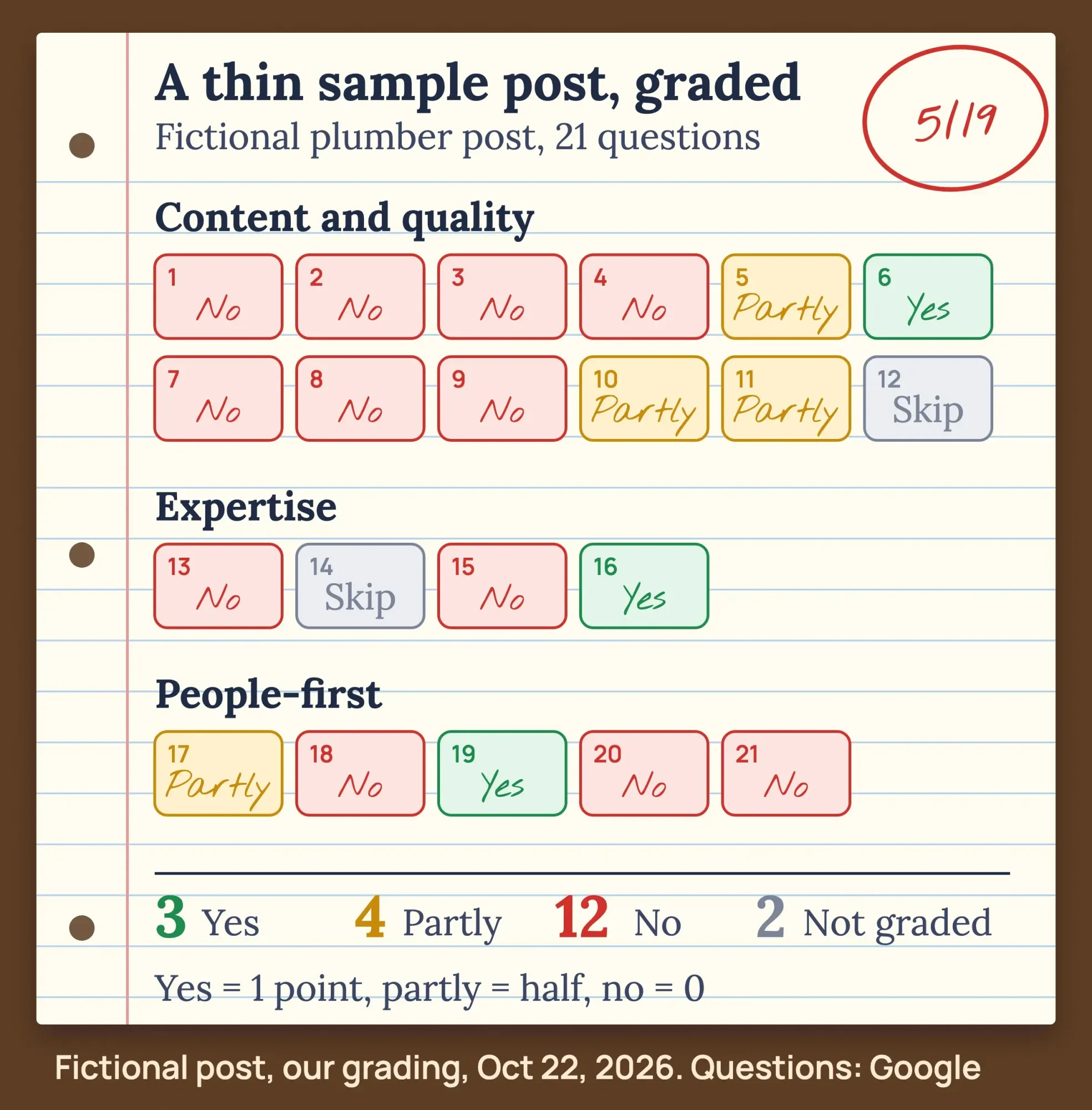 Diagram by DigitalTreed: our own grading of a fictional sample post against Google's questions, October 22, 2026.
| Google's question (shortened; yes is the good answer) | Our grade | Why |
|---|---|---|
| Original information, reporting, research or analysis? | No | Nothing from a real job |
| A substantial, complete description of the topic? | No | No costs, sizes or lifespans |
| Insightful analysis beyond the obvious? | No | Says what everyone knows |
| Adds value instead of rewriting other sources? | No | Generic lines any site has |
| Title gives a descriptive, helpful summary? | Partly | Names the topic, not the question |
| Title avoids exaggerating or shocking? | Yes | Calm, plain title |
| Worth a bookmark or a share? | No | Nothing to come back to |
| Fit for a printed magazine or book? | No | No facts to cite |
| Substantial value next to other results? | No | Top results go much further |
| Free of spelling or style issues? | Partly | Spelled right, "water heater" 12 times |
| Produced well, not sloppy or hasty? | Partly | Tidy, but rushed |
| Not mass-produced or spread across sites? | Not graded | Can't tell from the text |
| Trustworthy: sourcing, author, About page? | No | No byline, no source |
| Seen as a known authority on the topic? | Not graded | Made-up company |
| Written or reviewed by someone who knows it well? | No | Nothing shows hands-on work |
| Free of easily verified factual errors? | Yes | No clear errors, few facts |
| An audience that would find it useful? | Partly | Right readers, little help |
| Shows first-hand expertise? | No | No example from real work |
| Does the site have a primary purpose? | Yes | A plumber writing about plumbing |
| Reader learns enough to reach their goal? | No | No way to decide or act |
| Reader leaves satisfied? | No | They would need to search again |
Our result: 3 yes, 4 partly, 12 no and 2 not graded, for 5 out of 19 points. The misses cluster in one place: the post has nothing of its own, no price, no photo, no source and no sign of hands-on work.
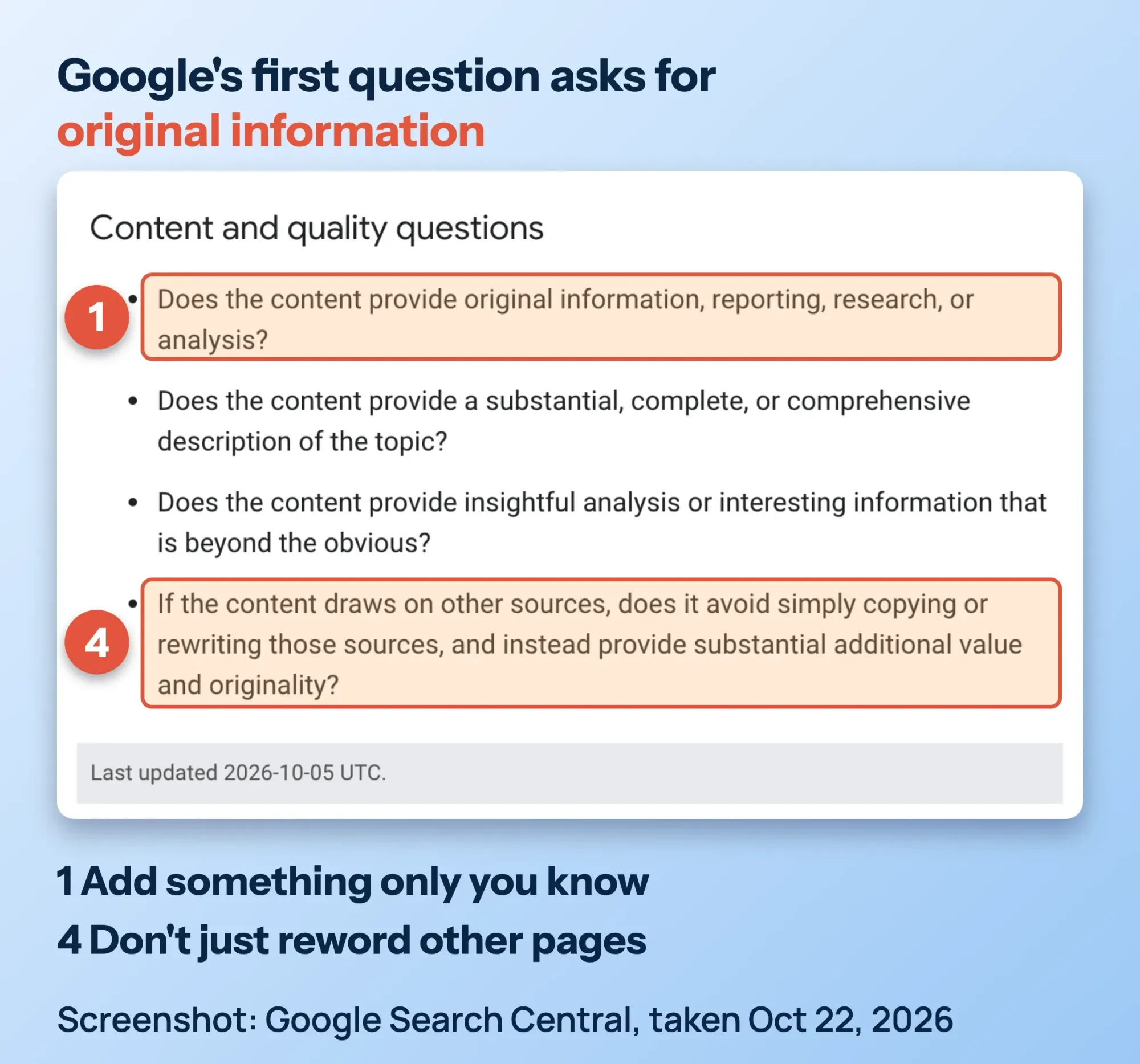 Screenshot: Google Search Central, Creating helpful, reliable, people-first content, last updated October 5, 2026, taken October 22, 2026.
That is exactly what Google's May 21, 2025 post on AI search asks for. It says to "focus on making unique, non-commodity content." A page that only rewords other pages is a commodity.
How do you write SEO content that ranks?
Write the page that answers one searcher's question better than the pages already ranking. Pick the question, read the results, and add something only you know. Use question headings, write the title last, and check every fact by hand before you publish.
Work through these 8 steps in order. Steps 1 to 3 happen before you write a word, and they matter most.
Write one SEO-friendly page
- Pick one reader and one question Choose a question your customers ask, such as "water heater replacement cost Columbus", not a broad word like "plumbing".
- Read the results page first Search the question. Note the page types that show up and the 3 to 5 points every top result covers.
- Find the part only you can say Add your own price range, a photo of a real job, a mistake you see each week or your own numbers.
- Outline with question headings Make each H2 a question readers ask, and answer it in the first sentence under it.
- Write short and plain Use short paragraphs, lists only for real lists, and the words your customers use.
- Link your sources and your pages Link the primary source at each number. Link 2 or more of your own related pages.
- Write the title and description last Write them once the page is done, then preview how they look in results.
- Fact-check and publish Check every fact, name and number by hand, including anything AI drafted. Then publish.
For step 2, our free keyword suggestions tool shows how people phrase a topic in Google, YouTube and Bing autocomplete. For video, our guide to YouTube SEO covers titles, descriptions and chapters. Our list of free keyword research tools covers the rest.
Search types matter too: Google's rater guidelines (PDF), dated September 11, 2025, sort searches into Know, Do, Website and Visit-in-person queries. Match your page to the type you see. Our Intermediate SEO chapter on content briefs that match search intent goes deeper.
Step 3 is the hard one, and it's the step the sample post skipped. Many owners know their trade but freeze when asked to write it down.
If you'd rather hand that part off, our content marketing team can interview you and write pages from what you know. (DigitalTreed sells this service.)
How long should an SEO title and meta description be?
Google sets no required length for either one. It shortens long titles and meta descriptions to fit the screen, so put the words that matter first. Then preview the result before you publish, instead of counting characters.
Google's title link guide says there's "no limit" on the length of a <title> element. Results cut long titles "to fit the device width," as its snippet guide also says for meta descriptions.
So write a title that says what the page is, in plain words, with your brand once at most. Google also asks you to avoid keyword stuffing and boilerplate text repeated across titles.
Check the cut before you publish with our free SERP snippet preview tool. It shows the desktop and mobile versions, measured in pixels.
Our take: character counts are a fine rough target, and we aim for 45 to 62 characters for titles. The preview is the real test, though. Our Intermediate SEO chapter on titles, descriptions, headings and images has more.
Write a different description for each page. Identical ones, Google says, "aren't helpful when individual pages appear in search results."
How do you make a blog post SEO friendly?
Make it easy for readers and Google to see what each part covers. Use a short URL made of words and the terms your readers search for. Add clear link text, and place images near the text they explain, each with alt text. Then answer each question heading in its first sentence.
| Part of the post | What Google says | What to do |
|---|---|---|
| URL | "Try to include words in the URL that may be useful for users" (SEO Starter Guide) | Use a few plain words, such as /water-heater-replacement-cost |
| Words between URL words | Use hyphens "instead of underscores" (URL structure guide) | Write water-heater, not water_heater |
| Search terms | "Think about the words that a user might search for" (SEO Starter Guide) | Use your customers' words once where they fit; skip repeats |
| Link text | It "tells users and Google something about the page you're linking to" (SEO Starter Guide) | Write "our water heater price list," not a vague "here" |
| Images | Place them "near text that's relevant to the image" (SEO Starter Guide) | Put the job photo in the section it shows |
| Alt text | "The most important attribute" for image metadata (image SEO guide) | Describe the image in plain words, no keyword lists |
Filling alt text with keywords "results in a negative user experience," says Google's image SEO guide. To check a live page, run it through our free image alt text checker. It lists every image and flags missing, empty, file-name and generic alt text.
What about featured snippets, the answer boxes above some results? Google's featured snippets guide asks whether you can mark a page as one, and answers "You can't." Its systems decide. The best you can do is answer each question clearly, right under its heading.
Our beginners guide shows each of these steps in its chapter on on-page basics: title, description, headings, URL, images and links. Writing for a business that serves one area? Read our plain-English guide to local SEO next.
Can you use AI to write SEO content?
Yes, with a person in charge. Google's February 8, 2023 post on AI content says "appropriate use of AI or automation is not against our guidelines." Use AI to research and outline, then have a person check every fact before the page goes live.
That post also says AI "doesn't give content any special gains," so an AI draft has no edge on its own.
The guidance on generative AI content, last updated October 1, 2026, is stricter about checking. AI "outputs may contain inaccuracies (also known as hallucinations)."
Google calls it "critical to manually factcheck and review all AI-generated content" before publishing. Writing with an AI tool? Our AI in digital marketing guide explains what Google says about AI-generated content and what to fact-check. That review covers titles, meta descriptions, structured data and image alt text too.
Does Google penalize AI content?
Not for being AI. Google acts on pages made mainly to manipulate rankings, and its spam policies apply "no matter how it's created." So the risk is volume: many pages with little value, whether a person or a tool wrote them.
The policies call it "scaled content abuse" when "many pages are generated for the primary purpose of manipulating search rankings."
Ten near-identical city pages from one prompt can fit that description. One useful page beats 10 thin ones.
Google's helpful content guide also warns against fake authors. "Fabricating creator profiles," such as AI headshots or made-up names, "is a form of deception." Put a real person's name on the page.
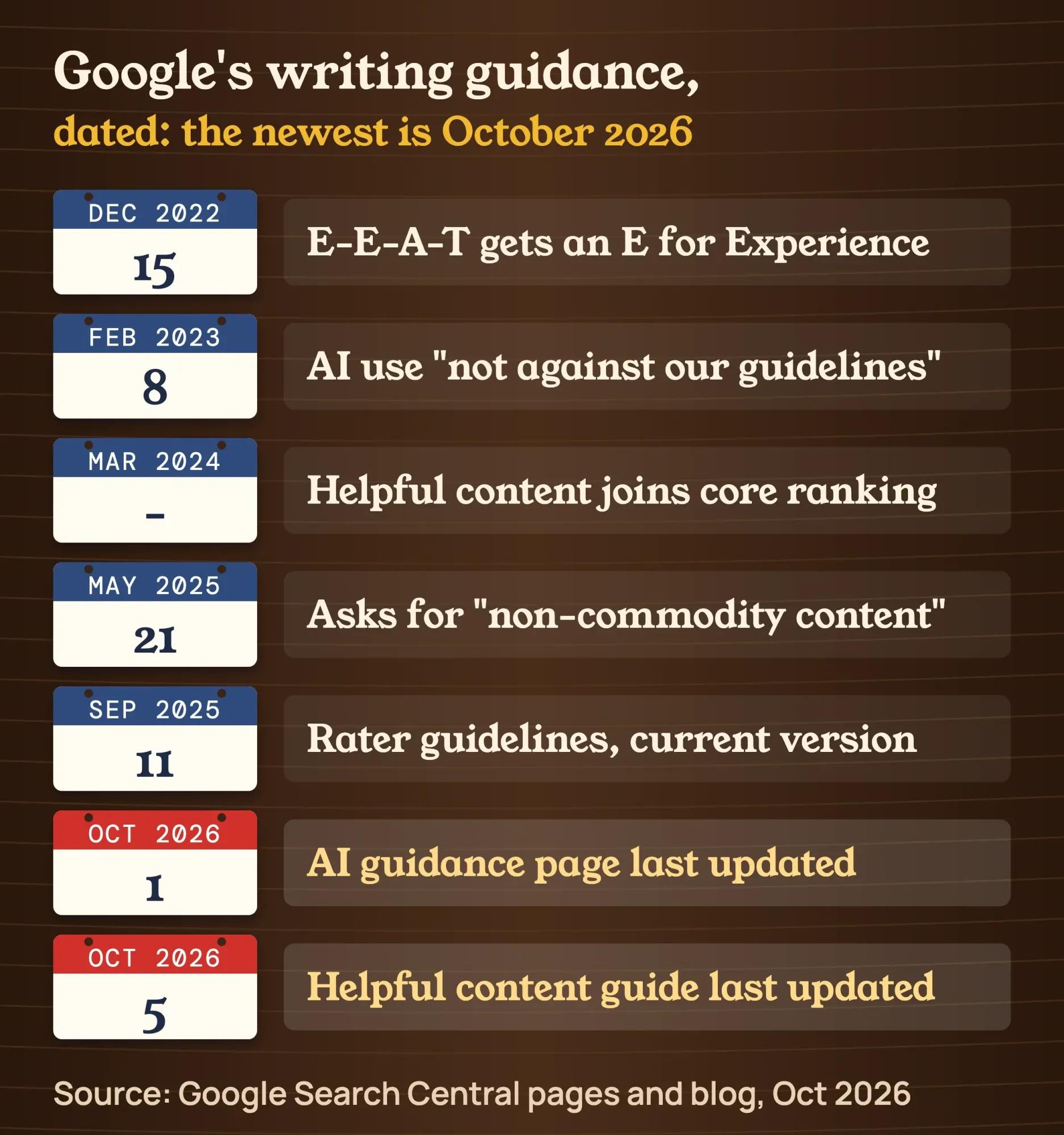 Source: Google Search Central pages and blog posts, dates as of October 22, 2026.
One more myth: there is no separate "helpful content update" to chase now. The ranking systems guide says it became part of the core systems in March 2024.
For prompts that help with research and outlines, see our guide to AI tools for SEO. Our Intermediate SEO chapter on E-E-A-T and AI-assisted writing covers the full method.
Wondering about AI Overviews? Google's AI features guide says there are "no additional requirements" to appear there. Our guide to getting cited by AI answers explains the rest.
Which SEO writing myths can you ignore?
You can ignore set word counts, keyword percentages, exact title lengths, perfect heading order and E-E-A-T scores. Google's own pages reject each one. What they ask for instead is a page that reads well and fully answers the question.
Many writing myths come from old tools and older blog posts. Here is each one next to Google's own words, from its SEO Starter Guide unless the row says otherwise.
| Myth | What Google says |
|---|---|
| Posts must be 2,000+ words | "There's no magical word count target, minimum or maximum" |
| Use the keyword a set % of the time | Repetition "is tiring for users" and is keyword stuffing |
| Titles must be exactly 60 characters | "No limit," cut "to fit the device width" (title link guide) |
| Headings must be in perfect order for SEO | "It doesn't matter if you're using them out of order" |
| E-E-A-T is a score or ranking factor | "No, it's not." |
| A new date makes a post fresh | Changing dates without real changes is a warning sign (helpful content guide) |
| The meta keywords tag helps | "Google Search doesn't use the keywords meta tag" |
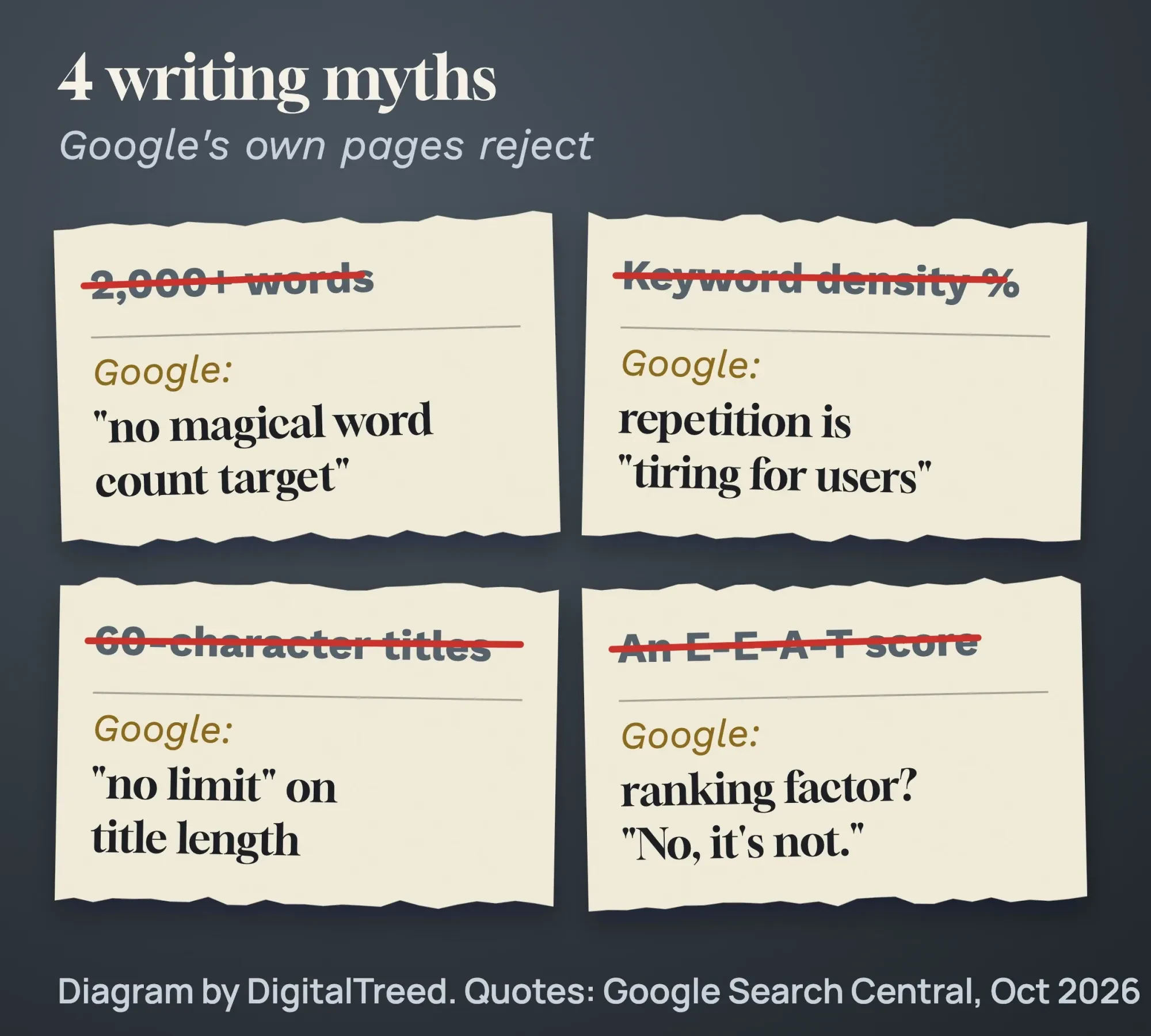 Diagram by DigitalTreed. Quotes from Google's SEO Starter Guide and title link guide, October 2026.
Headings still matter for people. Google says semantic order is "fantastic for screen readers," so keep it tidy anyway. Our beginners guide has a longer list of SEO myths beginners still hear.
What US rules apply to your content?
Three federal points touch everyday blog writing. The FTC bans fake reviews under its rule on consumer reviews and testimonials (16 CFR Part 465). It also expects affiliate links to be disclosed, and AI output alone may not be protected by copyright. Your own posts are copyrighted once they're live, and our guide to how to protect website content from copying covers DMCA takedowns.
First, reviews and testimonials. The FTC final rule announced August 14, 2024, bans fake ones, "such as AI-generated fake reviews."
It also covers testimonials from someone who "did not have actual experience with the business." Quote only real customers, with their permission.
Second, affiliate links. They are allowed, but the FTC Endorsement Guides FAQ says to disclose them "clearly and conspicuously" on your site.
A label like "affiliate link" alone may not be clear to readers, the FAQ adds. Its sample line for bloggers is "I get commissions for purchases made through links in this post."
Third, ownership. On January 29, 2025, the U.S. Copyright Office said AI output is protected "only where a human author has determined sufficient expressive elements." Prompts alone don't count, so your own writing and edits are what you can protect.
This is general information, not legal advice; check with an attorney for your situation.
Example: a plumbing company in Columbus
Example: Maple Street Plumbing is a made-up 5-person plumbing company in Columbus, Ohio. It is not a client. The owner wants a blog post that brings in water heater jobs.
She runs "water heater replacement" through the keyword tool and reads the results page. It shows national cost guides and a map of local plumbers, so people want prices and a nearby company.
Her part that nobody else has is simple. It's her own price sheet for 40- and 50-gallon tank swaps, a photo of a rusted tank and the 3 questions callers ask most.
She dictates notes, and an AI tool turns them into an outline. She checks every price and claim herself. The byline is her own name, linked to an About page that shows her 15 years in the trade.
Three weeks after publishing, Google Search Console shows a query she hadn't covered. She adds an H2 that answers it, and changes the updated date only because the page really changed.
SEO content writing checklist: 12 checks before you publish
Our free checklist puts each of the tips above in one table. Every row ties back to a Google or Federal Trade Commission page, so you can see why it matters. Copy it into a document and tick each row before you hit Publish.
| # | Check | It passes when | Source |
|---|---|---|---|
| 1 | Search type | The page type matches what ranks for the question | Rater guidelines (PDF) |
| 2 | Original information | It has something only you know: a price, a photo, a result | Helpful content guide |
| 3 | Reader's words | It uses the words customers search, without repeats | SEO Starter Guide |
| 4 | Headings | Each question heading is answered in its first sentence | Our rule, from the featured snippets guide |
| 5 | Title | Descriptive and concise, and checked in a preview | Title link guide |
| 6 | Meta description | Written for this page only | Snippet guide |
| 7 | URL | A few plain words, split by hyphens | URL structure guide |
| 8 | Images | Near the text they explain, with descriptive alt text | Image SEO guide |
| 9 | Sources and links | A primary source at each number; link text says where it goes | SEO Starter Guide |
| 10 | Byline | A real person's name, linked to an About page | Google AI content post |
| 11 | AI fact-check | Every fact, title, description and alt text checked by hand | Generative AI guidance |
| 12 | Reviews and affiliate links | Only real reviews; affiliate links disclosed | FTC Endorsement Guides FAQ |
Checklist by DigitalTreed, built from Google Search Central and Federal Trade Commission pages, checked October 23, 2026. It's a self-check, not a ranking formula.
What should you check after you publish?
Check that the live page sends the title, description and tags you wrote. Once Google has recrawled it, see which searches bring visitors in Google Search Console. Then update the page whenever it misses a question people ask.
Run the live URL through our free meta tag analyzer. It reads the title, description, Open Graph and other meta tags the page really sends.
Then wait. Google has to recrawl the page first, which "may take a few days to a few weeks," says its title link guide. After that, search for your page and compare the title Google shows with yours.
For the numbers, our guide to SEO analysis tools explains which free reports to watch. If you want a full check, follow our post on running your first SEO audit.
How often should you update a post? Google gives no schedule. Its SEO Starter Guide says to "check in on previously published content and update it as needed." It adds that you can even delete a page that's no longer relevant.
Change the date only when the content really changed. Google's helpful content guide lists changing dates "to make them seem fresh" as a warning sign.
Link each new post from 2 or 3 older pages, too. Our guide on how to find internal links shows where to look.
This guide covers writing the page. Getting readers to it after launch is a separate job, covered in our guide on how to promote your blog posts.
Frequently asked
How long should a blog post be for SEO?
As long as the answer needs. Google's SEO Starter Guide says there is no word count target, minimum or maximum. A short page that fully answers the question beats a long one that pads.
Does Google penalize AI content?
Not for being AI. Google acts on content made mainly to manipulate rankings, such as many pages with no added value. Fact-check every AI draft by hand before you publish.
How many keywords should I use per page?
Google gives no number. Pick one main question and write naturally. Google understands related words, and repeating a phrase over and over is keyword stuffing.
Do keywords in the URL help SEO?
Very little. Google's SEO Starter Guide says keywords in the domain name or URL path "have hardly any effect beyond appearing in breadcrumbs." Use readable words for people, and keep old URLs that already work.
Can you get a featured snippet on purpose?
No. Google's featured snippets guide says you can't mark a page as one; its systems decide. Answer each question clearly in the first sentence under its heading, and Google may pick it.
Do I need an author byline?
Yes, where readers would ask "who wrote this?" Google suggests accurate bylines, and the name should belong to a real person who knows the work.
Your next step
Open your best-selling service page and ask Google's first question: does it give original information? If not, add one thing only you know, such as a real price range or a job photo.
If you'd rather have it written for you, our content marketing service turns your know-how into pages. You see a plan before any writing starts.
How we made this guide: it's built from Google Search Central's guides, Google's rater guidelines, two Federal Trade Commission pages and a U.S. Copyright Office report. On October 22, 2026, we graded a fictional post against Google's 21 quality questions and recounted the scores. We checked every quote and date against the source named next to it the same day. Updated October 23, 2026: we added a key facts list, a section on SEO-friendly blog posts and an H3 on AI penalties. We also added a 12-row checklist, advice on updating posts and 2 FAQs, checked against Google that day.
First published August 17, 2021. Rewritten October 2026: a graded sample post, 8 sourced steps, dated title and AI rules, a myths table and US rules.
Sources
- Google Search Central: Creating helpful, reliable, people-first content (updated October 5, 2026)
- Google Search Central: Guidance on using generative AI content (updated October 1, 2026)
- Google Search Central Blog: Google Search's guidance about AI-generated content, February 8, 2023
- Google Search Central Blog: E-A-T gets an extra E for Experience, December 15, 2022
- Google Search Central Blog: Top ways to ensure your content performs well in Google's AI experiences on Search, May 21, 2025
- Google Search Central: Spam policies
- Google Search Central: SEO Starter Guide
- Google Search Central: Influencing your title links
- Google Search Central: Control your snippets
- Google Search Central: AI features and your website
- Google Search Central: A guide to Google Search ranking systems
- Google Search Central: Image SEO best practices (updated March 2, 2026)
- Google Search Central: URL structure best practices for Google Search (updated October 21, 2026)
- Google Search Central: Featured snippets and your website
- Google: Search Quality Rater Guidelines, September 11, 2025 (PDF)
- FTC: Final rule banning fake reviews and testimonials, August 14, 2024
- FTC: 16 CFR Part 465, Trade Regulation Rule on the Use of Consumer Reviews and Testimonials (final rule)
- FTC: Endorsement Guides, what people are asking
- U.S. Copyright Office: Copyright and AI report, Part 2, January 29, 2025


Comments
No comments yet. Start the conversation below.