

Keyword research in depth: intent, potential and difficulty

0:001:25
Starts with · 0:00Why Google picks someone else
Intermediate SEO (2026): Why Google Picks Someone Else, and What to Change
This is guide 2 of 5 in our SEO learning path. It picks up where "SEO for beginners" stopped: your site is set up, Search Console works, and you've fixed your first pages. Now the question changes from "can Google find me?" to "why does Google pick someone else?"
It's written for small business owners who want to do more than the basics, for in-house marketers, and for junior SEOs and freelancers. There are eleven chapters, about two hours in all. Read one chapter at a time, with your own site open in another tab, and do its how-to before moving on.
Everything here comes with its source, and the stories are from our own work: a women's wear store, a perfume brand, a sports platform, and the students I taught. Where a number comes from a vendor study or a small sample, the text says so.
Quick answer
Keyword research is choosing which searches a page should win. For each keyword check four things: the intent behind it (read the results that rank), traffic potential (what the top page gets, not one keyword's volume), difficulty (what it takes to beat those pages) and business potential (how naturally your service fits). Write only where all four add up.

0:005:21
Starts with · 0:00Four topics, one skipped
Keyword Research for SEO, Free: Search Console, Keyword Planner and 4 Checks
All 12 chapters
- 0:00Four topics, one skipped
- 0:14Why score keywords
- 0:34Your Search Console queries
- 1:07Your customers' words
- 1:24Autocomplete and People also ask
- 2:06Keyword Planner ranges
- 2:45Don't trust chatbot numbers
- 3:02Check 1: intent
- 3:29Check 2: traffic potential
- 3:55Check 3: difficulty
- 4:21Check 4: business potential
- 4:50Your keyword sheet
Guide 1 showed you how to find your first 20 keywords. This chapter is about choosing between them. Most sites don't fail for lack of keywords. They fail because they wrote pages nobody searches for, or pages that could never beat what already ranks. Ahrefs looked at about 14 billion pages in its own index in 2023 and found that 96.55% of them got no traffic from Google at all. One of the main reasons it gave: nobody was searching for the topic.[1]
96.55%
of pages in Ahrefs' index got zero Google traffic, 2023[1]
15K to 250K+
monthly Google visitors to the Ahrefs blog in about four years, after it switched to keyword-led topics (Tim Soulo's figures)[2]
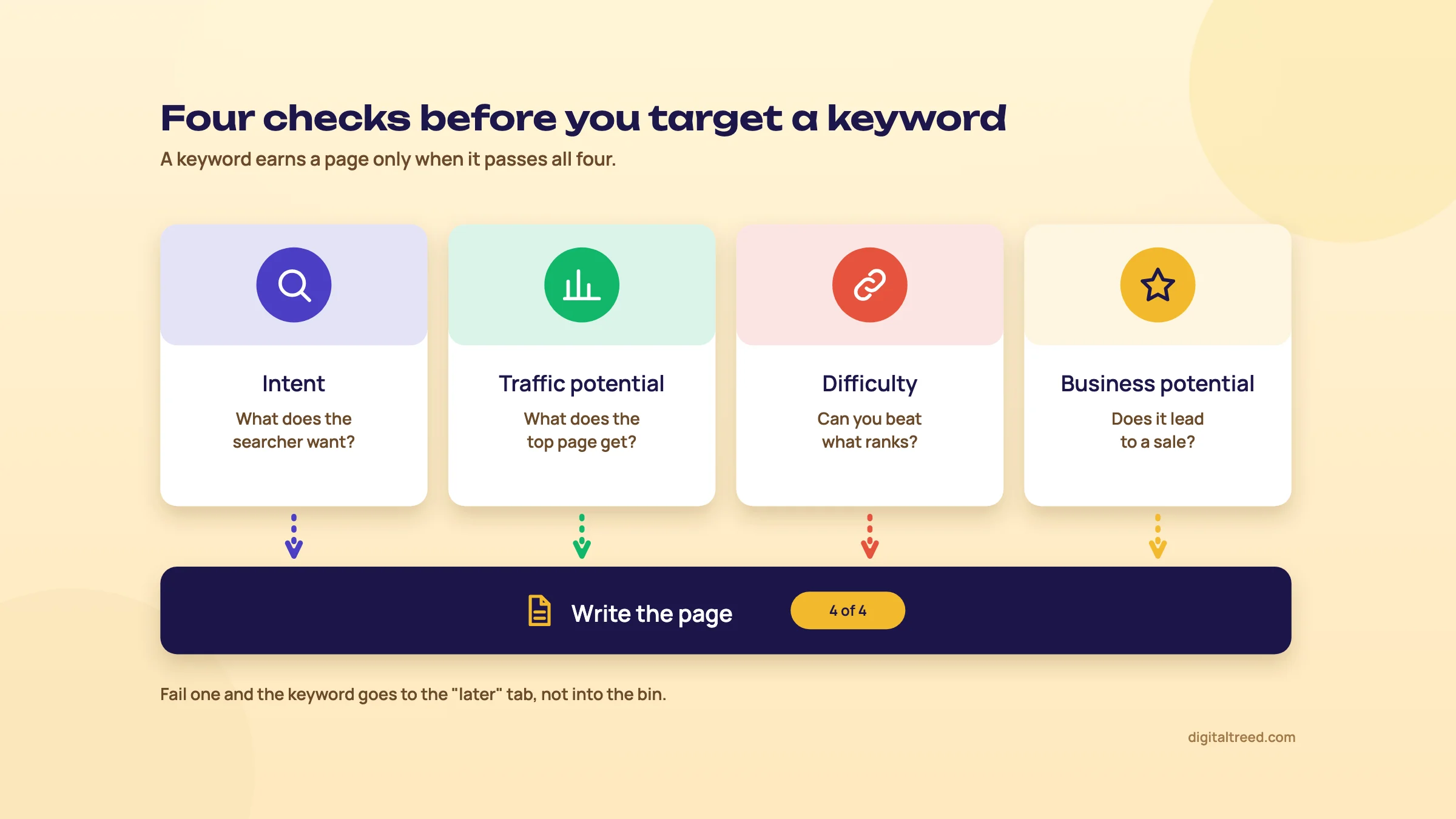 Four checks before a keyword gets its own page.
Start from what you already own
Seeds come before tools. A seed is a starting phrase you feed into the tools, and the best ones are already in three places you own.
Search Console. Open Performance, then the Queries tab, and set the date range to the last 3 months. Filter to non-branded queries so your business name doesn't crowd the list. That filter has been open to all eligible sites since 11 March 2026, which means whole-site properties with enough impressions; small sites may not see it yet.[3] Now sort by impressions. The queries with many impressions and few clicks are searches Google already connects with you. You're on the edge of them. They are usually the cheapest wins on the whole list.
Your customers' own words. Look at enquiry calls, WhatsApp chats and emails from the last few months. A coaching centre in Kanpur might call its course "medical entrance preparation". Parents type "neet coaching fees kanpur". Write down the exact phrases people use, spelling mistakes included.
Competitors' pages. Open the sites of three businesses that win the customers you want. Their menus, service pages and blog titles are topics they think are worth ranking for. You'll check later whether they're right.
Tim Soulo put the order bluntly: "you shouldn't start your content ideas from what you want to write about."[2] He says his first year of good content at Ahrefs got little traffic because it ignored search demand. The growth in the stat card above came after the switch.
Read search intent from the results
Guide 1 covered the four types of intent: informational (learn), commercial (compare), transactional (do it now) and navigational (go to a known site). At this level you need more than the label. Google has already decided what kind of page answers a search, and the top 10 shows you its decision.
Ahrefs reads that decision as three things, often called the 3 Cs.[4] Search the keyword on google.co.in in an incognito window and note each one:
- Content type: are the results blog posts, service pages, product or category pages, directory listings, videos or a map pack?
- Format: are they lists ("10 best..."), how-to steps, comparisons, a single page with prices?
- Angle: what do the titles promise? Fees, "near me", "for beginners", "2026", "without surgery"?
Try it with "neet coaching kanpur". If most results are institute pages and directory lists with fees, a blog post called "How to prepare for NEET" won't rank there, however good it is. It answers a different question. The page you need is a course page with fees, batch timings and past results.
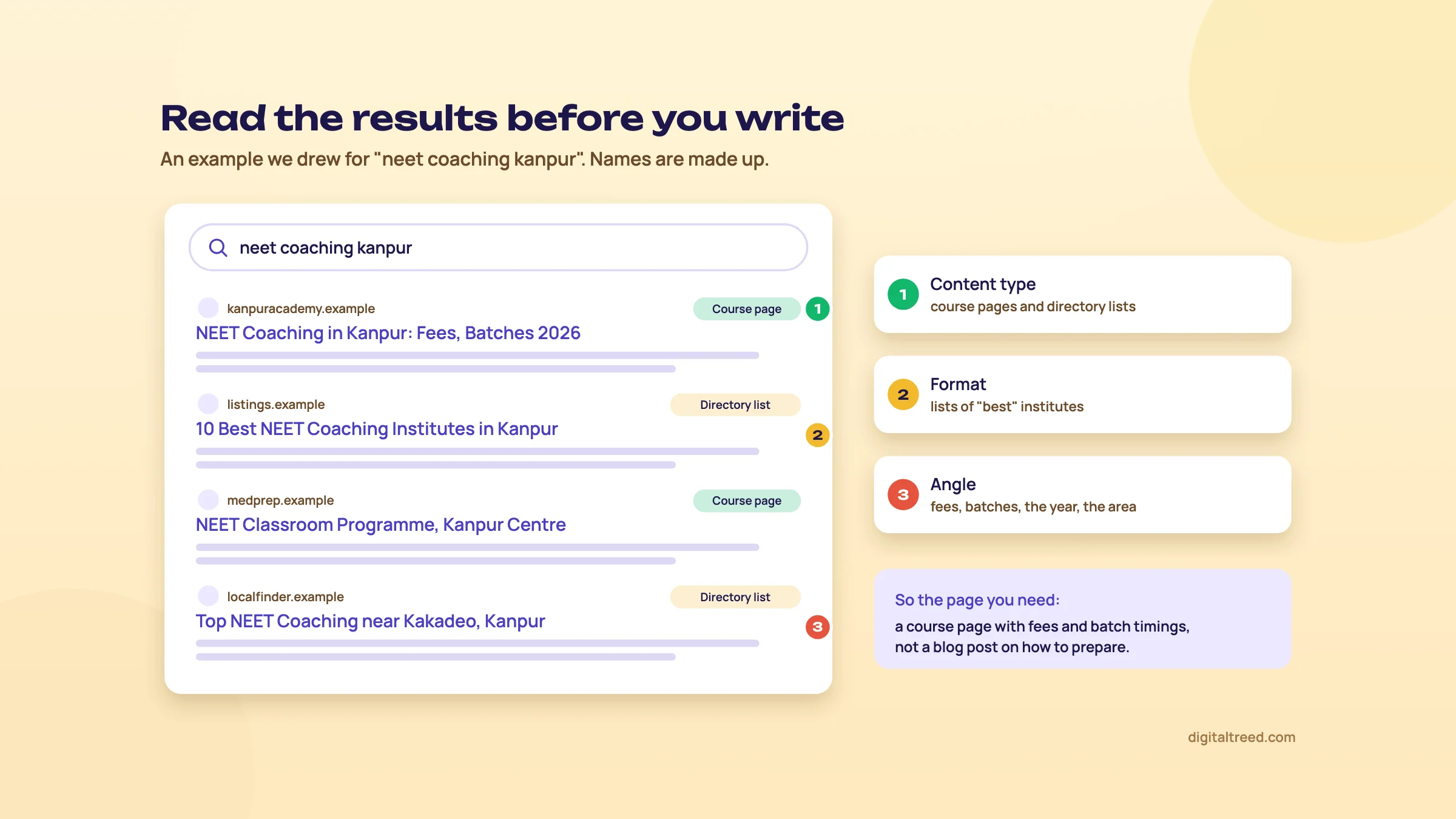 Read the results first. An example we drew; the names are made up.
Tip
When the results are mixed (a few guides, a few service pages), Google isn't sure what people want. That's often your opening: pick the type you can do best, and make it obvious from the title which one you are.
Search volume is an estimate, not a count
Every volume you see is a model of the real number. Treat them as sizes (tiny, small, medium, big), not as facts.
- Keyword Planner is free, but you need a Google Ads account with billing details entered, and keywords with very low search volumes can't be found or forecast at all.[5] Since 2016, accounts that spend little or nothing have often seen ranges like "1K–10K" instead of exact numbers. Google has never published the spend threshold.[6]
- Google Trends shows interest on a scale of 0 to 100, relative to all searches in the place and time you choose. Very low-volume terms show as 0. It isn't a count of searches.[7]
- Paid tools build their own estimates, so the same keyword can show quite different numbers in each.
For a local business, "no volume" in a tool doesn't mean no searches. "Root canal cost in Kidwai Nagar" may show nothing anywhere, and still bring two patients a month. If the phrase came from a real customer, it's worth a section on the right page even when the tools say zero.
Warning
Never take a search volume or a difficulty score from ChatGPT, Gemini or any other chatbot. In Google's own words, generative models "don't retrieve facts, but predict a likely sequence of words based on their training data".[8] They'll give you a confident number that no tool measured. Use them to brainstorm phrases, then check every number in Keyword Planner, Trends or Search Console.
Traffic potential beats search volume
A page that ranks well doesn't rank for one keyword. It ranks for dozens or hundreds of close variants: "dental implant cost", "implant price kanpur", "how much is one tooth implant" and so on. Judging a topic by one keyword's volume undersells it, and sometimes oversells it.
Ahrefs' framework judges a topic by its traffic potential: the estimated search traffic of the page that ranks first, across all the keywords it ranks for.[4] Paid tools show this directly. Without one, you can still see the idea in your own data. In Search Console, open Performance, switch to the Pages tab, click one of your better pages, then go back to Queries. You'll usually find that one page is getting impressions for far more searches than the single keyword you wrote it for.
Difficulty: can you actually beat these pages?
Difficulty is how hard it would be to get into the top results. Ahrefs calls it ranking potential. It looks at the backlinks you'd need (what its Keyword Difficulty score estimates) and the authority of the ranking sites. Then it asks whether you can match the intent and beat the quality.[4]
Two rules. First, compare difficulty only inside one tool. Each tool calculates its own score from its own data, so a 30 in one and a 30 in another don't mean the same thing. Second, look at the actual results before you trust the score. Ask:
- Who ranks? National brands, government sites and big directories are hard to move. Small local sites and old forum threads are not.
- Do the top pages have many sites linking to them? A paid tool shows this; the free MozBar extension shows Moz's Domain Authority at a glance (a Moz metric, not a Google one).
- Are the top pages actually good? Thin pages, old prices and no local detail mean you can beat them.
- Can you add what they can't? Your own photos, real prices, answers to the questions customers ask on calls.
Business potential: score every topic 0 to 3
This is the check most people skip, and the one that decides whether SEO turns into leads. Ahrefs scores every topic from 0 to 3 for how easily it can present its own product while covering the topic, and advises putting topics that score 2 or 3 first: 77% of its own blog posts score 2 or 3.[9] The score is relative to your business: a topic that's a 3 for you might be a 1 for someone else.
Here's how we'd score topics for a dental clinic in Kanpur. Our reading of the scale: 3, the page can't be written without your service; 2, your service clearly helps; 1, you can only mention it in passing; 0, there's no honest way to bring it up.
| Topic | Intent | Business potential | Why |
|---|---|---|---|
| dental implant cost in kanpur | Commercial | 3 | The page is your price list, your dentist and a booking button |
| dental implants vs bridges | Informational, close to buying | 2 | You can explain both honestly and offer a consultation to decide |
| how to stop tooth pain at night | Informational | 1 | You can suggest a check-up, but most readers want relief tonight |
| teeth whitening at home with baking soda | Informational | 0 | The reader is trying not to visit a clinic |
The first two get pages. The third might become a short section on an emergency care page. The fourth we'd skip, even if it has the biggest volume of the four. Traffic that can't become a patient isn't worth the writing time.
Long-tail and question keywords
Long-tail keywords are longer, more specific searches. Each one is searched less, but the person searching knows what they want, and fewer strong pages compete for it. For a small or new site, this is where rankings start.
Note
From our work: a women's wear store. The problem: a women's wear manufacturer selling through its own online store had its product pages aimed at short, highly competitive keywords, the ones the biggest fashion sites already own. What we did: we moved each product page to long-tail keywords that describe that exact product. The result: results started within a month. The lesson: a page aimed at a search it can win beats a page aimed at a search it can't.
Three free places to find long-tail and question keywords:
- Google autocomplete. Type your seed and add each letter of the alphabet after it ("dental implant a", "dental implant b"...). Also try question words in front: how, why, which, what. Our free Keyword Suggestion Tool does the alphabet and the question words for you, grouped and downloadable.
- People also ask. Click a question and Google adds more below it. Three or four clicks give you a good list. Our free Question Finder lists the questions from autocomplete, grouped by question word and intent, and merges the ones you copy from the box.
- AnswerThePublic. Shows questions, comparisons and "near" phrases around a seed. A free account gives 3 searches a day. Paid plans start at $10 a month, or $5 a month billed yearly under a limited-time offer (prices shown in India on 16 October 2026; they vary by country).[10]
Competitor keyword gap
A keyword gap is the list of searches your competitors rank for and you don't. Semrush's Keyword Gap and Ahrefs' Content Gap both compare several domains and list them for you; that's one of the main reasons to pay for a suite.
Without a paid tool, do it by hand. Open each competitor's sitemap (usually /sitemap.xml or /sitemap_index.xml), list their service pages and blog topics, and mark the ones you don't cover. Run each through the four checks, because competitors make bad choices too. For a perfume brand we work with, the first blog posts came from exactly this kind of list: the topics its competitors were already ranking for.
Seasonality and where in India people search
Google Trends is the tool for timing. Set the region to India and the period to the past 5 years. You'll see whether a search peaks every year: gift hampers before Diwali, banquet halls in wedding season, coaching before exam dates. Publish or update the page a month or two before the rise, so it has time to be crawled.
Trends also breaks interest down by state. Compare two phrasings, such as "chartered accountant" and "CA", and you'll see which one each state prefers. Chapter 3 goes further into how India searches.
Prompt research for AI assistants, briefly
Backlinko's 2026 SEO tutorial[11] and Semrush's SEO basics guide[12] now both include "prompt research": finding the questions people ask ChatGPT, Gemini and other assistants about your topic. Prompts tend to be longer and more conversational than searches.
The practical step is one you've already taken: collect the full questions customers ask on calls and WhatsApp, and answer them clearly on your pages. Google's own position is that optimising for its AI features "is optimizing for the search experience, and thus still SEO."[13] Guide 5 (chapter 8) covers prompt tracking properly.
Which tool when
Everything in this chapter can be done for free. Paid tools save time and add difficulty, traffic potential and gaps at scale.
| Job | Free choice | Paid choice |
|---|---|---|
| Searches you already appear for | Search Console | Not needed; Search Console is Google's own data |
| Volume ranges | Keyword Planner (with an Ads account) | Semrush, Ahrefs Keywords Explorer, SE Ranking |
| Questions | People also ask, autocomplete, AnswerThePublic (3 a day) | AnswerThePublic paid plans |
| Difficulty and traffic potential | Reading the results by hand | Ahrefs, Semrush, KWFinder (Mangools) |
| Competitor gaps | Competitors' sitemaps, by hand | Semrush, Ahrefs |
If you do decide to pay, these were the entry prices on 16 October 2026, before tax. They change often, so check on the day. We get nothing for recommending any of them.
| Tool | Entry paid plan | Free option | Best at |
|---|---|---|---|
| Semrush | SEO plan $139 a month[14] | Free plan, 10 reports a day | Breadth: SEO, PPC and local in one place |
| Ahrefs | Starter $29, Lite $129 a month[15] | Ahrefs Free for your own verified sites; no free trial | Backlink data, traffic potential |
| SE Ranking | Core $129 a month[16] | 14-day free trial, no card | Daily rank tracking at a lower price |
| Ubersuggest | About $29 a month, or a one-time lifetime plan[17] | About 3 searches a day | Cheap start for beginners |
| Mangools (KWFinder) | Prices differ between sources; check on the day | Free mini tools | A simple difficulty score |
Your keyword sheet
Put everything in one sheet. Guide 1's sheet had four columns; at this level it needs nine. One row per keyword:
- Keyword
- Intent (informational, commercial, transactional, navigational)
- What ranks (content type and format, from the results)
- Volume range (from Keyword Planner or your paid tool)
- Traffic potential (of the top page, if your tool shows it)
- Difficulty (one tool only, and say which)
- Business potential (0 to 3)
- Target URL (an existing page, or "new")
- Notes (seasonal peak, a customer's exact wording, the competitor who ranks)
Keyword research in 7 steps with free tools
- Pull your own queries In Search Console, open Performance, Queries, last 3 months, non-branded. Export it and copy queries with high impressions and low CTR into the sheet.
- Add your customers' words Go through recent calls, WhatsApp chats and enquiry emails, and add the phrases people actually used.
- Expand with autocomplete For each main service, run the A to Z autocomplete trick and open People also ask. Add the useful long-tail and question keywords.
- Get volume ranges Paste the list into Keyword Planner (Discover new keywords or Get search volume and forecasts), set the location to India or your city, and note the range for each.
- Check the season Put your top 5 phrases into Google Trends for India, past 5 years, and note any yearly peaks.
- Read the results Search each keyword you're serious about and fill in intent, what ranks, and your honest view of difficulty.
- Score and map Give each keyword a business potential score, drop the 0s and most of the 1s, and write the target URL next to the rest.
Once a keyword has a page, our Word Counter & Keyword Density Checker shows whether your customers' words appear on it at all. Don't chase a density number; there isn't one.
If you'd rather have us build the keyword plan with you, that's part of our search engine optimization service. Otherwise, take your sheet to chapter 2: by the end of it, every keyword will have exactly one page.
Topic clusters, topical maps and keyword cannibalisation
Quick answer
A topic cluster is one main page on a broad topic plus supporting pages on its subtopics, all linked together. Put keywords on one page when the same URLs rank for them, and split them when the results differ. When two of your pages chase the same search, that's cannibalisation: merge them, redirect one, or re-target it.
Chapter 1 left you with a sheet of keywords. Now each one needs a home. Get this wrong in one direction and you end up with 40 thin pages fighting each other. Get it wrong in the other and one page tries to answer six different questions, and answers none of them well.
Why one page can rank for hundreds of keywords
Google doesn't match pages to keywords word for word. It works out what a search means and ranks pages that answer that need. So "dental implant cost kanpur", "implant price per tooth" and "how much does a tooth implant cost" are, for Google, close to one question. A good page on implant costs can rank for all of them. That's why chapter 1 judged topics by the traffic potential of the top page, not one keyword's volume.
The practical question is always the same: does this keyword need its own page, or is it a section of a page you already have? You don't have to guess. The results tell you.
Group keywords by what Google already shows
The free method is called SERP overlap. Search two keywords on google.co.in in an incognito window and compare the top 10 results. If many of the same URLs rank for both, Google treats them as one topic, and one page should target both. If the lists are mostly different, Google sees two different needs, and you need two pages.
A rule of thumb we use (tools set the line at 3 or 4): 4 or more shared URLs in the top 10 means one page; 0 to 2 means separate pages; 3 means look at intent and format before you decide. It's a starting point, not a law, and the signals in this table help with the close calls.
| Signal | Same page | Separate pages |
|---|---|---|
| Shared URLs in the top 10 | Many (4 or more) | Few or none |
| Intent | Same (both want prices, say) | Different (one wants to learn, one wants to book) |
| Format of the ranking pages | Same (both show service pages) | Different (guides for one, product lists for the other) |
| Would one reader want both answers? | Yes, on the same visit | No, they're different people or moments |
Doing this by hand for 300 keywords takes days. Paid suites group keywords for you: Semrush's Keyword Strategy Builder[18] and the "Clusters by Parent Topic" tab in Ahrefs' Keywords Explorer[19] both cluster keyword lists, though the feature names keep changing. Search Console now groups similar queries too, in the "Queries leading to your site" card of its Insights report (since October 2025), though only for sites with a large volume of queries.[20] For a small list, a spreadsheet and the method below are enough.
Group 30 keywords into pages in a spreadsheet
- Sort by business potential Take your chapter 1 sheet and keep the keywords that scored 2 or 3. Sort them so the biggest, broadest ones sit at the top.
- Search the first keyword On google.co.in, in an incognito window, copy the top 10 URLs into the sheet next to it.
- Compare the next one Search the next keyword and count how many of its top 10 URLs match the first list. Write the number down.
- Give it a group 4 or more matches: same group as the first keyword. 0 to 2: start a new group. 3: check intent and format, then decide.
- Repeat Compare each new keyword with the first keyword of every existing group.
- Name each group's main keyword Pick the keyword that best describes what the group wants, usually the one with the most volume. That's the page's primary keyword; the rest are its secondary keywords and headings.
- Assign a URL Each group gets one URL: an existing page if one fits, or a new one.
Build a topical map
Groups tell you which pages to make. A topical map tells you which pages you're missing. It's a list of every subtopic and question a topic covers, arranged so you can see how they connect.
Koray Tuğberk Gübür, an SEO consultant known for his work on topical authority, plans sites this way. He maps out every connected subtopic and question, matches headings to real queries and what ranks for them, and links the pages to each other by context, so that each link sits in a sentence about the page it points to. Then he publishes steadily, and he increased his publishing rate as the project went on.[21]
Note
Case study: topical authority without links. In his "Topical Authority" study, Gübür describes a new site built on this method that went from zero to 128,000 organic visitors in 123 days. He says the growth came from the content alone, without technical SEO, speed work, design changes or backlinks.[21] Read it with care: the figures are his own, the page doesn't say how "organic traffic" was measured, and other factors weren't ruled out. The lesson still holds: covering a topic fully, with pages linked by meaning, can carry a new site a long way.
For a small business, the topical map doesn't need to be huge. A Kanpur dental clinic might have 6 main services. Under each, list the questions patients ask before they book: cost, pain, recovery, alternatives, how long it lasts, who shouldn't have it. That's a topical map of 30 to 40 pages, and many clinic websites cover only a handful of them.
Hub and spoke: how the pages link
Each group of pages becomes a cluster. The hub is the broad page; the spokes are the pages on subtopics. For the clinic:
- Hub: dental implants in Kanpur (what they are, who they suit, prices in brief, book a consultation)
- Spokes: dental implant cost, the implant procedure step by step, recovery after an implant, implants vs bridges vs dentures
The hub links to every spoke. Every spoke links back to the hub, and to other spokes where a reader would actually want to go next: the recovery page naturally links to the cost page, less naturally to the dentures comparison. Mike King of iPullRank gives the same advice for AI search, where answers are built from passages on many related pages: build clusters of linked, related pages.[22] Chapter 8 covers anchor text and how many links to add.
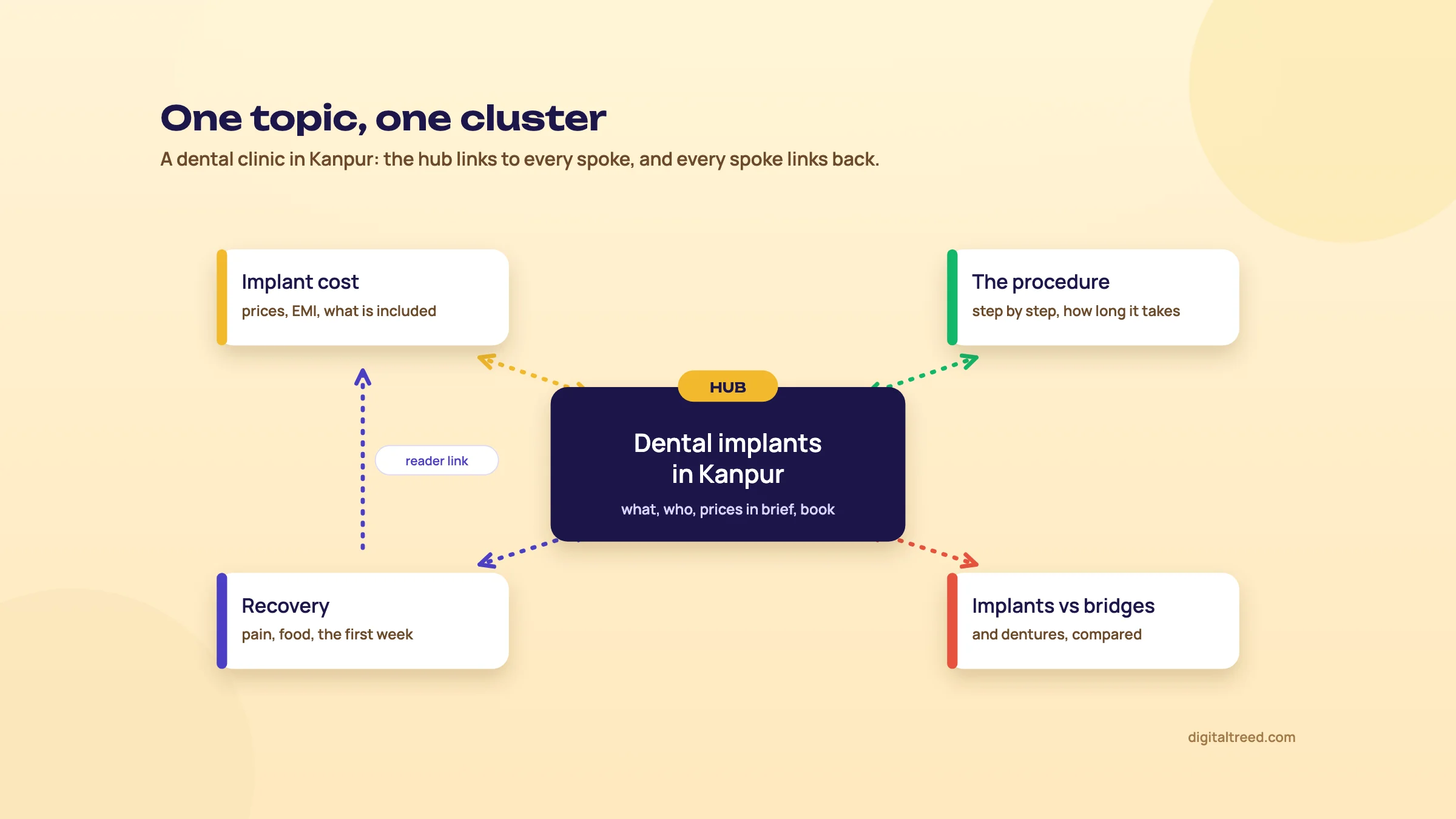 A topic cluster: the hub links to every spoke, and every spoke links back.
The keyword-to-URL map
Once the groups are done, add one more column to your sheet, or keep a separate tab: the URL, its one primary keyword, its intent, and its secondary keywords. One primary keyword and one intent per URL. If you ever find yourself writing the same primary keyword against two URLs, stop: you're about to create cannibalisation.
Check the map every time someone wants a new page. Most cannibalisation isn't planned. It happens when a blog post is written two years after the service page, by someone who didn't know it existed.
Spot cannibalisation in Search Console
Keyword cannibalisation is when two or more of your pages compete for the same search, so Google keeps switching between them and neither ranks as well as one strong page would. Google says duplicate content isn't a violation of its spam policies and isn't something that will cause a manual action.[23] It just wastes your effort.
To find it:
- Open Search Console, Performance, and set the date range to the last 3 months.
- Click + Add filter, choose Query, and enter the keyword.[24]
- Open the Pages tab. If more than one of your URLs is listed with real impressions, open the date chart for each.
- The sign of a problem is two URLs taking turns: one shows for a few weeks, then the other, and the average position for the query keeps moving.
Two URLs for one query isn't always a problem. If your home page and your implants page both show for your clinic's name, that's normal. If both pages sit in the top 3 together, you're taking two spots, and you leave it alone. Act when two pages split the impressions and neither holds a good position.
Our Free Website Audit flags duplicate titles, which is often the first hint that two pages were written for the same search.
Fixing it
Pick the winner first: usually the page with more links, more clicks, or the better match for the intent. Then choose one of these:
- Merge and redirect. Move anything useful from the weaker page into the winner, then 301 redirect the weaker URL to it. Google calls a redirect a strong signal for which URL to show,[25] and with a permanent redirect (301 or 308) Google takes the target as the URL that should become canonical.[26] It is usually the cleanest fix.
- Re-target. If both pages are worth keeping, change the weaker one to a different keyword and intent. A blog post on "dental implant cost" can become "is a dental implant worth it at 60?", and send readers to the cost page.
- Point internal links at the winner. Change menu links, related-post links and in-text links that use the keyword so they all point at one URL.
- Canonical tag. If both URLs have to stay live (a print version, a filtered product page), add a canonical on the weaker one pointing at the winner. Google lists rel="canonical" as a strong signal, not a command, and asks you to keep your signals consistent: redirects, canonicals, sitemaps and internal links should all name the same URL.[25] Guide 3 covers canonicals in depth.
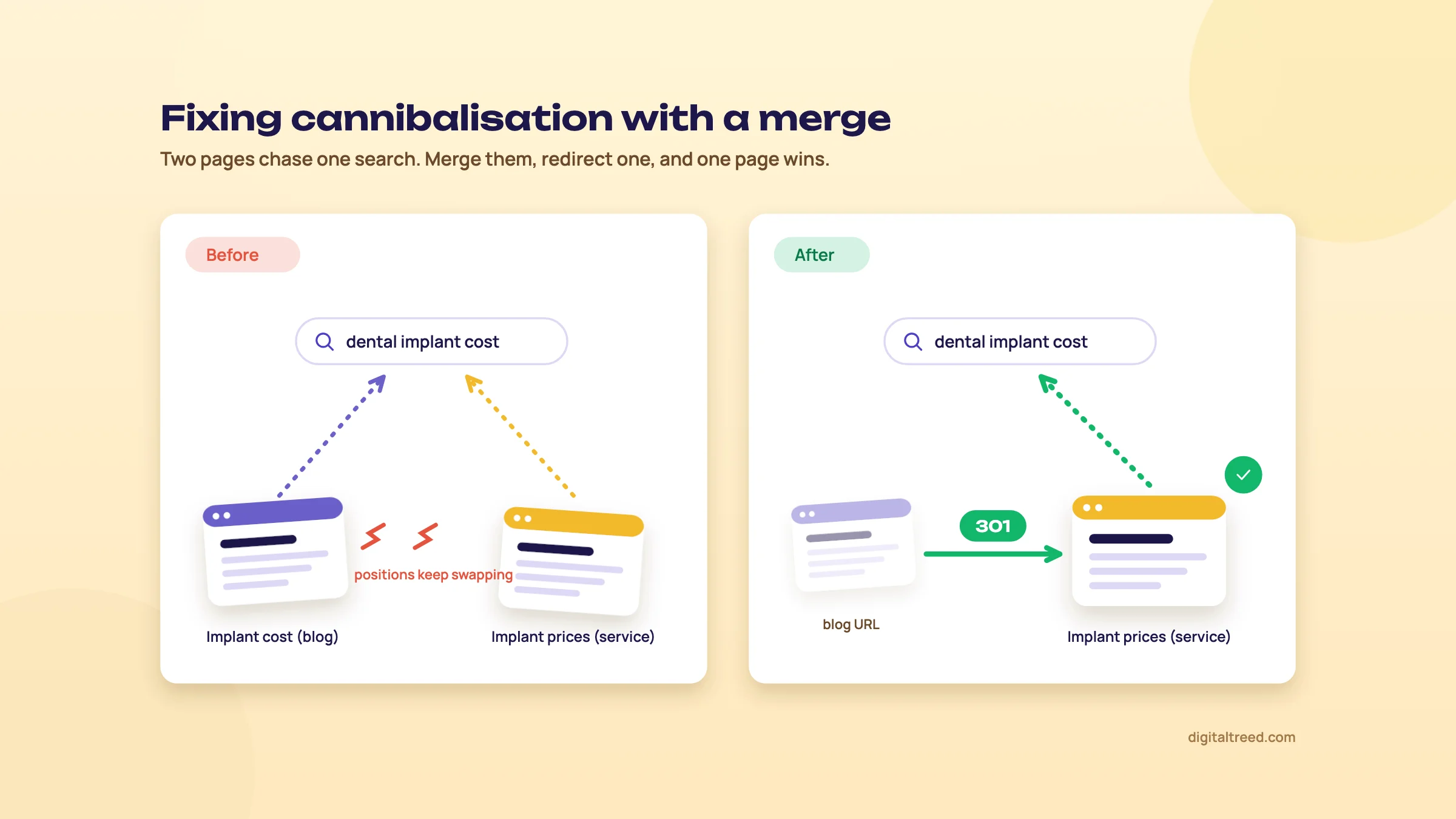 Merge the weaker page into the winner and redirect it with a 301.
After a merge, check two things. The old URL should return a 301 to the right address, not a 302 or a chain of redirects. And the winner should declare itself as canonical, not the old URL.
Then give it time. Watch the query in Search Console over the next two to three months, comparing clicks and position with the same length of time before the change.
Don't make a page for every variant
Warning
The opposite mistake is worse than cannibalisation. Google's spam policies define scaled content abuse as making many pages mainly to manipulate rankings, "no matter how it's created".[27] Its May 2026 guide to generative AI features goes further: making separate pages for every variation of a question mainly to show up in AI answers breaks that same policy.[13] Doorway pages are covered too: many pages aimed at similar searches that funnel people to one place, like 50 near-identical "dentist in [area]" pages.
One strong page per group, linked into a cluster, beats ten thin pages that say the same thing in different words. If you'd like help planning the clusters and writing the pages, that's what our content marketing service does. Otherwise, chapter 3 adds one more layer to your keyword sheet: the different ways people in India type the same search.
How India searches
Quick answer
People in India search in English, in Hindi and other Indian scripts, and in mixed language: Hindi words typed with English letters, or Hindi and English in one query. Each form is a separate keyword with its own results. Research each one, write native-script pages where demand is real, and don't machine-translate pages in bulk.
Most keyword guides are written for people who search in one language. Your customers don't. The same person might type in English at work, switch to Hindi letters to search for a recipe, and speak a question into their phone in Hinglish on the way home. Every one of those is a keyword, and most Indian sites only research the first.
Three ways to type one search
Take any need and you'll usually find it searched in three forms: English, a native script such as Devanagari, and a mixed form where Hindi words are typed in English letters (often called Hinglish). Here are four examples.
| Need | English | Hindi script | Mixed (Hinglish) |
|---|---|---|---|
| A home loan | home loan eligibility | the same words in Devanagari | home loan kaise milega |
| The government housing scheme | pm awas yojana apply online | the same words in Devanagari | pm awas yojana kaise apply kare |
| A dentist nearby | dentist in kanpur | the same words in Devanagari | dant ka doctor kanpur |
| Coaching fees | neet coaching fees | the same words in Devanagari | neet coaching fees kitni hai |
Search each form of your own main keyword and compare the top 10, the way chapter 2 compared keywords. Treat each form as its own keyword with its own results, and expect different pages to rank for each. Then put all three forms in your keyword sheet, with intent and business potential for each.
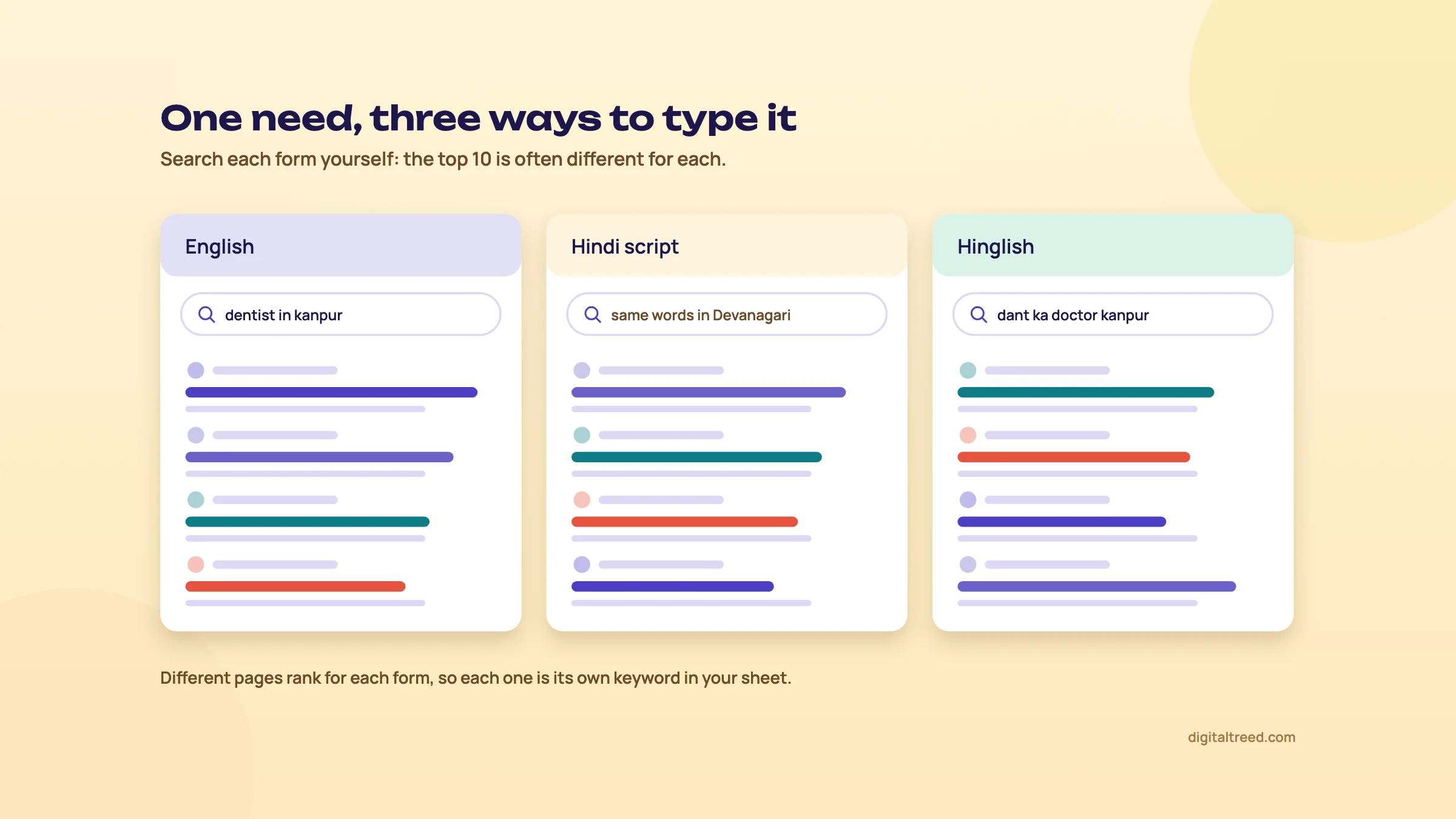 One need, three ways to type it. Compare the top 10 for each.
How to find the forms your customers use
- Autocomplete in Hindi. Add a Hindi keyboard to your phone or computer and type your service into Google in Devanagari. Then type it again in Hinglish. Note the suggestions for both.
- Search Console. Your own queries already include any Hindi-script and Hinglish searches you show up for. Filter for them with a regular expression (steps below).
- Google Trends by state. Compare an English phrase with its Hinglish or Hindi form, set to India, and look at the state breakdown. It shows where each form is used more, and when it peaks.[7]
- Keyword Planner. Its targeting settings include a language.[28] Try your Hindi-script keywords there for volume ranges, but expect gaps for low-volume phrases.[5]
Find your Hindi and Hinglish queries in Search Console
- Open Performance In Search Console, open Performance, Search results, and set the date range to the last 3 months.
- Add a query filter Click Add filter, choose Query, and switch the match type to Custom (regex).[24]
- Filter Hindi script Enter
\p{Devanagari}to keep only queries that contain Devanagari characters. - Filter Hinglish Make a second filter with common Hindi words typed in English letters, for example
\b(kaise|kya|kitna|kitni|kahan|wala|wali|sasta|ke liye)\b. Add words your customers use. - Export and compare Export both lists into your keyword sheet. Check which page ranks for each query, and whether that page answers it.
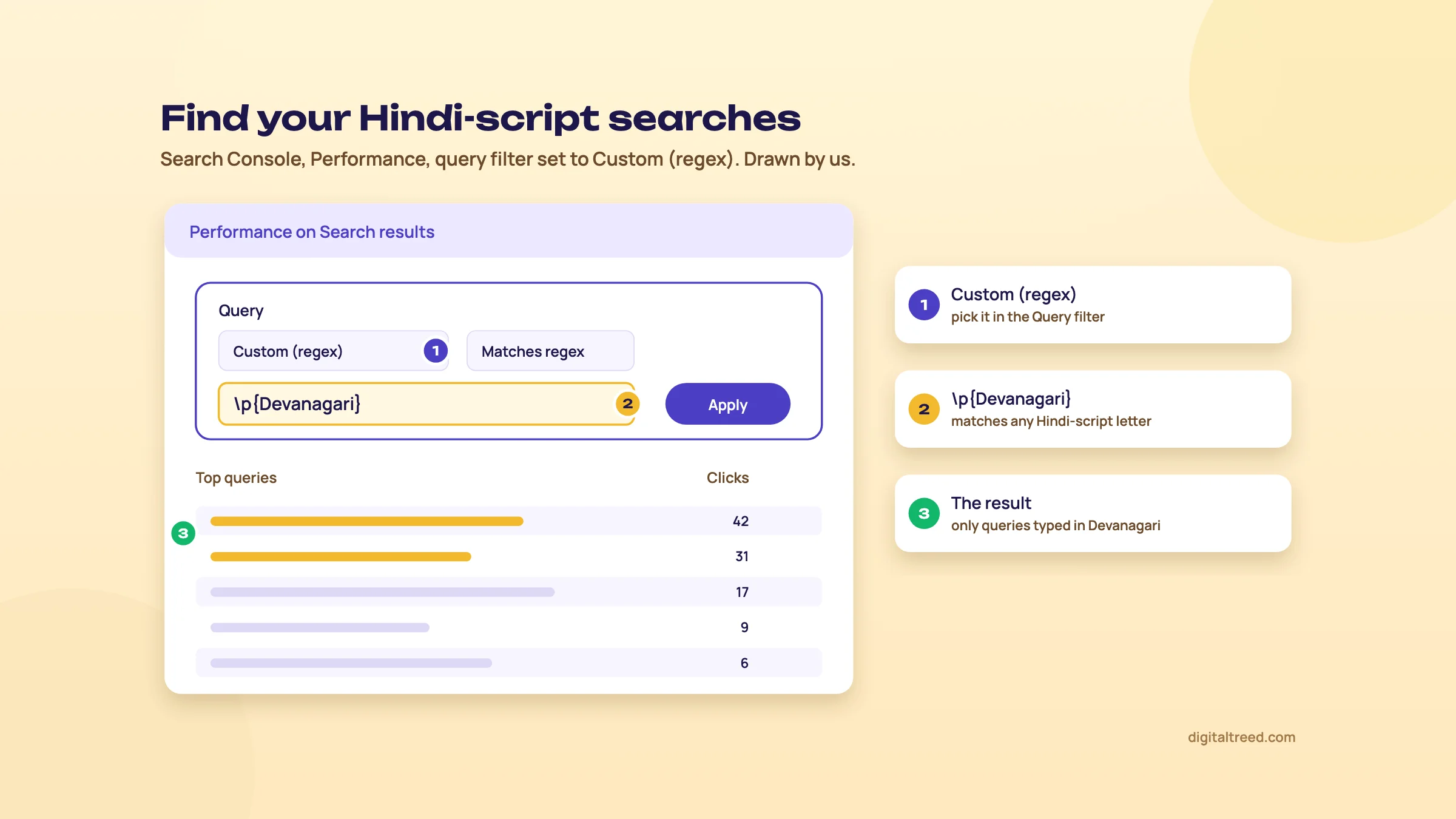 The regex filter that lists only Hindi-script queries. Drawn by us.
When a native-script page pays off
Note
Case study: Hindi pages for a lender. Techmagnate, an Indian agency, says it ran Hindi SEO for Bajaj Finserv from August 2019 to January 2020. It targeted 138 Hindi keywords with about 200,000 searches a month, built new Hindi pages, and earned PR and links from Hindi news and other vernacular sites. By its account, organic traffic to the Hindi pages rose 270%, and to the home loan Hindi pages by over 700%. The Hindi-script searches for "home loan" and for the Pradhan Mantri Awas Yojana housing scheme (90,500 searches a month) moved from outside the top 100 to number 1.[29] These are the agency's own figures, with no independent check. The lesson: Hindi-script search can be a big, under-served market, and fewer strong pages compete for it.
That doesn't mean every business needs a Hindi site. We'd write a native-script page when three things are true:
- Search Console or Keyword Planner shows real Hindi-script searches for something you sell.
- The pages ranking for those searches are weak: thin, machine-translated or off-topic.
- You can serve those customers in their language, on calls and on WhatsApp, not just on the page.
Hinglish searches are different. People typing "dant ka doctor kanpur" can usually read an English page, so a clear English page with the Hinglish phrase in a heading or an FAQ is often enough. We'd test that first, before building a whole Hindi section.
Voice and Indian languages
270%
year-on-year growth in voice searches in India, in a 2019 Google report[30]
8
Indian languages in Google's AI Mode by October 2025, Hindi included[31]
77.3%
of Indian web traffic came from phones in September 2026[32]
The 270% figure is old and grew from a small base. What's newer is Google's own push into Indian languages. It added Hindi to AI Mode in September 2025.[33] In October 2025 it added Bengali, Kannada, Malayalam, Marathi, Tamil, Telugu and Urdu, and launched Search Live, its voice and camera search, in India.[31]
Google has published no separate guidance for voice search. Spoken questions bring up the same kinds of results as typed ones: web pages, local results and AI answers. In our view, voice changes the wording, not the method: a spoken search is more likely to be a full question, and the question research from chapter 1 covers it. A clear answer near the top of the page and a complete Business Profile do the rest.
Translate with an editor, not in bulk
Machine translation makes a hundred Hindi pages in an afternoon. That's the problem. Google's scaled content abuse policy covers pages made mainly to manipulate rankings "no matter how it's created", and its examples include content scraped and then translated or reworded without adding value.[27] Bulk-translated pages that nobody checked sit close to that line, and they read badly to the people you're trying to reach.
Do not
- Run the whole site through a translation tool and publish it
- Translate English keywords word for word into Hindi
- Keep Delhi prices and examples on a page meant for Lucknow readers
Do
- Start with the few pages where Hindi demand is proven
- Research the Hindi and Hinglish keywords separately
- Have a fluent editor rewrite, not just correct, every page
- Adapt examples, prices and terms to the reader
Google publishes its own SEO Starter Guide in Hindi too (last updated 18 December 2025 at the time of writing).[34]
Once a page has Hindi text, our Word Counter & Keyword Density Checker counts its words and repeated phrases before you publish, in Hindi script as well as English.
If you run English and Hindi versions of a page
When the same page exists in English and Hindi, tell Google they're versions of each other with hreflang. The codes use a language and, optionally, a region, such as en-IN and hi-IN; a region on its own isn't valid. Each version has to list itself and every other version, and if two pages don't point to each other, Google ignores those tags. And Google doesn't use hreflang or the lang attribute to work out what language a page is in; it reads the text.[35] Guide 3 covers the setup step by step.
Add your Hindi and Hinglish keywords to the sheet now, each with its own row. Chapter 4 turns those rows into briefs for pages that match what each search wants.
Content briefs and pages that match search intent
Quick answer
A content brief tells the writer what the page must do before a word is written: the main keyword and its intent, what the top results cover and miss, the questions to answer, the angle only you can add, the headings, links and sources. Most pages that fail, fail on intent, not on the quality of the writing.
Here's the order that works. Read the results page. Decide what the page is for. Collect the questions. Write the brief. Only then does anyone write. It sounds slow, but a brief takes about 30 minutes, and rewriting a page that missed the intent takes days.
Read the results page before you plan anything
Search your main keyword on google.co.in in an incognito window, set to the city you care about if it's a local search. Then read the first page the way a writer would, and note four things.
- Type. Are the top results blog posts, product pages, category pages, service pages or videos? If Google shows ten clinic service pages for "knee replacement surgery Lucknow", your blog post won't get in.
- Format. Step-by-step guides, lists, comparisons, calculators, a single direct answer?
- Angle. What hook do the titles share: cheapest, fastest, for beginners, in 2026, near you?
- What else is on the page. An AI Overview at the top, a "People also ask" box, a map with three businesses, videos, shopping results.
AI Overviews show up mostly on informational searches. In Semrush's study of 200,000 US keywords, 80% of desktop AI Overviews appeared on informational keywords, and fewer than 3% on transactional ones.[36] Pew Research Center found AI summaries on 60% of searches phrased as questions, against 18% of all searches, in its March 2025 study of 900 US adults.[37] Both are US data, but the pattern is a fair warning: if your keyword is a question, expect an AI answer above you, and plan a page that gives people a reason to click past it.
To see how the top pages word their titles and descriptions, run their addresses through our Meta Tag Analyzer and paste the results into your brief.
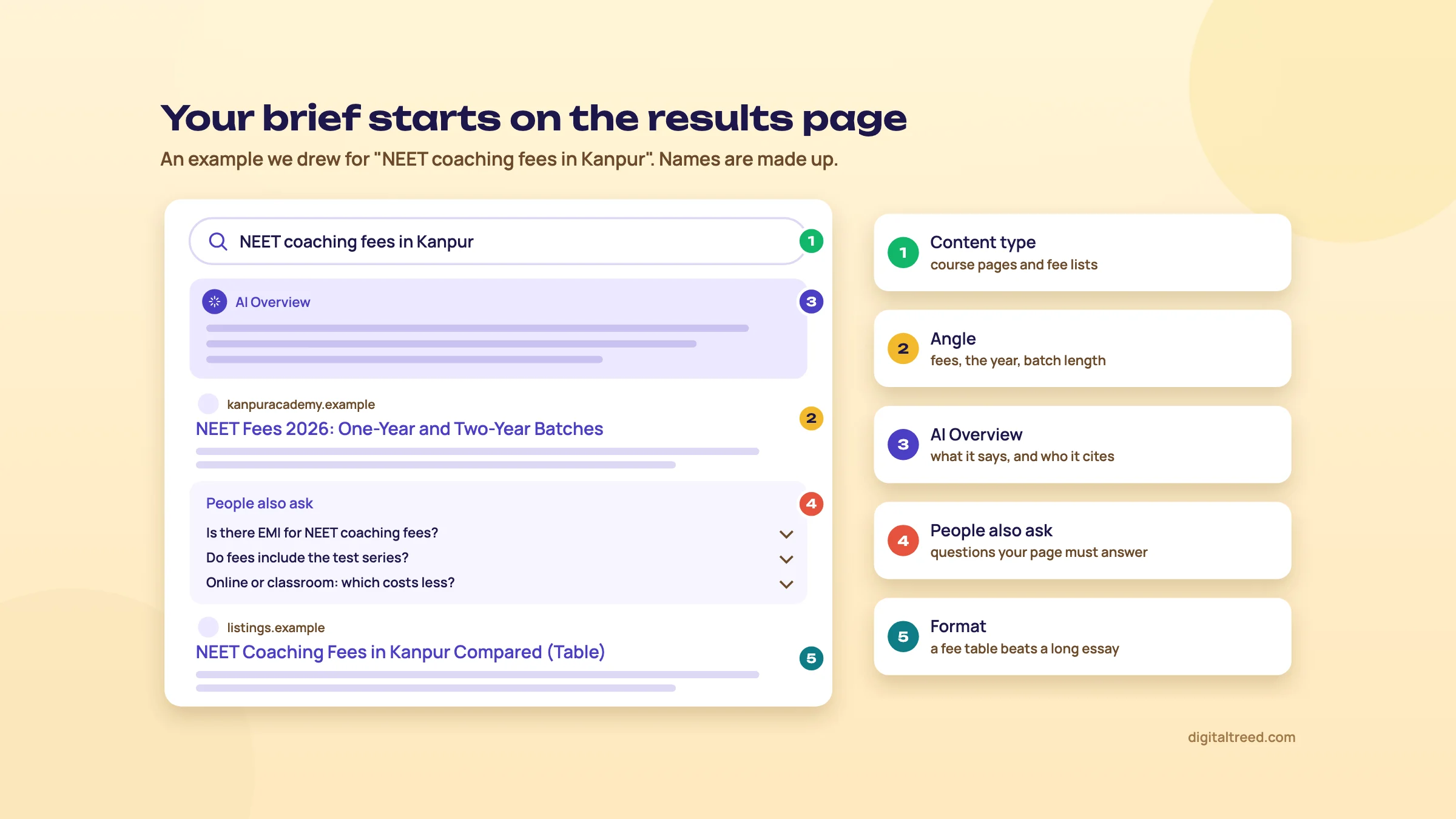 What to note from the results before you write the brief. An example we drew.
Cover the basics, then add what's missing
Once you know what ranks, list what every top page covers. Those are the basics: leave one out and the reader goes back to Google. But a page that only repeats the basics has no reason to rank above the pages it copied.
The extra part is what Backlinko's tutorial calls information gain: something useful the reader won't find in the other results.[11] Google makes the same point in its guide to generative AI features. It asks for unique, "non-commodity" content and contrasts a generic "7 Tips for First-Time Homebuyers" with "Why We Waived the Inspection & Saved Money: A Look Inside the Sewer Line".[13] Anyone can write the tips. Only someone who bought that house can write the second.
Focus on making unique, non-commodity content that visitors from Search and your own readers will find helpful and satisfying.[38]
For a small Indian business the gain is usually sitting in the office already. A coaching institute in Kanpur knows its real fee bands and what parents ask at the counter. A physiotherapy clinic in Lucknow knows which exercises patients get wrong at home. A D2C skincare brand knows the three questions that fill its support inbox every week. Put that on the page and you have something the top ten don't.
Collect the questions people actually ask
Questions become your subheadings and your must-answer list. Pull them from four places.
- "People also ask". Open a few questions; each one you open loads more. Copy the ones that fit your page's intent.
- Autocomplete. Type the keyword followed by "how", "why", "cost", "vs" and note the suggestions. Our free Question Finder does this with 24 question openers and turns the ticked questions into the brief's heading list.
- Search Console. If the page already exists, open Performance, filter by the page, and read the Queries tab. These are searches Google already connects with you. The table shows up to 1,000 rows.[39]
- Your own conversations. Sales calls, WhatsApp chats, the front desk, reviews. Customers phrase things in ways no tool shows you.
AnswerThePublic shows the questions around a keyword as a visual wheel, with 3 free searches a day once you create a free account.[10] We'd still start with the free Google sources and your own inbox; they're closer to what your customers say.
The brief, field by field
Here's the template. It fits on one page, and every field answers a question the writer would otherwise guess at.
| Field | What goes in it |
|---|---|
| Main keyword | One primary search the page must win (from your keyword sheet, Chapter 1) |
| Intent | Learn, compare, buy or go, plus the type and format the results page rewards |
| Reader | Who is searching and what they already know: "a parent in Kanpur comparing NEET coaching, first child" |
| Angle | The one thing only you can add: your data, your photos, your process, a real case |
| Must-answer questions | 5 to 10 from PAA, autocomplete, Search Console and your calls |
| H2 and H3 plan | Headings in the order the reader needs them, answer first |
| Sources | The pages and studies the writer must cite, with dates |
| Internal links | Pages that should link to this one, and pages this one should link to |
| Call to action | The one next step: call, book, WhatsApp, download, buy |
| Word range | A rough guide from the top results, never a target |
Here's a filled-in brief for a made-up Kanpur coaching institute, so you can see the level of detail.
| Field | Example |
|---|---|
| Main keyword | NEET coaching fees in Kanpur |
| Intent | Commercial: parents comparing before they visit. Results show institute pages and fee lists |
| Angle | Our real fee bands for one-year, two-year and crash courses, and what is and isn't included |
| Must-answer | Are there instalments? Is the test series extra? Are there scholarships? How do online and classroom fees compare? |
| Links in | From the NEET course page and the scholarship test page |
| Call to action | Book a free counselling visit |
Write a brief in 30 minutes
- Search the keyword Incognito, google.co.in, the right city. Note the type, format and angle of the top five results.
- Skim the top three pages List the subtopics all of them cover. That's your baseline.
- Note what's missing Write down one or two things none of them have that you can add from your own work.
- Collect questions Ten minutes across "People also ask", autocomplete, Search Console and your call notes.
- Plan the headings Turn the baseline and the questions into H2s and H3s, in the order a reader needs them.
- Add links and sources Two or three internal pages in and out, and every outside source the writer must cite.
- Set the call to action One next step, written the way you'd say it to a customer.
Write answer-first
Under each main heading, answer the heading's question in 40 to 60 words. Then give the detail, the steps, the exceptions. A reader who only wants the answer gets it in five seconds; a reader who wants more keeps going.
This helps in three places. People scan, so a clear first sentence keeps them. A short, direct answer is easy for Google to show as a snippet. And AI answers quote passages, not whole pages. Aleyda Solis's AI search checklist asks for direct, short answers near the top, and passages that make sense on their own.[40] Mike King gives similar advice: clear sections with descriptive headings, and specific, data-backed statements in plain subject-verb-object sentences.[22]
One caution. Google's own guide lists "chunking" content and rewriting it just for AI among the things you can ignore for Google Search.[13] So write answer-first because it's better for the reader, not because you're cutting the page into pieces for a machine. Guide 5, chapter 4, goes deeper on writing passages that get cited.
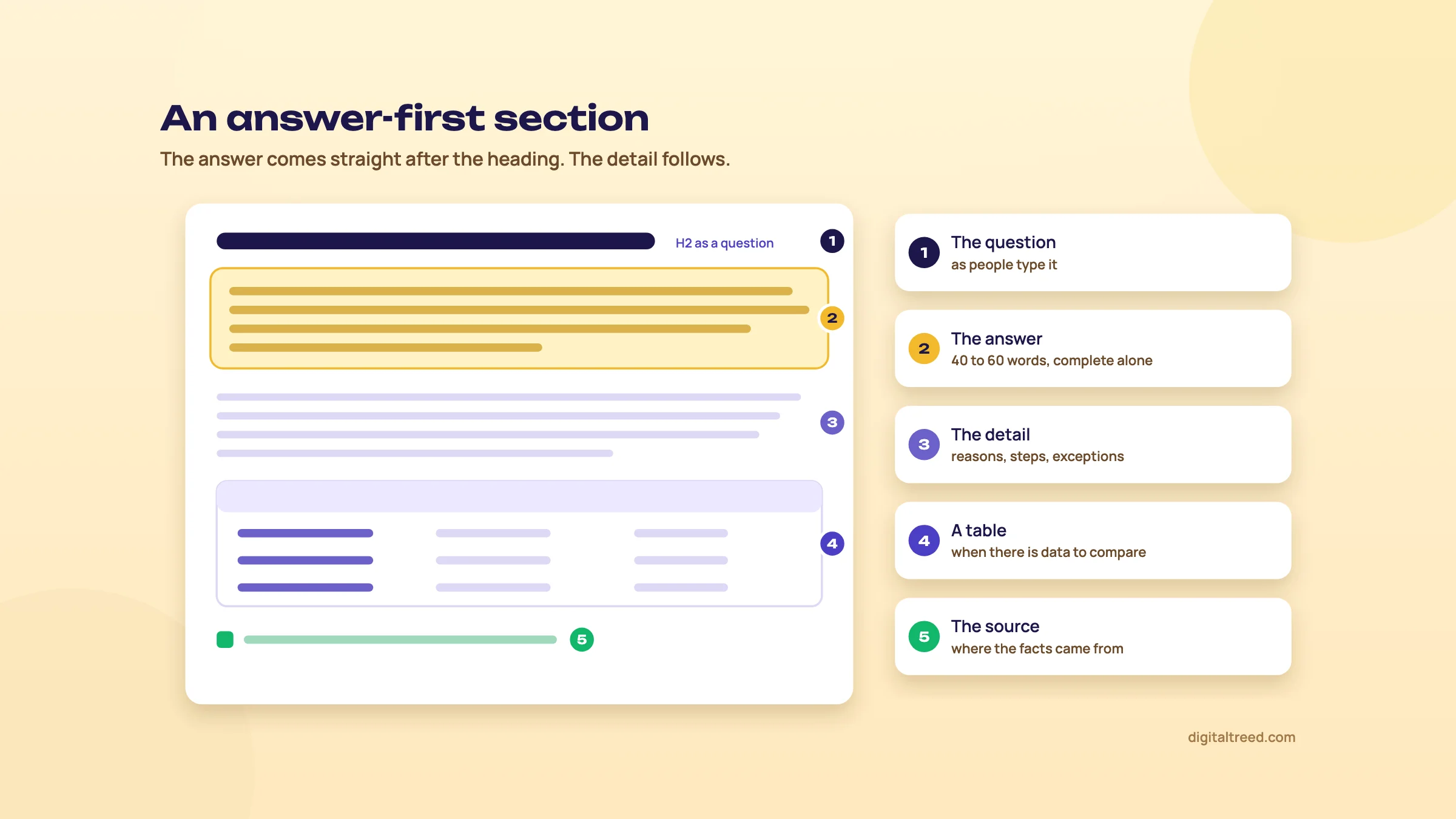 An answer-first section: the answer sits straight under the heading.
How long should the page be?
As long as the intent needs, and no longer. Google says so directly. Its helpful content page asks whether you're writing to a particular word count because you've heard Google prefers one, and answers: "(No, we don't.)"[41]
The studies agree. Backlinko's analysis of 11.8 million Google results found the average first-page result had 1,447 words, with no direct link between length and position.[42] In Cyrus Shepard's 50-site study at Zyppy, word count didn't separate sites that gained in Google updates from sites that lost; the winners averaged 2,623 words and the losers 3,619.[43] Both are correlations, and Zyppy's sample is small. Neither says "write more".
So the word range in the brief is a sanity check. If the top results are 800-word answers and your draft is 4,000 words, you've probably drifted off intent. If they're detailed guides and yours is 300 words, you've probably skipped questions.
Content score tools: good checklists, bad targets
Tools like Surfer, Clearscope and Frase compare your draft with the pages that rank and give it a score or grade, mostly on terms used, length and headings. They're handy for spotting a subtopic you forgot. The danger is writing for the score. Our view: these scores push you towards matching terms, and a draft can score high while saying nothing new. In a 2019 podcast, Tim Soulo, CMO of Ahrefs, said his team didn't use on-page SEO scoring tools at all.[2]
Pros
- Quick check for subtopics and questions the top pages cover
- Useful for briefing freelance writers who don't know the topic
- Clearscope also keeps an inventory of your published pages and flags decay
Cons
- Rewards matching what already ranks, which works against information gain
- Can push writers into repeating terms unnaturally
- Monthly cost adds up for a small business
- A high score says nothing about whether your facts are right
Prices as seen on each vendor's pricing page on 16 October 2026, in US dollars, before tax:
| Tool | Starting price | What it's best for | Free option |
|---|---|---|---|
| Surfer | $49/mo billed yearly (Discovery, 120 documents)[44] | Draft scoring against top pages, AI writer | No |
| Clearscope | $129/mo (Essentials, 50 pages tracked)[45] | Editorial teams; content grade and inventory tracking | 14-day trial |
| Frase | $49/mo, or $39 billed yearly (Starter, 10 articles)[46] | Briefs and outlines from search results, at a lower price | 7-day trial |
| AnswerThePublic | $10/mo, or $5 billed yearly with the current offer (Starter, price shown in India)[10] | Question research around a keyword | About 3 searches a day |
Our honest take: if you're writing briefs for your own business, "People also ask", autocomplete, Search Console and an AI assistant for a first outline (checked by you) cover most of it for free. Pay for Frase or Clearscope when you're briefing several writers every month. Until we build our own question finder and brief generator, Frase is what we'd point you to for briefs.
Keyword stuffing still backfires
Repeating your keyword to look relevant is a named spam policy at Google: filling a page with keywords or numbers out of context to manipulate rankings.[27] It doesn't help in AI answers either. In the GEO study by researchers from Princeton and IIT Delhi, keyword stuffing cut a page's share of a simulated AI answer by 8.7%, while adding quotes, statistics and cited sources raised it.[47] It was mostly a lab test with one AI model (a check on Perplexity found the same), but it points the same way as Google's policy.
Do not
- Start writing before you've read the results page
- Copy the outline of the top result and call it a brief
- Pad the page to hit a word count
- Write for a content score instead of the reader
- Repeat the keyword in every heading
Do
- Match the type and format Google already rewards
- Answer the heading's question in the first 40 to 60 words
- Add one thing only you know: a fee, a photo, a case, a number
- Cite your sources with dates
- Use the words your customers use, naturally
A brief gets the page right on day one. Chapter 5 covers the part that makes readers and Google trust it: experience, authorship and how to use AI in writing without getting burned. If you'd rather hand the writing over, have a look at our content marketing service.
E-E-A-T, helpful content and AI-assisted writing
Quick answer
Google rewards people-first content: written to help a reader, showing first-hand experience, and clear about who made it and how. E-E-A-T isn't a ranking factor by itself, but Google's systems look for signs of it, and trust counts most. AI can help you draft, but Google now calls it critical to fact-check AI output by hand.
This chapter is about the difference between a page that answers a search and a page people believe. Chapter 4 got the structure right. Now the substance: who wrote it, what they actually know, and how much of it a machine wrote.
People-first or search-engine-first?
Google's page on helpful content gives site owners a set of self-assessment questions, grouped under content and quality, expertise, page experience, and whether the content is made for people first.[41] It also lists warning signs of content made for search engines first. One of them is aimed straight at an old SEO habit: are you writing to a particular word count because you've heard Google prefers one? Google's answer: "(No, we don't.)"
In plain words, we'd boil the list down to four questions you can ask about any page before you publish it:
- Would we make this page if Google didn't exist, because our customers need it?
- Does it show something we know first-hand, or is it a rewrite of what already ranks?
- Will the reader leave able to do the thing, or will they go back to Google?
- Is it obvious who wrote it, and why they're worth listening to?
If the honest answer to the first question is no, the page is search-engine-first. A Lucknow dental clinic writing "best dentist in Delhi, Mumbai, Bangalore" pages to catch traffic it can't serve is the classic case.
E-E-A-T, explained properly
E-E-A-T stands for experience, expertise, authoritativeness and trustworthiness. It comes from Google's guidelines for its search quality raters, the people who check result quality. The first E, experience, was added on 15 December 2022.[48]
| Letter | What it asks | What it looks like on an Indian business site |
|---|---|---|
| Experience | Has the writer actually done or used this? | Your own photos of the clinic, a test you ran, a real client result |
| Expertise | Do they know the subject? | A physiotherapist writing about back pain, a CA writing about TDS |
| Authoritativeness | Are they a go-to source for this topic? | Mentions in local news, links from associations, reviews |
| Trust | Is the page accurate, honest and safe? | Correct prices, real address and phone, HTTPS, clear refund terms |
Two lines from Google matter more than the acronym. First: "Of these aspects, trust is most important." Second: E-E-A-T "itself isn't a specific ranking factor", but Google uses a mix of factors that can identify content with good E-E-A-T, and gives that more weight on "Your Money or Your Life" topics such as health, money and safety.[41] The SEO Starter Guide is blunter. Under things not to focus on, it lists thinking E-E-A-T is a ranking factor: "No, it's not."[23]
So there's no E-E-A-T score to raise. There are signals that a trustworthy page tends to have, and a clinic, a CA firm or a coaching institute has most of them already. They're just not on the website.
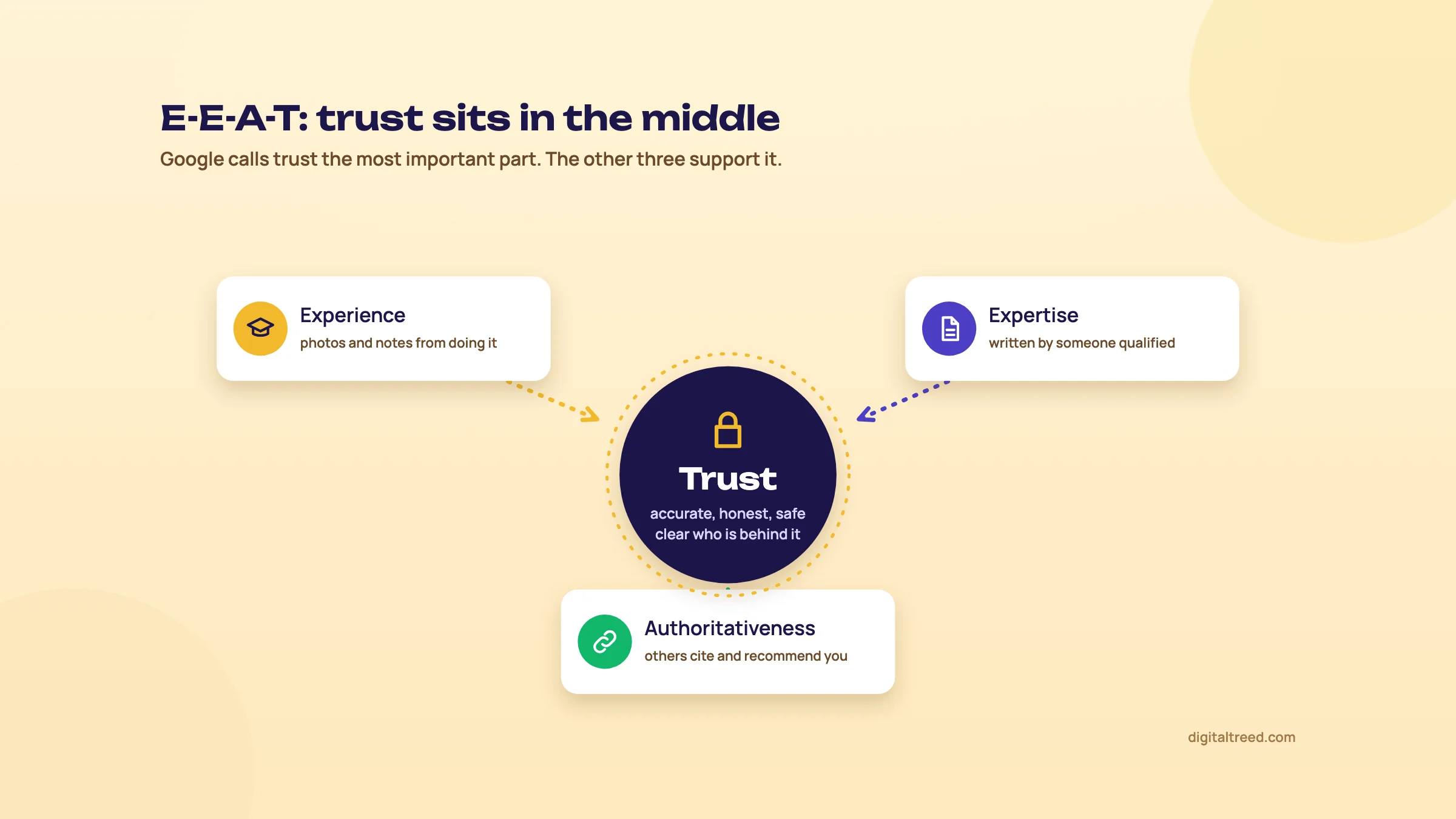 E-E-A-T: trust in the middle, the other three supporting it.
Who, how and why
Google asks you to make three things clear about your content.[41]
- Who made it. A byline where readers expect one, linking to an author page that says who the person is and why they know this topic.
- How it was made. For a product review, how you tested. If automation or AI played a big part, say so where a reader would reasonably wonder.
- Why it exists. Mainly to help people. If the honest reason is "to rank", see the first section again.
For a small business, "who" is often the owner or the practitioner. Put their name, qualifications and a photo on the page. We'd trust a dermatology clinic's skin-care article signed by the doctor, with her registration number, far more than one signed "Admin". So will your patients.
Show experience on the page
Experience is the easiest E to show and the hardest to fake. Use your own photos instead of stock. Give the numbers from your own work: how many patients asked this, what the fee really is, how long delivery to Kanpur actually takes. Describe what went wrong as well as what went right.
Marie Haynes looked at four sites that did well in Google's December 2025 core update.[49] A medical e-commerce store had improved its customer service and brought in medical authors. An affiliate site that already bought the products it reviewed started showing it, with its own detailed photos and video, and noindexed YMYL pages outside its expertise. A YMYL store fixed navigation, checkout and its About page, and published timely content that earned links and mentions. A city guide added its own video, photos and first-hand advice. She gives no traffic figures, and the city guide only partly recovered, but the pattern is clear: real experience and real trust, not SEO tweaks.
Your goal is to be the most helpful result there is![49]
Trust shows up in where people click, too. Kevin Indig's usability study of Google's AI Overviews found that people asking low-stakes questions often stopped at the AI answer. People searching about finance and health behaved differently: they clicked through to sources they already knew and trusted.[50] It's a small study: 70 people doing eight search tasks. It still matches what you'd expect: on serious topics, people want a name they recognise.
Here's what that looks like on one page. The clinic is made up; the changes are the kind any clinic can make in an afternoon.
| Before | After | |
|---|---|---|
| Byline | Admin | Dr. (name), physiotherapist, 12 years in practice, with a link to her profile |
| Photos | Stock image of a smiling model | The clinic's own treatment room and the exercise being demonstrated |
| Advice | "Consult a professional" | The three mistakes patients in Lucknow make most with home exercises, and when to stop |
| Facts | "Back pain affects millions" | Every number linked to its source, with the year |
| Date | None | "Reviewed on" date, changed only when the advice changes |
| Contact | A form | Address, phone, hours and the fee for a first visit |
E-E-A-T comes from other people too
You can't declare yourself trustworthy. Lily Ray has argued that E-E-A-T depends on how others see the brand: other companies and brands, reviewers and users.[51] Haynes made a similar observation in her four cases, where brand trust and customer service seemed to feed into recovery.
That means reviews on your Business Profile, mentions in local news, links from associations and partners, and a consistent name, address and phone number everywhere. Chapters 9 and 10 cover how to earn these.
Chapter 9 tells how a sports platform we worked with earned links and mentions this way: by adding sourced statistics that other sites wanted to cite.
AI-assisted content: what Google actually says
Google's position has three parts, and you need all three.
AI use is allowed. In February 2023 Google wrote: "Appropriate use of AI or automation is not against our guidelines."[52] The same post said giving AI an author byline "is probably not the best way" to tell readers how content was made. A note on how the page was made does the job better.
Mass-produced pages are spam. Scaled content abuse means making many pages mainly to manipulate rankings, "no matter how it's created". Google's examples include AI-generated pages that add no value and keyword pages that make little sense to a reader.[27] A coaching site with 500 AI-written "best coaching in [city]" pages for cities it doesn't teach in fits that description.
Everything AI writes needs a human check. On 1 October 2026 Google updated its guide to using generative AI content. It now explains that generative models "don't retrieve facts, but predict a likely sequence of words based on their training data", and that the output can contain hallucinations.[8]
Warning
Google's guide now says: "It is critical to manually factcheck and review all AI-generated content for accuracy and trustworthiness before publishing." The review also applies to metadata: title elements, meta descriptions, structured data and image alt text.[8] If an AI tool wrote your titles or alt text in bulk, check them by hand.
Merchant Center goes further for shops: AI-generated product titles and descriptions have to be labelled, and AI-generated images need a metadata tag saying so.[8] If you run a D2C store with AI-written product copy, check your feed settings.
What happened to sites that scaled AI content
Lily Ray tracked more than 220 sites publicly named as customers of AI content platforms, using Ahrefs traffic estimates, checked against Sistrix visibility data, up to May 2026.[53]
These are traffic estimates from third-party tools, and they show a pattern, not a proven cause. The typical shape she describes is fast growth in published pages for 6 to 12 months, a traffic peak a few months later, then a drop within a year that wipes out most of the gains.
scaling content production with AI is not a low-risk strategy for organic search[53]
How to use AI without getting burned
ChatGPT, Gemini and Perplexity are good at the boring parts: brainstorming topic ideas, drafting outlines, suggesting title options, writing a first draft of schema code or alt text, writing spreadsheet formulas and regex for Search Console filters. They're bad at facts. They invent search volumes, statistics, quotes and sources that sound right. Perplexity shows its sources, which helps, but you still have to open them.
Do not
- Publish AI drafts without reading every line
- Take numbers, prices, laws or medical claims from an AI tool unchecked
- Generate hundreds of near-identical pages for cities or keywords
- Let AI invent customer stories or reviews
- Put "AI" or a made-up person as the byline
Do
- Use AI for outlines, options and first drafts
- Check every fact against its source, and cite it
- Add what only you know: cases, photos, prices, mistakes
- Review AI-written titles, descriptions, schema and alt text too
- Say how the page was made where readers would wonder
Your E-E-A-T checklist
Go through this on your five most important pages:
- A named author with a byline, linking to an author page with qualifications and a photo
- A reviewer for health, money or legal topics, named on the page
- Sources linked for every number, with dates
- A real "last updated" date that changes only when the content does (Chapter 6)
- Your own photos, data or cases somewhere on the page
- An About page with the people, the address and the registration details
- A contact page with a phone number that someone answers
- HTTPS working on every page
HTTPS is one of the aspects of page experience Google lists, and a basic sign of trust.[54] Our free website audit checks the rest of your site's basics in one go.
Note
How this guide was made. We drafted this guide with AI help, from research notes in which every fact carries its source. The stories come from Aijaz Alam's own work. Before publishing, every fact, number, quote and link went through a separate fact-check pass against its source, with a written log, and the guide was read and approved by its reviewer, Eram N. The "Last reviewed" date shows when that last happened.
Next, Chapter 6: what to do when a page that used to bring traffic starts losing it.
Updating and refreshing content that is losing traffic
Quick answer
Content decay is a page slowly losing clicks as results, facts and competitors change. Find decaying pages in Search Console by comparing periods, then refresh them on the same URL: update the facts, re-check the intent, add what newer results cover, fix links, and change the date only when the content really changed.
Most sites that have published for a few years have more to gain from fixing old pages than from writing new ones. The old page already has links, history and a place in Google's index. It just stopped being the best answer.
The #1 thing I'd focus on is updating your older content.[55]
Spot the pages that are decaying
Search Console is the tool for this, and it's free. The Performance report keeps 16 months of data, so you can compare the last three months with the same three months a year ago.[56] Comparing with the same months last year matters: a Diwali gifting page in Kanpur will always look worse in February than in October.
Find your 10 decaying pages in Search Console
- Open Performance In Search Console, go to Performance, then Search results.
- Set the comparison Click the date filter, open the Compare tab and pick the last 3 months compared year over year.
- Open the Pages tab You'll see clicks for both periods side by side for each URL.
- Export Export the table to Google Sheets and add a column: this period's clicks minus last year's.
- Sort by the biggest loss Ignore pages with very few clicks in both periods; the numbers are too small to mean anything.
- Check each loser Click the URL back in Search Console and open the Queries tab. Did it lose position, or did impressions fall because fewer people search for it?
- List your top 10 Note the URL, clicks lost, the main query and your guess at why.
That last check is important. A page that dropped from position 3 to position 9 has a decay problem. A page that held position 3 while impressions halved has a demand problem, and rewriting it won't bring back searches people stopped making. And if the drop lines up with a Google core update, wait: Google's own advice is to wait at least a full week after the update finishes before comparing.[57]
Tip
Mark every refresh in Search Console with a custom annotation on the performance chart (up to 120 characters, added in November 2025).[58] Write something like "Refreshed NEET fees page: 2026 fees, new FAQ". Three months later you'll know exactly when the change went live.
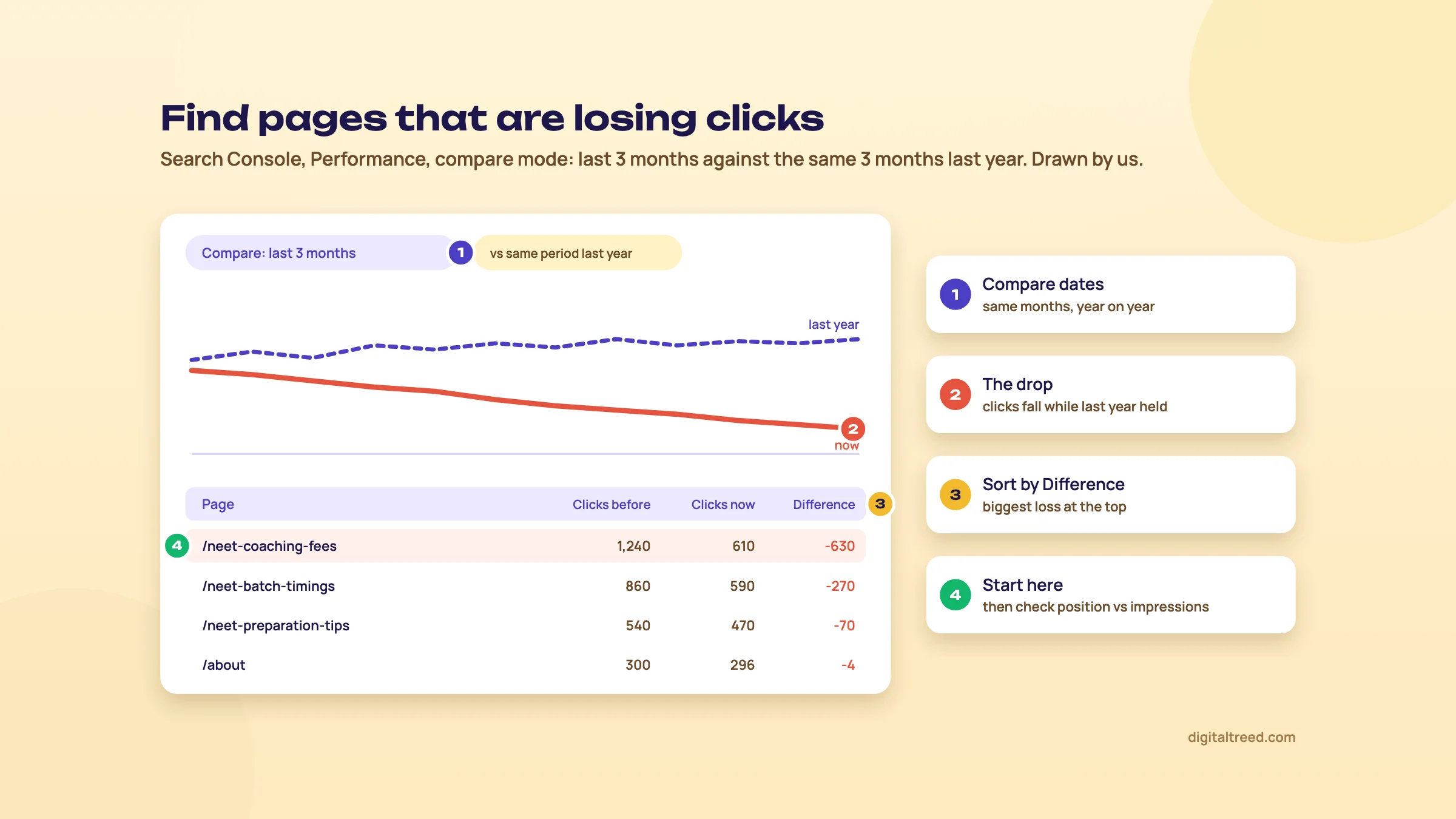 Compare mode, sorted by click loss, shows which pages to refresh first. Drawn by us; the figures are made up.
Refresh, merge or remove?
Not every decaying page should be rewritten. Decide first.
| Situation | What to do | How |
|---|---|---|
| The topic still matters, the page is out of date or thinner than what ranks now | Refresh | Update on the same URL, using the checklist below |
| Two of your pages answer the same search and swap places | Merge | Combine the best of both into the stronger URL, 301-redirect the other (Chapter 2) |
| The page is about a product, offer or event that no longer exists, and nothing replaces it | Remove | Return 404 or 410, or redirect to a genuinely close page if there is one |
| The page is useful to visitors but has no place in search (an old internal notice, a thank-you page) | Noindex | Keep it live with a noindex tag |
A 301 tells Google the page has moved for good and that the new URL is the one to show.[26] For pages that are truly gone, Google's crawl documentation says to return 404 or 410.[59] But treat removal as the last step. In its guidance on core updates, Google says plainly that "Deleting content is a last resort".[57] After a traffic drop it's tempting to delete half the blog. The better move is usually to fix the pages that deserve it and merge the rest.
After a merge or a removal, run the old URLs through our HTTP Status Checker to confirm they return the 301 or 410 you meant. If you noindexed a page, check the tag is really there with the Noindex Tag Checker.
How Ahrefs refreshes its own blog
Ahrefs' approach is worth copying because it's simple. Tim Soulo has described how the team rewrites its competitive articles from scratch every 6 to 12 months, on the same URL so the page keeps its backlinks. Then they promote the new version again: email, social media, retargeting ads and a notice inside their product.[2] Their content strategy article adds a quarterly review of what they've published.[4]
You probably don't need a full rewrite every year. But two habits transfer to any business: keep the URL, and tell people when the page is new again. A refreshed fee guide is worth a WhatsApp broadcast to past enquiries.
Dates and freshness: don't fake it
Changing the date on a page without changing the page is a trick Google calls out. Its helpful content guidance warns against changing dates to make pages seem fresh when the content hasn't substantially changed.[41] Your sitemap's lastmod date works the same way: Google uses it only if it's consistently and verifiably accurate.[60]
There's even a hint that fake freshness can hurt. In Cyrus Shepard's 50-site study, sites that gained in Google updates tended to show older dates on their pages.[43] It's a correlation from a small sample, so don't read it as "old dates rank better". Read it as "a new date on old content doesn't help".
Real freshness does count in some places. Ahrefs looked at about 17 million citations and found that AI assistants cite pages that are, on average, about 26% fresher than the pages in Google's organic results: 1,064 days old against 1,432.[61] That's a vendor study showing a correlation, but it's one more reason to update the facts, not just the date.
The refresh checklist
Work through this for each page on your list:
- Search the main query again and re-read the results page. Has the intent or format changed since you wrote it? (Chapter 4)
- Update every fact, price, fee, law and statistic, with the source and its date.
- Replace old screenshots and photos with current ones.
- Add the questions and subtopics that newer top results cover and you don't.
- Cut what's no longer true or no longer useful.
- Rewrite the title and description if the page's angle changed.
- Fix broken outbound links and add links to your newer related pages.
- Add links to this page from two or three of your stronger pages.
- Update the visible "last updated" date and the dateModified in your Article markup, since the content really changed.
- Add a Search Console annotation, and check the page again in 6 to 8 weeks.
Our free tools don't yet include a broken link checker. Until they do, Screaming Frog's free version or Ahrefs Webmaster Tools will find broken links on a small site.
Tools that track decay for you
Search Console is enough for most small sites. If you publish a lot, two paid tools track decay automatically. All in One SEO's Elite plan, the WordPress plugin, adds content decay tracking along with Search Console metrics, at $299.50 for the first year and $599 after that.[62] Clearscope tracks your content inventory and flags decay, from $129 a month.[45] Both prices as seen on 16 October 2026.
Pick your three biggest losers from the list and refresh one this week. Chapter 11 shows how to measure whether it worked, and Guide 3 covers what to do when a whole site drops after a core update.
On-page in depth: titles, descriptions, headings, images and snippets
Quick answer
On-page SEO is everything on the page you control: the title, meta description, headings, body copy, images and how the page shows in results. Put the main keyword early in a plain title, write the description to win the click, use headings as an outline, and give every image real alt text and a light file.

0:005:36
Starts with · 0:00The CTR gap on a real account
On Page SEO for Beginners: Fix a 1.5% CTR with Better Titles and Descriptions
All 12 chapters
- 0:00The CTR gap on a real account
- 0:31Step 1: pick the page
- 0:50Step 2: the title Google shows
- 1:16Step 3: our Meta Tag Analyzer
- 1:33Step 4: rewrite the title
- 2:10The meta description, like a small ad
- 2:39AI drafts, checked by hand
- 3:01Step 5: headings and answers
- 3:48Step 6: images
- 4:15The social card (og:image)
- 4:42FAQ schema in 2026
- 5:01What gets the click, and step 7
Guide 1 covered the basics: one topic per page, a unique title, a short URL, alt text. This chapter is the next layer. It's about the details that decide whether a page that ranks also gets the click, and about what changed in Google's results in 2026.
We'll use one running example, made up for this chapter: the root canal treatment page of a dental clinic in Gomti Nagar, Lucknow.
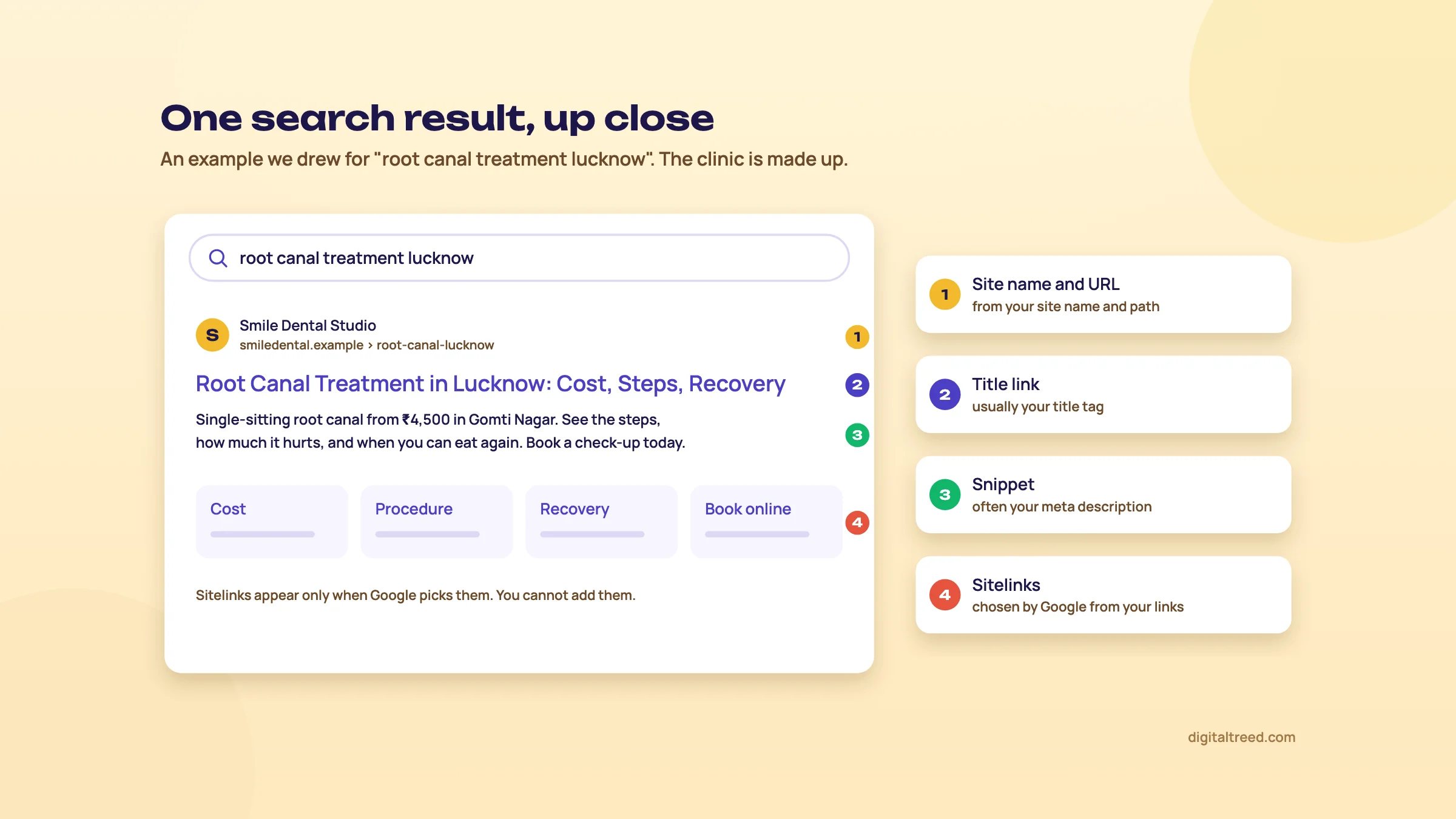 The parts of one search result, and where each comes from. An example we drew.
Titles beyond the basics
Google calls the clickable headline in its results the title link. It mostly comes from your title tag, and it's one of the clearest hints you give Google about what the page is for. Length rules get most of the attention. Three other things matter more: what comes first, whether Google keeps your title at all, and how it's written.
Placing your target keywords first is still the move.[63]
His reading of the leaked documents is that early text counts most. So the clinic's title should start with the treatment, "Root Canal Treatment in Lucknow, Single Visit | Smile Dental", and not with "Smile Dental | Welcome to Our Clinic".
Next, Google doesn't always use your title. Its title link documentation lists when it's more likely to use other text, such as a heading from the page. The issues it lists include titles that are half-empty, out of date, inaccurate or full of repeated boilerplate, and its best practices also warn against stuffing keywords.[64] If a page has plenty of impressions in Search Console but few clicks, search for its main query and look at the title Google actually shows. A rewritten title is often a sign that yours didn't describe the page well.
Then there's style. Cyrus Shepard of Zyppy compared 50 sites that won or lost in recent Google updates. Losing sites tended to have more adjectives in their titles (a correlation of -0.420) and more numbers (-0.297).[43] It's a small sample and a correlation, so it doesn't prove that "17 Amazing Tips" hurts a page. Take it as a nudge towards titles that describe the page plainly, not titles written as bait.
Do not
- Start every title with the brand name
- Stack adjectives: best, top, amazing, ultimate
- Copy one pattern across 40 pages and only swap the city
- Promise a number or offer the page doesn't deliver
Do
- Main phrase in the first few words
- Add one detail that sets you apart: area, price, time, qualification
- Brand at the end, after a separator
- Keep the title and the H1 on the same topic
If an AI tool drafts your titles, read every one before it goes live. Google's generative AI guidance, updated in October 2026, says it is "critical to manually factcheck and review all AI-generated content for accuracy and trustworthiness before publishing", and that this also applies to title elements, meta descriptions, structured data and image alt text.[8] A smooth title that promises "same-day appointments" when the clinic doesn't offer them is a trust problem, whoever wrote it.
Meta descriptions: write for the click
Google said in 2009 that "we still don't use the description meta tag in our ranking."[65] The description's job is the click, not the ranking. And Google doesn't promise to show it: it often builds the snippet from text on the page that fits the search better.[23]
Tip
Write the description as if it were a newspaper ad you pay for by the word. For the clinic: "Single-visit root canal with digital X-rays in Gomti Nagar. Fees shown upfront, evening slots till 9 pm. Book online or call." Every phrase in it answers a question a nervous patient has. None of it is an adjective.
One newer detail to read up on: in April 2026 Google added a section about "Read more" deep links to its snippet documentation.[66] Google lists three things that help: keep each section's text visible on the page without a click (not hidden in tabs or expandable sections), don't use JavaScript to force the scroll position when the page loads, and don't strip the #section part from the URL on load.[67]
Headings as an outline
Google is relaxed about heading order. Its Starter Guide says "it doesn't matter if you're using them out of order."[23] Readers aren't relaxed about it, though. They use headings to jump to their part of the page. And AI search systems pull passages, not whole pages, so a heading that says what the next paragraph answers makes that passage easier to find and quote.[40]
A quick test: read only your H1 and H2s, top to bottom. Would they work as a table of contents? Here's the clinic page as an outline:
- H1: Root canal treatment in Lucknow
- H2: Does a root canal hurt?
- H2: How many visits it takes
- H2: Root canal cost, and what changes it
- H2: After the treatment: what to eat and what to avoid
- H2: Book an appointment in Gomti Nagar
One clear H1 per page is a good habit. Subheadings that are questions work well when people really ask them that way; you'll find those questions in Search Console and in the People also ask box. To see the outline of any live page, paste its address into our free Heading Structure Checker: it lists the H1 to H6 headings in order and flags a missing or extra H1, skipped levels and empty or repeated headings.
Keyword placement without stuffing
Put the main phrase where it belongs naturally: the title, the H1, the first paragraph, and one subheading if it fits. Then write the way your patients or customers talk. A Lucknow patient might search "root canal", "RCT treatment" or "root canal cost"; use the words that fit each section, and don't force every variant into every paragraph.
Don't aim for a keyword density percentage. Filling a page with keywords out of context to manipulate rankings is keyword stuffing, one of Google's named spam practices.[27] Our Word Counter & Keyword Density Checker is most useful the other way round: it catches a phrase you've repeated twenty times without noticing.
Length works the same way. Google's Starter Guide says "there's no magical word count target, minimum or maximum, though you probably want to have at least one word".[23] Write until the patient's questions are answered, then stop. If two of your pages keep swapping places for the same phrase, that's a cannibalisation problem; chapter 2 shows how to fix it.
Images: alt text, names, weight and size
Alt text describes an image for people who can't see it, and for Google. Write what's in the picture: "Dentist showing a patient her X-ray on a screen", not "best dentist lucknow root canal treatment". When an image is a link, Google uses its alt text as the link's anchor text.[68] And if an AI tool wrote your alt text, the October 2026 guidance applies to it as well: check it by hand.[8]
For every image that matters on the page:
- Name the file in words, with hyphens: root-canal-xray-screen.webp, not IMG_2041.jpg.
- Save photos in a modern format such as WebP, and compress them before upload. Our free Image Compressor does it in your browser, 50 at a time, and resizes them to the width they're shown at.
- Resize to the size it's shown at. A 4,000-pixel phone photo shown 800 pixels wide is wasted weight.
- Set width and height in the HTML so the layout doesn't jump while the image loads. That jump is what CLS measures, and Google asks for a CLS score below 0.1.[69]
- Write the alt text last, looking at the image.
Image weight is usually the quickest speed fix you can make without a developer. The perfume brand in Guide 1 is a good example: its WordPress site was so slow that Google struggled to crawl and index it, and optimising the images was one of the three fixes we made with their developer, alongside a lighter theme and a caching plugin. Check your own pages with our Website Speed Test or Google's PageSpeed Insights; Guide 3 covers speed properly.
Images also decide how your page looks elsewhere. Google's documentation says it uses schema.org markup and the og:image tag when choosing a page's preferred image (a change logged in March 2026).[66] So pick that image on purpose. The section on social previews below shows the tag.
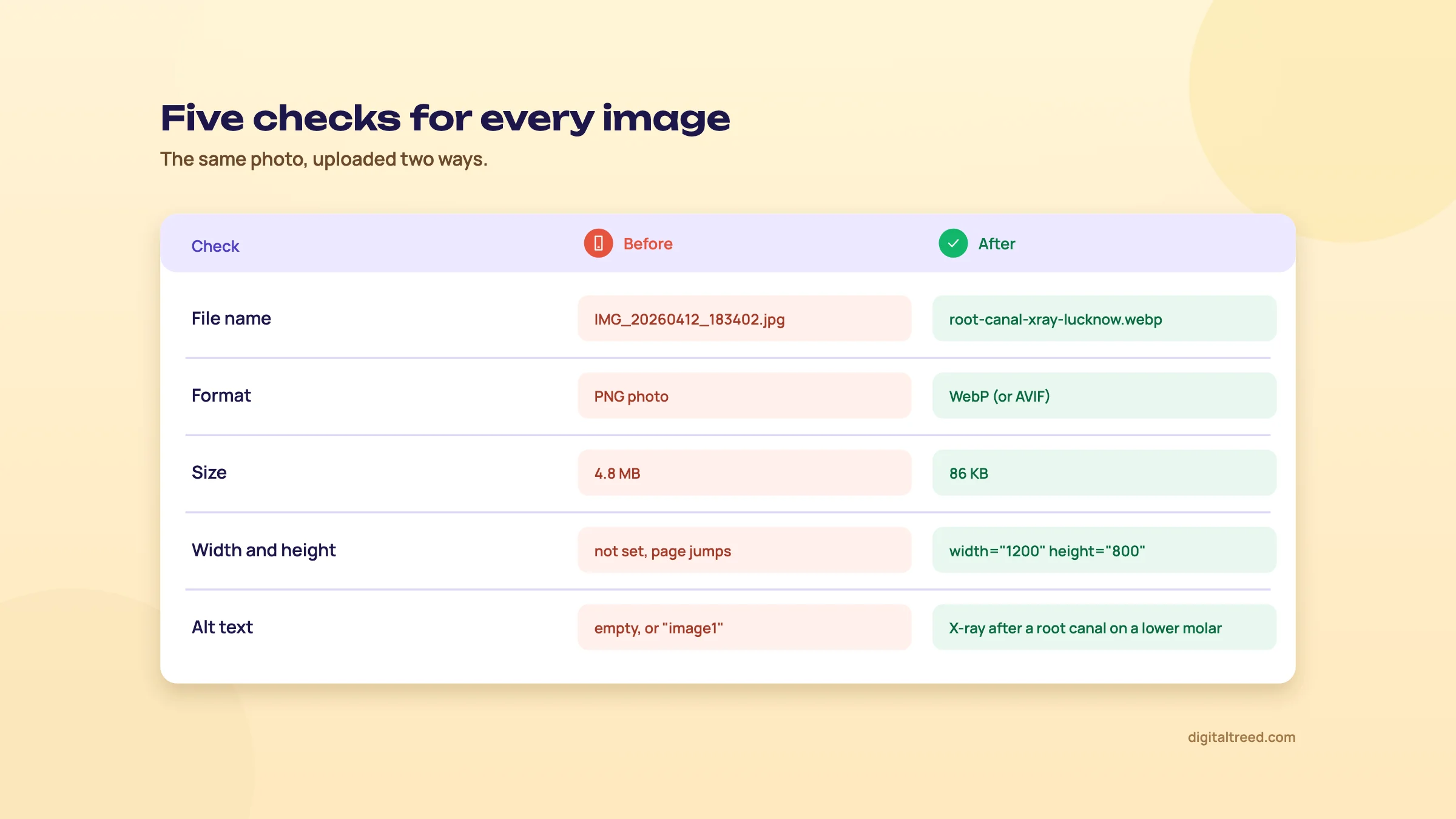 Five checks for every image, before and after.
Featured snippets, AI answers and fewer clicks
A featured snippet is the boxed answer Google sometimes shows above the normal results, quoted from one page. On many searches that top spot now goes to an AI Overview instead. Either way, the click maths has changed, and this chart shows how much.
Read the shape, not the exact figures. CTR studies disagree a lot: Backlinko's 2019 study of about 4 million results put position one at 27.6%,[71] while First Page Sage's 2026 figure across all searches is 7.1%. The sample, the year and above all whether an AI answer is on the page explain the gap. What every study agrees on is the steep drop after the top three, and the much lower clicks when an AI answer sits on top.
Here's what that looks like on a real account. On a client site we work on, Search Console showed 703 clicks from 48.3K impressions between April and August 2026: an average CTR of 1.5% at an average position of 9.7. Daily impressions roughly doubled over that time, from about 250 to about 520. Plenty of people see the site; a small share click. That gap is where better titles and descriptions pay off.
You can't force a featured snippet or an AI citation. Google's featured snippet page says you can't mark a page as one; its systems decide.[72] But you can write in the shape they quote:
- Put a direct answer of 40 to 60 words right under the heading that asks the question.
- Use a numbered list for steps and a table for comparisons (cost by treatment, timings by branch).
- Keep each section able to stand on its own, so a quoted passage still makes sense.
Aleyda Solis's AI search checklist gives the same advice: short, direct answers first, and passages that make sense alone.[40] It's also simply easier to read.
Rich results that are gone
Note
FAQ rich results, the expandable questions under a search result, stopped showing in Google Search on 7 May 2026, and Google removed their documentation on 15 June 2026.[66] Since August 2023 they'd been shown only for well-known government and health sites, and HowTo rich results were dropped that same year.[73] If someone sells you FAQ schema as a way to take up more space in Google's results, that hasn't worked for most sites since 2023, and it hasn't worked for anyone since May 2026.
A good FAQ section on the page is still useful to readers, and it's a natural home for those 40 to 60-word answers. Chapter 8 explains which structured data is still worth adding and what it does and doesn't do.
Open Graph and social previews
When someone shares your page on WhatsApp, LinkedIn or Facebook, the preview card is built from Open Graph tags in the page's head. Three of them do most of the work, and LinkedIn also asks for og:url:[74]
<meta property="og:title" content="Root Canal Treatment in Lucknow, Single Visit">
<meta property="og:description" content="Digital X-rays, fees shown upfront, evening slots in Gomti Nagar.">
<meta property="og:image" content="https://example.in/images/root-canal-clinic.jpg">
<meta property="og:url" content="https://example.in/root-canal-treatment">
The og:image matters twice now, because Google also reads it when picking your preferred image. Use a real photo of the place or the result, not your logo on a white square. Make it a JPG or PNG at least 1200 by 627 pixels, the size LinkedIn asks for.[74] If you use a WordPress SEO plugin, look in its social settings for these fields. Our free Social Preview Checker draws the WhatsApp, LinkedIn, Facebook and X cards from your tags, checks the image against each platform's rules and says why a card is small or empty; the Meta Tag Analyzer shows the tags beside the Google preview.
Fix one page in 20 minutes
Fix one page's on-page SEO
- Pick the page In Search Console, open Performance, then the Pages tab. Turn on Average CTR at the top of the report, sort by impressions and pick a page with plenty of impressions and a low CTR.
- See what Google shows Search the page's main query and note whether Google kept your title and description or rewrote them.
- Run the Meta Tag Analyzer Paste the URL to see the Google preview, the social card and the title, description, canonical and Open Graph tags.
- Rewrite the title and description Main phrase first, one real detail, brand last. Description written as a small ad. Write them in our free SERP Snippet Preview to see both cuts and the rewrite check, then copy the tags.
- Check the outline Read the H1 and H2s alone. Fix any heading that doesn't say what its section answers.
- Fix the images Alt text, file names, compression and width and height. Test the page with our Website Speed Test.
- Mark the date Right-click the Performance chart, choose Add annotation and note what you changed,[58] then compare CTR four weeks later.
To check many pages at once, the free version of Screaming Frog crawls up to 500 URLs and lists missing and duplicate titles and descriptions,[75] and our free Image Alt Text Checker lists every image on a page with its alt text and a fix. Our Free Website Audit flags missing alt text and title problems too. On WordPress, Yoast SEO (10 million+ active installations),[76] Rank Math (4 million+)[77] and All in One SEO (2 million+)[78] all give you fields for the title and description. Use the one your site already runs.
The on-page checklist
| Element | What good looks like | How to check |
|---|---|---|
| Title | Main phrase first, one real detail, brand last, unique on the site | Meta Tag Analyzer; search the query and compare |
| Meta description | Written as a small ad: who it's for, one fact, a reason to click | Meta Tag Analyzer preview |
| Headings | One H1; H2s that work as a table of contents | Read them alone; Heading Structure Checker |
| Main phrase | In title, H1, first paragraph, maybe one subheading; no stuffing | Word Counter & Keyword Density Checker |
| Answers | 40 to 60-word answer under each question heading; lists and tables where they fit | Read the page as a stranger would |
| Images | Descriptive alt and file name, compressed, sized, width and height set | Website Speed Test; Image Alt Text Checker |
| Social preview | og:title, og:description and a real og:image | Meta Tag Analyzer social card |
| AI-written text | Every AI-drafted title, description and alt text checked by hand | A person reads it before publishing |
| Schema | Matches what's on the page; no FAQ markup sold as a results trick | Chapter 8 |
Do the checklist on your five pages with the most impressions first. That's where a better title pays back fastest. Then move on to chapter 8 and link those pages together properly.
Internal linking and structured data basics
Quick answer
Internal links tell Google which pages matter and how topics connect; every page you care about should have at least one. Link from your strongest pages to pages you want to rank, with descriptive anchors. Structured data labels what a page is so it can earn rich results; it must match the visible content and won't lift rankings on its own.
These two jobs sit together because both are about helping Google understand your site, and both are cheap. Internal links cost you an hour with your own pages. Structured data, on most sites, is a plugin setting. Neither needs anyone else's permission, which makes them the easiest wins in this guide.
How Google uses your internal links
Google finds most pages by following links, and it reads the link's words to understand the page at the other end. Its documentation is specific about what works:[68]
- Google reliably follows only normal
<a href>links. A "Read more" built from a script on a span or a button may never be followed. - Anchor text should be descriptive and fairly short. "Root canal treatment" tells Google something; "click here" tells it nothing.
- Don't stuff keywords into anchors or chain lots of links together in one sentence.
- For an image used as a link, Google uses the image's alt text as the anchor text.
- Every page you care about should have a link from at least one other page on your site.
Followed:  <a href="/root-canal-treatment">root canal treatment</a>
Risky:     <span onclick="go('/root-canal-treatment')">Read more</span>
Our Hyperlink Generator builds a correct link with the anchor text and any rel value you need, if you're editing HTML by hand.
What the data says about internal links
The biggest public study we know of is Cyrus Shepard's at Zyppy: 23 million internal links across about 1,800 sites.[79]
4x
clicks for pages with 40 to 44 internal links, compared with pages that had 0 to 4[79]
5x+
traffic for pages with at least one exact-match internal anchor, compared with pages without one
45 to 50
internal links pointing to a page, roughly where the extra clicks start to fall off
Treat these as correlations, as the study does. Important pages tend to get more links because they're important, so the arrow can point both ways. Still, the pattern is useful: pages with almost no internal links do worse, and there's a sensible upper limit.
Anchor text: an expert who changed his mind
Shepard's original 2022 study found that more variety in anchor text went with more traffic. Since 2024 the page has carried a note that high anchor variety may hurt some sites.[79] That fits his other study of sites that won and lost in Google updates, where varied internal anchors went with losing (a correlation of -0.337).[43]
We like that he published the change instead of quietly editing the page. The practical takeaway: give each important page one main descriptive anchor and use it, or something close to it, most of the time. Let natural variation happen in sentences. Don't rotate ten versions of the keyword on purpose.
Build the plan: hubs, breadcrumbs, related links and your strongest pages
Say you run a JEE coaching institute in Kanpur. You have a hub page, "JEE coaching in Kanpur", and a dozen posts around it: cutoffs, timetables, fees, how to choose a batch. Here's how the links should run:
- Hub to spokes: the hub links to every post in its topic (chapter 2 explains clusters).
- Spokes back to the hub, with the hub's main anchor, and to one or two sibling posts where it helps the reader.
- Breadcrumbs at the top of each post (Home › JEE coaching › JEE Main cutoff), which link every level and can carry Breadcrumb markup too.
- Related posts picked by hand for your key pages. Automatic "related" widgets can link by date or tag, not by what the reader needs next.
- Your strongest pages to the ones on page 2. This is the one most sites skip.
Your strongest pages are the ones with the most clicks (Search Console, Performance) and the most links from other sites. Search Console's Links report shows which sites link to you,[80] and which of your pages are linked most, both from outside and from inside your site.
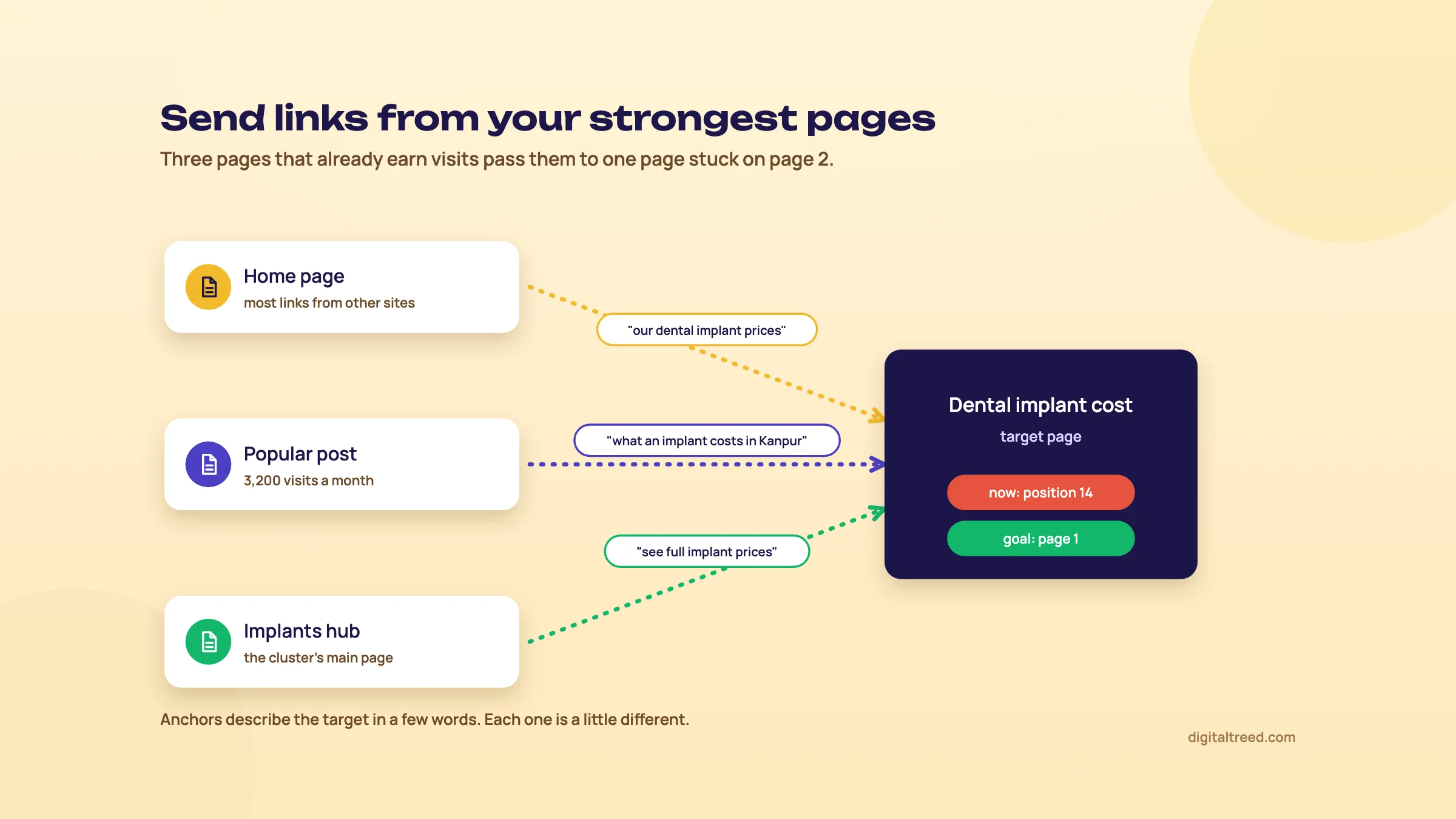 Point links from your strongest pages at a page stuck on page 2.
Add internal links to a page that sits on page 2
- Find the page In Search Console, open Performance, then the Pages tab, turn on Average position at the top of the report and look for pages with an average position between about 11 and 20 and steady impressions.
- Note its main query Click the page, then open the Queries tab. The top query by impressions is usually the anchor you want.
- Find related pages Search Google for site:yoursite.in plus the topic, for example site:yoursite.in "jee main". These are the pages that can link to it naturally.
- Pick three to five strong ones Prefer pages with clicks and outside links (Links report).
- Add the links in the body text Next to a sentence about that topic, with a descriptive anchor. Put it where a reader would actually click it, not in the footer.
- Check the hub Make sure the hub page links to it too, and that it's in your sitemap.
- Mark the date Add a Search Console annotation and compare the page's position and clicks a few weeks later.
Orphan pages and broken internal links
An orphan page has no internal links pointing to it. Google may still find it through your sitemap, but you've told it the page doesn't matter, and visitors can't reach it at all. Old landing pages, campaign pages and posts dropped from a menu after a redesign are the usual orphans.
To find them, compare two lists. Crawl your site from the home page, so you get every page reachable by links. Then take every URL in your sitemap, or Search Console's list of indexed pages. Anything in the second list and not in the first is an orphan. For the crawl, Screaming Frog's free version handles up to 500 URLs,[75] and Ahrefs Free gives verified sites a Site Audit with 5,000 crawl credits per project a month.[81] Then link each orphan you want to keep from a relevant page, or redirect or remove the ones you don't.
Broken internal links point to pages that return a 404. The same crawl lists them. Fix the link so it points straight at the live page. Don't just lean on a redirect: every redirect adds a hop, and Google's crawl budget guide advises against long redirect chains.[59] Our HTTP Status Checker takes up to 10 URLs at a time and shows every redirect hop, so you can confirm what each one really returns. Our free Broken Link Checker finds them in the first place: every dead link and every internal link that redirects, with the page and anchor text.
Structured data: labels for your page
Structured data is code that describes a page in a fixed vocabulary, schema.org, so a machine doesn't have to guess. It says: this page is a local business, here is its address and opening hours; or this is a product, here is its price. It comes in three formats, JSON-LD, RDFa and Microdata.[82] JSON-LD is the easiest to add and read, because it sits in one block instead of being woven through your HTML.
Google's search gallery listed 25 features that structured data can make a page eligible for when we checked in October 2026, including Article, Breadcrumb, Event, Job posting, Local business, Organization, Product, Review snippet and Video.[83] Most Indian business sites need only a few of them:
| Site type | Worth adding | Add only if it applies |
|---|---|---|
| Clinic, salon, coaching centre, shop | Local business, Organization, Breadcrumb | Event (open days, workshops), Video |
| Online store or D2C brand | Product, Organization, Breadcrumb | Review snippet (genuine reviews only), Video |
| Blog or publisher | Article, Breadcrumb, Organization | Video, Profile page for authors |
| Company hiring staff | Job posting on each live opening | Remove it when the job closes |
Here's a trimmed example for our made-up Lucknow clinic. Dentist is a more specific kind of LocalBusiness, and Google asks for the most specific type that fits.[84] Chapter 10 goes further with local markup.
<script type="application/ld+json">
{
  "@context": "https://schema.org",
  "@type": "Dentist",
  "name": "Smile Dental",
  "url": "https://example.in/",
  "address": {
    "@type": "PostalAddress",
    "streetAddress": "12 Vibhuti Khand, Gomti Nagar",
    "addressLocality": "Lucknow",
    "postalCode": "226010",
    "addressCountry": "IN"
  },
  "openingHoursSpecification": [{
    "@type": "OpeningHoursSpecification",
    "dayOfWeek": ["Monday", "Tuesday", "Wednesday", "Thursday", "Friday", "Saturday"],
    "opens": "10:00",
    "closes": "21:00"
  }]
}
</script>
Every value in it must be on the page too: the same name, address and hours a visitor can read.
Warning
Markup must match the visible content. Google lists this in its advice on AI features: make sure your structured data matches what's on the page.[38] Don't mark up reviews, prices or ratings that visitors can't see.
What structured data doesn't do
It doesn't lift rankings by itself. Backlinko's ranking factors study of 11.8 million results found no correlation between schema and position, even though 72.6% of page-one results used it.[42] When Google phased out seven rich result types in 2025, it said: "This update won't affect how pages are ranked."[85] Rich results and rankings are separate things.
It isn't a key to AI answers either. Google's AI features page says there's "no special schema.org structured data that you need to add" to appear in AI Overviews or AI Mode,[86] and its 2026 guide to generative AI search lists over-focusing on structured data among the things you can ignore.[13]
So treat schema as two things: eligibility for the rich results that still exist, and a clear, machine-readable statement of facts you already show. That's worth an hour of setup. It isn't worth a monthly retainer.
What was removed, and the new review rule
Google has been trimming rich results for three years. If a plugin or an agency still offers you the types below, ask what they expect it to do.
| When | What changed |
|---|---|
| August to September 2023 | FAQ rich results limited to well-known government and health sites; HowTo cut to desktop, then removed[73] |
| June 2025 | Book Actions, Course Info, ClaimReview, Estimated Salary, Learning Video, Special Announcement and Vehicle Listing phased out[85] |
| November 2025 | Practice problem markup phased out; Dataset markup used only for Dataset Search; Book Actions kept[66] |
| 7 May 2026 | FAQ rich results stop showing in Google Search; documentation removed 15 June 2026[66] |
| 24 July 2026 | Review snippet rule added against fake reviews and undisclosed incentivised reviews[66] |
The review rule matters most for D2C brands and clinics that collect testimonials. Clinics should also know that when a business controls the reviews about itself, its own LocalBusiness pages can't get review stars at all.[87] If you gave customers a discount or a gift for a review, say so; and never mark up reviews you wrote yourself.
Note
Our own guide pages, this one included, still output FAQPage markup for their FAQ sections. We keep it because it describes the content accurately and costs nothing. We don't expect a FAQ rich result from it, and you shouldn't either.
Test before and after you publish
Use two free tests, because they answer different questions. Google's Rich Results Test takes a URL or a pasted snippet and shows which Google rich results the page is eligible for, with errors and warnings. For a URL test the page has to be reachable from the internet (you can paste code instead), and the test runs as a smartphone by default.[82] It only knows Google's supported types. For whether your markup is valid schema.org at all, use the Schema Markup Validator at validator.schema.org, or ours, which fetches a page or takes pasted code. After launch, Search Console's rich result reports flag errors across the whole site.[88]
When I taught SEO, my students were already doing client work, and most of the local business sites they handled ran on WordPress. If yours does, let a plugin do the markup. Rank Math's free version includes schema and breadcrumbs,[77] and Yoast's free version outputs a schema graph and breadcrumbs, though for address and opening-hours markup Yoast points you to its separate Local SEO plugin.[76] Fill in the business details in the plugin settings, then run both tests. For a type your plugin doesn't cover, our free Schema Markup Generator writes the JSON-LD with Google's required and recommended fields marked, and can load the block your plugin already outputs so you edit one field instead of adding a second.
Next, links from other sites. Chapter 9 covers how to earn them without breaking Google's rules.
Link building that works, and what gets you penalised
Quick answer
Link building is earning links from sites that choose to cite you. Links still go with higher rankings, but buying them, swapping them at scale or putting keyword links in paid guest posts breaks Google's spam policies. What works: data and tools people cite, digital PR, useful guest posts, fixing broken links, and turning unlinked brand mentions into links.
If you run a website in India, you've probably had the message: a bundle of "high DA backlinks" for a few thousand rupees, delivered in a week. This chapter explains why to say no to those, and what works instead. The honest version takes longer. It also doesn't disappear in the next spam update.
Do links still matter?
Yes, though not as simply as the link sellers say. Backlinko's ranking factors study of 11.8 million Google results found the page in position one had about 3.8 times more backlinks than the pages in positions two to ten, and that top results tend to have more linking domains too.[42] That's a correlation. Pages that rank first also tend to be older, better known and more useful, which earns them links anyway.
The correlations in these studies are also modest. Semrush's 2024 ranking factors study, of 16,298 keywords, put the correlation between its own domain Authority Score and position at 0.21, which is weak.[89] Google's Starter Guide describes PageRank, its link-based signal, as "just one of those" many signals it uses.[23]
Absolutely. Backlinks will likely always be a key part of Google's algorithm.[55]
In the same interview he adds that links matter somewhat less than they did a few years earlier. You may also have read that links are no longer a top-three ranking factor. Google's Gary Illyes said that at a conference in September 2023, as Search Engine Land reported, while adding that links are still important.[90] Google hasn't put it in writing, so treat it as a remark, not a rule.
What Google calls link spam
Google's spam policies define link spam as creating links to or from a site mainly to manipulate rankings.[27] The page lists the forms it means, and most of the offers in your inbox are on it.
Warning
These count as link spam under Google's policies:
- Buying or selling links, for money, goods, services or free products in exchange for a review with a link
- Excessive link exchanges ("link to me and I'll link to you")
- Automated programs or services that create links
- Advertorials or guest posts with paid followed links or keyword-stuffed anchors
- Low-quality directory and bookmark sites
- Links hidden in widgets, and site-wide footer or template links spread across other sites
- Forum comments with optimised links
- Contracts that require a followed link, and text ads that pass ranking credit
Google finds this with automated systems and with "human review that can result in a manual action".[27] Since April 2026 it also says it may use spam reports from users to take manual action.[66] And since its December 2022 link spam update, its SpamBrain system is used to neutralise unnatural links,[91] so a bought link may simply count for nothing. You've paid for links that do nothing at best, and invited a penalty at worst. Guide 3 covers manual actions and recovery.
Sponsored, ugc and nofollow: label the links you don't vouch for
Paid links aren't banned. Paid links that pass ranking credit are. Google's answer is a rel attribute on the link:[92]
| Attribute | Use it for | Example |
|---|---|---|
| rel="sponsored" | Ads, paid placements, affiliate and sponsored links | A paid listing of a Delhi D2C brand on a gift guide |
| rel="ugc" | Links in comments and forum posts | A reader's link in your blog comments |
| rel="nofollow" | Any other link you don't want to vouch for | A link to a site you're criticising |
<a href="https://example.in/gift-box" rel="sponsored">Diwali gift box</a>Values can be combined, and nofollow is still accepted for paid links. Since 2019 Google treats all three as hints rather than strict orders for ranking, and "For crawling and indexing purposes, nofollow will become a hint as of March 1, 2020."[93] Our Hyperlink Generator adds the right rel value for you.
Earned links and bought links, side by side
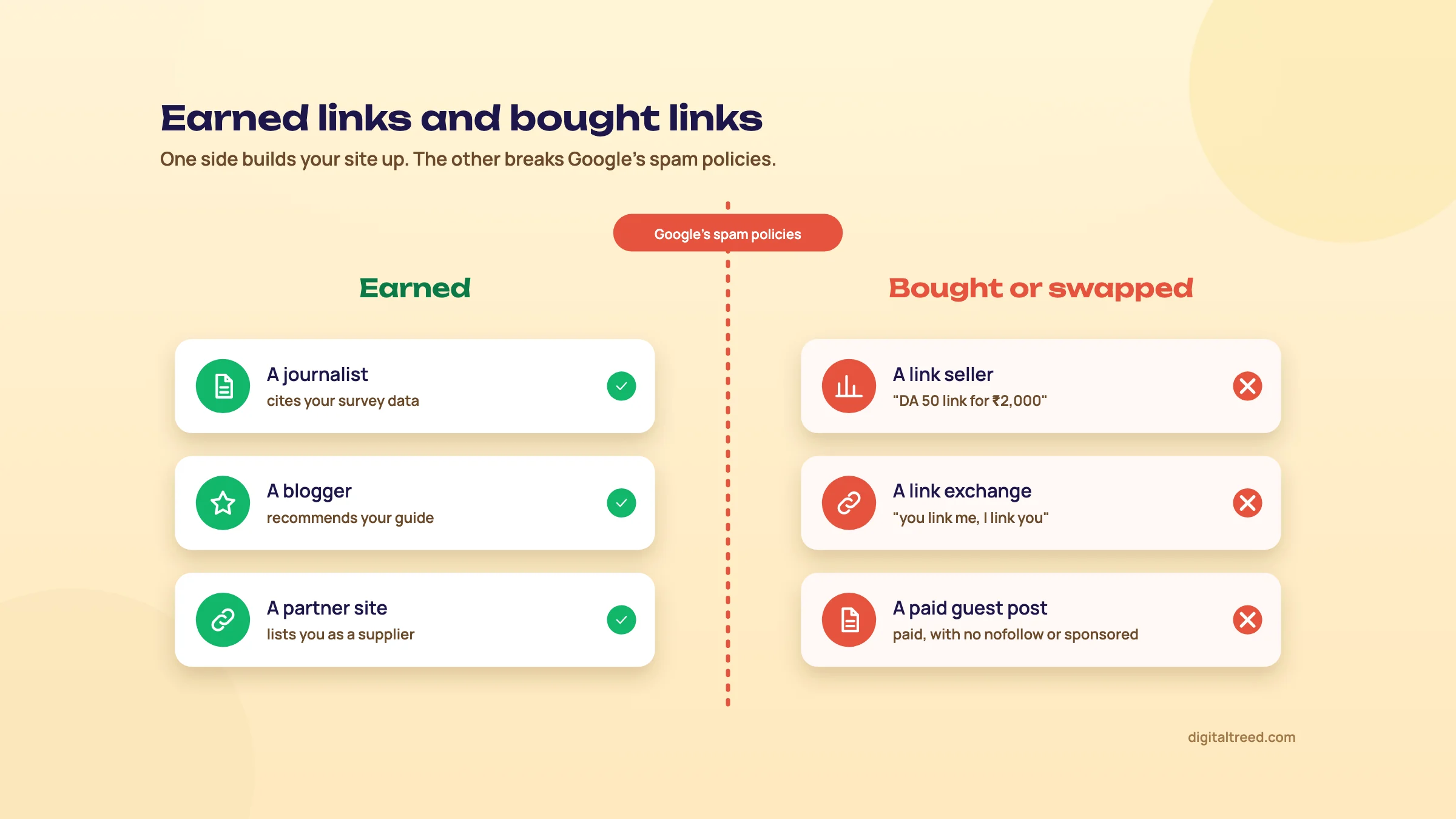 Earned links on one side, bought and swapped links on the other.
Here's how the common tactics compare. Effort and risk are our judgement; the risk column follows Google's spam policy.
| Tactic | Effort | Risk under Google's policy |
|---|---|---|
| Buying links or "DA packages" | Low | High: link scheme |
| Link exchanges at scale | Low | High: excessive exchanges |
| Paid guest posts with followed keyword anchors | Medium | High: named in the policy |
| Directory and bookmark blasts | Low | High: low-quality directories |
| Sponsorship marked rel="sponsored" | Medium | None |
| Guest posts written for readers, unpaid, natural anchor | Medium | Low |
| Broken link building | Medium | None |
| Turning unlinked mentions into links | Low | None |
| Data, tools and templates people cite | High | None |
| Digital PR | High | None |
Business listings on Justdial, IndiaMART or Google Business Profile are citations, not link building. They matter for local search, and chapter 10 covers them.
Linkable assets: give people a reason to cite you
The links worth having come from people who needed to point their readers somewhere. Give them that somewhere. A linkable asset is a page others cite because it has something they can't easily get elsewhere:
- Your own data. A Kanpur coaching institute's year-by-year table of JEE cutoffs with official sources, or a Delhi clinic's anonymised look at what patients ask before a procedure.
- A free tool. A fee calculator, an eligibility checker, a size chart that converts Indian and international sizes.
- A template. An invoice format for freelancers, a wedding budget sheet, a school admission checklist.
There's some recent evidence for this. Cyrus Shepard's 2026 study of more than 400 sites that won or lost Google traffic over a year found that sites with proprietary assets, such as their own data, products or software, were more likely to be winners: 92.9% of winners had them, against 57.1% of losers (a correlation of 0.357).[94] It's a correlation, but it fits the story below.
Note
From our work: a sports platform. A global sports platform and networking community had its technical SEO and speed in good shape, but its posts linked to no outside sources at all, so nothing in them showed where its facts came from. And its link building relied on spammy tactics. We changed course and added sports statistics, with their sources, to the posts. Collaboration requests started coming in from other sites, and they brought links from inside their articles and mentions of the brand by name. Traffic rose 60%. The lesson: publish something worth citing, and the links come to you.
The Skyscraper Technique, then and now
Brian Dean's Skyscraper Technique is the best-known outreach method: find a popular piece on your topic, make a clearly better one, then email the people who link to the weaker versions. In his original campaign he reported 17 links from 160 emails.[95] Those are his own figures.
It still works, with changes. Ahrefs revisited it in 2023. Their advice: don't send Dean's original email template, because people have seen it too often. Group your prospects by why they linked, and write each pitch for that reason. And add real value, not just more words or a newer date. They also note that a little-known brand gets fewer links from the same effort.[96]
Curation is where the value is.[96]
In practice "better" means something a linking writer can use: a current table where theirs is out of date, a source they can check, a clear diagram. Not 4,000 words where 1,500 would do.
Digital PR, including Hindi media
Digital PR is pitching journalists a story or a dataset they'll want to report, and getting a link or a mention when they do. It works best with a real finding, a clear number and a local angle. "We looked at 2,000 appointment requests and here's when Lucknow patients book" is a story. "Smile Dental launches new website" isn't.
Don't stop at English media. Techmagnate's Hindi SEO work for Bajaj Finserv used PR on Hindi news sites and links from vernacular sites, alongside new Hindi pages, and the agency reports a 270% rise in vernacular organic traffic over six months in 2019 and 2020.[29] That's the agency's own claim. Still, if your customers read Hindi or regional news, pitch there too, in their language. Chapter 3 covers how India searches in Hindi and mixed languages.
Guest posts done right
Guest posting isn't spam. Paying for a guest post with a followed, keyword-stuffed link is, and Google names exactly that in its policy.[27] The safe version is simple:
- Write for that site's readers, on a topic they care about, as well as you'd write for your own site.
- Don't pay for the link. If money changes hands, the link gets rel="sponsored".
- Use a natural anchor: your brand name, your name in the author bio, or a link to a page that adds to the article.
- Skip sites that publish anyone's article on any topic for a fee. Publishing third-party content mainly to ride a host site's rankings is what Google's site reputation abuse policy targets.[27]
A useful test: would you still write the post if the link were nofollow? If the audience is worth reaching, yes. If not, it was only ever about the link.
Broken link building
Pages on other sites die all the time, and the links pointing to them stay. If you have a page that does the dead page's job, you're offering the linking site a fix, not a favour.
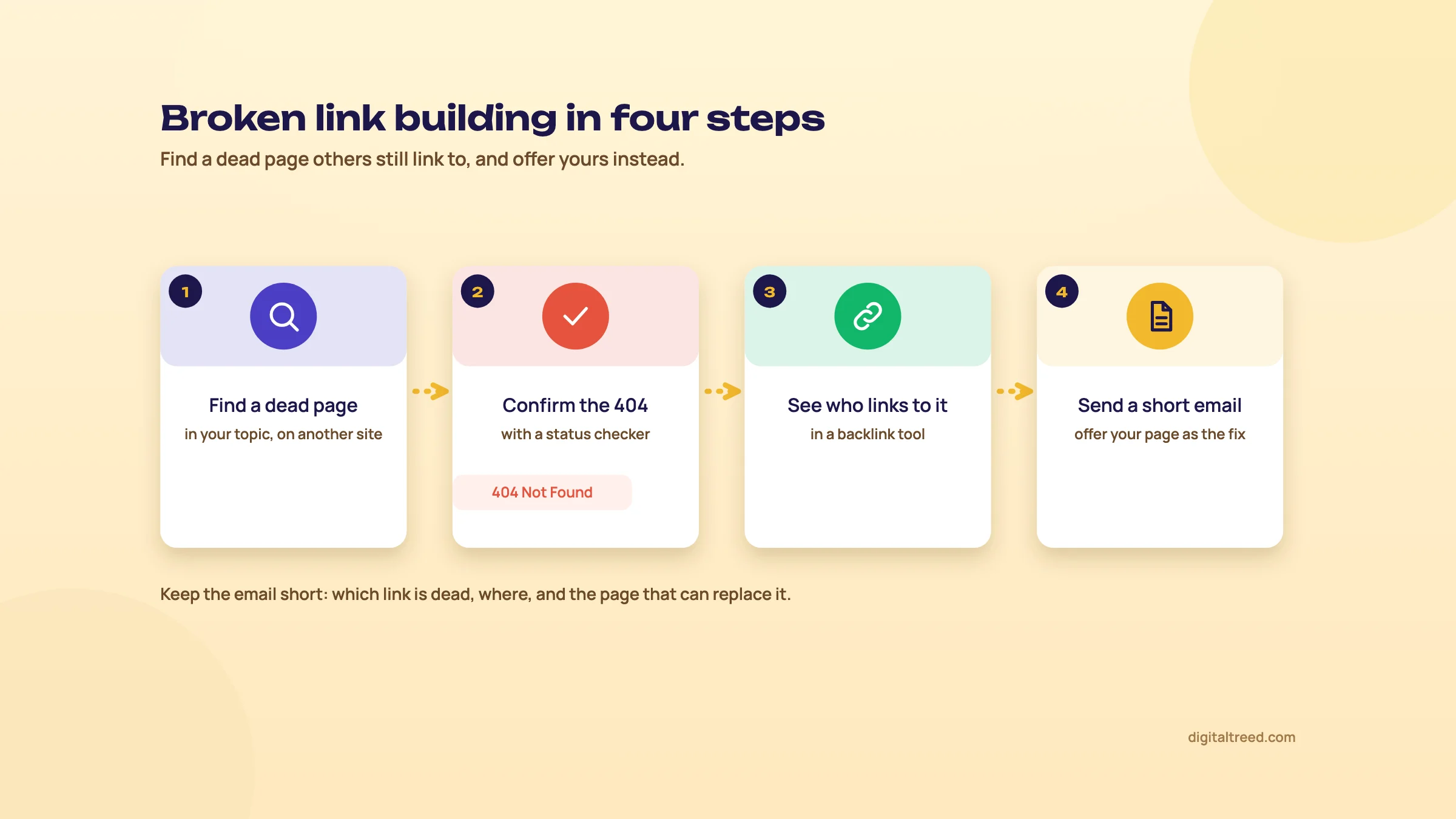 Broken link building in four steps.
Find and pitch one broken link
- Find dead pages in your topic Use a backlink tool's list of broken pages on sites in your niche, or note dead links you find while researching.
- Confirm it's really dead Run the URL through our HTTP Status Checker. You want a 404 or 410, not a temporary error or a redirect to a working page.
- Check your replacement Your page must cover what the dead page covered. If it doesn't, improve it first.
- Find who links to the dead page A backlink checker lists them; Ahrefs' free backlink checker will do until our own tool is ready.
- Email each site Name the exact page and the dead link, offer your page as one option, and keep it short.
- Follow up once One polite follow-up a week later. Then let it go.
Unlinked mentions
Sometimes a site already writes about you and just doesn't link. A local news site mentions your clinic, a blogger reviews your product, a college lists you as a recruiter. Those are the easiest links you'll ever ask for, because the writer already chose you.
Search Google for your brand name in quotes and exclude your own site (for example "Smile Dental Lucknow" -site:example.in), and set up an alert for your brand so new mentions come to you. When you find one, write to the author, thank them, and ask whether they'd link the name to your site, or to the page that matches what they wrote about. Correct any wrong details in the same email; that's often the part they're most glad to hear.
Brand mentions matter for AI answers too
Links aren't the only thing other sites give you. Ahrefs looked at 75,000 brands to see what goes with being mentioned in Google's AI Overviews. Mentions of the brand on other websites had the strongest relationship; backlinks had one of the weakest.
Louise Linehan, who wrote the study, sums it up: AI visibility depends on how widely your brand shows up across the web, well beyond your own site.[97] Mike King's advice after the 2024 leak points the same way: aim for more variety in who links to you, and for quality and relevance over volume.[63]
Brand is the solution.[98]
So count unlinked mentions as wins, not near misses. Before you chase AI mentions, make sure AI search bots can reach your site at all; our AI Crawler Checker shows which ones your robots.txt lets in. Guide 5 covers brand mentions and AI answers in depth.
Communities: Reddit, Quora, LinkedIn and YouTube
AI answers lean heavily on community sites. Profound analysed about 680 million citations. In Google's AI Overviews the most-cited domains were Reddit, YouTube, Quora and LinkedIn (2.2%, 1.9%, 1.5% and 1.3% of all citations), and Reddit led in Perplexity at 6.6%.[99] These shares change month to month, and they come from a vendor, but other studies point the same way.
Take part the way a person would. Answer questions in your field under your real name, link to your page only when it answers the question better than a reply can, and expect those links to carry ugc or nofollow. Forum comments with optimised links are on Google's link spam list. What you're after here is being known and recommended, not the link.
The outreach email
Do not
- Open with "Dear Sir/Madam" or "I hope this email finds you well"
- Offer money for a followed link
- Send the same template to 500 sites
- Ask for a specific keyword anchor
- Follow up more than once
Do
- Use the writer's name and the exact page
- Say what's in it for their readers
- Offer your page as one option, not a demand
- Keep it under 120 words
- Fix something for them: a dead link, an out-of-date figure
Here's a template you can adapt, for the coaching institute example. Change every bracket.
Tip
Subject: Dead link in your JEE Main cutoff guide
Hi [first name],
I was reading your guide to JEE Main cutoffs and noticed that the link to [source] in the section on [section] now goes to a "page not found".
We keep a year-by-year cutoff table with the official sources linked, updated after each session: [URL]. If it's useful as a replacement, please use it. If not, the dead link is still worth fixing.
Thanks for the guide; it's the clearest one I've read on this.
[Name], [role], [institute], Kanpur
Where to see your links, and what to spend
Start free. Search Console's Links report shows which sites link to you and which pages they link to.[80] Ahrefs Free covers your own verified sites, showing up to 1,000 backlinks,[81] and Bing Webmaster Tools has a free backlinks report that can show competitors' links too.[100] For a fuller view of competitors' links, most people use a paid tool:
| Tool | What it's good for | Price seen 16 Oct 2026 |
|---|---|---|
| Ahrefs | The world's largest index of live backlinks, by its own claim[101] | Starter $29 a month; Lite $129 a month[15] |
| Semrush Backlink Analytics | Links alongside PPC, local and content tools | SEO plan $139 a month[14] |
| Moz Link Explorer | Domain Authority, which is Moz's metric, not Google's | Moz Pro from $49 a month (Starter); Standard $99 a month[102] |
| Majestic | Another backlink index | Lite $49.99 a month[103] |
| Ahrefs Brand Radar | Tracking mentions of your brand in AI answers | From $199 a month[15] |
Whatever tool you use, don't chase its score. Domain Authority and Domain Rating are the vendors' own metrics, not Google's. The free Moz and Ahrefs authority checkers are fine for a quick look until we build our own.
On budget, Kevin Indig and Amanda Johnson suggest giving off-site distribution and community work its own budget line with a named owner, and putting about 5% of the marketing budget (up to 10% in some cases) into community.[104] For a small business that might mean one linkable asset a quarter, one PR pitch a month and a monthly hour for unlinked mentions and broken links. If you'd rather hand that to someone, it's part of our SEO service. Next, chapter 10 takes this offline: local SEO, reviews and Indian business listings.
Local SEO in depth: Business Profile, reviews and Indian citations
Quick answer
Local SEO gets a business into the map pack and "near me" results. The core is a verified, complete Google Business Profile; a steady flow of genuine reviews you reply to; the same name, address and phone everywhere; listings on directories Indians actually use, such as Justdial, IndiaMART and Sulekha; and one useful page for each real location.
Guide 1 got you a Business Profile. This chapter is about what decides whether it shows up, and what to do every week so it keeps showing up. Most of it is free. All of it takes discipline more than skill.

0:005:44
Starts with · 0:00Not in the map pack
How to Rank on Google Maps: Google Business Profile Setup, Step by Step (2026)
All 15 chapters
- 0:00Not in the map pack
- 0:12How Google ranks local results
- 0:30No paid local ranking
- 0:47Who can have a profile
- 0:58Steps 1-2: claim it with a business account
- 1:25Steps 3-4: name and category
- 1:57Steps 5-6: address and verification
- 2:32Step 7: fill every field
- 3:06Reviews: the 68% survey
- 3:28What breaks Google's review policy
- 3:52Review link and QR code
- 4:11Reply to every review
- 4:29One name, address and phone everywhere
- 4:56Is it working? Performance
- 5:18You're done when...
How Google picks the businesses in the local pack
Google says local results are based mainly on three things.[105]
- Relevance: how well your profile matches what the person searched. Complete, detailed information helps here.
- Distance: how far your business is from the person searching. If they don't share their location, Google works from what it knows about where they are.
- Prominence: how well-known the business is. Google says this takes in how many websites link to you and how many reviews you have, and that more reviews and positive ratings can help.
You can't change distance, short of moving. So the work is all relevance and prominence. Google also says plainly that there's no way to request or pay for a better local ranking. Anyone selling "guaranteed map pack" places is selling something Google says doesn't exist.
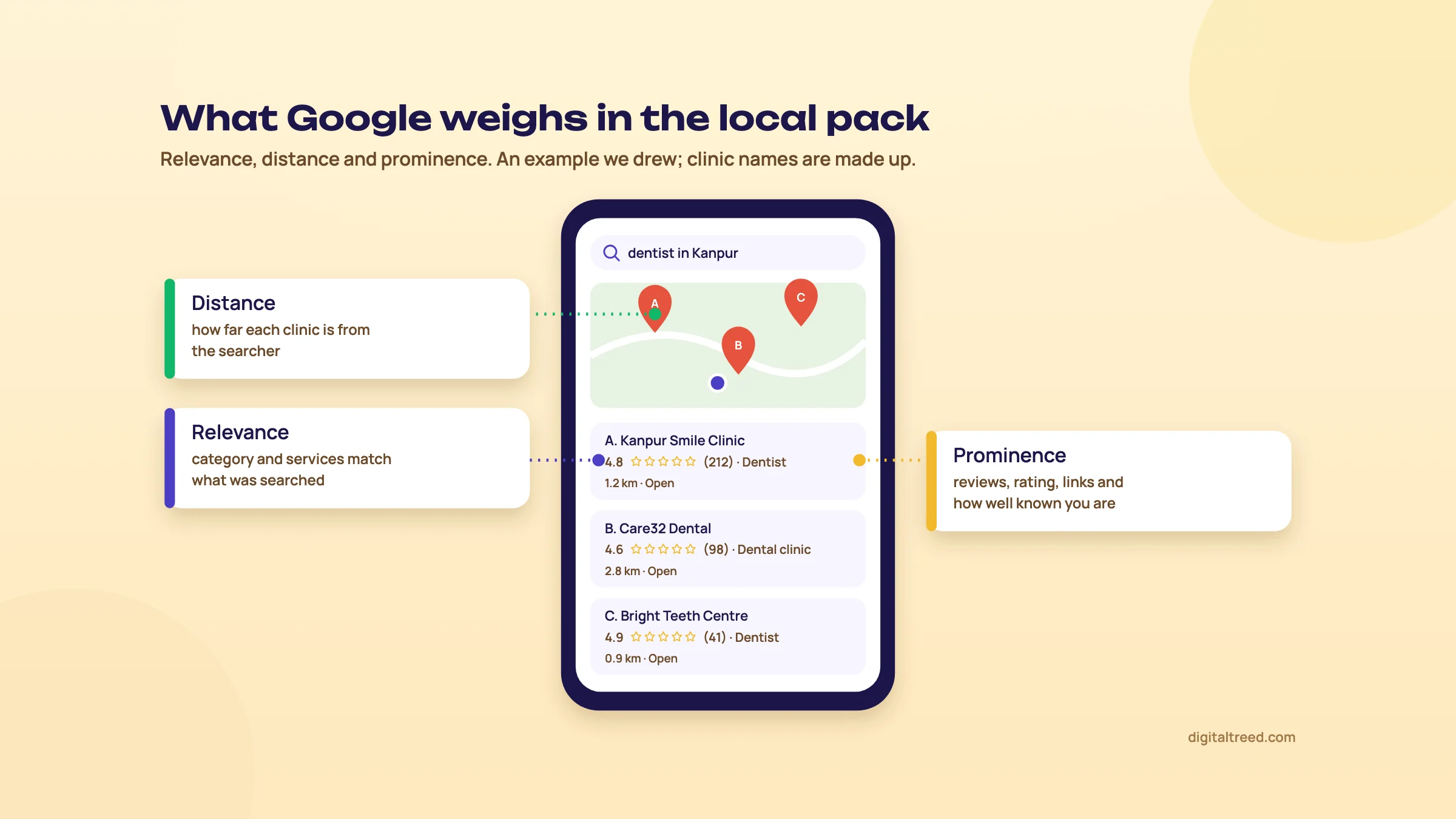 Relevance, distance and prominence in the local pack. An example we drew; the clinics are made up.
Set up and verify the profile properly
A Business Profile is free. To have one, your business has to make in-person contact with customers, either at your address or by going to them.[106] A purely online store doesn't qualify. Verification is how Google confirms you're real, and Google picks which methods you're offered: phone or text, email, a live video call, a postcard or a recorded video.[107]
Set up and verify a Google Business Profile
- Search first Search your business name on Google Maps. If a profile already exists (customers or Google may have created one), claim it instead of making a second one.
- Use a lasting account Sign in with a Google account the business owns, not a staff member's personal Gmail. People leave; profiles shouldn't leave with them.
- Enter the name exactly Use the name on your signboard and documents. No city or keywords added ("[Clinic name]", not "[Clinic name] Best Dentist Kanpur").
- Pick the primary category Choose the most specific one that describes what you are, then add a few secondary categories for real services.
- Add the address or service area If customers come to you, add the address. If you go to them (a plumber, a home tutor), set the areas you serve.
- Verify Use whichever method Google offers. For a video, show the signboard, the inside of the premises and something that proves you run it, such as the shop's keys or equipment.
- Fill everything else before you share it Hours, phone, website, photos, products or services (next section).
Complete the profile, then keep it current
Google's own list of what helps is short: verify, keep your information complete and accurate (address, hours, category and attributes), reply to reviews, add photos and videos, and add in-store products if you run a shop in an eligible country.[105] Here's how we'd work through it.
| Field | What to do |
|---|---|
| Categories | One specific primary category. A physiotherapy clinic is "Physiotherapist", not "Medical clinic". Check what the top three in your local pack use. |
| Hours | Regular hours plus special hours for Diwali, Eid, Holi and other closures. Wrong hours are the fastest way to earn a one-star review. |
| Phone | A number someone answers in working hours. If calls go to a staff mobile, make sure it's a number you'll keep. |
| Website | Link to the page for that location, not always the home page. Add UTM tags so you can see these visits in GA4 (chapter 11). |
| Attributes | Whatever applies: wheelchair access, online appointments, women-led and so on. |
| Photos and videos | Real ones: the front of the shop as people see it from the road, the inside, the team, the work. Add new ones regularly. |
| Products or services | List what you actually sell, in the words customers use ("root canal treatment", "IIT-JEE foundation batch"). |
Business Profiles also have posts for offers, events and updates. We'd treat them as a way to keep the listing fresh for people reading it, not as a ranking trick; Google's local ranking page doesn't mention them.
Reviews: get them, reply to them, never buy them
Reviews feed prominence, and they decide a lot of clicks on their own. BrightLocal's 2026 survey of 1,002 US adults found these numbers.[108] They are US figures from a vendor survey; we found no comparable survey for India.
97%
of US consumers read online reviews for local businesses[108]
71%
use Google to read them, down from 83% in 2025[108]
68%
will only use a business rated four stars or more[108]
How to ask. Google gives every profile a review link and a QR code; you make them from the profile on a computer: open Read reviews, then Get more reviews.[109] Google suggests putting them on receipts, thank-you emails and a printed card in the shop.[109] In India, add WhatsApp: most clinics, coaching centres and shops already message customers there, so a short follow-up the same day works better than a request a week later.
Tip
Two messages you can copy. After a visit, on WhatsApp: "Thank you for visiting [clinic name] today. If we looked after you well, would you leave us a short Google review? It takes a minute: [review link]". On a counter card next to the QR code: "Tell others about your visit on Google: scan here. Something wrong? Tell us too, we'll fix it." Send the same message to every customer, not just the ones you think liked you.
How to reply. Google's advice is to keep replies professional, polite and short, not to turn them into sales pitches, and for a bad review to reply promptly, use the reviewer's name and apologise where it's due.[110] We'd add: reply to every review, good or bad, with something specific to it rather than the same thank-you each time, and never argue in public. The person reading your reply is the next customer, not the angry one.
Do not
- Pay for reviews, or give a discount, free service or gift in return for one
- Ask staff, family or friends to post reviews
- Ask only the customers you know are happy (review gating)
- Set staff a target number of reviews to collect
- Reply with a coupon or a sales line
Do
- Ask every customer the same way, soon after the visit
- Share the Google review link or QR code
- Reply to every review within a day or two
- Fix the problem a bad review points to, then say so in the reply
- Report reviews that break Google's rules instead of fighting them
The first four items on the "don't" list are against Google's Maps content policy: paid reviews, incentives such as payment, discounts or free goods, conflict-of-interest reviews, selectively asking for positive reviews and staff targets.[111] The last goes against Google's advice on replies.[110] Google removes such reviews and can restrict the profile.
NAP: one name, one address, one phone
NAP stands for name, address and phone. Google, Bing and AI assistants see your business described on many sites, and when the details match they can be confident it's the same business. When your website says "Shop 4, Swaroop Nagar", Justdial says "Swaroop Nagar Market" and an old IndiaMART listing has a number you stopped using in 2022, that confidence goes, and so do some customers.
- Write the master version once: legal or signboard name, full address in one format (with PIN code) and one main phone number.
- Put it on your website, in the footer or contact page, as text, not inside an image.
- Copy it exactly into Google, Bing Places, Justdial, IndiaMART, Sulekha and any industry directory.
- Search your old phone numbers and old addresses once a year and fix any listing that still shows them.
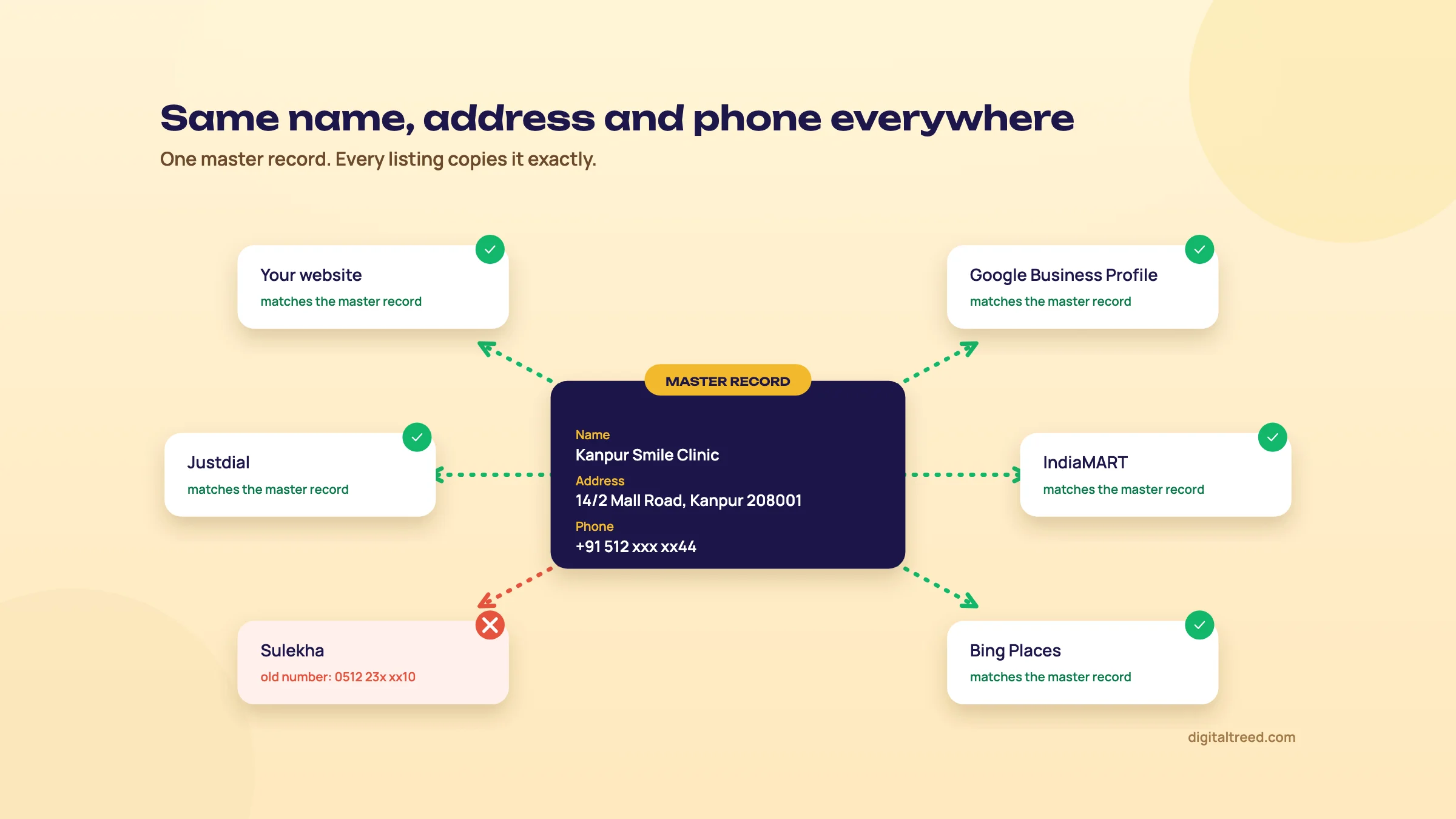 One master record, copied exactly everywhere. The red listing still has an old number.
Indian citations: Justdial, IndiaMART, Sulekha
A citation is any mention of your business name, address and phone on another site. In India the big three directories are also places where customers search directly, so a listing can bring calls on its own, whatever it does for Google.
| Justdial | IndiaMART | Sulekha | |
|---|---|---|---|
| Basic listing | Free[112] | Free registration: profile, products, replies to buyer enquiries[113] | Free[114] |
| Paid plans add | More visibility and leads | Higher placement in IndiaMART search, a "Verified" mark, buy leads[113] | Leads: you pay for each customer request it sends you |
| Best for | Consumer businesses: shops, clinics, coaching, restaurants | Manufacturers, wholesalers and B2B suppliers | Local service providers |
Our view: list on the ones that fit your business, with the exact NAP, real photos and correct categories, and judge any paid plan by the calls and leads it brings, not by SEO promises. We haven't checked whether these directories pass ranking credit through their links, so don't buy a plan for that. And don't confuse this with the "submit to 500 directories" packages; low-quality directory links are on Google's link spam list (chapter 9).
Beyond Google: Bing Places and Apple Business
Bing Places is Bing's version of the Business Profile[115], and Apple Business (called Apple Business Connect until April 2026)[116] does the same job for Apple Maps.[117] Both are free: Bing Places can import your details from your Google profile,[118] and Apple Business is open to businesses in India.[119] Neither will bring the calls Google does, but setting them up once your Google profile is done is an hour well spent, and it's one more place where your details are right. Use the same master NAP.
Location and service-area pages
Your website still matters for local search. The profile links to it, and Google reads it to judge relevance. Give each real location its own page: the address and map, hours, the team who work there, photos of that branch, the services it offers and directions from landmarks people know ("opposite Z Square Mall").
Warning
Don't make 40 near-identical pages like "AC repair in Kanpur", "AC repair in Lucknow", "AC repair in Agra" with only the city name changed, when you have one office. Google's spam policies call many similar pages aimed at similar searches, funnelling people to one place, doorway abuse.[27] If you really serve several cities, one service-area page listing them is honest and enough.
Speed matters here too. When I taught SEO, my students were already doing client work, and most of the local business sites they handled ran on WordPress with shared hosting. The problem they met most often was a slow site. A location page that takes ten seconds on a phone loses the call to the clinic that loads in two.
Check each location page's title and description before it goes live. The title should name the service and the place ("Physiotherapy clinic in Swaroop Nagar, Kanpur | [Clinic name]").
LocalBusiness schema
Local business is one of the structured data types Google supports for rich results.[83] Add LocalBusiness markup (or a more specific type, such as Dentist) on each location page with the same name, address, phone, hours and coordinates as the profile. Chapter 8 covers how to write it and the rule that matters most: markup must match what's visible on the page.
Our free Schema Markup Generator writes the LocalBusiness block with the address, hours and map coordinates, and keeps the rating fields off your own business; test the result before it goes live.
Local search and AI answers
People now ask AI tools for local recommendations too. In the same BrightLocal survey, 45% of US consumers said they use ChatGPT or other AI tools for local business recommendations, up from 6% in 2025.[108] Google's advice for its own AI features includes keeping your Business Profile and Merchant Center information up to date.[38] There's no separate trick: the same accurate profile, consistent NAP and genuine reviews feed both. Guide 5 covers AI visibility in depth.
Measure what the profile brings
Open your profile and click Performance. For a verified profile, Google shows calls (taps on the call button), direction requests, website clicks, profile views and the searches people used to find you.[120] The searches list updates at the start of each month and can take up to five days to show.[120]
Write down calls and direction requests every month, next to the number of reviews and your average rating. Those four numbers tell a shop owner more than any ranking report. The website clicks you'll see in GA4 as well, if you added UTM tags to the website link (chapter 11).
Before you start, run a baseline check of the website itself, so you know whether a slow or broken site is holding the profile back.
If you'd rather have someone do the local work with you, our SEO service covers Business Profiles, citations and location pages; you can get a quote in a couple of minutes. Next, chapter 11: measuring all of this in Search Console and GA4.
Measuring SEO: Search Console, GA4, rank tracking and KPIs
Quick answer
Measure SEO in three places: Search Console for how Google shows you (impressions, clicks, queries, pages, and now AI Overview and AI Mode appearances), GA4 for what visitors do after they land, and a rank tracker for a short list of keywords. Report leads and sales first, then the visibility numbers that explain them.
It's easy to build an SEO report that opens with a ranking table, ends with a traffic graph and never answers the client's real question: did it bring us business? This chapter sets up the numbers so that question comes first.

0:005:54
Starts with · 0:00Traffic up, phone quiet
Monthly SEO Report from Search Console and GA4: One Page, Leads First (2026)
All 15 chapters
- 0:00Traffic up, phone quiet
- 0:15Three tools, three questions
- 0:42Step 1: GA4 data retention
- 1:07Step 2: link Search Console
- 1:28Step 3: key events
- 1:53Step 4: UTM tags
- 2:22Outcomes first
- 2:46Behaviour: branded queries
- 3:01Exposure: 16 months
- 3:22Three Search Console traps
- 3:43Reading a real client report
- 4:11AI numbers in proportion
- 4:48One page, leads first
- 5:03Build it once in Data Studio
- 5:22Done when, and Guide 3
Three tools, three different questions
| Tool | Question it answers | Cost |
|---|---|---|
| Google Search Console | Does Google show my pages, for which searches, and do people click? | Free |
| Google Analytics 4 (GA4) | What do visitors from search do on my site? Do they call, fill the form, buy? | Free |
| A rank tracker | Where exactly do I rank today for my 20 to 50 most important keywords? | Paid, mostly |
Their numbers will never match each other. Search Console counts clicks on Google, GA4 counts sessions that loaded its tag (after consent), and a tracker checks one location and device. That's fine. Use each for its own question and stop trying to reconcile them.
The Search Console Performance report
Open Performance, then Search results. You get four numbers: clicks, impressions, average CTR (clicks divided by impressions) and average position. The default view is the last three months.[121] Change it to 16 months, the most Search Console keeps,[56] and compare with the same period a year earlier so festival seasons and exam months don't fool you.
Three things trip people up.
- Average position isn't your rank. It's an average across every search you appeared for, including the ones where you were on page four. One page can sit at 3 for its main keyword and still show an average of 18.
- The report shows and exports at most 1,000 rows.[122] For more queries or pages, use the API, which gives up to 25,000 rows per request.[123]
- Some queries are hidden. Google leaves out anonymised queries, so the query rows won't add up to the total clicks.[122]
Here's what a real report looks like. This is a client site, name hidden, over five months.
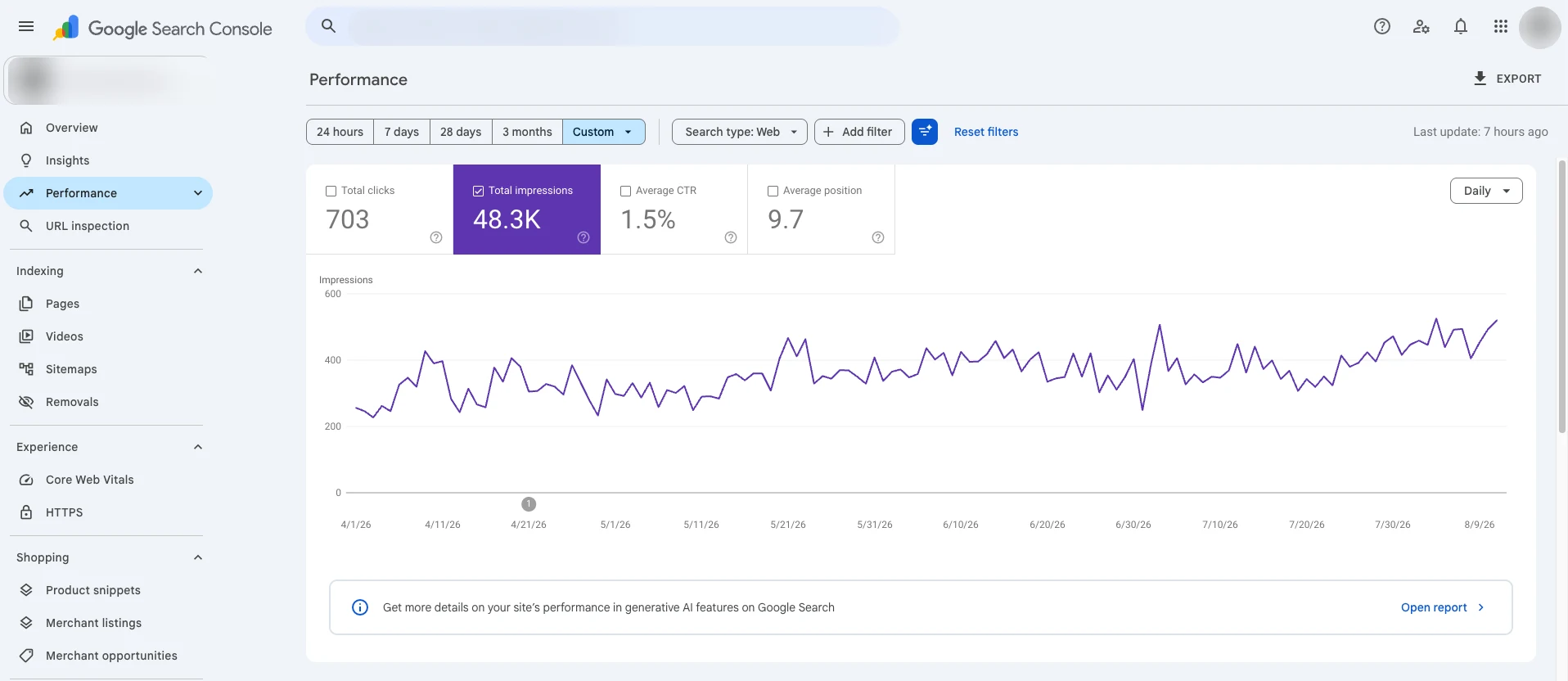 A client's Search Console, April to August 2026. Name hidden, shared with permission.
How we read it: 703 clicks from 48,300 impressions is a CTR of about 1.5%. An average position of 9.7 means many of those impressions come from the bottom of page one or from page two, where few people click. The line that matters is impressions, which roughly doubled from about 250 to about 520 a day. Google is showing the site for more searches. The next job is to find the queries sitting at positions 5 to 15 with plenty of impressions, and improve those pages (titles and descriptions in chapter 7, refreshes in chapter 6), because that's where clicks come from fastest.
Newer Search Console features worth switching on
Google added several things to the Performance report in the last year. Four of them change how you work.
- Branded queries filter. Splits searches for your brand name from everything else. Available to all eligible sites since 11 March 2026.[3] Non-branded clicks are the honest measure of SEO; branded clicks mostly measure how well-known the business already is.
- Custom annotations. Add a note of up to 120 characters to the chart: "New titles on service pages", "Site moved to new host".[58] Six months later you'll know why the line moved.
- Weekly and monthly views. Smooths out the daily noise in the chart.[124]
- Query groups. In Insights, for sites with lots of queries, Google uses AI to group similar queries together, which makes it easier to see topics instead of a thousand separate phrasings.[20]
In September 2026 Google also added a web multimodal search type, for searches made with Lens, Circle to Search and image uploads.[125] If you sell products people photograph, look at it.
AI Overviews and AI Mode in Search Console
Clicks and impressions from AI Overviews and AI Mode are counted inside the normal Performance report, under the "Web" search type, mixed in with blue links.[86] You can't filter them out there.
Since June 2026 there's also a separate Search Generative AI report. It shows impressions only, meaning how often your URLs appeared in AI Overviews, AI Mode and generative AI features in Discover, broken down by page and country, and by device for Search. It doesn't show clicks or queries. It reached all sites worldwide on 31 August 2026.[126] Use it to see which pages AI answers draw on, not to judge traffic.
To guess which queries came from AI Mode, Glenn Gabe published a method in August 2026.[127] In short:
- Export queries with their landing pages through the Search Analytics API (he uses Analytics Edge), so you get past the 1,000-row limit.
- Put the export in a spreadsheet.
- Give it to an AI assistant and ask it to flag queries that look like AI Mode prompts: long conversational questions, follow-ups and short replies, and to explain each pick.
- Check the list by hand. Expect noise from rank-tracking tools.
- Look at clicks on the flagged queries. He found few or none on many of them.
Before you read any AI numbers, make sure the AI search crawlers can reach you at all. Blocking OpenAI's OAI-SearchBot, for example, keeps you out of ChatGPT search answers.[128]
GA4: the setup that matters
GA4 has hundreds of settings. For SEO, five matter.
1. Data retention. A standard GA4 property can keep event and user-level data for 2 or 14 months,[129] and new properties start at 2.[130] The setting doesn't touch the standard reports, but it limits explorations and funnel reports, which is where you'll dig into organic visitors. Change it on day one.
Set GA4 retention to 14 months and link Search Console
- Check your role You need the Editor role on the property.
- Open retention Go to Admin, confirm the right account and property, then Data settings, then Data retention.[129]
- Choose 14 months Set event data retention to 14 months and save.
- Link Search Console In Admin, under Product links, open Search Console links and click Link. Choose your Search Console property (you must be a verified owner of it), then pick your web data stream and submit.[131]
- Publish the reports The Search Console collection of reports is unpublished by default. Open Library in the left menu and publish it.
2. Organic search channel. In Reports, Acquisition, Traffic acquisition, the "Organic Search" row is your SEO traffic. Add landing page as a secondary dimension to see which pages bring it.
3. Key events. GA4 calls the actions that matter to your business key events: you track an interaction as an event, then mark it as a key event.[132] For most Indian small businesses those are form submissions, taps on the phone number and taps on the WhatsApp button. Mark them, or your report can only ever say "traffic".
4. AI referrals. Since May 2026, GA4 puts visits from AI assistants such as ChatGPT, Gemini and Copilot in their own AI Assistant channel in Traffic acquisition.[133] Clicks from Google's AI Overviews and AI Mode still count as Organic Search. If an AI tool you care about still shows under Referral (check perplexity.ai), filter session source for it.
5. UTM tags on your own links. Covered below.
Keep the AI numbers in proportion. SE Ranking's 2026 study of 101,574 sites found AI referrals made up 0.32% of all site traffic, against 42.75% from organic search.[134] It's a vendor study, but the gap is too big to argue with.
Bing Webmaster Tools: AI citations
Bing has gone further than Google on AI reporting. Its AI Performance report, launched in public preview in February 2026, shows how often your pages are cited as sources in Microsoft Copilot, Bing's AI summaries and partner services: total citations, average cited pages, the "grounding queries" behind them and citations by page.[135] In June 2026 Bing added Intents, Topics, Citation Share and Compare.[136] It's free, and if you set up Bing in Guide 1 it's already waiting for you.
Rank tracking: when it's worth paying for
Search Console's average position is free, but it's an average. A rank tracker checks where you stand for a fixed list of keywords, in a set city and on a set device, every day or week. It's worth paying for when you have a short list of money keywords ("ivf centre lucknow", "school uniform manufacturer") and a client or boss who wants to see them move.
Don't build your own by scraping Google. Google's spam policies list sending automated queries to Google without permission, scraping results for rank checks included, as machine-generated traffic.[27] Use a reputable tracker and let it worry about that.
| Tracker | Entry price (USD, ex tax) | Keywords tracked | Good for |
|---|---|---|---|
| SE Ranking | Core $129/mo[16] | 2,000, daily | Agencies and freelancers; 14-day free trial |
| Semrush Position Tracking | SEO plan $139/mo[14] | 500, daily | Teams already using Semrush |
| Ahrefs Rank Tracker | Lite $129/mo[15] | 750 | Teams already using Ahrefs for links |
| Rank Math PRO | €7.99/mo billed yearly, first year[137] | 500 | Your own WordPress sites (not client sites), tracking inside the dashboard |
Prices seen on 16 October 2026; they change often. We'd start with Rank Math if you're on WordPress and only need a few dozen keywords, and move to SE Ranking when you're reporting for several clients.
UTM tags for links you control
Google Business Profile, newsletters, Instagram bio links and WhatsApp broadcasts all send visitors to your SEO pages. Without tags, GA4 files many of them under the wrong channel. Add UTM parameters, at least utm_source, utm_medium and utm_campaign, which Google says you should always use.[138] For the website link on your Business Profile, for example:
https://yourclinic.in/swaroop-nagar/?utm_source=google&utm_medium=organic&utm_campaign=gbp-listingGA4 still counts these visits as Organic Search, but they now show up as their own row when you view session campaign, and you can count the calls and forms they bring. Until we have a UTM builder of our own, Google's free Campaign URL Builder makes the links for you.[138] Don't add UTM tags to internal links between your own pages. Tags are meant for links from outside your site, and on internal links they can replace where the visitor really came from.
What to report, and in what order
Traffic targets built on last year's clicks are getting harder to hit. SparkToro found that 68.01% of US Google searches ended without a click in January to April 2026, up from 60.45% in 2024 on the same Similarweb data.[139] Some of your work will pay off in searches where nobody clicks, or in AI answers that send no visit.
Kevin Indig and Amanda Johnson's answer, in the October 2026 Growth Memo, is to report three kinds of signal together: an exposure metric, a behaviour signal and a business outcome.[104] In practice that means visibility, mentions and citations (exposure); branded searches and direct visits (behaviour); and leads, sales and pipeline (outcomes).
Plan 2027 around the signals that happen before the visit… or despite it.[104]
We'd flip the order for a small business owner: outcomes first, because that's what they're paying for, then behaviour, then exposure as the explanation.
| KPI | Group | Where to find it | How often |
|---|---|---|---|
| Leads, calls, WhatsApp taps, sales from organic | Outcome | GA4 key events, filtered to Organic Search | Monthly |
| Calls and direction requests from the Business Profile | Outcome | Business Profile, Performance | Monthly |
| Branded search clicks and impressions | Behaviour | Search Console, branded filter | Monthly |
| Direct visits | Behaviour | GA4, Traffic acquisition | Monthly |
| Non-branded clicks and impressions | Exposure | Search Console, branded filter | Monthly, checked weekly |
| Positions for 20 to 50 money keywords | Exposure | Rank tracker | Weekly |
| AI Overview and AI Mode appearances | Exposure | Search Console, Generative AI report | Monthly |
| AI citations in Copilot and Bing | Exposure | Bing Webmaster Tools, AI Performance | Monthly |
| AI referral visits | Exposure | GA4, AI Assistant channel | Monthly |
| Indexed pages and errors | Health | Search Console, Pages | Weekly |
One page is enough for most clients. Put the outcome numbers at the top with last month and the same month last year beside them, then one line on what changed and why, then the rest.
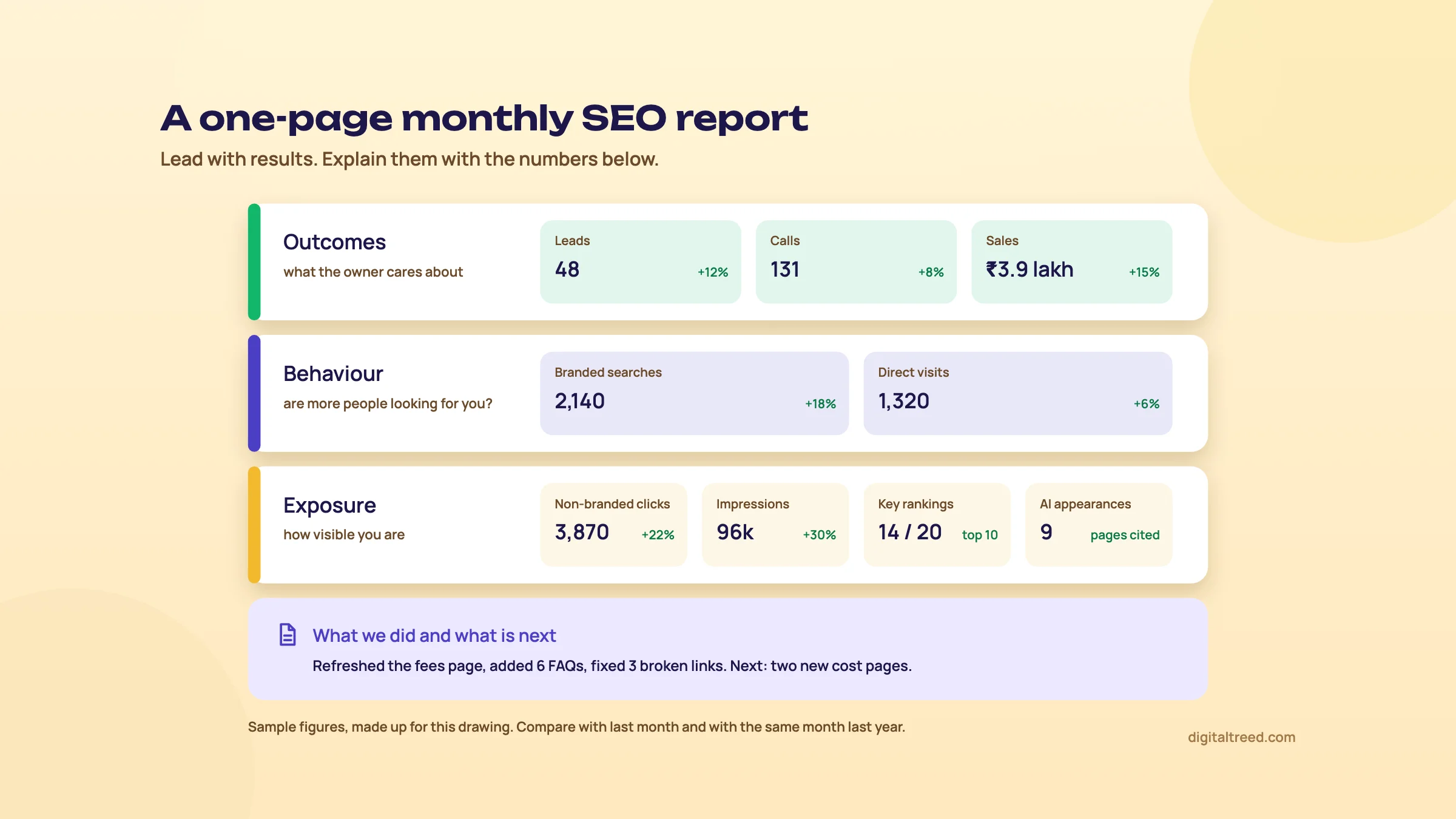 A one-page monthly report: outcomes first. Sample figures.
Build the report once, in Data Studio
Google's free reporting tool, Looker Studio, has been called Data Studio again since April 2026,[140] and it has connectors for Search Console and GA4.[141] Build the one-page layout above once, set the date to "last month" compared with the previous period, and it updates itself. Paid options such as AgencyAnalytics, the SE Ranking Agency Pack or Ahrefs Report Builder ($99 a month add-on)[15] make sense when you report for many clients and want white-label PDFs.
Before the first report, take a baseline of the site, so later months have something honest to compare with.
If you'd like us to set up the tracking and send the monthly report for you, see our SEO service or get a quote. Then take the 10-question quiz below to check what stuck from this guide.
Test yourself
Ten questions on the whole guide. Pick an answer, check it, and see your score at the end.
You got 0 of 10 right.
Frequently asked questions
Frequently asked
How do I do keyword research for free?
Start with the Search Console queries your site already gets, then Google autocomplete for the words customers actually type. Keyword Planner is free with a Google Ads account (you add billing details but don't have to run ads), though low-spend accounts see volume ranges, not exact numbers. Google Trends shows relative interest and seasonality, not counts. Then search each keyword yourself and read the results to see what intent Google is serving.
What is a good keyword difficulty to target?
There's no universal number. Every tool calculates difficulty its own way, so compare keywords within one tool, never across tools. Start where pages like yours, with a similar number of links, already rank on page one, and move up as your site earns links and trust.
How many keywords should one page target?
One primary intent per page. A page that answers that intent well will rank for many related phrasings at once, as long as Google shows the same results for them. If two keywords bring up different results, they usually need two pages.
Is AI-written content bad for SEO?
Not by itself. Google says appropriate use of AI is not against its guidelines. Making many low-value pages to manipulate rankings is scaled content abuse, however they're produced. And since October 2026 Google's guidance says it is critical to fact-check AI-generated content by hand before publishing, including titles, meta descriptions, structured data and alt text.
Is E-E-A-T a ranking factor?
Not directly, according to Google. E-E-A-T (experience, expertise, authoritativeness, trust) isn't a score your page gets, but Google's systems look for signals of it, and trust matters most. It weighs more on "your money or your life" topics such as health and finance.
How long should an SEO article be?
As long as the search needs. Google says it has no preferred word count. A "clinic timings" search needs two lines; a "how to choose an IVF centre" search may need 2,000 words. Look at what already ranks and at the questions people ask, then cover them without padding.
Do backlinks still matter in 2026?
Yes. Links are still one of the signals Google uses, and in Google's local ranking help they count towards how well-known a business is. Earn them with things worth linking to: data, guides, local news, real partnerships. Don't buy them. Mentions of your brand across the web also seem to go with appearing in AI answers, so they're worth earning too.
Are guest posts safe?
Yes, if you write them for the other site's readers and the links aren't paid for or stuffed with keywords. Google's link spam policy names guest posts with paid followed links or optimised anchor text. A paid placement is fine when the link is marked rel="sponsored" or nofollow.
How do I rank in the Google Maps local pack in India?
Google says local results depend mainly on relevance, distance and prominence, and that nobody can pay for a better local ranking. So: a verified, complete Google Business Profile with the right primary category; a steady flow of genuine reviews you reply to; the same name, address and phone on your site, Justdial, IndiaMART, Sulekha and Bing Places; and one useful page for each real location.
Are Justdial and IndiaMART listings good for SEO?
They're worth having as citations, places where your name, address and phone appear and match your Google profile, and as lead sources in their own right, since customers search on them directly. Basic listings are free; IndiaMART's paid plans mainly lift you higher inside IndiaMART's own search. Judge a paid plan by the calls and enquiries it brings, not by SEO promises.
Which SEO KPIs should I report to a client?
Outcomes first: leads, calls, WhatsApp enquiries and sales from organic search and the Business Profile. Then behaviour: branded searches and direct visits. Then exposure: non-branded clicks and impressions, a short list of rankings, and AI appearances from Search Console and Bing Webmaster Tools. One page, with last month and the same month last year beside each number.
Sources
References
- 96.55% of Content Gets No Traffic From Google. Here's How to Be in the Other 3.45% [New Research for 2023], Ahrefs, Tim Soulo, 1 Dec 2023, accessed 16 Oct 2026
- How Ahrefs Used SaaS SEO to Grow from 15K to 250K Monthly Visitors, The SaaS Podcast (SaaS Club), episode 205, Tim Soulo, 19 Mar 2019, accessed 16 Oct 2026
- Introducing the branded queries filter in Search Console, Google Search Central blog, 20 Nov 2025, updated 11 Mar 2026, accessed 16 Oct 2026
- How to Create an SEO Content Strategy (Follow the Ahrefs' Framework), Ahrefs, Si Quan Ong, 22 Nov 2022, accessed 16 Oct 2026
- Use Keyword Planner, Google Ads Help, accessed 16 Oct 2026
- Google officially throttling Keyword Planner data for low-spending AdWords accounts, Search Engine Land, Greg Finn, 13 Aug 2016, accessed 16 Oct 2026
- How Trends data is adjusted, Google Trends Help, accessed 16 Oct 2026
- Using generative AI content, Google Search Central, updated 1 Oct 2026, accessed 16 Oct 2026
- How to Do Keyword Research for SEO (Start to Finish), Ahrefs SEO Guide, Tim Soulo, no date shown, accessed 16 Oct 2026
- AnswerThePublic pricing, AnswerThePublic, seen 16 Oct 2026 (prices vary by country), accessed 16 Oct 2026
- The Ultimate SEO Tutorial for Search and AI Visibility (2026), Backlinko, Rosanna Campbell, updated 25 Aug 2026, accessed 16 Oct 2026
- SEO basics, Semrush, Carlos Silva, 20 May 2026, accessed 16 Oct 2026
- Optimizing your website for generative AI features on Google Search, Google Search Central, 15 May 2026, updated 10 Jul 2026, accessed 16 Oct 2026
- Semrush plans and pricing, Semrush, seen 16 Oct 2026, accessed 16 Oct 2026
- Ahrefs pricing, Ahrefs, seen 16 Oct 2026, accessed 16 Oct 2026
- SE Ranking subscription plans, SE Ranking, seen 16 Oct 2026, accessed 16 Oct 2026
- Ubersuggest pricing, Neil Patel Digital, seen 16 Oct 2026, accessed 16 Oct 2026
- Keyword Strategy Builder, Semrush, seen 16 Oct 2026, accessed 16 Oct 2026
- How To Do Keyword Clustering the Easy Way, Ahrefs, accessed 16 Oct 2026
- Introducing Query groups in Search Console Insights, Google Search Central blog, 27 Oct 2025, accessed 16 Oct 2026
- Importance of Topical Authority for SEO, Holistic SEO & Digital, Koray Tuğberk Gübür, 11 Feb 2021, updated 24 Nov 2022, accessed 16 Oct 2026
- [Webinar Replay] How to Optimize for AI Mode Using Query Fan-Outs and User Context: A Conversation with Mike King and Andrea Volpini, iPullRank, Francine Monahan, 3 Jul 2025, accessed 16 Oct 2026
- SEO Starter Guide, Google Search Central, updated 10 Dec 2025, accessed 16 Oct 2026
- Performance report (Search results): Advanced filtering and comparison, Search Console Help, accessed 16 Oct 2026
- How to specify a canonical URL with rel="canonical" and other methods (Consolidate duplicate URLs), Google Search Central, updated 10 Jul 2026, accessed 16 Oct 2026
- Redirects and Google Search, Google Search Central, updated 14 Apr 2026, accessed 16 Oct 2026
- Spam policies for Google web search, Google Search Central, updated 28 Aug 2026, accessed 16 Oct 2026
- Refine your new keywords in Keyword Planner, Google Ads Help, accessed 16 Oct 2026
- How we Increased Vernacular Traffic by 270%: Vernacular SEO Case study of Bajaj Finserv, Techmagnate, no date shown, accessed 16 Oct 2026
- Most of India prefers using Hindi for search, says Google, Inc42, 9 May 2019, accessed 16 Oct 2026
- Supercharging Search for India: new languages in AI Mode and Search Live debuts, Google India blog, 8 Oct 2025, accessed 16 Oct 2026
- Desktop, mobile and tablet market share in India, StatCounter Global Stats, September 2026, accessed 16 Oct 2026
- AI Mode expands to more languages, Google, 8 Sep 2025, accessed 16 Oct 2026
- SEO Starter Guide (Hindi version), Google Search Central, updated 18 Dec 2025, accessed 16 Oct 2026
- Tell Google about localized versions of your page, Google Search Central, updated 21 Sep 2026, accessed 16 Oct 2026
- AI Overviews study, Semrush, Luke Harsel, 22 Jul 2025, accessed 16 Oct 2026
- Google users are less likely to click on links when an AI summary appears in the results, Pew Research Center, 22 Jul 2025, accessed 16 Oct 2026
- Top ways to ensure your content performs well in Google's AI experiences on Search, Google Search Central blog, John Mueller, 21 May 2025, accessed 16 Oct 2026
- Performance report (Search results): Troubleshooting data discrepancies, Search Console Help, accessed 16 Oct 2026
- SEO expert releases AI search content optimization checklist, PPC Land, 18 Jun 2025 (on Aleyda Solis's checklist of 16 Jun 2025), accessed 16 Oct 2026
- Creating helpful, reliable, people-first content, Google Search Central, updated 5 Oct 2026, accessed 16 Oct 2026
- We analyzed 11.8 million Google search results, Backlinko, updated 14 Apr 2025, accessed 16 Oct 2026
- Google updates punish good SEO: 50-site case study, Zyppy, Cyrus Shepard, 18 Jun 2024, updated 1 Sep 2026, accessed 16 Oct 2026
- Surfer pricing, Surfer, seen 16 Oct 2026, accessed 16 Oct 2026
- Clearscope pricing, Clearscope, seen 16 Oct 2026, accessed 16 Oct 2026
- Frase pricing, Frase, seen 16 Oct 2026, accessed 16 Oct 2026
- GEO: Generative Engine Optimization, Aggarwal et al., Princeton University and IIT Delhi, KDD 2024, accessed 16 Oct 2026
- E-A-T gets an extra E for Experience, Google Search Central blog, Elizabeth Tucker, 15 Dec 2022, accessed 16 Oct 2026
- The December 2025 core update: observations on 4 sites that did well, Marie Haynes, 20 Feb 2026, accessed 16 Oct 2026
- Trust still lives in blue links, Search Engine Journal, Kevin Indig, 10 Sep 2025, accessed 16 Oct 2026
- Lily Ray: Search Engine Land 20 for 20 interview, Search Engine Land, Danny Goodwin, 2 Sep 2026, accessed 16 Oct 2026
- Google Search's guidance about AI-generated content, Google Search Central blog, Danny Sullivan and Chris Nelson, 8 Feb 2023, accessed 16 Oct 2026
- It Works Until It Doesn't: AI Content Strategies That Backfire, Lily Ray (Substack), 13 May 2026, accessed 16 Oct 2026
- Page experience, Google Search Central, updated 22 Sep 2026, accessed 16 Oct 2026
- The future of SEO: interview with Brian Dean, Rocket.net, 7 Nov 2022, accessed 16 Oct 2026
- Introducing the new Search Console, Google Search Central blog, Jan 2018, accessed 16 Oct 2026
- Google Search's core updates and your website, Google Search Central, updated 10 Dec 2025, accessed 16 Oct 2026
- Custom chart annotations in Search Console, Google Search Central blog, 17 Nov 2025, accessed 16 Oct 2026
- Crawl budget management for large sites, Google Search Central, updated 22 Jul 2026, accessed 16 Oct 2026
- Build and submit a sitemap, Google Search Central, updated 8 Jul 2026, accessed 16 Oct 2026
- Do AI assistants prefer to cite fresh content?, Ahrefs, Ryan Law, 28 Jul 2025, updated 27 Apr 2026, accessed 16 Oct 2026
- All in One SEO pricing, AIOSEO, seen 16 Oct 2026, accessed 16 Oct 2026
- Google search algorithm leak, iPullRank, Mike King, 27 May 2024, accessed 16 Oct 2026
- Influencing your title links, Google Search Central, accessed 16 Oct 2026
- Google does not use the keywords meta tag in web ranking, Google Search Central blog, Matt Cutts, 21 Sep 2009, accessed 16 Oct 2026
- Latest Google Search documentation updates, Google Search Central, accessed 16 Oct 2026
- Control your snippets in search results ("Read more" deep links), Google Search Central, updated 20 Apr 2026, accessed 16 Oct 2026
- Make your links crawlable, Google Search Central, updated 10 Dec 2025, accessed 16 Oct 2026
- Understanding Core Web Vitals and Google search results, Google Search Central, updated 10 Dec 2025, accessed 16 Oct 2026
- Google click-through rates (CTRs) by ranking position, First Page Sage, 22 Sep 2026, accessed 16 Oct 2026
- We Analyzed 4 Million Google Search Results. Here's What We Learned About Organic Click Through Rate, Backlinko, 27 Aug 2019, updated 16 Apr 2025, accessed 16 Oct 2026
- Featured snippets and your website, Google Search Central, updated 10 Dec 2025, accessed 16 Oct 2026
- Changes to HowTo and FAQ rich results, Google Search Central blog, John Mueller, 8 Aug 2023, accessed 16 Oct 2026
- Make your website shareable on LinkedIn, LinkedIn Help, accessed 16 Oct 2026
- SEO Spider pricing (free version: 500 URLs), Screaming Frog, seen 16 Oct 2026, accessed 16 Oct 2026
- Yoast SEO (10 million+ active installations), WordPress.org, seen 16 Oct 2026, accessed 16 Oct 2026
- Rank Math SEO (4 million+ active installations), WordPress.org, seen 16 Oct 2026, accessed 16 Oct 2026
- All in One SEO (2 million+ active installations), WordPress.org, seen 16 Oct 2026, accessed 16 Oct 2026
- Rethinking Internal Linking Best Practices, Zyppy, Cyrus Shepard, 12 Jul 2022, updated 23 Feb 2026, accessed 16 Oct 2026
- Links report, Search Console Help, accessed 16 Oct 2026
- Ahrefs Free (formerly Ahrefs Webmaster Tools), Ahrefs, seen 16 Oct 2026, accessed 16 Oct 2026
- Rich Results Test, Search Console Help, accessed 16 Oct 2026
- Structured data markup that Google Search supports (search gallery), Google Search Central, updated 15 Jun 2026, accessed 16 Oct 2026
- Local business (LocalBusiness) structured data, Google Search Central, accessed 16 Oct 2026
- Simplifying the search results page, Google Search Central blog, 12 Jun 2025, accessed 16 Oct 2026
- AI features and your website, Google Search Central, updated 10 Dec 2025, accessed 16 Oct 2026
- Review snippet (Review, AggregateRating) structured data, Google Search Central, updated 8 Sep 2026, accessed 16 Oct 2026
- Get started with Search Console, Google Search Central, updated 10 Dec 2025, accessed 16 Oct 2026
- Ranking Factors [Semrush Study], Semrush, Marcus Tober, 4 Jan 2024, accessed 16 Oct 2026
- Links are not a top 3 Google Search ranking factor, says Gary Illyes, Search Engine Land, September 2023, accessed 16 Oct 2026
- December 2022 link spam update, Google Search Central blog, 14 Dec 2022, accessed 16 Oct 2026
- Qualify your outbound links to Google, Google Search Central, updated 10 Dec 2025, accessed 16 Oct 2026
- Evolving nofollow: new ways to identify the nature of links, Google Search Central blog, Danny Sullivan and Gary Illyes, 10 Sep 2019, accessed 16 Oct 2026
- 5 Data-Backed Features of Websites Winning Google in 2026, Zyppy Signal, Cyrus Shepard, 9 Apr 2026, accessed 16 Oct 2026
- Link building case study: the Skyscraper Technique, Backlinko, Brian Dean, updated 20 Jun 2024, accessed 16 Oct 2026
- How to execute the Skyscraper Technique (and get results), Ahrefs, Si Quan Ong, 6 Feb 2023, accessed 16 Oct 2026
- What correlates with brand mentions in AI Overviews (75,000 brands), Ahrefs, Louise Linehan, 26 May 2025, accessed 16 Oct 2026
- Branding in the age of AI and zero-click SERPs (The Search Session, episode 28), Advanced Web Ranking, 1 Sep 2025, accessed 16 Oct 2026
- AI platform citation patterns, Profound, 5 Jun 2025, updated Aug 2025, accessed 16 Oct 2026
- Start using Bing Webmaster Tools to improve your site visibility, Bing Webmaster Blog, June 2025, accessed 16 Oct 2026
- Ahrefs big data (backlink index), Ahrefs, seen 16 Oct 2026, accessed 16 Oct 2026
- Moz Pro pricing, Moz, seen 16 Oct 2026, accessed 16 Oct 2026
- Majestic plans and pricing, Majestic, seen 16 Oct 2026, accessed 16 Oct 2026
- How to plan 2027 when traffic is down and AI won't attribute, Growth Memo, Kevin Indig and Amanda Johnson, 5 Oct 2026, accessed 16 Oct 2026
- Tips to improve your local ranking on Google, Google Business Profile Help, accessed 16 Oct 2026
- Google Business Profile FAQ (Google marketing tools support, India), Google, accessed 16 Oct 2026
- Verify your business on Google, Google Business Profile Help, accessed 16 Oct 2026
- Local Consumer Review Survey 2026, BrightLocal, 11 Feb 2026, accessed 16 Oct 2026
- Create a Google link or QR code to request reviews, Google Business Profile Help, accessed 16 Oct 2026
- Tips to get more reviews, Google Business Profile Help, accessed 16 Oct 2026
- Prohibited and restricted content (fake engagement, incentivised reviews), Google Maps user contributed content policy, accessed 16 Oct 2026
- Justdial Free Listing, Justdial, accessed 16 Oct 2026 (blocks automated readers), accessed 16 Oct 2026
- Registration Fee for IndiaMART, IndiaMART Help, updated 11 Dec 2025, accessed 16 Oct 2026
- Advertise your Business Online Free on Sulekha.com (business owners page), Sulekha, accessed 16 Oct 2026
- Bing Places for Business, Microsoft Bing, accessed 16 Oct 2026
- Introducing Apple Business, a new all-in-one platform for businesses of all sizes, Apple Newsroom, 24 Mar 2026, accessed 16 Oct 2026
- Apple Business, Apple, accessed 16 Oct 2026
- Microsoft Launches New Bing Places For Business, Search Engine Journal, 3 Oct 2025, accessed 16 Oct 2026
- Available services and features for Apple Business, Apple Support, 14 Apr 2026, accessed 16 Oct 2026
- Understand your Business Profile performance and insights, Google Business Profile Help, accessed 16 Oct 2026
- Performance report (Search results), Search Console Help, accessed 16 Oct 2026
- A deep dive into Search Console performance data filtering and limits, Google Search Central blog, Daniel Waisberg, 19 Oct 2022, accessed 16 Oct 2026
- Search Analytics: query (API reference), Google for Developers, accessed 16 Oct 2026
- Weekly and monthly views in Search Console, Google Search Central blog, 10 Dec 2025, accessed 16 Oct 2026
- Announcing web multimodal Search performance reporting in Search Console, Google Search Central blog, 24 Sep 2026, accessed 16 Oct 2026
- Introducing Search Generative AI performance reports in Search Console, Google Search Central blog, 3 Jun 2026, accessed 16 Oct 2026
- How to find and organize AI Mode queries via the Search Analytics API, Analytics Edge and Claude Cowork, GSQi, Glenn Gabe, 13 Aug 2026, accessed 16 Oct 2026
- Overview of OpenAI crawlers, OpenAI, accessed 16 Oct 2026
- Data retention, Google Analytics Help, accessed 16 Oct 2026
- Google Analytics 4 Data Retention Settings 101, InfoTrust, Ben Brooks, 3 May 2023, accessed 16 Oct 2026
- Search Console integration in Google Analytics, Google Analytics Help, accessed 16 Oct 2026
- Mark events as key events, Google Analytics Help, accessed 16 Oct 2026
- Default channel group (GA4), Google Analytics Help, accessed 16 Oct 2026 (AI Assistant channel added 13 May 2026), accessed 16 Oct 2026
- AI traffic research study, SE Ranking, 18 Jun 2026, accessed 16 Oct 2026
- Introducing AI Performance in Bing Webmaster Tools (public preview), Bing Webmaster Blog, 10 Feb 2026, accessed 16 Oct 2026
- New AI visibility insights in Bing Webmaster Tools: Intents, Topics, Citation Share, Compare, Bing Search Blog, 16 Jun 2026, accessed 16 Oct 2026
- Rank Math pricing and free features, Rank Math, seen 16 Oct 2026, accessed 16 Oct 2026
- URL builders: collect campaign data with custom URLs, Google Analytics Help, accessed 16 Oct 2026
- Zero-click searches reach 68% (2026 study), Search Engine Land on the SparkToro and Similarweb study, 9 Jun 2026, accessed 16 Oct 2026
- Data Studio returns as new home for Data Cloud assets, Google Cloud blog, Sean Zinsmeister and Jennifer Skene, 11 Apr 2026, accessed 16 Oct 2026
- Connect to Search Console (Data Studio), Google Cloud documentation, accessed 16 Oct 2026
Get the free checklist
Every step of this guide on one page, to print or tick off. We email you the PDF link.