
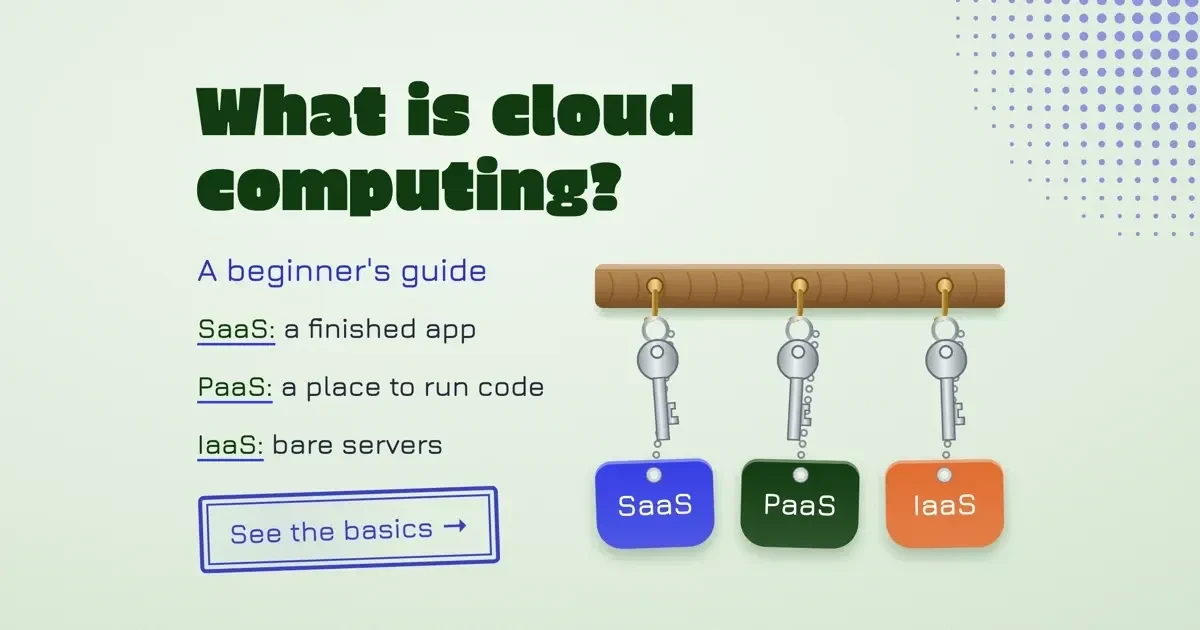
Quick answer
Cloud computing means renting servers, storage and software over the internet and paying for what you use. As of November 2026, AWS gives new accounts up to $200 in credits over 6 months, Azure $200 for 30 days and Google Cloud $300 for 90 days. Past each free allowance, data leaving the cloud costs money per gigabyte, so set a budget alert before you build.
What is cloud computing? A beginner's guide can answer in one sentence. Cloud computing is a way to rent computing power, storage and software over the internet, so you don't buy or run the machines. A provider runs the data centers and meters your use, much as a power company meters electricity. If your email lives in a browser tab or your phone backs up photos overnight, you already use it, and none of that needs a server of your own. We've aimed this at someone about to open a first cloud account, for a class, a job or a small business.
In our example sheet, a made-up small site pays $1.74 in Azure egress in a normal month. With ten times the traffic, it pays $95.70. The rate behind both, $0.087 per GB as of November 2026, isn't on Azure's free account page. It's on a separate bandwidth page. We start with definitions anyway. A cloud bill reads far more easily once you know if you're renting software, a platform or a bare server.
Key takeaways
- Azure and Google say budget alerts don't stop your services or billing.
- NIST defines cloud computing by five traits, three service models and four deployment types.
- Google's $300 credit lasts 90 days; Azure's $200 lasts 30, as of November 2026.
- Our example 400,000-view month cost $95.70 in Azure egress, 55 times a normal month.
- On any cloud, your data, accounts and sign-ins stay your security job.
What is the cloud in cloud computing?
The cloud in cloud computing is a provider's data centers, reached over the internet instead of a server closet down the hall. The rules for when renting them counts as cloud computing come from the National Institute of Standards and Technology, part of the US Commerce Department. Its definition of cloud computing, SP 800-145, written by Peter Mell and Tim Grance, came out in September 2011. It describes a model for "on-demand network access to a shared pool of configurable computing resources." The two-page definition then breaks that into five essential characteristics, three service models and four deployment models.
The middle column of this table paraphrases NIST, and the right column gives our own everyday example of each trait.
| NIST characteristic | What it means | Everyday example (ours) |
|---|---|---|
| On-demand self-service | You add server time or storage yourself, with no person at the provider involved | Adding 100 GB to a storage plan from a settings page at midnight |
| Broad network access | You reach it over the network from phones, tablets, laptops and workstations | Opening the same spreadsheet on your phone and your laptop |
| Resource pooling | Many customers share the hardware; you may pick a country, state or data center, not a machine | Choosing a US region such as Oregon or Iowa for a virtual server |
| Rapid elasticity | Capacity grows and shrinks with demand, sometimes automatically | An online store adding servers for a holiday sale and dropping them after |
| Measured service | Use is metered and reported, usually pay-per-use | A bill that lists gigabytes stored and gigabytes sent |
Two traits rule out some hosting plans. Self-service means adding capacity "without requiring human interaction with each service provider," and a footnote adds that metering is typically done "on a pay-per-use or charge-per-use basis." In our reading, a host that rents you one fixed server for a year fails two tests: adding disk takes a ticket, and the server can't grow with demand. Our reseller hosting vs VPS comparison covers that hosting side.
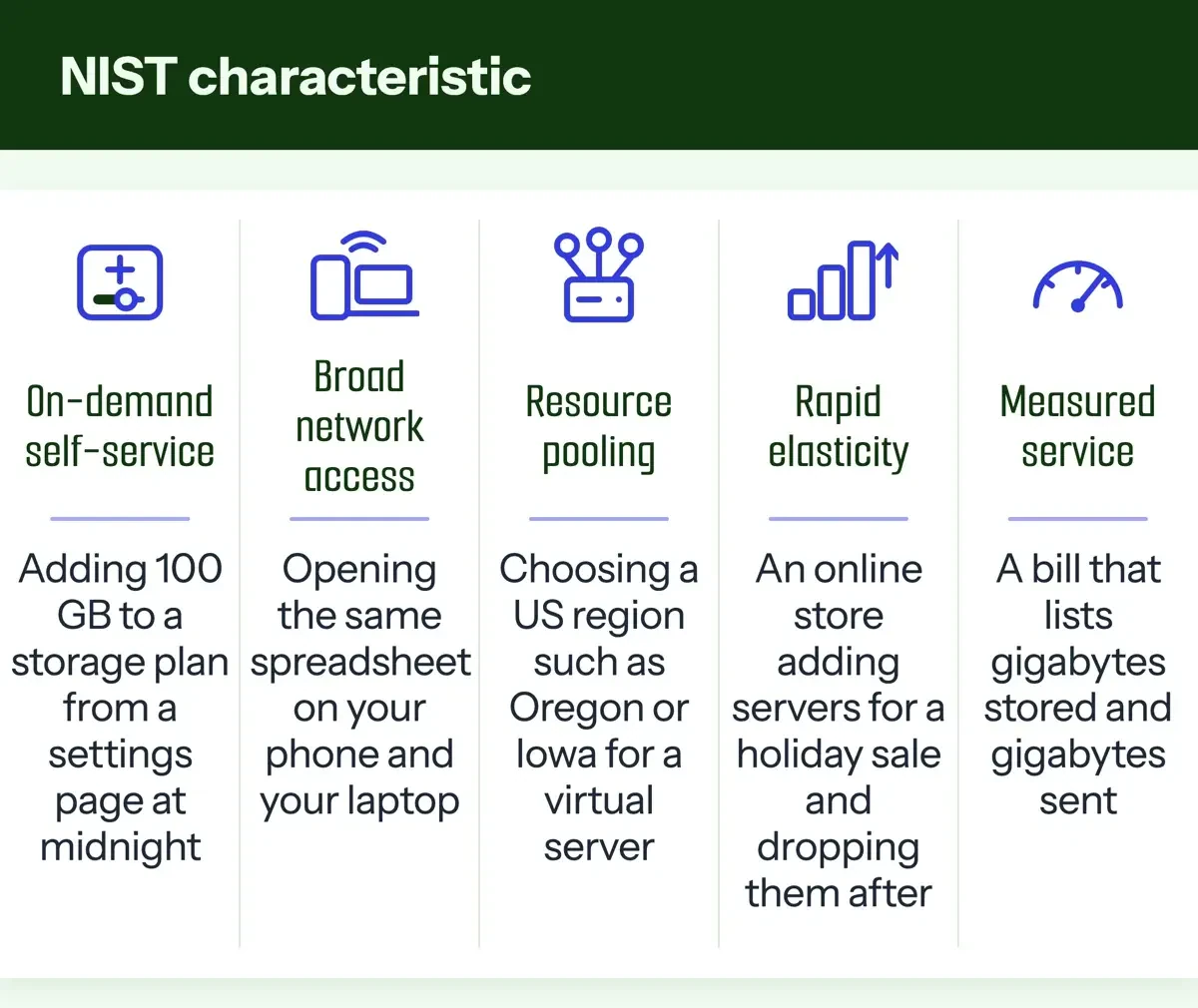 Diagram by DigitalTreed, from NIST SP 800-145 (September 2011), read November 20, 2026.
Cloud software, platforms and servers: SaaS, PaaS and IaaS
Once a service passes those tests, NIST sorts it into three models: a finished app, a place to run code, or bare servers.
Software as a service (SaaS) is the finished app. NIST's own example is "web-based email," and Microsoft's shared responsibility guide lists Microsoft 365 and Dynamics 365. That's usually what people mean by cloud software, and a small team paying per seat for email, files and chat is already a SaaS customer. You sign in through a browser and pay per user, while the vendor runs everything behind the login screen. The trade-off is control, since NIST says you manage nothing underneath except, possibly, a few user-specific settings. Accounting and ERP tools work this way too, as our cloud ERP for small business comparison shows with eight of them.
Platform as a service (PaaS) runs code you bring without making you look after the servers under it. NIST describes deploying "consumer-created or acquired applications" onto the provider's infrastructure. Microsoft's examples are Azure App Service, Azure Functions and Azure SQL Database. Pushing a small web app to a service like that is PaaS, and our beginner walk-through for deploying a web app follows one from repo to live URL.
Of those, Azure Functions is the serverless one, and our serverless architecture benefits and limits post covers where that style helps and where it doesn't.
Infrastructure as a service (IaaS) is the rawest option. You get a virtual machine, disks and a network, and you set them up yourself. Microsoft lists Azure Virtual Machines and Azure Disk Storage, and Google's free e2-micro VM, covered below, is IaaS too. It's the most control and the most chores. The operating system and its updates are yours. Our cloud computing architecture explainer for small business maps each model layer by layer, from the browser down to the data center.
Public, private, community and hybrid cloud solutions
NIST's four deployment models answer a different question: who else is on the hardware, and whose building it's in.
A public cloud is open to anyone who signs up and runs on the provider's premises, which describes what AWS, Microsoft Azure and Google Cloud sell to businesses and individuals. A private cloud serves one organization, though NIST lets a third party run it, on site or off. A community cloud is shared by organizations with "shared concerns," such as the same security or compliance rules.
A hybrid cloud joins two or more. NIST's example is "cloud bursting for load balancing between clouds," where a private system hands its overflow traffic to a public cloud during a seasonal rush. In a small office, hybrid tends to look plainer: files on a server or NAS in the back room, with a copy synced to public cloud storage. If storage is your first cloud purchase, our cloud storage for small business comparison prices four options per user and per terabyte.
Security in the cloud: the part that stays yours
Putting files in public cloud storage doesn't hand over the security work for them. AWS and Microsoft both publish where their part stops, and the line moves with the service model you choose. AWS's shared responsibility model page says AWS protects the hardware, software, networking and facilities that run its services. For managed storage such as Amazon S3, AWS runs "the infrastructure layer, the operating system, and platforms." You handle your data, its encryption options and who's allowed to reach it, so a bucket of client files left readable by anyone is your setting to fix.
Microsoft is blunter about what never moves. It lists responsibilities "you always retain" on every deployment type, including your data, the laptops and phones that sign in, user accounts, and access controls such as multifactor authentication. So a reused password that lets a stranger into your cloud console is your problem on any provider. The Federal Trade Commission agrees, and its cybersecurity basics for small business say to "Require multi-factor authentication to protect sensitive information" and to encrypt data kept in cloud storage.
The first two settings we'd change in a new account are multifactor sign-in for every user and a billing alert.
Free tiers from AWS, Microsoft Azure and Google Cloud as of November 2026
That billing alert matters most during a free offer, where credits, time limits and always-free amounts end on different dates.
The three public clouds whose free offers we read are Amazon Web Services, Microsoft Azure and Google Cloud. Smaller providers exist, and our older cloud computing companies roundup names more of them.
As of November 2026, the AWS Free Tier page gives new accounts $100 in credits at sign-up, and you can earn up to $100 more by trying key services. On the Free plan, the account "closes on its own" after 6 months or when your credits run out, whichever comes first. AWS says you won't be charged unless you move to a Paid plan, and 30+ services stay free within monthly limits on either plan.
Microsoft's Azure account page offers a $200 credit to spend within 30 days, as of November 2026, plus free monthly amounts of 20+ popular services for 12 months. Another 65+ services are always free. After 30 days, or once the credit is gone, you move to pay-as-you-go pricing to keep going. Sign-up may put a temporary $1 authorization on your card, and Microsoft says there's no upfront commitment, so you can cancel anytime. The free Azure services list shows which items are free for a year and which are free for good.
Google's Free Program documentation gives new customers a "$300 Welcome credit to spend over 90 days" as of November 2026. Trial usage isn't billed. The Google Cloud free tier is separate and covers 20+ products up to monthly limits, one of them a small e2-micro virtual machine in Oregon, Iowa or South Carolina.
| Provider (as of November 2026) | Starter credit | Time limit | Always-free part |
|---|---|---|---|
| AWS | Up to $200 ($100 at sign-up, up to $100 more) | Free plan closes after 6 months or when credits run out | 30+ services always free within monthly limits |
| Microsoft Azure | $200 | 30 days | 20+ services free for 12 months; 65+ always free |
| Google Cloud | $300 | 90 days | 20+ products with a free tier, including one e2-micro VM |
Azure's $200 has to be used within 30 days, as of November 2026, and that's the shortest clock of the three. A project you only touch on weekends could leave most of it unspent.
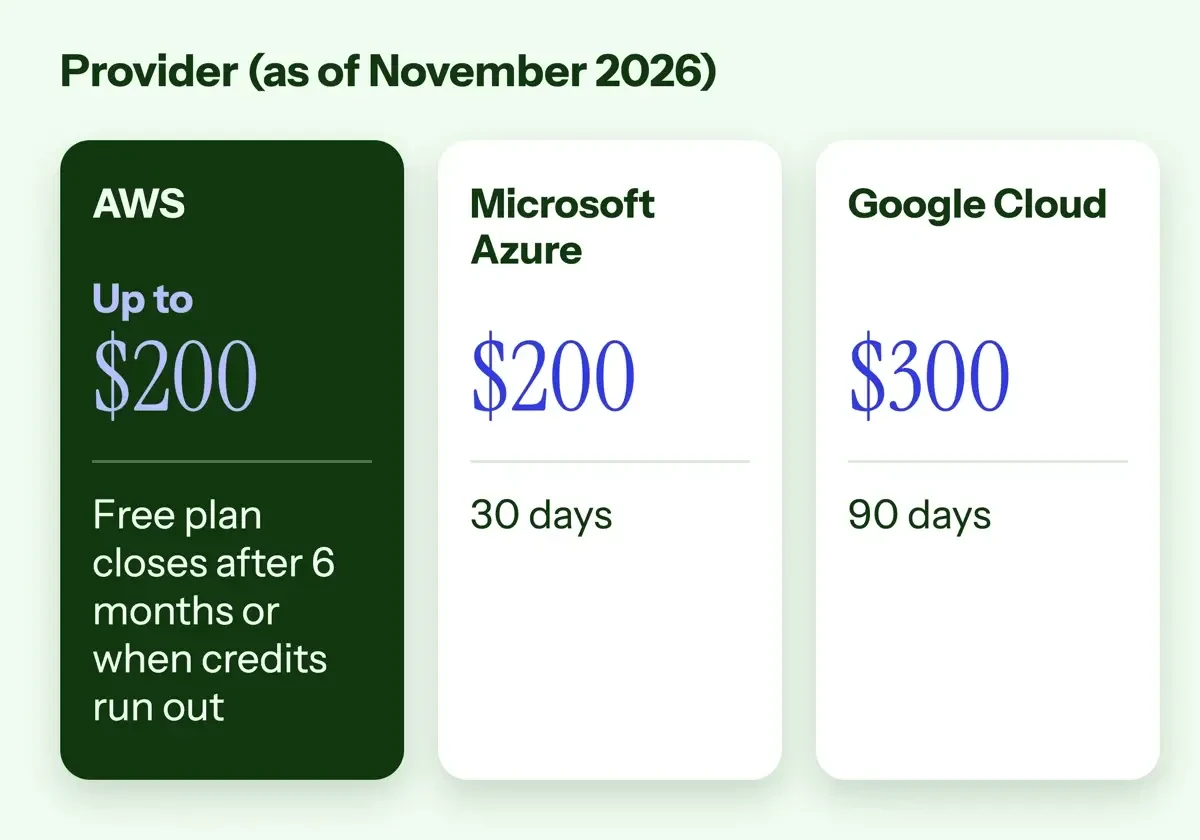 Diagram by DigitalTreed, from the AWS, Azure and Google Cloud free offer pages read November 20, 2026.
Egress fees: what data leaving the cloud costs
Egress is the data your app sends out to the internet: every page view, file download and video stream it serves.
Uploading is the cheap direction: Azure's bandwidth pricing page lists data transfer in as free. From North America or Europe to the internet, the first 100 GB a month is free and the next 10 TB costs $0.087 per GB, as of November 2026. Moving data between Azure regions inside North America costs $0.02 per GB, also as of November 2026.
AWS's Amazon S3 pricing page gives every customer 100 GB of data transfer out to the internet free each month. That allowance is "aggregated across all AWS Services and Regions," except China and GovCloud. It took effect on December 1, 2021, up from 1 GB per region, according to the AWS free tier data transfer announcement. In that same change, AWS's CloudFront content delivery network got 1 TB a month free, up from 50 GB. The per-GB price past those 100 GB didn't appear in our saved copy of the S3 page. We've left it out rather than guess. The free 100 GB is what our example sheet uses.
On Google Cloud, the free amount depends on the product. A Compute Engine VM gets 1 GB a month of outbound data from North America, while Cloud Storage gets 100 GB. Past that, Google's network pricing page lists $0.12 per GiB, as of November 2026, for 1 GiB to 1,024 GiB a month sent to users in North America. That's on the default Premium Tier. A GiB is 1,073,741,824 bytes, a little more than a gigabyte. Google prints that rate table under a region picker, and our plain copy doesn't show which region it was set to. Before you build, check the rate shown for the region you'd actually use.
Leaving a provider costs egress too. In a March 5, 2024 announcement on moving data out of AWS, AWS said eligible customers leaving with all their data can get that transfer free through AWS Support.
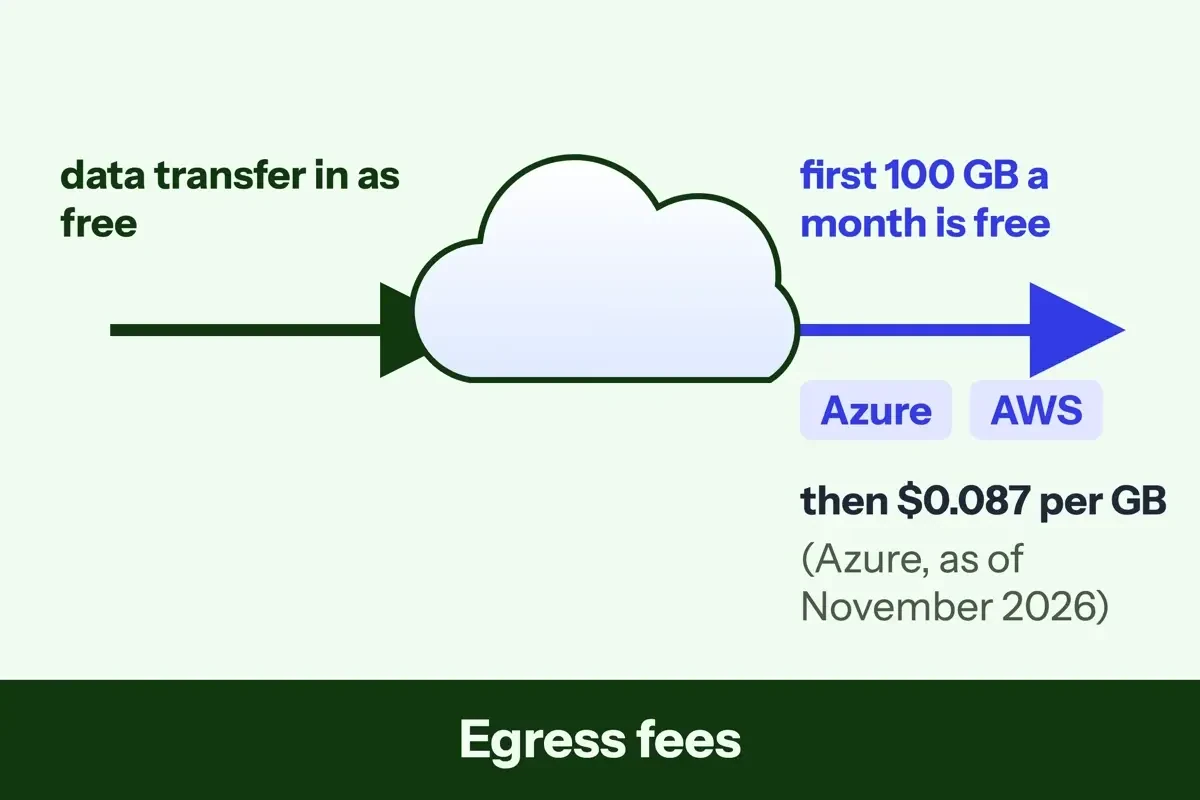 Diagram by DigitalTreed, from the Azure bandwidth and Amazon S3 pricing pages read November 20, 2026.
An example monthly cloud bill for a small website
To see what those egress charges do to a monthly bill, we built an example sheet. It's for a made-up small website serving pages and photos from one virtual machine in a US region. Every input is an example. Each page view sends 3 MB, a normal month brings 40,000 page views, and a spike month brings 400,000. That's 120 GB out in the normal month (40,000 x 3 MB) and 1,200 GB in the spike month. Google bills in GiB, so the same traffic is 111.76 GiB and 1,117.59 GiB there. The table covers egress only.
| Month (example, made-up usage) | Data out | Azure egress | Google Cloud egress | AWS |
|---|---|---|---|---|
| Normal month: 40,000 page views | 120 GB (111.76 GiB) | $1.74 | $13.29 | 20 GB over the free 100 GB |
| Spike month: 400,000 page views | 1,200 GB (1,117.59 GiB) | $95.70 | $133.05 | 1,100 GB over the free 100 GB |
Azure's example normal month is (120 - 100) x $0.087 = $1.74. Its spike month is (1,200 - 100) x $0.087 = $95.70, 55 times as much. Google's example spike month is 1,023 GiB x $0.12 plus 93.59 GiB x $0.11, its next-tier rate as of November 2026, or $133.05. In the normal month, the gap comes almost all from the free allowance: 100 GB on Azure against 1 GiB on a Google VM. Serve the same photos from Google Cloud Storage, with its 100 GB free, and that line shrinks. The AWS column can't show dollars for the reason above, though 1,100 GB would be billable in its spike month.
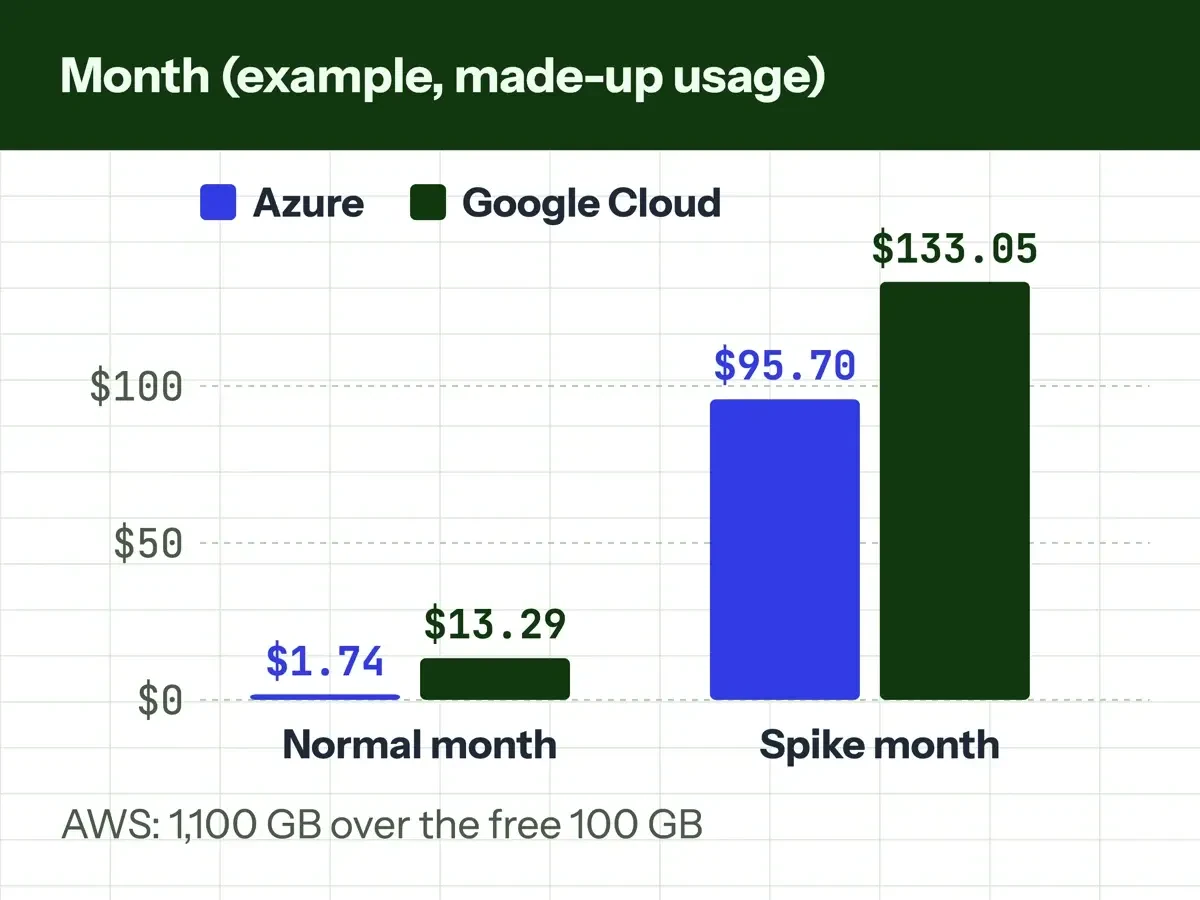 Chart by DigitalTreed of the example egress sheet (made-up usage), with rates read November 20, 2026.
What we tested
Our Python script first looked for 27 price and rule lines on the vendor and government pages we saved on November 20, 2026. It found all 27. The same script wrote the example sheet out three ways, as CSV, JSON and an HTML page we viewed on 127.0.0.1. Compute, storage and tax aren't included, and the AWS column shows gigabytes because its rate wasn't readable.
Do budget alerts stop cloud charges?
Not by default. Microsoft's Azure budgets tutorial says that when a threshold is crossed, "Resources aren't affected, and your consumption isn't stopped." Google's budget alerts documentation says alert emails "don't automatically prevent the use or billing of your services," and points to a separate spend cap budget where a service supports one. AWS Budgets can alert you on actual spending and on forecasted spending before it accrues. On a learning account, we'd set an example budget of $10 with alerts at $5 and $10, and delete test resources the same day. Azure notes that cost and usage data typically arrives within 8 to 24 hours, so an alert can trail a traffic spike by most of a day.
Which cloud facts we could check on November 20, 2026
Every page here was fetched as a plain copy on November 20, 2026, with no sign-in.
- Confirmed: NIST's definition and its five-three-four structure, on the CSRC page and the SP 800-145 PDF.
- Confirmed: the AWS, Azure and Google free offers above, each on the vendor's US page.
- Confirmed: Azure's free 100 GB and $0.087 per GB egress, on its bandwidth page.
- Confirmed on two pages: AWS's free 100 GB of data out, on S3 pricing and the 2021 announcement.
- Not confirmed: AWS's per-GB egress rate, which loads by script our plain copy didn't run.
- Partly confirmed: Google's $0.12 per GiB rate, printed under a region picker our copy can't tie to one region.
- Not checked: your own free-tier usage, which each provider shows only after you sign in.
These pages get edited: AWS's move-out post alone carries edit notes dated 9/30/25 and 10/8/26. Read the free offer page the day you sign up. Then check the egress rate for your exact service and region in that provider's pricing calculator.
Frequently asked
What are cloud solutions, in plain words?
A cloud solution is a product or setup built from rented cloud services, often mixing models. Microsoft's guide says "Many Azure solutions use a combination of service models," such as an app on App Service with its data in Azure SQL Database.
Is cloud technology the same as the internet?
No. The internet is the network, and cloud technology is the rented computing you reach across it. NIST's broad network access trait says cloud capabilities are "accessed through standard mechanisms" from phones, tablets, laptops and workstations.
Will AWS charge me when my free credits run out?
Not on the Free plan. As of November 2026, AWS says the Free plan covers over 90 services for up to 6 months and closes instead of billing you. On the Paid plan, usage past your credits is billed pay-as-you-go.
Can I choose which state my data is stored in?
Often, yes, at the region level. NIST says you may be able to pick a location "(e.g., country, state, or datacenter)" but not the exact machine, and Google's free VM must run in Oregon, Iowa or South Carolina.
How we made this guide: We kept a text copy of each vendor and government page. A script checked the example sheet's 27 price and rule lines against those copies, and every made-up input is labeled. Facts checked by the DigitalTreed team on November 20, 2026.
First published July 3, 2020. Rewritten for US readers on November 20, 2026, with the NIST definition, free offers and egress prices taken from the agency and vendor pages.
Sources
- NIST CSRC: SP 800-145, The NIST Definition of Cloud Computing
- NIST: SP 800-145 full text (PDF)
- Microsoft Learn: Shared responsibility in the cloud
- AWS: Shared Responsibility Model
- FTC: Cybersecurity for small business
- AWS Free Tier
- Microsoft Azure: Azure account options
- Microsoft Azure: Free Azure services
- Google Cloud: Free Program features and trial offer
- Google Cloud: Free trial and free tier
- Microsoft Azure: Bandwidth pricing
- AWS: Amazon S3 pricing
- AWS News Blog: Free Tier data transfer expansion
- Google Cloud: Network pricing
- AWS News Blog: Free data transfer out when moving out of AWS
- Microsoft Learn: Create and manage budgets
- Google Cloud: Create, edit, or delete budgets and budget alerts
- AWS: Managing your costs with AWS Budgets


Comments
No comments yet. Start the conversation below.