
Quick answer
The best video call apps for small business in 2026 are Google Meet if you already use Gmail, Microsoft Teams Essentials at $4 a user a month for the cheapest seat that records, and Zoom for client calls. Every free plan cuts group calls off at 40 to 95 minutes. Buy seats only for the people who host.
Skype was the old default, and it’s gone. Microsoft says that as of May 5, 2025, Skype is retired.
The usual free fallback changed this month too, so we rebuilt this list from the vendors’ own pricing pages, dated October 25, 2026, for a US business with 2 to 20 people. We also tried the one app that lets you open a meeting without an account.
It didn’t go the way the old advice says.
How we tested: one app without an account, five pricing pages
On October 25, 2026, we opened Jitsi Meet’s public web app in Google Chrome 155 on a Mac, run by script with a fresh, empty profile and the camera and microphone left off.
We didn’t sign in anywhere, and we didn’t install anything.
Then we read the free and paid plans on the pricing pages of Zoom, Google Workspace, Microsoft Teams and Webex, plus Jitsi’s terms and its latest blog post. Our office is in India, and two of those sites show local prices by default. We switched Zoom’s own currency menu to US dollars and opened Google’s page in its US region view, while Microsoft and Webex showed dollars already.
What we couldn’t test: hosting a meeting on Zoom, Google Meet, Teams or Webex, because each one needs an account to start a call. For those four, every limit below is the vendor’s published number, linked where we quote it.
Free time limits and seat prices, checked October 25, 2026
That’s five apps worth a small business’s time. Prices are per user a month on annual billing, before any sales tax, from Zoom, Google Workspace, Microsoft, Webex and Jitsi.
| App | Best for | Free group meeting cap | Free meeting size | Records on the free plan | Cheapest paid seat |
|---|---|---|---|---|---|
| Google Meet | Teams already on Gmail | 60 minutes (no limit on 1:1 and mobile calls) | 100 | No | $7 (Business Starter, no recording); $14 to record |
| Microsoft Teams | The lowest price for a seat that records | 60 minutes (1:1 calls up to 30 hours) | 100 | Not listed on the free page | $4 (Teams Essentials) |
| Zoom | Client calls and outside guests | 40 minutes | 100 | Yes, to your computer | $14.16 (Workplace Pro), $16.99 billed monthly |
| Webex | Bigger paid meetings for less | 40 minutes | 100 | Yes, to your computer | $12 ($144 a year, Webex Meet) |
| Jitsi Meet (meet.jit.si) | An occasional free call | 95 minutes, and someone must log in to start | Not stated; free use is capped at 25 active end points (tabs or devices) a month across all meetings | Not checked | No paid plan on meet.jit.si |
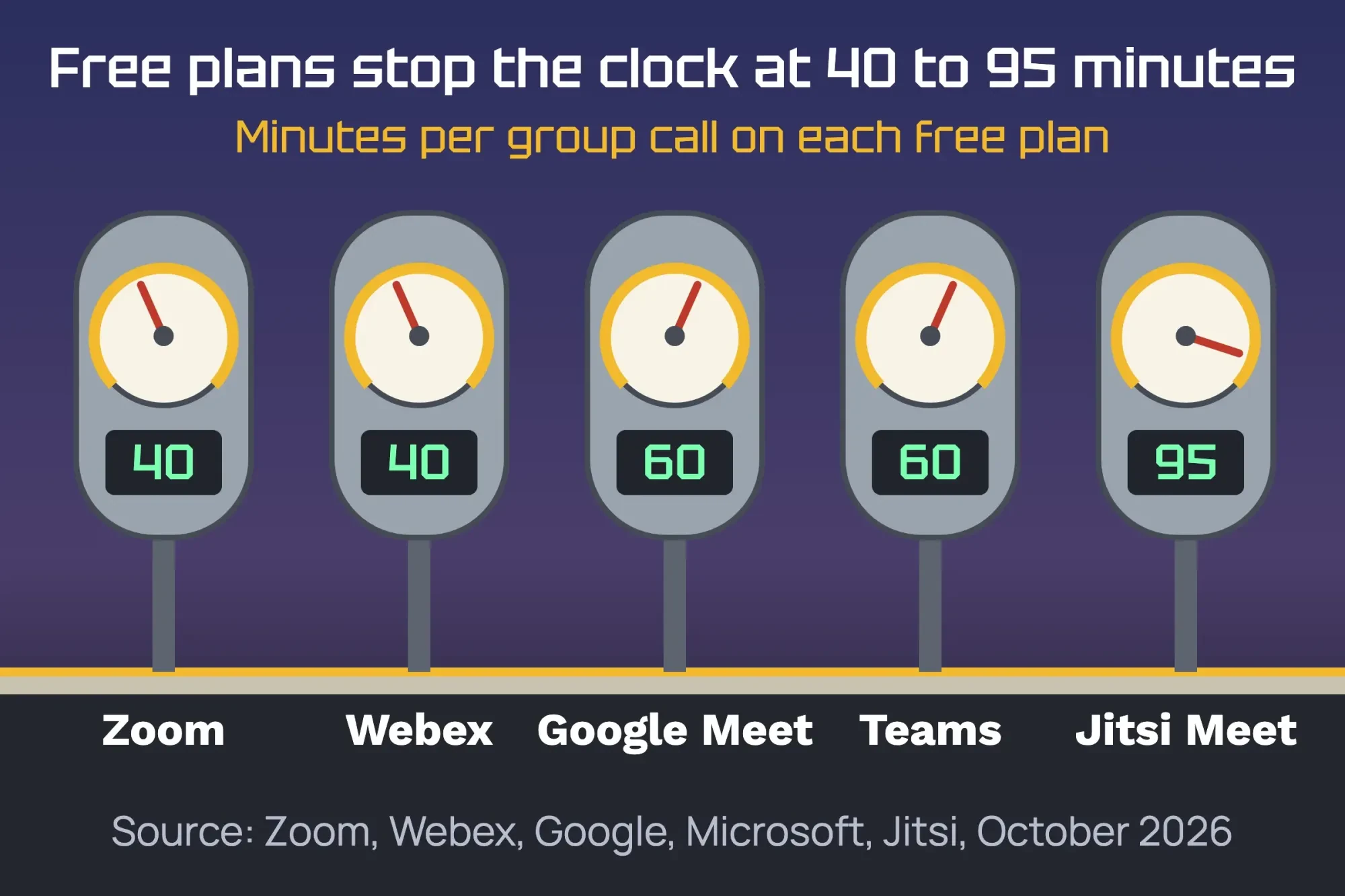 Diagram by DigitalTreed, from each vendor’s pricing, product or blog page, read October 25, 2026.
The clock is the real difference between free plans.
A 45-minute client review won’t fit on either 40-minute plan, and you’ll find out when the call drops in the middle of your best point.
Google Meet is the easy pick if your business runs on Gmail
Google Meet is best for a business that already lives in Gmail and Google Calendar. On the free plan, Google says anyone with a Google Account can invite up to 100 participants and meet for up to 60 minutes, and one-on-one calls and mobile calls have no time limit.
The paid step comes bundled with business email. As of October 2026, Google Workspace Business Starter is $7 a user a month on the annual plan, with 100-person meetings up to 24 hours. Business Standard is $14 and raises that to 150 people.
Here’s the catch: Starter can’t record.
Google’s help page lists the editions that can record a meeting. Business Starter isn’t on it. Business Standard is, and so is a Google One plan with 2 TB or more of storage. If you’re still choosing an email host, our guide to setting up a business email address walks through both big bundles.
Microsoft Teams Essentials is the cheapest seat that records
Microsoft Teams is best for a team that wants recording at the lowest seat price. As of October 2026, Teams Essentials costs $4.00 a user a month, paid yearly, with meetings up to 30 hours and up to 300 people.
Microsoft’s plan comparison adds meeting recordings with transcripts and 10 GB of cloud storage per user.
The free version stops group meetings at 60 minutes and 100 people, though one-on-one calls between Teams users can run 30 hours. Guests can join from a meeting link without a Teams account.
Watch one rule before you upgrade. Microsoft’s FAQ says that once you convert a free account to paid, you can’t go back to free with the same email address.
Teams fits best if your invites already land in Outlook, and our walkthrough on connecting webmail to Outlook covers that side.
Zoom is the one your clients already know
Zoom is best for meetings with people outside your company, because almost everyone has joined one. Zoom’s pricing page says a participant doesn’t need a Zoom account to join.
That helps on the first call with a new client.
Its free plan, Workplace Basic, is the tightest one here: 40 minutes per meeting and 100 participants, with recording to your own computer only.
As of October 25, 2026, Workplace Pro is $14.16 a user a month billed annually, or $16.99 billed monthly. It lifts the limit to 30 hours, keeps 100 people and adds 10 GB of cloud recording. Workplace Business is $18.33 a month on annual billing and seats 300.
So Zoom is the priciest seat in our table.
You’re paying for familiarity, and for client calls that’s often worth it. Our older post on becoming a Zoom power user has the settings tips.
Webex Meet doubles the meeting size for $12 a month
Webex is best for a team that needs bigger paid meetings without paying Zoom prices. As of October 2026, Webex Meet costs $144 a user a year, which works out to $12 a month for 24-hour meetings, up to 200 attendees and 10 GB of cloud recording.
Webex Free matches Zoom’s limits: 40 minutes and 100 attendees, with local recording, and it doesn’t ask for a card. When we checked, the page also ran an offer of 6 months free for 5 or more licenses.
The catch is that fewer clients will have used it.
Send a one-line “how to join” note with your first invite.
Jitsi Meet is still free, but someone has to log in now
Jitsi Meet used to be the standard answer for “free, no account”, so that’s exactly what we tested. We loaded a new room address, meet.jit.si/DigitalTreedVideoTest2510, and the join screen appeared without asking for a name or an email. It only warned that the microphone and camera were off. Then we clicked Join meeting. The page said the conference “has not yet started because no moderators have yet arrived” and offered a Log-in button.
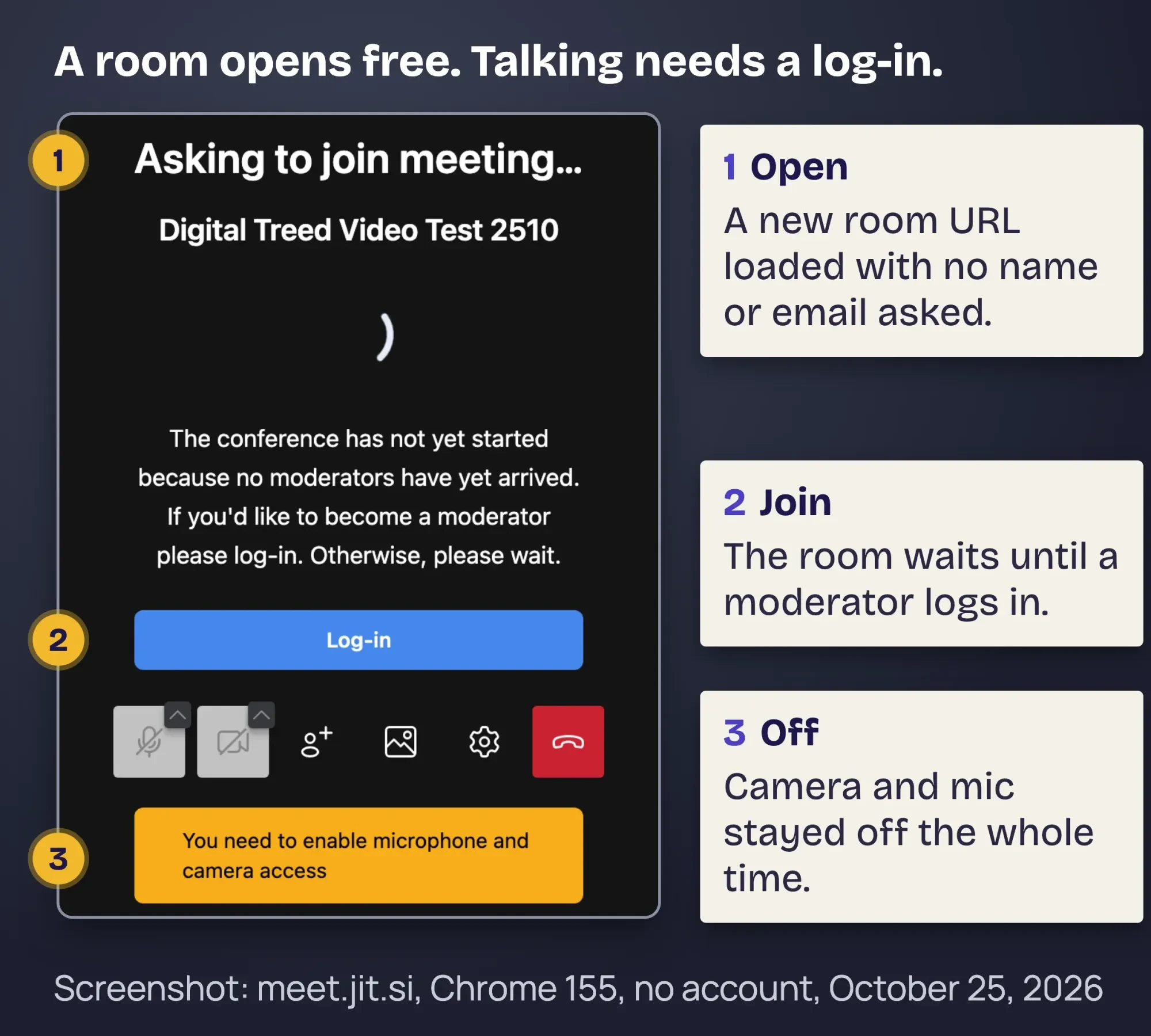 Screenshot: meet.jit.si in Chrome 155 with no account, camera and microphone off, October 25, 2026. Logo area cropped out.
We stopped there.
Nobody in that room could talk until someone signed in.
Two more limits are new or easy to miss. Jitsi’s blog post of October 9, 2026 says meetings on meet.jit.si are limited to 95 minutes.
And its terms of service cap free use at 25 “Active End Points” a month across all your meetings. Each browser tab, laptop or phone counts once a month, however often it joins.
So four staff laptops plus 21 different guests use up the month.
That’s fine for a tutor or a one-person shop. It’s too tight for a sales team meeting new prospects every week.
Room names are public, too, so pick a long, odd name for every meeting.
Skype is gone, and Linkello is a French service
This post used to list Skype and “apps like Linkello”, and both answers need an update. Microsoft’s retirement page moved Skype users to Teams Free and says inactive users’ Skype data will be completely deleted after June 15, 2026.
Linkello is a French browser-call service. Its home page is in French, says your data stays in Europe and asks for your email to create a call link, so we didn’t test it. For a US team, any app above does the same job.
We also left out WhatsApp, FaceTime, Signal and Discord, which are fine for a quick chat but have no business plans to compare.
What five seats cost in a year
Prices don’t mean much until you multiply them by your team. Example: Prairie Lantern Bookkeeping (fictional) has 5 people in Des Moines, Iowa, and holds client reviews that run about 50 minutes. Here’s a year of seats for everyone on annual billing, as of October 25, 2026, from Microsoft, Google, Webex and Zoom.
| Plan | Price per seat | 5 seats for a year | Records meetings |
|---|---|---|---|
| Microsoft Teams Essentials | $4 a month | $240 | Yes |
| Google Workspace Business Starter | $7 a month | $420 | No |
| Webex Meet | $144 a year | $720 | Yes, 10 GB in the cloud |
| Google Workspace Business Standard | $14 a month | $840 | Yes |
| Zoom Workplace Pro | $14.16 a month | $849.60 | Yes, local and 10 GB cloud |
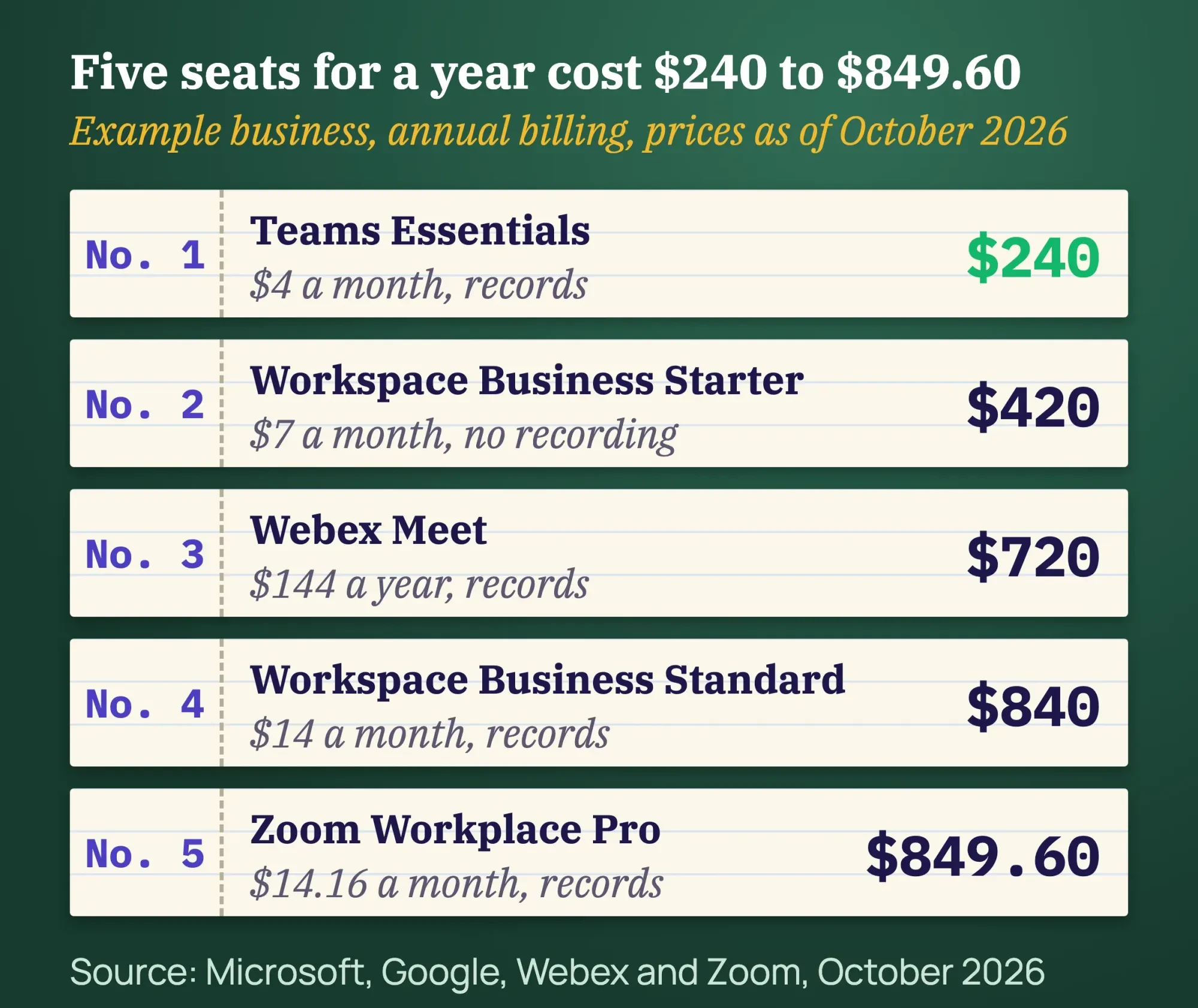 Diagram by DigitalTreed: the fictional Prairie Lantern Bookkeeping example, vendor prices as of October 25, 2026.
But not everyone needs a seat.
Zoom, Webex and Teams all let guests join free, so only the people who start meetings have to pay. If 2 of the 5 host, Zoom Pro drops from $849.60 to $339.84 a year, as of October 2026.
Monthly billing costs more: five Zoom Pro seats at $16.99 come to $1,019.40 a year, at Zoom’s monthly price in October 2026.
Google and Microsoft also bundle email, storage and office apps, so check what you’re already paying for before you add a separate meeting app. Read the cancellation terms, too, the way we suggest in our cloud ERP buying guide.
Recording a client call: get everyone’s yes first
Recording is where a cheap plan can turn into a legal problem. Federal law lets you record a call when one of the parties has given prior consent, under 18 U.S.C. 2511.
Some states don’t stop there.
California makes it a crime to record a confidential call “without the consent of all parties”, with a fine of up to $2,500 per violation under Penal Code 632. Florida allows a recording when all of the parties have given prior consent.
Washington is the useful one for habits. Its law, RCW 9.73.030, counts consent as given when you announce the recording to everyone, as long as the announcement is recorded too.
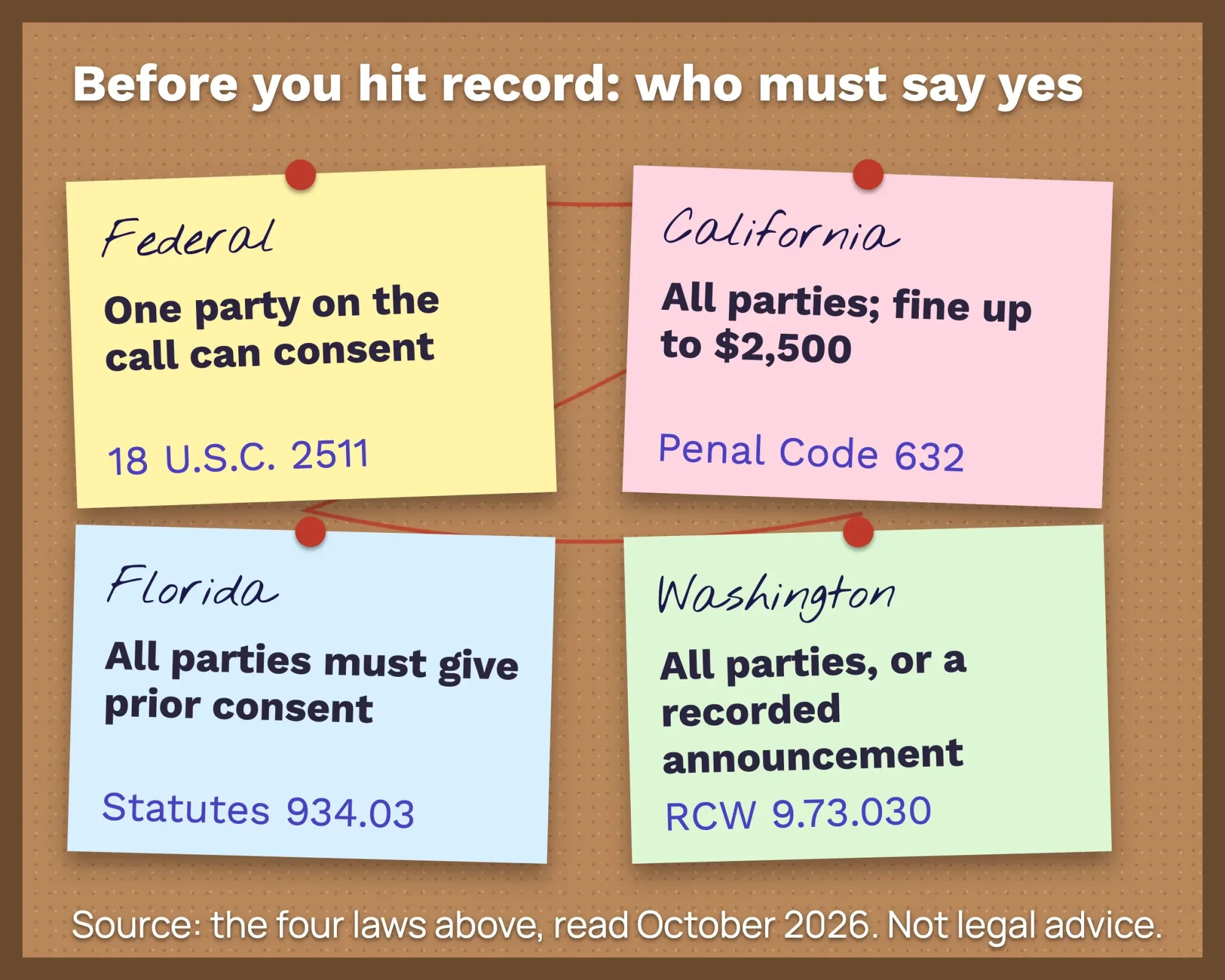 Source: 18 U.S.C. 2511, California Penal Code 632, Florida Statutes 934.03 and RCW 9.73.030, read October 2026. Drawn by us.
So say it out loud right after you press record: “We’re recording this call for our notes. Is that OK with everyone?”
The apps help, but they don’t replace that line. Microsoft says every Teams participant gets a notification when recording starts, and Google’s help page says people outside your organization get notified when a recording starts or stops.
This is a general overview, not legal advice; if you record callers in several states, ask an attorney which rule to follow.
One more thing about AI meeting notes: they’re recordings too, just turned into text. Our guide to AI tools and their privacy settings lists what to switch off.
A checklist before you pick one
Now match the apps to your week. Answer these seven questions, and one or two apps will fall out:
- Who hosts? Count only the people who start meetings.
- How long is your normal call? Anything past 40 minutes rules out free Zoom and Webex.
- How big is your biggest meeting? Free plans stop at 100 people.
- Do you record? Then skip Google Workspace Business Starter and the free plans with no recording.
- What do you already pay for? Gmail points to Meet, Outlook points to Teams.
- Do clients join from a browser without an account? Zoom, Webex and Teams all allow it.
- Which states are your callers in? All-party states mean announcing every recording.
Running a free webinar to find clients? Tag the sign-up link with our UTM builder, and you’ll see which post or email filled the seats.
The meeting app’s only half of the setup, though. The other half is how clients book the call. A booking page on your site, tied to your calendar, saves the back-and-forth emails, and our WordPress website guide and our post on third-party integrations show how those pieces connect.
We also build booking buttons and calendar connections into small-business sites. That’s a paid DigitalTreed service, so weigh it against doing it yourself; for a price, use our quote form.
Our take: most US teams of under 10 should start with the meeting app inside the email suite they already pay for, then add Zoom seats only for the people who run client calls.
If your website is still on the to-do list, our answer to whether your business needs a website is a good next read. For support calls, see how video calls help online stores.
Frequently asked
Which free video call app has no time limit for one-on-one calls?
Google Meet. Google says 1:1 calls and calls from the mobile app have no time limit on the free plan. Teams Free allows 1:1 calls up to 30 hours, per Microsoft.
Do my clients need an account to join a video call?
Not on Zoom, Webex or Teams. Each says guests can join from a link without an account, and Webex adds that guests don’t need a host license. On meet.jit.si, guests can wait without an account, but a moderator has to log in first.
Can I record on Google Meet's free plan?
No. Google's recording help page lists Business Standard and higher, plus Google One plans with 2 TB or more. A free Google Account and Business Starter aren’t on the list.
How we made this guide: the DigitalTreed team spent October 25, 2026 with each vendor’s own pricing and help pages open in US dollars. We read the four recording laws at their official sources, the federal one through Cornell’s Legal Information Institute. We tested Jitsi Meet ourselves with no account; we couldn’t host on the other four without signing up, so their numbers are published figures. You’ll find each source linked in the sentence that uses it.
First published December 2023. Rewritten October 25, 2026: now a roundup for US small businesses with dated free limits and prices for five apps, our Jitsi Meet test, a five-seat cost example, recording consent rules and a buying checklist. Skype and the consumer chat apps were removed.
Sources
- Zoom: Plans and pricing (vendor)
- Google Workspace: Google Meet (vendor)
- Google Workspace: Pricing, US region (vendor)
- Google Meet Help: Record a video meeting
- Microsoft: Microsoft Teams free (vendor)
- Microsoft: Compare Microsoft Teams business options (vendor)
- Microsoft Support: Record a meeting in Microsoft Teams
- Microsoft Support: Skype is retiring in May 2025
- Webex: Pricing (vendor)
- Jitsi blog: Changes coming to meet.jit.si, October 9, 2026
- Jitsi: meet.jit.si Terms of Service
- Jitsi Meet public web app
- Linkello (vendor, French)
- 18 U.S.C. 2511, Legal Information Institute
- California Penal Code 632, California Legislative Information
- Florida Statutes 934.03, Florida Legislature
- RCW 9.73.030, Washington State Legislature


Comments
No comments yet. Start the conversation below.