

ChatGPT, Perplexity and Gemini: what each is good and bad at for SEO
This guide is part of our "SEO tools explained" path. It's for site owners, freelancers and small agency teams who already use an AI assistant now and then and want to use it properly for SEO work, without publishing mistakes or leaking client data.
It's about using AI assistants as tools. Getting your own pages cited inside AI answers is a different job, and our GEO guide covers it.
By the end you'll know which assistant to open for which job and which privacy settings to change on day one. You'll also be able to run about ten real SEO tasks, each with a prompt you can copy and a check to run afterwards. The tasks run from keyword brainstorming and clustering to briefs, titles, schema, regex, spreadsheet formulas, crawl and log data, translation and cited research. Our examples are made up: a sweet shop in Kanpur, a dentist in Delhi, a coaching centre in Pune and a D2C skincare brand.
There are seven chapters, about 40 minutes in all. Chapter 1 compares the three assistants and says when you don't need one. Chapter 2 is set-up and privacy. Chapters 3 to 6 are the tasks, with the hallucination risks and what not to do in chapter 6. Chapter 7 has the plans and prices, read on each vendor's own page on 18 October 2026, in rupees where the page showed them. It ends with pros and cons and the alternatives, our free tools first.
Quick answer
ChatGPT is the best all-rounder for drafting and for working through files. Perplexity answers with numbered sources, so it suits research you need to check. Gemini sits inside your Google account and, on a paid plan, inside Docs and Sheets. None of them knows real search volumes, and all three can state wrong facts confidently.
Most people who do SEO already have one of these open in a tab. The question isn't whether to use them. It's which one to open for which job, and what to check before anything they wrote reaches a live page.
One line on scope first. This guide is about AI assistants as tools for your own SEO work. If you want your pages to be cited inside ChatGPT, Perplexity or Google's AI answers, that's our GEO guide, and we don't repeat it here.
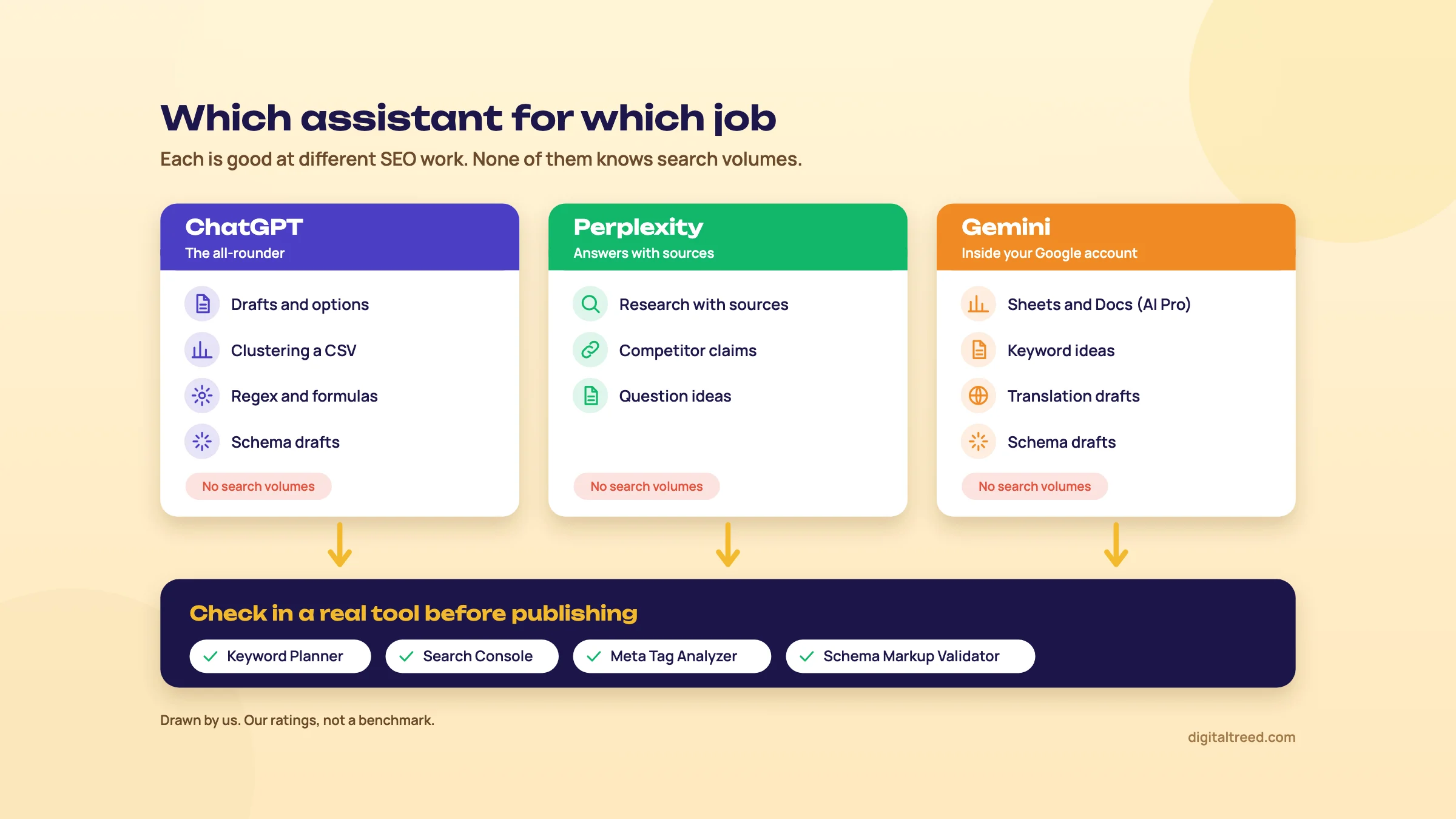 Which assistant to open for which SEO job, and where every output gets checked. Drawn by us; our ratings, not a benchmark.
The three assistants in one paragraph each
ChatGPT (OpenAI) is a general assistant. Its free plan gives unlimited text chats, subject to abuse guardrails, with limited file uploads, data analysis, deep research and memory.[1] For SEO the useful parts are the chat itself and the ability to read a CSV you upload and work on it. OpenAI said in February 2026 that ChatGPT had 900 million weekly users.[2]
Perplexity is built as an answer engine. Its pricing page says: "Every answer includes inline citations from trusted sources, so you can verify claims".[3] That claim is the vendor's. The sources are there to open, but they aren't always right, as chapter 6 shows. The free plan gives "practically unlimited basic searches" and three Pro Searches a day.[4]
Gemini (Google) runs on your Google account. The free plan includes Deep Research, Canvas and Gems, and 15 GB of storage.[5] The paid Google AI Pro plan adds Gemini in Gmail, Docs and Sheets, which matters if your keyword lists and reports already live in Sheets.[6] Sundar Pichai said in July 2026 that the Gemini app had 950 million monthly users.[7]
Good at, bad at
| SEO job | ChatGPT | Perplexity | Gemini |
|---|---|---|---|
| Brainstorming keywords and questions | Good | Good, with sources | Good |
| Search volumes, difficulty, CPC | Don't use | Don't use | Don't use |
| Clustering a keyword list | Good, upload the CSV | Weaker for long lists | Good, in Sheets on AI Pro |
| Briefs, outlines, title and meta drafts | Good | Fine | Good |
| Schema (JSON-LD) drafts | Good, then validate | Fine, then validate | Good, then validate |
| Regex and spreadsheet formulas | Good, then test | Fine, then test | Good, then test |
| Crawl and log exports | Good for files you can share | Not its strength | Good with Sheets and Drive files |
| Competitor and fact research | Possible with search on; check sources | Its main strength; open every source | Possible; check sources |
| Translation drafts | Good first draft | Fine | Good first draft |
That table is our opinion from how each product is built and what its pages say, not a benchmark. Answers also change with the model, the plan and the day, so treat the ratings as a starting point.
What every one of them gets wrong
Generative models write the most likely next words. Google's own guidance puts it plainly: they "don't retrieve facts, but predict a likely sequence of words based on their training data", and their output "may contain inaccuracies (also known as hallucinations)".[8] OpenAI says the same about its own product: "ChatGPT also hallucinates."[9]
For SEO that means three things you can't take from a chat window. Search volumes and difficulty scores, which assistants make up. Facts, prices, laws and statistics, which need a source you've opened. And quotes, which are often invented. Chapter 6 has the study numbers.
What Google says about AI-assisted content
Google doesn't ban AI help. In February 2023 it wrote: "Appropriate use of AI or automation is not against our guidelines."[10] What it asks for is people-first content: made to help a reader, with real experience behind it, and clear about who made it and how.[11]
Warning
Google's generative AI guide, updated 1 October 2026, says: "It is critical to manually factcheck and review all AI-generated content for accuracy and trustworthiness before publishing." The review covers title elements, meta descriptions, structured data and image alt text too.[8]
Guide 2 explains the rest of Google's position, including scaled content abuse and what happened to sites that mass-produced AI pages, in its chapter on E-E-A-T, helpful content and AI-assisted writing. Read it before you publish anything an assistant drafted.
When you don't need one
You don't need an AI assistant to do good SEO. For a 15-page site for a Delhi dental clinic, the jobs that move rankings are the ones only the clinic can do: real fees, real photos, the dentist's name and qualifications, reviews from real patients. An assistant can't supply any of that.
Where it saves real time is the glue work: turning 400 Search Console queries into groups, writing a regex you'd otherwise look up, drafting ten title options, fixing a broken JSON-LD bracket. If you never do that kind of work, the free plan of whichever assistant you already use is plenty.
Next, chapter 2: the settings to change before you paste anything into one of them.
Set-up: accounts, training opt-outs, temporary chats and what never to paste
Quick answer
On personal plans, all three assistants can use your chats to improve their models unless you switch it off. In ChatGPT turn off "Improve the model for everyone", in Gemini turn off Keep Activity, and in Perplexity turn off AI data retention. Use temporary or incognito chats for client work, and never paste personal data or passwords.
Set-up takes ten minutes. Sign in with the account you'll use for work, change one privacy setting in each assistant, and decide what client data is allowed in a chat at all. Do it before the first client file goes in, not after.
Training and history settings, side by side
| Checked 18 October 2026 | ChatGPT | Gemini | Perplexity |
|---|---|---|---|
| Setting that stops model training | Settings, Data controls, "Improve the model for everyone" off | Keep Activity off, in Gemini Apps Activity | Account settings, Preferences, "AI data retention" off (free accounts too) |
| Private chat mode | Temporary chat | Temporary chat | Incognito |
| How long the private chat is kept | Up to 30 days, for safety | 72 hours | Sessions expire within 24 hours |
| Thumbs up or down after opting out | The whole conversation may be used for training | Feedback and the last 24 hours of chats go to reviewers and are kept up to 3 years | Not stated |
| Business plans | Business, Enterprise and Edu not used for training by default | Workspace has its own Gemini add-on | Enterprise plans have their own retention terms |
The rows come from each vendor's help pages: OpenAI's data controls and temporary chat pages,[12] Google's Gemini Apps Privacy Hub (updated 13 October 2026),[13] and Perplexity's privacy and incognito help pages.[14] Google's plans page says Workspace customers get Gemini through an add-on, not a personal Google AI plan.[6] The detail for each assistant follows.
ChatGPT
Open Settings, then Data controls, and turn off "Improve the model for everyone". OpenAI says that when it's off, "your new conversations won't be used to train OpenAI models", and they still appear in your history. Signed in, the choice follows your account across devices.[12] The opt-out only covers new chats, so do it on day one.
Two catches. First, if you rate an answer with thumbs up or down, "the entire conversation associated with that feedback may be used to train our models", even after you've opted out.[15] Second, turning training off doesn't delete anything. Delete chats separately.
A temporary chat stays out of your history, doesn't create memories and isn't used to improve the models while it stays temporary. OpenAI "may keep a copy of a temporary chat for up to 30 days for safety purposes".[16] Choose Unpersonalized before your first message if you don't want your memories or custom instructions mixed into a client job.
On ChatGPT Business, Enterprise and Edu, OpenAI says it doesn't use your inputs or outputs to improve its models by default.[15] An agency with several people on client data should look at those plans rather than personal accounts.
Gemini
Gemini's control is called Keep Activity, managed in Gemini Apps Activity. With it on, Google uses your activity to improve its services, "including training generative AI models", and some chats are read by human reviewers. Activity auto-deletes after 18 months by default; you can choose 3 or 36 months, or no auto-delete.[13]
With Keep Activity off, future chats aren't used to train Google's models unless you send feedback, but they're still kept for 72 hours. Temporary chats get the same 72 hours and aren't used for training.[13] Two details matter for SEO work. Chats already seen by reviewers are kept for up to three years, even if you delete your activity. And with Keep Activity off, Connected Apps such as Google Workspace aren't available, so Gemini can't reach your Drive files.[13]
Google's own advice on the same page: "Please don't enter confidential information that you wouldn't want a reviewer to see".[13]
Perplexity
Perplexity says it uses search queries and feedback "to improve the search experience". To opt out, go to Account settings, Preferences and turn off AI data retention; Perplexity says it's on by default for Free, Pro and Max users.[42][14] Perplexity's own pages don't agree on who gets that switch. The privacy help page gives it with no plan limit, while the plan comparison page lists Data Privacy as "Standard" for Free and "Opt-out AI training available" for Pro, Education Pro and Max.[4] If you don't see the toggle on a free account, assume your searches can be used. It also says its agreements with model providers such as OpenAI and Anthropic stop them training on Perplexity data.[17]
Incognito mode is Perplexity's private chat; its help page says "All incognito sessions expire within 24 hours and are not recoverable."[18] Account data is kept while the account is active and removed within 30 days of deleting it.[19]
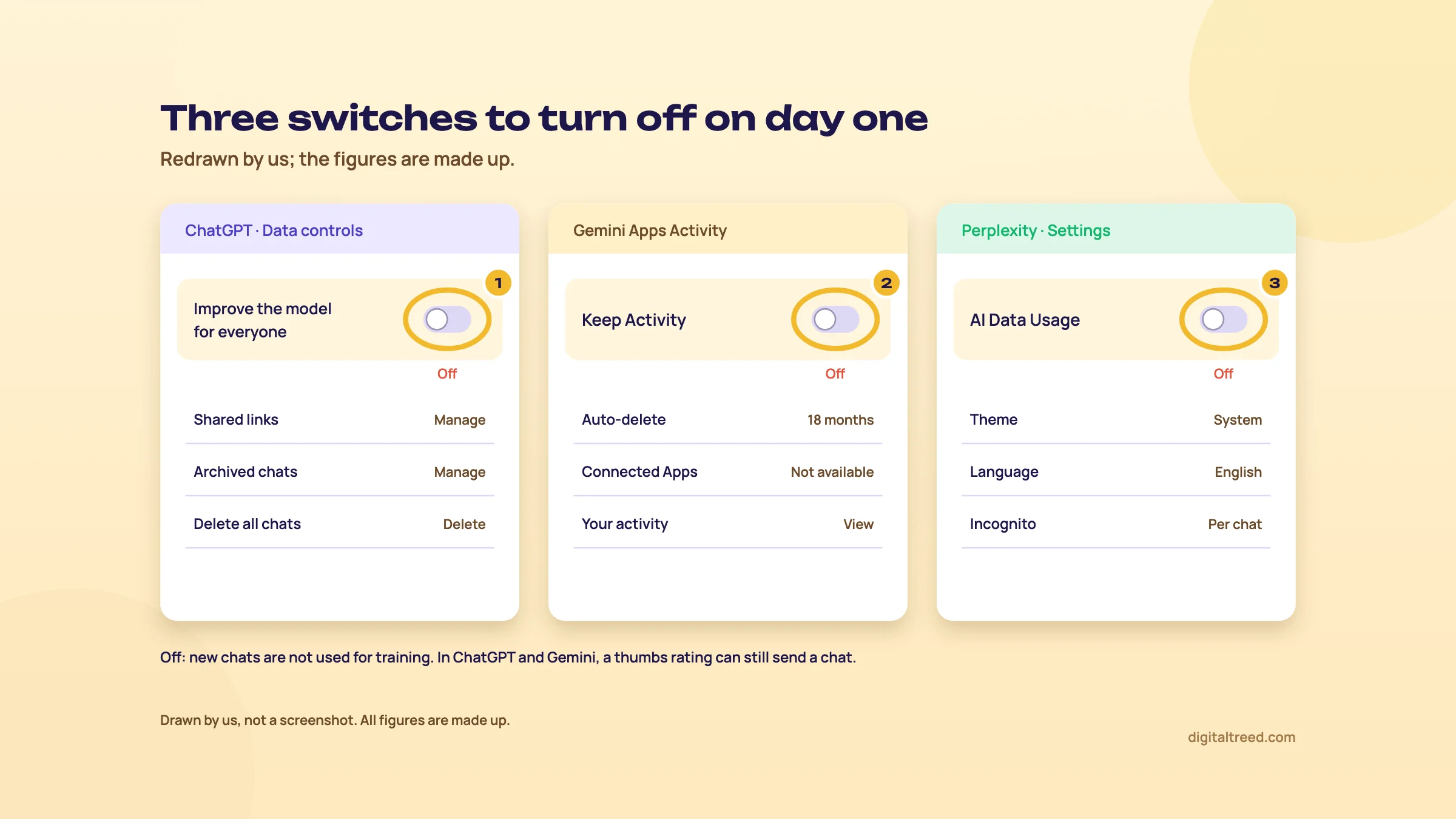 The three training switches to turn off on day one. Drawn by us; the figures are made up.
Day-one set-up for SEO work
- Pick one work account Sign in to each assistant with the account you use for work, not a family account, so client chats don't mix with personal ones.
- Turn training off ChatGPT: Settings, Data controls, "Improve the model for everyone" off. Gemini: Gemini Apps Activity, Keep Activity off if you don't need Drive access. Perplexity: Account settings, Preferences, AI data retention off.
- Skip the thumbs Don't rate answers on client chats. In ChatGPT a rating can send the whole conversation to training.
- Use private chats for client files Temporary chat in ChatGPT or Gemini, Incognito in Perplexity. Gemini's temporary chat works only on personal Google Accounts, not work or school ones.[20]
- Write a one-line house rule For example: "No names, phone numbers, emails, order IDs, passwords or unpublished financials in any AI chat." Pin it where your team works.
What never to paste
A setting is not a contract. Even with training off, chats are stored for a while and some may be read for safety. So keep these out of every chat, on every plan:
- Customer names, phone numbers, emails and addresses, which often sit in form exports and WooCommerce order files
- Passwords, API keys, Search Console or hosting logins
- IP addresses from server logs (remove the column before you upload a log, chapter 5)
- A client's unpublished revenue, prices or launch plans, unless the client has agreed
- Anything under an NDA
For SEO you rarely need any of it. A query export, a crawl export with URLs and status codes, or a list of page titles is enough for almost every task in this guide.
Next, chapter 3: keyword brainstorming and clustering, and where the volumes really come from.
Keyword brainstorming and clustering with AI, then checking the numbers
Quick answer
Use an assistant to widen a keyword list: modifiers, questions, local and festival variations you hadn't thought of. Then take every phrase to Google Keyword Planner and Search Console for real numbers, and check the Google results before you group keywords into pages. Never copy a search volume from a chat.
Brainstorming is where assistants earn their place. A person running out of ideas after twenty keywords can get eighty more in a minute. The catch is that some of those eighty nobody searches, and any number attached to them is invented.
What an assistant adds, and what it can't
It's good at the shape of searches: "price", "near me", "online order", "for diabetics", "Diwali gift box", the questions people ask before they buy, and the words a customer uses instead of the trade term. It can also suggest how people in India mix English with transliterated words in searches, which Guide 2 explains in How India searches.
It can't tell you how many people search any of it. Assistants don't have Google's query data. Ask for volumes and you'll get round, confident numbers that don't come from anywhere. Guide 1's rule stands: never take a number from a chatbot; check it in Keyword Planner or Search Console.
Keyword Planner gives "estimates on the number of searches a keyword gets each month". Google says you need to finish the Ads account set-up, including billing information, to use even its basic features, and that keywords with very low search volumes can't be found or forecast.[21] Our Keyword Planner guide shows how to open it without running an ad and how to read the ranges.
A brainstorming prompt that works
Give the assistant the business, the city, the customer and the season. Ask for phrases, not numbers, and ask it to say which ones it's unsure about.
I run a sweet shop in Kanpur that sells mithai, dry fruit boxes and
sugar-free sweets, with local delivery and courier across India.
List 60 search phrases a customer might type into Google before buying from us.
Group them as: product, occasion (Diwali, Raksha Bandhan, weddings),
local (Kanpur areas), gifting and corporate, and questions.
Use the words customers use, including common Hindi words written in English.
Do not give search volumes or difficulty. Mark any phrase you think is rare with (rare).
The last two lines matter. Telling it not to give volumes stops the made-up numbers, and the "(rare)" mark gives you a first filter, though you still check every phrase.
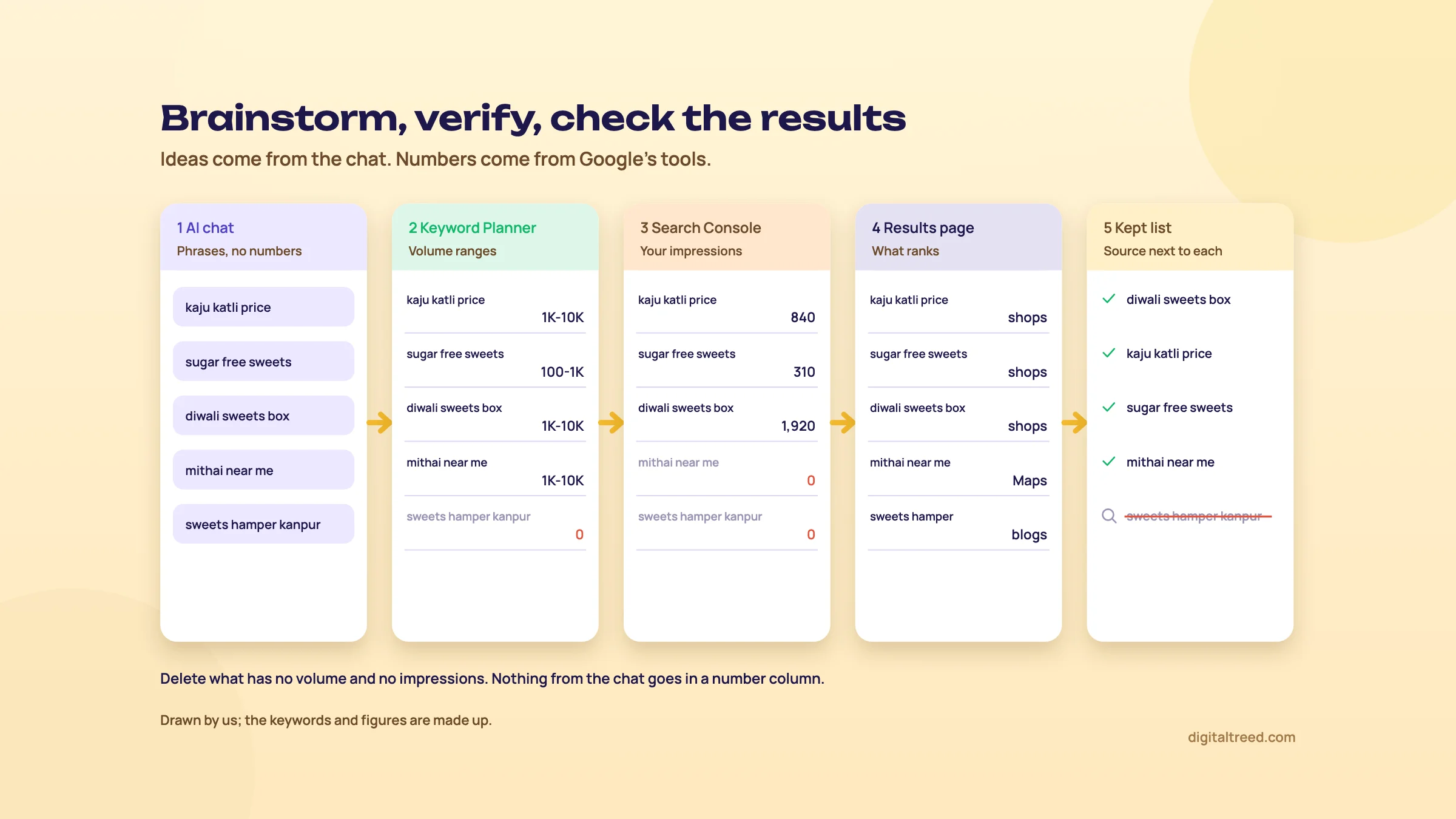 Ideas from the chat, numbers from Keyword Planner and Search Console, grouping from the results page. Drawn by us; the keywords and figures are made up.
Turn an AI keyword list into one you can trust
- Brainstorm Run the prompt above in ChatGPT or Gemini. Ask Perplexity the same question if you want sources for the questions people ask.
- Add your own data In Search Console, open Performance, set the last 16 months and export the Queries table. These are searches you already appear for, with real impressions. Our Search Console guide covers the report.
- Get volumes Paste the AI phrases into Keyword Planner's "Get search volume and forecasts", set the location to India (or Kanpur for local terms) and download the result.
- Cut Delete every phrase with no volume in Keyword Planner and no impressions in Search Console. Keep a short "maybe later" list for the rest.
- Check the results page Search your top 20 phrases in a private window. If the results are recipe blogs or marketplaces and you sell boxes, the phrase may not be for a shop page.
- Write the source next to each number One column for "Keyword Planner range", one for "Search Console impressions". Nothing from the chat goes in a number column.
Note
From our work: a women's wear manufacturer. Its online store's product pages targeted short, competitive keywords. We moved them to long-tail keywords, and results started within a month. The lesson for this chapter: the long, specific phrases are exactly what an assistant is good at suggesting, but only real data tells you which of them people use.
Clustering: grouping keywords into pages
Clustering means deciding which keywords one page should target and which need their own page. Assistants group by meaning. Google, in effect, groups by results: if two phrases show mostly the same pages, one page can usually rank for both. Those two methods agree most of the time and disagree on the cases that matter, so use the assistant for the first pass and the results page for the close calls.
Upload the cleaned CSV from the task above (keyword and volume only) and ask:
This CSV has keywords and Keyword Planner volume ranges for a Kanpur sweet shop.
Group the keywords into clusters where one page could answer all of them.
For each cluster give: a suggested page (existing type: product, category,
gift guide, blog post or location page), the main keyword, and the others.
List separately any pairs you are unsure should share a page, and say why.
Do not change, add or estimate any volumes.
Then check the "unsure" pairs by hand. Search both phrases and compare the top ten. Lots of the same URLs: one page. Different kinds of pages: two pages. Guide 2's chapter on topic clusters and cannibalisation has the full method, and how to spot two of your pages competing for one search.
Do not
- Ask for search volumes, difficulty or CPC
- Paste a cluster plan into your site map without checking the results pages
- Make a page for every phrase in the list
- Let the assistant add keywords to your CSV while it clusters
Do
- Ask for phrases and questions only
- Verify every phrase in Keyword Planner or Search Console
- Check the close calls by comparing the top ten results
- Compare the output file with your input, row count first
That last check catches a common problem: the assistant quietly drops or adds rows. If you sent 312 keywords, the clusters should hold 312.
Next, chapter 4: briefs, outlines, titles, meta descriptions and schema drafts, and the tools to check them in.
Briefs, outlines, titles, meta descriptions and schema drafts
Quick answer
Assistants draft briefs, outlines, title options, meta descriptions and JSON-LD quickly. Give them your real facts, ask for options, and choose yourself. Then check titles and descriptions in our Meta Tag Analyzer, validate schema in our Schema Markup Validator and Google's Rich Results Test, and remove anything the page doesn't show.
This is the work most people use AI for. It's also where small mistakes go live most often: a fee that changed, a doctor's qualification the assistant guessed, a review rating in the schema that nobody gave. The fix is simple. You supply the facts; the assistant supplies the wording.
Briefs and outlines
A brief tells a writer what a page must cover and for whom. Guide 2's chapter on content briefs and search intent explains what goes in one. An assistant can turn your notes and the questions you found in chapter 3 into a tidy brief. It can't see what ranks today unless it searches, and even then it reads only a few pages.
Write a content brief for a page on "root canal cost in Delhi" for a dental
clinic in Lajpat Nagar. Audience: adults with tooth pain comparing clinics.
Use only these facts: [paste the clinic's real fees, what's included,
number of sittings, the dentist's name and qualifications, payment options].
Include: search intent in one line, the questions the page must answer,
an H2/H3 outline, what proof to show (photos, case notes), and what
NOT to claim. Mark any point you added that isn't in my facts with [VERIFY].
The "[VERIFY]" instruction makes the assistant show its own additions. Search the draft for it and check each marked point against the clinic's records, or delete it. For a medical page, the dentist reads the final draft. That's the trust part of E-E-A-T, and no tool replaces it.
If you write many briefs a month, a paid content tool reads the ranking pages for you and lists headings and questions. Our guides to Surfer and Frase show what they add over a chat window, and what they cost.
Titles and meta descriptions
Ask for options, not one answer, and give the rules. Guide 2's chapter on titles, descriptions and snippets has the full rules; here is a prompt that builds them in.
Write 8 title tags and 5 meta descriptions for this page.
Page: root canal treatment, Lajpat Nagar clinic, Delhi. Main phrase: root canal cost in Delhi.
Facts: [fee range, sittings, payment options, dentist's name].
Rules: main phrase near the start; titles under 60 characters;
descriptions under 160 characters; no "best", "top" or "No. 1";
no fees or promises that aren't in the facts. Show the character count after each.
Don't trust the character counts the assistant prints; they're often off. Count them yourself, or check the live page.
Draft, choose and check a title and description
- Draft Run the prompt above. Pick the two titles and two descriptions a patient would click, not the cleverest.
- Fact-check every word Fee, sittings, area and name against the clinic's own price list. Google's AI guidance says title elements and meta descriptions need the same manual check as the body.[8]
- Publish the tags Paste them into your SEO plugin (Yoast, Rank Math or AIOSEO) and update the page.
- Check the live page Paste the URL into our Meta Tag Analyzer. It shows a Google result preview and a social share preview, flags titles under 30 characters as short and warns that over 60 may be cut off, and flags descriptions under 70 or over 160 characters.
- Fix and recheck If the preview cuts the title mid-word, shorten it and run the check again. You can check up to 10 URLs at once.
The analyzer reads pages from their URL, the way a crawler does, so it checks what's actually published, not a draft in a chat window. Google may still rewrite your title or description in its results; a good tag makes that less likely, but nobody controls it.
Schema (JSON-LD) drafts
Assistants write decent JSON-LD and are very good at fixing broken JSON. They're also happy to invent fields: a star rating, an opening time, a price range or a founding date. Every field must match what the page shows. Google's LocalBusiness documentation says to use the most specific subtype,[22] and schema.org has a Dentist type for exactly this kind of page.[23]
Write LocalBusiness JSON-LD using the schema.org type Dentist for this clinic.
Use only these values: [name, full address, phone, opening hours per day,
URL, logo URL, geo coordinates if known].
Do not add aggregateRating, review, priceRange or any field I haven't given.
Output only the JSON-LD script block.
Warning
Never let an assistant add aggregateRating or review values. Ratings in your markup must come from real reviews shown on the page. Made-up ratings are fake reviews, which chapter 6 covers.
Two more points before you paste FAQ markup an assistant suggests. Google stopped showing FAQ rich results on 7 May 2026, so FAQPage markup won't get you the extra lines in results any more.[24] And no markup guarantees a rich result.
Validate an AI-written schema block
- Paste before publishing In our Schema Markup Validator, choose "Paste markup" and paste the JSON-LD. It checks the syntax, @context and @type, and the fields for 18 common types.
- Fix the errors A missing comma or bracket breaks the whole block. Paste the error back into the assistant if you need help, then validate again.
- Compare with the page Read every value against the visible page: same name, same phone, same hours. Delete anything the page doesn't show.
- Publish, then test with Google Run the live URL through Google's Rich Results Test, which shows which rich result types it finds on the page, with any errors or warnings.[25] Our Rich Results Test guide explains the report.
Alt text works the same way. An assistant can describe a product photo in one line, but it doesn't know that the box in the photo holds 500 grams of kaju katli. Check alt text like any other copy.
Next, chapter 5: the data jobs, from Search Console regex to crawl and log exports.
Data jobs: Search Console regex, spreadsheet formulas, crawl and log exports
Quick answer
Assistants write regex for Search Console filters, Google Sheets formulas, and quick summaries of crawl exports. Tell them Search Console and Sheets use RE2, test every pattern on real rows, and compare row counts before and after. For big or sensitive files, ask for a formula or script you run yourself instead of uploading the file.
These are the jobs where an assistant saves the most time and does the least harm, because the output is easy to test. A regex either matches the right rows or it doesn't. A formula either gives the right total or it doesn't. You'll know in a minute.
Regex for Search Console filters
Search Console's Performance report has a Custom (regex) filter for queries and pages. Google's help page says "The RE2 syntax is used." A pattern matches anywhere in the text unless you anchor it with ^ or $. It isn't case-sensitive unless you start it with (?-i). And "Doesn't match regex" excludes instead of including.[26]
That RE2 detail is where AI-written patterns fail. RE2 doesn't support lookahead, lookbehind or backreferences; the syntax page marks each one "NOT SUPPORTED".[27] Assistants like lookaheads, so say so in the prompt.
Write a regex for the Google Search Console query filter (RE2 syntax:
no lookahead, lookbehind or backreferences).
Match queries about fees or cost for JEE or NEET coaching, in either order,
for example "neet coaching fees pune" and "fees of jee classes".
Give the pattern on one line, then 5 queries it should match and 5 it shouldn't.
A pattern that works in RE2 looks like this:
(fee|fees|cost|price|charges).*(jee|neet)|(jee|neet).*(fee|fees|cost|price|charges)Find fee searches for a Pune coaching centre
- Get the pattern Run the prompt above. Read the 10 test queries it gives: do the "should match" ones really mean what you want?
- Apply it In Search Console, open Performance, click "+ Add filter", choose Query, then Custom (regex), and paste the pattern with "Matches regex".
- Read the first 20 rows Every row should be a fee search. If you see "neet result" or "jee mains date", the pattern is too wide; ask the assistant to tighten it.
- Check what it missed Switch to "Doesn't match regex", export the rows and search them for "fee" in your spreadsheet. Anything you find is a gap in the pattern.
- Save it Keep working patterns in a shared doc with a one-line note. Our Search Console guide, chapter 3, has five more patterns worth saving.
Spreadsheet formulas
Ask for the formula, not the answer. If you paste 2,000 rows and ask "which queries are local?", you get a summary you can't audit. If you ask for a formula, you get something you can see working on every row.
In Google Sheets, column A has Search Console queries for a coaching centre in Pune.
Write a formula for column B that labels each query "Local" if it contains
pune, kothrud, baner, wakad, hinjewadi or "near me", "Brand" if it contains
our brand name [name], and "Other" otherwise. Brand should win over Local.
You'll get something close to this, which you can read and correct:
=IF(REGEXMATCH(LOWER(A2),"brandname"),"Brand",IF(REGEXMATCH(LOWER(A2),"pune|kothrud|baner|wakad|hinjewadi|near me"),"Local","Other"))Fill it down, then read ten labelled rows by eye, including one query with both your brand and an area in it. That one should say Brand.
Google Sheets also uses RE2 for REGEXMATCH, except Unicode character class matching, and the function only works on text, not numbers.[28] So the same "no lookahead" rule applies. Other formulas worth asking for: XLOOKUP to join a Search Console export with a Keyword Planner export on the keyword column, and a pivot table set-up to total clicks by label.
On a Google AI Pro plan, Gemini works inside Sheets itself.[6] ChatGPT's free plan has limited data analysis of uploaded files, with more on paid plans.[1] Either way, check the totals: the sum of clicks in your labelled sheet should equal the sum in the original export.
Crawl exports
A crawl export from Screaming Frog or Sitebulb has URLs, status codes, titles, canonicals and word counts, usually nothing personal, so it's safe to share. Assistants are good at the first sort: group the 404s by folder, list pages with duplicate titles by template, find pages whose canonical points somewhere else.
This CSV is a crawl export of a WordPress site (columns: Address, Status Code,
Title 1, Canonical Link Element 1, Indexability). Group the problems by URL
pattern or template, not page by page. For each group, give the count,
three example URLs, and a one-line fix a developer can act on.
Don't guess at causes you can't see in the data; say "needs checking" instead.
Then spot-check. Take three URLs from each group and test them in our HTTP Status Checker, which follows every redirect hop and shows the response headers for up to 10 URLs at once. Our guides to Screaming Frog and Sitebulb show how to get these exports.
Server log files
Logs are different. Every line holds a visitor's IP address, and a busy site's monthly log can be far too big to upload anyway. Two safer ways to use an assistant:
- Ask for a command or script you run on your own computer. The data never leaves your machine.
- Or remove the IP column first, cut the file to the bot lines you care about, and upload only that.
Write one command for macOS or Linux that reads an Apache access log
(combined log format) called access.log and counts requests per day
from user agents containing "Googlebot". Print date and count, oldest first.
Don't print IP addresses. Explain each part of the command in one line.
Before you trust the counts, check one day by hand: open the log, search that date for "Googlebot" and see whether the number roughly matches.
Either way, a user agent that says Googlebot can be faked. Guide 3's chapter on crawling at scale and log files explains how to verify real Googlebot hits before you draw conclusions.
Next, chapter 6: research with citations, translation, and the things an assistant should never do for you.
Cited research, translation, hallucinations and what not to do
Quick answer
Use Perplexity, or any assistant with search on, to find sources for competitor and market research, then open every source yourself. Use assistants for first translation drafts, then have a fluent speaker localise them. Never publish unedited AI text, invented facts or quotes, fake reviews or mass-produced pages: Google treats scaled low-value content as spam.
The jobs in chapters 3 to 5 are easy to test. The ones in this chapter aren't. A wrong fact in a competitor summary or a clumsy line in a Marathi page looks fine until a customer reads it. So this chapter ends with the rules and a short checking routine.
Competitor research with citations
Perplexity shows numbered sources under each answer, which makes it the natural first stop for "what are competitors saying?" questions. On the free plan you get three Pro Searches a day and one Research query a month; the rest are basic searches.[4]
I run a D2C skincare brand in India selling sunscreen online.
Which Indian sunscreen brands sell directly on their own websites, and what
do their product pages claim (SPF, PA rating, price for 50 g, free shipping
threshold)? Use only the brands' own websites as sources, give the URL for
each claim, and say "not found" where a page doesn't state something.
Asking for "the brands' own websites" and "not found" pushes the answer away from listicles and guesses. Then open every URL. Check that the page exists, that it says what the answer claims, and when it was updated. Prices on D2C sites change weekly, so write the date next to each one.
What this is good for: a first list of competitors, the claims they lead with, the questions their pages answer, the topics their blogs cover. What it isn't good for: traffic, rankings or keyword data. For those, use Search Console for your own site, and a suite such as Semrush or Ahrefs for others.
Note
From our work: a global sports platform and networking community. Its technical SEO was already good, but its posts linked to no outside sources, so nothing showed where the facts came from, and earlier link building had used spammy tactics. We added sourced sports statistics to the posts, and collaboration requests brought contextual links and brand mentions. Traffic rose 60%. The lesson: the source is what makes a statistic worth citing, so a cited answer is only a pointer to it.
How often cited answers are wrong
The biggest test we know of is a study coordinated by the European Broadcasting Union and led by the BBC, published on 22 October 2025. Journalists from 22 public service media organisations in 18 countries, working in 14 languages, rated more than 3,000 answers from ChatGPT, Copilot, Gemini and Perplexity to news questions.[29]
45%
of AI answers had at least one significant issue[29]
31%
had serious sourcing problems: missing, misleading or incorrect attributions[29]
20%
had major accuracy issues, including hallucinated details and outdated information[29]
Gemini did worst, with significant issues in 76% of its answers.[29] Two limits: these were news questions, not SEO tasks, and India wasn't one of the 18 countries. But sourcing was the most common failure, and that's exactly the part people trust when an answer shows links.
OpenAI explains why this happens. Its September 2025 research post argues that models hallucinate "because standard training and evaluation procedures reward guessing over acknowledging uncertainty". In one example, a chatbot asked for one of the paper's authors' PhD dissertation title gave three different answers, "none of them correct".[9]
An Indian example shows what it costs when nobody checks. The Bengaluru bench of the Income Tax Appellate Tribunal passed an order in Buckeye Trust (ITA No. 1051/Bang/2024) dated 30 December 2024 and recalled it on 7 January 2025. In a later Karnataka High Court petition, the trust argued that the order "appeared to have been driven by Artificial Intelligence", according to ITATonline's case digest.[30] A press report in Law Trend (28 February 2025) said the order rested on judgments that didn't exist, which were "reportedly generated by ChatGPT".[31] The report doesn't say who it got the ChatGPT link from, so treat that part as a press report, not a finding. If invented case law can reach a tribunal order, an invented statistic can certainly reach a blog post.
Translation and localisation
Assistants give a decent first draft in Hindi, Marathi, Tamil, Bengali and other Indian languages, and they're fast. They also miss what makes a page local: the words customers actually use, prices and units, festivals, and phrasing that sounds natural rather than translated.
Google's rules point the same way. Its spam policy lists, as scaled content abuse, scraping content to generate many pages "including through automated transformations like synonymizing, translating, or other obfuscation techniques" where little value is provided to users.[32] Its multilingual guidance asks for one language per page, warns against side-by-side translations, and says translating only the boilerplate while the main content stays in one language can create a bad experience.[33]
A translation prompt that keeps the facts fixed:
Translate this sunscreen product page from English into Marathi for a customer
in Pune. Keep the brand name, product names, SPF and PA values, prices and
pack sizes exactly as they are. Use everyday Marathi, not formal or literary
words, and keep common English words customers use (sunscreen, gel, SPF).
After the translation, list every phrase you found hard to translate and
every place you changed the meaning, with the English original.
[paste the page text]
The list at the end is what your reviewer starts with. Then compare every number in the Marathi version with the English page.
Localise a product page into Marathi
- Check demand first Look in Search Console for queries in Marathi or from Maharashtra before you translate. Guide 2's How India searches explains mixed-language and transliterated queries.
- Draft Run the prompt above with the page text pasted in.
- Localise with a person A fluent speaker, ideally a customer-facing colleague, rewrites the draft in the words customers use, and checks prices, units and offers.
- Publish properly One language per page on its own URL, with hreflang between the versions. Guide 3's chapter on programmatic and international SEO covers hreflang.
- Check the tags Run the new URL through our Meta Tag Analyzer to see the translated title and description as a result preview.
What not to do
Do not
- Publish AI text without a person reading every line
- Use facts, prices, statistics, laws or medical claims from a chat without opening the source
- Put quotes in someone's mouth that you haven't read in the original
- Write reviews or testimonials with AI, or add ratings to schema that no customer gave
- Generate hundreds of near-identical city or keyword pages
- Machine-translate a whole site and publish it unchecked
Do
- Use AI for drafts, options, structure and formulas
- Link every number to its source, with a date
- Quote only words you have read in the source
- Ask real customers for real reviews
- Make a page only when you have something real to say on it
- Have a fluent speaker localise every translated page
Fake reviews deserve their own line. Google's Maps content policy removes "Content that is not based on a real experience" and reviews "paid for, directly or in kind".[34] In India, the Department of Consumer Affairs launched IS 19000:2022, a Bureau of Indian Standards framework for collecting, moderating and publishing online consumer reviews, in November 2022.[35] AI makes fake reviews cheap to write. It doesn't make them any less fake.
And scale: Google's spam policies name "Using generative AI tools or other similar tools to generate many pages without adding value for users" as an example of scaled content abuse.[32] Guide 2's chapter on AI-assisted writing shows what happened to sites that tried it.
A checking routine for anything an assistant wrote
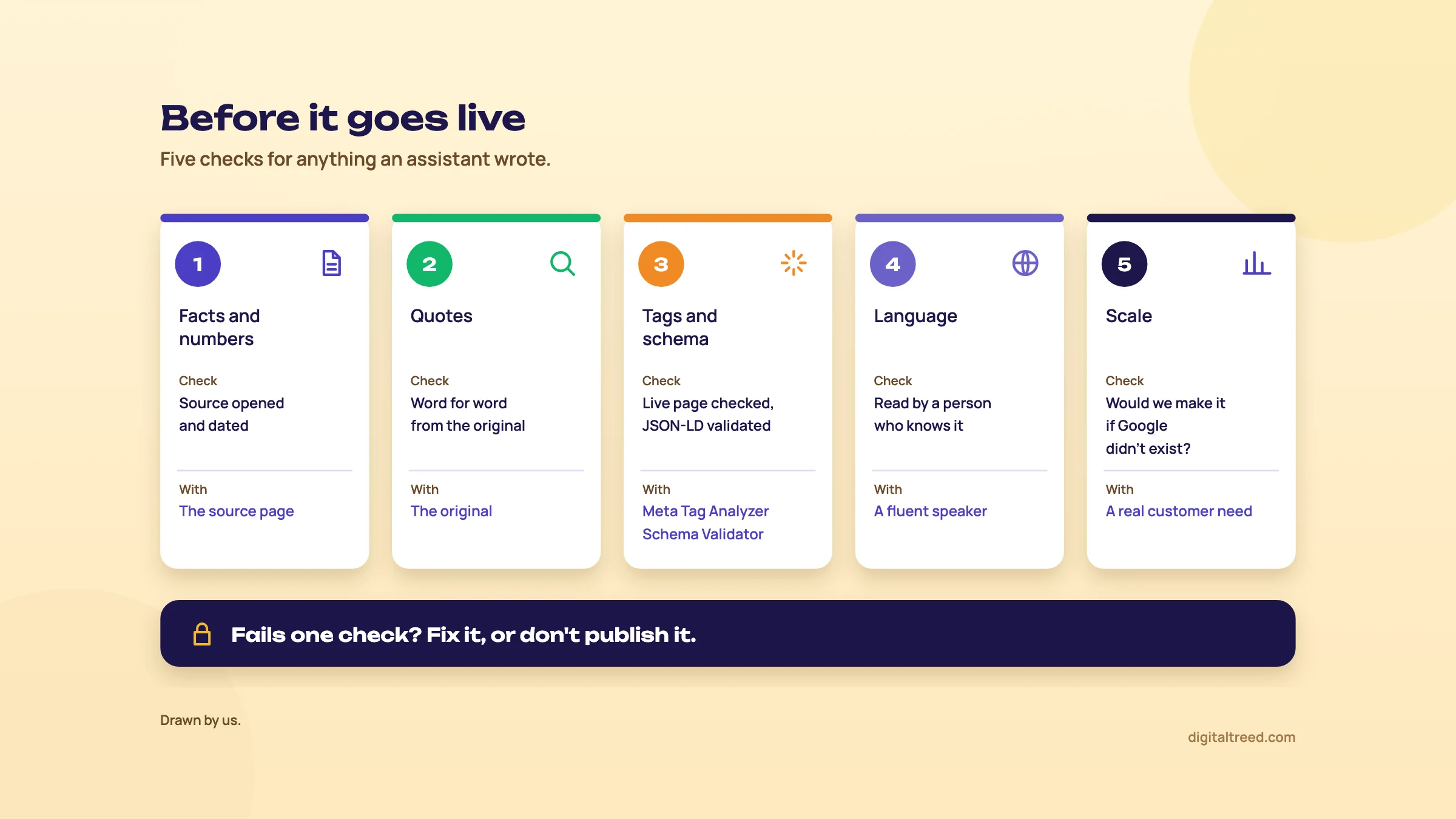 The five checks for anything an assistant wrote. Drawn by us.
- Facts and numbers: every one has a source you opened, with a date. Delete what you can't source.
- Quotes: every one is word for word from a page you read.
- Tags and schema: titles and descriptions checked on the live page, JSON-LD validated and matched to what the page shows.
- Language: a person who knows the subject, and for translations a fluent speaker, read the final text.
- Scale: each page exists because a customer needs it, not because a keyword list had a row for it.
Next, chapter 7: what each assistant costs in rupees, the pros and cons, and the alternatives.
Plans and prices in rupees, pros and cons, and the alternatives
Quick answer
All three have free plans. ChatGPT Go costs ₹399 a month, Plus ₹1,999 and Pro from ₹10,699. Google AI Plus is ₹399, AI Pro ₹1,950 and Ultra from ₹6,500. Perplexity Pro is US$17 a month billed annually (about ₹1,632). Prices checked 18 October 2026. For most SEO tasks in this guide, a free plan is enough.
The plans, checked 18 October 2026
We read each pricing page from India on 18 October 2026. ChatGPT and Google showed rupee prices. Perplexity showed US dollars only, so its rupee figures are ours, at ₹96 to US$1, the X-Rates average for 1 to 16 October 2026 that we use across these guides.[36] None of the three pages mentioned GST or other taxes.
| ChatGPT | Price a month | What the pricing page lists |
|---|---|---|
| Free | ₹0 | Unlimited text chats; limited uploads, image creation, voice, deep research and memory |
| Go | ₹399 | More messages with tools, uploads, image creation and voice; longer memory; "This plan may include ads" |
| Plus | ₹1,999 | Advanced reasoning models; expanded messages, uploads and deep research; projects, scheduled tasks and custom GPTs |
| Pro | From ₹10,699 | A choice of 3 usage tiers; maximum deep research, memory and context |
From ChatGPT's pricing page.[1] Its FAQ says Go and Plus are monthly plans, Business starts at 2 users, and Go, Plus, Pro and Business can be bought "with any major credit card".
| Gemini and Google AI | Price a month | What the plans pages list |
|---|---|---|
| Free | ₹0 | Gemini app, Deep Research, Canvas, Gems, Gemini Notebook; 15 GB storage |
| Google AI Plus | ₹399 | 2x the free plan's usage limits; Gemini in Gmail; 400 GB storage |
| Google AI Pro | ₹1,950 | 4x the free plan's usage limits; Gemini in Gmail, Docs and Sheets; 5 TB storage; YouTube Premium Lite |
| Google AI Ultra | From ₹6,500 | ₹6,500 for 5x Pro's limits, ₹19,500 for 20x; from 20 TB storage |
From Google's Gemini subscriptions page and Google One's AI plans page.[5] Only personal Google Accounts can sign up for Google AI plans, and the Gemini features in them are for ages 18 and over; Workspace customers buy a Gemini add-on instead.[6]
| Perplexity | Price a month | What the plans pages list |
|---|---|---|
| Free | US$0 | "Practically unlimited basic searches"; 3 Pro Searches a day; 1 Research query a month; limited file uploads |
| Pro | US$17 billed annually (about ₹1,632) | Deep research, a choice of AI models, more usage and memory |
| Max | US$167 billed annually (about ₹16,032) | Highest usage limits, frontier models, priority access to new features |
| Education Pro | US$10 (about ₹960) | With verification through SheerID |
From Perplexity's Pro page and its plan comparison help page.[3] The Pro page shows only the price per month when billed yearly.[4] Billed monthly, Pro is $20 a month[40] and Max $200 a month, or $2,000 a year.[41]
If you claimed Perplexity Pro free through Airtel's 2025 offer, check your renewal. New redemptions ended on 16 January 2026, the free year runs from each user's activation date, and the subscriptions were set to auto-renew, TechCrunch reported in August 2026.[37]
Tip
Which plan? For the tasks in this guide, start free on the assistant you already use, plus Perplexity Free for cited research. Pay for one plan only when you hit limits on uploads or data analysis every week. If your team lives in Google Sheets, Google AI Pro is the one that puts Gemini there. If you handle client data in a team, look at the business plans, which have different training defaults (chapter 2).
Pros and cons
Pros
- Free plans cover most SEO glue work
- Fast first drafts of briefs, titles, schema and translations
- Good at regex, formulas and sorting exports, all easy to test
- Perplexity shows sources you can open
- Gemini works inside Docs and Sheets on AI Pro
- Training can be switched off on personal plans
Cons
- No real search volumes, difficulty or ranking data
- State wrong facts and invent quotes confidently
- Cited sources can be wrong or not say what the answer claims
- Personal plans can train on your chats unless you opt out
- Answers change with the model, plan and day
- Easy to publish unchecked text at scale, which Google treats as spam
Alternatives, and which one when
Our own free tools are where we'd send the output of an assistant to be checked. Two of them use AI themselves. The Free Website Audit's AI visibility check asks AI who it recommends near you, alongside AI crawler access and llms.txt, as part of 50+ checks. With no account you get the score, every check and live progress, one audit a day; a free sign-in adds every fix with its points, the PDF report and a competitor compare, three audits a day.
The Background Remover cuts out product photos with an AI model that runs in your browser, so the photos are never uploaded, up to 10 images at a time.
Then the checkers this guide used. The Meta Tag Analyzer checks AI-drafted titles and descriptions, and the Schema Markup Validator checks AI-written JSON-LD. The Word Counter & Keyword Density Checker shows a draft's keyword use. The AI Crawler Checker tells you whether the crawlers behind ChatGPT, Perplexity and Gemini may read your site; Guide 5's chapter on technical access explains what to allow.
| Job | Use this | Cost |
|---|---|---|
| Keyword ideas | ChatGPT or Gemini, then Keyword Planner and Search Console | Free |
| Search volumes | Google Keyword Planner; paid suites such as Semrush or Ahrefs | Free with an Ads account; suites paid |
| Competitor and fact research | Perplexity, then open every source | Free; Pro US$17 a month billed annually |
| Briefs for several writers a month | Frase or Surfer | Frase from $49 a month, Surfer from $59 billed monthly |
| Titles and descriptions | Any assistant, then our Meta Tag Analyzer | Free |
| Schema | Any assistant, then our Schema Markup Validator and the Rich Results Test | Free |
| Regex and query sorting | Any assistant, then Search Console | Free |
| Formulas on Sheets data | Gemini in Sheets (AI Pro), or any assistant | ₹1,950 a month, or free |
| Is AI recommending us? | Our Free Website Audit, then a monthly prompt log (GEO guide, measuring AI visibility) | Free |
Surfer's lowest plan is $59 a month billed monthly or $49 billed yearly (about ₹5,664 or ₹4,704), from its pricing page on 18 October 2026.[38] Frase Starter is $49 a month or $39 billed yearly (about ₹4,704 or ₹3,744), from its pricing page the same day.[39] Claude and Microsoft Copilot do similar jobs; we haven't covered their plans here.
If you'd rather hand the work to a team, see our content marketing and SEO services. Otherwise, start with chapter 2's settings today, then run the keyword task in chapter 3 on your own site.
Test yourself
Ten questions on the whole guide. Pick an answer, check it, and see your score at the end.
You got 0 of 10 right.
Frequently asked questions
Frequently asked
Can I use ChatGPT for SEO?
Yes, for the right jobs: keyword and question ideas, clustering a list you've already checked, brief and outline drafts, title and meta description options, JSON-LD drafts, regex and spreadsheet formulas. Don't use it for search volumes or facts you haven't checked, and read every line before it goes on a page.
Does Google penalise AI-generated content?
Not for being AI-made. Google wrote in 2023 that appropriate use of AI or automation is not against its guidelines. What it treats as spam is scaled content abuse: many pages made mainly to rank, without adding value, however they're produced. Its October 2026 guidance also says it is critical to fact-check AI content by hand before publishing.
Which is best for SEO: ChatGPT, Perplexity or Gemini?
It depends on the job. ChatGPT is the strongest all-rounder for drafting and working on uploaded files. Perplexity is best for research, because it shows sources you can open. Gemini suits teams who work in Google Sheets and Docs, where it runs on the Google AI Pro plan. Most people need one of them plus Perplexity's free plan.
Can ChatGPT give accurate keyword search volumes?
No. Assistants don't have Google's query data, so any volume or difficulty score they give is made up. Get volumes from Google Keyword Planner and real impressions from Search Console, and use the assistant only for the list of phrases to check.
How much does ChatGPT Plus cost in India?
₹1,999 a month on ChatGPT's pricing page, checked from India on 18 October 2026. Go costs ₹399 a month and Pro starts at ₹10,699. The free plan stays at ₹0 with limits on uploads, data analysis and deep research.
Is Perplexity Pro worth it for SEO?
Only if you research every day. The free plan gives basic searches without a practical limit, three Pro Searches a day and one Research query a month, which covers occasional competitor checks. Pro was US$17 a month billed annually (about ₹1,632) on 18 October 2026.
Do ChatGPT, Gemini and Perplexity train on my chats?
On personal plans they can, unless you switch it off. Turn off "Improve the model for everyone" in ChatGPT's Data controls, Keep Activity in Gemini Apps Activity, and AI data retention in Perplexity's settings. Perplexity's privacy page gives that toggle with no plan limit, but its plan comparison lists the training opt-out under paid plans only. Temporary chats in ChatGPT and Gemini aren't used for training either, though they're kept for a short time. Perplexity's Incognito sessions expire within 24 hours.
Can AI write schema markup for my website?
It can write a good first draft. Give it only real values from your page, tell it not to add ratings or reviews, then validate the code in our Schema Markup Validator and test the live page in Google's Rich Results Test. Delete any field the page doesn't show.
Is it safe to translate my website with AI?
As a first draft, yes. Google's spam policy lists scraped content passed through automated translation, with little value added, as scaled content abuse, and its multilingual guidance asks for one language per page. Have a fluent speaker localise each page, then publish it on its own URL with hreflang.
Can I use AI to write customer reviews?
No. Google's Maps policy removes reviews not based on a real experience and reviews paid for in money or kind, and India has a Bureau of Indian Standards framework for online reviews, IS 19000:2022. Ask real customers for reviews instead, and never put ratings in schema that nobody gave.
Sources
References
- ChatGPT Plans and Pricing (Free, Go, Plus, Pro; compare table and FAQ), OpenAI, prices seen from India 18 Oct 2026, accessed 16 Oct 2026
- ChatGPT reaches 900M weekly active users, TechCrunch, 27 Feb 2026, accessed 16 Oct 2026
- Perplexity Pro (plans and pricing), Perplexity, prices seen 18 Oct 2026 (annual billing shown), accessed 16 Oct 2026
- Which Perplexity Subscription Plan is right for you?, Perplexity Help Center, accessed 18 Oct 2026
- Gemini subscriptions: choose a plan (Personal, India), Google, prices seen from India 18 Oct 2026, accessed 16 Oct 2026
- Google AI plans with cloud storage: plans and pricing, Google One, prices seen from India 18 Oct 2026, accessed 16 Oct 2026
- Alphabet Q2 2026 earnings: CEO remarks, Google, Sundar Pichai, 22 Jul 2026, accessed 16 Oct 2026
- Google Search's guidance on using generative AI content on your website, Google Search Central, updated 1 Oct 2026, accessed 18 Oct 2026
- Why language models hallucinate, OpenAI, 5 Sep 2025, accessed 16 Oct 2026
- Google Search's guidance about AI-generated content, Google Search Central blog, Danny Sullivan and Chris Nelson, 8 Feb 2023, accessed 16 Oct 2026
- Creating helpful, reliable, people-first content, Google Search Central, updated 5 Oct 2026, accessed 16 Oct 2026
- Data controls in ChatGPT, OpenAI Help Center, accessed 18 Oct 2026
- Gemini Apps Privacy Hub, Gemini Apps Help, last updated 13 Oct 2026, accessed 18 Oct 2026
- What data does Perplexity collect about me?, Perplexity Help Center, last modified 14 Sep 2026, accessed 18 Oct 2026
- How your data is used to improve model performance, OpenAI Help Center, accessed 18 Oct 2026
- Temporary chat in ChatGPT, OpenAI Help Center, accessed 18 Oct 2026
- Are third-party model providers training on my data?, Perplexity Help Center, accessed 18 Oct 2026
- Incognito Mode Troubleshooting, Perplexity Help Center, accessed 18 Oct 2026
- How long Perplexity retains your search and personal data, Perplexity Help Center, accessed 18 Oct 2026
- Start a temporary chat, Gemini Apps Help, Google, accessed 18 Oct 2026
- Use Keyword Planner, Google Ads Help, accessed 18 Oct 2026
- Local business (LocalBusiness) structured data, Google Search Central, accessed 18 Oct 2026
- Dentist, Schema.org, accessed 18 Oct 2026
- Latest Google Search documentation updates (FAQ rich result deprecated, no longer shown from 7 May 2026), Google Search Central, accessed 18 Oct 2026
- Rich Results Test, Search Console Help, accessed 18 Oct 2026
- Performance report (Search results): Advanced filtering and comparison, Search Console Help, accessed 18 Oct 2026
- RE2 Syntax, Google RE2 wiki on GitHub, accessed 18 Oct 2026
- REGEXMATCH, Google Docs Editors Help, accessed 18 Oct 2026
- Largest study of its kind shows AI assistants misrepresent news content 45% of the time, European Broadcasting Union, 22 Oct 2025, accessed 16 Oct 2026
- Buckeye Trust v. Registrar, ITAT (Karnataka High Court, WP No. 25280 of 2025, 18 Sep 2025), ITATonline, accessed 18 Oct 2026
- Bengaluru Tax Tribunal Withdraws Order Based on Non-Existent Case Law Cited by ChatGPT, Law Trend, 28 Feb 2025, accessed 16 Oct 2026
- Spam policies for Google web search, Google Search Central, updated 28 Aug 2026, accessed 18 Oct 2026
- Managing multi-regional and multilingual sites, Google Search Central, updated 10 Dec 2025, accessed 18 Oct 2026
- Prohibited and restricted content (fake engagement), Maps User Generated Content Policy Help, Google, accessed 18 Oct 2026
- Centre launches framework for safeguarding and protecting consumer interest from fake and deceptive reviews in e-commerce, Press Information Bureau, Ministry of Consumer Affairs, 21 Nov 2022, accessed 16 Oct 2026
- Exchange Rate Average (US Dollar, Indian Rupee), X-Rates, 1-16 Oct 2026 average, accessed 16 Oct 2026
- Perplexity's free AI offer left it with millions more users in India, TechCrunch, Jagmeet Singh, 18 Aug 2026, accessed 16 Oct 2026
- Pricing & Plans, Surfer, seen 18 Oct 2026, accessed 16 Oct 2026
- Frase pricing, Frase, seen 18 Oct 2026, accessed 16 Oct 2026
- How much do AI tools cost?, Perplexity blog, prices as of October 2026, accessed 21 Oct 2026
- Perplexity Max, Perplexity Help Center, accessed 21 Oct 2026
- Data collection at Perplexity, Perplexity Help Center, accessed 21 Oct 2026
Get the free checklist
Every step of this guide on one page, to print or tick off. We email you the PDF link.