

Quick answer
A third-party integration is a connection between your website and a service another company runs, like Stripe payments, a booking calendar or Google Analytics. More than nine in ten web pages load at least one, says the 2025 Web Almanac. Most are worth it. Each still costs speed, data or a bill, so add them one at a time.
Think of your website as a small shop on Main Street. You own the shelves and the sign. But the card reader belongs to your bank, the alarm to a security company and the music to a streaming service. Every one of them is useful, and every one is a stranger's equipment running inside your shop.
That's all a third-party integration is.
We measured what the common ones really cost a page, and a couple of the numbers surprised us. You'll also see which ones deserve a second look before you paste in the next snippet.
A third-party integration is a service another company runs on your site
A third-party integration is any feature on your site that depends on another company's software. Think of the checkout that sends cards to Stripe, the calendar that books appointments, or the form that drops leads into your CRM. You use them. Someone else runs them, and they can change them.
You'll also hear it contrasted with a native integration. Make sells a no-code connector, and its explainer on third-party integrations draws the line plainly. Native ones "are offered by the original app developers", while third-party ones "are built on external platforms". In a small shop that line blurs fast: a Shopify app from another company is native to Shopify and third-party to you.
Most small sites end up with the same handful, grouped by the job they do:
- Taking payments (Stripe, Square, PayPal)
- Booking appointments or classes
- Growing an email list
- Sending leads to a CRM (we compare options in our CRM software guide)
- Measuring visits (Google Analytics 4)
- Showing reviews, maps or videos
- Live chat (our website chatbot comparison covers that one)
None of these is a bad idea. Each one spares you from building a payment system or a calendar yourself, and it moves data between tools so nobody has to retype it. The trouble starts when nobody remembers why each one was added.
Integrations reach your site in four ways
That handful of jobs reaches your site through one of four doors. The door decides most of the cost and the risk, so here's each one, from least to most work.
The first is a native app or plugin from your platform's store. The WordPress.org plugin directory alone listed more than 72,000 free plugins in October 2026. Installing one takes minutes, and that's the catch: it's easy to stack up a dozen. Easy in, easy to forget. On Shopify, look for apps that meet the Built for Shopify requirements. They use theme app extensions, so their blocks are "automatically and entirely removed" from your theme when you uninstall. If you're still picking a platform, our WordPress vs Shopify comparison covers how each handles add-ons.
Next comes the no-code connector, such as Zapier or Make. It moves data between two services behind the scenes, so a new order lands in a spreadsheet and a form fill lands in your email tool. As of October 2026, Zapier's pricing page lists a free plan with 100 tasks a month and paid plans "starting from" $19.99 a month when billed yearly. A connector runs between services, so it usually adds nothing to the pages your visitors load. You can see one at work in our walkthrough on automating customer review requests.
Embed snippets are the third door: a few lines of code or an iframe you paste into your pages. Analytics tags, video players, maps, chat bubbles and ad pixels all arrive this way. They run in your visitor's browser, on every page where they sit.
The fourth is custom work against an API. An API is a set of rules one program uses to ask another for data, and a webhook is the reverse: a message the other service sends you when something happens. This route fits unusual jobs, like syncing stock between a warehouse system and your store. It's billed by the hour. The Bureau of Labor Statistics puts median pay for web developers and digital designers at $47.85 an hour (May 2025). That's an employee's wage, not an agency rate, so expect any quote to be higher.
Our ecommerce build guide shows where apps and custom work sit in a full store budget.
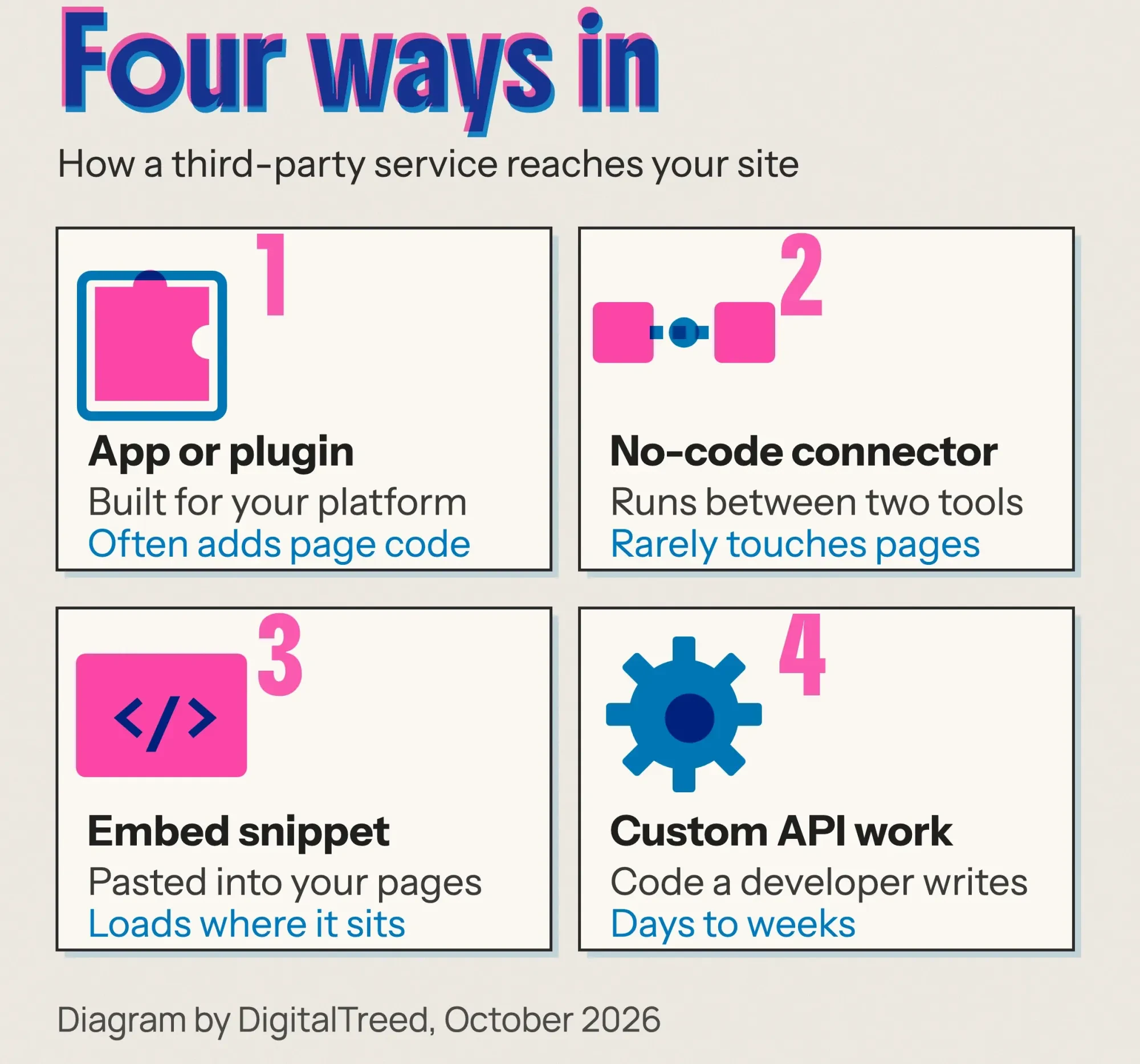 Diagram by DigitalTreed: the four routes, from least to most work.
Do third-party scripts slow down a website?
Yes, often. Google's web.dev article on loading third-party JavaScript doesn't hedge: "If you've optimized your code, but your site still loads too slowly, it's probably the fault of third-party scripts." The 2024 Web Almanac adds that chat and support scripts "are generally heavier in weight."
We wanted our own numbers, so we built a test.
On Friday, October 23, 2026, we made a plain fictional bakery page on our own machine: a heading, three paragraphs and one 79 KiB image. Then we made six copies, each with one embed pasted the way the vendor documents it, plus a seventh with five of them together. Lighthouse 13.5.0 ran five times on each page with its standard simulated mobile throttling, and we kept the median of each number so that one odd run couldn't skew the result. The Google Analytics 4 tag used a placeholder ID, Stripe.js loaded with no account key, and the video was a public Google Search Central clip.
We didn't load a Meta Pixel or a chat widget. Both need a real account ID, and both would've reported our visit to the company that makes them, under our name, which isn't something we're willing to do for a test.
| Test page (median of 5) | Score | LCP | Page weight | Other domains |
|---|---|---|---|---|
| No embeds | 100 | 1.4 s | 81 KiB | 0 |
| Google Analytics 4 tag | 100 | 1.2 s | 235 KiB | 2 |
| YouTube iframe | 98 | 1.9 s | 1,186 KiB | 9 |
| Same video, click-to-load | 99 | 1.6 s | 149 KiB | 2 |
| Google Maps iframe | 100 | 1.4 s | 678 KiB | 5 |
| Stripe.js in the head | 89 | 3.1 s | 370 KiB | 3 |
| Google Fonts, 2 weights | 100 | 1.5 s | 178 KiB | 2 |
| Five embeds together | 84 | 3.5 s | 2,191 KiB | 17 |
Weight was the first surprise. The YouTube player added about 1,105 KiB to a page that started at 81 KiB, and the map added 597 KiB. The same video behind a click-to-load facade added only 68 KiB. That's because the real player loads only when someone presses play (we used the free lite-youtube-embed package). Google's facade guide calls this "much less taxing on the page load."
Time was the second. Stripe.js, placed in the page head as a blocking script, pushed Largest Contentful Paint from 1.4 s to 3.1 s. More than double. All five embeds together landed at 3.5 s. That's past the 2.5-second line web.dev's Web Vitals guide sets for a good LCP, on a page with nothing else to do. Your real site, with a theme and its own scripts, starts from a worse place.
Small gaps mean little, though. The GA4 page came out 0.15 seconds faster than the bare one, which is lab noise, not a speed boost.
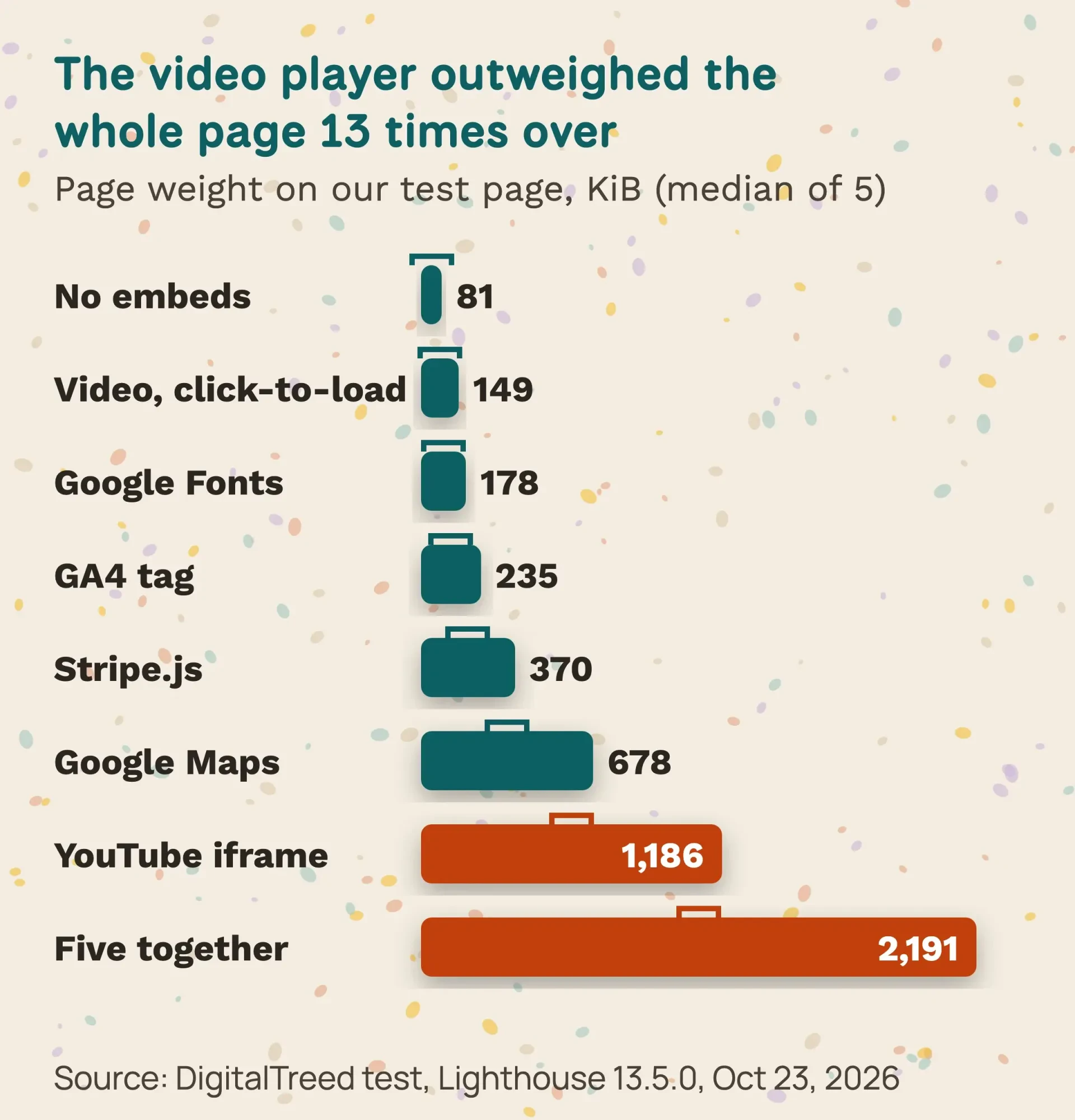 Source: DigitalTreed test, Lighthouse 13.5.0, medians of 5 runs, October 23, 2026.
One honest limit: Lighthouse runs in a lab. It reports Total Blocking Time, which web.dev calls useful as an indicator of responsiveness problems. Google wants an INP of 200 milliseconds or less from real visitors, and only field data can show that. Google Search also recommends good Core Web Vitals, but it treats them as one part of what its ranking systems "seek to reward", not a switch. Our PageSpeed Insights guide walks through both kinds of data.
Want the same before-and-after for your own pages? Run them through our free speed test tool.
Some integrations pass your visitors' data to other companies
That's speed, the cost you can see.
Data is the one you can't.
A tracking pixel is a tiny piece of code from an ad platform. In a March 2023 post on pixel tracking, the FTC's technology team warned that pixels "can be hidden from sight and can track and send all sorts of personal data". Its point for businesses: companies whose pixels "impermissibly disclose" personal information to third parties "may be violating the FTC Act".
That isn't theory. In February 2023 the FTC moved to bar GoodRx from sharing health data with third parties for advertising. GoodRx agreed to a $1.5 million civil penalty, and the FTC said the data had gone to Facebook, Google, Criteo, Branch and Twilio.
California adds its own layer. Under the CCPA, "sharing" means sharing for cross-context behavioral advertising, as the Attorney General's CCPA page explains. In 2022 Sephora paid $1.2 million after the state said letting third-party trackers run on its site constituted a sale of shopper data. The law reaches for-profit businesses that do business in California and meet one of three tests. The first is gross annual revenue over $26,625,000, the figure since January 1, 2025, per the California Privacy Protection Agency. The others are buying, selling or sharing data on 100,000 or more California residents or households, or earning half your revenue from selling it.
Most small shops fall below those lines. The FTC Act, which bars unfair or deceptive practices, has no size floor, though. So before you add a pixel, read what it collects and say so in your privacy policy. Keep it off pages where people share health or money details. If you manage tags in one place, our Google Tag Manager guide lists everything that fires.
We're explaining the rules in general here, and it isn't legal advice. A privacy lawyer licensed in your state can tell you what applies to you.
Payment pages have their own script rules
Payment pages raise the stakes again, because a stray script there can lift card numbers, not just browsing habits. The PCI Security Standards Council wrote in a July 2026 post on e-skimming that "scripts running in consumers' browsers are now a significant target" for card thieves. Its answer is two requirements in PCI DSS v4.0.1. Number 6.4.3 asks merchants to authorize every payment page script and check its integrity. Number 11.6.1 asks them to watch for tampering. Both became effective on March 31, 2025.
If your checkout is fully hosted by Stripe, Square or PayPal, you'll usually validate with the short SAQ A, and its January 2025 version dropped those two requirements. In exchange, you must confirm your site "is not susceptible to attacks from scripts" that could affect your checkout. The council adds that this doesn't "remove or diminish the underlying requirements."
PCI DSS is an industry standard, not a law. The council leaves it to the payment brands and acquirers to decide who must comply and how they prove it, and for a small shop that usually reaches you through your card processor. Ask them before you add anything to a page that touches checkout.
One snippet can bring its friends, and vendors change
Every other page carries a milder version of the same risk, because a snippet rarely travels alone. The 2025 Web Almanac found that "the median depth of the inclusion chain is 3". In plain words, one third party usually loads another, which loads another. On our test page the YouTube iframe alone reached 9 other domains, two of them DoubleClick ad domains. The five embeds together reached 17.
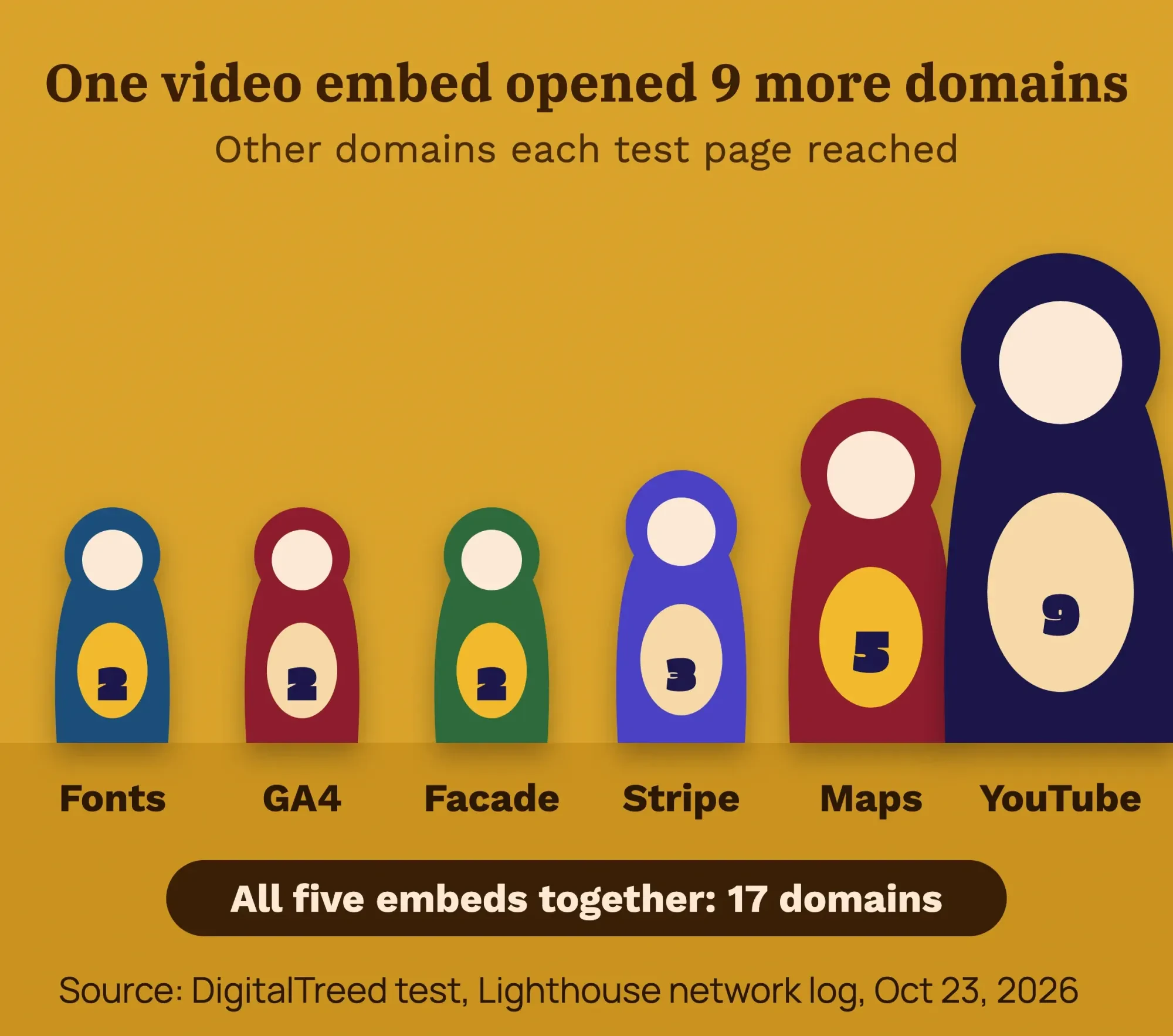 Source: DigitalTreed test, Lighthouse network log, October 23, 2026.
A chain is only as trustworthy as its weakest owner. Here's how that goes wrong. In February 2024 a Chinese company bought the polyfill.io domain. By June its script was sending some mobile visitors to scam sites, through every site that still loaded it. More than 100,000 sites were hit, according to security firm Sansec as reported by BleepingComputer. Cloudflare told site owners the service "can no longer be trusted and should be removed".
Vendors also just change their minds.
Google's Universal Analytics stopped processing data on July 1, 2023, and the old data went away a year later, so any site still relying on it lost its reports whether the owner noticed or not. Shopify's help page on uninstalling apps warns that some apps leave code in your theme. It also says uninstalling "doesn't cancel external charges". The FTC's Start with Security guide gives the plain fix on the vendor side: say what security you expect, and put it in the contract. (CISA and NIST publish the federal frameworks behind this, but they're written for large organizations.)
Myths that keep extra code on small sites
Given all that, you'd expect owners to prune hard. Most don't, because of a few beliefs that sound right and aren't.
"Async means it can't slow anything down"
It helps, but it isn't a guarantee. Google's third-party JavaScript article notes that embeds can still "block window.onload if their servers respond slowly, even if the embed is using async or defer." And async does nothing about the megabyte a video player downloads.
"Uninstalling the app removes it"
Not always. Shopify says some apps leave theme code behind. Its app performance guide adds that load time suffers when several apps install the same framework. After you remove an app, view the page source and search for its name.
"Zapier will slow my site down"
Usually not. A connector works between two services on their servers, not in your visitor's browser. Its weak spot is a different one: if either app changes, the connection can stop without telling you, so check now and then that new orders and leads still arrive.
"What matters is how many plugins you have"
What each one loads matters more than the count. An admin-only plugin may add nothing to the pages visitors see, while a slider can ship its own library to every page. The WordPress hardening guide still says to delete any plugin you aren't using, since each one is code you've got to keep updated. Our site audit tool flags heavy pages, so you'll know where to look first. And if you're weighing new store features, our list of ecommerce features worth adding separates the useful ones from hype.
First steps before you add the next integration
So nothing here says "never add an integration." It says add them on purpose. Here's the order we use:
- Write down the one job it does, such as "take class bookings."
- Look for a native app or plugin first, and prefer one that cleans up after itself.
- Test the page before you add it, and note LCP and page weight.
- Read what data it collects and whether it shares data for ads.
- Add it only to the pages that need it, never site-wide by default.
- Test again; if it's heavy, try click-to-load or another vendor.
- Update your privacy policy if it collects anything new.
- Keep a list: owner, login, cost, renewal date, pages it touches.
For steps 3 and 6, use our website speed test or Lighthouse in Chrome. Lighthouse 13 lists the outside companies whose code runs in your page in a "3rd parties" insight, which replaced the older third-party summary audit. Look at what it leaves out, too. In our report the YouTube player and the map didn't appear at all, most likely because they ran inside iframes.
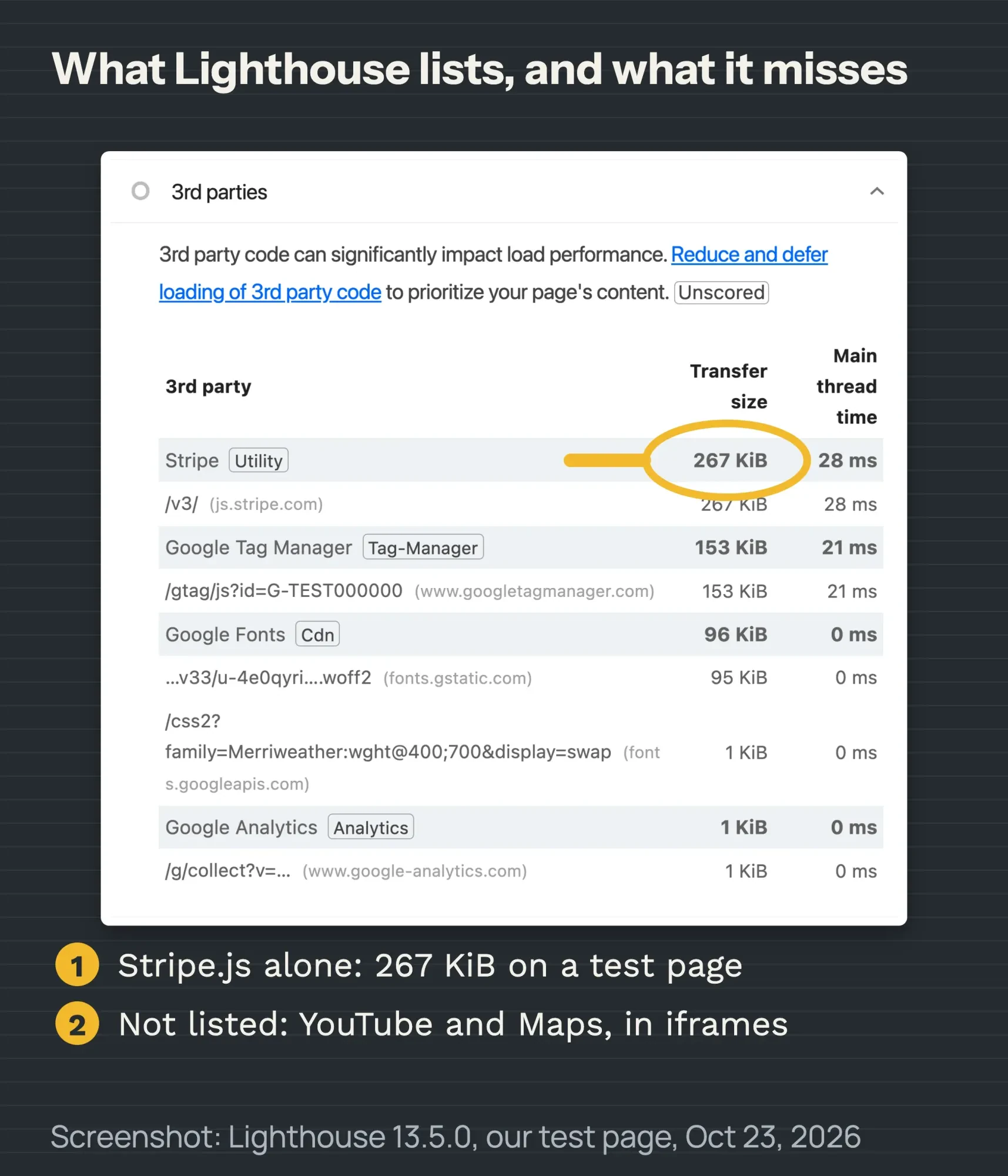 Screenshot: Lighthouse 13.5.0 report for our fictional test page, October 23, 2026.
Example: Lakewalk Clay is a made-up pottery studio in Duluth, Minnesota, that sells wheel classes online. Its owner wants a booking calendar, a map to the studio and a promo video. Following the steps, the calendar goes only on the Classes page and the map on Contact. The video sits behind a play button on the home page. The analytics tag stays site-wide, since that's its job, and checkout stays on the payment provider's hosted page.
Our take: keep the integrations that do a job you can name and earn back their weight.
Everything else is clutter with a monthly invoice.
Want someone to set this up and test it for you? Our web development team adds and trims integrations for small business sites. (We'd be paid for that work, so weigh our advice with that in mind.)
How we made this guide: We checked every law, price and quote against its source the day this was rewritten, Friday, October 23, 2026. That meant the FTC, California's Attorney General and privacy agency, the PCI Security Standards Council, Google's developer docs, Shopify, WordPress.org and the HTTP Archive. The speed test is ours. It ran on a fictional page served from an Apple Mac in India (model Mac16,10), with Chrome 155, Lighthouse 13.5.0 and simulated mobile throttling, five runs per page. We measured the GA4 tag, a YouTube iframe and its facade, a Google Maps iframe, Stripe.js and Google Fonts. We didn't test a Meta Pixel or a chat widget. You'll find every source linked in the sentence it supports.
First published August 2020. Rewritten October 23, 2026: the old vendor list and Marketo section are gone. In their place are the four routes, our speed test, US privacy and PCI rules, and real vendor failures.
Sources
- HTTP Archive: Web Almanac 2025, Third Parties
- HTTP Archive: Web Almanac 2024, Third Parties
- web.dev: Load third-party JavaScript
- web.dev: Best practices for using third-party embeds
- web.dev: Web Vitals
- web.dev: Interaction to Next Paint (INP)
- web.dev: Total Blocking Time (TBT)
- Chrome for Developers: What's new in Lighthouse 13
- Chrome for Developers: Lazy load third-party resources with facades
- Google Search Central: Understanding Core Web Vitals and Google search results
- Make: What are third-party integrations
- WordPress.org: Plugin directory
- WordPress Developer Resources: Hardening WordPress
- Shopify.dev: Built for Shopify requirements
- Shopify.dev: App performance best practices
- Shopify Help Center: Uninstalling apps
- Zapier: Plans and pricing (October 2026)
- U.S. Bureau of Labor Statistics: Web Developers and Digital Designers
- FTC: Lurking Beneath the Surface, Hidden Impacts of Pixel Tracking (March 2023)
- FTC: Enforcement action against GoodRx (February 2023)
- California Attorney General: California Consumer Privacy Act
- California Privacy Protection Agency: CPI adjustments
- California Attorney General: Sephora settlement (August 2022)
- PCI Security Standards Council: Updates for merchants validating to SAQ A
- PCI Security Standards Council: Payment page security and preventing e-skimming
- BleepingComputer: Polyfill.io supply chain attack (June 2024)
- Cloudflare: Replacing polyfill.io links (June 2024)
- Google Analytics Help: Universal Analytics is going away
- FTC: Start with Security, a guide for business
- CISA and NIST: Defending against software supply chain attacks
- NIST SP 800-161 Rev. 1: Cybersecurity supply chain risk management
- npm: lite-youtube-embed


Comments
No comments yet. Start the conversation below.