
Quick answer
For most small business sites, the best AI chatbot for website use is a free live chat tool with a bot on top: tawk.to if money is tight, Tidio to try AI answers for $0. Choose Intercom only with real chat volume, since its AI bills $0.99 per resolved conversation. Whichever you pick, label it as a bot.
An AI chatbot for a website is a chat window on your own site that answers visitors from your own pages, FAQ and policies, and hands the hard questions to a person. ChatGPT, Gemini and Claude are general assistants. You can't drop one onto your contact page and have it answer your customers about your hours.
We build and fix small business sites, and we install these widgets for clients. We don't sell or resell any of them, and nobody paid to be on this page.
Every price was read on the vendor's own pricing page the day we rewrote this, October 23, 2026. Prices change often, so check the linked page before you buy.
Key takeaways
- tawk.to gives away the most, and Tidio's free plan lets you try AI.
- Intercom's Fin AI agent costs $0.99 per outcome, so busy bots get expensive.
- Train the bot only on pages you'd stand behind, and read transcripts weekly.
- Intercom and Botpress loaders were the heaviest in our speed test.
- In California and Maine, a bot that sells must not pass as human.
The nine website chatbots at a glance
This table is the short version. "Lowest paid" is the cheapest plan that removes the free limits, with the billing period the vendor shows; where we couldn't confirm the period, we left the price out.
| Tool | Free plan | Lowest paid plan (as of Oct 23, 2026) | How the AI is billed | Best for |
|---|---|---|---|---|
| Tidio (Lyro) | Yes: 50 live chats, 50 AI chats once | $29/mo billed monthly ($24.17 billed yearly) | Lyro plan from $39/mo for 50 AI chats | Small stores trying AI |
| tawk.to | Yes, free for life with its branding | $29/mo to remove branding | AI Assist free for low chat volume, then from $29/mo | The tightest budget |
| HubSpot | Yes: 2 users, chat shows HubSpot branding | Starter $7 per seat/mo billed yearly ($20 struck) | HubSpot Credits | Teams already in HubSpot CRM |
| Crisp | Yes: 2 seats, no AI credits | Mini $45/mo per workspace, 4 seats | About 90 AI chats included | A flat bill, not per seat |
| Intercom (Fin) | No; 14-day trial | Essential $29 per seat/mo billed monthly for new customers ($39 list) | $0.99 per outcome | Real support volume |
| Zendesk | No; trial | Suite Team $69 per agent/mo monthly ($55 yearly); Support Team from $19 yearly | 5 resolutions per agent/mo, then $2.00 each | Teams that need ticketing |
| Text (LiveChat) | No; 14-day trial | Essential $25 per user/mo monthly ($19 yearly) | 10 AI resolutions/mo included | Sales-led chat |
| Chatbase | None shown on its page | Hobby $32/mo billed yearly | 700 message credits/mo | A bot trained on your docs |
| Botpress | Yes: 100 chats, 3 seats, 3 AI agents | Plus $150/mo billed yearly, 250 chats | $65 per 100 extra chats | Custom bots, technical owners |
Sources for each row: Tidio, tawk.to, HubSpot, Crisp, Intercom, Zendesk, Text, Chatbase and Botpress pricing pages, read October 23, 2026. HubSpot showed its Starter seat at $7 a month with annual billing, with $20 struck through; we couldn't confirm the month-to-month price.
 Source: vendor pricing pages, October 2026. Diagram by DigitalTreed.
tawk.to gives away the most; Tidio gives the best free taste of AI
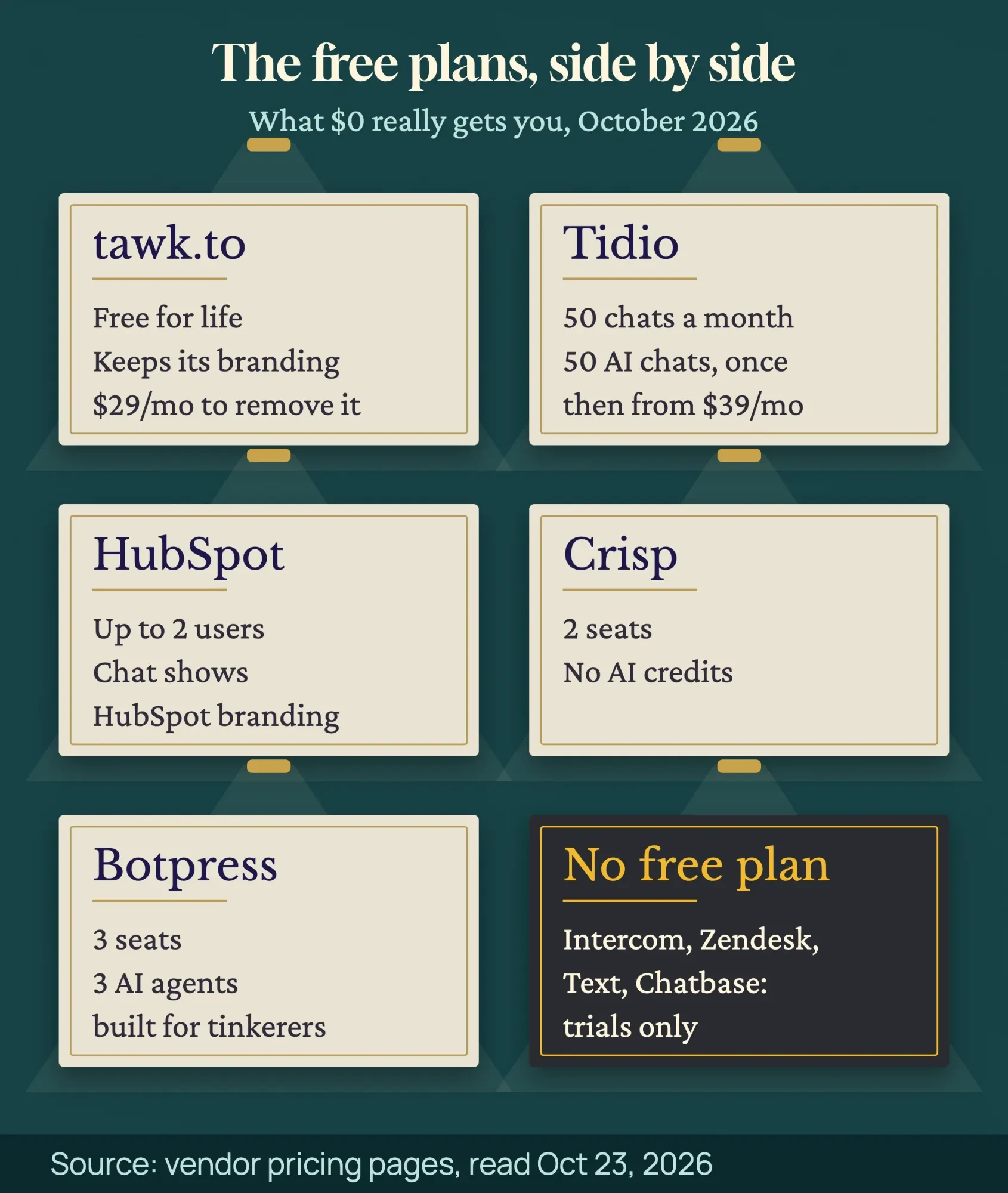
So start with the free plans, since that's where most small sites should begin. They aren't equal. The tawk.to pricing page is titled "Why is tawk.to free?" Its answer: keep the small "Powered by tawk.to" label and it's free for life. Removing the label costs $29 a month as of October 2026. You get unlimited human live chat, which is the part a small team uses most.
Tidio's free plan is tighter but includes real AI. You get 50 billable conversations a month, and its Lyro AI agent answers 50 conversations once per account, not every month. That's enough to see whether a bot can handle your questions. It isn't enough to run on. Keeping Lyro going starts at $39 a month for 50 AI conversations as of October 2026, per the Tidio pricing page.
The other free plans each carry a catch. HubSpot's is free for 2 users, but the chat shows HubSpot branding. Crisp's has 2 seats and no AI credits at all. Botpress gives you 3 seats and 3 AI agents, though it's built for people comfortable wiring up a bot.
Intercom, Zendesk, Text and Chatbase have no free plan today, only trials.
So if you want free forever, it's tawk.to. If you want to see AI answer your customers without paying, it's Tidio.
Per-outcome pricing is cheap at 50 chats and expensive at 1,000
That free trial of AI leads to the real question: what the bill looks like once a bot works. Vendors charge in three ways. Some charge per seat (each person who answers chats), some per workspace, and some per AI answer.
Intercom is the clearest per-answer example. Its Fin AI agent costs "$0.99 per outcome", and an outcome is counted at most once per conversation, according to Intercom’s pricing page. Zendesk works the same way under another name. Its Suite Team plan includes 5 "automated resolutions" per agent a month, then charges $2.00 each pay-as-you-go or $1.50 each on a commitment, per Zendesk’s pricing.
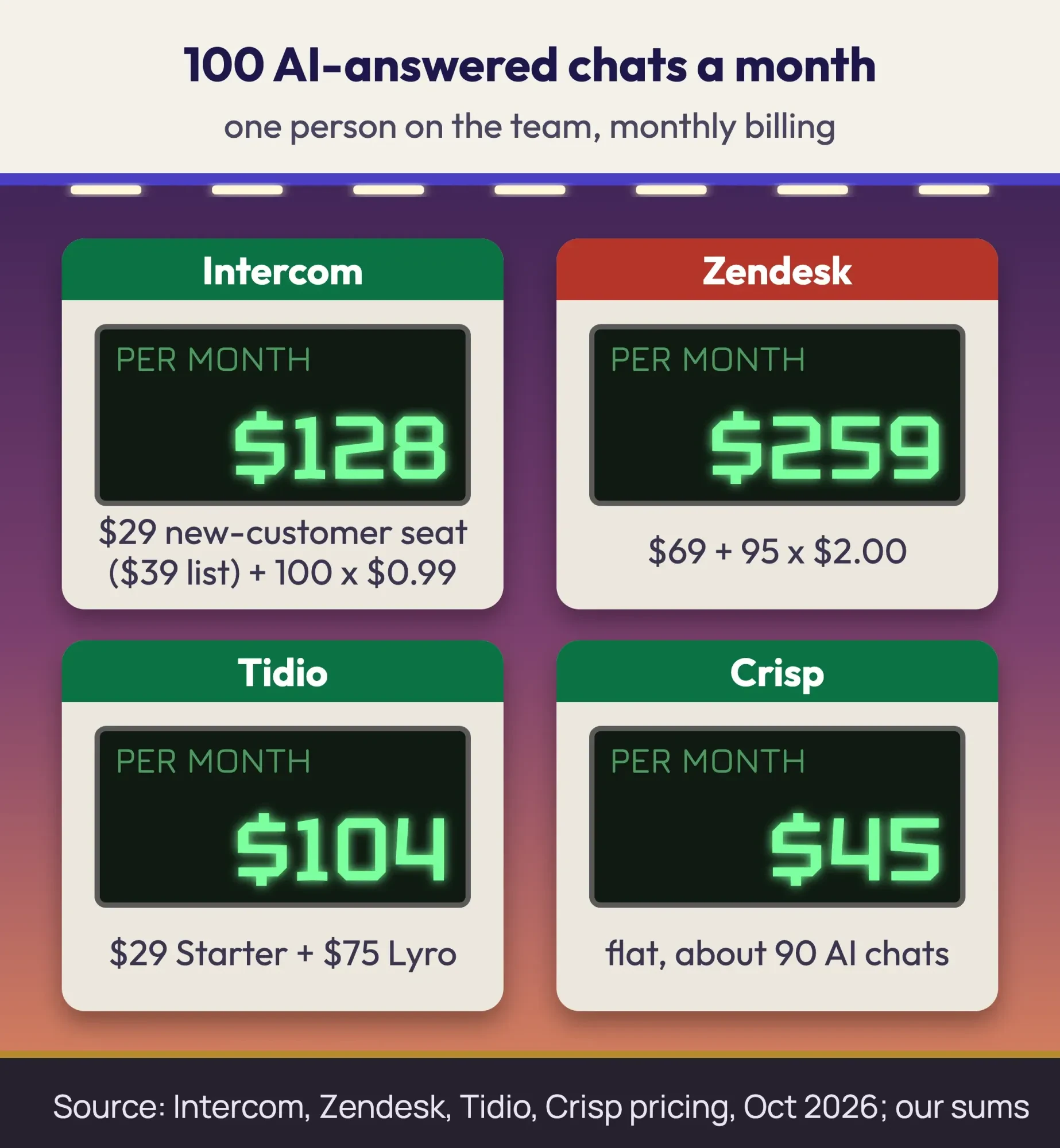
Here's what 100 AI-answered chats a month cost with one person on the team, using only the vendors' own October 2026 numbers and monthly billing:
- Intercom Essential: $29 new-customer seat ($39 list) + 100 outcomes at $0.99 ($99) = $128 a month.
- Zendesk Suite Team: $69 agent + 95 extra resolutions at $2.00 ($190) = $259 a month.
- Tidio: Starter at $29 + the Lyro plan for 100 AI chats at $75 = $104 a month.
- Crisp Mini: $45 a month flat, which covers about 90 AI conversations.
Now push it to 1,000 AI answers. Intercom becomes $29 plus $990, or $1,019 a month. Crisp and Tidio would need bigger plans, yet a flat or tiered price climbs far more slowly than $0.99 a chat. At 50 chats, though, Intercom is just $78.50.
Per-outcome pricing is fair while you're small and painful if a busy bot answers things nobody needed answered. Set a monthly spending cap in whichever tool you pick.
 Source: Intercom, Zendesk, Tidio and Crisp pricing pages, October 2026, our sums.
Prefer a fixed price for the setup work itself? You can get a quote from us. We install whichever tool fits; we don't take commissions.
Bots trained only on your own pages make fewer wrong promises
But price matters less than what the bot says.
An AI chatbot writes its answers fresh each time, so it can be confidently wrong about a refund window or a service area.
All nine tools let you point the AI at your own content: website pages, help articles, uploaded files. Chatbase and Botpress go furthest here, with bots built mainly from your documents. Older rule-based bots don't write anything. They follow buttons and scripts you set up, so they can't make things up, but they also can't handle a question you didn't plan for. Most tools now mix both.
Be careful with vendor claims, too. Many pages promise a bot that "resolves 80%" of questions. That's a sales number, not a test. The FTC has said there's "no AI exemption from the laws on the books" in its Operation AI Comply announcement. Its order against DoNotPay, the "robot lawyer" app, required $193,000 in monetary relief and barred it from claiming its service works like a real lawyer without sufficient evidence.
The same rule reaches your own bot: if it promises a price or a fix your business can't deliver, that's your promise.
Three habits keep answers honest: train it only on pages you'd stand behind, block topics it shouldn't touch (medical, legal, discounts), and read transcripts every week for the first month. Our guide to planning an AI chatbot rollout covers the team side of that work.
Most small teams need live chat with a bot, not a bot alone
Those transcripts usually show the same thing: some questions need a person. Live chat means a human answers. A chatbot means software answers. Nearly every tool above now does both, and the handoff between them is what you're really buying.
A good handoff passes the conversation to your inbox, email or phone with the history attached, and tells the visitor when a person will reply.
A bad one leaves them talking to a bot at 9 p.m. with no way out.
For a team of one to five people, a live chat tool with an AI layer (tawk.to, Tidio, Crisp, Text) fits better than a bot-only tool. If your leads already live in HubSpot, its free chat drops conversations straight into the CRM; our CRM software comparison covers that side. Need answers in Spanish as well as English? Check the language list before you pay, because AI and human chat often support different languages.
Every one installs on WordPress or Shopify in minutes
Once you've picked a mix, installing it is the easy part. Every tool gives you a short script to paste before the closing body tag, and most offer a WordPress plugin or a Shopify app.
The WordPress.org directory showed 1,609 plugins for "chatbot" when we searched it in October 2026. Two of the most used were AI Engine with 90,000+ active installs and Tidio’s own plugin with 70,000+. Install counts tell you a plugin is maintained, not that it's right for you. If you're still choosing a platform, our WordPress vs Shopify comparison covers how each handles add-ons like this.
Here's the order we follow when we add one for a client:
- List the 10 questions customers ask most (hours, prices, service area, booking, returns).
- Start on a free plan or trial and train it on your own pages only.
- Write a greeting that says it's automated and how to reach a person.
- Turn on handoff to email or live chat for anything it can't answer.
- Paste the script or install the plugin, only on pages that need it.
- Test the page speed before and after (next section).
- Add the chat vendor to your privacy policy.
- Read transcripts weekly for the first month.
To see whether chat leads to sales, track clicks on the chat button as an event; the setup is in our guide to GA4 events and reports. After the install, run a full check with our website audit tool so nothing else broke.
Intercom and Botpress loaders were the heaviest in our speed test
That speed check in step 6 is the one people skip. So we measured it ourselves.
On the evening of October 23, 2026, we took the same plain fictional test page we used in our guide to third-party integrations: a heading, three paragraphs and one 79 KiB image. We made a copy for each of six vendors and pasted that vendor's public loader script into it. We did not create an account anywhere. Each loader got a made-up placeholder ID, or none at all for Botpress, so no real bot ever loaded. Lighthouse 13.5.0 ran five times per page with simulated mobile throttling, and we kept the median of each number.
That makes this a test of the loader only, not of a configured bot. With a real account, a widget goes on to download its chat window, styles, fonts and settings, so real costs will be higher than ours. Think of these numbers as the floor.
| Test page (median of 5) | Weight added | Other domains | Main-thread work | Total Blocking Time |
|---|---|---|---|---|
| No chat (baseline) | 0 KiB | 0 | 58 ms | 0 ms |
| Crisp loader | 3 KiB | 1 | 66 ms | 0 ms |
| Chatbase loader | 23 KiB | 1 | 93 ms | 0 ms |
| Zendesk loader | 25 KiB | 2 | 77 ms | 0 ms |
| Text (LiveChat) loader | 37 KiB | 2 | 87 ms | 0 ms |
| Botpress loader | 205 KiB | 1 | 205 ms | 95 ms |
| Intercom loader | 228 KiB | 3 | 325 ms | 48 ms |
| Text loader behind a "Chat with us" button | 1 KiB | 0 | 61 ms | 0 ms |
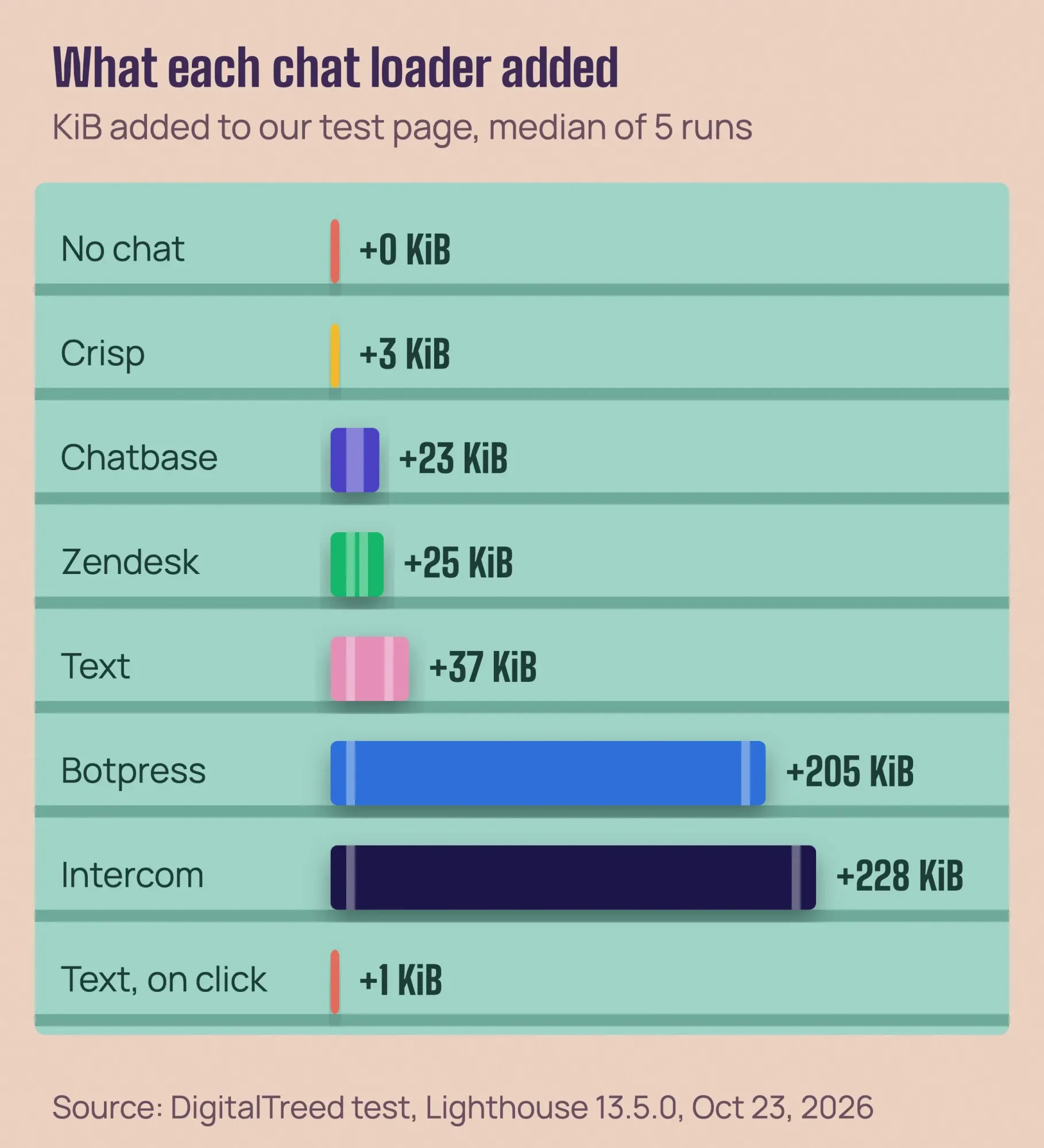
Two loaders stood out. Intercom's pulled 228 KiB from 3 domains even with a fake ID, and Botpress's single script weighed 205 KiB. Both added main-thread work: 325 ms and 205 ms, against 58 ms for the bare page. Botpress also caused 95 ms of Total Blocking Time, the lab stand-in for a page that feels stuck.
The rest stopped early. Crisp's loader added just 3 KiB, because without a real website ID it had nothing more to fetch.
Here's what surprised us.
Not one loader moved Largest Contentful Paint in a way we could trust; it stayed between 1.2 and 1.35 seconds on every page, well under the 2.5-second line in web.dev's Web Vitals guide. None of them delayed the main image, so the cost lands on responsiveness and data, not on first paint. On a real site with a theme, analytics and fonts already fighting for the main thread, that extra work adds up.
 Source: DigitalTreed test, Lighthouse 13.5.0, medians of 5 runs, October 23, 2026.
The fix is a facade: a plain "Chat with us" button that loads the real widget only when someone clicks. Google's Lighthouse facade guide names live chat (Intercom, Drift, Help Scout, Facebook Messenger) as a good case for one. And the web.dev embed best practices point out that "not every user" on a page "will interact with the chatbot." Our Text page behind a button added 1 KiB and zero outside domains. The trade-off: proactive pop-ups and unread badges wait until the click.
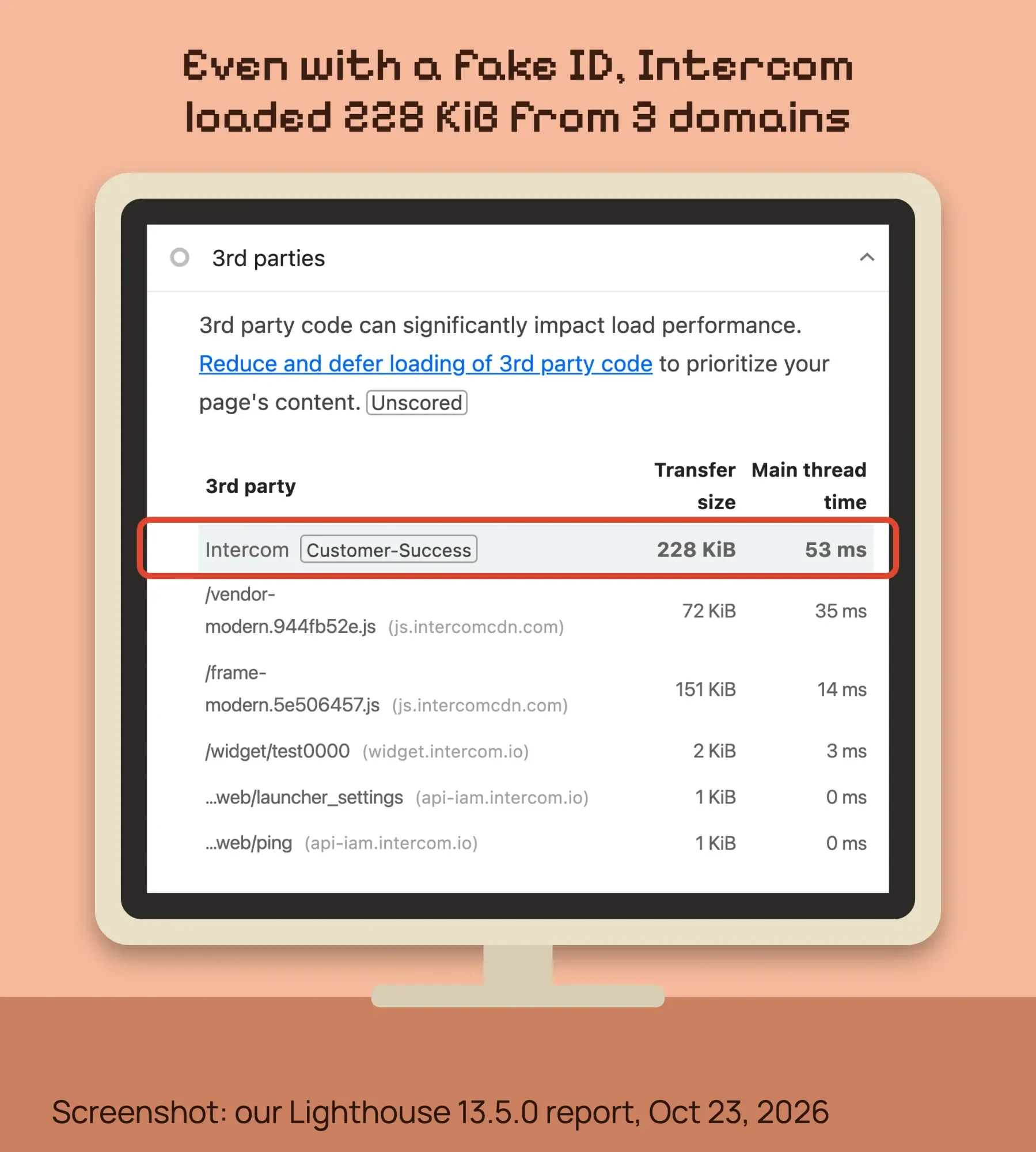 Screenshot: Lighthouse 13.5.0 report for our fictional test page with the Intercom loader, October 23, 2026.
Want the same before-and-after on your own pages? Test them with the free speed test on our site, once without the chat and once with it. Field data from real visitors matters more than any lab run, and the PageSpeed Insights walkthrough shows where to find it.
Do you have to tell visitors it's a bot?
But speed is a cost you can measure. The legal side is harder to see, and it starts with one rule: in California and Maine, a bot that sells must not pass itself off as a human.
California's bot law, SB 1001, is now Business and Professions Code sections 17940 to 17943, in force since July 1, 2019. It bans using a bot to talk with people in California online "with the intent to mislead" them about its artificial identity to drive a sale. You're not liable if you disclose it's a bot, and the disclosure must be "clear, conspicuous, and reasonably designed" to tell people. The chapter doesn't list a dollar penalty.
Maine went further in 2025. Its law, 10 M.R.S. section 1500-DD, covers AI chatbots used in trade with consumers. If a reasonable consumer could think they're talking with a human, the business must tell them "in a clear and conspicuous manner" that they aren't. No intent to mislead is needed there.
The simple answer works everywhere: say it in the first message. "I'm an automated assistant. Type 'person' to reach our team."
Privacy is the second piece. Chat logs hold names, emails and order details, which is personal information. The California Consumer Privacy Act reaches for-profit businesses that meet one of three tests, listed on the Attorney General’s CCPA page. One is gross annual revenue over $26,625,000, the figure since January 1, 2025, per the California Privacy Protection Agency. Most small businesses fall under that, but your privacy policy should still name the chat vendor and what it stores.
Then there's the wiretap risk. Plaintiffs have sued retailers under California's Invasion of Privacy Act, Penal Code section 631, claiming the chat vendor "read" chats in transit without consent. In a ruling reported in February 2026, a Los Angeles court ended one such case against Beyond Yoga on summary judgment, finding no evidence the vendor read the chats in transit, as Inside Class Actions reported. A short line in the chat window ("Chats are recorded and handled by our chat provider") lowers that risk.
We're describing the rules in general terms here, and none of it is legal advice for your business. If your bot sells to California or Maine customers, have a lawyer licensed in your state read your setup.
Frequently asked
Can one chatbot also answer WhatsApp and Instagram messages?
Often, yes. As of October 2026, Tidio's integrations page lists WhatsApp, Instagram and Messenger as channels in its shared inbox. That means website chats and social messages land in one place. Check which channels your plan includes before you connect them.
Can I build a website chatbot from free code on GitHub?
You can. As of October 2026, the Botpress repository on GitHub is published under the open-source MIT license. Running it yourself means you host it, update it and connect an AI model. For most small teams, a hosted plan is less work.
How do I add an AI chatbot to a Wix site?
Start with Wix's own tool, or paste a vendor's script if your plan allows custom code. As of October 2026, Wix's help center says the old Wix Chat can no longer be installed on new sites. Wix Smart Chat replaces it as the AI and manual chat option.
Choose tawk.to if you need free; choose Intercom only if you need scale
So put the law, the speed and the prices together and the choice gets simpler than vendor lists make it look:
- Choose tawk.to if you want free human live chat for good and can live with its label.
- Choose Tidio if you sell online and want to try AI answers before paying.
- Choose HubSpot if your leads and email already run there.
- Choose Crisp if you want one flat monthly price for a small team.
- Choose Intercom or Zendesk if you answer hundreds of chats a month and need ticketing.
- Choose Chatbase or Botpress if you want a bot built mainly from your documents.
Example: Copperline Plumbing is a made-up three-person plumber in Bend, Oregon, with a WordPress site. Most after-hours chats ask the same three things: the emergency call-out fee, the service area and how to book. That makes Tidio's free plan the first stop, trained only on the Services and FAQ pages. The bot's first message says it's automated, and anything urgent gets the phone number. It runs behind a "Chat with us" button on the contact and service pages only, so the home page stays light. If the free AI chats run out and the bot is earning its keep, the Lyro plan is the next step.
And if those chats turn out to be phone calls in disguise, the button can simply say "Call us now."
Our take: start free, label the bot, load it behind a click, and pay per answer only when you can see the answers are worth it.
Want it set up so it answers well and doesn't slow your site? Our web development team installs and tunes chat widgets for small business sites. That's paid work, and it's what we do. For more features shoppers now expect, see our list of ecommerce website trends.
How we made this guide: On Friday, October 23, 2026, we read every price on each vendor's pricing page. We checked each law against its statute or agency text: California's legislature (with FindLaw's copy of Penal Code 631, which the legislature's site blocked), Maine's legislature, the FTC, the California Attorney General and the California Privacy Protection Agency. For our speed test, we ran six public chat loader scripts with placeholder IDs, plus one click-to-load button, on a fictional page. We served it from a Mac (Mac16,10) in India and tested with Chrome 155 and Lighthouse 13.5.0, simulated mobile, five runs per page. We created no accounts and sent no customer data. Each source is linked where its fact appears.
First published July 2020. Rewritten October 23, 2026: the old list of general AI assistants is gone. In its place are nine real website chat tools with dated prices, our loader speed test, and the US bot, privacy and wiretap rules.
Sources
- Tidio: Pricing (October 2026)
- tawk.to: Why is tawk.to free? (October 2026)
- HubSpot: Service Hub pricing (October 2026)
- Crisp: Pricing and plans (October 2026)
- Intercom: Pricing (October 2026)
- Zendesk: Pricing (October 2026)
- Text (LiveChat): Pricing (October 2026)
- Chatbase: Pricing (October 2026)
- Botpress: Pricing (October 2026)
- WordPress.org: AI Engine plugin
- WordPress.org: Tidio live chat plugin
- Chrome for Developers: Lazy load third-party resources with facades
- web.dev: Best practices for using third-party embeds
- web.dev: Total Blocking Time
- web.dev: Web Vitals
- California Legislature: SB 1001, Bots: disclosure (2018)
- Maine Legislature: 10 M.R.S. section 1500-DD
- FTC: Crackdown on deceptive AI claims and schemes (September 2024)
- FTC: Final order with DoNotPay (February 2025)
- California Attorney General: California Consumer Privacy Act
- California Privacy Protection Agency: CPI adjustments
- California Legislature: Penal Code section 631
- Inside Class Actions: Website chat wiretap claims dismissed (February 2026)
Comments
No comments yet. Start the conversation below.