
Quick answer
Pick Shopify if you want one monthly bill, hosting included and no server work. Pick WordPress with WooCommerce if content drives your sales or you want full control of code and URLs. On cost, card fees matter more than plan prices: both charge about 2.9% + 30¢ per online sale, as of October 2026.
WordPress vs Shopify is the first big choice for most new online sellers. WooCommerce is a free, open-source ecommerce plugin for WordPress, per WooCommerce. Here, WordPress means self-hosted WordPress plus WooCommerce. W3Techs counts WordPress on 39.6% of all websites and Shopify on 5.3%, as of October 21, 2026.
We priced both for one fictional store with $50,000 in yearly sales, line by line, from each vendor's pricing page on October 22, 2026. The math is in the table, so you can check every total.
Key takeaways
- Choose by who will run the store, not by the plan price.
- Both platforms charge about 2.9% + 30¢ per US card sale.
- Shopify Basic adds a 2% fee if you skip Shopify Payments.
- Grow beats Basic on card fees only past about $360,000 a year.
- Neither platform files or remits your sales tax for you.
WordPress vs Shopify key facts
- Shopify adds a 2% fee on Basic if you use an outside processor, per Shopify pricing, as of October 2026.
- New Shopify stores get a free 3-day trial with no credit card required, per Shopify's pricing FAQ, October 2026.
- WooCommerce is free, and its pricing page puts hosting at $25 to $350 a month for most stores, as of October 2026.
- In our $50,000 example, card fees were $1,750 on every option at the standard rate, as of October 2026. That was 83% of the Shopify Basic total.
- By our math, upgrading from Shopify Basic to Grow doesn't pay for itself below about $360,000 a year in card sales, at October 2026 prices.
- Google's site move guide says to keep 301 redirects in place "generally at least 1 year."
Which is better for a small store, WordPress or Shopify?
For most first stores with nobody technical on the team, Shopify is the safer pick. WordPress with WooCommerce wins when the store sits inside a content-heavy site, or you need control Shopify won't give you. Card fees cost about the same on both, so who runs the store matters more. Not sure you need either platform? Our no-code vs custom development comparison covers builders, app builders and custom code side by side.
| As of October 2026 | Shopify | WordPress + WooCommerce |
|---|---|---|
| Software price | Basic: $29 a month billed yearly, $39 monthly | WooCommerce plugin: free |
| Hosting | Included | You buy it: $25 to $350 a month for most stores, per WooCommerce |
| Online US card fee | 2.9% + 30¢ on Basic | 2.9% + 30¢ with WooPayments or Stripe |
| Extra fee with an outside processor | 2% on Basic | None from WooCommerce |
| Free themes | 24 in the Shopify Theme Store | 8,767 in the WordPress.org directory |
| Updates, backups, security | Shopify | You or your host |
| URL control | /products/ and /collections/ paths are fixed | You set the permalinks |
| Sales tax tool | Shopify Tax, free on the first $100,000 of lifetime sales (stores created on or after May 13, 2026) | WooCommerce Tax, $0 |
Each row is sourced lower down. The Shopify prices come from its pricing page, and the WooCommerce ranges from WooCommerce pricing, both read on October 22, 2026.
Our take: choose by who will run the store, not by the plan price. If nobody will update plugins every month, Shopify's monthly plan buys you that work.
WordPress vs Shopify cost: what do you pay in year 1?
As of October 2026, Shopify Basic costs $29 a month billed yearly, or $39 month to month. Grow is $89 a month billed yearly, or $105 month to month, per Shopify's plan table. Shopify says there are no setup fees, and hosting and an SSL certificate are included.
WooCommerce itself is free. Its pricing page lists hosting at $25 to $350 a month for most stores, as of October 2026. Paid extensions run $29 to $299 a year each.
New Shopify stores start with a free 3-day trial, with no credit card needed. After it, most plans cost $1 a month for 3 months, as of October 2026, per Shopify's pricing FAQ. Then the standard monthly price starts. Trial length can vary, says its free trial help page. Our table leaves the $1 offer out, since it ends after 3 months.
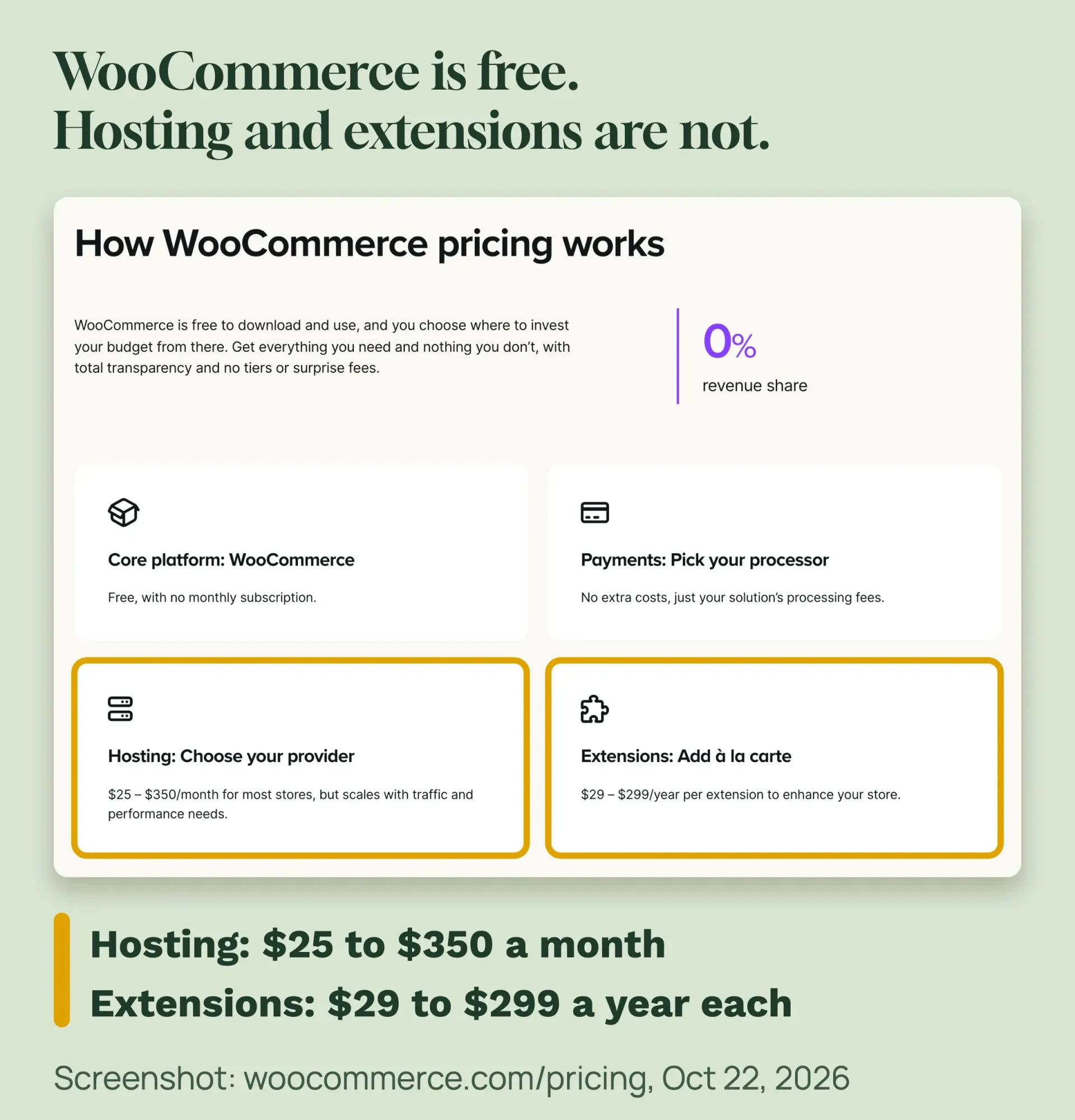 Screenshot: woocommerce.com/pricing, October 22, 2026, marks by DigitalTreed.
Cheap hosts start lower than that range. SiteGround's StartUp plan was $3.99 a month prepaid for 12 months, an intro price that renews at $17.99, as of October 2026. From year 2, that hosting costs 12 x $17.99 = $215.88 a year. A .com domain was $11.08 a year at Porkbun the same month.
Year-1 cost table: what a $50,000 store pays
Example (fictional): Bluebird Candle Co. is a 2-person candle maker in Asheville, North Carolina. It sells $50,000 online in year 1, as 1,000 orders of $50, all on US cards.
| Cost line (as of October 2026) | Shopify Basic + Shopify Payments | Shopify Basic + Stripe | WooCommerce on SiteGround + WooPayments |
|---|---|---|---|
| Plan or software | 12 x $29 = $348 | 12 x $29 = $348 | $0 |
| Hosting | Included | Included | 12 x $3.99 = $47.88 (intro price) |
| .com domain (Porkbun) | $11.08 | $11.08 | $11.08 |
| Theme and SSL | $0 (free theme, SSL included) | $0 | $0 (free theme; SSL if your plan includes it) |
| Card fees | 2.9% x $50,000 + 1,000 x $0.30 = $1,750 | 2.9% x $50,000 + 1,000 x $0.30 = $1,750 | 2.9% x $50,000 + 1,000 x $0.30 = $1,750 |
| Shopify third-party fee | $0 | 2% x $50,000 = $1,000 | Not charged |
| Sales tax tool | $0 | $0 | $0 |
| Year-1 total | $2,109.08 | $3,109.08 | $1,808.96 |
| Share of $50,000 in sales | 4.2% | 6.2% | 3.6% |
| Year 2, same sales | $2,109.08 | $3,109.08 | $1,976.96 (hosting renews at 12 x $17.99 = $215.88) |
The card rate is the same 2.9% + 30¢ on Shopify Payments Basic, on Stripe and on WooPayments in the US, as of October 2026. Shopify Payments charges 3.5% + 30¢ on Basic for cards it lists as premium, so $1,750 is the low end there. Card fees, $1,750, are 83% of the $2,109.08 Shopify Basic total.
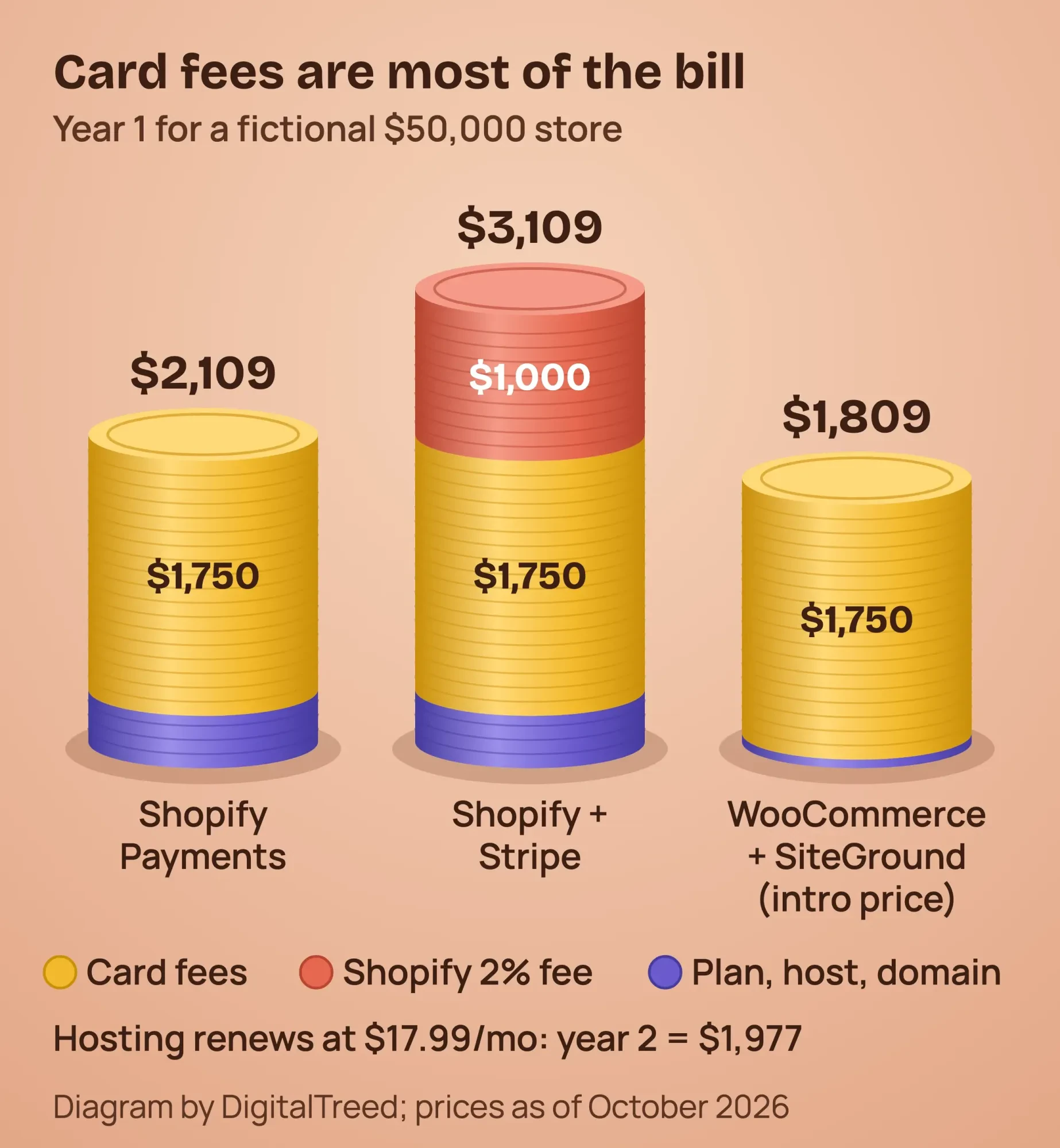 Diagram by DigitalTreed; fictional store, prices as of October 2026.
WooCommerce comes out $300.12 cheaper in year 1 here. But $3.99 intro hosting, as of October 2026, is a floor, not the norm. At WooCommerce's own $25-a-month starting point, the WooCommerce estimate gives $300 a year. The total becomes $2,061.08, only $48 less than Shopify Basic, before your time on updates.
Taking PayPal changes the math. PayPal's US business fees were 2.99% + 49¢ for card payments, as of October 2026, or $1,985 on the same 1,000 orders. Run your own order sizes through our free PayPal fee calculator.
Does Shopify charge a fee per sale?
Yes, through card fees, and through a second fee if you skip Shopify Payments. That third-party fee applies "when you use a third-party payment provider (instead of Shopify Payments)," per Shopify's pricing FAQ. On Basic, that fee is 2%, as of October 2026. Our payment gateway cost guide works the same fees out for six providers.
On Shopify, international cards add 1% on every plan. Here are the online rates for US cards, as of October 2026:
| Plan (billed yearly) | Monthly price | Online card rate | Third-party fee |
|---|---|---|---|
| Basic | $29 | 2.9% + 30¢ | 2% |
| Grow | $89 | 2.7% + 30¢ | 1% |
| Advanced | $359 | 2.5% + 30¢ | 0.6% |
| Plus | From $2,300 (monthly) | 2.25% + 30¢ | 0.2% |
WooCommerce charges no fee per sale, so you pay only your processor. WooPayments charges 2.9% + $0.30 per US card, with no setup or monthly fee, as of October 2026. A card dispute costs $15 there and on Stripe's pricing, and Stripe returns it if you win.
When does upgrading to the Grow plan pay off?
Upgrading from Basic to Grow doesn't save money on card fees until you pass about $360,000 a year in card sales. Grow costs $1,068 a year billed yearly, against $348 for Basic. That's $720 more, as of October 2026, from Shopify's prices. In return, its card rate is 0.2 points lower.
Divide $720 by 0.2% and you get $360,000 (prices as of October 2026). At $50,000, Grow costs $2,718 against $2,098 for Basic, before the domain.
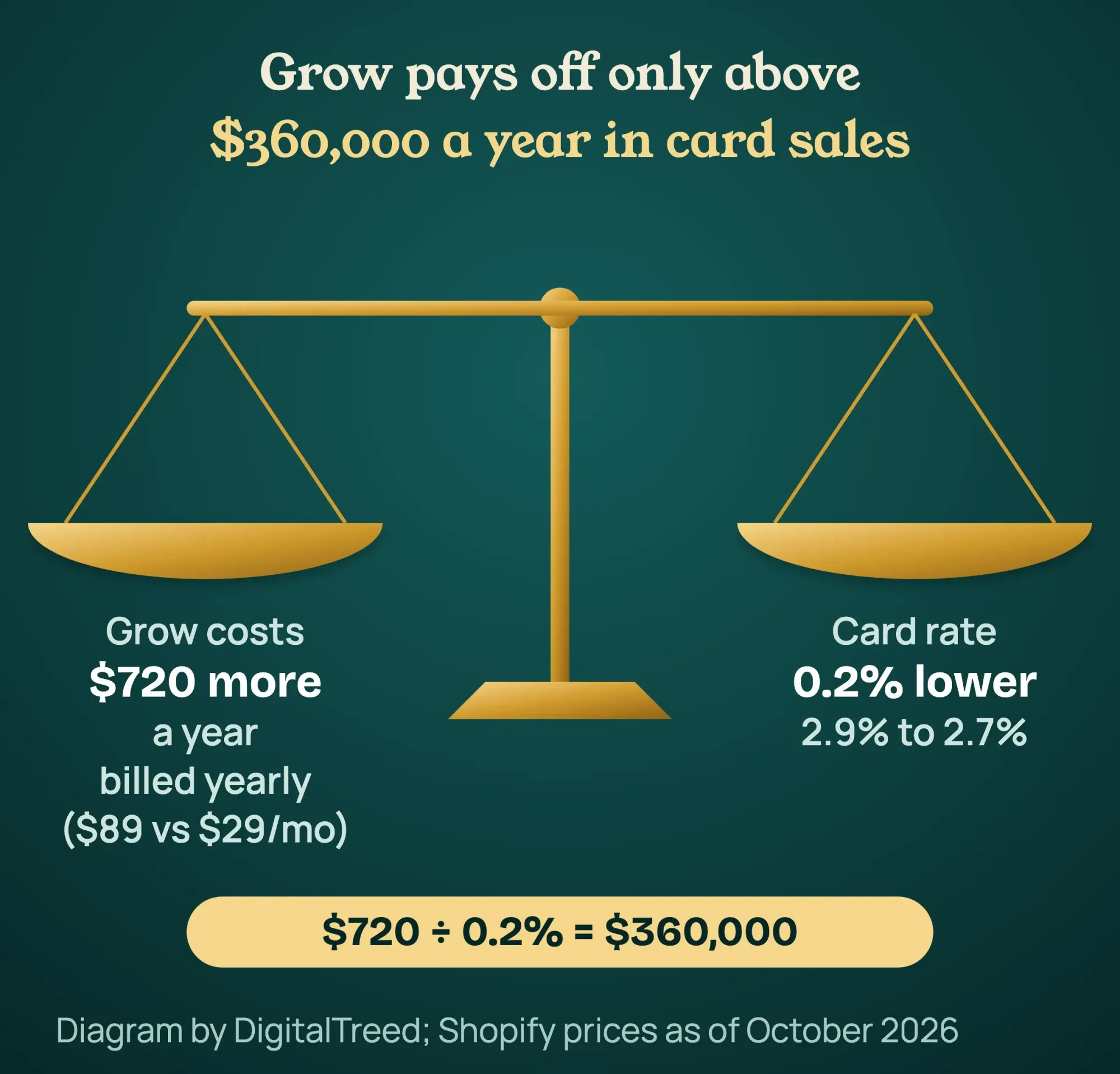 Diagram by DigitalTreed, from Shopify prices billed yearly ($29 and $89 a month), as of October 2026.
With an outside processor, the third-party fee drops from 2% to 1% on Grow. Then $720 divided by 1% is $72,000. Upgrade for the 5 staff accounts Grow includes, if you need them, not for fees.
Is Shopify easier to set up than WordPress?
Yes, for most beginners. Shopify runs the server, so setup happens in your browser. Its free trial help page lists 4 steps: enter your email, answer a few questions, set your location and create an account. A WordPress store needs its own host and a plugin setup, so it's slower to launch.
Your new store starts in private mode. To take orders, you set up a payment provider and pick a paid plan, per the same page.
The WooCommerce server guide asks for PHP 8.3 or newer, MySQL 8.0 or MariaDB 10.6 or newer, HTTPS, and a 256 MB memory limit. Ask your host to confirm all four before you buy.
Then you install WordPress and the free WooCommerce plugin. Its setup checklist walks you through these tasks:
- Add your products.
- Set up payments.
- Customize your store.
- Collect sales tax.
- Select your shipping options, when the checklist shows this task.
- Launch your store, after a test order.
For the WordPress part, follow our 10 steps to make a WordPress website. Our step-by-step WordPress website guide covers the whole build, with year-1 and renewal costs. Our take: Shopify gets a first store selling sooner. WooCommerce takes more setup, but every setting stays in your hands.
What help do you get when something breaks?
Shopify includes 24/7 live chat support on the Basic plan, per its plan comparison, as of October 2026. Grow also gets live chat, and Advanced gets enhanced live chat. On WordPress, help comes from your host, extension sellers and the community. Our WordPress 502 bad gateway guide shows which errors you can fix yourself and which ones need your host.
WooCommerce.com supports the products it sells there, such as paid extensions and themes. Its support policy says it does "not give general WordPress support." For WordPress itself, it points you to the WordPress.org forums.
WordPress vs Shopify for SEO: which is better?
Google has not published a ranking advantage for either platform. Both let you edit titles, meta descriptions and image alt text, and both make sitemaps. Google's URL guidance asks for "a simple URL structure" with readable words, and both meet that by default.
The difference is control. On Shopify, product and collection URLs keep fixed /products/ and /collections/ paths. Its robots.txt help page calls the default file "optimal for Search Engine Optimization (SEO)" as it is, and changing it means editing a theme template.
WordPress lets you set any URL pattern and edit any file. Most stores add an SEO plugin, and our Yoast SEO guide shows the settings that matter.
Speed matters more than the platform name. Before you choose a theme, open its demo store and test it with our free website speed test.
Our take: good product pages, reviews and links move rankings more than the platform does.
Shopify vs WooCommerce: which has more features built in?
Shopify puts most selling tools in every plan, including abandoned checkout recovery and gift cards on Basic. WooCommerce covers the basics for free. Its pricing page says you "only pay for the added features you use." Here is Shopify Basic against the free WooCommerce core:
| Feature (as of October 2026) | Shopify Basic | WooCommerce (free core) |
|---|---|---|
| Number of products | Unlimited | Unlimited |
| Discount codes | Included | Built in: percentage, fixed cart and fixed product coupons |
| Stock tracking | Included, up to 10 inventory locations | Stock level per product, and per size or color variation |
| Abandoned cart recovery | Included | AutomateWoo extension, $159 for a 1-year plan |
| Gift cards | Included | Gift Cards extension, $79 for a 1-year plan |
The Shopify column comes from its plan comparison. The WooCommerce column comes from its coupon guide and product guide, read on October 23, 2026.
Need both paid extras? AutomateWoo and Gift Cards add $159 + $79 = $238 a year, as of October 2026. Our example store would then pay $1,808.96 + $238 = $2,046.96 in year 1, with intro hosting. That is $62.12 less than Shopify Basic. At $25-a-month hosting, it becomes $2,061.08 + $238 = $2,299.08, or $190 more than Shopify Basic.
Our take: list the features you need on day 1, then price the extensions before you compare totals.
How big are the theme and plugin catalogs?
WordPress has the bigger catalog by far. On October 22, 2026, the WordPress.org plugin directory listed 72,305 plugins, and its theme directory listed 8,767 themes. Shopify's catalog is smaller and curated, so judge it by whether the theme or app you need exists.
WooCommerce itself has over 7 million active installs, per its WordPress.org plugin page. Paid extensions are where its costs grow. WooCommerce Subscriptions was $279 a year, as of October 2026.
The Shopify Theme Store showed 24 free themes on October 22, 2026. The first page of paid themes ran from $200 to $380. Shopify apps are priced one by one, so check each listing before you count on it.
Is Shopify more secure than WordPress?
Shopify takes more of the security work off you, while a WooCommerce store's safety rests on its host and your updates. Its pricing FAQ says Shopify is "certified Level 1 PCI DSS compliant," and that stores are PCI compliant by default. It also runs the hosting and the SSL certificate. Shopify is software as a service, so it runs more of the stack for you; our cloud computing architecture guide explains this shared responsibility model.
On WooCommerce, updates, backups and server security are your job or your host's. Take cards through a hosted payment field? The PCI Security Standards Council explains the short SAQ A form for stores that fully outsource card data. Ask your processor which one you need.
Whichever you pick, check that your certificate is valid and not close to expiry with our free SSL checker. On WordPress, turning on HTTPS in two places can cause a loop; our guide to fixing too many redirects in WordPress shows the safe order.
Who handles sales tax on each platform?
Both platforms calculate sales tax at checkout, but neither files it for you or decides where you owe it. Shopify's Help Center says it's your responsibility to check rates and to file and remit your taxes. That work stays with you or your accountant.
Shopify Tax is free on your first $100,000 of lifetime sales, as of October 2026. After that, it charges 0.35% on orders to states where you collect. Shopify's example is a $0.11 fee on a $30 t-shirt, for stores created on or after May 13, 2026.
WooCommerce Tax is free, as of October 2026. It uses your store address to decide where to collect. Its documentation says it "does not file returns, remit tax, or determine where your business has a tax obligation" for you.
Where you owe tax depends on each state. After the South Dakota v. Wayfair ruling in 2018, states can make out-of-state sellers collect. South Dakota's test was more than $100,000 of sales or 200 or more orders a year. California sets $500,000, per the California CDTFA.
Texas also uses $500,000, per the Texas Comptroller. Your home state usually comes first. This is general information, not legal or tax advice. Check with a CPA or tax attorney for your state.
Can you switch platforms later?
Yes, but plan for it on day 1, because product URLs and images don't move cleanly. WordPress is free software under the GPLv2 license, per WordPress.org. Your files and database sit on your host, so you can move them to another host.
Shopify lets you export products to a CSV file. But its export help page says product images "aren't included in the CSV file" you get. Keep the old store live until the new one has pulled the images in.
URLs change in either direction. Shopify's URL redirect rules say you can't redirect URLs that use the fixed /products and /collections paths. You can only redirect from broken URLs.
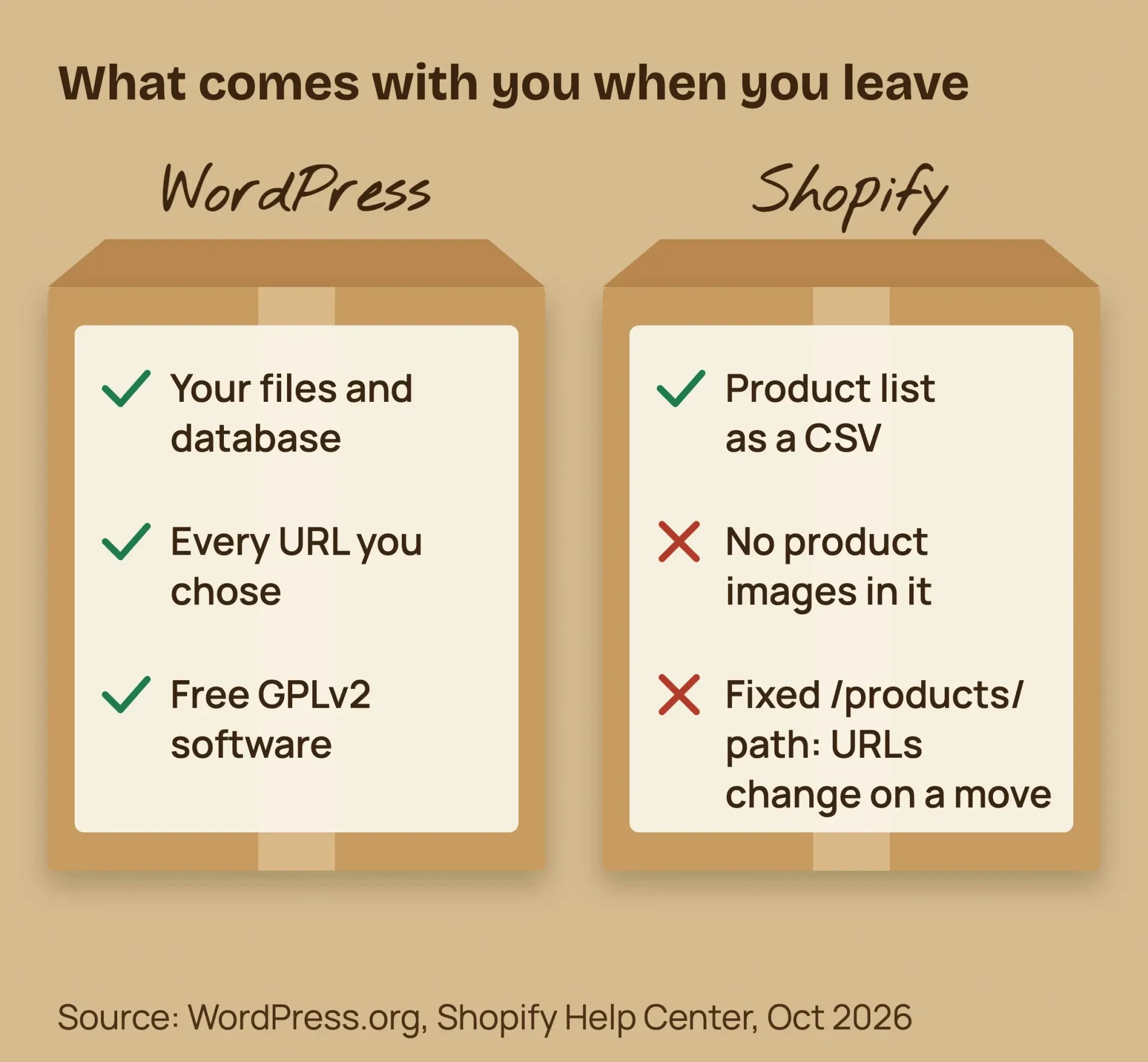 Diagram by DigitalTreed, from WordPress.org and Shopify Help Center, October 2026.
Google's site move guide says 301 redirects "don't cause a loss in PageRank" when you move. Keep them "generally at least 1 year," it adds. After a move, test old URLs with our free redirect checker.
Buy your domain at a registrar you control, too. If you buy it through Shopify, its domain help page says renewals bill separately from your plan. For a full move plan, see the site migration steps in our advanced SEO guide.
A move is the hardest step to get right. If you'd rather have it planned for you, we can quote your store setup or move, with a redirect map included. (DigitalTreed sells this service.)
Mistakes to avoid when you choose
- Comparing plan prices only. In our example, card fees were 5 times the Shopify Basic plan.
- Using an outside processor on Shopify Basic and paying the extra 2% fee.
- Picking the cheapest shared host for a store, then paying about 4.5 times the price at renewal.
- Assuming the platform files your sales tax. Neither Shopify nor WooCommerce does.
- Adding apps or plugins with no plan to update or cancel them.
- Moving platforms without a list of old and new URLs.
The renewal jump in item 3 is SiteGround's $3.99 intro and $17.99 renewal, as of October 2026, from its WordPress hosting page.
When does each one win?
Shopify wins for sellers who want a store running fast with no server work. WordPress with WooCommerce wins when content brings the buyers, or when you need control of code and URLs. Pick the list below that's closest to your business, then check the cost table with your own numbers.
Shopify wins when:
- You sell physical products and want one bill with no server work.
- Nobody on your team is technical, or you need to launch this month.
- You also sell in person and want one system for both.
WordPress with WooCommerce wins when:
- Your blog, recipes or guides bring the buyers, and the store is one part of the site.
- You need full control of URLs, code or unusual product options.
- You already run WordPress and someone can keep it updated.
Going with WordPress? Start with our guide on how to make a WordPress website, then add WooCommerce. For the whole build, from products to payments, read our ecommerce website guide for beginners.
Not sure who should build it? See how to hire a web designer for small businesses. If you lean to Shopify, read how to choose a Shopify development company. Want both? Shopify's Buy Button can add products to a WordPress blog.
Frequently asked
Is Shopify better than WordPress for ecommerce?
For most first stores with no technical help, yes. WordPress with WooCommerce is better when content brings your buyers or you need full control.
Is Shopify more expensive than WooCommerce?
Plan for plan, yes. But in our $50,000 example the year-1 gap was $300.12, because card fees of $1,750 hit both. Prices as of October 2026, from WooCommerce and Shopify.
How much does WooCommerce cost per month?
The plugin is free. WooCommerce puts hosting at $25 to $350 a month for most stores, as of October 2026. Add card fees and any paid extensions, at $29 to $299 a year each.
Does Shopify take a cut of every sale?
Card fees start at 2.9% + 30¢ on Basic, as of October 2026. Shopify adds 2% on Basic if you use an outside processor, per its pricing page.
How much does Shopify take from a $100 sale?
On Basic with Shopify Payments, a $100 online sale on a standard US card costs 2.9% x $100 + $0.30 = $3.20. A premium card costs 3.5% x $100 + $0.30 = $3.80. Rates as of October 2026, per Shopify pricing.
Can I keep my WordPress blog and sell with Shopify?
Yes. Shopify's pricing FAQ says the Buy Button channel can "embed buy buttons on an external website or blog."
Can I switch from WordPress to Shopify later?
Yes. Shopify offers a Store Importer app for moving in. Expect your product URLs to change, and set up 301 redirects from every old URL.
Your next step
Write down your expected yearly sales and order size, then fill in the year-1 table above with your numbers. Once card fees are in, the cheaper option is usually clear.
If you'd like it built or moved for you, get a free quote with a fixed price before any work starts.
How we made this guide: we read the Shopify, WooCommerce, Stripe, PayPal, SiteGround and Porkbun pricing pages on October 22, 2026. We took the WooCommerce screenshot that day. Catalog counts came from WordPress.org's public directory data the same day. We recomputed every total in the cost table by hand, and each fact links to its source inline. Updated October 23, 2026: added setup and support, a store features table, Shopify's trial offer and two cost FAQs. Updated October 25, 2026: added a sourced key facts list, direct answers under the question headings and a link to our WordPress website guide.
First published April 22, 2025. Rewritten October 2026: a year-1 cost table with the math shown, fees per sale, an upgrade break-even, sales tax and switching.
Sources
- Shopify: Pricing (plans, card rates, third-party fees, FAQ)
- Shopify: Shopify Tax pricing
- Shopify Help Center: Shopify Tax
- Shopify Help Center: Creating and managing URL redirects
- Shopify Help Center: Editing robots.txt
- Shopify Help Center: Exporting products
- Shopify Help Center: Buying a domain
- Shopify Theme Store: free themes
- WooCommerce: Pricing
- WooCommerce: WooPayments fees
- WooCommerce: WooCommerce Tax documentation
- WooCommerce: Subscriptions extension
- WordPress.org: License
- WordPress.org: WooCommerce plugin page
- WordPress.org: Plugin directory
- WordPress.org: Theme directory
- Stripe: Pricing
- PayPal: US business fees
- SiteGround: WordPress hosting plans (vendor)
- Porkbun: .com domain pricing (vendor)
- W3Techs: Usage of content management systems, October 21, 2026
- Google Search Central: URL structure best practices
- Google Search Central: Site moves with URL changes
- South Dakota v. Wayfair, Inc., 585 U.S. (2018), Cornell LII
- California CDTFA: Wayfair and remote sellers
- Texas Comptroller: Remote sellers
- PCI Security Standards Council blog: updates for SAQ A merchants
- Shopify Help Center: Trying Shopify with a free trial
- WooCommerce: Server recommendations
- WooCommerce: Setup wizard and checklist
- WooCommerce: Support policy
- WordPress.org: Support forums
- WooCommerce: Managing coupons
- WooCommerce: Adding and managing products
- WooCommerce: AutomateWoo extension
- WooCommerce: Gift Cards extension


Comments
No comments yet. Start the conversation below.