
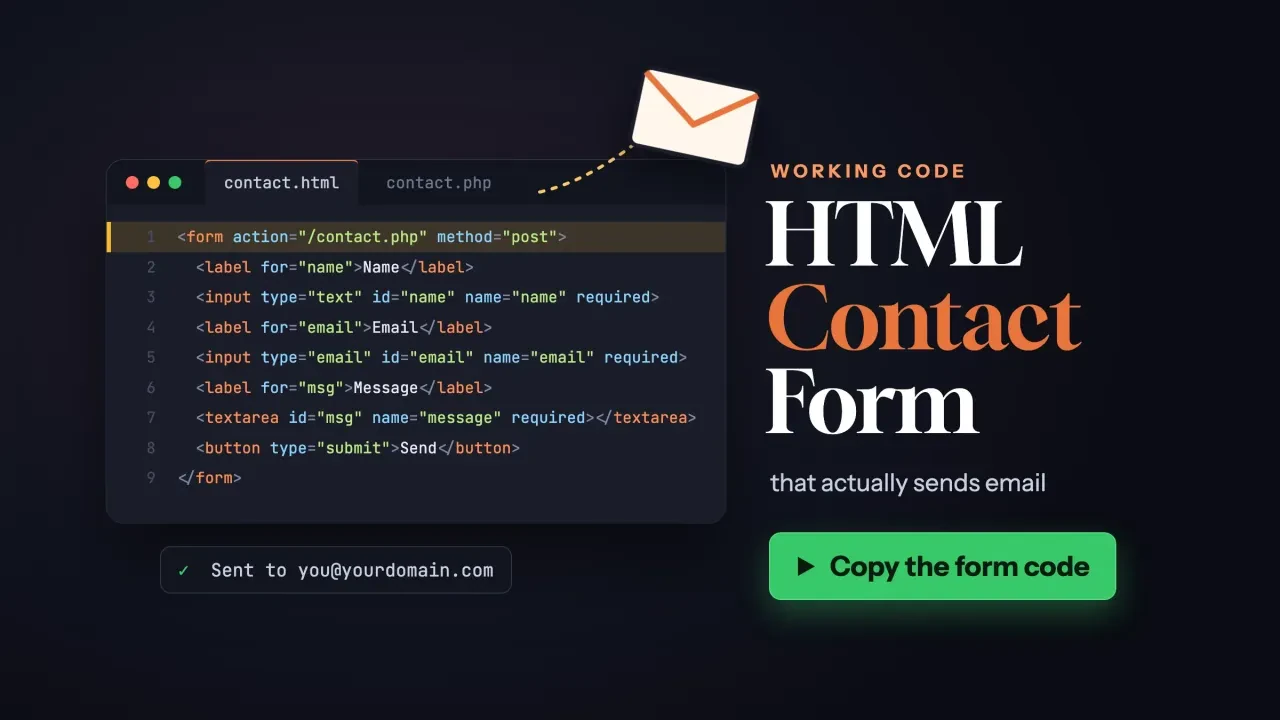
Quick answer
An HTML contact form can't send email by itself. HTML only collects the fields and posts them to the URL in the form's action attribute. A PHP script on your server, a form service or a WordPress plugin does the sending. If your form seems to work but nothing arrives, check the From line first.
That's the part most HTML contact form tutorials skip.
They stop at the markup, so the Send button looks fine while the messages go nowhere.
On October 26, 2026, we built the form below, wrote a small PHP handler for it and sent it 8 test requests on our own machine. Three of them were attacks: a fake spam bot, a header injection attempt and a script tag. No real email left the computer.
Key takeaways
- An HTML form can't send email; a handler on the server has to.
- A mailto: action only opens the visitor's own email app.
- Put your own address in From and the visitor's address in Reply-To.
- PHP's mail() returning true does not mean the mail arrived.
- Check any spam challenge on the server, not only in the browser.
An HTML form can't send email on its own
An HTML form can't send email because the browser's only job is to package the fields and send them to a URL. MDN's guide to sending form data says the action URL "should be a file on the server that can handle the incoming data."
No handler, no email. Something on that server has to turn the data into an email.
So every working contact form has two halves: the HTML your visitor sees, and a handler they never see.
What about action="mailto:[email protected]"? That's the trap.
The HTML standard's form submission rules handle a mailto: action by navigating to a mailto: URL. In plain terms, the browser hands the message to the visitor's own email app. Nothing is sent from your site, and a visitor with no mail app set up has nothing to send from.
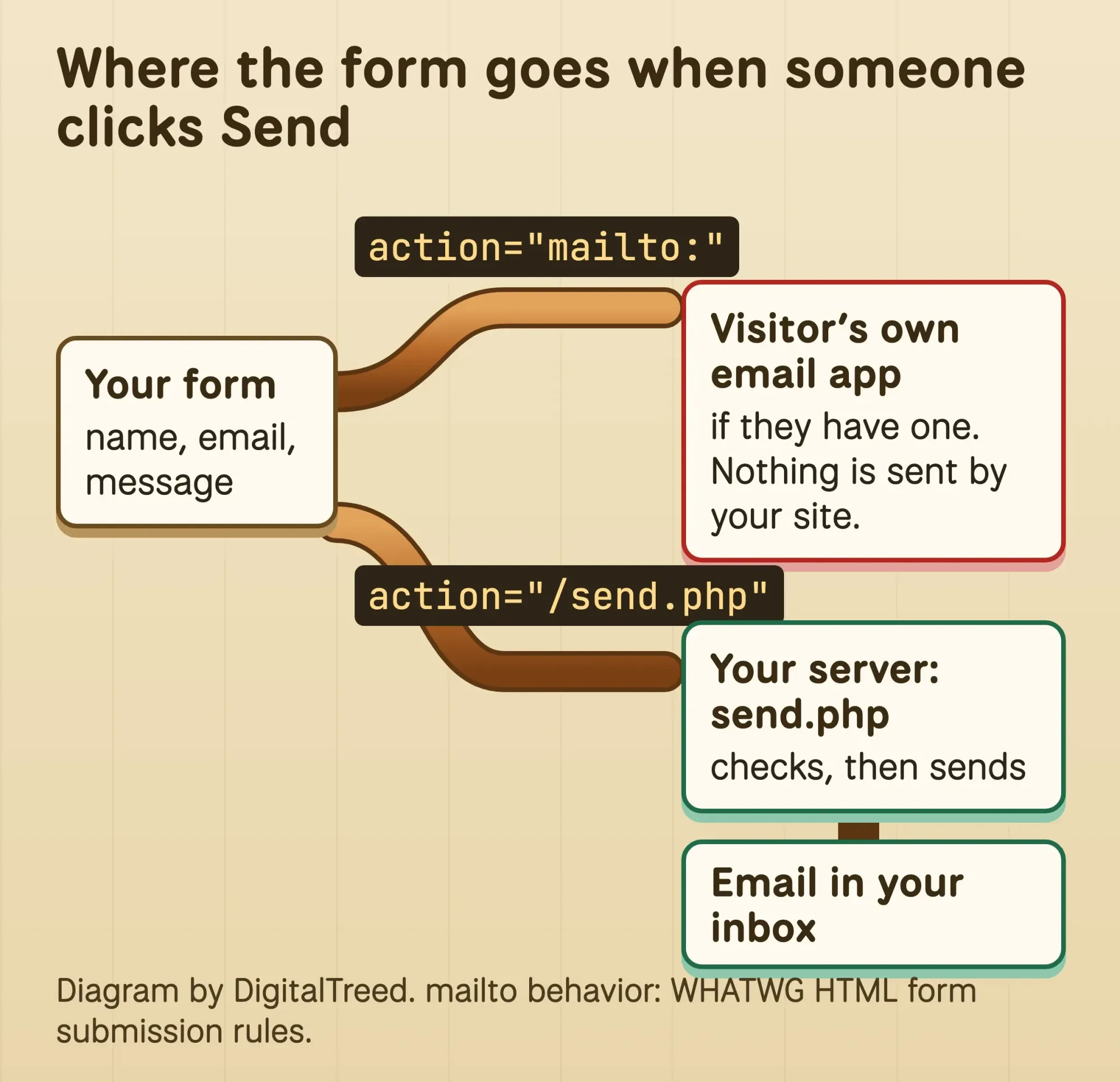 Diagram by DigitalTreed: a mailto: action only opens the visitor's email app; a handler on a server sends the email to you.
A mailto link is still fine as a plain "email us" link next to the form. Our guide to making links in HTML covers those.
The HTML for a contact form that works
That visible half is short. Here's the HTML we tested: three fields, a hidden trap field for bots and one button, posting to a handler called send.php.
<form action="/send.php" method="post">
  <p>
    <label for="name">Name (required)</label>
    <input type="text" id="name" name="name" autocomplete="name" maxlength="100" required>
  </p>
  <p>
    <label for="email">Email (required)</label>
    <input type="email" id="email" name="email" autocomplete="email" maxlength="254" required>
  </p>
  <p>
    <label for="message">How can we help? (required)</label>
    <textarea id="message" name="message" rows="6" maxlength="3000" required></textarea>
  </p>
  <div hidden>
    <label for="website">Leave this field empty</label>
    <input type="text" id="website" name="website" autocomplete="off">
  </div>
  <p>We only use your details to reply to you.</p>
  <button type="submit">Send message</button>
</form>
A few choices in it matter more than they look.
method="post"keeps the message out of the address bar. MDN says never to use GET for sensitive data "or you risk displaying it in the URL bar."type="email"makes the browser check the address format, but MDN's email input reference says you must not use that check "for any security purposes."requiredandmaxlengthstop empty or huge messages in the browser. The server checks again, because MDN's form validation guide calls client-side checks "too easy to bypass."- The
div hiddenholds a honeypot field. People never see it, and bots that fill every box give themselves away. autocomplete="name"andautocomplete="email"let the browser fill in saved details.
Need a phone field or a drop-down of services? Our post on HTML input types lists the options.
Paste the code into any of these free HTML editors to try it.
The form is unstyled on purpose. To make the button match your site, see how to make an HTML button, and to style the fields, link a CSS file to your HTML page.
Check the form for keyboard, screen reader and autofill users
Before you add a handler, make sure everyone can fill the form in. An accessible contact form starts with a real label element tied to each field. MDN's label reference says that tie means "a screen reader will read out the label when the user is focused on the form input."
Clicking the label also moves focus into the field.
That gives phone users a bigger target.
Tie them with for and id. W3C's labeling tutorial says the label's for attribute "must exactly match the id of the form control."
MDN adds that not all assistive technologies support a field simply nested inside its label.
Write "(required)" in the label text too. W3C's validation tutorial does this so people who don't use assistive technology can still see which fields they must fill.
The autocomplete values do a second job. WCAG 2.2's Identify Input Purpose rule is a Level AA rule. It asks that fields about the user expose their purpose in code, and it uses autocomplete="name" as an example.
We checked our form in headless Chrome 155 on October 26, 2026.
It passed. Every field had exactly one label. The empty form failed validation, and "not-an-email" got Chrome's own message: "Please include an '@' in the email address." The honeypot rendered 0 pixels high.
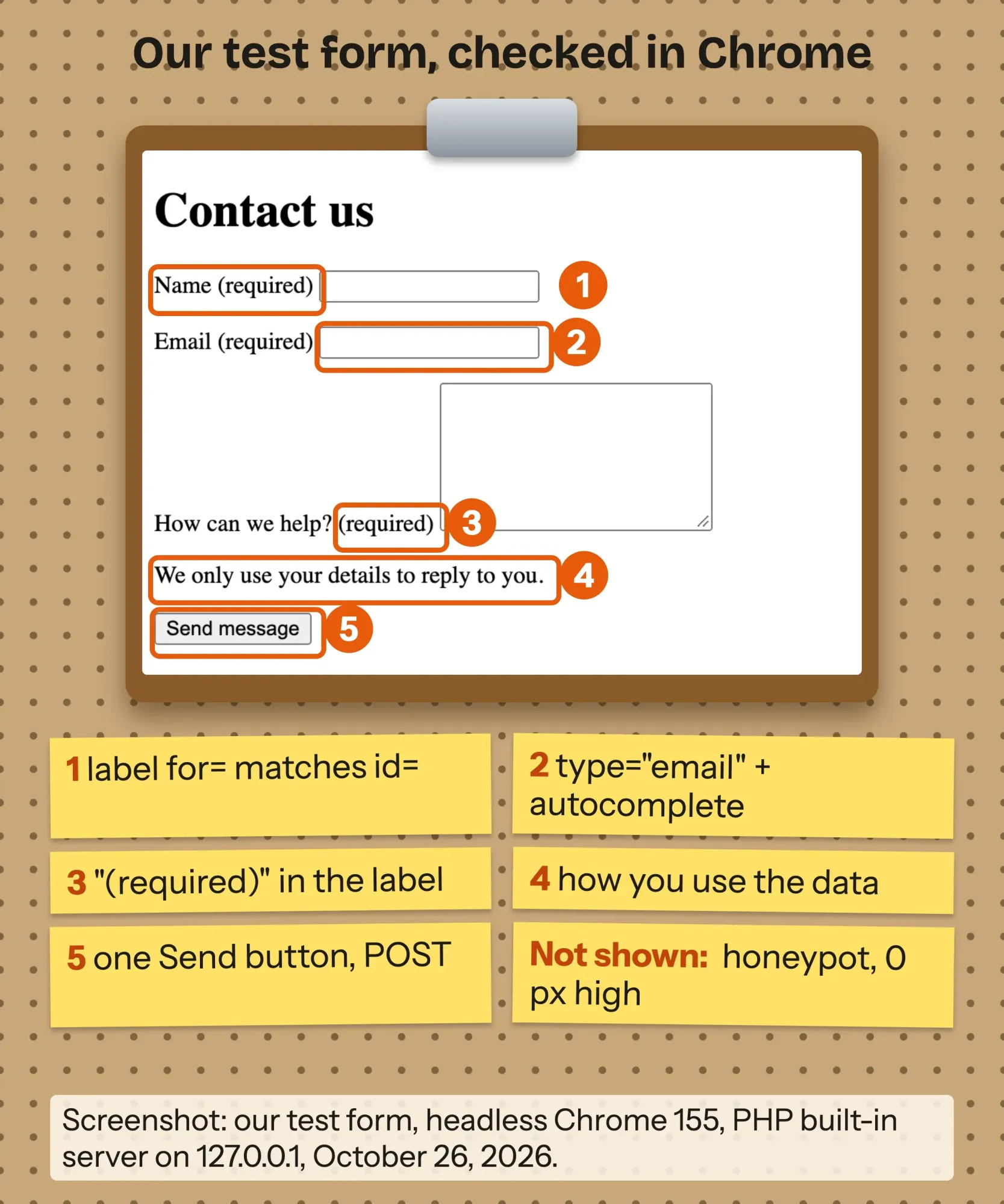 Screenshot: our test contact form in headless Chrome 155, served by PHP's built-in server on 127.0.0.1, October 26, 2026. Labels by DigitalTreed.
After the send, show a page that says it worked. W3C's notification tutorial suggests using the page title, because screen reader users "will receive this feedback immediately when the web page is loaded."
Our thank-you page's title reads "Thank you, your message was sent."
If you add your own script checks later, our JavaScript tutorial for beginners gets you started.
Keep the server checks either way.
Three ways to make an HTML form send email
Once the form itself is right, there are three working routes to make it send email. The right one depends on what your site runs on, not on the form. Prices in the table are as of October 26, 2026.
| Route | Best for | Cost | Setup | The catch |
|---|---|---|---|---|
| PHP handler on your host | HTML sites on hosting that runs PHP | $0 beyond hosting | Upload send.php, change two addresses | You own the security, spam and delivery checks |
| Form service | Static sites with no server code | Formspree: free for 50 submissions a month, $15 a month for 200 (vendor prices) | Point the action at the service's URL | Monthly caps, and your leads sit on the vendor's servers |
| WordPress form plugin plus SMTP plugin | WordPress sites | Contact Form 7 and WPForms Lite are free on WordPress.org | Install, build the form, set up SMTP | Two plugins to keep updated |
Example: Sawgrass Boat Repair is a made-up outboard motor shop in Valdosta, Georgia. It has a five-page HTML site on shared hosting that runs PHP. It expects a handful of messages a week and already pays for hosting, so the PHP handler costs nothing extra. If the shop moved to a static host with no PHP, a form service would be the switch.
Our take: if your host runs PHP and someone can look after 50 lines of code, use the handler. If nobody can, a form service is safer than half-finished PHP.
Option 1: a small contact form PHP handler that sends the email
Now for the code. This is the exact contact form PHP handler we tested: save it as send.php next to your form, then change the two addresses at the top.
<?php
// send.php: receives the contact form and emails it to you.
declare(strict_types=1);

const TO_ADDRESS   = '[email protected]';   // where messages should go
const FROM_ADDRESS = '[email protected]'; // an address on YOUR site's domain

if ($_SERVER['REQUEST_METHOD'] !== 'POST') {
    http_response_code(405);
    header('Allow: POST');
    exit('Please use the contact form.');
}

// Honeypot: people never see this field, many bots fill it in.
if (($_POST['website'] ?? '') !== '') {
    header('Location: /thanks.html', true, 303);
    exit;
}

$name    = trim((string) ($_POST['name'] ?? ''));
$email   = trim((string) ($_POST['email'] ?? ''));
$message = trim((string) ($_POST['message'] ?? ''));

$errors = [];
if ($name === '' || mb_strlen($name) > 100) {
    $errors[] = 'Please enter your name (100 characters at most).';
}
if (filter_var($email, FILTER_VALIDATE_EMAIL) === false || preg_match('/[\r\n]/', $email)) {
    $errors[] = 'Please enter a valid email address.';
}
if ($message === '' || mb_strlen($message) > 3000) {
    $errors[] = 'Please enter a message (3,000 characters at most).';
}

if ($errors) {
    http_response_code(422);
    echo '<!DOCTYPE html><html lang="en"><head><meta charset="utf-8">';
    echo '<title>Please fix ' . count($errors) . ' problem(s)</title></head><body>';
    echo '<h1>Your message was not sent</h1><ul>';
    foreach ($errors as $error) {
        echo '<li>' . htmlspecialchars($error) . '</li>';
    }
    echo '</ul><p>You typed this email address: ' . htmlspecialchars($email) . '</p>';
    echo '<p><a href="/contact.html">Go back to the form</a></p></body></html>';
    exit;
}

$message = str_replace(["\r\n", "\r"], "\n", $message);
$body = "Name: $name\r\nEmail: $email\r\n\r\n" . str_replace("\n", "\r\n", wordwrap($message, 70));
$headers = [
    'From'         => FROM_ADDRESS,
    'Reply-To'     => $email,
    'Content-Type' => 'text/plain; charset=UTF-8',
];

if (mail(TO_ADDRESS, 'New message from your website', $body, $headers)) {
    header('Location: /thanks.html', true, 303);
    exit;
}

http_response_code(500);
echo 'Sorry, your message could not be sent. Please call or email us instead.';
Here's what it does, in order:
- Refuses anything but a POST with a 405 status.
- Checks the honeypot. If a bot filled it in, the script shows the thank-you page and sends nothing.
- Trims each field and checks it on the server. filter_var() with FILTER_VALIDATE_EMAIL checks the address, and the length limits match the HTML.
- Rejects line breaks in the email address, because that address goes into the Reply-To header. The PHP mail() manual warns that outside data in headers "should be sanitized so that no unwanted headers could be injected."
- Escapes anything it prints back with htmlspecialchars(), which converts special characters to HTML entities.
- Sends from an address at your site's domain, with the visitor in Reply-To, then redirects to thanks.html with a 303.
The subject line is fixed on purpose.
Nothing the visitor types reaches a header except the checked email address.
There's one limit the code can't fix. PHP's mail() only hands the message to your server's mail program, and the manual says a true result "does NOT mean the mail will actually reach the intended destination."
That's the weak spot. Delivery gets its own section below.
We ran 8 requests against this handler
Then we tried to break it. On October 26, 2026, we ran send.php on the built-in server of PHP 8.3.35, bound to 127.0.0.1 on our own Mac. We pointed PHP's sendmail_path setting at a small script that saves each message to a folder instead of sending it. Then we sent 8 requests with curl: one good message and seven bad ones.
Only the good one produced an email, with our domain in From, the visitor in Reply-To and a plain-text body.
The bad ones are the useful part.
- A plain visit (GET) got a 405.
- A blank email, a 101-character name and a 3,001-character message each got a 422 page naming the problem.
- An email with a line break and "Bcc: [email protected]" tacked on got a 422. In a separate check, filter_var() alone rejected it too.
- An email of <script>alert(1)</script>@x.com came back on the error page as harmless text, starting <script>.
- A filled-in honeypot got the thank-you redirect and no email, so the bot thinks it won.
We also tried to slip a line break past PHP itself. On PHP 8.3.35, putting one inside the array form of the mail() headers threw a ValueError and sent nothing.
Keep your own check anyway. It costs one line.
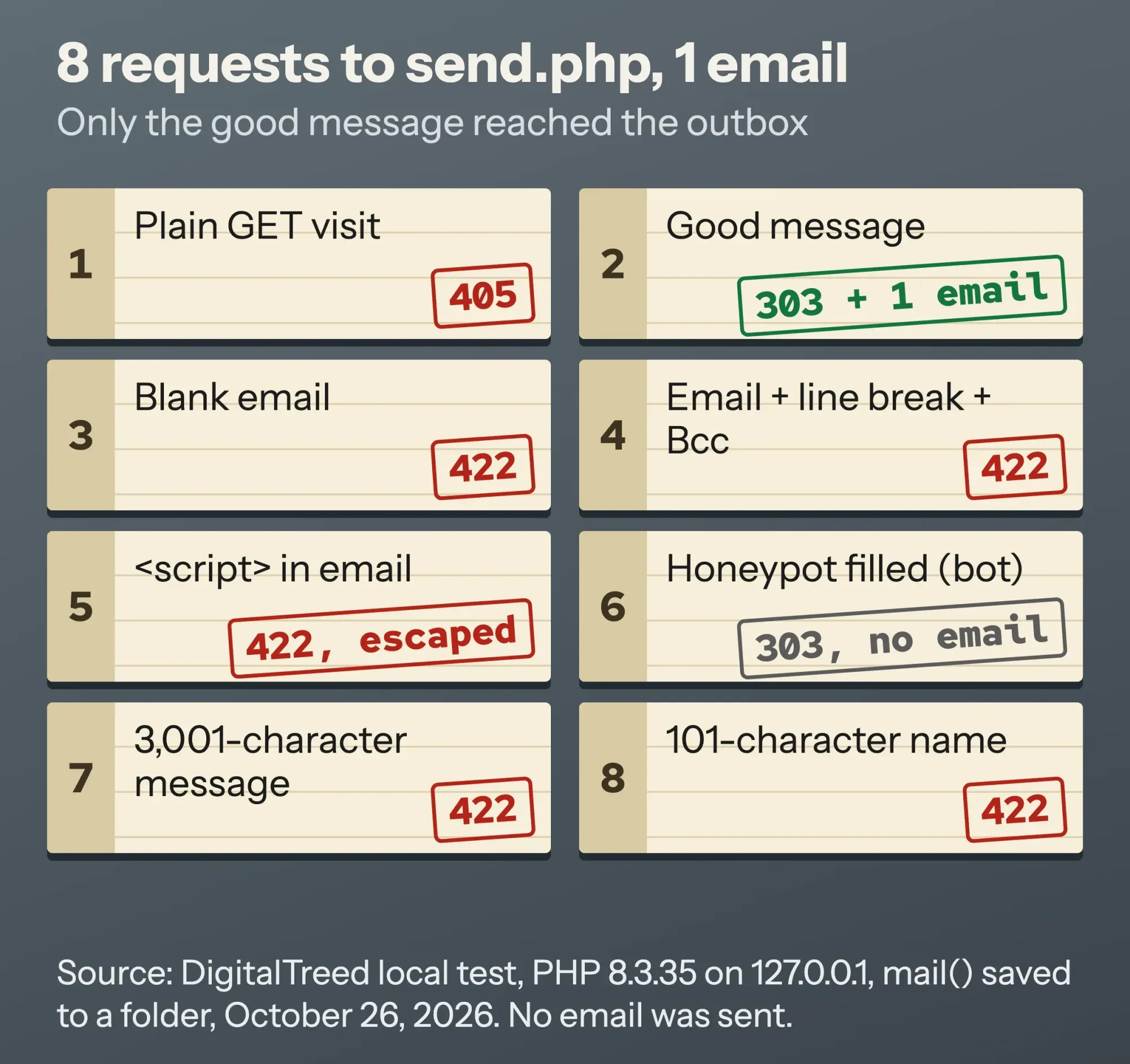 Source: DigitalTreed local test of send.php on PHP 8.3.35, October 26, 2026. No email was sent.
Run the same kind of check on your live site. Paste your send.php address into our HTTP status checker to see what it answers to a plain visit.
You want a 405, not a 200 or a 500. Then send yourself one real message from the live form and check your inbox and your spam folder.
Some owners want the form, the spam checks and the mail settings done in one go. It's the kind of job our web developers take on, and we'd earn money if you hire us, so try the steps here first.
Why do contact form emails land in spam or never arrive?
Even a handler that passes every test can send mail that lands in spam. That often happens when the message claims to come from a domain that didn't send it.
If your form puts the visitor's Gmail address in the From line, your server is sending mail "from" gmail.com.
Google's email sender guidelines tell senders not to impersonate Gmail From: headers. Its sender FAQ defines that as a message with "a @gmail address in the From: header" that "wasn't sent from a Gmail server." A form that copies the visitor's address into From does exactly that.
So put your own address in From and the visitor's in Reply-To.
You still hit Reply and answer the customer.
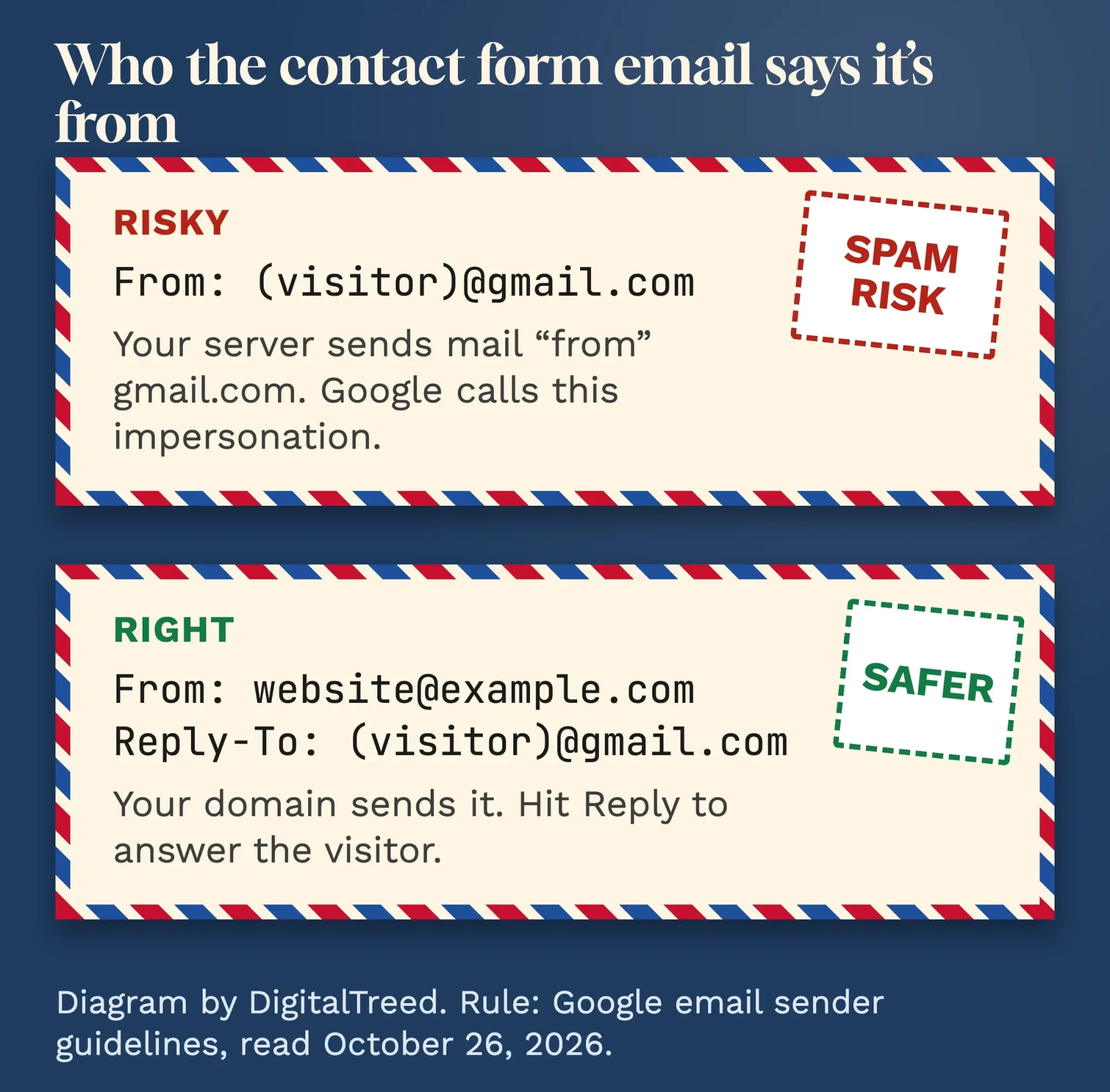 Diagram by DigitalTreed: your domain in From, the visitor in Reply-To. Rule from Google's email sender guidelines, read October 2026.
Next, make sure your domain is set up to send.
The same Google page asks every sender to "Set up SPF or DKIM email authentication for your sending domains."
Ask your host whether that's done for the domain in your From line.
If mail() still fails on your host, send through SMTP: a real mailbox with a login, such as your business email account. The PHP manual itself says mail() "is not suitable for larger volumes of email in a loop," and the open-source PHPMailer library lists "Integrated SMTP support" as a feature.
Option 2: a form service for sites with no PHP
But what if your host can't run PHP at all? Then a form service is the easiest way to make an HTML form send email. You point the form's action at the service's URL, and it emails you each submission.
Prices depend on volume. As of October 26, 2026, Formspree's plans page lists a free plan with 50 submissions a month and a 30-day archive. Its Personal plan costs $15 a month (or $120 a year) for 200.
Those are the vendor's own numbers.
If your site already runs on Netlify, its forms setup page says to add data-netlify="true" or a netlify attribute to the form tag, after you turn on form detection.
There's a catch. Your leads now live on someone else's servers. Use the service's spam settings, and if it can accept posts from your domain only, switch that on. Formspree calls the setting "Restrict to domain."
Option 3: a WordPress form plugin plus SMTP
And on WordPress, you shouldn't hand-write a handler at all. Install a form plugin and let it do the sending. On October 26, 2026, WordPress.org listed Contact Form 7 at 10+ million active installations and WPForms Lite at 5+ million, both free.
Then fix delivery. The WP Mail SMTP plugin page says that, by default, "WordPress uses the PHP mail function to send emails generated by WordPress or any contact form plugin."
That's the same mail() with the same limits.
An SMTP plugin sends through a real mail account instead.
WordPress's own wp_mail() reference carries the same warning as PHP: "A true return value does not automatically mean that the user received the email successfully."
New to WordPress? Our guide to making a WordPress website walks through setup, and the WordPress website guide's plugins chapter names a contact form and SMTP among the jobs plugins do. If the form throws errors after you add a plugin, turn on the WordPress debug log to see why.
Stop contact form spam without annoying people
Next comes spam. Start with the cheap layers, a honeypot and server-side checks: both are already in the code above, and neither asks anything of real visitors.
Still getting spam? Add a challenge. Cloudflare says Turnstile "works without showing visitors a CAPTCHA," and its plans page lists a Free plan with up to 20 widgets.
Wire it up all the way. Cloudflare's server-side validation guide warns that "the client-side widget alone does not protect your forms."
Your handler has to send each token to Cloudflare's Siteverify API.
Timing matters too. A token lasts 300 seconds and works once.
Google's reCAPTCHA v3 works differently. It scores each request from 0.0 (very likely a bot) to 1.0 (very likely a good interaction), and Google suggests starting your cutoff at 0.5.
Whichever you pick, check it on the server.
A widget that only runs in the browser is a sign on the door, not a lock.
Privacy basics for a form that collects names and emails
That's spam handled. Privacy is the last piece: a contact form collects personal data, so collect only what you'll use.
A name, an email address and a message are usually enough to reply.
Serve the form over HTTPS. MDN's form data guide says an HTTPS action URL encrypts the data along with the request. Its security advice is to "allow only what's necessary." Run your domain through our SSL certificate checker to confirm the certificate is valid.
Say near the button what you'll do with the details, as our test form does, and link your privacy policy. Delete old messages you no longer need, from your inbox and from any form service.
Privacy rules differ by state, and these are setup habits, not legal advice.
If your form asks for more than contact details, check with a lawyer which rules apply to you.
Want to count form leads in Google Analytics? Tracking a sent form is one of the jobs in our Google Tag Manager guide.
Frequently asked
Will my contact form work if I open the HTML file on my computer?
Not with a PHP handler. MDN notes that "browsers cannot interpret PHP code," so a PHP handler can't run from a file opened on your computer. Test on your host, or on PHP's built-in web server, which is for testing only and "should not be used on a public network."
Is GET or POST right for a contact form?
POST. MDN's form element reference says GET appends the data to the URL and suits forms with "no side effects." Sending you a message is a side effect.
Can the form send to two email addresses?
Yes. The PHP mail() manual shows two addresses in the to field, separated by a comma. Keep that list in your code, never in a form field a visitor can change.
Stuck between the options, or need the form tied into your CRM? Tell us about your site and get a quote. We earn money from that work, so only ask if the steps above didn't get you there.
How we made this guide: on October 26, 2026, we read the MDN, WHATWG, W3C WAI and php.net pages. We also read Google's sender rules, Cloudflare's Turnstile docs, three WordPress.org plugin pages and Formspree's prices. We ran our form and handler on PHP 8.3.35's built-in server on 127.0.0.1, with mail() saving messages to a folder, and sent 8 test requests with curl. We checked the labels in headless Chrome 155. We sent no real email and installed no plugins, so those parts come from their own docs, linked where used. This rewrite goes to its author, Eram N., for review before it's published.
First published July 2020. Rewritten October 26, 2026: the old page listed form controls and attributes. This version shows a tested contact form and PHP handler, the three ways to make a form send email, spam protection, delivery fixes and privacy basics.
Sources
- MDN: Sending form data
- MDN: The form element
- MDN: The label element
- MDN: input type="email"
- MDN: Client-side form validation
- WHATWG HTML Living Standard: Form submission
- W3C WAI: Labeling controls
- W3C WAI: Validating input
- W3C WAI: User notification
- W3C: Understanding WCAG 2.2 Success Criterion 1.3.5, Identify Input Purpose
- PHP manual: mail()
- PHP manual: filter_var()
- PHP manual: htmlspecialchars()
- PHP manual: Built-in web server
- PHPMailer on GitHub
- Google Workspace Admin Help: Email sender guidelines
- Google Workspace Admin Help: Email sender guidelines FAQ
- Cloudflare Turnstile overview
- Cloudflare Turnstile: Server-side validation
- Cloudflare Turnstile: Plans
- Google reCAPTCHA v3 developer guide
- WordPress.org: Contact Form 7
- WordPress.org: WPForms Lite
- WordPress.org: WP Mail SMTP
- WordPress developer reference: wp_mail()
- Formspree: Plans (vendor prices, read October 26, 2026)
- Netlify Docs: Forms setup

Comments
No comments yet. Start the conversation below.