
Quick answer
To sort customer feedback with AI, pool your reviews, surveys and emails, strip contact details, tag each line by theme and mood, then hand-check a sample. In our November 2, 2026 test on 40 made-up lines, keyword tags matched our hand tags on 80% of moods but only 67.5% of theme sets. Never let those mood tags decide who gets asked for a review.
Say you own a small cafe or shop, and feedback lands in three places: Google reviews, a short survey after checkout and the support inbox. Sorting customer feedback with AI is a way to turn that pile into a count of praise and complaints. A person still checks the count before anyone acts on it, and that's the part we'd never skip.
First comes what sorting feedback with AI involves and how to pull everything into one sheet. Then: strip contact details, tag themes and mood, check the tags by hand, our test on 40 made-up lines, and where tags go wrong. Last are the review rules AI makes easier to break, and how to reply, fix one thing and tell customers.
Key takeaways
- Never let AI mood tags decide which customers get a review invite.
- Remove names, emails, phone numbers and card digits before pasting feedback anywhere.
- Keyword tags matched our hand-tagged mood on 32 of 40 made-up lines.
- In our made-up test, the food theme caused 10 of 13 wrong theme hits.
- Since October 21, 2024, courts can impose civil penalties for knowing fake-review violations.
What does sorting customer feedback with AI involve?
It's one repeatable pass over your feedback, not a new dashboard. You hand a tool a list of comments, it returns a theme and a mood for each line, and you count the results. For example, 120 loose comments might shrink to one line in your notes: wait time, 18 complaints, mostly weekend lunch. The tool can be a chat AI, a feature in your survey or help desk software, or plain keyword rules in a spreadsheet. The job's shape doesn't change. Somebody writes the theme list, the tool applies it, and somebody checks a sample of the tags before the counts shape a decision about staff, menus or hours.
That person in the loop is the step that's easiest to drop once a tool sounds confident. The NIST AI Risk Management Framework came out on January 26, 2023 and is "intended for voluntary use." Its core functions list "Processes for human oversight are defined, assessed, and documented" as one outcome. NIST added a Generative AI Profile, NIST AI 600-1, on July 26, 2024.
None of it is a law a small shop must follow. We borrowed one habit: each month, a named person checks a sample of tags against the text.
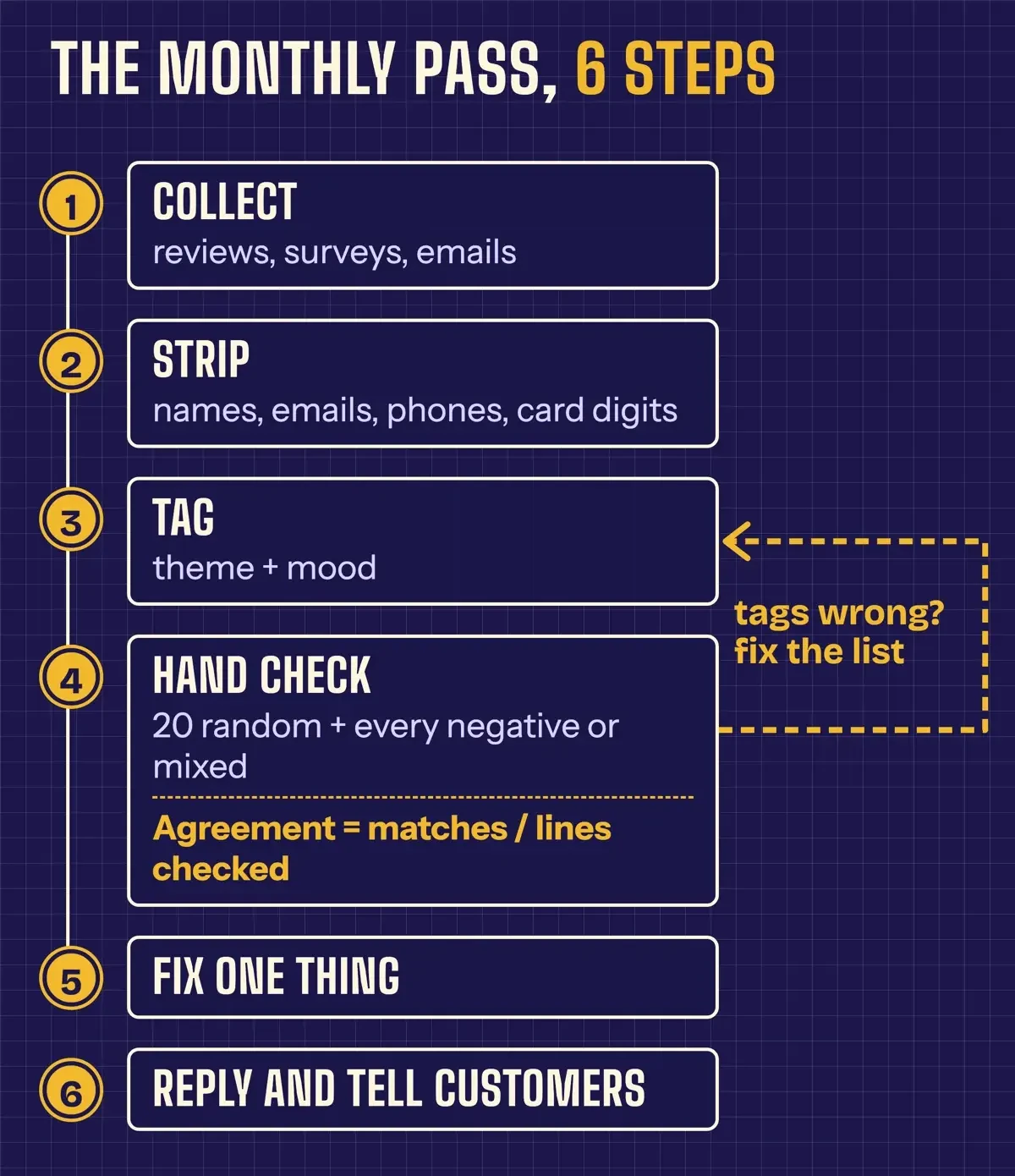 Diagram by DigitalTreed, from our November 2, 2026 test steps and the NIST AI RMF core functions.
In our test, redaction came before tagging, and hand tags came before the script. We'd keep that order with any tool.
Pull reviews, surveys and emails into one sheet
Your sheet can be a plain spreadsheet with one row per comment. Our columns were id, source, star rating where there is one, the feedback text, and two empty columns for theme and mood that you fill in later. Copy reviews from your Business Profile, survey answers from your form tool's export, and only the first message of each support email thread. Don't paste whole threads. Your own replies would get tagged as customer feedback.
No survey yet? The SBA's market research guide lists surveys, questionnaires, focus groups and in-depth interviews as ways to do direct research. Two questions after checkout work well: what went well, and what should we fix. Answers that short tag cleanly.
Keep the star rating beside the text, because the two can disagree. In our made-up set, one five-star review read "Yeah, great, another 30 minute wait for soup. Love that." A count built on stars alone would've filed that customer as happy, and the slow lunch line would've stayed hidden for another month. If your listing still needs setting up, see the Google Business Profile optimization guide first. Our CRM automation examples cover setting a ticket export to run on a schedule, which saves the copying once you've done it by hand twice.
Work on a duplicate tab and leave the original alone. You'll want the untouched record if a customer later asks what they told you.
Strip names and contact details first
That duplicate tab is where the personal data comes out. Feedback carries more of it than most owners notice: a signature, a callback number, the last four digits of a card in a billing complaint. If your survey export adds an email column, delete the column; you don't need it to count themes. The FTC's guide Protecting Personal Information is blunt: "If you don't have a legitimate business need for sensitive personally identifying information, don't keep it. In fact, don't even collect it." Its Start with Security guide says it in seven words: "Don't collect personal information you don't need."
It matters more once a chat AI is involved, because each app sets its own rules for what it keeps, who can read it and for how long. Google's Gemini Apps privacy page asks: "Please don't enter confidential information that you wouldn't want a reviewer to see or Google to use to improve our services." Anthropic's consumer privacy page says "We will use your chats and coding sessions (including to improve our models) if: You choose to allow us" and lists other cases. Read the data-use page of the tool you pick, and check whether its business or team plan treats pasted data differently from the free version you tried first.
The tool maker has promises to keep, too. An FTC technology blog post from January 2024 warns AI companies against "surreptitiously changing its terms of service or privacy policy." Save the terms page the day you start.
We ran a small redaction script over our made-up set before any tagging. It caught all 8 contact details we'd planted: 2 email addresses, 2 phone numbers, 1 card ending and 3 customer names. Those names followed "this is" or "my name is," which is the only place the script looks. It left a staff member's first name, Maria, in a five-star review, which is harmless in a public review but shows how easily a name slips past. Pattern rules can't spot a name that turns up anywhere else. So read the stripped tab once before it leaves your laptop.
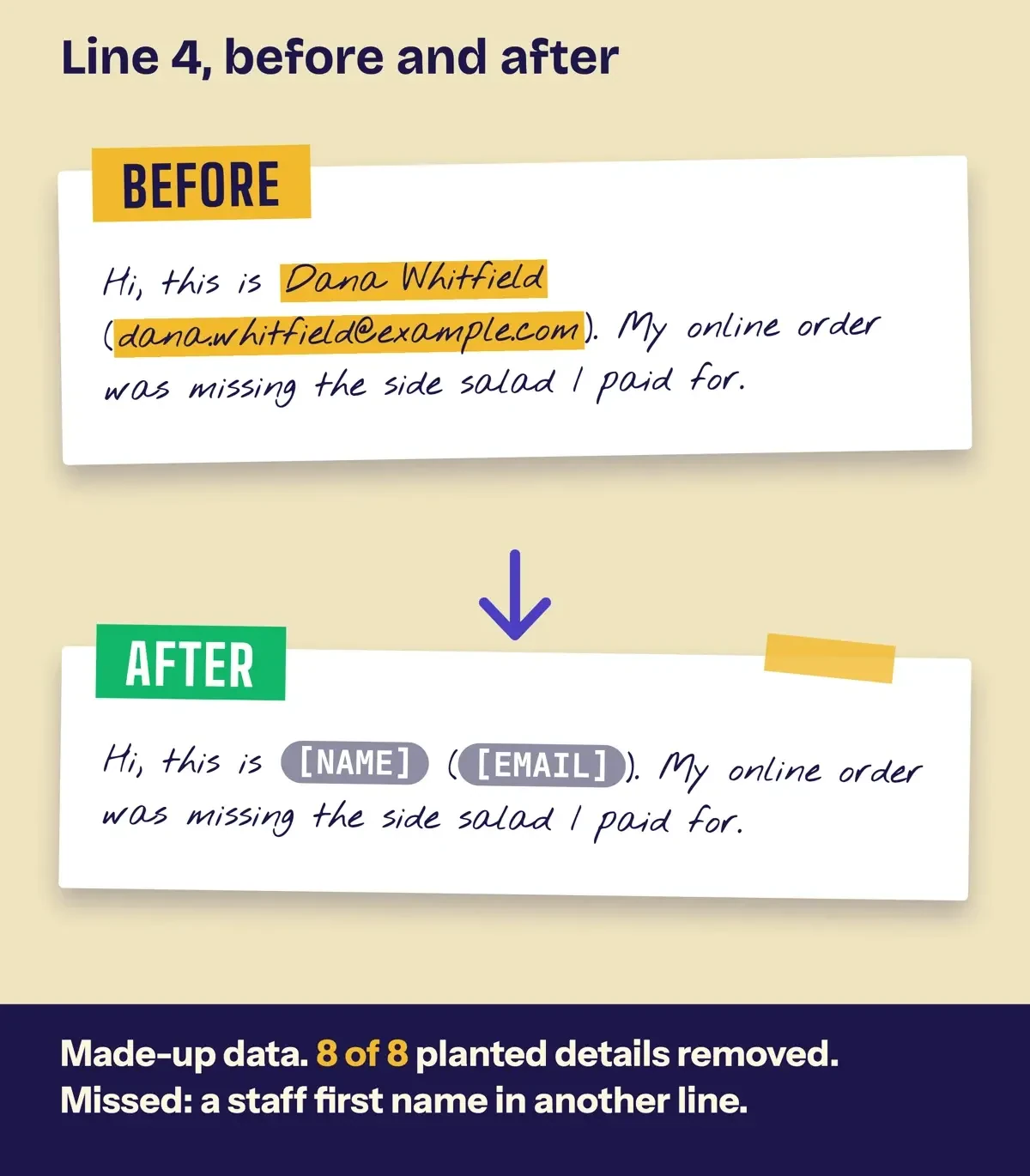 Drawn by us from line 4 of our made-up feedback set and the redaction script output, November 2, 2026.
Tag themes and mood, then check the tags by hand
Once the tab is clean, write your theme list before you look at any AI output, and keep it short. Eight themes covered our cafe set: food, wait, price, staff, order accuracy, online ordering, cleanliness and billing, plus other. Mood got four labels: positive, negative, mixed and neutral. A fixed list keeps the tool from inventing new categories as it goes, so this month's counts line up with next month's. With a chat AI, paste 30 to 50 stripped lines at a time with an instruction in the shape below. Ask for one row back per id so it pastes straight in.
We didn't run this prompt through a commercial AI service for this guide. It's the format we'd use, built on our test's theme list.
You are tagging customer feedback for a small cafe.
For each line, return one row: id | themes | mood
Themes: one or more, only from this list:
  food, wait, price, staff, order_accuracy, online_ordering, cleanliness, billing, other
Mood: exactly one of positive, negative, mixed, neutral
Tag what the customer judges, not every thing they mention.
Do not add themes. Do not rewrite or summarize the lines.
If you are not sure, write unsure in the mood column.

Lines:
1 | The tomato basil soup was rich and the bread was still warm. Will be back.
2 | Waited 25 minutes for two sandwiches at lunch. Food was fine once it came.
...
The line about judging rather than mentioning comes from our test, where a dish name in a wait-time complaint dragged the line into the food theme. Then check by hand. Read 20 random lines plus every line tagged negative or mixed, and mark each tag right or wrong in a third column so the misses are easy to count. NIST's trustworthy AI characteristics start with "valid and reliable," and its core asks that a system be "demonstrated to be valid and reliable" before use. For a feedback sheet, that just means you know how often the tags miss.
The math is short: matching lines divided by lines checked. For example, 16 matches in 20 checked lines is 16 / 20 = 80%, and that's the number you log each month.
Once the hand check is routine, the dull parts like exporting, pasting and copying tags back can run on a schedule without you touching them. Our AI automation for small business guide shows no-code workflows that move a sheet to a model and back. Keep the hand check anyway; it's the only part that tells you the tags still hold.
What we tested
That hand check is what we ran on 40 feedback lines for Ladle and Lark, a made-up soup and sandwich cafe. We tagged every line by hand first. Then a local Python script tagged them with keyword rules, no AI service, on November 2, 2026.
| Check | Result (made-up data) |
|---|---|
| Contact details removed | 8 of 8 |
| Theme sets match | 27 of 40 (67.5%) |
| Mood matches | 32 of 40 (80.0%) |
| Both match | 25 of 40 (62.5%) |
| Unhappy lines not tagged positive | 20 of 22 |
We wrote the keyword lists once and didn't tune them afterward. A chat AI may score higher or lower; we didn't run one.
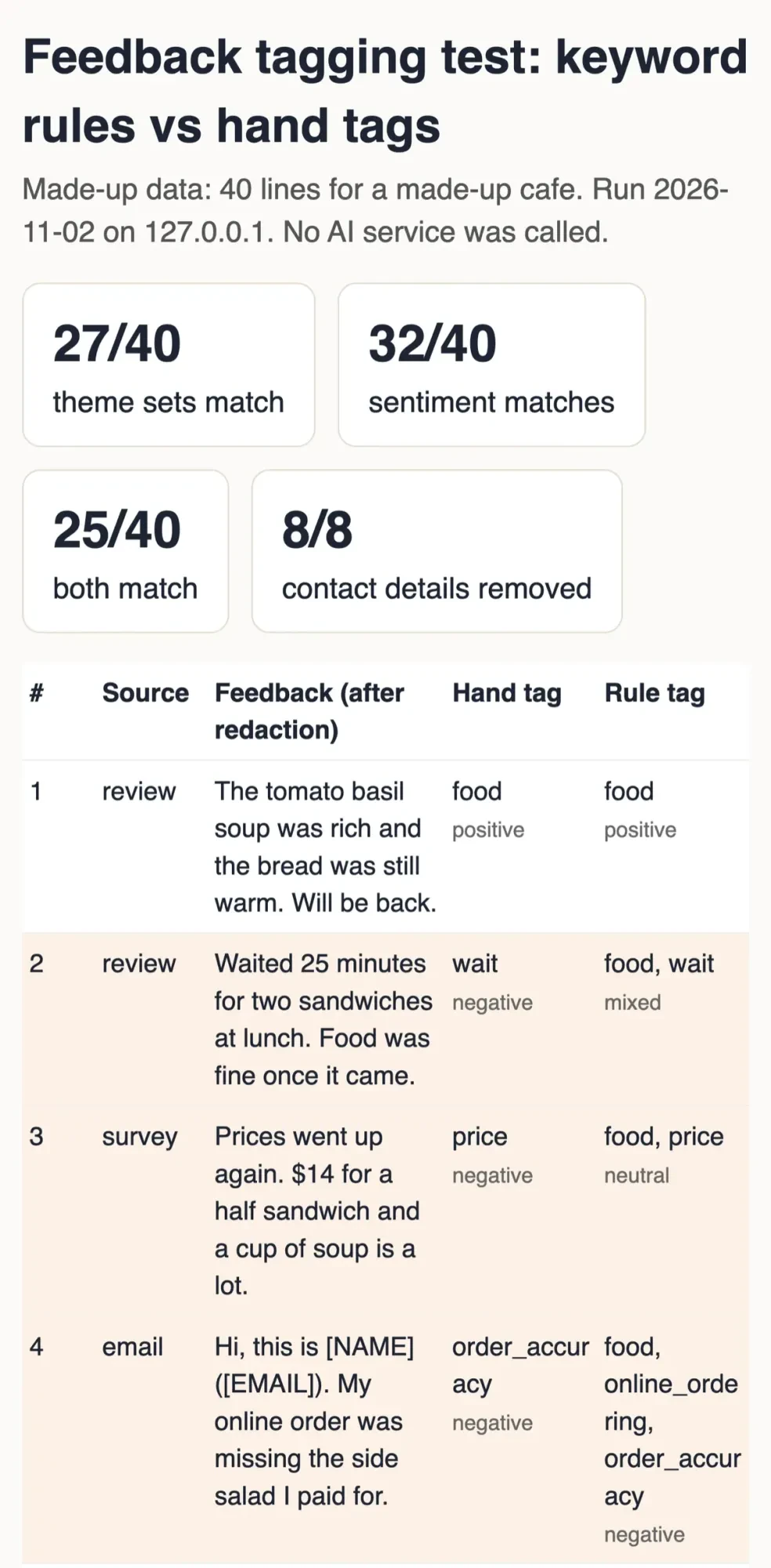 Screenshot: our feedback tagging test page on 127.0.0.1, November 2, 2026. Made-up data.
Where tags go wrong, and what to do about it
Those numbers hide 15 lines where the script and our hand tags disagreed. Three patterns covered most of them, and none is unique to keyword rules.
Broad theme words did the most damage. The food theme matched any line that named a dish, so a complaint about a 40-minute wait for soup also landed under food. Food's precision was 52.4%, worked out as 11 correct food tags / 21 lines tagged food. That one word's to blame for 10 of the 13 wrong theme hits. It skews the decision, too. By the rules, food led the negative and mixed count with 10 lines and wait time had 4, while our hand tags put both at 6. The fix is a tighter rule, or an instruction to tag only what the customer judges. The other 3 were one each for wait, staff and online ordering.
Complaints without emotion words came second. "The total on the app did not match the menu price" holds no angry word, so our rules called it neutral. So did a price rise and a pickup that was 30 minutes late. That's 3 of 19 negative lines lost.
Sarcasm came third. The sarcastic five-star review about a 30-minute wait scored as praise, since it holds two happy words and no unhappy one. Our rules also read "Nothing special but nothing wrong either" as positive, where we'd tagged it neutral.
Mood still matched more often than themes did, 80% against 67.5%. That's partly the scoring: a theme set only counts as a match when every theme in it agrees.
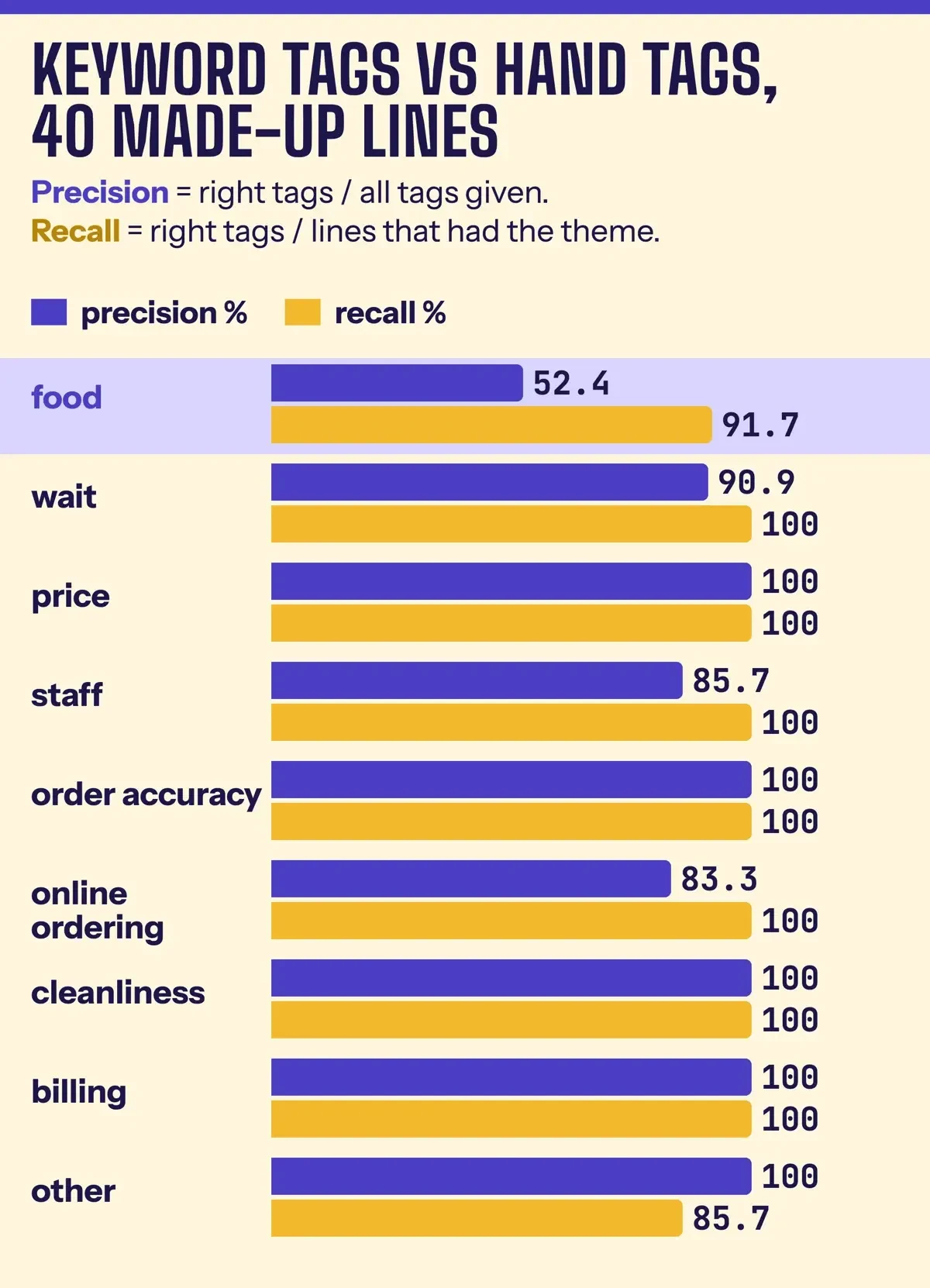 Diagram by DigitalTreed from our test results on 40 made-up lines, November 2, 2026.
So point the hand check where a wrong tag costs most. A missed complaint hides a problem for a month. A false one costs a minute of reading. That's why we'd read every negative and mixed line, not just a random sample.
Review rules that AI makes easier to break
Those mood tags carry a legal risk too, once they start steering reviews. The FTC announced its final rule on fake reviews and testimonials on August 14, 2024. The FTC's questions and answers say it went into effect on October 21, 2024, and that it "authorizes courts to impose civil penalties for knowing violations." Treat this section as a plain summary of public FTC pages, not legal advice; before you change contracts or review requests, run them past an attorney who handles advertising law.
Four practices in or around the rule's text on the eCFR are easy to drift into once AI is writing, sorting or routing reviews:
- Fake reviews. Section 465.2 covers a business that writes, creates or sells a review misrepresenting "That the reviewer or testimonialist exists" or their experience. The FTC said the rule would "deter AI-generated fake reviews."
- Paying for a mood. Section 465.4 covers incentives tied to reviews "expressing a particular sentiment, whether positive or negative."
- Hiding bad ones. Section 465.7(b) bars claiming the reviews you show "represent most or all the reviews submitted" while holding some back by rating or negative sentiment. Before the rule, Fashion Nova agreed in January 2022 to pay $4.2 million over FTC allegations that it held back reviews rated below four stars.
- Asking only happy customers. The rule has no specific ban on this, but the Q&A adds: "But this practice could violate the FTC Act." Example 11 in the Endorsement Guides at 16 CFR 255.2 describes the same pattern.
The last item is where AI tags quietly turn into trouble. Picture a workflow that reads each new survey answer, asks an AI for the mood and sends a Google review link only to customers tagged positive. It's tempting. In our made-up set, 22 lines were negative or mixed by hand. Our rules tagged 20 of those as something other than positive, so that workflow would've skipped 20 of the 22 unhappy customers. Under Example 11, the practice may be unfair or deceptive when the posted reviews turn out substantially more positive because of it. The FTC's guide for review platforms says: "Don't ask for reviews only from people you think will leave positive ones."
The fix? Split the two jobs. Send the same review request to every customer, whatever the tags say, and use mood tags only to pick who gets a personal call or email from you. Example 11 says that simply inviting all recent purchasers "would not have been unfair or deceptive, even if it had expressed its hope for positive reviews." The request side, including Google's own rules, is covered in how to automate customer reviews safely.
Your own paperwork counts as well. The FTC's page on the Consumer Review Fairness Act is direct about contracts. It says to "Remove any provision that restricts people from sharing their honest reviews, penalizes those who do, or claims copyright over peoples' reviews." A tool doing the work doesn't change any of it. Announcing Operation AI Comply on September 25, 2024, then-Chair Lina M. Khan said "there is no AI exemption from the laws on the books."
Reply, fix one thing, and tell customers
With invites going to everyone, the tags can go back to their real job. They tell you whom to answer and what to fix.
Google's Manage customer reviews help page says "Before you can reply to reviews, you must verify your business." It also says "The person who wrote the review is notified when you reply." Its tips for review replies ask you to "Keep it short and simple" and to "avoid using your response to offer deals or promotions." The same page notes that "A mix of positive and negative feedback often feels more trustworthy."
AI is fine for a first draft of a reply, as long as a person edits it and nothing in it is made up. Give the tool the review text and the facts, meaning what went wrong and what you changed, but never the name, email or phone number of the customer. For the hard ones, our templates for replying to negative comments show wording that stays calm. Read the draft out loud before you post it, and cut any line that would fit any other customer's review.
Then pick one fix. In our made-up set, food and wait time tied at six negative or mixed lines each, so we'd read those 12 lines in full. The cheaper fix would go first.
When the fix is in, say so where customers will see it. That's a reply to the reviews that raised it, a counter sign or a line in the next survey email. If the same questions keep coming back, our AI chatbot comparison covers tools that can answer them on your site. The local business AI search guide covers how AI assistants pick which local businesses to recommend.
Our take: run this once a month with a sheet, a stripped tab and a 20-line hand check. Hold off on any feedback platform until you've done it three times. If your agreement number stays steady for those three months, automate the export and the tagging, but don't drop the hand check.
Frequently asked
Can I use AI to write replies to Google reviews?
Yes, as a draft a person edits and posts. Google's help page says "Replies usually take up to 10 minutes to review, but sometimes a review can take up to 30 days."
Is it OK to ask only happy customers for a Google review?
No. The Google Maps content policy lists "selectively solicit positive reviews from customers" among prohibited practices. Send one request to every customer.
Can I pay a customer to change a bad review?
The FTC rule itself doesn't ban it, but its Q&A warns that "paying consumers to change or remove truthful negative reviews may violate the FTC Act." Google's policy bans incentives for removing a negative review too.
How long can an AI chat app keep feedback I paste in?
That varies by app and setting. Google's Gemini page says chats picked for human review stay even after you delete your activity: "they are retained for up to three years."
How we made this guide: On November 2, 2026, we opened each FTC, NIST, Google, Anthropic and SBA page linked here, with the rule text taken from the eCFR API. Every quote was checked against those saved copies. Our tagging test ran on 40 made-up lines, hand-tagged first and keyword-tagged second, with no AI service. Two OpenAI help pages blocked our checker, so this guide doesn't cover OpenAI's terms. Facts checked by the DigitalTreed team on November 2, 2026.
In December 2023, this page held a short opinion piece on AI feedback tools. The November 2, 2026 rewrite swaps that for a monthly routine, the FTC and Google review rules, and a tagging test on made-up data.
Sources
- eCFR: 16 CFR Part 465, Rule on the Use of Consumer Reviews and Testimonials
- FTC: The Consumer Reviews and Testimonials Rule, Questions and Answers
- FTC press release, August 14, 2024: final rule banning fake reviews and testimonials
- eCFR: 16 CFR Part 255, Guides Concerning the Use of Endorsements and Testimonials in Advertising
- FTC: Featuring Online Customer Reviews, a Guide for Platforms
- FTC press release, January 2022: Fashion Nova settlement over blocked negative reviews
- FTC: Consumer Review Fairness Act, what businesses need to know
- FTC press release, September 25, 2024: Operation AI Comply
- FTC: Protecting Personal Information, a Guide for Business
- FTC: Start with Security, a Guide for Business
- FTC Technology Blog: AI companies, uphold your privacy and confidentiality commitments
- NIST: AI Risk Management Framework
- NIST AIRC: AI RMF Core
- NIST AIRC: AI risks and trustworthiness
- NIST AI 600-1: Generative AI Profile
- Google Business Profile Help: Manage customer reviews
- Google Business Profile Help: Tips to get more reviews
- Google Maps User Generated Content Policy: Prohibited and restricted content
- Google: Gemini Apps Privacy Hub
- Anthropic Privacy Center: Is my data used for model training?
- SBA: Plan your business, market research section
Comments
No comments yet. Start the conversation below.